STIR/SHAKEN para VICIdial: La Guia Completa de Implementacion 2026

Publicado por ViciStack — la plataforma administrada de VICIdial construida por operadores, para operadores.

Si estas corriendo un call center VICIdial en 2026 y piensas que STIR/SHAKEN es solo otra casilla de cumplimiento que puedes ignorar con seguridad — felicitaciones, estas a punto de aprender como se siente una caida del 50% en tasas de respuesta.

La realidad incomoda que nadie en la comunidad VICIdial esta explicando con suficiente claridad: el cumplimiento de STIR/SHAKEN es necesario pero ni de lejos suficiente. Conseguir que tus llamadas se firmen con atestacion de nivel A es la Capa 1 de un stack de cumplimiento y reputacion de 13 capas. La mayoria de los operadores de VICIdial se detienen en la Capa 1 y luego se preguntan por que sus numeros se marcan como “Posible Spam” a los seis dias de una campana.

Que Hace Realmente STIR/SHAKEN (Y Que No)

STIR/SHAKEN es un framework de autenticacion criptografica de llamadas. Eso es todo. STIR (Secure Telephone Identity Revisited) define los estandares IETF (RFC 8224, 8225, 8226) para firmar digitalmente llamadas telefonicas. SHAKEN es el framework de despliegue norteamericano construido sobre esos estandares.

Cuando tu servidor VICIdial dispara un SIP INVITE a traves de Asterisk, esa llamada llega a tu proveedor de troncal SIP. Su Authentication Service (STI-AS) mira tres cosas: Te conocen (KYC)? Te asignaron este numero de telefono? La llamada se origino en su red?

La concepcion erronea critica que les cuesta dinero a los operadores de VICIdial cada dia: STIR/SHAKEN NO bloquea llamadas. NO etiqueta llamadas como spam. Autentica identidad. Punto.

Las decisiones reales de bloqueo y etiquetado? Esas las toman los motores de analytics de los carriers — Scam Shield de T-Mobile (impulsado por First Orion), ActiveArmor de AT&T (impulsado por Hiya), y Call Filter de Verizon (impulsado por TNS). Estos tres sistemas controlan la reputacion de llamadas para mas de 200 millones de suscriptores inalambricos de EE.UU., y actualizan sus modelos cada seis minutos.

Los Tres Niveles de Atestacion y Por Que Solo Uno Importa

Full Attestation (A): Tu carrier verifico tu identidad, tu eres dueno del numero, y la llamada empezo en su red. Este es el unico nivel que mueve la aguja en entregabilidad.

Partial Attestation (B): Tu carrier te conoce, pero no puede confirmar que eres dueno del numero especifico. Los datos de la industria muestran que las llamadas con atestacion B y C son aproximadamente tres veces mas propensas a ser marcadas como robocalls.

Gateway Attestation (C): Tu carrier no sabe de donde vino la llamada. Las llamadas con nivel C estan funcionalmente muertas al llegar.

La regla de oro: Compra tus DIDs directamente de tu proveedor de troncal SIP. Si el carrier asigno el numero y estas enviando la llamada desde su red, eso es automaticamente nivel A.

Tu Eleccion de Carrier Es Todo el Juego

VICIdial no implementa STIR/SHAKEN. Tu carrier lo hace.

Tu carrier debe tener:

  • Su propio token SPC y certificado. Desde el 18 de septiembre de 2025, la FCC prohibio los certificados STIR/SHAKEN de terceros.
  • Estar en la Robocall Mitigation Database (RMD). En agosto de 2025, la FCC removio 1,388 proveedores del RMD en un solo mes. Los call centers usando esos carriers vieron sus operaciones cesar en 48 horas.
  • Ser un CLEC con sus propios recursos de numeracion. Para nivel A automatico.
  • Infraestructura construida para marcadores predictivos. VICIdial necesita 2-3x mas canales concurrentes que agentes activos.

Tus Configuraciones de VICIdial Estan Alimentando los Algoritmos de Spam

La conexion que nadie hace con suficiente explicitud: la configuracion de tu campana de VICIdial genera patrones de llamadas especificos que los motores de analytics de carriers interpretan como firmas de spam.

AMD es el asesino silencioso de reputacion. Cuando el modulo AMD de Asterisk detecta un saludo de buzon de voz y desconecta despues de 2-3 segundos de analisis de audio, genera volumenes masivos de llamadas de muy corta duracion. Las llamadas de menos de 30 segundos son la senal de spam mas fuerte en los algoritmos de carriers.

Tu metodo de marcacion importa mas de lo que piensas. RATIO a 3:1 con 10 agentes dispara 30 llamadas simultaneas. ADAPT_AVERAGE produce el patron de trafico mas suave.

Configuraciones optimas de VICIdial para gestion de reputacion:

Dial Method:           ADAPT_AVERAGE
Auto Dial Level:       1.0  (dejar que adapt lo suba)
Adaptive Drop %:       2.0
Drop Action:           MESSAGE
Drop Exten:            8304  (grabacion safe harbor)
Dial Timeout:          28
Available Only Tally:  Y
Calls per DID per day: 75   (bajo configuraciones de DID Rotation)

El Stack Completo de Cumplimiento: 13 Capas, No Solo 1

La Cadena de Entregabilidad:

  1. Atestacion STIR/SHAKEN de nivel A (lado del carrier)
  2. Registro CNAM ($0.15-$2/numero)
  3. Inscripcion en Free Caller Registry
  4. Registro individual en motores de analytics (Hiya, First Orion, TNS)
  5. Monitoreo continuo de reputacion de numeros
  6. Branded calling (opcional pero cada vez mas importante)

La Cadena de Cumplimiento Legal:

  1. Documentacion de consentimiento (TrustedForm o Jornaya)
  2. Limpieza DNC Federal
  3. Limpieza DNC Estatal (11-13 estados mantienen listas separadas)
  4. Identificacion de celulares y cumplimiento TCPA
  5. Consultas a la Reassigned Numbers Database
  6. Limpieza de litigantes
  7. Gestion de DNC interna y grabacion de llamadas (VICIdial maneja esto nativamente)

Para un centro de 50 puestos, el cumplimiento minimo viable corre $3,000-$5,000/mes. El stack completo recomendado llega a $10,000-$18,000/mes.

Eso suena caro hasta que calculas la alternativa. El no cumplimiento le cuesta a un centro de 50 puestos un estimado de $143,000-$768,000 por mes en conexiones perdidas, salarios de agentes desperdiciados, desgaste acelerado de DIDs, y costos de remediacion.

El Camino de Implementacion en VICIdial: Tu Manual de 90 Dias

Semana 1-2: Auditoria de Carrier

  • Verifica el estado RMD de tu carrier
  • Confirma que tienen su propio token SPC y certificado
  • Solicita confirmacion de nivel de atestacion para tus DIDs especificos

Semana 3-4: Higiene de Numeros

  • Registra cada DID outbound en FreeCallerRegistry.com
  • Configura CNAM para todos los numeros
  • Ejecuta una verificacion de reputacion de referencia

Semana 5-8: Configuracion de VICIdial

  • Cambia a ADAPT_AVERAGE si estas corriendo RATIO arriba de 2.0
  • Establece porcentaje de abandono al 2% maximo
  • Cambia Drop Action de HANGUP a MESSAGE o IN_GROUP
  • Establece dial timeout a 28 segundos minimo
  • Limita llamadas por DID por dia a 75 maximo

Semana 9-12: Monitoreo y Optimizacion

  • Implementa rastreo diario de tasas de respuesta por carrier
  • Rastrea ratio de llamadas de corta duracion (llamadas contestadas de 6 segundos o menos como % del total). Manten por debajo del 15%
  • Monitorea codigos de respuesta SIP 603 — un pico repentino significa bloqueo activo

90 Dias Es Mucho Tiempo. Nosotros Podemos Hacerlo en 48 Horas.
ViciStack migra toda tu operacion a infraestructura optimizada y en cumplimiento de la noche a la manana. Inicia Tu Migracion →

La Linea Final

STIR/SHAKEN es el sistema operativo de la entregabilidad de llamadas moderna. No es toda la historia — es la Capa 1 de 13 — pero sin el, nada mas importa.

Los operadores que construyan el stack completo de cumplimiento y gestion de reputacion ahora veran tasas de respuesta, tasas de conversion, e ingresos por puesto que hacen que la inversion sea evidente por si misma. Los operadores que sigan tratando STIR/SHAKEN como problema de alguien mas se encontraran gastando mas dinero para llegar a menos personas hasta que la economia colapse por completo.

Deja de adivinar. Empieza a construir. Contacta a ViciStack →

ViciStack es la plataforma administrada de VICIdial que maneja cumplimiento STIR/SHAKEN, optimizacion de carriers, gestion de reputacion de numeros, y configuracion del marcador — para que tus llamadas realmente conecten.

4 pgvector Mistakes That Silently Break Your RAG Pipeline in Production

pgvector is the fastest way to add vector search to an existing PostgreSQL database. One extension, a few SQL commands, and you have similarity search running alongside your relational data. No new infrastructure. No new SDK. No vendor lock-in.

That simplicity is also its trap. Most teams add pgvector in a day and spend the next six months debugging performance issues that have nothing to do with the extension itself. The problems are almost always configuration mistakes that tutorials skip over.

Here are four I have seen break RAG pipelines in production, and how to fix each one before your team starts debating a migration to Pinecone.

No HNSW Index Means Full Table Scans

By default, pgvector performs exact nearest neighbor search. That means it scans every single row in the table on every query. For a prototype with 10,000 vectors, this is invisible. At 500,000 vectors, queries start crossing 800 milliseconds. At a million, you are looking at multi-second response times that make your RAG pipeline feel broken.

The fix is a single SQL statement: create an HNSW index on your vector column. HNSW (Hierarchical Navigable Small World) is an approximate nearest neighbor algorithm that trades a tiny amount of accuracy for massive speed improvements. After adding the index, the same 500K-vector query drops to under 50 milliseconds.

The reason this catches teams off guard is that pgvector works perfectly without the index. There is no warning, no error, no degradation signal. It just gets slower as data grows, and most teams blame the embedding model or the LLM before they check the database.

Dimensionality Is Not Free

OpenAI’s ada-002 embedding model outputs vectors with 1,536 dimensions. Each vector row in PostgreSQL consumes roughly 6 kilobytes of storage. Scale that to one million documents and you are looking at 6 gigabytes just for the embeddings column, before accounting for the HNSW index overhead, which can double or triple the total.

This matters because your AWS or cloud bill is not driven by the LLM API calls most teams obsess over. It is driven by the RDS instance size and storage needed to hold and index those vectors. A db.r6g.xlarge running pgvector with a million high-dimensional vectors costs real money every month.

The alternative is to use a smaller embedding model. Cohere’s embed-v3 outputs 384 dimensions and performs competitively on most retrieval benchmarks. That cuts storage by 75 percent and proportionally reduces index build time, memory usage, and query latency. Unless your use case specifically requires the nuance of 1,536 dimensions, smaller is almost always the right production choice.

Wrong Distance Function, Wrong Results

Most tutorials use cosine similarity as the default distance function, and most teams never question it. But pgvector supports three distance functions: cosine similarity, inner product, and L2 (Euclidean) distance. Each one measures “similarity” differently, and the choice directly affects which documents appear in your top-K results.

Cosine similarity measures the angle between vectors, ignoring magnitude. Inner product considers both direction and magnitude, which makes it the better choice when your embeddings are already normalized (as most modern embedding models produce). L2 distance measures the straight-line distance between vector endpoints, which works best when magnitude carries meaningful information.

The practical impact is real. I have seen cases where switching from cosine to inner product on the same dataset changed three of the top five results. If your RAG pipeline returns mediocre answers and you have already tuned your chunking strategy and prompt, check the distance function before anything else. It is a one-line configuration change that can transform result quality.

Know the Scaling Ceiling

pgvector is not a dedicated vector database. It is an extension that adds vector operations to PostgreSQL, and PostgreSQL was not designed to be a vector search engine at scale. In practice, pgvector handles up to about five million vectors comfortably on a db.r6g.xlarge instance with proper HNSW indexing. Past ten million vectors, expect query performance to degrade under concurrent load, and index build times to become a deployment bottleneck.

For most teams, this ceiling is not a problem. The majority of production RAG systems index fewer than five million documents. If you are in that range and already running PostgreSQL, adding pgvector is the right call. You avoid the operational complexity of a separate vector database, keep your data in one place, and eliminate an entire category of infrastructure to manage.

If you are genuinely approaching the ten million mark, look at pgvector-scale (which adds partitioning and distributed indexing) or evaluate a dedicated solution like Pinecone or Weaviate. But make that decision based on actual data volume, not on anxiety about future scale.

The Config Is the Bottleneck

The pattern I see repeated is predictable. Week one, a team adds pgvector and it works great. By month two, queries slow down and nobody thinks to check the index. By month four, someone proposes migrating to a managed vector database. By month six, a senior engineer adds one HNSW index and the problem disappears.

pgvector is a genuinely excellent tool for most production RAG systems. The mistakes that break it are not bugs or limitations. They are configuration gaps that tutorials gloss over and documentation buries. Fix the index, right-size the dimensions, pick the correct distance function, and know your scaling ceiling. That is the entire playbook.

What vector store is your team running in production right now?

La Guia Completa de Instalacion de VICIdial (2026): De Servidor Nuevo a Primera Llamada en Menos de 2 Horas

Ultima actualizacion: Marzo 2026 | Tiempo de lectura: ~18 minutos

Ya hiciste las cuentas. Convoso quiere $150/puesto/mes. Five9 quiere aun mas. Mientras tanto, VICIdial — el mismo marcador predictivo open-source que alimenta mas de 14,000 instalaciones en todo el mundo — no cuesta absolutamente nada en licencias.

Solo hay un problema: instalarlo.

Cada guia que vas a encontrar en Google ahora mismo es un PDF de ViciBox 7 del 2018, un hilo de foro con 47 respuestas contradictorias, o un post de blog que parece que fue traducido tres veces. CentOS 7 — el sistema operativo que el 90% de esas guias referencian — llego a su fin de vida en junio de 2024. Si sigues esas instrucciones en 2026, estas construyendo sobre una base muerta.

Esta guia arregla eso. Vamos a cubrir ViciBox 12.0.2 (la version estable actual), instalaciones desde cero en AlmaLinux 9, despliegues de servidor unico, clusters multi-servidor, configuracion de troncales SIP con ejemplos reales de carriers, configuracion de WebRTC para agentes remotos, y cada problema comun que te va a arruinar el fin de semana si no lo conoces de antemano.

O — escuchanos — puedes saltarte todo esto y dejar que ViciStack lo maneje en una noche. Migramos operadores de VICIdial a infraestructura bare-metal completamente optimizada con precision de AMD llegando al 92-96% desde el primer dia. Sin compilar Asterisk desde el codigo fuente. Sin depurar audio unidireccional a las 2 AM. Pero si quieres hacerlo tu mismo, sigue leyendo. Respetamos el espiritu DIY. Solo queremos que sepas que hay una mejor opcion cuando estes listo.

Que Cambio Realmente en 2024-2026 (Y Por Que Tu Guia Antigua Te Esta Mintiendo)

Saquemos esto del camino primero, porque si te saltas esta seccion y sigues un tutorial desactualizado, vas a perder unas buenas 6-8 horas antes de darte cuenta de que algo esta roto de raiz.

CentOS 7 esta muerto. Literalmente muerto. EOL junio 2024. Sin mas parches de seguridad, sin mas actualizaciones. Cada “guia de instalacion de VICIdial” de striker24x7, cada curso de Udemy, cada hilo de foro que dice yum install centos-release-scl — todo eso es ficcion historica ahora.

ViciBox salto de la v9 a la v12. Los numeros de version no son un error. ViciBox 12.0.2 salio en enero de 2025, corriendo sobre OpenSuSE Leap 15.6 con Asterisk 18, MariaDB 10.11.9, y PHP 8.2. ViciBox 13.0 ya esta en beta con OpenSuSE 16.0 y soporte para SELinux. Si estas siguiendo una guia que menciona ViciBox 8 o 9, estas leyendo historia antigua.

Asterisk 18 es ahora el estandar. El salto de Asterisk 13/16 a 18 trajo soporte PJSIP, mejor manejo de WebRTC, y mejor negociacion de codecs. Matt Florell confirmo oficialmente el soporte completo de Asterisk 18 en septiembre de 2025. Los parches especificos de VICIdial ahora apuntan exclusivamente a Asterisk 18 para nuevas instalaciones.

PHP 8.2 es estandar. El codigo de VICIdial con mas de 4 anos tirara advertencias de depreciacion o directamente se rompera en PHP 8.x. Las funciones mysql_* que tus viejos scripts de instalacion referencian desaparecieron desde PHP 7.0.

El trunk SVN esta en la revision 3939+, version 2.14b0.5, esquema de base de datos 1729. Todavia alojado en svn://svn.eflo.net:3690/agc_2-X/trunk porque el proyecto VICIdial no tiene planes de migrar a Git. Algunas cosas nunca cambian.

Esto es lo que significa en la practica: los unicos dos caminos que valen la pena para una nueva instalacion de VICIdial en 2026 son ViciBox 12.0.2 (recomendado) o una instalacion desde cero en AlmaLinux 9 / Rocky Linux 9. Todo lo demas es una perdida de tiempo.

Tu Guia Antigua Te Esta Mintiendo. Nosotros No.
ViciStack despliega VICIdial completamente optimizado en Asterisk 18, AlmaLinux 9, con cada problema pre-resuelto. Salta la Instalacion →

Hardware: Lo Que Realmente Necesitas (No Lo Que El Foro Te Dijo en 2015)

Hablemos de numeros reales. La documentacion de ViciBox 12 finalmente tiene especificaciones de dimensionamiento adecuadas, y son diferentes de lo que encontraras en posts viejos de foros.

Servidor Unico (La Configuracion “Tengo 10-25 Agentes”)

Componente Minimo Recomendado
CPU 4 nucleos @ 2.0+ GHz 6+ nucleos @ 2.0+ GHz
RAM 8 GB 16 GB ECC
Almacenamiento 160 GB SSD 500 GB RAID1 SSD
Red 1 Gbps 1 Gbps dedicado

Los SSDs son obligatorios en 2026. No recomendados — obligatorios. La documentacion de ViciBox establece explicitamente SATA SSD como el minimo. Si alguien intenta venderte un servidor VICIdial con discos mecanicos, o estan atascados en 2016 o no les importa que tus agentes se queden sentados esperando consultas de base de datos.

Un solo servidor Express maneja de manera realista 15-20 agentes outbound con marcacion predictiva activa, o aproximadamente 50 agentes solo-inbound bajo condiciones ideales. Una vez que pasas de 25 agentes outbound, estas jugando con fuego.

Cluster Multi-Servidor (La Configuracion “Realmente Estoy Manejando un Negocio”)

Cuando superas un solo servidor, VICIdial se divide en cuatro roles. Para la guia completa sobre arquitectura de cluster, planificacion de capacidad, y cada detalle de configuracion, consulta nuestra guia dedicada de clusters.

Servidor de base de datos — El cerebro. Uno por cluster, siempre. Para 150 agentes: 8+ nucleos, 32 GB de RAM ECC, NVMe RAID1.

Servidores de telefonia/marcador — Los pulmones. Cada uno maneja aproximadamente 25 agentes outbound con grabacion pesada y ratios de marcacion de 4:1.

Servidores web — La cara. 2-4 nucleos, 4-8 GB de RAM. SSL reduce la capacidad aproximadamente a la mitad debido al overhead de TLS.

Servidor de archivo — La memoria. Este es el unico lugar donde los discos mecanicos realmente estan bien.

Deja de Adivinar las Especificaciones del Servidor.
ViciStack provisiona bare metal construido a medida para tu numero exacto de agentes y ratio de marcacion. Obtener Tu Cotizacion Personalizada →

Metodo de Instalacion 1: ViciBox ISO (El Camino Sensato)

ViciBox es el ISO pre-construido oficial mantenido por Kumba (el desarrollador de ViciBox). Empaqueta OpenSuSE Leap 15.6, Asterisk 18, MariaDB, Apache, PHP, y VICIdial en una sola imagen booteable. Es el camino de menor resistencia y el que recomendamos para cualquiera que valore su tiempo.

Descarga e Inicio

Descarga ViciBox 12.0.2 de download.vicidial.com/iso/vicibox/server/. Dos sabores: Standard (disco unico, RAID por hardware, VMs) y MD (RAID1 por software entre dos discos). Graba en USB con Rufus o dd, inicia, y selecciona “Install ViciBox” del menu.

El instalador copia el sistema operativo al disco, inicias sesion como root, y te guia a traves de idioma, teclado, zona horaria, y contrasena de root. Reinicia cuando se te indique. Tiempo total: aproximadamente 10 minutos.

Configuracion Pre-VICIdial (No Te Saltes Esto)

Antes de tocar VICIdial, asegura tu red. La configuracion de VICIdial esta permanentemente ligada a la direccion IP de tu servidor — cambiarla despues es una cirugia dolorosa en multiples archivos.

Establece una IP estatica:

yast lan

Selecciona tu interfaz, elige “Statically assigned IP Address,” ingresa la IP/subred/gateway, y establece DNS. Presiona ALT-O para aplicar. Verifica con ping -4 google.com.

Establece la zona horaria (usa el comando de ViciBox, no yast):

vicibox-timezone

El comando regular de yast para zona horaria no actualiza la zona horaria de PHP. Preguntame como lo se.

Actualiza el sistema:

zypper ref
zypper up
reboot

Advertencia critica: Siempre zypper up, nunca zypper dup. El comando dup (actualizacion de distribucion) puede degradar MariaDB o romper la compatibilidad con DAHDI. Multiples posts del foro documentan esto destruyendo sistemas de produccion.

Instala VICIdial (El Milagro de Un Solo Comando)

Para un servidor unico con 20 o menos agentes:

vicibox-express

Escribe Y. Espera. Reinicia. Eso es todo. VICIdial esta corriendo.

Verifica con screen -ls — deberias ver 10-12 sesiones de screen. Accede a http://<IP-de-tu-servidor>/vicidial/welcome.php con las credenciales por defecto 6666 / 1234 y estaras viendo un marcador funcionando.

Para un cluster, ejecuta vicibox-install en cada servidor (base de datos primero, luego web, luego telefonia), selecciona que roles habilitar, y apunta los servidores que no son DB a la IP del servidor de base de datos. Mismo proceso, solo repetido.

El Unico Bug Que Necesitas Arreglar Inmediatamente

ViciBox 12 viene con una version de MariaDB que deprecio el comportamiento implicito de TIMESTAMP. Esto puede romper tablas silenciosamente. Arreglalo antes de hacer cualquier otra cosa:

echo "explicit_defaults_for_timestamp = Off" >> /etc/my.cnf.d/general.cnf
systemctl restart mariadb.service

ViciBox Te Pone en Marcha. ViciStack Te Da Resultados.
Vamos mas alla de la instalacion — ajuste de AMD, gestion de DID, optimizacion de carriers, todo incluido. Ver la Diferencia →

Metodo de Instalacion 2: Instalacion Desde Cero en AlmaLinux 9 (El Camino del Controlador)

Algunas personas necesitan Linux de la familia RHEL. Algunas personas quieren entender cada componente. Algunas personas simplemente disfrutan compilar software desde el codigo fuente un viernes por la noche. No juzgamos.

La mejor opcion en 2026 es el auto-instalador de carpenox mantenido por Chris en CyburDial/Dialer.one. Es el script comunitario mas activamente mantenido y maneja AlmaLinux 9 + Rocky Linux 9 con Asterisk 18:

timedatectl set-timezone America/New_York
yum check-update && yum update -y
yum -y install epel-release && yum update -y
yum install git kernel* --exclude=kernel-debug* -y
sed -i 's/SELINUX=enforcing/SELINUX=disabled/g' /etc/selinux/config
cd /usr/src
git clone https://github.com/carpenox/vicidial-install-scripts.git
reboot
cd /usr/src/vicidial-install-scripts
chmod +x alma-rocky9-ast18.sh
./alma-rocky9-ast18.sh

SELinux debe estar deshabilitado. Esto no es negociable. Los scripts Perl de VICIdial, las operaciones de archivo de Asterisk, y la configuracion de Apache asumen que SELinux esta desactivado. Cada guia de instalacion desde cero comienza deshabilitandolo.

El script maneja la instalacion de dependencias, la compilacion de Asterisk 18 con los parches de VICIdial, DAHDI, LAME, Jansson, checkout de VICIdial por SVN, configuracion de base de datos, configuracion de crontab, y scripts de inicio. Los cinco parches especificos de VICIdial para Asterisk (estadisticas de AMD, estado de peer IAX, logging de peer SIP, y dos parches de reinicio de timeout) se aplican automaticamente.

Post-Instalacion: De “Esta Corriendo” a “Estamos Haciendo Llamadas”

Aqui es donde cada otra guia en internet se detiene. “Felicitaciones, instalaste VICIdial! Aqui hay una captura de pantalla de la pagina de login. Buena suerte!” No ayuda. Vamos a configurar esto de verdad.

Asegura los Valores por Defecto (Haz Esto Primero)

VICIdial viene con valores por defecto que son tambien agujeros de seguridad:

  1. Cambia la contrasena de admin — Admin → Users → Modify user 6666. Las credenciales por defecto 6666/1234 las conoce literalmente todo el que haya buscado en Google “vicidial.”
  2. Establece la contrasena root de MySQLmysqladmin -u root password 'ALGO_FUERTE'
  3. Cambia las contrasenas de registro de telefonos — El valor por defecto es test. Si, en serio.
  4. Mueve SSH del puerto 22 — Cada bot en internet esta golpeando el puerto 22 ahora mismo.

Configurando Tu Troncal SIP

Aqui es donde la mayoria de las instalaciones DIY se atascan. Necesitas un carrier VoIP para realmente hacer llamadas telefonicas, y la configuracion de carriers de VICIdial tiene algunas particularidades no obvias.

Navega a Admin → Carriers → Add A New Carrier. Para un trunk autenticado por IP (la mayoria de los carriers empresariales):

Account Entry:

[tu-carrier]
disallow=all
allow=ulaw
allow=g729
type=peer
insecure=port,invite
host=sip.tucarrier.com
dtmfmode=rfc2833
context=trunkinbound
canreinvite=no

Dialplan Entry:

exten => _91NXXNXXXXXX,1,AGI(agi://127.0.0.1:4577/call_log)
exten => _91NXXNXXXXXX,2,Dial(${CARRIER}/${EXTEN:1},60,tTor)
exten => _91NXXNXXXXXX,3,Hangup

Global String: CARRIER=SIP/tu-carrier

El prefijo 9 es una convencion de dial string — cuando tu campana usa el prefijo de marcacion 9, VICIdial lo antepone a cada numero, y el dialplan lo elimina antes de enviarlo al carrier. Verifica tu trunk con:

asterisk -rx "sip show registry"
asterisk -rx "sip show peers"

Consejo profesional de operar 100+ centros VICIdial: La atestacion STIR/SHAKEN importa enormemente en 2026. Necesitas atestacion de nivel A, lo que requiere que tus DIDs y la terminacion esten en el mismo carrier. El enfoque dual-stack te da redundancia mientras mantienes nivel A en ambos.

La Configuracion del Carrier Es Donde Las Instalaciones DIY Van a Morir.
Una configuracion incorrecta de STIR/SHAKEN = “Posible Spam” en una semana. ViciStack configura tus carriers correctamente desde el primer dia. Hazlo Bien →

Creando Tu Primera Campana

Admin → Campaigns → Add a New Campaign. La configuracion critica es el Dial Method:

  • RATIO — Llamadas fijas por agente (ej., 2.0 = dos llamadas simultaneas por agente disponible). Simple, predecible, bueno para equipos pequenos.
  • ADAPT_HARD_LIMIT — Marcacion predictiva con un techo fijo en la tasa de abandono. Establece esto en 3% para cumplimiento TCPA. Esto es lo que la mayoria de las operaciones outbound deberian usar.
  • ADAPT_TAPERED — Mas agresivo al principio, mas conservador a medida que avanza el dia. Bueno para operaciones experimentadas que entienden los compromisos.
  • MANUAL — El agente hace clic para marcar. Para entornos de alto cumplimiento normativo o pruebas.

Configuraciones clave para establecer desde el inicio: Hopper Level (100-200 leads pre-cargados), Dial Timeout (26-30 segundos — depende del carrier), Available Only Tally = Y (solo marcar cuando los agentes estan realmente disponibles), y Auto Dial Level (empieza en 1.5 para modos adaptativos y ajusta basado en rendimiento). Para el desglose completo de cada configuracion del marcador que importa, consulta nuestra guia dedicada.

Cargando Leads

Lists → Add A New List → asigna a tu campana → Lists → Load New Leads. Sube un CSV con como minimo: phone_number, first_name, last_name, state. Siempre prueba con un lote pequeno primero. El cargador de leads de VICIdial es potente pero implacable con problemas de formato.

Configuracion del Telefono del Agente

Dos opciones en 2026:

Softphone SIP (MicroSIP, Zoiper, X-Lite): Crea un telefono en Admin → Phones con una extension (ej., 1001), IP del servidor, y contrasena de registro. El agente configura su softphone con estas credenciales. Funciona, pero requiere software en cada maquina de agente.

WebRTC/ViciPhone (la forma moderna): Requiere SSL/TLS en tu servidor web y el puerto 8089 abierto. Configura con vicibox-ssl en ViciBox, o certbot en instalaciones desde cero. Habilita plantillas de telefono WebRTC en Admin, establece los telefonos en “As Webphone = Y,” y los agentes obtienen un telefono basado en navegador integrado directamente en la interfaz del agente. Sin instalaciones de software, funciona desde cualquier lugar. Asi es como la mayoria de las operaciones remotas funcionan en 2026.

Clustering Multi-Servidor: Las Reglas Que Nadie Escribe

Una vez que creces mas alla de 20-25 agentes outbound, necesitas un cluster. Aqui estan las reglas que te salvaran del cementerio de posts de clusters rotos del foro:

Regla 1: Un proceso adaptativo, un servidor. El proceso AST_VDadapt (keepalive 5) gestiona el algoritmo predictivo. Corre en exactamente un servidor en todo el cluster. Ejecutarlo en dos servidores causa conflictos de nivel de marcacion que parecen abandonos aleatorios. Lo mismo aplica para AST_VDauto_dial_FILL (keepalive 7).

Regla 2: Misma LAN, sin routers. Todos los servidores del cluster deben estar en la misma red local con latencia de menos de 1ms. Un router entre tus servidores de base de datos y marcador agrega suficiente latencia para romper las sesiones de los agentes. Usa IAX2 (no SIP) para trunks inter-servidor.

Regla 3: NTP desde una sola fuente. Todos los servidores sincronizan sus relojes al servidor de base de datos o a una fuente NTP designada. La sincronizacion NTP independiente a servidores externos causa desviacion del reloj que rompe sesiones de agentes, desconecta llamadas, y corrompe reportes.

Regla 4: Conoce tu techo. Las tablas MEMORY de VICIdial son de un solo hilo. Un cluster llega al maximo alrededor de 450-500 agentes. Planifica tu crecimiento de acuerdo a esto.

Cuando Agregar Que

Llegas a… Agregas…
20 agentes outbound Separar DB de telefonia
25 agentes mas Segundo servidor de marcacion
50+ agentes Servidor de DB dedicado
70+ agentes Servidor web dedicado
150+ agentes Base de datos esclava para reportes
450+ agentes Segundo cluster

Regla #1 del Clustering: No Lo Aprendas Por Las Malas.
Hemos construido mas de 100 clusters. Que nuestras cicatrices salven tu fin de semana. Habla con un Experto en Clusters →

El Salon de la Fama de la Resolucion de Problemas

Estos son los problemas que llenan los mas de 13,400 hilos de soporte del foro de VICIdial. Aprende del dolor de otros:

Sin audio / audio unidireccional — 80% de probabilidad de que el firewall este bloqueando UDP 10000-20000 (puertos RTP). 15% de probabilidad de que falta un externip en sip.conf. 5% de probabilidad de que sea SIP ALG en un router NAT. Deshabilita temporalmente el firewall y prueba. Si el audio funciona, es el firewall.

“No available sessions” — Las extensiones de conferencia no estan pobladas para la IP de tu servidor. Admin → Conferences → Show VICIDIAL Conferences. Cada servidor necesita su propio rango de conferencias.

Grabaciones faltantes — Verifica todo el pipeline: esta SOX instalado? La grabacion de campana esta en ALLCALLS? Estan corriendo los cron jobs? Revisa /var/spool/asterisk/monitor/ para archivos crudos. La configuracion de grabacion a nivel de usuario puede sobreescribir silenciosamente la configuracion de campana — verifica ambas.

Advertencia de desajuste de esquema de base de datos — Actualizaste el codigo SVN pero olvidaste la base de datos. Ejecuta:

mysql -p -f --database=asterisk < /usr/src/astguiclient/trunk/extras/upgrade_2.14.sql

La Verdad Honesta Sobre VICIdial DIY vs. Administrado

Mira, escribimos toda esta guia porque creemos en la transparencia. VICIdial es un software increible. Es gratuito, es potente, y en las manos correctas, supera a marcadores que cuestan 10 veces mas.

Pero “las manos correctas” esta haciendo mucho trabajo pesado en esa oracion.

Manejar VICIdial tu mismo significa que eres el administrador de sistemas, el DBA, el ingeniero de telefonia, el auditor de seguridad, y el gerente de relaciones con carriers. Cuando Asterisk se cae a las 9 AM un lunes y 50 agentes estan sentados sin hacer nada, tu eres el que esta en la terminal. Cuando tus DIDs se marcan como spam y tus tasas de conexion caen un 40%, tu eres el que esta llamando a los carriers.

ViciStack existe porque hemos hecho esto mas de 200 veces. Hemos construido y vendido mas de 200 call centers. Hemos contratado mas de 10,000 agentes. Hemos pasado mas de 15 anos aprendiendo cada peculiaridad de VICIdial, cada trampa de Asterisk, cada optimizacion de carrier que mueve la aguja.

Esto es lo que entregamos que esta guia no puede:

  • Precision de AMD del 92-96% (vs. el 80-85% que la mayoria de las instalaciones autogestionadas logran). Esa diferencia significa 7-16% mas conversaciones en vivo por hora.
  • Migracion nocturna — Todo tu entorno VICIdial, movido a nuestra infraestructura bare-metal optimizada mientras tus agentes duermen.
  • Atestacion STIR/SHAKEN de nivel A configurada correctamente desde el primer dia.
  • Gestion de reputacion de DID — Rotamos y monitoreamos tus numeros para que “Posible Spam” no se coma tus tasas de conexion.

Leiste Toda la Guia. Respeto.
Ahora imagina saltarte todo y hacer llamadas manana. Eso es ViciStack. Obtener Tu Prueba de Concepto Gratuita →

Recursos Esenciales (Marca Estos Como Favoritos)

  • Documentacion de ViciBox 12: docs.vicibox.com — Especificaciones de hardware, fases de instalacion, redes, firewall
  • Foro de VICIdial: forum.vicidial.org — Mas de 13,400 temas. Busca antes de publicar. Matt Florell (mflorell) y William Conley (williamconley) son las voces mas autorizadas
  • SVN de VICIdial: svn://svn.eflo.net:3690/agc_2-X/trunk — El codigo fuente
  • Scripts de Instalacion de Carpenox: github.com/carpenox/vicidial-install-scripts — El auto-instalador mejor mantenido para Alma/Rocky
  • Manual del Gerente de VICIdial: Amazon, $45-65 — La referencia completa de Matt Florell
  • ViciStack: vicistack.com — Cuando termines de hacerlo tu mismo

Esta guia es mantenida por ViciStack y actualizada a medida que el ecosistema de VICIdial evoluciona. Ultima verificacion contra ViciBox 12.0.2 y VICIdial SVN trunk 2.14b0.5, marzo 2026. Encontraste algo desactualizado? Dinoslo.

How to Send Webflow Form Submissions Directly to Google Sheets (No Zapier Required)

Webflow is an excellent tool for building professional websites without writing code. Its built-in form builder lets you add contact forms, enquiry forms, and registration forms to any page in minutes. But when it comes to where those submissions actually go, Webflow’s native options are limited.

By default, Webflow sends form submissions to your email inbox. That works well enough when you are receiving a handful of messages a month. But the moment you need your team to collaborate on responses, filter submissions by type, track patterns over time, or simply keep everything organised in one place, an inbox falls short.

The solution most people reach for is Zapier. Set up a Zap, connect Webflow to Google Sheets, and submissions flow across automatically. It works, but it adds a monthly subscription on top of what you are already paying, introduces a delay between submission and spreadsheet row, and creates a dependency on a third service that can break independently of both Webflow and Google Sheets.

This guide shows you a more direct approach. Using Formgrid, you can point your Webflow form at a custom endpoint and have every submission land in Google Sheets automatically, in real time, with no Zapier account required.

What You Will Need

Before starting, make sure you have the following in place:

A Formgrid Business plan account:

Google Sheets integration is available on the Formgrid Business plan at $29 per month. If you do not have an account yet, you can sign up for free at formgrid.dev and upgrade to Business when prompted during the integration setup.

A Webflow site with a form:

You will need an existing Webflow form that you want to connect to Google Sheets. Any Webflow form works, whether it is a simple contact form with three fields or a detailed multi-field enquiry form.

A Google account:

You will need access to Google Sheets to create the spreadsheet that will receive your submissions. Any standard Google account works.

How This Works

The setup replaces Webflow’s default form submission handling with Formgrid’s backend. Instead of Webflow catching the submission and forwarding it to your email, the form sends its data directly to a Formgrid endpoint URL. Formgrid receives the submission, saves it to your dashboard, sends you an email notification, and writes a new row to your connected Google Sheet instantly.

The key change on the Webflow side is a single setting: the form action URL. You point it at your Formgrid endpoint instead of leaving it on Webflow’s default handler. That is the only configuration change you make in Webflow. Everything else happens inside Formgrid.

Part One: Set Up Your Formgrid Form and Get Your Endpoint URL

Step 1: Log In to Formgrid and Create a New Form

Log in to your Formgrid account at formgrid.dev. From your dashboard, create a new form and give it a name that corresponds to the Webflow form you are connecting. For example, “Contact Form” or “Service Enquiry Form.”

You are not building a form inside Formgrid here. You are registering a form entry in your dashboard so that Formgrid knows where to route the incoming submissions from Webflow. Your actual form fields remain exactly as they are in Webflow.

Step 2: Copy Your Formgrid Endpoint URL

Once your form is created, open it in your Formgrid dashboard. You will see your unique endpoint URL displayed prominently. It will follow this format:

https://formgrid.dev/api/f/your-form-id

Copy this URL. You will need it in the next section when you update your Webflow form settings.

This URL is permanent. It does not change when you update your form settings, connect integrations, or make any other changes inside Formgrid. You set it once in Webflow and never need to touch it again.

Part Two: Update Your Webflow Form to Use the Formgrid Endpoint

Step 3: Open Your Webflow Form Settings

Log in to your Webflow account and open the project containing the form you want to connect. In the Webflow Designer, click on your form element to select it. Then open the form settings panel.

Step 4: Set the Form Action URL

In the form settings panel, locate the Action field. By default, this is either empty or set to Webflow’s internal submission handler.

Replace the existing value with your Formgrid endpoint URL:

https://formgrid.dev/api/f/your-form-id

Set the Method to POST if it is not already.

Step 5: Check Your Field Names

Formgrid uses the name attribute of each form field to create the column headers in your Google Sheet. Webflow assigns name attributes to every field automatically, but it is worth reviewing them before you connect your Sheet to make sure they are clear and descriptive.

In the Webflow Designer, click on each input field in your form and check the name value in the element settings panel. Field names like “Name,” “Email,” “Phone,” and “Message” will produce clean, readable column headers in your spreadsheet. Webflow’s default auto-generated field names are sometimes less intuitive, so update any that are unclear.

Step 6: Publish Your Webflow Site

Once you have updated the form action URL and reviewed your field names, publish your Webflow site to push the changes live. The Formgrid endpoint will not receive any submissions until your site is published.

Step 7: Submit a Test Entry

Before connecting Google Sheets, confirm that submissions are reaching Formgrid correctly. Visit your live Webflow site, fill in your form with test data, and submit it.

Open your Formgrid dashboard and check the submissions list for your form. The test entry should appear within a few seconds.

If the submission does not appear, go back to your Webflow form settings and confirm that the action URL is set correctly and that the method is POST. Also, confirm that you published the site after making the change, as unpublished changes in Webflow do not take effect on the live site.

Part Three: Connect Google Sheets

Step 8: Open the Integrations Tab in Formgrid

In your Formgrid dashboard, open the form you just connected and click on the Integrations tab at the top of the page.

You will see the Google Sheets integration section. Since you are on the Business plan, the Connect interface is active and ready to use.

Step 9: Create a Blank Google Sheet

Click the Create blank Google Sheet button in the Formgrid integrations panel. This opens a new blank spreadsheet in Google Sheets in a separate browser tab.

Give your sheet a clear, identifiable name. Something like “Contact Form Submissions” or “Enquiries 2026” works well. If you manage multiple Webflow forms and plan to connect each one to its own sheet, a consistent naming convention will help you stay organised.

Do not add any column headers or set up any structure in the spreadsheet. Formgrid creates the column headers automatically from your Webflow field names on the very first submission. The sheet should be empty when you connect it.

Step 10: Share the Sheet With the Formgrid Service Account

In your Google Sheet, click the Share button in the top right corner. The share dialog will open.

You need to add the Formgrid service account email address as an editor. Go back to your Formgrid dashboard, where the service account email is displayed with a Copy button next to it. Copy it directly from there to avoid any chance of a typing error.

Paste the email into the share dialog and make sure you select Editor access, not Viewer. Formgrid needs Editor access to write new rows to your sheet. If you add it as a Viewer, the connection will fail with a permissions error.

Click Send or Done to confirm.

Step 11: Paste Your Sheet URL Into Formgrid

Go back to your Formgrid dashboard. Copy the full URL of your Google Sheet from the browser address bar of the tab where your sheet is open. The URL will look like this:

https://docs.google.com/spreadsheets/d/1BxiMVs0XRA5nFMdKvBdBZjgmUUqptlbs74OgVE2upms/edit

Paste the full URL into the sheet URL field in your Formgrid dashboard. Make sure you are copying from the address bar and that the URL contains the full spreadsheet ID, which is the long alphanumeric string between /d/ and /edit.

Step 12: Choose Whether to Sync Existing Submissions

Before connecting, you will see the following option:

Sync existing submissions to this sheet?

If you already have submissions, Formgrid can add them all to your
Google Sheets now, so your entire history is in one place.

[ ] Yes, sync my existing submissions

If you have been collecting Webflow form submissions through Formgrid for a while and want your full history in the sheet from day one, check this box. Formgrid will write all past submissions to the sheet before it begins syncing new ones.

If you only want submissions going forward, leave it unchecked.

Step 13: Click Connect

Click the Connect Google Sheets button.

Formgrid will verify that it can access your sheet and that the service account has the correct permissions. If everything is in order, you will see a success confirmation:

Connected successfully

Your sheet is ready. Every new submission will appear as a new row automatically.

Part Four: Verify the Full Flow Is Working

Step 14: Submit Another Test Entry Through Your Webflow Form

Visit your live Webflow site and submit another test entry through the form. Use realistic-looking data so it is easy to identify in your spreadsheet.

Open your Google Sheet. Within a few seconds, you should see:

Row 1: Column headers created automatically from your Webflow field names.

Row 2: Your test submission data, with a timestamp in the final column showing exactly when the submission was received.

From this point forward, every submission made through your Webflow form will appear as a new row in your Google Sheet in real time. You do not need to log into Formgrid, export anything, or take any manual action. The data moves automatically the moment someone fills in your form.

What Happens on Every Submission

Here is the complete flow from the moment a visitor fills in your Webflow form to the moment a row appears in your spreadsheet:

Visitor fills in your Webflow form and clicks Submit
              ↓
The browser sends a POST request to your Formgrid endpoint
              ↓
Formgrid receives and saves the submission to your dashboard
              ↓
Email notification sent to you and any other configured recipients
              ↓
A new row added to your Google Sheet instantly
              ↓
Spam protection runs in the background to filter out bot submissions

Your submission is available in three places simultaneously: your Formgrid dashboard, your email inbox, and your Google Sheet. If any one of those ever has an issue, you still have the other two as a complete record.

Managing Your Google Sheets Connection

Once connected, the Integrations tab in your Formgrid dashboard gives you full control over your Google Sheets connection:

Pause the integration:

Use the Active toggle to pause syncing at any time. When paused, new submissions are still saved to your Formgrid dashboard, and email notifications still go out, but new rows are not written to your sheet. Toggle it back on to resume at any time.

Disconnect:

Removes the connection entirely. Your existing sheet data stays exactly as it is in Google Sheets. New submissions will not be synced until you reconnect.

Open Sheet:

Takes you directly to your connected Google Sheet with a single click, without having to search for it in your Google Drive.

Troubleshooting

Submissions not appearing in Formgrid after publishing Webflow:

Confirm that you published your Webflow site after changing the form action URL. Changes made in the Webflow Designer do not go live until you publish. Also, confirm that the action URL is your full Formgrid endpoint and that the method is set to POST.

“Could not access this sheet” error when connecting:

This means Formgrid does not have write access to your sheet. Open Google Sheets, click Share, and confirm that the Formgrid service account email is listed as an Editor. If it is listed as a Viewer, remove it and re-add it with Editor access, then try connecting again.

Column headers missing or showing unexpected values:

Column headers come from the name attribute of your Webflow form fields. If a column is missing, the corresponding field likely does not have a name attribute set. If a header looks incorrect, update the field name in your Webflow Designer, republish, and submit a new test entry. Note that existing headers in your sheet will not update automatically. You would need to clear the sheet and reconnect if you want the headers to reflect updated field names.

Submissions appearing in Formgrid but not in Google Sheets:

Open the Integrations tab in your Formgrid dashboard and check that the Google Sheets integration is showing as Active. If it shows as Paused, click the toggle to resume. If it shows as Active but submissions are still not appearing, try disconnecting and reconnecting the integration.

Webflow’s default success message is still showing, but no submission in Formgrid:

This usually means the form is still being handled by Webflow’s own submission system rather than being sent to your Formgrid endpoint. Double-check that the Action URL in your Webflow form settings contains your Formgrid endpoint and that you did not accidentally revert it during a subsequent Webflow Designer session.

What the Formgrid Business Plan Includes

The Google Sheets integration is part of the Formgrid Business plan at $29 per month. The plan includes:

Google Sheets native integration (this guide)

Custom HTML email templates for fully branded notification emails

Auto-responder emails are sent automatically to anyone who submits your form

Webhooks to connect to Zapier, Make, Slack, Notion, Airtable, and thousands of other tools

Multiple email notification recipients so your entire team stays informed

Custom email subject lines for every form

15,000 submissions per month

Priority support with direct access to the founder

No contracts. Cancel at any time.

Start your Business plan at formgrid.dev

Final Thoughts

Webflow makes it easy to build forms. Formgrid makes it easy to do something useful with what those forms collect.

Connecting your Webflow form to Google Sheets through Formgrid requires one change in Webflow, one shared spreadsheet, and a few clicks in your Formgrid dashboard. Once it is set up, every submission lands in your spreadsheet automatically and in real time, without a Zapier subscription, without a Google Apps Script, and without any ongoing maintenance on your part.

If your team is currently managing Webflow form submissions out of an email inbox, this setup will save you time from the first submission it processes.

Get started at formgrid.dev

Our Agent’s #1 Failure Mode: Thinking

Our Agent’s #1 Failure Mode: Thinking

Thirty-three tasks. Four projects. $32.93. Time to read the spreadsheet.

MissionControl has been running for a week. Quick context if you’re just joining: autonomous dev agent. Describe a coding task in Telegram, it spawns a Claude Code session, builds the feature, opens a PR on GitHub. Post 1 covered the 16-hour build. Posts 2 through 5 covered the bugs, the trust chain, the architecture, and a task that deployed a full MVP then got marked as failed. All anecdotal. Now there’s enough data to stop telling stories and start reading spreadsheets.

The Raw Numbers

Metric Value
Tasks created 33
Completed 12 (36%)
Failed 19 (58%)
Cancelled 2 (6%)
Total spend $32.93

36% completion rate. Worse than the 50% reported after 20 tasks. But the raw number lies — it’s weighed down by early infrastructure failures that no longer exist. Strip those out and the picture changes.

Where the Money Went

Not all failures are equal. Some cost pennies. One category cost almost $9.

“No commits produced” — 5 tasks, $8.88

The real failure mode. Five tasks where Opus ran for its full budget or turn limit and produced zero commits. Tasks #20, #23, #25, #27, #29 — all greenfield builds (“Build a full-stack…”) on $2 budgets.

The pattern is consistent: Opus starts by reading the entire codebase. Then it plans. Then it plans more. Explores alternative approaches. Considers edge cases it will never hit. By the time it’s ready to write code, the budget is gone.

$8.88 burned on thinking. Not a single line committed.

API and infra failures — 10 tasks, $0.69

Ten tasks failed on infrastructure issues — all fixed since. Anthropic API 500s during early testing (4 tasks, $0.69). Missing sudo, stale OAuth tokens, missing worker user (6 tasks, $0). Resolved in the first week. Noise in the data now.

Timeout — 1 task

Default timeout was too short for a full-stack build on a 2-core box. Bumped it. Hasn’t recurred.

CLI quirk — 1 task

--print combined with --output-format=stream-json silently requires --verbose. Without it, the CLI exits 1 with no useful error. Fixed in worker.ts.

The Funnel

Signal separated from noise:

33 total tasks
 - 10 infra/API failures (fixed, no longer relevant)
 -  2 cancelled
 -  1 timeout (fixed)
 -  1 CLI quirk (fixed)
 = 19 real attempts
 - 12 completed
 -  5 "no commits" (the actual problem)
 -  2 other failures

Strip the noise: roughly 63% on real attempts. Not bad for an autonomous agent with no human in the loop. But 5 tasks and $8.88 wasted on overthinking — that’s the leak.

Model Economics

Model Tasks Cost Avg/Task Raw Success Adjusted
Opus 30 $30.65 $1.02 30% (9/30) 50% (9/18)
Sonnet 3 $2.28 $0.76 100% (3/3) 100% (3/3)

Three data points isn’t a sample size. But the pattern is worth noting.

Opus’s failure mode is overthinking. Reads everything, considers everything, plans extensively. On a constrained budget, that means it runs out of money before it writes code. On greenfield builds — where the codebase is small and the task is “just build it” — this is exactly wrong.

Sonnet’s strength is mechanical execution. Clear task, does the task. No exploration spirals. No alternative-architecture tangents. Three tasks, three completions, $0.76 average.

This isn’t “Sonnet is better.” It’s match the model to the task shape. Opus for complex modifications to large codebases where understanding context matters. Sonnet for greenfield builds and mechanical fixes where the path is clear.

Three Changes We Made

The data pointed to three specific interventions. Shipped all three before starting the next batch.

1. Doubled All Budgets

Parameter Old New
Default task budget $5 $10
Max task budget $10 $20
Daily budget cap $50 $100

The hypothesis: “no commits produced” isn’t an intelligence failure — it’s a budget failure. Opus needs room to think and build. At $2, it can do one or the other. At $4-10, it can do both.

This is a bet. If doubling budgets converts those five failures into completions, the ROI is obvious — spending $4 to get working code beats spending $2 to get nothing. If it doesn’t, we have a deeper problem that money won’t fix.

2. Two-Phase Reviews

Single-phase reviews were inconsistent. Task #33 came back with “Done” and no detail. Task #31 found a real bug. Same prompt, different quality. Split analysis from execution.

Phase 1 — Opus analyzes. Read-only access. Reviews the PR diff against a structured checklist: logic errors, security, styling, imports, TypeScript compliance. Outputs a machine-readable verdict:

<!-- REVIEW_VERDICT {"approved": false, "issues": [
  "src/components/VotingPanel.tsx:42 — duplicate accent color logic",
  "src/components/Icon.tsx — missing style?: CSSProperties prop"
]} -->

Budget: $1.50. Model: Opus. Tools: read-only (Bash, Read, Glob, Grep).

Phase 2 — Sonnet fixes. If Phase 1 finds issues, a child task is auto-created. Sonnet gets the issue list, fixes each one, runs tsc --noEmit and npm run build, commits, and pushes.

Budget: $1.00. Model: Sonnet. Tools: full access.

Already caught real bugs in production PRs. The duplicate accent color in VotingPanel would have shipped. The missing style prop on icon components would have caused runtime issues in any consumer passing inline styles. Total review cost: $2.50 for analysis plus fixes — cheaper than a single Opus task that might or might not find anything.

3. Commit-Early Culture

The lead dev prompt now emphasizes incremental commits over perfect final PRs. Old pattern: plan everything, build everything, commit once at the end. Budget runs out before that final commit — zero output.

New pattern: commit after each meaningful unit of work. A partial feature with three commits is infinitely more valuable than a complete feature with zero commits.

Can’t force the model to commit early — it’s guidance, not enforcement. But combined with higher budgets, the goal is to shift the failure mode from “zero output” to “partial output.” Partial output can be retried. Zero output is wasted money.

What We’re Watching

Batch 2 starts now. Three questions:

Does doubling budgets convert failures? If the five “no commits” tasks would have succeeded at $4-10, the completion rate will show it. If they still fail at higher budgets, the problem is in the prompt or the task shape, not the money.

Does two-phase review scale? Three review tasks isn’t a pattern. Need 15-20 to know if the structured verdict format is reliable and if Sonnet consistently fixes what Opus finds.

Can we auto-calibrate? A greenfield build and a one-line config change shouldn’t share a budget. Considering scope-size flags — small, medium, large — that auto-set budget and timeout based on expected complexity. Not built yet. Waiting for more data to set the thresholds.

The Takeaway

Thirty-three tasks taught us more than building the system did. The system works. The question was always “how well?” Now we know: ~63% on real attempts, with a clear #1 failure mode we can measure and attack.

Not crashes. Not bugs. Not infrastructure. The agent thinks too much and ships nothing. Solvable problem. Higher budgets give it room. Two-phase reviews separate thinking from doing. Commit-early guidance reduces the blast radius of a timeout.

$32.93 for 33 tasks and a clear roadmap for improvement. Not bad.

Next up: batch 2 results — did the changes work?

DataGrip 2026.1: AI Agents in the AI Chat, Redesigned Query Files, Data Source Templates in Your JetBrains Account, Explain Plan Flow Enhancements, and More!

DataGrip 2026.1, the first major update of the year, is here! Let’s take a look at what’s inside.

Download DataGrip 2026.1

Query files and consoles

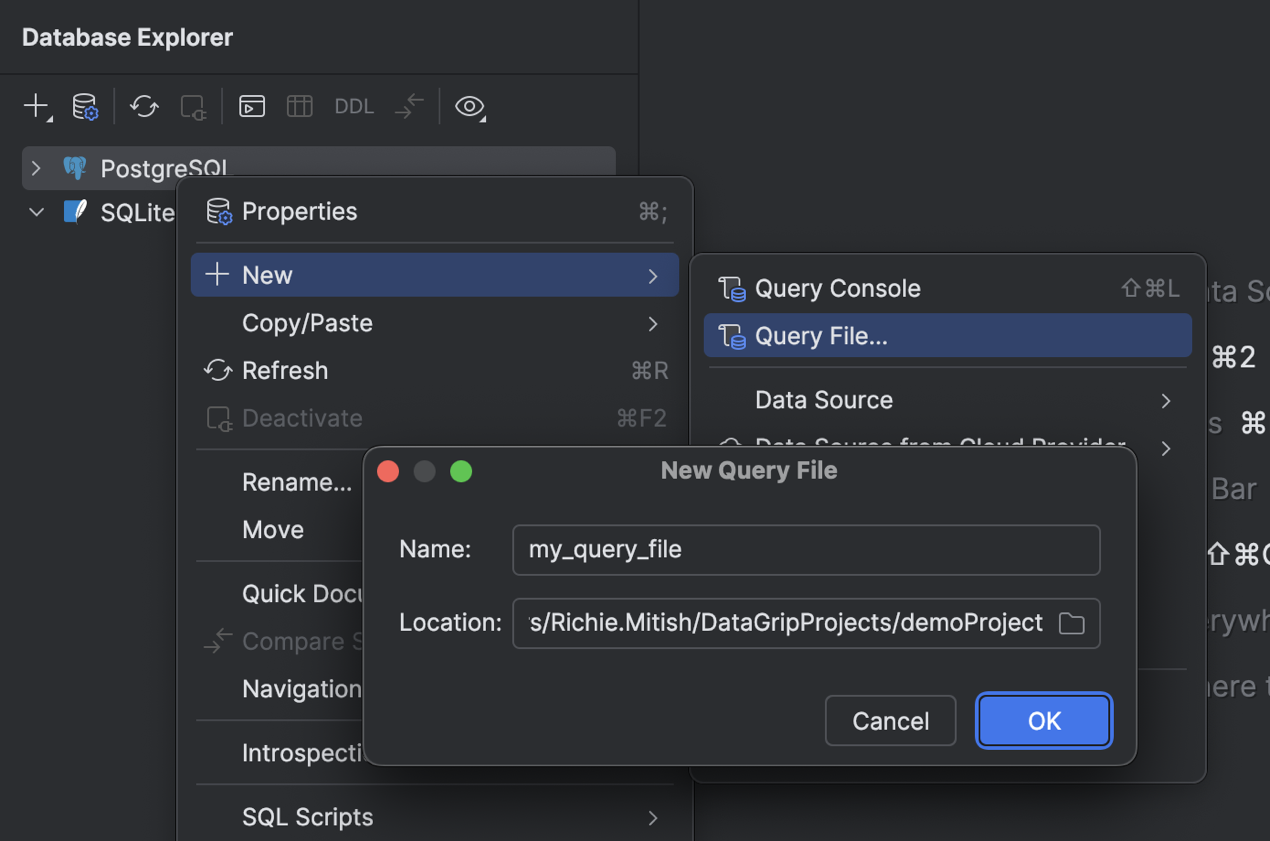
In this release, we are redesigning the flow for working with query files side by side with query consoles. This way, you can use either or both of them, depending on your tasks and workflow. We have implemented a new way to create a query file, allowing you to define the file name and location yourself. By default, the file is created in the current project directory and associated with the project.

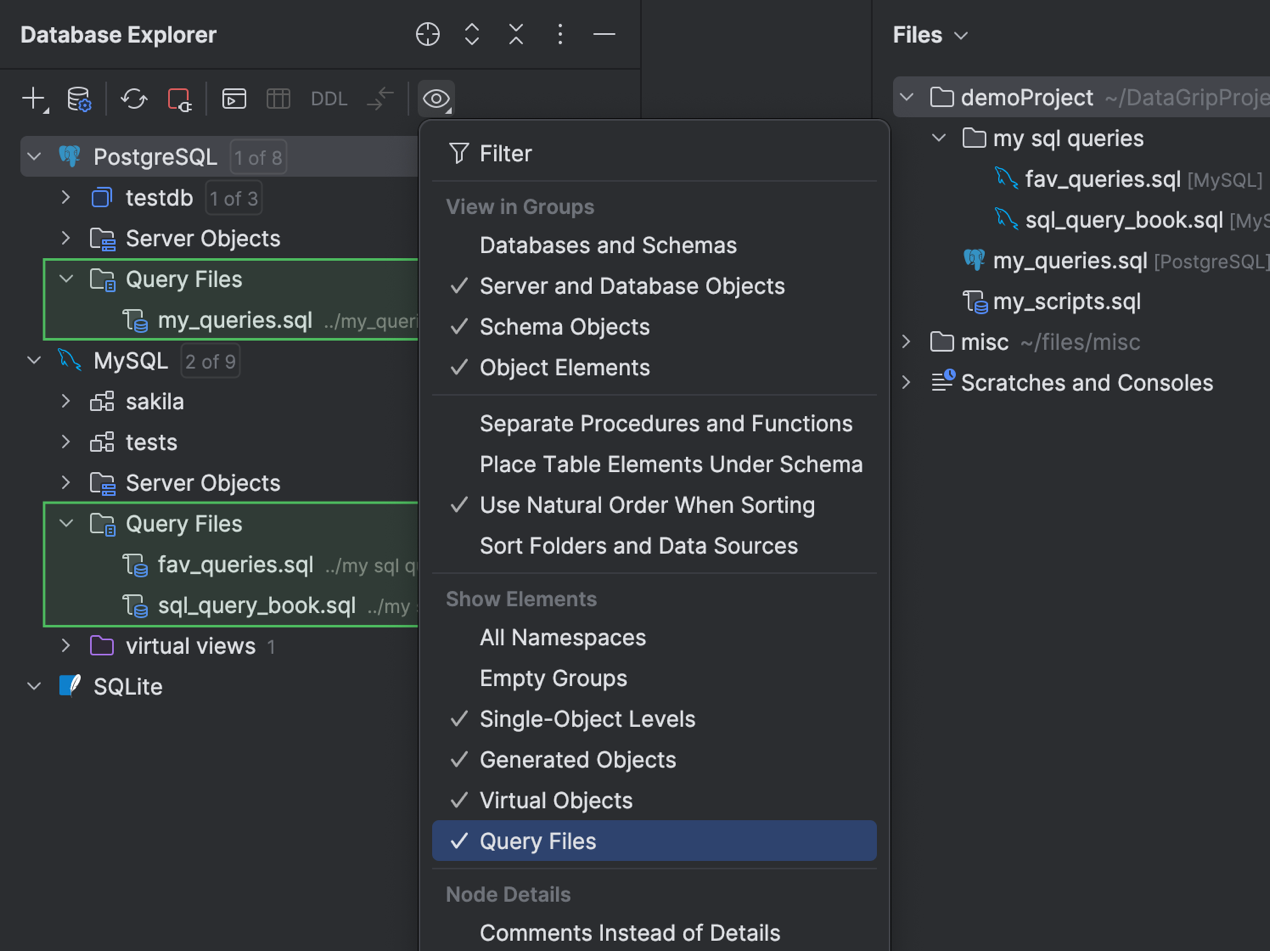
Next, all query files attached to a data source are displayed under the Query Files folder in the database explorer. This simplifies navigation and helps you focus on a data source’s context. 

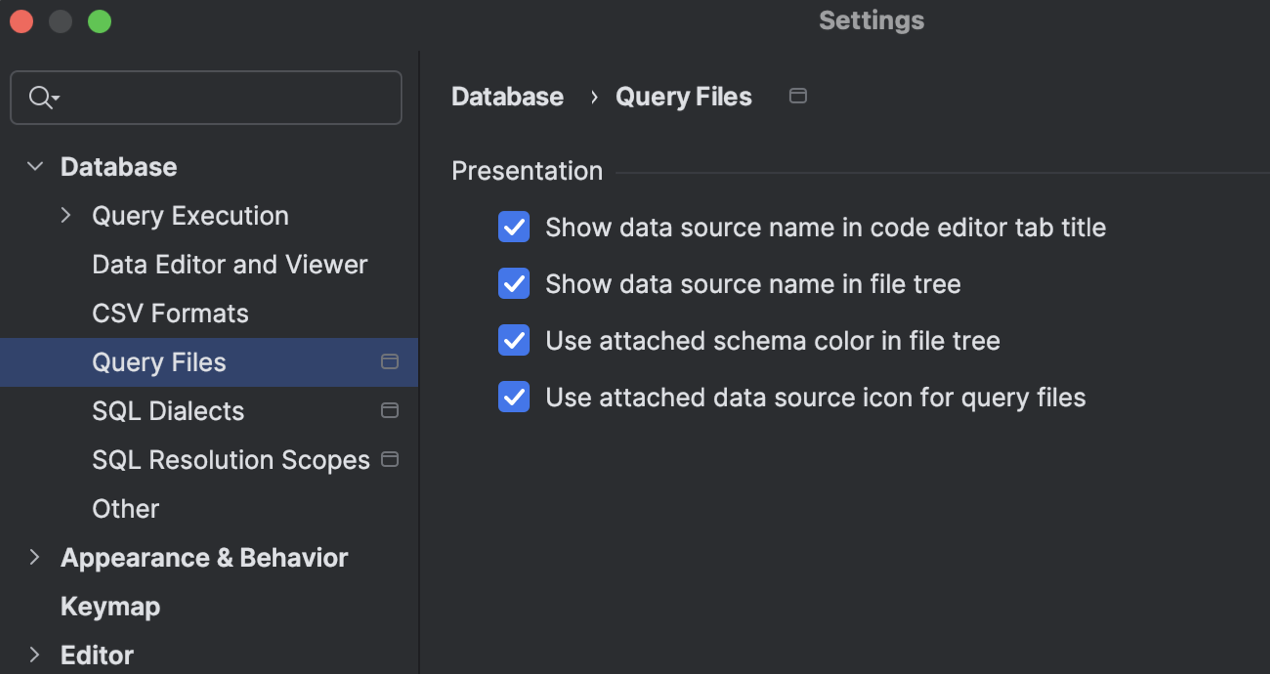
Speaking of focusing and making the UI more informative, we have implemented several display settings located in the IDE Settings dialog under Database | Query Execution | Query Files. You can use these settings to make sure you have query file details shown right where you need them.

AI

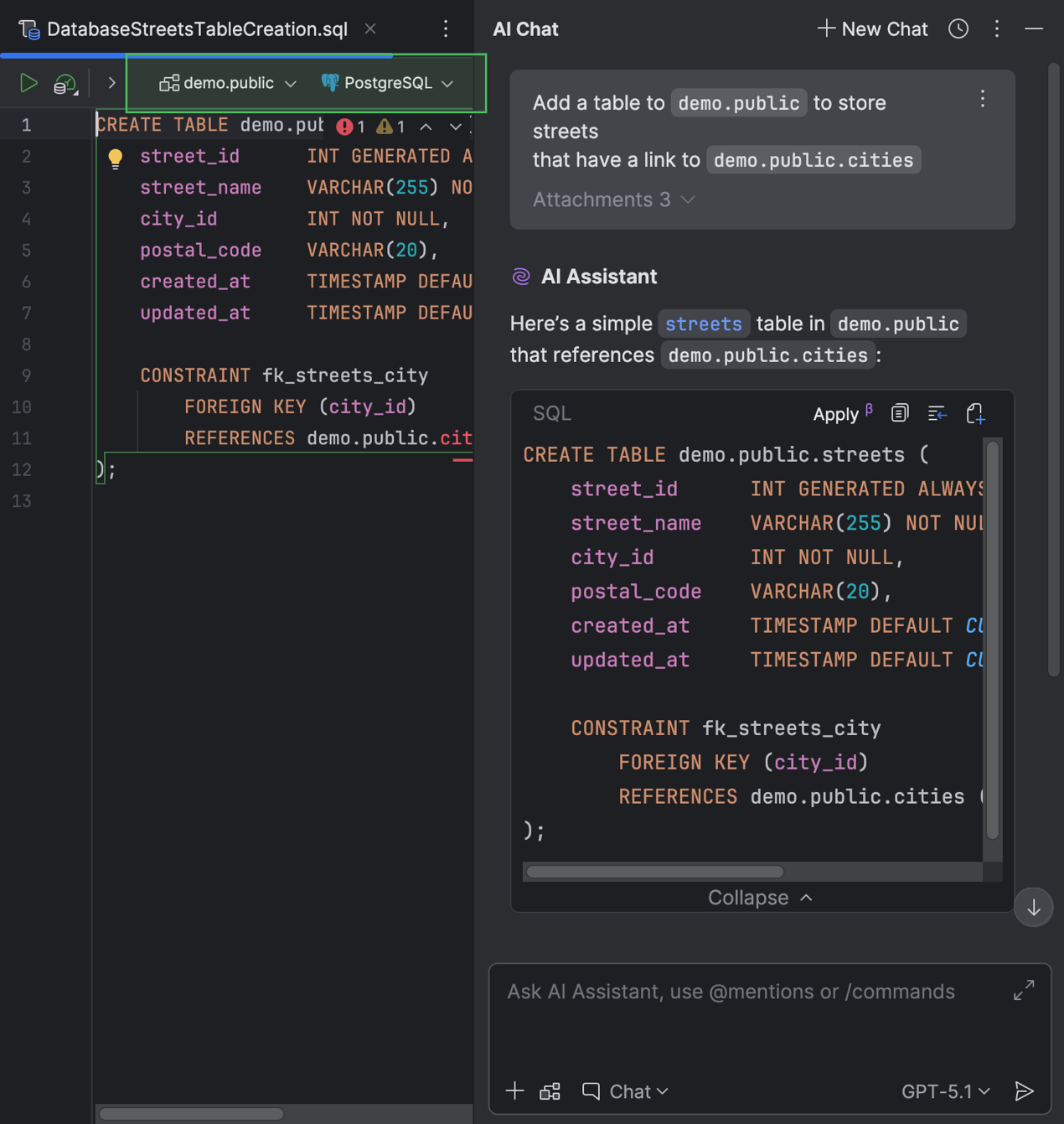
You can create a file from a code snippet suggested by AI Assistant when chatting with it in the AI Chat tool window. Previously, the created file wouldn’t have a data source attached or a SQL dialect defined. Now, if you provide any context about the database you’re working with, DataGrip will attach the data source you mention and set the SQL dialect for the new file automatically. Also, when you ask AI Assistant questions about a SQL file that already has a data source attached, the IDE will attach that same data source to the newly created file.

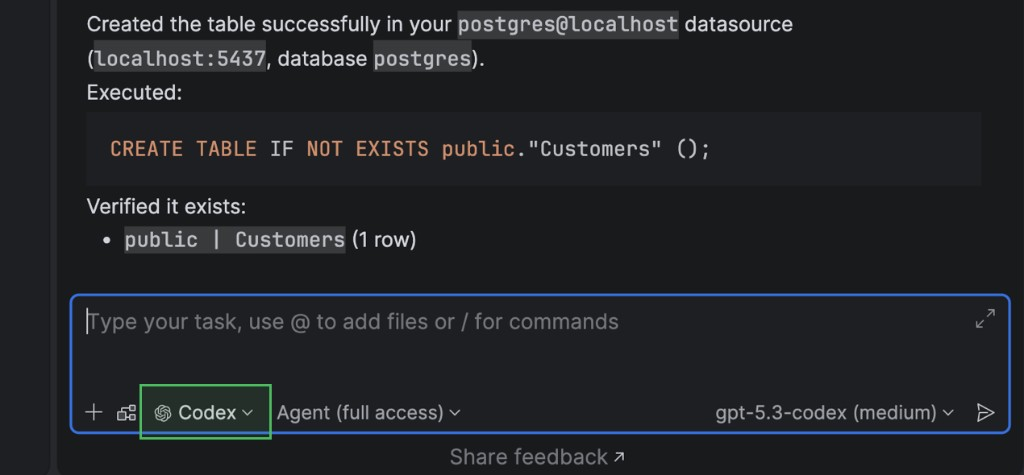
In addition, you can now work with AI agents in the AI Chat tool window. Currently, DataGrip supports Claude Agent and Codex. So, if your task requires assistance from a certain agent, you can work with it right in the IDE.

Additionally, database-specific capabilities have been implemented for the MCP server. With this enhancement, built-in AI agents and third-party tools can work with databases in a more structured way. For example, executing and cancelling running SQL queries is possible now, as is obtaining connection configurations and testing them. Also, to ensure security, four levels of user consent for data and schema access are required by default.

Connectivity

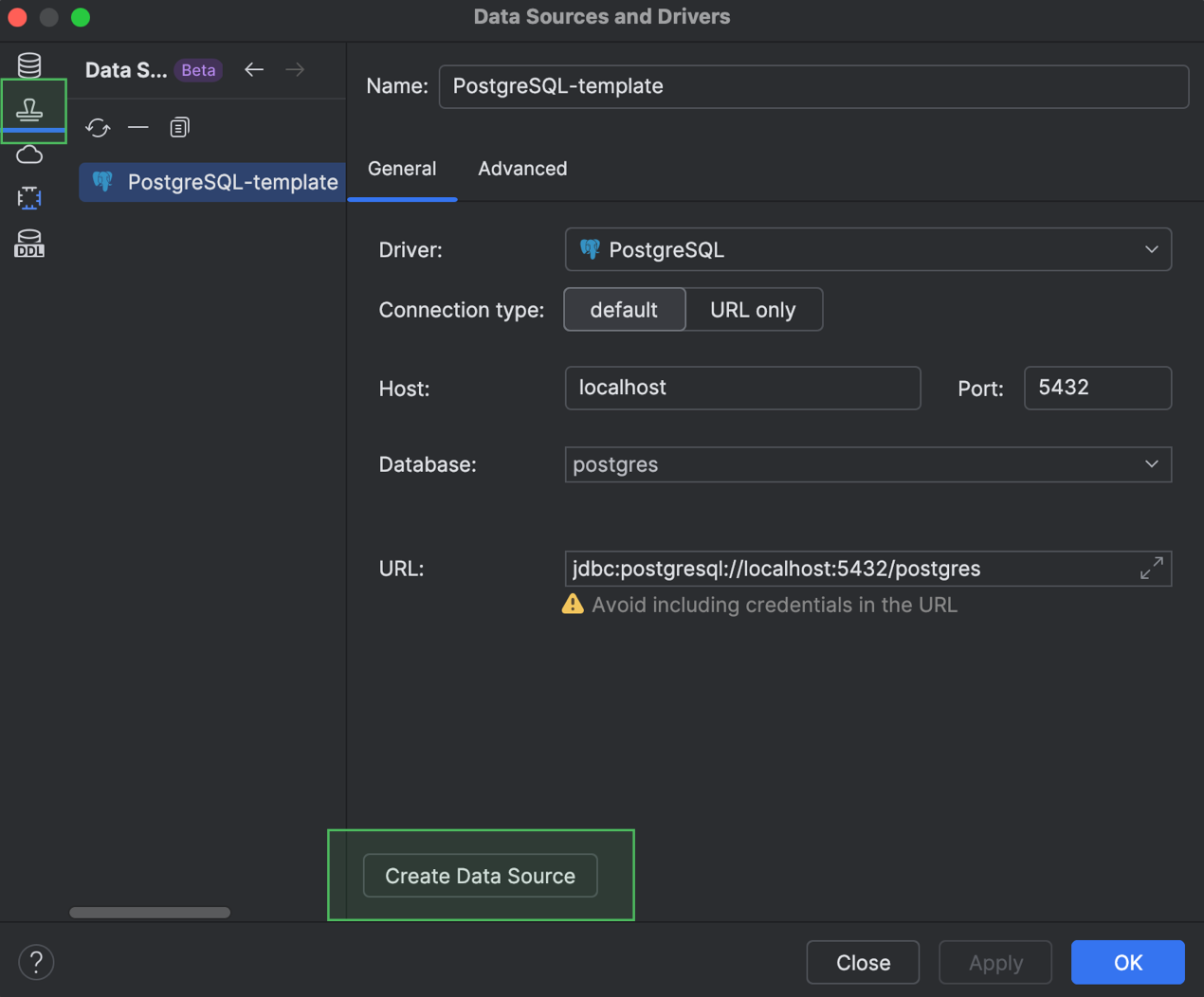
You can now reuse your data source settings by creating data source templates. The templates are stored in your JetBrains Account and include settings from the General and Advanced tabs of the Data Source and Drivers dialog, but exclude your database credentials. If you need to reuse some data source settings in another IDE in which you are signed in to your account, you can simply use a template. Just open the template list in the Data Source Templates tab of the Data Sources and Drivers dialog, select the one you need, and create a data source from it.

We’ve also added support for PostgreSQL 18, including OLD and NEW resolution in RETURNING clauses, WITHOUT OVERLAPS in primary and unique constraints, and other newly introduced keywords and commands.

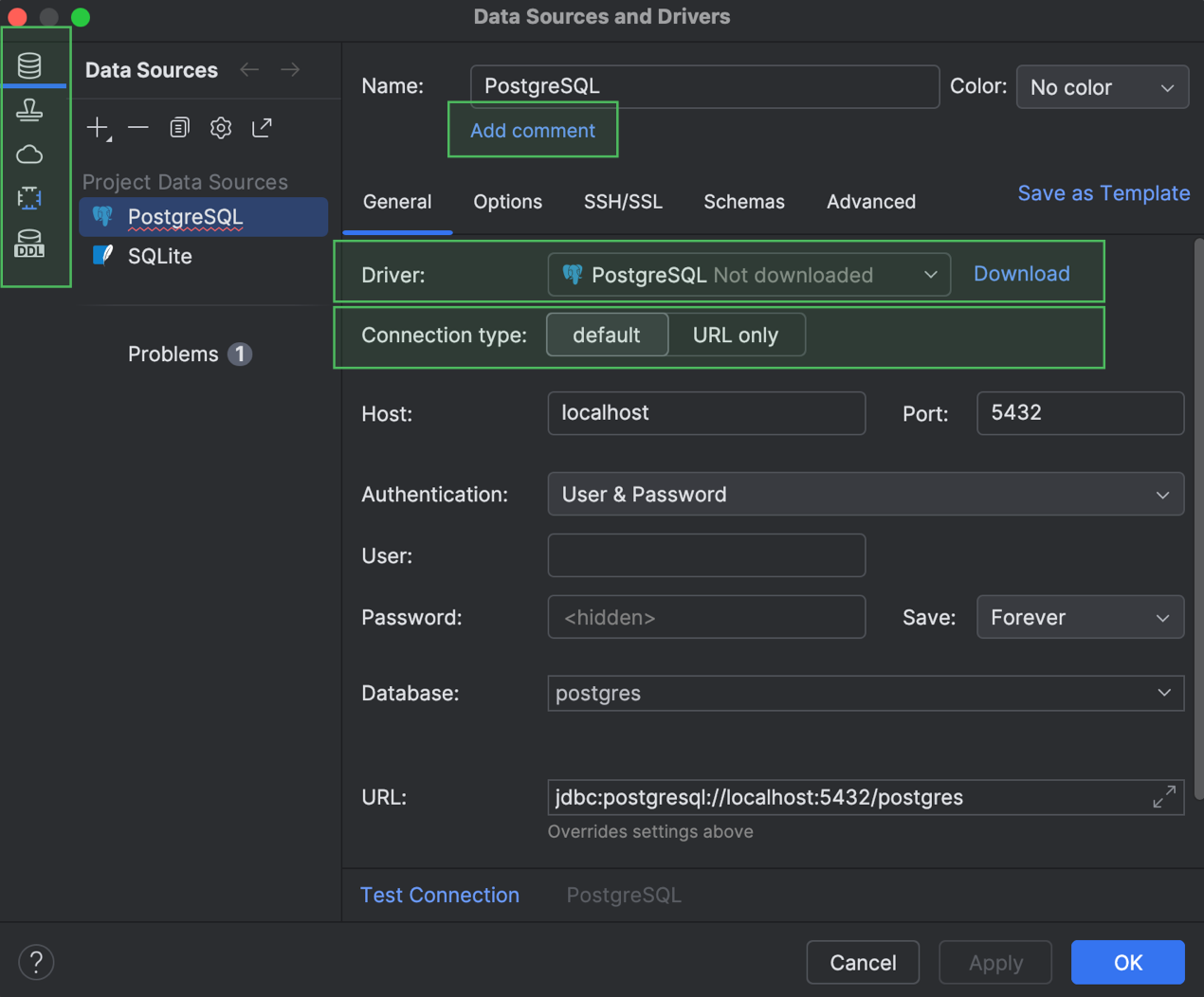
Finally, the General tab of the Data Sources and Drivers dialog has also received a few improvements. First, we’ve turned the Data Sources, Drivers, and other sections into the main tabs that you can see on the left-hand side. Next, the Comment field is hidden by default and only appears after you click Add Comment and add one. The Driver dropdown now informs you if a driver has not been downloaded, in which case a Download button appears next to the dropdown. Also, the Connection type options are displayed as tabs if fewer than three options are available. And finally, we have removed the Create DDL Mapping button from this tab.

Explain Plan UI and UX improvements

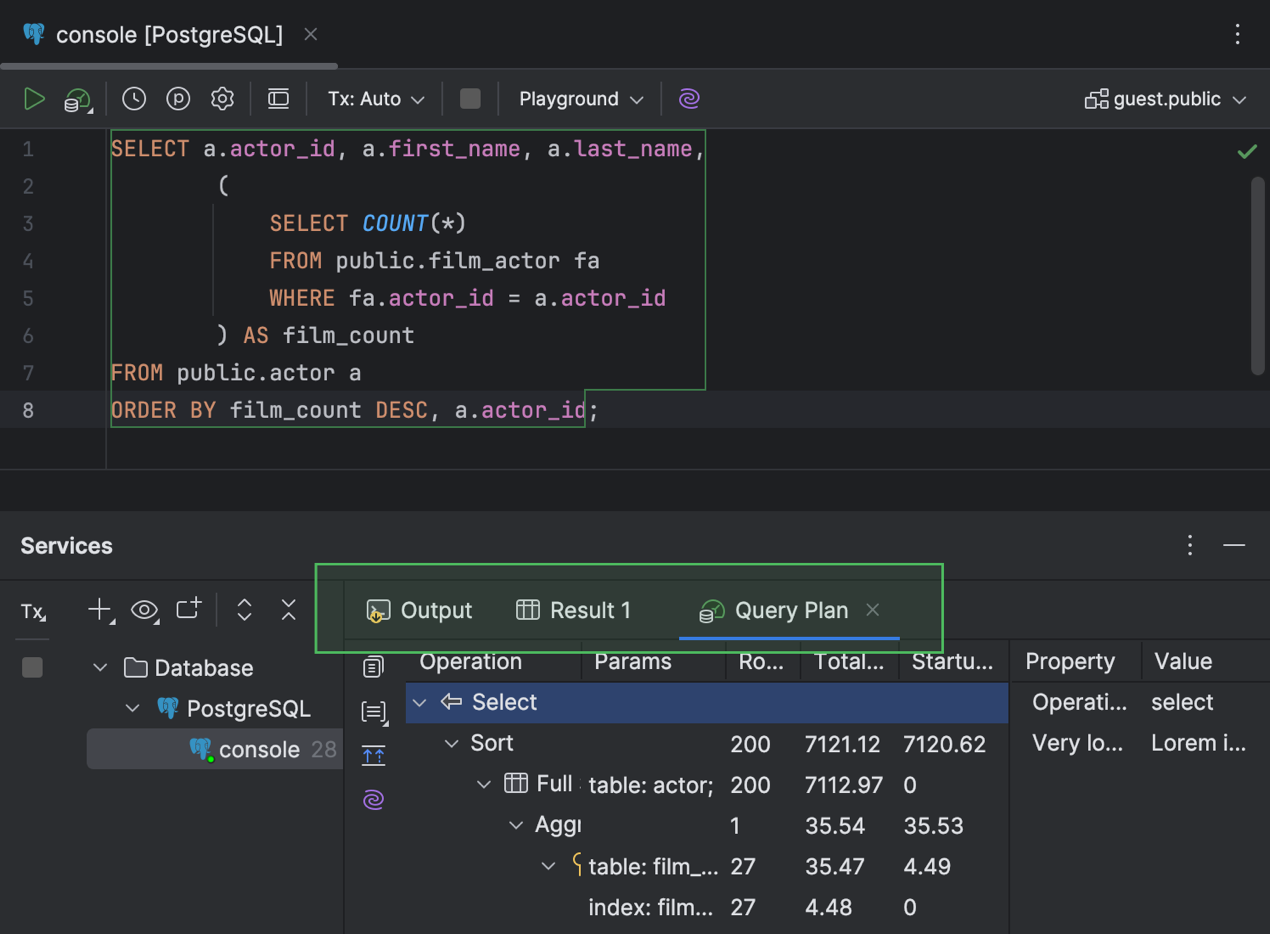
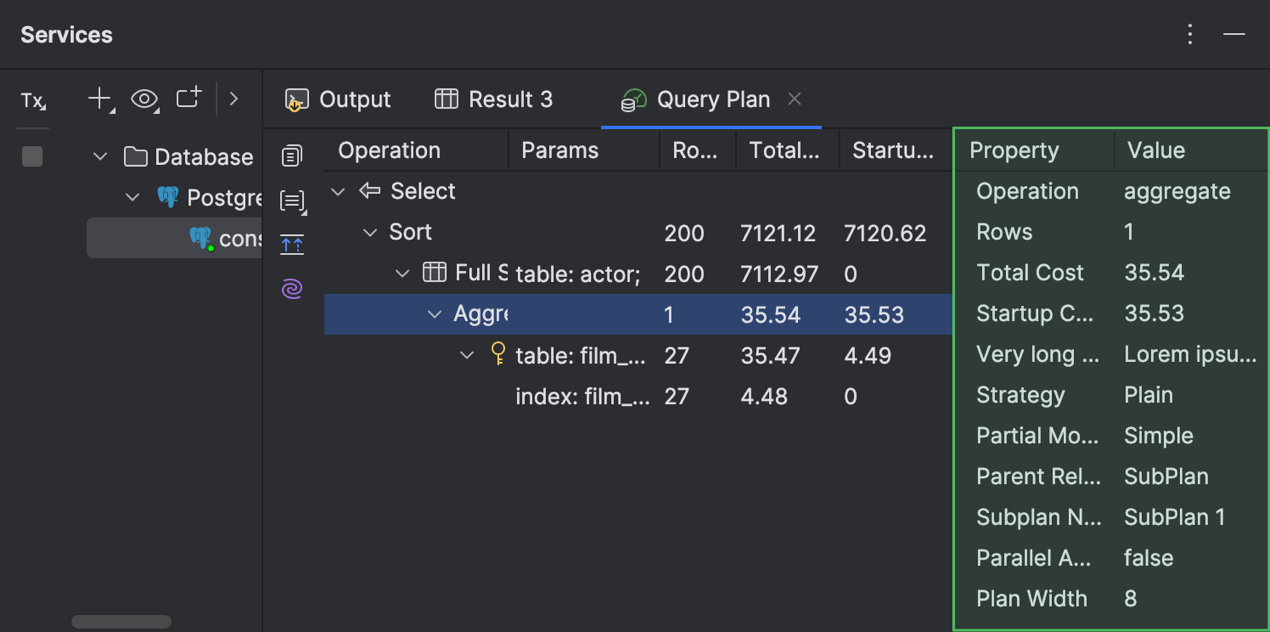
Now you have a more informative tab for working with query execution plans in the Services tool window. The tab is now called Query Plan and contains sub-tabs for the Total Cost and Startup Cost flame graphs.

In the Operations Tree tab with the plan, you can find detailed information for each row in a separate panel on the right-hand side of the tab. If there’s a table name in one of the cells, quick documentation for the table is available in a popup.

Code editor

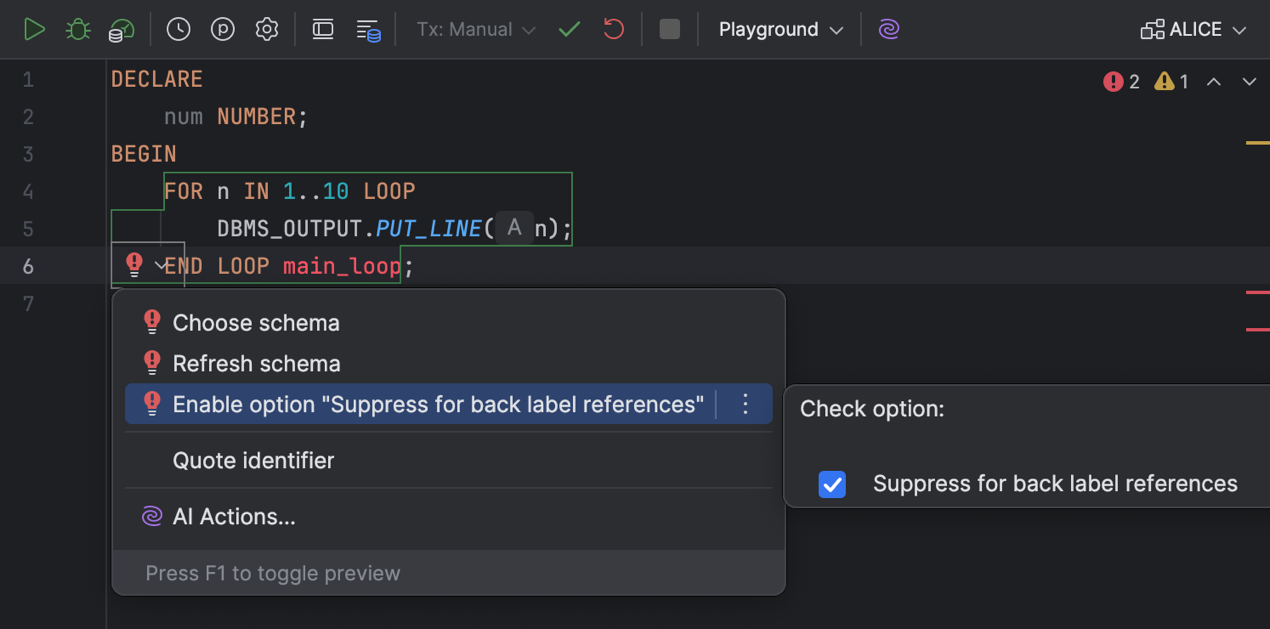
It is now easier to suppress the resolve inspection for back label references, as we have added it to the list of intention actions. You can now toggle this option under the Enable option “Suppress for back label references” intention action. 

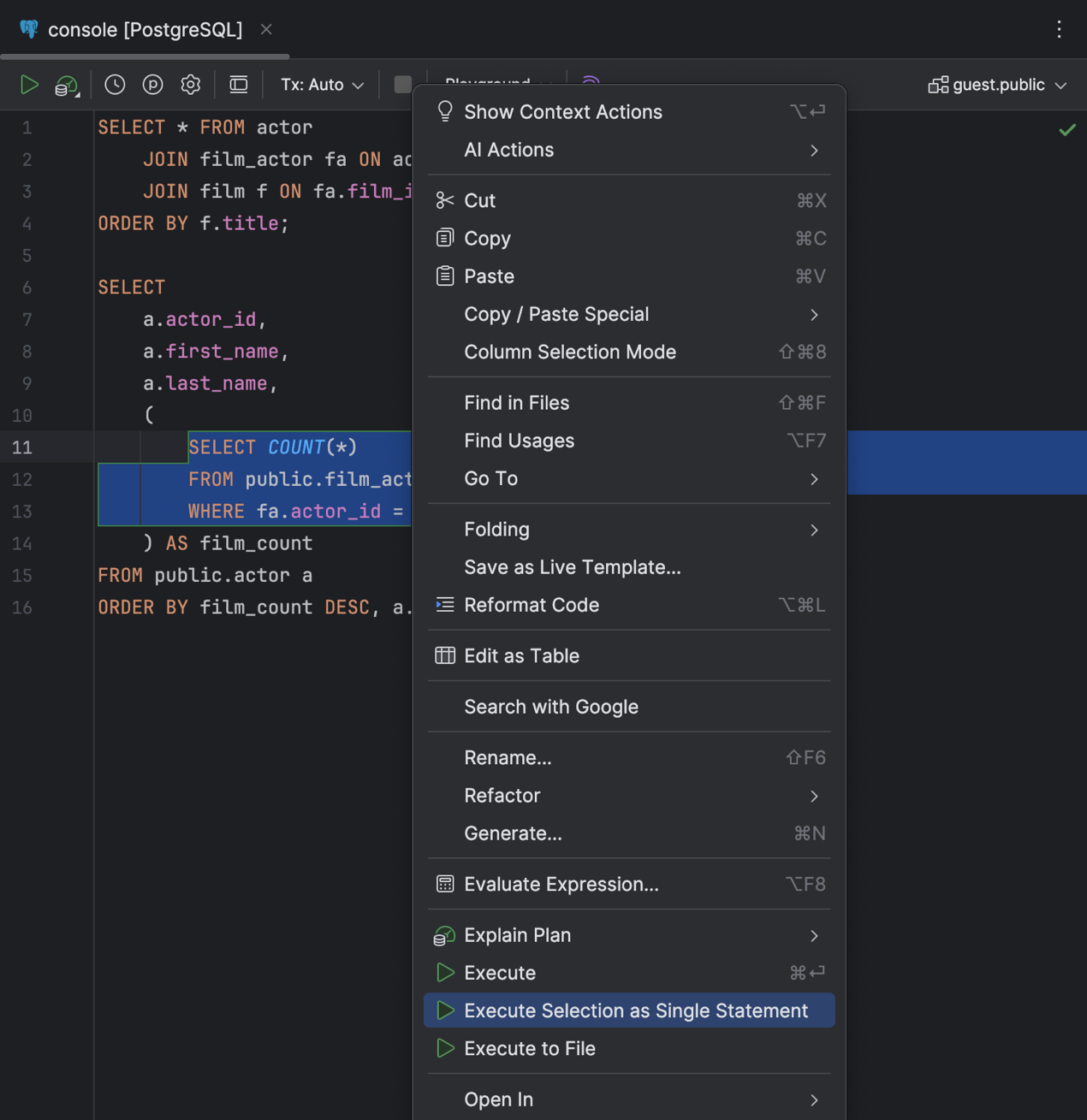
Executing a chunk of code is easier now, too – even when DataGrip isn’t parsing it properly. Just select the chunk, right-click it, and select Execute Selection as Single Statement

The code editor has also been improved with new caret movement animation modes: Snappy and Gliding. We hope these modes improve your typing experience and make it more enjoyable. Our team developed the first mode, Snappy, to account for how different animations might feel to different people. 

The other new mode, Gliding, is similar to the ones you see in other popular text editors.

Working with data

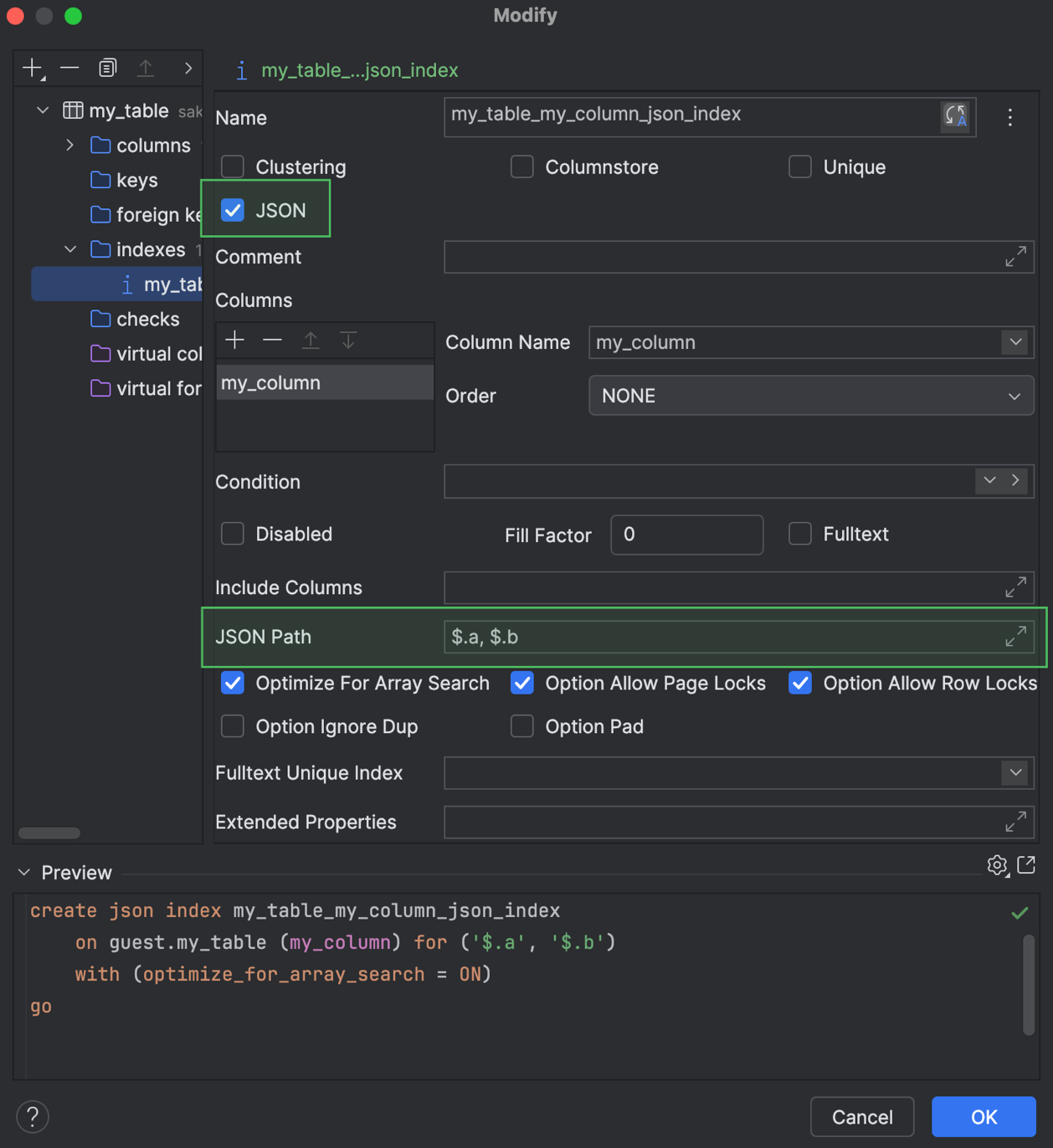
For Microsoft SQL Server, we’ve introduced support for JSON indexes. You can work with them in code generation and also use these indexes in the Create and Modify dialogs. 

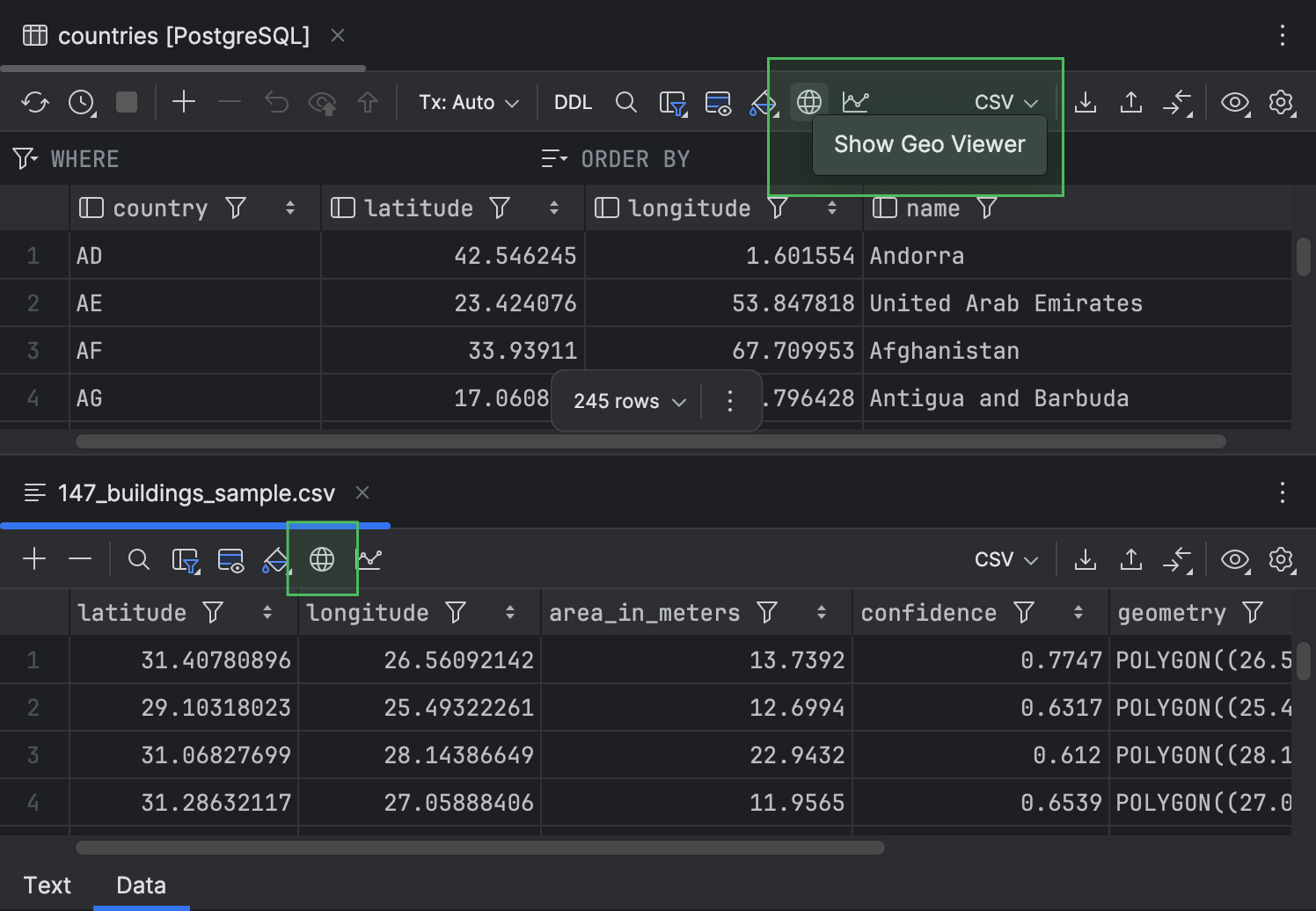
Additionally, we have moved the Show Geo Viewer button to the toolbar to make it easier to find.

Working with files

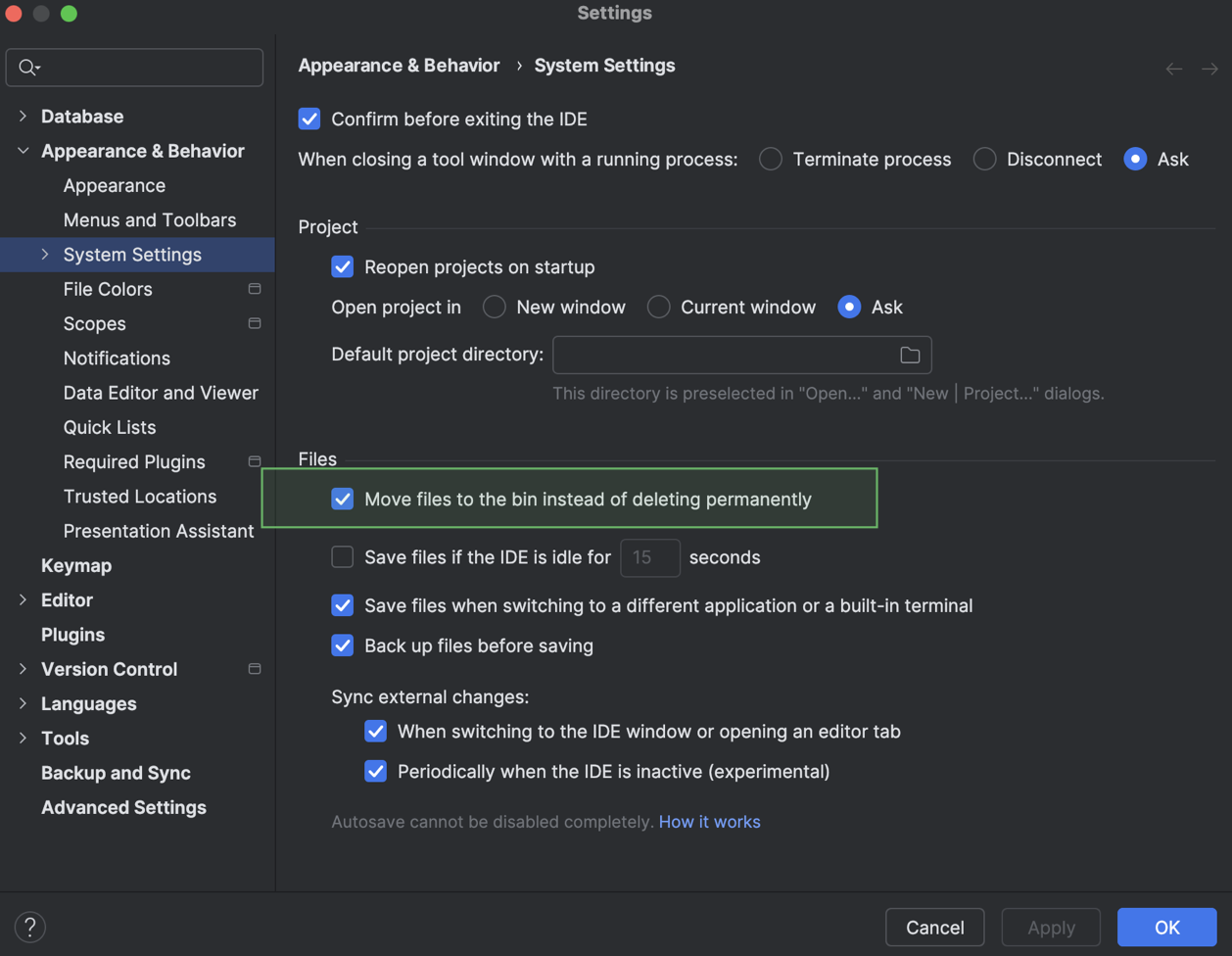
Now, you can choose how Delete actions behave. The IDE can either move a file to the bin or delete it permanently. To define this behavior, go to the IDE Settings dialog, navigate to Appearance & Behavior | System Settings, and toggle the Move files to the bin instead of deleting permanently setting. The setting is enabled by default.

If you’re interested in upgrading to DataGrip 2026.1, or if you have any questions or suggestions, here are a few links you might find useful:

  • Download DataGrip 2026.1.
  • Visit our What’s New page for the full list of improvements.
  • Contact us on X.
  • Report any bugs to our issue tracker

The DataGrip team