Moving From Moment.js To The JS Temporal API

Almost any kind of application written in JavaScript works with times or dates in some capacity. In the beginning, this was limited to the built-in Date API. This API includes basic functionality, but is quite limited in what it can do.

Third-party libraries like Moment.js, and later built-in APIs such as the Intl APIs and the new Temporal API, add much greater flexibility to working with times and dates.

The Rise And Fall Of Moment.js

Moment.js is a JavaScript library with powerful utilities for working with times and dates. It includes missing features from the basic Date API, such as time zone manipulation, and makes many common operations simpler. Moment also includes functions for formatting dates and times. It became a widely used library in many different applications.

However, Moment also had its share of issues. It’s a large library, and can add significantly to an application’s bundle size. Because the library doesn’t support tree shaking (a feature of modern bundlers that can remove unused parts of libraries), the entire Moment library is included even if you only use one or two of its functions.

Another issue with Moment is the fact that the objects it creates are mutable. Calling certain functions on a Moment object has side effects and mutates the value of that object. This can lead to unexpected behavior or bugs.

In 2020, the maintainers of Moment decided to put the library into maintenance mode. No new feature development is being done, and the maintainers recommend against using it for new projects.

There are other JavaScript date libraries, such as date-fns, but there’s a new player in town, an API built directly into JavaScript: Temporal. It’s a new standard that fills in the holes of the original Date API as well as solves some of the limitations found in Moment and other libraries.

What Is Temporal?

Temporal is a new time and date API being added to the ECMAScript standard, which defines modern JavaScript. As of March 20266, it has reached Stage 4 of the TC39 process (the committee that oversees proposals and additions to the JavaScript language), and will be included in the next version of the ECMAScript specification. It has already been implemented in several browsers: Chrome 144+ and Firefox 139+, with Safari expected to follow soon. A polyfill is also available for unsupported browsers and Node.js.

The Temporal API creates objects that, generally, represent moments in time. These can be full-time and date stamps in a given time zone, or they can be a generic instance of “wall clock” time without any time zone or date information. Some of the main features of Temporal include:

  • Times with or without dates.
    A Temporal object can represent a specific time on a specific date, or a time without any date information. A specific date, without a time, can also be represented.
  • Time zone support.
    Temporal objects are fully time zone aware and can be converted across different time zones. Moment supports time zones, too, but it requires the additional moment-timezone library.
  • Immutability.
    Once a Temporal object is created, it cannot be changed. Time arithmetic or time zone conversions do not modify the underlying object. Instead, they generate a new Temporal object.
  • 1-based indexing.
    A common source of bugs with the Date API (as well as with Moment) is that months are zero-indexed. This means that January is month 0, rather than month 1 as we all understand in real life. Temporal fixes this by using 1-based indexing — January is month 1.
  • It’s built into the browser.
    Since Temporal is an API in the browser itself, it adds nothing to your application’s bundle size.

It’s also important to note that the Date API isn’t going away. While Temporal supersedes this API, it is not being removed or deprecated. Many applications would break if browsers suddenly removed the Date API. However, also keep in mind that Moment is now considered a legacy project in maintenance mode.

In the rest of the article, we’ll look at some “recipes” for migrating Moment-based code to the new Temporal API. Let’s start refactoring!

Creating Date And Time Objects

Before we can manipulate dates and times, we have to create objects representing them. To create a Moment object representing the current date and time, use the moment function.

const now = moment();
console.log(now); 
// Moment<2026-02-18T21:26:29-05:00>

This object can now be formatted or manipulated as needed.

// convert to UTC
// warning: This mutates the Moment object and puts it in UTC mode!
console.log(now.utc()); 
// Moment<2026-02-19T02:26:29Z>

// print a formatted string - note that it's using the UTC time now
console.log(now.format('MM/DD/YYYY hh:mm:ss a')); 
// 02/19/2026 02:27:07 am

The key thing to remember about Moment is that a Moment object always includes information about the time and the date. If you only need to work with time information, this is usually fine, but it can cause unexpected behavior in situations like Daylight Saving Time or leap years, where the date can have an effect on time calculations.

Temporal is more flexible. You can create an object representing the current date and time by creating a Temporal.Instant object. This represents a point in time defined by the time since “the epoch” (midnight UTC on January 1, 1970). Temporal can reference this instant in time with nanosecond-level precision.

const now = Temporal.Now.instant();

// see raw nanoseconds since the epoch
console.log(now.epochNanoseconds);
// 1771466342612000000n

// format for UTC
console.log(now.toString());
// 2026-02-19T01:55:27.844Z

// format for a particular time zone
console.log(now.toString({ timeZone: 'America/New_York' }));
// 2026-02-18T20:56:57.905-05:00

Temporal.Instant objects can also be created for a specific time and date by using the from static method.

const myInstant = Temporal.Instant.from('2026-02-18T21:10:00-05:00');

// Format the instant in the local time zone. Note that this only controls
// the formatting - it does not mutate the object like moment.utc does.
console.log(myInstant.toString({ timeZone: 'America/New_York' }));
// 2026-02-18T21:10:00-05:00

You can also create other types of Temporal objects, including:

  • Temporal.PlainDate: A date with no time information.
  • Temporal.PlainTime: A time with no date information.
  • Temporal.ZonedDateTime: A date and time in a specific time zone.

Each of these has a from method that can be called with an object specifying the date and/or time, or a date string to parse.

// Just a date
const today = Temporal.PlainDate.from({
  year: 2026,
  month: 2, // note we're using 2 for February
  day: 18
});
console.log(today.toString());
// 2026-02-18

// Just a time
const lunchTime = Temporal.PlainTime.from({
  hour: 12
});
console.log(lunchTime.toString());
// 12:00:00 

// A date and time in the US Eastern time zone
const dueAt = Temporal.ZonedDateTime.from({
  timeZone: 'America/New_York',
  year: 2026,
  month: 3,
  day: 1,
  hour: 12,
  minute: 0,
  second: 0
});
console.log(dueAt.toString());
// 2026-03-01T12:00:00-05:00[America/New_York]

Parsing

We’ve covered programmatic creation of date and time information. Now let’s look at parsing. Parsing is one area where Moment is more flexible than the built-in Temporal API.

You can parse a date string by passing it to the moment function. With a single argument, Moment expects an ISO date string, but you can use alternative formats if you provide a second argument specifying the date format being used.

const isoDate = moment('2026-02-21T09:00:00');
const formattedDate = moment('2/21/26 9:00:00', 'M/D/YY h:mm:ss');

console.log(isoDate);
// Moment<2026-02-21T09:00:00-05:00>

console.log(formattedDate);
// Moment<2026-02-21T09:00:00-05:00>

In older versions, Moment would make a best guess to parse any arbitrarily formatted date string. This could lead to unpredictable results. For example, is 02-03-2026 February 2 or March 3? For this reason, newer versions of Moment display a prominent deprecation warning if it’s called without an ISO formatted date string (unless the second argument with the desired format is also given).

Temporal will only parse a specifically formatted date string. The string must be compliant with the ISO 8601 format or its extension, RFC 9557. If a non-compliant date string is passed to a from method, Temporal will throw a RangeError.

// Using an RFC 9557 date string
const myDate = Temporal.Instant.from('2026-02-21T09:00:00-05:00[America/New_York]');
console.log(myDate.toString({ timeZone: 'America/New_York' }));
// 2026-02-21T09:00:00-05:00

// Using an unknown date string
const otherDate = Temporal.Instant.from('2/21/26 9:00:00');
// RangeError: Temporal error: Invalid character while parsing year value.

The exact requirements of the date string depend on which kind of Temporal object you’re creating. In the above example, Temporal.Instant requires a full ISO 8601 or RFC 9557 date string specifying the date and time with a time zone offset, but you can also create PlainDate or PlainTime objects using just a subset of the date format.

const myDate = Temporal.PlainDate.from('2026-02-21');
console.log(myDate.toString());
// 2026-02-21

const myTime = Temporal.PlainTime.from('09:00:00');
console.log(myTime.toString());
// 09:00:00

Note that these strings must still comply with the expected format, or an error will be thrown.

// Using a non-compliant time strings. These will all throw a RangeError.
Temporal.PlainTime.from('9:00');
Temporal.PlainTime.from('9:00:00 AM');

Pro tip: Handling non-ISO strings

Because Temporal prioritizes reliability, it won’t try to guess the format of a string like 02-01-2026. If your data source uses such strings, you will need to do some string manipulation to rearrange the values into an ISO string like 2026-02-01 before attempting to use it with Temporal.

Formatting

Once you have a Moment or Temporal object, you’ll probably want to convert it to a formatted string at some point.

This is an instance where Moment is a bit more terse. You call the object’s format method with a string of tokens that describe the desired date format.

const date = moment();

console.log(date.format('MM/DD/YYYY'));
// 02/22/2026

console.log(date.format('MMMM Do YYYY, h:mm:ss a'));
// February 22nd 2026, 8:18:30 pm

On the other hand, Temporal requires you to be a bit more verbose. Temporal objects, such as Instant, have a toLocaleString method that accepts various formatting options specified as properties of an object.

const date = Temporal.Now.instant();

// with no arguments, we'll get the default format for the current locale
console.log(date.toLocaleString());
// 2/22/2026, 8:23:36 PM (assuming a locale of en-US)

// pass formatting options to generate a custom format string
console.log(date.toLocaleString('en-US', {
  month: 'long',
  day: 'numeric',
  year: 'numeric',
  hour: '2-digit',
  minute: '2-digit'
}));
// February 22, 2026 at 8:23 PM

// only pass the fields you want in the format string
console.log(date.toLocaleString('en-US', {
  month: 'short',
  day: 'numeric'
}));
// Feb 22

Temporal date formatting actually uses the Intl.DateTimeFormat API (which is already readily available in modern browsers) under the hood. That means you can create a reusable DateTimeFormat object with your custom formatting options, then pass Temporal objects to its format method. Because of this, it doesn’t support custom date formats like Moment does. If you need something like 'Q1 2026' or other specialized formatting, you may need some custom date formatting code or reach for a third-party library.

const formatter = new Intl.DateTimeFormat('en-US', {
  month: '2-digit',
  day: '2-digit',
  year: 'numeric'
});

const date = Temporal.Now.instant();
console.log(formatter.format(date));
// 02/22/2026

Moment’s formatting tokens are simpler to write, but they aren’t locale-friendly. The format strings “hard code” things like month/day order. The advantage of using a configuration object, as Temporal does, is that it will automatically adapt to any given locale and use the correct format.

const date = Temporal.Now.instant();

const formatOptions = {
  month: 'numeric',
  day: 'numeric',
  year: 'numeric'
};


console.log(date.toLocaleString('en-US', formatOptions));
// 2/22/2026

console.log(date.toLocaleString('en-GB', formatOptions));
// 22/02/2026

Date calculations

In many applications, you’ll need to end up performing some calculations on a date. You may want to add or subtract units of time (days, hours, seconds, etc.). For example, if you have the current date, you may want to show the user the date 1 week from now.

Moment objects have methods such as add and subtract that perform these operations. These functions take a value and a unit, for example: add(7, 'days'). One very important difference between Moment and Temporal, however, is that when performing these date calculations, the underlying object is modified and its original value is lost.

const now = moment();

console.log(now);
// Moment<2026-02-24T20:08:36-05:00>

const nextWeek = now.add(7, 'days');
console.log(nextWeek);
// Moment<2026-03-03T20:08:36-05:00>

// Gotcha - the original object was mutated
console.log(now);
// Moment<2026-03-03T20:08:36-05:00>

To avoid losing the original date, you can call clone on the Moment object to create a copy.

const now = moment();
const nextWeek = now.clone().add(7, 'days');

console.log(now);
// Moment<2026-02-24T20:12:55-05:00>

console.log(nextWeek);
// Moment<2026-03-03T20:12:55-05:00>

On the other hand, Temporal objects are immutable. Once you’ve created an object like an Instant, PlainDate, and so on, the value of that object will never change. Temporal objects also have add and subtract methods.

Temporal is a little picky about which time units can be added to which object types. For example, you can’t add days to an Instant:

const now = Temporal.Now.instant();
const nextWeek = now.add({ days: 7 });
// RangeError: Temporal error: Largest unit cannot be a date unit

This is because Instant objects represent a specific point in time in UTC and are calendar-agnostic. Because the length of a day can change based on time zone rules such as Daylight Saving Time, this calculation isn’t available on an Instant. You can, however, perform this operation on other types of objects, such as a PlainDateTime:

const now = Temporal.Now.plainDateTimeISO();
console.log(now.toLocaleString());
// 2/24/2026, 8:23:59 PM

const nextWeek = now.add({ days: 7 });

// Note that the original PlainDateTime remains unchanged
console.log(now.toLocaleString());
// 2/24/2026, 8:23:59 PM

console.log(nextWeek.toLocaleString());
// 3/3/2026, 8:23:59 PM

You can also calculate how much time is between two Moment or Temporal objects.

With Moment’s diff function, you need to provide a unit for granularity, otherwise it will return the difference in milliseconds.

const date1 = moment('2026-02-21T09:00:00');
const date2 = moment('2026-02-22T10:30:00');

console.log(date2.diff(date1));
// 91800000

console.log(date2.diff(date1, 'days'));
// 1

To do this with a Temporal object, you can pass another Temporal object to its until or since methods. This returns a Temporal.Duration object containing information about the time difference. The Duration object has properties for each component of the difference, and also can generate an ISO 8601 duration string representing the time difference.

const date1 = Temporal.PlainDateTime.from('2026-02-21T09:00:00');
const date2 = Temporal.PlainDateTime.from('2026-02-22T10:30:00');

// largestUnit specifies the largest unit of time to represent
// in the duration calculation
const diff = date2.since(date1, { largestUnit: 'day' });

console.log(diff.days);
// 1

console.log(diff.hours);
// 1

console.log(diff.minutes);
// 30

console.log(diff.toString());
// P1DT1H30M
// (ISO 8601 duration string: 1 day, 1 hour, 30 minutes)

Comparing Dates And Times

Moment and Temporal both let you compare dates and times to determine which comes before the other, but take different approaches with the API.

Moment provides methods such as isBefore, isAfter, and isSame to compare two Moment objects.

const date1 = moment('2026-02-21T09:00:00');
const date2 = moment('2026-02-22T10:30:00');

console.log(date1.isBefore(date2));
// true

Temporal uses a static compare method to perform a comparison between two objects of the same type. It returns -1 if the first date comes before the second, 0 if they are equal, or 1 if the first date comes after the second. The following example shows how to compare two PlainDate objects. Both arguments to Temporal.PlainDate.compare must be PlainDate objects.

const date1 = Temporal.PlainDate.from({ year: 2026, month: 2, day: 24 });
const date2 = Temporal.PlainDate.from({ year: 2026, month: 3, day: 24 });

// date1 comes before date2, so -1
console.log(Temporal.PlainDate.compare(date1, date2));

// Error if we try to compare two objects of different types
console.log(Temporal.PlainDate.compare(date1, Temporal.Now.instant()));
// TypeError: Temporal error: Invalid PlainDate fields provided.

In particular, this makes it easy to sort an array of Temporal objects chronologically.

// An array of Temporal.PlainDate objects
const dates = [ ... ];

// use Temporal.PlainDate.compare as the comparator function
dates.sort(Temporal.PlainDate.compare);

Time Zone Conversions

The core Moment library doesn’t support time zone conversions. If you need this functionality, you also need to install the moment-timezone package. This package is not tree-shakable, and therefore can add significantly to your bundle size. Once you’ve installed moment-timezone, you can convert Moment objects to different time zones with the tz method. As with other Moment operations, this mutates the underlying object.

// Assuming US Eastern time
const now = moment();
console.log(now);
// Moment<2026-02-28T20:08:20-05:00>

// Convert to Pacific time.
// The original Eastern time is lost.
now.tz('America/Los_Angeles');
console.log(now);
// Moment<2026-02-28T17:08:20-08:00>

Time zone functionality is built into the Temporal API when using a Temporal.ZonedDateTime object. These objects include a withTimeZone method that returns a new ZonedDateTime representing the same moment in time, but in the specified time zone.

// Again, assuming US Eastern time
const now = Temporal.Now.zonedDateTimeISO();
console.log(now.toLocaleString());
// 2/28/2026, 8:12:02 PM EST

// Convert to Pacific time
const nowPacific = now.withTimeZone('America/Los_Angeles');
console.log(nowPacific.toLocaleString());
// 2/28/2026, 5:12:02 PM PST

// Original object remains unchanged
console.log(now.toLocaleString());
// 2/28/2026, 8:12:02 PM EST

Note: The formatted values returned by toLocaleString are, as the name implies, locale-dependent. The sample code was developed in the en-US locale, so the format is like this: 2/28/2026, 5:12:02 PM PST. In another locale, this may be different. For example, in the en-GB locale, you would get something like 28/2/2026, 17:12:02 GMT-8.

A Real-world Refactoring

Suppose we’re building an app for scheduling events across time zones. Part of this app is a function, getEventTimes, which takes an ISO 8601 string representing the time and date of the event, a local time zone, and a target time zone. The function creates formatted time and date strings for the event in both time zones.

If the function is given an input string that’s not a valid time/date string, it will throw an error.

Here’s the original implementation, using Moment (also requiring use of the moment-timezone package).

import moment from 'moment-timezone';

function getEventTimes(inputString, userTimeZone, targetTimeZone) {
  const timeFormat = 'MMM D, YYYY, h:mm:ss a z';

  // 1. Create the initial moment in the user's time zone
  const eventTime = moment.tz(
    inputString,
    moment.ISO_8601, // Expect an ISO 8601 string
    true, // Strict parsing
    userTimeZone
  );

  // Throw an error if the inputString did not represent a valid date
  if (!eventTime.isValid()) {
    throw new Error('Invalid date/time input');
  }

  // 2. Calculate the target time
  // CRITICAL: We must clone, or 'eventTime' changes forever!
  const targetTime = eventTime.clone().tz(targetTimeZone);

  return {
    local: eventTime.format(timeFormat),
    target: targetTime.format(timeFormat),
  };
}

const schedule = getEventTimes(
  '2026-03-05T15:00-05:00',
  'America/New_York',
  'Europe/London',
);

console.log(schedule.local);
// Mar 5, 2026, 3:00:00 pm EST

console.log(schedule.target); 
// Mar 5, 2026, 8:00:00 pm GMT

In this example, we’re using an expected date format of ISO 8601, which is helpfully built into Moment. We’re also using strict parsing, which means Moment won’t try to guess with a date string that doesn’t match the format. If a non-ISO date string is passed, it will result in an invalid date object, and we throw an error.

The Temporal implementation looks similar, but has a few key differences.

function getEventTimes(inputString, userTimeZone, targetTimeZone) {
  // 1. Parse the input directly into an Instant, then create
  // a ZonedDateTime in the user's zone.
  const instant = Temporal.Instant.from(inputString);
  const eventTime = instant.toZonedDateTimeISO(userTimeZone);

  // 2. Convert to the target zone
  // This automatically returns a NEW object; 'eventTime' is safe.
  const targetTime = eventTime.withTimeZone(targetTimeZone);

  // 3. Format using Intl (built-in)
  const options = {
    year: 'numeric',
    month: 'short',
    day: 'numeric',
    hour: 'numeric',
    minute: '2-digit',
    second: '2-digit',
    timeZoneName: 'short'
  };

  return {
    local: eventTime.toLocaleString(navigator.language, options),
    target: targetTime.toLocaleString(navigator.language, options)
  };
}

const schedule = getEventTimes(
  '2026-03-05T15:00-05:00',
  'America/New_York',
  'Europe/London',
);

console.log(schedule.local);
// Mar 5, 2026, 3:00:00 PM EST

console.log(schedule.target);
// Mar 5, 2026, 8:00:00 PM GMT

With Moment, we have to explicitly specify a format string for the resulting date strings. Regardless of the user’s location or locale, the event times will always be formatted as Mar 5, 2026, 3:00:00 pm EST.

Also, we don’t have to explicitly throw an exception. If an invalid string is passed to Temporal.Instant.from, Temporal will throw the exception for us. One thing to note is that even with strict parsing, the Moment version is still more lenient. Temporal requires the time zone offset at the end of the string.

You should also note that since we’re using navigator.language, this code will only run in a browser environment, as navigator is not defined in a Node.js environment.

The Temporal implementation uses the browser’s current locale (navigator.language), so the user will automatically get event times formatted in their local time format. In the en-US locale, this is Mar 5, 2026, 3:00:00 pm EST. However, if the user is in London, for example, the event times will be formatted as 5 Mar 2026, 15:00:00 GMT-5.

Summary

Action Moment.js Temporal
Current time moment() Temporal.Now.zonedDateTimeISO()
Parsing ISO moment(str) Temporal.Instant.from(str)
Add time .add(7, 'days') (mutates) .add({ days: 7 }) (new object)
Difference .diff(other, 'hours') .since(other).hours
Time zone .tz('Zone/Name') .withTimeZone('Zone/Name')

At first glance, the difference may be slightly different (and in the case of Temporal, sometimes more verbose and more strict) syntax, but there are several key advantages to using Temporal over Moment.js:

  • Being more explicit means fewer surprises and unintended bugs. Moment may appear to be more lenient, but it involves “guesswork,” which can sometimes result in incorrect dates. If you give Temporal something invalid, it throws an error. If the code runs, you know you’ve got a valid date.
  • Moment can add significant size to the application’s bundle, particularly if you’re using the moment-timezone package. Temporal adds nothing (once it’s shipped in your target browsers).
  • Immutability gives you the confidence that you’ll never lose or overwrite data when performing date conversions and operations.
  • Different representations of time (Instant, PlainDateTime, ZonedDateTime) depending on your requirements, where Moment is always a wrapper around a UTC timestamp.
  • Temporal uses the Intl APIs for date formatting, which means you can have locale-aware formatting without having to explicitly specify tokens.

Notes On The Polyfill

As mentioned earlier, there is a Temporal polyfill available, distributed as an npm package named @js-temporal/polyfill. If you want to use Temporal today, you’ll need this polyfill to support browsers like Safari that haven’t shipped the API yet. The bad news with this is that it will add to your bundle size. The good news is that it still adds significantly less than moment or moment-timezone. Here is a comparison of the bundle sizes as reported by Bundlephobia.com, a website that presents information on npm package sizes (click on each package name to see the Bundlephobia analysis):

Package Minified Minified & gzipped
@js-temporal/polyfill 154.1 kB 44.1 kB
moment 294.4 kB 75.4 kB
moment-timezone 1 MB 114.2 kB

The polyfill also has historically had some performance issues around memory usage, and at the time of writing, it’s considered to be in an alpha state. Because of this, you may not want to use it in production until it reaches a more mature state.

The other good news is that hopefully the polyfill won’t be needed much longer (unless you need to support older browsers, of course). At the time of writing, Temporal has shipped in Chrome, Edge, and Firefox. It’s not quite ready in Safari yet, though it appears to be available with a runtime flag on the latest Technology Preview.

Vite: O Bundler Moderno que Acelera Sua Programação Web

Descubra o Vite, o bundler moderno que acelera o desenvolvimento frontend. Aprenda suas vantagens, recursos e como usá-lo com React, Vue e outras bibliotecas, otimizando sua programação web.

Atualmente, o desenvolvimento frontend está em constante evolução. Por esse motivo, a busca por ferramentas que otimizem o fluxo de trabalho e melhorem a performance das aplicações tornou-se uma prioridade para desenvolvedores.

Nesse cenário surge o Vite, um bundler moderno que promete revolucionar a forma como desenvolvemos aplicações web.

Graças à sua velocidade impressionante e arquitetura inovadora, o Vite tornou-se rapidamente uma escolha popular entre desenvolvedores que buscam agilidade — algo que valorizamos na LCM Sistemas.

Neste artigo vamos explorar:

  • O que é o Vite
  • Suas vantagens
  • Recursos principais
  • Como utilizá-lo com React e Vue

O que é Vite?

O Vite (pronuncia-se vit, do francês “rápido”) é uma ferramenta moderna de build que funciona como bundler para projetos frontend.

Ele utiliza um servidor de desenvolvimento baseado em ES Modules nativos, permitindo que módulos sejam servidos diretamente do código-fonte.

Isso traz benefícios importantes:

  • Inicialização extremamente rápida
  • Atualizações instantâneas
  • Experiência de desenvolvimento mais fluida

Diferente de bundlers tradicionais como Webpack, que precisam compilar toda a aplicação antes de iniciar o servidor, o Vite trabalha de forma mais leve e incremental.

Vantagens do Vite em relação a outros Bundlers

O Vite oferece várias melhorias em comparação com ferramentas mais tradicionais.

Velocidade de Desenvolvimento

O servidor de desenvolvimento inicia quase instantaneamente, permitindo foco total no código.

Essa agilidade é essencial para manter códigos de alta performance.

Hot Module Replacement (HMR) otimizado

O HMR atualiza apenas os módulos modificados.

Isso significa que você não precisa recarregar toda a aplicação durante o desenvolvimento.

Melhor experiência para projetos grandes

A arquitetura do Vite evita problemas comuns de lentidão presentes em bundlers tradicionais quando projetos crescem.

Configuração simples

Criar um projeto Vite leva poucos minutos e exige pouquíssima configuração inicial.

Recursos principais do Vite

Além da velocidade, o Vite possui recursos importantes que ampliam sua utilidade no desenvolvimento moderno.

Suporte a múltiplos frameworks

O Vite possui suporte nativo para:

  • React
  • Vue
  • Svelte
  • Preact

Build otimizado

Durante o build de produção, o Vite utiliza ferramentas modernas que garantem:

  • bundles menores
  • carregamento mais rápido
  • melhor performance geral

Arquitetura baseada em plugins

O sistema de plugins permite adicionar funcionalidades facilmente ao projeto.

Integração com ferramentas modernas

O Vite também se integra facilmente com fluxos modernos de desenvolvimento, como:

  • testes automatizados
  • pipelines CI/CD
  • ferramentas de QA

Inclusive em cenários de desenvolvimento ágil com IA.

Configurando o Vite com React

Criar um projeto React com Vite é muito simples.

1️⃣ Criar o projeto

npm create vite@latest my-react-app -- --template react

2️⃣ Entrar no diretório

cd my-react-app

3️⃣ Instalar dependências

npm install

4️⃣ Iniciar o servidor

npm run dev

Após esses passos, seu projeto React estará pronto para desenvolvimento.

Você também pode utilizar frameworks CSS modernos como
Tailwind CSS para criar designs responsivos.

Configurando o Vite com Vue

O processo para Vue é bastante semelhante.

npm create vite@latest my-vue-app -- --template vue
cd my-vue-app
npm install
npm run dev

Com isso, você já pode iniciar sua aplicação Vue.

Caso prefira componentes prontos e layouts rápidos, frameworks como o
Bootstrap para criação de sites responsivos podem ajudar bastante.

Integração com outras bibliotecas

Outra grande vantagem do Vite é sua arquitetura modular.

Isso permite integrar facilmente bibliotecas externas ou ferramentas avançadas.

Por exemplo, aplicações que utilizam processamento em tempo real com Apache Kafka podem ser integradas ao frontend desenvolvido com Vite.

Conclusão: Vite e o Futuro da Programação Web

O Vite representa um grande avanço no desenvolvimento frontend.

Entre seus principais benefícios estão:

  • velocidade impressionante
  • configuração simples
  • integração com frameworks modernos
  • build otimizado

Essas características fazem do Vite uma das ferramentas mais promissoras no ecossistema JavaScript.

Para garantir que toda essa performance chegue ao usuário com segurança e estabilidade, também é recomendável utilizar soluções como o
Cloudflare para proteção e aceleração de aplicações web.

Dicas adicionais para otimizar seus projetos

Algumas boas práticas podem melhorar ainda mais seus projetos com Vite:

  • Utilize plugins relevantes
  • Otimize seus assets e imagens
  • Mantenha seu código organizado
  • Utilize linters e formatadores
  • Versione seu projeto utilizando Git

Seguindo essas práticas, você garante maior escalabilidade e manutenção eficiente do código.

Why Your OpenClaw Cron Jobs Should Run in Isolation

Why Your OpenClaw Cron Jobs Should Run in Isolation

Category: Engineering

Slug: isolated-cron-jobs-reliability

Read time: ~12 min

Image key: isolated-cron-jobs

Most people set up their first OpenClaw cron job in the simplest way possible: attach it to the main session, let it share context with everything else, and move on. It works — until it doesn’t. Then it fails in ways that are hard to debug, hard to predict, and occasionally embarrassing when garbled output lands in a Slack channel or Telegram message at 7 AM.

There is a better way. OpenClaw’s isolated cron execution model addresses the reliability problems that come with shared-session scheduling, and the engineering principles behind why it works are well-established, well-documented, and not specific to AI agents at all. This post walks through the difference between the two modes, the concrete failure modes that isolation prevents, and how to choose the right approach for every job you schedule.

OpenClaw’s Cron System in 60 Seconds

Before getting into reliability, a quick orientation on how OpenClaw’s scheduler works.

Cron runs inside the Gateway — the persistent daemon that keeps OpenClaw alive between conversations. Jobs are stored under ~/.openclaw/cron/jobs.json, which means they survive restarts and reboots. The scheduler supports three types of schedules:

  • --at for one-shot execution at a specific timestamp
  • --every for interval-based repetition (“every 6 hours”)
  • --cron for Unix-style cron expressions (“every weekday at 8 AM”)

You can schedule anything: a morning news summary, a weekly project review, a reminder in 20 minutes. The question is not what to schedule but how the execution should happen — and that comes down to the session mode.

The Two Modes: Main Session vs. Isolated

When you schedule a cron job in OpenClaw, you make a fundamental architectural choice: where does the job actually execute?

The official docs describe it cleanly:

Main session: enqueue a system event, then run on the next heartbeat.

Isolated: run a dedicated agent turn in cron:<jobId>, with delivery by default.

In practice:

  • --session main injects the job’s prompt as a system event into your existing main agent session. Whatever conversation history, tool outputs, and accumulated context is sitting in that session gets loaded alongside the job. The job does not start fresh — it inherits everything.

  • --session isolated spins up a brand new session for that job, with its own sessionId and a clean transcript. It starts from scratch, executes its task, and optionally delivers output directly to a channel — without touching the main session at all.

The difference sounds subtle. The reliability implications are anything but.

The Failure Modes of Main-Session Scheduling

1. Context Compaction Degrades Output Quality

Large language models have a finite context window. When a long-running main session approaches that limit, OpenClaw triggers context compaction — a process that summarizes older conversation turns to free up space. The summary keeps recent turns intact but condenses older ones.

This is fine for normal conversation. It is a reliability hazard for scheduled jobs.

GitHub issue #2965, filed in January 2026, documents the problem directly:

“When the main agent session undergoes context compaction (hitting token limits), cron jobs can produce degraded or nonsensical output that gets delivered to end users.”

The mechanics are straightforward. A main-session cron job fires. The agent loads its full session context. If compaction produced a degraded summary — the issue notes “Summary unavailable due to context limits” as a real example — the agent loses awareness of the job’s intent. The cron payload is injected, but without useful context to act on it, the output is garbage. And because main-session jobs run inside the same turn loop, that garbage gets delivered.

Isolated jobs are unaffected. They start with a clean session and load only what they need.

2. Token Costs Spiral Out of Control

Even without hitting the compaction cliff, main-session cron jobs burn tokens needlessly.

GitHub issue #1594 describes the mechanism:

“Main session cron jobs enqueue a system event into the main heartbeat loop → full main session context is loaded (including any prior huge tool dumps or 1000-message history) → same risk of context explosion if the job triggers large tool outputs or chains. Isolated session cron jobs (the recommended mode for most scheduled tasks) largely avoid the problem.”

If your main session has been running for days — long conversation history, large file reads, tool outputs from previous tasks — every main-session cron job drags all of that forward. A simple “summarize overnight news” job does not need your three-day conversation history. With isolated execution, it does not get it.

For high-frequency jobs this adds up fast. The token cost of a clean isolated session is bounded by the job itself. The token cost of a main-session job is bounded by everything that has ever happened in your session.

3. Model Overrides Affect the Wrong Thing

One of the more powerful features of isolated cron jobs is the ability to specify a model and thinking level per job. A weekly deep analysis might warrant --model opus --thinking high. A quick status ping does not.

The OpenClaw docs note a critical caveat:

“You can set model on main-session jobs too, but it changes the shared main session model. We recommend model overrides only for isolated jobs to avoid unexpected context shifts.”

Changing the model on a main-session job is a side effect that outlasts the job. If your morning briefing runs at 7 AM and switches the main session to a heavier model, every interaction for the rest of the morning uses that model — your own messages, unrelated tasks, other heartbeat checks. The briefing job is long done, but its footprint remains. Isolated jobs have no such contamination risk. The model choice lives and dies with the session.

4. Errors Leak to Messaging Surfaces

This one is embarrassing. GitHub issue #2654 documents that cron isolation internal errors — gateway timeouts, execution failures — can leak directly to messaging surfaces via postToMain.

When a main-session job fails mid-execution, its error state is part of the session transcript. The session may attempt to deliver whatever it has produced. Users get raw error JSON or truncated output in their Slack or Telegram. This is the kind of failure mode that erodes trust fast — automated messages are only useful if users can rely on them to be coherent.

Isolated jobs with deliver: true send to a channel only upon completion. If a job times out or errors, the failure is contained within the job’s own session. The main session continues running normally; no garbage gets pushed downstream.

5. Deadlocks and Scheduling Conflicts

GitHub issue #1812 tracks a “Deadlock between cron timer lock and agent tool calls.” The problem arises when a cron job fires while the main session is in the middle of an active tool call chain. The scheduler and the agent compete for the same session lock.

With isolated execution, the cron job runs in its own session. There is no shared lock to contend for. The main session continues its work; the cron job runs concurrently without interference. This is especially relevant for users who run complex, multi-tool workflows in the main session — the scheduler firing at an inconvenient moment should never block or corrupt what is already in progress.

6. Debugging Is Near-Impossible

There is a sixth problem, more operational than technical: when a main-session cron job produces bad output, diagnosing why is painful. The cron job’s execution is interwoven with the main session history. Was it context compaction? A model that was left in the wrong state? A tool call that hit the lock? The signals are mixed together.

GitHub issue #27427 documents the debugging gap directly:

“Debugging via sessions_history on the cron session key returns: { 'status': 'forbidden', 'error': 'Session history visibility is restricted to the current session tree.' } — This makes post-mortem debugging of cron jobs impossible from within the agent itself.”

Isolated cron jobs have their own sessionId. When something goes wrong, you can inspect that session in isolation, without wading through the noise of the main session history.

Why Isolation Works: The Engineering Principle

None of this is specific to AI agents. The reliability case for process isolation is one of the oldest lessons in systems engineering.

The Google SRE Book’s chapter on distributed periodic scheduling frames the core principle around failure domains:

“Cron’s failure domain is essentially just one machine. If the machine is not running, neither the cron scheduler nor the jobs it launches can run.”

The point is that a failure domain defines the blast radius of any single failure. On a single machine, everything shares the same failure domain — if the machine goes down, all jobs go down together. In distributed systems, you introduce smaller, isolated failure domains to limit how far any single failure propagates. The entire practice of microservices, containers, and serverless functions is built on this premise.

The same logic applies to OpenClaw sessions. A main-session cron job shares its failure domain with your entire interactive session. Context compaction? Your job degrades. Model swap? Your job’s output changes unexpectedly. Active tool call chain? Your job might deadlock. The main session is a shared resource, and shared resources are where reliability goes to die.

An isolated cron job creates its own failure domain. It can fail, produce garbage, or time out — and your main session keeps running, completely unaffected. The blast radius is exactly one job.

This is the same principle behind the Noisy Neighbor antipattern documented by Microsoft’s Azure Architecture Center. When workloads share resources without isolation, they create unpredictable interference. The solution is always the same: isolate the workloads.

The Practical Rule

A good rule of thumb, derived from both the OpenClaw documentation and the failure modes above:

Use --session isolated for:

  • Recurring jobs that produce output (morning briefings, summaries, weekly reports)
  • Any job that delivers to a channel or sends a notification
  • Jobs with model or thinking-level overrides
  • Long-running jobs or anything that chains multiple tool calls
  • Jobs that run more than a few times per day

Use --session main for:

  • Simple reminders that inject a note into your current conversational context
  • Jobs where continuity with the current conversation genuinely matters
  • One-shot --at reminders tied to something happening right now in your workflow

If you are unsure, default to isolated. The overhead is negligible. The reliability gain is real.

What This Looks Like in Practice

Here is a typical morning briefing job, set up the right way:

openclaw cron add 
  --name "Morning brief" 
  --cron "0 7 * * *" 
  --tz "Europe/Berlin" 
  --session isolated 
  --message "Check emails, calendar for today, and any GitHub notifications. Summarize the top 3 priorities." 
  --announce 
  --channel slack 
  --to "channel:C1234567890"

This fires at 7 AM Berlin time, creates a clean session, runs the task, and delivers output directly to Slack. If the job fails, nothing leaks to the main session. If your main session has accumulated a 2,000-message history from yesterday, the briefing does not pay for it in tokens.

For a weekly deep-analysis job where you want a more capable model:

openclaw cron add 
  --name "Weekly project analysis" 
  --cron "0 9 * * 1" 
  --tz "Europe/Berlin" 
  --session isolated 
  --message "Review this week's git commits, open issues, and project notes. Identify blockers and the top 3 risks going into next week." 
  --model "opus" 
  --thinking high 
  --announce 
  --channel slack 
  --to "channel:C1234567890"

Running this as a main-session job with --model opus --thinking high would switch your entire interactive session to Opus until something resets it. Isolated execution contains the model choice to exactly this job.

Contrast with a simple one-shot reminder where main-session is fine:

openclaw cron add 
  --name "PR review reminder" 
  --at "2026-03-15T14:00:00Z" 
  --session main 
  --system-event "Reminder: review the open PRs on the octoclaw repo before end of day." 
  --wake now 
  --delete-after-run

This is a one-shot nudge. It does not deliver to an external channel. It does not need a model override. It benefits from main-session context because you are already working on that repo. This is the right use case for --session main.

Auditing and Migrating Your Existing Jobs

If you have been running OpenClaw for a while, there is a good chance some of your jobs are set to --session main by default — either because that was the easier option at setup time, or because isolated execution was added or clarified in a later version.

Auditing is straightforward:

openclaw cron list

This shows all scheduled jobs with their current configuration. Look for sessionTarget: "main" entries that have delivery.mode: "announce" or any external channel in delivery.to. These are your risk candidates — jobs that run in the shared session but push output to external surfaces.

Migrating one is also simple. Delete the old job and recreate it with --session isolated:

# Remove the old main-session job
openclaw cron remove --id <job-id>

# Recreate it as isolated
openclaw cron add 
  --name "Morning brief" 
  --cron "0 7 * * *" 
  --tz "Europe/Berlin" 
  --session isolated 
  --message "Check emails, calendar, and notifications. Summarize the top 3 priorities." 
  --announce 
  --channel slack 
  --to "channel:C1234567890"

There is one exception worth checking: if a main-session job does not have delivery configured and only injects a system event into your workflow, it may be intentional. A reminder that asks “did you follow up on X?” might legitimately benefit from main-session context. Leave those alone. Target the ones delivering to external channels.

One Nuance: Heartbeats Are Different

Heartbeats are the one recurring case where main-session execution is often the right call. Heartbeats are designed to batch multiple lightweight checks into a single turn — checking email, calendar, and notifications together, with access to recent conversational context.

The OpenClaw documentation is explicit about the trade-off: if you need conversational context from recent messages, heartbeats in the main session make sense. If timing can drift slightly and the checks are lightweight, the simplicity of main-session heartbeats is worth it.

The key distinction is output with delivery. Heartbeats that simply check things and inject notes are low-risk in the main session — they are essentially part of the conversation. The moment a job is expected to deliver something to an external channel — a report, a summary, a notification — isolation becomes non-negotiable. That is when all the failure modes above become actual user-facing problems.

The Bottom Line

Running cron jobs in the main session is the easy default. It requires less thought and usually works fine for the first few jobs. As automation grows — more jobs, higher frequency, longer session history — the failure modes compound: context compaction degrades output, token costs balloon, model overrides leak across tasks, errors surface in places they should not.

Isolated cron execution is not a workaround or an advanced feature. It is the architecturally correct default for any job that produces and delivers output. The OpenClaw docs recommend it explicitly. The GitHub issue tracker documents what real-world failures look like when it is skipped. The engineering principle is the same one Google’s SRE teams apply to distributed scheduling: minimize failure domains, and the blast radius of any single failure stays bounded.

If you are setting up recurring jobs on OpenClaw, start with --session isolated. Save the main session for the cases where shared context genuinely adds value — and even then, keep an eye on whether that context is helping or getting in the way.

Want to run OpenClaw without the setup headache? OctoClaw gives you a fully hosted instance in minutes — pre-configured, pre-provisioned, and ready to automate from day one.

Sources

  • OpenClaw Cron Jobs — official documentation
  • GitHub #2965 — Cron jobs should be resilient to main session context compaction
  • GitHub #1812 — Deadlock between cron timer lock and agent tool calls
  • GitHub #1594 — Tokens burned by dragging huge context forward
  • GitHub #3733 — Tracking: Cron Job Reliability
  • GitHub #27427 — Isolated cron job session history inaccessible
  • Google SRE Book — Distributed Periodic Scheduling with Cron
  • Microsoft Azure Architecture Center — Noisy Neighbor antipattern
  • OpenClaw Cron Jobs: Building Proactive AI Automation — zenvanriel.com

This article was originally published on OctoClaw. OctoClaw provides turnkey cloud-hosted OpenClaw instances — up and running in minutes, no self-hosting pain.

Understanding Modern AI: Adaptive A* Search and Agentic Ai

Introduction:
Artificial Intelligence is developing very quickly. Researchers are constantly improving AI algorithms and systems. In our AI course we studied topics like search algorithms and intelligent agents.

In this blog, I explored two research papers related to these topics. The first paper improves the A* search algorithm and the second paper explains the concept of Agentic AI.

**

Paper 1: Adaptive A* Search Algorithm:

**

The A* algorithm is one of the most common search algorithms used in artificial intelligence. It is used to find the best or shortest path between two points.

The algorithm uses two values:
the actual cost from the start node and the estimated distance to the goal.

Sometimes the algorithm explores many unnecessary paths which can make the search slower.

The research paper “Research on the A Algorithm Based on Adaptive Weights (2025)”* improves the algorithm by introducing adaptive weights. This means the importance of the heuristic value can change during the search process.

Because of this improvement, the algorithm can focus on better paths and reduce unnecessary exploration. This makes the search faster and more efficient.

This research connects to the informed search algorithms we studied in our AI course.

Paper 2: The Rise of Agentic AI:

The second paper explains the idea of Agentic AI.

Agentic AI systems are artificial intelligence systems that can act more independently. They can observe their environment, make decisions, and perform tasks to achieve goals.

Traditional AI systems usually perform tasks when given instructions. However, agentic AI systems behave more like intelligent agents that can plan actions and solve problems on their own.

The paper also discusses challenges such as safety, reliability, and controlling autonomous AI systems.

This concept connects to the intelligent agents model we studied in class.

Personal Insights

While reading the papers and using NotebookLM, I understood the ideas more clearly. NotebookLM helped explain difficult parts of the research papers in simple language.

One interesting thing I learned is that AI research is improving both search algorithms and intelligent agents. These improvements can help AI systems become faster and more independent.

Video Explanation

Here is my video explaining these papers:

About Me

Hello! I’m Fatima Zolfqar, a FAST University student interested in Artificial Intelligence.
@raqeeb_26

How to Optimize AI Agent Costs — Inference, API Calls, and Infrastructure

How to Optimize AI Agent Costs — Inference, API Calls, and Infrastructure

Agents are expensive. Every API call costs money. Every inference costs money. Every screenshot costs money. At scale, the bill adds up fast.

Your agent workflow might cost $0.02 per execution. That’s fine for 100 runs. At 10,000 runs per month, you’re paying $200. At 100,000 runs, you’re at $2,000.

Here’s how to cut those costs without sacrificing performance.

Where Agent Costs Live

1. Inference (LLM calls)

  • GPT-4: $0.03 per 1K input tokens
  • GPT-3.5: $0.0005 per 1K input tokens
  • Claude 3: $0.003 per 1K input tokens

A single agent workflow might make 5-10 LLM calls. Each call costs tokens. At scale, this dominates the budget.

2. API Calls

  • Stripe: $0 (but slow at high volume)
  • AWS API calls: $0.0000002 per call (negligible)
  • Custom API calls: depends on your pricing

3. Infrastructure

  • Browser automation: Puppeteer, Playwright, Selenium = CPU-intensive
  • PageBolt API: Pay per screenshot/video
  • Hosting agents: EC2, Lambda, serverless containers

4. Data Transfer

  • Screenshots, videos, logs = bandwidth costs
  • S3 storage: $0.023 per GB/month

Cost Optimization Strategies

Strategy 1: Reduce Inference Calls

Not every step needs an LLM call. Many agent actions are deterministic.

# Bad: LLM decides every step
for page in pages:
    decision = llm.call(f"What should I do with {page}?")
    execute(decision)

# Good: Use logic for deterministic steps, LLM only for ambiguous ones
for page in pages:
    if page.matches_pattern(expected_format):
        execute_deterministic_action(page)
    else:
        decision = llm.call(f"How should I handle this unexpected format?")
        execute(decision)

Result: 80% fewer LLM calls. Cost drops from $200 to $40.

Strategy 2: Batch Processing

Process multiple items in a single LLM call instead of one-by-one.

# Bad: 1 LLM call per item
for item in items:
    classification = llm.call(f"Classify this: {item}")

# Good: Batch 10 items per LLM call
for batch in chunks(items, size=10):
    classifications = llm.call(f"Classify these 10 items: {batch}")

Result: 10x fewer calls. Cost drops proportionally.

Strategy 3: Caching and Memoization

Agent workflows often repeat the same tasks. Cache the results.

cache = {}

def process_page(url):
    if url in cache:
        return cache[url]

    result = agent.process(url)
    cache[url] = result
    return result

If 30% of your agent’s work is duplicate, caching eliminates that cost.

Result: 30% cost reduction for repeated workflows.

Strategy 4: Use Cheaper Models for Initial Filtering

Use GPT-3.5 for simple filtering, GPT-4 only for complex reasoning.

# Tier 1: GPT-3.5 for classification
initial_category = gpt35.call(f"Is this a support ticket or sales inquiry?")

# Tier 2: GPT-4 only if ambiguous
if initial_category == "ambiguous":
    refined_category = gpt4.call(f"Deeper analysis required...")

Result: 90% of work done at 1/60th the cost.

Strategy 5: Minimize Screenshots/Videos

Screenshots and videos are expensive to store and process. Capture selectively.

# Bad: Screenshot every step
for step in workflow:
    execute(step)
    screenshot()  # 10 screenshots per workflow

# Good: Screenshot only critical steps
critical_steps = ["login", "form_submission", "confirmation"]
for step in workflow:
    execute(step)
    if step.name in critical_steps:
        screenshot()  # 3 screenshots per workflow

Result: 70% fewer screenshots. Saves on storage and API costs.

Strategy 6: Optimize API Calls

Not all APIs are equal. Some are slow, some are expensive.

# Bad: Call Stripe API for every transaction
for transaction in transactions:
    stripe.create_charge(transaction)  # 1 API call per transaction

# Good: Batch API calls where possible
stripe.create_charges_batch(transactions)  # 1 API call for 100 transactions

Result: 100x fewer API calls.

Real-World Example

Agent workflow: “Process 10,000 customer support tickets per month”

Original costs:

  • 5 LLM calls per ticket × 10,000 = 50,000 calls = $1,500 (GPT-3.5)
  • 3 screenshots per ticket × 10,000 = 30,000 screenshots = $300
  • Infrastructure: $200
  • Total: $2,000/month

Optimized:

  • Tier 1 (GPT-3.5): 10,000 calls = $5
  • Tier 2 (GPT-4, 20% only): 2,000 calls = $60
  • Batch processing: 80% reduction = $12 (instead of $60)
  • Selective screenshots (3 → 1 per ticket): $100
  • Infrastructure: $200
  • Total: $377/month

Savings: 81%

Where to Focus First

  1. Identify your biggest cost driver — Is it inference? Screenshots? API calls?
  2. Optimize that single thing — Often yields 50%+ savings
  3. Iterate — Move to the next biggest cost driver

Most teams can cut costs by 60-80% with targeted optimizations.

Try it free: 100 requests/month on PageBolt—optimize your agent workflow costs while maintaining visibility into every action. No credit card required.

Safe Subtree Deletion Best Practices in ForgeRock DS

SubtreeDelete is an LDAP operation used to delete an entire subtree of entries in a directory server. This operation is powerful but comes with significant risks if not handled properly. In this post, I’ll share my experiences and best practices for safely performing SubtreeDelete operations in ForgeRock DS.

What is SubtreeDelete in ForgeRock DS?

SubtreeDelete is an LDAP extended operation that allows you to delete an entry and all of its subordinates in a single operation. This can be incredibly useful for cleaning up large sections of your directory tree efficiently. However, it also poses risks if not managed correctly, such as accidental data loss.

Why use SubtreeDelete in ForgeRock DS?

Use SubtreeDelete when:

  • You need to remove a large number of entries from your directory.
  • You want to ensure that all related entries are deleted without manual intervention.
  • You are performing a bulk cleanup operation, such as removing test data or old user accounts.

How do you implement SubtreeDelete in ForgeRock DS?

To implement SubtreeDelete in ForgeRock DS, you need to follow these steps:

Step 1: Enable the SubtreeDelete Control

First, ensure that the SubtreeDelete control is enabled in your ForgeRock DS configuration. You can do this using the dsconfig tool.

dsconfig set-backend-prop 
  --backend-name userRoot 
  --set allow-subtree-delete:true 
  --hostname localhost 
  --port 4444 
  --bindDN "cn=Directory Manager" 
  --bindPassword password 
  --trustAll 
  --no-prompt

💜 Pro Tip: Always use a secure connection (LDAPS) and strong authentication when configuring your DS instance.

Step 2: Perform the SubtreeDelete Operation

You can perform the SubtreeDelete operation using an LDAP client that supports extended controls, such as ldapmodify or ldifdelete.

Here’s an example using ldifdelete:

ldifdelete 
  --hostname localhost 
  --port 1389 
  --bindDN "cn=Directory Manager" 
  --bindPassword password 
  --control "1.2.840.113556.1.4.805:true" 
  "ou=old-users,dc=example,dc=com"

⚠️ Warning: Ensure you specify the correct DN to avoid accidentally deleting the wrong subtree.

Step 3: Verify the Deletion

After performing the SubtreeDelete operation, verify that the entries have been removed. You can use ldapsearch to check:

ldapsearch 
  --hostname localhost 
  --port 1389 
  --baseDN "ou=old-users,dc=example,dc=com" 
  --bindDN "cn=Directory Manager" 
  --bindPassword password 
  "(objectClass=*)"

🎯 Key Takeaways

  • Enable the SubtreeDelete control in your DS configuration.
  • Use an LDAP client that supports extended controls to perform the operation.
  • Verify the deletion to ensure the correct subtree was removed.

What are the security considerations for SubtreeDelete in ForgeRock DS?

Security considerations include ensuring only authorized users can perform SubtreeDelete operations and backing up data before deletion.

Access Control

Ensure that only users with appropriate permissions can execute SubtreeDelete operations. You can achieve this by configuring fine-grained access control policies.

dsconfig create-access-control-handler-rule 
  --rule-name "Restrict SubtreeDelete" 
  --type ldap 
  --set condition:"operation=delete && requestControl=1.2.840.113556.1.4.805" 
  --set action:deny 
  --set client:!* 
  --set client:"uid=admin,ou=people,dc=example,dc=com" 
  --hostname localhost 
  --port 4444 
  --bindDN "cn=Directory Manager" 
  --bindPassword password 
  --trustAll 
  --no-prompt

💡 Key Point: Use access control rules to restrict SubtreeDelete to authorized users only.

Backup Strategies

Always back up your directory data before performing a SubtreeDelete operation. This ensures you can restore the data if something goes wrong.

dsbackup create 
  --backupId "pre-subtree-delete-backup" 
  --hostname localhost 
  --port 4444 
  --bindDN "cn=Directory Manager" 
  --bindPassword password 
  --trustAll 
  --no-prompt

💜 Pro Tip: Regularly test your backup and restoration processes to ensure they work as expected.

Error Handling

Implement robust error handling to catch and log any issues during the SubtreeDelete operation. This helps in diagnosing problems and taking corrective actions.

Here’s an example of handling errors in a script:

#!/bin/bash

# Perform SubtreeDelete
ldifdelete 
  --hostname localhost 
  --port 1389 
  --bindDN "cn=Directory Manager" 
  --bindPassword password 
  --control "1.2.840.113556.1.4.805:true" 
  "ou=old-users,dc=example,dc=com" || {
    echo "SubtreeDelete failed with error $?" >> /var/log/subtree-delete.log
    exit 1
}

echo "SubtreeDelete successful" >> /var/log/subtree-delete.log

🎯 Key Takeaways

  • Restrict SubtreeDelete to authorized users using access control rules.
  • Back up your directory data before performing the operation.
  • Implement error handling to catch and log issues.

Comparison of SubtreeDelete vs. Manual Deletion

Approach Pros Cons Use When
SubtreeDelete Efficient, deletes entire subtree in one operation Risk of accidental data loss, requires careful planning Bulk cleanup of large subtrees
Manual Deletion Granular control, safer for small deletions Time-consuming, prone to human error Deleting individual entries or small subtrees

Common Mistakes to Avoid

Here are some common mistakes to avoid when performing SubtreeDelete operations:

Incorrect DN Specified

Specifying the wrong DN can result in the deletion of unintended entries. Always double-check the DN before executing the operation.

# Incorrect DN
ldifdelete 
  --hostname localhost 
  --port 1389 
  --bindDN "cn=Directory Manager" 
  --bindPassword password 
  --control "1.2.840.113556.1.4.805:true" 
  "ou=users,dc=example,dc=com" # This might delete all users!

# Correct DN
ldifdelete 
  --hostname localhost 
  --port 1389 
  --bindDN "cn=Directory Manager" 
  --bindPassword password 
  --control "1.2.840.113556.1.4.805:true" 
  "ou=old-users,dc=example,dc=com"

🚨 Security Alert: Always verify the DN to avoid deleting critical data.

SubtreeDelete Not Enabled

Attempting to perform a SubtreeDelete operation when the control is not enabled will result in an error.

# Attempting SubtreeDelete without enabling the control
ldifdelete 
  --hostname localhost 
  --port 1389 
  --bindDN "cn=Directory Manager" 
  --bindPassword password 
  --control "1.2.840.113556.1.4.805:true" 
  "ou=old-users,dc=example,dc=com"

# Error output
# ldap_delete_ext_s: Protocol error (2)
# additional info: Unrecognized control: 1.2.840.113556.1.4.805

💡 Key Point: Ensure the SubtreeDelete control is enabled in your DS configuration.

Lack of Access Control

Failing to restrict SubtreeDelete to authorized users can lead to unauthorized deletions.

# No access control rule in place
dsconfig get-access-control-handler-rule 
  --rule-name "Restrict SubtreeDelete" 
  --hostname localhost 
  --port 4444 
  --bindDN "cn=Directory Manager" 
  --bindPassword password 
  --trustAll 
  --no-prompt

# Output: No such rule found

⚠️ Warning: Implement access control rules to restrict SubtreeDelete to authorized users.

Best Practices Summary

To safely perform SubtreeDelete operations in ForgeRock DS, follow these best practices:

  • Enable the SubtreeDelete control in your DS configuration.
  • Use an LDAP client that supports extended controls to perform the operation.
  • Verify the deletion to ensure the correct subtree was removed.
  • Restrict SubtreeDelete to authorized users using access control rules.
  • Back up your directory data before performing the operation.
  • Implement error handling to catch and log issues.

By following these guidelines, you can leverage the power of SubtreeDelete while minimizing risks to your directory data.

Best Practice: Always verify the DN and ensure backups are in place before performing SubtreeDelete operations.

Datalore 2026.1: New Data Explorer Cells, Instance-Wide BYOK for AI, Stronger Security via Sidecar Containers in Kubernetes, and More

The first Datalore release of the year delivers several new features that make working with data even easier. These updates are already available to Datalore Cloud users. For Datalore On-Premises, instance administrators can enable them by updating their Datalore instance.

Let’s dive in!

Data explorer

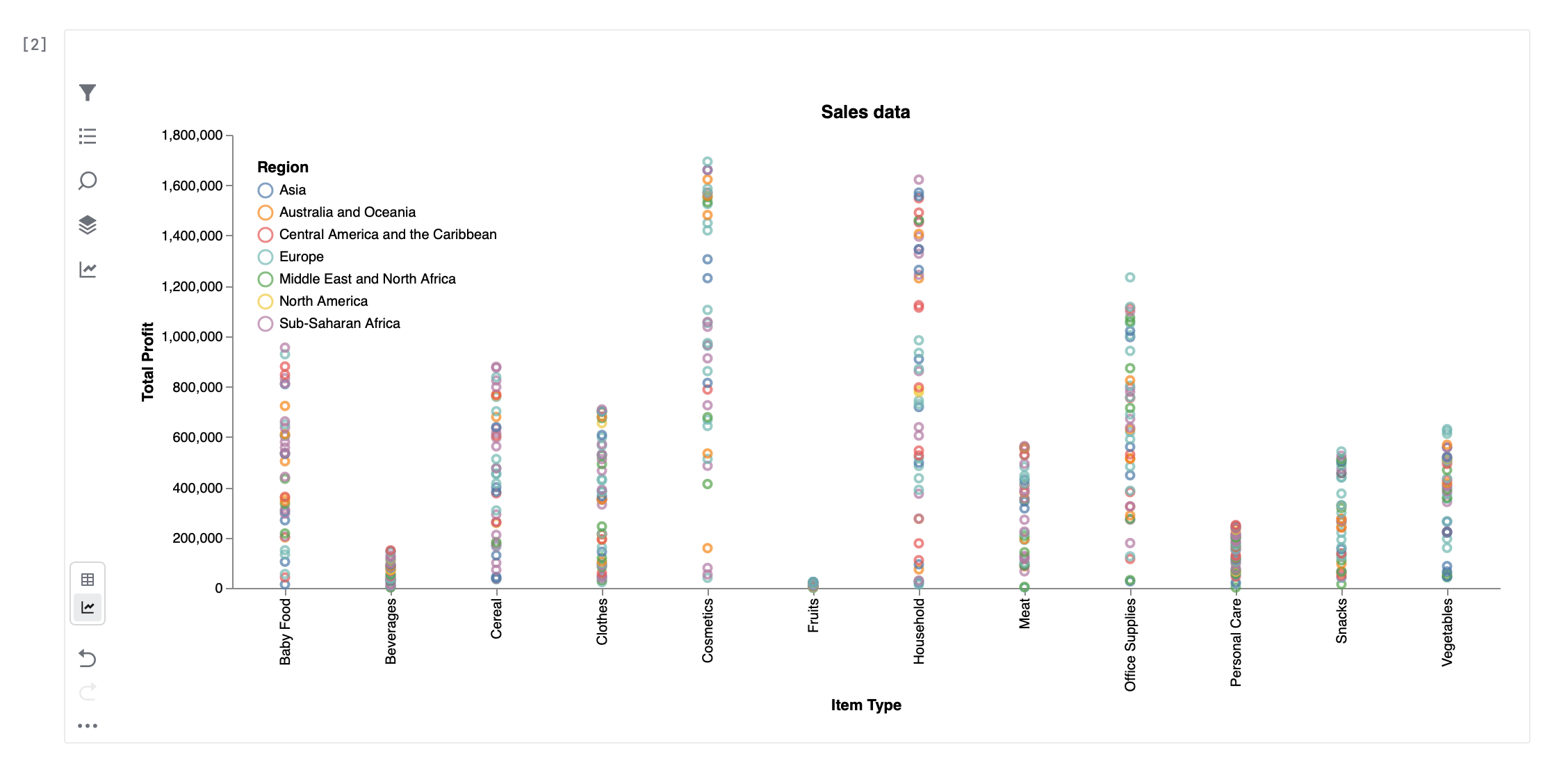
Datalore 2026.1 introduces data explorer cells, a new way to explore and visualize data directly from dataframes without writing additional code. You can quickly inspect datasets, filter results, and generate charts from a single interactive cell.

Data explorer cell in Datalore

In Table mode, you can search and filter your data, exclude duplicates or missing values, and control which columns are displayed. You can also create new columns using SQL expressions, allowing you to derive new values from existing data without modifying your dataframe.

Visualization mode allows you to build charts such as line, bar, area, scatter, and box plots. Configure axes, apply aggregations, and adjust chart settings directly in the UI. Once your chart is ready, you can download it as a PNG or SVG file for use in reports or presentations. Learn more

Bring Your Own Key (BYOK) for AI

Starting with this release, Datalore On-Premises administrators can choose between JetBrains AI or another provider for all AI features. 

If your company has strict security and data governance policies, using instance-wide BYOK for AI enables you to align AI usage with these policies and maintain explicit control over which external services are accessed. It can also be useful if you have specific pricing agreements or consumption commitments with AI providers. 

Datalore On-Premises supports OpenAI, Azure OpenAI, and other providers through OpenAI-compatible APIs. This includes self-hosted models running in your environment. Learn more

Sidecar containers 

When deploying Datalore On-Premises on Kubernetes, agents can be configured to run as a pod with two containers that share a filesystem: an unprivileged agent container and a privileged sidecar container.

In this architecture, the privileged sidecar container is responsible for mounting external resources. It uses FUSE to mount WebDAV and other data sources as local filesystems, which are then exposed to the notebook agent container through shared volumes.

Because the mounting logic is isolated in the sidecar container, the container running the notebook agent typically does not require elevated privileges, helping maintain a more secure setup. Learn more

For more details about the new features, see What’s new in the Datalore documentation.

Update to 2026.1

Python Unplugged on PyTV Recap

Last week marked the fruition of almost a year of hard work by the entire PyCharm team. On March 4th, 2026, we hosted Python Unplugged on PyTV, our first-ever community conference featuring a 90s music-inspired online conference for the Python community.

Python Unplugged on PyTV – Free Online Python Conference

The PyCharm team is a fixture at Python conferences globally, such as PyCon US and EuroPython, but we recognize that while attending a conference can be life-changing, the costs involved put it out of reach for many Pythonistas.

We wanted to recreate the entire Python conference experience in a digital format, complete with live talks, hallway tracks, and Q&A sessions, so anyone, anywhere in the world, could join in and participate.

And we did it! Superstar speakers from across the Python community joined us in our studio in Amsterdam, Netherlands – the country where Python was born. Some of them traveled for over 10 hours, and one even joined with their newborn baby! Travis Oliphant, of Numpy and Scipy fame, was ultimately unable to join us in person, but he kindly pre-recorded a wonderful talk and participated in a live Q&A after it, despite it being very early morning in his time zone. 

Cheuk Ting Ho, Jodie Burchell,  Valerie Andrianova

The PyCharm team is extremely grateful for the community’s support in making this happen.

The event

We livestreamed the entire event from 11am to 6:30pm CET/CEST, almost seven and a half hours of content, featuring 15 speakers, a PyLadies panel, and an ongoing quiz with prizes. Topics covered the future of Python, AI, data science, web development, and more.

Here is the complete list of speakers and timestamped links to their talks:

  • Carol Willing – JupyterLab Core Developer
  • Deb Nicholson – Executive Director, Python Software Foundation
  • Ritchie Vink – Creator of Polars
  • Travis Oliphant – Creator of NumPy
  • Sarah Boyce – Django Fellow 
  • Sheena O’Connell – Python Software Foundation Board Member 
  • Marlene Mhangami – Senior Developer Advocate at Microsoft 
  • Carlton Gibson – Creator of multiple open-source projects in the Django ecosystem
  • Tuana Çelik – Developer Relations Engineer at LlamaIndex
  • Merve Noyan – Machine Learning Engineer at Hugging Face 
  • Paul Everitt – Developer Advocate at JetBrains
  • Mark Smith – Head of Python Ecosystem at JetBrains
  • Georgi Ker – Director and Fellow of the Python Software Foundation
  • Una Galyeva – Head of AI at Geobear Global and PyLadies Amsterdam organizer 
  • Jessica Greene – Senior Machine Learning Engineer at Ecosia
The studio room with presenter’s desk and Q&A table.
Production meeting the day before the event

We spent the afternoon doing final checks and a run-through with the studio team at Vixy Live. They were very professional and patient with us as we were working in a studio for the first time. With their help, we were confident that the event the next day would go smoothly.

Livestream day

On the day of the livestream, we arrived early to get our makeup done. The makeup artists were absolute pros, and we all looked great on camera. One of our speakers, Carol, jokingly said that she is now 20 years younger! The hosts, Jodie, Will, and Cheuk, were totally covered in ‘90s fashion and vibes.

Python Team Lead Jodie Burchell bringing the 90s back

We also had swag designed by our incredible marketing team, including t-shirts, stickers, posters, and tote bags.

PyTV Stickers for all participants
PyTV Totebags

PyTV posters

Python content for everyone

After a brief opening introducing the conference and the event Discord, we began with a series of talks focused on the community, learning Python, and other hot Python topics. We also had two panels, both absolutely inspiring: one on the role of AI in open source and another featuring prominent members of PyLadies.

Following our first block of speakers, we moved on to web development-focused talks from key people involved with the Django framework. We then had a series of talks from experts across the data science and AI world, including speakers from Microsoft, Hugging Face, and LlamaIndex, who gave us up-to-date insights into open-source AI and agent-based approaches. We ended with a talk by Carol Willing, one of the most respected figures in the Python community.

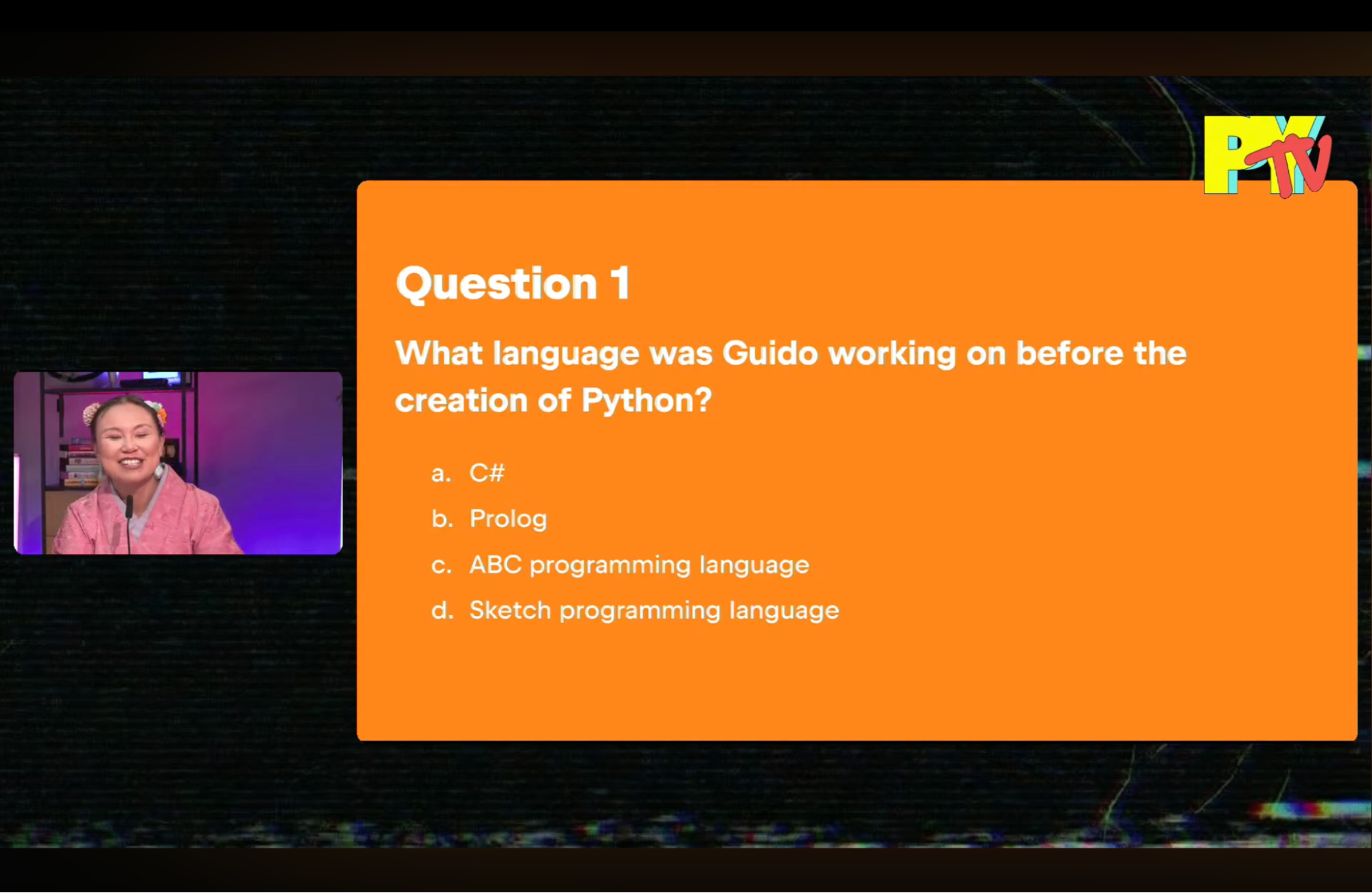
Throughout the day, we ran a quiz for the audience to test their knowledge about Python and the community. Since we had many audience members learning Python, we hope they learned some fun facts about Python through the quiz.

First of 8 questions on the Python ecosystem

Sarah Boyce, Will Vincent, Sheena O’Connell, Carlton Gibson, Marlene Mhangami

Next year?

Looking at the numbers, we had more than 5,500 people join us during the live stream, with most of them watching at least one talk. We’ve since had another 8,000 people as of this writing watch the event recording.

We’d love to do this event again next year. If you have suggestions for speakers, topics, swag, or anything else please leave it in the comments!

Watch now