I cut Claude API costs by 90% with prompt caching. Here’s what I learned before I had to shut it down.

867 Discord servers. 1,000+ active users. $10–11 every time someone played a one-hour D&D session.

I was the only engineer. There was no revenue. And that number wasn’t going down on its own.

I want to be upfront before we go any further: Scrollbook is no longer running.

I built it because I was always the Dungeon Master. My wife, my son, and I had a standing D&D night, and I wanted to actually play for once instead of running the whole session. So I built an AI dungeon master to take my seat. It worked well enough that I shared it. I did not expect anyone else to care.

They did. 867 servers and 1,000+ users later, I was looking at $10-11 every time someone played a one-hour session with no revenue, no paywall, and no plan for either. (Scrollbook is one of three production projects I break down in my case studies. The other two are live and generating revenue. The contrast is instructive.) I shut it down because the cost of operating it solo, without a monetization model that kept pace with usage, made it unsustainable. By the time I pulled the plug, prompt caching had dropped that same session to $0.50-1.50. The technical solution worked. The business math didn’t.

Both of those things are worth talking about.

This post covers the technical side in detail: what the problem was, what I changed, and the actual production code behind it. The business lesson is at the end. I’d argue it’s the more important one.

The Cost Problem

Every message to Claude sent the entire conversation context from scratch. In a D&D session, that context grows with every exchange between the player and the AI.

Before caching, each API call looked like this:

[system prompt: ~1,800 lines of D&D rules + Cipher's personality]
[campaign context: setting, NPCs, quests, locations, active encounter]
[character context: stats, equipment, spells, conditions, companions]
[party context: all active players and their characters]
[message history: every exchange in the session so far]
[current question: "can I grapple the goblin?"]

The system prompt and campaign context alone sat at 4,000–5,000 tokens, reprocessed at full price on every single message.

A one-hour D&D session averages 15–25 back-and-forth exchanges. Context grows on each call. At Sonnet pricing ($3.00/M input, $15.00/M output): $10–11 per session. Multiply that across hundreds of active servers running concurrent sessions and it stops being a line item. It becomes a ceiling. Every new user makes the situation structurally worse.

The Architecture

Scrollbook runs on six services:

Service Role
bot/ Discord bot — receives player commands
api/ REST API for the companion web app
shared/services/cipher_service.py Owns all Anthropic API calls
shared/services/ai_usage_tracker.py Token counting and budget enforcement
shared/services/ai_extraction_service.py PDF/content extraction via Bedrock
infrastructure/ AWS CDK — ECS Fargate, RDS, ALB

cipher_service.py is the single point of contact with the Anthropic API. Context is assembled per-request by ContextManager.build_context(), pulling campaign data, character stats, active party, quests, encounters, and NPCs from Postgres — all scoped to the Discord guild ID.

Here is the insight that unlocked the fix: the system prompt and campaign context were structurally identical on every request for a given server. The D&D rules, Cipher’s personality, the campaign world — none of it changes message-to-message. It was being sent and fully reprocessed every single time, on every message, for every server.

What Prompt Caching Actually Is

Anthropic caches the prefix of your prompt on their infrastructure for a TTL window. Subsequent requests that match that prefix byte-for-byte skip the reprocessing cost. Instead of paying full input token price, you pay roughly 10% of that on a cache hit.

A few things that matter:

Prefix, not arbitrary sections. The cache applies to the beginning of your prompt. Everything you want cached must come before everything that changes. This means prompt order is the entire game.

Cache hits vs. misses. A hit means the prefix was already in cache; you pay about 10% of the normal input token price. A miss means the prefix gets written to cache at roughly 1.25x the normal input token price — slightly more expensive than a regular call, but a one-time cost within each TTL window. After the first message in a session, you want hits almost exclusively.

The TTL is 5 minutes for the ephemeral cache type on Anthropic’s infrastructure. For active D&D sessions this is fine — messages come fast. For a server that runs one session a week, you pay write costs every time with zero read benefit. The math only works at session density.

This is a first-class API feature, not a workaround. You opt in by passing structured content blocks with a cache_control field instead of a plain string. Two lines of code. Anthropic’s infrastructure handles everything else.

One more thing worth saying clearly: this is not client-side caching. You are not storing API responses locally. You are telling Anthropic’s infrastructure which portion of your prompt is stable so it does not need to recompute it.

The Implementation

Centralizing Prompt Assembly

With six services in play, the first structural requirement was centralizing all prompt assembly into one place. The cacheable prefix must be byte-for-byte identical across every request. That cannot happen if prompts are assembled in multiple code paths and concatenated at call time. A trailing space, a newline difference, a Unicode normalization inconsistency — any of it produces a full cache miss.

All prompt assembly in Scrollbook runs through one function: cipher_service.py:_build_conversational_prompt().

Prompt Order

The ordering decision is the whole thing:

1. System prompt (D&D rules + Cipher personality)        CACHED
2. Campaign and character context (per-guild, stable)    included in cache
3. Conversation history [0 ... N-3]                      CACHED at breakpoint
4. Conversation history [N-2, N-1]                       NOT cached
5. Current question                                      NOT cached

Static content at the top. Dynamic content at the bottom. The most expensive tokens, cached. The tokens that change on every message, not cached.

The Code

Before caching, the system prompt was passed as a plain string:

# Every call: full system text + context, reprocessed at full price every time
response = self.anthropic_client.messages.create(
    model=self.model_id,
    system=full_system_text,  # plain string, no caching
    messages=messages,
)

After caching, it becomes a structured content block:

# cipher_service.py:2070-2079
if self.enable_caching:
    system_blocks = [
        {
            "type": "text",
            "text": full_system_text,
            "cache_control": {"type": "ephemeral"}  # two lines
        }
    ]
else:
    system_blocks = [{"type": "text", "text": full_system_text}]

The conversation history gets a second cache breakpoint at the third-to-last message, capturing the entire prior session:

# cipher_service.py:2084-2098
for i, msg in enumerate(conversation_history):
    content_blocks = [{"type": "text", "text": msg["content"]}]

    if self.enable_caching:
        is_last_two = i >= len(conversation_history) - 2
        # Cache breakpoint at third-to-last message
        if not is_last_two and i == len(conversation_history) - 3:
            content_blocks[0]["cache_control"] = {"type": "ephemeral"}

    messages.append({"role": msg["role"], "content": content_blocks})

# Current question is never cached
messages.append({"role": "user", "content": [{"type": "text", "text": question}]})

Two cache breakpoints: one on the system prompt, one on the conversation history. The Anthropic API limits the number of cache control markers per request, so placement matters. You want those markers positioned to maximize the ratio of cached-to-uncached tokens on every call — that ratio is what drives your actual savings.

The API call itself barely changes. The system parameter is now a content block array instead of a string:

# cipher_service.py:2221-2228
response = self.anthropic_client.messages.create(
    model=self.model_id,
    max_tokens=self.max_tokens,
    temperature=self.temperature,
    system=system_blocks,  # content block array instead of plain string
    messages=msgs,
    tools=tools_to_use,
)

The Multi-Tenant Problem

867 servers means 867 sets of campaign state — different characters, different HP totals, different active encounters, different party compositions. Keeping per-guild context out of a polluted shared prefix requires a specific architectural decision.

In Scrollbook, guild-specific data lives inside the cached block:

# cipher_service.py:2066-2068
context_section = context.to_prompt_section()
full_system_text = f"{system_prompt_text}nn{context_section}"
# This full_system_text then receives the cache_control block

This works because campaign context is stable within a session. Cipher updates game state via tool calls when something changes — it does not receive externally updated context as new input mid-session. For the duration of an active session, the system prompt plus campaign context is genuinely identical across every message for that guild. Each guild gets its own cached prefix. No cross-contamination.

If your situation is different — if state changes externally between messages — that dynamic content needs to live below the cache breakpoint, not inside it.

The Results

A one-hour session that cost $10–11 dropped to $0.50–1.50.

To verify you are actually hitting the cache, read the usage object on the response. Do not assume. Log it explicitly:

# cipher_service.py:2268-2288
if self.enable_caching and hasattr(response, "usage"):
    usage = response.usage
    input_tokens = getattr(usage, "input_tokens", 0)
    cache_read_tokens = getattr(usage, "cache_read_input_tokens", 0)
    cache_creation = getattr(usage, "cache_creation_input_tokens", 0)

    if cache_read_tokens > 0:
        savings_pct = (
            cache_read_tokens / (input_tokens + cache_read_tokens)
        ) * 100
        logger.info(
            f"Cache HIT: {cache_read_tokens} tokens read from cache "
            f"({savings_pct:.1f}% savings), {input_tokens} new tokens"
        )
    elif cache_creation > 0:
        logger.info(f"Cache MISS: {cache_creation} tokens written to cache")

Three fields to understand:

  • input_tokens — tokens billed at full price this call
  • cache_creation_input_tokens — tokens written to cache, billed at approximately 1.25x the base input token price (one-time cost per TTL window)
  • cache_read_input_tokens — tokens read from cache, billed at approximately 10% of normal (this is where the 90% savings comes from)

The feature flag that controlled it all:

# shared/config/settings.py:86-98
anthropic_enable_prompt_caching: bool = Field(
    default=True, description="Enable Anthropic prompt caching (90% cost savings)"
)

# Bedrock fallback has no equivalent — hardcoded off
bedrock_enable_prompt_caching: bool = Field(
    default=False, description="Enable prompt caching (not supported on AWS Bedrock)"
)

A note on Bedrock: At the time Scrollbook was built, Bedrock did not support prompt caching. That gap made it a non-starter as the primary provider and locked the architecture to the direct Anthropic API. Bedrock has since caught up — prompt caching went GA in April 2025, with 1-hour TTL support added in January 2026. If you are on Bedrock today, the same technique applies.

When optimization becomes load-bearing infrastructure, provider lock-in follows. That was true when I built this. It is less true now.

Gotchas That Will Kill Your Cache Hit Rate

Prompt order is everything. If you accidentally flip the ordering — campaign context before system prompt, for example — every call is a full miss. The cache matches from the beginning of the prompt in sequence. There is no partial matching.

Dynamic content in the cached prefix. This is the hardest mistake to catch. Timestamps, counters, random values, user-specific data — anything that changes per-message, if it bleeds into the section you are trying to cache, every call is a miss. In Scrollbook, character HP and active conditions are inside the cached block intentionally, because Cipher controls those updates via tool calls. If your state changes externally, that content belongs below the breakpoint.

The 5-minute TTL cliff. Servers with long gaps between messages cold-start on every session. Write costs get paid repeatedly with zero read benefit. The math works at session density. For sparse traffic, run the calculation before assuming caching helps.

Whitespace and encoding. The prefix match is byte-level. A trailing space, a newline inconsistency, a Unicode normalization difference — any of it is a miss. Prompt assembly must run through a single code path. If you are concatenating in multiple places, you will have inconsistency you cannot see.

Don’t assume, verify. The logging block above takes ten minutes to add. Add it. The usage object will tell you immediately whether your cache hit rate matches your expectations. Ship it before you ship the feature.

Why I Still Had to Shut It Down

The honest math: 90% off still leaves 10% of a cost that grows with usage.

At $0.50–1.50 per session across 867 servers with no subscription revenue, the situation improved dramatically and remained unsustainable. I had bought runway. I had not fixed the underlying problem.

There was no paywall. No subscription tier. No mechanism for Scrollbook to generate revenue as usage scaled. Every new server was a new cost center with nothing offsetting it. Prompt caching made the slope of that curve shallower. It did not change the direction.

Beyond the API costs: solo maintenance at that user count meant incident response, server reliability, and the full weight of being the only person accountable to 867 active communities. That is not something you can optimize your way out of.

What I would do differently: charge earlier. I know that is a strange thing to say about something I built so my family could play D&D together. But the moment it left that context and became someone else’s tool, it became a product. I just did not treat it like one. Even a small subscription changes the entire math and the entire psychology of the product.

I built the technical foundation first, optimized costs second, and never got to monetization. The right order is the reverse: figure out how this sustains itself, then build, then optimize. I applied that lesson to the next two products I shipped. ReptiDex launched with a three-tier subscription model on day one and hit 50 paid subscribers in 9 days. Geckistry collects payment at checkout. Both are still running.

What to Take From This

Prompt caching is a real, production-grade optimization. The cache_control field is two lines of code. A 90% reduction in inference cost is achievable if your prompt has a large, stable prefix and your traffic density is high enough for cache reads to consistently outpace cache writes.

If you are building on Claude at any meaningful scale, look at your prompt structure. If you are sending the same system prompt on every request and that prompt is long, you are paying for reprocessing you do not need.

But the bigger lesson is not technical. If you are building an AI product solo, get to monetization before you get to optimization. The optimization I built here was real and it worked. The product did not survive anyway — not because the code was wrong, but because I treated cost reduction as a substitute for a business model.

It is not.

I run Built By Dusty, a software studio that builds custom apps and sales platforms for animal breeders and small businesses. The AI cost optimization techniques from Scrollbook now power features in the breeding software I deliver to clients. If you’re building on Claude at scale, or you’re a founder with a product that has real infrastructure costs to manage, I’d like to hear from you.

All code references in this article are from the actual Scrollbook production codebase. The codebase is private, but every snippet shown here ran in production.

How the DNS is resolved ?

USER MAKING A REQUEST:
when a user searches for something using the domain name , the browser needs to know the IP of the domain to establish communication so it resolves the DNS.

How it fetches the IP through the DNS?

Before starting, let’s be clear about what DNS is. DNS is like a label that maps a domain name to an IP address.

Let’s say we are searching for “WIKIPEDIA”.

First, the machine checks within itself (browser/cache) asking, “Do you remember the IP of Wikipedia?” If it doesn’t find it there, the request is forwarded to the router/modem. If it still doesn’t know, it is sent to the resolver (Internet Service Provider).

If the resolver also doesn’t have it cached, it queries the Root Name Server. From there, it is directed to the appropriate Top-Level Domain (TLD) server like .com, .in, or .org. Then it reaches the authoritative name server, where it finds Wikipedia’s IP from the zone file.

Finally, the IP address is returned back to the user.

I Built a tool to give AI coding agents persistent memory and a way smaller token footprint

Been building with AI coding agents for a while now. Claude Code, Cursor, Antigravity, and two things kept annoying me enough that I finally just built something to fix them.

The two problems

Problem 1: Your agent reads a 1000-line file and burns 8000 tokens doing it.

That’s before it’s done anything useful. Large codebases eat context fast, and once the window fills up, you’re either compressing (lossy) or starting over. Neither is great.

Problem 2: Every new session, your agent starts from zero.

It doesn’t remember that the API rate limit is 100 req/min. It doesn’t remember the weird edge case in the auth module you spent two hours debugging last week. It doesn’t remember anything. You either re-explain everything, or watch it rediscover the same gotchas.

These aren’t niche complaints — if you’re using AI agents to work on real codebases, you’ve hit both of these.

What I built

agora-code — persistent memory and context reduction for AI coding agents. Works with Claude Code, Cursor, and Gemini CLI. Survives context resets, new conversations, and agent restarts.

It’s early. It works. I want people to try it.

How it handles token bloat

Instead of letting the agent read raw source files, agora-code intercepts every file read and serves an AST summary instead.

Real example: summarizer.py is 885 lines. Raw read = 8,436 tokens. Summarized = 542 tokens. That’s a 93.6% reduction — and the agent still gets all the signal: class names, function signatures, docstrings, line numbers.

It works across languages too:

File type Method What you get
Python stdlib AST Classes, functions, signatures, docstrings
JS, TS, Go, Rust, Java + 160 more tree-sitter Same — exact line numbers, parameter types
JSON / YAML Structure parser Top-level keys + shape
Markdown Heading extractor Headings + opening paragraph

Summaries are cached in SQLite, so re-reads on the same branch are instant.

How it handles memory loss

When a session ends, agora-code parses the transcript and extracts a structured checkpoint: what was the goal, what changed, what non-obvious things did you find, what’s next.

At the start of the next session, the relevant parts are injected automatically — last checkpoint, top learnings from recent commits on the branch, git state, symbol index for dirty files.

You can also manually store findings:

agora-code learn "POST /users rejects + in emails" --tags email,validation
agora-code learn "Rate limit is 100 req/min" --confidence confirmed

And recall them later (keyword search by default, semantic search if you wire up embeddings):

agora-code recall "email validation"
agora-code recall "rate limit"

Storage is three layers: an active session file (project-local, gitignored), a global SQLite DB scoped per project via git remote URL, and search (FTS5/BM25 always on, optional vector search).

What happens automatically (Claude Code)

Once hooks are installed, you don’t have to think about most of this:

When you… agora-code automatically…
Start a session Injects last checkpoint + relevant learnings
Submit a prompt Recalls relevant past findings, sets session goal
Read a file > 100 lines Summarizes via AST — serves summary instead
Edit a file Tracks the diff, re-indexes symbols
Run git commit Derives learnings from the commit
Context window compresses Checkpoints before, re-injects after
End a session Parses transcript → structured checkpoint in DB

Getting started

pip install git+https://github.com/thebnbrkr/agora-code.git

Then in your project:

cd your-project
agora-code install-hooks --claude-code

For Cursor and Gemini CLI, you copy a config directory into your project root — full instructions in the README.

At the start of every Claude Code session, run /agora-code to load the skill. That’s the bit that tells the agent when to summarize, when to inject context, when to save progress.

It’s early

APIs may change. Things might break. I’m actively working on it — semantic search is in progress, automated hook setup for Cursor and Gemini is on the roadmap.

If you try it and hit something weird, open an issue. If you want to add hook support for a different editor, the pattern is consistent across .claude/hooks/ and .cursor/hooks/ — PRs welcome.

GitHub: https://github.com/thebnbrkr/agora-code

Screenshot: (https://imgur.com/a/APaiNnl

Would love to hear if this solves the same pain points for others, or if you’re handling token bloat / memory loss differently. Drop a comment.

Filter Assignments

DB- TASK 2

Bonus Q/A

  1. Find all movies where the special features are not listed (i.e., special_features is NULL).

cmd:
SELECT title FROM film WHERE special_features IS NULL;

sample op:

title

Academy Dinosaur
Ace Goldfinger
Adaptation Holes
Affair Prejudice
African Egg

2) Find all movies where the rental duration is more than 7 days.

cmd:
SELECT title, rental_duration
FROM film
WHERE rental_duration > 7;

sample op:
title | rental_duration
———————+—————–
Alamo Videotape | 8
Brotherhood Blanket | 9
Chicago North | 10
Dragon Squad | 8

3) Find all movies that have a rental rate of $4.99 and a replacement cost of more than $20.

cmd:
SELECT title, rental_rate, replacement_cost FROM film WHERE rental_rate = 4.99 AND replacement_cost > 20;

sample op:
title | rental_rate | replacement_cost
——————–+————-+——————
Ace Goldfinger | 4.99 | 22.99
Airport Pollock | 4.99 | 24.99
Bright Encounters | 4.99 | 21.99

4) Find all movies that have a rental rate of $0.99 or a rating of ‘PG-13’.

cmd:
SELECT title, rental_rate, rating FROM film WHERE rental_rate = 0.99 OR rating = ‘PG-13’;

sample op:
title | rental_rate | rating
——————-+————-+——–
Academy Dinosaur | 0.99 | PG
Alien Center | 2.99 | PG-13
Angels Life | 0.99 | PG-13

5) Retrieve the first 5 rows of movies sorted alphabetically by title.

cmd:
SELECT title FROM film ORDER BY title ASC LIMIT 5;

sample op:

title

Academy Dinosaur
Ace Goldfinger
Adaptation Holes
Affair Prejudice
African Egg

6) Skip the first 10 rows and fetch the next 3 movies with the highest replacement cost.

cmd:
SELECT title, replacement_cost
FROM film
ORDER BY replacement_cost DESC
LIMIT 3 OFFSET 10;

sample op:
title | replacement_cost
——————-+——————
Anthem Luke | 24.99
Apollo Teen | 24.99
Arabia Dogma | 24.99

7) Find all movies where the rating is either ‘G’, ‘PG’, or ‘PG-13’.
cmd:
SELECT title, rating FROM film WHERE rating IN (‘G’, ‘PG’, ‘PG-13’);

sample op:
title | rating
——————-+——–
Academy Dinosaur | PG
Ace Goldfinger | G
Alien Center | PG-13

8) Find all movies with a rental rate between $2 and $4.

cmd:
SELECT title, rental_rate FROM film WHERE rental_rate BETWEEN 2 AND 4;

sample op:
title | rental_rate
——————-+————-
Adaptation Holes | 2.99
Alien Center | 2.99
Apollo Teen | 3.99

9) Find all movies with titles that start with ‘The’.

cmd:
SELECT title FROM film WHERE title LIKE ‘The%’;

sample op:

title

The Matrix
The Pianist
The Others
The Truman Show

10) Find the first 10 movies with a rental rate of $2.99 or $4.99, a rating of ‘R’, and a title containing the word “Love”.

cmd:
SELECT title, rental_rate, rating
FROM film
WHERE rental_rate IN (2.99, 4.99)
AND rating = ‘R’
AND title LIKE ‘%Love%’
LIMIT 10;

sample op:
title | rental_rate | rating
—————–+————-+——–
Crazy Love | 2.99 | R
Dangerous Love | 4.99 | R
Endless Love | 2.99 | R

11) Find all movies where the title contains the % symbol.

cmd:
SELECT title FROM film WHERE title LIKE ‘%%%’ ESCAPE ”;

sample op:

title

100% Love
50% Chance

12) Find all movies where the title contains an underscore (_).

cmd:
SELECT title FROM film WHERE title LIKE ‘%_%’ ESCAPE ”;

sample op:

title

Mission_Impossible
Fast_Furious

13) Find all movies where the title starts with “A” or “B” and ends with “s”.

cmd:
SELECT title FROM film WHERE (title LIKE ‘A%’ OR title LIKE ‘B%’) AND title LIKE ‘%s’;

sample op:

title

Angels Life
Backwards Towns
Brothers Dreams

14) Find all movies where the title contains “Man”, “Men”, or “Woman”.

cmd:
SELECT title FROM film WHERE title LIKE ‘%Man%’ OR title LIKE ‘%Men%’ OR title LIKE ‘%Woman%’;

sample op:

title

Spider Man
X Men United
Wonder Woman

15) Find all movies with titles that contain digits (e.g., “007”, “2”, “300”).

cmd:
SELECT title FROM film WHERE title ~ ‘[0-9]’;

sample op:

title

007 Bond
300 Spartans
2 Fast 2 Furious

16) Find all movies with titles containing a backslash ().

cmd:
SELECT title FROM film WHERE title LIKE ‘%%’;

sample op:

title

Escape Reality
Path Finder

17) Find all movies where the title does contain the words “Love” or “Hate”.

cmd:
SELECT title FROM film WHERE title LIKE ‘%Love%’ OR title LIKE ‘%Hate%’;

sample op:

title

Crazy Love
Endless Love
Hate Story
Love Actually

18) Find the first 5 movies with titles that end with “er”, “or”, or “ar”.

cmd:
SELECT title
FROM film
WHERE title LIKE ‘%er’
OR title LIKE ‘%or’
OR title LIKE ‘%ar’
LIMIT 5;

sample op:

title

Joker
Creator
Avatar
Doctor
Warrior

Code Autopsy #1: How ~90 Lines Turned System Monitoring Into A Conversation

Code Autopsy #1: How 30 Lines Turned System Monitoring Into A Conversation

Part of the PC_Workman build-in-public series. Code Autopsy drops every Wednesday.

The Problem: Numbers Without Answers

You open Task Manager.

“CPU: 87%”

Cool.

But WHY 87%?

Is that normal? Should you worry? What process caused it? When did it start?

Task Manager doesn’t answer. HWMonitor doesn’t answer. MSI Afterburner doesn’t answer.

They show you WHAT is happening. Never WHY.

That’s the gap PC_Workman fills.

PC Workman 1.6.8 - hck_GPT in action. Service Setup - quick access to disable useless services, or services what you don't will use (Bluetooth, Print, fax). Today Report - Info about correctly collecting data by sessions. Daily usage averages. And Alerts from suspected spikes/moments by temperatures or voltage.

The Solution: EventDetector

After 800 hours building PC_Workman (most of it on a laptop that peaks at 94°C), I realized: users don’t need more data. They need context.

So I built EventDetector.

30 lines of Python that turn monitoring into a conversation.

Here’s how it works.

Step 1: Track YOUR Baseline (Not Generic Averages)

Most tools compare against hardcoded thresholds:

  • “50% CPU is normal”
  • “60% RAM is high”
  • “80°C is warm”

Problem: Your normal isn’t my normal.

A gaming PC idling at 30% CPU? Normal.

A lightweight laptop idling at 30% CPU? Something’s wrong.

EventDetector tracks YOUR baseline from the last 10 minutes:

def _get_baseline(self, now):
    """Get recent baseline averages from minute_stats.
    Cached for 60 seconds to avoid excessive queries.
    """
    cutoff = now - SPIKE_BASELINE_WINDOW  # 10 minutes

    rows = conn.execute("""
        SELECT AVG(cpu_avg) as cpu_avg, 
               AVG(ram_avg) as ram_avg,
               AVG(gpu_avg) as gpu_avg,
               AVG(cpu_temp) as cpu_temp, 
               AVG(gpu_temp) as gpu_temp
        FROM minute_stats
        WHERE timestamp >= ?
    """, (cutoff,)).fetchone()

    return baseline_cache

Key insight: The baseline is YOU. Not everyone. Just you.

PC Workman 1.6.8 - Events detector for hck_GPT insights. Based on long-term monitoring: CPU, GPU, RAM. EventDetector code with highlights on baseline, delta, rate limiting, severity

Step 2: Calculate Delta (Current vs YOUR Normal)

Once we have YOUR baseline, detecting spikes is simple math:

def _check_metric(self, now, metric_name, current_val, 
                  baseline_val, threshold, description):
    """Check if a metric exceeds its threshold above baseline"""

    delta = current_val - baseline_val

    if delta < threshold:
        return  # No spike - you're within YOUR normal range

Example:

  • Your CPU baseline (last 10 min): 42%
  • Current CPU: 87%
  • Delta: +45%
  • Threshold: 20%

Result: Spike detected. But we’re not done yet.

Step 3: Rate Limiting (No Alert Spam)

Early versions of EventDetector had a problem: alert spam.

Chrome spikes CPU every 30 seconds? You’d get 120 alerts per hour.

Useless.

Solution: Rate limiting.

# Rate limiting: {metric_name: last_event_timestamp}
self._last_event_time = {}

def _check_metric(self, ...):
    # ... delta calculation ...

    # Rate limiting
    last_time = self._last_event_time.get(metric_name, 0)
    if now - last_time < SPIKE_COOLDOWN:  # 5 minutes
        return  # Too soon since last alert

    # Log the event
    self._last_event_time[metric_name] = now

Result: Max 1 alert per metric per 5 minutes. No spam.

Step 4: Severity Levels (Critical vs Warning vs Info)

Not all spikes are equal.

CPU spiking 21% above baseline? Worth noting.

CPU spiking 60% above baseline? Drop everything.

EventDetector categorizes:

# Determine severity
if delta >= threshold * 2:
    severity = 'critical'  # 🔴
elif delta >= threshold * 1.5:
    severity = 'warning'   # ⚠️
else:
    severity = 'info'      # ℹ️

Example thresholds:

  • CPU threshold: 20%
  • Delta 40%+: Critical
  • Delta 30%+: Warning
  • Delta 20-29%: Info

Result: Alerts match urgency.

The Final Output: Context, Not Just Numbers

Here’s what you see in PC_Workman when a spike happens:

Before (Task Manager):

CPU: 87%

After (PC_Workman):

⚠️ CPU spike: 87% (baseline: 42%, delta: +45%)
Chrome.exe - started 3 hours ago

Same data. Different story.

One gives you anxiety. The other gives you action.

PC Workman 1.6.8 - My PC - Center of Actions.
STATS & ALERTS - Long term monitoring your components usage, process usage. And mainly time-travel TEMP and Voltages alerts about spikes, or suspected moments. Optimization & Services - For optimize and improve your PC performance. First Setup & Drivers - All for setup your new device/new os. Stability Tests - For check about correctly working of PC Workman and Database check. Your Account-Details - Soon :)

Implementation Notes

Handles 5 Metrics With Same Logic

The beauty of this design: reusable.

Same _check_metric function handles:

  • CPU usage
  • RAM usage
  • GPU usage
  • CPU temperature
  • GPU temperature
def check_and_log_spike(self, cpu_avg, ram_avg, gpu_avg,
                        cpu_temp=None, gpu_temp=None):
    baseline = self._get_baseline(now)

    # Check each metric with same logic
    self._check_metric(now, 'cpu', cpu_avg, 
                      baseline['cpu_avg'], 
                      SPIKE_THRESHOLD_CPU, 'CPU usage')

    self._check_metric(now, 'ram', ram_avg, 
                      baseline['ram_avg'],
                      SPIKE_THRESHOLD_RAM, 'RAM usage')

    # ... and so on

Clean. Maintainable. Scalable.

Performance: Cached Baselines

Baseline queries hit SQLite. Could be slow.

Solution: 60-second cache.

if now - self._baseline_cache_time < 60 and self._baseline_cache:
    return self._baseline_cache  # Use cached data

Result: Query once per minute, not once per second.

Storage: SQLite Events Table

All events logged to database:

INSERT INTO events
(timestamp, event_type, severity, metric, value, 
 baseline, process_name, description)
VALUES (?, ?, ?, ?, ?, ?, ?, ?)

Benefits:

  • Historical tracking (what spiked last week?)
  • Pattern detection (Chrome spikes every Tuesday?)
  • Exportable data

What I Learned Building This

1. Users Don’t Need More Data

Early versions of PC_Workman showed 20+ metrics.

Users ignored them all.

Lesson: Context, no quantity.

2. Rate Limiting Is User Experience

First version: no rate limiting.

Result: 500 alerts per hour. Unusable.

Lesson: Silence is a feature.

3. Personalization.

“50% CPU is high” works for nobody.

YOUR 50% vs MY 50% = different stories.

Lesson: Baselines must be personal.

PC Workman 1.6.8 - hck_GPT Insights

The Numbers

EventDetector stats:

  • ~30 lines core logic
  • Handles 5 metrics
  • Max 1 alert per metric per 5 min
  • Baseline cached 60 sec
  • 3 severity levels

PC_Workman stats:

  • 800+ hours development
  • Built on 94°C laptop
  • v1.6.8 current (v2.0 -> Microsoft Store, Q3 2026)
  • 60+ downloads
  • 17 stars
  • Open source, MIT licensed

Try It Yourself

PC_Workman is open source.

EventDetector is in hck_stats_engine/events.py.

Download, run, break it, improve it.

GitHub: github.com/HuckleR2003/PC_Workman_HCK
File what I show you: PC_Workman_HCK/hck_stats_engine/events.py

Building in public. Code Autopsy every Wednesday.

Follow the journey:

  • Twitter: @hck_lab
  • LinkedIn: Marcin Firmuga
  • Everything: linktr.ee/marcin_firmuga

Next Week: Wednesday Code Autopsy #2

Topic: ProcessAggregator – how PC_Workman tracks which apps eat your CPU without destroying performance.
See you Wednesday.

Questions? Comments? Roasts? I’m building in public. Feedback welcome.

About the Author

I’m Marcin Firmuga. Solo developer and founder of HCK_Labs.

I created PC Workman , an open-source, AI-powered
PC resource monitor
built entirely from scratch on dying hardware during warehouse
shifts in the Netherlands.

This is the first time I’ve given one of my projects a real, dedicated home.

Before this: game translations, PC technician internships, warehouse operations in multiple countries, and countless failed projects I never finished.

But this one? This one stuck.
800+ hours of code. 4 complete UI rebuilds. 16,000 lines deleted.
3 AM all-nighters. Energy drinks and toast.

And finally, an app I wouldn’t close in 5 seconds.
That’s the difference between building and shipping.

PC_Workman is the result.

WebStorm 2026.1: Service-powered TypeScript Engine, Junie, Claude Agent, and Codex in the AI chat, Framework Updates, and More

WebStorm 2026.1 is now available!

This release focuses on the everyday web development workflows where IDE support matters most, helping you stay productive in large TypeScript projects, making it easy to keep up with frameworks that evolve quickly, and bringing AI tools into the IDE so you don’t have to switch contexts.

The highlights of this release include:

AI-powered development

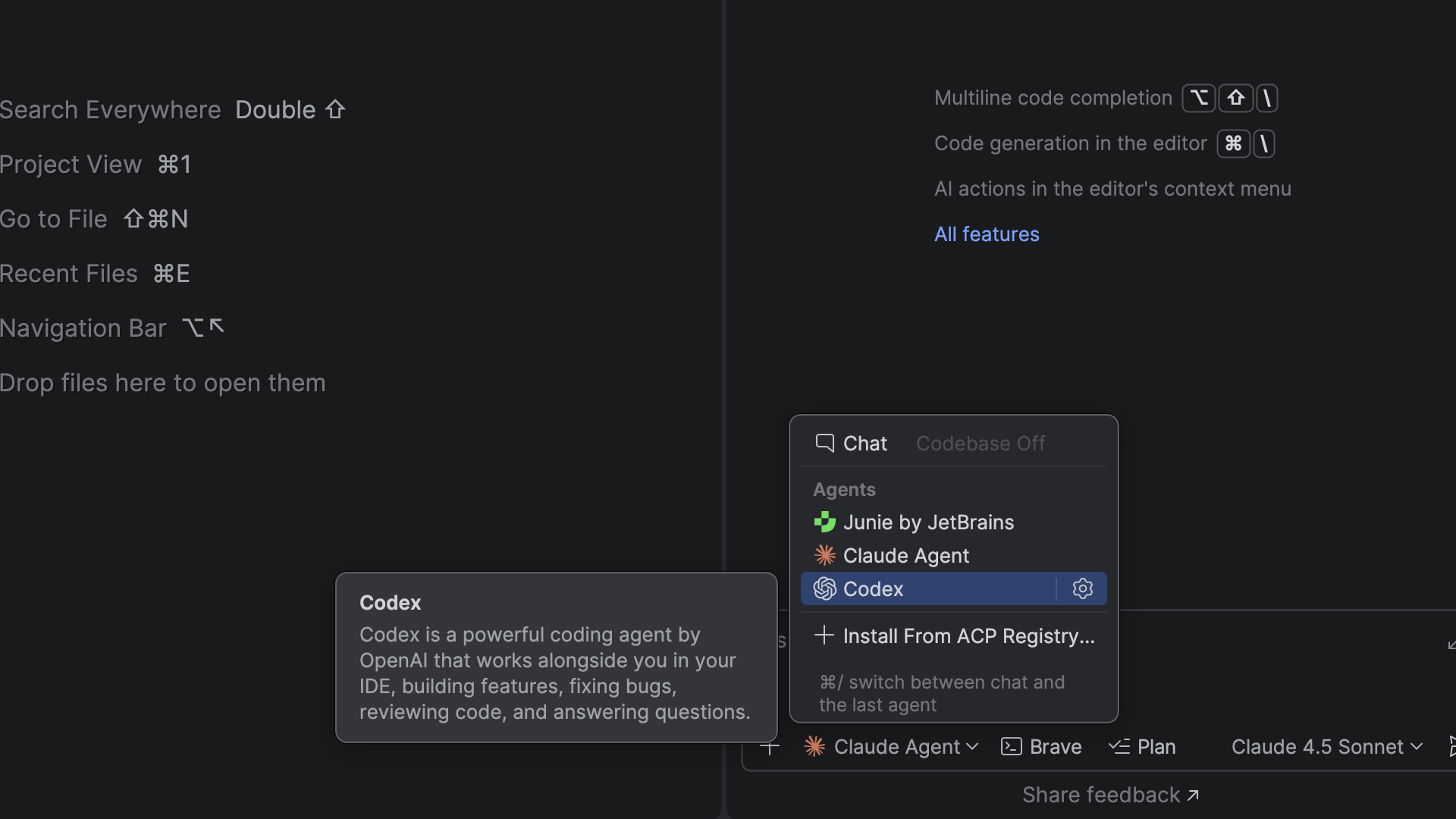
  • Junie, Claude Agent, and Codex available directly in the AI chat
  • ACP Registry for discovering and installing agents
  • Next edit suggestions

Better TypeScript support

  • Service-powered TypeScript engine enabled by default
  • Alignment with TypeScript 6
  • String-literal import/export support

Frameworks and technologies

  • Highlighting for new React directives
  • Angular 21 template syntax
  • Vue TypeScript integration updates
  • Astro language server configuration
  • Svelte generics support
  • Support for modern CSS color spaces

This release also includes numerous fixes and quality-of-life improvements to the support for TypeScript, React, Angular, Vue, Astro, Prettier, and more.

Want a guided tour of WebStorm 2026.1? Check out our livestream for a detailed walkthrough of the biggest updates in this release.

You can update to WebStorm 2026.1 via the Toolbox App or download it directly from our website.

DOWNLOAD WEBSTORM 2026.1

Highlights

AI

Junie, Claude Agent, and Codex available directly in the AI chat

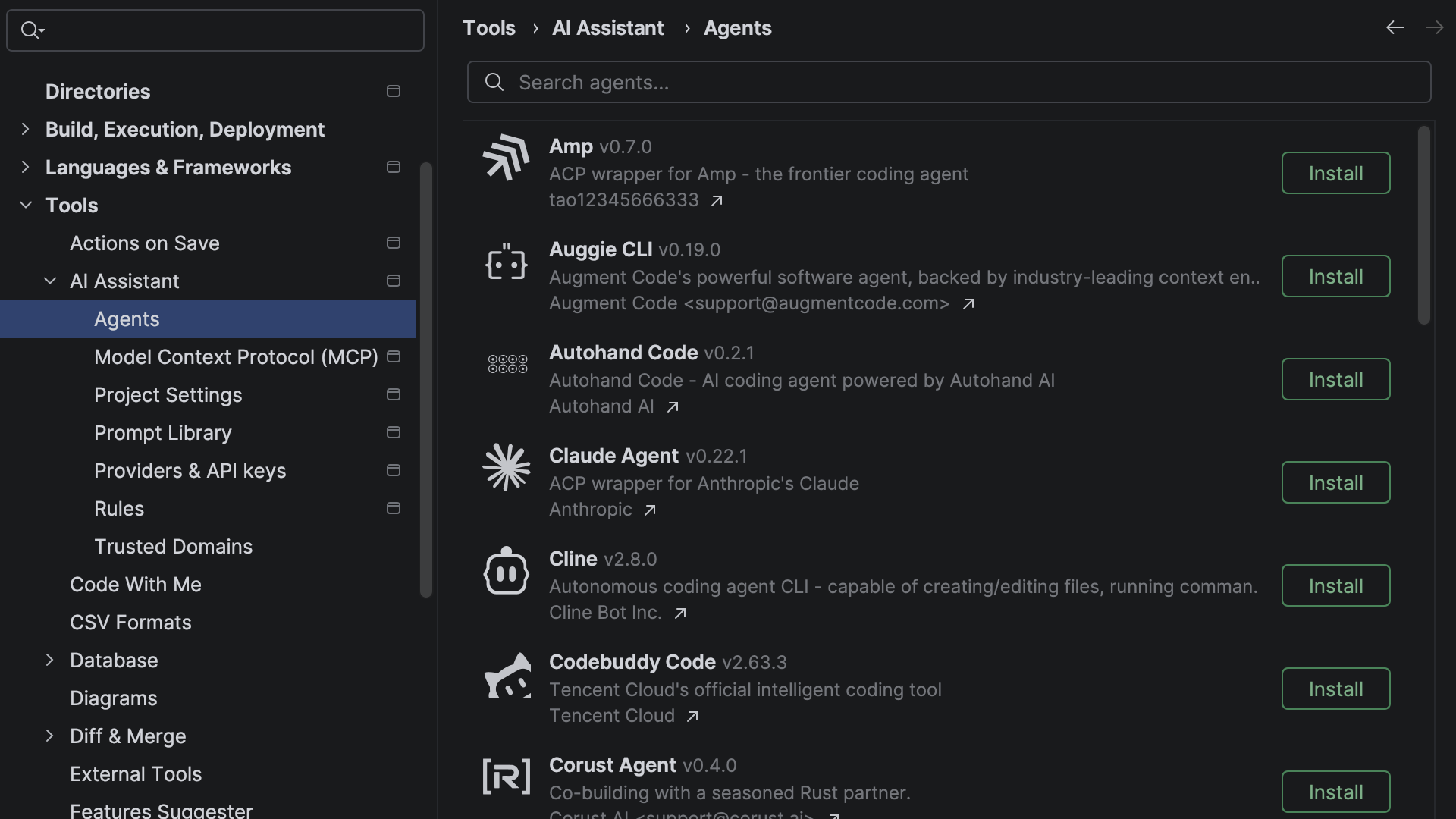
Different AI tools are good at different tasks, but switching between them can break your flow. In addition to Junie, Claude Agent, and most recently Codex, you can now choose from more agents in the AI chat, including Cursor, GitHub Copilot, and dozens of external agents supported via the Agent Client Protocol.

With the new ACP Registry, you can discover available agents and install them in just one click.

Next edit suggestions

Next edit suggestions are now available without consuming the AI quota of your JetBrains AI Pro, Ultimate, and Enterprise subscriptions. These suggestions go beyond traditional code completion for JavaScript, TypeScript, HTML, and CSS. Instead of updating only what’s at your cursor, they intelligently apply related changes across the entire file, helping you keep your code consistent and up to date with minimal effort.

This natural evolution of code completion delivers a seamless Tab Tab experience that keeps you in the flow.

TypeScript

More accurate and responsive TypeScript support

Large TypeScript codebases put constant pressure on the editor. WebStorm now uses the service-powered TypeScript engine by default, improving correctness while reducing CPU usage in large projects. That keeps navigation, inspections, and refactorings more responsive in everyday work.

Furthermore, if you use the TypeScript Go-based language server, WebStorm now also shows its inlay hints directly in the editor (WEB-75982).

TypeScript 6 support

Compiler defaults shape how a project behaves, so the editor needs to stay aligned with them. WebStorm 2026.1 follows the TypeScript 6 changes affecting the default types value (WEB-75541) and rootDir (WEB-75865). It also starts the process of bringing TypeScript config handling into alignment with the direction of TypeScript 7’s changes to baseUrl (WEB-76504).

String-literal import and export specifiers

WebStorm now understands string-literal names in import and export specifiers, so parsing, highlighting, navigation, and refactoring all work as expected for this standards-compliant syntax (WEB-72912, WEB-76597).

Example:

export { a as "a-b" };
import { "a-b" as a } from "./file.js";

Frameworks and technologies

Support for new React directives

Directive-based behavior is becoming more common in React, and you need to be able to spot it easily when reading a component. WebStorm now highlights the use memo and use no memo directives alongside use client and use server (WEB-75595).

Support for modern Angular template syntax

Angular templates keep getting more expressive, and the IDE’s support needs to keep pace. WebStorm 2026.1 adds support for arrow functions (WEB-76240), the instanceof operator (WEB-76528), regular expressions (WEB-75718), and spread syntax (WEB-76241) in Angular 21.x templates.

Updated Vue TypeScript integration

Reliable support in .vue files depends on staying in sync with the Vue TypeScript toolchain. WebStorm now uses @vue/typescript-plugin 3.1.8 ensuring compatibility with the latest features (WEB-75948).

Configurable Astro language server

Some Astro projects need more control over language server behavior than the defaults can provide. WebStorm now lets you pass your JSON configuration to the Astro language server directly from the IDE (WEB-75717).

Improved Svelte support

Working with typed Svelte components is easier when the IDE understands the framework-specific typing model. WebStorm now supports the generics attribute in <script> tags, enabling usage search, navigation to declarations, use of the Rename refactoring for type parameters, and the parsing of TypeScript constructs in the attribute value.

The IDE now also reports common problems relating to this feature, offers support for the @attach directive, and includes updates to the bundled svelte-language-server and typescript-svelte-plugin packages.

Modern CSS color support

Modern CSS color features are useful only if the editor can validate and preview them properly. WebStorm now supports the color() function in swatches and recognizes additional predefined CSS color spaces (WEB-76615).

That means newer color formats get proper previews and validation in the editor.

Editor and tooling improvements

Productivity

Native Wayland support

WebStorm now runs natively on Wayland by default. This transition provides Linux professionals with ultimate comfort through sharper HiDPI and better input handling, and it paves the way for future enhancements like Vulkan support.

While Wayland provides benefits and serves as a foundation for future improvements, we prioritize reliability: The IDE will automatically fall back to X11 in unsupported environments to keep your workflow uninterrupted. Learn more.

In-terminal completion

Stop memorizing commands. Start discovering them. In-terminal completion helps you instantly explore available subcommands and parameters as you type. Whether you’re working with complex CLI tools like Git, Docker, or kubectl or using your own custom scripts, this feature intelligently suggests valid options in real time.

Previously introduced for Bash and Zsh shells, it is now also available in PowerShell.

Sunsetting of Code With Me

As we continue to evolve our IDEs and focus on the areas that deliver the most value to developers, we’ve decided to sunset Code With Me, our collaborative coding and pair programming service. Demand for this type of functionality has declined in recent years, and we’re prioritizing more modern workflows tailored to professional software development.

As of version 2026.1, Code With Me will be unbundled from all JetBrains IDEs. Instead, it will be available on JetBrains Marketplace as a separate plugin. 2026.1 will be the last IDE version to officially support Code With Me, as we gradually sunset the service.

Read the full announcement and sunset timeline in our blog post.

Final words

WebStorm 2026.1 focuses on the places where the IDE’s quality most affects your everyday work, ensuring type checking stays responsive, framework support keeps up with the ecosystem, and your workflows let you stay in the editor instead of switching tools. For the complete list of changes, see the full release notes.
If you try the latest version in a real project, let us know what you like and where you run into trouble. Your feedback is what shapes the next release.

Expanding Our Core Web Development Support in PyCharm 2026.1

With PyCharm 2026.1, our core IDE experience continues to evolve as we’re bringing a broader set of professional-grade web tools to all users for free. Everyone, from beginners to backend-first developers, is getting access to a substantial set of JavaScript, TypeScript, and CSS features that were previously only available with a Pro subscription.

React, JavaScript, TypeScript, and CSS support

Leverage a comprehensive set of editing and formatting tools for modern web languages within PyCharm, including:

  • Basic React support with code completion, component and attribute navigation, and React component and prop rename refactorings.
  • Advanced import management:
    • Enjoy automatic JavaScript and TypeScript imports as you work.
    • Merge or remove unnecessary references via the Optimize imports feature.
    • Get required imports automatically when you paste code into the editor.
  • Enhanced styling: Access CSS-tailored code completion, inspections, and quick-fixes, and view any changes in real time via the built-in web preview.
  • Smart editor behavior: Utilize smart keys, code vision inlay hints, and postfix code completions designed for web development.

Navigation and code intelligence

Finding your way around web projects is now even more efficient with tools that allow for:

  • Pro-grade navigation: Use dedicated gutter icons for Jump to… actions, recursive calls, and TypeScript source mapping.
  • Core web refactorings: Perform essential code changes with reliable Rename refactorings and actions (Introduce variable, Change signature, Move members, and more).
  • Quality control: Maintain high code standards with professional-grade inspections, intentions, and quick-fixes.
  • Code cleanup: Identify redundant code blocks through JavaScript and TypeScript duplicate detection.

Frameworks and integrated tools

With the added essential support for some of the most popular frontend frameworks and tools, you will have access to:

  • Project initialization: Create new web projects quickly using the built-in Vite generator.
  • Standard tooling: Standardize code quality with integrated support for Prettier, ESLint, TSLint, and StyleLint.
  • Script management: Discover and execute NPM scripts directly from your package.json.
  • Security: Check project dependencies for security vulnerabilities.

We’re excited to bring these tried and true features to the core PyCharm experience for free! We’re certain these tools will help beginners, students, and hobbyists tackle real-world tasks within a single, powerful IDE. Best of all, core PyCharm can be used for both commercial and non-commercial projects, so it will grow with you as you move from learning to professional development.

IntelliJ IDEA 2026.1 Is Out!

IntelliJ IDEA 2026.1 is here, and it comes packed with an array of new features and enhancements to elevate your coding experience! 

You can download this latest release from our website or update to it directly from inside the IDE, via the free Toolbox App, or using snap packages for Ubuntu.

As always, all new features are brought together on the What’s New page, with detailed explanations and demos.

Explore the What’s New page

In addition to the What’s New page, our developer advocates got together to discuss and demonstrate the key updates. If you prefer watching to reading, check it out.

IntelliJ IDEA 2026.1 brings built-in support for more AI agents, including Codex, Cursor, and any ACP-compatible agent, and delivers targeted, first-class improvements for Java, Kotlin, and Spring. The release also advances IntelliJ IDEA’s mission to provide support for the latest languages and tools from day one.

Any agent, built-in:

  • ACP Registry: Browse and install AI agents in one click.
  • Git worktrees: Work in parallel branches and hand one off to an agent while you keep moving in another.
  • Database access for AI agents: Let Codex or Claude Agent query and modify your data sources natively.

Intelligence in the platform:

  • Quota-free next edit suggestions: Propagate changes throughout a given file with IDE-driven assistance.
  • Spring runtime insight: Inspect injected beans, endpoint security, and property values without pausing execution.
  • Kotlin-aware JPA: Detect and fix Kotlin-specific pitfalls in Jakarta Persistence entities.

First-class language support:

  • Java 26: Enjoy day-one support, including preview features.
  • Kotlin 2.3.20: Enjoy day-one support, including experimental features.
  • C/C++ in IntelliJ IDEA: Access first-class C/C++ coding assistance for multi-language projects.
  • Support for JavaScript without an Ultimate subscription.

Productivity and environment:

  • Expanded command completion, now with AI actions, postfix templates, and config file support.
  • Better performance for large-scale TypeScript projects.
  • Native Dev Container workflow: Open containerized projects as if they were local.

Along with new features, 2026.1 delivers numerous stability, performance, and usability improvements across the platform. These are described in a separate What’s Fixed blog post.

As always, your feedback plays an important role in shaping IntelliJ IDEA. Tell us what you think about the new features and help guide future improvements.

Join the discussion on X, LinkedIn, or Bluesky, and if you encounter any issues, please report them via YouTrack.

For full details of the improvements introduced in version 2026.1, refer to the release notes.

Thank you for using IntelliJ IDEA. Happy developing!

What’s fixed in IntelliJ IDEA 2026.1

Welcome to the overview of fixes and improvements in IntelliJ IDEA 2026.1.

In this release, we have resolved over 1,000 bugs and usability issues, including 334
reported by users. Below are the most impactful changes that will help you work with greater confidence every day.

Performance

We continue to prioritize reliability, working to improve application performance, fix freezes, optimize operations, and cover the most common use cases with metrics. Using our internal tools, we identified and resolved 40 specific scenarios that caused UI freezes.

However, internal tooling alone cannot uncover every issue. To identify additional cases, we enabled automatic error and freeze reporting in EAP builds. By collecting this data, we gain a real, unfiltered picture of what’s going wrong, how often it happens, and how many users are affected. This allows us to prioritize fixes based on real impact rather than guesswork.

As always, we prioritize your privacy and security. When using EAP builds, you maintain full control and can disable automatic error and freeze reporting in Settings | Appearance & Behavior | System Settings | Data Sharing. Thank you for helping us build better tools!

Terminal

Version 2026.1 enhances your productivity by streamlining the experience offered by the terminal, a crucial workspace for developer workflows involving CLI-based AI agents.

First, we fixed the Esc behavior – it is now handled by the shell instead of switching focus to the editor, so it does not break the AI-agent workflow. Additionally, Shift+Enter now inserts a new line, making it easier to write multi-line prompts and commands directly. This behavior can be disabled in Settings | Advanced Settings | Terminal.

We also improved the detection of absolute and relative file paths in terminal output, allowing you to open files and folders with a single click in any context. When you encounter compilation or build errors, or submit a task to an AI coding agent, you can jump directly to the referenced file and review or fix issues faster.

Link navigation is activated by holding Ctrl (or Cmd on macOS) and clicking – just like in external terminals.

JVM language support

Better Kotlin bean registration support

Kotlin’s strong DSL capabilities are a perfect fit for Spring Framework 7’s BeanRegistrar API. In 2026.1, we’ve made working with programmatic registration as productive as annotation-based configuration.

The IDE ensures complete visibility into your application structure thanks to the Structure tool window, providing better endpoint visibility, intuitive navigation with gutter icons, integrated HTTP request generation, and path variable support.

New Kotlin coroutine inspections

To help maintain code quality, we’ve introduced a set of new inspections for the Kotlin coroutines library, covering common pitfalls.

Read more about coroutine inspections in this article.

Scala

Working with sbt projects inside WSL and Docker containers is now as smooth as working with local projects. We’ve also improved code highlighting performance and sped up sbt project synchronization.

To reduce cognitive load and provide a more ergonomic UI, we’ve redesigned the Scala code highlighting settings. A new Settings page consolidates previously scattered options, making them cleaner, more intuitive, and easier to access.

You can now disable built-in inspections when compiler highlighting is sufficient, or configure compilation delay for compiler-based highlighting. Settings for Scala 2 and Scala 3 projects are now independent, and the type-aware highlighting option has been integrated with the rest of the settings.

You can read more about these updates this article.

Spring

Spring support remains a core focus for IntelliJ IDEA. We are committed to maximizing reliability and reducing friction in your daily development.

In this release, we made a dedicated effort to address issues related to running Spring Boot application from the IDE. There are now even fewer reasons to run your application in the terminal – just run it in the IDE and use the debugger when you need deeper insights.

Spring Boot 4 API versioning support

This is a new Spring Boot feature, and we keep improving its support based on your feedback. In this version, we added .yml files support for version configuration, fixed false positives and added a couple of useful inspections, so you get an instant feedback about issues without running the app.

Flyway DB Migrations

To ensure a reliable and distraction-free experience, the IDE now verifies migration scripts only when a data source is active, eliminating false-positive errors when the data source is disconnected.

At the same time, Flyway scripts got correct navigation to the table definitions, and SQL autocompletion for any files and tables defined in them.

User interface

With IntelliJ IDEA 2026.1, we’ve continued to prioritize ultimate comfort and an ergonomic UI, ensuring your workspace is as accessible and customizable as your code.

The long-awaited ability to sync the IDE theme with the OS is now available to Linux users, bringing parity with macOS and Windows. Enable it in Settings |Appearance & Behavior | Appearance.

The code editor now supports OpenType stylistic sets. Enjoy more expressive typography with your favorite fonts while coding. Configure them via Editor |Font, and preview glyph changes instantly with a helpful tooltip before applying a set.

Windows users who rely on the keyboard can now bring the IDE’s main menu into focus by pressing the Alt key. This change improves accessibility for screen reader users.

Version control

We continue to make small but impactful improvements that reduce friction and support your everyday workflow.

You can now amend any recent commit directly from the Commit tool window – no more ceremonies involving interactive rebase. Simply select the target commit and the necessary changes, then confirm them – the IDE will take care of the rest.

In addition to Git worktrees, we’ve improved branch workflows by introducing the Checkout & Update action, which pulls all remote changes.

Furthermore, fetching changes can now be automated – no need for a separate plugin. Enable Fetch remote changes automatically in Settings | Git.

In-IDE reviews for GitLab merge requests now offer near feature parity with the web interface. Multi-line comments, comment navigation, image uploads, and assignee selection when creating a merge request are all available directly in the IDE, so you can stay focused without switching to the browser.

The Subversion, Mercurial, and Perforce plugins are no longer bundled with the IDE distribution, but you can still install them from JetBrains Marketplace.

Databases

We’ve enhanced the Explain Plan workflow with UI optimizations for the Query Plan tab, an additional separate pane for details about the execution plan row, inner tabs that hold flame graphs, and an action to copy the query plan in the database’s native format.

JetBrains daemon

IntelliJ IDEA 2026.1 includes a lightweight background service – jetbrainsd – that handles jetbrains:// protocol links from documentation, learning resources, and external tools, opening them directly in your IDE without requiring you to have the Toolbox App running.

Sunsetting of Code With Me

As of version 2026.1, Code With Me will be unbundled from all JetBrains IDEs and will instead be available as a separate plugin on JetBrains Marketplace. Version 2026.1 will be the last IDE release to officially support Code With Me as we gradually sunset the service.

Read the full announcement and timeline in our blog post.

Enhanced AI management and analytics for organizations

We are working hard to provide development teams with centralized control over AI and built-in analytics to understand adoption, usage, and cost. As part of the effort, we’ve introduced the JetBrains Console. It adds visibility into how your teams use AI in practice, including information about active users, credit consumption, and acceptance rates for AI-generated code.

The JetBrains Console is available to all organizations with a JetBrains AI subscription, providing the trust and visibility required to manage professional-grade development at any scale.

That’s it for this overview.

Let us know what you think about the fixes and priorities in this release. Your feedback helps us steer the product so it works best for you!

We’d also love to hear your thoughts on this overview and the format in general.

Update to IntelliJ IDEA 2026.1 now and see how it has improved. Don’t forget to join us on X , Bluesky, or LinkedIn and share your favorite updates.

Thank you for using IntelliJ IDEA!