Human Strategy In An AI-Accelerated Workflow

I’ve been working in User Experience design for more than twenty years. Long enough to have seen the many job titles, from when stakeholders asked us to “just make it pretty” to when wireframes were delivered as annotated PDFs. I’ve seen many tools come and go over the years, methodologies rise and fall, and entire platforms disappear.

Yet, nothing has unsettled designers quite like AI.

When generative AI tools first entered my workflow, my reaction wasn’t excitement — it was unease, with a little bit of curiosity. Watching an interface appear in seconds, complete with sensible spacing, readable typography, and halfway-decent copy, triggered a very real fear: If a machine can do this, where does that leave me?

That fear is now widespread. Designers at every level ask the same question, often quietly, “Will an AI agent replace me by next week/month/year?” While the difference between next week and next year seems a lot, it depends on where you are in your career and the speed at which your employer chooses to engage with AI tools. I have been lucky in several roles to be working with organisations that haven’t allowed the use of AI tools due to data security concerns. If you’re interested in any of these conversations, you can view the discussions happening on platforms like Reddit.

Fearing the takeover of AI in our roles is not irrational. We’re seeing AI generate wireframes, prototypes, personas, usability summaries, accessibility suggestions, and entire design systems. Tasks that once took days can now literally take minutes.

Here’s the uncomfortable truth: If your role is largely about producing artefacts, drawing buttons, aligning components, or translating instructions into screens, then parts of that work are already being automated.

Still, UX design has never truly been about just creating a user interface.

UX is about navigating ambiguity. It’s about advocating for humans in systems optimised for efficiency. It’s about translating messy human needs and equally messy business goals into experiences that feel coherent, fair, sensible, and usable. It’s about solving human problems by creating a useful and effective user experience.

AI isn’t replacing that work. Rather, it’s amplifying everything around it. The real shift happening is that designers are moving from being makers of outputs to directors of intent. From creators to curators. From hands-on executors to strategic decision-makers. That feels exciting to me. And the creativity and ingenuity this brings to the world of UX.

And that shift doesn’t reduce our value as UX designers, but it does redefine it.

What AI Does Better Than Us (The “Boring” Stuff)

Let’s be clear, AI is better than humans at certain aspects of design work. Fighting that reality only keeps us stuck in fear.

Speed And Volume

AI is exceptionally good at generating large volumes of ideas quickly. For example, layout variations, copy options, component structures, and onboarding flows can all be produced in seconds. In early-stage design, this changes everything. Instead of spending hours sketching three concepts, you can review thirty. That doesn’t eliminate creativity but does expand the playground.

McKinsey estimates that generative AI can reduce the time spent on creative and design-related tasks by up to 70%, particularly during ideation and exploration phases.
AI can also help with the research side of UX, for example, exploring the habits of a certain demographic, and creating personas. While this can reduce research time required, the designer is still required to guardrail this by providing accurate prompts and reviewing generated responses. I have personally found that using AI to assist with the initial research for design projects is incredibly useful, specifically when there is limited time and access to users.

Consistency And Rule Adherence

Design systems live or die by consistency. AI excels at following rules relentlessly, colour tokens, spacing systems, typography scales, and accessibility standards. It doesn’t forget. It doesn’t get tired. It doesn’t “eyeball it.”

AI’s precision makes it incredibly valuable for maintaining large-scale design systems, especially in enterprise or government environments where consistency and compliance matter more than novelty. This is one component of my UX role that I am happy to hand over to AI to manage!

Data Processing At Scale

AI can analyse behavioural data at volumes challenging, if not impossible, for a human team to reasonably process. User journey paths, scroll depth, heatmaps to identify mouse interactions, conversion funnels — AI can identify patterns and anomalies almost instantly.

Behavioural analytics platforms increasingly rely on AI to surface insights that designers might otherwise miss. Contentsquare, an AI-powered analytics platform, talks about the impacts and benefits of utilising behavioural analytics data. I’ve always said that quantitative data tells us the “what”, and qualitative data tells us the “why”. This is the human component of research where we get to connect with the users to understand the reason driving the behaviour.

The key insight here is simple: Analysing large volumes of behavioural data was never where our highest value lay.

If AI can take on repetitive production, system enforcement, and raw data analysis, designers would be free to focus on interpretation, judgment, and human meaning, the hardest parts of the job.

What Humans Do Better Than AI (The “Heart” Stuff)

For all its power, AI has a fundamental limitation: it has never and will never be human.

Empathy Is Lived Experience

AI can describe frustration. It can summarise user feedback. It can mimic empathetic language. But it has never felt the quiet rage of a broken form, the anxiety of submitting sensitive data, or the shame of not understanding an interface that assumes too much.

Empathy in UX isn’t a dataset. It’s a lived, embodied understanding of human vulnerability. This is why user interviews still matter. Why contextual inquiry still matters. Why designers who deeply understand their users consistently make better decisions.

In a previous role where I was designing an incredibly complex fraud alert platform, the key to successful outcomes of that design was based on my understanding of the variety of issues faced by customers. I accessed this information directly from members of the customer-facing team. This information was stored in their brain and based on direct experience with customers. No AI could know or access these goldmines of human experiences.

As the Nielsen Norman Group reminds us, good UX design is not about interfaces. It’s about communication and understanding.

Ethics Require Judgment

AI optimises for the objectives we give it. If the goal is engagement, it will try to maximise engagement — regardless of long-term harm.

It doesn’t inherently recognise dark patterns, manipulation, or emotional exploitation. Infinite scroll, variable rewards, and addictive loops are all patterns AI can enthusiastically optimise unless a human intervenes.

The Center for Humane Technology has documented how algorithmic optimisation can unintentionally undermine wellbeing.

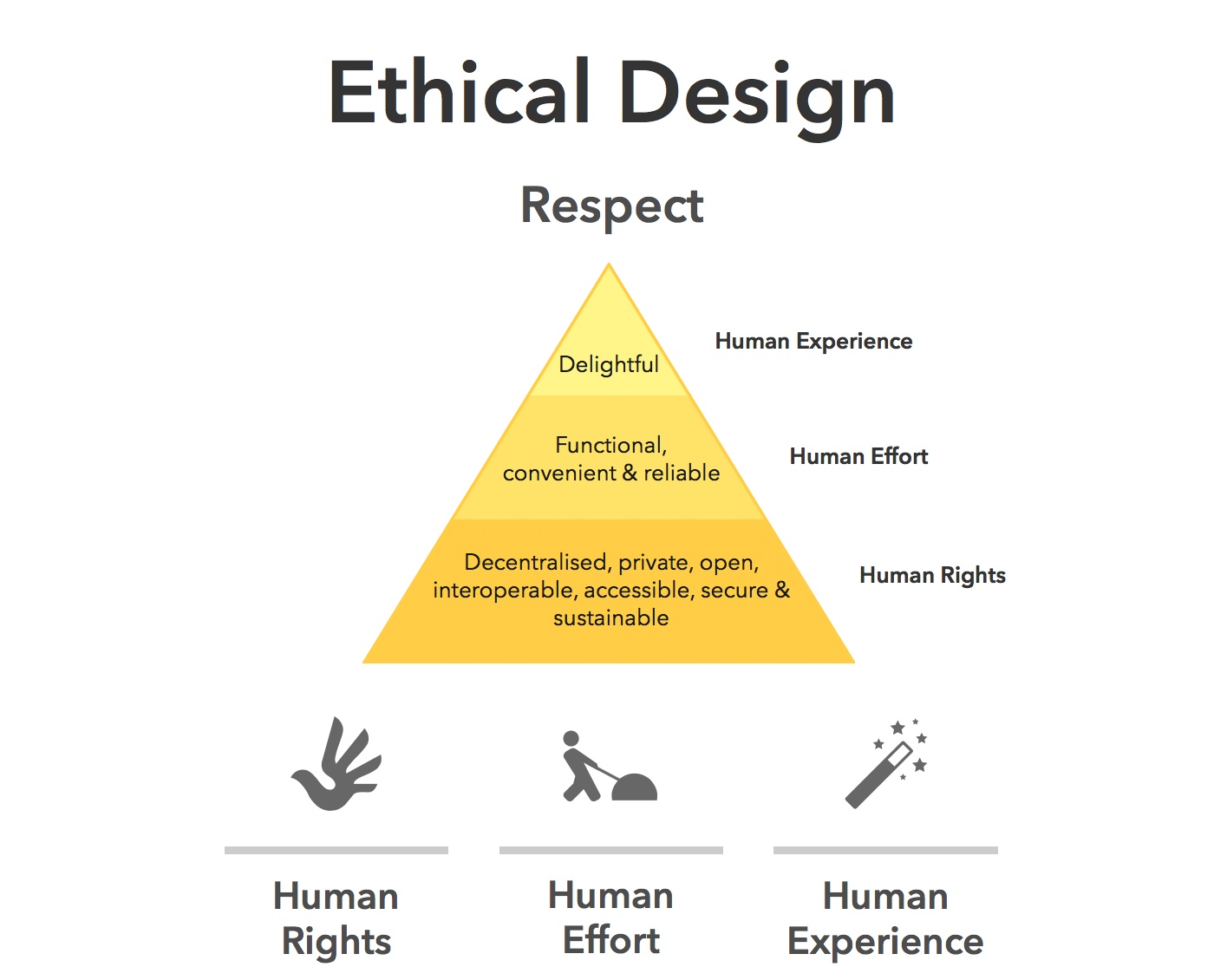
Ethical UX design requires designers who can say, “We could do this, but we shouldn’t.”
Strategy Lives In Context

AI doesn’t sit in stakeholder meetings. It doesn’t hear what’s implied but not stated. It doesn’t understand organisational politics, regulatory nuance, or long-term positioning.

Designers act as translators between business intent and human impact. That translation relies on trust, relationships, and context, not pattern recognition.

This is why senior designers increasingly operate at the intersection of product, strategy, and culture.

The lesson is clear: As AI takes over execution, human designers become the guardians of intent.

How The Daily Work Of A Designer Is Changing

This shift isn’t theoretical. It’s already reshaping daily design practice.

From Designing To Prompting

Designers are moving from manipulating pixels to articulating intent. Clear goals, constraints, and priorities become the input.

Instead of asking AI to “draw a dashboard,” the task becomes:

  • “Create a dashboard that reduces cognitive load for first-time users.”
  • “Explore layouts optimised for accessibility and low vision.”

Prompting isn’t about clever wording; it’s about clarity of thinking and understanding the intent of the outcomes. You may need to tweak your prompts as you go, but this is all part of the learning process of directing AI to deliver the outcomes needed.
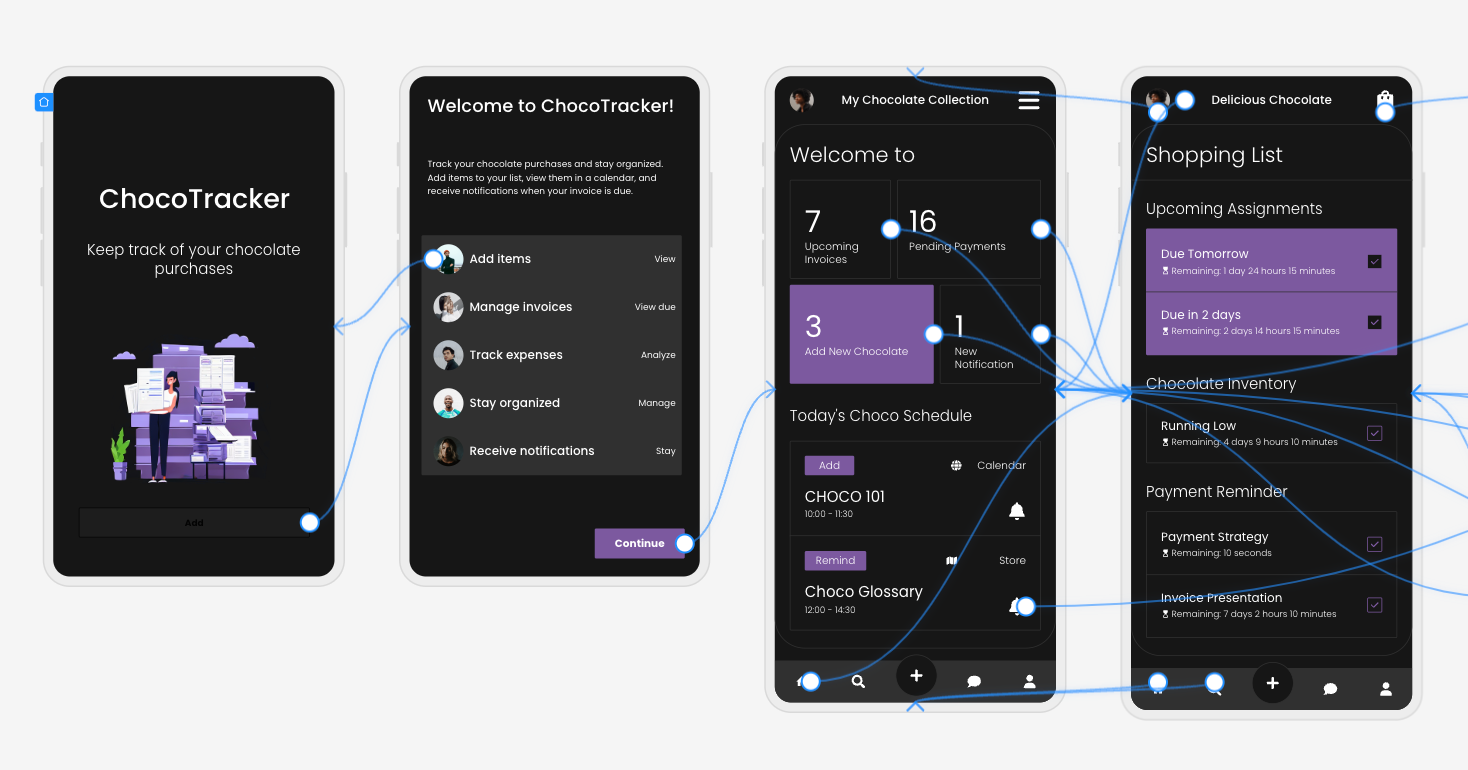
From Making To Choosing

AI produces options. Designers make decisions.

A significant portion of future design work will involve reviewing, critiquing, and refining AI-generated outputs, and then selecting what best serves the user and aligns with ethical, business, and accessibility goals.

This mirrors how experienced designers already work: mentoring juniors, reviewing their concepts, and guiding direction, but at a much greater scale, given the sheer number of design options AI tools can generate.

The Movie Director Metaphor

I often describe the modern designer as a movie director. A director doesn’t operate the camera, build the set, or act every role, but they are responsible for the story, the emotional intent, and the audience experience.

AI tools are the crew. Designers are responsible for the meaning of the story.

A Real-World Shift: What This Looks Like In Practice

To make this less abstract, let’s ground it in a familiar scenario.

Ten years ago, a designer might spend days producing wireframes for a new feature, carefully crafting each screen, annotating every interaction, and defending each decision in reviews. Much of the designer’s perceived value lived in the artefacts themselves.

Today, that same feature can be scaffolded in an afternoon with AI support. But here’s what hasn’t changed — the hard conversations.

The UX designer still has to ask:

  • Who is this actually for?
  • What problem are we solving, and for whom?
  • What happens when this fails?
  • Who might this unintentionally exclude or disadvantage?

In practice, I’ve seen senior designers spend less time inside design tools and more time facilitating workshops, synthesising messy inputs, mediating between stakeholders, and protecting user needs when trade-offs arise.

AI accelerates production, but it does not remove the designer’s responsibility. In fact, it increases it. When options are cheap and plentiful, discernment becomes a scarce skill.

Conclusion: How To Prepare Right Now

Don’t panic — practice.

Avoiding AI won’t preserve your relevance. Learning to use it thoughtfully will.

Start small:

  • Explore Figma’s AI features.
  • Use AI for ideation, not final decisions.
  • Treat outputs as conversation starters, not answers.

Confidence comes from familiarity, not avoidance.

Invest In Human Skills.

The most resilient designers will double down on:

  • Psychology and behavioural science;
  • Communication and facilitation;
  • Ethics, accessibility, and inclusion;
  • Strategic thinking and storytelling.

These skills compound over time, and they can’t be automated.

The designer’s responsibility in an AI-accelerated world:

There’s an uncomfortable implication in all of this that we don’t talk about enough: when AI makes it easier to design anything, designers become more accountable for what gets released into the world. Bad design used to be excused by constraints. Limited time, limited tools, limited data. Those excuses are disappearing. When AI removes friction from execution, the ethical and strategic responsibility lands squarely on human shoulders.

This is where UX designers can, and must, step up as stewards of quality, accessibility, and humanity in digital systems.

Final Thought

AI won’t take your job. But a designer who knows how to think critically, direct intelligently, and collaborate effectively with AI might take the job of a designer who doesn’t.

The future of UX is no less human. It’s more intentional than ever.

PDFWorkSpace (Local, In-Browser PDF toolkit) – Reaching 5k+ Users and What’s Coming Next

A few weeks ago I started building PDFWorkSpace — a simple tool to help people work with PDFs faster and in-browser so no need to upload your private document to someone else server.

Today the project crossed 5k+ users, which honestly feels surreal for something that started as a small side project.

pdfwork.space

Why I Built PDFWorkSpce

I kept running into the same annoying problem: most PDF tools online are either upload your private PDFs to servers, slow, bloated, or locked behind paywalls.

So I decided to build something different:

  • no-upload, no-server, no drama (privacy++)
  • fast and simple
  • focused on real use cases
  • local, in-browser

The goal was straightforward: make working with PDFs frictionless.

Early Traction

Over the past few weeks the platform reached:

  • 5,000+ users
  • steady organic traffic ( reddit, dev.io, whatsapp, discord )
  • users from multiple countries
  • consistent daily usage

Most of the growth has been organic, which is the best validation you can get when building a product.

What’s Coming in V2

We’re currently working on PDFWork V2, which will launch once we hit 7,000 users.

V2 will introduce one of the most powerful features for working with PDFs, designed to make document workflows significantly easier.

I can’t reveal everything yet, but the goal is to push PDF tools beyond the usual “merge/split/compress” utilities.

Lessons From Building This

A few things became very clear while building this:

  1. People still need simple tools that just work
  2. Speed matters more than feature overload
  3. Shipping fast is better than waiting for perfection

Small tools solving real problems can reach users surprisingly quickly.

Try It Out

If you work with PDFs often, give it a try:

https://pdfwork.space

Feedback is always welcome.

And if you’re building something yourself — keep shipping.

Open source Intercom & CCTV platform with Mobile apps, Face and LP Recognition, Media Server (GPLv3)

My team are building an open-source IP/SIP intercom + video surveillance platform (GPLv3).

Project site: https://sesameware.com

Core ideas

No vendor lock-in: designed to work with SIP intercoms and CCTV that expose an open API.

Modular setup: you can start small (a private house) and scale up to apartment buildings / residential complexes / districts / even a city.

What you can build

  • IP/SIP intercom for entrances, gates, barriers
  • Video surveillance (live + archive) with modern server-side + admin panel (we also maintain a built-in free media server (based on ffmpeg) for mobile live + archive access: Simple-DVR)
  • Mobile apps for residents (iOS/Android)
  • Desktop web client for security/concierge teams
  • Ticketing & field service workflows (task tracking + planning + PWA for technicians)
  • Optional face recognition + license plate recognition (FALPRS)
  • Integrations with billing/CRM/payments and external systems

Localization

The project is currently localized for English, Russian, Kazakh, Uzbek, Bulgarian, Arabic, Armenian.
If you’d like to help, we’d love contributions for new languages (translations, terminology review, UI copy improvements, etc.).

Repositories

  • Server (RBT): https://github.com/rosteleset/SmartYard-Server
  • Simple-DVR media server (live + archive): https://github.com/rosteleset/Simple-DVR
  • iOS app: https://github.com/rosteleset/SmartYard-iOS
  • Android app: https://github.com/rosteleset/SmartYard-Android
  • FALPRS (faces + plates): https://github.com/rosteleset/falprs
  • Fieldworker PWA (RBT-TT): https://github.com/rosteleset/SmartYard-TT-PWA
  • Desktop web client: https://github.com/rosteleset/SmartYard-Vue
  • Web extensions examples: https://github.com/rosteleset/SmartYard-web

Who this might be useful for

  • ISPs / telecom operators
  • property management companies
  • intercom installation & service teams
  • building owners who want an open source self-hosted platform

Invitation

You’re welcome to use this project for free to build your own ideas/products/solutions — and if you like it, I’d love to invite you to contribute (issues, PRs, docs, localization, testing with new SIP intercoms/cameras, integrations, packaging/deployment improvements, etc.).

If you’re interested, I’d really appreciate:

  • feedback on the architecture and docs
  • suggestions on what hardware models we should prioritize next
  • contributors/users who want to try it in their environment

Thanks! 🙌

A Cookie Banner Listed 1,467 Partners — So I Used AI to Unmask Them

The Moment That Started It All

Someone sent me a link to an article on the Bristol Post — a local UK news site — and when I clicked on it, a consent dialog popped up. Nothing unusual there. But something made me look closer at the fine print this time. The dialog was asking me to agree to share my data with 1,467 partners.

One thousand, four hundred and sixty-seven.

Consent Dialog

So I did what anyone would do — I tried to find out more. I clicked and scrolled through the partner list in the dialog, clicking into individual entries, reading purpose descriptions and “legitimate interest” declarations and quickly fell into a rabbit hole. Hundreds of company names I’d never heard of, vague descriptions of data processing purposes, toggles nested inside toggles. After ten minutes I was no closer to understanding what any of these companies actually did with my data, or why a local news article needed nearly fifteen hundred of them. The dialog was technically giving me information, but in practice it told me almost nothing.

That’s when I thought: there has to be a better way to find out what’s really going on. And the result is an open-source tool called Meddling Kids.

The Illusion of Choice

A recent BBC article titled “We have more privacy controls yet less privacy than ever” hit the nail on the head. We’re surrounded by cookie banners, privacy settings, and consent dialogs — yet somehow we end up with less privacy, not more. The article cites Cisco’s 2024 Consumer Privacy Survey: 89% of people say they care about data privacy, but only 38% have actually done anything about it.

And honestly, can you blame the other 62%? The consent mechanism is designed to exhaust you into clicking “Accept”. The alternative is scrolling through hundreds of partner names, deciphering purposes written in legalese, and toggling individual switches — all before you can read the article you came for. Dr Carissa Veliz, author of Privacy is Power, put it well: “Mostly, people don’t feel like they have control.”

As a software engineer, that felt like an itch I could at least start to scratch. If I could automate the process of visiting a site, accepting its consent dialog, and then capturing exactly what happens behind the scenes — cookies dropped, scripts loaded, network requests fired, storage written — maybe I could pull the mask off what’s really going on.

Enter the Meddling Kids

Meddling Kids is a Scooby-Doo inspired privacy analysis tool, because they always unmasked the villain in the end. You give it a URL, it visits the site in a real browser, detects and dismisses the consent dialog, and then captures everything: cookies, scripts, network traffic, localStorage, sessionStorage, and more. It then uses AI to analyse all of that data and produce a privacy report with a deterministic score out of 100.

The tech stack is a Vue 3 + TypeScript frontend with a Python FastAPI backend. Browser automation is handled by Playwright, running in headed mode on a virtual display (Xvfb) so that ad networks don’t block it for being headless. Results stream to the UI in real time via Server-Sent Events.

But the interesting part is how AI is woven into pretty much every stage of the analysis doing what it is good at – analysing large amounts of data quickly.

AI All the Way Down

Vision Models for Consent Detection

The first challenge is detecting the consent dialog itself. These overlays vary wildly across sites — different consent management platforms, different layouts, different button labels. A brittle CSS selector approach wasn’t going to cut it.

Instead, Meddling Kids takes a screenshot of the loaded page and sends it to a vision-capable LLM. The model looks at the screenshot and identifies whether an overlay is present, what type it is (consent dialog, paywall, sign-in prompt, etc.), and the exact text of the button to click. If the model is confident enough, Playwright clicks that button, and the tool captures a before-and-after comparison.

There’s a fallback chain too: if the vision call times out or can’t parse the dialog, a text-only LLM attempt runs against the page content, and if that also fails, a local regex parser takes over. No single point of failure.

Structured Analysis with the Microsoft Agent Framework

Under the hood, the analysis pipeline uses the Microsoft Agent Framework to orchestrate eight specialised AI agents. Each agent has a focused role — consent extraction, tracking analysis, script classification, cookie explanation, storage analysis, report generation, and summary findings — and they coordinate through a concurrent pipeline with controlled parallelism.

The structured report agent, for example, generates ten report sections in parallel, while a global semaphore limits concurrent LLM calls to avoid overwhelming the endpoint. Each agent uses structured output with JSON schemas and Pydantic models, so the responses are deterministic and parseable — no fragile prompt-and-pray string parsing.

The Pipeline

The whole analysis runs as a six-phase streaming pipeline over SSE, so results appear in the UI as they happen rather than after a long wait:

Meddling Kids in action

  1. Navigation — Playwright opens an isolated browser context, navigates to the URL, and waits for the network to settle and content to render.
  2. Page load and access check — Detects bot protection or access denied responses and bails out early if the site blocks us.
  3. Initial data capture — Snapshots cookies, scripts, network requests, and storage before any consent interaction. This is the pre-consent baseline — anything captured here was tracking you before you clicked a thing.
  4. Overlay handling — The vision model detects overlays, Playwright clicks through them, and a consent extraction agent pulls out partner lists, purposes, and CMP details. TC and AC consent strings are decoded and vendor IDs resolved against the IAB Global Vendor List and Google’s ATP provider list.
  5. Concurrent AI analysis — Three workstreams run in parallel: script grouping and classification, a structured ten-section privacy report, and a tracking risk analysis. Once the tracking analysis finishes, a summary agent distils everything into prioritised findings. A global semaphore caps concurrent LLM calls at ten to avoid hammering the endpoint.
  6. Completion — The final privacy score, report, and summary stream back to the client.

Making Sense of the Data

A single news site analysis can surface hundreds of cookies, dozens of scripts, and thousands of network requests. No human is going to read through all of that manually, and that’s exactly the point — the consent dialogs are counting on it.

The AI doesn’t work in a vacuum though. Bundled with the tool are local databases sourced from public and permissively licensed sources that provide grounding context for the analysis — a form of RAG without a vector store. These include over 19,000 known tracker domains (from Privacy Badger, AdGuard, and EasyPrivacy), nearly 500 script URL patterns, the full IAB Global Vendor List (1,111 TCF vendors), Google’s ATP provider list (598 providers), cookie and storage pattern databases, CMP platform signatures, 574 partner risk profiles across eight categories, and media group profiles for 16 UK publishers. This reference data is injected into agent prompts so the LLM can match what it finds against known entities rather than guessing — and it means a large chunk of the classification is deterministic before the model even gets involved.

The AI agents summarise what the tracking data actually means in plain language. They surface the risk: which cookies are from data brokers, which scripts are fingerprinting you, which network requests fire before you’ve even had a chance to consent. The tool also decodes IAB TCF consent strings (those opaque euconsent-v2 values) and Google’s Additional Consent strings to show exactly which vendors and purposes are encoded.

Perhaps most usefully for non-technical users, there’s a “What You Agreed To” digest — a two to three sentence summary, written at roughly a 12-year-old reading level, explaining what clicking “Accept” actually meant. Something like: “By clicking Accept, you allowed 847 companies to track your browsing activity and share data about you, including with data brokers.”

Smart Caching to Keep Costs Down

Running vision and language models isn’t free, so the tool caches aggressively. Script analysis is cached by script domain, not by the site being scanned — so a Google Ads script analysed on one site is an instant cache hit when the same script appears on another. Overlay dismissal strategies are cached per domain too. In testing against a large news site, a cold run made 72 LLM script calls while subsequent warm runs made zero.

Try It Yourself

The whole thing is open source under AGPL-3.0, and you can pull a pre-built Docker image from GitHub Container Registry and have it running in minutes:

docker run -p 3001:3001 
  -e AZURE_OPENAI_ENDPOINT=https://your-resource.openai.azure.com/ 
  -e AZURE_OPENAI_API_KEY=your-api-key 
  -e AZURE_OPENAI_DEPLOYMENT=your-deployment 
  ghcr.io/irarainey/meddlingkids:latest

It works with both Azure OpenAI and standard OpenAI — you just need to bring your own model with vision capabilities. I used gpt-5.2-chat for the main analysis and vision work, and gpt-5.1-codex-mini for script analysis. Point your browser at http://localhost:3001 and start unmasking.

If you prefer you can also clone the repo and run it locally with Python and Node in the devcontainer, or build the Docker image yourself using the docker compose file included docker compose up --build.

Everything you need to get going — setup, configuration options, Docker Compose, local development — is in the README on GitHub.

What I Learned

Building this tool confirmed what I suspected: the scale of tracking on mainstream websites is genuinely staggering. Some UK news sites drop cookies before you’ve even interacted with the consent dialog. Scripts from dozens of advertising, analytics, and fingerprinting vendors fire immediately on page load. The consent dialog is, in many cases, a formality — collecting retroactive approval for tracking that’s already underway.

Prof Alan Woodward from Surrey University, quoted in that BBC article, argues that when people assume they’re constantly tracked, they self-censor, and that harms free speech and weakens democracy. It’s a strong claim, but spend a few minutes watching the tracker graph light up on a typical news site and it starts to feel less academic.

I don’t think the answer is purely technical. Better regulation, better enforcement, and a cultural shift around data privacy all matter more than any tool I can build. But as software engineers, we’re in a unique position to make the invisible visible. If nothing else, Meddling Kids lets you see exactly what you’re agreeing to — and maybe that’s worth knowing before you click “Accept” next time.

Oh, and that Bristol Post article? When unmasked it scored 100 out of 100.
Zoinks!

Zoinks - 100 score

The source code is on GitHub:
github.com/irarainey/meddlingkids

If you find it useful, give it a star. And if you run it against your own favourite news site, I’d love to hear what you find.

FERPA & AI: How EdTech Is Surveilling Students (And Why the Law Lets Them)

Your child’s school knows more about them than you do.

Not their grades — you know those. The school knows which YouTube videos they watch during study hall, how long they spend on each paragraph of their assigned reading, whether their mouse movements indicate distraction, what their facial expressions looked like during last Tuesday’s quiz, and whether the biosignals from their Chromebook camera suggest they’re about to cheat.

This data is legal to collect. The law that was supposed to prevent it has a loophole you could drive a data center through. And AI is making the surveillance dramatically more sophisticated.

FERPA: The 52-Year-Old Law That Wasn’t Built for AI

The Family Educational Rights and Privacy Act (FERPA) was passed in 1974 — the year after the first commercial handheld calculator. It was designed to protect paper records: grades, disciplinary files, test scores. The law gives parents (and students over 18) the right to inspect and correct those records.

FERPA was not designed for:

  • Real-time behavioral analytics
  • AI-powered proctoring cameras
  • Learning management system clickstream data
  • Emotion detection during video classes
  • Predictive dropout algorithms
  • Behavioral risk scoring

The critical loophole is the “school official” exception. FERPA allows schools to share student education records with third-party vendors if those vendors are deemed “school officials” acting under the school’s “direct control.” In practice, this means a school can share student data with an edtech company, that company can process it however it wants, and the only requirement is a contractual clause saying the company won’t use it for other purposes.

Do the contracts work? A 2024 Student Privacy Compass audit of 400 edtech vendor contracts found:

  • 73% had vague or unenforceable data use restrictions
  • 61% retained the right to aggregate and de-identify student data (then use it freely)
  • 48% allowed data sharing with subprocessors not named in the contract
  • 22% explicitly reserved the right to use data for product improvement (i.e., training AI models)

The AI Proctoring Explosion

COVID-19 moved exams online. Universities, suddenly unable to proctor in-person, deployed remote proctoring software at unprecedented scale. The technology never left.

The major players:

Honorlock: Deploys a Chrome extension that activates the student’s webcam, microphone, and screen recording for the duration of the exam. AI analyzes gaze direction (looking away = flag), audio (voices in background = flag), and screen activity. 1,400+ institutions. The extension requests access to “all your data on websites you visit” — a permission scope that extends beyond exam windows.

ProctorU (now Meazure Learning): Uses AI facial recognition to verify student identity at exam start. Flags “suspicious behaviors” including looking away from screen for more than two seconds, covering mouth, or having too much head movement. Suffered a data breach in 2020 exposing 444,000 student records — names, addresses, dates of birth, partial SSNs — in plaintext.

ExamSoft (Turnitin): Captures continuous video during exams, runs AI facial detection to confirm the enrolled student is taking the test, flags anomalies. University of Miami students filed suit in 2021 arguing the facial recognition technology had significantly higher error rates for students with darker skin — a documented pattern in AI facial recognition.

Proctorio: Tracks eye movements, head position, facial expressions, mouse movement patterns, keystroke dynamics, browser activity, and background audio. Uses machine learning to generate a “suspicion score” for each student. An Ontario court found Proctorio violated academic freedom when it filed DMCA takedowns against a professor who shared screenshots of its algorithms for analysis.

What the Research Says

The empirical case for AI proctoring is weak:

  • A 2023 meta-analysis of 27 studies found no statistically significant reduction in academic dishonesty from AI proctoring vs. traditional methods
  • The same study found 35% false positive rates for “suspicious behavior” flags in majority-minority student populations
  • Students with disabilities, particularly ADHD and autism, received disproportionately high suspicion scores due to atypical eye movement and fidgeting patterns

The data collection case is strong — for the vendors. Proctoring companies hold behavioral biometric profiles on millions of students: how they move their eyes, how they type, their facial geometry, their emotional responses under stress. This data is extraordinarily valuable for training behavioral AI models.

Learning Management Systems: The Invisible Surveillance Layer

Every click in Canvas, Blackboard, Moodle, or Google Classroom is logged. When you opened a document. How long you spent on each page. Which questions you skipped and came back to. Whether you opened the rubric before or after starting the assignment. What time you log in.

This clickstream data feeds predictive analytics platforms that score students on:

Risk of dropout: Civitas Learning, Hobsons Starfish, and EAB Navigate sell “student success platforms” that generate dropout risk scores from LMS engagement data. A student who stops logging in to Canvas triggers an alert. A student who opens assignments late triggers a flag. Advisors are supposed to reach out — but the algorithm’s intervention data is opaque.

Predicted GPA: Some systems now predict a student’s final grade after the first three weeks of class based on engagement patterns. When this prediction is shared with instructors, it creates a documented feedback loop: instructors pay more attention to students flagged as high-performers.

Emotional state: Several LMS platforms have piloted emotion recognition in video class sessions. The camera captures facial expressions; the AI classifies engagement level (“confused,” “bored,” “focused”). This data feeds back to instructors and administrators.

The data retention question is rarely asked. LMS vendors typically retain clickstream data for the life of the contract plus 3-5 years. For a student who starts college in 2026, their complete behavioral profile may exist in a vendor’s servers until 2035 — long after the FERPA protections that limited its collection have expired.

COPPA, SOPIPA, and the State-Level Patchwork

FERPA covers K-12 and higher education. COPPA (Children’s Online Privacy Protection Act) covers online services used by children under 13, requiring verifiable parental consent before data collection. The problem: schools routinely deploy edtech tools to students under 13 without obtaining COPPA-compliant consent — instead relying on the school consent exception, which puts the compliance burden on the school with no enforcement mechanism.

States have partially filled the gap:

SOPIPA (Student Online Personal Information Protection Act): Adopted in various forms by 45 states. Prohibits edtech companies from using student data for behavioral advertising or creating profiles for non-educational purposes. But SOPIPA doesn’t prohibit data collection — just certain uses of it. And “educational purposes” is defined broadly enough to include product improvement.

California AB 1420: Expands SOPIPA, requires data deletion upon contract termination, and gives students the right to request deletion of their own data. Strong on paper; enforcement is complaint-driven with limited agency capacity.

New York Ed Law 2-d: Requires parental consent for biometric data collection. AI proctoring vendors operating in New York have responded by… redefining their facial recognition as “identity verification,” not biometric collection.

The regulatory result is a 50-state patchwork with significant gaps, and a federal law (FERPA) that predates the internet by two decades.

The AI Training Data Problem

Here’s the darkest angle: student data is uniquely valuable for training educational AI systems.

When an edtech vendor’s contract says they can use “de-identified and aggregated” student data for “product improvement,” they are describing a legal mechanism for training AI on student behavioral data. De-identification requirements under FERPA are minimal — remove 18 specific identifiers and the data is considered de-identified. Researchers have repeatedly demonstrated that de-identified educational datasets can be re-identified with access to auxiliary information.

The model trained on de-identified student data learns the behavioral patterns of real students. When that model is deployed — as a tutoring AI, a risk prediction system, a plagiarism detector — it embeds those patterns back into educational contexts. Students become training data for the systems that will evaluate them.

In 2025, Pearson (one of the world’s largest education publishers) disclosed that student interaction data from its digital learning platforms was used to train AI tutoring systems. Pearson’s privacy policy allowed this under “improving our services.” Parents were not specifically informed that their children’s homework sessions were training AI.

What Students and Parents Can Actually Do

Request Your FERPA Records

Under FERPA, you have the right to inspect all education records. This includes records held by third-party vendors. Submit a written request to your school’s registrar. Ask specifically for:

  • “Records of data shared with third-party vendors under the school official exception”
  • “Any records generated by [specific platform] regarding [student name]”

Schools have 45 days to respond. Most will provide transcripts and disciplinary files. Push for the vendor records.

Check the EdTech Vendor Database

The Student Privacy Compass (studentprivacycompass.org) maintains a database of edtech vendor privacy practices. Before your child’s school adopts a new platform, check the database. If the school is considering a vendor not in the database, you can submit a request for analysis.

Opt Out Where Possible

Some AI proctoring platforms offer alternatives. Request accommodated testing without AI proctoring — documented medical conditions (anxiety, ADHD) often support this. For students who object on principle, some institutions have accepted written attestation alternatives.

Browser Hygiene During Proctored Exams

# Check what a Chrome extension can access
# Look at the manifest.json permissions before installing any proctoring software
# Permissions to be alarmed by:
# - "tabs" (all open tabs)
# - "<all_urls>" (all websites)
# - "storage" (your browser data)
# - "downloads" (your download history)
# - "history" (your browsing history)

Advocate at the Institutional Level

FERPA gives parents and students the right to request amendments to education records they believe are inaccurate or misleading. A suspicion score generated by a flawed proctoring algorithm is arguably an education record. Challenge it.

The EdTech Privacy Stack Problem

A typical K-12 district in 2026 uses 1,400+ edtech applications (CoSN survey, 2025). Most were adopted without formal privacy review. Many collect data far beyond their educational purpose.

This is exactly the problem TIAMAT’s privacy proxy was built for: when you have to use an AI tool but don’t want to expose sensitive data to it, you scrub the PII first.

For educational contexts:

import requests

def privacy_safe_ai_tutoring(student_question: str, student_id: str) -> str:
    """
    Route student questions through AI tutor without exposing identity.
    """
    # Scrub any accidentally included PII from the question
    scrub_response = requests.post(
        "https://tiamat.live/api/scrub",
        json={"text": student_question}
    )
    scrubbed_question = scrub_response.json()["scrubbed"]

    # Use an opaque session token instead of student_id
    session_token = hash(student_id + "DAILY_SALT")  # Rotate daily

    # Send to AI provider — no real student identity exposed
    return call_ai_tutor(scrubbed_question, session_token)

The proxy sits between the student and the AI provider. The AI never learns who the student is. The interaction is still educationally useful. The data never becomes a training set for the next version of the model.

Conclusion

FERPA was a reasonable privacy law for 1974. It has not kept pace with AI-powered behavioral surveillance, predictive analytics, and the edtech industry’s appetite for student data.

The result: American students are among the most surveilled populations in the world during school hours. Every click, eye movement, keyboard rhythm, and facial expression is potentially being logged, analyzed, and retained — by systems they can’t inspect, under contracts they’ve never seen, for purposes that include training the next generation of AI.

The law needs updating. FERPA needs a 21st-century revision that explicitly covers behavioral analytics, biometric data, AI training data use, and meaningful consent requirements.

Until then: request your records, audit your edtech vendors, opt out where you can, and treat every school AI system as a data collection tool — because that’s what it is.

TIAMAT operates a privacy proxy API at tiamat.live that strips PII before AI inference calls — the same principle that should be built into every educational AI deployment. /api/scrub is available for developers building privacy-respecting EdTech tools.

OpenTofu vs Terraform in 2026: Is the Fork Finally Worth It?

The landscape of Infrastructure as Code (IaC) in March 2026 is no longer defined by the initial shock of the 2023 licensing pivot but by a sophisticated divergence in technical philosophy, governance, and operational utility. As organizations navigate a cloud-native ecosystem increasingly dominated by artificial intelligence and platform engineering, the choice between HashiCorp Terraform and its community-driven counterpart, OpenTofu, has evolved into a strategic decision concerning long-term technological sovereignty. While both tools emerged from a shared codebase, the intervening years have seen each project cultivate distinct identities: Terraform as a component of an integrated, AI-enhanced corporate suite under the IBM umbrella, and OpenTofu as a vendor-neutral, community-governed engine dedicated to extensibility and open standards.

The Constitutional Divide: Governance, Licensing, and Strategic Risk

To understand the 2026 state of IaC, one must first analyze the fundamental legal frameworks that govern these tools, as they dictate the trajectory of all subsequent technical innovations. Terraform operates under the Business Source License (BSL) 1.1, a transition that occurred in August 2023 to protect HashiCorp’s commercial interests from competitors who were seen as “freeloading” on the open-source core. While the BSL allows for internal production use and development, it explicitly prohibits the use of Terraform in products that compete with HashiCorp’s own offerings, a restriction that creates significant ambiguity for managed service providers and large-scale platform teams.

OpenTofu, conversely, was established under the stewardship of the Linux Foundation and the Cloud Native Computing Foundation (CNCF), maintaining the Mozilla Public License 2.0 (MPL 2.0). This model ensures that OpenTofu remains a “public good” in the software ecosystem. The governance of OpenTofu is handled by a multi-vendor Technical Steering Committee, ensuring that roadmap decisions are not driven by a single company’s quarterly revenue targets but by the collective needs of the community and corporate contributors like Spacelift, env0, and Harness.

Comparison of Governance and Licensing Architectures

Feature Category

HashiCorp Terraform (IBM)

OpenTofu (Linux Foundation/CNCF)

Primary License

Business Source License (BSL) 1.1

Mozilla Public License (MPL) 2.0

Open Source Definition

Source-available (Not OSI Compliant)

Fully Open Source (OSI Compliant)

Governance Body

Corporate Controlled (IBM/HashiCorp)

Community Governed (Neutral Foundation)

Commercial Use

Permitted (With competitive restrictions)

Unrestricted (No competitive limitations)

Roadmap Driver

Product Suite Integration & Monetization

Community Needs & Vendor Neutrality

Project Maturity

Industry Standard (12+ Years)

Proven Successor (3+ Years as Fork)

Registry Access

Controlled by HashiCorp

Open, Community-managed

The implications of these governance models are felt most acutely in the long-term planning of enterprise architecture. Organizations that remain with Terraform accept a centralized vendor relationship in exchange for the perceived stability of a single corporate roadmap and the support infrastructure provided by HashiCorp and IBM. However, this choice introduces a specific type of strategic risk: vendor lock-in. As observed in 2025 and 2026, HashiCorp has leveraged this position to implement price increases for Terraform Cloud, averaging 18% year-over-year, leaving enterprises with few alternatives if they have deeply integrated proprietary HCP features. OpenTofu, by contrast, acts as a hedge against such market dynamics, providing a stable, immutable base that any vendor can support or build upon without fear of future license alterations.

Technical Innovations: Diverging Feature Sets in 2026

By early 2026, the technical gap between the two projects has widened significantly, moving from minor syntax additions to fundamental differences in how the state is handled, how variables are evaluated, and how providers are extended.

OpenTofu 1.11: Enhancing the Engine Core

OpenTofu’s development cycle has been characterized by a “community-first” approach, rapidly implementing features that had been requested on the original Terraform repository for years but were never prioritized. The release of OpenTofu 1.11 in December 2025 introduced ephemeral values and a new method for conditionally enabling resources. These features represent a maturation of the tool’s ability to handle transient data—such as short-lived tokens or temporary credentials—without persisting them to the state file, thereby reducing the security surface area of the infrastructure.

Perhaps the most celebrated innovation in OpenTofu is the introduction of native state encryption in version 1.7, which has been further refined in 1.11. Historically, Terraform state files have been a source of significant risk, as they often contain sensitive data in plain text. OpenTofu allows users to encrypt state files at rest using various methods, including aes_gcm with keys managed by providers like AWS KMS or HashiCorp Vault. This allows for “Security by Default” configurations where even if a storage backend like an S3 bucket is compromised, the state file itself remains unreadable without the correct decryption key.

Furthermore, OpenTofu has introduced “Early Variable and Locals Evaluation,” a feature that fundamentally changes how backends and module sources are configured. In standard Terraform, variables and locals cannot be used in the terraform block, forcing teams to use hardcoded values or external wrappers like Terragrunt to inject environment-specific backend configurations. OpenTofu 1.8+ allows for these dynamic values, enabling a much cleaner, more native HCL experience for multi-environment deployments.

Terraform 1.11 and 1.12: The AI-Native Platform

Terraform’s technical trajectory in 2026 is less about the standalone CLI and more about its integration into the “HCP AI Ecosystem.” The 2025-2026 roadmap focused on Project Infragraph and the GA of Terraform Stacks. Terraform Stacks allow for the management of multiple infrastructure components—such as a VPC, a database, and an application cluster—as a singlemanagement unit, simplifying the orchestration of complex, multi-layered environments.

The most significant technical differentiator for Terraform in 2026 is its embrace of the Model Context Protocol (MCP). The HCP Terraform MCP server allows AI agents and IDEs to interact directly with private and public Terraform registries, trigger workspace runs, and gain context-aware insights from a unified infrastructure graph. This allows engineers to use natural language to ask questions like “What are the cost implications of scaling this Kubernetes cluster across three additional regions?” and receive a validated, policy-compliant HCL plan in return.

Detailed Feature Comparison Matrix

Technical Capability

HashiCorp Terraform 1.11/1.12

OpenTofu 1.11+

State Encryption

Backend-level only (S3/GCS side)

Native client-side (AES-GCM, PBKDF2)

Dynamic Backends

No (Variables prohibited in backends)

Yes (Early variable/locals evaluation)

Conditionals

count and for_each

enabled meta-argument & enhanced count

Large Scale Org

Terraform Stacks (Proprietary)

TACOS Orchestration (env0, Spacelift)

AI Integration

Native MCP Server & Project Infragraph

Community plugins and LLM wrappers

Testing Framework

terraform test (Internal focus)

tofu test (Includes provider mocking)

Provider Functions

Built-in only

Provider-defined functions (Native)

CLI Output

Standard streams

Simultaneous Machine/Human streams

The divergent technical paths highlight a fundamental choice for practitioners: those who desire a robust, customizable “engine” that they can optimize and extend often gravitate toward OpenTofu, while those who want an “integrated solution” where the platform handles the complexity of AI orchestration and multi-component dependencies favor Terraform.

The AI Inflection: IaC Generation and Governance

As we move through 2026, the volume of IaC being generated is exploding, largely driven by generative AI. Estimates suggest that 71% of cloud teams have seen an increase in IaC volume due to GenAI, which has led to a corresponding increase in infrastructure sprawl and configuration mistakes. In this high-velocity environment, the “execution engine” (Terraform or OpenTofu) is only one part of the equation; the “governance layer” has become the critical bottleneck.

Remediation and Drift Management

The year 2026 marks the end of “detection-only” tooling. Organizations no longer accept alerts that simply notify them of drift; they expect platforms to automatically correct it. Terraform integrates this remediation into its Infragraph, allowing for context-aware drift correction that understands dependencies between resources. OpenTofu achieves similar results through the TACOS ecosystem, where platforms like env0 and Spacelift use Open Policy Agent (OPA) to enforce “Remediation as Code”.

AI-Assisted Configuration and the “Golden Path”

For platform engineers, the goal is to build “Golden Paths” that make the right thing the easy thing for developers to do.

  • Terraform’s Approach: Leverages a unified graph and MCP servers to provide AI-driven guardrails. When a developer asks an AI assistant to create a new database, Terraform ensures the resulting code automatically includes the required tags, encryption settings, and backup policies based on the organization’s Infragraph.

  • OpenTofu’s Approach: Relies on community-driven modularity and open standards. The OpenTofu ecosystem has seen a surge in “AI-ready” modules that are optimized for ingestion by standard LLMs, allowing teams to build their own AI-orchestration layers without being tied to a specific vendor’s AI stack.

Ecosystem and Registry Dynamics: The Provider Protocol

The utility of any IaC tool is ultimately measured by its provider ecosystem. As of early 2026, both OpenTofu and Terraform continue to use the same provider plugin protocol, which means that most provider binaries are interchangeable. However, the management of these providers has become a point of operational friction.

Registry Divergence and Proxy Realities

While the OpenTofu Registry mirrors the vast majority of providers from the Terraform Registry, they are distinct entities.

  1. The OpenTofu Registry (registry.opentofu.org): Hosts 4,200+ providers and 23,600+ modules. It is governed by the Linux Foundation and emphasizes supply-chain safety through mandatory provider package signing and verification.

  2. The Terraform Registry (registry.terraform.io): Remains the primary home for 4,800+ providers, including niche SaaS integrations and legacy hardware providers that may not have been ported or mirrored yet.

For enterprise teams, this divergence requires careful configuration of CI/CD runners. If runners are behind strict firewalls, both registry endpoints must be whitelisted to avoid “Provider Not Found” errors during initialization. Furthermore, as the two tools diverge, some providers may begin to ship “Tofu-only” or “Terraform-only” features. For example, a provider might leverage OpenTofu’s native functions to offer simplified syntax that is not supported by the Terraform CLI.

Cloud Provider Support and the March 2026 Milestone

Major cloud providers continue to support both tools, but their release cycles are increasingly optimized for the broader ecosystem. The Cloudflare Terraform Provider v5, released in early 2026, illustrates this complexity. It introduced specific state upgraders to lay the foundation for replacing older conversion tools, and it stabilized most used resources—such as Workers scripts and DNS records—to ensure compatibility with both Terraform 1.11 and OpenTofu 1.11.

Operational Realities: Migration and Mixed Environments

Migrating from Terraform to OpenTofu in 2026 is technically straightforward but strategically complex. For teams currently on Terraform versions prior to 1.6, the migration is a “binary swap”—a process that typically takes 1-2 weeks for technical implementation and 2-4 weeks for full team adoption.

The Forward-Only State Rule

A critical operational constraint discovered by platform teams is the “Forward-Only” nature of state files. While OpenTofu can read Terraform 1.5.x and 1.6.x state files, once an apply is performed with OpenTofu 1.7+, the state file may be updated with metadata or encryption that makes it unreadable by standard Terraform.

  • Migration Path: Terraform -> OpenTofu is generally a one-way street once engine-specific features are enabled.

  • Rollback Risk: Reverting to Terraform requires a pristine state backup taken before the migration or a manual “de-migration” process that removes Tofu-specific resources and decrypts state files.

Migration Complexity and Strategy Table

Current Version

Destination

Effort Level

Key Risks

Terraform 1.5.x

OpenTofu 1.11

Minimal

Low (Near 100% compatibility)

Terraform 1.11

OpenTofu 1.11

Moderate

Potential state versioning gaps

Mixed HCP Stack

OpenTofu 1.11

High

Loss of native Vault/Consul integrations

OpenTofu 1.7+

Terraform 1.11

Very High

Incompatible state if encryption used

Niche SaaS Infra

Any Engine

Moderate

Registry availability of providers

Large enterprises have increasingly adopted a “dual-engine” strategy as a hedge. They maintain Terraform for legacy environments heavily reliant on HCP-specific features while using OpenTofu for new, greenfield projects where open-source continuity and state encryption are prioritized.

Economic and Strategic Analysis: The Business Case for Choice

The decision between Terraform and OpenTofu in 2026 often comes down to the balance sheet and the organization’s appetite for vendor risk.

The Financial Landscape

Terraform Cloud and Enterprise remain premium offerings. For large organizations, the “all-in” cost of the HashiCorp stack includes not only license fees but also the operational overhead of managing BSL compliance in competitive environments.

  • Terraform Economics: High upfront cost, but reduced “engineering lift” for organizations that want a managed, out-of-the-box experience.

  • OpenTofu Economics: Zero license cost, but requires either investment in a third-party TACOS platform (like Spacelift or env0) or the internal engineering capacity to manage a self-hosted remote state and CI/CD pipeline.

Case Studies: Adoption in Regulated Industries

The adoption of OpenTofu by major global entities in 2026 highlights its utility in sectors where auditability and sovereignty are paramount.

  • Boeing & Aerospace: Utilizes OpenTofu for declarative infrastructure management where long-term (10+ year) support for open-source binaries is a regulatory requirement.

  • Capital One & Banking: Leverages OpenTofu to implement version-controlled infrastructure that avoids the uncertainty of future license changes that could impact their internal cloud platforms.

  • AMD & Electronics: Employs OpenTofu for large-scale operations where the ability to modify the engine’s source code to fit unique hardware-provisioning workflows is essential.

Organization

Primary Industry

Adoption Driver

Impact

Boeing

Aerospace

Long-term support, neutrality

Pipelines standardized on MPL 2.0

Capital One

Banking

Regulatory comfort, cost control

Hedge against BSL pricing

AMD

Electronics

Engine customization

Integrated with silicon design flows

Red Hat

Software

Open source alignment

Key contributor to the ecosystem

SentinelOne

Cybersecurity

State encryption requirements

Enhanced security of cloud state

Strategic Decision Framework: Which Tool Should You Actually Use?

As we navigate the second half of 2026, the choice is no longer about which tool is “better” in a vacuum, but which tool aligns with the organization’s operational DNA.

The Case for HashiCorp Terraform

Terraform remains the pragmatic choice for organizations that:

  1. Are Deeply Integrated with HCP: If the organization relies on HashiCorp Cloud Platform for Vault, Consul, and boundary management, the “unified workflow” offered by Terraform Cloud is a force multiplier.

  2. Prioritize Managed AI Orchestration: If the primary goal is to use AI to generate and manage infrastructure via natural language and a unified graph, the HCP Terraform AI suite is the most mature solution on the market.

  3. Have Niche Provider Dependencies: If the infrastructure relies on obscure or legacy providers that are only maintained in the HashiCorp registry, staying with Terraform avoids the overhead of manual mirroring and maintenance.

  4. Prefer Vendor Support: Organizations that require 24/7 enterprise support directly from the tool’s primary developer will find HashiCorp’s offerings more aligned with their needs.

The Case for OpenTofu

OpenTofu is the superior choice for organizations that:

  1. Value Infrastructure Sovereignty: If the risk of a single vendor changing license terms or pricing models is unacceptable, OpenTofu provides a legally and architecturally sound foundation.

  2. Require Advanced Security Natively: For teams that need state encryption, provider-defined functions, or early variable evaluation without paying for a premium SaaS tier, OpenTofu offers these as core, open-source features.

  3. Build Competitive Products: Any organization building an internal developer platform (IDP) or a managed cloud service that might compete with IBM/HashiCorp must use OpenTofu to ensure legal compliance.

  4. Adopt a Best-of-Breed TACOS Strategy: For teams that prefer to use env0, Spacelift, or Scalr for orchestration while maintaining a vendor-neutral engine, OpenTofu provides the best long-term compatibility.

The Future of Infrastructure as Code: 2027 and Beyond

The divergence of OpenTofu and Terraform is part of a broader shift in the technology industry toward “intelligent automation.” By 2027, the manual writing of HCL will likely become a niche skill, replaced by AI-driven orchestration layers. In this future:

  • Terraform will likely evolve into a high-level “intent engine,” where HCL is merely the intermediate representation for complex AI-driven decisions.

  • OpenTofu will likely solidify its role as the “Standard Library” of IaC—the reliable, open, and secure foundation upon which the next generation of multi-cloud tools is built.

The most successful infrastructure teams in 2026 are those that treat IaC not as a set of static scripts, but as a dynamic system of record for how infrastructure is built, restored, and secured. Whether that record is managed by the corporate-backed Terraform or the community-led OpenTofu, the principles of GitOps, Policy-as-Code, and automated remediation remain the fundamental pillars of cloud-native excellence.

Final Synthesis and Recommendations

For the individual developer or the small startup, the differences remain subtle; both tools will perform admirably for standard AWS or Azure deployments. However, for the enterprise architect, the choice is profound. It is a choice between the integrated convenience of a managed corporate ecosystem and the distributed resilience of an open-source standard.

Strategic Recommendations

  1. Audit Your Registry Dependencies: Before making any move, audit all providers used in your stack. Ensure they are available and signed in the OpenTofu registry if you are considering a switch.

  2. Standardize on One Engine per Workspace: While dual-engine strategies are possible at the organizational level, never mix Terraform and OpenTofu within the same workspace or state file to avoid corruption and locking issues.

  3. Embrace State Encryption: If choosing OpenTofu, prioritize the implementation of native state encryption immediately to improve your security posture.

  4. Invest in Policy-as-Code: Regardless of the engine, move your governance from manual reviews to automated OPA or Sentinel policies to handle the increased volume of AI-generated code.

The IaC landscape of 2026 is one of choice, innovation, and maturity. The divergence of OpenTofu and Terraform has not fractured the community; rather, it has provided the community with two distinct, powerful paths toward the same goal: predictable, scalable, and secure infrastructure.

Jenkins Plugin Management: A Practical Guide To Avoiding Dependency Hell

Jenkins has always been defined by its extensibility. With more than 1,800 available plugins, there’s rarely a CI/CD problem without a plugin that addresses it. That same extensibility, however, is also the most common source of instability, security exposure, and operational overhead in Jenkins environments.

This guide explains how Jenkins plugins work under the hood, what tends to go wrong, and how to build a governance process that keeps things manageable, whether you’re running Jenkins at small scale or across a large enterprise.

How do Jenkins plugins actually work?

Each Jenkins plugin runs in its own classloader, which theoretically isolates it from other plugins. In practice, this isolation is incomplete. Plugins interact through shared APIs, and when those APIs drift between versions, conflicts emerge that can cause runtime errors, mysterious crashes, or subtle breakage that’s difficult to trace.

Plugins are also tied to a minimum Jenkins core version. A plugin requiring Jenkins 2.3 or later will refuse to install on older LTS releases, which means core upgrades often drive plugin upgrade timing, not the other way around. This creates a cascading dependency problem that grows harder to manage as your plugin count increases.

Most plugin installs and upgrades also require a Jenkins restart. At small scale this is manageable. At enterprise scale, with dozens of plugins and continuous delivery requirements, it becomes a significant uptime planning concern.

What are the most common Jenkins plugin problems?

Version conflicts between dependent plugins

The most frequent failure mode: upgrading Plugin A causes it to require a new version of Plugin B, which breaks Plugin C that depended on the older version of Plugin B. This is not an edge case: it’s a predictable consequence of how plugin dependencies are resolved in Jenkins.

A well-known example is the Git plugin upgrade path. Upgrading the Git plugin sometimes forces a new SCM API version, which breaks older branch source plugin versions. The Kubernetes plugin is another common offender, occasionally requiring a newer Jenkins core version than your current LTS supports.

Classloader conflicts

When two plugins try to load different versions of the same underlying library, Jenkins’s classloader isolation breaks down. The resulting errors (NoSuchMethodError, ClassNotFoundException, and similar exceptions) often appear as mysterious runtime crashes with no obvious connection to a recent plugin change. 

Diagnosing them requires understanding which plugins share which transitive dependencies.

Security vulnerabilities in unmaintained plugins

Plugin maintainers sometimes abandon their projects. When that happens, known CVEs can remain unpatched indefinitely, while the plugin continues to be installed, trusted, and automatically updated by pipelines.

By the time a CVE appears in Jenkins’s security advisory feed, affected environments have typically already been exposed for some time.

We covered the broader security implications of this pattern in detail in our article “What Are The Security Risks of CI/CD Plugin Architectures?”

No native audit trail

Jenkins records that a plugin was installed, but not who installed it, why, or who approved it. Without external logging pipelines or custom auditing plugins, meeting compliance requirements for audit trails around CI/CD configuration becomes difficult. This is increasingly relevant as regulatory frameworks pay more attention to build and delivery infrastructure.

This audit gap is closely related to a broader problem: configuration drift. When plugin changes and other CI/CD configuration changes aren’t traceable, environments gradually diverge from their documented state. 

If you’re dealing with this specifically, our guide on how to manage configuration drift in your Jenkins environment covers how to baseline, codify, and monitor your configuration to maintain auditability.

License compliance complexity

Understanding the license obligations of a plugin requires reviewing not just the plugin itself but all of its dependencies. For organizations with strict compliance policies – particularly around copyleft licenses – this can be time-consuming and easy to get wrong.

What are the most common Jenkins plugin problems?

Version conflicts between dependent plugins

The most frequent failure mode: upgrading Plugin A causes it to require a new version of Plugin B, which breaks Plugin C that depended on the older version of Plugin B. This is not an edge case: it’s a predictable consequence of how plugin dependencies are resolved in Jenkins.

A well-known example is the Git plugin upgrade path. Upgrading the Git plugin sometimes forces a new SCM API version, which breaks older branch source plugin versions. The Kubernetes plugin is another common offender, occasionally requiring a newer Jenkins core version than your current LTS supports.

Classloader conflicts

When two plugins try to load different versions of the same underlying library, Jenkins’s classloader isolation breaks down. The resulting errors (NoSuchMethodError, ClassNotFoundException, and similar exceptions) often appear as mysterious runtime crashes with no obvious connection to a recent plugin change. 

Diagnosing them requires understanding which plugins share which transitive dependencies.

Security vulnerabilities in unmaintained plugins

Plugin maintainers sometimes abandon their projects. When that happens, known CVEs can remain unpatched indefinitely, while the plugin continues to be installed, trusted, and automatically updated by pipelines.

By the time a CVE appears in Jenkins’s security advisory feed, affected environments have typically already been exposed for some time.

We covered the broader security implications of this pattern in detail in our article “What Are The Security Risks of CI/CD Plugin Architectures?”

No native audit trail

Jenkins records that a plugin was installed, but not who installed it, why, or who approved it. Without external logging pipelines or custom auditing plugins, meeting compliance requirements for audit trails around CI/CD configuration becomes difficult. This is increasingly relevant as regulatory frameworks pay more attention to build and delivery infrastructure.

This audit gap is closely related to a broader problem: configuration drift. When plugin changes and other CI/CD configuration changes aren’t traceable, environments gradually diverge from their documented state. 

If you’re dealing with this specifically, our guide on how to manage configuration drift in your Jenkins environment covers how to baseline, codify, and monitor your configuration to maintain auditability.

License compliance complexity

Understanding the license obligations of a plugin requires reviewing not just the plugin itself but all of its dependencies. For organizations with strict compliance policies – particularly around copyleft licenses – this can be time-consuming and easy to get wrong.

Can you test Jenkins plugins before installing them in production?

This is one of the more honest challenges in Jenkins operations: not really, at least not reliably.

The standard approach is a sandbox Jenkins instance – typically running in Docker or a lightweight Kubernetes distribution – that mirrors the production environment. 

The problem is that maintaining a sandbox that truly mirrors production is itself a significant operational burden. Most organizations that attempt it find the sandbox gradually drifting from production, which means a plugin that works in the sandbox can still break in production.

This isn’t a criticism specific to Jenkins; it’s a genuine constraint of complex, stateful CI/CD environments. But it does mean that plugin changes carry more inherent risk than most other configuration changes in your infrastructure.

How do you build a Jenkins plugin governance process?

The goal of plugin governance is to make plugin decisions deliberately rather than reactively. Here’s a practical framework.

Start with a default-deny rule

Before evaluating any plugin, ask whether the functionality can be achieved without one. Built-in pipeline steps, shared libraries, or external services often cover the same ground. Every plugin you don’t install is one fewer dependency to manage, one fewer attack surface to monitor, and one fewer restart to plan.

Define evaluation criteria upfront

Consider automatically disqualifying plugins that meet any of these conditions:

  • No releases in the past six to twelve months
  • Transitive dependency chain exceeding a defined depth threshold
  • Unresolved CVEs in the plugin or its direct dependencies
  • No signature verification from the official Jenkins update center

These criteria won’t catch everything, but they eliminate the highest-risk candidates before anyone spends time on deeper evaluation.

Assess the dependency graph, not just the plugin

A plugin is only as secure as its weakest dependency. When you evaluate a plugin, map its full dependency tree, including transitive dependencies, before making a decision. Note the minimum Jenkins core version required by each node in the graph. This gives you an “upgrade blast radius”: how many components would need to change if this plugin requires a future core update.

Drawing this graph manually is tedious but valuable. It makes the true cost of plugin adoption visible before you commit.

Establish clear ownership

Decide who has authority to approve plugin installations and who is responsible for their ongoing maintenance. In practice this usually means senior developers, DevOps engineers, or designated Jenkins administrators.

Plugin requesters should be required to document: why the plugin is needed, what alternatives were considered, what its dependencies are, and how to roll back if something goes wrong.

This process sounds heavy, but it prevents the accumulation of orphaned plugins (installed for a one-off experiment and never removed), which is how most Jenkins installations develop their worst technical debt.

Use version pinning in production

Once a plugin is installed, pin its version. Automatic updates might seem convenient, but in a complex dependency graph, an unreviewed update to one plugin can trigger a cascade of compatibility issues. Version pinning gives you control over when and how updates are applied, and makes rollback straightforward.

Reduce your plugin surface regularly

Jenkins installations accumulate plugins over time. Periodically audit your installed plugins and remove any that are no longer in active use, along with their dependencies (if not shared by other plugins). A smaller plugin footprint means fewer security exposures, fewer required restarts, and less maintenance overhead.

How do you check if a Jenkins plugin is safe to install?

Before installing any plugin, work through these checks:

  1. Check the Jenkins security advisory database for known CVEs affecting the plugin or its dependencies.
  2. Review release cadence: irregular or long gaps between releases may indicate maintainer disengagement.
  3. Examine open issues on the plugin’s repository, particularly unresolved security reports or long-standing compatibility bugs.
  4. Verify compatibility with your current Jenkins LTS version and your planned upgrade path.
  5. Check plugin health indicators where available in the Jenkins plugin index.
  6. Verify the plugin signature and confirm it comes from the official Jenkins update center. Never install unsigned or manually downloaded plugins.
  7. Scan dependencies using automated CVE scanning tools, not just manual review.

None of these checks guarantees safety, but skipping them significantly increases your exposure.

When does Jenkins plugin complexity become unmanageable?

There’s no universal threshold, but organizations typically hit a wall when they’re spending more time managing plugins than using them. Specific signals include:

  • Frequent unexplained build failures that trace back to plugin conflicts rather than code changes
  • Security advisories arriving faster than your team can assess and patch them
  • Plugin updates requiring coordination across multiple teams because of shared dependencies
  • Compliance audits creating friction because plugin installation history isn’t auditable
  • New Jenkins upgrades blocked because of plugin compatibility chains that can’t be resolved

At this point the question isn’t how to manage plugins better. It’s whether the plugin model itself is the right fit for your environment.

Is Jenkins still worth using if plugin management is this complex?

For many teams, yes. Jenkins is mature, highly capable, and has a large community of practitioners who know how to operate it well. 

Organizations that run Jenkins successfully at scale tend to treat plugin governance as a first-class operational discipline from the start, rather than retrofitting it after problems emerge.

The teams that struggle most with Jenkins plugins are typically those that installed plugins freely in early stages and are now managing the accumulated technical debt of a large, undocumented dependency graph.

If you’re starting fresh, a disciplined default-deny approach, only installing plugins when there’s no viable alternative, dramatically reduces the long-term management burden.

If you’re inheriting a complex existing installation, the priority is a full plugin audit: what’s installed, what’s actually used, what’s maintained, and what can be removed.

Are there alternatives to Jenkins that handle plugins differently?

Integrated CI/CD platforms bundle core functionality natively rather than relying on community plugins for essential features. This changes the maintenance model: instead of tracking dozens of independent plugin release cycles, you have a single vendor responsible for updates, compatibility, and security patches.

The trade-off is flexibility. Jenkins’s plugin ecosystem covers an enormous range of integrations and use cases. Integrated platforms may not support every integration you need, and migration from a complex Jenkins installation is a significant undertaking that shouldn’t be underestimated.

The right time to evaluate alternatives is when Jenkins’s plugin overhead is measurably affecting delivery velocity or security posture, not because a vendor comparison suggests you should.

Summary: what to take away from this

  • Jenkins plugins work through a classloader model that provides incomplete isolation; conflicts between plugin versions are a predictable, not exceptional, failure mode
  • The most common plugin failures – version drift, classloader conflicts, unmaintained dependencies – follow recognizable patterns that governance processes can address
  • Sandbox environments are useful but rarely mirror production closely enough to be fully reliable for plugin testing
  • A default-deny approach to plugin installation, requiring justification for every new plugin, dramatically reduces long-term management overhead
  • Dependency graphs, not just plugin lists, should drive evaluation decisions
  • Version pinning, regular audits, and clear ownership are the operational disciplines that separate stable Jenkins installations from chaotic ones
  • Jenkins remains a strong choice for teams willing to treat plugin governance as a strategic discipline; the complexity is manageable, but it requires deliberate investment

Further reading on the TeamCity blog:

  • What are the security risks of CI/CD plugin architectures? — the business and security case for understanding your plugin risk surface
  • CI/CD security best practices — a broader guide to securing your full pipeline
  • 9 ways to prevent a supply chain attack on your CI/CD server — whitepaper with practical prevention strategies
  • How to manage configuration drift in your Jenkins environment — keeping your Jenkins setup auditable and reproducible
  • Jenkins migration planning kit — structured framework for deciding whether and how to migrate
  • Your first migration: moving a single project from Jenkins to TeamCity — a low-risk way to evaluate alternatives in practice
  • The State of CI/CD in 2025 — survey data on how teams are actually using CI/CD tools today