Open VSX and software sovereignty in the era of AI-driven developer tools

Open VSX and software sovereignty in the era of AI-driven developer tools

Image
Open VSX as a central extension registry connecting VS Code, AI editors, and AI agents through shared extension flows.

Extension marketplaces have quietly become one of the most strategic control points in modern developer tooling.

As editors and IDEs evolve into platforms, and as AI systems increasingly orchestrate development workflows, the registry behind those extensions is no longer a secondary service. It is infrastructure.

Over the past weeks, we (the Eclipse Foundation) have shared several updates on how we are strengthening that infrastructure.

Christopher Guindon outlined how we are introducing proactive pre publish security checks to improve trust in the Open VSX Registry and reduce supply chain risk.

He then explained why structured rate limiting is necessary to ensure the Registry can scale responsibly as AI driven automation increases traffic and operational pressure.

Denis Roy has also detailed how we are investing in infrastructure reliability and security to reinforce the operational backbone of the service.

Together, these posts explain how we are strengthening and scaling Open VSX as critical shared infrastructure.

In this post, I would like to step back and focus on a different dimension: why Open VSX matters from a software sovereignty perspective.

The structural challenge Open VSX addresses

Modern editors and IDEs are no longer standalone tools. They are platforms. Their extension ecosystems define capabilities, integrations, and increasingly AI behaviour.

  • Control over the extension marketplace determines:
  • who can publish and distribute extensions
  • under what conditions
  • which APIs and integrations are viable
  • how AI driven workflows are assembled
  • whether competing platforms can operate independently

For many vendors, compatibility with the Visual Studio Code extensibility model has become essential. It is now a de facto standard across modern developer tools, including many AI native environments.

However, the Microsoft Marketplace is intended for Microsoft’s own distributions. VS Code forks, downstream distributions, and tools that are not Microsoft products cannot rely on it as their extension marketplace.

This creates a gap: maintaining ecosystem compatibility without marketplace dependency.

Open VSX was created to address this gap with a vendor neutral, open source governed registry.

A neutral, open source governed foundation

  • Eclipse Open VSX is an open source project: https://github.com/eclipse/openvsx
  • The Open VSX Registry, is the hosted instance operated by the Eclipse Foundation: https://open-vsx.org/

The distinction matters: the project evolves in the open, while the service is governed by a non profit foundation, with strategic direction coordinated through the Open VSX Working Group.
Image
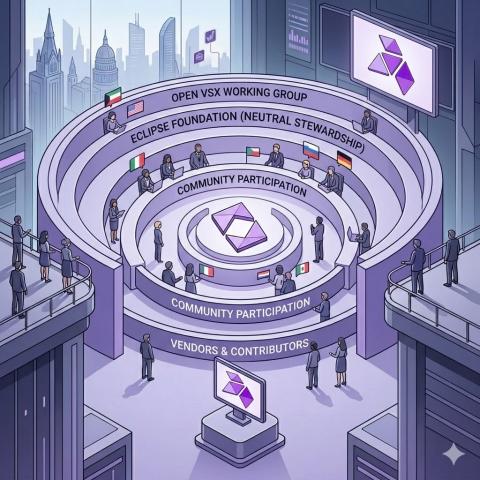
Open VSX governance model showing Eclipse Foundation stewardship, working group coordination, and community participation.

The Eclipse Foundation operates as a global community, with its legal seat in Brussels, ensuring neutrality, transparency, and long-term stewardship.

In practice:

  • no single vendor controls marketplace policy,
  • decisions are not dictated by a commercial competitor,
  • the registry software is open source,
  • participation is structured and transparent.

Open VSX provides neutral ground for extension distribution and discovery.

Why sovereignty has become central in the AI era

AI has significantly increased the strategic importance of extension ecosystems.

AI coding platforms depend on extensible components such as:

  • Language server
  • static analysis engines
  • debug adapter
  • framework integrations
  • code generation and transformation tools

Many AI development tools, whether VS Code based or independent, rely on Open VSX as their extension distribution layer. Sometimes this is driven by licensing constraints, sometimes by architectural choice to avoid dependency on a proprietary marketplace.

As AI agents orchestrate workflows across tools and environments, extension registries become dependency hubs in automated pipelines.

If that layer is controlled by a single commercial actor, ecosystem participants inherit platform risk.

Open VSX mitigates that risk by providing a neutral alternative.

Software sovereignty in concrete terms

Sovereignty in developer tooling is operational, not abstract.

For tool vendors:

  • ability to distribute extensions without competitor approval
  • protection from unilateral policy changes
  • transparent governance
  • option to mirror, federate, or self host

For enterprises and public sector organisations:

  • infrastructure governed by a neutral non profit foundation
  • clear accountability and transparency
  • reduced exposure to proprietary lock in
  • alignment with regulatory and regional requirements

This also gives context to the operational work described earlier. Security, rate limiting, and infrastructure investment are not isolated improvements. They are required to sustain a sovereign, neutral ecosystem at scale.

European strategy, global competition, and open infrastructure

Software sovereignty is no longer a niche concern. It is increasingly central in policy and industry strategy, particularly in Europe.

As Europe evaluates its position in the context of significant US capital investment and large scale AI initiatives in China, the question is not only how much to invest, but where.

Digital sovereignty begins at infrastructure layers that shape ecosystems. Extension registries are one of those layers.

If Europe aims to foster competitive AI driven developer tooling, investing only in applications is insufficient. The underlying control points must remain open, interoperable, and neutral.

Open VSX represents one such control point.

It is global infrastructure, governed under a European legal framework, and open to participation from vendors and contributors worldwide. This combination, global collaboration with neutral governance, provides a practical model for sustaining open digital infrastructure.

Open alternatives that combine compatibility and independence

Sovereignty does not require fragmentation. It requires credible alternatives.

Open VSX provides compatibility with the dominant extension ecosystem while preserving independence from proprietary marketplace control.

Projects such as Eclipse Theia AI demonstrate that it is possible to build AI enabled developer experiences on fully open foundations.

Together, Theia AI and Open VSX offer:

  • compatibility with the dominant extension ecosystem
  • a modern, extensible, AI capable user experience
  • open source implementation across the stack
  • governance under a neutral foundation

This combination differs fundamentally from proprietary platforms or single vendor controlled open source projects. Governance matters as much as the code.

Open source alone is not sufficient if strategic control remains centralised. Neutral governance and community participation are essential to long term sovereignty.
Image
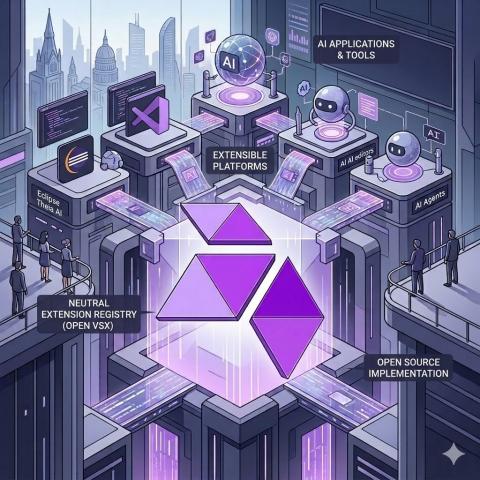
Centralised extension registry concept illustrating how Open VSX connects developer tools, platforms, and AI systems.

Preserving architectural independence

The operational work described throughout this series, security hardening, responsible scaling, infrastructure investment, reflects the fact that Open VSX has become foundational infrastructure.

But the deeper objective is architectural independence.

As AI reshapes developer tooling and global competition intensifies, maintaining neutral, open source governed infrastructure layers becomes strategically important for vendors, enterprises, and public institutions.

Open VSX is not just an alternative registry. It is part of a broader effort to keep developer tooling open, interoperable, and governed in the public interest.

That is why it matters.

Thomas Froment


Sorting an Array of 0s, 1s, and 2s

In this task, I worked on sorting an array that contains only 0s, 1s, and 2s. Instead of using a normal sorting method, I used a more efficient approach that sorts the array in a single pass.

What I Did

I created a function called sort012 that takes an array of 0s, 1s, and 2s and returns the sorted array.

For example:
Input: [0, 1, 2, 0, 1, 2]
Output: [0, 0, 1, 1, 2, 2]

How I Solved It

To solve this, I used three pointers:

  • low → to place 0s
  • mid → to traverse the array
  • high → to place 2s

I started all pointers at the beginning except high, which starts at the end.

Then I used a loop to go through the array:

  • If the element is 0 → swap it with the low position and move both low and mid
  • If the element is 1 → just move mid
  • If the element is 2 → swap it with the high position and move high

Code

def sort012(arr):
low = 0
mid = 0
high = len(arr) – 1

while mid <= high:
    if arr[mid] == 0:
        arr[low], arr[mid] = arr[mid], arr[low]
        low += 1
        mid += 1
    elif arr[mid] == 1:
        mid += 1
    else:  # arr[mid] == 2
        arr[mid], arr[high] = arr[high], arr[mid]
        high -= 1
return arr

print(sort012([0, 1, 2, 0, 1, 2]))
print(sort012([0, 1, 1, 0, 1, 2, 1, 2, 0, 0, 0, 1]))

How It Works

This approach works by dividing the array into three parts:

  • Left side for 0s
  • Middle for 1s
  • Right side for 2s

As the loop runs, elements are moved into their correct positions using swaps. This way, the array gets sorted without needing extra space or multiple passes.

A Deep Dive Into Page Sync

Page Sync is the feature in Earleaf where you photograph a page from your physical book and the app finds that position in the audiobook. It takes about two seconds. Everything runs on your phone. This post is about how it actually works under the hood.

The problem

You’re reading a physical book at home. You get in the car and switch to the audiobook. Where were you?

You could scrub around trying to find the right spot. You could try to remember the chapter number and estimate. Or you could take a photo of the page you were on and let the app figure it out.

That last option sounds simple until you think about what it actually requires. You need to extract text from a photograph (OCR), extract text from audio (speech recognition), and then figure out where those two texts overlap. Both the OCR and the speech recognition will make mistakes. Different mistakes.

Two imperfect signals

Here’s what makes Page Sync tricky. You’re not matching clean text against clean text. You’re matching the output of one ML model against the output of another, and both of them are wrong in different ways.

OCR mistakes are visual. It reads “rn” as “m”, or “cl” as “d”. It drops characters at the edge of the page. It picks up text from the other side of thin paper (bleed-through). It includes the page header and footer.

Speech recognition mistakes are phonetic. It hears “propper” instead of “proper”. It mangles names, especially fantasy names. “Daenerys” comes out as something only vaguely recognizable. It can’t tell the difference between “their”, “there”, and “they’re”, but that doesn’t matter here because we’re only matching word shapes, not meaning.

So the matching has to be fuzzy enough to tolerate errors from both sides, but precise enough to find the right spot in a 10+ hour audiobook.

Step one: transcribe the audiobook

Before Page Sync can work, the audiobook needs a transcription. Not a human transcription. An on-device one, generated by Vosk, an offline speech recognition engine. The Vosk model is about 40MB and downloads once.

Transcription runs as a background process. A 10-hour book takes roughly 4-7 hours to transcribe, depending on device speed. Vosk is the bottleneck, eating 40-60% of the processing time, with audio decoding and resampling splitting the rest.

The pipeline never loads the full audiobook into memory. It streams through three stages: MediaCodec decodes compressed audio into PCM one buffer at a time, a resampling step converts whatever sample rate the file uses (usually 44.1kHz) down to the 16kHz that Vosk expects, and Vosk ingests the resampled audio and spits out JSON with word-level timestamps.

Each word gets stored individually in a database with millisecond timestamps:

"the"    → 142560ms - 142710ms
"castle" → 142740ms - 143120ms

A 10-hour audiobook at roughly 120 words per minute produces about 72,000 of these entries. The text column is indexed in an FTS4 full-text search table. Total storage: about 5-6MB per book. Not nothing, but not a problem on modern phones.

For books with multiple files (one per chapter), a running time offset keeps all timestamps in absolute book time rather than chapter-relative time. If transcription gets interrupted (app killed, phone rebooted), it picks up where it left off by checking the last timestamp in the database.

Step two: photograph a page

You point your camera at a page. ML Kit runs OCR and returns text blocks with bounding boxes. But before any matching happens, the raw OCR output needs cleaning.

Filtering out garbage

OCR picks up more than you want. The facing page bleeds through thin paper. The header says “Chapter 12 — The Return” on every page. The footer has a page number. None of this helps with matching and some of it actively hurts.

The filtering is heuristic. It finds the main text column by looking at the 5 largest text blocks, then throws out anything too far left or right of that column (bleed-through from the other page). For headers, it looks for an unusually large gap in the top 30% of the page — if there’s a gap 2.5x the normal spacing between blocks, everything above it gets cut. Footers are simpler: short text in the bottom 10% of the image, especially if it contains a digit, gets removed.

It’s conservative. Better to accidentally include a header (slightly noisier query) than to accidentally remove the first line of body text.

Building the query

The surviving text is normalized (lowercase, strip punctuation, collapse whitespace) and split into words. From those, up to 20 “query words” are selected: at least 4 characters long, not common stopwords like “the” or “and”. Shorter and more common words are kept as fallbacks but ranked last.

Step three: find the position

OK so now you have ~20 query words from the photograph and ~72,000 word entries in the transcription index. Finding the right 30-second window in a 10+ hour book.

IDiagram showing the Page Sync search pipeline: 72,000 word segments narrowed to 200-500 FTS hits, then to 5-15 candidate windows, then fuzzy matched to the top results and a final seek position, all in 100-500ms.

Phase one: cheap broad search

Each query word gets a prefix search against the FTS4 index:

WHERE fts.text MATCH 'castle*'

The prefix wildcard is important. “castle” matches “castles” and vice versa. It handles pluralization and partial OCR reads without needing a stemmer.

Typical numbers for a 10-hour book: 15 query words might produce 200-500 FTS hits across the entire transcription.

Phase two: time window grouping

All those hits are grouped into 30-second time windows. Each window is scored by how many distinct query words matched within it. A window where 8 different query words appear in the same 30 seconds is probably the right spot. A window with only 1 or 2 hits is probably a coincidence.

Windows with 4 or more distinct matching words survive. The rest are discarded. This usually gets you from hundreds of hits down to 5-15 candidate positions. The search space just shrank by orders of magnitude, and we haven’t done anything expensive yet.

Phase three: fuzzy matching

Now the expensive part, but only on a handful of candidates. For each candidate position, the system loads the surrounding transcription segments and slides a window across them, scoring what fraction of the query words have a match with at least 70% Levenshtein similarity.

That 70% threshold means a 5-letter word tolerates 1 edit, and a 10-letter word tolerates 3 edits. This is where OCR’s “rn”→”m” errors and Vosk’s “propper”→”proper” errors get absorbed.

A minimum overall score of 0.5 is required — at least half the query words need to match. Results are deduplicated within 30-second windows, and the top 5 are returned sorted by score.

End-to-end, from finished OCR to results: typically 100-500ms. The FTS queries take under 1ms each. Almost all the time is in the fuzzy matching, and that’s only running on 5-15 candidates instead of 72,000 words.

The resampling bug

For several days during development, Page Sync was landing about 30 seconds early. Consistently. And it got worse the further into a book you went.

The matching was working. It was finding the right text. But the timestamps attached to that text were slightly wrong, and the error accumulated over time.

The problem was in the resampling step. Vosk needs 16kHz audio. Audiobooks are usually 44.1kHz. The ratio is 16000/44100, which is irrational. You can’t convert an integer number of source samples to an integer number of target samples without rounding.

The original code calculated target frames per chunk independently:

val targetFrames = (sourceFrames * ratio).roundToInt()

Each chunk introduces a rounding error of up to half a sample. At 16kHz, that’s about 31 microseconds. Over a 12-hour audiobook with roughly 465,000 chunks, these errors accumulate like a random walk. The theoretical worst case is around 21 seconds of drift. In practice, I was seeing about 30 seconds on a 12-hour book (unlucky bias direction).

The fix was to track cumulative frames globally instead of rounding per-chunk:

var totalSourceFramesProcessed = 0L
var totalTargetFramesProduced = 0L

// Per chunk:
val newTotalSource = totalSourceFramesProcessed + sourceFrames
val expectedTotalTarget = round(newTotalSource * ratio).toLong()
val targetFramesThisChunk = (expectedTotalTarget - totalTargetFramesProduced).toInt()

totalSourceFramesProcessed = newTotalSource
totalTargetFramesProduced = expectedTotalTarget

Now the rounding happens once on the cumulative total. Any rounding error in one chunk is automatically compensated by the next. Maximum drift at any point in the file is bounded to one sample (about 63 microseconds at 16kHz), regardless of how long the book is.

Small bug. Days of frustration. Six lines to fix.

What trips it up

Page Sync is not magic. It’s a system built on two ML models that both have failure modes, and it helps to know where those are.

Proper nouns and invented words. Vosk was trained on general English. “Malazan” or “Daenerys” will be transcribed as phonetic approximations. The fuzzy matching helps, but it can only absorb so much distance. Fantasy novels are the hardest genre for Page Sync.

Very short pages. If the OCR only extracts 3-4 usable words, there isn’t enough signal to narrow down the position. The system might return multiple candidates and you’d have to pick.

Numbers and abbreviations. The page says “Dr. Smith arrived at 3:15 p.m.” The OCR produces “dr smith arrived at 3 15 p m”. The speech recognition produces “doctor smith arrived at three fifteen pm”. None of those words match each other.

Heavy dialogue with short utterances. Pages of “Yes.” “No.” “Why?” produce almost no searchable words after filtering.

Where it works best: Standard prose, novels and non-fiction, with paragraphs of normal English. Pages with distinctive vocabulary (technical terms, unusual words) are the easiest to match. Good lighting and a flat page help the OCR side. Clear narration by a single narrator helps the speech recognition side.

In practice, I’d estimate it gets the right position about 90-95% of the time on standard prose, dropping to 70-80% on the harder cases above. When it’s wrong, it’s usually close (within a page or two of the right spot) rather than completely off.

Why this and not that

Some stuff that might not be obvious from the description above.

Word-level timestamps instead of sentences. Vosk produces word boundaries natively. Storing individual words lets the player seek to within about 200ms of the target, and the matching window can start at any word boundary rather than waiting for a sentence break. The trade-off is more database rows (72K for a 10-hour book vs maybe 7K for sentences), but 5-6MB is nothing.

FTS4 + fuzzy matching instead of longest common substring. A naive “find the longest shared substring” approach would be O(n*m) where n is the transcription length. For 72K words, that’s slow. The two-phase approach (cheap FTS to find candidates, expensive fuzzy matching only on the candidates) turns a search through 72,000 words into a search through 5-15 positions. The total time stays under 500ms.

Levenshtein distance instead of phonetic similarity. Soundex or Metaphone would help with speech-recognition errors, but wouldn’t help with OCR errors (which are visual, not phonetic). Levenshtein handles both kinds of errors with one metric. The 0.7 threshold was tuned empirically across a few dozen books.

No stemming or lemmatization. The prefix wildcard on FTS queries (castle*) already handles basic pluralization. A real stemmer would add complexity and risk false positives (matching words that stem the same but mean different things). Given that the fuzzy matching layer already provides error tolerance, stemming didn’t seem worth it.

Try it

Page Sync is part of Earleaf, an audiobook player for Android. $4.99, no ads, no subscriptions. The transcription runs on your phone, nothing leaves your device.

If you have questions about any of this, I’m at arcadianalpaca@gmail.com.

Why people don’t make bi-directional code/modelling programs

There’s a bug in Draw.io that means a call to app.editor.setGraphXml(app.editor.getGraphXml)) isn’t cleanly reproducing the diagram. I wonder why that is, possibly there’s additional processing or cleaning on either a full file load or write. Individual nodes (proto MxRectange, MxCircle) appear to be recreated very well, but their relationships aren’t (represented internally by both a top-level node in the model, as well as an additional object referring to the top level as a property of the sender or receiver in MxNode.edges).

The closest example of what I’m trying to accomplish is swimlanes.io and dbdiagram.io – both amazing tools for taking something defined as code (giving developers all the power of cut-paste etc, as well as uber-easy readability and updates) and producing something visual from it. Interestingly, they focus on code as the input method, both right hand sides (RHS) are essentially read-only. I wonder, why is that?

Looking at Draw.io for a few hours, to the point where I have two panes: code LHS, local draw.io iframe RHS), I think I vaguely understand the problem and am at a point where I can put it down on paper.

The Problem

Start with a blank slate, LHS+RHS. If we add code, we can add a new node to the diagram model, and update the view. Maybe our DSL allows for some metadata to be set, take that and represent it in the model. We store a reference to the model against the token in the AST, and move on. Let’s say we now add a node on the RHS, similar procedure, we need to validate in our global map if we have a reference to it in code, and if not, add a declarative line. Hopefully our translation knows enough about the metadata available to express that through the generated code.

Enough

I just made public a repo from 2022, with some Claude edits to productionise it. It feels good to be able to get out of the weeds, or just get unblocked on a fun idea I had back then. These projects are a bit of a graveyard for me – each spun out into a business in my head and I miss the guy who spent hours demo’ing to friends on Zoom during covid, talking through MVPs and ICPs for something with logically zero chance of ever launching.

“If only the world had a modelling tooling for engineers, it would be the next X!”

GitHub logo

psedge
/
modeld

nobody gives a fuck about your models, pal

modeld

Make every model interactive, declarative, and programmable.

A bi-directional, dual-representation modeling tool built on draw.io and YAML; editing one updates the other in real time! Comes with an MCP server to assist with no/low-human workflows.

example diagram

 ▐▛███▜▌   Claude Code v2.1.76
▝▜█████▛▘  Sonnet 4.6 · Claude Pro
  ▘▘ ▝▝    ~/modeld
❯ ▎ Using the modeld MCP tools, create a minimal house security threat model with these elements:

  ▎ - A Thief (actor) outside the house, attempting entry through the Front Door (app)
  ▎ - A House boundary containing the Front Door and a Bedroom (boundary, trust: high) — the bedroom represents a locked trust zone
  ▎ - A Safe (app, trust: critical) inside the Bedroom, containing the family heirlooms

  ▎ Connections: Thief → Front Door ("attempts entry"), Front Door → Bedroom ("path through").

  ▎ Follow the CLAUDE.md layout guidance to plan coordinates before

View on GitHub

I’ll venmo the first person to run the docker image and open a Github issue $10.

We Built ComfyUI Workflow Visualization Into Our AI Art Portfolio Platform

Hey dev community! 👋

I’m building PixelAI — a portfolio platform for AI artists. Today I shipped a feature I’m really excited about: ComfyUI workflow support with interactive graph visualization.


The Problem

ComfyUI is arguably the most powerful tool for AI image/video generation. But sharing workflows is painful:

  • Screenshot your node graph
  • Paste prompts in Discord
  • Upload .json files to random file hosts
  • Explain your setup in comment threads

The Solution

Now on PixelAI, you can:

  1. Upload your .json workflow alongside your artwork
  2. Auto-extraction — checkpoint, sampler, seed, steps, CFG are pulled from the workflow automatically
  3. Interactive node graph — built with React Flow, viewers can zoom, pan, and explore your workflow
  4. One-click download — viewers download your exact .json and load it in ComfyUI

Technical Implementation

  • Parser: Supports both Workflow format (File → Save) and API format (File → Export API)
  • Visualization: React Flow with lazy loading (dynamic import, zero bundle impact on other pages)
  • Node categories: Color-coded — Loader (purple), Sampler (blue), Conditioning (yellow), Output (red)
  • Custom nodes: Detected and marked with ⚡ badge
  • Edge labels: Show data types (IMAGE, VIDEO, MASK, etc.)
  • Fullscreen mode: For complex workflows with 50+ nodes
  • Validation: Non-ComfyUI JSON files are rejected with helpful error message

Stack

  • Next.js 14 (App Router)
  • React Flow (@xyflow/react)
  • Supabase (jsonb column for workflow storage)
  • Tailwind CSS

What’s Next

  • A/B comparison of different workflows for the same image
  • Workflow versioning (iterate and track changes)
  • “Fork” button — remix someone’s workflow with your modifications

Check it out: pixelai.world

Automating the Chase: How AI Transforms Vendor Compliance for Festivals

The Manual Chase is Over

As a festival organizer, you know the drill: endless spreadsheets, frantic last-minute emails, and the looming risk of a vendor showing up without valid insurance. This manual “compliance chase” consumes precious time and introduces significant operational risk. What if you could reclaim that time and eliminate the anxiety?

The Principle of Intelligent Escalation

The core principle for automating this process is Intelligent Escalation. Instead of sending the same reminder to everyone, an AI-driven system categorizes documents by risk and lead time, then triggers a tailored, multi-channel communication path that escalates automatically. This moves you from being a reactive chaser to a proactive manager.

A Framework in Action

Consider your vendor’s General Liability Insurance, a standard one-year document. The system doesn’t just send one email. Using the framework from my research, it initiates a First Alert 90 days before expiry, giving ample time. A Second Alert follows at 30 days. As the deadline nears, urgency increases: Final Alerts go out at 14, 7, and 3 days pre-expiry. For high-risk permits with short lead times, this timeline compresses dramatically.

Mini-Scenario: A food vendor’s insurance expires in three weeks. They ignore the first two email alerts. The AI system automatically escalates, sending a text message reminder and flagging their file in the daily digest email sent to your compliance lead, ensuring human oversight kicks in right on time.

Configuring Your System: Three Key Steps

  1. Categorize & Schedule: Classify every required document (e.g., Business License vs. Food Permit) by its risk level and typical renewal lead time. Input these validity periods and your preferred alert thresholds (90, 30, 14, 7, 3 days) into your automation platform.
  2. Define Communication Paths: Set your Primary channel (e.g., email with a clear “Upload Document” button). Then, configure secondary channels (like SMS) for critical, final alerts to increase open rates.
  3. Establish Oversight Protocols: Implement an exception-handling rule, such as the daily digest email, to automatically surface overdue items to a human manager. This creates a safety net for documents that slip through automated reminders.

Key Takeaways for Festival Pros

Intelligent automation transforms vendor compliance from a chaotic, manual task into a systematic, reliable process. By implementing a tiered alert system, you significantly reduce risk, save countless hours each week, and provide a more professional experience for your vendors. The goal is not to remove human judgment but to empower your team with timely, actionable data, letting you focus on creating a fantastic festival experience.

Core JavaScript and TypeScript Features Will Be Free in IntelliJ IDEA

Modern Java development often involves web technologies. To make this workflow more accessible and smoother, we’re making some core JavaScript, TypeScript, HTML, and CSS features – previously included with the Ultimate subscription only – available for free in IntelliJ IDEA v2026.1.

JavaScript, TypeScript, HTML, CSS, and React Support

Enjoy a comprehensive set of features for building modern web applications:

  • Basic React support, including code completion, component and attribute navigation, and React component and prop rename refactorings.
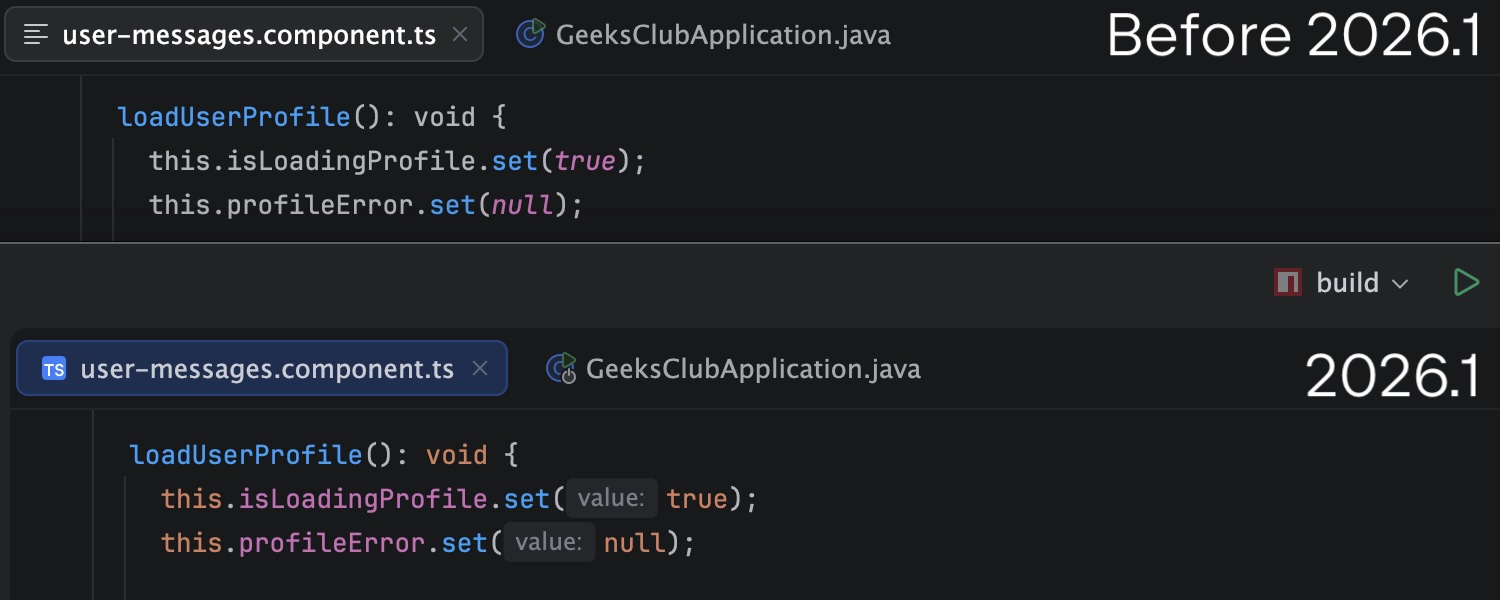
  • Full syntax highlighting for JavaScript, TypeScript, HTML, and CSS, ensuring better readability and usability of frontend code inside the IDE.
    Full syntax highlighting for JavaScript, TypeScript, HTML, and CSS
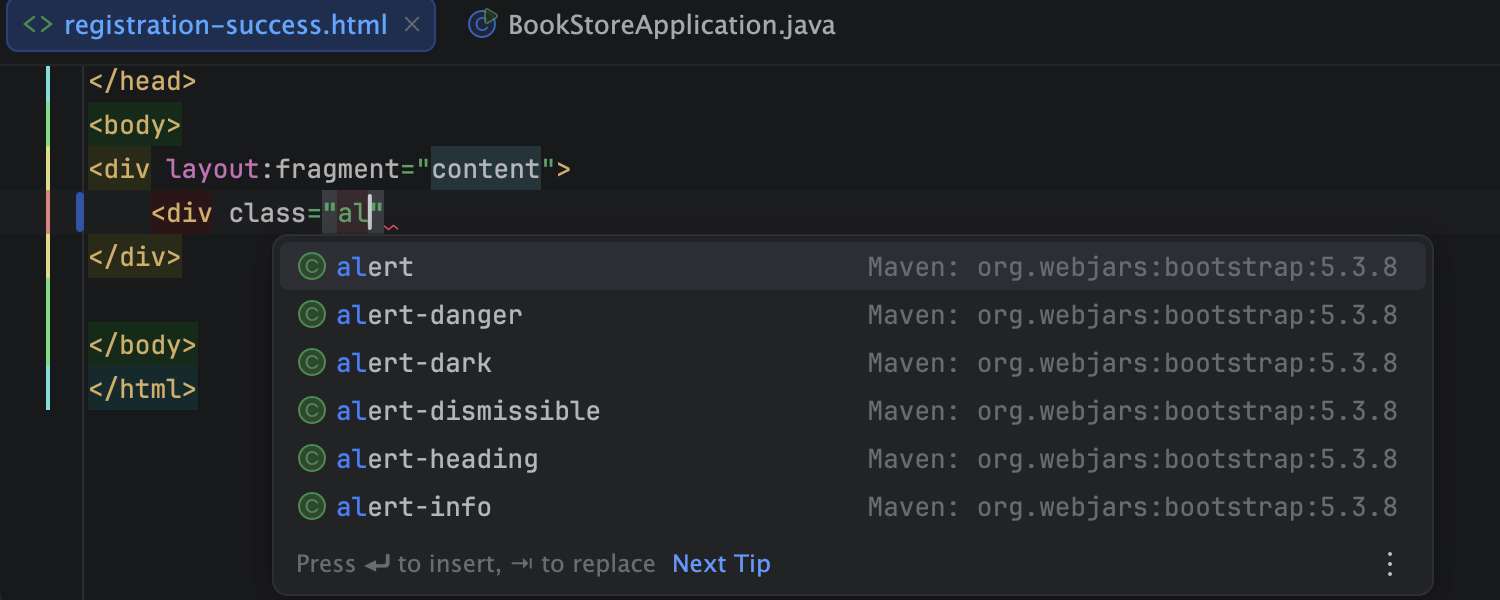
  • Reliable code completion to write code faster and with fewer errors across both backend and frontend parts of your web application.code completion for JS and TS
  • Advanced import management automatically handles JavaScript and TypeScript imports as you code, adds missing references when pasting code, and cleans up unused ones with Optimize Imports – helping you save time, reduce errors, and keep your codebase clean.
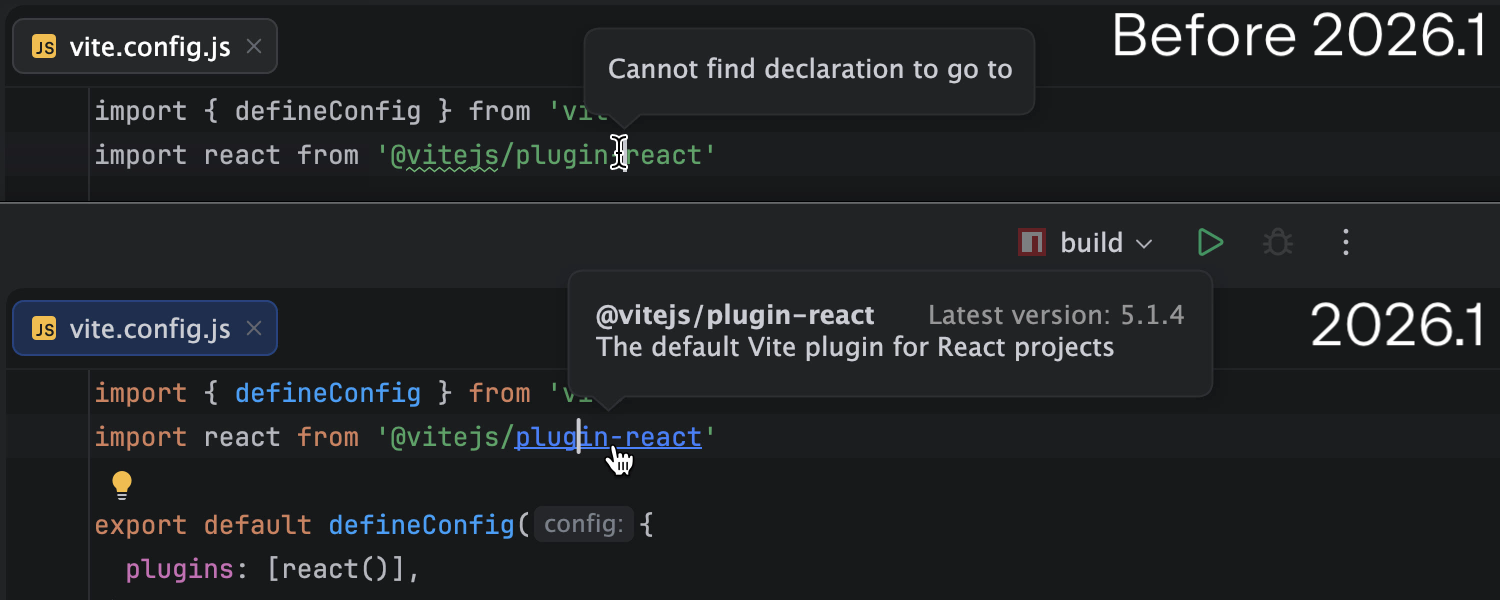
  • Smooth code navigation via dedicated gutter icons for Jump to… actions, recursive calls, TypeScript source mapping, and more.code navigation for JS and TS

Code Intelligence and Code Quality

Improve and maintain your web code with built-in intelligence and quality tools:

  • Core web refactorings: Make changes to your code with reliable Rename refactorings and actions (Introduce Variable, Introduce Constant, Change Signature, Move Members, and more).
  • Quality control: Identify potential issues early with built-in inspections, intentions, and quick fixes, and get improvement suggestions as you code.
  • Code cleanup: Keep your codebase clean with JavaScript and TypeScript duplicate detection, making it easier to spot and eliminate redundant code.

Integrated workflows

Now it’s easier to manage, maintain, and secure your web projects from within a single environment.

  • Create new web projects quickly by using the built-in Vite generator.
  • Keep your codebase consistent and clean with integrated support for Prettier, ESLint, TSLint, and StyleLint.
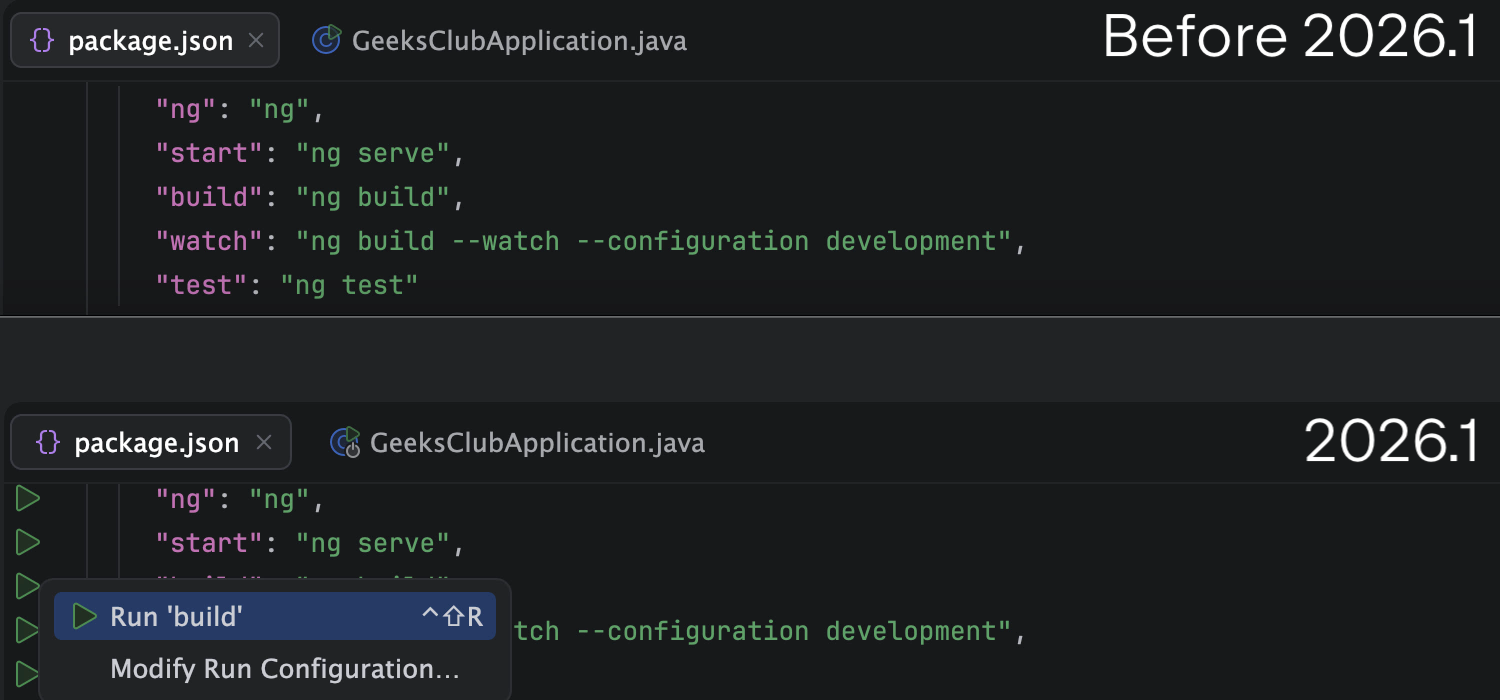
  • Execute NPM scripts directly from package.json.
    Execute NPM scripts directly from package.json
  • Monitor your project dependencies and identify known security vulnerabilities early.

Enjoy building your web applications with IntelliJ IDEA, and happy developing!

If you need more advanced tools (dedicated debugger, test runners, test UI tooling, support for all frontend frameworks including Angular, Vue, advanced refactorings, and more) for full-stack application development, you can try them with the Ultimate subscription trial. The trial provides 30 days of full access – no credit card required.

Why Your AI Governance Is Holding You Back, and You Don’t Even Know It

Most enterprises claim to govern their AI use. They have policy documents, review boards, approval flows, and sandbox environments.

On paper, control exists. Then agents enter real software delivery workflows.

They generate code, refactor systems, open pull requests, query internal data, trigger automations, and coordinate across tools. They move from experiment to execution. At that point, many organizations lose visibility, control, and cost accountability.

Governance designed for static systems breaks under dynamic agents.


The illusion of control

Enterprise AI governance today remains largely abstract. Organizations define policies, approval processes, and access controls. They specify which models teams can use and where experimentation can happen.

These mechanisms work in contained environments, but they break down when agents operate at scale inside production systems.

This creates governance, with:

  • No clear visibility into agent actions and decision paths.
  • No enforceable link between policy and execution.
  • No reliable way to attribute cost or measure effectiveness.
  • A false sense of control that increases risk rather than reducing it.

The most dangerous part isn’t the lack of control. It is the belief that control already exists.


Policies describe intent, agents decide behavior

As agents gain autonomy, they make micro-decisions inside workflows that policy documents never anticipated. Governance frameworks define permissions, approval gates, and high-level constraints.

They rarely account for how an agent interprets context, chains tools, or explores edge cases while attempting to complete a task. The result is a structural gap. Organizations assume that if rules exist, behavior will follow.

In reality, agents operate more like capable teenagers. You can set clear rules. You can explain the boundaries. Yet curiosity, optimization logic, or a creative interpretation of an objective can produce actions no one explicitly planned for.

My teenage daughter loves to cook and bake. She is independent and does not require supervision. She knows the rules: wash the dishes, wipe down surfaces, and leave the kitchen as you found it. I trust her to operate within those boundaries.

One afternoon, she got curious and decided to test what would happen if she combined cola and Mentos. On their own, the ingredients were harmless. Once she combined them, they became a problem. Nothing was broken. But I had not anticipated cleaning soda off the ceiling. The rules existed. An unexpected outcome still emerged.

Agents behave in a similar way. They pursue goals, generate code, call APIs, trigger workflows, and access data in ways that may sit technically within permission boundaries but outside the spirit of the policies.

Traditional governance has no mechanism to observe or intervene in these runtime decisions. When autonomy increases, static policy loses reach.


Cost without clarity

Even when behavior does not create immediate risk, it creates opacity.

Agents consume tokens, call external models, execute workflows, and use internal tools. Costs accumulate across teams and projects. Without integrated visibility, finance teams see invoices but not what the costs are ultimately for. Engineering leaders see velocity changes but not the economic trade-offs behind them.

At the same time, few organizations can answer even basic questions while assessing results, such as:

  • What did the agent actually do?
  • How reliably did it perform?
  • What tools did it use and with which permissions?
  • Did it improve delivery speed or introduce duplicate work? 
  • What value did it generate relative to its cost?

Without answers to these questions, governance becomes performative. It satisfies compliance checklists while leaving the operational reality unexamined.


Governance only works when it has sight

If organizations can’t observe AI behavior, enforce controls at runtime, and understand economic impact, they do not have operational governance.

Governance that exists only in policy documents remains theoretical. Real governance must be built into the AI system itself.

This requires a reframing. Governance isn’t a committee. It isn’t a framework layered on top of agents. It is an operating ecosystem.

Governance must be embedded by design, woven into how agents are built, orchestrated, deployed, and monitored from day one.


What governance by design looks like practically

A governance-by-design ecosystem includes runtime enforcement of organizational policies, coordinated management of models and providers, structured orchestration of agents, deep visibility into execution paths, auditability, and transparent cost attribution.

It restricts agent capabilities through tool and skill allowlists, least privilege permissions, and blast radius reduction. It isolates agents through segmentation, so if one is compromised or behaves unpredictably, the impact does not spread laterally across the company.

It also embeds continuous evaluation. Quality checks, policy validation, and hallucination detection must form part of the operating environment. If you can’t measure output quality, detect fabricated responses, and identify when agent behavior drifts from policy or intended objectives, you can’t claim meaningful governance.

Most importantly, this ecosystem would make that oversight transparent and actionable. Different stakeholders would see what matters at their level: engineering teams would monitor execution paths and quality signals; platform teams would enforce policy boundaries and manage model access; product leaders would evaluate impact and trade-offs; executives would understand risk exposure and economic return.

Governance would no longer slow adoption. Instead, it would create the conditions for confident scaling.


Why this matters now

Agents are already operating in production. They write code, manage infrastructure, triage incidents, and coordinate work across teams. This isn’t a future scenario – a shift that’s already happening – and adoption is accelerating.

If governance depends on trust rather than visibility, it’s already ineffective.

The question isn’t whether you have an AI policy. It’s whether you can monitor what your agents are doing, control how they do it, and understand what it costs.

If you can’t, then your governance is aspirational, not operational. And that gap will only widen as agent autonomy increases.

Let me know what you think in the comments. 

IntelliJ IDEA’s New Kotlin Coroutine Inspections, Explained

This article was written by an external contributor.

Marcin Moskała

Marcin is a highly experienced developer and Kotlin instructor, founder of Kt. Academy, an official JetBrains partner specializing in Kotlin training. He is also a Google Developers Expert and a well-known contributor to the Kotlin community. Marcin is the author of several widely recognized books, including Effective Kotlin, Kotlin Coroutines, Functional Kotlin, Advanced Kotlin, Kotlin Essentials, and Android Development with Kotlin.

Website

Every technology has its misuses, and different ecosystems use different approaches to prevent them. In the Kotlin ecosystem, I believe the philosophy has always been to make APIs so good that correct usage is simple and intuitive, while misuse is harder and more complicated. This differs from JavaScript, which has plenty of legacy practices (like using == instead of ===, or var instead of let/const) and relies more on warnings. However, not everything can be enforced by good design, and Kotlin also uses warnings to guide developers in writing better code. 

Today, IntelliJ IDEA introduces a set of new inspections for the Kotlin coroutines library. I’ve seen these issues in many codebases and addressed them through my books, articles, and workshops. These patterns often show up, so let’s walk through why they are problematic and how to handle them correctly. 

Note: These inspections are also available in Android Studio. You can check how IntelliJ IDEA versions map to Android Studio versions here. 

awaitAll()and joinAll()

Available since IntelliJ IDEA 2025.2

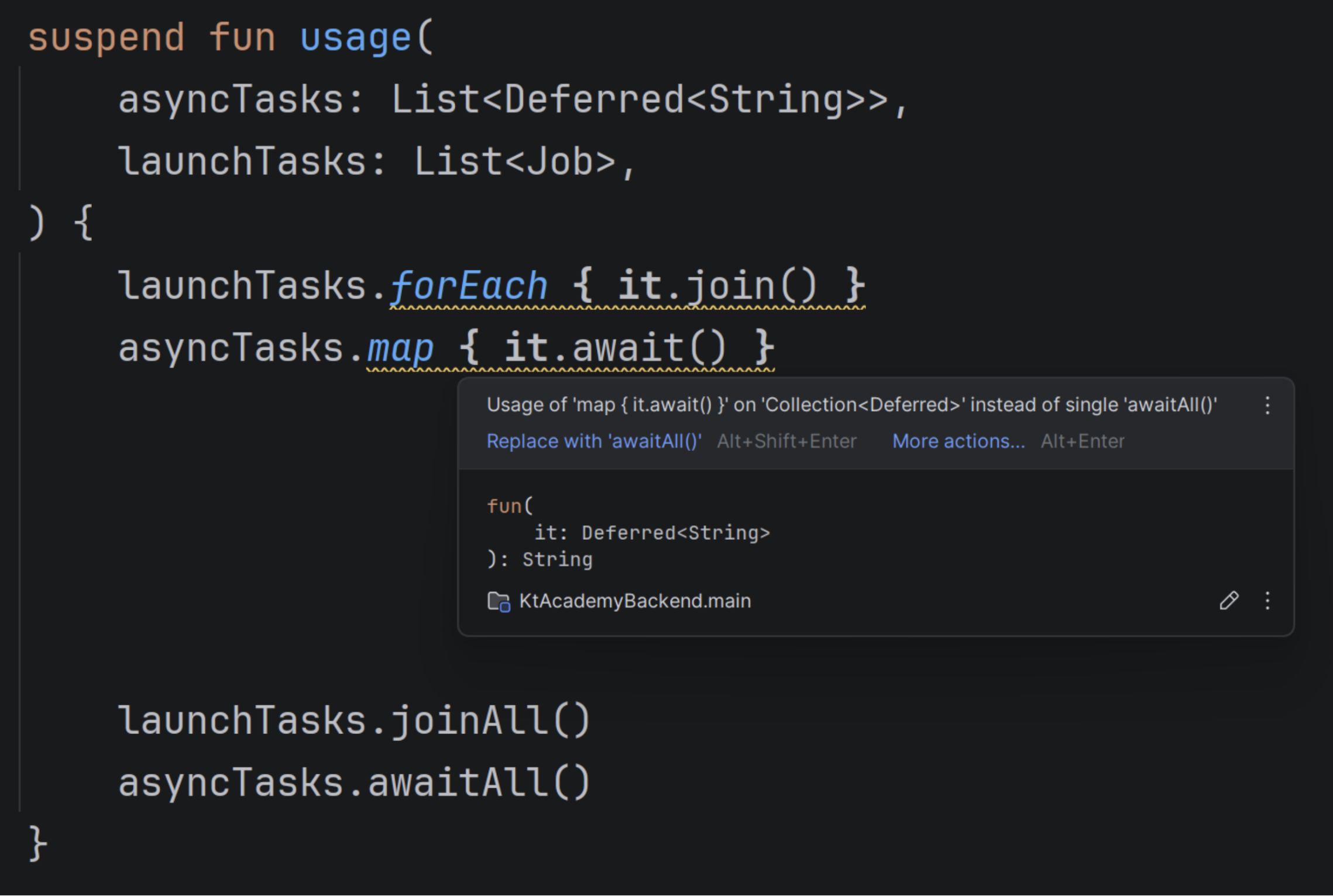
If you use map { it.await() }, IntelliJ IDEA will suggest awaitAll(). If you use forEach { it.join() }, it will suggest joinAll(). Why? These alternatives are cleaner, and awaitAll() is also more efficient and better represents waiting for multiple tasks, as it waits for all elements concurrently rather than one after another. 

awaitAll() also behaves more efficiently in the presence of exceptions. Imagine awaiting 100 coroutines, and the fiftieth throws an exception. awaitAll() will immediately rethrow the exception, unlike map { it.await() }, which would wait for the first 49 coroutines before throwing the exception. In most cases, this behavior cannot be observed because of other exception propagation mechanisms. 

currentCoroutineContext() over coroutineContext

Available since IntelliJ IDEA 2025.2

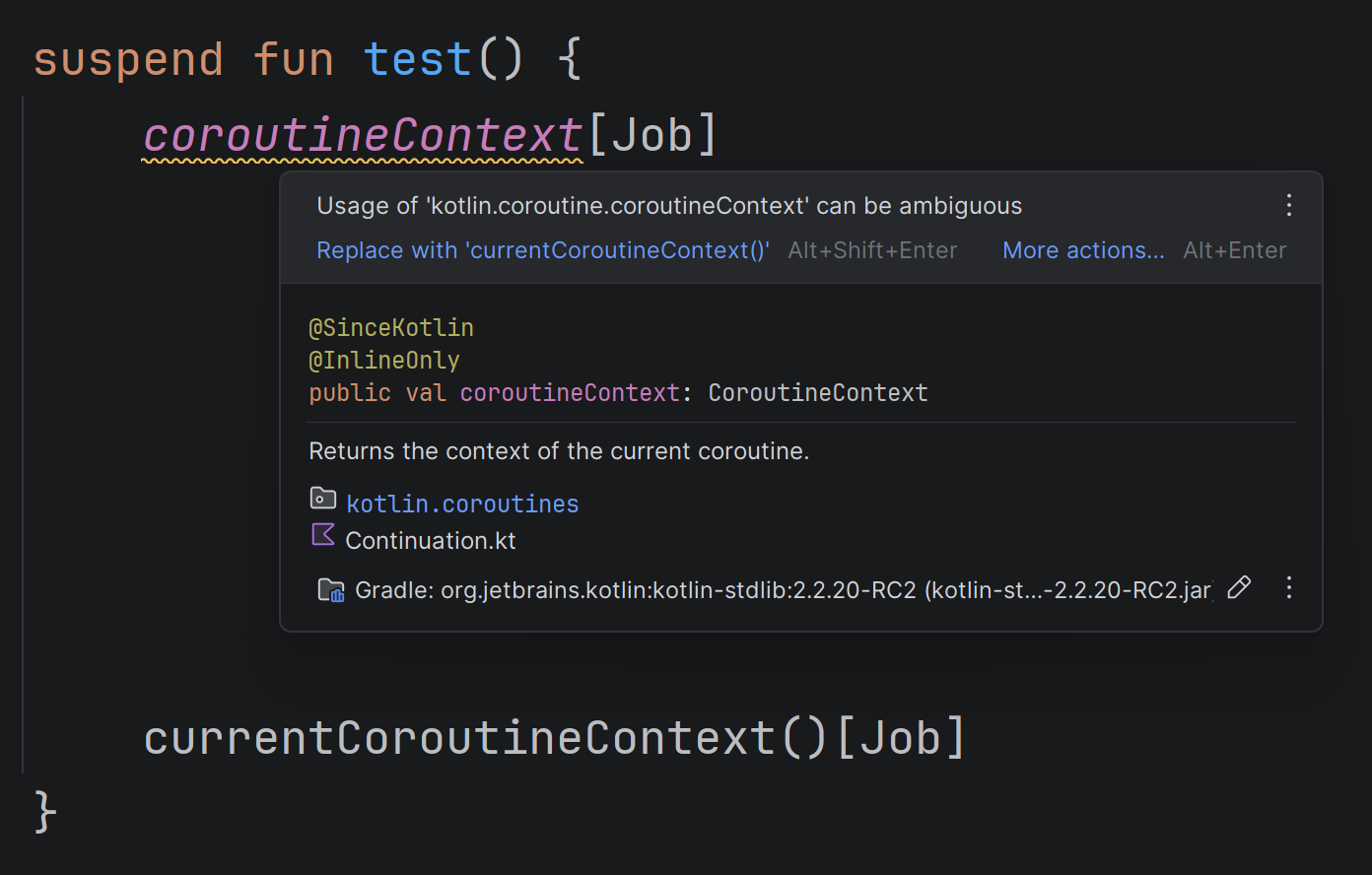
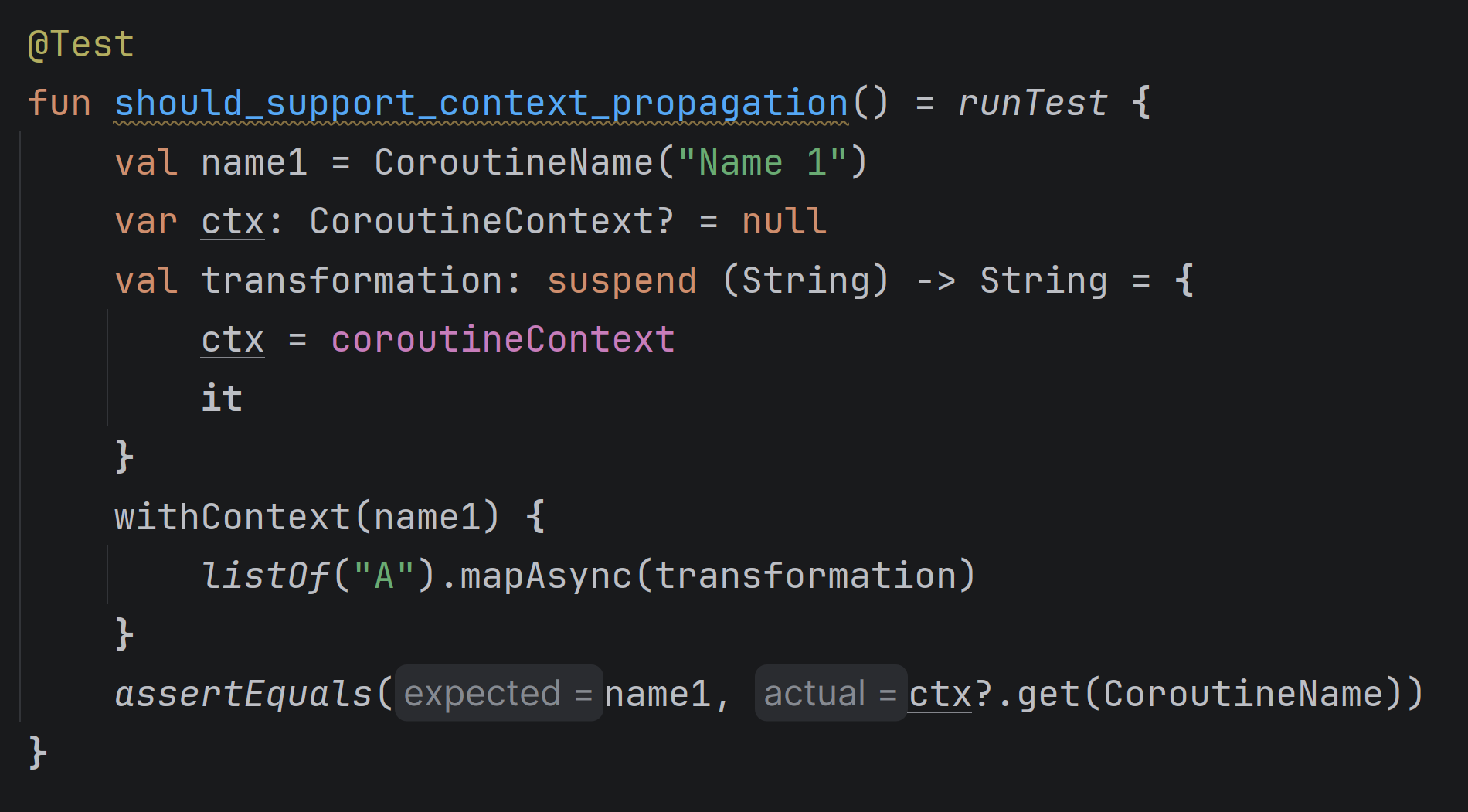
All suspending functions can access the context of the coroutine in which they are called. Traditionally, this was done via the coroutineContext property. The problem is that CoroutineScope, which is implicitly available in coroutine starters, such as launch, coroutineScope, and runTest, has a property with the same name. This can be confusing and lead to issues. Consider the following example: 

This code tests the mapAsync function and checks whether it correctly propagates context from the caller to the transformation. It is incorrect. Within the transformation, we could read the caller context from the coroutineContext, but not in this situation. This lambda is defined inside runTest, and the coroutineContext property from CoroutineScope (provided by runTest) takes priority over the top-level coroutineContext property. This kind of mistake is quite common, which is why the currentCoroutineContext() function was introduced to read the context of the coroutine that runs a suspending function. You should use it instead of coroutineContext

runBlocking inside a suspending function

Available since IDEA 2025.2

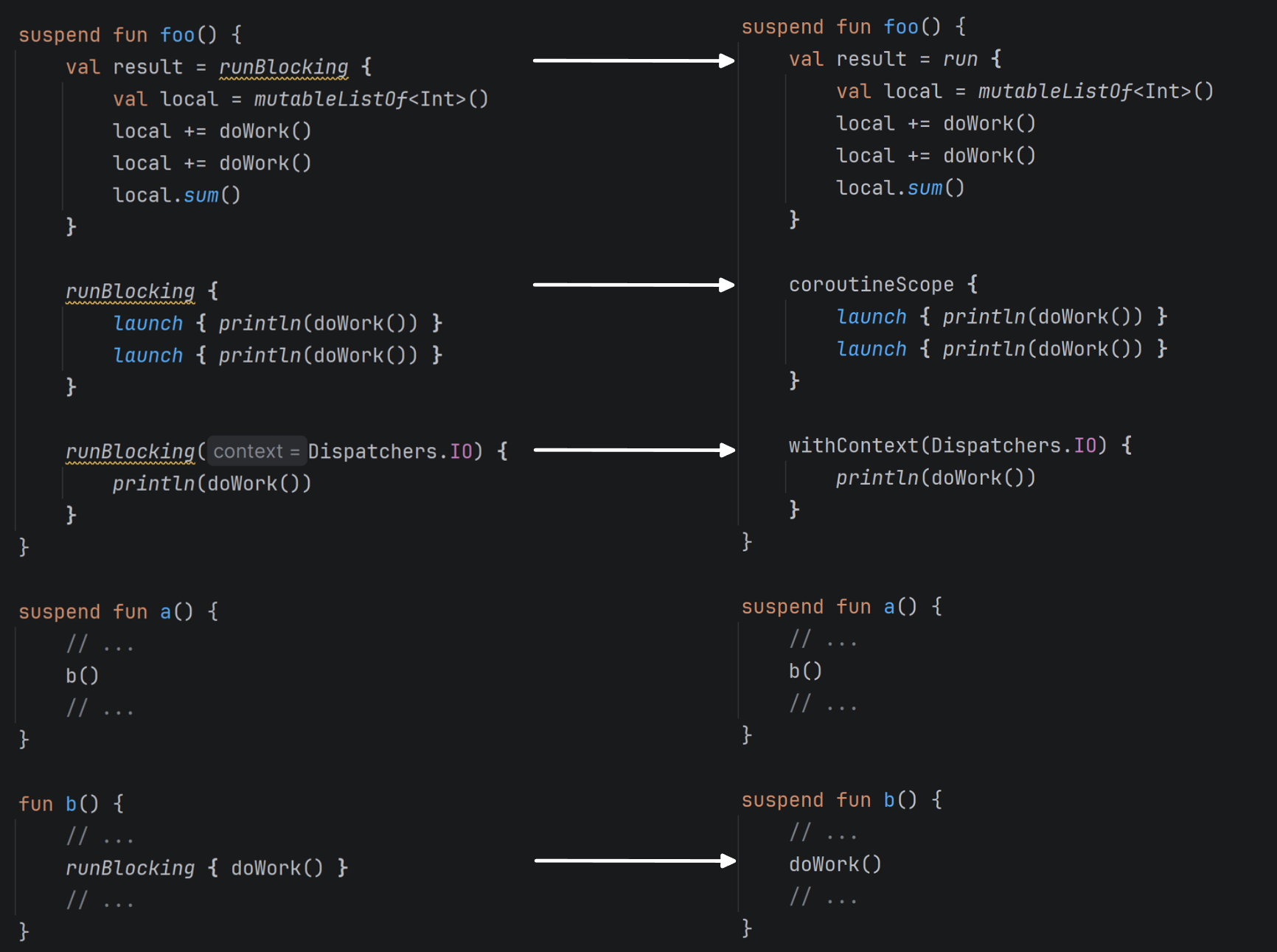
Using runBlocking inside suspending functions is a serious issue. It blocks the calling thread, which defeats the purpose of coroutines.

So what can you use instead? That depends on what you want to achieve. In most cases, you don’t need it. If you need to create a coroutine scope, use coroutineScope { … }. If you need to change context, use withContext(ctx) { … }.
Watch out for situations where a suspending function calls a regular function that uses runBlocking. Opt for making this function suspend to avoid making a blocking call. 

Unused Deferred

Available since IntelliJ IDEA 2025.3

This inspection appears when you use async without ever using its result. In such cases, you should use launch instead. This is the key difference between launch and async: async returns a result and is expected to await this result, while launch produces no result. 

Because of this, exception handling differs. async doesn’t call CoroutineExceptionHandler because it is expected to throw an exception from await and propagate it this way. 

Job used as an argument in a coroutine starter

Available since IntelliJ IDEA 2025.3

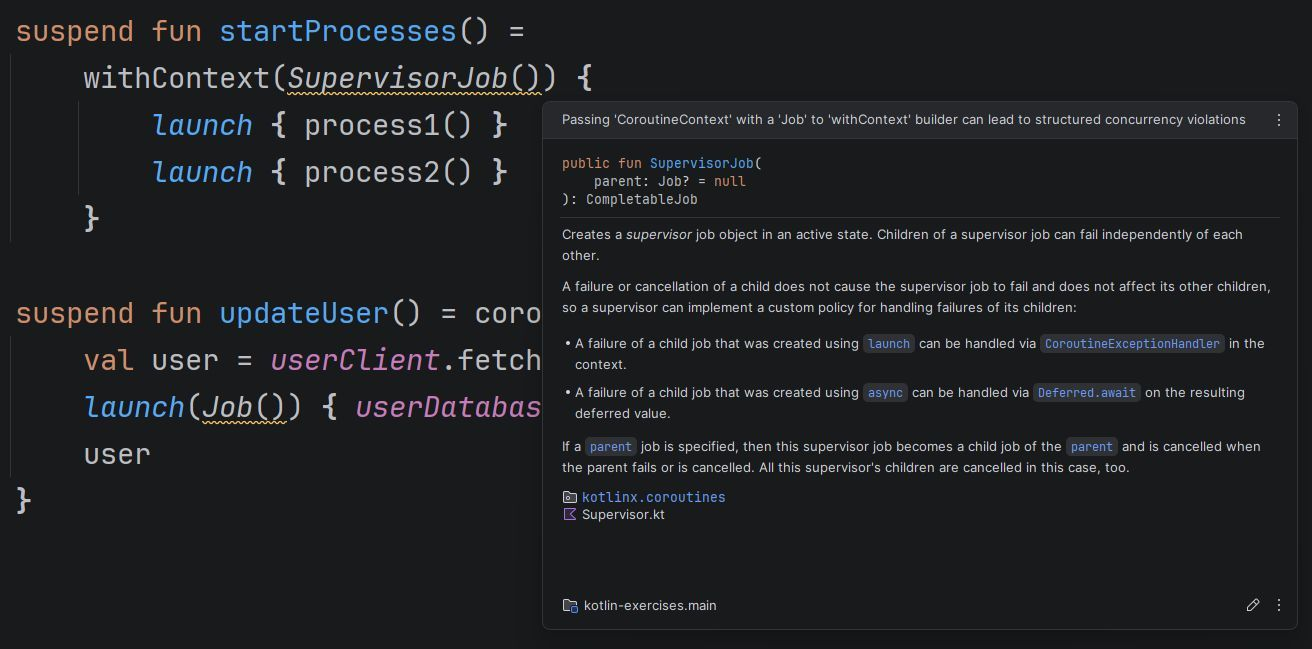
I’ve been looking forward to this inspection for years! Using Job as an argument to a coroutine starter causes issues, and it’s something I’ve seen in many projects. I covered this anti-pattern in my book and workshops, but it still appears quite often. This inspection should help clarify the correct approach. Let’s look at why Job shouldn’t be used as an argument for a coroutine. 

The key misunderstanding here is that Job cannot be overridden by an argument. If you use any other context, it will be used in the coroutine and its children, but not Job. Every coroutine creates its own job. A job contains a coroutine’s state and relations – it cannot be shared or enforced from outside. The Job that is used as an argument isn’t going to be a job of this coroutine. Instead, it overrides Job from the scope and becomes a parent. This breaks structured concurrency.

For example: Using withContext(SupervisorJob()) { … } behaves very differently from supervisorScope { … }

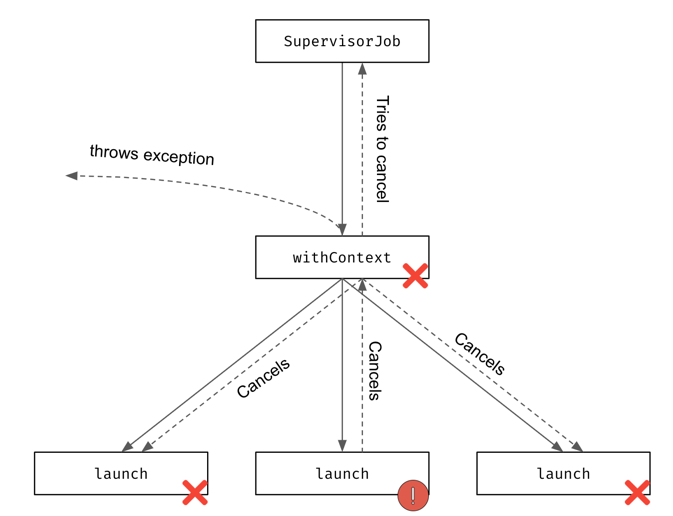
supervisorScope creates a child coroutine of the caller of this function, and it uses a supervisor job (it doesn’t propagate its children’s exceptions). On the other hand, withContext(SupervisorJob()) creates a regular coroutine, which is a child of SupervisorJob and has no relation to the caller. 

Consider the code below. An exception in the first launch propagates to withContext (which uses regular Job), cancels the other child coroutines, and is then rethrown. SupervisorJob() has no effect. In some cases, it can even be harmful, as it breaks structured concurrency. If the caller of withContext(SupervisorJob()) is cancelled, that cancellation won’t propagate, which will result in a memory leak. 

import kotlinx.coroutines.*

val handler = CoroutineExceptionHandler { _, e ->
   println("Exception:  ${e.message}")
}

fun main(): Unit = runBlocking(handler) {
   // DON'T DO THAT!
   withContext(SupervisorJob()) {
       launch {
           delay(1000)
           throw Error("Some error")
       }
       launch {
           delay(2000)
           println("AAA")
       }
   }
  println("Done")
}
// (1 sec)
// Exception in thread "main"...

Using supervisorScope would prevent this problem: 

import kotlinx.coroutines.*

val handler = CoroutineExceptionHandler { _, e ->
   println("Exception:  ${e.message}")
}

fun main(): Unit = runBlocking(handler) {
  supervisorScope {
      launch {
          delay(1000)
          throw Error("Some error")
      }
      launch {
          delay(2000)
          println("AAA")
      }
  }
  println("Done")
}
// (1 sec)
// Exception:  Some error
// (1 sec)
// AAA
// Done

A Job used as an argument breaks the relationship with the caller. In the case below, updateToken won’t be related to the caller of getToken:

suspend fun getToken(): Token = coroutineScope {
   val token = tokenRepository.fetchToken()
   launch(Job()) { // Poor practice
       tokenRepository.updateToken(token)
   }
   token
}

This is generally discouraged, as it breaks structured concurrency. The standard approach would be to sequentially call updateToken

suspend fun getToken(): Token {
   val token = tokenRepository.fetchToken()
   tokenRepository.updateToken(token)
   return token
}

If we really want to detach updateToken from getToken, a better practice would be to start the launch on a different scope, like the backgroundScope we define in our application for background tasks. With this approach, the new coroutine is still attached to a scope, just a different one: 

suspend fun getToken(): Token {
   val token = tokenRepository.fetchToken()
   backgroundScope.launch { // Acceptable
       tokenRepository.updateToken(token)
   }
   return token
}

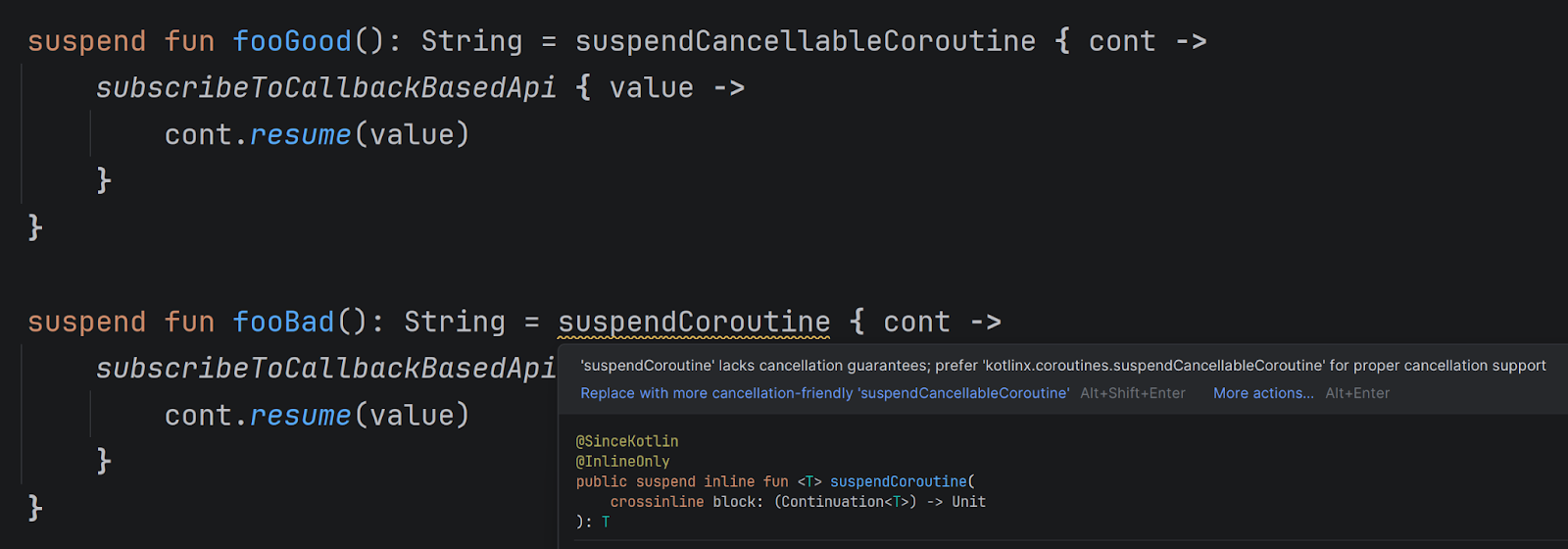
suspendCancellableCoroutine instead of suspendCoroutine

Available since IntelliJ IDEA 2025.3

To suspend a coroutine, use suspendCancellableCoroutine. Its predecessor, suspendCoroutine, does not support cancellation and should be avoided.
suspendCancellableCoroutine is a low-level API rarely used in application code, but often used by libraries that support suspending calls. 

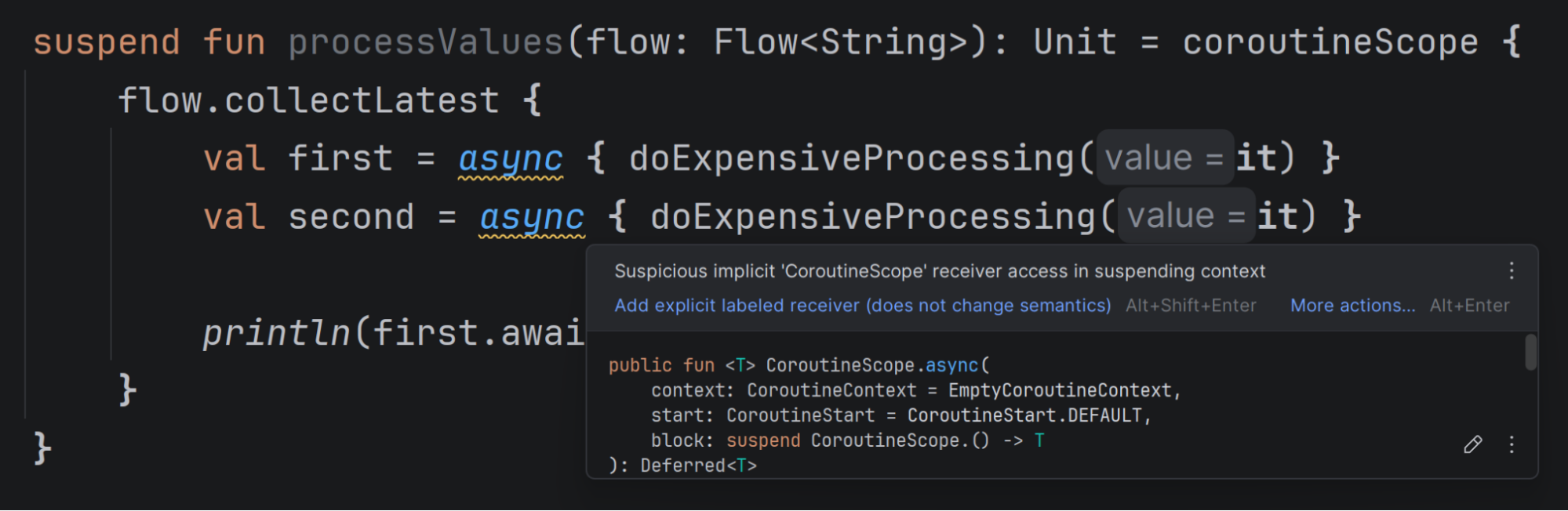
Suspicious implicit CoroutineScope receiver

Available since IntelliJ IDEA 2025.3, but this inspection is disabled by default and must be enabled manually.

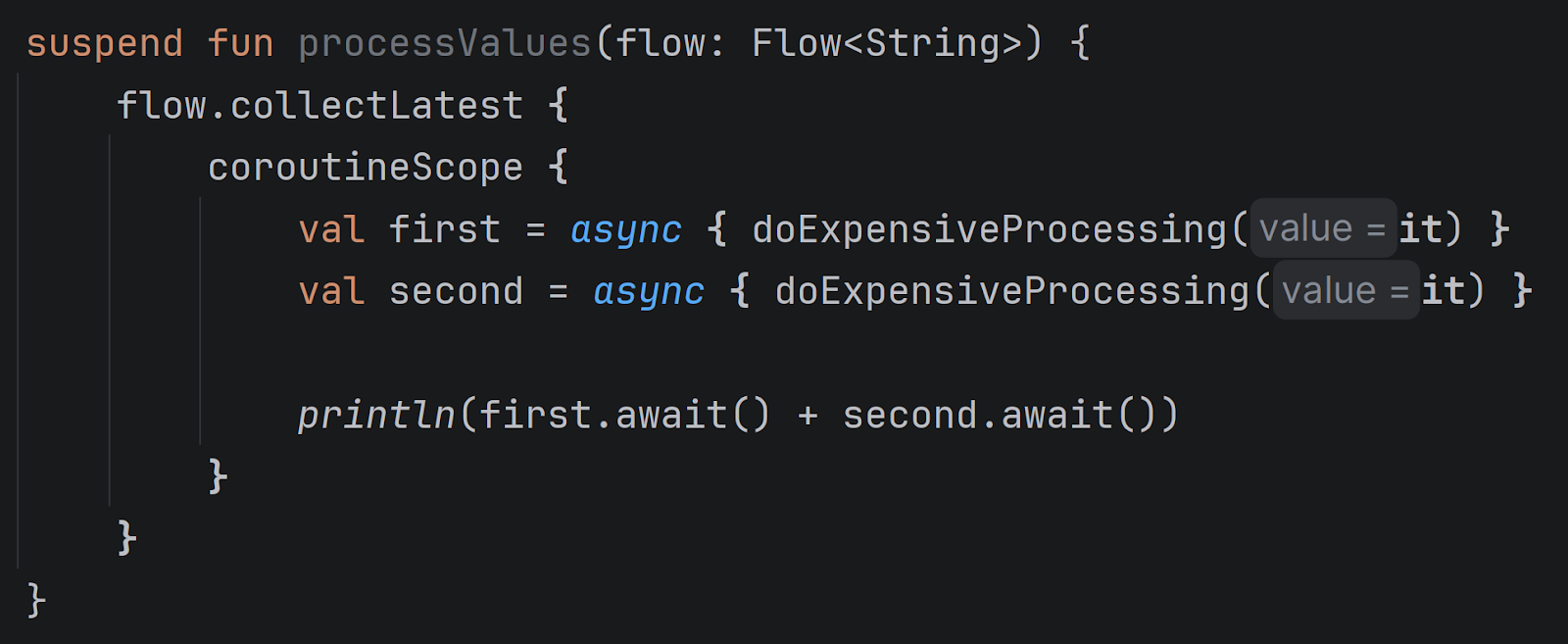
Implicit receivers within lambdas can be confusing. In the above example, async calls are executed on the scope created by coroutineScope because collectLatest doesn’t provide its own scope. This can lead to memory leaks. When a new value reaches collectLatest, it should cancel processing of the previous one. In this example, it cannot cancel the async coroutines, as they are attached to coroutineScope, not to collectLatest. To avoid this, define coroutineScope inside collectLatest, not outside it. This inspection highlights such cases to prevent these issues. 

Simpler operations for flow processing

Available since IntelliJ IDEA 2026.1 (currently in EAP)

You may already know these from collection or sequence processing:
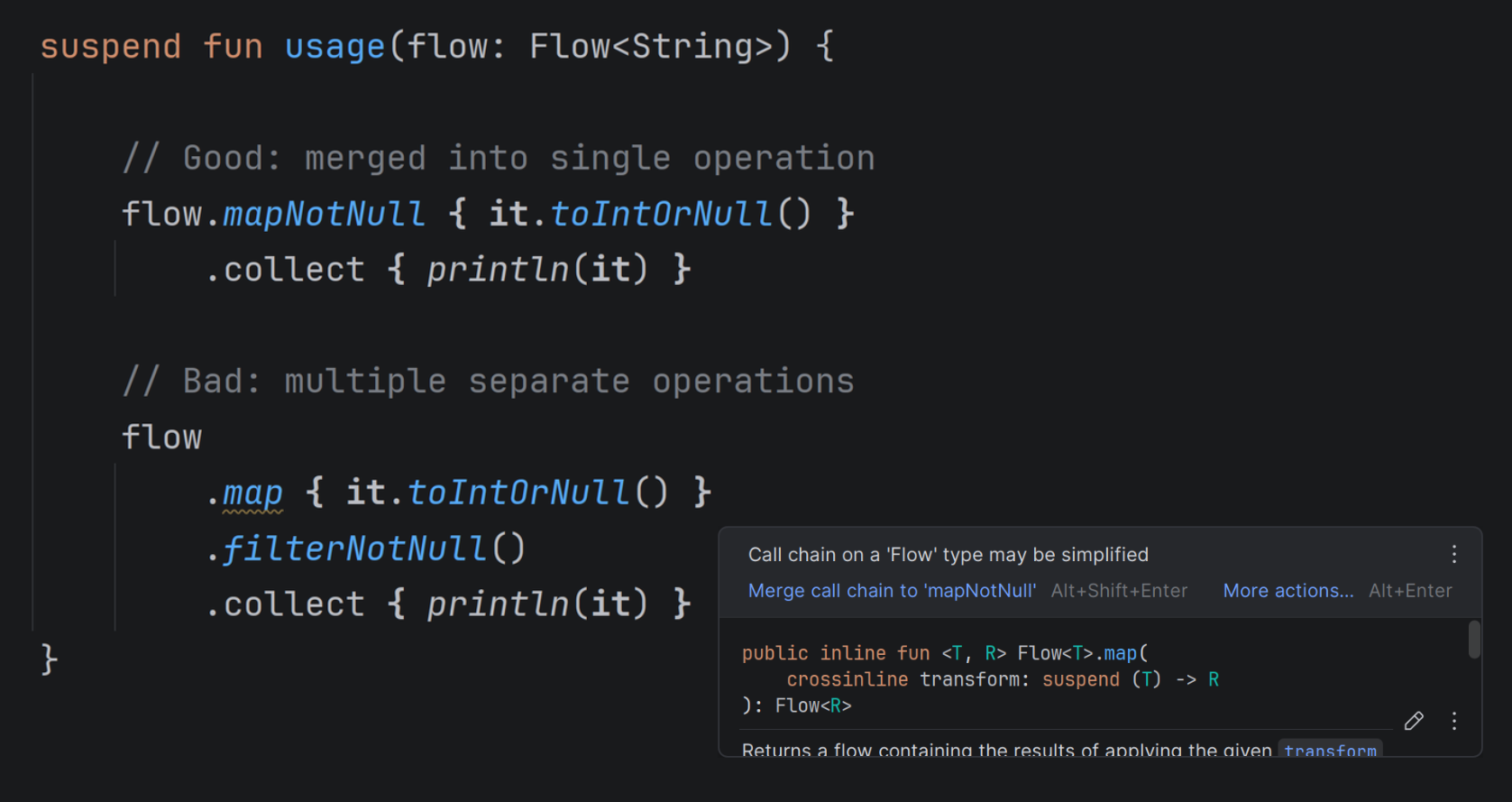
If you use filterNotNull after map, you’ll get the suggestion to use mapNotNull. If you use filter { it is T }, the IDE will suggest using filterNotNull<T>.
These suggestions are now also available for flows! 

Summary

IntelliJ IDEA continues to help you write better code – not only by advancing its AI tools and agents, but also by improving the core development experience. There are still many inspections I would love to see in the IDE, but the current set already brings significant value.

$ teamcity From the Command Line

Start builds, tail logs, and manage agents and queues – without switching windows.

Whether you are debugging a failed build, managing build agents, or scripting your deployment pipeline (or your AI coding agent is doing so) – there are times when opening a browser is one step too many.

TeamCity CLI is a lightweight, open-source tool that puts TeamCity at your fingertips. 

A CLI for TeamCity has been a long-standing request from the community. Here’s how it works and what you can use it for.

TeamCity CLI includes over 60 commands, and for anything it doesn’t wrap yet, teamcity api gives you direct access to the full TeamCity REST API.

Source code (Apache 2.0): https://github.com/JetBrains/teamcity-cli

Getting started

Install and authenticate in seconds:

# macOS / Linux
brew install jetbrains/utils/teamcity

# via a bash script
curl -fsSL https://jb.gg/tc/install | bash

# Windows
winget install JetBrains.tc

# via a powershell script
irm https://jb.gg/tc/install.ps1 | iex

# Connect to your server
teamcity auth login https://example.teamcity.com/

That’s all! Now let’s see it in action.

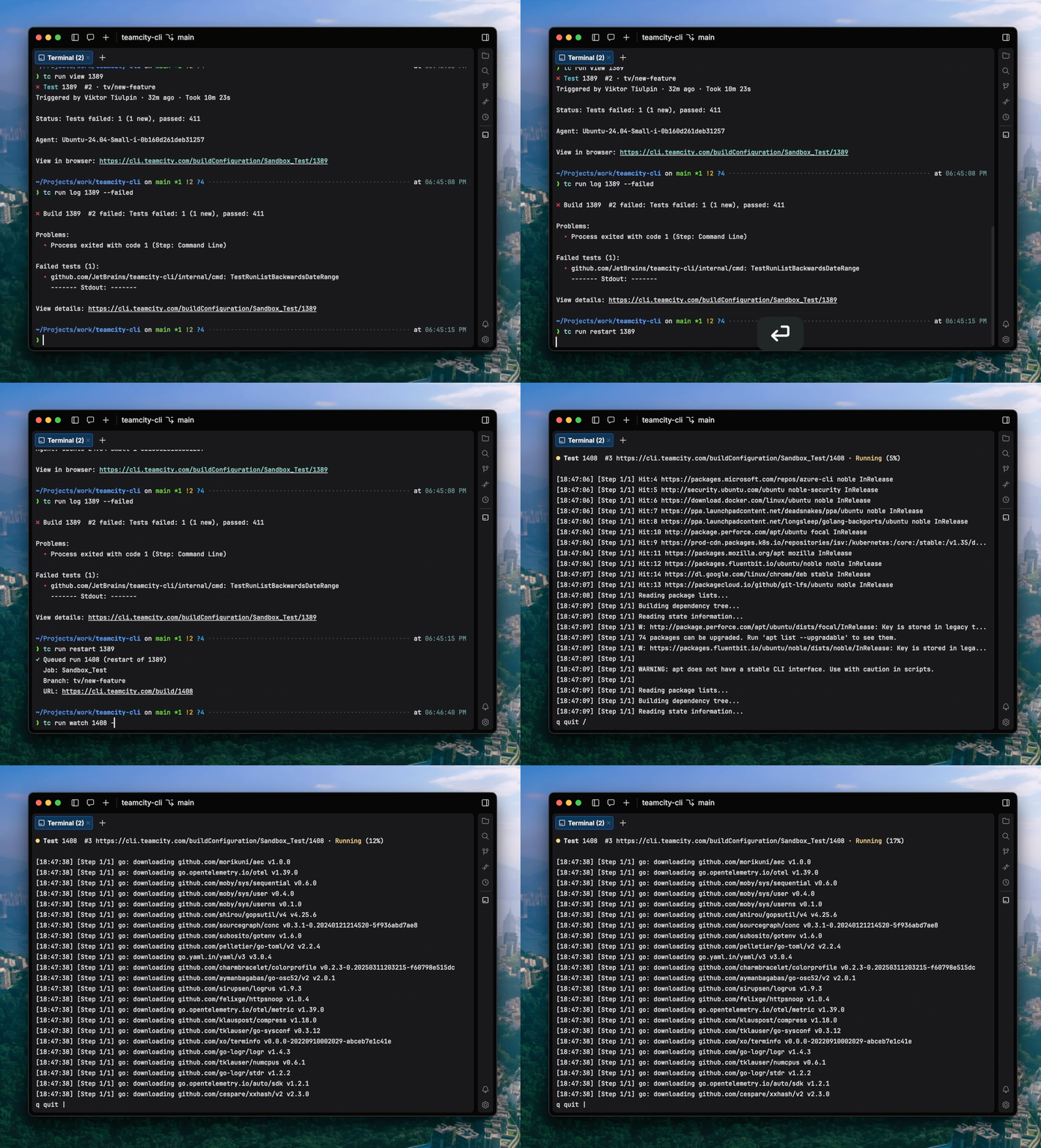
Investigating a failed build

Let’s say something breaks. Here’s how to go from wondering what happened to having it fixed without switching windows.

See what’s happening

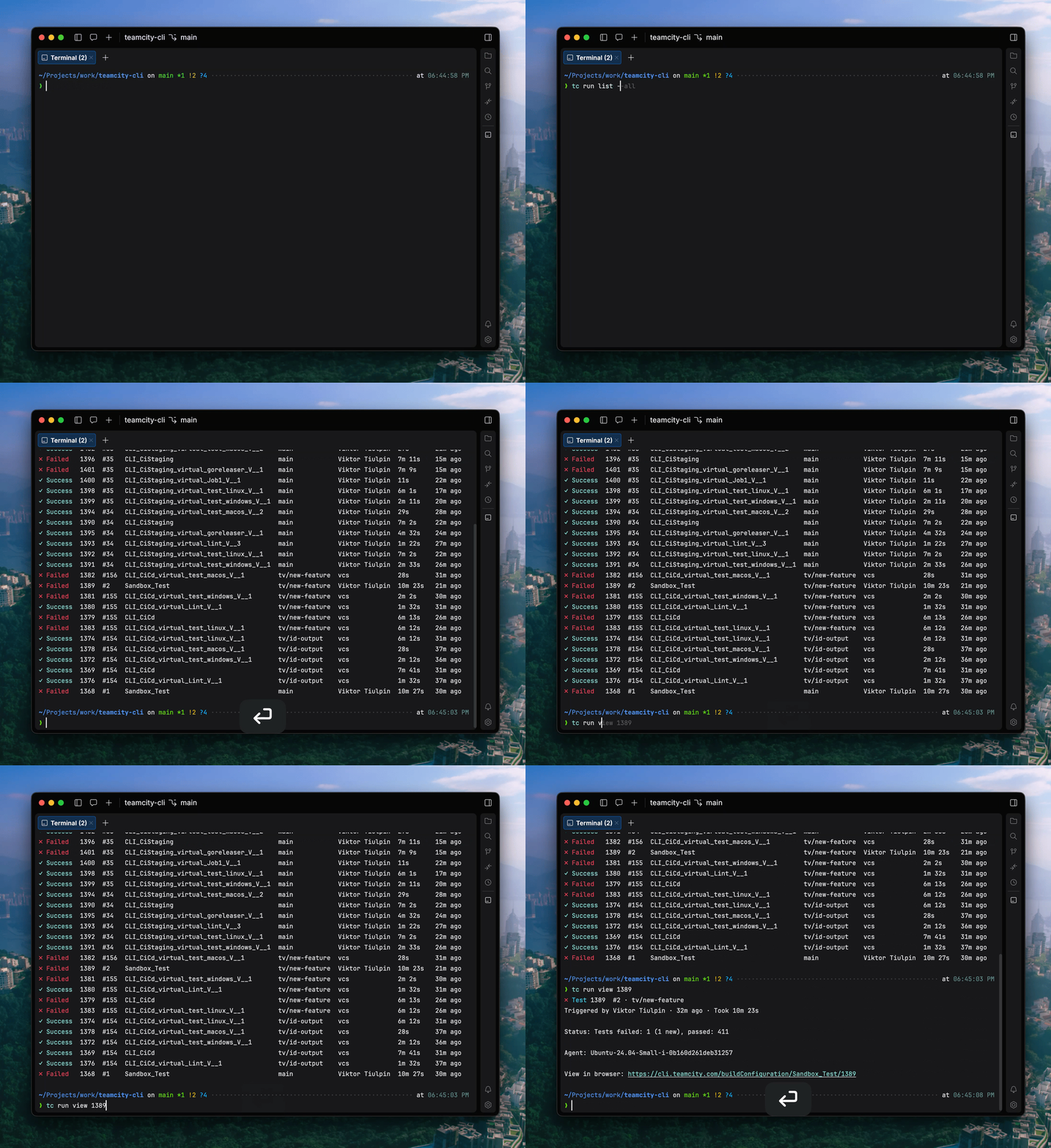
teamcity run list --all

Build 1389 failed. Here’s how we can drill down:

teamcity run view 1389

Need to jump to the TeamCity UI instead? Add --web.

Find the root cause

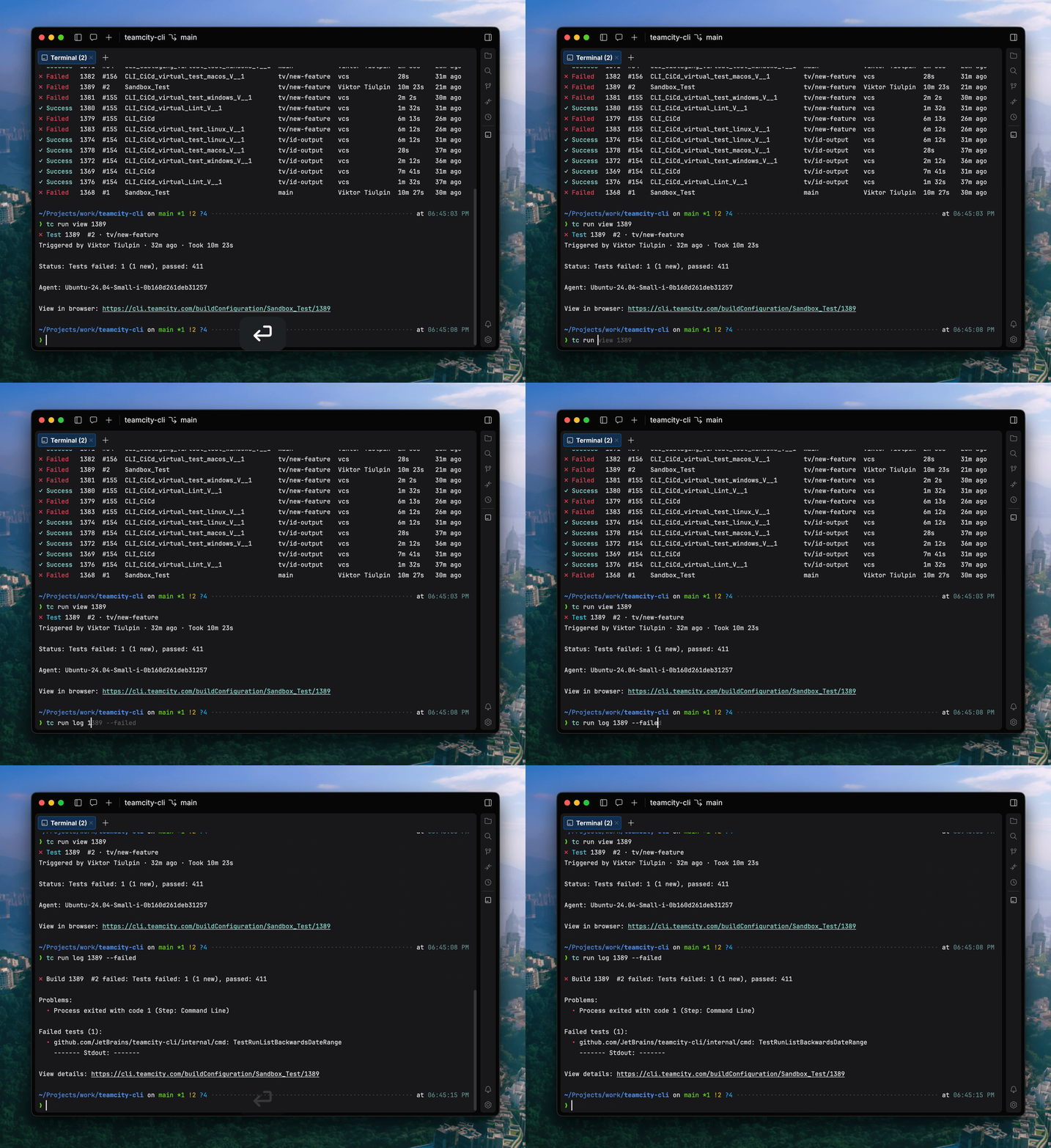
You don’t need to scroll through the entire log. Show only the failed step, then the failed tests:

teamcity run log 1389 --failed

Only one test failed, so you know exactly what to fix.

Fix and re-trigger

After you push the fix, restart and watch it in real time:

teamcity run restart 1389
teamcity run watch 1408 --logs

You see all the updates happening live in your terminal – build state changes, step progress, and streaming log output.

Test before you push

Want to validate your changes with CI before committing to a push? Run a personal build with your local changes:

teamcity run start Sandbox_Test --local-changes

TeamCity runs the build with your uncommitted work applied as a patch – no branch, no force-push, no noise in the repo.

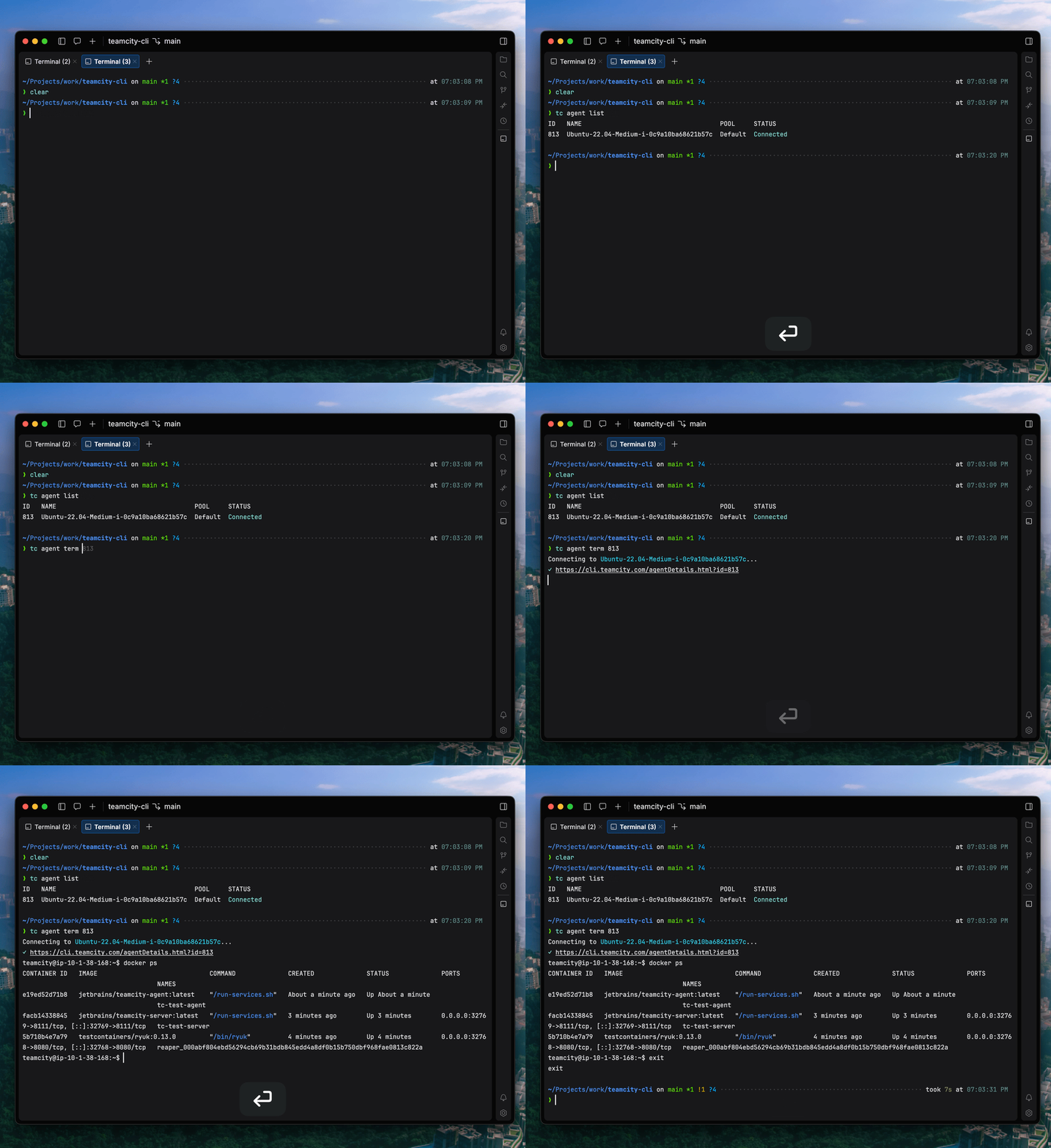
Remote agent access

You can open an interactive shell session on any build agent – or execute commands remotely:

teamcity agent list
teamcity agent term 813

No SSH keys to manage, no VPN to connect – if your TeamCity server can reach the agent, so can you.

Need to just run a quick command? Here’s how:

teamcity agent exec 813 "docker ps -a"

Built for scripting

teamcity covers queues, agents, artifacts, and project configuration – the commands look exactly as you’d expect:

teamcity queue list                                          # what's queued
teamcity queue top 461                                       # move a build to the front
teamcity queue approve 462                                   # approve a waiting build

teamcity agent list                                          # all agents with status
teamcity agent disable "Linux Agent 03" --comment "Maint"    # take one offline

teamcity run artifacts 453                                   # browse artifacts
teamcity run download 453 "reports/**/*.html" --output ./out # grab what you need

# Restart all failed builds on main
teamcity run list --failed --branch main --plain=id | xargs -I{} tc run restart {}

# Structured data for dashboards or scripts
teamcity run list --failed --json=id,status,buildType.name

# Hit any REST API endpoint directly
teamcity api /app/rest/server

Every list command supports --json with field selection and --plain for tab-delimited text – making teamcity a building block for automation.

teamcity api is the escape hatch – anything the CLI doesn’t wrap yet, you can call directly.

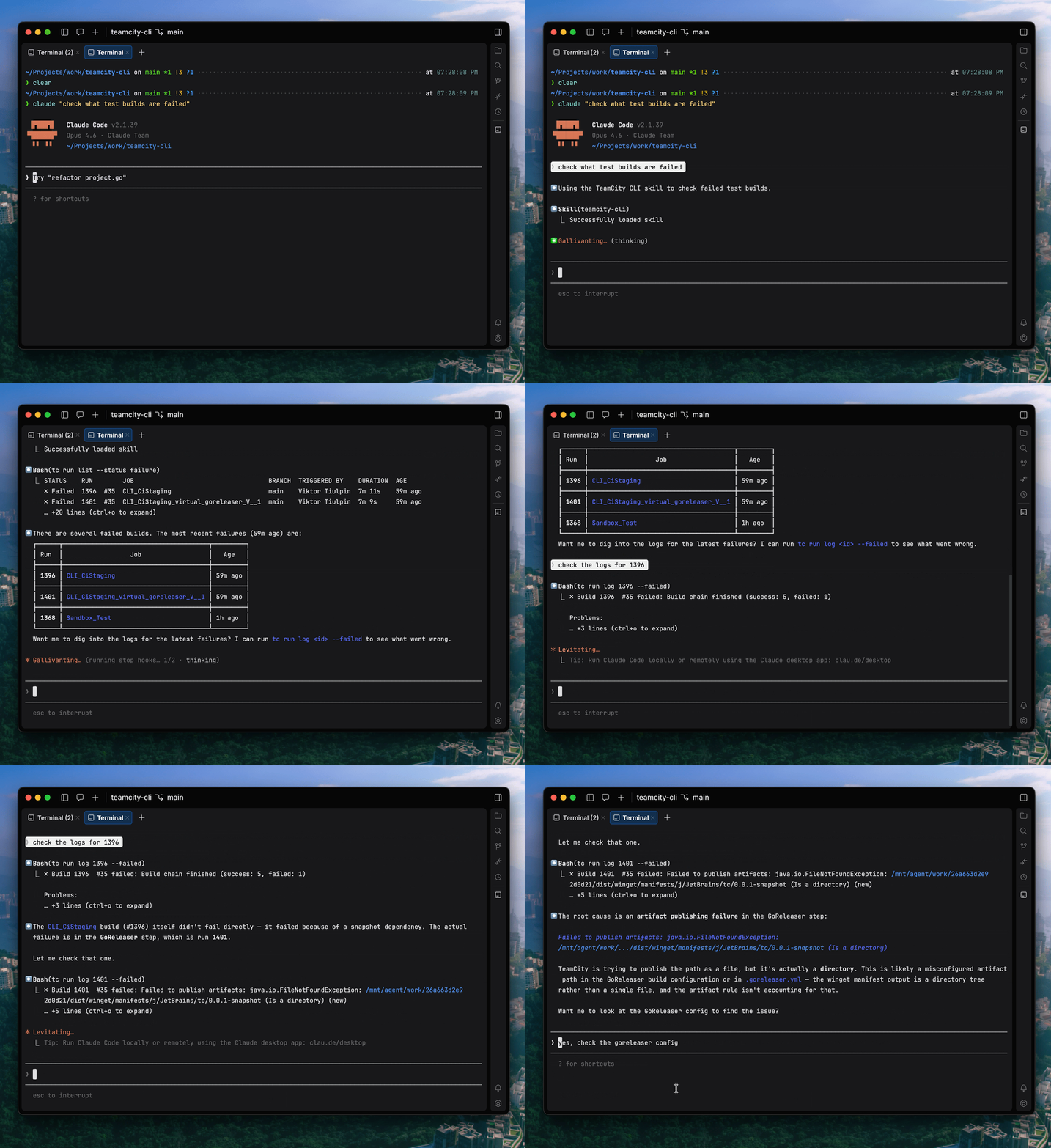
Compatible with AI coding agents

TeamCity CLI ships with an Agent Skill that teaches AI coding assistants how to use the tool. Your AI agent can then check the build status, investigate failures, download artifacts, and manage your pipeline on your behalf.

Users should limit the token rights granted to the agent, be aware of security implications, and always check the actions the agent intends to execute.

What’s next

TeamCity CLI is open-source under Apache 2.0. There’s more we want to build – for example, pipeline visualization, richer TUI interfaces, and deeper integration with version control workflows. Your feedback will shape what comes next.

Try it

brew install jetbrains/utils/teamcity       # macOS
winget install JetBrains.TeamCityCLI        # Windows
curl -fsSL https://jb.gg/tc/install | bash  # Linux/macOS setup script
irm https://jb.gg/tc/install.ps1 | iex      # Windows setup script

Source code and docs: github.com/JetBrains/teamcity-cli

Report issues or request features: GitHub Issues