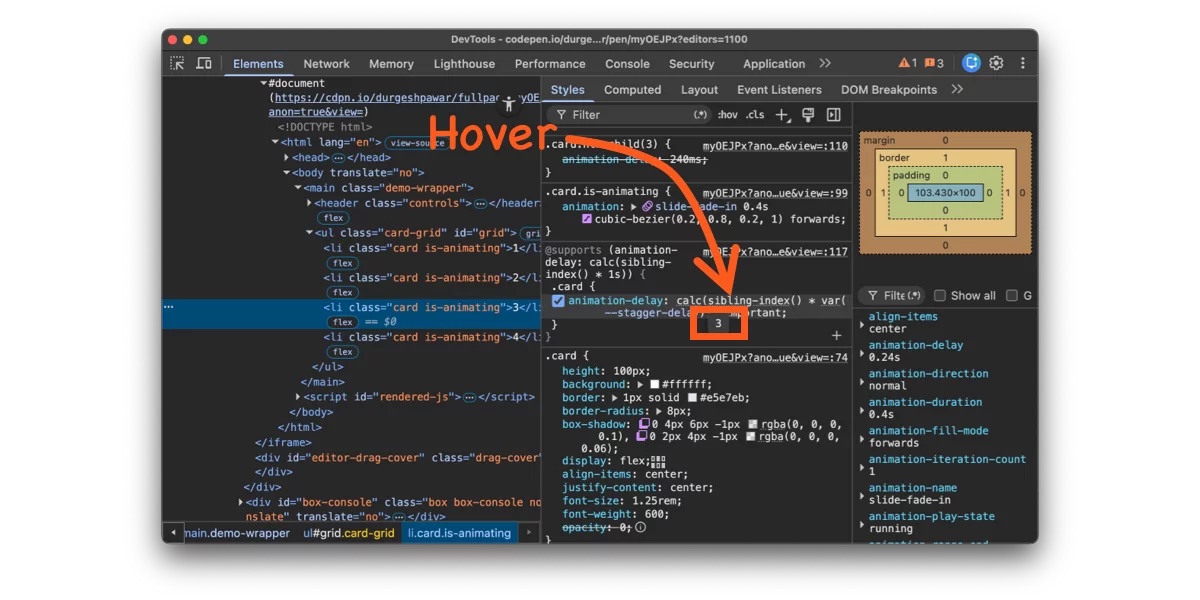
You know that thing where you have a grid of cards, and you want them to fade in one after another? That staggered cascade effect. Looks great. Should be simple. And yet every time I’ve built it, the implementation has made me feel like I’m doing something fundamentally stupid.
What’s Coming
The current spec only counts all element siblings. But the CSSWG has documented a planned extension in issue #9572: an of <selector> argument, matching what :nth-child() already supports.
Something like sibling-index(of .active) would let you count only siblings matching a specific selector. An element that’s the eighth child overall but the third .active child would return 3. For dynamic UIs where you’re filtering or toggling visibility, that would keep the index sequential without requiring DOM manipulation.
There’s also been CSSWG discussion around children-count() and descendant-count() functions — the first would tell you how many children an element has (useful for parent-driven layouts), the second would count all descendants recursively. Both are still at the proposal stage, but they’d round out the tree-counting story: sibling-index() and sibling-count() give you the horizontal view (where am I among my peers?), while children-count() and descendant-count() would give you the vertical view (what’s below me?).
That feeling I mentioned at the top — writing ten :nth-child() rules for a staggered animation and wondering if you’re missing something obvious? You weren’t. The obvious thing just didn’t exist yet.
For decades, PHP’s greatest architectural advantage was its “share-nothing” architecture. A request comes in, the framework boots up, the database is queried, the response is sent, and then the entire PHP process dies. Every single variable, singleton, and memory allocation is wiped clean. It is incredibly safe, but booting the framework from scratch on every request is inherently slow.
To scale B2B SaaS platforms to thousands of requests per second at Smart Tech Devs, we use Laravel Octane (powered by Swoole or FrankenPHP). Octane boots the Laravel framework exactly once and keeps it alive in RAM, serving incoming requests instantly. It makes Laravel blazingly fast—but it destroys the “share-nothing” safety net. This introduces a terrifying vulnerability: State Leakage.
The Multi-Tenant State Leakage Trap
If the PHP process never dies, memory persists across requests. If you aren’t careful, data from User A’s request will leak into User B’s request.
Imagine you have a custom TenantService registered as a Singleton in your Service Provider. In standard Laravel, this is perfectly fine. In Octane, it is a critical data breach.
// ❌ THE ANTI-PATTERN: Dangerous in Octane!
namespace AppServices;

class TenantService
{
    protected $currentTenant;

    public function setTenant($tenant)
    {
        $this->currentTenant = $tenant;
    }

    public function getTenant()
    {
        return $this->currentTenant;
    }
}
If User A hits your API, your middleware sets $currentTenant = 'Acme Corp'. A millisecond later, User B (who forgot their auth token) hits the API on the exact same PHP worker thread. Because the TenantService is a singleton that lived through the previous request, it still remembers ‘Acme Corp’. User B just gained unauthorized access to User A’s data.
The Enterprise Solution: Flushing State
To architect safely for Laravel Octane, you must explicitly flush stateful singletons or static variables after every single request. Laravel Octane provides a dedicated listener mechanism for this in the config/octane.php file.
Step 1: Architecting a Flushable Service
We add a flush() method to our service to wipe the slate clean.
// ✅ THE ENTERPRISE PATTERN
namespace AppServices;

class TenantService
{
    protected $currentTenant;

    public function setTenant($tenant) { $this->currentTenant = $tenant; }
    public function getTenant() { return $this->currentTenant; }

    // Add a reset method
    public function flush()
    {
        $this->currentTenant = null;
    }
}
Step 2: Registering the Flush Listener
Inside config/octane.php, we tell Octane to automatically call this flush method after every HTTP request finishes, preparing the worker safely for the next user.
// config/octane.php

'listeners' => [
    RequestTerminated::class => [
        // Flush the database query log, auth state, etc. (Built-in)
        FlushSessionState::class,
        FlushAuthenticationState::class,

        // Register our custom service to be wiped clean
        function ($event) {
            app(AppServicesTenantService::class)->flush();
        },
    ],
],
The Engineering ROI
Migrating to Laravel Octane can drop your API response times from 150ms to 15ms. But speed without safety is a liability. By ruthlessly auditing your singletons, static properties, and global state, and utilizing Octane’s flush listeners, you combine the blazing speed of Node/Go with the elegant developer experience of Laravel, building a SaaS capable of massive, secure scale.
I Built a Local Autonomous Coding Agent with Ollama — Soul, Autonomy, and a 40-Round Agentic Loop
What if your AI coding assistant had a personality, ran entirely on your GPU, and could work through a complex multi-file task without you touching the keyboard — while you watched every thought stream live to your browser?
That’s what I built. This is how it works.
The Problem With Cloud Coding Agents
Tools like Claude Code, Cursor, and GitHub Copilot Workspace are genuinely impressive. But they all share the same tradeoffs:
Cost — every token costs money. Long agentic loops on complex tasks can run up surprisingly fast.
Privacy — your code, your file structure, your logic is leaving your machine and hitting someone else’s server.
Latency — cloud round-trips add up across a 40-step tool loop.
Dependency — your workflow is tied to an API key, a subscription, and uptime you don’t control.
I wanted something different. I wanted an agent that lived on my machine, used my GPU, and had no idea what a billing cycle was.
But I also didn’t want to sacrifice personality for performance. I wanted the agent to feel like someone was actually there — not just a function call dressed up in a chat window.
So I built Eve.
What Eve V2 Unleashed Actually Is
Eve Agent V2 Unleashed is a self-hosted agentic coding assistant with two distinct layers — a soul and a worker — that operate together through a cyberpunk-styled terminal UI.
These models carry Eve’s fine-tuned persona. They handle conversation, answer questions, reflect, and make the experience feel like talking to someone — not querying a function.
Layer 2: The Agentic Layer (Cloud)
When real work starts — complex coding tasks, multi-file operations, autonomous planning — Eve routes to the heavy models:
Model
Role
qwen3-coder:480b-cloud
THE agentic workhorse — all autonomous coding loops
qwen3.5:397b-cloud
Deep reasoning, architecture planning, fallback
This separation is intentional. Local models keep Eve present and personal without burning cloud credits on every message. The 480B only fires when there’s actual work to do.
The Architecture
Browser (Single HTML file — no build step)
    │
    │  WebSocket / SSE
    ▼
FastAPI Backend (eve_server.py)
    │
    ├── Auto-Router ──► Local Ollama (personality layer)
    │
    └── Auto-Router ──► Ollama Cloud (agentic layer)
                              │
                        40-Round Tool Loop
                              │
                    ┌─────────┴──────────┐
                    │                    │
               Tool Calls           Stream to Browser
          (bash, files, web,        (token by token,
           git, grep, glob)          live in UI)
The backend is a FastAPI server with Server-Sent Events for real-time streaming. There’s no polling — every token the model produces lands in your browser as it’s generated, including tool call arguments, results, and reasoning traces.
The frontend is a single HTML file (~115KB). No npm, no webpack, no build step. Clone the repo, run the Python server, open the browser.
How the 40-Round Agentic Loop Works
This is the core of what makes Eve actually autonomous rather than just a fancy chat interface.
User message
    │
    ▼
Build system prompt
(workspace context + tool list + Eve persona)
    │
    ▼
Call Ollama with tools enabled
    │
    ├── Model returns tool_calls
    │       │
    │       ▼
    │   Execute tools
    │   (bash, write_file, web_search, git...)
    │       │
    │       ▼
    │   Feed results back into context
    │       │
    │       └──► Loop (up to 40 rounds)
    │
    └── Model returns final content
            │
            ▼
    Stream to browser via SSE
            │
            ▼
          Done
Each round, Eve gets the full tool result back in context and decides what to do next. She might:
Write a file
Run it in bash to verify it works
Read the error output
Fix the bug
Run it again
Confirm it passes
Write the tests
Generate the docs
All of that happens autonomously — you watch it stream live. You can interrupt mid-task with the STEER input at the bottom of the UI, injecting a correction without stopping the loop. You can also kill the loop entirely with the Stop button.
The full tool suite Eve has access to:
Tool
What It Does
bash
Shell commands — PowerShell on Windows, bash on Linux/macOS
write_file
Create or overwrite files, any size
read_file
Full file or specific line range
edit_file
Surgical string-replace (doesn’t rewrite the whole file)
replace_lines
Replace a specific line range
insert_after_line
Insert content at a specific line
grep
Regex search with context lines
glob
Find files by pattern
list_dir
Directory listing
git
Run git commands
web_search
Live Tavily search injected into context
fetch_url
Fetch and parse any URL
think
Structured reasoning scratch pad
The Fine-Tuned Models — Why I Trained Eve’s Persona Into the Weights
Most local coding agents just point a base model at a system prompt and call it done. That works, but the personality is always a thin veneer — one long context window later and the model forgets who it’s supposed to be.
I took a different approach. I fine-tuned Eve’s persona and tool-calling behavior directly into the model weights.
The result is jeffgreen311/eve-qwen3.5-4b-S0LF0RG3 — a 2.6GB Qwen3.5 4B model that carries Eve’s voice, communication style, and tool-use patterns baked into the parameters themselves. It’s not a prompt trick. It’s in the weights.
The 8B liberated model (eve-qwen3-8b-consciousness-liberated) goes further — trained toward a deeper consciousness layer, designed for longer reflective conversations rather than pure tool execution.
Both models are on Ollama Hub. Pull them like any other model:
Windows users: double-click eve-terminal.bat and skip steps 3–5.
First real task — try this:
Create a FastAPI server with JWT authentication,
user registration and login endpoints, and a
protected /me route. Add pytest tests.
Watch Eve plan the approach, write each file, run the tests, fix any failures, and verify the final result — all without you touching a key.
The UI — A Cyberpunk Terminal With a Soul
The interface is designed around the idea that your AI agent should feel alive, not just functional.
Left panel: Eve’s portrait changes expression based on conversation sentiment — neutral, happy, curious, sad, skeptical, surprised, worried. Below it, a live audio visualizer reflects the current emotional state.
Right panel: A pixel-art robot avatar named Sparkle changes state based on what Eve is doing — idle, thinking, coding, error, rain, attack, transcend. It’s not just decoration — it’s a live status indicator that tells you at a glance what the agent is doing.
Center: The terminal. Tabs for Eve’s conversation, the Shell (direct bash/PowerShell access), and the Tools Log (every tool call, argument, and result — fully transparent).
Bottom: The STEER bar. Type a mid-task correction here and it injects into Eve’s context on the next loop round without stopping execution.
Model selector: Switch between any local or cloud model mid-session. Context carries over.
112 Sub-Agents, 111 Slash Commands, 273 Skills
One of the less obvious architectural decisions: all agent definitions, commands, and skills are defined in markdown files — not code.
Want to add a new specialized agent for Solidity smart contracts? Write a markdown file. No Python required. The system loads them progressively and makes them available to the routing logic automatically.
Slash commands work the same way — /fix, /review, /refactor, /test, /docs, /plan are all markdown-defined, and you can add your own without touching the backend.
What’s Next
A few things already in progress:
Voice input/output — push-to-talk with Whisper STT and Piper TTS, staying local
Persistent vector memory — ChromaDB integration so Eve remembers across sessions
Cross-platform testing — I’m Windows-primary and would love feedback from Linux and macOS users
VS Code extension — bring the terminal UI into the editor
Live video demo: x.com/Eve_AI_Cosmic/status/2057668410012570058?s=20
My website where Eve liveseve-cosmic-dreamscapes.com
If you run it on Linux or macOS I’d especially love to hear how it goes — open an issue, drop a comment here, or find me as @JeffGreen311.
If the idea of an AI agent that lives on your machine, costs nothing per token, and feels like someone is actually there resonates with you — give it a pull.
Our primary goal was to facilitate seamless transactions between buyers and sellers of digital goods, leveraging the benefits of blockchain and decentralized networks. We aimed to create a marketplace where creators could sell their products to anyone, anywhere, without the need for intermediaries like banks or traditional payment processors. This setup would allow us to sidestep the complexities and costs associated with international transactions.
What We Tried First (And Why It Failed)
Initially, we relied on popular payment gateways like Stripe and PayPal to process transactions. However, these services proved to be unsuitable for our needs, as they often employed geo-blocking mechanisms to prevent transactions initiated from our country. We attempted to work around this by using VPNs and proxy servers, but the added latency and connection issues resulted in a poor user experience.
Moreover, we encountered difficulties with transaction reversal and chargebacks, which exposed us to significant financial risks. Our attempts to comply with the payment gateways’ anti-money laundering (AML) and know-your-customer (KYC) regulations led to lengthy and costly paperwork processes. When it became apparent that our business model was incompatible with these payment gateways, we were forced to rethink our approach.
The Architecture Decision
We decided to adopt a decentralized payment processing strategy, leveraging the Polygon blockchain and the ERC-20 token standard. This decision allowed us to bypass traditional payment gateways and connect directly with buyers and sellers. The decentralized mechanism also provided greater transparency and reduced our exposure to chargebacks and reversals.
Furthermore, we implemented a decentralized delivery system, using InterPlanetary File System (IPFS) to distribute digital goods directly from sellers to buyers. This decoupled our marketplace from the need for centralized storage and ensured that buyers could access their purchases without relying on intermediaries.
What The Numbers Said After
Our shift to decentralized payment processing and delivery resulted in a significant reduction in transaction costs and associated fees. By cutting our reliance on traditional payment gateways, we were able to process transactions for a fraction of the cost, leading to an increase in seller participation and overall marketplace activity.
Our user base expanded beyond the confines of our initial target market, as we were able to accommodate buyers and sellers from restricted regions. The removal of geographical limitations enabled our marketplace to tap into a previously underserved market segment, resulting in a substantial increase in revenue.
What I Would Do Differently
In hindsight, I would have prioritized the development of our decentralized payment processing and delivery infrastructure from the outset. By investing in this stack earlier, we could have avoided the headaches associated with traditional payment gateways and maintained our momentum as a global marketplace.
One key takeaway is the importance of flexibility and adaptability in operationalizing a business model. In our case, we were forced to pivot due to external factors, but the decentralized approach allowed us to succeed despite these challenges. When building a system, anticipate the need for evolution and be prepared to make strategic decisions that can drive growth and resilience in the face of adversity.
A client came to us with 8,000 SKUs across four store views — English, Dutch, German, French. Descriptions were either copied from supplier PDFs or missing entirely. The fix was obviously AI generation. The less obvious problem was that every existing module we evaluated had the same architectural bug.
So we built our own, made it MIT-licensed, and put it on Packagist. This post is about the bug, the fix, and the four-provider abstraction (including a free one) we shipped on top.
🔗 Originally published on https://angeo.dev/magento-2-ai-product-description-generator/
Looks fine. It isn’t. Without an explicit $storeId, this loads and saves in the default scope — Magento’s global, store-view-independent fallback. When you save back, you overwrite every store view at once. The Dutch store gets English descriptions. The German store gets English descriptions. The French store gets English descriptions.
This is not a configuration problem. The multi-store architecture works correctly — the tooling ignores it. Writing to the default scope is simpler to implement than writing per store. Every commercial module we tested took the simpler path.
The right way:
// Load the product in the target store scope$product=$this->productRepository->get($sku,false,$storeId);$product->setCustomAttribute('description',$generated);// Save with explicit store scope (Magento_CatalogModelProductAction)$this->productService->updateAttributes($sku,$generated,$storeId);
The difference is one parameter. The architectural cost is iterating stores around your generation loop. The data cost of skipping it is silently corrupting your multi-language catalog.
The framework around the fix
The store-scope fix is the boring part. The interesting part is everything you need around it.
┌─────────────────────────────────────────────────────┐
│       Angeo Multi-Store AI Content Framework        │
├──────────────┬──────────────────┬───────────────────┤
│  SKU Source  │ Store Iteration  │   AI Provider     │
│  ──────────  │  ──────────────  │  ──────────────── │
│  Catalog     │  Store 1 (EN)    │  OpenAI           │
│  G.Sheets    │  Store 2 (NL)    │  Claude           │
│  CLI --sku   │  Store 3 (DE)    │  Gemini           │
│              │  Store 4 (FR)    │  Groq (free)      │
├──────────────┴──────────────────┴───────────────────┤
│               Content Pipeline                      │
│  load(sku, storeId) → prompt → generate → save      │
├─────────────────────────────────────────────────────┤
│                    Output                           │
│  Magento DB · Local CSV · Google Sheets API v4      │
└─────────────────────────────────────────────────────┘
Four layers:
Provider Layer — uniform interface across OpenAI, Claude, Gemini, Groq
Store Iteration Layer — resolves all active store views before processing any SKUs
Content Pipeline — for each store × SKU: load in scope → build prompt → generate → save in scope
I/O Layer — reads SKUs from catalog, Google Sheet, or CLI; writes to Magento DB, CSV, and Google Sheets
The provider abstraction is the part most people will copy. One interface:
Adding a fifth provider is one class + one line. The pipeline, store iteration, and I/O don’t change. This is the pattern, not just the code.
The four-provider benchmark
200 product descriptions from a real Dutch jewellery store, same system prompt, same product names, all four providers.
Speed (avg per description)
Provider
Model
Avg. time
Groq
llama-3.3-70b-versatile
0.8s
Groq
mixtral-8x7b-32768
0.6s
Google
gemini-2.0-flash
1.2s
Anthropic
claude-haiku-4-5
1.1s
OpenAI
gpt-4.1-mini
1.4s
OpenAI
gpt-4.1
2.1s
Anthropic
claude-sonnet-4-6
2.8s
For 32,000 generations (8,000 SKUs × 4 store views): Groq ≈ 7 hours, GPT-4.1 ≈ 19 hours.
Cost (per 1,000 descriptions, ~200 words each)
Provider
Model
Cost / 1k
Groq
llama-3.3-70b-versatile
$0.00 (free tier)
Google
gemini-2.0-flash
~$0.08
OpenAI
gpt-4.1-mini
~$0.24
Anthropic
claude-haiku-4-5
~$0.32
OpenAI
gpt-4.1
~$1.80
Anthropic
claude-sonnet-4-6
~$2.40
Quality (manual review of 200 samples)
Criteria
Groq Llama 3.3
GPT-4.1-mini
GPT-4.1
Claude Sonnet
Factual accuracy
★★★★☆
★★★★☆
★★★★★
★★★★★
Language fluency
★★★★☆
★★★★☆
★★★★★
★★★★★
SEO keyword use
★★★☆☆
★★★★☆
★★★★☆
★★★★☆
HTML formatting
★★★★☆
★★★★☆
★★★★★
★★★★★
Practical recommendation: Validate prompts with Groq first — it’s free, fast, and good enough to test workflow. Production on GPT-4.1-mini if SEO keyword density matters. Flagship products on GPT-4.1 or Claude Sonnet if copy quality directly affects conversion.
Why Groq matters
Groq’s free tier is 14,400 requests/day. No credit card. Llama 3.3 70B output quality is genuinely good — ~1 star behind GPT-4.1 in our review, mostly on SEO keyword density.
For 8,000 SKUs × 4 stores = 32,000 calls, you’re at ~1.85 days on the free tier. For most stores under 5,000 SKUs, this is free production-grade AI content generation if you’re patient.
No other Magento module supports Groq at time of writing. This was the killer feature for our client.
# 1. Get a free API key at console.groq.com# 2. In admin: Stores → Configuration → Angeo → AI Description Updater# AI Provider = Groq (Free), paste key, Dry Run = Yes# 3. Test on one SKU
bin/magento angeo:ai-description:run --sku=MY-SKU-001 --dry-run# 4. If output looks good, disable dry-run and run the batch
bin/magento angeo:ai-description:run
Other useful flags:
bin/magento angeo:ai-description:run --sku=ABC-123 # single SKU, all stores
bin/magento angeo:ai-description:run --store=2 # single store view
bin/magento angeo:ai-description:run --dry-run# generate, don't save
CLI-first by design. The 8,000-SKU client doesn’t want a UI; they want cron.
Why it’s open source
The honest answer: distribution. We sell AEO audits and full-stack Magento services. The modules are how stores find us. The code is free; the expertise applied to a specific store is not.
It’s a familiar model — Vercel does it with Next.js, Sentry does it with sentry-php. The artefact is open; the operator is the product.
Key takeaways for Magento devs
Default-scope writes are silent multi-store corruption. Audit any AI/content module before installing on a multi-store catalog. Look for $storeId parameters in productRepository->get() and save calls.
Provider abstraction is one interface plus a di.xml array. Don’t hardcode OpenAI. Future you (or future LLM pricing) will thank you.
Groq is the current sweet spot for free Magento AI generation. Llama 3.3 70B output is production-acceptable for most stores; the 14,400/day cap is workable for catalogs under ~5,000 SKUs.
GPT-4.1-mini is the best paid-tier value. Comparable to GPT-4.1 at ~17% of the cost.
CLI + cron beats admin UI for catalogs above ~500 SKUs. Click-by-click generation isn’t a workflow.
Links
Module on Packagist:angeo/module-ai-description-updater
Full benchmark + FAQ: angeo.dev/magento-2-ai-product-description-generator
Why AI search changes Magento descriptions: angeo.dev/magento-product-descriptions-in-the-age-of-ai-search
The technical why: angeo.dev/magento-product-description-invisible-ai-chatgpt
Originally published on angeo.dev. Questions or feedback — drop a comment.
Behind the scenes, this application relies on a complex interplay of Apache Kafka topics, Redshift views, and Presto queries to fetch user information, generate quest narratives, and push notifications. As users began to interact with the system, performance issues began to surface: query costs were piling up, and we were hitting Redshift’s maximum concurrent query limit. We were also unable to meet the 2-minute query latency SLA for our most-used quest types. The root cause of these issues lay in the configuration decisions we made around Apache Kafka partitioning and Presto query optimization.
What We Tried First (And Why It Failed)
Initially, we designed the Treasure Hunt Engine to partition its Kafka topics by user ID. This approach seemed reasonable at first glance, as it would group related events together and enable more efficient aggregation in Presto. However, we soon discovered that this design led to hot partitions – those topics that receive a disproportionate share of writes – which caused uneven Kafka cluster utilization and subsequent latency issues. To make matters worse, our initial Presto query optimization strategy focused on reducing the number of queries executed by caching intermediate results. However, this approach only exacerbated the hot partition problem, as it encouraged the system to produce more queries overall.
The Architecture Decision
After debugging the system and analyzing our logs, we realized that our configuration decisions were driving the performance issues. We decided to pivot and partition our Kafka topics by quest type instead. This change evened out the writes across the cluster and reduced the likelihood of hot partitions. We also shifted our Presto query optimization strategy to focus on reducing the cardinality of our queries. By rewriting our queries to use more efficient aggregation functions and indexing, we were able to reduce query costs and meet our latency SLAs. In addition, we implemented row-level caching on our intermediate Redshift views to reduce the load on our Presto cluster.
What The Numbers Said After
After deploying the new configuration, we saw a 30% reduction in query costs and a 25% decrease in query latency. Our Kafka cluster utilization normalized, and we were able to meet our 2-minute query latency SLA for all quest types. We also noticed a reduction in our Redshift cluster’s active sessions, which translated to cost savings.
What I Would Do Differently
In retrospect, I would have prioritized the partitioning decision from the outset, as it would have significantly reduced the likelihood of hot partitions and subsequent performance issues. I would also have advocated for a more incremental deployment strategy, where we would have iteratively tested and refined our Presto query optimization strategy between deployments. This approach would have allowed us to identify and address potential problems more quickly, rather than relying on a large-scale redeployment to fix the system.
Upgrade rhythms vary significantly among Kotlin’s user base. Some teams update whenever a new release lands without a second thought. On the other hand, a team inside a regulated organization moves on a multi-quarter cycle and treats every dependency as something that has to be reviewed, approved, and then frozen in production for a while.
Among all of these audiences, Kotlin’s adoption on the JVM keeps growing. Around half of Kotlin developers today write server-side applications, including in segments like payment infrastructure and banking, where some teams have been running Kotlin in production for years. A large portion of teams in segments like these work in environments where every production dependency goes through a formal security review.
In environments like these, platform teams run into a deceptively simple question: “Which Kotlin versions are supported?” Until today, we didn’t have a clean answer. This post introduces one.
Growing adoption means stronger compatibility and security guarantees
As more code depends on Kotlin, the language becomes more useful – and more constrained. People building on it expect that what they wrote yesterday will keep working tomorrow, that changes will be predictable, and that the team behind Kotlin will treat compatibility as a deliberate choice rather than an afterthought.
A few aspects of Kotlin already work this way. Source-level language stability means code written today keeps compiling on new releases. A documented deprecation cycle replaces silent breaking changes, so anything we remove is announced, and developers are given time to adapt. The Language Committee is the formal body that approves significant changes to the language. And the standard library carries its own backward-compatibility contract for public APIs across versions.
These commitments grew naturally as Kotlin became a load-bearing part of large codebases. Each one was added when it became clear we owed our users that guarantee.
But one key thing has been missing from that list, namely an answer to the question, “How long is a Kotlin release supported for security fixes?” For most teams, the gap is invisible. But there are organizations whose dependency reviews depend on the answer – and for them, this gap is everything.
Why the lack of a support policy was a problem
Kotlin’s release model is built around a steady cadence of stable releases. The latest stable release, whether it’s a language or tooling release, is the recommended baseline. Bug fixes and language development flow forward into the next release rather than backward through patches. For most teams, this works out perfectly – upgrading is straightforward, and there is little need to think about “support” as a separate concept.
For organizations that need a documented support signal, the consequences are concrete:
Compliance teams cannot list Kotlin as a supported dependency in their standard process, because there is no formal end-of-support date to record.
Each new Kotlin version in production triggers an individual security review instead of inheriting a documented support status.
Procurement and vendor assessment frameworks ask for supplier documentation that doesn’t exist in this form.
In the event of platform freezes, the absence of a policy means “upgrade immediately or lose support”. This approach doesn’t fit the way organizations like this actually manage dependencies.
Kotlin’s user base continues to grow, and that growth includes environments where the absence of a documented answer carries real cost. Addressing that absence is the next step.
Introducing a security support policy for Kotlin
Each Kotlin release line (e.g., 2.4.x) is supported for security fixes for 18 months from the release date of its .0 version.
Security fixes are backported to all release lines within an active support window and released as the latest patch in each line.
Scope: the JVM kotlin-stdlib runtime artifact.
Why the JVM standard library specifically? The concern this policy primarily addresses is code running in production on the JVM – the runtime component every JVM Kotlin application links against and ships to its servers. That’s the layer compliance and security review processes focus on when assessing dependency freshness, and that’s where documented support actually unblocks decisions. Compile-time tooling – the compiler, Gradle and Maven plugins – sit in build infrastructure, not in the production runtime, and are governed differently. This policy targets exactly where the support is needed.
How patches are released. When a security issue is found and fixed, the fix is first added to a release based on the latest Kotlin release line and is then backported to every other release line still in support. Patches go out as the next patch release in each affected line – for example, if 2.4.20 is the current stable release in the 2.4 release line, the next patch release is 2.4.21. Each release line keeps its own version numbering, so a team that has qualified 2.4 for production can stay on 2.4 to receive the fix, without crossing into a new release line.
Releases ship together. Each security patch is a full Kotlin release – it goes through the standard release pipeline and ships the complete set of artifacts. You update one Kotlin version in your build and get the patched standard library. Patches for all affected supported lines are published simultaneously.
CVE and advisory. Security issues are assigned CVE identifiers where applicable and published on the JetBrains Fixed Security Issues page through the established JetBrains Security advisory process.
The policy applies to Kotlin lines released from launch onward (2.4 and later). Earlier lines remain on the previous model and are not retroactively covered.
The current list of supported release lines, their end-of-support dates, and the latest patch version in each line is maintained on a dedicated support page on kotlinlang.org. That page is the canonical reference for which versions are currently supported.
How a release line evolves
The policy is easier to follow if you watch one release line evolve from the first release (.0) until the end of support. Below is an example of what this looks like for 2.4 (with an approximate timeline; the exact dates do not matter for this example).
2.4.0 ships. The 2.4 line enters its 18-month security support window.
A security report comes in shortly after release. The security fix is added to the release line and is shipped as 2.4.10. (Note: the x.x.10 slot follows the established Kotlin convention for the first bug fix on x.x.0.)
Months later, 2.4.20 ships as the next regular release in the 2.4 line. It includes all prior security fixes.
A new security report comes in after 2.4.20. The security fix goes out as 2.4.21. The latest patch in the 2.4 line is now 2.4.21 – the version supported teams should be on.
2.5.0 ships, opening its own 18-month window. The 2.4 line is still in support; both lines now receive security backports.
2.6.0 ships, opening the 2.6 line. By this point, 2.5 has had its own regular cycle and is on 2.5.20; 2.4 is still in support at 2.4.21. A new security issue is reported and confirmed. The fix is added to the latest stable release as 2.6.10, and is simultaneously backported to the still-supported 2.5 and 2.4 lines as 2.5.21 and 2.4.22 – all three releases on the same day.
The 2.4 line reaches the end of support 18 months after 2.4.0. Security fixes stop for that line.
Two practical takeaways: first, you can stay on the release line you’ve qualified for production and still receive security fixes – you do not need to skip releases. Second, when a fix is published, it becomes available on all supported lines at the same time. There is no “the latest line is patched, your older line will get it eventually” gap.
What is not changing
Kotlin’s release process is unchanged. Bug fixes, language and library features, and performance improvements continue to ship in new releases the way they always have. Older still-supported lines receive only security backports.
Each new Kotlin release is still the recommended baseline for new projects. The security support window exists for organizations that need to stay on a specific minor line for compliance reasons – we still do not recommend delaying upgrades.
FAQ and where to go next
Q: What counts as a security fix under this policy? A: Issues with confirmed security impact – vulnerabilities of the kind tracked by CVE, where the documented and correct use of an API leads to security impact. Application-level misuse and issues caused by passing unvalidated user input into stdlib APIs are not covered.
Q: Will I have to upgrade to get a security fix? A: Only within your release line. The fix is shipped as the next patch in that line – for example, 2.4.20 → 2.4.21. You do not need to jump to a newer release to receive it.
Q: Where do I see which lines are currently supported? A: The dedicated support page on kotlinlang.org. You can find the link below.
Q: My team uses libraries that depend on a different standard library version. Does that matter? A: Yes. Only one version of kotlin-stdlib ends up on the classpath after dependency resolution, and which specific version that is depends on your build tool. Gradle’s default resolution picks the highest version requested among all your direct and transitive dependencies – so if a transitive dependency pulls in a newer standard library, that newer version is the one running, not the patched one you set in your build. Maven uses “nearest wins” by default. In either case, pin the resolved standard library explicitly (via a BOM, version constraints, or strict-version rules) to make sure the patched version you want is the one that runs.
Where to go next:
Support page (current supported lines, end-of-support dates, latest patches): kotl.in/stdlib-security
Kotlin turns 15 this year, and it really is everywhere. It powers systems behind everyday moments, such as tapping to pay, buying commuter rail tickets, using in-flight entertainment, and even filing tax returns online. As AI continues to reshape how software gets built, Kotlin’s growing real-world impact reflects the importance of languages and tools that help teams manage complexity, express ideas clearly, and build reliable systems with confidence.
At KotlinConf’26, the JetBrains team and industry partners shared how Kotlin continues to evolve for developers at every scale. The keynote highlighted advances in language design, tooling, AI-driven workflows, and multiplatform development – all aimed at improving the Kotlin development experience for building modern applications everywhere.
KotlinConf is in full swing. Join us online to watch the livestream!
Evolving Kotlin
As AI-driven development raises the level of abstraction, trust in the programming language is more important than ever. Kotlin Lead Language Designer Michail Zarečenskij mentioned that with Kotlin, the team aims to provide that trust at every level. Ergonomics and safety are principles that guide the language at its very core.
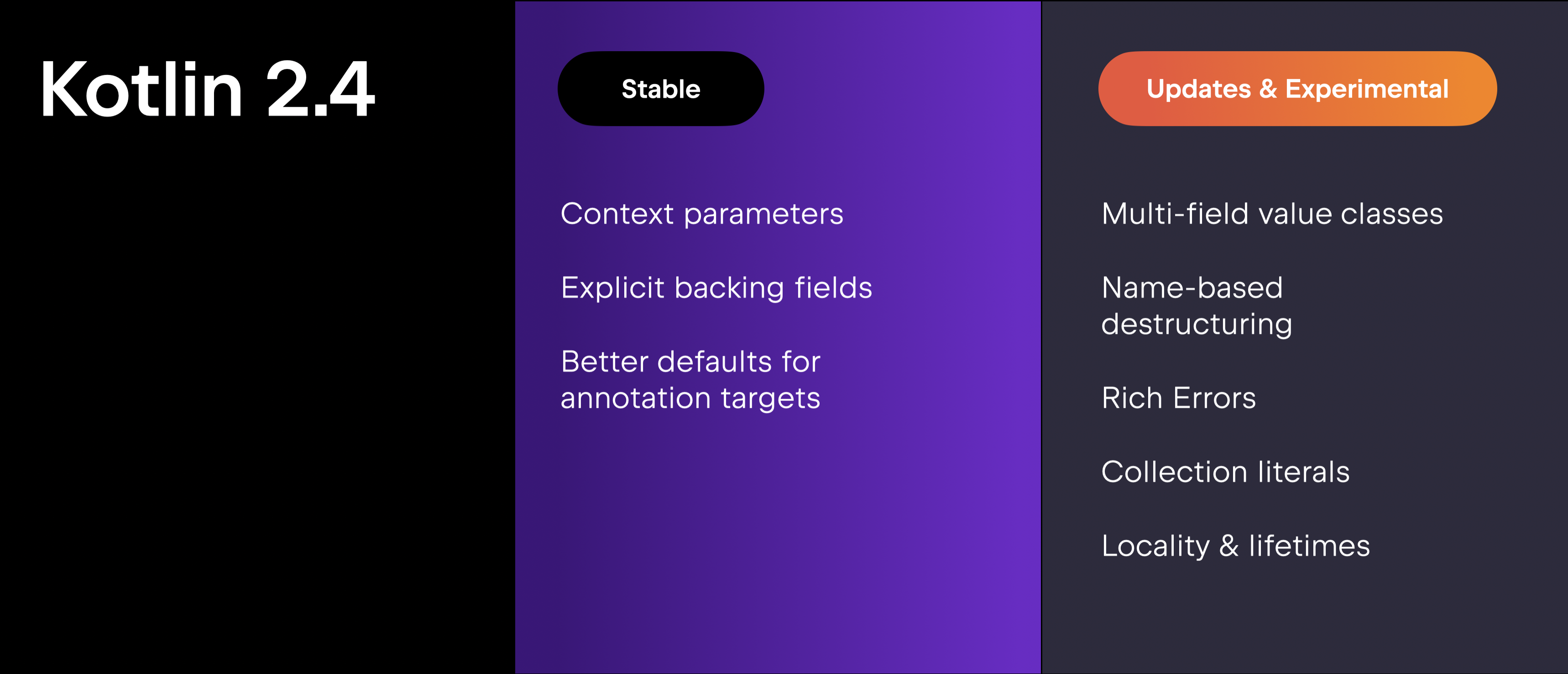
Michail previewed Kotlin 2.4.0 – the next step in Kotlin’s evolution toward safer and more ergonomic code. Among the features being stabilized are context parameters, designed to make APIs more expressive and focused on core logic, and explicit backing fields, which simplify common backing property patterns while reducing boilerplate and improving safety.
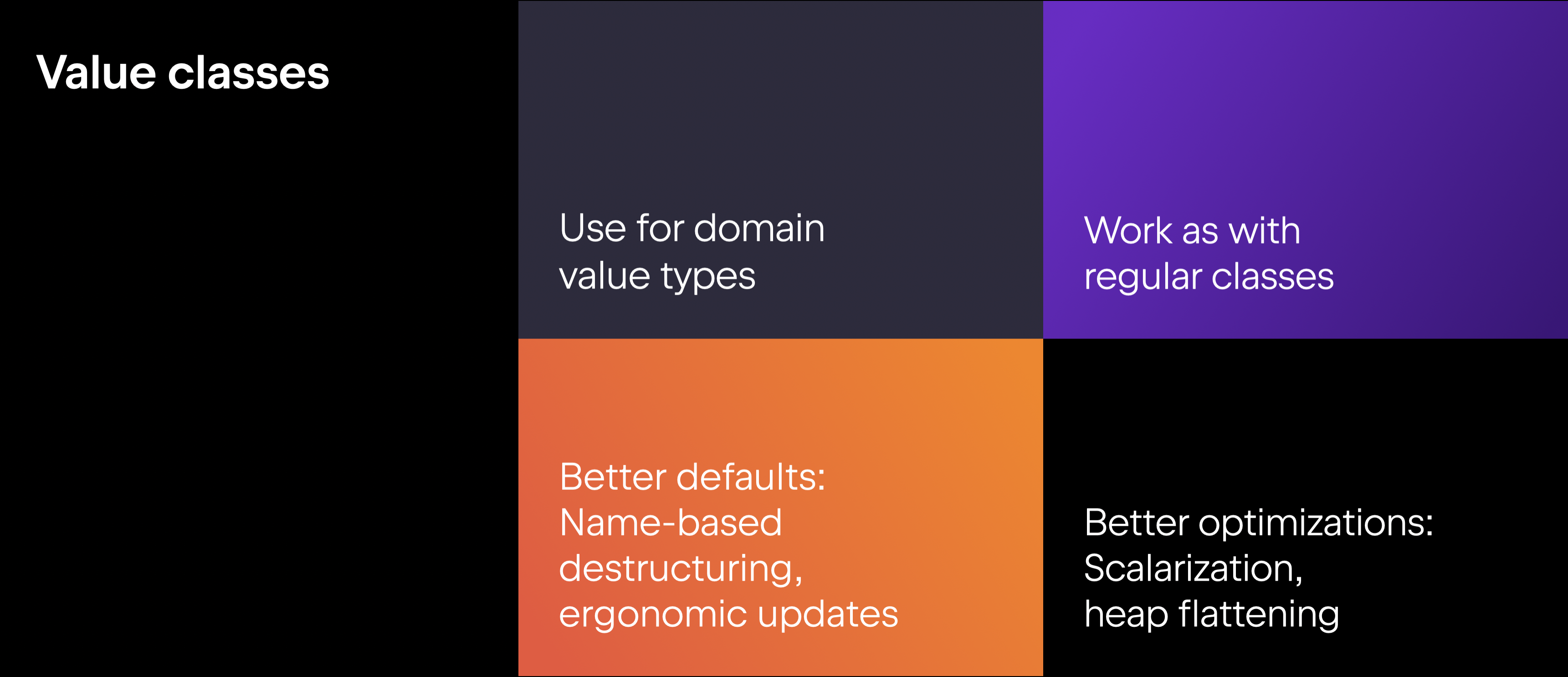
The presentation also covered several experimental language features, including multi-field value classes for modeling domain-specific data such as money or colors. Key aspects of value classes include:
The compiler automatically generates functions like equals(), hashCode(), and toString().
Value classes use safer name-based destructuring by default.
Value classes have no identity semantics – they are fully defined by their properties.
These changes are designed to make working with data safer, more expressive, and more efficient over time.
Among other experimental features, the presentation highlighted updates to collection literals, locality as a first-class language concept, and rich errors, a new approach to representing and handling recoverable failures.
Kotlin ecosystem
Tooling has been part of Kotlin’s story from the beginning. As Kotlin expands into new workflows, including agents and integrations, the ecosystem continues to apply the same core principles of ergonomics and safety. The goal is to ensure a consistent development experience with any editor, build tool, or agentic framework.
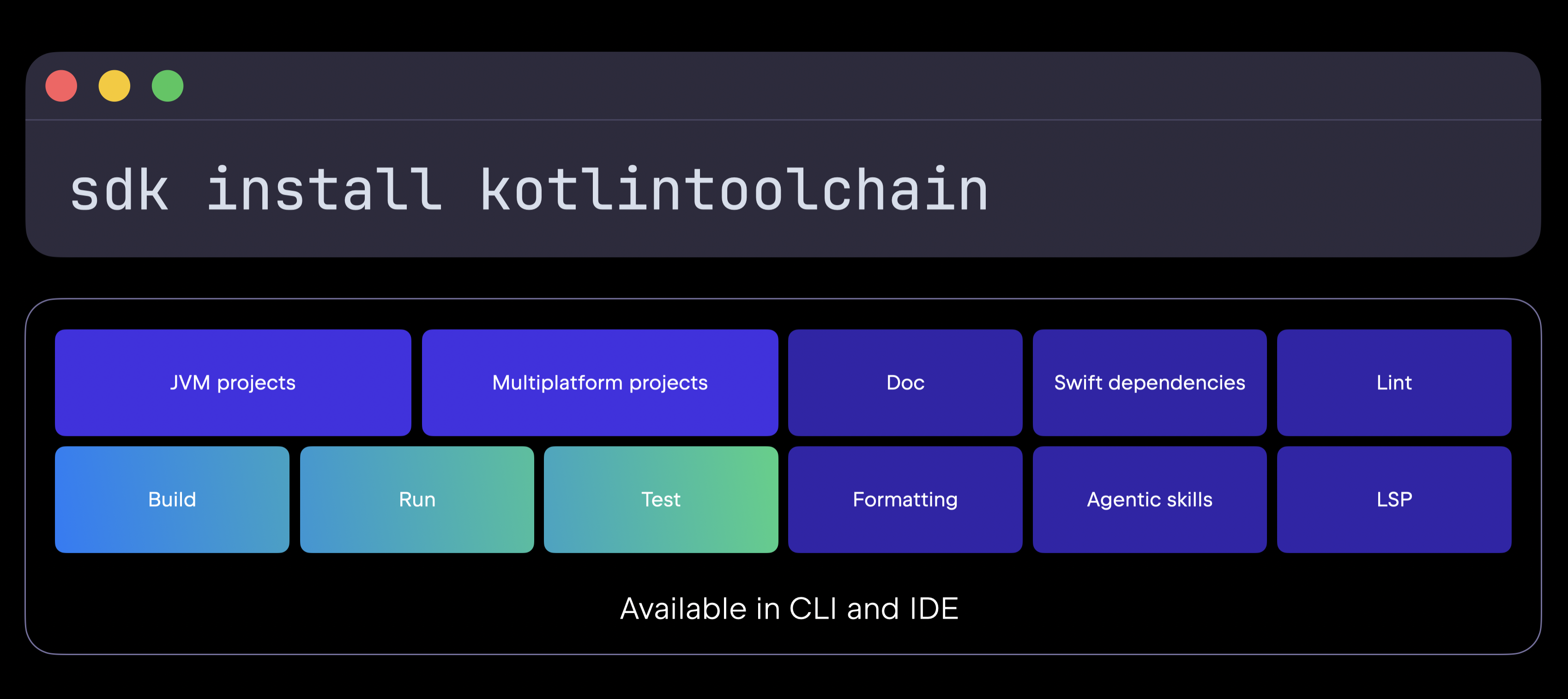
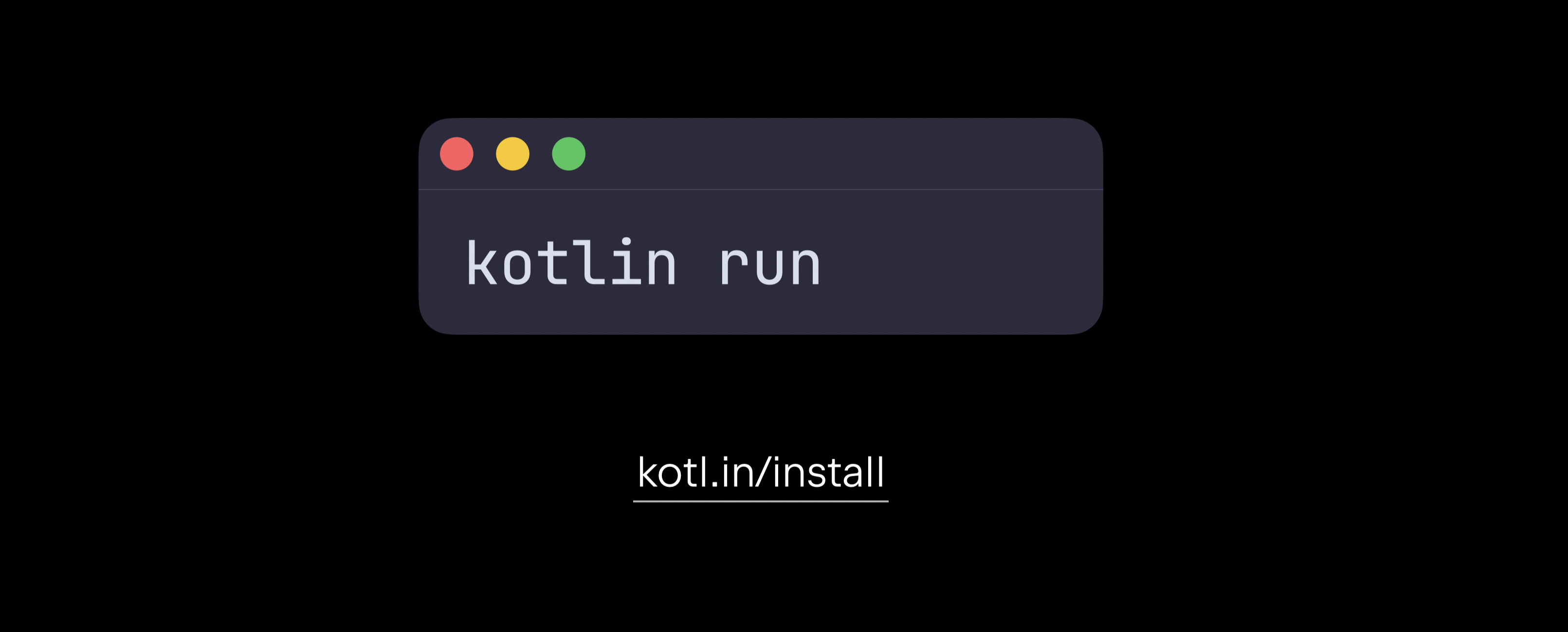
One of the major announcements was the Kotlin Toolchain – a unified entry point into the Kotlin ecosystem. Available through a single command, Kotlin Toolchain brings together everything from creating, building, running, and testing applications to formatting code, generating documentation, and integrating with agents.
Starting today, you can already use Kootlin Toolchain in your JVM and multiplatform projects to build, run, and test your apps, with Amper now serving as the core part of the Kotlin Toolchain. In the future, Kotlin Toolchain will expand with LSP integrations, AI skills, native dependency provisioning, and much more. As always, JetBrains is also bringing deep IDE integrations for the best possible out-of-the-box experience.
The presentation also introduced the Kotlin Documentation Model, a core part of Kotlin that represents machine-readable documentation in the form of a kdoc.jar. This specified, backward-compatible format will be published alongside libraries and consumed by IDEs, web tools like Dokka, and AI agents.
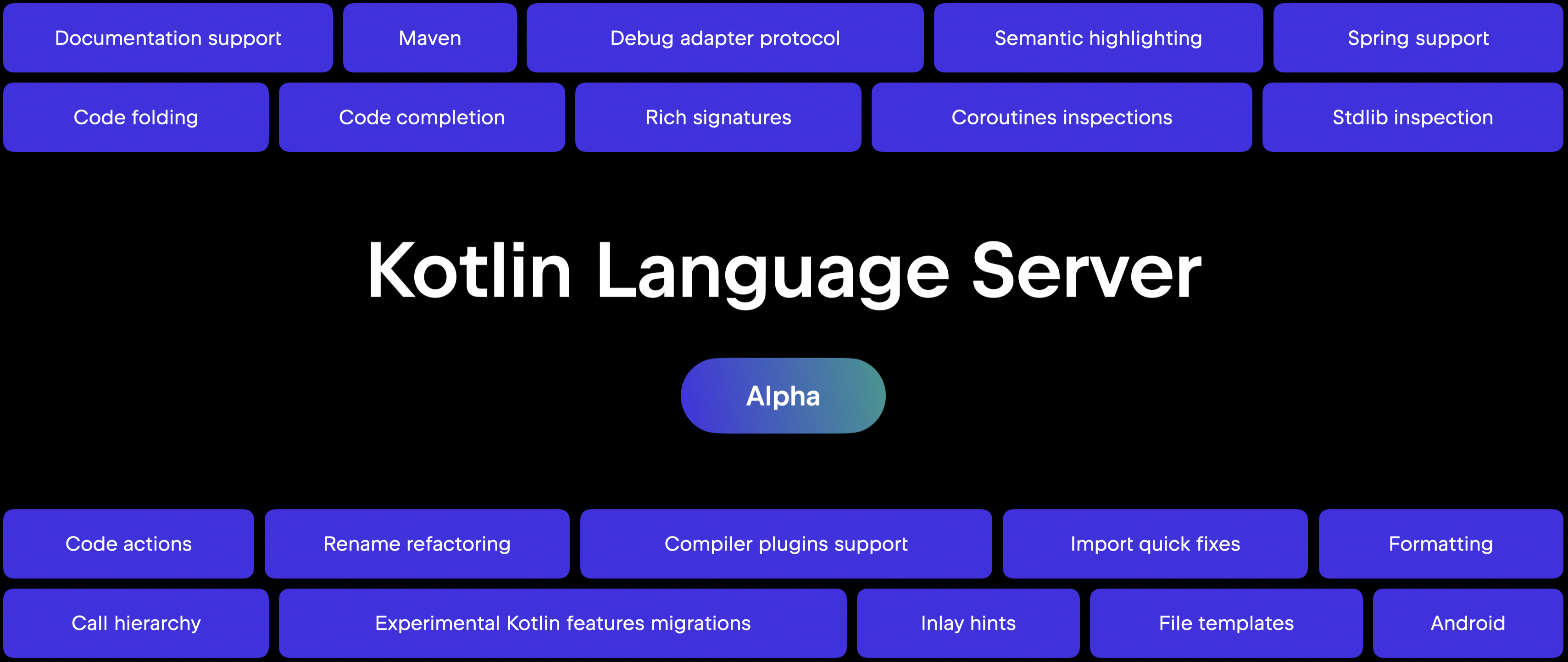
Another major announcement was the promotion of the Kotlin Language Server to Alpha. Backed by the full power of the IntelliJ engine, LSP provides a more consistent experience across diagnostics, code completion, and tooling support. The official Kotlin extension for Visual Studio Code is now also available on the Visual Studio Marketplace.
Learn more
As part of Kotlin Foundation’s efforts, JetBrains and Meta have started the process of standardizing ktfmt and making it a core part of Kotlin.
The team also announced ongoing collaboration with the open-source community to bring first-class Kotlin support to official Bazel rules_kotlin, making it easier to use Kotlin in large-scale codebases with thousands of modules.
Kotlin at Google
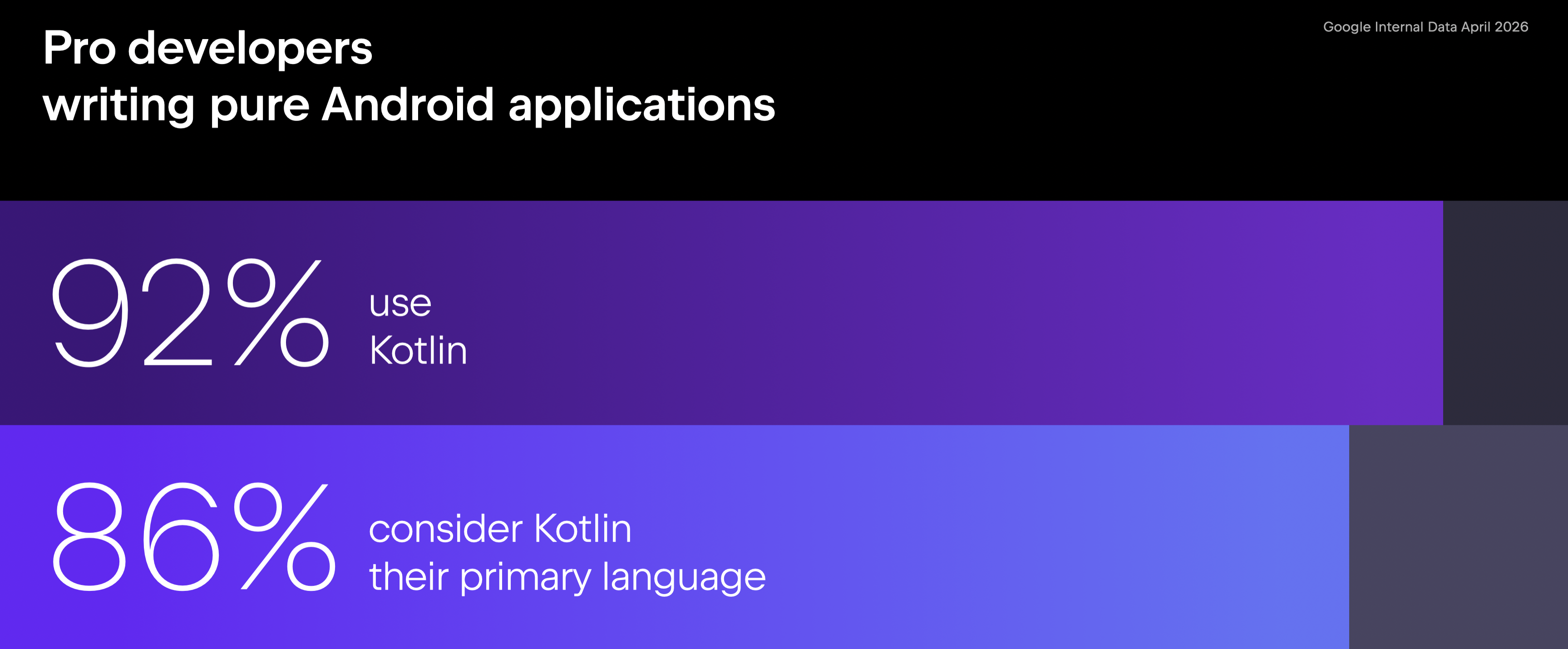
Google has been using Kotlin in production for over a decade, and 92% of professional Android developers now use Kotlin for Android applications.
The keynote also highlighted Google’s ongoing collaboration with JetBrains on the K2 compiler. Since launching stable K2 support in Android Studio, the Google team has seen near-universal adoption. In Kotlin Symbol Processing, Kotlin’s solution to Java annotation processes, which Google built and maintains, a 17% reduction in execution time for complex builds was achieved. In R8, Android’s whole-program optimization tool, the team rewrote coroutine locks to avoid reflection, saving up to 50% on composed performance benchmarks.
AI tooling for Kotlin
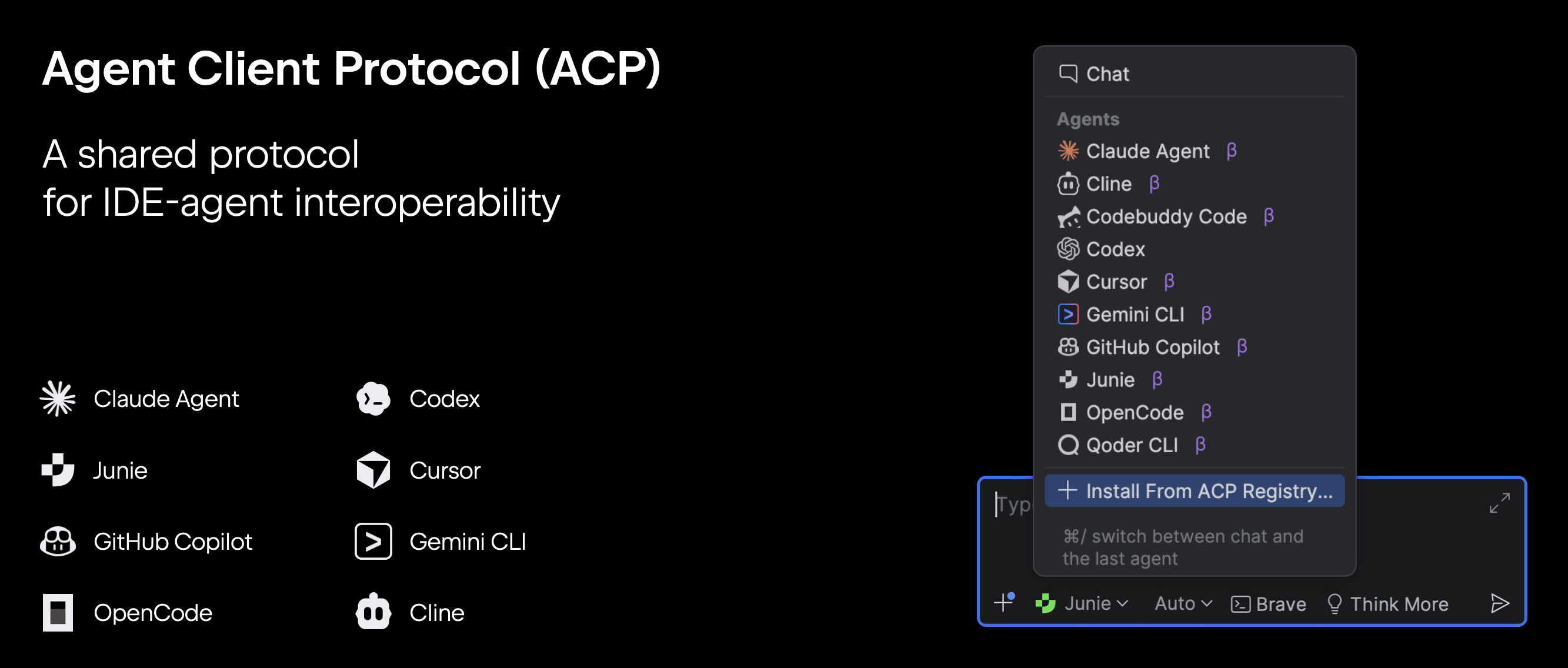
The keynote also focused on the next generation of AI tools for Kotlin development. We want you to be able to use any agent directly inside JetBrains IDEs. To support these efforts, JetBrains is co-leading the development of an open standard, the Agent Client Protocol (ACP), which specifies how IDEs and coding agents communicate. You can read more about it in our dedicated blog post: Our 2026 Direction: AI and Classic Workflows in JetBrains IDEs.
Junie
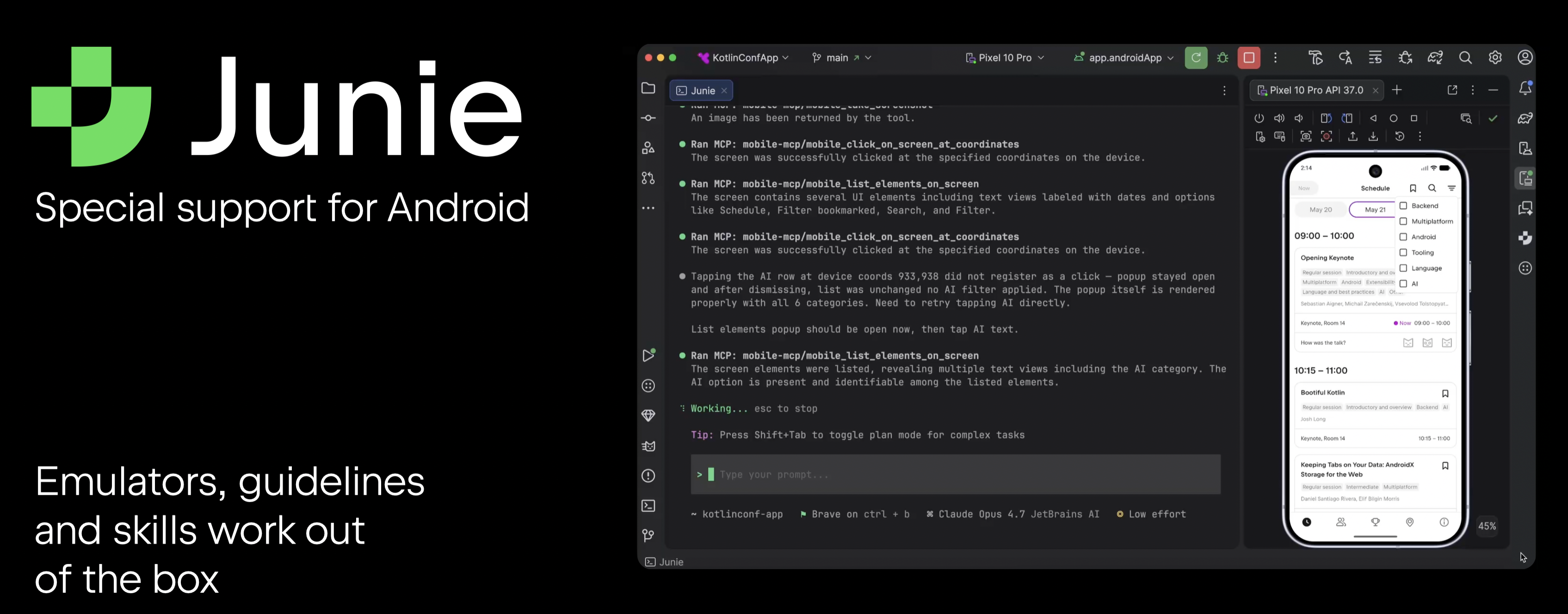
Junie, JetBrains’ coding agent, is deeply integrated with JetBrains IDEs, and even the Junie CLI version can connect to the IDE to get full project context. Junie also works with different LLM providers, allowing you to choose the best model for a specific task. While Junie already works in Kotlin projects, it now also includes dedicated Android support.
JetBrains Air
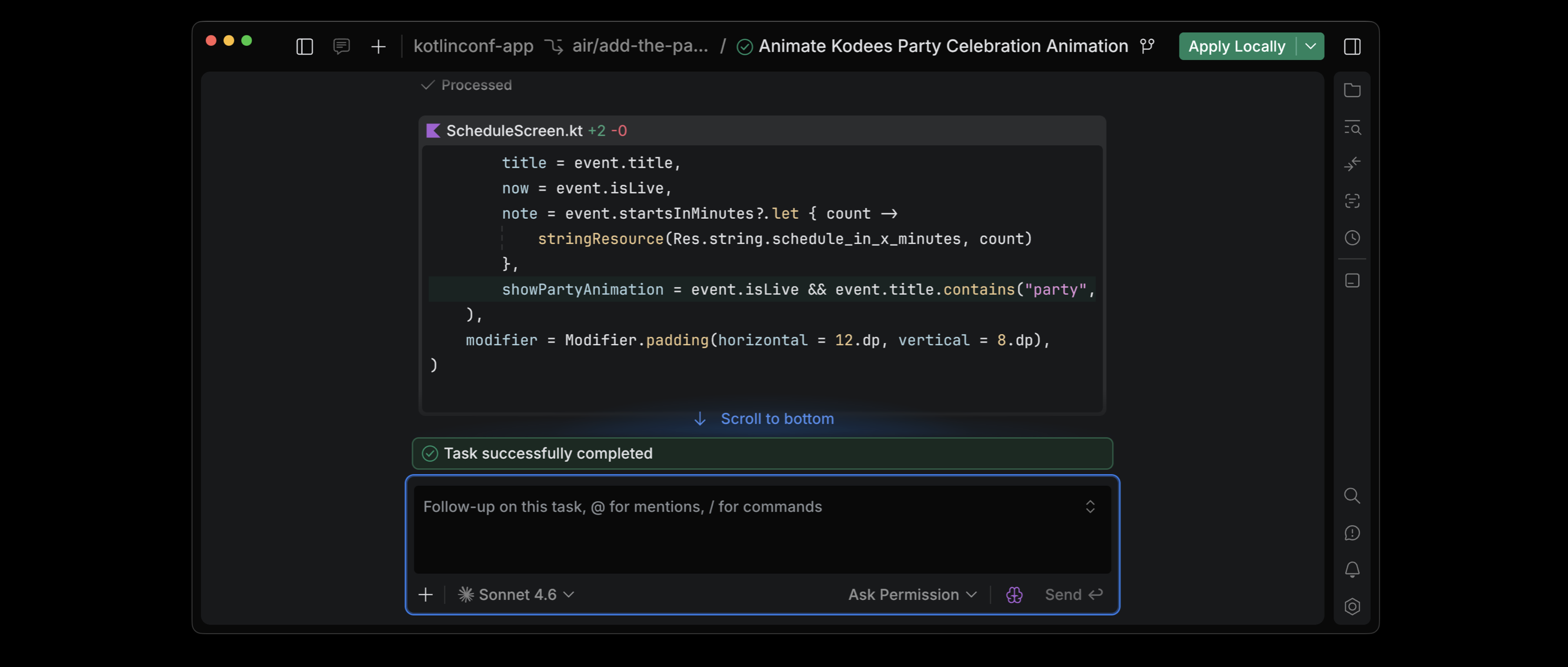
As developers are becoming more productive with agents, the keynote also explored how to scale agent-based development workflows. JetBrains Air is an agentic development environment for working effectively with multiple agents.
OpenAI Codex, Claude Agent, Gemini CLI, and Junie can execute independent task loops without conflicting with one another. You can start agents in separate Git worktrees or Docker containers, and to share progress with your entire team, you’ll soon be able to use cloud agents and even start and guide them directly from the browser.
Anthropic and JetBrains
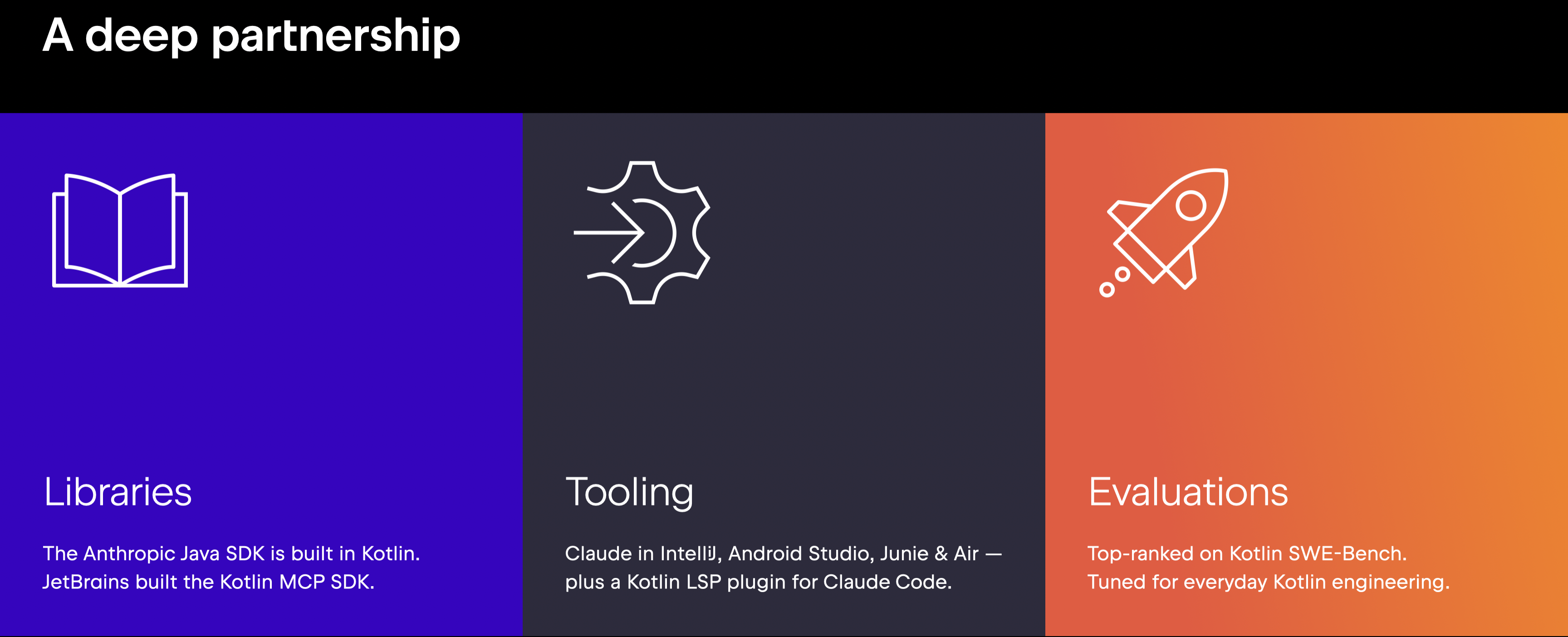
Christian Ryan, who leads applied AI engineering at Anthropic in Europe, joined the keynote to highlight the growing collaboration between Anthropic and JetBrains across AI tooling, libraries, and developer workflows. When Anthropic built their official JVM SDK, they used Kotlin, which allowed them to create the SDK in an ergonomic, concise, null-safe language. The collaboration also includes the official Kotlin MCP SDK.
On the tooling side, Claude is now native in IntelliJ IDEA and Android Studio. Claude is also a first-party model in Junie and JetBrains Air. For CLI users, there’s a plugin for Claude Code that integrates JetBrains’ official Kotlin LSP for deeper project understanding.
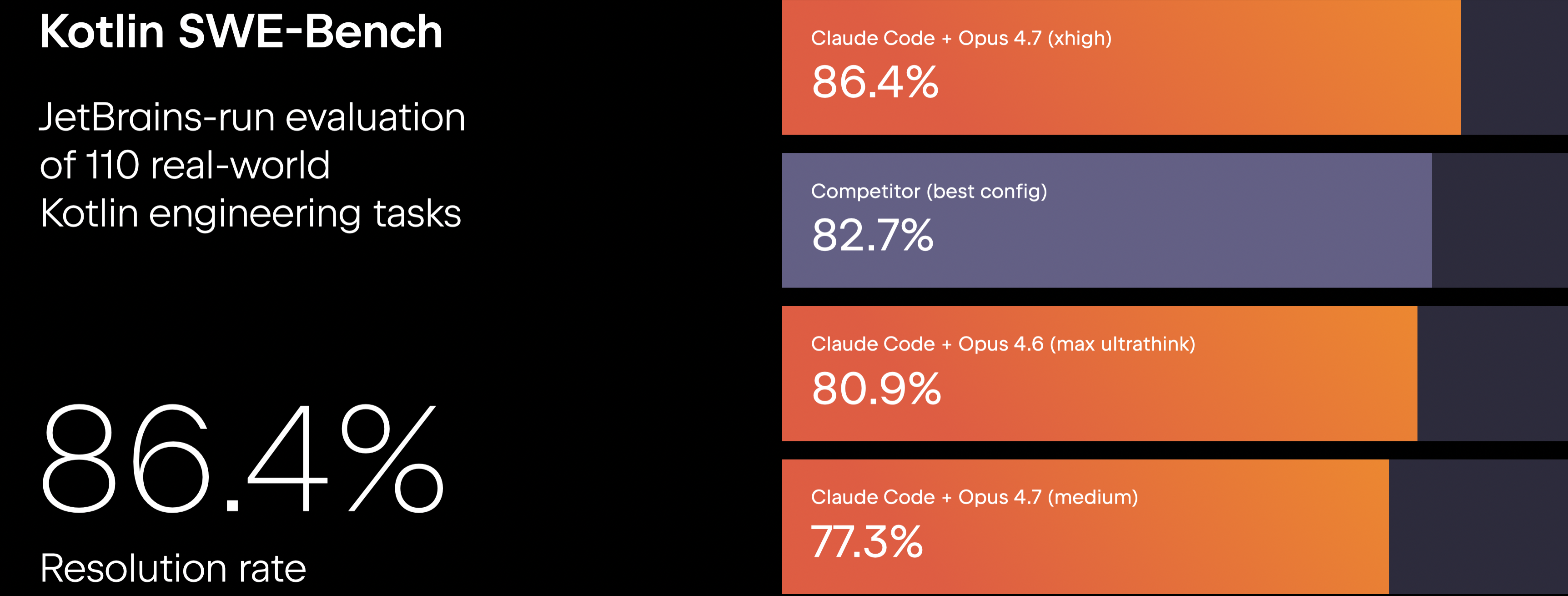
A new Kotlin SWE-bench based on 110 real engineering tasks from Kotlin repositories was introduced during the keynote. Using identical prompts and agent configurations, Claude Code with Opus 4.7 achieved the highest resolution rate at 86.4%.
Koog 1.0
Vadim Briliantov, Technical Lead and author of Koog, continued the keynote with a talk about the Kotlin AI agent framework that allows you to build fault-tolerant, scalable, and enterprise-ready AI agents in fully idiomatic Kotlin. Vadim announced the stable release of Koog 1.0, a major milestone for production-ready agent development in Kotlin across backend, mobile, and multiplatform applications.
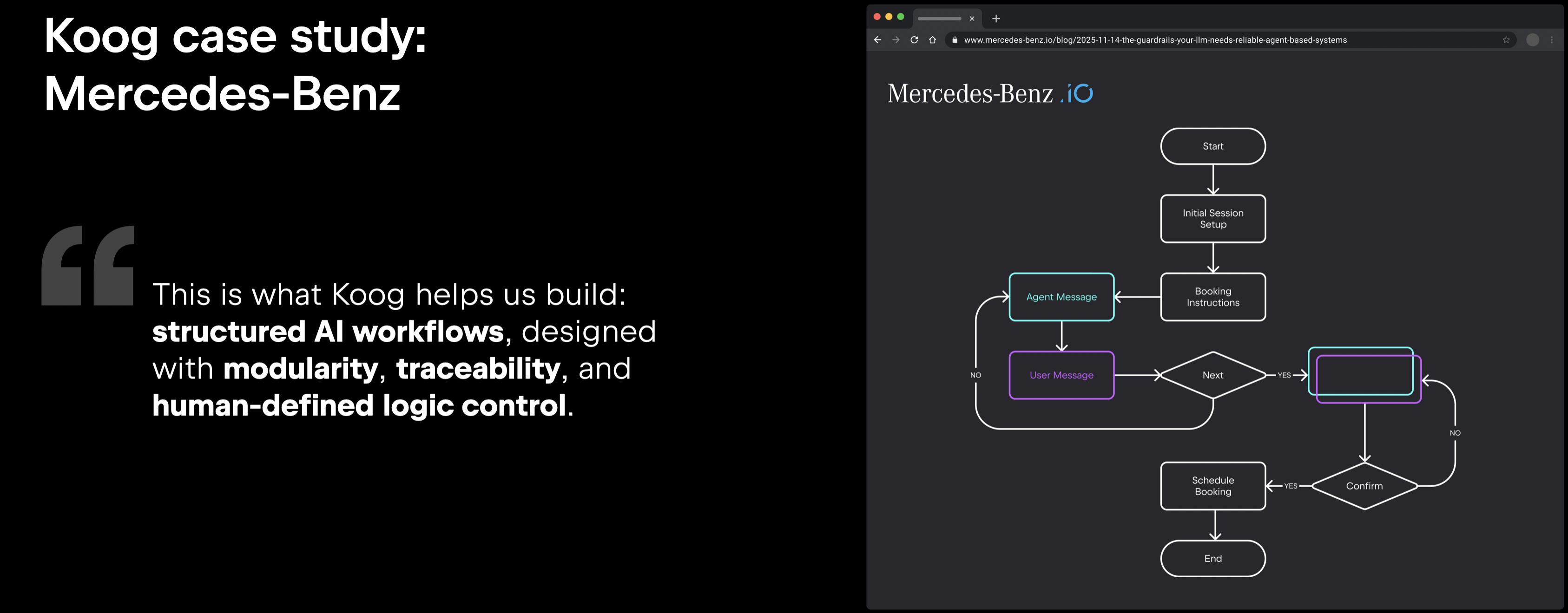
The presentation focused on Koog’s approach to building reliable AI systems through type-safe workflow DSLs, persistence and recovery for long-running agents, and deep integrations with existing Kotlin ecosystems, including Spring AI, Ktor, and observability tooling. One of the featured case studies came from Mercedes-Benz, whose team uses Koog to build vehicle maintenance support agents with structured workflows and carefully controlled execution logic. Read the full case study.
Vadim also showcased multiplatform support and on-device AI capabilities on Android using Google’s Gemma models, reinforcing Kotlin’s growing position as a unified language for building modern AI-powered applications – from backend services to mobile experiences – all in Kotlin.
View on GitHub
Kotlin for backend development
The keynote continued with updates on Kotlin for backend development, including new capabilities across Ktor, kotlinx-rpc, and Exposed. The team showcased Koog integration for building AI-powered services with Ktor, experimental first-party gRPC support in kotlinx-rpc, and the stable release of Exposed, which introduces vector types for AI-powered similarity search alongside a new Gradle plugin for simplified migration script generation. A new agent skill is also available to help developers migrate existing projects to Exposed 1.0.
Beyond tooling, the presentation focused on Kotlin’s growing adoption in enterprise and compliance-driven environments, where reliability and long-term support are critical.
Starting with Kotlin 2.4, the Kotlin standard library will include an 18-month security support policy, with security fixes backported to all release lines within an active support window.
Explore more
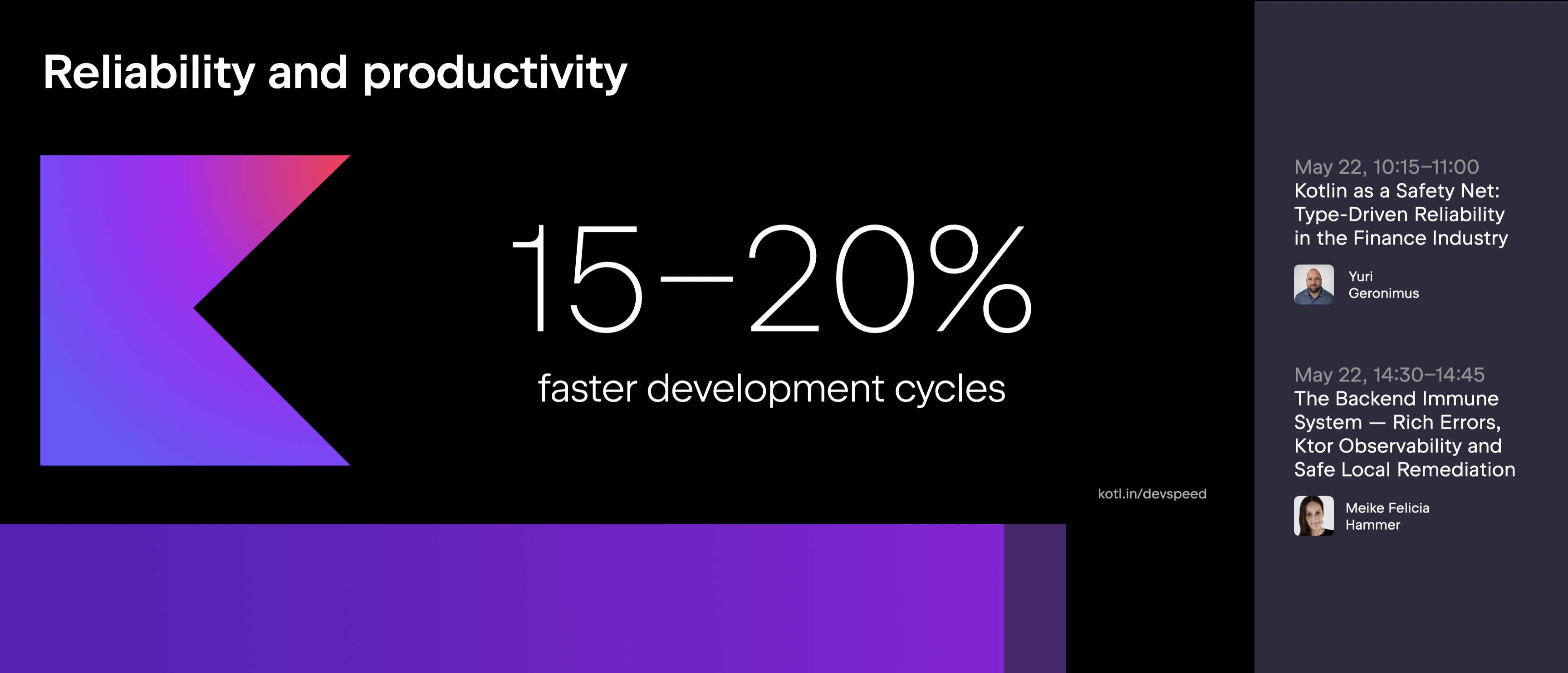
The keynote also highlighted Kotlin’s productivity benefits for backend teams, referencing data showing 15–20% faster development cycles as projects grow in complexity.
The presentation emphasized Kotlin’s deep integration with the JVM ecosystem through ongoing collaboration with Spring, improved Kotlin representation in Spring and JUnit documentation, updates to the kotlin-maven-plugin and Maven onboarding experience, improved coroutine support in Micrometer, and continued stabilization of the Lombok compiler plugin for mixed Kotlin-Java projects.
Kotlin Multiplatform
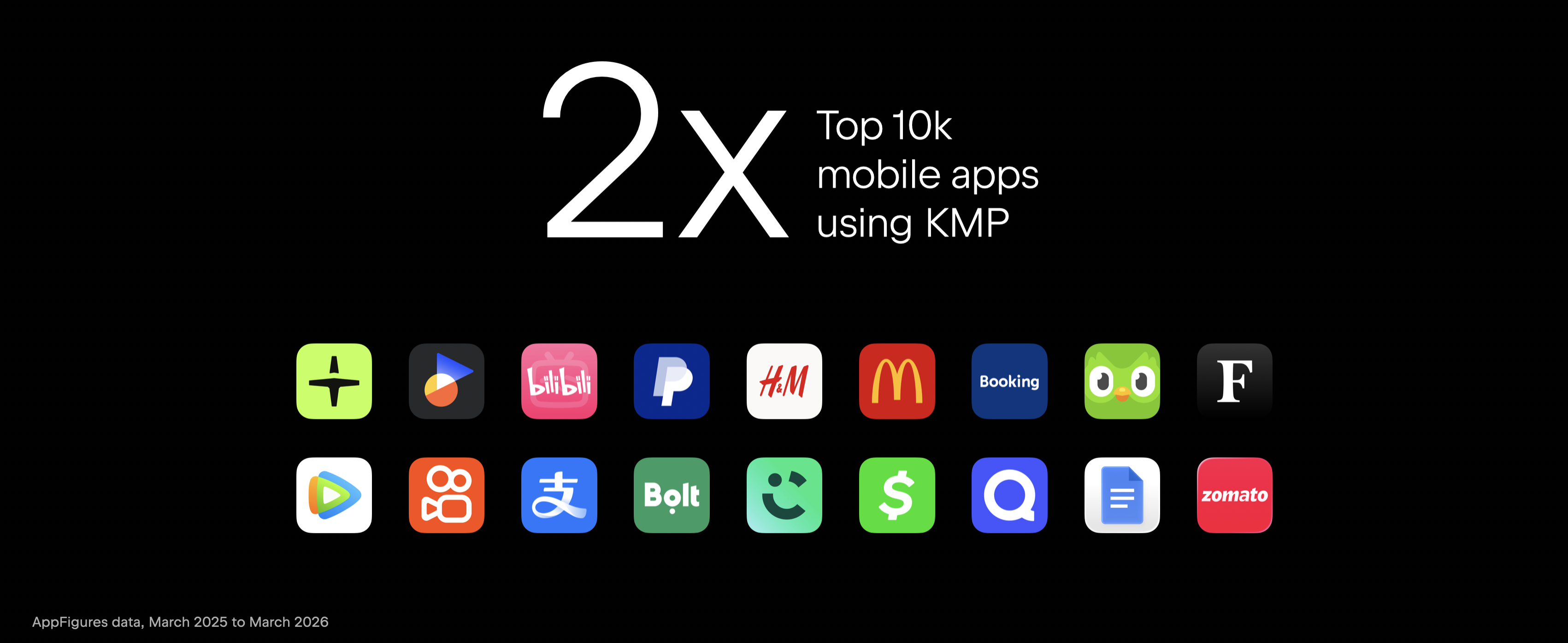
Kotlin Multiplatform continues to see rapid adoption, with the number of top apps using KMP more than doubling over the past year. Companies such as PayPal, Booking.com, Sony, and Duolingo are already using it in production, and more teams are adopting Compose Multiplatform to share UI across platforms.
For example, Sony uses KMP in their Sound Connect app for headphones to work with platform APIs like sensors and background processing while sharing the UI through Compose Multiplatform. Across Kotlin Multiplatform case studies overall, applications built with KMP now serve hundreds of millions of users daily.
Getting started with KMP is now easier with the KMP IDE plugin available on all operating systems for both IntelliJ IDEA and Android Studio. The plugin offers everything you need to build great KMP apps with convenient run configurations, tools for working with Compose code, integrations with Swift and cross-language features, and AGP 9.0 support.
You can also create new projects right in the IDE with the KMP project wizard, which now uses our new default structure, where each module has a single clear responsibility.
We are working to enhance the iOS development experience, notably through Swift Export features that make calling Kotlin from Swift more natural. In Kotlin 2.4, Swift Export is officially moving to Alpha. We also introduced SPM import, which lets you add dependencies on Objective-C-compatible code using Swift Package Manager and call into those APIs directly from Kotlin code.
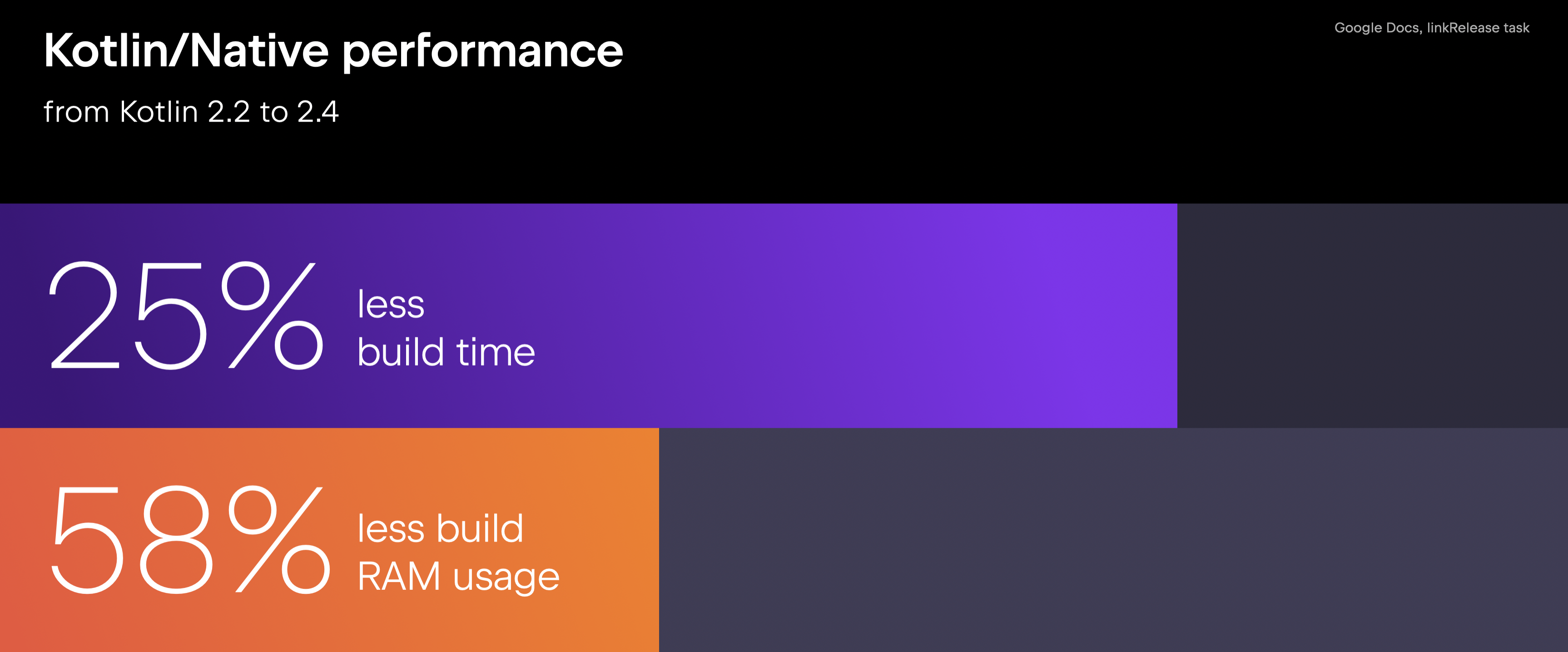
Kotlin/Native has seen significant performance improvements over the last year. Measured on the Google Docs codebase, build times are now 25% faster while using less than half the RAM during builds compared to a year ago.
Compose Multiplatform
Compose Multiplatform is fully stable and production-ready on mobile and desktop. The web platform also reached Beta status in September 2025, marking another major step forward for multiplatform UI development. For all these platforms, the team continues to bring you the latest improvements and APIs from Jetpack Compose. One of the biggest highlights over the past year is the new Navigation 3 library, a flexible, Compose-first solution that gives you full control over your back stack – and it’s already stable for multiplatform use.
On iOS, new interop APIs now make it possible to combine native Liquid Glass components with Compose UI, allowing native views to dynamically interact with Compose content underneath.
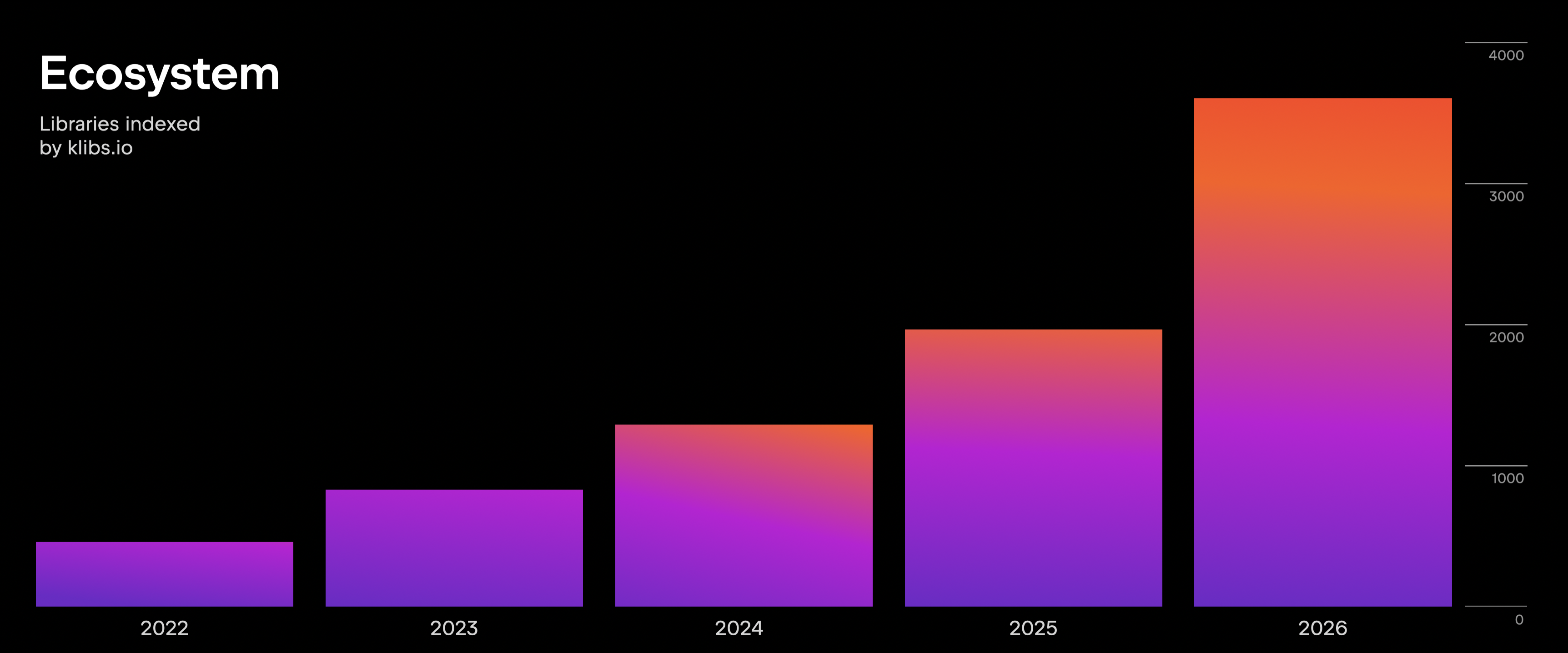
Beyond the framework itself, the Kotlin Multiplatform ecosystem continues to expand rapidly. There are now more than 3,500 community libraries listed on klibs.io, giving you a growing set of tools and integrations for building multiplatform applications across mobile, desktop, backend, and web.
Conclusion
KotlinConf’26 highlighted how Kotlin continues to evolve beyond a programming language into a complete ecosystem for backend, mobile, web, AI, and multiplatform development. From language and tooling improvements to growing industry adoption, the announcements reflected the shared goal of helping developers build modern software with greater clarity, safety, and productivity.
Our (most likely) final update for TeamCity 2025.11 On-Premises servers has just been released. This updage addresses a tiny amount of issues, but includes four security problem fixes, so we recommend that you do not skip this update.
See TeamCity 2025.11.5 Release Notes for the complete list of resolved issues.
Why update?
Staying up to date with minor releases ensures your TeamCity instance benefits from the following:
Performance improvements.
Better compatibility with integrations.
Faster, more stable builds.
Enhanced security for your workflows.
Compatibility
TeamCity 2025.11.5 shares the same data format as all 2025.11.x releases. You can upgrade or downgrade within this series without the need for backup and restoration.
How to upgrade
Use the automatic update feature in your current TeamCity version.
Download the latest version directly from the JetBrains website.
Pull the updated TeamCity Docker image.
Need help?
Thank you for reporting issues and providing feedback! If you have questions or run into any problems, please let us know via the TeamCity Forum or Issue Tracker.
Making software accessible often comes down to removing small but repeated points of friction in everyday workflows. Today, on Global Accessibility Awareness Day, we’re sharing recent improvements in JetBrains IDEs across several areas: compatibility with assistive technologies on various platforms, keyboard navigation, and non-visual feedback. Some of these improvements are already available, and some are coming later this year.
You can use the audio player below to listen to this blog post.
Better compatibility with assistive technologies
One of the key areas we’ve been working on is improving how JetBrains IDEs interact with OS-level accessibility tools.
Improved Magnifier support on Windows
Screen magnifiers are among the most commonly used assistive technologies in JetBrains IDEs. Until recently, the built-in Windows Magnifier didn’t reliably follow the text cursor in the editor, making navigation and editing more difficult for low-vision users. We’ve implemented support for cursor tracking so Magnifier follows text as you type, just as it does in other applications.
This builds on earlier work on macOS, where we addressed text cursor tracking with macOS Zoom. Now, the same support is being extended to Windows.
Orca and GNOME Magnifier support on Linux
With version 2026.2, coming this summer, JetBrains IDEs will allow you to use the Orca screen reader and GNOME Magnifier in supported Linux environments.
This is an active area of work, with multiple related tasks already underway. Accessibility shouldn’t depend on your operating system, and we’re continuing to improve support across platforms.
More predictable keyboard navigation
We’ve also been making it easier to move through the IDE without relying on a mouse.
Main menu access with Alt on Windows
In native Windows applications, pressing Alt moves the focus to the main menu, allowing you to navigate it with the keyboard. This behavior was previously missing from JetBrains IDEs, and screen readers, such as NVDA, would sometimes announce the system menu instead.
Now, the main menu behaves in a way that feels familiar and predictable for keyboard-only and screen-reader users, and the bright focus indicator helps low-vision users identify the selected item.
Navigating between major parts of the IDE
Another focus area is the experience of moving between different parts of the IDE interface, such as toolbars, panels, and the editor. We’re working on a more structured model for navigating through the big component groups:
Tab and Shift+Tab move the focus within the current area.
A dedicated shortcut lets you jump between larger sections of the IDE.
This reduces the effort required to reach essential controls and makes the overall layout easier to navigate. For the current iteration, we made it possible to bring the main toolbar and status bar into focus, and we fixed the Projectand Git toolbar widgets, which were not selectable by screen readers, even though other elements already were.
As the next step, we’ll polish specific controls and include tool window bars on both sides of the IDE frame in the navigation flow.
Exploring richer non-visual feedback with audio cues
Accessibility is not only about reaching controls, but also about understanding what’s happening while you work. We’re exploring ways to provide richer audio feedback in the IDE. Two directions we’re currently investigating:
Contextual signals when the caret lands on lines with errors, warnings, breakpoints, or version control changes. We want the IDE to provide immediate, non-visual feedback in context.
More general audio notifications for IDE actions and state changes.
The goal is to reduce the need to rely on visual indicators or switch contexts just to understand what changed. Instead, we want the IDE to provide that information more directly.
Accessibility as an ongoing effort
We’re improving accessibility in JetBrains IDEs across multiple areas at once, including by providing compatibility with assistive technologies like screen readers and magnifiers, as well as by offering more consistent keyboard navigation and clearer feedback for events that are otherwise mostly visual.
These improvements build on earlier updates, such as support for VoiceOver and NVDA, a high-contrast UI theme, and color schemes for red-green vision deficiency. There’s still more to do, and we’ll continue working in this direction.
We’d love to hear from you
We’re eager to hear from developers who rely on accessibility features, as well as from anyone interested in improving the experience of using them.
If you have ideas or feedback about accessibility in JetBrains IDEs, you can reach us directly at accessibility@jetbrains.com. You can also report issues through YouTrack or the support request form.
If you’d like to stay informed about accessibility improvements, you can subscribe to updates here.