Last October, I was sitting in a hotel room in Lisbon, the night before I was supposed to demo a project management tool my team had spent four months building. The hotel Wi-Fi was doing that thing where it connects but nothing actually loads. And I watched our app, this thing I was genuinely proud of, render a blank screen with a spinner. Then a timeout error. Then nothing.
I pulled out my phone, tethered to cellular, and got a shaky connection. The app loaded, but every click was a two-second wait. Create a task? Spinner. Move a task between columns? Spinner. I sat there thinking: we built a front end in React, a back end in Node, a Postgres database, a Redis cache, a GraphQL API with six resolvers just for the task board. All that infrastructure, and the damn thing can’t show me my own data without a round-trip to a server 3,000 miles away.
That was the night I started seriously looking at local-first architecture. Not because I read a blog post or saw a tweet. Because I was embarrassed.
I want to be upfront about something: I spent the first year or so dismissing local-first as academic. I read the Ink & Switch “Local-First Software” paper when it came out in 2019 and thought, “Cool research, not practical for real apps.” I was wrong. The tooling in 2019 genuinely wasn’t ready. But I was also being lazy, defaulting to the architecture I already knew. The paper laid out seven ideals for software: fast, multi-device, offline, collaboration, longevity, privacy, user ownership. And I remember thinking those sounded like a wish list, not engineering requirements.
Seven years later, I’ve shipped three production apps using local-first patterns. I’ve also ripped local-first out of two projects where it was the wrong call. I have opinions. Some of them are probably wrong. But they’re earned.
So here’s what I actually think about building local-first web apps in 2026, written for developers who’ve been doing this long enough to be skeptical of silver bullets.
What “Local-First” Actually Means (And The Confusion That Won’t Die)
I need to clear something up because I keep having this conversation at meetups. Local-first is not offline-first. It’s not “add a service worker and call it a day.” It’s not a synonym for PWA. I’ve seen all of these conflated in conference talks, and it drives me a little crazy.
Offline-first means your app handles network loss gracefully, but the server is still the source of truth. When the network comes back, the server wins. Cache-first (service workers caching responses) is a performance optimization. You’re serving stale data faster, which is great, but you haven’t changed who owns the data. PWAs are a delivery mechanism: installable, cached, push notifications. None of these is a data architecture.
Local-first is a data architecture. Your user’s device holds the primary copy of their data. The app reads and writes to a local database. Renders instantly. Syncs with servers or other devices in the background. The server, when it exists, is a sync peer with some special authority (authentication, backup, access control). But it’s not the gatekeeper.
The Ink & Switch paper defined seven ideals, and I think they still hold up. But the one that matters most in practice, the one that changes how you build everything, is this:
The client is not a thin view requesting permission to show data. The client is a node in a distributed system with its own database.
That distinction sounds subtle. It isn’t. It changes your entire stack.
Be Honest Early: When You Should Not Do This
I’m putting this near the top because I’ve watched too many developers (including myself, once) get excited about a new architecture and shoehorn it into projects where it doesn’t belong. I wasted about six weeks trying to make a local-first approach work for an internal analytics dashboard at a previous job. My colleague Sarah finally pulled me aside and said, “The data is generated on the server. There’s nothing to replicate to the client. What are you doing?” She was right.
Local-first is a bad fit when your data is primarily server-generated. Analytics dashboards, social media feeds, search results: the server produces this data, so the client consuming it via API requests is completely fine.
It’s wrong for systems that need strong transactional consistency. Banking, payment processing, and inventory management. If two people try to buy the last item in stock, you need a single authoritative database making that decision with ACID guarantees. Eventual consistency will lose you money, or worse.
It’s overkill for simple CRUD apps with no offline or collaboration needs. If you’re building an internal admin panel used by five people in an office with good internet, adding a sync engine is over-engineering. And it’s physically impractical for massive datasets that won’t fit on client devices.
But here’s where it shines: note-taking, document editing, collaborative design tools, project management, field apps with unreliable connectivity, basically anything where data privacy is a selling point, as well as anything with real-time collaboration. In other words, it’s great for user-generated data that benefits from instant interaction and should survive the server going down.
One more thing I wish someone had told me earlier: you don’t have to go all-in. I’ve had the best results using local-first for specific features within otherwise traditional apps. Offline drafts in a blog editor. Real-time collaborative notes inside a project management tool that’s otherwise standard REST.
The “spectrum of local-first” is a real thing, and starting with one feature is how I’d recommend anyone begin.
Replicas, Not Requests
If you’ve used Git, you already understand the mental model.
SVN (remember SVN?) was centralized. One server. You check out files, make changes, and commit to the server. Server down? Can’t commit. Can’t even see history.
Git gave every developer a full clone. You commit locally, branch locally, and merge locally. Push and pull when you’re ready. The remote repository is important, but it’s not the only copy of the truth.
Local-first web development is Git for application data. Every client device holds a replica (full or partial) of the relevant data. Writes happen locally. Sync is push/pull in the background. Conflicts get resolved through defined merge strategies.
I remember the first time this clicked for me in practice. I was prototyping a task board, and I wrote a function to add a task. In our old architecture, it would be:
- POST to API.
- Wait for the response.
- If success, update the local state.
- If failure, show error toast and maybe roll back optimistic update.
In the local-first version, it was: write to local SQLite, done. The UI updated instantly because it was reading from the same local database. Sync happened whenever. No loading state, no error handling for the write itself, no optimistic update logic (because there’s nothing to be “optimistic” about; the local write is the state).
The implications ripple through everything. You don’t need React Query or SWR for data fetching, because you’re not fetching. You don’t need Redux or Zustand for server-derived state, because the local database is your state. Your routing doesn’t trigger API calls. Authentication works differently because the server isn’t checking permissions on every read.
Here’s a visual comparison that might help if you’re the kind of person (like me) who thinks spatially:
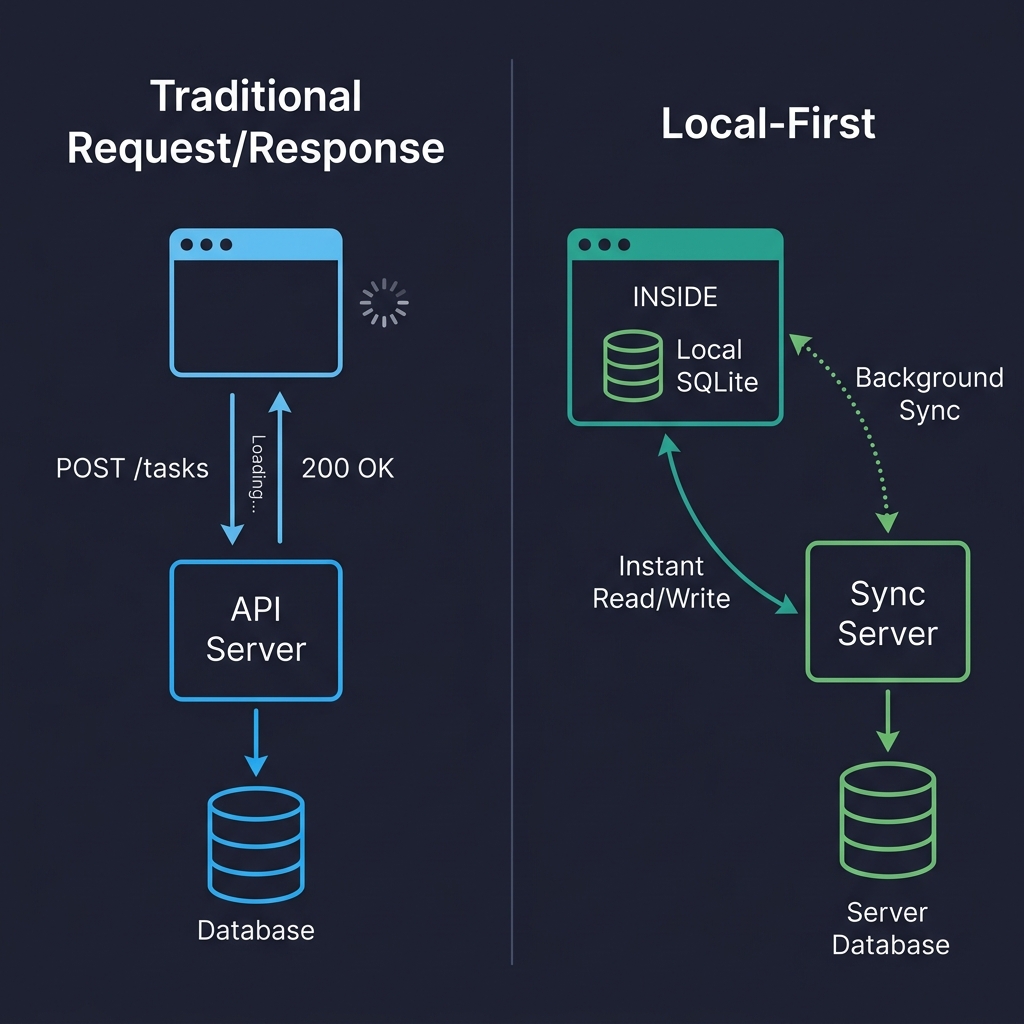
On the left, every user interaction is a round-trip. Click, wait, render. On the right, reads and writes hit the local database directly. The sync server is still there, but it’s doing its work in the background. The user never waits for it. That’s the fundamental shift.
But I’m getting ahead of myself. Before we can talk about sync and conflicts, we need to talk about where the data actually lives on the client.
Where Data Lives on the Client
Forget localStorage. It’s synchronous (blocks the main thread), caps at 5-10 MB, and only stores strings. It’s fine for a theme preference. It’s not a database.
IndexedDB is the workhorse that nobody loves. It’s in every browser, it’s asynchronous, it can handle hundreds of megabytes, and its API is absolutely miserable to work with. I’ve used it directly a grand total of once. Now I use it through abstractions or, more often, I don’t use it at all.
Because the real story in 2026 is SQLite running in the browser via WebAssembly.
I know that sounds like a party trick, but it’s not. SQLite compiled to WASM, persisted to the Origin Private File System (OPFS), gives you a real relational database in the browser. Full SQL queries. Transactions. Indexes. The works.
OPFS is the newer API that makes this practical. It gives web apps a sandboxed file system with high-performance synchronous access (in Web Workers), which is exactly what SQLite needs. Before OPFS, you could run SQLite in memory and manually persist to IndexedDB, which worked but was slow and fragile.
Here’s roughly what initialization looks like in a real project (I’m using wa-sqlite here, which is the library I’ve had the best luck with):
import { SQLiteAPI } from 'wa-sqlite';
import { OPFSCoopSyncVFS } from 'wa-sqlite/src/examples/OPFSCoopSyncVFS.js';

async function initDatabase() {
  const module = await SQLiteAPI.initialize();
  const vfs = new OPFSCoopSyncVFS('pm-tool-db');
  await vfs.initialize(module);

  const db = await module.open_v2('workspace.db');

  // HACK: wa-sqlite doesn't handle concurrent writes well on Safari,
  // so we serialize through a queue. See vlcn-io/wa-sqlite#247
  await module.exec(db, PRAGMA journal_mode=WAL);

  await module.exec(db, CREATE TABLE IF NOT EXISTS tasks (
      id TEXT PRIMARY KEY,
      title TEXT NOT NULL,
      status TEXT DEFAULT 'backlog',
      assignee_id TEXT,
      project_id TEXT NOT NULL,
      position REAL DEFAULT 0,
      created_at TEXT DEFAULT (datetime('now')),
      updated_at TEXT DEFAULT (datetime('now'))
    ));

  return db;
}
In production, I wrap all database access in a write queue that serializes mutations. I also log every failed write to Sentry with the full SQL statement (scrubbed of PII, obviously) because debugging database issues in a user’s browser is hell without that telemetry.
A gotcha I wasted almost two days on: Safari’s OPFS implementation behaves differently from Chrome’s in subtle ways. Specifically, I hit a bug where createSyncAccessHandle() would silently fail in certain iframe contexts on Safari 18. There’s no error, no exception. It just doesn’t work. I ended up falling back to IndexedDB-backed persistence on Safari, which was slower but at least functioned. (I’m told Safari 19/26 fixes this, but I haven’t verified it yet.)
Quick comparison of the options I’ve actually used:
| Storage | Good For | Watch Out For |
|---|---|---|
| IndexedDB | Broad compatibility, moderate data | Terrible DX, no SQL, verbose |
| OPFS + SQLite WASM | Relational data, complex queries, serious apps | Safari quirks, ~400KB bundle addition |
| PGlite (Postgres in WASM) | Full Postgres compatibility on client | Newer, larger bundle, still maturing |
I’ve also tried cr-sqlite, which adds CRDT column support directly to SQLite tables. Clever idea, but I found it too early-stage for production use when I evaluated it in late 2025. The merge semantics were sometimes surprising, and debugging CRDT state inside SQLite was painful. I’d revisit it later this year.
The Part That’s Actually Hard
Storing data locally is a solved problem. Syncing it reliably across devices and users is where you earn your gray hairs.
When multiple replicas can independently read and write, you need a mechanism to reconcile changes. There are basically four approaches, and I’ve used three of them.
CRDTs (Conflict-Free Replicated Data Types) are data structures designed so that concurrent edits can always be merged without conflicts, mathematically guaranteed. Yjs is the most popular implementation in JavaScript, and it’s genuinely excellent for real-time collaborative text editing. I used it to build a collaborative document editor at my last company, and the experience was mostly good, though I’ll get into the pain points in the conflict resolution section.
Here’s what setting up a shared Yjs document looks like in practice:
import * as Y from 'yjs';
import { WebsocketProvider } from 'y-websocket';

const ydoc = new Y.Doc();

const provider = new WebsocketProvider(
  'wss://sync.our-app.dev',
  'workspace-a1b2c3d4',
  ydoc
);

const tasks = ydoc.getMap('tasks');

// Add a task
const task = new Y.Map();
task.set('title', 'Review Q3 roadmap draft');
task.set('completed', false);
task.set('assignee', 'maria');
// TODO: type this properly once; yjs exports better TS types
// for nested maps. For now, this works fine.
tasks.set('f47ac10b-58cc-4372-a567-0e02b2c3d479', task as any);

tasks.observeDeep(() => {
  // Re-render UI. In practice, I debounce this to ~16ms
  // because observeDeep fires a LOT during active collaboration
  renderTaskList(tasks.toJSON());
});
Automerge is the other major CRDT library, backed by Rust and with a document-oriented model. I’ve used it less, but I know teams who swear by it. Loro is newer, Rust-based, and claims better performance. I haven’t shipped anything with Loro yet.
Database replication is the other big approach, and honestly, for most apps that don’t need Google Docs-style real-time text editing, I think it’s the better choice. The idea is straightforward: replicate rows between a server database (Postgres) and a client database (SQLite) with a sync engine managing the plumbing.
PowerSync does this well. It gives you one-way replication from Postgres to client SQLite with a write-back path for mutations. ElectricSQL is more ambitious, going for full active-active sync between Postgres and SQLite. I’ve used PowerSync in production and ElectricSQL in prototypes. PowerSync felt more stable when I evaluated them both in early 2026, but ElectricSQL’s approach is more powerful if they nail the execution.
Triplit takes a different angle entirely: it’s a full-stack database with sync built in, so you don’t think about “client DB” and “server DB” separately. I haven’t tried it beyond a weekend prototype, but the developer experience was surprisingly nice.
Event sourcing (syncing a log of mutations rather than the current state) is the approach LiveStore takes. I find it intellectually appealing and occasionally useful, but in practice, I’ve found that reconstructing state from an event log adds complexity that most apps don’t need. My controversial opinion: Event sourcing is over-recommended for application development. It’s great for audit logs and certain domains, but for a task board? Just sync the rows.
Not everyone will agree with that. I know event sourcing has passionate advocates, and I’ve been told I’m wrong about this at least twice at conferences. Maybe I just haven’t built the right app for it yet.
Conflicts: The Thing Everyone’s Afraid Of
I used to think conflict resolution was a terrifying, unsolvable problem. After building three apps that handle it, I’d revise that to: it’s a manageable problem that requires you to think carefully about your specific data model, and most developers overthink it.
Conflicts happen when two replicas modify the same data without seeing each other’s changes. User A edits a task title on their phone while offline. User B edits the same title on their laptop. Both come back online. Now what?
My first attempt at handling this was embarrassingly naive:
// My first try. Don't do this.
function resolveConflict(local: any, remote: any) {
  // just... take the remote one? sure?
  return remote;
}
The problem is obvious: local changes get silently dropped. User A edits a title, syncs, and their edit vanishes. They don’t even know it happened.
What actually works for most cases is last-write-wins (LWW) at the field level, not the record level. If User A changes the title and User B changes the due date, you keep both changes because they touched different fields. You only have a real conflict when both modified the same field, and then you pick the later timestamp.
interface FieldValue {
  value: string | number | boolean;
  // ISO timestamp with enough precision to break most ties
  updatedAt: string;
  // Client ID as tiebreaker when timestamps match.
  // This happens more often than you'd think.
  clientId: string;
}

function pickWinner(a: FieldValue, b: FieldValue): FieldValue {
  const timeA = new Date(a.updatedAt).getTime();
  const timeB = new Date(b.updatedAt).getTime();
  if (timeA !== timeB) return timeA > timeB ? a : b;
  // Deterministic tiebreaker when timestamps match
  return a.clientId > b.clientId ? a : b;
}

// In practice, I apply this per-field across the whole record.
function mergeTask(local: Record<string, FieldValue>, remote: Record<string, FieldValue>) {
  const merged: Record<string, FieldValue> = {};
  const allKeys = new Set([...Object.keys(local), ...Object.keys(remote)]);
  for (const key of allKeys) {
    if (!local[key]) { merged[key] = remote[key]; continue; }
    if (!remote[key]) { merged[key] = local[key]; continue; }
    merged[key] = pickWinner(local[key], remote[key]);
  }
  return merged;
}
In our production app, this handles about 95% of conflicts without any user-visible issues. For the remaining cases (two people editing the same text field), LWW means one person’s edit silently wins. For a task title? Honestly, that’s usually fine. For a document body? No. That’s where CRDTs earn their keep.
But there’s a subtler problem I didn’t appreciate until I hit it: semantic conflicts. Data merges cleanly at the structural level, but the result is nonsensical. Two users, both offline, book the same 2 PM meeting slot with different meetings. Field-level merge accepts both writes because they’re writing to different records. No structural conflict. But you’ve got a double-booking, and your merge function has no idea that’s a problem.
Semantic conflicts require application-level validation, and that has to happen on the server during sync. Your sync engine merges the data structurally, but your server needs to check domain invariants before accepting the result. The approach I’ve landed on (after getting it wrong twice) is: validate on the server during the write-back phase, but flag violations rather than silently rejecting them.
Here’s what I mean. When the client pushes mutations to the server during sync, the server runs them through a constraint validation layer before applying them to Postgres:
interface SyncViolation {
type: 'scheduling_conflict' | 'capacity_exceeded' | 'stale_assignment';
recordId: string;
description: string;
// The conflicting records so the client can show context
conflictingRecords: string[];
// When was this violation detected
detectedAt: string;
}
async function validateSyncBatch(
mutations: SyncMutation[],
serverDb: Database
): Promise<{ accepted: SyncMutation[]; violations: SyncViolation[] }> {
const accepted: SyncMutation[] = [];
const violations: SyncViolation[] = [];
for (const mutation of mutations) {
if (mutation.table === 'calendar_events') {
// Check for double-booking
const overlapping = await serverDb.query(
SELECT id, title FROM calendar_events
WHERE room_id = ? AND id != ?
AND start_time < ? AND end_time > ?,
[mutation.data.room_id, mutation.data.id,
mutation.data.end_time, mutation.data.start_time]
);
if (overlapping.length > 0) {
violations.push({
type: 'scheduling_conflict',
recordId: mutation.data.id,
description: Conflicts with "${overlapping[0].title}",
conflictingRecords: overlapping.map(r => r.id),
detectedAt: new Date().toISOString()
});
// Still accept the write, but flag it
// The alternative is rejecting it, but then the user's
// local state and server state diverge, and that's worse
accepted.push(mutation);
continue;
}
}
accepted.push(mutation);
}
return { accepted, violations };
}
The key decision here — and I went back and forth on this — is that we accept the conflicting write and flag it, rather than rejecting it outright. If you reject it, the user’s local database has a record that the server refuses to acknowledge, and now you’re in a state divergence situation that’s genuinely hard to recover from. I tried the rejection approach first, and it led to ghost records on the client that users couldn’t delete because they didn’t exist on the server. Nightmare.
So instead, the server accepts the write, stores the violation, and syncs the violation back to the client. The client shows a non-blocking notification: “Your meeting ‘Q3 Planning’ conflicts with ‘Design Review’ in Room B at 2 PM. Tap to resolve.” The user taps, sees both meetings, and picks one to reschedule or cancel. The resolution is a normal write that syncs back.
Is this perfect? No. There’s a window between when the violation is created and when the user resolves it, where both conflicting records exist. For meeting rooms, that’s tolerable. For something like inventory management where two people “buy” the last item, that window is unacceptable, and that’s exactly why I said earlier that local-first is wrong for systems requiring strong transactional consistency.
I’m still iterating on this pattern. The violation table grows if users ignore notifications (we expire them after 72 hours, which feels arbitrary). And deciding which invariants to validate on the server requires you to essentially maintain a parallel set of business rules outside your client-side application logic. It’s not elegant. But it works, and it’s the best approach I’ve found for the class of apps I’m building. If you’ve built something cleaner, I genuinely want to hear about it.
For CRDTs like Yjs, conflict resolution at the character level (for text) works remarkably well. Two people typing in the same paragraph will see both sets of characters appear in a sensible order. But CRDT merging of structured data (maps, arrays, nested objects) can produce results that surprise you. I once watched a Yjs-backed task list duplicate items after a merge because two users had reordered the same list offline, and the CRDT’s list merge semantics interleaved their orderings. Technically correct. Practically confusing. We ended up adding a post-merge de-duplication step, which felt like a hack but solved the problem.
When should you surface conflicts to the user, Git-style? In my experience, almost never for typical app data. Users don’t want to resolve merge conflicts. They want the app to figure it out. The exception is high-stakes content: legal documents, medical records, anything where silently dropping an edit could cause real harm.
The Tools Right Now
I’m going to give you my honest read on the tools available as of mid-2026, with the caveat that this space is moving fast enough that some of this might be outdated by the time you read it.
Yjs is the most mature CRDT library. Production-ready, huge community, integrates with most collaborative editors (TipTap, BlockNote, Lexical). If you need real-time collaborative editing, start here.
Automerge is solid, Rust-backed, and takes a more document-oriented approach than Yjs. I’ve seen it used well in apps where the data model fits a document metaphor. Fewer integrations than Yjs, but the core is well-engineered.
PowerSync is what I’d recommend for teams that have an existing Postgres back-end and want to add offline support. It’s production-ready, the docs are good, and the mental model (Postgres syncs to client SQLite, client writes go through a defined upload path) is easy to reason about. In our app, initial sync for a workspace with around 5,000 tasks takes about 1.2 seconds on a decent connection and about 3.5 seconds on a throttled 3G simulation. That was acceptable for us.
ElectricSQL is going for something more ambitious: true active-active replication between Postgres and SQLite, with “shapes” defining what data syncs to which client. I want this to succeed because the developer experience in prototypes was excellent. But when I evaluated it for production in February 2026, I hit enough rough edges (particularly around shape management and reconnection behavior) that I went with PowerSync instead. I plan to revisit it.
Triplit impressed me in a weekend prototype. Full-stack database with sync built in, nice TypeScript API. I haven’t stress-tested it with real production load, and I’d want to before committing.
Zero (from Rocicorp, the Replicache people) is interesting because it takes a query-based approach to sync, which is different from the row-replication model. Replicache was sunset in favor of Zero, which tells you something about how fast approaches are evolving in this space. Worth watching, but I wouldn’t build on it yet for a production app.
TinyBase is a lightweight reactive store that’s great for smaller apps or prototyping. I used it for a personal side project (a reading tracker) and liked it a lot. Not sure I’d use it for a team-scale product.
PGlite (Postgres compiled to WASM) is wild. Same SQL dialect on client and server. Combined with ElectricSQL, you could theoretically run identical queries everywhere. I think this is where things are heading long-term, but PGlite’s bundle size and memory footprint are still concerns for mobile browsers.
One thing the Replicache sunset taught me: don’t bet your architecture on a single tool from a small company without a fallback plan. I keep my sync layer abstracted enough that I could swap engines in a few weeks, not months. I know that sounds like premature abstraction, but in a space this young, I think it’s just prudence.
Building A Real App: Architecture, Auth, And Migrations
I want to walk through how I actually structure a local-first app in practice, because the layer diagrams you see in blog posts rarely match what the code looks like.
My current stack for a collaborative project management tool looks like this:
- UI: React components that never call
fetch()for data reads. - Query layer:
useLiveQueryhooks that subscribe to the local SQLite database and re-render automatically when data changes. - Local database: SQLite via wa-sqlite, persisted to OPFS.
- Mutation layer: Plain
INSERT/UPDATE/DELETEstatements against local SQLite. - Sync: PowerSync managing replication between local SQLite and our Postgres back-end.
- Server: Postgres, a Node.js auth service, and a small sync validation layer.
The component code ends up looking almost absurdly simple compared to what I used to write:
import { useLiveQuery } from '@powersync/react';
import { db } from '../lib/database';

function TaskBoard({ projectId }: { projectId: string }) {
  const tasks = useLiveQuery(
    SELECT * FROM tasks WHERE project_id = ? AND archived = 0 ORDER BY position,
    [projectId]
  );

  async function addTask(title: string) {
    await db.execute(
      INSERT INTO tasks (id, title, project_id, position, created_at)
       VALUES (?, ?, ?, ?, datetime('now')),
      [crypto.randomUUID(), title, projectId, tasks.length]
    );
    // That's it. useLiveQuery picks up the change automatically.
    // No invalidation, no refetch, no loading state.
  }

  // No isLoading check. Data is local. It's always there after the first sync.
  return (
    <div>
      {tasks.map(task => <TaskCard key={task.id} task={task} />)}
      <NewTaskInput onSubmit={addTask} />
    </div>
  );
}
Compare that to the React Query + REST equivalent, which would be at least twice the code and include loading states, error states, optimistic update logic with rollback, and cache invalidation. I don’t miss it.
Auth In A Local-First World
Authentication works roughly the same as traditional apps: JWT tokens, OAuth flows, and session management. The token authenticates the sync connection rather than every individual request. Offline access works because the data is already local. The user was authenticated when the data was originally synced.
Authorization is trickier, and I think most local-first articles under-explain this. You cannot sync your entire database to every client and rely on client-side code to hide unauthorized data. Someone will open DevTools, find the local SQLite file, and see everything. The client is not a trust boundary.
You enforce authorization at the sync layer. PowerSync has “sync rules” that define which rows go to which clients. ElectricSQL has “shapes.” Either way, the server only sends data that the user is authorized to see. When the client sends writes back, the server validates them against authorization rules before applying them to Postgres. If a user tries to modify something they shouldn’t, the server rejects it during sync.
I also want to mention end-to-end encryption (E2EE), because it pairs naturally with local-first. Since data lives on the client, you can encrypt it before sync. The server stores and relays encrypted blobs it can’t read. Apps like Anytype do this. We haven’t implemented E2EE in our current app, but it’s on the roadmap for when we handle more sensitive data.
Schema Migrations On A Thousand Devices
This one caught me off guard the first time. On the server, you run a migration against one database you control. On the client, every user has their own database that might be running any version of your schema, depending on when they last opened the app.
I use a simple migration runner that checks a version number at app startup:
const MIGRATIONS = [
  {
    version: 1,
    sql: CREATE TABLE IF NOT EXISTS tasks (
        id TEXT PRIMARY KEY,
        title TEXT NOT NULL,
        status TEXT DEFAULT 'backlog',
        project_id TEXT NOT NULL,
        created_at TEXT DEFAULT (datetime('now'))
      );
  },
  {
    version: 2,
    // Added priority and due_date in sprint 4
    sql: ALTER TABLE tasks ADD COLUMN priority INTEGER DEFAULT 0;
      ALTER TABLE tasks ADD COLUMN due_date TEXT;
  },
  {
    version: 3,
    // Denormalized assignee name for offline display.
    // Yes, I know this is a trade-off. The JOIN was killing
    // performance on low-end Android devices.
    sql: ALTER TABLE tasks ADD COLUMN assignee_name TEXT DEFAULT '';
  }
];

async function runMigrations(db: Database) {
  await db.execute(CREATE TABLE IF NOT EXISTS _schema_version (version INTEGER));

  const rows = await db.execute('SELECT version FROM _schema_version');
  const currentVersion = rows.length > 0 ? rows[0].version : 0;

  for (const migration of MIGRATIONS) {
    if (migration.version > currentVersion) {
      console.log(Migrating local DB to v${migration.version});
      await db.execute('BEGIN');
      try {
        await db.execute(migration.sql);
        await db.execute(
          'INSERT OR REPLACE INTO _schema_version (rowid, version) VALUES (1, ?)',
          [migration.version]
        );
        await db.execute('COMMIT');
      } catch (err) {
        await db.execute('ROLLBACK');
        // In production, this fires a Sentry alert with the
        // migration version and error details
        throw err;
      }
    }
  }
}
Design your migrations to be additive. New columns with defaults. New tables. Don’t rename or drop columns unless you absolutely must, because users running old app versions will still be syncing data, and your server needs to handle the mismatch. I learned this the hard way when I dropped a column that an older client was still writing to, which caused silent sync failures for about 200 users over a weekend. Not fun.
If I Were Starting A New Project Today
I get asked this a lot, so here’s my current answer. It changes every six months or so.
For a collaborative app with real-time features and offline support, I’d start with: React on the front end, PowerSync for sync, SQLite via wa-sqlite on the client (persisted to OPFS with IndexedDB fallback for Safari), and Supabase (which gives me Postgres, auth, and row-level security out of the box). I’d use Yjs only if I needed rich text collaboration, and I’d avoid it if I didn’t, because CRDTs add meaningful complexity to your data model.
For a simpler app where I mostly need offline support and instant reads but collaboration is secondary, I might skip the sync engine entirely and just use a local SQLite database with a custom sync layer that pushes/pulls from a REST API. I know that sounds like reinventing the wheel, but for simple cases, a custom sync that you fully understand is better than a general-purpose sync engine that adds concepts you don’t need.
I would not currently use ElectricSQL or Zero for production, not because they’re bad, but because I want another 6-12 months of maturity before I’d trust them for something I’m on-call for. I’ve been burned before by building on early-stage infrastructure (I was an early Meteor adopter, if that tells you anything) and I’m more cautious now about where I accept novelty risk.
Performance: What’s Actually Fast And What Hurts
Reads are instant. That’s not marketing. Querying a local SQLite database for a list of 500 tasks takes under two milliseconds on my M2 MacBook and about eight milliseconds on a mid-range Android phone. No network. No spinner. No loading state.
Writes are instant, too. INSERT INTO tasks runs locally, the UI updates reactively, and sync happens whenever. Users perceive writes as instantaneous because they are.
Initial sync is where you pay the cost. Bootstrapping the local replica on first load (or on a new device) means downloading potentially megabytes of data. In our app, a workspace with 5,000 tasks, 200 projects, and 50 users takes about 1.2 seconds on broadband and four to five seconds on a slow mobile connection. We mitigate this with partial sync (only sync the user’s active projects) and by showing a one-time “Setting up your workspace” screen during the first sync. After that initial sync, incremental updates are tiny.
Bundle size is a real concern. SQLite compiled to WASM adds roughly 400KB gzipped to your JavaScript bundle. That’s not trivial, especially if you care about Time to Interactive on mobile. I lazy-load the database module with dynamic import() so it doesn’t block the initial render.
Memory is the other gotcha. SQLite WASM runs in memory, and on mobile browsers with aggressive memory limits, a large database can cause tab crashes. I haven’t found a great solution for this beyond keeping the synced dataset small through partial sync and being aggressive about pruning old data.
Note: Speaking of memory issues, I’ve been reading Designing Data-Intensive Applications by Martin Kleppmann for the third time. Every re-read, I catch something new. If you haven’t read it and you’re thinking about distributed data, just stop and read it first.
Testing This Stuff
I’ll keep this brief because the honest answer is that testing local-first apps is harder than testing traditional apps, and the tooling isn’t great yet.
What works for me: unit tests for merge logic (these are pure functions, easy to test), integration tests that spin up two client instances in memory and verify they converge after concurrent edits, and Playwright E2E tests that use context.setOffline(true) to simulate offline/online transitions.
What I haven’t figured out well: reproducing bugs that only happen during conflict resolution with specific timing. When a user reports that a task “lost its description,” I often can’t reproduce it because I don’t know exactly what sequence of offline edits and sync events led to the conflict. I’ve started logging sync events in more detail (what was sent, what was received, what conflicts were detected, how they were resolved) and shipping those logs to our observability stack. It helps, but it’s not as clean as I’d like.
Property-based testing with something like fast-check is genuinely useful for CRDT logic. Generate random operation sequences, apply them in random orders, and assert convergence. I wish I’d started doing this earlier.
What I’m Watching, What Worries Me
I’m excited about where this is going. PGlite (full Postgres in the browser) feels like a glimpse of a future where the client/server data layer distinction just dissolves. You write SQL, it runs everywhere, sync is a runtime concern rather than an architectural decision. We’re not there yet, but you can see it from here.
I’m also watching the convergence of local-first and AI. Running models locally, keeping data on-device, using cloud AI only with explicit consent, and encrypted data. The privacy implications are compelling, and I think “your data never leaves your device” will become a real product differentiator as AI eats more of the software experience.
What worries me is fragmentation. Every sync engine uses its own protocol. There’s no standard. If ElectricSQL shuts down (it won’t, probably, but if), migrating to PowerSync isn’t trivial. I abstract my sync layer partly for this reason, but it still makes me nervous.
The web has standards for nearly everything. We don’t have one for sync, and I don’t see one emerging soon.
I’m also worried about the complexity budget. Local-first adds real architectural complexity: sync engines, conflict resolution, client-side migrations, partial replication, and auth at the sync boundary. For a team of experienced developers building the right kind of app, that complexity pays for itself many times over. For a team that just needs a CRUD app, it’s a trap.
I keep coming back to something a developer named Kevin said to me at a local-first meetup in Berlin last year:
“The best architecture is the one your team can debug at 2 AM.”
He’s right. If local-first makes your app faster, more reliable, and better for users, and your team understands how the sync works, go for it. If you’re adding it because it sounds cool and you don’t fully understand the failure modes yet, build a prototype first. Learn where it breaks. Then decide.
I’m building my fourth local-first app right now: a collaborative planning tool for small teams, with offline support and optional E2E encryption. It’s the most ambitious thing I’ve attempted with this architecture. I’ll write about how it goes.
If you’re starting out, pick one feature in your current app that would benefit from instant local reads and offline writes. Add a local SQLite database. Wire up reactive queries. See how it feels. I think you’ll have the same reaction I did: oh, this is how it should have always worked.
Further Reading
- “Local-First Software” (Ink & Switch): This is still the best starting point.
- “CRDTs: The hard parts”” (Martin Kleppmann, video): Martin’s talks on CRDTs are excellent.
- The localfirstweb.dev community site: A good directory of tools.
- PowerSync Documentation
- ElectricSQL Documentation
- Yjs Documentation
- Automerge Documentation