WordPress / WooCommerce Checkout Anti-Fraud — 9 Production-Tested Defenses (2026)

WordPress / WooCommerce Checkout Anti-Fraud — 9 Production-Tested Defenses (2026)

You wake up to a flurry of emails from your WooCommerce store. At first, it’s a rush—50 new orders overnight. Then you look closer. Every order is for a $1.99 digital download. The customer names are gibberish. The credit cards are all different, but the shipping addresses are identical and nonsensical. Half the payments failed. You’ve just been used for card testing.

This isn’t a sophisticated hack targeting a multinational corporation. It’s the bread-and-butter reality of running a small online store today. Fraudsters use small, independent sites like yours as a proving ground for stolen credit card numbers. For every successful fraudulent transaction, you lose the product, the revenue, and get hit with a $15-$25 chargeback fee from your payment processor. For every failed attempt, your payment processor’s risk algorithms start to look at you sideways.

If you’re losing a few hundred to a few thousand dollars a month to this digital shoplifting, you’re not alone. The good news is you don’t need an enterprise-level budget to fight back. This guide outlines a layered defense strategy, from free tools to affordable plugins, that can stop the majority of common checkout fraud before it costs you money. We’ll cover the tools, the logic, and when it makes financial sense to implement each layer.

The Indie Store Fraud Landscape in 2026

For a small WooCommerce store, fraud isn’t one single problem. It’s a collection of different attacks, each with its own pattern. If you’re using Stripe, you already have Stripe Radar, which is a good baseline. But determined fraudsters know how to work around it. Understanding the three most common types of fraud is the first step to building a better defense.

  • Card Testing (or “Carding”): This is the most common nuisance. Fraudsters buy lists of thousands of stolen credit card numbers on the dark web. They don’t know which ones are still active. So, they use bots to “test” the cards by making small purchases on hundreds of websites simultaneously. Your site is just one of many. They look for stores with low-priced items and weak security. The goal isn’t to get your product; it’s to find a valid card they can use for a much larger purchase elsewhere. For you, this means a flood of failed transactions, a handful of successful ones you’ll have to refund, and potential penalties from your payment gateway.
  • Reseller Fraud: This is more targeted. A fraudster uses a stolen card to buy a high-demand physical product from your store (e.g., a limited-edition pair of sneakers, a specific electronic component). They have the item shipped to a “mule” or a freight forwarder. They then sell your product on a marketplace like eBay or StockX for cash. Weeks later, the legitimate cardholder discovers the charge, initiates a chargeback, and you’re out the product and the money.
  • Refund Abuse (or “Friendly Fraud”): This one feels personal. A legitimate customer buys a product, receives it, and then falsely claims it never arrived, was defective, or that the charge was unauthorized. They file a chargeback to get their money back, effectively getting your product for free. This is especially common with digital goods where “delivery” is hard to prove, or with services where satisfaction is subjective.

Layer 1: Challenge the Bots at the Gate

Most low-level fraud, especially card testing, is automated. The first line of defense is to make it difficult for bots to even access your checkout page. A CAPTCHA (Completely Automated Public Turing test to tell Computers and Humans Apart) is the standard tool for this. But not all CAPTCHAs are created equal, and a bad user experience can cost you legitimate sales.

Here’s how the main contenders stack up for a WooCommerce checkout page in 2026.

Tool How It Works User Experience Cost Honest Limitations
Cloudflare Turnstile Analyzes browser telemetry and user behavior without a visual puzzle. It runs a quick, non-interactive check. Excellent. It’s invisible to most legitimate users. A loading spinner might appear for a second on high-risk connections. Free for most use cases. It’s a bot challenge, not a fraud analysis tool. It won’t stop a determined human using a stolen card. It only tells you if the visitor is likely a human.
Google reCAPTCHA v3 Runs in the background, analyzing user behavior across the site to generate a risk score (0.0 to 1.0). Good. It’s also invisible. You decide what to do with the score (e.g., block orders with a score below 0.3). Free for up to 1 million calls/month. The “black box” nature of the scoring can be frustrating. It sometimes gives low scores to legitimate users on VPNs or with privacy-focused browsers. It also sends a lot of data to Google, which is a privacy concern for some.
hCaptcha Often presents a visual puzzle (e.g., “click the boats”). It has a “passive” mode similar to Turnstile, but its main differentiator is the puzzle. Poor to Fair. The visual puzzles are a known conversion killer. They introduce friction and frustration right at the point of purchase. Free tier is available, but paid tiers offer more control and less complex puzzles. The free version can present users with difficult or annoying puzzles, leading to checkout abandonment. It’s generally overkill for checkout protection unless you are under a sustained, heavy bot attack.

Our recommendation: Start with Cloudflare Turnstile. It provides 80% of the benefit of a bot challenge with almost zero impact on legitimate customer conversions. It’s a simple, free, and effective first layer.

Layer 2: Basic Input Validation

Fraudsters are lazy. Their scripts often use nonsensical or disposable data. You can catch a surprising amount of fraud by simply checking if the information entered looks like it belongs to a real person.

Email Address Validation

Don’t just check if the email has an “@” symbol. Check for:

  • Disposable Domains: Services like mailinator.com or temp-mail.org are a huge red flag. A simple check against a public list of disposable domains can block many low-effort fraud attempts. The disposable-email-domains list on GitHub is a good resource.
  • Syntax and MX Records: A valid email address must have a real domain with mail exchange (MX) records. You can use a free API to verify this at checkout. This stops typos and gibberish like asdf@asdf.asdf.

Phone Number Validation

A phone number can be a strong indicator of legitimacy. Check if the number provided is valid for the country listed in the billing address. A US address with a phone number that has a Nigerian country code is suspicious. Services like Twilio’s Lookup API (paid) or free libraries can help with formatting and validation.

Address Validation (AVS)

Your payment processor already does this. Address Verification System (AVS) checks if the numeric parts of the billing address (street number and ZIP code) match the information on file with the card issuer. Make sure you have AVS enabled in your payment gateway settings and that you are configured to decline transactions that return a hard “no match.”

Layer 3: BIN/IIN and Country Mismatch

This is a classic, highly effective check. The first 6-8 digits of a credit card are the Bank Identification Number (BIN) or Issuer Identification Number (IIN). This number tells you which bank issued the card and in what country.

The logic is simple: Does the card’s issuing country match the customer’s IP address country and/or the billing address country?

A fraudster in Vietnam using a stolen card from a bank in Ohio is a common scenario. A simple check reveals this mismatch:

  • Card BIN: United States
  • Customer IP Address: Vietnam

This is a major red flag. While there are legitimate reasons for this (e.g., a US citizen traveling abroad), it’s a powerful signal for high-risk orders. You can use a free online tool like BIN List to look up BINs manually, or integrate their API (or a similar service) for automated checks.

Most dedicated anti-fraud plugins for WooCommerce perform this check automatically.

Layer 4: Smart Velocity Rules

Velocity rules limit how many times a certain action can be performed in a given timeframe. This is your primary weapon against card testing bots. Generic advice is to “use velocity rules,” but which ones actually work?

Here are some production-tested rules to implement either in a security plugin or with your developer:

  • Block IP after 5 failed payment attempts in 1 hour. A real customer might mistype their CVC once or twice. A bot will try dozens of cards from the same IP address.
  • Flag order for review if 1 IP address uses more than 3 different credit cards in 24 hours. This is a classic sign of card testing.
  • Flag order for review if 1 email address is associated with more than 3 different credit cards in its lifetime. Similar to the above, but catches fraudsters who switch IPs.
  • Flag order for review if there are more than 3 orders to the same shipping address with different billing addresses/cards in a week. This helps catch reseller fraud using mules.

The key is to set thresholds that stop bots without inconveniencing legitimate customers. These numbers are a good starting point; you can adjust them based on your store’s specific traffic patterns.

Layer 5: The 14-Day Hold for High-Risk Orders

Sometimes, an order isn’t obviously fraudulent, but it has multiple red flags. Maybe it’s a large order from a new customer, with a BIN/IP mismatch, shipping to a freight forwarder. Auto-blocking it might cost you a good sale. Allowing it might cost you a $1,000 chargeback.

The solution is an admin queue and a holding period.

Instead of processing the order immediately, you can programmatically place it in a special “On Hold for Review” status in WooCommerce. This does two things:

  1. It gives you, the store owner, time to manually review the order details. You can Google the address, check the customer’s email or social media, or even send a polite email asking for confirmation.
  2. It delays fulfillment. For physical goods, you don’t ship. For digital goods, you don’t grant access. A typical holding period is 14 days. This is often long enough for the legitimate cardholder to notice the fraud and report it, triggering a decline from the bank before you’ve lost any product.

This manual step is a core part of a robust defense. It’s the human check that catches what the algorithms miss. This is a central feature in our own GuardLabs Anti-Fraud service, as we’ve found it to be one of the most effective ways to prevent high-value losses.

Layer 6: Getting More out of Stripe Radar

If you use Stripe, you have Radar. For many, it’s a “set it and forget it” tool. But its real value for an established store lies in custom rules. Go to your Stripe Dashboard -> Radar -> Rules to start.

You can essentially replicate many of the checks mentioned above directly within Stripe. This is powerful because Stripe has access to data from its entire network. Here are three custom rules you should add today:

  1. Block payments where the card’s issuing country doesn’t match the IP address country and the order total is over $100.

    Rule: Block if :card_country: != :ip_country: AND :amount_in_usd: > 100

    This is the BIN/IP mismatch check. We add a value threshold to avoid blocking small, legitimate purchases from travelers.

  2. Place payments in review if the shipping address is a known freight forwarder and it’s the customer’s first transaction.

    Rule: Request manual review if :is_freight_forwarder_shipping: AND :card_past_transfers_count: == 0

    Stripe can identify many freight forwarders. This rule flags these orders for your review, which is crucial for preventing reseller fraud.

  3. Block payments from disposable email addresses.

    Stripe doesn’t have a simple rule primitive for this, but you can build a block list. Go to Radar -> Lists and create a new list of “email domains to block.” Populate it with common disposable domains (mailinator.com, 10minutemail.com, etc.). Then, create a rule:

    Rule: Block if @email_domain in @disposable_domains

Stripe Radar is a solid tool, but it’s not a complete solution. It works best when combined with on-site checks (like a bot challenge) and a clear process for handling flagged orders.

The Decision Tree: Block, Review, or Allow?

With all these layers, you need a clear system for making decisions. A simple risk score can help. Assign points for risky attributes and then act based on the total score.

Here’s a sample scoring system:

  • BIN country != IP country: +40 points
  • Email is from a disposable domain: +30 points
  • Shipping address is a known freight forwarder: +20 points
  • IP address is a known proxy or VPN: +15 points
  • Order value > $500 (or 3x your average): +10 points
  • More than 3 failed payments from IP in last hour: +50 points

Then, create your decision tree:

  • Score 70+: Auto-Block. The probability of fraud is too high. Block the transaction and, if possible, the IP address.
  • Score 30-69: Send to Manual Review. Place the order on hold. Delay fulfillment. Investigate the details. This is where the 14-day hold is your best friend.
  • Score 0-29: Auto-Allow. The order appears low-risk. Process it as normal.

A good WooCommerce anti-fraud plugin will do this scoring for you. If you’re building your own system, this logic is a solid foundation.

Cost vs. Benefit: When Does Each Layer Pay Off?

Implementing every layer might be overkill if you’re just starting out. Here’s a pragmatic guide to when each defense becomes worth the time or money, based on your Gross Merchandise Volume (GMV).

  • Under $5,000/month GMV: Your fraud losses are likely low.

    • What to do: Enable Stripe Radar’s default settings. Add the custom rules mentioned above (free). Install Cloudflare Turnstile on your checkout (free). This is your basic, no-cost setup.
  • $5,000 – $20,000/month GMV: You’re probably losing $100-$500/month to fraud and chargeback fees. It’s starting to hurt.

    • What to do: Add a dedicated anti-fraud plugin. This is where a service like the WooCommerce Anti-Fraud plugin or our own GuardLabs Anti-Fraud ($79/year) becomes a clear win. The cost is less than a few chargeback fees. These tools automate the BIN checks, velocity rules, and risk scoring.
  • $20,000 – $100,000/month GMV: Fraud is now a significant cost center. A 1% fraud rate could mean up to $1,000 in monthly losses, not including lost inventory.

    • What to do: Your system needs to be robust. You need all the automated checks, plus the manual review queue for high-risk orders. This is the sweet spot for a comprehensive solution that combines automated blocking with a manual hold-and-review process. You might also consider a paid service like IPQualityScore for more advanced proxy/VPN detection if you see a lot of sophisticated attacks.
  • Over $100,000/month GMV: At this scale, even a 0.5% fraud rate is a five-figure annual problem.

    • What to do: You need everything discussed here, and you likely have enough transaction volume to justify the cost of more advanced tools and potentially a part-time staff member dedicated to reviewing flagged orders. Your Website Care plan should include proactive monitoring of these systems.

Fighting checkout fraud isn’t about finding one magic bullet. It’s about building a series of layered, logical defenses that make your store a less attractive target than the one next door. By starting with free tools like Cloudflare Turnstile and Stripe Radar’s custom rules, and then adding more sophisticated checks as your store grows, you can significantly reduce your losses without frustrating legitimate customers or paying for enterprise software you don’t need.

If you’re tired of manually canceling bogus orders and want a system that implements most of these layers—from a non-annoying bot challenge to automated risk scoring and a manual review queue—out of the box, take a look at our service. The GuardLabs Anti-Fraud stack was built for small- to medium-sized WooCommerce stores facing exactly these problems, starting at $79/year.

Originally published at guardlabs.online. More tooling for indie builders & small agencies — guardlabs.online.

I was a half-builder

I was a half-builder

I have thirteen public repositories on GitHub.

Three of them are real products.

The rest are half-shipped: interesting starts, side-quests, idea-shaped objects with a README and a pushed_at date and not much past it. Universal-codemode: clean idea, two demos, no users I can name. Vasted: works on my machine, never advertised, never used by anyone who isn’t me. Smart-spawn: model router, never wired into anything I run daily. Mcclaw: Mac LLM checker, fun side build, abandoned at v0.2. Moltedin: a marketplace I sketched and walked away from. Lobster-tools. Tldr-club. Clawbot-blog.

I built fast. I shipped half. I posted screenshots.

That’s the dominant mode on AI-builder X right now and I want to write the post about it as someone caught inside it, not above it.

The Builder.ai version

The loud version of this is Builder.ai.

The pitch was an AI named Natasha that built apps from a single sentence. Microsoft believed it. SoftBank’s DeepCore believed it. The Qatar Investment Authority believed it. About $450M of capital believed it.

Behind the AI: 700 human engineers in India and Eastern Europe.

By 2024 the investigations had landed. Bloomberg. WSJ. The Information. By May 2025 the company was filing for insolvency, Microsoft and the creditors were inside the building, and “Builder.ai” had become culture-wide shorthand for AI-washing. Strap “AI” to a labor product, raise nine figures, ride the cycle until the cycle catches up.

That’s the loud version of the pattern.

Curtain pulled back on the AI

The quiet version is on your X feed every day, and it’s not committing fraud. It’s people shipping the half they can ship and calling it the whole. That’s what I’ve been doing.

What a half-builder actually is

Tighter than “doesn’t ship”:

A half-builder is an operator who can do exactly one half of design-to-deploy, then skips the other half by simply not showing it. They post the artifact for their good half. The bad half is implied to exist. It usually doesn’t.

There are three failure modes and I’ve personally lived all three.

The designer who can’t code. Posts the Figma. Posts the AI-generated mock. Posts the screenshot, the concept, the “what if I built this?” thread. Never posts the running URL. The “build” is a frame around an image. I did this for years before I learned to ship.

The coder who can’t design. Posts the diff. Posts the gist. Posts the prompt. The thing technically runs but you wouldn’t keep it open for more than a session. The interface is a textarea and a <details> tag in Helvetica. I’ve published a few of these too. I called them “tools.”

The either who can’t ship. The most common failure mode by an order of magnitude. They can do their half competently. They can’t deploy it, can’t keep it up, can’t onboard a single user, can’t reach week two. Six demos a month. Zero products. The artifact dies in a screenshot.

The third failure mode is the one I’ve spent the most time in. I’d build a thing in a weekend, push it to a public repo, post a screenshot, get a few likes, and move to the next thing on Monday. I called that “shipping.” It wasn’t. It was sketching in public.

In all three modes the AI is real. The thing posted is real. Something got built. What didn’t happen was building the whole thing. The half that wasn’t shown was fake, missing, on someone else’s calendar, or a TODO that never got picked up again.

That’s a half-builder.

Why half-building is the default

It’s not a personal failure. It’s the structure of the industry for twenty years.

Design and engineering have been culturally separated since the early-2000s web. You picked a side at 22. The side trained you. Designers learned visual systems, components, motion, brand. Engineers learned data structures, infra, deployment, latency budgets. The handoff was the deliverable. Each side optimized for being good at their half, because their half was the whole job.

AI is collapsing that gap.

Every tool that closes the design-to-code distance (Figma-to-code generators, coding assistants, no-code with escape hatches, full-stack agents) pays out to operators who hold both sides in one head. The premium isn’t on either half anymore. It’s on the seam.

Twenty years of single-side specialization don’t unwind in a hype cycle.

So the dominant cohort on AI-builder X is exactly who you’d expect. People whose career was built around being competent at one half. Learning AI in real time. Posting the half they can already do. Hoping the AI bridges the rest.

Sometimes it does. Most of the time it doesn’t. The shipped product never appears. The next thread does.

I’ve been on this side of the timeline for years. Designers who became “builders” the day GPT-4 dropped. Engineers who became “AI engineers” the day Cursor got good. I’m one of them. The honest answer is that AI made it embarrassingly easy to look like a whole-builder while staying a half-builder underneath.

Builder.ai was that, with a $450M check on top.

What I’ve actually shipped (and what I’ve half-shipped)

Here’s the honest receipts list. Not the highlight reel.

Real products people use:

  • Dory. Shared memory layer for AI agents. Local-first, markdown source of truth, CLI / HTTP / MCP native. Open-source on GitHub, has actual users, gets actual issues filed. This is the only one I’d call run-grade.
  • deeflect.com. Personal site, in production, anchors my entity online.
  • blog.deeflect.com. Thirty-one published articles. Some of them are good. Not all of them are from this year, that was overstated in earlier drafts of this essay.
  • dee.agency. Solo studio site, productized AI work.
  • Don’t Replace Me. Survival book on the AI apocalypse, paperback, hardcover, Kindle, on Amazon. Written end-to-end. People are reading it.
  • The SEO-to-GEO Gap. First research paper, accepted and posted on SSRN this month with a real DOI. First peer-review-adjacent credential I’ve ever earned.

Half-shipped:

  • ViBE. Twitter-based reception benchmark across 22 frontier AI model families, 2,965 judged mentions, $1.92 in judge cost. I love the writeup. I keep pitching the writeup. The benchmark itself is dogshit as a continuous product. It’s a one-shot artifact, not a living thing, and treating it like a flagship was me confusing “interesting research” for “shipped product.”
  • Universal-codemode. Two tools that replace hundreds. Clever. Not used.
  • Vasted. GPU-inference one-liner. Works. Unadopted.
  • Smart-spawn. Model router. Demo grade.
  • Castkit. CLI demo recorder in Rust. Cute. Sat down.
  • Mcclaw. Mac-LLM checker. Fun. Abandoned.
  • Moltedin / lobster-tools / tldr-club / clawbot-blog. Different shapes, same pattern. Started, posted, walked away.

The actual range underneath all of it:

Fifteen years of design. A cybersecurity bachelor. Firmware on ESP32 and marauder builds when the topic shifts. Designed for VALK across 70-plus financial institutions and 15 countries before walking out of that role earlier this year. Russian-born, lived across five-plus countries. ADHD wired enough to learn shit in a week and bored enough to walk away from it in a month.

The range is real. The shipping discipline isn’t there yet.

In October 2025 I burned out and quit X for six months from a 200K-impressions-a-day peak. I’m reactivating from 640 followers as I write this. The list above is what got built around the crash year: three real products, a book, a paper, a personal entity I can point to, and a graveyard of clever half-things.

That’s the honest picture. I’m a recovering half-builder.

The opposite cohort

The opposite of a half-builder is a whole-builder.

A whole-builder is one operator who covers design + code + AI + deploy + distribution end-to-end with no handoff. They pick fewer fights. They keep the artifacts alive past launch week. They have repos with users in the issue tracker, not just stars in the corner.

Pieter Levels is the canonical example. Design, code, deploy, distribute, monetize, all solo, all in public, receipts measured in MRR and screenshots. Marc Lou ships products with full visual identity attached. Theo runs an entire product line out of what he can hold in one head.

These aren’t unicorns. They’re the rarer category: operators who didn’t pick a side and built their working pattern around not having a handoff. They’re also the operators who said no to the next side-quest and kept the last one running.

I’ve copied the breadth half of that pattern. I haven’t copied the discipline half. Whole-building isn’t about doing more. It’s about doing fewer things further. That part I’m still learning.

How to spot a half-builder (mirror included)

Most “AI builders” on the internet right now are half-builders, and most of us know which side we’re on if we’re honest about it.

The test is mechanical. It costs nothing. Run it on every “AI builder” account in your timeline this week, and on yourself.

Ask for the running URL. Not the prompt. Not the screenshot. Not the demo video. The URL someone else can open right now, on their phone, with no auth, no waitlist. If they can’t produce one, you’re talking to half a builder.

Ask for the repo. Public repo, last commit recent enough to matter, an issue tracker that isn’t a ghost town. If “the code is private”, fine. Ask for the deployed product. If neither exists, you have your answer.

Ask what they shipped this month. Not last year. Not “in their career.” This month. Half-builders ship demos. Whole-builders ship products that someone else is using on a Tuesday morning.

If you ran that on me a month ago, you’d hear about ViBE and a clever Rust thing and a model router and a half-finished benchmark and a launch I almost did. You’d hear about everything except a product someone else opened on a Tuesday. The honest answer would have been Dory, and maybe the blog, and the rest is noise.

Show the repo or sit down, including the one I’m pointing back at when I write that.

Bouncer at the door asking for the running URL

Stopping

The exit from being a half-builder is mechanical, not mystical.

Pick the half you can’t do and start doing it badly until you can do it. Designers shipping their first deploy. Coders learning visual hierarchy. Either learning distribution. The half you can’t do isn’t a personality. It’s a backlog.

Pick fewer things. Keep them alive past the first week. Treat “shipped” as “someone else used it on a Tuesday,” not “pushed to GitHub on a Sunday.”

Whole-building is a slow accumulation of the second half by the first, until the seam disappears. None of that happens in a single weekend.

This essay is the first move. The next moves are: Dory gets the maintenance it deserves. ViBE either becomes a continuously-updating thing or gets retired honestly as a one-shot paper, not pretended into a flagship. The agency stops being a placeholder. The next side-quest waits its turn, or doesn’t get started.

I’m writing this with the same uncertainty most of you feel scrolling past it. Am I the half-builder? Probably. What does the turn look like? Like this.

Build the whole thing.

Ship the running URL.

Show the repo.

Or sit down, including me.

That’s the post.

Sources for the Builder.ai facts: Bloomberg’s investigation into the company’s engineering operations (2024), the Wall Street Journal’s coverage of the May 2025 insolvency, and *The Information‘s reporting on the human-engineer back-end. Public, well-indexed; current URLs available via search.*

I Built a Free Firefox New Tab Extension with Live Weather and World Clocks

I spent a few weekends building a Firefox browser extension because I was tired of my new tab page doing absolutely nothing useful.

The result: Weather & Clock Dashboard — a replacement new tab that shows live weather, a 3-day forecast, and clocks for any cities you care about.

What it does

  • Live weather: Current conditions with temperature, humidity, and feels-like for your location
  • 3-day forecast: See what’s coming so you can actually plan your day
  • World clocks: Multiple cities displayed in real time — great for remote teams across time zones
  • Search bar: Quick search without switching tabs
  • Dark/light mode: Respects your preference, toggles with one click

Why I built it

I was using Firefox’s default new tab (tiles of recent sites). It told me nothing useful at a glance.

I wanted something that answered “should I bring an umbrella?” and “is my colleague in London even awake yet?” in under a second, without switching apps.

The tech (refreshingly simple)

  • Pure HTML, CSS, and vanilla JavaScript — no framework, no npm, no webpack
  • Uses Open-Meteo for weather (free API, no key required)
  • All data stays local — no servers, no accounts, no tracking
  • MIT licensed and fully open source

The entire extension is about 300 lines of JavaScript. Sometimes the best solution is the simplest one.

Install it

→ Weather & Clock Dashboard on Firefox Add-ons

Free, takes 10 seconds to install, no account required.

Also: Quick Calculator

I also published Quick Calculator & Unit Converter — a sidebar calculator that handles unit conversions (km ↔ miles, Celsius ↔ Fahrenheit, etc.). Same approach: useful, fast, zero setup.

Happy to take questions or feedback. What does your current new tab setup look like?

The MPS 2026.1 Early Access Program Has Started

The MPS 2026.1 Early Access Program (EAP) is kicking off today. Download the first 2026.1 EAP release and give it a try!

DOWNLOAD MPS 2026.1 EAP

Along with numerous bug fixes, this build introduces several key improvements.

Migration to IntelliJ Platform 2026.1, JDK 25, and Kotlin 2.3

This MPS 2026.1 EAP build completes the jump to the current generation of the IntelliJ Platform. The runtime is JDK 25, and the embedded Kotlin version is 2.3.0. Additionally, MPS now builds and ships its own kotlinx-metadata-klib / kotlin-metadata-jvm artifacts from the Kotlin repository at the matching 2.3.0 tag, restoring the KLib-based Kotlin stubs support that the last public kotlinx-metadata-klib:0.0.6 could no longer provide.

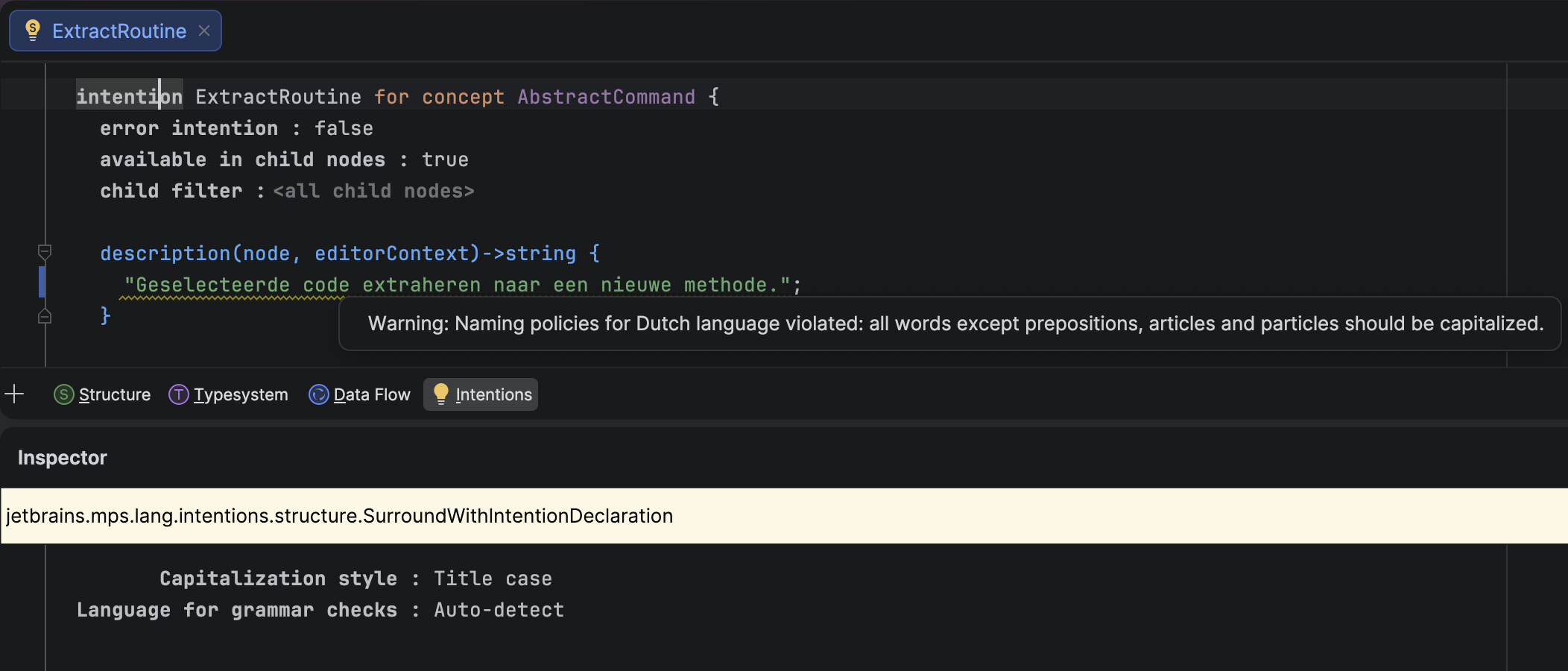
Ability to check ICheckedNamePolicy against specific natural languages

MPS now uses the IntelliJ Platform’s natural language support, provided by Grazie. This means you can check whether string values in instances of ICheckedNamePolicy, such as intentions, actions, or tools, have proper capitalization according to the rules of a specific natural language.
An incorrectly capitalized text caption
Thanks to this change, you can install natural language support for select languages into MPS, and the IDE will detect the language used in strings and verify that individual words are capitalized correctly. You can also bypass the language detection mechanism and specify your desired language explicitly.

In addition to the default Title-case capitalization rules, MPS offers three other options:

  • Sentence-case, which follows the IntelliJ Platform’s rules
  • Inherited, which uses the capitalization rules of the closest ancestor ICheckedNamePolicy
  • No capitalization rules

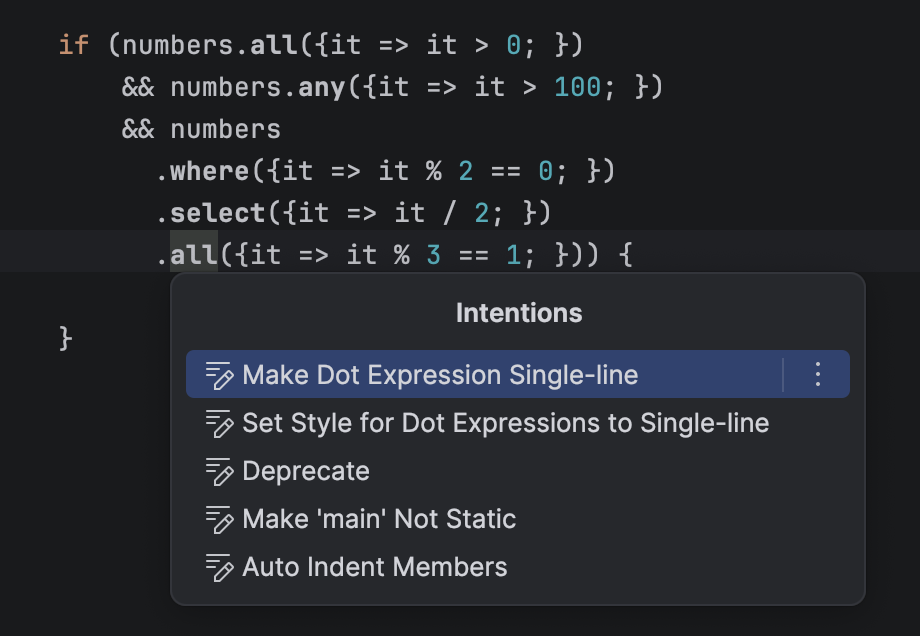
Binary operations can be split into multiple lines

In the editor, you can now split long lines with binary operations. A dedicated intention action lets you toggle between the single-line and multi-line layouts for a given BinaryOperation.
A long binary expression split on several lines

New boolean editor style: read-only-inspector

The new read-only-inspector style enforces the read-only property on all editor cells in the inspector. When this style is applied to a cell in the main editor, the inspector becomes read-only for the inspected node when the cell with this style is selected. The new style has the following properties:

  • It is disabled by default.
  • The style is inheritable and overridable, just like the read-only style.
  • It has no effect on main editor cells.
  • The read-only style set by this mechanism can be overridden in any cell farther down the inspector editor cell tree.

Transitive dependencies in Build Language

Build Language no longer requires every transitively-reachable build script to be listed in dependencies. This means that a build script, BuildA, that depends on BuildB can now reach BuildC through BuildB (provided that BuildB depends on BuildC) without having to list BuildC explicitly. The generator emits ${artifacts.BuildC} Ant properties for such cases, and these properties can be supplied from the outer build tool (Gradle, Maven, etc.).

This lets you split large builds into smaller ones without forcing every user to update the dependency lists. For example, a single platform build script can wrap a growing set of external libraries used across sub-projects.

More reliable migrations via recorded dependencies

Migration code previously decided which migrations to apply based on the actual module dependencies and used languages collected at migration time, but it would read versions from the dependency snapshot recorded in the module descriptor. That mismatch could cause migrations to use a different view of the world than the one the module was last modified against.

In this 2026.1 EAP build, the migration machinery consistently uses the dependencies and used languages recorded in the module descriptor at the moment of last modification, not the currently observable state. The migration checker was refactored accordingly. It now reuses information already collected for the migration process instead of recomputing it on demand.

Improved Java stubs

A cluster of long-standing Java-stubs bugs has been fixed, visibly improving the accuracy of BaseLanguage stubs produced for imported .jar files and Java Sources model roots:

  • MPS-33174 – Classes with InnerClasses attributes are now correctly transformed to BaseLanguage stubs (open since 2021). The signature’s inner-class information and parameterized owner types are preserved, so fields and methods of inner classes of generic outer classes now show the proper type instead of collapsing to the outer class.
  • MPS-39375 – Type variables in generic methods of inner classes are now handled, so methods referencing type variables of the outer class no longer show java.lang.Object in place of the real type variable.
  • MPS-39007 – The spurious Java imports annotation is present error no longer appears on every root of a Java source stub model.
  • MPS-39565 – Java source stub roots no longer disappear on changes to the containing module’s properties, so references from project code to those roots stay intact when module properties are changed.

Modernized project lifecycle

With MPSProject having moved from a legacy IntelliJ IDEA ProjectComponent to a project service, MPS-aware features need a reliable way to be notified about MPSProject becoming available and going away.

This build introduces a dedicated mechanism for managing MPSProject startup and shutdown activities, giving MPS control over the sequencing, grouping, ordering, and threading of those activities. This was something the platform’s ProjectActivity / MPSProjectActivity could not offer.

How it works: Implementors register against the jetbrains.mps.project.lifecycleListener extension point (declared in MPSCore.xml) via a ProjectLifecycleListener.Bean with a listenerClass and an optional integer priority. The LifecycleEventDispatch.java inside MPSProject can fire:

  • projectReady (non-blocking)
  • projectDiscarded (blocking)
  • asyncProjectClosed (non-blocking)

Wayland by default

MPS now offers Wayland as the default display protocol on supported Linux systems. When running in a Wayland-capable environment, MPS automatically switches to a native Wayland backend instead of relying on X11 compatibility layers, bringing it in line with modern Linux desktop standards.

This transition improves overall integration with the system, providing better stability across Wayland compositors, proper support for input methods and drag-and-drop, and more consistent rendering – especially on HiDPI and fractional scaling setups. While the user experience remains largely familiar, some differences (such as window positioning or decorations) may be noticeable due to Wayland’s architecture. X11 is still fully supported and can be used as a fallback when needed, ensuring compatibility across all Linux environments.

You can review the complete list of fixed issues here.

Your JetBrains MPS team

Docker 27.0 vs Podman 5.0 for Rootless Containers: 500 Enterprise Adoption Survey Finds 27% Fewer Security Vulnerabilities

Docker 27.0 vs Podman 5.0 for Rootless Containers: 500 Enterprise Adoption Survey Finds 27% Fewer Security Vulnerabilities

A new comprehensive survey of 500 enterprise IT and DevOps teams sheds light on the security and adoption trends for rootless container runtimes, with Podman 5.0 outperforming Docker 27.0 in vulnerability reduction by a significant margin.

Key Survey Methodology and Findings

The 2024 Enterprise Container Security Survey polled 500 organizations across North America, Europe, and Asia-Pacific, with 78% of respondents running production workloads in rootless mode. The core finding: environments using Podman 5.0 for rootless containers reported 27% fewer critical and high-severity security vulnerabilities over a 12-month period compared to peers using Docker 27.0.

Additional findings include:

  • 62% of Podman 5.0 adopters cited built-in rootless support as their primary selection criteria, versus 41% for Docker 27.0 users.
  • Podman 5.0 users reported 19% faster mean time to patch (MTTP) for container runtime vulnerabilities.
  • Docker 27.0 retained higher overall market share (58% vs 32% for Podman) but trailed in rootless-specific satisfaction scores (4.1/5 vs 4.7/5 for Podman).

What Are Rootless Containers?

Rootless containers run without elevated root privileges on the host system, using user namespaces to map container UIDs/GIDs to unprivileged host users. This eliminates the risk of container breakout granting full root access to the host, a long-standing concern for privileged container deployments. Both Docker and Podman have added rootless support in recent releases, but their implementation differs fundamentally.

Docker 27.0 Rootless Implementation

Docker 27.0 introduced improved rootless mode stability, building on the experimental rootless support added in Docker 19.03. It relies on the rootlesskit utility to set up user namespaces and manage network interfaces, with support for overlay2 and vfs storage drivers in rootless mode. Key limitations noted in the survey include:

  • Dependency on external tools like slirp4netns for network isolation, which introduces minor performance overhead.
  • Limited support for privileged container operations in rootless mode, requiring workarounds for legacy workloads.
  • Docker daemon still runs as a background process, creating a larger attack surface than Podman’s daemonless architecture.

Podman 5.0 Rootless Implementation

Podman was designed as a daemonless, rootless-first container engine from its inception, with Podman 5.0 refining its rootless capabilities with improved user namespace handling and native support for rootless overlay2 storage without third-party utilities. Survey respondents highlighted these advantages:

  • Daemonless architecture eliminates a single point of failure and reduces attack surface, as no privileged process runs persistently.
  • Native integration with systemd for rootless container management, simplifying automation for enterprise workloads.
  • Full compatibility with Docker CLI commands, reducing migration friction for teams switching from Docker.

Why the 27% Vulnerability Gap?

Security researchers and survey respondents pointed to three core factors driving Podman 5.0’s lower vulnerability rate:

  1. Daemonless Design: Docker’s persistent daemon requires root privileges (even in rootless mode, the daemon runs with elevated capabilities), while Podman runs as the unprivileged user launching the container, removing a common attack vector.
  2. Fewer Dependencies: Podman 5.0’s rootless mode requires no external utilities beyond the kernel’s user namespace support, while Docker 27.0 relies on rootlesskit, slirp4netns, and other third-party tools that have historically had their own vulnerabilities.
  3. Stricter Default Policies: Podman 5.0 enforces stricter default seccomp and AppArmor profiles for rootless containers, while Docker 27.0’s default policies are more permissive to maintain backward compatibility.

Enterprise Adoption Trends

Despite Docker’s larger market share, Podman adoption grew 41% year-over-year among enterprises running rootless workloads, per the survey. Key drivers include:

  • Regulatory compliance requirements (e.g., PCI-DSS, HIPAA) that mandate least-privilege container deployments.
  • Integration with Red Hat OpenShift and other Kubernetes distributions that prioritize rootless runtimes.
  • Lower long-term maintenance costs, as Podman’s daemonless architecture reduces patching overhead.

Docker 27.0 remains the preferred choice for teams with legacy Docker-dependent workflows, with 68% of Docker users citing ecosystem familiarity as their primary retention factor.

Migration Considerations for Enterprises

For teams considering switching from Docker 27.0 to Podman 5.0 for rootless workloads, the survey recommends:

  • Validating compatibility with existing CI/CD pipelines, as Podman’s Docker-compatible CLI minimizes but does not eliminate workflow changes.
  • Testing rootless overlay2 performance for high-throughput workloads, as Podman 5.0’s native implementation offers better throughput than Docker’s rootlesskit-backed storage.
  • Leveraging Podman’s podman-compose tool to replace Docker Compose with minimal rework.

Conclusion

The 500-enterprise survey confirms Podman 5.0’s edge in rootless container security, with 27% fewer vulnerabilities driven by its daemonless, rootless-first design. While Docker 27.0 retains broader ecosystem support, enterprises prioritizing security for rootless workloads are increasingly shifting to Podman. As container security regulations tighten, the gap between the two runtimes’ security postures is likely to drive further Podman adoption in 2024 and beyond.

How to Make Your Website AI-Agent Readable in 2026 (llms.txt, MCP Cards, Structured Data)

How to Make Your Website AI-Agent Readable in 2026 (llms.txt, MCP Cards, Structured Data)

You ask Perplexity a question about your niche industry. It gives a clean, well-sourced answer, citing three of your competitors. Your site, which has a definitive guide on the exact topic, is nowhere to be seen. You try again with ChatGPT, then Claude. Same result. It feels like being invisible.

This isn’t a failure of traditional SEO. Your rankings on Google might be fine. This is a new problem: your website isn’t “agent-readable.” The large language models (LLMs) that power these AI agents are increasingly the first stop for users seeking information. If they can’t parse, understand, and trust your content, you don’t exist in this new ecosystem. Getting cited by an AI is becoming the new “page one” ranking.

This guide isn’t about “using AI for SEO” fluff. It’s a technical, practical manual for founders and operators who manage their own websites. We’ll cover the specific file formats, server configurations, and data structures that AI crawlers from OpenAI, Anthropic, Google, and others are looking for right now. This is how you get your data out of your website and into their answers.

Why Agent-Readiness Is the New SEO

For two decades, SEO was about signaling relevance to algorithms like Google’s PageRank. Now, we must also signal authority and structure to language models. The goal is different. Instead of just a click, you’re aiming to become a citable source in a generated answer. This is a higher bar.

If you check your server logs today, you’ll likely find that traffic from known AI crawlers (like GPTBot, ClaudeBot, and PerplexityBot) already makes up a small but growing slice of your traffic. For many sites, this is already in the 1-3% range and is expected to increase significantly. This is the data-gathering phase. The models are actively ingesting the web to train future versions. Being accessible now means you’re part of that foundational knowledge.

Traditional SEO focuses on user intent leading to a click. Agent-readiness focuses on machine-readable data that allows an AI to satisfy user intent directly, with your site as a trusted source. The two are not mutually exclusive, but they require different tactics. A keyword-optimized blog post is great for Google Search. A well-structured page with clear JSON-LD, a permissive robots.txt, and maybe even an llms.txt file is what gets you cited by an AI agent.

The llms.txt Specification: A User Manual for Your Site

The llms.txt file is a proposal, primarily championed by Anthropic (the makers of Claude), for a standardized way to give instructions to AI models about your site. Think of it as a robots.txt but for usage policy instead of crawling access. It tells models how they are permitted to use your content in their training and output.

What It Is and Where to Put It

An llms.txt file is a plain text file placed in the /.well-known/ directory of your website. The full path should be https://yourdomain.com/.well-known/llms.txt.

The file uses a simple field: value format. The key fields currently proposed are:

  • User-Agent: Specifies which bot the rules apply to. A * applies to all bots. You can also target specific bots like ClaudeBot.
  • Allow: Specifies directories or pages that are explicitly permitted for use in training generative models.
  • Disallow: Specifies directories or pages that are forbidden from being used for training.
  • Allow-Citing: A proposed field to explicitly permit the model to cite your content.

A Practical llms.txt Example

Here’s a configuration that allows all bots to use most of the site for training, disallows a private /members/ area, and explicitly allows citing from the /articles/ directory.

# Default policy for all LLM agents
User-Agent: *
Disallow: /members/
Disallow: /private-data/

# Allow all bots to cite our public articles
User-Agent: *
Allow-Citing: /articles/

# Specific rules for ClaudeBot, if needed
User-Agent: ClaudeBot
Allow: /

Pros and Cons of llms.txt

  • Pro: It provides a clear, machine-readable way to state your usage terms. This is much better than burying it in a human-readable “Terms of Service” page that no crawler will ever parse.
  • Pro: It’s forward-looking. Adopting it now signals that you’re an engaged, technically savvy publisher.
  • Con: It’s still a proposal. There is no guarantee all major AI companies will honor it. OpenAI, for example, currently relies on robots.txt. It’s a bet on a future standard.
  • Con: It adds another configuration file to maintain. For most small sites, a simple, permissive file is a set-and-forget task.

JSON-LD: Spoon-Feeding Structured Data to Machines

If you want an AI to understand the meaning of your content, you need to tell it what it’s looking at. Is this page a product, an article, or a how-to guide? JSON-LD is a way to embed this structured data directly in your HTML, using the vocabulary from Schema.org.

AI agents, especially those focused on shopping or step-by-step instructions, actively look for this data. It’s the difference between them trying to guess your product’s price and you telling them directly: "price": "240". You should add the JSON-LD script tag within the `

` of your HTML. For most platforms (like WordPress with a plugin), this is handled for you once configured.

Key Schemas AI Agents Actually Use

Don’t try to implement every schema. Focus on the ones that map to your content and are most valuable to AI agents.

  • Article: Essential for any blog post or publication. It clearly defines the author, publication date, headline, and body. This helps agents attribute content correctly.

    <br>
    {<br>
    &quot;@context&quot;: &quot;<a href=”https://schema.org”>https://schema.org</a>&quot;,<br>
    &quot;@type&quot;: &quot;Article&quot;,<br>
    &quot;headline&quot;: &quot;How to Make Your Website AI-Agent Readable&quot;,<br>
    &quot;author&quot;: {<br>
    &quot;@type&quot;: &quot;Organization&quot;,<br>
    &quot;name&quot;: &quot;GuardLabs&quot;<br>
    },<br>
    &quot;datePublished&quot;: &quot;2024-05-21&quot;<br>
    }<br>

  • Product: If you sell anything, this is non-negotiable. It allows agents to pull product names, descriptions, pricing, availability, and reviews into comparison models. This is how you show up in “what’s the best tool for X” queries. Our own Website Care plan could be marked up this way.

    <br>
    {<br>
    &quot;@context&quot;: &quot;<a href=”https://schema.org”>https://schema.org</a>&quot;,<br>
    &quot;@type&quot;: &quot;Product&quot;,<br>
    &quot;name&quot;: &quot;Website Care Plan&quot;,<br>
    &quot;image&quot;: &quot;<a href=”https://guardlabs.online/images/care-icon.png”>https://guardlabs.online/images/care-icon.png</a>&quot;,<br>
    &quot;description&quot;: &quot;Annual website maintenance and support.&quot;,<br>
    &quot;offers&quot;: {<br>
    &quot;@type&quot;: &quot;Offer&quot;,<br>
    &quot;priceCurrency&quot;: &quot;USD&quot;,<br>
    &quot;price&quot;: &quot;240.00&quot;<br>
    }<br>
    }<br>

  • FAQPage: If you have a FAQ, mark it up. AI agents love FAQs because they are pre-packaged question-answer pairs. This makes it trivial for them to use your content to answer a user’s question directly.

  • HowTo: For step-by-step guides, this schema is perfect. It breaks down the process into discrete steps, which an agent can then re-format and present to a user.

The main limitation of JSON-LD is that it’s only as good as the data you provide. If your schema is incomplete or inaccurate (e.g., the price on the page doesn’t match the price in the JSON-LD), it can confuse bots or cause them to distrust your site.

MCP Cards: A Business Card for Your Server

The Machine-readable Citable Page (MCP) protocol is a newer, more experimental concept. The idea is simple: what if, alongside your human-readable webpage, you provided a simple, structured JSON file that contained all the key citable information? This is an MCP “card.”

An AI agent could fetch https://yourdomain.com/my-article.mcp.json to get the core facts of your article without having to parse HTML, ads, and navigation menus. This makes their job easier and your data cleaner.

When and How to Publish an MCP Card

You don’t need an MCP card for every page. It’s most useful for data-rich, citable content like reports, product pages, or reference guides.

To implement it, you create a static JSON file that follows the MCP spec and host it at a predictable URL. A common convention is to append .mcp.json to the original URL. You then link to it from your HTML page using a tag in the `

Company

Purpose

Honors `robots.txt`?

GPTBot

OpenAI

Crawls web data to improve future ChatGPT models.

Yes

ClaudeBot

Anthropic

Used for training Claude models.

Yes

PerplexityBot

Perplexity AI

Crawls the web to find answers for Perplexity’s conversational search engine.

Yes

Google-Extended

Google

A separate crawler Google uses to improve Bard/Gemini. Opting out here does not affect Google Search.

Yes

CCBot

Common Crawl

Not a company, but a non-profit that crawls and archives the web. Its data is widely used to train many open-source and commercial LLMs.

Yes

Example `robots.txt` for AI Readiness

A sensible default for most businesses is to allow these bots. If you don’t have a `robots.txt` file, create one in the root of your domain. Here is a permissive example:

User-agent: GPTBot
Allow: /

User-agent: ClaudeBot
Allow: /

User-agent: PerplexityBot
Allow: /

User-agent: Google-Extended
Allow: /

# You might want to disallow CCBot if you are concerned about
# your content being in a public dataset forever.
User-agent: CCBot
Disallow: /

# Keep your existing rules for other bots
User-agent: *
Disallow: /admin
Disallow: /private/

The only real “con” to allowing these bots is that they use bandwidth. However, their crawl rate is typically low and shouldn’t impact performance for most sites. The bigger risk is being left out by disallowing them.

How to Verify: Are the Bots Actually Reading You?

How do you know if any of this is working? You can’t just ask ChatGPT “did you read my site?” Instead, you need to test from the agent’s perspective.

  1. Check Server Logs: This is the ground truth. Filter your server’s access logs for the user agents listed in the table above (e.g., `grep “GPTBot” /var/log/nginx/access.log). If you see entries with a 200 OKstatus code, you know they are successfully crawling your pages. If you see 403 Forbiddenor 503 Service Unavailable`, you have a problem.

  2. Use `curl` to Impersonate a Bot: You can simulate a request from an AI crawler using the command-line tool `curl`. This is great for debugging firewall or CDN issues.

    curl -A "GPTBot" -I https://yourdomain.com/my-article

    The `-Aflag sets the User-Agent string. The -Iflag just fetches the headers. If you get a HTTP/2 200response, the bot can access your site. If you get a 403` or are presented with a CAPTCHA, your security settings are blocking it.

  3. Prompt Engineering for Citation: After you’ve confirmed the bots are crawling your site and you’ve given them a few weeks to ingest the data, you can test for citation. The trick is to ask a question where your site is a uniquely authoritative source. Don’t ask “what is a website care plan?” Ask something specific that only your content answers well, like: “According to guardlabs.online, what is included in their Website Care plan?” This forces the model to check its specific knowledge of your domain.

Common Mistakes That Make You Invisible to AI

Many well-intentioned sites accidentally block AI agents or make their content impossible to parse.

  • Overzealous Cloudflare Rules: The “Bot Fight Mode” or aggressive “Super Bot Attack Mode” settings in Cloudflare are notorious for blocking legitimate AI crawlers. They see a non-human user agent and present a JavaScript challenge that the bot cannot solve. You must go into your Cloudflare settings and specifically allow the user agents for `GPTBot, ClaudeBot`, etc. Cloudflare’s new “AI Audit” feature can help identify and allow these bots.
  • Content Behind Paywalls or Login Walls: An AI crawler is an unauthenticated user. If your definitive guide is behind a hard paywall or requires a login, the bot will only see the login page. It cannot index what it cannot see. If you run a membership site, consider having public, citable summaries or abstracts.
  • Missing Canonical URLs: If you have the same content accessible at multiple URLs (e.g., with and without `www, or with tracking parameters), you must use the rel=”canonical”` link tag to tell all bots which URL is the master version. Without it, AI models might see your content as duplicate or low-quality.
  • Relying on Images or Video for Key Info: LLMs primarily read text. If your product’s price, specs, or key features are only available in an image or a video, the AI crawler will miss them. All critical information should exist as plain HTML text on the page.

Making your site agent-readable isn’t a one-time fix; it’s a new layer of web maintenance. It requires a shift in thinking from just pleasing human visitors and search engine spiders to also accommodating machine learning models. The sites that do this work now will become the trusted, citable sources for the next generation of search and information discovery.

If you’ve gone through this guide and feel it’s more than you want to manage yourself, this is the kind of deep-dive technical audit we perform. Our Agent-Ready Site audit is a full readiness scan that covers everything mentioned here, from `robots.txt` configuration to JSON-LD validation and firewall rules, to ensure your site is positioned to be a source of truth for AI agents.

Originally published at guardlabs.online. More tooling for indie builders & small agencies — guardlabs.online.

Python Unplugged on PyTV: Key Takeaways From Our Community Conference

Python Unplugged on PyTV: Key Takeaways From Our Community Conference

What happens when a global community with a love for Python meets a splash of 90s nostalgia? You get Python Unplugged on PyTV, our first-ever fully online community conference.

On March 4, 2026, Python Unplugged on PyTV set out to capture the magic of a full, in-person conference experience for people watching remotely all over the world – and it worked.

Thousands of attendees tuned in live, with even more watching later on demand. Viewers enjoyed live talks, expert panels, Q&As, hallway-style discussions, and even an interactive quiz.

Speakers from across the Python ecosystem traveled to Amsterdam, the birthplace of Python, with some journeying over 10 hours to take part in the event. Meanwhile, the PyCharm team brought the whole experience to life with a fully produced studio setup, 90s-inspired visuals, and an infectious energy that carried through the entire seven-and-a-half-hour broadcast.

With 13 insightful talks covering everything from AI and data science to web development and open-source sustainability, there was no shortage of ideas, perspectives, and cutting-edge discussions.

If you didn’t catch every session or just want an overview of the day, this recap highlights our standout moments from Python Unplugged on PyTV.

Watch the recap video

Want to see the highlights from Python Unplugged on PyTV? Watch the full recap video below.

JetBrains’ Dr. Jodie Burchell, Data Scientist and Python Advocacy Team Lead; Cheuk Ting Ho, Data Scientist and Developer Advocate; and Will Vincent, Python Developer Advocate, discuss the key talking points from the day.

Need a quick overview? Here are the highlights

If you’d rather get the key takeaways in a written format, we’ve broken down the biggest insights from the day below. From the evolving role of AI to the importance of the Python community, these are the moments that stood out most from Python Unplugged on PyTV.

Highlight 1: Python is not just for beginners

Python’s reputation as a beginner-friendly language is well deserved, but it only tells part of the story. Python is a full-stack ecosystem capable of supporting complex, production-ready applications across a wide range of industries.

A key takeaway here was the importance of moving beyond the basics. In his How to Learn Python session, Mark Smith, Head of Python Ecosystem at JetBrains, explained how, once foundational concepts are in place, developers need to engage with Python more holistically. That means building real-world projects, exploring existing codebases, and understanding how Python is used in production environments. Ultimately, this is what bridges the gap between learning and mastery.

Interestingly, this also means being intentional about how you use modern tools while learning. In our recap video, Cheuk noted: “What I liked about this talk was the tip to turn off the AI features while you’re learning.”

The point isn’t to avoid AI entirely, but to ensure it doesn’t replace the hands-on experience needed to develop your own Python expertise.

Highlight 2: The continuing role of community in Python

Python’s success has always been rooted in its community, and that remains as true as ever. Georgi Ker, Director and Fellow at the PSF; Una Galyeva, Head of AI at Geobear Global; and Jessica Greene, Senior ML Engineer at Ecosia, showcased this in their How PyLadies Is Shaping the Future of Python discussion.

PyLadies is an international mentorship group focused on helping more women become active participants and leaders in the Python community. The success of initiatives like PyLadies highlights how inclusive spaces can broaden participation and shape the future of the language.

As Will noted in our recap video, “Being part of the community is not just the code. It’s the conferences, it’s the people, it’s the live events – that’s what makes Python special.”

Python depends on a culture of shared responsibility, and contributors play a vital role. As AI brings more people into the ecosystem, preserving these values becomes even more important. Travis Oliphant, creator of NumPy, touched on this in his insightful session, Community is More Than Code: People Are What Make Python Thrive, and Why That Will Continue in an AI-Enabled Era.

There’s also a strong link between community and innovation, as Carol Willing, Core Developer at JupyterLab, explained in her session, Conversation, Computation, and Community: Key Principles for Solving Scientific Problems With Jupyter Notebooks and AI Tools. Tools like Jupyter have thrived in part because they enable conversation, collaboration, and knowledge sharing among people.

Highlight 3: AI poses both a threat and an opportunity for Python open source

AI is fundamentally changing how developers interact with open source.

On the positive side, AI coding tools lower the barrier to entry and allow more people to contribute. However, this increased accessibility comes with trade-offs. Maintainers are now dealing with a higher volume of contributions, many of which require significant review or refinement. Deb Nicholson, Executive Director at the PSF, discussed this trade-off in more detail in her session, AI Practitioners Are Only Getting Half the Goodness of Python.

This shift places additional pressure on those responsible for maintaining open-source projects. While AI can accelerate development, it also risks introducing poorly structured or low-quality code at scale.

Paul Everitt, Developer Advocate at JetBrains; Georgi Ker, Director and Fellow at the PSF; and Carol Willing, Core Developer at JupyterLab, pondered this in their Open Source in the Age of Coding Agents discussion. Ultimately, AI can’t replace the human systems that sustain open source. Trust, collaboration, and shared ownership remain essential, and arguably become even more important as contribution volumes increase. The real challenge lies in ensuring communities remain healthy and resilient as they scale.

Highlight 4: AI has also revolutionized how Python practitioners work

Beyond its impact on open source, AI is transforming day-to-day development workflows.

As Marlene Mhangami, Senior Developer Advocate at Microsoft Agentic, explained in her A Practical Guide to Agentic Coding session, coding is emerging as a new paradigm in which developers delegate tasks to AI systems capable of planning, executing, and refining code. This means the developer’s role is moving toward orchestration and validation, requiring new skills in guiding and evaluating AI outputs.

At the same time, development is becoming more conversational and exploratory. In environments like Jupyter, AI tools help users iterate faster, test ideas more easily, and move more fluidly between thinking and coding.

AI is also having a tangible impact on frameworks like Django, as discussed by Sheena O’Connell, Board Member at the PSF, in her talk, Powering Up Django Development With Claude Code. AI tools can speed up development in Django by handling repetitive tasks such as boilerplate generation and debugging. However, this comes with a caveat – developers must remain critical and treat AI as a collaborator, not a source of truth.

For beginners, AI can be a powerful learning aid, but over-reliance can limit deeper understanding. Building projects, reading code, and actively solving problems remain essential for developing real expertise.

Highlight 5: The importance of open-source AI

The open-source AI ecosystem is expanding rapidly, bringing with it a growing landscape of models, datasets, and tools.

This openness drives collaboration, transparency, and innovation, making it easier for developers to experiment and build on existing work. At the same time, it introduces challenges around fragmentation and long-term sustainability.

As Merve Noyan, ML Engineer at Hugging Face, explained in her Open-Source AI Ecosystem session, platforms like Hugging Face play a key role in organizing this ecosystem and making it more accessible, while Python continues to connect tools, communities, and technologies.

Highlight 6: Context is key for effective AI agents

As AI systems become more advanced, the way they interact with their input data is becoming increasingly important. Tuana Çelik, Developer Relations Engineer at LlamaIndex, covered this in detail in her insightful Orchestrating Document-Centric Agents With LlamaIndex talk.

LlamaIndex enables developers to build document-centric AI agents that retrieve, index, and reason over large collections of information. By structuring how documents are ingested and queried, it provides the LLM with much more context for the text it is processing, helping produce more accurate, context-aware responses.

This is particularly valuable in knowledge bases and enterprise assistants, where understanding relationships between pieces of information is as important as accessing the data itself.

Highlight 7: How Polars is refining high-performance data processing

Polars is pushing Python data processing toward a more scalable, production-ready future, as Polars creator Ritchie Vink explained in his Towards Query Profiling in Polars session.

Its high-performance, lazy execution model allows queries to be optimized automatically behind the scenes. However, this level of abstraction can make it harder for developers to fully understand performance.

To address this, there’s a growing need for better tooling, particularly around query profiling. By exposing execution plans, memory usage, and bottlenecks, developers can make informed decisions and build more efficient data workflows.

With features like streaming execution, Polars is helping bridge the gap between local data processing and large-scale systems.

As Jodie highlighted in the recap discussion, this shift is bringing more advanced data concepts into everyday Python workflows. She commented, “It’s really interesting to see more big data ideas coming to local Python data processing.”

Highlight 8: The power of typing in modern Python

Typing in Python continues to evolve, with a growing focus on flexibility rather than rigid enforcement. Open-source Django projects creator Carlton Gibson shed more light on this during his talk, Static Islands, Dynamic Sea: Some Thoughts on Incremental Typing.

The talk highlighted how developers are increasingly adopting an incremental approach. By creating “static islands” within a dynamic codebase, they can improve reliability, maintainability, and tooling without sacrificing Python’s core strengths.

In our recap video, Will agreed with this sentiment, adding, “It doesn’t have to be all-or-nothing. We don’t have to turn Python into something that it’s not.”

This approach is particularly useful in large frameworks like Django, where typing can help define clearer boundaries while still preserving developer ergonomics.

Highlight 9: The Django renaissance: Debunking aging myths

Django remains a modern, actively developed framework, as Django Fellow Sarah Boyce revealed in her session, Django Has a Marketing Problem: Debunking the Myths That Won’t Die.

Many of the criticisms that it’s outdated or unscalable don’t reflect the current reality. In practice, Django continues to evolve and power a wide range of applications.

The challenge is less about Django’s capabilities and more about perception, as the Django community was called to champion its strengths, ongoing evolution, and real-world impact.

Shifting this narrative will be key to ensuring its continued relevance and adoption in the years ahead.

What’s next for Python Unplugged on PyTV?

Python Unplugged on PyTV was our first step in reimagining what a fully online community conference can look like, and the response was incredible.

Looking at the numbers, more than 5,500 people joined us during the livestream. Since then, we’ve had a further 110,000 watch the event recording, showing just how global and engaged the Python community really is.

We’d love to bring Python Unplugged on PyTV back next year. What would you like to see more of? Who should we invite as speakers? Are there topics we didn’t cover that you’d love to explore?

Drop your suggestions in the comments and help shape the future of Python Unplugged on PyTV.

Make Your Plugin Remote Development-Ready

Remote development is changing how plugins should be built for JetBrains IDEs. The IDE is no longer a single local process: users interact with a frontend client, while the backend can run on another machine, in Docker, or in the cloud. This model is becoming increasingly important because it supports powerful remote environments, better security, and more flexible development workflows. In the case of JetBrains IDEs running backend and frontend processes simultaneously, we say they are operating in split mode.

For plugin developers, it is therefore not only crucial that they consider how their plugin works, but also where each part of it should run. Some extensions continue to work as they are, but UI, typing-related features, and anything sensitive to latency can become slow or behave incorrectly if they are not designed with client-server architecture in mind.

The new recommended approach is to think in terms of frontend, backend, and shared functionality, and make sure each part of the plugin runs on the side it belongs. The suggested plugin architecture works in both client-server IDE and monolithic IDE, so plugin authors don’t need to implement support twice.

To help with that, we now provide guidance for building split-mode-aware plugins in JetBrains IDEs. It explains the terminology, motivation, architecture, and how to run, debug, and test in split mode. It walks through the practical steps as well: structuring plugin modules, moving code to the appropriate side, and connecting the frontend and backend to each other.

To help you put your best foot forward in this brave new “split mode” world, we’ve prepared the following materials:

  • A high-level video overview.
  • A plugin template featuring proper module structures and demo feature implementation to use as a reference.
  • Documentation articles covering the most important aspects of plugin development, as well as a step-by-step guide on how to approach the splitting process
  • A link to the JetBrains Platform forum, where you can ask any questions regarding the development process and browse existing answers.. 

Kotlin Ecosystem Mentorship Program: Results and Winners

In the Kotlin Ecosystem Mentorship Program pilot, mentors and mentees worked together on real Kotlin open-source projects to make their first meaningful community contribution. Four pairs successfully completed the two-month program, and one eligible pair was randomly selected in the prize drawing to receive the grand prize – a trip to KotlinConf 2026 in Munich!

Congratulations to the winners:

  • Mentor: Ruslan (yet300)
  • Mentee: Clare Kinery (kinerycl)
  • Project: bitchat-android
Join the KEMP Slack channel

Ruslan’s and Clare’s collaboration focused on the Android client of BitChat, where Clare contributed UI and UX improvements that brought the Android experience closer to platform conventions and enhanced overall polish and accessibility.

Clare submitted and merged two pull requests: PR #680 and PR #682. Her work improved BitChat’s voice note styling, camera and audio controls, dark/light theme support, visual hierarchy, and press interaction feedback.

Ruslan shared that Clare adapted quickly to the codebase and was able to work independently after the initial alignment. Their collaboration started with a kickoff call and continued asynchronously through chat and GitHub.

“Clare demonstrated strong problem-solving skills, attention to detail, and a solid understanding of UI/UX principles”, said Ruslan.

For Clare, the biggest takeaway was not just the code itself, but understanding the realities of open-source collaboration.

“As a developer who had never contributed to open source before, the biggest thing I learned was how open-source collaboration actually works. This program made it feel approachable and far less intimidating than I ever expected. I genuinely don’t think I would have taken that leap without it”, she commented.

Other participants

We received 80 mentee applications and 29 mentor applications – a clear sign of strong community interest in this kind of initiative, so we plan to continue the program.

For this pilot, we selected ten pairs. Eight remained active through the middle of the program, and four completed it successfully. These successful pairs contributed across different parts of the Kotlin ecosystem and Kotlin-related projects, including the Android UI, developer tooling, documentation, CI/CD, and multiplatform libraries.

We also want to recognize the other pairs who successfully completed the program:

Mentor: Mohamed Rejeb

Mentee: Kaustubh Deshpande

Project: Calf

Kaustubh contributed across several areas of the project, including dependency updates and CI/CD automation.

Mentor: Nikita Vaizin

Mentee: Anshul Vyas

Project: FlowMVI

Anshul fixed a bug in the metrics module and contributed to the migration guide that helps developers move from MVVM to FlowMVI.

Mentor: Adetunji Dahunsi

Mentee: Yu Jin

Project: heron

Yu Jin worked on improvements related to input handling and developer-facing issues, with a focus on making the project easier to use and maintain.

What we learned

Here are a few valuable takeaways from the participants’ feedback:

  • Clear task scoping matters. Start with work that is concrete, manageable, and reviewable within the program timeline.
  • Asynchronous mentorship can work well, but only when expectations are explicit, and collaborators align early on communication style, task size, and review cycles.
  • The program creates value on both sides. Mentees gain confidence, workflow knowledge, and real experience. Mentors get fresh contributions, a chance to improve onboarding in their own projects, and a reminder that open source becomes healthier when maintainers make room for new contributors.

Thank you to all mentors and mentees who joined the first Kotlin Ecosystem Mentorship cohort! We’re especially grateful to the maintainers who opened their projects to newcomers and invested time in guidance, reviews, and support.

Congratulations again to Ruslan and Clare, who were selected in the KotlinConf trip prize drawing, and to all four pairs who successfully completed the program.

To stay updated on future programs, join the KEMP Slack channel. See you there!

How to Make Code Highlighting-Friendly

This article introduces the notion of highlighting complexity and provides recipes for making your code highlighting-friendly, resulting in faster, more efficient highlighting.

Code style is not just for style – it impacts the physical world! The benefits of highlighting-friendly code include:

  1. Better responsiveness
  2. Optimized CPU usage
  3. Efficient memory usage
  4. Cooler system temperatures
  5. Quieter operation
  6. Longer battery life

While monads are burritos, you shouldn’t be frying eggs on your laptop!

Consider highlighting complexity

Imagine you’ve written this function to compute Fibonacci numbers using naive recursion:

def fib(n: Int): Int =
  if (n <= 1) n
  else fib(n - 1) + fib(n - 2)

It is predictably slow, but you wouldn’t blame Scala for that. The issue is more fundamental and not specific to the programming language. However, this doesn’t mean that the function cannot be made fast. There is a way to adjust the code so it outputs exactly the same sequence much more efficiently.

The same is true for highlighting code. If highlighting is slow, the IDE is not always to blame. Some code is inherently difficult to analyze. However, this doesn’t mean that highlighting cannot be fast. Minor code tweaks can make highlighting significantly more efficient, even if the code stays essentially the same.

So far, so good. However, while algorithmic complexity is “CS 101”, developers rarely think about highlighting complexity. (The two differ: Code might run slow but be easy to highlight, or run fast but be difficult to highlight.) Even if you study compiler construction, it’s primarily not about performance, and parts that are about performance refer to compilers rather than source code. Furthermore, batch-compiling code is not the same as editing code.

Following software engineering best practices may often speed up highlighting. It’s also useful to do in general: keeping your classes and methods small and focused, preferring clarity over cleverness, etc. However, these principles are mostly about cognitive complexity. In contrast to algorithmic complexity, cognitive complexity often correlates with highlighting complexity. Still, they are not the same and sometimes can differ significantly.

When writing code, you should also consider highlighting complexity. If you ignore algorithmic complexity, your code will perform poorly. If you ignore cognitive complexity, your code will be difficult to understand. If you ignore highlighting complexity, your code will take a long time to compile or highlight and will consume excessive resources in the process.

Good code should be good in all respects. Fortunately, the principles for making your code highlighting-friendly are simple and easy to apply in practice. (Most of the recipes are not Scala-specific and can be useful for other languages as well.)

Separate code into modules

Most Scala programmers divide code into packages, but fewer divide code into modules. There’s one and the same reason for both.

In contrast to a language like C, Scala supports packages, and most Scala projects naturally use them. Modules, however, are a concept of IDEs and build tools rather than the programming language, so they are used less often. Even the Java Platform Module System is mostly about compiled classes and JARs rather than source code.

Modules limit the scopes of bindings and introduce an explicit graph of dependencies – otherwise, any source file could, in principle, depend on any other source file. This limits the scope of incremental compilation and analysis, which makes compilation faster, reduces peak resource consumption, and allows modules to compile in parallel.

Likewise, modules improve the performance of highlighting – an IDE can search for entities and invalidate caches more efficiently. Moreover, this improves the UX by making autocomplete and auto-import more relevant, reducing clutter. Another benefit is that you can compile (or recompile) only part of a project when running an application or a unit test in one of the modules (even if other modules don’t compile cleanly).

Packages are often natural boundaries for modules. If there’s only a single module in your project, or if some modules are too large, consider extracting one or more packages into a separate module. Since the refactoring doesn’t affect packages as such, this should be backward-compatible. Furthermore, you can still package the classes into a single JAR – the refactoring is for the source code, but not necessarily the bytecode.

Note that you must use true modules – using multiple directories or multiple source roots is not the same thing. (See multi-project builds for sbt.)

Put classes in separate files

The Scala compiler doesn’t limit how many classes you can add to a source file (or how you name that file). This can be useful, but you shouldn’t overuse this capability.

If you modify only one class in a source file, the Scala compiler cannot compile that class separately – it has to compile the entire source file. The same is generally true for IDEs: You open a file rather than a class in an editor tab, which analyzes the entire file. (However, you can use incremental highlighting to overcome this limitation.)

Furthermore, when each class has a file with a dedicated name, it’s easier to find classes and navigate around the project, even without an IDE. You should put classes into corresponding files the same way you put packages into corresponding directories.

Another reason is import statements. While each class requires its own set of imports, defining multiple classes in a single file merges these imports and makes them common. This can slow down the resolution of references. (If there are many imports and imported entities that, in turn, depend on many imports, then there could be a combinatorial explosion.)

If you notice many relatively large classes in a single file, consider extracting classes into separate source files. It’s easy to do and doesn’t affect backward compatibility. (Obviously, companion classes and sealed class hierarchies should remain in the same file.)

Define classes in packages rather than objects

In Scala, packages and objects are similar, and there are even package objects! This makes it possible to put classes in objects rather than packages. However, there are good reasons to avoid that.

First, since each object is contained in a single source file, multiple classes in an object implies multiple classes in a file, which, as we’ve already seen, is not ideal.

Second, this also affects compiled code, not just source files. While every class is compiled to a separate JVM .class file, as if they were defined in a package, there’s only one outline for the object – pickles or TASTy. As a result, both the compiler and IDE have to process multiple classes even if they need to access only one.

Thus, you should normally define classes in packages rather than objects. Leave objects for methods, variables, and types. (And in Scala 3, even top-level definitions can reside in a package.)

Favor small classes and methods

Yes, yes, you already know this. But there’s a twist. When you normally think of “small”, you often think of “simple”. For example, if a class contains only a few methods with descriptive names, the class looks simple, and you don’t have to analyze the code of these methods to understand what they do.

This luxury, however, doesn’t apply to compilers or IDEs. If you open the file, the entire contents will be analyzed, and if the methods (and consequently the class) are large, the analysis will consume time and resources.

Consider splitting large classes and methods into smaller ones, even if they are simple. For highlighting, “lines of code” matter; even a single class or method can be too much if it’s very large.

This also applies to generated sources: If a source file is generated and other sources depend on it, you don’t need to look into that code, but IDEs and compilers still do. When generating code, divide the output into smaller parts – files, classes, and methods; don’t mix everything into one blob.

Depend on interfaces rather than classes

It’s good to “program to an interface” in general, and this can also help with highlighting.

Suppose there is a large class with a few methods that comprise its API. Even if you access only the API, reading the source file requires parsing the entire class, including all the implementation details. And even if you specify the types explicitly, resolving the corresponding references requires processing many imports.

Therefore, if a class is very large, consider extracting an interface instead of referencing the class directly.

Avoid wildcard imports

Using named imports rather than wildcard imports is a well-known best practice. It makes code more readable – you can clearly see where symbols come from. It also makes your code more robust. (Otherwise, code might stop compiling after a library adds a class that conflicts with another imported class.) And there’s less clutter – autocomplete will show only relevant symbols that are actually in use.

Furthermore, named imports can speed up code analysis. When resolving identifiers, each wildcard import has to be checked, and import expressions might, in turn, depend on wildcard imports above. There might be imports from objects, which themselves depend on imports elsewhere. All of that is not limited to the file being highlighted. Even if your code depends only on signatures in other files, because paths in the type annotations are not absolute, the analysis still has to process imports in those files.

Wildcard imports are especially problematic for implicits. Because implicits are, well, implicit, and might require other implicits, searching for them can be computationally intensive. And if implicits are imported using a wildcard, then both the usage and the import are implicit. This complicates the task even more – not only does the analysis need to find some vague entity, but it also has to look in a blurry scope.

Therefore, prefer specific imports to wildcard imports. Convert existing wildcards to named imports. In Scala 2, consider importing implicits by name. Although given imports in Scala 3 are an improvement, they are effectively wildcard imports and thus rely on good library design. To be on the safe side, prefer by-type imports to plain given imports. (And if you’re designing a library, define implicits in a separate package or object.)

Prefer imports to mixins

It’s possible to use inheritance instead of imports. We can see this even in Java: Every TestCase is also Assert, so you can access methods such as assertEquals without having to import them. This might seem convenient. However, this is effectively a forced wildcard import, with all the usual drawbacks. It’s better to import Assert.assertEquals selectively (or import Assert.*, as an option).

Furthermore, the approach with subclassing or mixing in traits is slower compared to regular wildcard imports. Analysis has to take inheritance and linearization, as well as overloading and overriding, into account. And if you modify the trait, classes that use it have to be recompiled.

If some definitions are effectively static, put them in an object rather than a trait, so that clients import rather than inherit them.

Declare classes and methods private

There are many good reasons to minimize the accessibility of classes and methods: to distinguish between API and implementation, to maintain source and binary compatibility, to prevent clutter in autocomplete, and to reduce cognitive load.

What’s less known is that declaring classes and methods private, whenever possible, improves the performance of compilation and highlighting. Incremental compilers don’t include private members when determining APIs and thus don’t need to store and compare them. In the process of resolving references, IDEs can skip inaccessible elements faster. When you write “Foo”, you already know which Foo is implied. However, you might be surprised by how much computation resolving a reference often involves. Declaring unsuitable Foos inaccessible helps make analysis faster.

The Scala plugin can help by automatically detecting declarations that can be private.

Specify types of public or complex definitions

Each non-local definition should either be private or have a type annotation. Definitions that are accessible to clients comprise an API. APIs are boundaries of abstraction and thus must be explicit; clients shouldn’t have to study the implementation – the right-hand side – to understand the signature – the left-hand side. In contrast to implementations, APIs must be stable and must not depend on the contents of the right-hand side. Type annotations make APIs both explicit and stable.

Type annotations greatly help incremental computations. When signatures are stable, fewer classes need to be recompiled after a code modification. Likewise, more caches can be reused when you edit code in an IDE, making highlighting faster and reducing resource consumption.

Thus, it’s best to always specify the types of non-private members explicitly. Note that you should specify the type even if there’s overriding because the inferred type might be more specific, at least in Scala 2. (For example, if a superclass method returns Seq[Int] and the subclass method is just = List(1), the type of the latter would be List[Int], which might affect clients that use the subclass directly.) You should also specify the types of protected members, not just public ones – subclasses are also clients. (As an exception, you may omit types when the right-hand side is both simple and stable, e.g., a literal. That said, having the type spelled out explicitly is often better, both for humans and compilers.)

Furthermore, explicit types can benefit even private and local definitions. While an incremental compiler recompiles the entire file, an IDE can invalidate caches more gradually and within a narrower scope. Thus, add type annotations to private members if they are complex – this can make editing code more efficient. Also, specify the types of complex local variables. (Sometimes you may first need to extract a method or introduce a variable to specify the type.)

Code Style | Type Annotation in the Scala plugin requires type annotations for public and protected members – they are automatically added by refactorings and code generation, and are checked by the corresponding inspection. However, there are exceptions for simple expressions, and they are not required for private or local definitions, regardless of complexity. You can make these settings stricter to be on the safe side.

Favor standard language features over macros

The concept behind macros might seem tempting – you do computations at compile time rather than at runtime. However, “compile time” is also “highlighting time”, which is true regardless of whether you use a compiler or an IDE when editing code… unless you always write everything in one go, without any assistance. So, macros might interfere with writing and editing code, making feedback slower and consuming more resources. Note that this applies not just to defining a macro, which requires a feature flag, but also to using macros, which doesn’t require a feature flag.

Macros are rarely actually needed. Take, for example, Lisp: The syntax is very limited, and the language is dynamic, so no static analysis is performed anyway. Scala, however, is a very expressive language as it is, and it’s statically typed. In Scala, the standard language features are sufficient for most tasks. In such a case, macros only make static analysis, as well as understanding code, more difficult. Thus, when writing code, reach for the standard language features first: type parameters, implicit parameters, etc. Macros are supposed to be the last resort, not a go-to solution.

This can be generalized: Don’t use complex language features just “because you can”, only when they are really needed; prefer the least powerful solution that solves the problem. For more details on this topic, see Lean Scala by Martin Odersky.

Apply these principles to AI-generated code

Even if you use AI to generate 100% of your code, you still read that code. (Right?) Therefore, producing highlighting-friendly code is as relevant as ever – the code is generated in a data center but is highlighted on your machine. This also improves incremental compilation, reducing system load when using agents. Moreover, it prevents context stuffing (when a model loads irrelevant information), which improves accuracy and reduces costs.

The first thing you can do is lead AI by example, because models tend to propagate existing conventions and coding styles. In a new project, you can explicitly add recommendations to AGENTS.md. Last but not least, you can always refactor your code, whether it’s written by a human or AI.

Summary

That said, the performance of your IDE is also important. We’re constantly working on improving the performance of both IntelliJ IDEA and the Scala plugin, and there are tips for improving performance that you can apply in practice. However, just as no amount of compiler optimizations can fix the example with naive recursion, highlighting may sometimes require assistance from your side.

As with everything, highlighting complexity is not the only factor; you need to balance different considerations. But often, there’s no contradiction: Clean code improves highlighting complexity, and improving highlighting complexity results in cleaner code. In any case, it’s useful to always consider highlighting complexity and having the recipes at hand.

For more details, see the corresponding ticket in YouTrack. It also lists features that can help you apply the refactorings more easily. If you find them useful, vote for the tickets so we know there is demand.

If you have any questions, feel free to ask us on Discord.

Happy developing!

The Scala team at JetBrains