Modal vs. Separate Page: UX Decision Tree

You probably have been there before. How do we choose between showing a modal to users, and when do we navigate them to a separate, new page? And does it matter at all?

Actually, it does. The decision influences users’ flow, their context, their ability to look up details, and with it error frequency and task completion. Both options can be disruptive and frustrating — at the wrong time, and at the wrong place.

So we’d better get it right. Well, let’s see how to do just that.

Modals vs. Dialogs vs. Overlays vs. Lightboxes

While we often speak about a single modal UI component, we often ignore fine, intricate nuances between all the different types of modals. In fact, not every modal is the same. Modals, dialogs, overlays, and lightboxes — all sound similar, but they are actually quite different:
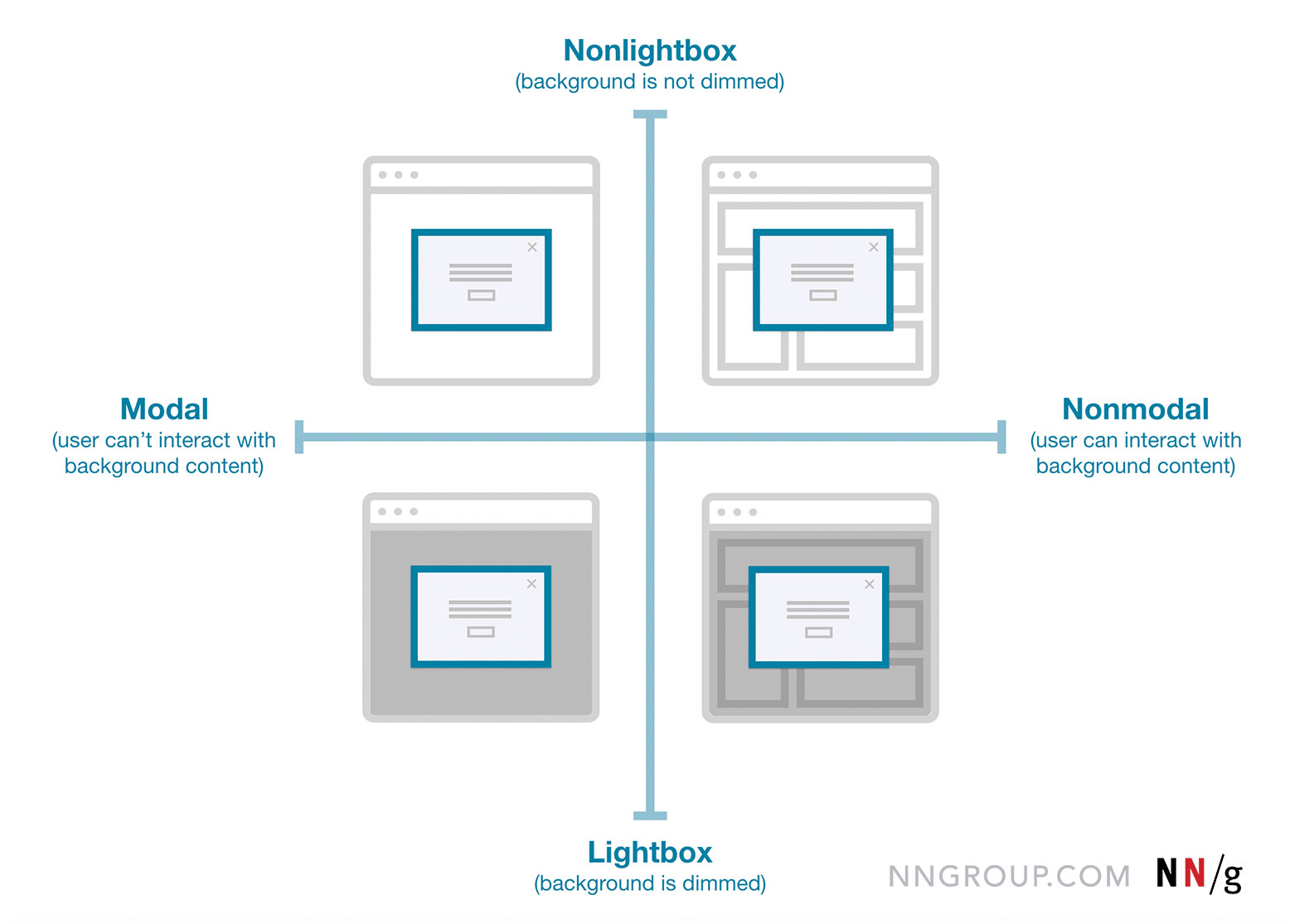
  • Dialog
    A generic term for “conversation” (user ↔ system).
  • Overlay
    A small content panel displayed on top of a page.
  • Modal
    User must interact with overlay + background disabled.
  • Nonmodal
    User must interact with overlay + background enabled.
  • Lightbox
    Dimmed background to focus attention on the modal.

As Anna Kaley highlights, most overlays appear at the wrong time, interrupt users during critical tasks, use poor language, and break users’ flow. They are interruptive by nature, and typically with a high level of severity without a strong need for that.
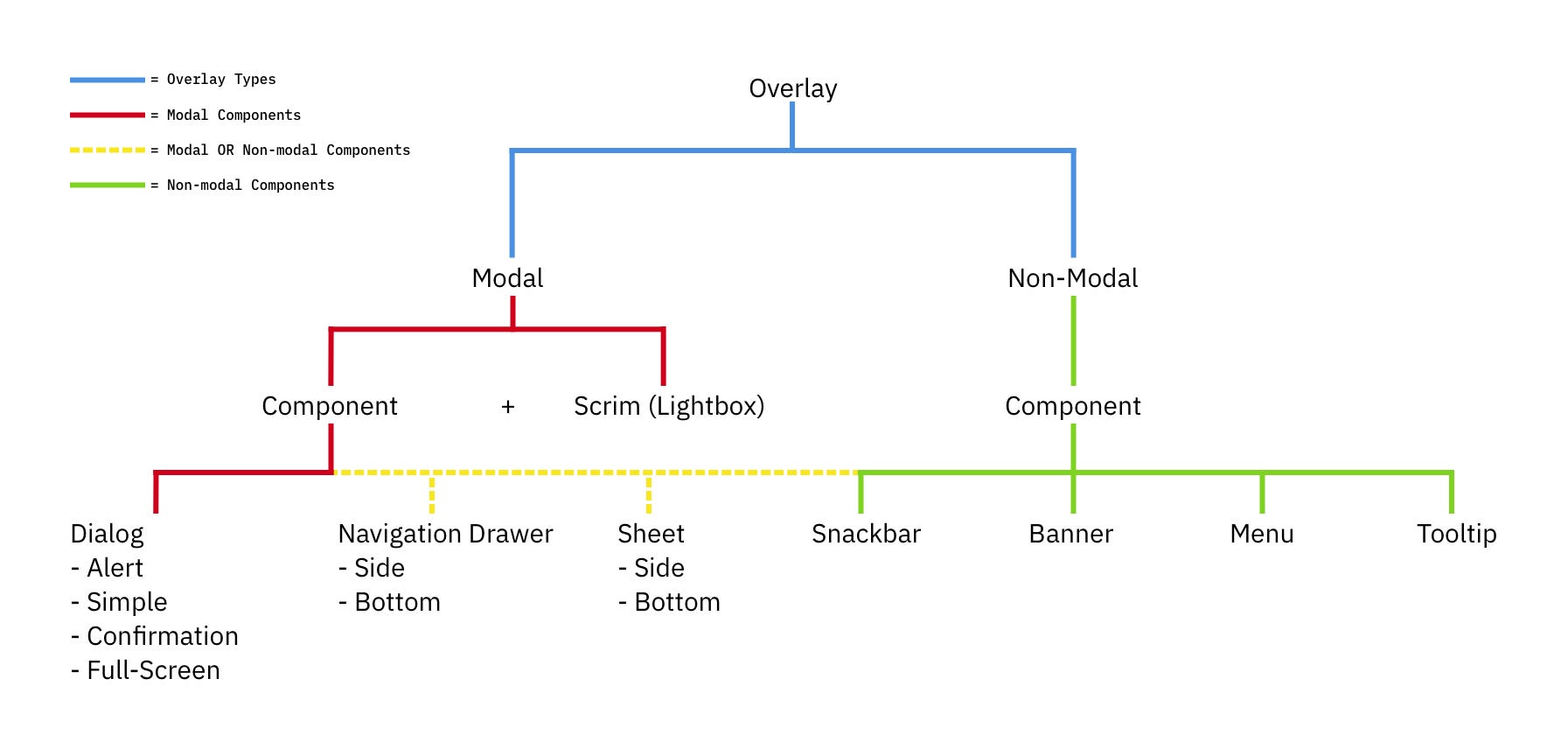
Surely users must be slowed down and interrupted if the consequences of their action have a high impact, but for most scenarios non-modals are much more subtle and a more friendly option to bring something to the user’s attention. If anything, I always suggest it to be a default.

Modals → For Single, Self-Contained Tasks

As designers, we often dismiss modals as irrelevant and annoying — and often they are! — yet they have their value as well. They can be very helpful to warn users about potential mistakes or help them avoid data loss. They can also help perform related actions or drill down into details without interrupting the current state of the page.

But the biggest advantage of modals is that they help users keep the context of the current screen. It doesn’t mean just the UI, but also edited input, scrolling position, state of accordions, selection of filters, sorting, and so on.
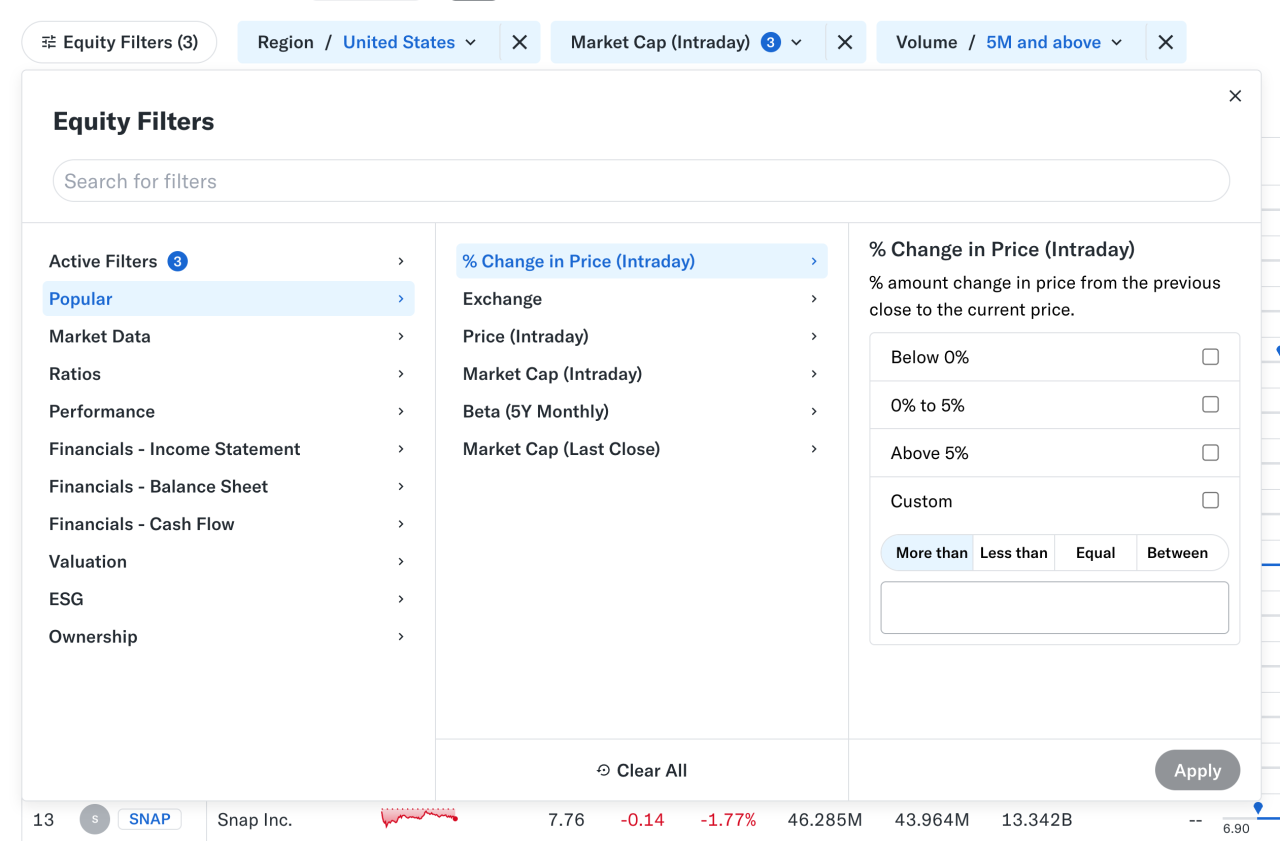
At times, users need to confirm a selection quickly (e.g., filters as shown above) and then proceed immediately from there. Auto-save can achieve the same, of course, but it’s not always needed or desired. And blocking the UI is often not a good idea.

However, modals aren’t used for any tasks. Typically, we use them for single, self-contained tasks where users should jump in, complete a task, and then return to where they were. Unsurprisingly, they do work well for high-priority, short interactions (e.g., alerts, destructive actions, quick confirmations).

When modals help:

🚫 Modals are often disruptive, invasive, and confusing.
🚫 They make it difficult to compare and copy-paste.
✅ Yet modals allow users to maintain multiple contexts.
✅ Useful to prevent irreversible errors and data loss.
✅ Useful if sending users to a new page would be disruptive.

✅ Show a modal only if users will value the disruption.
✅ By default, prefer non-blocking dialogs (“nonmodals”).
✅ Allow users to minimize, hide, or restore the dialog later.
✅ Use a modal to slow users down, e.g., verify complex input.
✅ Give a way out with “Close”, ESC key, or click outside the box.

Pages → For Complex, Multi-Step Workflows

Wizards or tabbed navigation within modals doesn’t work too well, even in complex enterprise products — there, side panels or drawers typically work better. Troubles start when users need to compare or reference data points — yet modals block this behavior, so they re-open the same page in multiple tabs instead.

For more complex flows and multi-step processes, standalone pages work best. Pages also work better when they demand the user’s full attention, and reference to the previous screen isn’t very helpful. And drawers work for sub-tasks that are too complex for a simple modal, but don’t need a full page navigation.

When to avoid modals:

🚫 Avoid modals for error messages.
🚫 Avoid modals for feature notifications.
🚫 Avoid modals for onboarding experience.
🚫 Avoid modals for complex, lengthy multi-step-tasks.
🚫 Avoid multiple nested modals and use prev/next instead.
🚫 Avoid auto-triggered modals unless absolutely necessary.

Avoid Both For Repeated Tasks

In many complex, task-heavy products, users will find themselves performing the same tasks repeatedly, over and over again. There, both modals and new page navigations add friction because they interrupt the flow or force users to gather missing data between all the different tabs or views.

Too often, users end up with a broken experience, full of never-ending confirmations, exaggerated warnings, verbose instructions, or just missing reference points. As Saulius Stebulis mentioned, in these scenarios, expandable sections or in-place editing often work better — they keep the task anchored to the current screen.

In practice, in many scenarios, users don’t complete their tasks in isolation. They need to look up data, copy-paste values, refine entries in different places, or just review similar records as they work through their tasks.

Overlays and drawers are more helpful in maintaining access to background data during the task. As a result, the context always stays in its place, available for reference or copy-paste. Save modals and page navigation for moments where the interruption genuinely adds value — especially to prevent critical mistakes.

Modals vs. Pages: A Decision Tree

A while back, Ryan Neufeld put together a very helpful guide to help designers choose between modals and pages. It comes with a handy PNG cheatsheet and a Google Doc template with questions broken down across 7 sections.

It’s lengthy, extremely thorough, but very easy to follow:
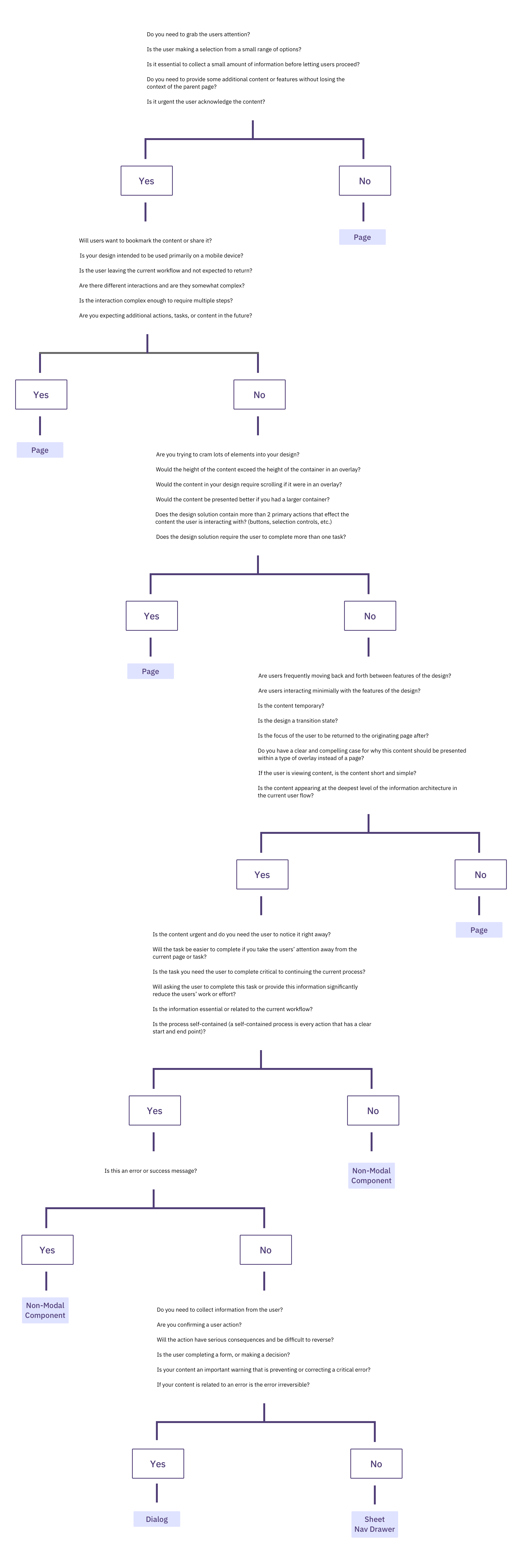
It might look daunting, but it’s a quite simple 4-step process:

  1. Context of the screen.
    First, we check if users need to maintain the context of the underlying screen.
  2. Task complexity and duration.
    Simpler, focused, non-distracting tasks could use a modal, but long, complex flows need a page.
  3. Reference to underlying page.
    Then, we check if users often need to refer to data in the background or if the task is a simple confirmation or selection.
  4. Choosing the right overlay.
    Finally, if an overlay is indeed a good option, it guides us to choose between modal or nonmodal (leaning towards a nonmodal).

Wrapping Up

Whenever possible, avoid blocking the entire UI. Have a dialog floating, partially covering the UI, but allowing navigation, scrolling, and copy-pasting. Or show the contents of the modal as a side drawer. Or use a vertical accordion instead. Or bring users to a separate page if you need to show a lot of detail.

But if you want to boost users’ efficiency and speed, avoid modals at all costs. Use them to slow users down, to bundle their attention, to prevent mistakes. As Therese Fessenden noted, no one likes to be interrupted, but if you must, make sure it’s absolutely worth the cost.

Meet “Smart Interface Design Patterns”

You can find a whole section about modals and alternatives in Smart Interface Design Patterns, our 15h-video course with 100s of practical examples from real-life projects — with a live UX training later this year. Everything from mega-dropdowns to complex enterprise tables — with 5 new segments added every year. Jump to a free preview. Use code BIRDIE to save 15% off.

Meet Smart Interface Design Patterns, our video course on interface design & UX.

  • Video + UX Training
  • Video only

Video + UX Training

$ 579.00 $ 699.00

Get Video + UX Training

25 video lessons (15h) + Live UX Training.
100 days money-back-guarantee.

Video only

$ 275.00$ 350.00

Get the video course

40 video lessons (15h). Updated yearly.
Also available as a UX Bundle with 2 video courses.

Useful Resources

  • Different Types of Popups, by Anna Kaley
  • Best Practices for Designing UI Modals, by Uxcel
  • We Use Too Many Damn Modals: UX Guidelines, by Adrian Egger
  • Modal & Nonmodal Dialogs, by Therese Fessenden
  • Modern Enterprise UI Design: Modal Dialogs, by James Jacobs
  • Modals in Design Systems
From TDD to AIDD: AI-Informed Development Where Tests Co-Evolve with Implementation

From TDD to AIDD: AI-Informed Development Where Tests Co-Evolve with Implementation

The landscape of software development is in a constant state of evolution. For decades, Test-Driven Development (TDD) has stood as a cornerstone methodology, emphasizing the creation of tests before writing production code. This approach has fostered robust, maintainable, and reliable software. However, with the advent of powerful Artificial Intelligence (AI) and Machine Learning (ML) tools, a new paradigm is emerging: AI-Informed Development (AIDD). AIDD takes the core principles of TDD and supercharges them, leveraging AI to enhance every stage of the development lifecycle, particularly in how tests and implementation co-evolve.

This article delves into the journey from traditional TDD to the cutting-edge AIDD, exploring its principles, benefits, challenges, and practical applications. We will examine how AI can assist in generating, refining, and validating tests, ultimately leading to more efficient, higher-quality software development.

The Foundation: Understanding Test-Driven Development (TDD)

Before we explore AIDD, it’s crucial to solidify our understanding of TDD. At its heart, TDD is a software development process that relies on the repetition of a very short development cycle: ‘Red, Green, Refactor’.

The ‘Red, Green, Refactor’ Cycle

  1. Red: Write a failing test. This test should define a new piece of functionality or a fix for a bug. The key here is that the test must fail initially, proving that the functionality doesn’t yet exist or is incorrect.
  2. Green: Write just enough production code to make the failing test pass. The focus here is solely on passing the test, not on writing perfect, optimized code.
  3. Refactor: Once the test passes, refactor the code to improve its design, readability, and maintainability without changing its external behavior. This ensures the codebase remains clean and extensible.

Benefits of TDD

TDD offers numerous advantages:

  • Improved Code Quality: By forcing developers to think about requirements from the perspective of a user or consumer of the code, TDD often leads to simpler, clearer, and more modular designs.
  • Reduced Bugs: The continuous testing cycle catches defects early, making them cheaper and easier to fix.
  • Better Documentation: Tests serve as living documentation, describing how the code is expected to behave.
  • Increased Confidence: A comprehensive suite of passing tests provides confidence when making changes or adding new features.
  • Enhanced Maintainability: Well-tested code is easier to maintain and extend over time.

Despite its strengths, TDD can be perceived as time-consuming, especially for developers new to the practice. It also requires significant discipline and expertise in writing effective tests.

The Dawn of AI-Informed Development (AIDD)

AI-Informed Development (AIDD) represents a significant leap forward, integrating AI capabilities throughout the development process to augment human developers. While TDD focuses on human-driven test creation, AIDD leverages AI to assist, accelerate, and even automate aspects of test and code generation, ensuring a harmonious co-evolution.

Core Principles of AIDD

AIDD builds upon TDD’s foundation with these key principles:

  • AI-Assisted Test Generation: AI tools can analyze requirements, existing code, and even user stories to suggest or generate initial test cases, reducing the manual effort of writing tests from scratch.
  • Intelligent Code Completion and Generation: Beyond simple auto-completion, AI can suggest entire blocks of code based on the test’s intent or the desired functionality, accelerating the ‘Green’ phase.
  • Automated Refactoring Suggestions: AI can identify code smells, suggest refactoring opportunities, and even propose code transformations to improve design and performance, enhancing the ‘Refactor’ phase.
  • Continuous Feedback and Learning: AI systems can continuously monitor code changes, test results, and runtime behavior to provide real-time feedback, learn from development patterns, and adapt its suggestions over time.
  • Co-Evolution of Tests and Implementation: The core tenet of AIDD is that tests and implementation aren’t just written sequentially but evolve together, with AI facilitating this symbiotic relationship. As code changes, AI can suggest updates to existing tests or the creation of new ones, and vice-versa.

The AIDD Cycle: An Evolution of ‘Red, Green, Refactor’

The AIDD cycle can be visualized as an enhanced ‘Red, Green, Refactor’ loop:

  1. AI-Assisted Red: Based on requirements or a prompt, AI suggests initial failing tests. The developer reviews, refines, or generates these tests.
  2. AI-Guided Green: With the failing test in place, AI assists in writing the production code. This could involve suggesting implementations, completing code blocks, or even generating entire functions that satisfy the test.
  3. AI-Enhanced Refactor: Once the test passes, AI analyzes the newly written code for potential improvements in design, efficiency, and adherence to best practices, offering refactoring suggestions or automatically applying minor refactors.

This cycle is not about replacing the developer but augmenting their capabilities, allowing them to focus on higher-level design and problem-solving.

AI in Action: Practical Applications within AIDD

Let’s explore specific ways AI can be integrated into the development process to realize AIDD.

1. Requirements Analysis and Test Case Generation

  • Natural Language Processing (NLP) for User Stories: AI can process user stories, functional specifications, or even informal descriptions to extract key entities, actions, and constraints. This information can then be used to propose initial test scenarios.
  • Test Data Generation: Generating realistic and comprehensive test data is often a tedious task. AI can synthesize diverse datasets, including edge cases and boundary conditions, based on schema definitions or existing data patterns.
  • Behavioral Test Scaffolding: Tools can generate Gherkin-style Given-When-Then test structures directly from requirements, providing a solid starting point for behavioral tests.

2. Intelligent Code Generation and Completion

  • Function/Method Stubs: Given a test case, AI can generate the skeleton of the function or method required to pass that test, including parameters and return types.
  • Implementation Suggestions: As developers write code, AI can suggest complete lines or blocks of code that logically follow, often learning from the project’s codebase and common coding patterns.
  • Code Transformation: For example, converting a procedural block into a more functional or object-oriented style, or suggesting performance optimizations based on common patterns.

3. Automated Test Refinement and Maintenance

  • Test Suite Optimization: AI can analyze test execution times and coverage to identify redundant tests, suggest parallelization strategies, or prioritize tests that are more likely to fail based on recent code changes.
  • Self-Healing Tests: When UI elements change, or API responses are modified, traditional tests often break. AI can learn these changes and suggest updates to selectors or assertions, reducing test maintenance overhead.
  • Anomaly Detection in Test Results: Beyond simple pass/fail, AI can detect subtle anomalies in test results (e.g., performance degradation, unexpected resource consumption) that might indicate deeper issues.

4. Code Quality and Refactoring Assistance

  • Code Smell Detection: AI can identify complex code structures, duplicated logic, or violations of coding standards with greater accuracy and speed than static analysis tools alone, often with explanations.
  • Automated Refactoring: For common refactoring patterns (e.g., extracting a method, introducing a variable), AI can automatically apply these changes, subject to developer approval.
  • Architectural Pattern Enforcement: AI can monitor code to ensure adherence to defined architectural patterns and suggest corrections when deviations occur.

5. Continuous Learning and Adaptation

  • Personalized Suggestions: Over time, AI can learn a developer’s coding style, common mistakes, and preferred solutions, tailoring its suggestions for maximum relevance.
  • Contextual Awareness: AI can understand the broader context of the project, including its dependencies, historical changes, and team conventions, to provide more intelligent assistance.
  • Feedback Loop Integration: Integrating AI’s suggestions and their outcomes into a feedback loop allows the AI model to continuously improve its accuracy and utility.

The Symbiotic Relationship: How Tests and Implementation Co-Evolve with AI

The most powerful aspect of AIDD is the dynamic, co-evolutionary relationship it fosters between tests and implementation. This is where the ‘AI-Informed’ part truly shines.

  • Tests Inform Implementation: Just as in TDD, writing a failing test first provides a clear objective for the AI-assisted code generation. The AI’s task is to find the most efficient and effective way to satisfy that test.
  • Implementation Informs Tests: As the implementation evolves, especially during refactoring or when new features are added, AI can analyze the code to identify areas that lack sufficient test coverage. It can then suggest new test cases or modifications to existing ones to ensure robustness.
  • Mutual Refinement: If a developer refactors code, AI can immediately check if existing tests are still valid or if they need adjustments. Conversely, if a test is updated, AI can suggest minor code tweaks to ensure it continues to pass while maintaining quality.
  • Predictive Maintenance: AI can observe patterns in bug reports and production failures, then suggest creating specific tests that would have caught these issues earlier in the development cycle, preventing future regressions.

This continuous feedback loop, driven by AI, ensures that the test suite remains a precise reflection of the codebase’s functionality and that the code itself is always adequately covered and robust.

Challenges and Considerations for Adopting AIDD

While AIDD presents exciting possibilities, its adoption is not without challenges.

1. Trust and Over-Reliance

Developers must maintain a critical eye on AI-generated code and tests. Over-reliance on AI without proper human review can introduce subtle bugs or suboptimal solutions. AI is a tool, not a replacement for human expertise.

2. Contextual Understanding and Nuance

AI models, especially large language models, can sometimes struggle with deep contextual understanding or the nuanced requirements of complex business logic. They may generate syntactically correct but functionally incorrect code or tests.

3. Ethical Considerations and Bias

AI models are trained on vast datasets, which can contain biases. If not carefully managed, AI-generated code or tests could perpetuate or even amplify these biases, leading to unfair or discriminatory software.

4. Integration Complexity

Integrating AI tools into existing development workflows and IDEs can be complex. Ensuring seamless operation and minimal disruption requires careful planning and implementation.

5. Cost and Computational Resources

Training and running powerful AI models require significant computational resources, which can be costly. This is a practical consideration for smaller teams or projects with limited budgets.

6. Security and Intellectual Property

Using cloud-based AI services means sending code or test data to external servers. Concerns about data privacy, security, and intellectual property need to be addressed through robust agreements and secure practices.

Best Practices for Implementing AIDD

To successfully transition from TDD to AIDD, consider these best practices:

  • Start Small and Iterate: Begin by integrating AI for specific, well-defined tasks, such as generating simple unit tests or suggesting refactors for common code smells. Gradually expand its role as confidence grows.
  • Maintain Human Oversight: Always review AI-generated code and tests. Treat AI as a highly intelligent assistant, not an autonomous agent. Human review is crucial for quality assurance and error correction.
  • Train AI with Project-Specific Data: Where possible, fine-tune AI models with your project’s codebase, coding standards, and historical data. This significantly improves the relevance and quality of AI suggestions.
  • Define Clear Guidelines: Establish clear guidelines for how AI should be used, what level of automation is acceptable, and the standards for AI-generated output.
  • Focus on Augmentation, Not Replacement: Position AI as a tool to empower developers, reduce repetitive tasks, and accelerate learning, rather than as a means to replace human ingenuity.
  • Implement Robust Feedback Mechanisms: Create systems for developers to provide feedback on AI suggestions. This data is invaluable for continuously improving the AI’s performance and accuracy.
  • Address Security and Privacy Early: Before integrating any AI tool, thoroughly evaluate its security posture, data handling practices, and compliance with relevant regulations.

The Future of Software Development with AIDD

The journey from TDD to AIDD is not merely an incremental improvement; it represents a fundamental shift in how we approach software construction. As AI technologies continue to advance, we can anticipate even more sophisticated capabilities:

  • Proactive Bug Prevention: AI might predict potential bugs based on design patterns or common pitfalls, suggesting preventative measures even before code is written.
  • Automated System-Level Testing: AI could orchestrate complex integration and system tests, identifying bottlenecks and vulnerabilities across distributed systems.
  • Personalized Development Environments: AI-powered IDEs will become even more intelligent, adapting to individual developer preferences, learning styles, and project contexts.
  • Codebase ‘Immunity’ Systems: Imagine an AI system that constantly monitors your codebase for vulnerabilities, performance regressions, or design deviations, and proactively suggests fixes or even applies them with approval.

AIDD promises a future where software development is faster, more reliable, and more enjoyable. By offloading repetitive and predictable tasks to AI, developers can dedicate more time to creative problem-solving, architectural design, and fostering innovation.

Conclusion

Test-Driven Development revolutionized software quality by embedding testing deeply into the development cycle. Now, AI-Informed Development is set to usher in the next era, leveraging the power of artificial intelligence to create a truly co-evolutionary relationship between tests and implementation. AIDD enhances efficiency, boosts code quality, and accelerates the delivery of robust software. While challenges exist, strategic adoption and a focus on human-AI collaboration will unlock unprecedented potential. Embracing AIDD means embracing a smarter, more agile, and ultimately more productive future for software engineering.

Further Reading

  • Martin Fowler on Test-Driven Development
  • The Rise of AI Pair Programmers
  • Exploring GitHub Copilot and Its Impact

React Router Now Supports Contextual Routing with

React Router just released v7.13.1. Along with a few bug fixes and improvements, it also introduced an exciting new feature: URL masking through the new <Link unstable_mask={...}> API for Framework and Data Mode. This API now provides a first-class way to handle contextual routing. But what exactly is contextual routing?

Already familiar with contextual routing? Feel free to skip ahead to the API section. If not, let’s quickly break it down first.

Contextual Routing

What Is Contextual Routing?

Contextual Routing means that the same URL might lead to different routes depending on how it was reached.

At first, that might sound like inconsistent behavior, but it really isn’t once the context is clear.

For example, imagine you are browsing a product catalog and click on a product. Instead of opening as a separate page, the product details show up in a modal (overlay on top of the catalog). That is great for UX because you can quickly check the product without moving away from the catalog.

Now suppose you want to share that product URL with a friend. Without contextual routing, that same URL could open the catalog page with the modal on top, which is not ideal because your friend only needs the product page, not the catalog in the background.

This is where contextual routing comes in. When you open the product from the catalog, the catalog stays in the background and the details appear in a modal. But when your friend visits the same URL directly, the app renders the full product page instead.

How Contextual Routing Works

Now you know what contextual routing is, but how does it actually work? The neat trick here is that we make the browser mask the real URL and instead display a URL that we want.

So when you click a product and the modal opens, the URL in the address bar is not really the one you were routed to. We mask the original URL with the one for that product’s detail page. This is why, when you share that URL or open it in a new tab, it opens as the full product detail page instead of reopening the product catalog with the modal on top.

Reddit Example

To better understand this concept, let’s see how Reddit uses contextual routing.

In Reddit’s home feed, clicking on an image opens it in a modal while keeping the home feed in the background.

Reddit Post Modal

Now, if you copy that URL and open it in a new tab, it opens the detailed view for that post.

Reddit Post Detailed View

Using the URL Masking API in React Router

This part is really easy, and I mean really easy. To enable URL Masking, all you have to do is add the unstable_mask prop to the Link component, and that’s it. Congratulations, you have now enabled contextual routing.

<Link
    to={"actual url string"} 
    unstable_mask={"masked url string"} 
>

Here’s an example from the official documentation:

export default function Gallery({ loaderData }: Route.ComponentProps) {
  return (
    <>
      <GalleryGrid>
       {loaderData.images.map((image) => (
         <Link
           key={image.id}
           to={`/gallery?image=${image.id}`}
           unstable_mask={`/images/${image.id}`}
         >
           <img src={image.url} alt={image.alt} />
         </Link>
       ))}
      </GalleryGrid>

      {data.modalImage ? (
        <dialog open>
          <img src={data.modalImage.url} alt={data.modalImage.alt} />
        </dialog>
      ) : null}
    </>
  );
}

View this example in

  • Github Repository
  • Stackblitz

⚠️ Caution

Keep these points in mind when using the unstable_mask API:

1 – According to the official documentation, this feature is intended only for SPA use, and SSR renders do not preserve the masking.

“This feature relies on history.state and is thus only intended for SPA uses and SSR renders will not respect the masking.”

— React Router Documentation

2 – This API is still unstable, so it may go through changes before it is safe to rely on in production.

Hopefully, this article gave you a clear idea of what contextual routing is and how the new URL Masking API makes it easier to implement. If you have any questions, feel free to comment below.

Further Reading

If you want to explore this topic further, here are two useful resources:

  1. Official React Router documentation for the unstable_mask API.
  2. This Baymard article on quick views explains why modal-based product previews can improve the shopping experience.

I built NexusForge: The Multimodal AI Agent Hub for Notion

This is a submission for the Notion MCP Challenge

NexusForge is a multimodal workflow app for Notion. It turns screenshots, whiteboard photos, rough sketches, and messy prompts into structured Notion-ready deliverables.

The strongest workflow in the app is diagram to technical brief: upload a system design image, ask for a concise engineering summary, and NexusForge produces a clean markdown artifact that can be previewed immediately and published into Notion as a child page.

I built it to solve a very practical problem: visual thinking happens early, but documentation usually happens later and manually. NexusForge closes that gap.

It combines:
Gemini 3 Flash Preview for multimodal understanding
Notion API for creating real pages from generated markdown
Notion MCP configuration in the workspace, so the repo is ready for direct Notion MCP OAuth in VS Code

Reliability Hardening

To make the app safer for broader public use, I added:

  • a Notion page picker backed by live workspace search
  • client-side upload validation for unsupported image types and oversized files
  • clearer Notion publish errors instead of generic failures
  • retry and timeout handling for both Gemini and Notion requests
  • a small runtime health panel so users can see whether Gemini, OAuth, and Notion publish paths are actually ready

Live:

nexus-forge-one.vercel.app

View the source code:

GitHub logo

aniruddhaadak80
/
nexus-forge

Turn rough visuals into polished Notion deliverables with Gemini, Notion, and MCP.

NexusForge logo

NexusForge

Turn rough visuals into polished Notion deliverables.

Next.js
Gemini
Notion
Vercel

Overview

NexusForge is a challenge-focused multimodal workflow app for Notion. It takes a screenshot, whiteboard photo, product sketch, or architecture diagram plus a text prompt, uses Gemini 3 Flash Preview to generate structured markdown, and then publishes that result into Notion as a child page.

It now supports two Notion auth paths:

  • Connect Notion with OAuth from the app UI
  • Fall back to NOTION_API_KEY for a workspace token based setup

The project also includes workspace-level Notion MCP configuration in .vscode/mcp.json so the repo itself is ready for direct Notion MCP OAuth inside VS Code.

Why This Is Different

  • It is built around a concrete workflow, not a generic chat wrapper.
  • It demonstrates multimodal input with a real generated artifact.
  • It uses an honest split between Notion MCP for workspace tooling and the Notion API for user-triggered web publishing.
  • It is screenshot-ready for…
View on GitHub

Demo:

Landing page

Imalkoio tion

Generated result from an uploaded system map

NexusForge generated result

Structure Flowchart

Let’s see how the internal pipeline operates using this diagram:

Im ption

Setup & Implementation Guide

1. The Multimodal Intelligence

I used @google/genai with gemini-3-flash-preview so NexusForge can reason about both text and images in one request. That makes screenshots and architecture diagrams first-class input instead of just attachments.

const contents = [
  {
    text: `${buildSystemPrompt(mode)}nnUser request: ${prompt.trim()}`,
  },
];

if (imageBase64) {
  const [meta, data] = imageBase64.split(",");
  const mimeType = meta.split(":")[1]?.split(";")[0] ?? "image/png";
  contents.push({
    inlineData: { data, mimeType },
  });
}

const response = await ai.models.generateContent({
  model: "gemini-3-flash-preview",
  contents,
});

2. The Notion Publishing Path

For the web app runtime, I now support a proper Notion OAuth connect flow. Users can connect their own workspace from the UI, which stores an encrypted session cookie and lets the server publish to Notion using that workspace token. I also kept NOTION_API_KEY as a fallback for internal demos.

Once connected, the app uses the Notion API to create a real child page under a selected parent page:

const response = await fetch("https://api.notion.com/v1/pages", {
  method: "POST",
  headers: {
    Authorization: `Bearer ${notionApiKey}`,
    "Content-Type": "application/json",
    "Notion-Version": "2026-03-11",
  },
  body: JSON.stringify({
    parent: { page_id: cleanParentId },
    properties: {
      title: {
        title: [{ text: { content: title } }],
      },
    },
    markdown,
  }),
});

3. OAuth Callback + Session Handling

The app includes a callback route at /api/notion/callback that exchanges the authorization code for an access token, encrypts the token server-side, and stores it in an HTTP-only cookie. That makes the demo feel like a real connected product rather than a one-off internal script.

4. Where MCP Fits

The repo also includes .vscode/mcp.json pointing at https://mcp.notion.com/mcp, so the workspace itself is ready for direct Notion MCP authentication inside GitHub Copilot or other MCP-capable tools in VS Code.

That means the project demonstrates two complementary ideas:

  • Web app publishing flow for end users
  • Workspace MCP integration for AI-assisted Notion operations while developing

Why This Stands Out In The Challenge

  • It is not just “chat with Notion”. It is a concrete production-style workflow.
  • It shows off multimodality in a way judges can understand immediately.
  • It includes a real in-product Connect Notion OAuth handoff instead of relying only on hidden developer credentials.
  • It uses Notion in a way that feels native: generating polished artifacts and pushing them directly into a workspace.
  • It is practical across engineering, operations, marketing, and study workflows.
  • It has been hardened beyond a demo by reducing common user failure modes in the publish flow.

Future Scope

  • Add PDF and document ingestion for richer multimodal pipelines.
  • Add template-aware publishing into specific Notion databases.
  • Add polling and human-in-the-loop approval flows for recurring workflows.

NexusForge aims to redefine exactly how interactive and automated workspaces should feel!

Thank you to Notion and DEV. 💖

Why Your AI Agent Demo Falls Apart in Production

Your agent demo crushed it on stage. The audience clapped. Your PM high-fived you. The travel-planning agent nailed it — a 4-day hiking trip, budget-friendly, one fancy dinner on night three. Beautiful.

Then you deployed it and… it fell apart.

Not dramatically. Not all at once. It just started doing weird things. Booking a hotel in Paris, then recommending a restaurant in London. Picking a “budget” flight that cost $1,200. Suggesting a hiking trail that’s been closed since 2019. Death by a thousand paper cuts.

If this sounds familiar, you’re not alone. And the problem isn’t your model, your prompt, or your vibes. It’s math.

Multi-Step Agents Are Distributed Systems (Whether You Like It or Not)

Here’s the thing nobody tells you when you’re building that first agent prototype: a multi-step AI agent is a distributed system. Every tool call is a network request that can fail, time out, or return garbage. Every reasoning step is a non-deterministic decision that might go sideways.

Your travel agent doesn’t just “plan a trip.” It orchestrates a chain of operations: search flights, check hotel availability, look up hiking trails, find restaurants, cross-reference budgets, verify dates. Each step depends on the last. Each step can break.

We’ve been building distributed systems for decades. We know they’re hard. But somehow, when we slap “AI” on it, we forget everything we learned and expect magic.

Let’s stop doing that.

The 5 Failure Modes of Multi-Step Agents

I’ve seen agents fail in production in roughly five ways. Every. Single. Time.

The 5 failure modes of multi-step AI agents

1. Wrong Tool Selection

The agent has six tools available and picks the wrong one. You ask for hiking trails near Chamonix and it calls the hotel booking API. Why? Because the model decided “outdoor activities” was close enough to “hotel amenities.” This isn’t a bug you can reproduce consistently — it happens 1 in 20 times, which is exactly often enough to ruin your weekend.

2. API Timeouts

External APIs are flaky. The flight search takes 30 seconds instead of 3. The agent doesn’t wait — it either times out and hallucinates a result, or it retries in a loop until your user gives up. Welcome to the real world, where third-party APIs don’t care about your agent’s plans.

3. Partial Failures

This one’s sneaky. The tool responds, but with incomplete data. The flight API returns 2 results instead of 15 because of a pagination bug. The agent doesn’t know it’s working with a partial dataset — it just picks the “best” option from a bad menu. Your user gets a suboptimal flight, and nobody understands why.

4. Inconsistent State

Over a long conversation or a multi-step plan, the agent loses track. It picks Paris as the destination in step 1, finds flights to CDG in step 2, then recommends a restaurant in London in step 5. The context window is long, but the agent’s attention isn’t perfect. Earlier decisions get fuzzy, and the plan stops being coherent.

5. Compounding Failures

This is the killer. A small mistake early on — say, the agent misreads the budget as $5,000 instead of $500 — doesn’t just affect one step. It cascades. The hotel is too expensive. The restaurant is too fancy. The hiking gear rental gets skipped because the budget’s already blown. By step 7, the entire itinerary is garbage, and the root cause is buried six steps back.

The Reliability Tax: When “Almost Perfect” Isn’t Good Enough

Let’s talk numbers, because this is where intuition fails us.

Say your agent is 95% accurate at each individual step. That sounds great, right? You’d ship that. Your PM would celebrate that.

Now do the math for a 10-step task:

0.95¹⁰ ≈ 0.5987

Your “95% accurate” agent succeeds less than 60% of the time on a 10-step plan. That’s a coin flip. For a travel itinerary.

Here’s what that looks like as your agent takes on more complex tasks:

Steps Per-Step Accuracy System Success Rate
5 95% 77.4%
10 95% 59.9%
15 95% 46.3%
20 95% 35.8%
5 99% 95.1%
10 99% 90.4%
20 99% 81.8%

Read that bottom row again. Even at 99% per-step accuracy — which is incredibly hard to achieve — a 20-step agent fails nearly 1 in 5 times.

Almost perfect at the step level turns into mostly broken at the system level.

This is the reliability tax. You pay it whether you know about it or not. And the instinct — the thing everyone does first — is to blame the model. “We need GPT-5.” Or to blame the prompt. “Let me add 47 more lines to the system prompt.”

But the real issue isn’t the model or the prompt. It’s system complexity and basic probability. You can’t prompt-engineer your way out of compound probability.

The Fix: Stop Treating Agents Like Magic

The solution isn’t a better model. It’s a better architecture. Stop treating your agent as a magic black box and start treating it as what it actually is: a non-deterministic software component that needs the same engineering discipline as any other distributed system.

Two mindset shifts make the biggest difference.

Mindset Shift 1: Selective Autonomy

The instinct with agents is to go full autopilot. “Let the AI handle everything!” That’s like removing the pilot from a plane because autopilot exists.

Autopilot is incredible — for cruising at 35,000 feet. But you want a human pilot for takeoff, landing, and when the engine catches fire. Same with agents.

Don’t let the agent do everything autonomously. Insert human approval steps at high-stakes decision points. Before the agent books a $400 flight? Human confirms. Before it commits to a restaurant reservation? Human confirms.

Selective autonomy workflow with human approval checkpoints

Here’s the beautiful part: each human checkpoint resets the error probability. Instead of one 10-step chain with a 60% success rate, you get three 3-step chains with a human verification between them. Each chain has ~85% accuracy, and the human catches the failures in between. Your effective reliability goes way up — not because the model got smarter, but because you designed the system better.

This is selective autonomy. Let the agent handle what it’s good at (searching, comparing, summarizing) and keep humans in the loop for what matters (confirming, approving, deciding).

Mindset Shift 2: Trace-Level Observability

When your agent breaks in production, your logs say something helpful like:

ERROR: Agent failed to complete task

Thanks. Very useful.

Traditional logging tells you something bad happened. But with a multi-step agent, you need to know:

  • What happened — which tool was called, what arguments were passed, what came back
  • Where time went — did step 3 take 200ms or 20 seconds?
  • Why it failed — was it the model’s reasoning, the tool’s response, or the orchestration logic?

This is where traces come in. Not logs. Traces.

A trace captures the full execution path of your agent: every reasoning step, every tool call, every input and output. It’s the difference between “the patient is sick” and a full medical chart with vitals, lab results, and imaging.

Build trace-level observability from day one. Instrument every tool call. Capture the agent’s chain-of-thought at each decision point. When (not if) something breaks in production, you’ll know exactly where to look.

Here’s what you want to capture in a trace:

  • Agent reasoning — the model’s chain-of-thought before each action
  • Tool selection — which tool was chosen and why
  • Tool input/output — the exact request and response
  • Latency — how long each step took
  • Token usage — how much context was consumed at each step
  • Outcome — success, partial failure, or error

Without this, you’re debugging a distributed system with console.log. Good luck.

The Gap Between Demo and Production

The gap between a demo that works and a product that works isn’t more features. It’s not a bigger model. It’s not a fancier prompt.

It’s discipline and structure.

It’s acknowledging that your agent is a distributed system subject to compound probability, and engineering accordingly. It’s inserting human checkpoints where they matter. It’s building observability that tells you the full story, not just the punchline.

The travel agent that worked on stage can work in production. But only if you stop treating it like magic and start treating it like software.

Takeaways

Here’s what you should do this week:

  • Map your agent’s failure modes. Walk through each step and ask: “What happens when this tool fails? Returns partial data? Times out?” If you can’t answer, you have a problem.
  • Calculate your reliability tax. Count your agent’s steps. Do the math. If you’re at 10+ steps with no human checkpoints, your success rate is probably lower than you think.
  • Add human-in-the-loop checkpoints at high-stakes decision points. Start with the most expensive or irreversible actions.
  • Instrument traces, not just logs. Capture the full execution path — reasoning, tool calls, latency, outputs. Make it queryable.
  • Stop blaming the model. The model is one component. The system is the product. Engineer the system.

In the next post, we’ll tackle one of the biggest culprits behind agent failures: retrieval. Specifically, why classic RAG makes everything worse — and how Agentic RAG fixes it.

Have you experienced the reliability tax with your agents? Share your thoughts in the comments below!

Rider 2026.1 Release Candidate Is Out!

The Rider 2026.1 Release Candidate is ready for you to try.

This upcoming release brings improved support for the .NET ecosystem and game development workflows, as well as refinements to the overall developer experience. Rider 2026.1 allows you to work with file-based C# programs and offers an improved MAUI development experience on Windows, mixed-mode debugging, and early support for CMake projects.

If you’d like to explore what’s coming, you can download the RC build right now:

Download Rider 2026.1 RC

.NET highlights of this release

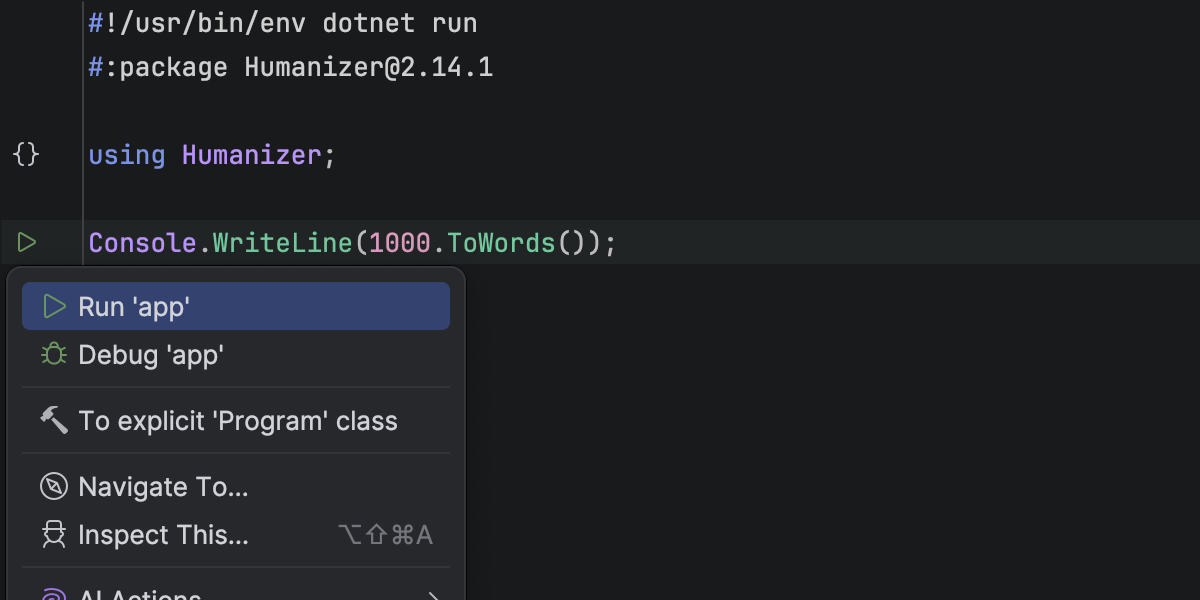
Support for file-based C# programs

You can now open, run, and debug standalone .cs files directly in Rider – no project file required.

This makes it easier to create quick scripts, prototypes, or small tools while still benefiting from full IDE support, including code completion, navigation, and debugging.

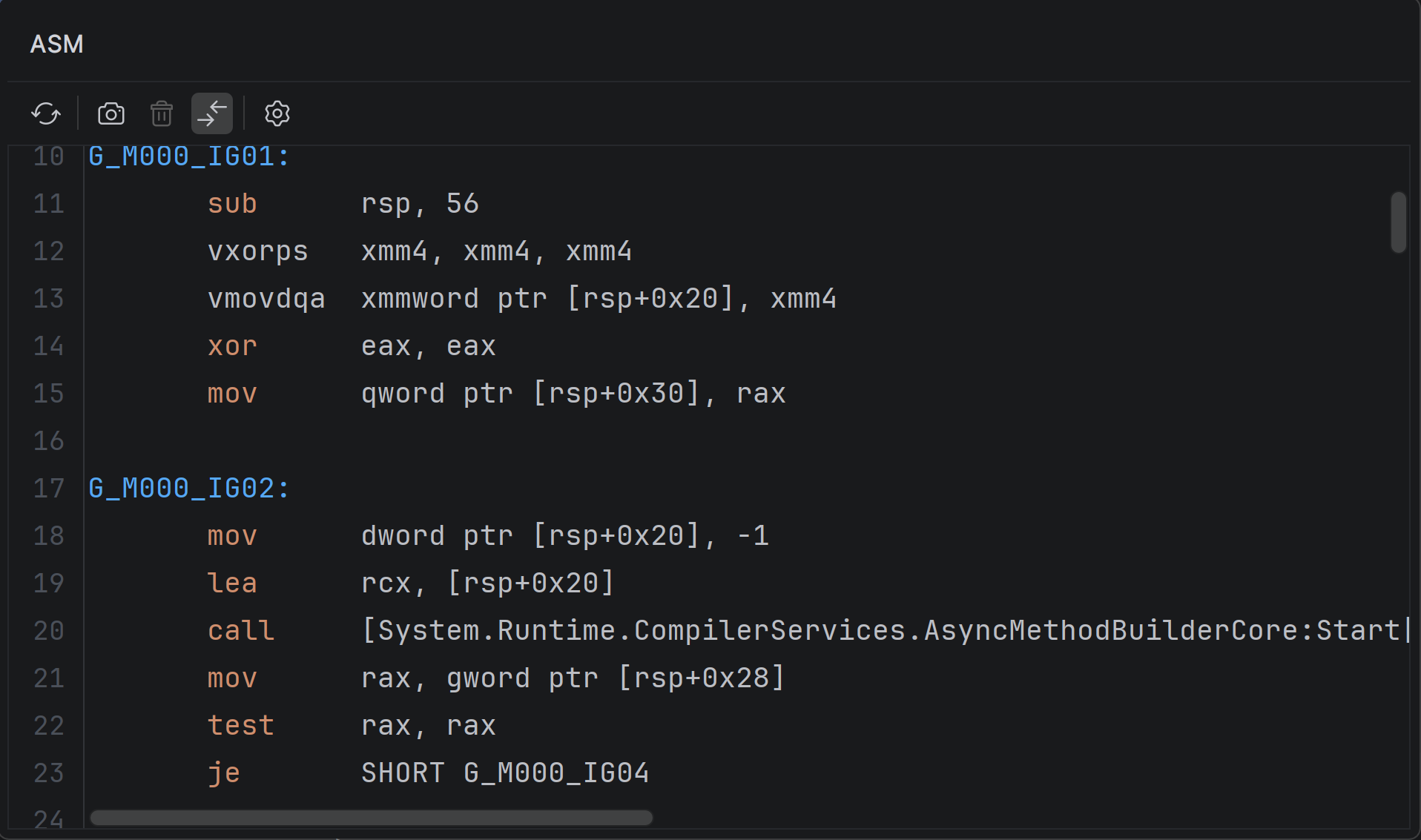
Viewer for .NET disassemblies

You can now inspect native disassembly generated from your C# code inside Rider.

With the new ASM Viewer tool window, you can explore output from JIT, ReadyToRun, and NativeAOT compilers without leaving the IDE. More on that here.

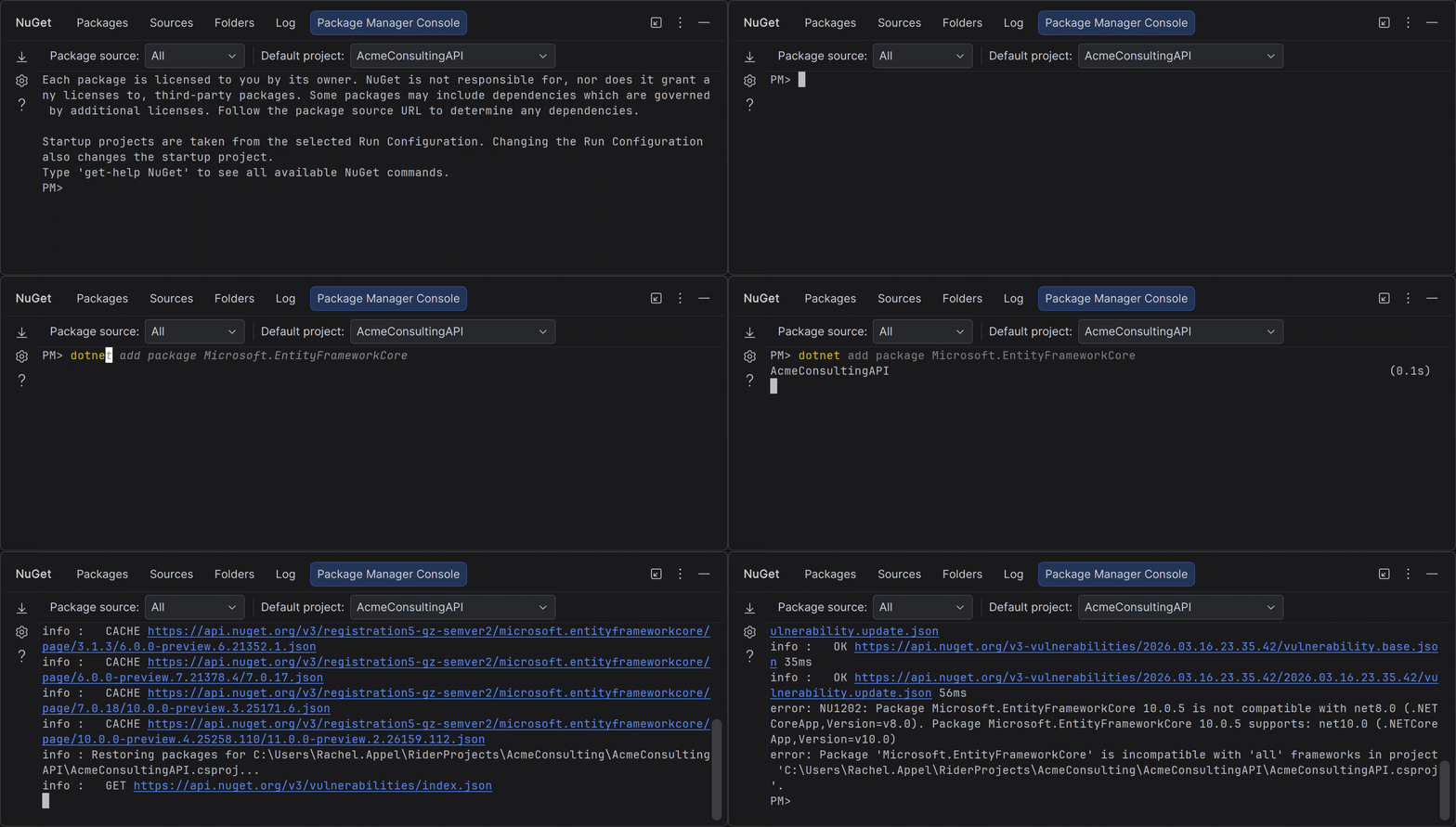
NuGet Package Manager Console (Preview)

Rider now includes a NuGet Package Manager Console with support for standard PowerShell commands and Entity Framework Core workflows.

If you’re used to working with PMC in Visual Studio, you can now use the same commands without leaving Rider. Learn more here.

Smoother MAUI iOS workflow from Windows

Building and deploying MAUI iOS apps from Windows is now more reliable and easier to set up.

When connecting to a Mac build host, Rider automatically checks and prepares the environment – including Xcode, .NET SDK, and required workloads – so you can get started faster and spend less time troubleshooting setup issues.

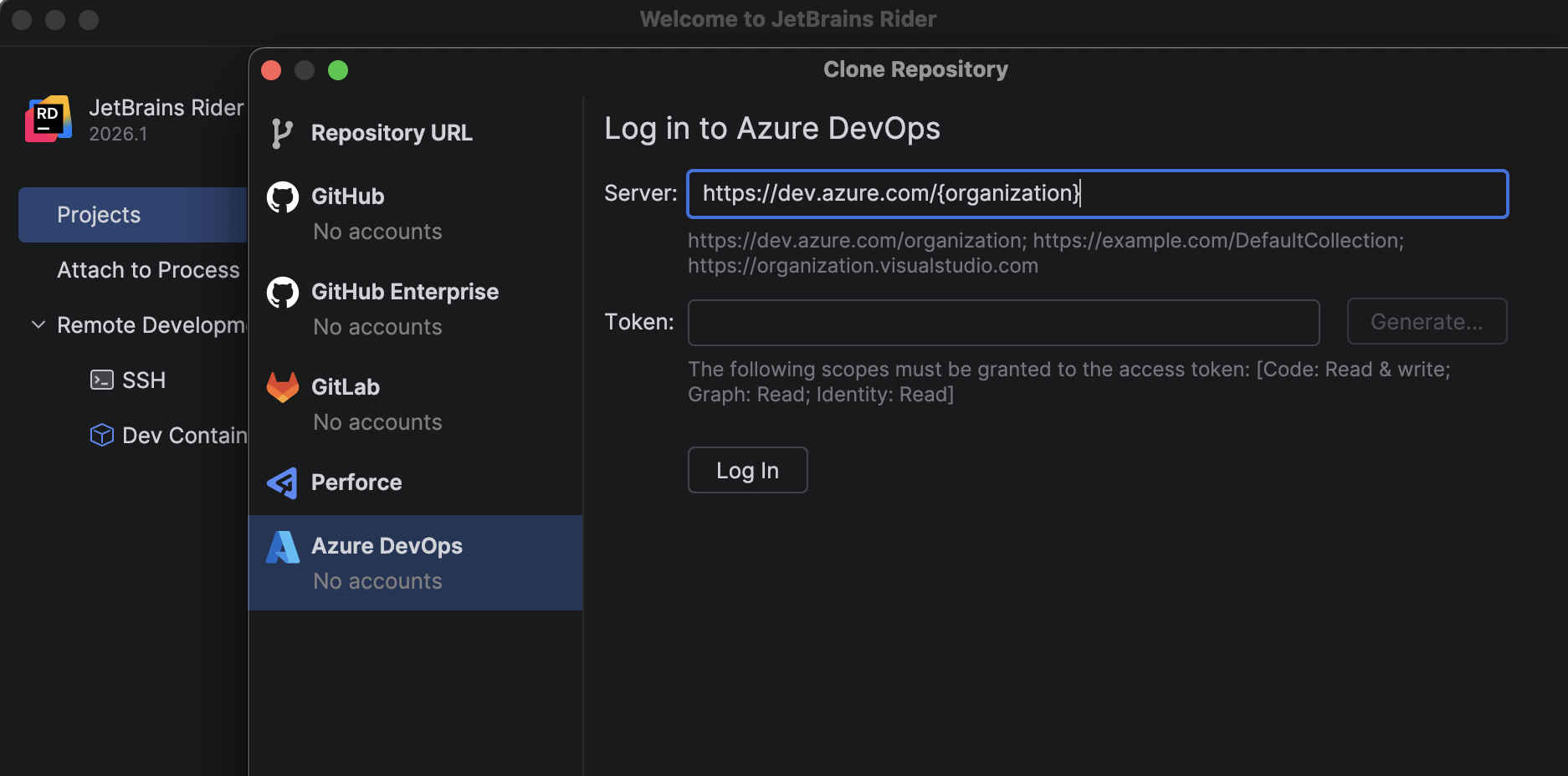
Azure DevOps: Ability to clone repositories

A new bundled Azure DevOps plugin lets you browse and clone repositories directly from Rider using your personal access token.

No need to switch tools – everything is available from File | Open | Get from Version Control.

Game development improvements

Rider 2026.1 continues to improve the experience of building and debugging games across Unreal Engine, Unity, and C++ workflows.

Full mobile development support for Unreal Engine

Rider 2026.1  fully supports mobile game development for Unreal Engine on both Android and iOS.

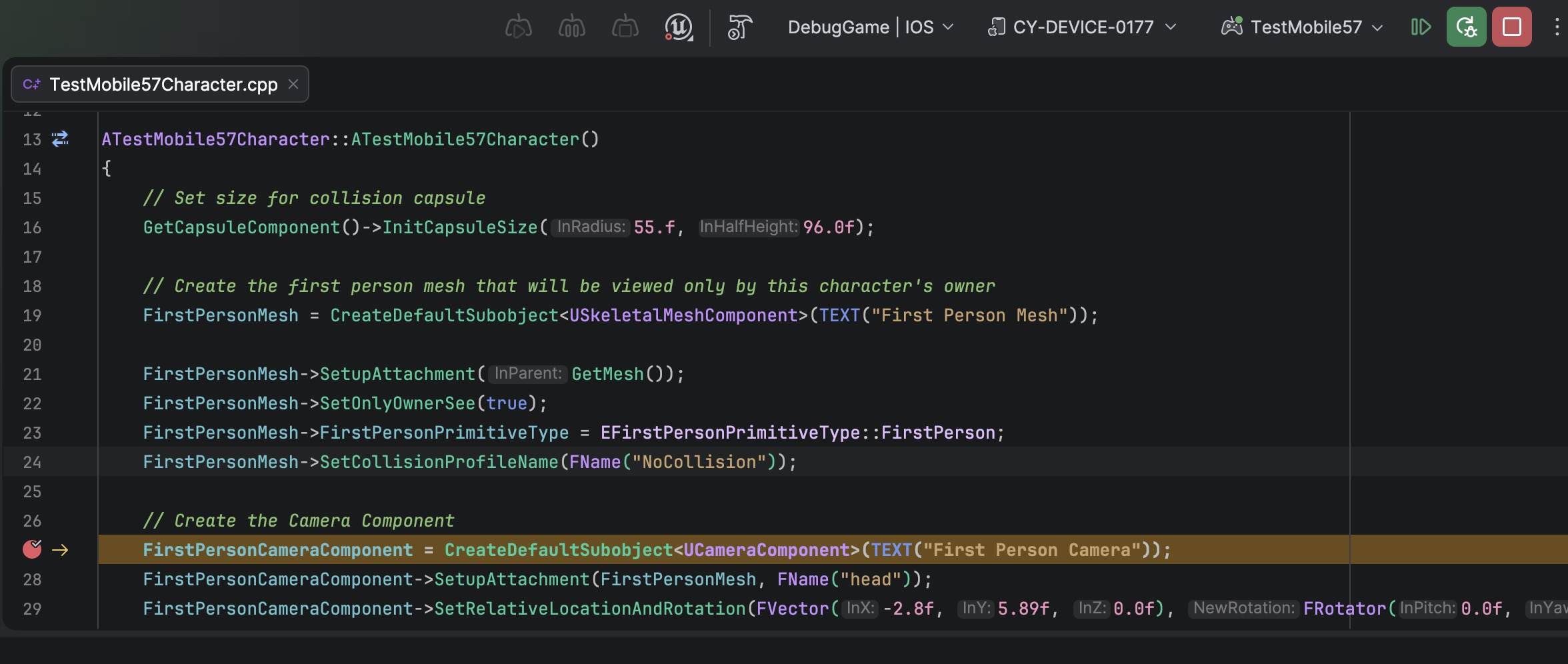
You can debug games running on iOS devices directly from Rider on macOS – set breakpoints, inspect variables, and step through code using the familiar debugger interface. This builds on previous Android support and completes the mobile workflow across platforms.

Faster and more responsive Unreal Engine debugging

C++ debugging in Rider now uses a new standalone parser and evaluator for Natvis expressions. Variable inspection with the rewritten evaluator is up to 87 times faster on warm runs and 16 times faster on cold ones. The debugger memory usage has dropped to just over a third of what it was.

Get the full story of how we were able to achieve that from this blog post.

Blueprint improvements

Finding usages, event implementations, and delegate bindings across Unreal Engine Blueprints and C++ code is now more reliable, making it easier to trace how gameplay logic connects across assets.

Code Vision now supports the BlueprintPure specifier and correctly detects blueprint events implementations in Blueprints. Find Usages has also been improved and now identifies additional BlueprintAssignable delegate bindings.

Blueprint usage search now relies on the asset path instead of the Blueprint name, ensuring accurate results even when multiple Blueprints share the same name.

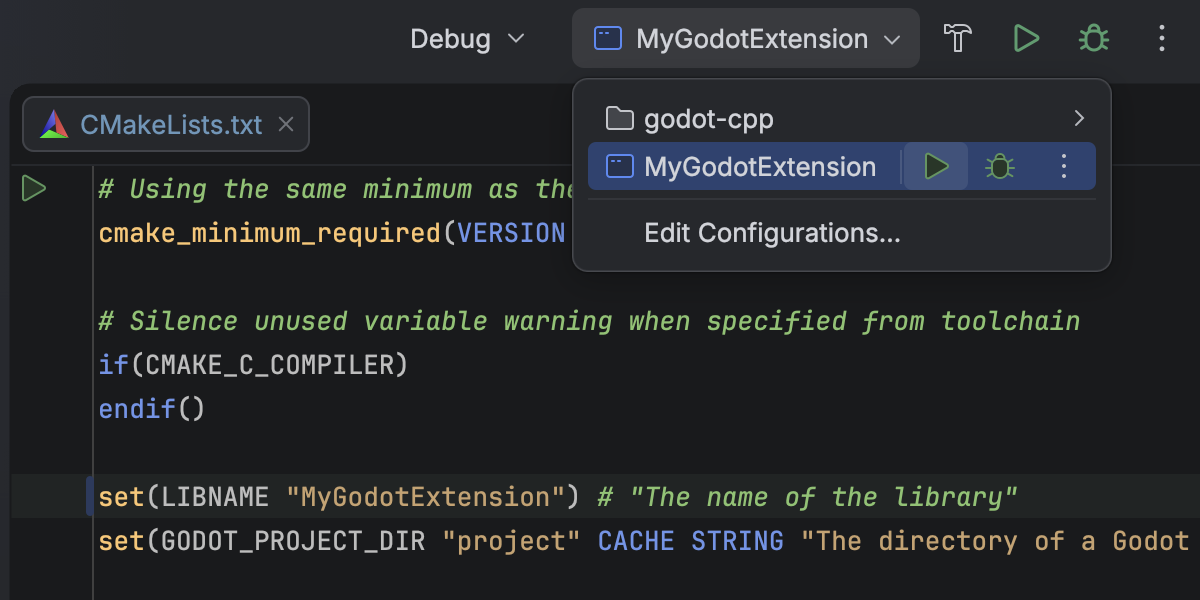
CMake support for C++ gaming projects (Beta)

Rider 2026.1 introduces Beta support for CMake-based C++ projects.

You can now open, edit, build, and debug CMake projects directly in Rider, making it easier to work with game engines that rely on CMake. This is an early implementation focused on core C++ workflows, and we’ll continue expanding compatibility and performance in future releases.

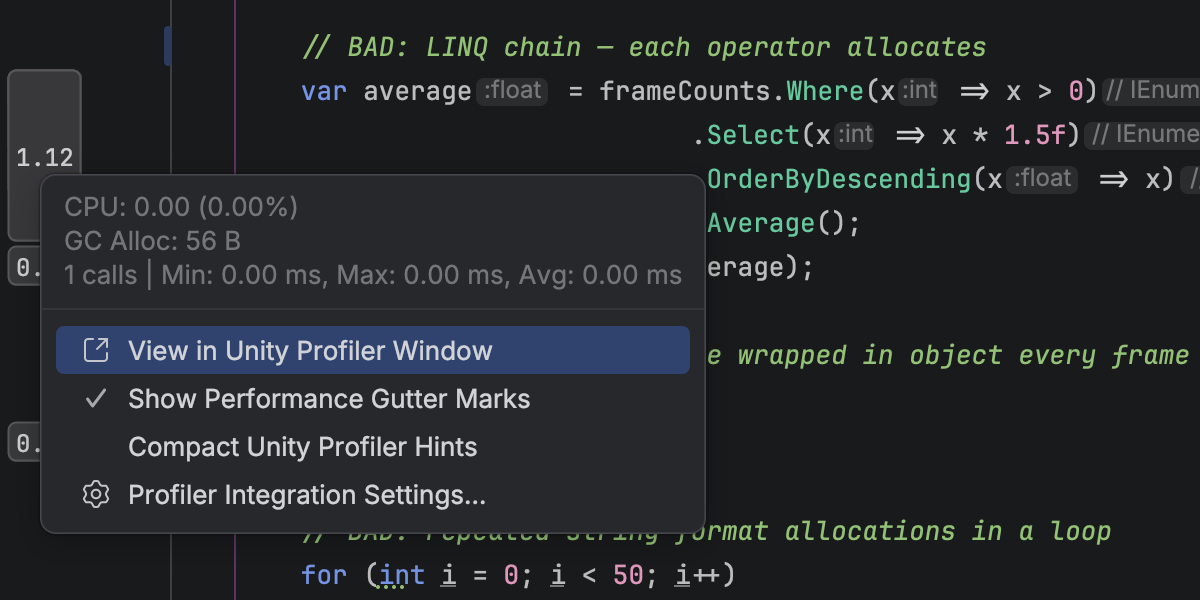
Redesigned Unity Profiler integration

Performance analysis for Unity projects is now more integrated into your workflow.

You can open Unity Profiler snapshots directly in Rider and explore them in a dedicated tool window with a structured view of frames and call stacks. A timeline graph helps you identify performance hotspots, and you can navigate directly from profiler data to source code.

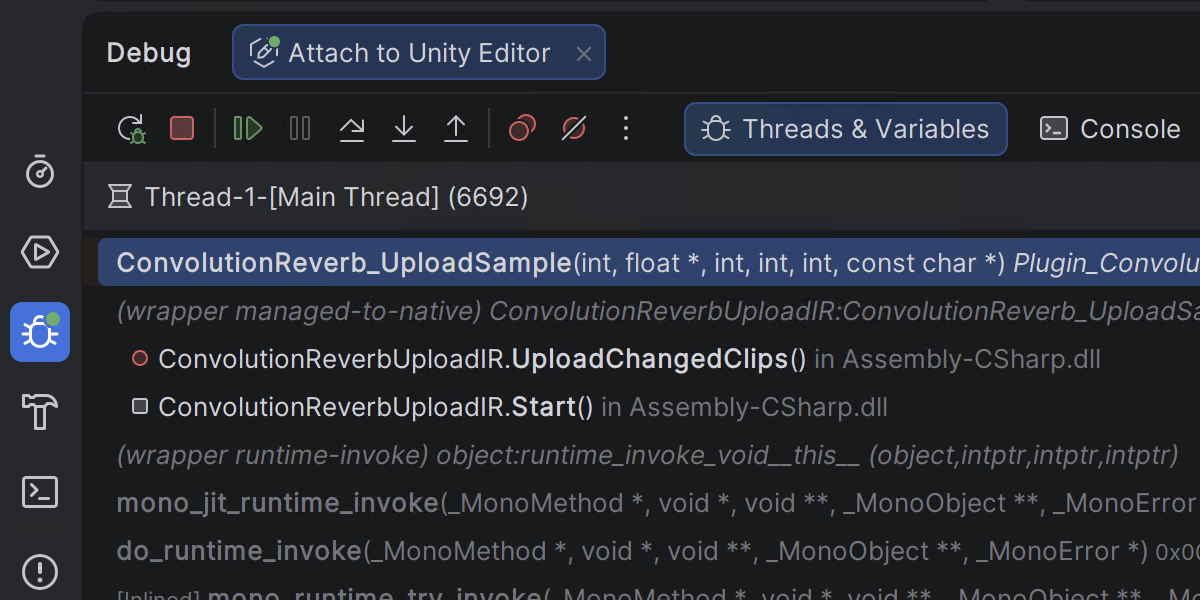
Mixed-mode debugging for game scenarios on Windows

With mixed-mode debugging on Windows, you can debug managed and native code in a single session. This is particularly useful for game development scenarios where .NET code interacts with native engines or libraries, allowing you to trace issues across the full stack without switching contexts.

Language support updates

Rider 2026.1 brings improvements across multiple languages:

  • C#: better support for extension members, new inspections, and early support for C# 15 Preview
  • C++: updated language support, improved code analysis, and smarter assistance
  • F#: improved debugging with Smart Step Into and better async stepping

Rider’s C# intelligence is powered by ReSharper. For a deeper dive into C# updates, check out this blog post for ReSharper 2026.1 Release Candidate.

Try it out and share your feedback

You can download and install Rider 2026.1 RC today:

Download Rider 2026.1 RC

We’d love to hear what you think. If you run into issues or have suggestions, please report them via YouTrack or reach out to us on X.

KotlinConf 2026: Talks to Help You Navigate the Schedule

The full KotlinConf’26 schedule is finally live, and it’s packed!

With parallel tracks, deep-dive sessions, and back-to-back talks, planning your time can feel overwhelming. When almost every session looks interesting, deciding where to spend your time isn’t easy.

To help you navigate it all, the Kotlin team has selected a few talks worth adding to your list. Whether you’re an intermediate or advanced Kotlin developer looking to sharpen your expertise, part of a multiplatform team solving cross-platform challenges, building robust server-side systems, or exploring AI-powered applications in Kotlin, these are sessions you might want to check out.

Join us at KotlinConf’26

Intermediate 

These talks are perfect if you want to build on your foundations, understand where Kotlin is heading, and sharpen practical skills you can apply in your day-to-day work.

Evolving Language Defaults

Michail Zarečenskij

Kotlin Lead Language Designer, JetBrains

Programming languages are shaped by their defaults – what’s safe, convenient, and practical. But defaults evolve, and yesterday’s good idea can become today’s source of friction. This session explores how languages rethink and change their defaults, including mutability, null-safety, and deeper object analysis. With examples from C#, Java, Swift, Dart, and Kotlin, you’ll gain insight into how Kotlin continues to evolve and what those changes mean for everyday development.

Real-World Data Science With Kotlin Notebook

Adele Carpenter

Software Engineer, Trifork Amsterdam

Data is messy, and drawing the right conclusions takes more than generating a pretty chart. In this practical session, Adele will walk you through analyzing a real-world powerlifting dataset using Kotlin tools. You’ll explore how to understand and validate data, work with Postgres and DataFrame, and visualize results with Kandy – all directly from your IDE. It’s a hands-on introduction to doing thoughtful, reliable data science in Kotlin.

Talking to Terminals (And How They Talk Back)

Jake Wharton

Android Developer, Skylight

Modern terminals can do far more than print text. In this deep dive, Jake explores how command-line apps communicate with terminals – from colors and sizing to advanced features like frame sync, images, and keyboard events. Using Kotlin, he covers OS-specific APIs, JVM vs. Kotlin/Native challenges, and reusable libraries that help you unlock the full power of the terminal.

Dissecting Kotlin: 2026

Huyen Tue Dao

Software Engineer, Netflix
Co-host, Android Faithful

Ten years after Kotlin 1.0, the language continues to evolve quickly. This talk examines recent stable and preview features, unpacking their design and implementation to reveal what they tell us about Kotlin’s direction. You’ll leave with a deeper understanding of how the language is shaped and how those insights can influence your own Kotlin code.

Full-Stack Kotlin AI: Powering Compose Multiplatform Apps With Koog and MCP

John O’Reilly

Software Engineer, Neat

This session explores how Koog can power the intelligent core of a Compose Multiplatform app. This session demonstrates building AI-driven applications using local tools across Android, iOS, and desktop, connecting to an MCP server with the Kotlin MCP SDK, and integrating both cloud and on-device LLMs. It’s a practical look at bringing full-stack AI into real Kotlin applications.

Advanced

Ready to go deeper? These sessions dive into compiler internals, language design, architecture, and performance, making them ideal for experienced developers who want to explore Kotlin beneath the surface.

Metro Under the Hood

Zac Sweers

Mobile Person, Kotlin

Metro is both a multiplatform DI framework and a sophisticated Kotlin compiler plugin. This advanced session breaks down how Metro works inside the compiler, what code it generates, and how its “magic” actually happens. If you’re comfortable with DI frameworks and curious about compiler-level mechanics, this is a rare behind-the-scenes look.

Local Lifetimes for Kotlin

Ross Tate

Programming-Languages Researcher and Consultant

What if Kotlin could enforce that certain objects never escape their intended scope? This talk introduces a proposed design for enforceable locality – lightweight, limited-lifetime objects that prevent leaks and enable safer APIs. Beyond bug prevention, locality opens the door to advanced control patterns, effect-like behavior, and strong backwards compatibility, all while integrating cleanly into today’s Kotlin ecosystem.

Advanced Kotlin Native Integration

Tadeas Kriz

Senior Kotlin Developer, Touchlab

Kotlin Multiplatform native builds come with a key constraint: one native binary per project. This session explores what happens when multiple binaries enter the picture, the architectural impact on large systems, and strategies for splitting compilation into manageable parts. It’s a practical look at scaling Kotlin/Native in complex, multi-repository environments.

Deconstructing OkHttp

Jesse Wilson

Programmer

Instead of showing how to use OkHttp, this talk opens it up. You’ll explore its interceptor-based architecture, connection lifecycle management, caching state machines, URL decoding, and performance optimizations. From generating HTTPS test certificates to extending the library in multiple ways, this session is a masterclass in reading and learning from high-quality Kotlin code.

Multiplatform

Kotlin Multiplatform continues to expand what’s possible across devices and platforms. These sessions showcase the latest advancements, real-world journeys, and forward-looking tooling shaping the cross-platform landscape.

What’s New in Compose Multiplatform: Better Shared UI for iOS and Beyond

Sebastian Aigner

Developer Advocate, JetBrains

Márton Braun

Developer Advocate, JetBrains

This session explores what’s new in Compose Multiplatform and how it continues to improve shared UI across iOS, web, desktop, and Android. You’ll get a hands-on look at recent platform advances, including faster rendering, improved input handling, richer iOS interop, web accessibility improvements, and a smoother developer experience with unified previews, mature Hot Reload, and a growing ecosystem. It’s a practical update on how Compose Multiplatform is becoming an even stronger choice for cross-platform UI.

Sony’s KMP Journey: Scaling BLE and Hardware With Kotlin Multiplatform

Sergio Carrilho

TechLead, Sony

Go behind the scenes of Sony’s six-year journey from an early, risky experiment with Kotlin Multiplatform to the global success of the Sony | Sound Connect app. From high-speed BLE and background execution to migrating from React Native to Compose Multiplatform, this talk explores technical trade-offs, stakeholder skepticism, and hard-earned architectural lessons. It’s a real-world story of betting on KMP early and scaling it globally.

Swift Export: Where We Stand

Pamela Hill

Developer Advocate, JetBrains

Swift Export aims to make calling shared Kotlin code from Swift more idiomatic and natural. This session looks at the current experimental state of Swift Export, demonstrates the transition from the old Objective-C bridge to the new approach, and highlights supported features, current limitations, and practical adoption guidance. By the end, you’ll be able to evaluate whether Swift Export is ready for your team.

Practical Filament – Reshape Your UI!

Nicole Terc

SWE, HubSpot

Discover how Filament, a real-time physically-based rendering engine, can bring dynamic visual effects into your Compose Multiplatform UI. Through practical examples, you’ll explore materials, shaders, lighting, and touch-reactive animations – all without diving too deep into low-level graphics code. It’s a hands-on introduction to building expressive, animated interfaces.

Kotlin/Wasm: Finally, the Missing Piece for a Full Stack Kotlin Webapp!

Dan Kim

Engineering Manager

With Kotlin/Wasm reaching Beta and supported in modern browsers, full-stack Kotlin is closer than ever. This talk walks through building a complete web app using Kotlin/Wasm, Compose Multiplatform, Coroutines, Exposed, and Ktor – unifying the frontend, backend, and database in one ecosystem. It’s a practical guide to building performant, fully Kotlin-powered web applications.

Server-side

Kotlin is increasingly used to power large-scale backend systems. These talks explore how Kotlin powers high-performance systems, large migrations, and mission-critical platforms in the real world. 

How Google.com/Search Builds on Kotlin Coroutines for Highly Scalable, Streaming, Concurrent Servers

Sam Berlin

Senior Staff Software Engineer, Search Infra, Google

Alessio Della Motta

Senior Staff Software Engineer, Search Infra, Google

Discover how Google Search uses server-side Kotlin and coroutines to enable low-latency, highly asynchronous streaming code paths at massive scale. This session explores Qflow, a data-graph interface language connecting asynchronous definitions with Kotlin business logic, along with coroutine instrumentation for latency tracking and critical path analysis. It’s a deep look at building “asynchronous by default” systems at massive scale.

Go Get It, With Kotlin: Evolving Uber’s Java Backend

Ryan Ulep

Tech Lead, Developer Platform, Uber

Uber introduced Kotlin into its massive Java monorepo to modernize backend development without disrupting scale. This talk shares how the JVM Platform team built the business case, addressed tooling and static analysis gaps, overcame skepticism, and enabled thousands of engineers to adopt Kotlin. It’s a practical story of large-scale language evolution inside a global engineering organization.

Kotlin Bet for Mission-Critical Fintech: Reliability, ROI, Risk, and Platform Architecture

Yuri Geronimus

Tech leader, Verifone

Adopting Kotlin in a payment platform is a strategic decision about risk, trust, and long-term ROI. This session examines how Kotlin was integrated into a global EMV/PCI ecosystem – from Android terminals to gateways – using null-safety, sealed hierarchies, and value classes to eliminate entire classes of production issues. You’ll see architectural outcomes, measurable compliance gains, and a practical framework for positioning Kotlin as a strategic bet in regulated industries.

AI

AI is rapidly becoming part of modern application development. If you’re exploring agents, LLM integrations, or AI-assisted coding, these sessions will give you both strategy and hands-on insight.

Eval-Driven Development: The Fine Line Between Agentic Success and Failure

Urs Peter

Senior Software Engineer, JetBrains certified Kotlin Trainer

Agentic systems introduce probabilistic behavior and real risk. This talk introduces Eval-Driven Development (EDD), an engineering-first approach to making AI agents reliable. Using Koog, you’ll see how to test agents at multiple layers, collect meaningful metrics, detect regressions, generate synthetic test cases with LLMs, and build continuous evaluation loops that prevent silent degradation in production.


Why Do Most AI Agents Never Scale? Building Enterprise-Ready AI With Koog

Vadim Briliantov

Technical Lead of Koog, JetBrains

Many AI agents fail when moving beyond demos. This session introduces Koog 1.0.0-RC and explains how its structured, type-safe architecture enables scalable, production-ready agents across JVM and KMP targets. You’ll explore cost control, strongly typed workflows, state persistence, observability with OpenTelemetry and Langfuse, and integrations across the Kotlin ecosystem – all focused on building agents that actually scale.

Increasing the Quality of AI-Generated Kotlin Code

Sergei Rybalkin

Kotlin, Meta

Improving AI-generated Kotlin code requires more than better prompts. This talk explores practical strategies, evaluation techniques, and lessons from advancing Kotlin code generation in real-world agents. You’ll learn how to measure quality, refine outputs, and apply tools and best practices that ensure reliability, readability, and maintainability, even as models continue to evolve.

This is just a glimpse of the many great sessions waiting for you at KotlinConf’26. With dozens of talks across multiple tracks, the hardest part might simply be choosing which ones to attend. Don’t forget to dive into the full schedule, plan your agenda, and get ready for three days packed with ideas, insights, and conversations with the global Kotlin community.

Browse the full schedule

ReSharper 2026.1 Release Candidate Released!

The ReSharper 2026.1 Release Candidate is ready for you to try.

This release focuses on making everyday .NET development faster and more predictable, with improvements to code analysis and language support, a new way to monitor runtime performance, and continued work on stability and responsiveness in Visual Studio.

If you’re ready to explore what’s coming, you can download the RC right now:

Download ReSharper 2026.1 RC

Release highlights

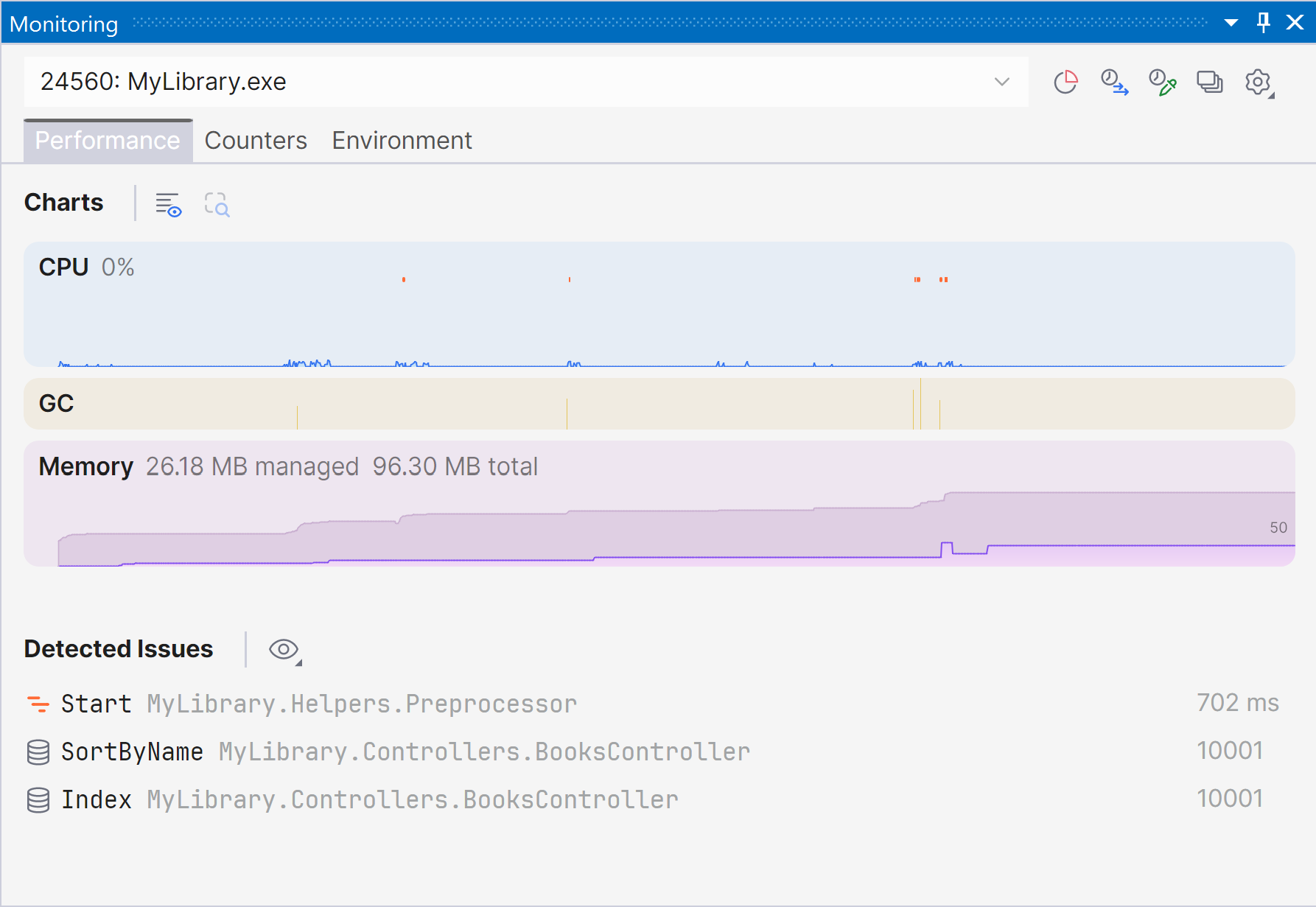
A new way to monitor runtime performance

ReSharper 2026.1 introduces the new Monitoring tool window, giving you a clearer view of how your application behaves at runtime.

You can track key performance metrics while your app is running or during debugging and get automated insights into potential issues. The new experience builds on capabilities previously available in Dynamic Program Analysis and our profiling tools, but brings them together in a single view that makes it easier to evaluate performance at a glance.

Starting with ReSharper 2026.1, the Monitoring tool window is available when using ReSharper as part of the dotUltimate subscription.

Note: The Dynamic Program Analysis (DPA) feature will be retired in the 2026.2 release, while its core capabilities will continue to be provided through the new monitoring experience.

Current limitations: The Monitoring tool window is not currently supported in Out-of-Process mode. We are working to remove this limitation in ReSharper 2026.2.

ReSharper now available in VS Code-compatible editors

ReSharper expands its support beyond Microsoft Visual Studio. The extension is now publicly available for Visual Studio Code and compatible editors like Cursor and Google Antigravity.

You can use familiar ReSharper features – including code analysis, navigation, and refactorings – in your preferred editor, along with support for C#, XAML, Razor, and Blazor, and built-in unit testing tools.

ReSharper for VS Code and compatible editors is available under the ReSharper, dotUltimate, and All Products Pack subscriptions. A free subscription is also available for non-commercial use.

Learn more in this dedicated blog post.

Better support for modern C#

ReSharper 2026.1 improves support for evolving C# language features, helping you work more efficiently with modern syntax.

  • Better handling of extension members, including improved navigation, refactorings, and auto-imports
  • Early support for upcoming C# features like collection expression arguments
  • New inspections to catch subtle issues, such as short-lived HttpClient usage or incorrect ImmutableArray<T> initialization

These updates help you write safer, more consistent code with less manual effort.

Faster code analysis and indexing

This release includes performance improvements across core workflows:

  • Faster indexing of annotated type members
  • More responsive import completion
  • Reduced overhead in code analysis by optimizing performance-critical paths

Improved stability in Out-of-Process mode

We continue to improve the reliability of ReSharper’s Out-of-Process (OOP) mode, which separates ReSharper’s backend from Visual Studio to keep the IDE responsive.

In this release, we fixed over 70 issues affecting navigation, UI interactions, unit testing sessions, and solution state synchronization, making everyday work more stable and predictable.

Updated editor UI

ReSharper’s editor experience has been refreshed to better align with the modern Visual Studio look and feel. Code completion, parameter info, and other popups now have a cleaner, more consistent design and properly support editor zoom, improving readability across different setups.

C++ improvements (ReSharper C++)

Alongside the core ReSharper updates, the 2026.1 Release Candidate also brings improvements for C++ developers working with ReSharper C++:

  • Performance: Faster startup times and lower memory usage in Unreal Engine projects.
  • Language support: Support for the C23/C++26 #embed directive, C++23 extended floating-point types, the C2Y _Countof operator, and other features.
  • Coding assistance: Auto-import for C++20 modules and postfix completion for primitive types, literals, and user-defined literal suffixes.
  • Code analysis: New inspections for out-of-order designated initializers and override visibility mismatches, update of bundled Clang-Tidy to LLVM 22.
  • Unreal Engine: Richer Blueprint integration in Code Vision and Find Usages, compatibility fixes for the upcoming Unreal Engine 5.8.

Try it out and share your feedback

You can download and install ReSharper 2026.1 RC today:

Download ReSharper 2026.1 RC

We’d love to hear what you think. If you run into issues or have suggestions, please share your feedback via YouTrack.