Introducing Tracy: The AI Observability Library for Kotlin

Tracy is an open-source Kotlin library that adds production-grade observability to AI-powered applications in minutes. It helps you debug failures, measure execution time, and track LLM usage across model calls, tool calls, and your own custom application logic. Ultimately, comprehensive observability ensures you have the exact data needed to understand real-world application behavior, analyze performance from high-level trends down to granular traces, and power comprehensive online and offline evals.

It works seamlessly with common Kotlin/LLM stacks (including OkHttp and Ktor clients, as well as OpenAI, Anthropic, and Gemini ones) while relying on OpenTelemetry under the hood. This architecture guarantees complete flexibility over your trace data, enabling both standard exporting to any compatible backend (like Jaeger, Zipkin, or Grafana) and direct integration with dedicated LLM engineering platforms like Langfuse and W&B Weave.

While full-fledged AI frameworks like Spring AI or Koog provide built-in observability, LLM calls must be made exclusively through their framework APIs to be traced, and they do not provide an easy way to trace the internal application flow. In contrast, Tracy helps you monitor LLM usage through API or HTTP client instrumentation. It also helps you unwind the timing of and causal relationships between AI components or internal AI-agent states by annotating Kotlin functions or blocks of code.

By making Tracy open-source, we invite you to help extend its functionality – whether by requesting new integrations for AI backends and API clients, or by submitting pull requests to implement them.

Components of AI observability and how Tracy helps

As engineers, whether we’re adding observability to an existing application or building a new one from scratch, we want to trace, store, and analyze the following:

  1. LLM call metadata, including the API being called, the model, and its parameters. Optionally, we may want to track LLM inputs and outputs during development for debugging, while ensuring they are not traced in production.
  2. Application logic flow that leads to and from LLM calls – where a certain call originates and which tools are involved.

Imagine a very simple LLM chat application that greets the user, employing tools to make the greeting more personal. Using the OpenAI client, the application code might look like this:

/** Interface for LLM tool */
interface Tool<T> {
   /** Tool call */
   fun execute(): T
}

/** Gets the current user's name from the system */
class GetUserName() : Tool<GetUserName.UserNameResult> { ... }

/** Gets the current date and time */
class GetCurrentDateTime() : Tool<GetCurrentDateTime.DateTimeResult> { ... }

fun main() {
   // Create OpenAI-client using environment variables
   val client: OpenAIClient = OpenAIOkHttpClient.fromEnv()
   ...
   val params = ResponseCreateParams.builder()
       .model(ChatModel.GPT_4O_MINI)
       .maxOutputTokens(2048)
       .addTool(GetUserName::class.java)
       .addTool(GetCurrentDateTime::class.java)
       .input(ResponseCreateParams.Input.ofResponse(inputs))
       .build()

   // Get the response. 
   // In a real application, it would use a loop to process tool calls.
   val response: Response = client.responses().create(params)
   ...
   println(finalGreeting)
}

The important things to trace here are:

  1. The fact that the greeting agent was called.
  2. The LLM calls.
  3. The tool executions.

We could use the basic OpenTelemetry SDK, but that would require us to add instrumentation code manually, and it would lead to code repetition for tool call traces. 

In an ideal scenario, we would be able to configure tool tracing once and have all implementations traced automatically, ensuring we never end up in a situation where newly added tools go untraced. Tracy makes this scenario a reality.

Adding observability with Tracy

Tracy provides three high-level APIs that help us fully cover our chat application with tracing.

Scoped spans

The withSpan API allows you to create scoped spans. These spans automatically activate when a block starts and end when the block finishes, ensuring correct nesting and timing. 

fun main() {
   // Encapsulation into withSpan ensures that all nested events will be
   // traced as part of the greeting agent’s work.  
   withSpan("Greeting agent") {
       ...
   }  
}

LLM client instrumentation 

LLM calls are a crucial part of any AI agent. They define the cost, latency, and efficiency of the application, and they are the first things to be investigated if something goes wrong. That’s why adding observability to an LLM client should be straightforward and require minimal changes to the codebase. For example, adding instrumentation to your OpenAI client is as easy as:

val client = OpenAIOkHttpClient.fromEnv()
// All calls made with the instrumented client are traced.
instrument(client)

By default, client instrumentation traces metadata only. To trace LLM inputs and outputs, which may contain sensitive data, you must explicitly enable this programmatically with:

TracingManager.traceSensitiveContent()

Alternatively, you can enable it at runtime by setting the TRACY_CAPTURE_INPUT and TRACY_CAPTURE_OUTPUT environment variables to true.

Tool calls and function tracing

LLMs love tools: They help the LLMs effectively complete deterministic tasks, save tokens, and interact with the environment they operate in. As developers, we love tools as well, but adding observability for each and every LLM tool in the codebase is a mundane task that is easy to forget.

While decorators shine for such scenarios in Python frameworks, Kotlin developers previously could only look on with envy. Tracy changes things for the better. With annotation-based tracing, you simply have to add the @Trace annotation to an interface method to enable tracing in all implementing classes. If you have an isolated method you want to trace, it’s just as easy. The @Trace annotation works on individual methods or functions as well.

/** Interface for LLM tool */
interface Tool<T> {
   // All tool calls are now traced
   @Trace(name = "Tool Call")
   fun execute(): T
}

Bringing it all together

Capturing telemetry from the application is only half the battle. The other half is routing it to a proper backend where it can be stored and analyzed. While we definitely recommend using observability solutions that target LLM tracing specifically, and provide support for Langfuse and W&B Weave out of the box, Tracy also offers effortless ways to send traces to any OpenTelemetry-compatible backend, file, or console. The repository contains a number of examples, and the complete code for the example from this article is available here.

Configuring telemetry export to Langfuse takes seconds with Tracy. As a result, you get a hierarchical application trace with both LLM and tool calls captured.

What’s next

We truly believe that regardless of the pace of LLM progress in the coming years, observability will remain a cornerstone of effective and reliable AI engineering. No matter how good the underlying LLMs become, the applications using them must still be debugged and evaluated – both during development and in the field. We created Tracy in response to this demand, aiming to bring production-grade AI observability to the Kotlin ecosystem.

And we are just getting started! You can contribute to the growth of the Kotlin AI ecosystem by filing issues, submitting pull requests, or simply by trying Tracy in your projects and sharing your feedback. Let’s trace together!  
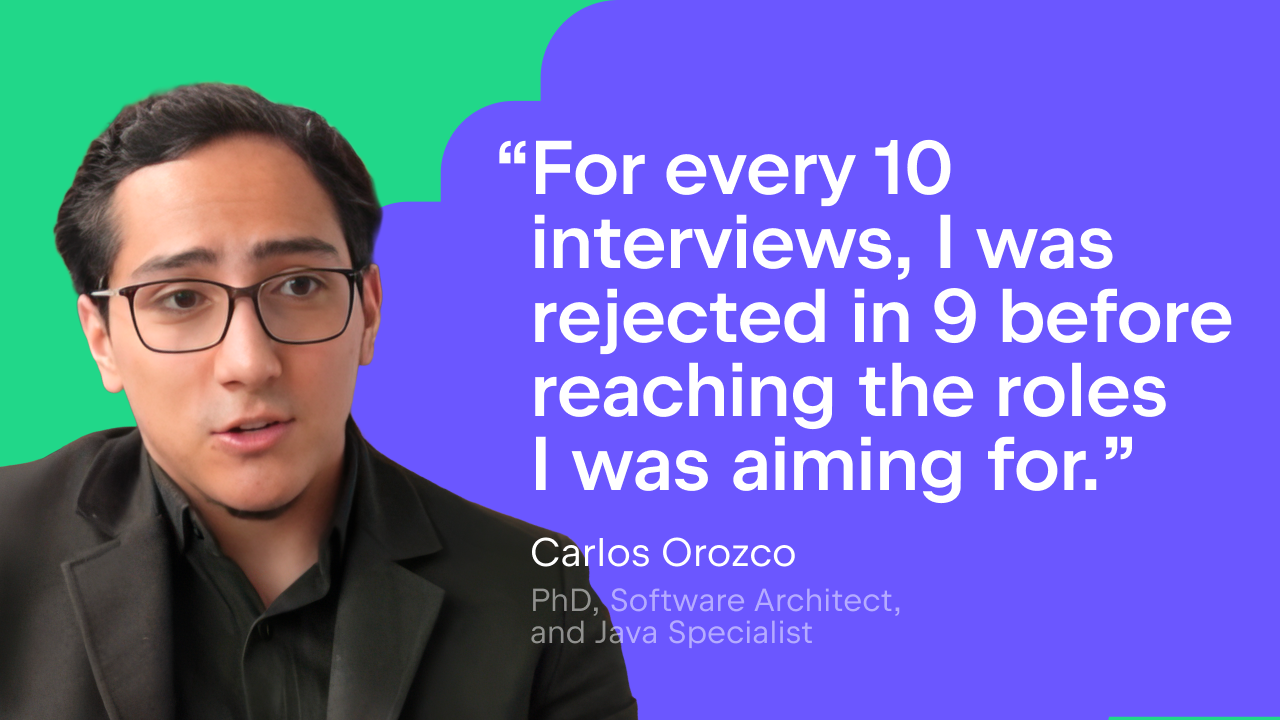
From Classroom Code to NASA Challenges: Carlos Orozco’s Journey Into Big Tech

Carlos Orozco decided to study computer science when he realized that programming was about formalizing ideas and solving problems systematically. He was drawn to the mix of logic, mathematics, and creativity, a field where rigorous thinking leads to tangible results.

His interest deepened when he began working on real-world projects. That’s when computer science stopped being abstract. Designing structured solutions under real constraints and seeing software used in real environments confirmed that this was the work he wanted to pursue professionally.

Today, Carlos holds a PhD in computer science, is a professor at two universities, and serves as an expert consultant on quantum software architecture for Colombia’s Ministry of Science, Technology, and Innovation. As a senior software engineer, he has collaborated with global firms like EPAM and held leadership roles in the NASA International Space Apps Challenge. Beyond his professional work, Carlos authors books and academic research focused on software architecture, engineering methodologies, and the formal structure of complex systems. While still furthering his studies, Carlos is an avid user of the JetBrains Student Pack.

 “The Student Pack becomes a gateway to working with the same ecosystem used in real-world, high-impact projects.”

We spoke with Carlos about learning computer science, navigating interviews, and how professional tools supported his journey.

From healthcare to NASA and national-scale projects

Carlos’s first job in tech came about 13 years ago, when he started as a Java developer in the healthcare sector. Through connections built at university, he learned about the opportunity and applied. Two years working on real production systems taught him what software development truly means: responsibility, reliability, and long-term thinking.

“That’s where I understood the standards expected in professional software development.”

From there, his career kept evolving. During his astronomy studies, he joined the NASA International Space Apps Challenge as a participant – and stayed. Over time, he became an expert juror and collaborator, evaluating how teams translated complex scientific challenges into technically sound, well-structured software solutions.

NASA International Space Apps teams tackle challenges in data analysis, sustainability, Earth and space sciences, and open data – projects that demand both technical precision and creative thinking.

“Events like NASA International Space Apps bring together people from many backgrounds – science, engineering, design, and data – so being able to explain ideas clearly and collaborate across disciplines is essential.”

From global collaboration, his path moved toward national innovation projects. Through his work as a consultant and professor, he became involved in initiatives funded by Colombia’s Ministry of Science, Technology, and Innovation. Today, he serves as a consultant, assuming the roles of Software Architecture Lead and expert in quantum software engineering across multiple projects in Colombia.

Working at the intersection of research, policy, education, and technology changed how he approaches system design.

“Working in these contexts broadens your understanding of how these worlds intersect – and enriches how you approach complex problems.”

The skills that actually get you hired

Landing your first software job isn’t just about being able to code. 

Carlos puts it simply: Strong fundamentals come first – programming basics, data structures, and problem-solving. Technologies can be learned relatively quickly, but long-term value comes from how well you analyze problems and reason through solutions. Frameworks change. Thinking lasts.

But technical skill alone isn’t enough.

“On the soft skills side, communication, a willingness to learn, and the ability to work collaboratively make a big difference.”

In environments like EPAM and the NASA International Space Apps Challenge, interviews go beyond correct answers. They assess how you think under constraints, how you collaborate, and how clearly you explain the impact of your work. Technical competence is expected. Clear communication sets you apart. Employers don’t just hire coders. They hire problem-solvers.

“Being able to demonstrate that you are technically solid, can explain your thinking, and work effectively with others makes a significant difference in high-level interviews and complex, real-world projects. One of the most underestimated skills in this process is knowing how to sell yourself.” 

Interview strategy: Why rejection is part of the plan

Carlos approached interview preparation methodically – studying classics like Cracking the Coding Interview, refining his technical skills, and building side projects to test real design decisions. But the real growth came from something less comfortable.

“Everyone tends to share success stories, but in my case, for every ten interviews, I was rejected in nine before reaching the roles I was aiming for. Those rejections helped me identify gaps, improve, and build resilience.”

The rejections weren’t failures – they were feedback. They exposed weaknesses and forced reflection. Rejection wasn’t the opposite of success. It was part of the process.

Learning computer science in a fast-moving world

Carlos sees two major challenges for computer science students today: speed and overload.

Technology evolves fast. New tools and frameworks appear constantly, and many students struggle to balance keeping up with trends and building strong fundamentals.

At the same time, information is everywhere. With endless courses, tutorials, and content, it’s easy to jump between topics without going deep.

His solution? Balance.

“I believe the most effective way to learn computer science today is through a combination of formal education, self-directed learning, and the responsible use of AI tools.”

Formal training builds structure and a strong theoretical foundation. Self-learning allows depth and exploration. And AI – when used correctly – becomes support, not substitution.

Carlos uses AI for exploration, validation, and repetitive tasks. But understanding must come first. Students should solve problems independently, reason through algorithms, and write code on their own. AI can review solutions or suggest alternatives – but it should never replace thinking.

Used properly, AI becomes an accelerator – not a shortcut.

Why professional tools matter from day one

Carlos first encountered the JetBrains ecosystem during his academic years. He noticed how widely these tools were used in professional environments, but he fully understood their value only after stepping into the industry – and later during his astronomy training, where productivity and code quality were critical.

During his studies, Carlos primarily used IntelliJ IDEA for Java projects. This setup was especially helpful for working on academic projects involving backend systems, software design, and structured programming. The tooling supported code navigation, refactoring, and debugging, making it easier to work with larger Java codebases and to apply good development practices from the start.

Carlos highlights several features of JetBrains IDEs that make a real difference for students:

  • Intelligent code completion and inspections – to catch errors early and encourage better coding habits.
  • Refactoring tools – to improve structure and readability safely while learning.
  • The debugger – to get an in-depth understanding of how programs actually execute.
  • Code navigation and version control integration, especially in larger projects – to explore and manage codebases more easily.

“Together, these features help students focus less on tooling issues and more on learning how to design and reason about software.”

To get the most out of the JetBrains Student Pack, Carlos offers simple advice: “Don’t treat your IDE like a text editor. Treat it like a professional environment.”

Build real projects.
Run tests.
Refactor confidently.
Learn to navigate complex codebases.

“Take the time to go beyond the basics,” he says. “Understand the debugger, refactoring tools, and code inspections – not just code editing. Explore version control integration and practice working with larger projects. These habits transfer directly to industry.”

That’s how learning turns into engineering.

Discipline, energy, and the long game

Balancing roles as an engineer, author, PhD student, and professor doesn’t happen by accident. For Carlos, productivity comes down to discipline and clear priorities.

Managing time across so many responsibilities requires planning ahead and being intentional with how you use your energy.

“This kind of lifestyle is demanding and often exhausting. It requires constant adjustment and self-awareness.”

What makes it sustainable isn’t productivity tricks – it’s having a genuine interest in the work itself. Teaching. Researching. Building systems.

And when asked what he would tell computer science students today, he keeps it simple:

“Enjoy the journey. Studying computer science is a marathon, not a sprint. There will be challenging moments, but staying curious, patient, and consistent makes a real difference. The process can be demanding, but the outcome – being able to build, understand, and shape complex systems – is well worth it.”

What to read, watch, and follow

To build strong foundations, Carlos recommends reading:

  • Clean Code – Robert C. Martin
  • Design Patterns – Erich Gamma et al.
  • Introduction to Algorithms – Thomas H. Cormen et al.

“For blogs and online content,” he adds, “Martin Fowler’s blog, freeCodeCamp, and GeeksforGeeks offer high-quality explanations across a wide range of topics.”

On YouTube, channels like Computerphile, MIT OpenCourseWare, and CS50 provide both conceptual clarity and practical insight.

And yes – his own books are also an option. “Although that might require you to learn Spanish,” he jokes.

Carlos also recommends roadmap.sh as a practical way to understand different learning paths and how skills connect over time.

“Combined with modern IDEs, and professional tooling, and AI, these resources can significantly enhance the learning experience.”

Learn like Carlos

If you want to start building strong fundamentals and work with professional tools from day one, explore the JetBrains Student Pack and start treating your projects like real engineering work.

Get the JetBrains Student Pack

Do you want to share your own journey into tech? Let us know – we’d love to hear your story.