We’re hiring: improving the services that support a global open source community

We’re hiring: improving the services that support a global open source community

The Eclipse Foundation supports a global open source community by providing trusted platforms, services, and governance. As a vendor-neutral organisation, we operate infrastructure that enables collaboration across projects, organisations, and industries.

This infrastructure supports project governance, developer tooling, and day-to-day operations across Eclipse open source projects. While much of it runs quietly in the background, it plays a critical role in the health, security, and sustainability of those projects.

We are expanding the Software Development team with two new roles. Both positions involve contributing to the design, development, and operation of services that are widely used, security-sensitive, and expected to operate reliably at scale.

Software engineer: security and detection

One of the roles is a Software Engineer position with a focus on security and detection engineering, alongside general development and operations.

This role will work on Open VSX Registry, an open source registry for VS Code extensions operated by the Eclipse Foundation. As adoption grows, maintaining the integrity and trustworthiness of the registry requires continuous analysis, detection, and operational safeguards.

In this role, you will:

  • Analyse suspicious or malicious extensions and related artefacts
  • Develop, test, and maintain YARA rules to detect malicious or policy-violating content
  • Design, implement and contribute improvements to backend services, including new features, abuse prevention, rate-limiting, and operational safeguards

This is hands-on work that combines backend development with practical security analysis. The outcome directly improves the reliability, integrity, and operation of services that are part of the developer tooling supply chain.

For more context on this work, see my recent post on strengthening supply-chain security in Open VSX.

To apply:
https://eclipsefoundation.applytojob.com/apply/eXFgacP5SJ/Software-Engineer

Software developer: open source project tooling and services

The second role is a Software Developer position focused on improving the tools and services that support Eclipse open source projects.

This work centres on maintaining and evolving systems that our open source projects and contributors rely on every day. It includes:

  • Maintaining and modernising project-facing applications such as projects.eclipse.org, built with Drupal and PHP
  • Developing Python tooling to automate internal processes and improve project metrics
  • Improving services written in Java or JavaScript that support project governance workflows

As with the Software Engineer role, this position involves contributing to production services. The focus is on incremental improvement, reducing technical debt, and ensuring systems remain maintainable, secure, and reliable as they evolve.

To apply:
https://eclipsefoundation.applytojob.com/apply/mvaSS7T8Ox/Software-Developer

What we are looking for

Across both roles, we are looking for people who:

  • Take a pragmatic approach to problem solving
  • Are comfortable working in a remote, open source environment
  • Value clear documentation and thoughtful communication
  • Enjoy understanding how systems work and how to improve them over time

If you are interested in working on open source infrastructure with real users and real impact, we would be happy to hear from you.

Christopher Guindon


Jfokus 2026

Jfokus 2026

This year’s Jfokus was probably the busiest I have had. My schedule filled up even though I didn’t have a talk at this year’s conference. This year, I joined the group of volunteer stage hosts, so I had the pleasure of introducing speakers in one of the rooms on Wednesday afternoon.

Whenever I am at Jfokus, I host the Jfokus 2026 Morning Run, and this year was no exception. 11 brave runners showed up at 7:15 on Wednesday morning for a refreshing run. Half of the group returned after a 5km loop, while the other half ran all around Kungsholmen, which is about 10km.

New at Jfokus this year was the Mentoring Hub, organized by Bruno Souza. On Tuesday afternoon, I hosted a session about how to Advance Your Career in Open Source.

In addition, while I was on the plane from Brussels to Stockholm, I received a text message from Sharat Chander and Heather VanCura inviting Bruno and me to join their session on Tuesday morning. The session was titled Java: To Infinity and beyond and my contribution to it was to speak a little about how individuals and community members can help influence Java and the ecosystem by contributing in different ways.

Ivar Grimstad


IoT architecture at scale: why device-centric design no longer works

IoT architecture at scale: why device-centric design no longer works

IoT systems rarely fail because of hardware constraints. They fail because we continue to design them as collections of isolated devices rather than as distributed systems. As edge infrastructure, cloud platforms, and AI workloads become integral to modern deployments, device-centric approaches to IoT architecture at scale begin to collapse under their own complexity. The real challenge is no longer connectivity, but how devices participate in systems that can evolve, integrate, and be managed over time.

That device-centric mindset breaks down quickly as deployments grow. As Anastasios Zafeiropoulos, Post-Doctoral Researcher at the Network Management and Optimal Design Laboratory (NETMODE) of the National Technical University of Athens, describes it: “If you do not virtualise devices, you don’t have a unified way to manage them.” Lifecycle management, software updates, and maintenance become increasingly brittle as device fleets expand and diversify, making IoT device management at scale difficult to sustain.

The issue is not purely operational. It is architectural.

Modern IoT systems operate across a computing continuum that spans devices, edge infrastructure, and cloud platforms. Treating IoT logic as something that lives exclusively on the device ignores how real systems are built today. “When we speak about applications and microservices-based applications, you develop application graphs,” Zafeiropoulos explains. Yet many teams still design IoT software without considering how it interacts with edge services, cloud workloads, or AI components, a critical gap in edge and cloud computing for IoT.

This gap becomes more pronounced as workloads increase in complexity. AI components are computationally heavy and cannot realistically execute on constrained devices. Instead, they must be deployed as part of a broader application graph, distributed across edge and cloud infrastructure with clear orchestration and placement decisions.

This is where IoT virtualisation and the concept of Virtual Objects become essential. Through the VOStack open source software stack, Virtual Objects abstract devices from protocols and semantic models, allowing developers to extend functionality without binding software evolution to specific hardware implementations. “Virtualisation allows you to extend device functionality without touching the hardware,” says Zafeiropoulos, a key requirement for building resilient, open source IoT platforms.


Explore IoT virtualisation and distributed architectures at OCX

In his OC for Research session at OCX, VOStack open source Software Stack for the virtualisation of IoT devices” and “Intent Lifecycle Management Simulation Kit, Zafeiropoulos will explore how this systems-first approach helps teams avoid architectural shortcuts that block scalability, including monolithic, device-specific software and tightly coupled designs that resist change.

If you’re attending, you will gain a clearer mental model for designing IoT systems as part of distributed application graphs across devices, edge infrastructure, and cloud platforms. You will see where common architectural shortcuts limit scalability, and how virtualisation and Virtual Objects help decouple software evolution from hardware constraints. 

Join this talk in person at Open Community Experience 2026 to explore these trade-offs through concrete examples and real-world system design decisions.

Image
Register for OCX


Daniela Nastase


CSS @scope: An Alternative To Naming Conventions And Heavy Abstractions

When learning the principles of basic CSS, one is taught to write modular, reusable, and descriptive styles to ensure maintainability. But when developers become involved with real-world applications, it often feels impossible to add UI features without styles leaking into unintended areas.

This issue often snowballs into a self-fulfilling loop; styles that are theoretically scoped to one element or class start showing up where they don’t belong. This forces the developer to create even more specific selectors to override the leaked styles, which then accidentally override global styles, and so on.

Rigid class name conventions, such as BEM, are one theoretical solution to this issue. The BEM (Block, Element, Modifier) methodology is a systematic way of naming CSS classes to ensure reusability and structure within CSS files. Naming conventions like this can reduce cognitive load by leveraging domain language to describe elements and their state, and if implemented correctly, can make styles for large applications easier to maintain.

In the real world, however, it doesn’t always work out like that. Priorities can change, and with change, implementation becomes inconsistent. Small changes to the HTML structure can require many CSS class name revisions. With highly interactive front-end applications, class names following the BEM pattern can become long and unwieldy (e.g., app-user-overview__status--is-authenticating), and not fully adhering to the naming rules breaks the system’s structure, thereby negating its benefits.

Given these challenges, it’s no wonder that developers have turned to frameworks, Tailwind being the most popular CSS framework. Rather than trying to fight what seems like an unwinnable specificity war between styles, it is easier to give up on the CSS Cascade and use tools that guarantee complete isolation.

Developers Lean More On Utilities

How do we know that some developers are keen on avoiding cascaded styles? It’s the rise of “modern” front-end tooling — like CSS-in-JS frameworks — designed specifically for that purpose. Working with isolated styles that are tightly scoped to specific components can seem like a breath of fresh air. It removes the need to name things — still one of the most hated and time-consuming front-end tasks — and allows developers to be productive without fully understanding or leveraging the benefits of CSS inheritance.

But ditching the CSS Cascade comes with its own problems. For instance, composing styles in JavaScript requires heavy build configurations and often leads to styles awkwardly intermingling with component markup or HTML. Instead of carefully considered naming conventions, we allow build tools to autogenerate selectors and identifiers for us (e.g., .jsx-3130221066), requiring developers to keep up with yet another pseudo-language in and of itself. (As if the cognitive load of understanding what all your component’s useEffects do weren’t already enough!)

Further abstracting the job of naming classes to tooling means that basic debugging is often constrained to specific application versions compiled for development, rather than leveraging native browser features that support live debugging, such as Developer Tools.

It’s almost like we need to develop tools to debug the tools we’re using to abstract what the web already provides — all for the sake of running away from the “pain” of writing standard CSS.

Luckily, modern CSS features not only make writing standard CSS more flexible but also give developers like us a great deal more power to manage the cascade and make it work for us. CSS Cascade Layers are a great example, but there’s another feature that gets a surprising lack of attention — although that is changing now that it has recently become Baseline compatible.

The CSS @scope At-Rule

I consider the CSS @scope at-rule to be a potential cure for the sort of style-leak-induced anxiety we’ve covered, one that does not force us to compromise native web advantages for abstractions and extra build tooling.

“The @scope CSS at-rule enables you to select elements in specific DOM subtrees, targeting elements precisely without writing overly-specific selectors that are hard to override, and without coupling your selectors too tightly to the DOM structure.”

— MDN

In other words, we can work with isolated styles in specific instances without sacrificing inheritance, cascading, or even the basic separation of concerns that has been a long-running guiding principle of front-end development.

Plus, it has excellent browser coverage. In fact, Firefox 146 added support for @scope in December, making it Baseline compatible for the first time. Here is a simple comparison between a button using the BEM pattern versus the @scope rule:

<!-- BEM --> 
<button class="button button--primary">
  <span class="button__text">Click me</span>
  <span class="button__icon">→</span>
</button>

<style>
  .button .button__text { /* button text styles */ }
  .button .button__icon { /* button icon styles */ }
  .button--primary { primary button styles */ }
</style>
<!-- @scope --> 
<button class="primary-button">
  <span>Click me</span>
  <span>→</span>
</button>

<style>
  @scope (.primary-button) {
    span:first-child { /* button text styles */ }
    span:last-child { /* button icon styles */ }
  }
</style>

The @scope rule allows for precision with less complexity. The developer no longer needs to create boundaries using class names, which, in turn, allows them to write selectors based on native HTML elements, thereby eliminating the need for prescriptive CSS class name patterns. By simply removing the need for class name management, @scope can alleviate the fear associated with CSS in large projects.

Basic Usage

To get started, add the @scope rule to your CSS and insert a root selector to which styles will be scoped:

@scope (<selector>) {
  /* Styles scoped to the <selector> */
}

So, for example, if we were to scope styles to a <nav> element, it may look something like this:

@scope (nav) {
  a { /* Link styles within nav scope */ }

  a:active { /* Active link styles */ }

  a:active::before { /* Active link with pseudo-element for extra styling */ }

  @media (max-width: 768px) {
    a { /* Responsive adjustments */ }
  }
}

This, on its own, is not a groundbreaking feature. However, a second argument can be added to the scope to create a lower boundary, effectively defining the scope’s start and end points.

/* Any a element inside ul will not have the styles applied */
@scope (nav) to (ul) {
  a {
    font-size: 14px;
  }
}

This practice is called donut scoping, and there are several approaches one could use, including a series of similar, highly specific selectors coupled tightly to the DOM structure, a :not pseudo-selector, or assigning specific class names to <a> elements within the <nav> to handle the differing CSS.

Regardless of those other approaches, the @scope method is much more concise. More importantly, it prevents the risk of broken styles if classnames change or are misused or if the HTML structure were to be modified. Now that @scope is Baseline compatible, we no longer need workarounds!

We can take this idea further with multiple end boundaries to create a “style figure eight”:

/* Any <a> or <p> element inside <aside> or <nav> will not have the styles applied */
@scope (main) to (aside, nav) {
  a {
    font-size: 14px;
  }
  p {
    line-height: 16px;
    color: darkgrey;
  }
}

Compare that to a version handled without the @scope rule, where the developer has to “reset” styles to their defaults:

main a {
  font-size: 14px;
}

main p {
  line-height: 16px;
  color: darkgrey;
}

main aside a,
main nav a {
  font-size: inherit; /* or whatever the default should be */
}

main aside p,
main nav p {
  line-height: inherit; /* or whatever the default should be */
  color: inherit; /* or a specific color */
}

Check out the following example. Do you notice how simple it is to target some nested selectors while exempting others?

See the Pen @scope example [forked] by Blake Lundquist.

Consider a scenario where unique styles need to be applied to slotted content within web components. When slotting content into a web component, that content becomes part of the Shadow DOM, but still inherits styles from the parent document. The developer might want to implement different styles depending on which web component the content is slotted into:

<!-- Same <user-card> content, different contexts -->
<product-showcase>
  <user-card slot="reviewer">
    <img src="avatar.jpg" slot="avatar">
    <span slot="name">Jane Doe</span>
  </user-card>
</product-showcase>

<team-roster>
  <user-card slot="member">
    <img src="avatar.jpg" slot="avatar">
    <span slot="name">Jane Doe</span>
  </user-card>
</team-roster>

In this example, the developer might want the <user-card> to have distinct styles only if it is rendered inside <team-roster>:

@scope (team-roster) {
  user-card {
    display: inline-flex;
    align-items: center;
    gap: 0.5rem;
  }

  user-card img {
    border-radius: 50%;
    width: 40px;
    height: 40px;
  }
}

More Benefits

There are additional ways that @scope can remove the need for class management without resorting to utilities or JavaScript-generated class names. For example, @scope opens up the possibility to easily target descendants of any selector, not just class names:

/* Only div elements with a direct child button are included in the root scope */
@scope (div:has(> button)) {
  p {
    font-size: 14px;
  }
}

And they can be nested, creating scopes within scopes:

@scope (main) {
  p {
    font-size: 16px;
    color: black;
  }
  @scope (section) {
    p {
      font-size: 14px;
      color: blue;
    }
    @scope (.highlight) {
      p {
        background-color: yellow;
        font-weight: bold;
      }
    }
  }
}

Plus, the root scope can be easily referenced within the @scope rule:

/* Applies to elements inside direct child section elements of main, but stops at any direct aside that is a direct chiled of those sections */
@scope (main > section) to (:scope > aside) {
  p {
    background-color: lightblue;
    color: blue;
  }
  /* Applies to ul elements that are immediate siblings of root scope  */
  :scope + ul {
    list-style: none;
  }
}

The @scope at-rule also introduces a new proximity dimension to CSS specificity resolution. In traditional CSS, when two selectors match the same element, the selector with the higher specificity wins. With @scope, when two elements have equal specificity, the one whose scope root is closer to the matched element wins. This eliminates the need to override parent styles by manually increasing an element’s specificity, since inner components naturally supersede outer element styles.

<style>
  @scope (.container) {
    .title { color: green; } 
  }
  <!-- The <h2> is closer to .container than to .sidebar so "color: green" wins. -->
  @scope (.sidebar) {
    .title { color: red; }
  }
</style>

<div class="sidebar">
  <div class="container">
    <h2 class="title">Hello</h2>
  </div>
</div>

Conclusion

Utility-first CSS frameworks, such as Tailwind, work well for prototyping and smaller projects. Their benefits quickly diminish, however, when used in larger projects involving more than a couple of developers.

Front-end development has become increasingly overcomplicated in the last few years, and CSS is no exception. While the @scope rule isn’t a cure-all, it can reduce the need for complex tooling. When used in place of, or alongside strategic class naming, @scope can make it easier and more fun to write maintainable CSS.

Further Reading

  • CSS @scope (MDN)
  • “CSS @scope”, Juan Diego Rodríguez (CSS-Tricks)
  • Firefox 146 Release Notes (Firefox)
  • Browser Support (CanIUse)
  • Popular CSS Frameworks (State of CSS 2024)
  • “The “C” in CSS: Cascade”, Thomas Yip (CSS-Tricks)
  • BEM Introduction (Get BEM)

The Secret Life of Python: The Phantom Copy

Why = doesn’t actually copy your data in Python.

Timothy stared at his screen, his face pale. “Margaret? I think I just accidentally deleted half the database.”

Margaret wheeled her chair over immediately, her voice calm. “Don’t panic. Tell me exactly what happened.”

“I was testing a script to clean up our user list,” Timothy explained. “I wanted to test it safely, so I made a copy of the list first. I thought if I messed up the copy, the original would be safe.”

He showed her the code:

# Timothy's Safety Plan

# The original list of critical users
users = ["Alice", "Bob", "Charlie", "Dave"]

# Create a "backup" copy to test on
test_group = users

# Timothy deletes 'Alice' from the test group
test_group.remove("Alice")

# Check the results
print(f"Test Group: {test_group}")
print(f"Original Users: {users}")

Timothy hit Run, hoping for a miracle.

Output:

Test Group: ['Bob', 'Charlie', 'Dave']
Original Users: ['Bob', 'Charlie', 'Dave']

Timothy slumped. “See? I removed Alice from the test_group, but she disappeared from the users list too! How is that possible? I touched the backup, not the original!”

The Address, Not the House

Margaret studied the code. “This is one of the most common misunderstandings in Python, Timothy. It comes down to how Python handles memory.”

She grabbed a notepad. “When you wrote test_group = users, what did you think that command did?”

“I thought it created a new list,” Timothy said. “I thought it took all the names from users and copied them into a new variable named test_group.”

“That is a very reasonable assumption,” Margaret said gently. “But Python takes a shortcut for efficiency. Copying data takes time and memory. So instead of copying the house, Python just copies the address.”

She drew a simple diagram. On the left, she wrote the word users. On the right, she drew a box containing the list of names. She drew an arrow pointing from users to the box.

“When you wrote test_group = users, you didn’t create a new box. You just gave the second variable the address of the original box.”

Timothy looked at the diagram. “So users and test_group are just two different names for the exact same object?”

“Exactly,” Margaret smiled. “It’s like having a shared document online. You gave me the link (the reference). If I delete a paragraph, it’s deleted for you too. We are both looking at the same document.”

Breaking the Link

“So how do I actually make a copy?” Timothy asked. “I want a separate box.”

“We have to be explicit,” Margaret said. “We need to tell Python to take the data and build a new list.”

She showed him the .copy() method.

# Margaret's Fix: Explicit Copying

users = ["Alice", "Bob", "Charlie", "Dave"]

# .copy() creates a brand new list with the same data
test_group = users.copy()

test_group.remove("Alice")

print(f"Test Group: {test_group}")
print(f"Original Users: {users}")

Output:

Test Group: ['Bob', 'Charlie', 'Dave']
Original Users: ['Alice', 'Bob', 'Charlie', 'Dave']

Timothy breathed a sigh of relief. “Alice is safe.”

“She is,” Margaret confirmed. “By using .copy(), you forced Python to create a second, independent list in memory. Now, test_group has its own box, and changes there don’t touch the original.”

She added a small warning note. “Just remember, .copy() makes a ‘Shallow Copy.’ If your list has other lists inside it, those inner lists are still shared. But for a simple list of names like this, it is exactly what you need.”

Margaret’s Cheat Sheet

Margaret opened her notebook to the “Memory Management” section.

The Trap: Assuming that new_list = old_list creates a copy.
The Reality: In Python, assignment (=) creates a Reference (a nickname), not a copy. Both variables point to the same object.
The Why: Python does this to save memory and speed.
The Fix:

  • Shallow Copy: new_list = old_list.copy() (Standard way).
  • Slicing: new_list = old_list[:] (Older, but common way).

The Check: You can verify if two variables are the same object using id(a) == id(b).

Timothy made a note in his editor. “I’ll never assume = means ‘copy’ again.”

“It’s a rite of passage,” Margaret assured him. “Every Python developer learns this lesson the hard way. Better to learn it on a test script than on the production database.”

In the next episode, Margaret and Timothy will face “The Safety Net”—where Timothy learns how to catch errors gracefully so his programs don’t crash when users make mistakes.

Aaron Rose is a software engineer and technology writer at tech-reader.blog and the author of Think Like a Genius.

How to Connect CopilotKit to a Python Backend Using Direct-to-LLM (FastAPI Guide)

AI copilots are rapidly becoming the primary interface for modern applications. Frameworks like CopilotKit make it easier to build production-grade, AI-powered assistants without manually handling raw LLM interactions or complex prompt pipelines.

In this guide, you’ll learn how to connect CopilotKit to a remote Python backend using Direct-to-LLM with FastAPI, and why this approach is often better than heavy orchestration tools like LangGraph.

What is CopilotKit?

CopilotKit is the Agentic Application Platform — an open-source framework with cloud and self-hosted services for building AI-powered, user-facing agentic applications.

It connects your application’s logic, state, UI, and context to agentic backends, enabling interactive experiences across embedded UIs and headless interfaces. Teams use CopilotKit to build, deploy, and operate agentic features that feel deeply integrated into their products.

CopilotKit supports:

  • Direct integration with any agentic backend
  • Connectivity via AG-UI, MCP, and A2A protocols
  • Native integrations with popular agent frameworks through AG-UI

By decoupling your application from specific models, frameworks, or agent protocols, CopilotKit allows you to evolve your AI stack without redesigning your product’s UX.

Why Use CopilotKit with Direct-to-LLM + Remote Python Backend?

Lightweight architecture (no heavy orchestration)

Many AI systems rely on orchestration frameworks like LangGraph or middleware pipelines, which introduce:

  • More infrastructure
  • Higher latency
  • More maintenance complexity

With CopilotKit Direct-to-LLM, you keep things simple:

**CopilotKit → UI + LLM + intent handling

Python (FastAPI) → data + business logic + integrations**

Best for streaming AI responses

Direct-to-LLM is ideal when you need:

  • Real-time AI streaming responses
  • Low-latency conversational AI
  • Smooth user experience

This works especially well for:

  • Customer support copilots
  • Booking / planning assistants
  • SaaS dashboard copilots
  • Data analytics copilots

Reuse your existing Python backend

  • Most teams already use:
  • FastAPI / Django / Flask
  • PostgreSQL / MySQL / MongoDB
  • Python-based ML models

CopilotKit’s Remote Backend Endpoint lets you integrate all of this without rewriting your logic in Node.js.

*How CopilotKit’s Remote Backend Endpoint Works
*

Here’s the flow:

  1. User → CopilotKit
  2. CopilotKit → Python FastAPI backend
  3. Backend returns structured JSON
  4. CopilotKit → Direct-to-LLM
  5. LLM streams response back to user

Setting Up a FastAPI Remote Endpoint for CopilotKit

1️⃣ Install dependencies

poetry new My-CopilotKit-Remote-Endpoint
cd My-CopilotKit-Remote-Endpoint
poetry add copilotkit fastapi uvicorn

2️⃣ Create FastAPI server

Create server.py:

from fastapi import FastAPI

app = FastAPI()

3️⃣ Define a CopilotKit backend action

from fastapi import FastAPI
from copilotkit.integrations.fastapi import add_fastapi_endpoint
from copilotkit import CopilotKitRemoteEndpoint, Action as CopilotAction

app = FastAPI()

async def fetch_name_for_user_id(userId: str):
    return {"name": "User_" + userId}

action = CopilotAction(
    name="fetchNameForUserId",
    description="Fetches user name from the database for a given ID.",
    parameters=[
        {
            "name": "userId",
            "type": "string",
            "description": "The ID of the user to fetch data for.",
            "required": True,
        }
    ],
    handler=fetch_name_for_user_id
)

sdk = CopilotKitRemoteEndpoint(actions=[action])

add_fastapi_endpoint(app, sdk, "/copilotkit_remote")

def main():
    import uvicorn
    uvicorn.run("server:app", host="0.0.0.0", port=8000, reload=True)

if __name__ == "__main__":
    main()

Run the server:

poetry run python server.py

Your endpoint will be available at:

http://localhost:8000/copilotkit_remote

*Connecting to Copilot Cloud
*

  1. Go to Copilot Cloud dashboard
  2. Register your FastAPI endpoint as a Remote Endpoint
  3. Use either:
  4. Local tunnel, or
  5. Hosted backend URL

CopilotKit will now call your Python backend automatically.

Advanced: Thread Pool Configuration

add_fastapi_endpoint(app, sdk, "/copilotkit_remote", max_workers=10)

Useful for high-traffic applications.

Dynamic Agents with CopilotKit

Frontend:

<CopilotKit properties={{ someProperty: "xyz" }}>
  <YourApp />
</CopilotKit>

Backend:

def build_agents(context):
    return [
        LangGraphAgent(
            name="some_agent",
            description="This agent does something",
            graph=graph,
            langgraph_config={
                "some_property": context["properties"]["someProperty"]
            }
        )
    ]

app = FastAPI()
sdk = CopilotKitRemoteEndpoint(agents=build_agents)

Real-World Use Case (In-Body Example)

In a recent booking-related AI copilot project, I used CopilotKit Direct-to-LLM with a FastAPI backend to deliver real-time, streaming AI responses without complex orchestration like LangGraph.

Flow:

  • User asks a question
  • CopilotKit calls FastAPI → fetches structured data
  • CopilotKit sends data directly to LLM
  • LLM streams response in real time

This kept the system simple, fast, and maintainable.

When Should You Use This Architecture?

Use this pattern when:

  • You already have a Python backend
  • You need real-time streaming responses
  • You want to avoid complex orchestration
  • You need production-ready scalability

Conclusion

Using CopilotKit Direct-to-LLM with a Remote Python Backend gives you:

✔ FastAPI integration
✔ Real-time streaming AI
✔ Minimal orchestration
✔ Clean system design
✔ Production-ready architecture

If you’re building AI copilots today, this pattern is worth adopting.

🗂️ Designing a Scalable Category System for an E-Commerce App

When building an e-commerce application, categories look simple at first — until your product count grows and business asks for:

  • sub-categories
  • nested menus
  • breadcrumbs
  • SEO-friendly URLs
  • easy reordering

This README explains a scalable, production-ready category design used in real-world systems, without overengineering.

❌ The Common Mistake

Many apps start with this:

categories
sub_categories
sub_sub_categories

This breaks immediately when:

  • you need more depth
  • hierarchy changes
  • queries become complex

✅ The Scalable Solution (Single Categories Table)

Use one table with a self-reference.

categories
-----------
id          UUID / BIGINT (PK)
name        VARCHAR(255)
slug        VARCHAR(255) UNIQUE
parent_id   UUID / BIGINT (FK  categories.id, NULL)
level       INT
path        VARCHAR(500)
sort_order  INT
is_active   BOOLEAN
created_at  TIMESTAMP
updated_at  TIMESTAMP

This supports unlimited nesting and clean queries.

🌳 How Hierarchy Works

Example structure

Electronics
 └── Mobiles
      ├── Smartphones
      └── Feature Phones

Stored data

id name parent_id level path sort_order
1 Electronics NULL 0 1 1
2 Mobiles 1 1 1/2 1
3 Smartphones 2 2 1/2/3 1
4 Feature Phones 2 2 1/2/4 2

🔑 Field Breakdown (The Important Part)

1️⃣ slug – URL-friendly identifier

A slug is a readable string used in URLs.

Example:

"Smart Phones" → "smart-phones"

Used for:

/category/electronics/mobiles/smartphones

Why slugs matter:

  • SEO friendly
  • Stable URLs
  • No exposed IDs

2️⃣ level – Depth of the category

level tells how deep a category is.

level 0 = root category
level 1 = sub-category
level 2 = sub-sub-category

Why it exists:

  • Show only top-level categories on homepage
  • Restrict max depth
  • Simple filtering

Query example:

SELECT * FROM categories WHERE level = 0;

3️⃣ path – Full hierarchy (Materialized Path)

path stores the entire lineage from root → current node.

Example:

Electronics  Mobiles  Smartphones
path = "1/2/3"

Why it’s powerful:

  • Fetch entire subtrees without recursion
  • Build breadcrumbs easily
  • Generate SEO URLs

Query example:

SELECT * FROM categories WHERE path LIKE '1/2/%';

4️⃣ sort_order – Display control (NOT hierarchy)

sort_order controls how categories appear in UI.

Without it → unpredictable order

With it → business-controlled order

Query example:

ORDER BY sort_order ASC;

Used for:

  • Navbar ordering
  • Featured categories
  • Seasonal rearrangements

💡 Why Use level + path Together?

Use case level path
Top-level filtering
Max depth validation
Subtree queries
Breadcrumbs
SEO URLs

They solve different problems, not duplication.

🌟 Product Association

Products usually belong to the leaf category.

products
---------
id
name
slug
price
category_id  categories.id

🏆 Final Recommendation

  • ✅ Single categories table
  • parent_id for structure
  • level for depth logic
  • path for fast reads
  • slug for clean URLs
  • sort_order for UI control

This design scales from startup MVP → large marketplace without schema changes.

💬 Interview One-Liner

A scalable category system uses a self-referencing table with materialized paths to support unlimited depth, fast reads, clean URLs, and UI-controlled ordering.

If you liked this design, feel free to ⭐ the repo or reuse it in your project.

Happy building 🚀

Jeff Su: The 5 AI Tools You Need After ChatGPT (that do real work)

Feeling a bit overwhelmed by the AI explosion? This expert has done the heavy lifting, spending three years testing tools daily to find the real workhorses for productivity and creativity, going beyond just ChatGPT. This guide is your cheat sheet to understanding what each tool does best.

You’ll discover the sweet spot for using Google Workspace’s Gemini, how to truly leverage Notion AI within your workspace, and the distinct powers of Midjourney, Nano Banana Pro, and ChatGPT’s image model for different creative projects. Get ready for clear rules of thumb on when and how to use these powerhouse AIs!

Watch on YouTube

Extending Qodana: Adding Custom Code Inspections

Qodana is a static code analysis tool that brings code inspections and quick-fixes from JetBrains IDEs to the realm of continuous integration. It can be run in the cloud, executed from a Docker container, integrated into CI/CD pipelines, or invoked through a JetBrains IDE.

Qodana already offers an impressive suite of inspections, but it is not limited to what comes built in. You can add custom inspections to enforce project specifics and conventions.

For example, imagine a project with a specific code convention:

Each Kotlin class in a service package must have a Service suffix.

In this case, com.jetbrains.service.JetComponent would not conform to this convention, while com.jetbrains.service.BrainComponentService would be perfectly fine. In what follows, we’ll build a plugin that implements this inspection, allowing Qodana to enforce this convention in future projects.

We can implement this code convention by creating a custom code inspection packaged in a plugin. Qodana plugins are developed just like JetBrains IDE plugins, which is to say we simply need to create an IntelliJ Platform plugin that can be run in Qodana. Here’s a quick overview of the steps we’ll take:

  1. Initialize the project from the IntelliJ Platform Plugin Template.
  2. Adjust the project properties and plugin descriptor along with necessary dependencies.
  3. Declare the local inspection in the plugin descriptor and implement it in Kotlin.
  4. Build and package the plugin.
  5. In the example playground project, put the plugin artifact into a proper directory.
  6. Adjust the Qodana configuration file.
  7. Run Qodana and look at the report!

Preparing the plugin project

To bootstrap the project, visit the IntelliJ Platform Plugin Template repository and click the Use this template button to create a plugin repository. Name it classname-inspection-qodana-plugin, copy the project URL, and open it in IntelliJ IDEA. When the project is ready, customize gradle.properties by declaring the pluginGroup, pluginName, and pluginRepositoryUrl as necessary. Remember to click the Sync Gradle Changes floating button to apply the changes. To modify the unique plugin identifier, change the id element in the plugin descriptor plugin.xml.

Declaring dependencies

Our code inspection targets Kotlin classes, so we need to add the Kotlin plugin to the Qodana plugin’s dependencies. The gradle.properties file requires you to declare:

platformBundledPlugins = org.jetbrains.kotlin

In addition, the plugin descriptor plugin.xml must contain the same bundled Kotlin plugin in its dependencies:

<depends>org.jetbrains.kotlin</depends>

Again, remember to sync Gradle changes by clicking the floating button.

In addition, the Kotlin class inspection needs to support the Kotlin K2 Compiler, which has been enabled by default since version 2025.1 of the IntelliJ Platform. In the plugin descriptor, declare the org.jetbrains.kotlin.supportsKotlinPluginMode extension.

<extensions defaultExtensionNs="org.jetbrains.kotlin">
    <supportsKotlinPluginMode supportsK2="true" />
</extensions>

Creating the code inspection

The actual code for any code inspection that targets Kotlin classes requires three steps:

  1. Declare a com.intellij.localInspection extension in the plugin descriptor along with the necessary attributes and a fully qualified reference to the implementation class.
  2. Create an implementation class, preferably in Kotlin.
  3. Provide a standalone HTML file with an inspection description, usage guidelines, and an example.

Declaring the extension

Add the following declaration to the plugin.xml plugin descriptor file:

<extensions defaultExtensionNs="com.intellij">
    <localInspection
        language="kotlin"
        implementationClass="org.intellij.sdk.codeInspection.ServicePackageClassNameInspection"
        enabledByDefault="true"
        displayName="SDK: Discouraged class name"
        groupName="Kotlin"
    />
</extensions>

The language attribute indicates that the inspection applies to Kotlin source code files. It is important to explicitly enable the inspection by default; otherwise, Qodana will not run it. Then provide a human-readable descriptive displayName to be shown in the report and settings. The groupName attribute sets the inspection category that is shown both in the Qodana report and in the IDE settings. Finally, provide a fully qualified name for the implementation class.

Code inspection source code

The Kotlin plugin provides a useful base inspection class for Kotlin inspections: AbstractKotlinInspection. Override the buildVisitor method and provide a PSI visitor instance that traverses the Kotlin class elements in a type-safe way. classVisitor is a convenient DSL-like function that returns this kind of PSI visitor and is invoked on any Kotlin class in the project you’re inspecting.

package org.intellij.sdk.codeInspection

import com.intellij.codeInspection.ProblemHighlightType
import com.intellij.codeInspection.ProblemsHolder
import com.intellij.psi.PsiElementVisitor
import org.jetbrains.kotlin.idea.codeinsight.api.classic.inspections.AbstractKotlinInspection
import org.jetbrains.kotlin.psi.KtClass
import org.jetbrains.kotlin.psi.KtVisitorVoid
import org.jetbrains.kotlin.psi.classVisitor

class ServicePackageClassNameInspection : AbstractKotlinInspection() {
    override fun buildVisitor(holder: ProblemsHolder, isOnTheFly: Boolean) = classVisitor { klass ->
        val classNamePsi = klass.nameIdentifier ?: return@classVisitor
        val classFqn = klass.fqName?.asString() ?: return@classVisitor
        if (klass.packageLastComponent == "service" && !classFqn.endsWith("Service")) {
            holder.registerProblem(
                classNamePsi,
                "Class name in the 'service' package must have a 'Service' suffix"
            )
        }
    }

    private val KtClass.packageLastComponent: String
        get() = containingKtFile.packageFqName.shortName().asString()
}

The visitor subclass extracts the fully qualified Kotlin class name, inspects the rightmost package element, and checks the corresponding suffix. Any improper class name is reported to the ProblemsHolder instance with an enclosing class as a PSI element and a human-readable problem description.

Inspection description

Each local inspection requires a companion description file, represented as HTML. If you use the Create description file ServicePackageClassNameInspection.html quick-fix, a file named src/main/resources/inspectionDescriptions/ServicePackageClassName.html will be created in the proper location. You’ll also have to provide a description that will be shown in the Qodana report and in the IDE settings.

<html>
<body>
Reports class names in the <code>service</code> packages that lack the <code>Service</code> suffix.
<p><b>Example:</b></p>
<pre><code>
  package com.example.foo.service
  class SomeComponent {
    /* class members */
  }
</code></pre>
</body>
</html>

Build the plugin

You’re all set – time to build! Execute the buildPlugin Gradle task and look at the build/distributions/qodana-code-inspection-0.0.1.zip artifact available in the Gradle output directory. The JAR file will be used as the primary artifact in the Qodana scan. 

Keep the plugin artifact type in mind

Qodana does not directly support local ZIP plugin artifacts that include additional JAR archives or third-party dependencies. Any plugin needs to be packaged as a single JAR or unzipped into a specific directory.

Run Qodana on a playground project

Let’s create a playground project, written in Kotlin, that we can inspect with Qodana now that we’ve extended it with our plugin. To run the Qodana plugin locally, make sure that two software components are available on your system:

  • Docker
  • Qodana CLI

Our playground project should contain a class called src/main/kotlin/org/intellij/sdk/qodana/service/SomeComponent.kt, which does not follow our code convention, as it does not have the Service suffix. There are two ways to integrate the Qodana plugin into Qodana:

  • Publish it on JetBrains Marketplace
  • For quicker turnaround, put the plugin’s JAR artifact into your project’s .qodana directory.

To simplify the build, copy the build/distributions/qodana-code-inspection-0.0.1.zip file from the plugin project to the .qodana/qodana-code-inspection-0.0.1.zip file in the playground project. Create the .qodana directory, if it does not yet exist. Then extract the archive with your preferred program or tool. Qodana is able to access the plugin in the build/distributions/qodana-code-inspection directory.

In addition, Qodana needs to be configured to include our custom code inspection. Change the qodana.yaml file in the root directory of the playground project as follows:

version: "1.0"
linter: qodana-jvm-community
include:
  - name: org.intellij.sdk.codeInspection.ServicePackageClassNameInspection

The include block needs to refer to the fully qualified class name of the code inspection available in the plugin. Now execute the following command to run Qodana from the terminal:

qodana scan --volume $PWD/.qodana/qodana-code-inspection:/opt/idea/custom-plugins/qodana-code-inspection

This will download the corresponding Qodana Docker image. A Docker container will be created and run based on the Qodana configuration. To make the custom plugin accessible inside the Qodana run, mount the Qodana plugin directory from the local filesystem to the appropriate directory inside the Qodana Docker container. After a couple of minutes, Qodana will produce a report summary and print it to the standard output.

Qodana - Detailed summary                                                                                                                                                                                                                
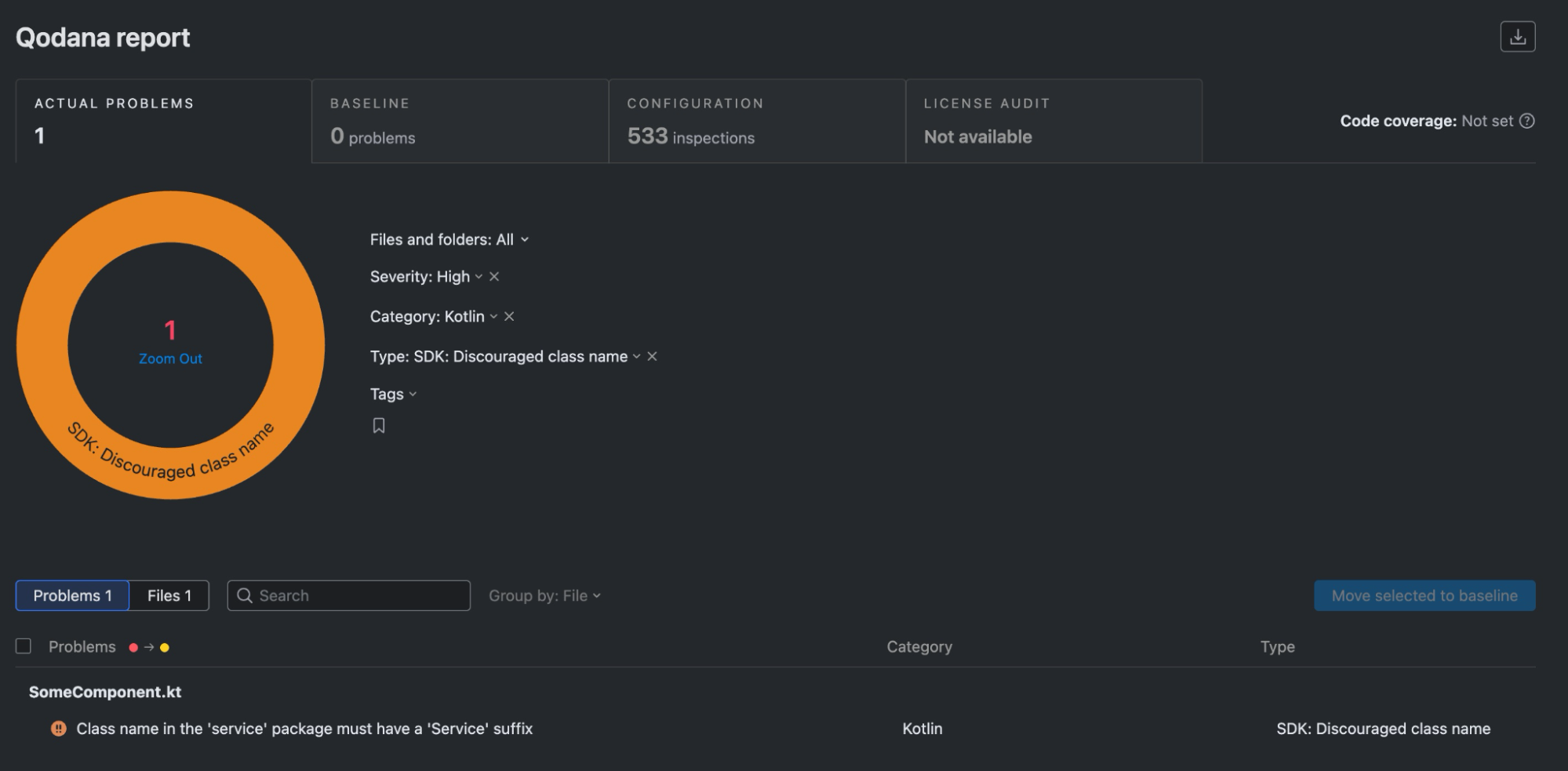
Analysis results: 1 problem detected                                                                                                                                                                                                     
By severity: High - 1                                                                                                                                                                                                                    
-------------------------------------------------------                                                                                                                              
Name                           Severity  Problems count                                                                                                                                                             
-------------------------------------------------------                                                                                                                              
SDK: Discouraged class name    High      1                                                                                                                                                             
-------------------------------------------------------

Open the full report in your browser:

  Do you want to open the latest report [Y/n]Yes

!  Press Ctrl+C to stop serving the report

  Showing Qodana report from http://localhost:8080/... (10s)

Qodana will show that SomeComponent does not conform to the code convention provided by our local inspection in the Qodana plugin.

Tips for future runs

When the Qodana plugin is modified and rebuilt, the Qodana cache needs to be recreated as well. In such cases, use the --clear-cache CLI switch to reload all of the Qodana run’s dependencies.

qodana scan --clear-cache --volume $PWD/.qodana/qodana-code-inspection-0.0.1.jar:/opt/idea/custom-plugins/codeinspection.jar

Plugging Qodana into your IDE

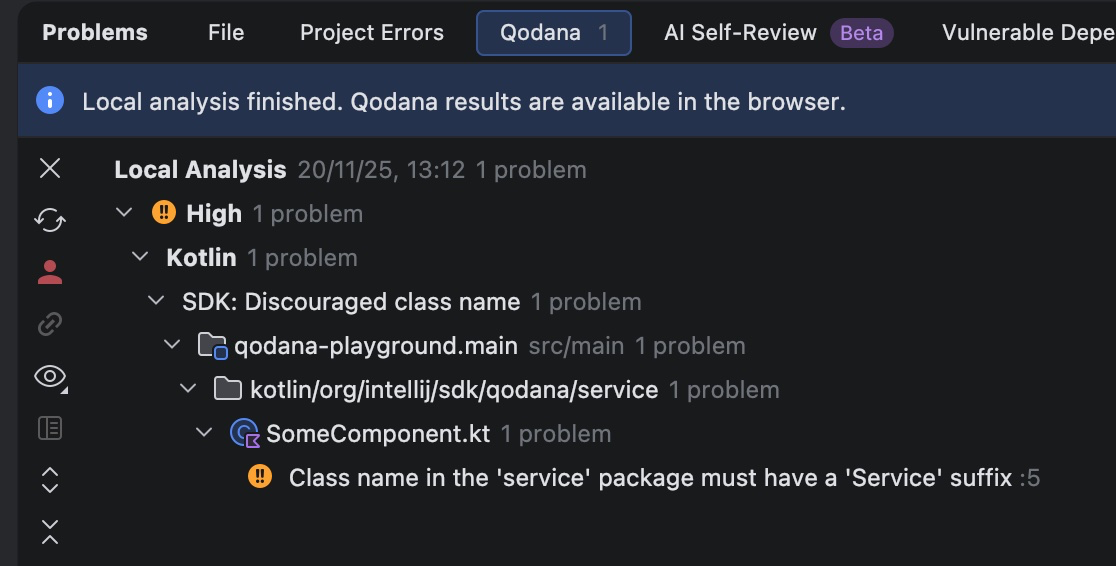
The Qodana plugin can be installed from disk into the IDE. Its code inspection is then automatically enabled and invoked for any Kotlin class in a project. To check that it’s working, revisit the playground project, open the org.intellij.sdk.qodana.service.SomeComponent class, and make sure that the problematic class name is underlined. As a convenience, hovering the mouse on the class name will show the code inspection result along with the problem description. Alternatively, you can open the Problems tool window and find the problem in the list of all problems reported by code inspections. 

The code inspection now behaves like any other inspection provided by the IDE. In Settings | Editor | Inspections | Kotlin, you’ll find the SDK: Discouraged class name inspection, along with the description sourced from the HTML file that we provided before.

Running Qodana within the IDE

With the plugin installed, you can now run Qodana from your IDE as well. In the Problems tool window, go to the Qodana tab, and click the Try Locally button. Qodana will be configured with the qodana.yaml file and run. The Qodana report can be found directly in the tool window. 

Qodana plugins and JetBrains Marketplace

Properly built and tested custom inspection plugins can be published on JetBrains Marketplace, removing the need to serve them from the .qodana directory. Instead, you just need to make sure that the Qodana configuration specifies a public plugin identifier that matches the id element in the plugin descriptor.

version: "1.0"
linter: qodana-jvm-community
plugins: 
  - id: com.github.novotnyr.qodanacodeinspection

Qodana’s scan command is simplified, as the .qodana directory mount is no longer necessary.

qodana scan

Qodana downloads this plugin from JetBrains Marketplace and runs all its inspections, producing both console output and an HTML report that can be shown in a web browser.

Summary

We have created a Qodana plugin with a code inspection that checks for a specific code convention, and we have a handful of ways to run it:

  • As a JAR placed in the .qodana directory and included in the Qodana YAML file.
  • As a reference to the publicly available plugin on JetBrains Marketplace.
  • As a JAR installed in the IDE, where the inspection is applied in a local Qodana run.
  • As a JAR installed in the IDE, where the inspection is included among the integrated code inspections. 

See the IntelliJ SDK Code sample for concise examples of both the Qodana plugin and a playground project

6 Workato Alternatives to Consider in 2026 ✅🚀

AI agents are being shipped to production faster than most integration layers were designed to handle. When workflows start breaking, it is usually not the model that is causing the trouble. It is authentication edge cases, permission boundaries, API limits, or long-running automations that quietly fail.

Platforms like Workato still appear early in evaluations, but teams are increasingly testing alternatives as systems become more API-driven and agent-initiated. By 2026, integrations are expected to behave like core infrastructure rather than background tooling.

This article looks at six Workato alternatives teams are actively using in 2026. The focus is on how these platforms behave in real environments, what they support well, and where trade-offs arise as workflows move beyond simple automations.

Before diving deeper, here is a quick TL;DR of the platforms worth considering.

TL;DR

If you want the quick takeaway, these are the Workato alternatives teams are actively evaluating in 2026 👇

  • Composio: Designed for AI agents running in production, with a large tool ecosystem, runtime execution, on-prem deployment, and MCP-native support.
  • Tray.ai: A good fit for complex, predefined enterprise workflows that need deep API orchestration.
  • Zapier: Optimized for quick, lightweight automations across common SaaS tools.
  • Make.com: Best for visually modeling complex, predefined workflows with branching, loops, and data transformation, especially for ops and business teams.
  • n8n: Ideal for teams that want full control through open-source, self-hosted automation with custom logic and deep API access.

Why a Workato Alternative Makes Sense in 2026

Integration platforms now sit directly on the execution path of modern systems. AI agents trigger actions across SaaS tools, internal services, and customer-facing workflows. Under real usage, issues around authentication, permissions, API limits, and long-running processes surface quickly.

This reality has pushed teams to look more closely at how integration tools behave beyond initial setup. Attention has shifted toward failure handling, state management, and visibility once workflows are live. These factors often determine whether a platform supports production workloads or becomes a source of operational friction.

In 2026, expectations are clear. Teams evaluating alternatives in the Workato category prioritize predictable behavior, operational control, and safe execution for agent-initiated actions over surface-level features or polished builders.

Here are the six Workato alternatives teams are actively using in 2026, along with where each one tends to fit best.

Comparison Table

Capability (vs Workato) Composio Tray.ai Zapier Make.com n8n
Built for AI agents Native: designed for agent tool use and action execution No: oriented to human built workflows Partial: can be used by agents through Zaps, not agent native No: scenario automation, not agent focused Partial: can power agent tools, but you assemble the patterns
Developer friendly Native: API and SDK centric Partial: strong platform, heavier enterprise setup Partial: easy to start, limited deep customization Partial: flexible builder, some developer hooks Native: code friendly, extendable nodes, self hostable
Runtime action or tool selection Native: pick tools dynamically at runtime No: mostly pre defined workflow paths No: action set is fixed at design time No: module path is fixed at design time Partial: possible with branching, expressions, custom logic
Managed OAuth plus automatic token refresh Native: handles OAuth and refresh as part of connectors Native: OAuth supported, refresh handled in connectors Native: OAuth apps can auto refresh when configured Native: connections handle OAuth and refresh when configured Partial: usually supported, can vary by node and setup
Safe agent initiated actions Native: guardrails, scoped actions, safer execution patterns No: not built around agent safety controls No: limited agent specific approvals or guardrails No: limited agent specific approvals or guardrails Partial: possible with approvals and checks you build
Long running workflows Native: built to support longer executions and retries Native: supports long running enterprise workflows Partial: good for delays and scheduling, not long compute runs Partial: supports scheduling, but scenario run time is limited Native self hosted: configurable timeouts, Partial cloud
API first execution Native: designed to be called and controlled via API Partial: APIs exist, platform first No: primarily UI driven automation Partial: some API and webhook driven patterns Partial: strong webhooks and APIs, depends how you deploy
Production reliability for agents Native: built for agent execution in production settings Partial: strong reliability, not agent specific No: best for business automation, not agent runtimes No: best for business automation, not agent runtimes Partial: can be reliable, depends on hosting and ops
Self hosting Self-hosting an =d private VPC No: SaaS only No: SaaS only No: SaaS only Native: first class self hosting option

Workato Alternatives Explained

1. Composio

Composio is a developer-first platform that connects AI agents with 500+ apps, APIs, and workflows. It is built for teams deploying agents into real production environments, where integrations need to behave predictably and survive ongoing API changes rather than just work in controlled demos.

The platform is structured around agent-initiated actions instead of static automation flows. Common integration pain points, such as authentication, permission scoping, retries, and rate limits, are managed centrally, reducing the operational overhead that typically slows teams down as systems scale.

Composio emphasizes consistency and control at the execution layer. Tools are exposed with clear schemas and stable behavior, helping agents remain reliable across long-running workflows and high-volume use cases without constant manual intervention.

Features

  • 500+ agent-ready integrations across SaaS and internal systems
  • Centralized handling of OAuth, token refresh, retries, and API limits
  • Native Model Context Protocol support with managed servers
  • Python and TypeScript SDKs with CLI tooling
  • Works with major agent frameworks and LLM providers
  • Execution visibility and control for agent-triggered actions

Why is Composio a strong Workato alternative

Composio is designed for agent-driven execution where actions are selected at runtime rather than defined as static workflows. This model fits modern AI systems that need to interact with many external tools while maintaining consistent behavior around permissions, retries, and API limits.

By centralizing integration logic and exposing tools through stable, structured interfaces, Composio reduces operational overhead as systems scale. Teams can focus on agent behavior and decision-making while the platform handles execution details reliably across production environments.

Best for

Teams building AI agents that must operate across multiple services in production, especially when reliability and developer control matter more than visual workflow builders.

Benefits

  • Faster production readiness for agent-based systems
  • Reduced integration maintenance and breakage
  • More predictable behavior under real-world load
  • Cleaner separation between agent logic and tooling
  • Better handling of auth and API edge cases

2. Tray (Tray.ai)

Tray.ai is built for teams that need to orchestrate complex, API-heavy workflows across large SaaS environments. It is commonly used when automations span many systems and require detailed control over branching, transformations, and execution flow.

The platform is optimized for structured automation rather than agent-native execution. Workflows are typically defined upfront and refined over time, which works well for predictable processes but can introduce friction for highly dynamic, agent-driven use cases.

Features

  • Visual workflow builder with advanced branching and conditional logic
  • Deep API connectors with support for custom requests
  • Data mapping and transformation across steps
  • Built-in retries, error handling, and execution controls
  • Enterprise governance, access control, and security features

Why Tray is a viable alternative

Tray offers significantly more flexibility than basic iPaaS tools as workflows become more complex. Its strength lies in handling detailed API interactions and multi-step orchestration without requiring teams to build and maintain custom infrastructure.

Pros

  • Strong support for complex and long-running workflows
  • Fine-grained control over logic and execution
  • Well-suited for enterprise-scale automation
  • Reduces reliance on custom orchestration code

Cons

  • Less suited for highly dynamic or agent-driven execution
  • Setup and maintenance can be heavier than simpler tools
  • Visual workflows can become hard to manage at a large scale

3. Zapier

Zapier is widely used for connecting everyday SaaS tools through simple, event-driven automations. It is optimized for speed and accessibility, allowing teams to set up workflows quickly without needing deep technical knowledge or custom infrastructure.

The platform works best when workflows are short, predictable, and built around common triggers and actions. While it has added more advanced features over time, its core strength remains ease of use rather than handling complex or highly dynamic execution patterns.

Features

  • Thousands of prebuilt app integrations
  • Trigger-and-action-based workflow builder
  • Basic branching and filtering logic
  • Built-in scheduling and webhook support
  • Fast setup with minimal configuration

Why Zapier is a viable alternative

Zapier lowers the barrier to automation and remains a practical choice for teams that need to move quickly. For straightforward integrations and internal workflows, it often delivers results faster than heavier iPaaS platforms.

Pros

  • Extremely easy to use and quick to deploy
  • Broad integration coverage across SaaS tools
  • Minimal operational overhead
  • Accessible to non-technical teams

Cons

  • Limited support for complex or long-running workflows
  • Not well suited for agent-driven or API-heavy execution
  • Can become expensive at scale
  • Limited control over execution details

4. n8n

n8n is an open-source, developer-friendly automation platform that gives teams full control over how workflows are built, executed, and hosted. Unlike fully managed iPaaS tools, n8n can be self-hosted, making it attractive for teams that want ownership over infrastructure, data, and execution behavior.

n8n workflows are built using a node-based visual editor, but the platform is fundamentally code-capable. Teams can inject custom JavaScript logic, call arbitrary APIs, and design workflows that closely mirror real system behavior. This makes n8n flexible enough for non-standard integrations while still offering a visual layer for orchestration.

While n8n is increasingly used alongside AI systems, it is not agent-native by default. Agent-driven execution, retries, permission control, and long-running reliability must be explicitly designed and maintained by the team.

Features

  • Open-source core with optional managed hosting
  • Visual node-based workflow builder
  • Custom code steps with full JavaScript support
  • Native HTTP, webhook, and API integration nodes
  • Self-hosting support for security and compliance needs
  • Extensible via custom nodes and plugins

Why n8n is a viable alternative

n8n appeals to teams that want flexibility without vendor lock-in. By owning the execution environment, teams can tailor workflows to exact requirements, integrate deeply with internal systems, and adapt quickly as APIs or business logic change.

For organizations with engineering resources, n8n provides a powerful foundation for building bespoke automation layers that align closely with internal architecture.

Pros

  • Full control over execution and infrastructure
  • Open-source and highly extensible
  • Strong fit for custom and internal integrations
  • Suitable for self-hosted and regulated environments

Cons

  • Operational responsibility sits with the team
  • Requires engineering effort to maintain reliability
  • Not designed for agent-native, runtime action selection
  • Auth handling, retries, and governance must be built manually

5. Make.com

Make.com focuses on visual workflow orchestration for teams that need more flexibility than basic trigger-action tools, without moving fully into code-first systems. Workflows, called scenarios, are built using a drag-and-drop interface that supports branching, looping, data transformation, and conditional logic.

Make.com sits between lightweight automation tools and enterprise iPaaS platforms. It is often evaluated when teams want to model moderately complex processes across SaaS tools, internal systems, and APIs, while keeping workflows understandable to non-engineers.

The platform assumes workflows are largely defined upfront. While it supports HTTP modules and custom API calls, execution remains scenario-driven rather than agent-selected at runtime.

Features

  • Visual, drag-and-drop scenario builder with branching and loops
  • Broad SaaS integration library with custom HTTP/API modules
  • Data mapping, filtering, and transformation tools
  • Scheduling, webhooks, and event-based triggers
  • Execution history and basic error handling controls

Why Make.com is a viable alternative

Make.com offers significantly more control than simple automation tools while remaining accessible to operations and business teams. It allows complex logic to be expressed visually, which makes it easier to reason about workflows that span multiple systems without introducing full custom infrastructure.

For teams that want flexibility but still value visual clarity and faster iteration, Make.com can serve as a practical middle layer between no-code tools and developer-heavy platforms.

Pros

  • Strong visual modeling for complex workflows
  • More flexible logic than basic trigger-action tools
  • Good balance between power and usability
  • Suitable for cross-functional teams

Cons

  • Workflows must be largely predefined
  • Not designed for dynamic, agent-initiated execution
  • Limited control over deep API governance and permission boundaries
  • Debugging becomes harder as scenarios grow large and interconnected

Comparison Table

Capability (vs Workato) Composio Tray.ai Zapier Make.com n8n
Built for AI agents Yes ⚠️ ⚠️
Developer friendly Yes No No No Yes
Runtime action/tool selection
Managed OAuth & token refresh automatically ⚠️ ⚠️ ⚠️
Safe agent-initiated actions ⚠️
Long-running workflows ⚠️ ⚠️
API-first execution ⚠️ ⚠️ ⚠️
Production reliability for agents ⚠️ ⚠️
  • ✅ Native and well-supported
  • ⚠️ Possible but not core
  • ❌ Not a primary focus

Which One Should You Choose?

The right platform depends on what your system needs to optimize for. A practical way to think about the decision in 2026 is to map it to how your workflows actually behave.

  • Speed to production: Choose an agent-first platform with deep tool coverage, native agent protocol support, and solid SDKs.
  • Governance and compliance: Prioritize platforms that offer audit logs, policy controls, role-based access, and strong security guarantees.
  • Permission control: Look for fine-grained scopes, runtime authorization, and safe handling of agent-initiated actions.
  • Embedded integrations: Pick a platform designed for in-app, customer-facing integration flows with customizable UX.
  • Rapid experimentation: Visual builders and fast setup help validate workflows quickly.
  • Long-term control: Developer-centric or API-first platforms tend to scale better as systems become more complex.

A common pattern is to start with tools optimized for speed and iteration, then move to an agent-focused integration layer once workflows become production-critical.

Closing

Choosing an integration platform in 2026 comes down to how well it supports real execution, not how polished it looks in setup. As AI agents take on more responsibility inside products and internal systems, integrations need to behave predictably under load, handle edge cases cleanly, and surface failures clearly.

Each platform covered here optimizes for a different set of constraints. Composio focuses on agent-driven execution; Tray and Zapier support structured automation at different levels of complexity. Make.com excels at visually modeling complex, predefined workflows, and n8n appeals to teams that want open-source flexibility and infrastructure ownership. The right choice depends less on feature breadth and more on how closely a platform matches the way your systems actually operate in production.

Teams that evaluate these tools through the lens of reliability, control, and long-term maintenance tend to make better decisions than those optimizing for speed alone. In 2026, integration layers are no longer optional infrastructure. They are part of how systems execute.