Will AI Kill Open Source?

Will AI Kill Open Source?

Will AI kill Open Source? Is it already happening? Or is this just another clickbait title? Well, let’s see. First of all, I am writing this by hand without the help of any artificial intelligence. There is only human intelligence involved here. I will leave it up to you to judge the quality of it, but at least it is real.

I don’t think AI will kill Open Source. It is not about it not being capable of it. I think it is more that we are not going to allow it to happen. Why should we suddenly abandon all practices of reuse and use of proven implementations and libraries over reinventing the wheel ourselves? Why would we let AI rewrite algorithms and functionality that are already implemented in open source projects, verified, and proven to work? That’s where human intelligence comes in. Abandoning all sound practices of software engineering just because we suddenly have a new developer-kid-on-the-block that can vomit out code faster than any human in history? I don’t think so.

After all, human intelligence is human

After all, human intelligence is human. We know that we sometimes make mistakes. AI doesn’t. AI is never wrong unless a human points out that it is. How does this relate to open source again? What if we didn’t have to point out to the AI that it was wrong? What if we got the AI to use components and building blocks from open source libraries and APIs that are verified to be correct? Isn’t that the strength of open source? That multiple human brains have been involved in creating it in collaboration. So, in order to feed the AI with secure, stable, correct building blocks, we need open source.

If there is one thing AI is good at, it is following specifications. Maybe implementations can be generated by AI if the specifications are well-defined enough. Especially if the specifications come with a comprehensive test suite to verify that an implementation implements it correctly. Wouldn’t it be nice if we had a set of high-quality, widely adopted, interoperable specifications with associated test suites?

Luckily, we do! And that is what Jakarta EE is all about. I will elaborate more on this in future posts. I see that this post is starting to get a little long, so it may be that this will be the first in a series of posts on this topic.

Ivar Grimstad


A Designer’s Guide To Eco-Friendly Interfaces

I’ve spent over two decades in the trenches of user experience design. I remember the transition from table-based layouts to CSS, the pivot to responsive design when the iPhone launched, and the rise of the “attention economy.” But as we navigate 2026, the industry is facing its most significant shift yet. We are moving past the era of “design at any cost” into the era of Sustainable UX.

It’s not something most designers think about, including myself, until I was prompted by hearing about this as a concept. For years, we have treated the internet as an ethereal, weightless cloud. We have assumed that digital products were “green” simply because they weren’t printed on paper. I used to think that too, and before the concept of climate change emerged, it was more about saving trees.

We were wrong. The cloud is a physical infrastructure, a sprawling network of data centres, undersea cables, and cooling systems that hum 24/7. While AI-focused data centers match the power consumption of massive aluminum smelters, their high geographic density creates an even more intense and localised environmental strain.

As UX designers, we are the architects of this energy consumption. Every high-resolution hero image, every auto-playing background video, and every complex JavaScript animation we approve is a direct instruction to a processor to consume power. If we want to build a future that lasts, we must stop designing for “wow” and start designing for efficiency.

Dark Mode

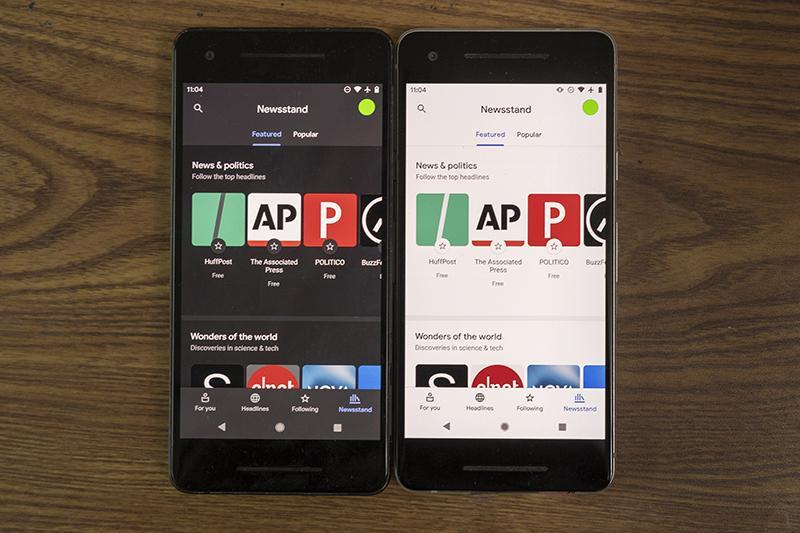
In the early 2000s, white backgrounds were the standard because they mimicked the familiarity of paper. However, the hardware has evolved, and our design philosophy must follow. The shift from LCD to OLED (Organic Light Emitting Diode) technology has fundamentally changed how colour impacts energy.

The Logic

Unlike traditional LCD screens, which require a backlight that is always on (even when displaying black), OLED screens illuminate each pixel individually. When a pixel is set to true black (#000000), that specific diode is turned completely off. It draws zero power.

By designing interfaces that favour darker palettes, we aren’t just following a trend; we are physically reducing the energy requirement of the user’s device.

The Data

The energy savings are far from negligible. A landmark study by Purdue University in 2021, which has become the gold standard for this discussion, revealed that at 100% brightness, switching from light mode to dark mode can save an average of 39% to 47% of battery power. On a global scale, if every major app defaulted to dark mode, the reduction in grid demand would be astronomical.

The Design Goal

In 2026, Dark Mode should no longer be a secondary “theme” tucked away in a settings menu. We should be designing with a “Dark-First” mentality. This doesn’t mean every site must look like The Matrix, but it does mean prioritising high-contrast dark themes as the default system-preferred state. This extends the hardware lifespan of the device and lowers the carbon footprint of every interaction.

I personally prefer Light-Mode for reading, so it makes sense to have both light and dark mode options available. There are also accessibility considerations with providing both options.

Image And Video Optimisation

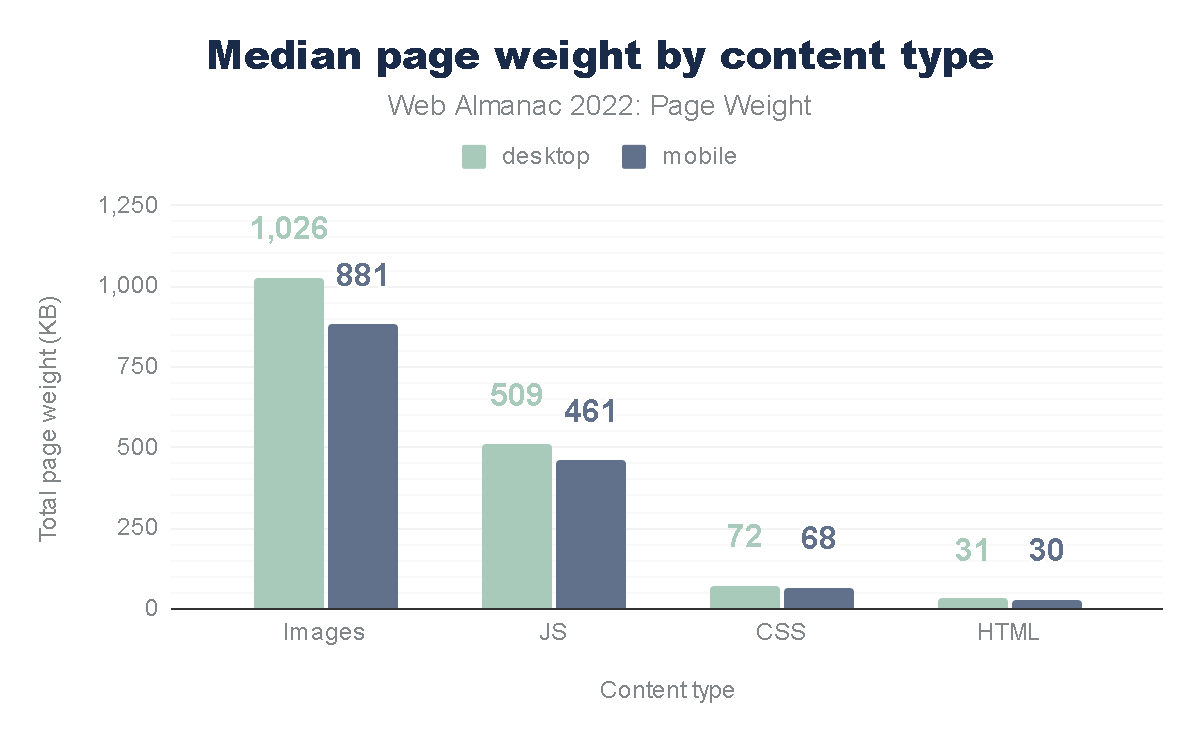
We have become lazy designers. With high-speed 5G and fibre optics, we’ve stopped worrying about file sizes. The average mobile page weight has increased by over 500% in the last decade, largely due to unoptimized visual assets.

The Logic

The “Digital Fat” of a website (those 4MB Unsplash photos and 15MB background videos) is the single largest contributor to page-load energy. Every megabyte transferred from a server to a client requires electricity for the transmission, the server’s processing, and the user’s rendering engine. When we use massive files, we are essentially “burning” energy to show a picture that could have been just as effective at a fraction of the size. Not to mention, you are also providing a better user experience with a page that loads much faster.

The Data

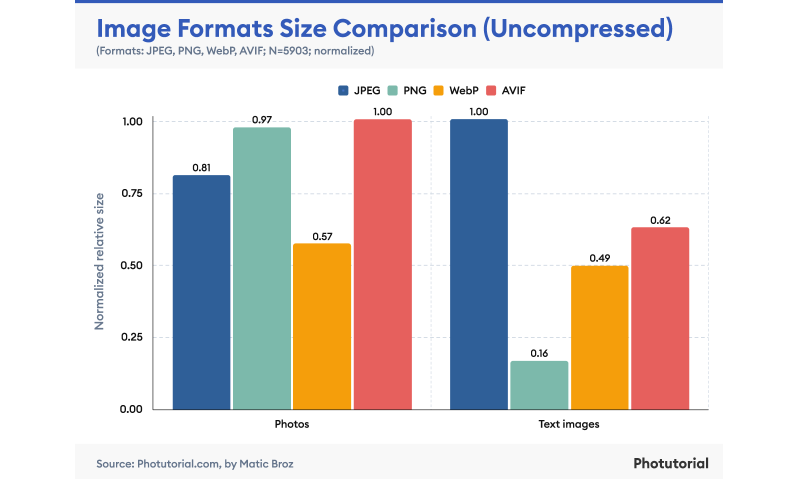
According to the HTTP Archive, images and video consistently account for the lion’s share of a page’s total weight. However, the shift to modern formats like AVIF and WebP can reduce image weight by up to 50% compared to JPEG, without any perceptible loss in quality.

Although these formats are not as familiar to me as JPG and PNG, I am definitely looking forward to using them to reduce page size.

The Design Goal

I recently led a redesign for a cybersecurity platform. By implementing a “Before and After” audit, we discovered that their homepage was loading 5.5MB of data. By replacing high-res photography with SVG (Scalable Vector Graphics) art and using clever CSS gradients instead of image assets, we dropped the load to 1.2MB. That is a 78% reduction in energy load! As a designer, your first question should always be:

“Do I need a photo for this, or can I achieve the same emotional resonance with code?”

Intentional Motion: Cutting “Loud” Animations

We live in an era of “scroll-jacking” and complex 3D Parallax effects. While these might win awards on Awwwards.com, they are often ecological disasters.

The Logic

Animation is not free. To render a complex animation, the device’s GPU (Graphics Processing Unit) must work at high capacity. This increases the CPU temperature, triggers cooling fans (in laptops), and drains battery rapidly. “Loud” animations that run constantly in the background or trigger massive re-paints of the browser are the energy equivalent of leaving your car idling in the driveway.

The Data

Google’s Material Design guidelines emphasize “Meaningful Motion.” They argue that animation should be used only to orient the user or provide feedback. And using WebP instead of JPEG can save 25-50% of data on a page.

The Design Goal

We must adopt Meaningful Motion. If an animation doesn’t help a user complete a task or understand a hierarchy, it is a waste. We should favour CSS transitions over heavy JavaScript libraries like GSAP or Lottie where possible, as CSS is hardware-accelerated and far more efficient for the browser to calculate.

As a UX designer, I can’t argue this approach. This not only helps reduce data waste but also improves UX for our users.

Setting A “Data Budget” For Every Project

In my 20+ years of UX, the most successful projects have generally been the ones with the tightest constraints.

Just as a project has a financial budget, it should also have a carbon and data budget.

The Logic

A Data Budget is a hard cap on the total size of a page (e.g., “This landing page cannot exceed 1MB”). This forces the design team to make difficult, intentional choices. If you want to add a new tracking script or a fancy font weight, you have to “pay” for it by optimising or removing something else. This prevents “feature creep” from turning into “carbon creep.”

The Data

The Sustainable Web Design model, developed by pioneers like Wholegrain Digital, provides a formula to calculate the CO2 per page view. The average website produces about 0.5 grams of CO2 per view. For a site with 1 million monthly views, that’s 6 metric tons of CO2 a year, equivalent to driving a car 15,000 miles.

The Design Goal

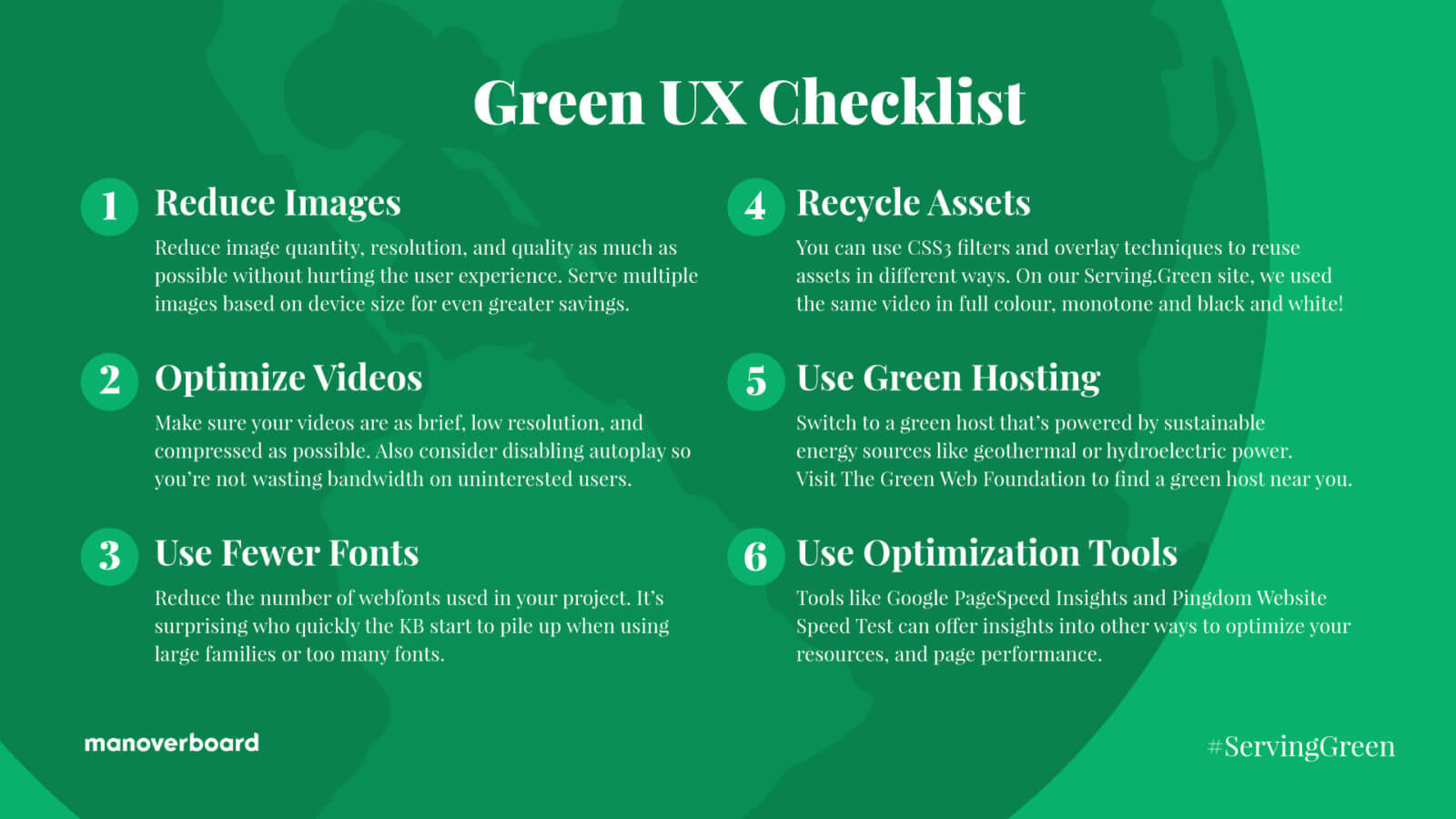
The Sustainable UX Checklist

  • Reduce Images
    Question the necessity of every visual and use the smallest resolution and most efficient file formats (like AVIF) to minimize data transfer.
  • Optimise Video
    Eliminate auto-playing media and prioritise highly compressed, short loops to ensure energy is only spent on content the user intends to view.
  • Limit Fonts
    Use a maximum of two web font weights or stick to classic system fonts to remove unnecessary server requests and rendering bloat.
  • Recycle Assets
    Repurpose a single image or video multiple times using CSS filters and overlays to create visual variety without increasing the total page weight.
  • Choose Green Hosting
    Host your digital products on servers verified by The Green Web Foundation to ensure they are powered by renewable energy sources.
  • Minimize Data Distance
    Select server locations geographically close to your primary audience to reduce the energy required for data to travel through physical infrastructure.

The Business Case For Eco-friendly Design

Some might argue that “Green UX” sounds like a compromise on quality. On the contrary, it is a competitive advantage. Sustainable design is performance design.

When you reduce page weight, your site loads faster. When your site loads faster, your Core Web Vitals improve. When your Core Web Vitals improve, your SEO ranking goes up. Furthermore, users on older devices or slower data plans (especially in emerging markets) can actually access your product. This is the definition of “Inclusive Design.”

By cutting the “digital fat,” we create a leaner, faster, and more accessible web. We are moving away from the “disposable design” of the 2010s toward a more permanent, respectful digital architecture.

Conclusion: The Future Of “Clean” Design

In my two decades of design, I’ve seen many trends come and go. Skeuomorphism, Flat Design, Neumorphism — they were all aesthetic choices. But sustainable UX isn’t a trend; it’s now a necessity. We are the first generation of designers who have to reckon with the physical consequences of our digital work.

Sustainable UX is a “win-win-win.” It’s better for the planet because it reduces energy consumption. It’s better for the user because it results in faster, more responsive interfaces. And it’s better for the business because it lowers hosting costs AND improves conversion rates.

The era of “unlimited pixels” is over. In 2026, the most sophisticated design is the one that leaves the smallest footprint. We are no longer just designers; we are the guardians of the user’s battery, their data plan, and ultimately, the environment.

The Call To Action

I challenge you to audit just one page of your current project today. Use a tool like the Website Carbon Calculator to see its impact. Then, look for the “invisible waste.” Can that image be an SVG? Can that video be a static hero? Can that “loud” animation be silenced?

Start small. The most elegant solution is often the one with the fewest bytes.

What Skills Will You Learn in a QA Software Tester Course in 2026?

Quality Assurance (QA) software tester courses in 2026 teach practical skills required to test modern applications, identify defects early, automate repetitive testing tasks, and ensure software reliability. These courses focus on manual testing, automation testing, API testing, AI-assisted testing, real-world project experience, and industry tools used in real IT environments. By learning these skills, students can prepare for roles such as QA Tester, Automation Tester, Software Test Engineer, and QA Analyst.
Software testing has evolved significantly. Today’s QA professionals are not just testers; they are quality engineers who work closely with developers, DevOps teams, and business stakeholders to ensure software works correctly, securely, and efficiently.
Why QA Software Testing Skills Are Critical in 2026
Software is everywhere – mobile apps, web platforms, cloud systems, AI tools, and enterprise applications. Every application must work correctly, securely, and smoothly. QA testers ensure this happens.
Here’s why QA skills are in high demand:
Companies release software faster using Agile and DevOps

Automation testing reduces manual effort

AI-powered applications require specialized testing

Businesses need high-quality, bug-free applications

Cybersecurity and performance testing are essential

According to industry trends, software testing remains one of the most accessible entry points into IT, especially for beginners and career switchers.
Core Skills You Will Learn in a QA Software Tester Course
A comprehensive QA software tester course focuses on both technical and practical skills used in real-world software testing environments.

  1. Software Testing Fundamentals
    Before learning advanced tools, students first understand the foundation of software testing.
    Key concepts include:
    What is software testing and why it is important

Software Development Life Cycle (SDLC)

Software Testing Life Cycle (STLC)

Testing levels: Unit, Integration, System, and User Acceptance Testing

Testing types: Functional and Non-functional testing

Bug lifecycle and defect tracking

These concepts help students understand where testing fits in the software development process.
Example:
If a login button doesn’t work, a tester identifies the issue, reports it, and verifies the fix.

  1. Manual Testing Skills
    Manual testing is the starting point for every QA career. It helps testers understand application behavior and user workflows.
    Skills learned include:
    Writing test cases

Creating test scenarios

Executing test cases

Identifying bugs

Reporting defects clearly

Performing functional testing

Performing regression testing

Example:
Testing an e-commerce website checkout process manually to ensure payments work correctly.
Manual testing builds strong analytical thinking and attention to detail.

  1. Automation Testing Skills
    Automation testing is one of the most valuable skills in 2026. It helps test applications faster and more efficiently.
    Students learn:
    Selenium WebDriver

Automation frameworks

Writing automation scripts

Test execution automation

Automation reporting

Automation testing reduces repetitive work and increases testing efficiency.
Example:
Automatically testing login functionality across different browsers using Selenium.
Automation testers are highly in demand and earn higher salaries compared to manual testers.

  1. Programming Basics for Testers
    QA testers learn basic programming to create automation scripts and understand application logic.
    Common programming languages include:
    Java

Python

JavaScript

Students learn:
Variables and data types

Conditional statements

Loops

Functions

Object-oriented concepts

Programming helps testers automate tests and collaborate with developers.
Example:
Writing a script that automatically verifies website functionality.

  1. API Testing Skills
    Modern applications use APIs (Application Programming Interfaces). API testing ensures backend systems work correctly.
    Students learn:
    What APIs are

REST API testing

Using tools like Postman

Sending requests and validating responses

Testing data flow between systems

Example:
Testing whether a login API returns correct user information.
API testing is critical because many systems depend on backend communication.

  1. Test Automation Frameworks
    Automation frameworks organize automation scripts efficiently.
    Students learn frameworks such as:
    Data-driven framework

Keyword-driven framework

Hybrid framework

Page Object Model (POM)

These frameworks improve test maintainability and scalability.
Example:
Using a framework to test multiple user login scenarios automatically.

  1. Bug Tracking and Test Management Tools
    QA testers use tools to track bugs and manage test cases.
    Common tools include:
    Jira

TestRail

Bugzilla

Azure DevOps

Students learn:
Reporting bugs

Tracking bug status

Writing clear defect reports

Managing test execution

Example:
Reporting a bug when a mobile app crashes during login.
These tools are essential in real-world projects.

  1. Agile and Scrum Methodology
    Most companies use Agile methodology for software development. QA testers work in Agile teams.
    Students learn:
    Agile principles

Scrum framework

Sprint cycles

Daily standup meetings

Sprint planning and retrospective

Example:
Testing new features released in every sprint.
Understanding Agile helps testers work efficiently in modern teams.

  1. Web Application Testing Skills
    Web applications are widely used across industries.
    Students learn to test:
    Login systems

Forms

Navigation

User interface

Browser compatibility

Example:
Testing a website on Chrome, Firefox, and Edge browsers.
This ensures applications work correctly across different environments.

  1. Mobile Application Testing Skills
    Mobile app testing is essential because millions of users use mobile apps daily.
    Students learn:
    Android testing

Mobile test scenarios

Device compatibility testing

App functionality testing

Example:
Testing a banking app on different mobile devices.
Mobile testing skills increase job opportunities.

  1. Database Testing Skills
    Applications store data in databases. QA testers verify data accuracy.
    Students learn:
    SQL basics

Writing SQL queries

Validating database records

Checking data integrity

Example:
Verifying user registration data stored correctly in the database.
Database testing ensures backend accuracy.

  1. Performance Testing Basics
    Performance testing ensures applications work well under heavy load.
    Students learn:
    Performance testing concepts

Load testing basics

Response time analysis

Example:
Testing whether a website handles 1,000 users simultaneously.
This skill helps improve application reliability.

  1. AI and Modern Testing Skills in 2026
    AI is transforming software testing. Modern QA courses now include AI-related testing skills.
    Students learn:
    AI-assisted testing tools

Smart test automation

Test case generation using AI

Self-healing automation scripts

AI reduces manual effort and improves testing accuracy.
Example:
Using AI tools to identify test scenarios automatically.
AI testing skills are becoming highly valuable.

  1. Real-World Project Experience
    One of the most important parts of QA training is working on real projects.
    Students learn:
    Testing real applications

Writing real test cases

Automation project implementation

Bug reporting in real environments

Example:
Testing an actual e-commerce or banking application.
This experience prepares students for real job roles.

  1. Communication and Documentation Skills
    QA testers communicate with developers, managers, and teams.
    Students learn:
    Writing clear test cases

Writing bug reports

Communication skills

Reporting testing results

Good communication improves teamwork and efficiency.

  1. CI/CD and DevOps Testing Basics
    Modern companies use CI/CD pipelines for faster software delivery.
    Students learn:
    Continuous Integration basics

Continuous Testing concepts

Automation integration with CI/CD tools

Example:
Running automation tests automatically during software deployment.
This skill is highly valuable in DevOps environments.
Tools You Will Learn in a QA Software Tester Course
Students typically learn industry-standard tools such as:
Selenium

Postman

Jira

TestNG

Jenkins

Git

SQL tools

Browser Developer Tools

These tools are widely used in real IT companies.
Job Roles You Can Get After Learning QA Skills
After completing a QA software testing course, students can apply for roles such as:
QA Tester

Software Test Engineer

Automation Tester

QA Analyst

Test Automation Engineer

Quality Engineer

These roles exist in almost every IT company.
Salary Expectations for QA Testers in 2026
QA tester salaries depend on experience and skills.
Typical salary ranges:
Entry-level QA Tester:
$60,000 to $80,000 per year
Automation Tester:
$80,000 to $110,000 per year
Senior QA Engineer:
$110,000 to $140,000 per year
Automation and AI testing skills increase earning potential significantly.
Who Should Learn QA Software Testing?
QA software testing is suitable for:
Beginners with no IT experience

Career switchers

Fresh graduates

Manual testers upgrading to automation

IT professionals switching roles

It is one of the easiest ways to enter the IT industry.
How QA Skills Prepare You for Real Jobs
QA courses prepare students through:
Hands-on practice

Real-world projects

Industry tools training

Automation experience

Interview preparation

These skills help students become job-ready.
Future Scope of QA Software Testing in 2026 and Beyond
Software testing continues to grow because software continues to expand.
Future trends include:
AI-powered testing

Automation-first testing

Cloud testing

Security testing integration

DevOps testing integration

QA professionals will remain essential in software development.
Conclusion
A Quality assurance tester course in 2026 teaches essential skills such as manual testing, automation testing, API testing, programming basics, database testing, Agile methodology, and real-world project experience. These skills prepare students for high-demand QA roles across industries. With the rise of automation, AI, and cloud applications, QA testing remains one of the most stable and accessible IT career paths.
By learning modern testing tools, automation frameworks, and industry practices, students can build strong careers as QA testers and contribute to delivering high-quality software used by millions of users worldwide.

Quarkus vs Spring: Performance, Developer Experience, and Production Trade-offs : Part 1

Since the advent of Spring Boot, it has been the De-Facto Backend Framework for Java Web Developers, thanks to its Developer friendly ecosystem, Autoconfiguration Magic and ready to code setup (Spring starters).

But, This is the age of cloud. Several other frameworks have mushroomed up, such as Micronaut and Quarkus.

We will talk about Quarkus, how is it different from Spring Boot, how cloud has made companies to rethink their strategy of choosing the framework, and what is Spring’s answer to Quarkus.

For me, Quarkus was difficult. Despite Quarkus having similar ready to code setup, similar style of writing code, there was far less developer support and exhaustive documentation when compared to that of Spring boot’s detailed documentation and other online forums.

Spring uses reflection heavily for autoconfiguration. It provides amazing developer experience.

Stereotypes, Component Scan, Configuration files declaring beans for classes outside the container using @Bean, Spring Data JPA interfaces, all of this is autoconfigured using reflection. Spring creates proxies at runtime to setup the Spring Container. This results in high usage of RAM and slower application startup.

To relate to this, lets go through a small example. You might have seen BeanCreationException while working with Spring, refer here. This happens when Spring tries to create Application Context at start up. It tries to resolve all the dependencies and create Beans in their respective scopes.

This can help you understand that Spring Beans are created at runtime, when the Application Context initialization is attempted.

Now that we have established that Spring has a high memory footprint, lets understand, why is it a problem.

Organizations have been moving to Microservices architecture because of its Reliability and Scalability. Systems are moving to cloud environments, reducing costs compared to On Premises Infrastructure and plenty of out of the box options for various use cases that these systems may need.

A monolith is divided into multiple microservices based on domain driven design principles. Each microservice has multiple replica instances and each replica gets its own computing and memory resources.

Imagine a system where hundreds, if not thousands of microservices run on cloud, each pod consumes memory and computing resources, the cloud bill increases.

Now imagine an Alternative that is approximately 10x faster on average and uses 1/10th of memory resources, saves a ton of money, the trade off is Developer experience. This is what Quarkus brings to the table.

Here we discussed briefly how Spring works internally, what challenges does it face when integrating with cloud.

In the next part, we will discuss as to how Quarkus solves the cloud challenge and what Spring’s team is doing to mitigate the same.

The Ultimate Guide to AI Agents in 2026: OpenClaw vs. Claude Cowork vs. Claude Code

The era of conversational AI chatbots is officially giving way to the era of agentic AI—systems that don’t just talk to you, but actually do the work for you. If you have been following the rapid developments in early 2026, you already know that Anthropic and the open-source community are releasing tools that are actively disrupting industries.

But with so many new tools hitting the market, the terminology can get confusing. If you are trying to figure out the difference between OpenClaw, Claude Cowork, and Claude Code, you are in the right place.

This comprehensive guide will break down what each tool does, who it is built for, and which one you should integrate into your daily workflow to maximize your productivity.

  1. Claude Code: The Developer’s Powerhouse

Launched as an agentic coding tool, Claude Code is Anthropic’s terminal-native assistant designed specifically for software engineers. Instead of making you copy and paste code snippets from a browser window, Claude Code lives directly in your terminal, IDE, or browser, and has deep access to your entire codebase.

Key Features

Autonomous Engineering: Claude Code doesn’t just suggest code; it reads your repository, plans an approach, writes across multiple files, runs tests, and can even create pull requests.

Claude Code Security: A recently launched (and highly disruptive) feature that scans production codebases to find and patch complex vulnerabilities. It reads code like a human security researcher, tracing data flows rather than just matching known threat patterns.

Legacy Modernization: It is exceptionally proficient at deciphering and modernizing legacy languages like COBOL, automating the grueling analysis phases of enterprise server migrations.

Who is it for? Software developers, security analysts, and DevOps engineers who are comfortable working in a Command Line Interface (CLI) and want an autonomous AI pair programmer.

  1. Claude Cowork: The Desktop Digital Employee

While Claude Code is incredible, terminal interfaces are intimidating for non-developers. Enter Claude Cowork—Anthropic’s answer to “Claude Code for the rest of us.” Released as a desktop application feature (currently for macOS), Cowork operates as a highly capable digital employee.

Key Features

Direct File System Access: You can grant Claude Cowork permission to specific local folders. It runs in a secure, containerized sandbox (using Apple’s Virtualization Framework) to protect your system.

Workflow Automation: Point it at a messy “Downloads” folder and tell it to organize files by type, rename them, and extract data from receipt PDFs into an Excel spreadsheet. It handles the entire multi-step process autonomously.

Progressive Skills: It utilizes Anthropic’s “Agent Skills” to natively interact with office file formats like XLSX, DOCX, and PPTX without needing external software.

Who is it for? Knowledge workers, project managers, and administrators who want the power of an autonomous AI agent without ever having to open a developer terminal. It is currently available for Claude Pro ($20/mo) and Max subscribers.

  1. OpenClaw: The Open-Source “Personal OS”

Formerly known as Clawdbot/Moltbot, OpenClaw is a viral, open-source, “local-first” AI agent created by developer Peter Steinberger. Unlike Anthropic’s official tools, OpenClaw is designed to be an always-on, 24/7 personal assistant that you communicate with via standard messaging apps like Telegram, WhatsApp, or Discord.

Key Features

Conversation-First Interface: You don’t need a complex UI. You just text your agent on WhatsApp to clear your inbox, check you in for a flight, or summarize a project status.

Continuous Memory & Proactivity: Because it runs continuously on your local machine (or a dedicated cloud server/Raspberry Pi), OpenClaw remembers your past interactions, learns your preferences, and can execute scheduled tasks (cron jobs) without being prompted.

Community Skills: It features a massive marketplace (“ClawHub”) of over 3,000 community-built extensions, allowing it to connect to almost any API or service.

Model Agnostic: While it runs beautifully with Claude Code under the hood, you can also run it completely locally on NVIDIA RTX GPUs using open-source models to ensure absolute data privacy.

Who is it for? Tech-savvy tinkerers, automation enthusiasts, and anyone looking to build a highly personalized, deeply integrated “second brain” that acts proactively on their behalf.

Feature Comparison at a Glance

Which AI Agent Should You Choose?

The decision ultimately comes down to your technical comfort level and daily workflows:

If you write code for a living: Claude Code is the undisputed champion. Its ability to navigate complex repositories and autonomously debug makes it a mandatory tool for modern development.

If you handle documents, spreadsheets, and messy files: Claude Cowork is your best bet. It provides enterprise-grade AI automation wrapped in a safe, intuitive, and sandboxed desktop interface.

If you want a 24/7 proactive life assistant: OpenClaw offers unparalleled flexibility. It requires a bit of setup (often via Docker or WSL), but the ability to text an AI on WhatsApp and have it manage your actual desktop calendar and emails is the closest thing we have to Artificial General Intelligence (AGI) today.

80% of ‘AI Is Stupid’ Complaints Are Actually Context Problems

I watched a teammate spend 20 minutes complaining that Copilot “doesn’t understand our codebase.” Then I looked at the repo. No README. No architecture docs. No module descriptions. Just code.

Here’s the uncomfortable truth: most AI code quality problems aren’t AI problems. They’re context problems.

The experiment that changed my mind

I took the same task — “add pagination to the users endpoint” — and tried it two ways:

Round 1: Just the prompt. AI generated something that technically worked but used the wrong ORM pattern, wrong error handling style, and a pagination approach nobody on the team uses.

Round 2: Same prompt, but I added a 40-line AGENTS.md file describing our project conventions: ORM patterns, error handling approach, pagination style, test expectations.

The difference was night and day. Not because the AI got smarter between attempts — the context did.

Why this matters more than model upgrades

Everyone’s waiting for GPT-5 or Claude Next or whatever to “finally get it right.” But I’ve found that well-documented context with a mediocre model outperforms zero context with a frontier model.

Think about it like onboarding a new developer. You wouldn’t drop a senior engineer into your codebase with zero documentation and expect them to match your team’s patterns on day one. Why do we expect that from AI?

What actually works: the AGENTS.md pattern

I keep a simple markdown file at the project root that describes:

# AGENTS.md

## Project Overview
Express API with PostgreSQL, using Knex for queries.

## Conventions
- Error handling: wrap in try/catch, use AppError class
- Pagination: cursor-based, not offset
- Tests: co-located with source, use test factories
- Naming: camelCase for JS, snake_case for DB columns

## Common Gotchas
- Don't use the `users` table directly — go through UserService
- Rate limiting is middleware-level, don't add it per-route

That’s it. 30 lines. Takes maybe an hour to write well.

The key insight: this file is portable. I’ve used variations of it with Cursor, Copilot, and Claude Code. The format changes slightly, but the content — your project’s actual knowledge — stays the same.

The trade-off nobody talks about

I won’t pretend this is free. The setup cost is real — maybe 2-3 days to get your context files right for a large project. And they need maintenance. When your patterns evolve, your AGENTS.md needs to evolve too.

It also doesn’t solve everything. Greenfield projects where you don’t have established patterns yet? AI is still going to hallucinate conventions. And for high-stakes code — auth, payments, data migrations — I still do manual review regardless of how good the context is.

But for the 80% of code that follows established patterns? Context files are the highest-leverage investment I’ve found.

The question I’m still working through

Here’s what I haven’t figured out: how do you keep context files in sync with a fast-moving codebase?

I’ve tried pre-commit hooks that validate AGENTS.md against actual code patterns. It sort of works. But I’m curious — has anyone found a better approach? Or do you just accept some drift and do periodic manual updates?

P.S. I’ve been packaging the workflow patterns I use daily into a toolkit — project templates, AGENTS.md examples, verification scripts. If you’re interested, I share more at updatewave.gumroad.com.

AI Prompts

Rovo

  • I’m ________ and ________ happened.
  • Search the whole company, restricted to _____ Jira project, _____ confluence space, and ______ github repo.
  • Answer my question: ________
  • Reply very concisely and abruptly, with no background information or definitions <— this doesn’t fully work with Rovo!

Copilot

You’re an expert __________ with comprehensive knowledge of ________.
Help me _
_____.
I already know _
_____.
I want you to _
_______.

  • I need you to reason step by step and explain your thought process internally before giving the final answer.
  • Think through trade-offs before deciding.
  • Perform internal reasoning before answering.
  • Provide the final output only after complete reasoning.

Gemini

As of 22nd January 2026, ____________?

  • Answer Yes or No, with sources.
  • Do not rely on memory, verify against current official docs.
  • If you are not sure, say ‘unknown’ instead of guessing.
  • State whether this comes from official docs, community reports, or inference.

[critical thinking]

  • I need you to reason step by step and explain your thought process internally before giving the final answer.
  • Think through trade-offs before deciding.
  • Perform internal reasoning before answering.
  • Provide the final output only after complete reasoning.
  • Do not rely on memory, verify against actual content.
  • If you are not sure, say ‘unknown’ instead of guessing.
  • State whether this comes from official docs, community reports, or inference.

C# Extension Members

Overview: What are extension members?

Extension members allow you to define additional members for existing types without modifying their definitions. With them, you can add functionality to existing types you don’t have access to or don’t control, for example, built-in types or types from an API or commercial library. 

Extension methods have been a feature of C# since version 3.0 in 2007, so the concept has been around for some time in .NET. However, traditional extension methods were just that – methods only. Extensions could not be created for properties, fields, or operators. You couldn’t create static extensions and they couldn’t easily participate in interfaces. However, new syntax in C# 14 allows both instance and static properties and methods, as well as operators.

Classic extension methods

Let’s quickly review what a classic extension method looks like. We’ll extend the DateTime structure to check the first Monday of any quarter. You might see code like this in manufacturing scenarios where production runs need to start on a specific day, such as the first Monday of a quarter. The code looks something like this:

    public static DateTime FirstMondayOfQuarter(this DateTime dateTime, int quarter)
    {
        if (quarter is < 1 or > 4)
            throw new ArgumentOutOfRangeException(nameof(quarter), 
                "Quarter must be between 1 and 4.");

        var year = dateTime.Year;
        var firstMonth = (quarter - 1) * 3 + 1;

        var date = new DateTime(year, firstMonth, 1);

        var offset = ((int)DayOfWeek.Monday - (int)date.DayOfWeek + 7) % 7;
        return date.AddDays(offset);
    }

Notice that to make the extension method you must make the class and method static, and use the this keyword to indicate which type to extend. While the definition uses the static keyword, it’s not a static member.

Code to use this extension method looks like the following:

DateTime myDate = DateTime.Now;

for (var i = 1; i <= 4; i++)
{
    Console.WriteLine(myDate.FirstMondayOfQuarter(i).ToShortDateString());
}

Because it’s not a static method, you can’t just call DateTime.FirstMondayOfQuarter(2). Calling DateTime.Now (or any DateTime member) creates a new instance of a DateTime.

Extension members in C# 14

Use the new extension block inside a static class to define extensions. The extension block accepts the receiver type (the type you want to make an extension for), and optionally, a receiver parameter name for instance members. Adding the parameter name is recommended for clarity. Here’s the syntax:

extension(Type) { … }    // plain extension block

extension(Type parameterName) { … }   // extension block with a parameter name

If we want to convert a classic extension method to a new extension member, we can use Rider. Rider has a handy intention action for this, just press Alt + Enter and choose Move to extension block:

Animated gif showing how to use Rider to upgrade a classic method that extends the DateTime struct to calculate the first Monday of a quarter to an extension member

The code to use it doesn’t change. However, you can now call the code without having to create an instance first, like this:

Console.WriteLine(DateTime.Now.FirstMondayOfQuarter(i).ToShortDateString());

So you won’t need to change any calling code unless you want to.

To create an extension property, use an extension block like you would for any extension member. The rest of the code looks very natural like regular C# code.

public static class DateTimeExtensions
{
    extension(DateTime date)
    {
        public static bool isWeekend(DateTime d) => 
                d.DayOfWeek is DayOfWeek.Saturday or DayOfWeek.Sunday;
    }
}

// To use it:

if (DateTime.Today.IsWeekend)
{
    // No work today, yay!
}

Notice that in the extension block you define methods, properties, and other members without using the this parameter syntax for each member.

A goal of the C# team was to ensure that existing code doesn’t break, so then the syntax you use becomes a matter of style. There’s no need to change any of your existing extension methods, but Rider’s handy intention action makes it fast and easy to do so.

In Summary

Extension members are beneficial for several scenarios, including transforming helper methods into properties, organizing related extensions, incorporating static constants or factories into existing types, defining operators on external types, and making third-party APIs feel more integrated or native.

#1 on Spider 2.0–DBT Benchmark – How Databao Agent Did It

As of February 2026, Databao Agent ranks #1 in the Spider 2.0–DBT benchmark. This ranking measures how well agents can operate in a real dbt project, including reading the repository, understanding what’s broken, implementing the missing models, and validating everything by actually running code.

Our team ended up achieving the highest score in the benchmark, but we didn’t do it just because “we used a better model.” We got the biggest gains by treating the agent the same way you would mentor a junior colleague – providing better context, restricting chaos, and enforcing a reliable workflow.

This post is a practical account of what we changed and why it mattered. Read on to learn about the engineering decisions that made the difference, including how we reduced uncertainty, upgraded context, tightened up tool discipline, and rewrote a messy pile of prompts into a clear policy the agent could follow. The lessons we learned the hard way are that reliability beats cleverness, and prompts alone don’t buy you reliability – you have to design for it.

What is a dbt project?

dbt (data build tool) treats analytics like software. Instead of ad-hoc SQL embedded in dashboards and notebooks, data transformations live in a version-controlled repository, are reviewed like code, and can reliably rebuild the same analytics layer.

The main unit of work in dbt is a model: an .sql file that defines a dataset (usually a table or a view) built from other datasets. Models depend on other models, and dbt builds them in dependency order, turning the project into a directed graph rather than a pile of disconnected queries.

A typical dbt repository contains the following parts:

  • The models/ directory with SQL models (often organized into layers, such as staging → intermediate → marts).
  • YAML files that document the project and add tests and constraints (sources, descriptions, uniqueness tests, freshness, etc.).
  • A workflow built around commands like dbt run or dbt build. These commands materialize models, run tests, and tell you what failed, where, and why.

Working with dbt means navigating a codebase, respecting conventions and dependencies, iterating, and not declaring victory until the build is green. The Spider 2.0–DBT benchmark asks agents to do exactly that.

What Spider 2.0–DBT evaluates

The Spider 2.0–DBT benchmark turns a day-to-day dbt workflow into an evaluation. In the version we ran, the benchmark had 68 tasks. Each of them was a folder containing:

  • An incomplete dbt project (models were missing or incorrect).
  • A DuckDB database file with the available data.

The agent’s job was to behave like a careful data engineer:

  1. Read the repository to understand what the repo is trying to produce. 
  2. Identify what’s missing or wrong.
  3. Implement the missing SQL models or fixes.
  4. Run dbt.
  5. Keep iterating until the project builds.

The evaluation compares the produced database with a “golden database” and checks whether the agent produced the right tables and columns.

Even though it may sound like simple SQL generations that many LLMs can do well, the hard part is operating in a repository environment. Some tasks are large – like, “data warehouse” sized – tables with 2,500+ columns, dozens of models in a single task, and thousands of lines of SQL across the project. 

This scale forces the agent to behave like a real contributor. You can’t paste the entire repository and schema into a single prompt and expect consistent reasoning. The agent has to navigate the project, read selectively, build a mental map of the project, and stay oriented after each run.

Where we started: Baselines and the real enemy

We didn’t start from scratch – our first agent was based on a popular LLM and could inspect a data project, run commands, and make edits using standard data tools. Surprisingly enough, its performance right out of the gate wasn’t too shabby – it could solve about a quarter of the tasks in our benchmark.

Encouraged, we built a more flexible version of the agent by giving it some more tools not available in default setups of other agents. This gave us more control and room to experiment. On paper, these were all improvements. But in practice, consistency was sorely lacking. The agent behaved a little differently each time we ran it. It would nail one task, then completely whiff on the next.

This inconsistency turned out to be the real enemy. When we looked closer, the issue wasn’t that the agent couldn’t write SQL or “do data stuff.” The problem was that it struggled to behave consistently and to understand what the actual task was – something a careful data or analytics engineer wouldn’t have any issues with.

Important kinds of uncertainty

As we dug deeper, we realized there were two main culprits behind the agent’s randomness.

The first was missing or unclear context. The agent often didn’t have enough visibility into how the project was structured, what tables existed, or what conventions were being followed. This uncertainty is fixable. If you provide better, targeted context, the agent stops guessing.

The second was natural ambiguity. Human language is fuzzy by nature. Even with good instructions, there can be multiple reasonable ways to solve a task, but only one of them matches the benchmark’s expected answer. You can’t fully eliminate this kind of uncertainty.

Understanding this distinction changed what we worked on. Once we did, we were able to re-allocate our efforts, focusing less on fixing the model and more on fixing the environment around it.

Our strategy shift: From model tuning to workflow engineering

Early on, we gave the agent lots of freedom and lots of tools. That felt powerful, but failed in predictable ways: the agent wandered around, tried random actions, undid its own work, and generally got lost.

So, we changed our mindset. Instead of asking, “What can this agent do?” we asked, “What would a human engineer actually do here?”

We focused on two things:

  1. Better context: Make the right information easy to access and hard to miss.
  2. A clear, disciplined workflow: Reduce chaos by forcing a specific order of operations.

Better context

We made sure the agent didn’t have to hunt for information.

We showed the important project files upfront, so the agent wouldn’t waste time opening the wrong things, and added a quick database overview at the beginning, so the agent knew which tables already existed. These fixed a surprising number of failures, especially on tasks where the correct action was to do nothing at all.

We also helped the agent connect the dots between requirements and data sources instead of guessing names. When it ran data builds, we summarized the results instead of dumping long, noisy logs. This kept the agent focused on what mattered next.

The result? Fewer blind mistakes and fewer “I didn’t find the right thing” failures.

A clear, disciplined workflow

Context helped, but it didn’t solve the failures entirely, so we tightened up the rules.

In the first version, we gave the agent access to many tools. It could read, write, edit, and add any file in the dbt project, and it had unrestricted access to the terminal. In theory, this was supposed to make the agent powerful, but unfortunately, the agent used its power to break things.

We removed the general scope tools and limited access to a narrow set of specific commands, such as dbt run or dbt build. File edits were restricted so that the agent could mostly edit .sql files in specific directories. We also gave the agent a clear checklist: inspect first, make minimal changes, verify, and only then declare success.

In several tasks, the agent didn’t inspect the database state carefully and could unintentionally overwrite existing tables with incorrect results. To prevent this, we added a few hard rules like never touching tables that already exist but aren’t part of the project, and never submitting an answer unless the final validation step succeeds.

This dramatically reduced chaotic behavior, loops, and premature “I’m done!” moments.

What we learned: Stability over cleverness

It goes without saying that not every idea paid off. Adding more clever mechanisms (e.g., re-running the agent several times and choosing the “best” output, simulating human reviewers, or layering on extra tools) often gave us even less reliable results.

And then there was the “prompt onion” problem. Initially, whenever we wanted to improve performance or change the logic, we added another rule or clarification. But soon enough, rules started overlapping and conflicting, and the execution flow became murky.In the end, stability beat cleverness. We took a step back and rewrote everything into a clean, human-readable policy. Redundancies and contradictions were removed, and the workflow became linear and predictable, leaving less room for interpretation – for both humans and the agent.

How this translates to real agents (Databao)

The biggest takeaway was about behavior, not SQL or models. Agents work best when:

  • They can clearly see their environment.
  • They follow a human-like workflow.
  • Their freedom is intentionally limited.

In real systems, prompts alone aren’t enough. Safety and reliability need to be enforced at the tool and system levels, not just in the instructions.

What’s next: Reducing variance and catching errors automatically

Ranking #1 on the benchmark wasn’t the finish line for us. We’re already working on reducing variance, implementing smarter error detection, and splitting responsibilities across multiple specialized agents.

If data agents interest you, you can get involved. The open-source data agent code is already available on GitHub, and support for dbt will be added soon.

If you’d rather use agents than develop them, you can build Databao into your workflow or join us in building a proof of concept together. We’ll work with you to understand your use case, define a context-building process, and give the agent access to a selected group of business users. Together, we’ll evaluate the quality of the responses and overall satisfaction with the results.

TALK TO THE TEAM

AI Tool Switching Is Stealth Friction – Beat It at the Access Layer

Has your team’s sprint velocity actually improved since you approved all those AI coding tools?

If not, recent research by JetBrains and UC Irvine shows your developers may be facing a new dimension of context switching that resists the usual fixes.  

The key findings were that most AI-assisted developers switched in and out of their IDEs more but 74% of those surveyed didn’t notice it. When context switching doesn’t feel like context switching, behavioral policies won’t catch it.

Consolidating AI tools would catch it but at the cost of flexibility. Model capabilities evolve constantly. Locking into one vendor limits your team’s ability to learn, experiment, and stay competitive.     

The good news is that there’s a solution that sidesteps both challenges – consolidating the access layer. 

Here’s the research behind it, why it works, and how to apply it. 

Developers complain about switching, just not this kind

In general, developers are outspoken about context switching killing productivity. Atlassian’s State of Developer Experience Report 2025 found developers citing switching context between tools as one of their biggest drags on productivity.

At the same time, developers report record productivity thanks to an ever-increasing array of AI tools. In the 2025 DORA State of AI-Assisted Software Development Report, respondents said that AI had a positive impact on delivery throughput, code quality, and almost every other key performance outcome. 

Paradoxically DORA also found no relationship between AI adoption and reduced friction or burnout. The organizational wins weren’t translating to a lighter day-to-day experience.

This disconnect between experience and performance points to something deeper. When researchers combine self-reported perceptions with objective behavioral data, the gap becomes clear.

  • In the JetBrains/UC Irvine study mentioned above, 74% of surveyed AI-assisted developers didn’t notice an increase in their switching. Telemetry on 151 million IDE window activations across 800 developers told a different story. Over the two-year study period, AI users’ monthly window switching trended upward while non-AI users’ did not. This divergence was mostly invisible to those experiencing it. Conducted from October 2022 to October 2024, the research spanned ChatGPT’s launch and the initial scramble to adopt AI coding tools.

74% said switching hadn’t gone up.

Telemetry disagreed.

  • Experienced open-source developers in a 2025 METR study believed AI tools made them 20% faster. Screen recordings showed the opposite.

All this research suggests that AI’s productivity benefits come with a hidden cost when distributed across different tools and interfaces. The switching feels productive and voluntary, so it is nearly impossible to manage behaviorally. When developers don’t perceive the friction, they can’t self-correct. When they don’t report it, you can’t coach around it.

The solution isn’t measuring or managing – it’s architectural. And there’s a proven pattern for architectural solutions to developer friction.

The platform-engineering lesson: Consolidation reduces cognitive load

Platform engineering is all about building internal tooling and infrastructure that lets developers self-service what they need without hitting speed bumps like tickets or approvals. The goal is to create “golden paths” that make the right ways the easy ways.

Traditionally, platform engineering has focused on the “outer loop” of everything after git push. This includes CI/CD pipelines, deployment automation, infrastructure provisioning, and security scanning.

AI tools, on the other hand, fragment the “inner loop” of everything before git push. GitLab’s 2025 Global DevSecOps Report found that 49% of development teams use more than five AI tools across use cases like code generation, testing, and documentation. 

Standardization was the top motivation for platform initiatives according to Weave Intelligence’s State of AI in Platform Engineering 2025 report, but standardizing around a single AI tool doesn’t work when different models are better at different tasks. 

Reducing developers’ cognitive load was the second-highest motivation. Apply that principle to AI tools: consolidate the access layer, not the options.

One environment, multiple AI tools

Since our study data was finalized in 2024, we’ve shipped two features that make JetBrains IDEs the consolidated access layer for your team’s AI tools of choice: 

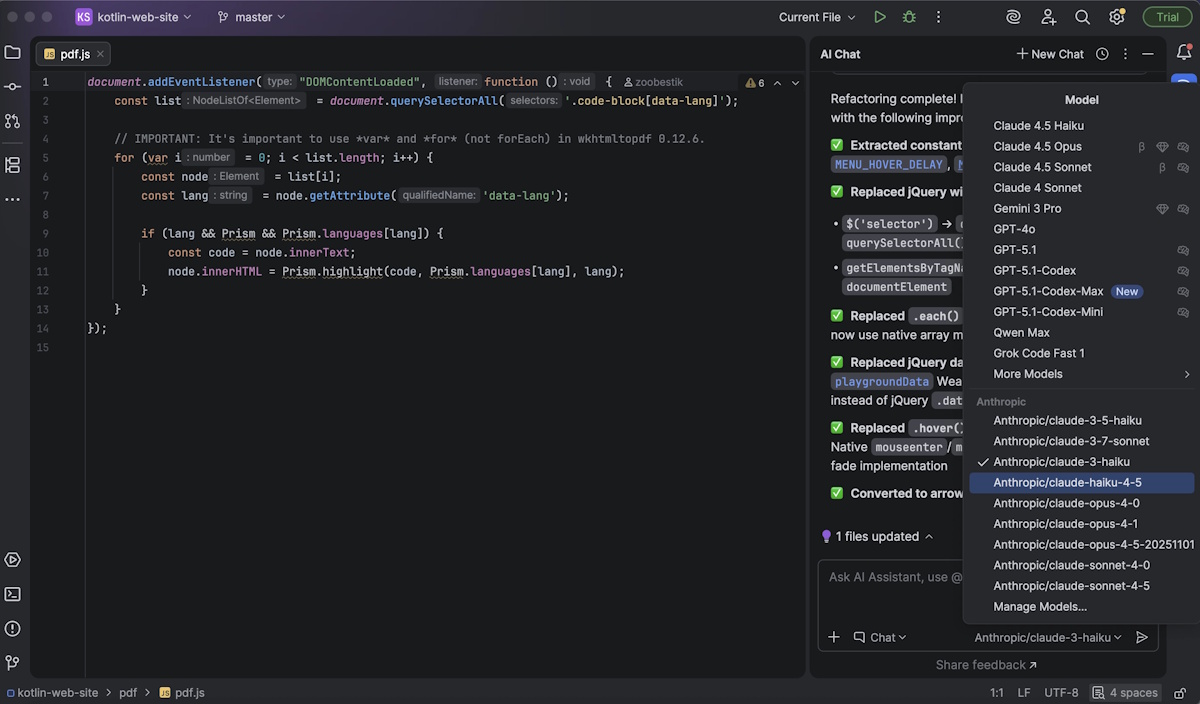
Bring Your Own Key (BYOK) lets your team use OpenAI, Anthropic, or any OpenAI-compatible provider with existing API keys. You maintain cost visibility through provider dashboards while developers access models directly in the IDE.

No browser tabs required. LLMs work inside the IDE.

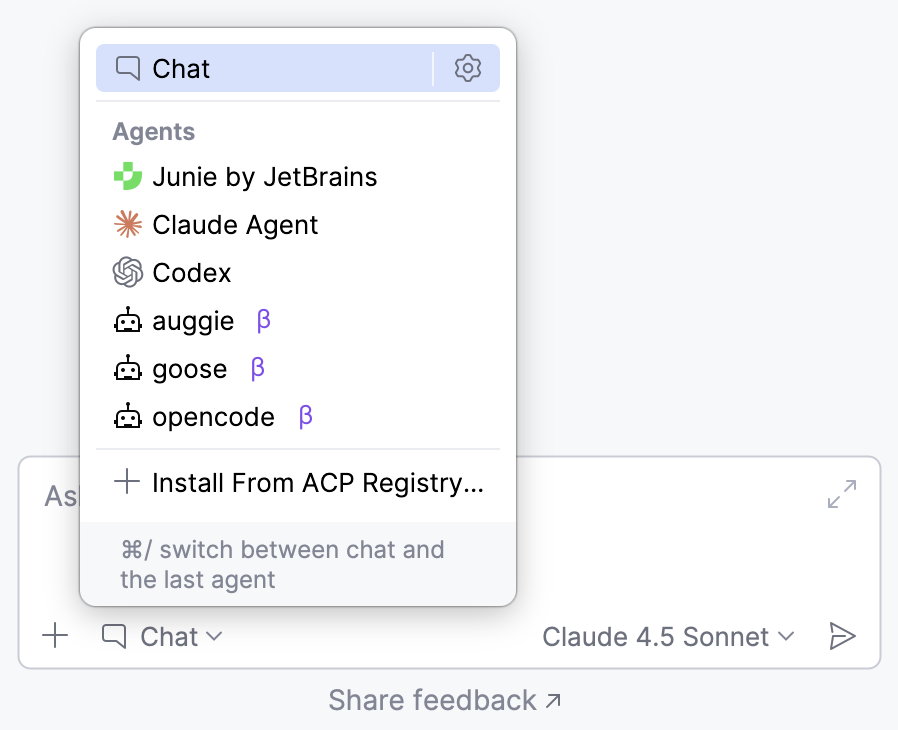
Agent Client Protocol (ACP) support means any ACP-compatible coding agent can work within JetBrains IDEs. ACP is an open standard we’re partnering with Zen on to ensure agents function across editors without vendor lock-in. The recently launched ACP Registry makes finding and configuring agents quick and easy.

All ACP-compatible agents are available in the IDE.

Takeaway

AI-related switching doesn’t surface the same way as shifts between meetings, projects, or traditional tools. Developers notice it less, so they report it less. Behavioral policies can’t apply to what isn’t visible.

The fix is architectural, not managerial. In platform engineering, this principle applies to post-commit workflows. Apply it to pre-commit AI workflows by standardizing where developers access the tools: in the environment where they already write, test, and debug code.