Private Channels

Private Channels

With the exception of channels created to discuss security issues while they are in quarantine, we provide no private channels for open source projects. This means that we do not provide private mailing lists (or any other private channels) for any project activity and that all mailing lists used for project activity are configured to have a public archive.

Private channels are an anti-pattern in open source. When your community members reach out to your personally, direct them to use the project’s preferred public discussion channels (public mailing lists, GitHub discussions, issues, etc.). Directing user questions to public channels preserves the open in open source.

Public channels:

  • facilitate sharing knowledge and experience;
  • allow the community to self-assist;
  • scale much better than a one-on-one support model;
  • protect committers from burnout;
  • become a searchable knowledge base; and
  • foster a sense of collective ownership that encourages new contributors to join.

It’s pretty natural for folks – especially those who are not familiar with open source – to be hesitant to use public channels. In my experience, most people get over this pretty quickly and engage in a manner that is consistent with the open source model.


If you have questions about Eclipse Project Governance, open help desk issue or contact emo@eclipse-foundation.org (the irony of including this here is not lost on us; we’ll likely direct you to a public channel).

Eclipse Manage…


Say Cheese! Meet SmashingConf Amsterdam 🇳🇱

We’ve been passionate about design & UX for years. We’ve published articles on design systems and usability, inclusive design and product design, UX research and enterprise UX. Now it’s time to bring it all together: In-person. In a new location. With a new spirit of curiosity and community. And it’s happening this April!

Meet the first SmashingConf Amsterdam 🇳🇱 taking place on April 13–16, 2026! A conference for designers and UI engineers all around UX and front-end: design systems, accessibility, Figma, UX writing, modern CSS and AI.. all while enjoying the best views, fun and gezelligheid that Amsterdam has to offer!

  • In-Person
  • Online

In-Person

€ 72479

Get your ticket!

Apr 13–16, 2026. Amsterdam, the Netherlands.
Save up to 25% with Smashing Membership.

Online

€ 20000

Live talks + Behind the scenes

With all video recordings, of course.
Save up to 25% with Smashing Membership.

“Gezelligheid” Meets Modern Tech

Perhaps one of the most difficult Dutch words to translate directly into English is the Dutch word Gezelligheid (pronounced guh-ZELL-uhk-hyde). It’s a foundational concept in Dutch culture that translates loosely to coziness, conviviality, and a warm, social, or inviting atmosphere — and that’s exactly what SmashingConf Amsterdam has to offer! 🙌

What Should You Expect?

Ever since launching our first-ever SmashingConf back in 2012, each one has always focused on how folks in the industry work, how they fail and how they succeed. We kindly encourage our speakers to share lessons learned and show how they work. Don’t be surprised by speakers sitting down and showing their design process, or setting up a Figma board and designing live with the audience!

SmashingConf Amsterdam is a premier, single-track conference curated for front-end developers, UI engineers, and UX designers. Unlike traditional conferences that rely on polished slide decks, SmashingConf is distinguished by its “live-work” philosophy. Speakers are encouraged to show their actual workflows—coding live, designing in Figma, and troubleshooting in real-time—to provide actionable insights rather than high-level theory.

All of our Smashing conferences are friendly and inclusive. In fact, we know many attendees by names, and we love friendships emerging as people get together and learn together, during the talks as well as in the workshops. Plus, we design our side events to help everyone take part in meaningful, respectful conversations.

Already convinced, but need to convince your manager? We’ve got your back! Download the Convince Your Boss PDF to tip the scales in your favor. We’ve prepared a “letter to the boss” template for you as well. Good luck!

Meet the Speakers

Expect 10 practical talks from friendly, knowledgeable and approachable speakers who are bound to inspire you. See schedule →

Meet Kevin Powell, Nick DiLallo, Sara Soueidan, TJ Pitre, Calvin Robertson, Christine Vallaure, Nathan Curtis, Nadieh Bremer, Chris Kolb, and of course the Mystery Speaker.

Our speakers are very approachable and there is enough time for you to ask all your questions and get all the answers, in 1:1-conversations or in round tables.

Full-Day Workshops: Immersive, Hands-On Learning

If you attend a conference, why not join a practical workshop as well? Beyond the main stage sessions, the event offers a curated selection of seven full-day workshops. These are designed for deep-dive practical learning, allowing you to spend an entire day mastering a specific topic of your choice under the guidance of a world-class expert.

On April 13 and April 16, we run two full-days of training focusing around tangible, applicable insights that you can use right after the workshop. That way, you can dive even more into design systems, accessibility testing or complex interface design patterns. Plenty of topics to choose from, and bundle discounts are available, too: You can save €100 when signing up for the conference and a workshop →

Smashing In-Person Workshops

  • Figma Deep Dive with Christine Vallaure.
  • Building Context-Based Design Systems for AI-Driven Product Teams with TJ Pitre
  • Front-End Accessibility Workshop with Sara Soueidan.
  • Designing For Complex UIs, 2026 Edition with Vitaly Friedman
  • The New CSS Toolkit with Kevin Powell.
  • Architecting Component Anatomy, Props and Slots with Nathan Curtis.
  • How To Measure UX and Design Impact with Vitaly Friedman.

The Venue: Pathé Tuschinski

We definitely don’t choose venues randomly. We love the contrast of beautiful historical venues and digital craftsmanship, so for Amsterdam, we’ve chosen the magnificent Pathé Tuschinski — an unforgettable venue that will make quite an impression on you! (Pathé Tuschinski will be our home for both conference days.)

Walking into Pathé Tuschinski feels like stepping into a living masterpiece. Opened in 1921, the legendary cinema contains so much detail — from the ornate ceilings to the glowing wall sconces.

The main auditorium is designed with comfort in mind. Plush, spacious seats ensure that you’ll be able to enjoy a perfectly unobstructed view of the stage or screen — no craning your neck, no dodging tall heads!

Side Events Before, During and After

While in Amsterdam, Why not explore the neighborhood and the city itself? At the end of the day, it’s about the fringe experiences that transform into something unforgettable!

  • Friedman’s Fabulous Fries Feestje 🍟
    Join the one-and-only Vitaly for a little feestje (that’s Dutch for “small party”) through a few cool neighborhoods of the city, sharing his best tips on bitterballen, fries, ice cream, and more. It’s a great way to connect with fellow attendees before the main event even begins, and bond over cones of perfectly crispy Dutch fries!
  • Smashing Sloep (Canal Tour) 🚤
    Enjoy a chill, 2-hour cruise through the Amsterdam iconic canals, navigating past historic canal houses and under low stone bridges. You’ll share a sloepje with 6–7 fellow attendees, and choose your own route. The fee of €30,– is not included in your conference ticket, so make sure you register separately (friends and family are welcome to join in, too!).
  • Jam Session 🎤
    Lightning talks, drinks and snacks: it’s the perfect setting to meet fellow attendees and “geek out” the night before the conference. This event is for attendees only, and you can pick up your badge early and skip the registration lines on Tuesday morning. The atmosphere is open, friendly and energizing, so make sure to join in!
  • Sports & Morning Rituals 🧘
    It’s all about keeping the energy high and clearing your head. Whether you’re a runner or more of a yoga cat, we’ve got just what you need. You can join speakers and attendees for a 5k run, and then if you like, join a mindfulness session with a few minutes of functional stretches followed by guided meditation and stillness. You do you!
  • Bitterballen & Beer 🍺
    You can’t be in the Netherlands without embracing local flavor. Breaks come with bitterballen — the iconic Dutch crispy meat snacks — paired with cold beer. It’s not just catering; it’s culture.

Together, these side events turn a conference ticket into a full experience — part learning, part adventure, part community. Inside Pathé Tuschinski, you get the “back to the future” inspiration. Outside, you get the human connections that make it all more meaningful!

Team Tickets? 👫👭

Bring the entire team to SmashingConf, and save some of your training budget along the way as well. With our friendly bundle tickets and team discounts, we’ve got your back! If you want to come with a large team, or are interested in something special, please send us a short email and we’ll get back to you right away!

We Can’t Wait To See You!

As we are getting ready for the event, we couldn’t be more excited to meet you in Amsterdam. Let’s boost our design and UX skills, together, and create memorable experiences that will last for a while. 🧡

  • In-Person
  • Online

In-Person

€ 72479

Get your ticket!

Apr 13–16, 2026. Amsterdam, the Netherlands.
Save up to 25% with Smashing Membership.

Online

€ 20000

Live talks + Behind the scenes

With all video recordings, of course.
Save up to 25% with Smashing Membership.

Ah, perhaps your manager needs a little bit convincing? We’ve got your back! Download the Convince Your Boss PDF to tip the scales in your favor. And we’ve prepared a “letter to the boss” template for you as well. Good luck! 🤞🤞🏼🤞🏾

Designing a Production-Grade AI Chat Service with FastAPI.

title

Developing an AI chat service is easy, but making it production-grade is where the real work is and where things get serious.

FastAPI helps you with the tools you need to build a backend that is fast, predictable, and ready for real traffic.

But how then do you structure that backend to prevent your AI chat service from falling apart as the usage grows? Probably you’re building your first AI chatbot.

Learning how to design a reliable AI chat service using FastAPI , how request handling works, async execution, and how API design choices affect latency and reliability.

This guide walks you through the decisions that matter so you can ship with confidence, and also helps you build a FastAPI backend that can support AI workloads, handle concurrent users, and remain easy to debug and extend in production.

Creating a Chatbot Using FastAPI

Creating a FastAPI-based chatbot starts with a simple idea like accepting a user message, processing it, and returning a response. But the main challenge is doing this in a way that stays fast, scalable, and easy to extend.

You begin by stating a clear request and response schema. This keeps inputs predictable and reduces runtime errors. Pydantic models help to enforce structure and validation at the API boundary.

from pydantic import BaseModel

class ChatRequest(BaseModel):
    message: str

class ChatResponse(BaseModel):
    reply: str

Next, you create a POST endpoint that is dedicated to chat interactions. POST is preferred because chat messages are state-changing and may include large payloads.

from fastapi import FastAPI

app = FastAPI()

@app.post("/chat", response_model=ChatResponse)
async def chat(request: ChatRequest):
    response_text = generate_reply(request.message)
    return {"reply": response_text}

Use async endpoints. Async execution helps you to prevent a slow request from blocking others and improves throughput under load.

Keep chatbot logic out of the route handler and make sure to place message processing in a service layer. This makes the chatbot easier to test and easier to evolve when logic becomes too complex.

def generate_reply(message: str) -> str:
    # placeholder logic
    return f"You said: {message}"

Each request should include everything you need to generate a response, as this helps to simplify scaling and avoids tight coupling to server memory.

Whenever a conversation context is required, be sure to pass a conversation ID or message history explicitly.

This keeps the API predictable and works well with distributed deployments. Good timing, status codes, and error types help you understand how the chatbot behaves in production without exposing sensitive content.

Structuring a FastAPI AI Agent Service

A FastAPI AI agent service works best when responsibilities are clearly separated; mixing routing logic, agent reasoning, and external integrations in one place leads to fragile code and slow iteration.

Start with a layered structure to keep API routes thin. They should only handle HTTP concerns like request validation, response formatting, and status codes.

Move AI agent logic into a dedicated service layer. This is where reasoning steps in, tool calls, and decision-making come in.

Whenever the agent grows more complex, this separation prevents route handlers from becoming unmaintainable.

A common example of how a structure should look:

  • api/ for route definitions
  • schemas/ for request and response models
  • services/ for agent logic and orchestration
  • agents/ for agent-specific behaviour
  • utils/ for shared helpers

This layout scales well as the features increase.

Define a clear agent interface. For example, a single run(input) method that returns a structured result. This keeps the rest of the system decoupled from internal agent behaviour.

class ChatAgent:
    async def run(self, message: str) -> str:
        return f"Processed: {message}"

Try as much as possible to avoid hard-coding dependencies inside the agent. Inject clients for LLMs, databases, or external APIs, as this makes testing easier and allows swapping implementations without touching core logic.

Use async throughout the agent service, as AI agents often call multiple external systems, and Async execution reduces idle time and also improves concurrency.

Define clear boundaries between the “agent thinking” and “side effects.” Reasoning and decision logic should be separate from actions like database writes or API calls because it improves observability and makes failures easier to trace.

Add structured logging at the service level. Log agent decisions, tool usage, and execution time. These signals help debug unexpected behaviour and optimize performance as usage grows.

By structuring a FastAPI AI agent service this way, you get cleaner code, safer scaling, and a system that can evolve from a simple prototype into a production-grade AI backend.

Managing Async Requests and Concurrency

FastAPI is based on async I/O, which means handling concurrency correctly is very important, not optional, as it directly affects latency, throughput, and system stability.

Make use of async def for all request handlers that perform I/O. Network calls to LLM APIs, databases, vector stores, or third-party services should always be expected. Blocking calls inside async routes reduces concurrency and reduces FastAPI’s performance benefits.

If a sync dependency cannot be avoided, be sure to run it in a thread pool using run_in_executor.

semaphore = asyncio.Semaphore(10)

async def run_agent(message: str):
    async with semaphore:
        return await agent.run(message)

This simple pattern helps to protect the system under load.

Separating fast and slow tasks requires long-running reasoning, or multiple tool calls should not block the main request lifecycle. Offload them to background tasks or async workers when possible.

Use BackgroundTasks for lightweight async work that does not require you to block the response. For heavier workloads, queue the job and return immediately with a task ID.

Wrap calls with asyncio.wait_for or client-level timeouts to prevent runaway requests.

response = await asyncio.wait_for(call_llm(prompt), timeout=15)

Without timeouts, concurrency collapses under partial failures.

Be mindful of the shared state, as Async code runs simultaneously and not sequentially. Mutable globals can cause race conditions and data corruption. Be sure to pass context explicitly or use request-scoped dependencies instead.

Use connection pooling correctly. Async database and HTTP clients should be created once and reused. Creating clients per request increases overhead and limits concurrency.

Monitor event loop health. High latency, increasing response times, or dropped requests often indicate blocking code or excessive parallelism. Async works best when tasks yield control frequently.

By managing async requests and concurrency intentionally, you allow your FastAPI AI service to handle more users, respond faster, and remain stable even under unpredictable traffic.

Designing API Schemas for Chat Messages

A clean chat message schema makes your AI service predictable, debuggable, and easy to evolve. You want structure without overengineering.

Start with a small message model; every message should clearly state who sent it and what it contains. At a minimum, include role and content.

{
  "role": "user",
  "content": "Explain async in FastAPI"
}

This shows how most LLMs reason about conversations and keeps the API intuitive.

Make use of roles, not flags. Avoid booleans like is_user or is_bot. Roles scale better as the system grows. Some common roles include user, assistant, system, and tool.

Be sure to define a conversation as an ordered list of messages. Order matters, and AI responses depend heavily on sequence.

{
  "conversation_id": "abc123",
  "messages": [
    { "role": "system", "content": "You are a helpful assistant" },
    { "role": "user", "content": "What is concurrency?" }
  ]
}

This structure supports retries, replay, and debugging without guesswork.

Use strong typing with Pydantic. Enforce schemas at the API boundary to catch bad inputs early.

class ChatMessage(BaseModel):
    role: Literal["user", "assistant", "system", "tool"]
    content: str

Validation errors should fail fast and return clear error messages.

Plan for metadata without polluting the core schema. Also, keep message content clean, and attach optional metadata separately.

{
  "role": "assistant",
  "content": "Here’s how async works...",
  "metadata": {
    "model": "gpt-4",
    "latency_ms": 842
  }
}

This helps with analytics, tracing, and experimentation later.

Avoid embedding UI concerns in the API. Do not include formatting hints, markdown flags, or frontend-only fields unless absolutely required. APIs should stay transport-focused.

Support streaming and partial responses at the schema level. If streaming is planned, design for message chunks or deltas instead of forcing full messages every time.

{
  "type": "delta",
  "content": "Async allows "
}

This prevents breaking changes when real-time output is added.

Version your schemas early. Even a simple v1 protects clients when message formats evolve.

At times, a good chat schemas feel boring, but the feature, clear roles, predictable structure, and strict validation make AI systems easier to scale, test, and maintain under real-world traffic.

Have a great one!!!

Author: Toluwanimi Fawole

Thank you for being a part of the community

Before you go:

Whenever you’re ready

There are 4 ways we can help you become a great backend engineer:

  • The MB Platform: Join thousands of backend engineers learning backend engineering. Build real-world backend projects, learn from expert-vetted courses and roadmaps, track your learning and set schedules, and solve backend engineering tasks, exercises, and challenges.
  • The MB Academy: The “MB Academy” is a 6-month intensive Advanced Backend Engineering Boot Camp to produce great backend engineers.
  • Join Backend Weekly: If you like posts like this, you will absolutely enjoy our exclusive weekly newsletter, sharing exclusive backend engineering resources to help you become a great Backend Engineer.
  • Get Backend Jobs: Find over 2,000+ Tailored International Remote Backend Jobs or Reach 50,000+ backend engineers on the #1 Backend Engineering Job Board.

Originally published at https://blog.masteringbackend.com.

Why Polish Small Businesses Don’t Need Websites (And Why I’m Building Them Anyway)

I’ve spent the last month cold-prospecting nail salons and barbers in Częstochowa. 100+ businesses researched. Maybe 15 have proper websites. The rest? Booksy profiles and Instagram accounts. That’s it.

When I started building an AI system to find these businesses, I thought the lack of websites was laziness or budget constraints. It’s not. It’s a deliberate choice rooted in a very specific psychology.

Polish small business owners genuinely believe websites are unnecessary. And I’m starting to understand why.

The Booksy Fortress

Booksy owns the Polish beauty and wellness market. Not “has a presence.” Owns.

If you’re a nail salon, barber, or massage therapist in Poland, you’re on Booksy. It’s not optional. Your clients book through Booksy. They discover you through Booksy. Your calendar lives in Booksy. Your payments run through Booksy.

Why would you need a website when Booksy already handles discovery, booking, payments, and reviews? The platform does everything a website would do, except you don’t have to build it or maintain it.

From the business owner’s perspective, a website is redundant infrastructure. I’ve read this exact sentiment in my research notes at least 20 times. “Already on Booksy.”

The logic is sound. The conclusion is still wrong, but the logic is sound.

Instagram as the Second Pillar

The businesses that aren’t beauty/wellness based, restaurants and bars, live on Instagram and Facebook.

They post daily. Photos of dishes, interior shots, weekend specials. Stories with live updates. DMs for reservations. The engagement is real. People comment, tag friends, share posts.

For these owners, Instagram is their website. Why pay for something static when you can post for free and reach customers where they already spend their time?

Again, the logic holds. A restaurant doesn’t need online booking. They need people to show up. Instagram drives that better than a landing page buried on page 3 of Google.

The Trust Gap

There’s a third layer that took me longer to notice. Websites carry a credibility problem in Poland’s SMB market.

Older demographics, which dominate small business ownership here, associate websites with either big corporations or scams. A local barber with a sleek website feels suspicious. Too corporate. Not authentic.

Instagram feels personal. Booksy feels utilitarian. A website feels like someone is trying too hard or hiding something.

I didn’t expect this. In Western markets, no website is the red flag. In Poland’s local service economy, having one can raise questions. “Why do you need this? What are you selling me?”

Why They’re Wrong (But Also Right)

Here’s the thing. They’re not entirely wrong.

If you’re a nail salon with 200 regular clients who all book through Booksy, and your schedule is full most weeks, why burn money on a website? The return on investment is unclear. The effort to maintain it is real.

But here’s what they’re missing.

Booksy owns the customer relationship. Not them. If Booksy raises fees, they pay. If Booksy changes the algorithm, they adapt. If Booksy shuts down tomorrow, they lose their entire discovery channel overnight.

Instagram is even worse. You’re building an audience on rented land. Algorithm changes, shadowbans, account suspensions. You have zero control.

A website is the only piece of digital infrastructure you actually own. It’s insurance against platform dependency. It’s leverage when Booksy tries to squeeze margins. It’s the foundation for everything else, email lists, direct booking, content marketing, local SEO dominance.

Most importantly, it separates you from every other business stuck in the same Booksy/Instagram loop. When someone Googles “nail salon Częstochowa,” the businesses with proper websites win. The rest don’t even appear.

The Opportunity

This is why I’m building them anyway.

The fact that Polish SMBs don’t see the value is exactly why there’s value in showing them. The market is underserved because the market doesn’t know it needs serving.

My approach isn’t to argue. It’s to show. I build the website first, using photos from their Instagram and services from their Booksy profile. Then I show them what they could own instead of rent.

Some will ignore it. Some will dismiss it. But some will see it and realize they’ve been thinking too small.

That’s the opportunity. Not convincing skeptics. Finding the 10% who are ready to see what ownership looks like.

What I’m Learning

Prospecting these businesses taught me more about market psychology than any course or framework ever could.

People don’t resist websites because they’re uninformed. They resist because their current setup works well enough, and change introduces risk with unclear reward.

The businesses that will adopt websites aren’t the ones doing poorly. They’re the ones doing well and starting to feel the ceiling. The owner who wants to expand but realizes Booksy doesn’t scale beyond one location. The restaurant that maxed out Instagram reach and needs another channel.

Understanding why they don’t need websites is more valuable than explaining why they do. It changes how I pitch, what I build, and who I target.

Where This Goes

I’m still early in this process. The AI system I wrote about in my previous post finds the prospects. But converting them requires understanding the mindset first.

Polish SMBs aren’t behind on digital marketing. They’ve optimized for the platforms available to them. Booksy and Instagram work. Websites don’t obviously improve on that equation.

My job isn’t to fight that logic. It’s to show what becomes possible when you own your infrastructure instead of rent it.

I’ll write more as this evolves.

This article is also available on maxmendes.dev.

Questions? Reach out — I reply within 24 hours.

Microservices Architecture for Modular EdTech File Processing

If you’re building or scaling a learning management system, you’ve probably seen this: exam week arrives, thousands of students upload assignments at once, and the system starts to slow down or crash.

Video processing delays document uploads. A failed virus scan blocks everything behind it. One bad file affects other students. When everything runs inside one big system, a small problem can impact everyone.

The fix isn’t just better servers. It’s a better architecture.

With a microservices approach, each task runs independently. You can scale specific parts, prevent failures from spreading, and meet strict education compliance requirements more easily. This guide is an architectural blueprint for technical decision-makers who need to build that system.

Key Takeaways

  • EdTech platforms need a smarter architecture to handle deadline spikes, many file types, and strict privacy rules.

  • Break the system into six clear services: Ingestion, Validation, Transformation, OCR, Metadata, and Delivery.

  • Use events (like Kafka) so each service works independently, and failures don’t affect everyone.

  • Keep files secure with limited access, encryption, audit logs, and regional data controls.

  • Plan for monitoring, error handling, and build-vs-buy decisions from the start.

To understand why this architecture matters, we first need to understand what makes EdTech file processing fundamentally different from other platforms.

The EdTech File Processing Problem Is Different

Most file processing guides are written for e-commerce or general SaaS products. Education platforms operate under very different pressures, and those differences shape how the system must be designed.

Content types vary a lot. One course might include PDFs, .ipynb notebooks, MP4 lectures, DOCX essays, audio exams, and image-based lab reports. Each format needs different processing, storage rules, and delivery methods, yet they all pass through the same platform.

Traffic is unpredictable and spiky. Uploads often surge right before deadlines. A platform with 50,000 students might receive most weekly submissions in just a few hours. The system must handle these bursts smoothly without slowing down or losing data.

Compliance is foundational. Family Educational Rights and Privacy Act (FERPA) protects student education records, and the Children’s Online Privacy Protection Act (COPPA) applies to platforms serving children under 13. In many regions, data residency rules also control where student files can be stored or processed. These aren’t details to fix later, they must shape the architecture from the start.

Accessibility directly affects grading. Teachers need to clearly review student work. That may require OCR for handwritten submissions, transcription for audio responses, and alt-text for images. These steps aren’t just user experience improvements; they directly support fair evaluation and learning outcomes.

These pressures are exactly why a monolithic system struggles. The solution is to break the lifecycle into clear, independent stages.

That’s where service decomposition comes in.

Service Decomposition: Six Focused Services

The main idea behind microservices is simple: decompose the file processing lifecycle into clear stages. Each stage is handled by a separate service. Services communicate through events, and each service owns only its own data.

Below is a typical way to divide responsibilities in an EdTech file pipeline:

1. Ingestion Service

The Ingestion Service is the single entry point for all file uploads. Whether a student uploads from a web app, mobile app, or an LMS like Canvas, Blackboard, or Moodle (via LTI), every file comes through this service first.

Its job is simple: receive the file, not process it. It assigns a unique ID (UUID), stores the raw file in object storage, and sends out a file.received event so other services know a new file is ready.

Keeping this service separate has big advantages. You can scale it during deadline rush hours, change your upload provider without breaking other services, and implement handling batch student submissions without touching validation or processing logic.

Key responsibilities:

  • Handle large and chunked uploads.

  • Convert different upload sources into a consistent internal format.

  • Avoid duplicates using content hashing before saving.

  • Emit a file.received event with UUID, source metadata, and raw storage reference.

Example file.received event:

{
  "event": "file.received",
  "file_id": "f3a1b2c4-d5e6-7890-abcd-ef1234567890",
  "source": "web_upload",
  "uploader_id": "student_88421",
  "course_id": "cs101_fall_2025",
  "assignment_id": "hw3",
  "original_filename": "submission_final_v2.pdf",
  "raw_storage_ref": "s3://edtech-raw/f3a1b2c4...",
  "received_at": "2025-11-15T22:14:03Z",
  "size_bytes": 2048744
}

Once a file enters the system, the next concern isn’t formatting; it’s safety and policy enforcement.

2. Validation Service

The Validation Service listens for file.received events. Before any processing happens, it checks whether the file is safe and allowed.

It verifies the real file type (not just the extension), runs antivirus scans, checks file size limits, and ensures the format matches the assignment rules. This prevents harmful or unsupported files from moving further in the pipeline.

If a file fails validation, the service emits a file.rejected event with a reason code. The system can then quickly notify the student. Importantly, this service never edits or converts files; it only approves or rejects them.

For security implementation details on protecting student-facing upload surfaces, see protecting educational platforms from malicious uploads.

Example internal API (OpenAPI fragment):

paths:
  /validate:
    post:
      summary: Trigger validation for a received file
      requestBody:
        content:
          application/json:
            schema:
              type: object
              required: [file_id, raw_storage_ref, assignment_policy_id]
              properties:
                file_id:
                  type: string
                  format: uuid
                raw_storage_ref:
                  type: string
                assignment_policy_id:
                  type: string
      responses:
        '202':
          description: Validation accepted, result delivered via event

Only after a file is approved should heavy processing begin.

3. Transformation Service

After a file passes validation, the Transformation Service prepares it for use. Its job is to standardise and optimise files so instructors and students can access them easily.

This may include converting DOC files to PDF for consistent grading, transcoding videos into adaptive streaming formats (like HLS), compressing and resizing images, or safely running and formatting code submissions in isolated containers.

This service usually requires the most computing power, so it’s a strong candidate for horizontal scaling (adding more instances during peak load). It may also rely on external processing tools or APIs, but those should be wrapped behind an internal interface so providers can be changed without affecting the rest of the system.

One important rule: transformation should be idempotent. If a job runs twice because of a retry or temporary failure, it should produce the same result. This can be done by generating output based on the file_id and transformation settings. If the processed file already exists in storage, the service simply returns its reference instead of processing it again.

Some content requires deeper extraction beyond simple conversion.

4. OCR / Text Extraction Service

The OCR / Text Extraction Service is separate because it behaves differently from other processing steps. It’s slower, more CPU-heavy, and often needs specialised models, especially for handwritten answers, math equations, or multiple languages.

This service listens for file.validated events (for supported document types). It extracts text from the file and then emits a file.text_extracted event that includes the extracted content and a confidence score.

Other services use this output. The Metadata Service can index the text for search. Accessibility tools can improve readability. In the future, an AI grading assistant could also analyse the extracted text.

Because OCR has unique performance and reliability challenges, keeping it isolated makes scaling and troubleshooting much easier.

For a deeper look at what’s possible with modern OCR in educational contexts, including handwriting recognition and equation parsing, see modern OCR capabilities for educational content.

Now that the file has been processed and analysed, the system needs a structured record of its state.

5. Metadata Service

The Metadata Service collects information from other services and builds a complete record for each file. It listens to events from validation, transformation, and OCR, then stores details like file type, processing status, extracted text, word count, video duration, and compliance labels.

This service owns the metadata database. No other service can directly read or write to it, all queries go through its API. That’s what allows advanced searches like “all handwritten submissions for Assignment 3 that are still ungraded,” without accessing raw file storage.

It also handles sensitive student information. Fields like student name, ID, and submission data must be protected at rest. Use field-level encryption for sensitive data and ensure only authorised roles can retrieve specific metadata records.

With processing complete and metadata stored, the final step is secure delivery.

6. Delivery Service

The Delivery Service controls who can access files and for how long. It generates signed URLs for instructors reviewing submissions and time-limited links for students viewing graded work. It also handles CDN cache updates when files change or access is revoked.

This service does not store or move files. It simply creates secure access paths to files already stored in object storage.

Because it’s isolated, you can change your CDN provider or update access control rules without affecting validation, transformation, or any other processing steps.

Breaking the system into services solves one problem. But how those services communicate determines whether the architecture truly scales.

Event-Driven Communication

All services communicate through a message broker instead of calling each other directly. This keeps them loosely coupled and easier to scale.

For large EdTech platforms, Apache Kafka is often preferred over RabbitMQ. Kafka stores durable, replayable event logs. That’s important for auditing file histories, meeting compliance requirements, and replaying events after outages.

Core file processing event lifecycle:

EventProducerConsumersfile.receivedIngestionValidationfile.validatedValidationTransformation, OCR, Metadatafile.rejectedValidationIngestion (notify student)file.transformedTransformationMetadata, Deliveryfile.text_extractedOCRMetadatafile.readyMetadataDelivery, Instructor notificationsfile.processing_failedAny serviceDLQ monitor, Ops alerts

Dead Letter Queues (DLQs) are essential.

If a message fails after several retries, it should move to a DLQ with full context. Operations teams need tools to inspect failed files, retry processing, or notify students if something went wrong. During exam periods, losing a submission silently is both an academic and legal risk, so failure handling must be deliberate and visible.

Events coordinate behaviour. Storage handles the actual file bytes. Both must be designed carefully.

File Storage Strategy

All services use the same object storage system (like S3, GCS, or Azure Blob). But they don’t all get full access. Each service has limited permissions based on what it needs.

  • Ingestion Service → can write files to raw/

  • Transformation Service → can read from raw/ and write to processed/

  • Delivery Service → can create secure read links for processed/

  • No service has full access to everything

Use a UUID for every file. When a file is uploaded, it gets a unique ID (UUID). That UUID becomes the file’s main identity across the entire system.

  • Storage paths include the UUID

  • Services communicate using the UUID

  • No service depends on the storage folder paths directly

This makes it easy to switch storage providers or reorganise buckets later without breaking anything.

File retention rules:

  • Files in raw/ can be deleted after about 30 days (or once processing is confirmed).

  • Files in processed/ follow school or legal retention rules. Some content must be kept longer due to compliance requirements.

Service deployment example (Docker Compose fragment):

services:
  ingestion:
    image: edtech/ingestion-service:latest
    environment:
      - KAFKA_BROKER=kafka:9092
      - S3_BUCKET=edtech-raw
      - S3_PREFIX=raw/
    depends_on:
      - kafka
      - minio
validation:
    image: edtech/validation-service:latest
    environment:
      - KAFKA_BROKER=kafka:9092
      - ANTIVIRUS_API_URL=http://clamav:3310
      - MAX_FILE_SIZE_MB=500
    depends_on:
      - kafka
  transformation:
    image: edtech/transformation-service:latest
    environment:
      - KAFKA_BROKER=kafka:9092
      - S3_RAW_BUCKET=edtech-raw
      - S3_PROCESSED_BUCKET=edtech-processed
      - PROCESSING_API_URL=http://filestack-adapter:8080
    deploy:
      replicas: 4  # Scale horizontally for peak load
    depends_on:
      - kafka

For handling the chunked upload mechanics that make large lecture video ingestion reliable, see techniques for large educational media files.

At this point, the architecture is internally complete. The next question is: which parts should you build yourself?

Integrating External Processing APIs

Not every feature needs to be built from scratch. Things like video transcoding, OCR models, and file format conversion are complex and expensive to maintain. Instead of building and managing that infrastructure yourself, you can use specialised external APIs.

The smart way to do this is to hide external APIs behind your own internal service layer.

How the integration works:

  • Internal Service: Your Transformation or OCR service triggers processing like normal.

  • Adapter Layer: This translates your internal format (events, UUIDs, metadata) into the format the external API expects. If you ever change providers, you only update the adapter, not the whole system.

  • Circuit Breaker: If the external API becomes slow or unavailable, this prevents failures from spreading through your system. It temporarily stops sending requests.

  • Fallback Strategy: If the external service fails, you can:

  • Retry later

  • Switch to another provider

  • Mark the file as “processing delayed” and notify the student

Why this is important:

  • You avoid managing heavy infrastructure.

  • You keep your architecture clean and modular.

  • You prevent external outages from breaking your system.

  • You can swap providers without rewriting your services.

💡Rather than building every adapter yourself, Filestack’s file processing APIs are designed to plug directly into the transformation and delivery layers described above: handling format conversion, virus scanning, CDN delivery, and more through a single integration point, so your team can focus on the educational logic that actually differentiates your platform.Start your free trial with Filestack!

For pre-built processing workflows, this article explains how advanced workflows can fit into EdTech architectures.

Regardless of what you build or buy, security must wrap every layer of this system.

Security and Compliance Implementation

Security isn’t a separate service. It must be built into every layer of the system.

  • Service-to-service security: Each service should use short-lived JWT tokens to prove its identity. No request should be accepted without a valid token, even inside your private network. Adding mTLS gives extra protection between services.

  • Audit logging: Every action on a student file: view, process, deliver, delete, must be recorded with who did it, when, and why. These logs should be permanent and stored according to institutional policy. Treat audit events as structured Kafka topics, not simple app logs.

  • Encryption: Use TLS (1.2 or higher) for all communication. Store files with AES-256 encryption. For highly sensitive documents, use stronger protections like envelope encryption.

  • Data residency: If a student’s data must stay in a specific region (like the EU), that rule should be added to the file’s metadata at ingestion. Processing services must respect this tag when choosing where to store or process the file. Adding this later is difficult; it should be designed in from the start.

Even a secure system can fail. That’s why visibility is just as important as design.

Monitoring and Observability

When one student upload passes through multiple services, you need full visibility. Use distributed tracing (like OpenTelemetry) across all services, and use the file_id as the trace ID. This lets you track exactly what happened to any submission from start to finish.

Important metrics to monitor:

  • Queue depth per service: If queues grow suddenly, something downstream is slow.

  • Processing time by file type: PDFs should be quick; videos can take longer but should stay within expected limits.

  • Dead Letter Queue (DLQ) rate: Spikes mean repeated failures.

  • Validation rejection rate: A sudden jump may signal a bug or a malicious upload attempt.

  • Signed URL generation time: Delays here mean students are waiting to access their graded work.

Set alerts before peak deadlines. If submissions are due at midnight, you want warnings hours earlier, not after students start complaining.

Finally, architecture isn’t just about design; it’s about strategic decisions.

When to Build vs. Buy

You don’t need to build everything yourself. Decide based on what truly makes your platform unique.

Build it if it directly affects your educational value, things like assignment rules, LMS integration, grading workflows, or compliance logic. These are part of your core product.

Buy or integrate if it’s standard infrastructure: file conversion, virus scanning, video transcoding, OCR, CDN delivery, or object storage. These are common problems with reliable third-party solutions.

Think carefully when it’s somewhere in between. For example, general OCR is easy to integrate. But if your platform specialises in chemistry equations or music notation, a custom OCR model might be worth building.

This architecture makes that boundary clear. External tools plug in through adapter layers. If a vendor changes pricing or performance drops, you replace the adapter, not your whole system.

When all these pieces come together: service isolation, event-driven flow, secure storage, external integration, and observability, you get a system built for long-term scale.

Conclusion

A strong EdTech file processing system is built around six focused services: Ingestion, Validation, Transformation, OCR, Metadata, and Delivery. These services communicate through durable events, use shared object storage with strict per-service permissions, and keep external processing tools behind internal adapters.

The benefit is clear: each stage can scale independently, failures stay isolated, audit trails are compliance-ready, and the system can grow without needing a complete redesign every time user numbers increase.

The real challenges aren’t in the basic upload flow. They’re in handling dead letter queues, maintaining FERPA-compliant audit logs, enforcing data residency rules, and setting alerts before deadline spikes. These should be designed from the beginning, not added later.

This article was published on the Filestack blog.

What Are Autonomous AI Agents? Complete Beginner Guide for Developers, Founders, and CTOs

Software is undergoing its biggest architectural shift since the rise of cloud computing. Instead of applications that simply respond to user input, we are now entering an era where software can operate independently. These systems are known as autonomous AI agents, and they are redefining how modern software and businesses function.

For developers, founders, and CTOs, understanding autonomous AI agents is quickly becoming essential knowledge. These systems are no longer experimental concepts. They are already being deployed in production environments to automate operations, monitor infrastructure, analyze data, and execute workflows without human supervision.

To understand why autonomous AI agents are so powerful, it helps to first understand the limitations of traditional software.

Traditional software operates based on predefined logic. Developers write explicit instructions that determine how software behaves in every scenario. This model works well for predictable workflows, but it breaks down when environments become complex or unpredictable.

For example, consider a traditional monitoring system. It can detect when CPU usage exceeds a threshold and send an alert. However, it cannot investigate the cause, determine the appropriate response, or execute corrective actions on its own. It depends entirely on human intervention.

Autonomous AI agents operate differently.

Instead of simply executing predefined instructions, autonomous AI agents can interpret goals, analyze context, make decisions, and execute actions independently. This allows software systems to operate continuously without requiring constant human supervision.

At the core of an autonomous AI agent is a reasoning engine, typically powered by a large language model. This reasoning engine enables the agent to understand instructions, analyze information, and determine appropriate actions.

However, reasoning alone is not enough. Autonomous agents also require memory.

Memory allows agents to store and retrieve information across interactions. This enables agents to maintain context, learn from past actions, and improve performance over time. Memory can include short-term working memory for active tasks, as well as long-term memory stored in vector databases or structured storage systems.

Another critical component of autonomous AI agents is tool integration.

Tools allow agents to interact with external systems such as APIs, databases, cloud services, and enterprise applications. For example, an AI agent can retrieve data from a database, send requests to an API, execute scripts, or update systems automatically.

This ability transforms AI agents from passive conversational tools into active operational systems.

Autonomous agents also operate within execution loops. These loops allow agents to continuously observe their environment, analyze information, execute actions, and evaluate outcomes. This creates a feedback cycle that enables continuous operation.

This architecture enables agents to perform complex tasks such as:

Monitoring infrastructure and resolving performance issues

Analyzing business data and generating reports

Automating customer support workflows

Managing operational processes

Executing multi-step workflows across multiple systems

This capability fundamentally changes how software systems operate.

Instead of requiring humans to constantly monitor systems and execute tasks manually, organizations can deploy autonomous agents that perform these tasks continuously.

This has profound implications for businesses.

Organizations can operate more efficiently by reducing manual operational work. Engineers can focus on building new systems instead of maintaining existing ones. Founders can scale operations without increasing operational overhead.

For developers, this introduces a new software paradigm.

Instead of building static applications that execute predefined logic, developers are building dynamic systems capable of reasoning, decision-making, and autonomous execution.

This shift is similar in magnitude to the transition from on-premise infrastructure to cloud computing. Developers who understood cloud architecture early gained a significant advantage. The same is true for autonomous agent architecture today.

Autonomous agents are already being deployed across industries.

Technology companies use agents to monitor infrastructure and resolve incidents automatically.

Financial institutions use agents to analyze transactions and detect anomalies.

Customer support systems use agents to handle inquiries and resolve issues.

Marketing systems use agents to optimize campaigns and automate workflows.

This trend is accelerating rapidly as AI models become more capable and infrastructure becomes more accessible.

Understanding how autonomous AI agents work is becoming a foundational skill for modern software professionals.

However, building reliable autonomous agents requires understanding architectural patterns, memory systems, tool integration, and execution frameworks.

A complete, implementation-focused guide explaining how autonomous AI agents are designed and deployed in enterprise environments is available here:

https://gofortool.com/en/books/the-agentic-enterprise/

This guide explains real-world architecture patterns, system design strategies, and implementation approaches used by modern organizations.

As AI continues to evolve, autonomous agents will become a core component of software systems. Developers, founders, and organizations that understand and adopt this architecture early will be better positioned to build scalable, intelligent, and efficient systems.

The transition from static software to autonomous systems is already underway. Understanding this shift today provides a significant advantage for the future.

Introducing TeamCity’s New Design, Phase II: Creation Flow

This is the second part in a series that dives into how and why we’re redesigning TeamCity. In Part One, we shared navigational and admin changes. In Part Two, we’ll dive deeper into the сreation flow redesign. We’ll also introduce you to the new UI and go into detail about the steps we’re taking to revamp TeamCity.

Introducing a more cohesive UI

We’re reimagining TeamCity’s design to meet the expectations of today’s developers. The goal is simple: help teams get from setup to their first successful build faster and with less friction.

Today, creating a first build can take more than 20 clicks, and only a fraction of users explore advanced features. By rethinking this experience, we’re making TeamCity more approachable for new users and more efficient for experts.

The creation flow is a key part of how people experience a product. It’s often the first thing users see, and it helps determine whether the product feels easy and welcoming or confusing and heavy.

A well-designed flow helps people get started without overthinking and guides them smoothly so they can focus on what they want to do, not how to do it.

Concept exploration

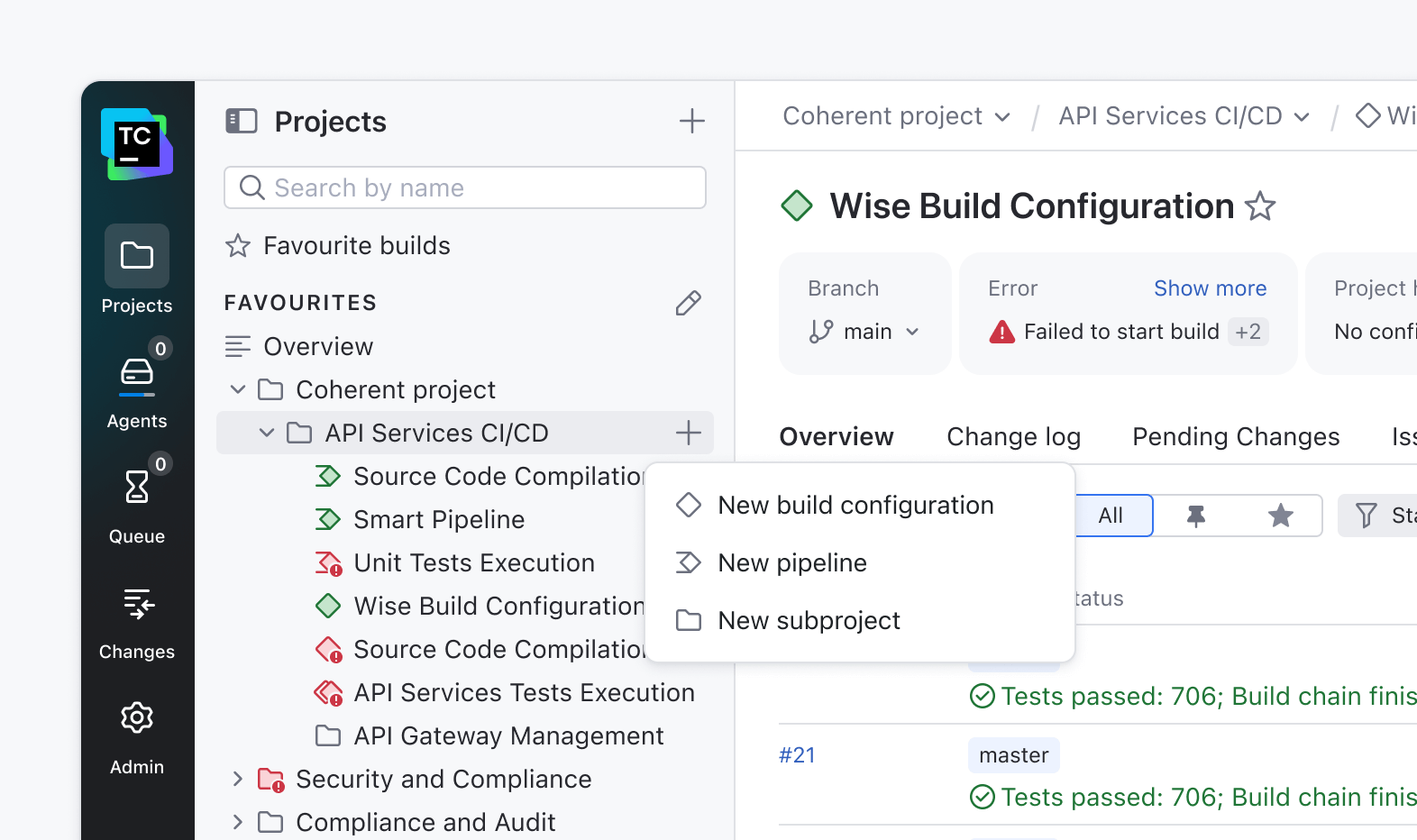
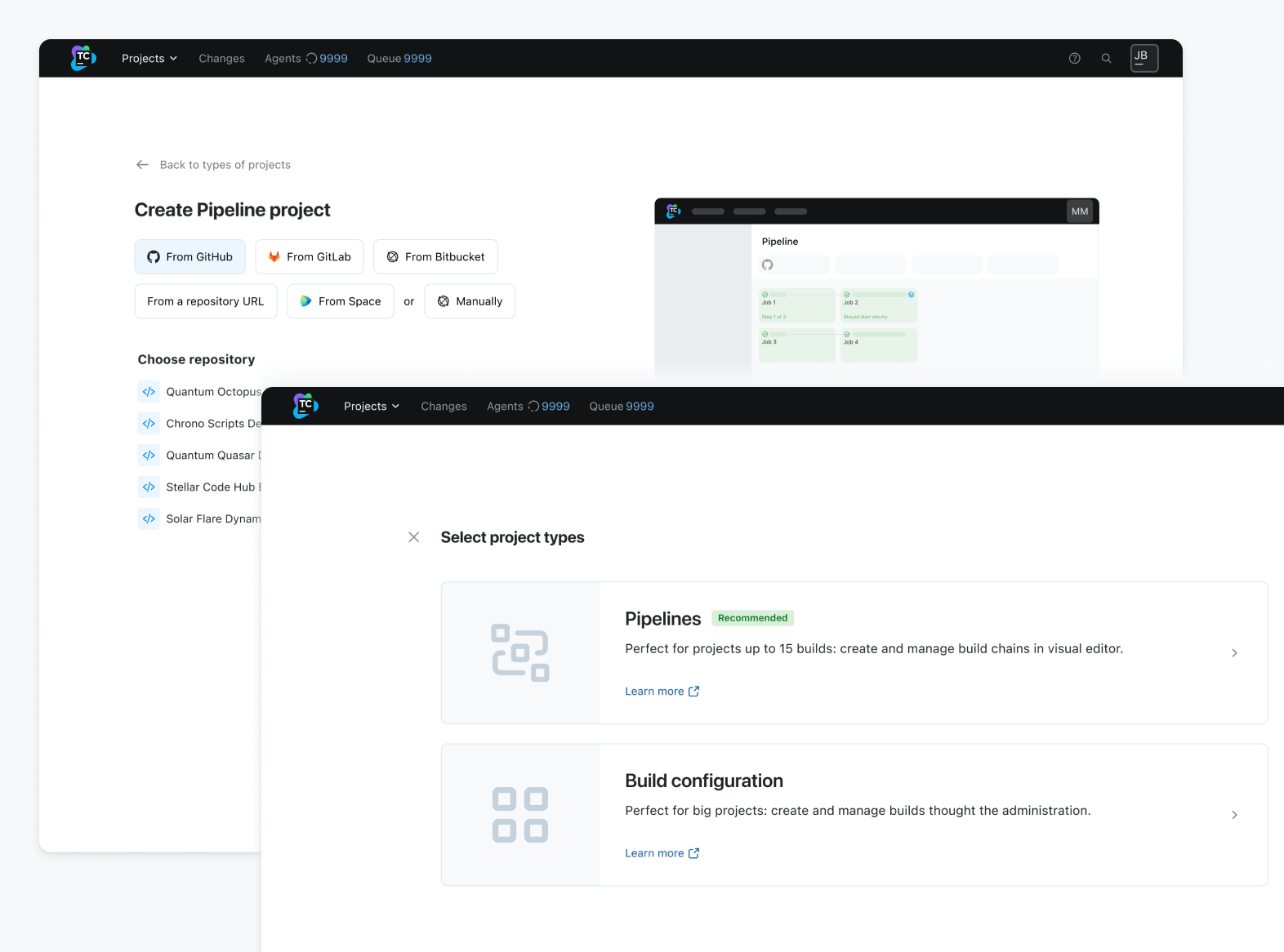
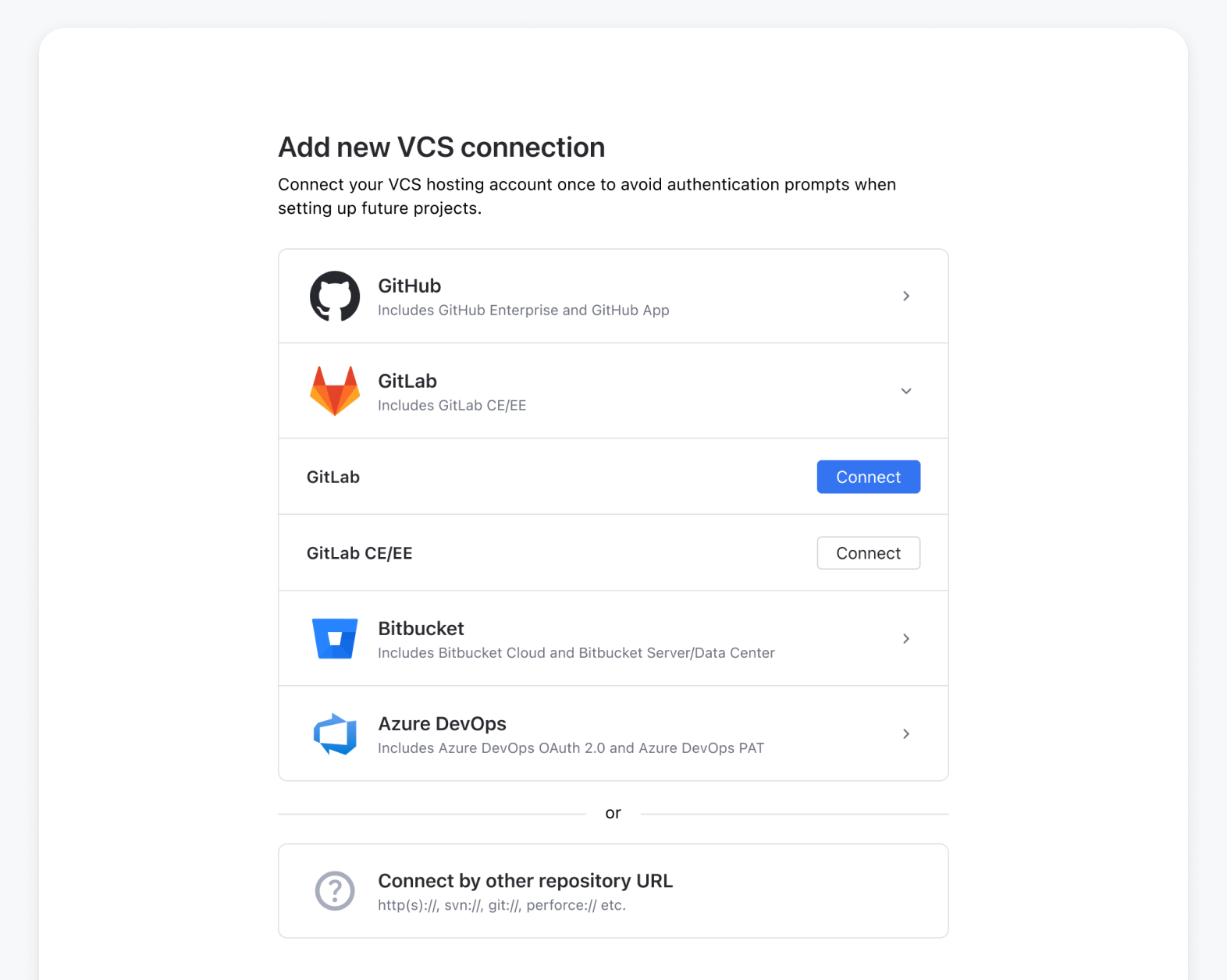
As outlined in Part One, our product interviews uncovered a recurring pain point: new users often get stuck when creating projects in TeamCity. The flow wasn’t intuitive, and creating or reusing connections was more complex than it should have been.

Our mission became simple: to make starting a new project effortless, straightforward, and enjoyable.

The most pressing problems were:

  1. A hidden entry point
  2. A cluttered UI with broken informational hierarchy
  3. Missing functionality that required the user to find workarounds

One major factor to keep in mind from the beginning is that we are bringing pipelines to TeamCity. So, the first challenge was to clearly communicate the difference between pipelines and build configurations and help users understand the distinct value each provides.

The second goal was to remove clutter and unnecessary information, guiding the user and displaying relevant settings when needed. TeamCity is one of the strongest CI tools on the market, but many of its strengths are hidden deep within the product.

During interview sessions, users mentioned pain points that had already been solved by functionality the users were simply not aware of, such as templates or VCS reuse.

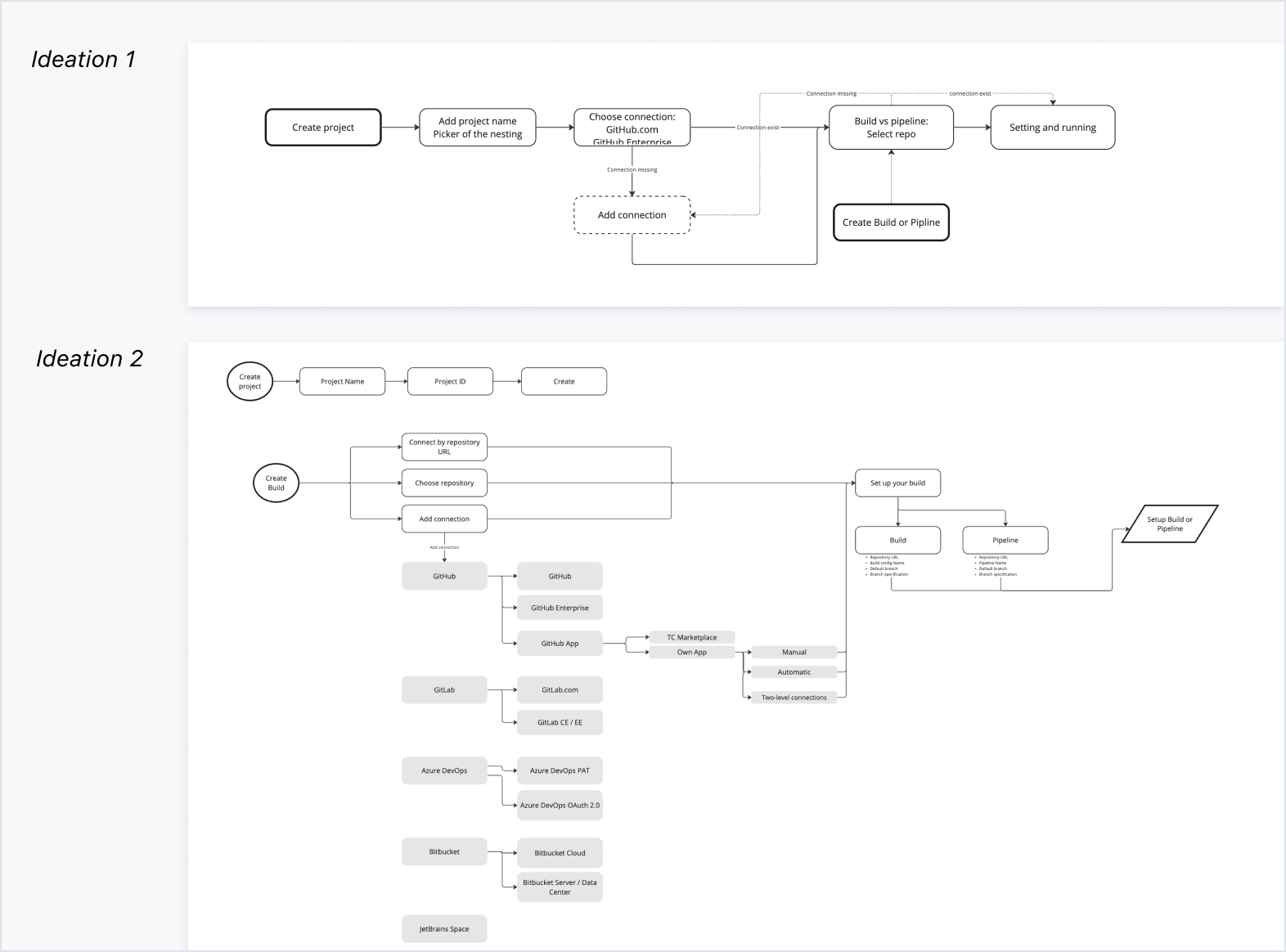
We started by drawing up a flow chart of what the new step-by-step process might look like:

Concept → Prototype → Action

The design underwent multiple iterations and rounds of guerrilla testing before being handed over to the first client for evaluation. We conducted UX prototype testing with 10 clients, iterating after each session to refine and develop the mockups.

Once the design was validated, we worked closely with the engineering team to review all existing and new scenarios, ensuring complete coverage. Finally, we structured the delivery into iterations – and the first version is now live for users to explore.

Before
Concept
After

Features

Separate flow for project creation

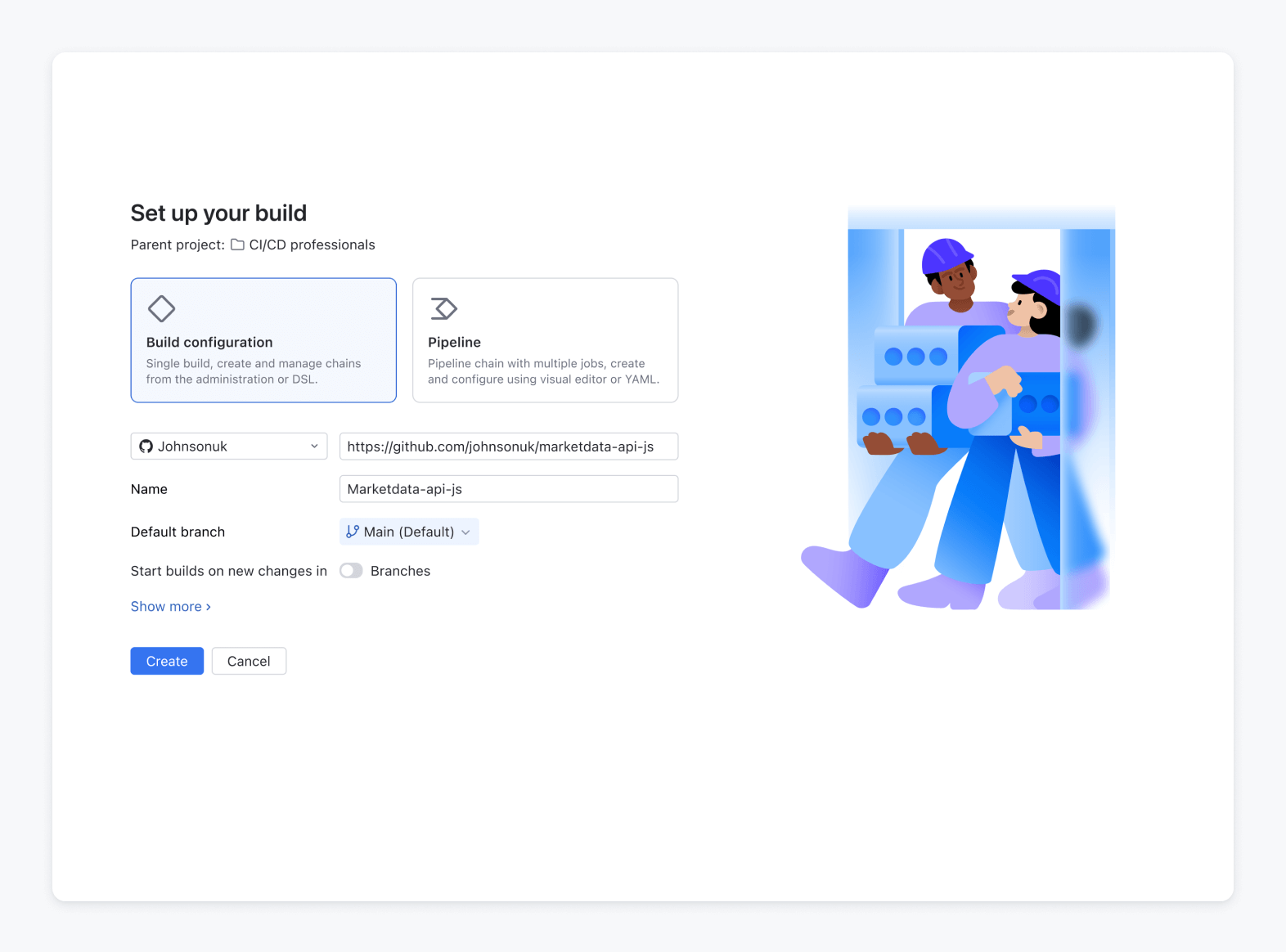
In the old UI, users were never sure what would happen after triggering the creation process – would it create a project, a build configuration, or both? Separating them into distinct flows brought much-needed clarity and predictability.

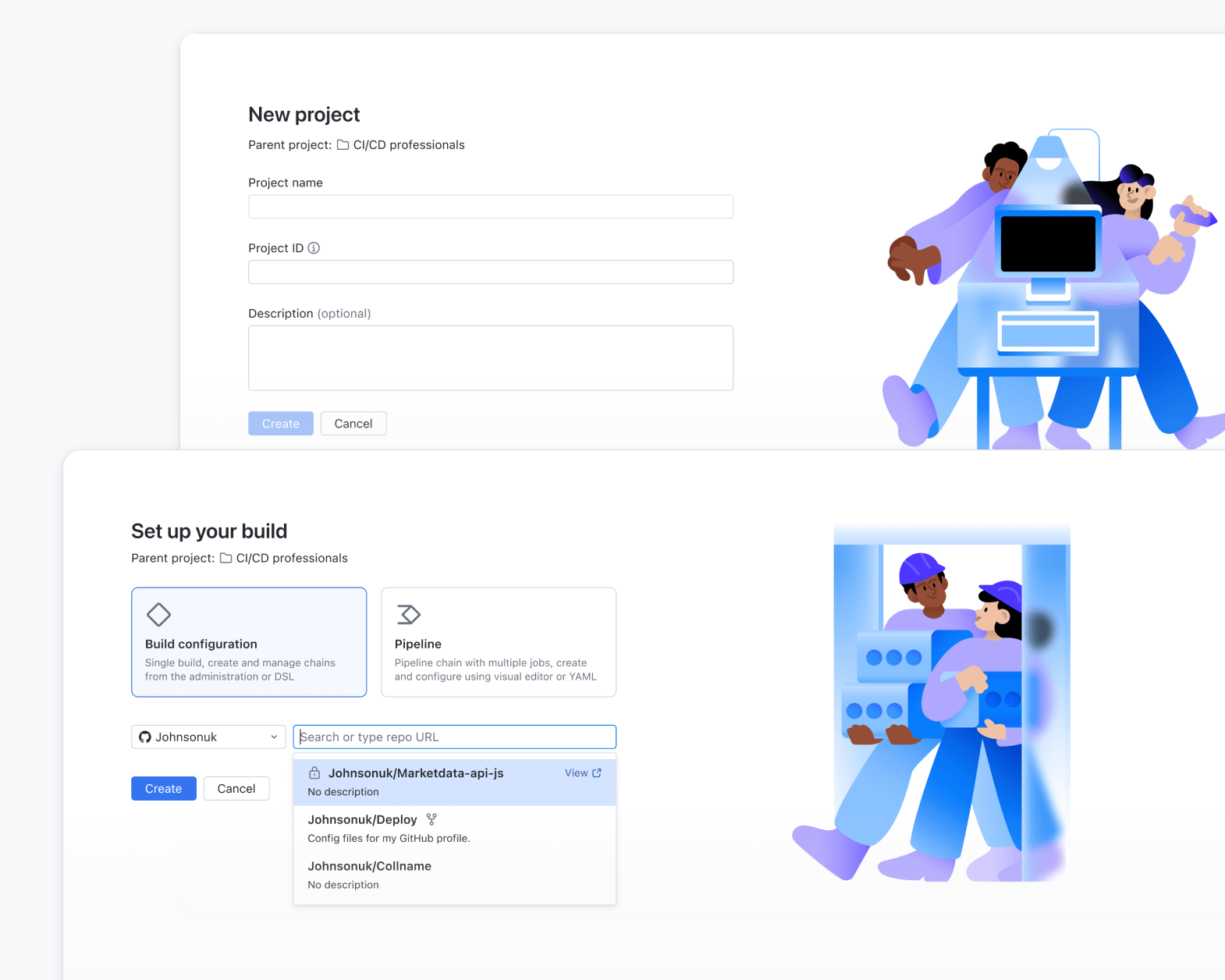
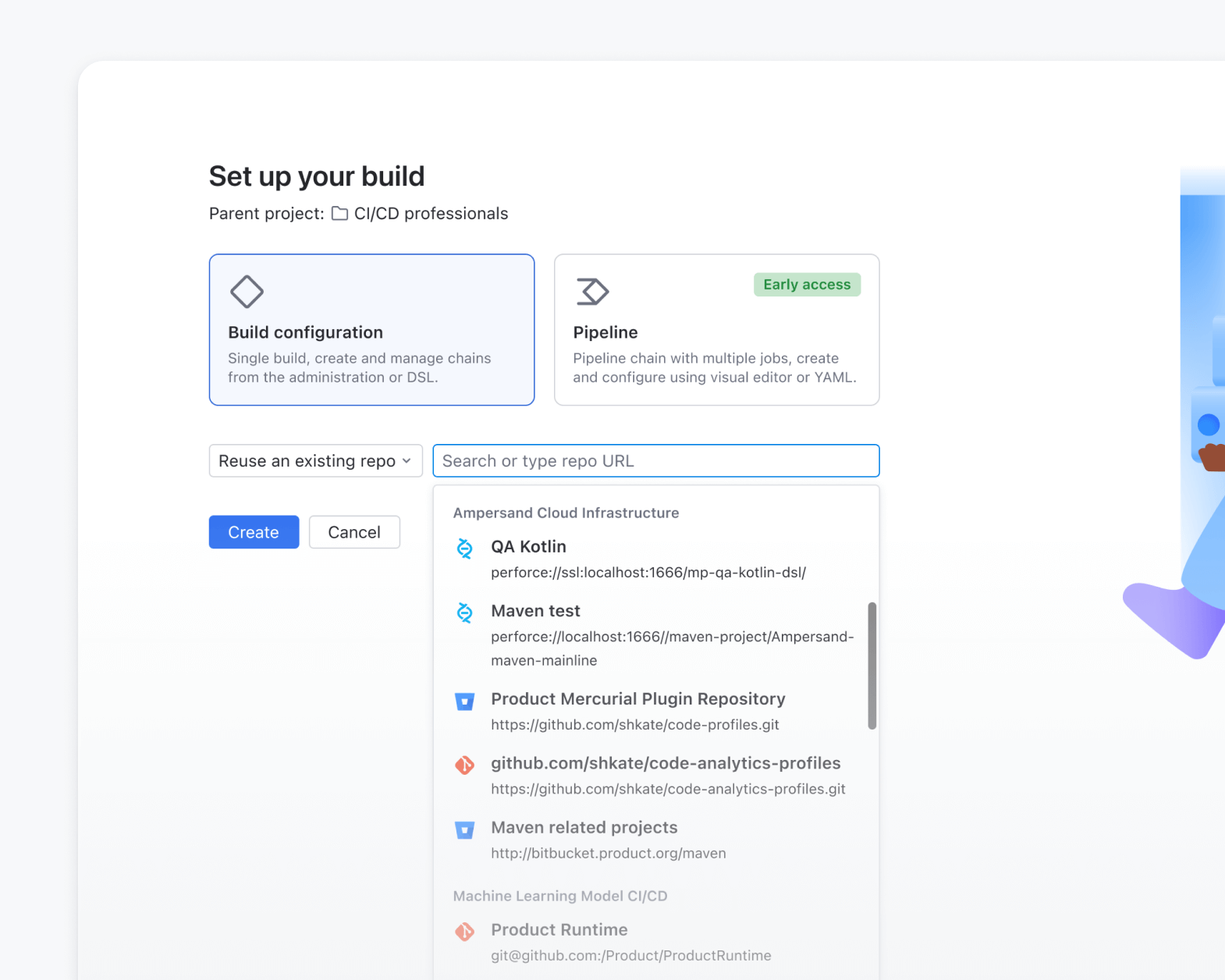
Create projects from an existing repository URL

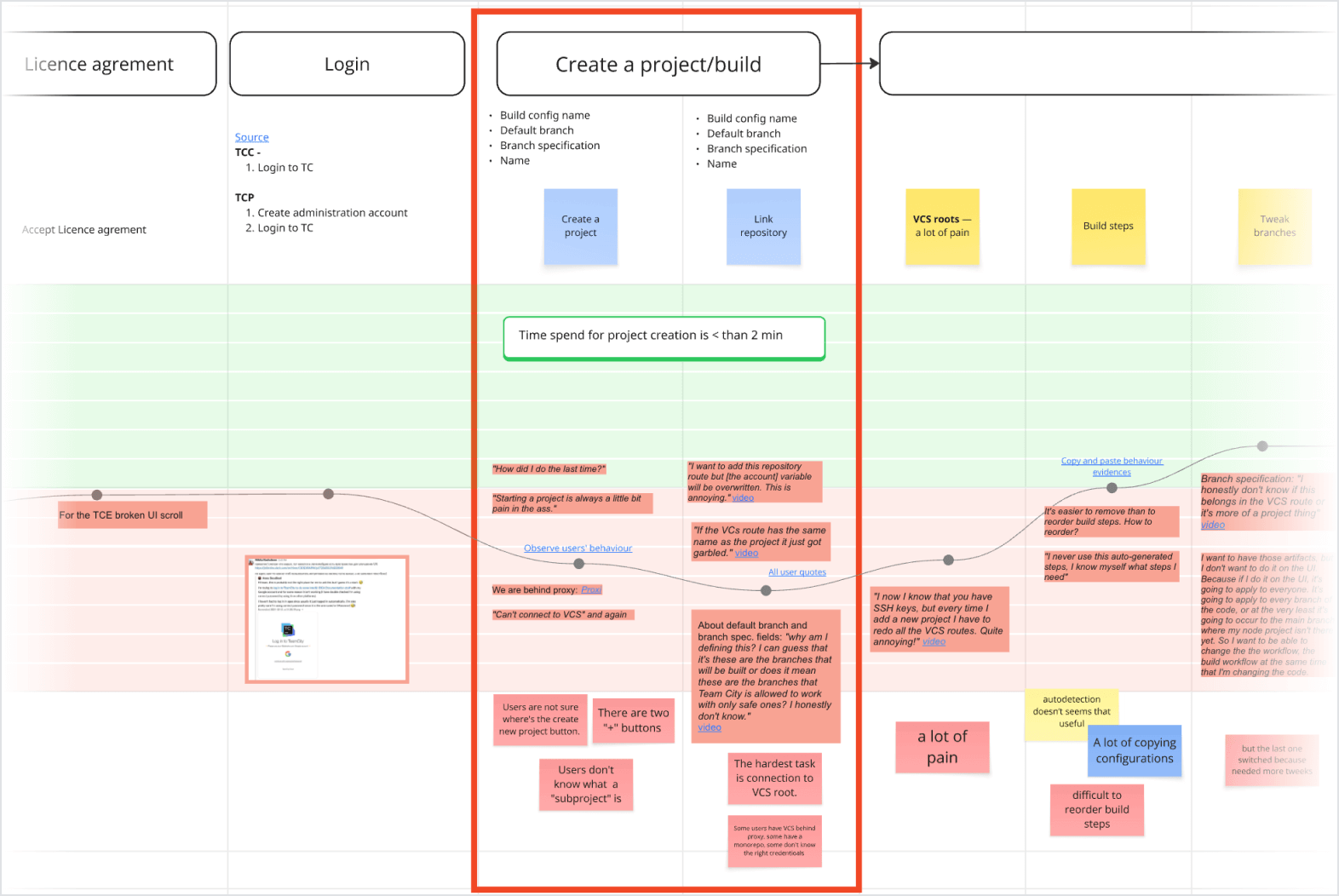
During the Journey Map study, we discovered the workarounds that users employed when attaching the VCS root. To streamline this process, we’ve added the option to create a project straight from a VCS root.

Easier VCS integration setup

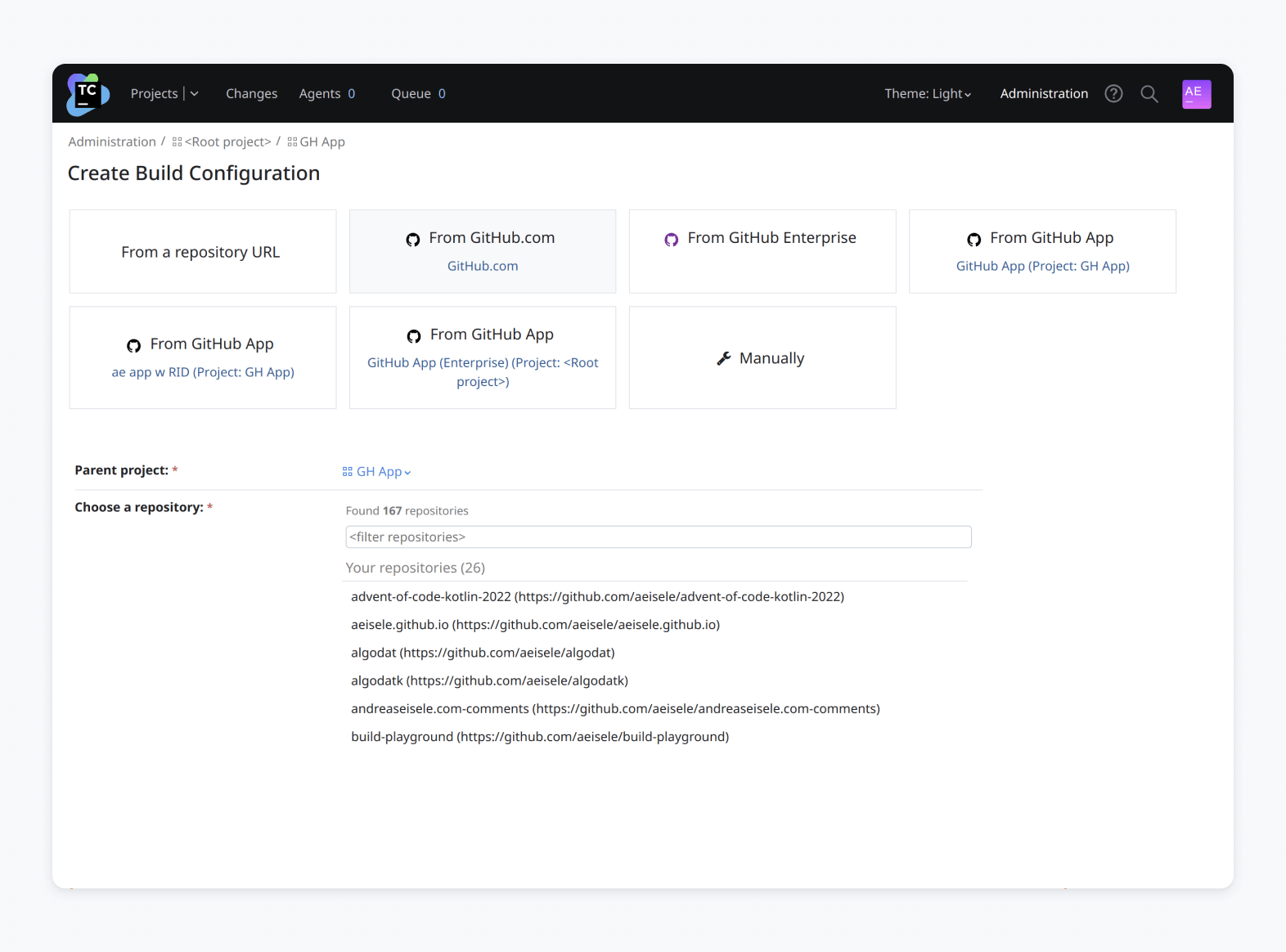
Connecting TeamCity to your version control system is now simpler than ever. We’ve introduced a new connection interface that guides you through linking your GitHub, GitLab, or Bitbucket account before creating a VCS root.

Once the integration is set up, TeamCity can automatically find your repositories by name and help you configure the VCS root with just a few clicks.

We have added a setting to configure a new VCS connection in the creation flow. Setting up the connection both speeds up onboarding and enables TeamCity functionality to serve the user.

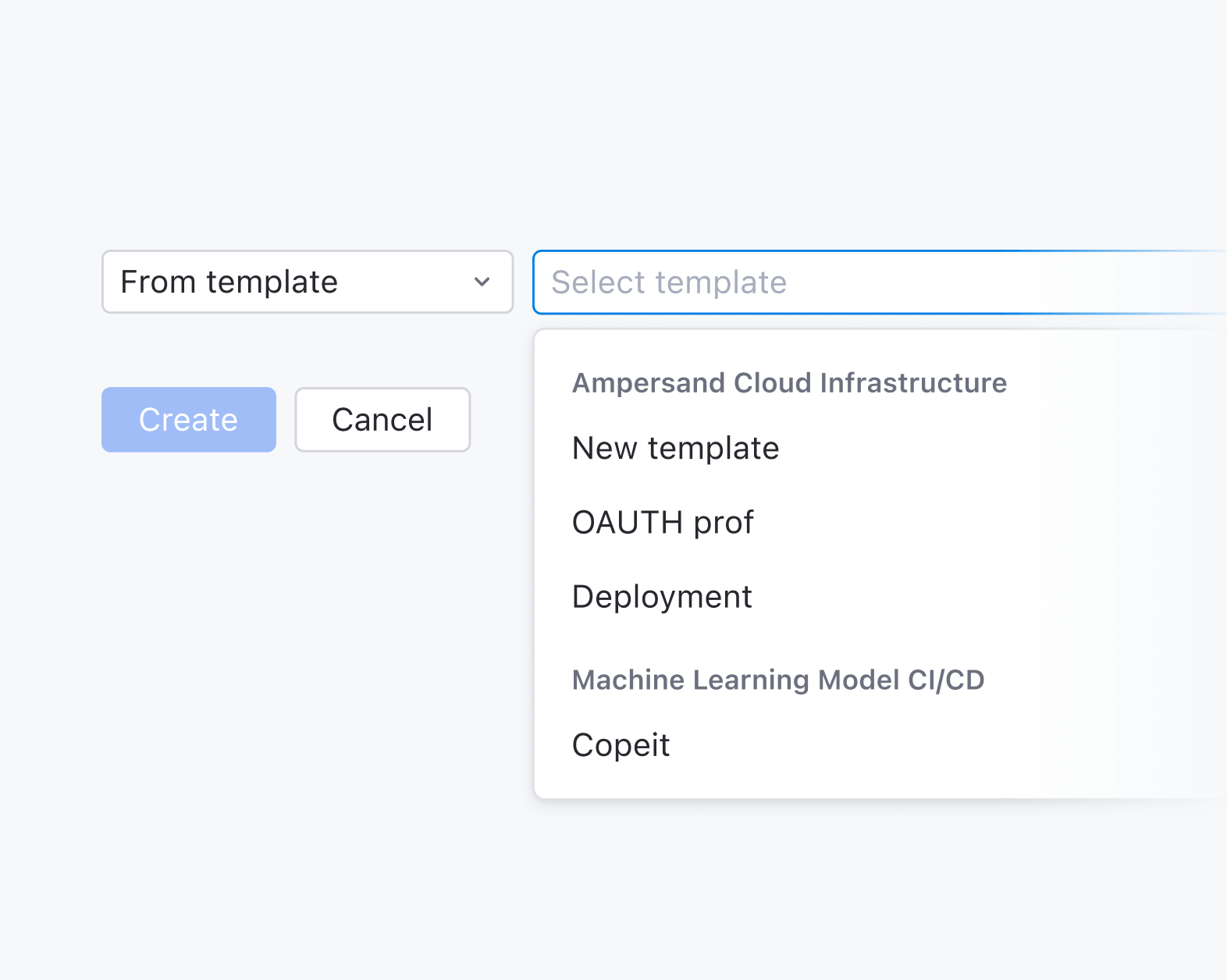
Create from template

Templates have always been one of TeamCity’s hidden gems. They simplify setup, reduce repetition, and make managing builds easier.

In the new design, we’ve made templates a visible part of the setup flow. Instead of digging through menus, users can opt to use a template in the early stages of build creation. This saves time and helps you get to your first successful build faster.

Welcome to the new TeamCity

We’re excited for you to get your hands on the new TeamCity and can’t wait to hear your thoughts!

Please feel free to share them here in the comments, and don’t hesitate to contact our Support team if you have any questions. We’re always here to help!

15 Things To Do Before, During, and After KotlinConf’26

So, you’re coming to KotlinConf’26? Maybe it’s your first time in Munich, or even your first time at KotlinConf. You have your tickets, you’ve learned the schedule by heart, but it might still feel a little overwhelming. Let me show you how you can have the best possible experience by guiding you through all the things you can do.

Believe me, KotlinConf is so much more than a conference!

1. Explore Munich (before things get busy)

If you’re arriving before the conference, try to set aside some time to explore the city. Munich has great food, interesting neighborhoods, and plenty of places to slow down before the schedule gets busy.

Not sure what to see? Keep an eye out for my social media posts, I’ll definitely have some tips for you! 😉

KotlinConf'26: Explore Munich

2. Skip the line. Register early

Standing in line on the first morning, half-awake and carrying a backpack, is not how you want to start KotlinConf.

Come to the venue the day before the conference kicks off on May 20 between 2:00 and 5:00 pm. You’ll avoid large queues, save time, and keep your energy for what really matters. And believe me, you’ll need it.

When you’re already checked in, you can walk in on Day 1, grab a coffee, find your seat, and focus on the talks instead of logistics. It’s a much better way to begin.

Save your spot at KotlinConf’26

3. Start with a workshop

If you want to get even more out of KotlinConf, start with a full day of hands-on workshops on May 20.

  • Build Shared UI With Compose Multiplatform.
  • Go Deeper Into Kotlin Multiplatform Architecture.
  • Master Coroutines and Asynchronous Programming.
  • Build High-Performance Backends With Spring Boot.
  • Create AI Agents in Kotlin.
  • Refactor Toward Functional Kotlin.

Workshops are practical, focused, and led by Kotlin experts. You’ll leave with skills you can apply right away.

Seats are limited, so make sure to save yours before they’re gone!

4. Don’t miss the Keynote!

Join us for the opening Keynote to see the big picture. This is where we set the stage, introduce the year’s most ambitious ideas, and bring the entire community together. There is a specific energy to experiencing these reveals live – don’t settle for the recap.

KotlinConf'25 Keynote

5. Take a selfie with me

If you spot me somewhere around the venue, don’t hesitate, come over and say “hello”. 
A quick selfie, a short chat, a shared laugh in between sessions, whatever, I’m down!
I’m always happy to meet you, hear where you’re from, what you’re working on, and how KotlinConf is going for you. And who knows, you might even end up in one of my posts. Let’s create some memories!

KotlinConf: Take a selfie with Kodee

6. Join the Coding Challenge

Engage in our Coding Challenge. It’s a good way to test yourself, learn something new, and see how you approach problems under a bit of pressure. It gets even more interesting when you are watching others code! And if you win? Well then, you’ve earned the right to brag a little.

7. Wander around the expo 

Don’t be shy, after you’ve met everything Kotlin, go out and meet some of our partners!
This is where companies, communities, and partners set up booths to connect with all of you!

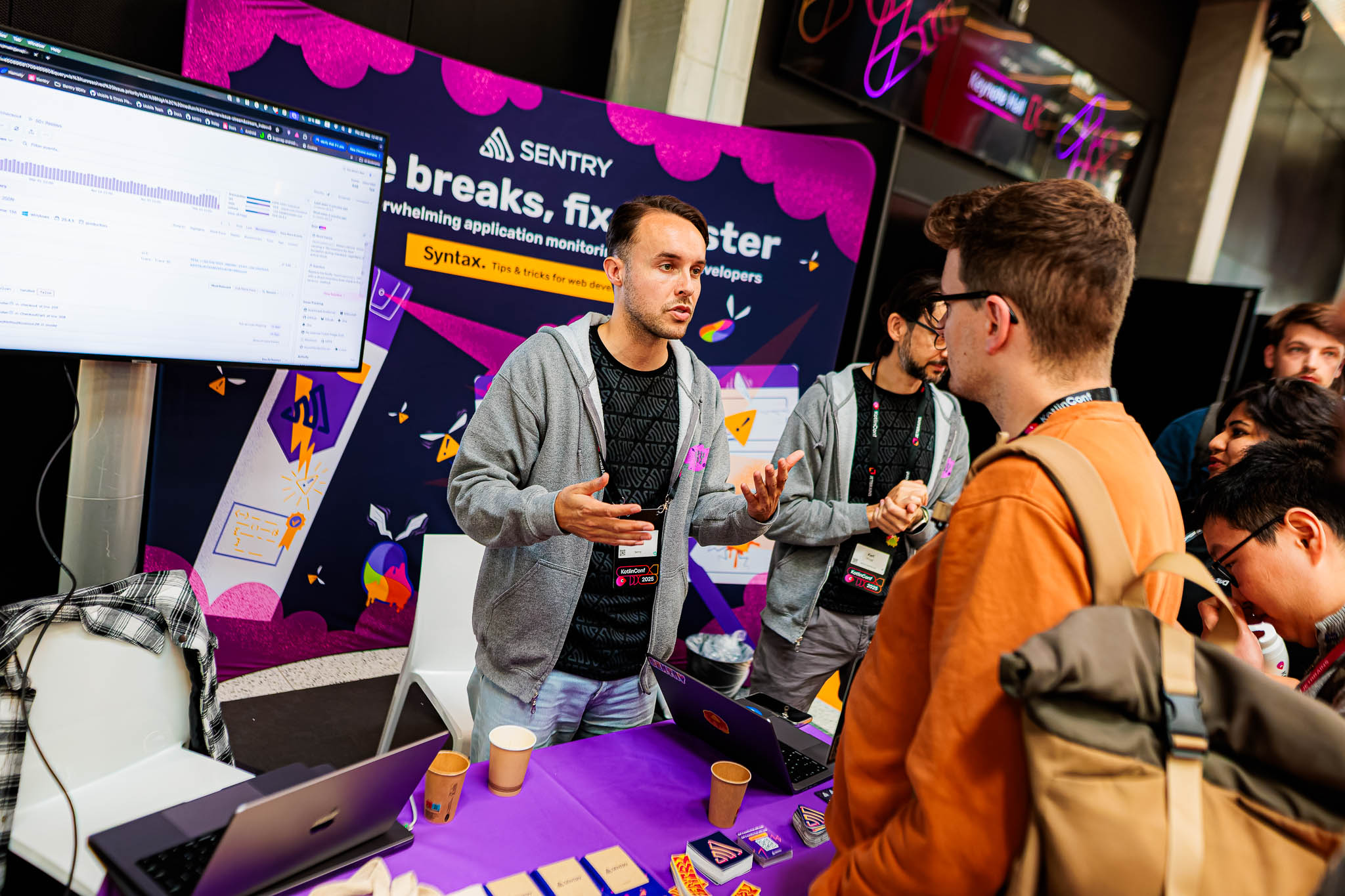
See how Kotlin is used in practice, and talk directly with engineers. Ask some questions and discover new tools, libraries, and platforms. Of course, do some networking and meet other developers. And also, get some swag for yourself and colleagues back home, it’s always nice to have some souvenirs!

KotlinConf'25: Expo

8. Go to the party

On the evening of May 21, put on your fancy clothes (maybe even your dancing shoes) and come to the party.

This is where you can reconnect with friends you haven’t seen in a while, continue conversations that started earlier on in the day, and meet new people along the way. Come for the music, stay for the conversations, and leave with a few more names in your contacts list!

KotlinConf'25: Party

9. Wake up early for Day 2

After a night of partying, I know waking up isn’t always the easiest. But you have another full day of learning ahead, starting from the Day 2 Keynote at 9:00 am, where Lena Reinhard will take the stage to set the tone for the day. Set your alarm, grab a coffee (no worries if you don’t have time for one: The team and plenty of coffee will be waiting for you at the venue), and head down to the conference. You’ll be glad you did. 

10. Learn something new (and eat well)

The main reason you’re here is to learn – new tools, ideas, or ways of thinking.
Take notes, ask questions, and give yourself time to reflect. And don’t forget to eat. Good food keeps you focused and energized, and don’t worry, KotlinConf has plenty of delicious eats on offer!

KotlinConf: Food at the conference

11. See the future! 

Make a wish, write a prediction, and place it in a time capsule. We’re going to open it and reveal what’s inside in 2031, so you’ll have to be patient and wait a bit to see if you were right! 

12. Take part in the games

After all the learning and networking, it’s always good to relax. Use what you’ve just learned and play a game built with Compose Multiplatform for web, with a chance to win a prize. If I were you, I wouldn’t miss this! 

13. Attend the Golden Kodee Awards

The Golden Kodee Awards celebrate individuals and communities who make a real impact by sharing knowledge, organizing events, and inspiring others. This year is special, because 2026 marks the very first time these awards are being presented.
 It’s a chance to recognize outstanding contributors and thank them for everything they do. And let’s be honest, gold looks great on me, don’t you agree?

14. Don’t forget to take a photo with me!

Did I already mention that?

KotlinConf'25: Photos with Kodee

15. Leave feedback and vote

Vote for all the sessions you attended. Leave your comments in the app about the talks. Reach out to us – don’t be shy, your feedback means a lot. We want to provide the best possible experience. The next KotlinConf might be even better than this one!

Save your spot at KotlinConf’26

+ 16. Mark your calendars

Before you head home and dive back into your inbox, take a moment to mark the dates for next year’s KotlinConf. It’s a small step, but it makes sure you won’t miss it once work gets busy.

I already miss you all, so let’s make sure we meet again next year.

Toolbox App 3.3: Introducing jetbrainsd, an Improved Linux Experience, and More

Toolbox App 3.3 introduces jetbrainsd – a lightweight background service that lays the foundation for cross-IDE features like protocol handling. This release also brings significant stability improvements for Linux users, smoother plugin updates, and a number of bug fixes across all platforms.

jetbrainsd

Toolbox App 3.3 ships with the jetbrainsd service – a new lightweight background process that starts automatically when you launch the Toolbox App.

What this means for you:

  • jetbrains:// links now route through the daemon instead of the Toolbox App itself, providing a more reliable experience when opening links from browsers, documentation, or external applications.
  • The service is managed automatically by the Toolbox App – it installs, starts, and updates alongside the Toolbox App.

Read more in the docs. 

Improved Linux experience

Linux users will notice several stability improvements in this release. Highlights include:

  • The Toolbox App widget no longer stays stuck on top of windows after the app restarts or updates on Linux.
  • The Toolbox App no longer shuts down instantly or fails to restart during the update process.
  • If you previously couldn’t log in to the Toolbox App on a fresh GNOME setup due to a missing secret collection, you can now authenticate successfully.
  • The .desktop file now uses relative icon paths instead of absolute ones, improving compatibility with different Linux setups.

Plugin updates without restart

Plugins can now be updated without restarting the application. Previously, after distributing a new plugin version to the plugin directory, you had to restart the Toolbox App to load the updated version. This is no longer necessary, as the Toolbox App will pick up plugin changes automatically.

Remote development fixes

  • The Toolbox App remote agent now properly stops when you select Close and Stop and disconnect via SSH, instead of remaining active in the background.
  • The app no longer crashes with an RpcClient was cancelled error when navigating to SSH remote development targets after restarting your machine.
Download Toolbox App

We’d love to hear your thoughts on Toolbox App 3.3! Your feedback helps us improve the product, so please share your experience in the comments.

The JetBrains Toolbox App team