FOSDEM’26

FOSDEM’26

FOSDEM is a very special kind of event, and the 2006 edition was no exception. It is organised at a university campus, it is free for attendees, and there is a massive amount of exhibitors that are involved in open source in one way or the other. It is the place to be for the open source community, no question about that.

Since there were no Java devroom at the conference this year, some dedicated members of the Java community met up at Bier Centraal on Saturday night. As always when we meet, there were some discussions and ideas coming out of it. Nobody will ever know if it is because fo the Belgian beer or not…

Among other things, we planned for how we can scramble to see if we can get the Java devroom back at FOSDEM next year.

True to tradition, Eclipse Foundation had a booth at FOSDEM. We were almost 20 present from the Foudation at FOSDEM this year, so the booth had excellent coverage from the various technologies and projects that are represented among the more than 400 projects at Eclipse Foundation. The spin-the-wheel-to-win-swag was extremely popular. As was the chance to win a Lego set in the raffle at the end of each day. FOSDEM is an excellent event for us to meet and talk to the open source community.

Ivar Grimstad


Combobox vs. Multiselect vs. Listbox: How To Choose The Right One

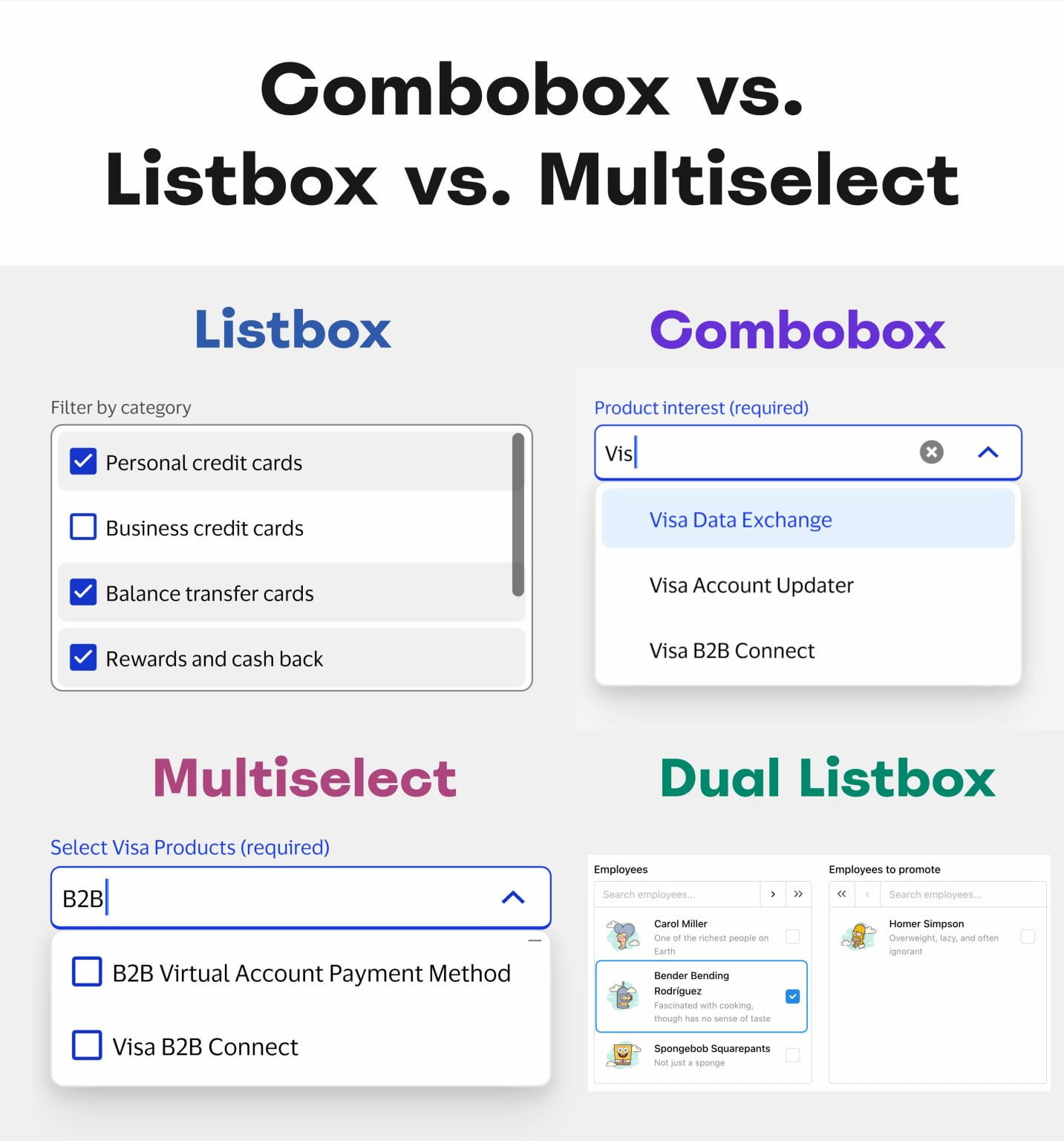
So what’s the difference between combobox, multiselect, listbox, and dropdown? While all these UI components might appear similar, they serve different purposes. The choice often comes down to the number of available options and their visibility.

Let’s see how they differ, what purpose they serve, and how to choose the right one — avoiding misunderstandings and wrong expectations along the way.

Not All List Patterns Are The Same

All the UI components highlighted above have exactly one thing in common: they support users’ interactions with lists. However, they do so slightly differently.

Let’s take a look at each, one by one:

  • Dropdown → list is hidden until it’s triggered.
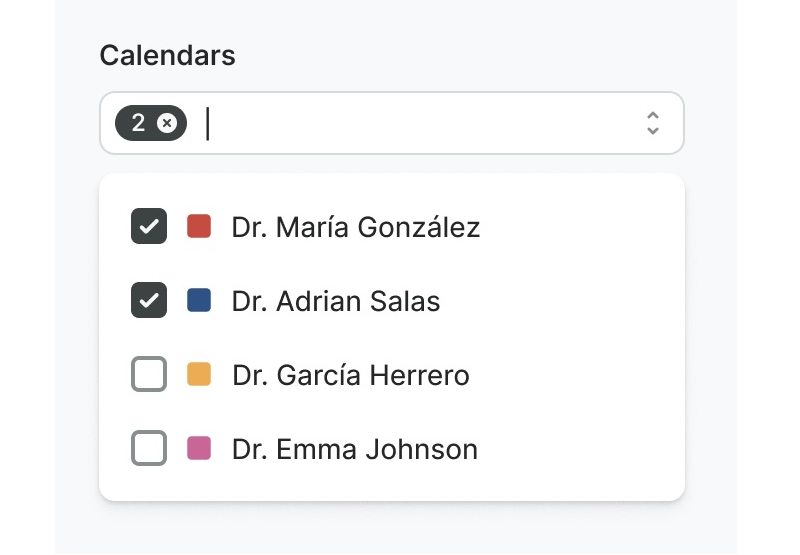
  • Combobox → type to filter + select 1 option.
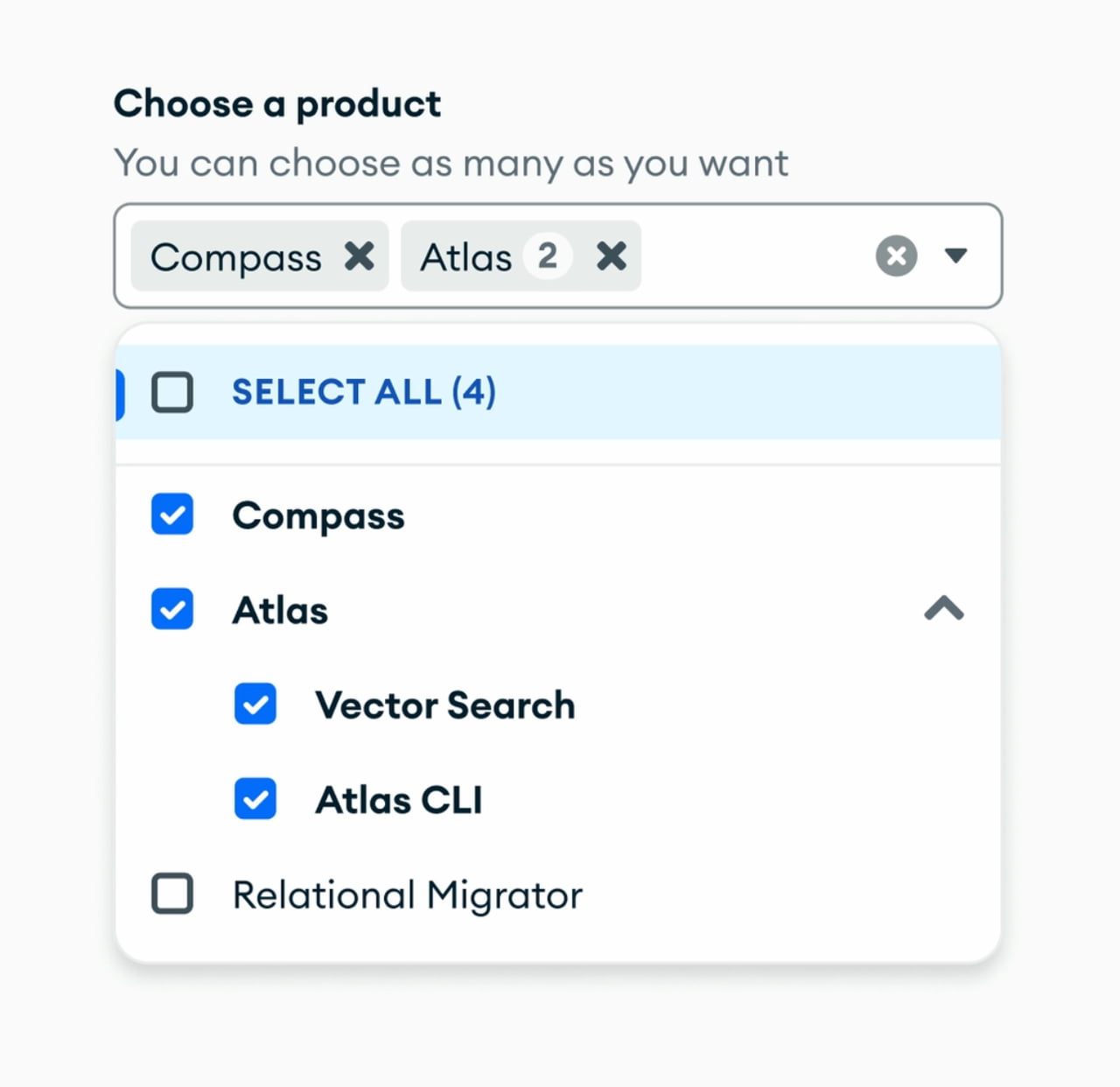
  • Multiselect → type to filter + select many options.
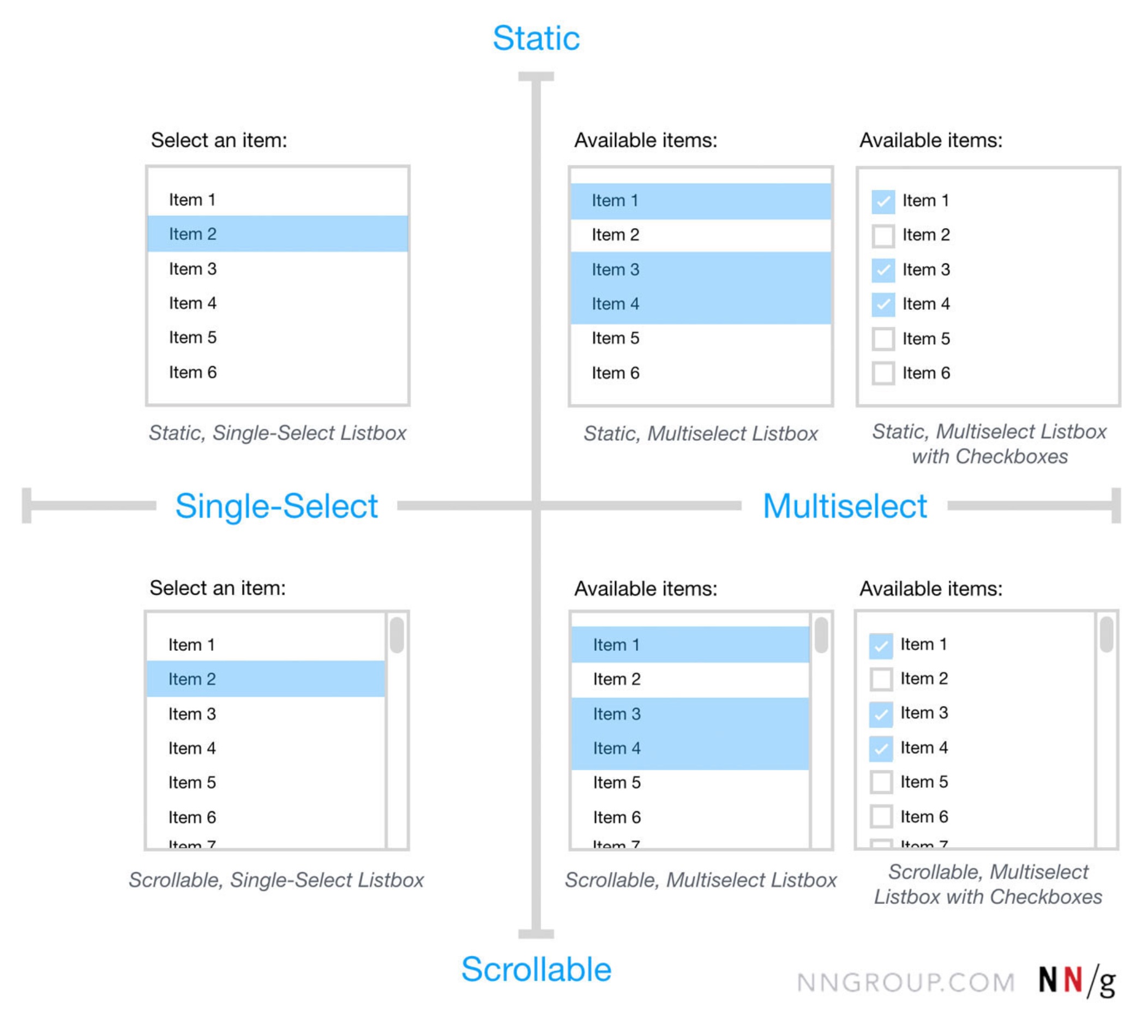
  • Listbox → all list options visible by default (+ scroll).
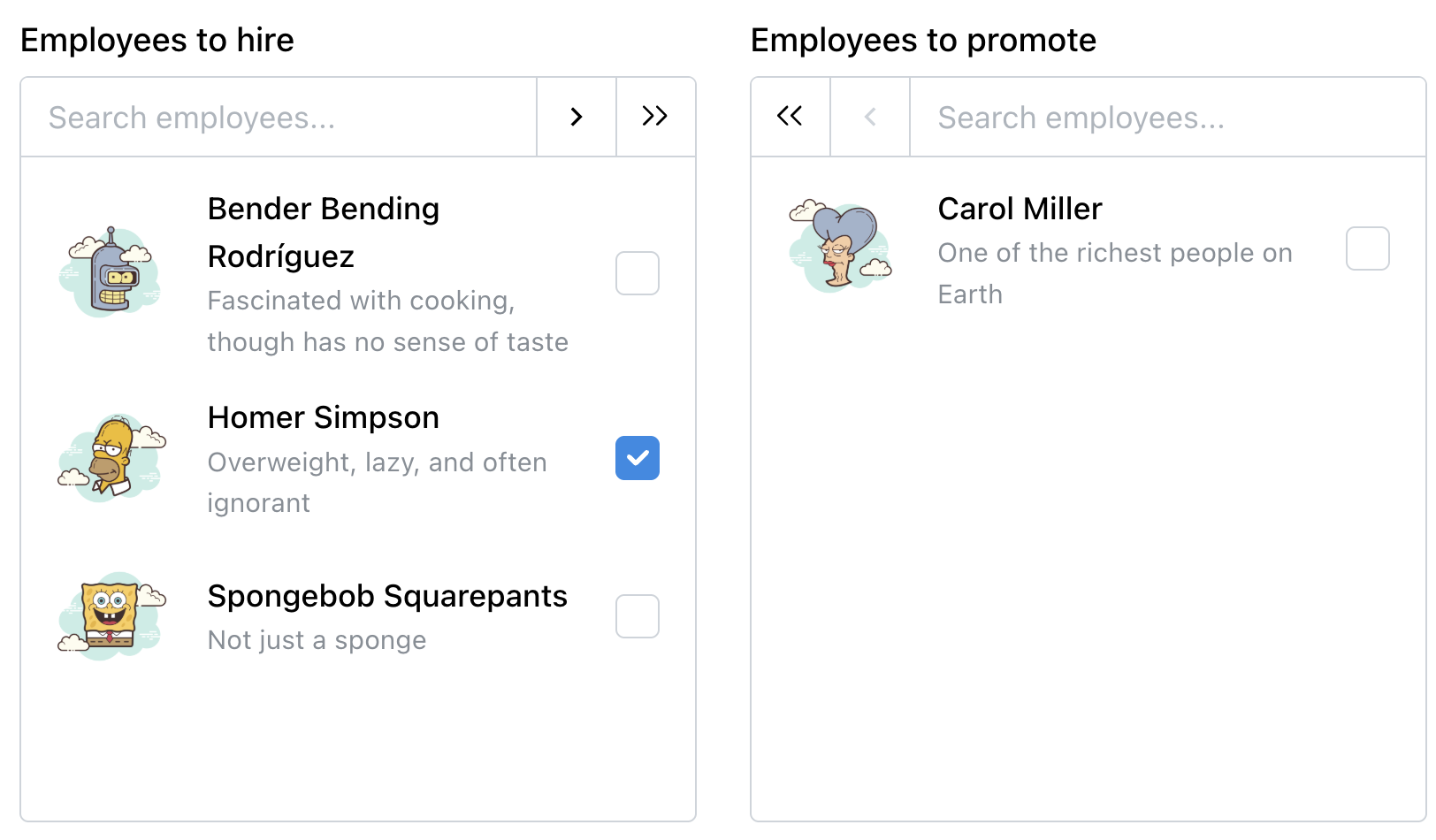
  • Dual listbox → move items between 2 listboxes.

In other words, Combobox combines a text input field with a dropdown list, so users can type to filter and select a single option. With Multiselect, users can select many options (often displayed as pills or chips).

Listboxes display all list options visible by default, often with scrolling. It’s helpful when users need to see all available choices immediately. Dual listbox (also called transfer list) is a variation of a listbox that allows users to move items between two listboxes (left ↔ right), typically for bulk selection.

Never Hide Frequently Used Options

As mentioned above, the choice of the right UI component depends on 2 factors: how many list options are available, and if all these options need to be visible by default. All lists could have tree structures, nesting, and group selection, too.

There is one principle that I’ve been following for years for any UI component: never hide frequently used options. If users rely on a particular selection frequently, there is very little value in hiding it from them.

We could either make it pre-selected, or (if there are only 2–3 frequently used options) show them as chips or buttons, and then show the rest of the list on interaction. In general, it’s a good idea to always display popular options — even if it might clutter the UI.

How To Choose Which?

Not every list needs a complex selection method. For lists with fewer than 5 items, simple radio buttons or checkboxes usually work best. But if users need to select from a large list of options (e.g., 200+ items), combobox + multiselect are helpful because of the faster filtering (e.g., country selection).

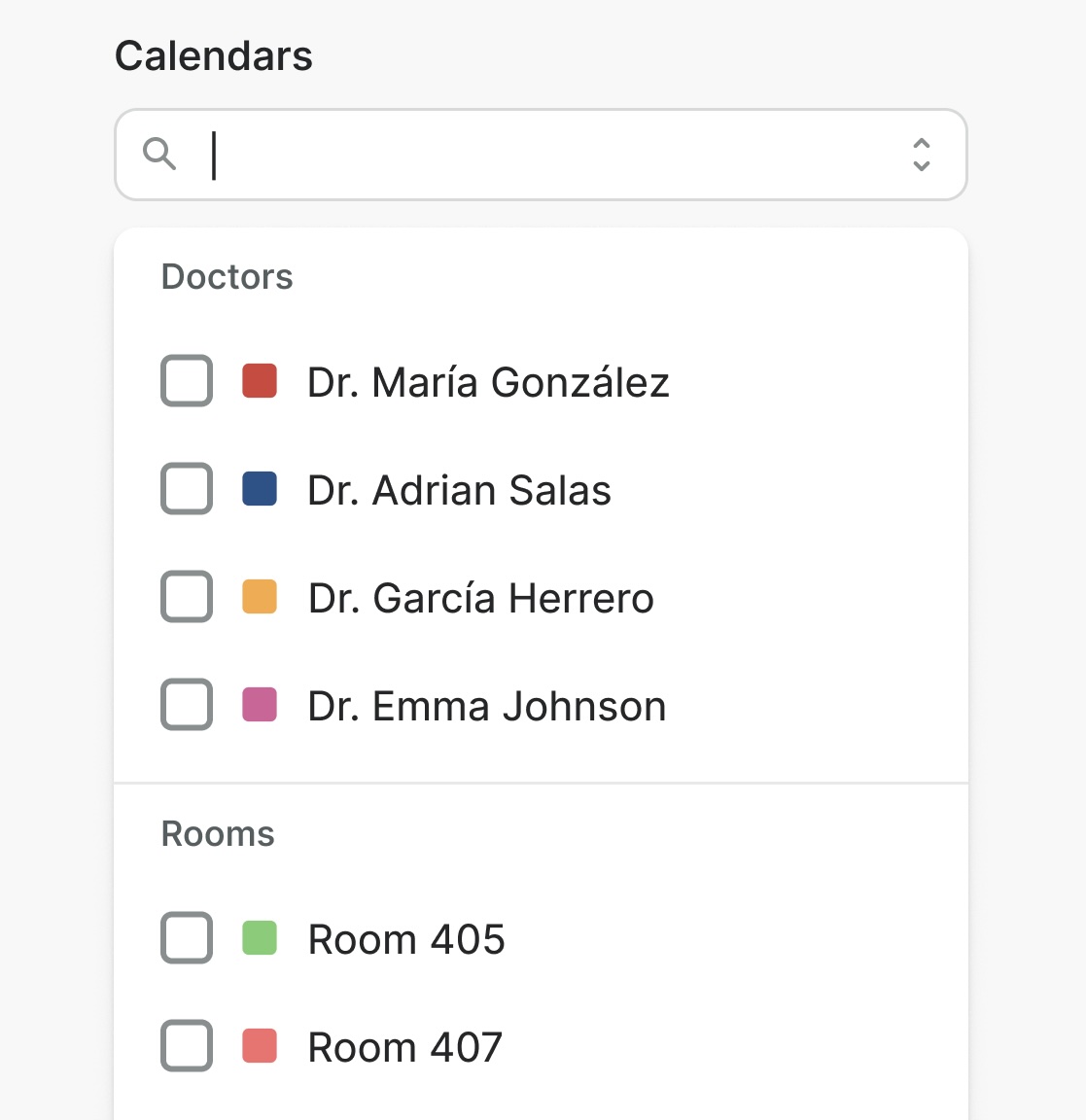
Listboxes are helpful when people need to access many options at once, especially if they need to choose many options from that list as well. They could be helpful for frequently used filters.

Dual listbox is often overlooked and ignored. But it can be very helpful for complex tasks, e..g bulk selection, or assigning roles, tasks, responsibilities. It’s the only UI component that allows users to review their full selection list side-by-side with the source list before committing (also called “Transfer list”).

In fact, dual listbox is often faster, more accurate, and more accessible than drag-and-drop.

Usability Considerations

One important note to keep in mind is that all list types need to support keyboard navigation (e.g., ↑/↓ arrow keys) for accessibility. Some people will almost always rely uponthe keyboard to select options once they start typing.

Beyond that:

  • For lists with 7+ options, consider adding “Select All” and “Clear All” functionalities to streamline user interaction.
  • For lengthy lists with a combobox, expose all options to users on click/tap, as otherwise they might never be seen,
  • Most important, don’t display non-interactive elements as buttons to avoid confusion — and don’t display interactive elements as static labels.

Wrapping Up: Not Everything Is A Dropdown

Names matter. A vertical list of options is typically described as a “dropdown” — but often it’s a bit too generic to be meaningful. “Dropdown” hints that the list is hidden by default. “Multiselect” implies multi-selection (checkbox) within a list. “Combobox” implies text input. And “Listbox” is simply a list of selectable items, visible at all times.

The goal isn’t to be consistent with the definitions above for the sake of it. But rather to align intentions — speak the same language when deciding on, designing, building, and then using these UI components.

It should work for everyone — designers, engineers, and end users — as long as static labels don’t look like interactive buttons, and radio buttons don’t act like checkboxes.

Meet “Design Patterns For AI Interfaces”

Meet Design Patterns For AI Interfaces, Vitaly’s new video course with practical examples from real-life products — with a live UX training happening soon. Jump to a free preview.

Meet Design Patterns For AI Interfaces, Vitaly’s video course on interface design & UX.

  • Video + UX Training
  • Video only

Video + UX Training

$ 450.00 $ 799.00

Get Video + UX Training

30 video lessons (10h) + Live UX Training.
100 days money-back-guarantee.

Video only

$ 275.00$ 395.00

Get the video course

30 video lessons (10h). Updated yearly.
Also available as a UX Bundle with 3 video courses.

Useful Resources

  • Autocomplete: UX Guidelines, by Vitaly Friedman
  • Combobox, by eBay 👍
  • Combobox, by Elastic
  • Combobox, by Elisa
  • Combobox, by MongoDB 👍
  • Combobox, by Visa 👍
  • Combobox, by Watson (Docplanner)
  • Combobox, by Wikimedia
  • Combobox, by Zendesk
  • Multiselect (MongoDB Combobox Design Docs), by MongoDB 👍
  • Multiselect Lookup, by Wikimedia
  • Multi-select Combo Box, by Vaadin
  • Multiselect, by Visa
  • Transfer (Listbox example), by Ant Design
  • Listbox, by Hopper
  • List Box, by Vaadin
  • Listbox, by Visa
  • Dual List Selector, by Red Hat (PatternFly)
  • Dual Listbox, by Salesforce (Lightning Design System)
  • Transfer List, by Mantine
  • Dual Listbox, by Dashlite
  • Badges vs. Pills vs. Chips vs. Tags, by Vitaly Friedman
  • Listboxes vs. Dropdown Lists, by Anna Kaley (NN/g)

How AWS Vector Databases Empower Semantic Search and AI Applications

Have you imagined that in a search system, you are searching for “Best places for a day-long tour?” and immediately you get results like:

  • Good spot for one day tour with family and friends

  • Places to visit within a short time

  • Best short picnic tour with natural view

How do you get these results that don’t exactly match your search queries?

Also, have you imagined how your company’s dedicated AI chatbot answers users’ queries related to your company’s information, where the AI chatbot models are actually not trained with your company’s information!

What is actually behind these things? Where do search engines get their information?

The simple answer is Vector Database. Vector Database is the thing that answers your imagination.

In this article, we will discuss what is Vector Database and how Vector Database resolves these problems? Later, we will know how AWS Vector Databases empower semantic search and AI applications.

So, before explaining Vector Database, let’s first understand the problems it resolves, such as semantic search and one of the core components of modern AI applications: RAG (Retrieval-Augmented Generation).

What do you mean by semantic search?

In the very first section of this article, you searched for suggestions like best places for a day-long tour, and you got similar results that match your intention, understand your query’s meaning.

Semantic Search is a search technique that focuses on the meaning and intent behind your query, rather than just matching the exact queries. Unlike the traditional keyword-based search (which looks for exact word matches), Semantic Search uses machine learning to understand the context, intents, and relationships between words. It tries to answer the question: “What is the user actually looking for?”

So now, what does semantic search use to work?

Semantic search uses several things to work, like a data chunker, embedding models (large language models), vector databases, and several indexing algorithms.

Here is an image for the semantic search process that can give you some idea.

RAG (Retrieval-Augmented Generation):

Now, suppose I want to build a chatbot for my company, “Dynamic Solution Innovators Ltd. (DSi)” that can answer users about the company-specific information. And for this, what will I need? I need an LLM model which can understand user queries and will also have my company’s (DSi) information, right? As you know, only an LLM model that can understand natural language will not be enough, as it needs your company’s information so that it can answer.

Now, for this, you can train an LLM model by fine-tuning it with all of your company data. However, this approach is time-consuming, costly, and complex. In addition, over time, a lot of information about your company will change, and regularly re-training the LLM model with new data will become even more difficult. Moreover, training the model only on company data does not guarantee that you will get correct answers to all questions, because an LLM generates responses based on predictions from the data. In such cases, there is a chance of hallucination or incorrect answers.

In this case, you can take another approach. You can provide all of your company’s information as context to a foundation model with every question. Since a foundation model is capable of understanding and processing language, there is no need to train it separately. By supplying the necessary context, it can generate answers based on that context. This way, even if your company or product data changes, it is not a problem, because the data is being provided dynamically as context. However, there is still a problem with this approach. If your company’s data is very large, like a hundred gigabytes, then what happens? The model cannot realistically process such a huge amount of data as context every time it answers a question. And here, RAG (Retrieval-Augmented Generation) comes to rescue you, it provides an excellent solution to all of these problems.

The full process of RAG generally involves these 4 steps.

  1. Ingestion/Indexing: Company or product data is split into small chunks, converted into vector embeddings using an embedding model, and stored in a vector database for efficient retrieval.

  2. Retrieval: When a user submits a query, it is converted into a vector embedding and matched against the vector database to retrieve only the most relevant information.

  3. Augmentation: The user’s query and the retrieved relevant information are combined to generate a prompt that includes both the question and the necessary context.

  4. Generation: The LLM generates a response based on the augmented prompt, producing more accurate and context-aware answers.

So you can see the power of Vector databases here. It is one of the backbones of the RAG.

You will have a better understanding of RAG from this image.

To learn more about RAG you can read this nice pinecone’s article.

Now let’s come to the point!

What is Vector Database?

To know what Vector Database is, let’s start with a scenario. Suppose you want to store this image in a database. So, how would you store it, and how would you describe it as an image of a sunset in Mountain Vista?

If we want to use a relational database like PostgreSQL/MySQL to store this image, we will generally save its properties like:

  • Binary data

  • Metadata

  • Tags (sunset, mountain, orange)

So these are the properties that you can use later to retrieve this image or describe it. But can you realise that this kind of information largely misses the images’ overall semantic context? Because how would you query for images with similar colour palettes using this information? These concepts are not really represented in these structure fields, and that disconnects how computers store data and how humans understand it. This is a semantic gap.

Now to retrieve information from a traditional database, it will use like
SELECT *
WHERE
color = ‘orange’

It is kind of short because it does not capture the information of multidimensional unstructured data. And that’s where Vector Database comes in.

A vector database is a database to store, index, and rapidly search high-dimensional data points called vector embeddings. These vectors are high-dimensional data points that capture semantic meaning.

You can store any kind of data, like text, audio, or video, in a vector database, but before storing, you need to convert this data into vector embeddings, as a vector database only stores vector embeddings.

What Are Vector Embeddings?

Vector Embeddings are high-dimensional numerical arrays that represent the semantic meaning of text, images, or audio. When text, images, audio, or other content is processed by an embedding model, it is converted into a high-dimensional vector. These vectors are stored in the vector database.

The embedding models are machine learning models that convert these types of complex unstructured data into numerical arrays that contain semantic meaning.

Vector database primarily uses Approximate Nearest Neighbor (ANN) search algorithms for efficient similarity search across high-dimensional data. Later on in the next article we will discuss how vector databases actually work.

AWS Vector Database Services:

AWS does not provide any standalone vector database service. It offers multiple vector database capabilities embedded across its existing services including Amazon OpenSearch Service, RDS/Aurora for PostgreSQL, Amazon MemoryDB, Amazon DocumentDB, and specialized tools like Amazon Neptune Analytics, catering to different needs for AI/ML applications like Retrieval-Augmented Generation (RAG) and recommendation engines. Instead of a single universal solution, it allows teams to choose the option that best fits their requirements while keeping data near the workloads that rely on it.

Amazon RDS/Aurora for PostgreSQL with Vector Search (pgvector)

What Amazon RDS/Aurora for PostgreSQL does:

  • Stores vector embeddings in PostgreSQL tables
  • Performs fast similarity search and semantic similar items
  • Combines vector search with full SQL operations like filters, joins, sorting
  • Allows in-database embedding generation

What makes Amazon RDS/Aurora for PostgreSQL different:

  • Everything stays in one PostgreSQL database. No separate vector DB
  • Full ACID transactions with relational features preserved
  • Direct integration with Bedrock that generate embeddings with simple SQL calls
  • Hybrid search (vector + keyword) in single query

Amazon OpenSearch with vector engine / K-NN

What Amazon OpenSearch with vector engine does:

  • Stores high-dimensional vector embeddings in dedicated indexes (knn_vector field)
  • Supports semantic/meaning-based search
  • Enables hybrid search that combines vector similarity with keyword/full-text, filters, and aggregations in one query

What makes Amazon OpenSearch with vector engine different:

  • Purpose-built search & analytics engine that excels at large-scale, complex queries beyond just vectors
  • True hybrid/combined search in single query like keyword + vector

Amazon MemoryDB for Redis

What Amazon MemoryDB for Redis does:

  • Stores vector embeddings in Redis hashes or JSON documents
  • Performs ultra-fast k-Nearest Neighbors (k-NN) similarity search
  • Enables semantic/meaning-based search at in-memory speed
  • Provides real-time indexing and updates

What makes Amazon MemoryDB for Redis different:

  • Fastest vector search on AWS with nearly single-digit millisecond latency
  • Multi-AZ durability with 99.99% availability. Data persists across failures, unlike pure cache
  • Redis ecosystem compatibility, which can use existing Redis clients, commands, and tools

Amazon DocumentDB (with MongoDB compatibility)

What Amazon DocumentDB does:

  • Stores vector embeddings directly within JSON documents alongside operational data
  • Performs similarity search using HNSW (Hierarchical Navigable Small Worlds)
  • Enables hybrid search by combining vector similarity with traditional document filtering
  • Integrates with LangChain and other AI frameworks for building semantic search applications

What makes Amazon DocumentDB different:

  • Eliminates the need to move data to a separate vector database; you can run vector queries on your existing JSON data.
  • Native JSON support means you can store embeddings next to complex, nested attributes without rigid schema definitions.
  • Allows you to use standard MongoDB drivers and tools to manage vector data.

Amazon Bedrock Knowledge Bases

What Amazon Bedrock Knowledge Bases does:

  • Fully manages the end-to-end RAG workflow
  • Automates the ingestion process: connects to data sources like S3, splits text into chunks, generates embeddings, and stores them in a vector index
  • Retrieves relevant context at runtime to augment LLM prompts for more accurate responses

What makes Amazon Bedrock Knowledge Bases different:

  • Abstracts away the complexity of building data pipelines. You don’t need to write code to chunk documents or call embedding APIs.
  • It acts as a connector rather than just storage. It manages the synchronization between your raw data and your vector db store
  • Connects natively with Bedrock Agents to give AI assistants access to proprietary data without manual implementation.

In summary, the table below outlines when to use each service and what makes it different

References

  • https://docs.aws.amazon.com/prescriptive-guidance/latest/choosing-an-aws-vector-database-for-rag-use-cases/vector-db-options.html
  • https://aws.amazon.com/what-is/vector-databases/
  • https://www.pinecone.io/learn/vector-database/
  • https://www.linkedin.com/pulse/aws-vector-databases-explained-semantic-search-rag-systems-jon-bonso-rgx0f/
  • https://www.pinecone.io/learn/retrieval-augmented-generation/
  • https://www.dsinnovators.com/services/cloud-platform-engineer.html
  • https://www.youtube.com/watch?v=gl1r1XV0SLw&t=1s
  • https://www.youtube.com/watch?v=T-D1OfcDW1M
  • https://www.datacamp.com/tutorial/mastering-vector-databases-with-pinecone-tutorial

Why Your Competitive Intelligence Scrapers Fail: A Deep Dive into Browser Fingerprinting

You’ve built a scraper to track a competitor’s pricing. You’re using high-quality residential proxies, you’re rotating User-Agents, and your logic is sound. For the first week, the data flows perfectly. Then, suddenly, the walls go up. You start seeing 403 Forbidden errors, CAPTCHAs on every page, or worse: “ghosting,” where the site serves slightly outdated or fake data without throwing an error.

You swap your proxies, but the blocks persist. You slow down your request rate, but the site still knows it’s you.

The reality of modern web scraping is that browser fingerprinting has replaced IP tracking as the primary weapon for anti-bot platforms like Cloudflare, Akamai, and DataDome. If you are running high-frequency “Intel Mode” scrapers designed for near real-time competitive intelligence, you aren’t being blocked because of your IP, but because of what you look like.

This guide explores why standard scraping techniques fail under high scrutiny and how to align your browser’s hardware and software signals to bypass advanced detection.

The ‘Intel Mode’ Paradox

In data extraction, there is a massive difference between scraping a blog once a month and monitoring an e-commerce giant every hour. We call the latter Intel Mode.

When you increase the frequency and volume of your requests, you move into high-scrutiny zones. Anti-bot systems assign every visitor a Trust Score. A low-volume visitor with a slightly messy fingerprint might get a pass, but when a system sees 10,000 requests coming from a specific “type” of device, it triggers a deep interrogation.

The paradox is that many developers try to solve this by randomizing everything. They rotate screen resolutions, GPU strings, and font lists on every request. This “chaos strategy” actually lowers your trust score. Real humans don’t change their hardware every five minutes. To a sophisticated defense system, a “unique” fingerprint is just as suspicious as a blocked one.

The goal isn’t to be unique; it’s to look like a standard, boring bucket of millions of real users.

The First Leak: Header Integrity and TLS

Before a single line of HTML is parsed, your scraper has likely already betrayed itself at the network layer.

Header Mismatches and Client Hints

Most developers know to set a User-Agent (UA) string. However, modern browsers now use Client Hints (CH), a set of Sec-CH-UA headers that provide more granular detail. If you send a Chrome 124 User-Agent but fail to include the corresponding Sec-CH-UA-Platform header, or if the versions don’t match, the server knows you’re using a manual library like Python requests.

The TLS Fingerprint (JA3/JA4)

This is a common silent killer. When your code initiates an HTTPS connection, it performs a TLS Handshake. During this handshake, the client sends a list of supported ciphers, extensions, and elliptic curves.

Python’s urllib or Node.js’s http module have distinct TLS signatures that differ significantly from a real Google Chrome browser. Anti-bot services use JA3 fingerprinting to identify these signatures. If you claim to be Chrome in your headers but your TLS handshake looks like Python, you are flagged instantly.

Feature Standard Library (Requests) Modern Browser (Chrome)
Header Order Often alphabetical or fixed Specific, non-alphabetical order
TLS Ciphers Limited, older suites Modern, GREASE ciphers
Client Hints Usually missing Present and consistent with UA
HTTP version Often defaults to HTTP/1.1 Defaults to HTTP/2 or HTTP/3

The Second Leak: Device-Type Coherence

If you pass the network layer, the anti-bot will execute JavaScript to check for Device Coherence. This is the alignment between your software claims and your hardware reality.

A common mistake is creating a “Frankenstein Fingerprint.” For example, a developer might set a User-Agent for “Windows 10” but run the scraper on a Linux server.

// A simple anti-bot check for coherence
const isBot = () => {
  const userAgent = navigator.userAgent;
  const platform = navigator.platform;

  // If UA says Windows but platform says Linux, it's a bot
  if (userAgent.includes("Win") && !platform.includes("Win")) {
    return true;
  }

  // Check for the 'webdriver' property used by automated tools
  if (navigator.webdriver) {
    return true;
  }

  return false;
};

Font Enumeration

One of the most effective ways to detect a server-side bot is by checking available fonts. A Windows machine has a very specific set of installed fonts, such as Arial and Calibri. A headless Linux server often lacks these or has different versions. If your script claims to be a Windows user but can’t render a specific Windows-only font, your trust score hits zero.

The Third Leak: Canvas and Hardware Realism

The most advanced form of fingerprinting is Canvas Fingerprinting. The website asks the browser to draw a hidden 2D or 3D image. Because of slight variations in GPU drivers, OS sub-versions, and hardware, the resulting image pixel data is unique to that device.

The Trap of Randomization

Many “stealth” plugins try to bypass this by adding random noise to the Canvas output. While this makes the fingerprint unique, it also makes it impossible. Anti-bot systems maintain a database of legitimate hardware signatures. If your Canvas output doesn’t match any known real-world GPU and driver combination, you are marked as an anomalous visitor.

WebGL and GPU Signatures

Similarly, the unmaskedRenderer and unmaskedVendor properties in WebGL can reveal your true identity. If these return Google SwiftShader or Mesa Offscreen, the site knows you are running a headless browser on a server, regardless of your proxies or User-Agent.

Implementation: Configuring for Stealth

To fix these leaks, you need to move away from simple HTTP clients and toward browser orchestration with specific configurations.

1. Aligning the Network Layer

If you use Python requests or aiohttp, use a library that can spoof the TLS fingerprint, such as curl_cffi or httpx with a custom SSL context. However, for high-frequency scraping, a browser-based approach is usually safer.

2. Playwright with Consistent Profiles

When using Playwright, avoid randomizing every attribute. Instead, create a profile that is internally consistent.

from playwright.sync_api import sync_playwright

def run_stealth_scraper():
    with sync_playwright() as p:
        # Launching with a consistent viewport and user agent
        # We use a real-world resolution (1920x1080)
        browser = p.chromium.launch(headless=True)

        context = browser.new_context(
            user_agent="Mozilla/5.0 (Windows NT 10.0; Win64; x64) AppleWebKit/537.36 (KHTML, like Gecko) Chrome/124.0.0.0 Safari/537.36",
            viewport={'width': 1920, 'height': 1080},
            device_scale_factor=1,
            is_mobile=False,
            has_touch=False,
            locale="en-US",
            timezone_id="America/New_York"
        )

        page = context.new_page()

        # Note: Modern Playwright handles some of this, 
        # but specialized plugins are often better for hiding the webdriver flag.
        page.goto("https://bot.sannysoft.com/")
        page.screenshot(path="check.png")
        browser.close()

run_stealth_scraper()

3. Offloading Fingerprint Management

Managing the perfect alignment of TLS, Canvas, and Fonts is a full-time job. For large-scale competitive intelligence, it is often more cost-effective to use a dedicated scraping API like ScrapeOps. These tools handle hardware realism for you by using real browser instances and rotating fingerprints that are statistically normal.

For example, using an SDK to enable Anti-Scraping Protection (ASP) handles the JS challenges and fingerprinting automatically:

import requests

API_KEY = 'YOUR_SCRAPEOPS_KEY'
TARGET_URL = 'https://competitor.com/prices'

# Send the request to a proxy that manages the browser fingerprint
response = requests.get(
    url='https://proxy.scrapeops.io/v1/',
    params={
        'api_key': API_KEY,
        'url': TARGET_URL,
        'render_js': 'true', # Handles JS-based fingerprinting
        'wait_for_selector': '.price-table'
    }
)

print(response.text)

To Wrap Up

The era of IP-only blocking is over. If your competitive intelligence scrapers are failing, it is likely because your browser fingerprint is shouting “Bot!” while your proxies are whispering “User.”

To build resilient scrapers in 2024, remember these fundamentals:

  • Consistency is King: Your User-Agent, Client Hints, TLS signature, and hardware signals must all tell the same story.
  • Avoid Over-Randomization: You don’t want to be unique; you want to be unremarkable.
  • Verify Your Footprint: Use tools like CreepJS to see exactly what your scraper looks like to a server.
  • Bridge the Gap: If the engineering overhead of managing WebGL, Canvas, and TLS becomes too high, use specialized scraping browsers or APIs that handle the fingerprinting layer for you.

As anti-bot systems move toward AI-driven behavioral analysis, the next frontier will be how you move the mouse and click buttons. But until you fix your fingerprint, you won’t even get through the front door.

Public IPs Are Not LANs: A Routing Mental Model That Actually Works

Users most often break networking by treating public IP subnets as if they behave like the local area networks in their homes or near-production environments.

This usually shows up as bridged interfaces, virtual machines assigned public IPs directly, or expectations that ARP will “just work.” When things fail, the blame tends to fall on the firewall, the hypervisor, or the ISP.

The real issue is simpler:

the mental model is wrong.

1. The incorrect mental model

The typical belief sounds like this:

“I have a /29 or /24 from my ISP. If I connect that subnet to my hypervisor, my VMs can just use those public IPs directly.”

This assumes public address space behaves like a private broadcast domain — similar to plugging one switch into another. From that perspective, ARP should resolve, neighbors should reply, and traffic should flow normally.

That assumption is incorrect.

2. What actually happens on the wire

Public IP subnets are not shared Ethernet segments. They are routed address space, owned and controlled by the upstream router.

When traffic is destined for one of your public IPs, the upstream router does not broadcast ARP requests through your hypervisor or internal switch. Instead, it consults its routing table and forwards the packet to a single next hop — the device it believes owns that address.

If you bridge public IPs internally and expect ARP to resolve between multiple hosts, it will fail. The upstream router never sees those ARP requests and will never respond to them. No firewall rule or hypervisor configuration can change this behavior.

From the upstream router’s point of view, anything beyond the next hop does not exist.

3. Public subnets are routed, not switched

A useful rule to remember:

Public IP space is delivered to you as a route, not as a layer-2 network.

That means:

  • You do not get a broadcast domain
  • You do not get neighbor discovery across hosts
  • Packets are forwarded strictly to a next hop

That next hop is usually your router or firewall — not individual VMs. Bridging public IPs internally creates a false sense of connectivity that may appear to work in trivial cases, but collapses under real traffic.

When people say “my ISP gave me a subnet,” what actually happened is that the ISP routed that subnet to one device.

4. Models that actually work

Only a few models behave correctly and predictably:

  • Routed subnet to a firewall/router, with all public IPs terminating there
  • 1:1 NAT, where the router owns the public IP and maps it explicitly
  • Policy routing / loopback ownership, where the router is the ARP endpoint

All of these share the same property:

One device owns the public IP at layer-2. Everything else lives downstream at layer-3.

Once you understand this, packet flow becomes obvious, debugging becomes simpler, and the system stops feeling unpredictable.

5. The rule of thumb

If you don’t control the upstream router, you don’t control ARP.

Public IPs should be routed to you — not bridged through you.

Using Redis to Optimize Backend Queries

How I Optimized My /leaderboard API from 200ms to 20ms Using Redis

Performance issues don’t usually scream at you.

They whisper.

My /leaderboard endpoint was one of those whispers.

It worked.
It returned the top 10 players correctly.
But under load… it felt slow.

Around ~200ms per request.

Not terrible.

But not great either.

And as someone building backend systems, I knew this would eventually become a bottleneck.

So I decided to fix it.

The Original Approach (The Comfortable One)

The endpoint logic was simple:

Query database

Sort users by score

Return top 10

Classic.

SELECT * FROM users ORDER BY score DESC LIMIT 10;

With proper indexing, it worked fine at small scale.

But leaderboards are:

Frequently accessed

Frequently updated

Competitive, real-time data

And hitting the database every single time didn’t feel right.

I needed something faster.

First Attempt: Let’s Use Redis

Redis felt like the perfect fit.

In-memory.
Fast.
Built for ranking.

But here’s the twist.

Redis wasn’t even working.

When I tried starting it locally, I got:

Error: Address already in use

Port 6379 was already occupied.

I tried restarting services.
Killing processes.
Nothing clean worked.

Instead of wasting more time debugging system-level conflicts, I decided to isolate it properly.

The Fix: Dockerizing Redis

I ran:

docker run -d -p 6379:6379 –name redis-server redis

And that solved everything instantly.

Now Redis was:

Isolated

Portable

Cleanly running

Easy to restart

Sometimes the real optimization is fixing your environment first.

Now I could finally move forward.

Enter Sorted Sets (ZSET)

Redis has a powerful data structure called Sorted Sets (ZSET).

Each entry has:

A member (user ID)

A score (points)

Redis automatically keeps them sorted by score.

That meant I no longer needed:

SQL sorting

ORDER BY queries

Heavy DB reads

When a user’s score updates:

await redis.zadd(“leaderboard”, score, userId);

To fetch top 10:

await redis.zrevrange(“leaderboard”, 0, 9, “WITHSCORES”);

Now the ranking logic lived entirely in memory.

Latency improved immediately.

But something still felt off.

The Hidden Bottleneck I Didn’t See Coming

After fetching the top 10 user IDs, I needed user details:

username

avatar

level

metadata

So I wrote:

for (let userId of topUsers) {
await redis.hgetall(user:${userId});
}

It worked.

But performance wasn’t where I expected it to be.

Then it hit me.

I had recreated the N+1 problem.

Not in the database.

In Redis.

Here’s what was happening:

**1 request → fetch leaderboard

10 requests → fetch each user

That’s 11 network round trips.**

Even if Redis responds in microseconds, network latency doesn’t.

That’s where my missing 100ms was hiding.

The Real Fix: Redis Pipelining

Redis supports pipelining.

Instead of:

request → response
request → response
request → response

You send all commands together and receive all responses together.

So I rewrote it:

_**const pipeline = redis.pipeline();

for (let userId of topUsers) {
pipeline.hgetall(user:${userId});
}

const users = await pipeline.exec();**_

Now:

Only 1 network round trip

All commands executed in batch

No more N+1 latency

This was the real breakthrough.

The Results

Here’s how it evolved:

Stage Latency
DB sorting ~200ms
Redis (no pipeline) ~120ms
Redis + pipeline ~20ms

A full 10x improvement.

And interestingly, the biggest win wasn’t just using Redis.

It was reducing network round trips.

What This Taught Me

  1. Infrastructure problems come first

If Redis isn’t running cleanly, nothing else matters.

  1. Data structures matter

ZSET eliminated repeated sorting completely.

  1. N+1 problems aren’t just database issues

They can happen in any remote system.

  1. Network latency is invisible — but expensive

Even “fast” systems become slow when you talk to them too many times.

  1. Docker simplifies backend life

Instead of fighting your OS, containerize dependencies.

Final Architecture

Now the /leaderboard flow looks like this:

Score update → ZADD

Fetch top 10 → ZREVRANGE

Batch fetch user data → pipeline + exec

Return response

No DB hit.
Fully in-memory.
Minimal network calls.
~20ms response time.

Clean.

Closing Thought

Optimization isn’t about throwing tools at a problem.

It’s about identifying where time is actually being spent.

For me, it wasn’t just the database.

It was:

The environment

The data structure

And the network

And fixing those made all the difference.

How We Reduced iOS App Launch Time by 60%

App launch time is your first impression.
If your app takes more than 2–3 seconds to open, users notice. If it takes 5+, they leave.

We recently faced this exact problem on one of our production iOS apps. Cold launch time was hovering around 4.8–5.2 seconds on mid-range devices. Crash rates were fine. UI was polished. But retention was dropping.

The culprit?

Slow startup performance

After a focused optimization sprint, we reduced launch time by 60% (down to ~2 seconds).

Here’s exactly how we did it — step by step.

Step 1 — Measure Before You Optimize

Never guess. Measure.
We used:

  • Xcode Instruments → Time Profiler
  • App Launch Metric (Xcode Organizer)
  • DYLD_PRINT_STATISTICS
  • Custom logging for did Finish Launching

Baseline numbers
Metric Before

Cold launch 5.1s
Warm launch 2.7s
Main thread blocked 3.4s

Insight

Most of the time was spent before first frame render — meaning startup work was blocking the main thread.

Step 2 — Find What Blocks the Main Thread

Problems we discovered:

  • Heavy dependency injection at launch
  • Database migration during startup
  • Synchronous network calls
  • Large storyboard initialization
  • Too many dynamic frameworks

All happening before the first screen.
Classic mistake.

Optimizations That Gave Us 60% Improvement
Let’s break down what actually worked.

1. Defer Non-Critical Work (Biggest Win)

Previously:
func application(_ application: UIApplication,
didFinishLaunchingWithOptions launchOptions: …) -> Bool {
setupAnalytics()
migrateDatabase()
preloadImages()
fetchRemoteConfig()
}
Everything blocking startup ❌
After:
DispatchQueue.global(qos: .background).async {
self.setupAnalytics()
self.migrateDatabase()
self.preloadImages()
self.fetchRemoteConfig()
}
Or even better:
DispatchQueue.main.asyncAfter(deadline: .now() + 1)
Result
Saved ~1.8 seconds immediately

2. Lazy Load Dependencies

We were initializing everything at launch:

let networkManager = NetworkManager()
let cacheManager = CacheManager()
let analytics = Analytics()
Instead, switched to:
lazy var networkManager = NetworkManager()

Why?
If the user never hits that feature, we never pay the cost.

Result
Saved ~400ms

3. Reduce Storyboard Complexity

Our initial storyboard had:

  • 20+ view controllers
  • embedded navigation
  • heavy auto-layout
  • custom fonts loading

Fix
We:

  • Split storyboard
  • Used lightweight launch screen
  • Moved heavy views to programmatic UI

Result
Saved ~300–500ms

4. Optimize Dynamic Frameworks

Each dynamic framework increases launch time due to:

  • dyld linking
  • symbol resolution

We had 18 frameworks
Actions

  • Merged small frameworks
  • Converted some to static libraries
  • Removed unused pods

Result
Saved ~700ms

5. Move Database Migration Off Startup

This one hurt.
We were migrating SQLite on every launch.

Fix

  • Run only if schema version changed
  • Perform after first screen
  • Use background queue

Result
Saved ~600ms

6. Image & Asset Optimization

Found:

  • Large PNGs
  • unnecessary @3x assets
  • images preloaded on launch

Fix

  • Convert to WebP/HEIF
  • Load on demand
  • Remove preloading

Result
Saved ~200–300ms

Final Metrics
Metric Before After
Cold launch 5.1s 2.0s
Warm launch 2.7s 1.1s
Main thread blocked 3.4s 0.9s
Total improvement: ~60% faster launch

Key Lessons Learned

If you remember only these, you’ll be fine:

Do

  • Defer everything non-critical
  • Lazy load dependencies
  • Measure with Instruments
  • Minimize dynamic frameworks
  • Keep launch screen lightweight

Don’t

  • Call APIs on startup
  • Migrate DB on main thread
  • Initialize all services eagerly
  • Load heavy storyboards
  • Block main thread

Quick Startup Optimization Checklist

Use this in your next project:

  • Use lightweight launch screen
  • Lazy load services
  • Remove unnecessary frameworks
  • Defer analytics
  • Background DB work
  • Avoid heavy DI containers at launch
  • Profile with Instruments

Final Thoughts

Launch time directly impacts:

  • Retention
  • Ratings
  • Perceived quality
  • Conversions

Users judge your app in seconds — literally.

Treat startup performance as a feature, not a technical afterthought.
By focusing on smart deferring, lazy loading, and removing startup bloat, we achieved a 60% improvement without changing core features.

Pick Your KotlinConf Workshop by What You Want to Learn

Hi!

Already coming to KotlinConf in Munich? Kick off the conference with a full day of hands-on workshops on May 20.

Not going yet? Then this is a good moment to get your KotlinConf ticket and start with a workshop that matches what you want to learn.

Asynchronous programming with Kotlin coroutines

Learn how to write safe, efficient asynchronous code with Kotlin coroutines and Flow – from suspending functions and structured concurrency to hot vs. cold flows and real-world streaming use cases.

Save your spot

Building shared UI

Learn how to build shared UI across Android, iOS, desktop, and web using Compose Multiplatform.

Save your spot

Better Kotlin Multiplatform architecture

Improve code sharing, interoperability, performance, and app quality with advanced KMP techniques.

Save your spot

High-performance backend

Build fast, scalable Spring Boot APIs using Kotlin coroutines and virtual threads without reactive complexity.

Save your spot

AI in Kotlin

Learn how to build AI agents in Kotlin with Koog – from quick prototypes to production-ready systems.

Save your spot

Cleaner, safer code

Refactor existing OO code toward functional Kotlin step by step, without breaking your app.

Save your spot

All workshops are hands-on, led by Kotlin experts, and seats are limited.

View workshops and save your spot
Get your KotlinConf ticket

See you in Munich,
The KotlinConf team