Hardening the Open VSX Registry: Keeping it reliable at scale

Hardening the Open VSX Registry: Keeping it reliable at scale

Denis Roy, Head of Information Technology, Eclipse Foundation

As the Open VSX ecosystem continues to grow, keeping the registry stable is a top priority. Behind the scenes, we are strengthening the infrastructure so that even during peak loads or major provider outages, developer workflows remain uninterrupted.

In recent posts, we shared how the Open VSX Registry is strengthening supply-chain security with pre-publish checks and introducing operational guardrails through rate limiting to scale responsibly. As adoption and usage increase, the underlying infrastructure behind those improvements becomes just as important. This post focuses on that work: improving availability, reducing single points of failure, and making recovery faster and more predictable when incidents occur.

A hybrid, fail-safe architecture

We are currently transitioning to a hybrid infrastructure model, moving core services to AWS as our primary environment, while keeping our on-premise infrastructure fully operational as a secondary site.

This is deliberate architectural diversity. AWS provides scale and flexibility. Our on-premise environment provides an independent fallback. If a cloud region experiences an outage, services can shift to infrastructure under our direct control.

The objective is simple: keep the registry online even when part of the underlying environment is not.

High-availability storage

Compute alone does not keep a registry running. The data must be available wherever the service is active.

As part of our infrastructure improvement plan, we are adding a dedicated fallback storage cluster and synchronizing extension binaries and metadata across locations. This reduces reliance on any single storage layer and prevents situations where one environment is healthy but lacks the data it needs. 

If one storage layer becomes unreachable, the other is ready to step in.

Seeing issues before they become outages

Reducing downtime starts with visibility.

We are modernizing our observability stack across both cloud and on-prem environments, strengthening monitoring, centralized logging, and real-time alerting. This makes it easier to detect slowdowns, rising error rates, or unusual traffic patterns before they impact users.

Earlier detection leads to faster resolution and fewer user-visible incidents.

Faster recovery through clearer process

Technology improves reliability. Process makes it consistent.

We are formalizing incident response and recovery procedures for our multi-site architecture. Updated runbooks and rehearsed failover scenarios reduce mean time to recovery and remove uncertainty during high-pressure events.

When something does go wrong, clarity and speed make all the difference.

Why this work matters

The Open VSX Registry now supports a rapidly expanding ecosystem of developer platforms, CI systems, and AI-enabled tools. Growth brings higher expectations for uptime and reliability.

These infrastructure improvements are a long-term investment in keeping the Open VSX Registry stable, secure, and dependable as it scales.

Security builds trust. Operational guardrails support sustainability. Infrastructure upgrades ensure the service remains available when it matters most.

The Open VSX Registry is shared public infrastructure. Keeping it reliable requires continuous investment, thoughtful architecture, and disciplined operations. This work strengthens the registry so developers, publishers, and platform providers can rely on it with confidence, today and as the ecosystem continues to evolve.

It’s a team effort

This work reflects the effort of many people across the Eclipse Foundation and the broader Open VSX community. From the IT teams to Software Development, Security and beyond, including our community of users, developers, testers and integrators, all have contributed to making Open VSX a world‑class, high‑value extension registry that continues to grow through focused stewardship, open collaboration, and a commitment to empowering developers everywhere.

We also appreciate the collaboration of our cloud and infrastructure partners who continue to support the reliability and performance of the Open VSX Registry.

Denis Roy


Building Skill Align – Part 6 – Project Staffing Assistant(Backend)

I started with the first feature in this project: Project Staffing Assistant.

Project Staffing Assistant helps managers decide which candidates are suitable for a project based on actual project requirements.

I began with the backend, building the intelligence layer in Apex.

The Core Service – SkillEvaluatorService

public with sharing class SkillEvaluatorService 

Two important design decisions:

  • public → Required because LWC will call this Apex class

  • with sharing → Ensures record-level security is respected

I had previously configured roles, OWD, and sharing rules (Refer here).
Using with sharing ensures this evaluation logic follows those configurations.

Apex Sharing Behavior:

  • Apex runs in system context by default. Object-level and field-level permissions are not automatically enforced.

  • with sharing enforces record-level sharing rules only, ensuring queries and DML respect the current user’s access.

  • with sharing does not enforce object or field permissions. You must explicitly handle CRUD/FLS (e.g., WITH SECURITY_ENFORCED or Security.stripInaccessible()).

  • If no sharing keyword is defined, the class inherits sharing from its caller, so behavior may vary depending on depending on how it is invoked.

  • Triggers run in system context. Even if a helper class is marked with sharing, the trigger executes in system mode.

Designing Data Transfer Objects

Instead of returning raw Employee__c or Employee_Skill__c records, I created Data Transfer Objects or DTOs.

DTOs define the structured connection between backend and UI. They wrap only the fields required by the frontend, preventing unnecessary exposure of internal data.

For this feature, the UI needed:

  1. Detailed skill gap information (for manager-level decision making)

  2. Candidate-level summary information

Note: @AuraEnabled is required for LWC(UI) to access Apex properties and methods.

Skill-Level DTO

public class SkillGapDetail {
    @AuraEnabled public String skillName;
    @AuraEnabled public Integer requiredLevel;
    @AuraEnabled public Integer impact;
}

Represents a single skill gap for a candidate.

Advantages:

  • All evaluation logic runs in Apex, so UI performs no calculations

  • Business logic stays in the backend

  • UI remains lightweight

  • Future logic changes don’t affect frontend code

Candidate-Level DTO

public class CandidateResult {
    @AuraEnabled public String employeeName;
    @AuraEnabled public Decimal gapScore;
    @AuraEnabled public Boolean isProjectReady;
    @AuraEnabled public SkillGapDetail detail;
}

For each evaluated employee, the UI receives:

  • Employee name

  • Final gap score

  • Ready / Not Ready flag

  • Skill Gap Detail

This keeps the response clean and structured.

Entry Point – evaluateProject()

@AuraEnabled
public static List<CandidateResult> evaluateProject(Id projectId, Integer topN)

Responsibilities:

  • Accept a Project Id

  • Evaluate unallocated employees

  • Rank them

  • Return top N candidates

  • Persist evaluation results

Guard Clause

  • Guard clauses help prevent unnecessary processing and avoid unexpected or confusing UI behavior.
if (projectId == null) return new List<CandidateResult>();

If no project is provided, evaluation stops.

Prevents:

  • Null pointer exceptions

  • Unexpected UI errors

  • Wasted governor limits

Load Project Requirements

List<Project_Skill_Requirement__c> reqs = [
    SELECT Skill__c, Required_Level__c,
           Importance__c, Weight__c
    FROM Project_Skill_Requirement__c
    WHERE Project__c = :projectId
];

Each requirement contains:

  • Skill

  • Required Level

  • Importance (Required / Nice-to-have)

  • Weight

After fetching, I converted them into Maps for fast access.

Why Maps?

Governor limits restrict queries per transaction. Querying inside loops risks hitting limits. By storing data in Maps:

  • Avoid repeated SOQL calls

  • Ensure constant-time lookups (O(1))

  • Keep code bulk-safe

Maps are essential in Apex for this reason.

Weighted Impact Formula

This is the heart of the evaluation engine.

I first compute the deficit to rank candidates:
deficit = requiredLevel – employeeLevel;

By itself, this treats all skills equally. To make evaluations more realistic, I introduced weighted scoring:

Integer impact = deficit * importanceMultiplier * weight;

Where:

  • Required skill → multiplier = 2

  • Nice-to-have → multiplier = 1

  • Weight → configurable per skill

From this I ensured,

  • Missing a critical skill has higher impact

  • Minor skills don’t disproportionately penalize a candidate

The result is a system that is realistic and flexible rather than rigid.

Effective Level – Making It Smarter

Raw skill levels aren’t always reliable. To improve accuracy, I introduced two adjustments:

  1. Confidence adjustment
  2. Staleness adjustment

1. Confidence Adjustment

Boolean isTrusted = (src == 'Manager-assessed');
Integer confidenceAdjust = isTrusted ? 0 : 1;
Integer afterConfidence = rawLevel - confidenceAdjust;
  • Self-assessed → reduce slightly
  • Manager-assessed → keep unchanged

2. Staleness Adjustment

Date staleCutoff = Date.today().addMonths(-12);

if (lastVerified == null) {
    stalenessAdjust = 2;
} else if (lastVerified <= staleCutoff) {
    stalenessAdjust = 1;
}

Never verified → larger reduction

Verified >12 months ago → slight reduction
Finally, the effective level is computed as:

Integer effectiveLevel = afterConfidence - stalenessAdjust;
if (effectiveLevel < 0) effectiveLevel = 0;

This makes the evaluation time and credibility aware, preventing outdated or inflated skill ratings from misleading staffing decisions.

Ranking Candidates

results.sort(new CandidateComparator());

Custom comparator:

private class CandidateComparator implements System.Comparator<CandidateResult> {
    public Integer compare(CandidateResult x, CandidateResult y) {
        if (x.gapScore != y.gapScore) {
            return (x.gapScore < y.gapScore) ? -1 : 1;
        }
        return x.employeeName.toLowerCase()
               .compareTo(y.employeeName.toLowerCase());
    }
}

Sorting priority :

  1. Lowest gap score

  2. Alphabetical order as tie-breaker

Using this comparator ensures deterministic sorting, providing consistent results across repeated evaluations.

Project Ready Logic

cr.isProjectReady = (requiredImpact == 0);

If all required skills have zero impact, the candidate is ready.

Nice-to-have gaps don’t block readiness, preventing unnecessary hiring when existing employees are suitable.

Persisting Recommendations

The evaluation results are stored in the Project_Candidate__c object.

A composite key is used to uniquely identify each candidate for a project:

pc.Project_Employee_Key__c =
    String.valueOf(projectId) + '|' + String.valueOf(employeeId);

Note: – The Project_Employee_Key__c is a Text field marked Unique and Required.

The records are then saved using:

upsert candidates Project_Employee_Key__c;

upsert ensures:

  • Insert if record doesn’t exist

  • Updates the record if it already exists

  • Prevents duplicate records

  • Allows re-evaluation to update previous scores

[AutoBe] We Built an AI That Writes Full Backend Apps — Then Broke Its 100% Success Rate on Purpose with Weak Local LLMs

TL;DR

Z-AI GLM v5

  • Github Repository: https://github.com/wrtnlabs/autobe
  • Generated Examples: https://github.com/wrtnlabs/autobe-examples

AutoBe is an open-source AI agent that generates complete backend applications (TypeScript + NestJS + Prisma) from natural language.

  • We adopted Korean SI methodology (no code reuse) and hit 100% compilation + near-100% runtime success
  • Real-world use exposed it as unmaintainable, so we rebuilt everything around modular code generation
  • Success rate cratered to 40% — we clawed it back by:
    • RAG optimization for context management
    • Stress-testing with weak local LLMs (30B, 80B) to discover edge cases
    • Killing the system prompt — replacing prose instructions with strict function calling schemas and validation feedback
  • A 6.75% raw function calling success rate becomes 100% through validation feedback alone
  • With GLM v5 (local LLM), we’re back to 100% compilation success
  • AutoBe is no longer a one-shot prototype builder — it now supports incremental feature addition, removal, and modification on completed projects
  • Runtime success (E2E tests) has not recovered yet — that’s next

1. The Original Success (And Its Hidden Problem)

We achieved 100% compilation success. Every generated application compiled without errors, every E2E test passed, every API returned correct results. By every metric, the system was perfect.

Then we threw it all away and rebuilt from scratch.

AutoBe is an open-source AI agent, developed by Wrtn Technologies, that generates production-ready backend applications from natural language. You describe what you need in a chat interface, and AutoBe produces a complete TypeScript + NestJS + Prisma codebase — database schema, API specification, E2E tests, and fully typed implementation code.

With GLM v5 — a local LLM — we’ve clawed our way back to 100%. Smaller models aren’t there yet. This is the story of why we broke it, and what it took to start recovering.

When we first built AutoBe, we looked at how Korean SI (System Integration) projects are developed — government SI, financial SI, healthcare SI.

Their methodology is strict waterfall, and it enforces one distinctive principle: each API function and test function must be developed completely independently.

This means:

  • No shared utility functions
  • No code reuse between API endpoints
  • Every operation is self-contained
flowchart LR
  subgraph "Original Architecture"
    API1["POST /users"] --> Impl1["Complete Implementation A"]
    API2["GET /users/:id"] --> Impl2["Complete Implementation B"]
    API3["PUT /users/:id"] --> Impl3["Complete Implementation C"]
  end

We considered this the most orthodox, battle-tested approach to backend development — and adopted it wholesale.

And it worked. We achieved 100% compilation success and near-100% runtime success — meaning not only did every generated application compile without errors, but the E2E tests actually passed and the APIs returned correct results.

Each API had its own complete implementation. No dependencies. No shared code. The AI generated each function in isolation, and the compiler validated them independently.

E2E Test Code Example

Generated E2E test results showing all tests passing

Every API and test function was written independently. And it worked surprisingly well.

1.1. Why This Methodology Exists

The logic behind this approach isn’t arbitrary. In Korean SI projects:

  • Separation of responsibility: Each developer is accountable for their specific functions
  • Regulatory compliance: Auditors need to trace exactly which code handles which data
  • Conservative stability: Changing shared code risks cascading failures

I once reviewed code written by bank developers. They had a function to format numbers with thousand separators (e.g., 3,000,000) — duplicated identically across dozens of API endpoints.

From their perspective, this was correct: no shared dependencies means no shared risk.

1.2. The Real-World Problem

Then we tried to use AutoBe for actual commercial projects.

Requirements changed.

In a waterfall approach, changing requirements should be handled at the specification phase. But reality doesn’t follow textbooks. Clients change their minds. Market conditions shift. What seemed like a final specification evolves.

And with our “no code reuse” architecture, every small change was amplified across the entire codebase.

“Can you add a created_by field to track who created each record?”

Simple request. But with 50 endpoints that handle record creation, we had to regenerate 50 completely independent implementations. Each one needed the exact same change. Each one had to be validated independently.

It was hell.

But the deeper problem wasn’t just the cost of changes — it was that AutoBe had no concept of maintenance at all. It was a one-shot prototype builder. You described what you wanted, it generated a complete application, and that was it.

Want to add a notification system three weeks later? Start over. Want to remove the comment feature? Start over. Want to change how user permissions work? Start over.

We had built an impressively thorough generation pipeline — requirements analysis, database design, API specification, E2E tests, implementation — but it produced disposable code.

In the real world, software is never finished. Requirements evolve continuously. An AI agent that can’t evolve with them is a toy, not a tool.

We understood why SI development enforces these patterns. But we weren’t building applications for 20-year maintenance cycles with teams of specialized maintainers.

We needed an agent that could grow with a project — and our architecture made that fundamentally impossible.

flowchart
subgraph "Backend Coding Agent"
  coder("Facade Controller")
end
subgraph "Functional Agents"
  coder --"Requirements Analysis"--> analyze("Analyze")
  coder --"ERD"--> database("Database")
  coder --"API Design"--> interface("Interface")
  coder --"Test Codes" --> test("Test")
  coder --"Main Program" --> realize("Realize")
end
subgraph "Compiler Feedback"
  database --"validates" --> prismaCompiler("Prisma Compiler")
  interface --"validates" --> openapiValidator("OpenAPI Validator")
  interface --"generates" --> tsCompiler("TypeScript Compiler")
  test --"validates" --> tsCompiler("TypeScript Compiler")
  realize --"validates" --> tsCompiler("TypeScript Compiler")
end

2. The Decision: Embrace Modularity

We made a radical choice: rebuild AutoBe to generate modular, reusable code — not just for cleaner output, but because modularity is the prerequisite for maintainability.

If the generated code has stable module boundaries, then adding a feature means generating new modules and updating affected ones. Not starting over.

flowchart TB
  subgraph "New Architecture"
    subgraph "Reusable Modules"
      Collector["Collectors<br/>(DTO → Prisma)"]
      Transformer["Transformers<br/>(Prisma → DTO)"]
    end
    subgraph "Operations"
      POST["POST /users"]
      GET["GET /users/:id"]
      PUT["PUT /users/:id"]
    end
    POST --> Collector
    POST --> Transformer
    GET --> Transformer
    PUT --> Collector
    PUT --> Transformer
  end

The new architecture separates concerns into three layers:

  1. Collectors: Transform request DTOs into Prisma create/update inputs
  2. Transformers: Convert Prisma query results back to response DTOs
  3. Operations: Orchestrate business logic using collectors and transformers

When requirements change, you update the collector or transformer once, and all dependent operations automatically get the fix.

2.1. The Immediate Consequence

Compilation success dropped to under 40%.

The moment we introduced code dependencies between modules, everything became harder:

  • Circular dependency detection
  • Import ordering validation
  • Type inference across module boundaries
  • Interface compatibility between generated modules

Our AI agents, optimized for isolated function generation, suddenly had to understand relationships. They had to know that one module’s output is compatible with another module’s input. They had to understand that interfaces between modules must match exactly.

The margin for error vanished.

The self-healing feedback loops we relied on — compiler diagnostics feeding back to AI agents — were overwhelmed by cascading errors. Fix one module, break three others.

3. The Road Back to 100%

We spent months rebuilding. Here’s what it took.

3.1. RAG Optimization for Context Management

The first breakthrough was realizing our AI agents were drowning in context. With modular code, they needed to understand:

  • The database schema
  • All related collectors
  • All related transformers
  • The OpenAPI specification
  • Business requirements

Passing all of this in every prompt was noisy. The AI couldn’t find the relevant information in the sea of context.

Commercial models like GPT-4.1 or Claude could muscle through a bloated context window — their sheer capacity compensated for the noise. Local LLMs couldn’t. A 30B model fed the entire specification would lose track of what it was generating and hallucinate wildly.

We implemented a hybrid RAG system combining vector embeddings (cosine similarity) with BM25 keyword matching. Now, when generating a module, the system retrieves only the relevant requirement sections — not the entire 100-page specification.

Local LLMs that previously failed on anything beyond a toy project started handling complex, multi-entity backends — the same tasks that used to require commercial API calls.

3.2. Stress-Testing with Intentionally Weak Models

AutoBe’s core philosophy is not about making smarter prompts or more sophisticated orchestration — it’s about hardening the schemas and feedback loops that surround the LLM.

The AI can hallucinate, misinterpret, or produce malformed output. Our job is to catch every failure mode and feed precise diagnostics back so the next attempt succeeds.

The question was: how do you find edge cases you don’t know exist?

Our answer: use intentionally weak models as stress testers. A strong model like GPT-4.1 papers over ambiguities in your schemas — it guesses what you meant and gets it right. A weak model exposes every gap mercilessly.

We ran two local LLMs against the same generation tasks:

Model Success Rate What It Exposed
qwen3-30b-a3b-thinking ~10% Fundamental AST schema ambiguities, malformed output structures, missing required fields
qwen3-next-80b-a3b-instruct ~20% Subtle type mismatches and edge cases that only surface in complex nested relationships

The ~10% success rate with qwen3-30b-a3b-thinking was the most valuable result. Every failure pointed to a place where our AST schema was ambiguous, our compiler diagnostics were vague, or our validation logic had a blind spot.

Each fix didn’t just help the weak model — it tightened the entire system. When a schema is precise enough that even a 30B model can’t misinterpret it, a strong model will never get it wrong.

This is also why local LLMs matter for cost reasons: discovering these edge cases requires hundreds of generation-compile-diagnose cycles. At cloud API prices, that’s prohibitive.

Running locally, we could iterate relentlessly until every failure mode was catalogued and addressed.

3.3. Killing the System Prompt

We made a counterintuitive decision: minimize the system prompt to almost nothing.

Most AI agent projects pour effort into elaborate system prompts — long, detailed instructions telling the model exactly how to behave. Inevitably, this leads to prohibition rules: “do NOT generate utility functions,” “NEVER use any type,” “do NOT create circular dependencies.”

The problem is that prohibition rules often backfire. When you tell a language model “do not do X,” you’re placing X front and center in its attention. The model now has to represent the forbidden pattern to avoid it — and in practice, this increases the probability of producing exactly what you prohibited.

It’s the “don’t think of a pink elephant” problem, baked into token prediction.

We went the opposite direction. To build an agent that works consistently across different LLMs, we stripped the system prompt down to bare essentials: only the minimum rules and principles, stated with maximum clarity and brevity. No verbose explanations. No prohibition lists.

Instead, we moved the “prompting” into two places where ambiguity doesn’t survive — and where prohibition rules simply aren’t needed:

1. Function calling schemas — strict type definitions with precise annotations on every type and property. A JSON Schema with a well-named field and a clear description is unambiguous in a way that natural language instructions never are.

AutoBe defines dedicated AST types for every generation phase. The AI doesn’t produce raw code — it fills in typed structures that our compilers convert to code:

  • Database schema AST — Prisma models, fields, relations, indexes
  • API specification AST — OpenAPI schemas, endpoints, DTOs
  • Test function AST — E2E test expressions, assertions, random generators
// DTO types: the AI defines request/response schemas from a closed set of AST nodes
export namespace AutoBeOpenApi {
  export type IJsonSchema =
    | IJsonSchema.IConstant
    | IJsonSchema.IBoolean
    | IJsonSchema.IInteger
    | IJsonSchema.INumber
    | IJsonSchema.IString
    | IJsonSchema.IArray
    | IJsonSchema.IObject
    | IJsonSchema.IReference
    | IJsonSchema.IOneOf
    | IJsonSchema.INull;
}

// Test functions: 30+ expression types forming a complete test DSL
export namespace AutoBeTest {
  export type IExpression =
    | IBooleanLiteral   | INumericLiteral    | IStringLiteral
    | IArrayLiteralExpression   | IObjectLiteralExpression
    | ICallExpression   | IArrowFunction     | IBinaryExpression
    | IArrayMapExpression       | IArrayFilterExpression
    | IFormatRandom     | IPatternRandom     | IIntegerRandom
    | IEqualPredicate   | IConditionalPredicate
    | ...  // 30+ variants in total
}

Every variant is a discriminated union with annotated properties. The model can’t produce an invalid shape — the type system physically prevents it, and validation catches anything that slips through.

2. Validation feedback messages — when the compiler catches an error, the diagnostic message itself becomes the guide. Each message is crafted to tell the model exactly what went wrong and what the correct form looks like.

To put this in perspective: qwen3-coder-next‘s raw function calling success rate for DTO schema generation is just 15% on a Reddit-scale project. For a shopping mall backend, where the project is larger and more complex, that drops to 6.75%.

That means roughly 93 out of 100 function calls produce invalid output.

Yet the interface phase finishes with 100% success. Every single DTO schema is generated correctly.

Validation feedback turns a 6.75% raw success rate into 100% — not 92%, not 96%, but 100%. Every failed call gets a structured diagnostic — exact file, exact field, exact problem — and the model corrects itself on the next attempt.

This is the loop we hardened by stress-testing with local LLMs: every edge case we discovered became a more precise feedback message, and every more precise message pushed the correction rate higher.

Qwen3-Coder-Next

Qwen3-Coder-Next’s function calling success rate for constructing DTO schema drops as low as 6.75%. Yet validation feedback turns that abysmal 6.75% into a 100% completion rate.

You could say the system prompt didn’t disappear — it migrated from free-form text into schemas and feedback loops.

The result surprised us. When instructions live in type definitions and validation messages rather than prose, model variance nearly vanishes.

We didn’t need to write different prompts for different models. A type is a type. A schema is a schema. Every model reads them the same way.

How strong is this effect? On more than one occasion, we accidentally shipped agent builds with the system prompt completely missing — no instructions at all, just the bare function calling schemas and validation logic.

Nobody noticed. The output quality was indistinguishable.

That’s when we knew: types and schemas turned out to be the best prompt we ever wrote, and validation feedback turned out to be better guidance than any orchestration logic.

4. The Results

After months of work, here’s where we stand — local LLMs only.

Every model passes all prior phases (requirements analysis, database schema, API specification, E2E tests) with 100% success. The only remaining errors occur in the final realize phase, where the generated code must compile. The scores below show the compilation success rate (error-free functions / total generated functions):

Model Backend todo bbs reddit shopping
z-ai/glm-5 ✅ 100 ✅ 100 ✅ 100 ✅ 100
deepseek/deepseek-v3.1-terminus-exacto ✅ 100 🔴 87 🟢 99 ✅ 100
qwen/qwen3-coder-next ✅ 100 ✅ 100 🟡 96 🟡 92
qwen/qwen3-next-80b-a3b-instruct 🟡 95 🟡 94 🔴 88 🟡 91
qwen/qwen3-30b-a3b-thinking 🟡 96 🟡 90 🔴 71 🔴 79

To be honest: runtime success has not recovered yet. The original architecture achieved near-100% E2E test pass rates. With the new modular architecture, we’re not there.

Compilation is a necessary condition, not a sufficient one — code that compiles doesn’t guarantee correct business logic. Runtime recovery is our next frontier.

But more importantly, the generated code is now maintainable:

// Before: 50 endpoints × duplicated logic
// After: 1 collector, 1 transformer, 50 thin operations

// When requirements change:
// Before: Modify 50 files
// After: Modify 1 file

4.1. Developer Experience

We felt the difference firsthand when building an administrative organization management system. Requirements changed constantly — not just field additions, but structural changes.

The client restructured the entire department hierarchy from a flat list to a tree. Then they bolted on a multi-level approval workflow that cut across departments. Then they changed permission scopes from role-based to position-based — twice.

With the old architecture, each of those changes would have meant regenerating the entire application from scratch.

With the modular architecture, restructuring the department hierarchy meant regenerating only the modules responsible for department data — every API that consumed them just worked with the updated structure. Adding the approval workflow meant generating new modules without touching existing ones.

The system grew incrementally instead of being rebuilt from zero each time.

4.2. From Prototype Builder to Living Project

There’s another result that doesn’t show up in the benchmark table.

Remember the core problem from Section 1: the old AutoBe was a one-shot prototype builder. Generation was impressive, but the moment you needed to change anything, you started over. That made AutoBe a demo, not a development tool.

With the modular architecture, that limitation is gone. AutoBe now supports incremental development on completed projects:

  • Add a feature: “Add a notification system” → AutoBe generates new notification collectors, transformers, and operations. Existing user, article, and comment modules stay untouched.
  • Remove a feature: “Remove the comment system” → AutoBe removes comment-related modules and updates the operations that referenced them. Everything else remains intact.
  • Modify behavior: “Change permissions from role-based to attribute-based” → AutoBe regenerates the permission modules and the operations that depend on them. The rest of the codebase is unaffected.

This is possible because the generated modules form stable boundaries. Each module has a well-defined interface.

When requirements evolve, AutoBe identifies which modules are affected, regenerates only those, and validates that the updated modules still integrate correctly with the rest.

The old AutoBe generated code. The new AutoBe maintains code. That’s the difference between a toy and a tool.

5. Lessons Learned

5.1. Success Metrics Can Mislead

We had 100% compilation success. By every metric, the system was working. But metrics don’t capture maintainability. They don’t measure how painful it is to change things.

The willingness to sacrifice a “perfect” metric to solve a real problem was the hardest decision.

5.2. Weak Models Are Your Best QA Engineers

Not for production — but for hardening your system. A strong model compensates for your mistakes. A weak model refuses to. Every edge case we discovered with qwen3-30b-a3b-thinking was a gap in our schemas or validation logic that would have silently degraded output quality for all models.

If you’re building an AI agent, test it with the worst model you can find.

5.3. Types Beat Prose

We spent months perfecting system prompts. Then we stripped them to almost nothing and moved the instructions into function calling schemas and validation feedback messages.

The result was better — and model-agnostic. Natural language is ambiguous. Types are not. If you can express a constraint as a type, don’t express it as a sentence.

5.4. RAG Isn’t Just About Retrieval

Our RAG system doesn’t just retrieve documents. It curates context. The AI needs to see the right information at the right time, not everything all at once.

5.5. Modularity Compounds

The short-term cost of modularity (40% success rate, months of rebuilding) was high. But modularity compounds. Each improvement to our compilers, our schemas, our validation logic benefits every module generated from now on.

6. What’s Next

We’re not done. Current goals:

  • 100% runtime success: Compilation success doesn’t guarantee business logic correctness. Runtime recovery is our top priority.
  • Multi-language support: The modular architecture makes this feasible. Collectors and transformers can compile to different target languages.
  • Incremental regeneration: Only regenerate modules affected by requirement changes, not the entire codebase.

7. Conclusion

The journey from 100% → 40% → and climbing back taught us something important: the right architecture matters more than the right numbers.

We could have kept our original success rates. The code would compile. The tests would pass. But every requirement change would be painful, and the generated code would remain disposable — use once, throw away, regenerate from scratch.

The rebuild cost us months and a perfect scorecard.

What it gave us was stronger schemas, model-agnostic validation loops, and an architecture where the agent can grow with a project instead of starting over every time.

We’re not at 100% across all models yet. But the gap is small, the trajectory is clear, and every fix we make to our schemas and validation logic closes it for every model at once.

That’s the power of building on types instead of prompts.

Sometimes you have to break what works to build what’s actually useful.

In the next article, we’ll break down exactly how validation feedback turns a 6.75% raw success rate into 100% — how to design function calling schemas for structures as complex as a compiler’s AST with 30+ node types, and how to build the feedback loops that make even weak models self-correct.

We’ll make it practical enough that you can apply it to your own AI agents.

About AutoBe: AutoBe is an open-source AI agent developed by Wrtn Technologies that generates production-ready backend applications from natural language.

Through strict type schemas, compiler-driven validation, and modular code generation, we’re pushing compilation success toward 100% across all models — while producing maintainable, production-ready code.

https://github.com/wrtnlabs/autobe

Six Enterprise AI Adoption Challenges and How Docker’s Latest Tools Address Them

AI isn’t coming to your software teams. It’s already there. Developers are running local models, pulling AI-optimized images, connecting autonomous agents to codebases and cloud APIs, and integrating AI tools into every stage of the development lifecycle. The question for security, platform, and executive leadership isn’t whether to allow it. It’s whether you govern it or pretend it isn’t happening.

The risks are well-documented: unpredictable inference costs, unvetted images and tools entering the supply chain, autonomous agents with write access to production systems, and no audit trail across any of it. Without a deliberate architecture, this becomes Shadow AI.

Docker’s recent AI-focused releases address these challenges directly. Here’s how they map to the concerns platform and security teams are navigating right now.

The Challenges (and What Addresses Them)

1. “AI inference costs are unpredictable and growing fast.”

Docker Model Runner + Remocal/MVM + Docker Offload

Docker’s “Remocal” approach pairs local-first development with Minimum Viable Models (MVMs), the smallest models that get the job done. (Docker, “Remocal + Minimum Viable Models”) Docker Model Runner executes these locally through standard APIs (OpenAI-compatible and Ollama-compatible) with three inference engines. (Docker Docs, “Model Runner”) Developers iterate locally at zero marginal token cost and only hit cloud APIs when they need to.

When local hardware isn’t enough, Docker Offload extends the same workflow to cloud infrastructure (L4 GPU currently in beta) without changing a single command. (Docker, “Docker Offload”) The cost lever is clear: local by default, cloud when justified.

2. “Autonomous agents with write access terrify our security team.”

Docker Sandboxes

This is the answer to the “but what if the agent goes rogue” conversation. Each sandbox runs in a dedicated microVM with its own kernel, filesystem, and private Docker daemon. The agent can build, install, test, and run containers, all without any access to the host environment. Only the project workspace is mounted. When you tear down the sandbox, everything inside it is deleted. (Docker Docs, “Sandboxes Architecture”)

This is hypervisor-level isolation, not container-level. Sandboxes already support Claude Code, Codex, Copilot, Gemini, cagent, Kiro, OpenCode, and custom shell. (Docker Docs, “Sandbox Agents”) For standard (non-agent) containers, Enhanced Container Isolation (ECI) provides complementary protection using Linux user namespaces. (Docker Docs, “Enhanced Container Isolation”)

3. “Developers are connecting agents to GitHub, Jira, and databases with no oversight.”

MCP Gateway + MCP Catalog

The open-source MCP Gateway runs every tool server in an isolated container with restricted privileges, network controls, and resource limits. It manages credential injection (so API keys don’t live in developer configs), and it includes built-in logging and call tracing. Every tool invocation is recorded. (Docker Docs, “MCP Gateway”; Docker, “MCP Gateway: Secure Infrastructure for Agentic AI”)

The MCP Catalog provides 300+ curated, verified tool servers packaged as Docker images. Organizations can create custom catalogs scoped to their approved servers, turning “find a random MCP server on the internet” into “pick from the approved list.” Docker is also applying automated trust measures including structured review of incoming changes. (Docker Docs, “MCP Catalog”)

4. “We can’t control what our developers are pulling and running.”

Docker Hardened Images + Registry Access Management + Image Access Management

Docker Hardened Images (DHI) are distroless, minimal base images stripped of shells, package managers, and unnecessary components. Every image ships with an SBOM, SLSA Build Level 3 provenance, and transparent CVE data. (Docker, “Introducing Docker Hardened Images”) DHI is now free and open source (Apache 2.0) with over 1,000 images available, which removes the “it’s too expensive to do the right thing” objection. (Docker Press Release, December 17, 2025)

Registry Access Management (RAM) provides DNS-level filtering to control which registries developers can access through Docker Desktop. (Docker Docs, “Registry Access Management”) Image Access Management adds controls over which types of Docker Hub images are permitted. (Docker Docs, “Image Access Management”) Together, they let your platform team enforce approved sources without slowing anyone down.

This isn’t just for application images. Docker is actively extending hardening to MCP server images, the tools AI agents use to interact with external systems. (Docker, “Hardened Images for Everyone”)

5. “We need an audit trail and we need it yesterday.”

Docker Scout + MCP Gateway logging

Docker Scout provides continuous SBOM and vulnerability analysis across container images in the stack: DHI base images, application images, and MCP server images. (Docker Docs, “Docker Scout”) MCP Gateway logging captures tool-call details with support for signature verification (checking image provenance before use) and secret blocking (scanning payloads for exposed credentials). (Docker, “MCP Gateway: Secure Infrastructure for Agentic AI”; GitHub, docker/mcp-gateway)

Together, these answer the three questions auditors will ask: What’s running? Is it safe? What did the agent do?

6. “We can’t enforce any of this without knowing who’s who.”

SSO + SCIM

Identity is the layer that makes all the others enforceable. RAM policies only activate when developers sign in with organization credentials. Image Access Management is scoped to authenticated users. Audit trails are meaningless without verified identities attached.

SSO authenticates via your existing identity provider. SCIM automates provisioning and deprovisioning. When someone joins or leaves, their Docker access updates automatically. (Docker Docs, “Single Sign-On”)

What This Looks Like Composed

Outcome Docker Tool(s) Why It Matters
Lower AI spend + faster iteration Docker Model Runner + Remocal/MVM + Docker Offload Run more of the dev loop locally to reduce paid API calls and latency during iteration.
Safe autonomy for agents Docker Sandboxes MicroVM isolation + fast reset reduces host risk and cleanup time when agents misbehave.
Governed tool access Docker’s MCP Catalog + Toolkit (including MCP Gateway) Centralize tool servers, apply restrictions, and capture logs/traces for visibility.
Stronger supply-chain posture Docker Hardened Images + RAM + Image Access Management Standardize hardened bases and prevent pulling from unapproved sources.
Fewer vuln/audit fire drills Docker Scout + MCP Gateway logging Continuous SBOM and CVE visibility + tool-call logs improves triage and audit readiness.
Identity-based policy enforcement SSO + SCIM Tie governance controls and audit trails to verified, managed identities across every layer.
Faster CI + hardened non-agent containers Docker Build Cloud + Enhanced Container Isolation (ECI) Reduce build bottlenecks and strengthen isolation for everyday containers.

The Seven-Layer Architecture

For teams ready to go deeper, here is a reference architecture that weaves these capabilities into seven concurrent layers to solve the problems mentioned above.

Layer Docker Tool(s) What It Does
Foundation Docker Hardened Images + RAM + Image Access Management Hardened/minimal base images; registry allowlisting and image-type controls
Definition cagent Declarative YAML agent configs with root/sub-agent orchestration
Inference Docker Model Runner + Remocal/MVM Local-first model execution with Minimum Viable Models; Docker Offload for cloud burst
Execution Docker Sandboxes MicroVM isolation with a private Docker daemon per agent
External Access MCP Gateway + MCP Catalog Governed, containerized tool servers with credential injection and call tracing
Observability Docker Scout + MCP Gateway logging Continuous SBOM/CVE analysis; tool-call audit trails
Identity SSO + SCIM Authentication, user provisioning, and identity-based policy enforcement

For the full architecture walkthrough, including how each layer connects, read the companion overview: From Shadow AI to Enterprise Asset: A Seven-Layer Reference Architecture for Docker’s AI Stack.

How I Wrote This Article

This post was produced through a multi-stage process combining human research and writing with AI tools. I spent a week studying Docker’s AI-focused releases, built the architectural framework, then used AI tools (Gemini, ChatGPT, and Claude) iteratively for drafting, fact-checking, and structural review. For the full methodology, see the “How I Wrote This” section of my deep dive into these concepts: From Shadow AI to Enterprise Asset: A Seven-Layer Reference Architecture for Docker’s AI Stack – The Deep Dive.

When Regex Meets the DOM (And Suddenly It’s Not Simple Anymore)

I recently built a custom in-page “Ctrl + F”-style search and highlight feature.

The goal sounded simple:

  • Support multi-word queries
  • Prefer full phrase matches
  • Fall back to individual token matches
  • Highlight results in the DOM
  • Skip <code> and <pre> blocks

In my head?

“Easy. Just build a regex.”

Step 1: Build the Regex

If a user searches:

power shell

I generate a pattern like:

power[su00A0]+shell|power|shell

The logic:

  • Try to match the full phrase first
  • If that fails, match individual tokens

On paper? Clean.

In isolation? Works.

Step 2: Enter the DOM

This is where things escalated.

Instead of just running string.match(), I had to:

  • Walk the DOM
  • Avoid header UI
  • Avoid <pre>, <code>, <script>, <style>
  • Avoid breaking syntax highlighting
  • Replace only text nodes
  • Preserve structure

That meant using a TreeWalker.

const walker = document.createTreeWalker(root, NodeFilter.SHOW_TEXT, {
  acceptNode(node) {
    const p = node.parentElement;
    if (!p) return NodeFilter.FILTER_REJECT;

    if (p.closest("code, pre, script, style")) {
      return NodeFilter.FILTER_REJECT;
    }

    return NodeFilter.FILTER_ACCEPT;
  },
});

Now we’re not just doing regex.
We’re doing controlled DOM mutation.

Step 3: The Alternation Problem

This is where it got interesting.

Even though the phrase appears first in the alternation:

phrase|token1|token2

The engine still happily matches:

  • power
  • shell
  • PowerShell

Depending on context.

So now the problem isn’t “regex syntax”.

It’s:

  • Overlapping matches
  • Execution order
  • Resetting lastIndex
  • Avoiding double mutation
  • Preventing nested <mark> elements

Step 4: Two Passes?

At one point I thought:

Maybe this shouldn’t be one regex.

Maybe the logic should be:

  1. Try phrase match
  2. If none found, then try token match

Which sounds simple…

Until you realise your DOM has already been mutated once.

Now you’re managing state across passes.

The Realisation

I understand JavaScript logic.

I understand regex.

But applying that logic safely across a live DOM tree?

That’s a different tier of problem.

Regex is deterministic.
The DOM is structural and stateful.

And once you start replacing text nodes, everything becomes delicate.

What I Learned

  • Regex problems are easy in isolation.
  • DOM mutation problems are easy in isolation.
  • Combining them multiplies complexity.

Also:

The line between “simple feature” and “mini search engine” is very thin.

Where I Am Now

The search works.

Mostly.

It highlights.
It skips protected blocks.
It respects structure.

But it’s not a browser-level Ctrl + F.
Not yet.

And that’s the interesting part.

I now respect the DOM far more than I did before.

And I never thought I’d say this sentence naturally:

I get the logic of JavaScript.
Making that logic behave predictably inside a living DOM tree is the real challenge.

There’s still refinement to do.
Edge cases to tame.
State to simplify.

But that’s the line between “feature complete” and “actually robust.”

And I’m somewhere in the middle of that line.

Deploying Secure Azure File Shares: Premium Performance and Network Security

Deploying Secure Azure File Shares: Premium Performance and Network Security

Introduction

Azure Files offers fully managed file shares in the cloud that are accessible via the industry-standard SMB and NFS protocols. For departments like Finance, balancing high performance with strict network security is critical. In this guide, we will walk through deploying a Premium Azure File share, protecting data with snapshots, and restricting access to a specific Virtual Network to ensure enterprise-grade security.

Create and configure a storage account for Azure Files.

Create a storage account for the finance department’s shared files. Learn more about storage accounts for Azure Files deployments.

  1. In the portal, search for and select Storage accounts.
    Storage accounts

  2. Select + Create.
    Create

  3. For Resource group select Create new. Give your resource group a name and select OK to save your changes.
    Resource group

  4. Provide a Storage account name. Ensure the name meets the naming requirements.
    Storage account name

  5. Set the Performance to Premium.
    Premium

  6. Set the Premium account type to File shares.
    File shares

  7. Set the Redundancy to Zone-redundant storage.
    Zone-redundant storage

  8. Select Review and then Create the storage account.
    Review and then Create

  9. Wait for the resource to deploy.
    resource to deploy

  10. Select Go to resource.
    Go to resource

Create and configure a file share with directory.

Create a file share for the corporate office. Learn more about Azure File tiers.

  1. In the storage account, in the Data storage section, select the File shares blade.
    File shares

  2. Select + File share and provide a Name.
    + File share
    Name

  3. Review the other options, but take the defaults.

  4. Select Create
    Create
    Create

Add a directory to the file share for the finance department. For future testing, upload a file.

  1. Select your file share and select + Add directory.
    Add directory

  2. Name the new directory finance.
    finance

  3. Select Browse and then select the finance directory.
    Browse
    finance

  4. Notice you can Add directory to further organize your file share.

  5. Upload a file of your choosing.
    Upload

Configure and test snapshots.

Similar to blob storage, you need to protect against accidental deletion of files. You decide to use snapshots. Learn more about file snapshots.

  1. Select your file share.

  2. In the Operations section, select the Snapshots blade.
    Snapshots

  3. Select + Add snapshot. The comment is optional. Select OK.
    OK

  4. Select your snapshot and verify your file directory and uploaded file are included.
    Select your snapshot and verify your file directory

Practice using snapshots to restore a file.

  1. Return to your file share.
    finance

  2. Browse to your file directory.
    Browse

  3. Locate your uploaded file and in the Properties pane select Delete. Select Yes to confirm the deletion.

    yes

  4. Select the Snapshots blade and then select your snapshot.
    snapshot

  5. Navigate to the file you want to restore,

  6. Select the file and the select Restore.
    Restore

  7. Provide a Restored file name.
    Restored file name

  8. Verify your file directory has the restored file.

file directory has the restored file

Configure restricting storage access to selected virtual networks.

This tasks in this section require a virtual network with subnet. In a production environment these resources would already be created.

  1. Search for and select Virtual networks.
    Virtual networks

  2. Select Create. Select your resource group. and give the virtual network a name.
    Create

  3. Take the defaults for other parameters, select Review + create, and then Create.
    Review + create
    Create

  4. Wait for the resource to deploy.

  5. Select Go to resource.
    Go to resource

  6. In the Settings section, select the Subnets blade.
    Settings

  7. Select the default subnet.
    default

  8. In the Service endpoints section choose Microsoft.Storage in the Services drop-down.
    Microsoft.Storage

  9. Do not make any other changes.

  10. Be sure to Save your changes.
    Save

The storage account should only be accessed from the virtual network you just created. Learn more about using private storage endpoints.

  1. Return to your files storage account.
    files storage ac

  2. In the Security + networking section, select the Networking blade.
    Security + networking

  3. Change the Public network access to Enabled from selected virtual networks and IP addresses.
    Enabled from selected virtual networks

  4. In the Virtual networks section, select Add existing virtual network.
    Add existing virtual network

  5. Select your virtual network and subnet, select Add.
    virtual network

  6. Be sure to Save your changes.
    Save

  7. Select the Storage browser and navigate to your file share.
    Storage browser

  8. Verify the message not authorized to perform this operation. You are not connecting from the virtual network.
    not authorized to perform this operation

Conclusion

By completing these steps, you have successfully deployed a high-performance, resilient file storage solution. Using Premium File Shares with Zone-redundant storage (ZRS) ensures low latency and protection against datacenter failures. Furthermore, by implementing Service Endpoints and restricting traffic to a specific Virtual Network, you have significantly reduced the attack surface of your financial data. This layered approach to security and availability represents best practices for managing sensitive departmental data in Azure.

Migrating to Modular Monolith using Spring Modulith and IntelliJ IDEA

As applications grow in complexity, maintaining a clean architecture becomes increasingly challenging. The traditional package-by-layer approach of organizing code into controllers, services, repositories, and entities packages often leads to tightly coupled code that’s hard to maintain and evolve.

Spring Modulith, combined with IntelliJ IDEA’s excellent tooling support, offers a powerful solution for building well-structured modular monoliths.

In this article, we will use a bookstore sample application as an example to demonstrate Spring Modulith features.

If you are interested in building a Modular Monolith using Spring and Kotlin, check out Building Modular Monoliths With Kotlin and Spring

1. The Problem with Monoliths and Package-by-Layer

Many Spring Boot applications are organized by technical layer rather than by business capability. A typical layout looks like this:

bookstore
  |-- config
  |-- entities
  |-- exceptions
  |-- models
  |-- repositories
  |-- services
  |-- web

This package-by-layer style causes several problems.

The Code Structure Doesn’t Express What the Application Does

When you open the project, you see “repositories,” “services,” and “web,” but not “catalog,” “orders,” or “inventory.” The domain is hidden behind technical folders, which makes it harder for developers to find feature-related code and understand boundaries.

Everything Tends to Become Public

In a layer-based layout, types in one package are often used from many others. To allow that, classes are made public, which effectively exposes them to the whole application. There is no clear “public API” per feature, and hence anything can depend on anything.

Tight Coupling and Spaghetti Code

With no explicit boundaries, services and controllers from different features depend on each other’s internals. For example, order logic might call catalog’s ProductService directly or reuse internal DTOs. Over time this turns into a tightly coupled “big ball of mud” where changing one feature risks breaking others.

Fragile Changes

Adding or changing a feature often forces you to touch code in repositories, services, and web at once, with no clear “module” to test or reason about. Refactoring becomes risky because the impact is hard to see.

In short: package-by-layer encourages a single, undivided monolith with weak boundaries and unclear ownership. Spring Modulith addresses this by turning your codebase into an explicit set of modules with clear APIs and enforced boundaries.

2. What Benefits Spring Modulith Brings

Spring Modulith helps you build modular monoliths: one deployable application, but with clear, domain-driven modules and enforced structure.

Explicit Module Boundaries

Modules are direct sub-packages of your application’s base package (e.g. com.example.bookstore.catalog, com.example.bookstore.orders). Spring Modulith treats each as a module and checks that:

  • Other modules do not depend on internal types unless they are explicitly exposed.
  • There are no circular dependencies between modules.
  • Dependencies between modules are declared (e.g. via allowedDependencies), so the architecture stays intentional.

Clear Public APIs

Each module can define a provided interface (public API): a small set of types and beans that other modules are allowed to use. Everything else is internal. This reduces coupling and makes it obvious how modules interact.

Event-Driven Communication

Spring Modulith encourages events for cross-module communication (e.g. OrderCreatedEvent). It provides:

  • @ApplicationModuleListener for module-aware event handling.
  • Event publication registry (e.g. JDBC) so events can be persisted and processed reliably.
  • Externalized events (e.g. AMQP, Kafka) to integrate with message brokers and other applications.

This keeps modules loosely coupled and makes it easier to later extract a module into a separate service.

Testability

You can test one module at a time with @ApplicationModuleTest, controlling which modules and beans are loaded. You mock other modules’ APIs instead of pulling in the whole application, which speeds up tests and keeps them focused.

Documentation and Verification

Spring Modulith can:

  • Verify modular structure in tests via ApplicationModules.of(...).verify().
  • Generate C4-style documentation from the same model.

So the documented architecture and the actual code stay in sync.

Gradual Migration Path

You can introduce Spring Modulith into an existing Spring Boot monolith step by step: first refactor to package-by-module, then add the Spring Modulith dependencies and ModularityTest, and fix violations one by one. You don’t need to rewrite the application.

3. How to Add Spring Modulith to a Spring Boot Project

Add the Dependencies

Use the Spring Modulith BOM and add the core and test starters:

<properties>
    <spring-modulith.version>2.0.3</spring-modulith.version>
</properties>

<dependencyManagement>
    <dependencies>
        <dependency>
            <groupId>org.springframework.modulith</groupId>
            <artifactId>spring-modulith-bom</artifactId>
            <version>${spring-modulith.version}</version>
            <type>pom</type>
            <scope>import</scope>
        </dependency>
    </dependencies>
</dependencyManagement>

<dependencies>
    <!-- other dependencies -->
    <dependency>
        <groupId>org.springframework.modulith</groupId>
        <artifactId>spring-modulith-starter-core</artifactId>
    </dependency>

    <dependency>
        <groupId>org.springframework.modulith</groupId>
        <artifactId>spring-modulith-starter-test</artifactId>
        <scope>test</scope>
    </dependency>
</dependencies>

Enable IntelliJ IDEA Support

Spring Modulith support is bundled in IntelliJ IDEA with the Ultimate Subscription and is enabled by default once the Spring Modulith dependencies are on the classpath.

To confirm the plugin is enabled:

  1. Open Settings (Ctrl+Alt+S / Cmd+,).
  2. Go to PluginsInstalled.
  3. Search for Spring Modulith and ensure it is checked.

You can then use module indicators in the project tree, the Structure tool window, and Modulith-specific inspections and quick-fixes.

Add a Modularity Test

Add a test that verifies your modular structure so that violations are caught in CI:

package com.sivalabs.bookstore;

import org.junit.jupiter.api.Test;
import org.springframework.modulith.core.ApplicationModules;

class ModularityTest {
    static ApplicationModules modules = ApplicationModules.of(BookStoreApplication.class);

    @Test
    void verifiesModularStructure() {
        modules.verify();
    }
}

After refactoring to package-by-module, this test will fail until all boundary and dependency rules are satisfied. Fixing those failures is the main migration work.

4. Converting a Monolith into a Modulith: Refactoring to Package-by-Module

Let’s see how we can convert a monolith application into a modular monolith one step at a time.

Step 1: Reorganize to Package-by-Module

Move from layer-based packages to module-based (package-by-module) packages. Each top-level package becomes a module.

Target structure (example):

bookstore
  |- config
  |- common
  |- catalog
  |- orders
  |- inventory

Practical steps:

  • Create the new package structure (e.g. catalog, orders, inventory, common with subpackages like domain, web, etc).
  • Move classes from entities, repositories, services, web into the appropriate feature package. Prefer package-private (no modifier) for types that should stay internal.
  • Replace a single GlobalExceptionHandler with module-specific exception handlers (e.g. CatalogExceptionHandler, OrdersExceptionHandler) in each module’s web (or equivalent) package.
  • Move and adjust tests to match the new structure.

After this, the code is organized by feature, but Spring Modulith is not yet enforcing boundaries. Adding the dependency and running ModularityTest will surface the next set of issues.

Step 2: Fix Module Boundary Violations

When you run ModularityTest, you’ll see errors such as:

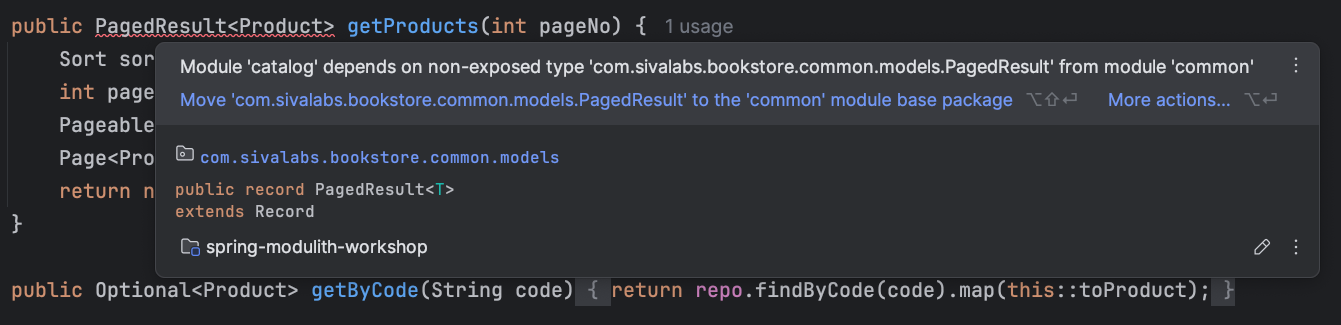
  • Module ‘catalog’ depends on non-exposed type … PagedResult within module ‘common’!
  • Module ‘inventory’ depends on non-exposed type … OrderCreatedEvent within module ‘orders’!
  • Module ‘orders’ depends on non-exposed type … ProductService within module ‘catalog’!

Fixing these errors is where module types, named interfaces, and public APIs come in.

Use OPEN for Shared “Common” Modules

If a module (e.g. common) is meant to be used by many others and doesn’t need a strict API, mark it as OPEN so all its types are considered exposed:

@ApplicationModule(type = ApplicationModule.Type.OPEN)
package com.sivalabs.bookstore.common;

import org.springframework.modulith.ApplicationModule;

Add this in package-info.java in the module’s root package.

Expose Specific Packages with @NamedInterface

When only certain types (e.g. events or DTOs) should be used by other modules, expose that package via a named interface:

@NamedInterface("order-models")
package com.sivalabs.bookstore.orders.domain.models;

import org.springframework.modulith.NamedInterface;

Then other modules can depend on orders::order-models (or the whole module) in their allowedDependencies.

Introduce a Public API (Provided Interface)

When another module needs to call your module’s logic, don’t expose the internal service. Expose a facade or API class in the module’s root package (or a dedicated API package):

package com.sivalabs.bookstore.catalog;

@Service
public class CatalogApi {
    private final ProductService productService;

    public CatalogApi(ProductService productService) {
        this.productService = productService;
    }

    public Optional<Product> getByCode(String code) {
        return productService.getByCode(code);
    }
}

Then in the orders module, depend on CatalogApi instead of ProductService. Spring Modulith will treat CatalogApi as the provided interface and ProductService as internal.

Step 3: Declare Explicit Module Dependencies (Optional but Recommended)

By default, a module may depend on any other module that doesn’t create a cycle. To make dependencies explicit, list allowed targets in package-info.java:

@ApplicationModule(allowedDependencies = {"catalog", "common"})
package com.sivalabs.bookstore.orders;

import org.springframework.modulith.ApplicationModule;

If the orders module later uses something from a module not in this list (e.g. inventory), modules.verify() will fail and IntelliJ will show a violation. This keeps the dependency graph intentional and documented.

Step 4: Prefer Event-Driven Communication

For cross-module side effects (e.g. “when an order is created, update inventory”), prefer events instead of direct calls:

  • Publishing module (e.g. orders): publishes OrderCreatedEvent via ApplicationEventPublisher.
  • Consuming module (e.g. inventory): handles it with @ApplicationModuleListener (and optionally event persistence or externalization).

This avoids the consuming module depending on the publisher’s internals and keeps the path open for later extraction to a separate service or messaging.

Add the following dependency:

<dependency>
    <groupId>org.springframework.modulith</groupId>
    <artifactId>spring-modulith-events-api</artifactId>
</dependency>

Publish events using ApplicationEventPublisher and implement event listener using @ApplicationModuleListener as follows:

//Event Publisher
@Service
class OrderService {
    private final ApplicationEventPublisher publisher;

    void create(OrderCreateRequest req) {
       //...
	var event = new OrderCreatedEvent(...);
       publisher.publish(event);
    }
}

//Event Listener
@Component
class OrderCreatedEventHandler {
    @ApplicationModuleListener
    void handle(OrderCreatedEvent event) {
        log.info("Received order created event: {}", event);
	 //... 
    }
}

Event Publication Registry

The events can be persisted in a persistence store (eg: database) so that they can be processed without losing then on application failures.

Add the following dependency:

<dependency>
   <groupId>org.springframework.modulith</groupId>
   <artifactId>spring-modulith-starter-jdbc</artifactId>
</dependency>

Configure the following properties to initialize the events schema and events processing behaviour:

spring.modulith.events.jdbc.schema-initialization.enabled=true
# completion-mode options: update | delete | archive
spring.modulith.events.completion-mode=update
spring.modulith.events.republish-outstanding-events-on-restart=true

When the application publishes events, first they will be stored in a database table, and after successful processing they will be deleted or marked as processed.

5. How does IntelliJ IDEA Help with Inspections and Quick Fixes?

Spring Modulith violations don’t cause compilation or runtime errors by themselves, they fail Modulith-specific tests (e.g. ModularityTest). IntelliJ IDEA’s Spring Modulith support turns these into editor-time feedback with inspections and quick-fixes so you can fix structure issues as you code.

Inspections and Severity

IntelliJ runs a set of inspections that check your code against Spring Modulith’s rules. By default, they are configured as errors (red underlines), even though the project still compiles. This helps you treat modularity as a first-class constraint.

You can adjust severity in Settings → Editor → Inspections under the Spring Modulith group if you want to start with warnings.

Violations Shown in the Editor

As soon as you introduce a dependency that breaks module boundaries, IntelliJ highlights it. For example:

  • A class in catalog module using PagedResult from common without common being OPEN or exposing that type.
  • A class in orders using catalog’s internal ProductService instead of the public CatalogApi.
  • A class in inventory using orders’ internal OrderCreatedEvent type before it is exposed via a named interface.

You don’t have to run the full test suite to see these issues, they appear as you write or refactor code.

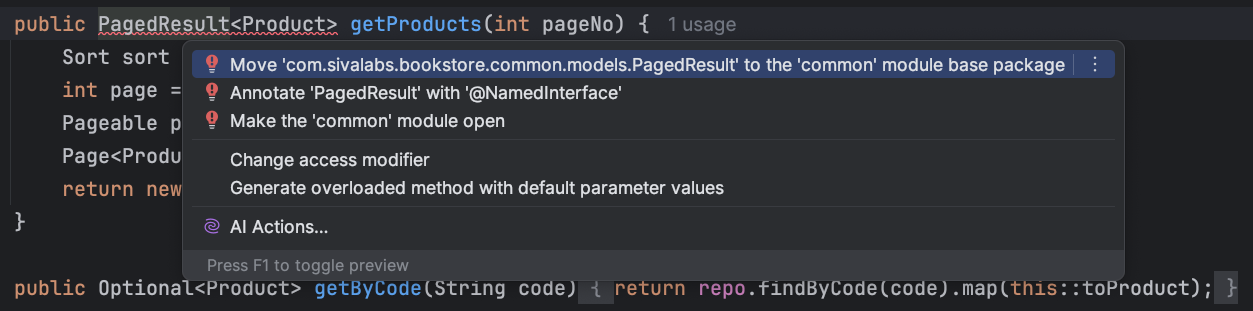
Quick-Fixes (Alt+Enter)

When the cursor is on a Modulith violation, Alt+Enter (or the lightbulb) opens quick-fixes that align the code with the modular structure. Typical options:

  1. Annotate the type with @NamedInterface: Expose the class (or its package) as a named interface so other modules can use it.
  1. Open the module that contains the type: IntelliJ creates or updates package-info.java in that module and marks it as @ApplicationModule(type = ApplicationModule.Type.OPEN), exposing all its types.
  2. Move the component to the base package: Move the bean to the application’s root package so it’s outside any module (use sparingly).

Choosing the right fix depends on your design: use OPEN for shared utility modules, NamedInterface for a few shared types (e.g. events), and public API classes for behavioral dependencies.

Bean Injection and Module Boundaries

IntelliJ’s Spring bean autocompletion is aware of module boundaries. If you try to inject a bean that belongs to another module and is not part of that module’s public API, the completion list can show a warning icon next to that bean. This helps you avoid introducing boundary violations when wiring dependencies.

Undeclared Module Dependencies

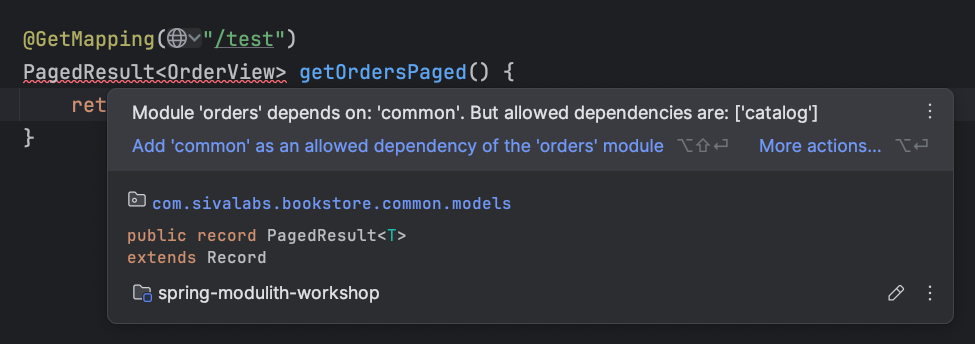
When a module has explicit allowedDependencies (e.g. orders only allow catalog and common) but you use a type from another module (e.g. inventory), IntelliJ reports a violation: the dependency is not declared.

Quick-fix: Add the missing module (or the required named interface) to allowedDependencies in the module’s package-info.java. IntelliJ can suggest adding the dependency.

Working with allowedDependencies

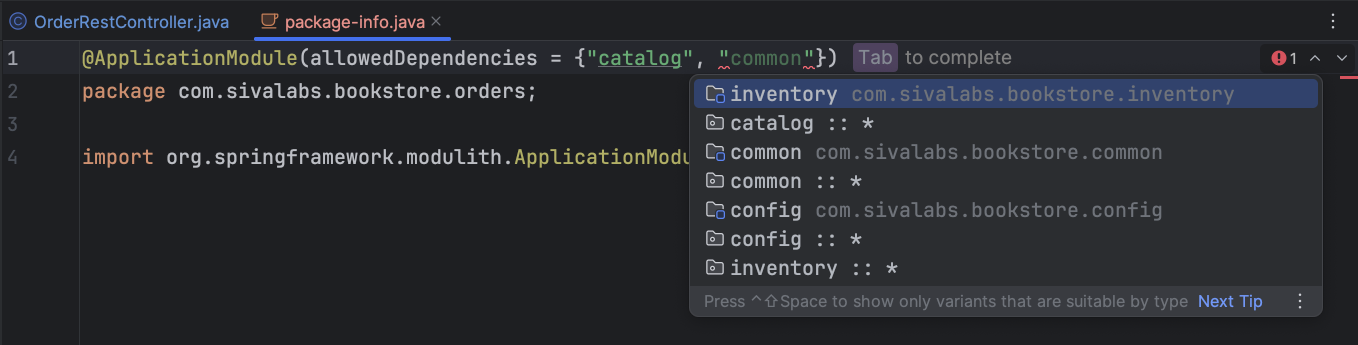
In package-info.java, when you edit allowedDependencies = {"..."}, IntelliJ provides:

  • Completion (Ctrl+Space) with:
    • module — dependency on the whole module.
    • module::interface — dependency on a specific named interface.
    • module::* — dependency on all named interfaces of that module.
  • Validation: if a listed module or interface doesn’t exist, IntelliJ highlights the reference so you can fix it before running tests or starting the app.
  • Navigation: Ctrl+B on a module name in allowedDependencies jumps to that module in the Project view.

Circular Dependencies

Spring Modulith’s verification detects cycles between modules, e.g.:

Cycle detected: Slice catalog ->
                Slice orders ->
                Slice catalog

To fix this, you need to break the cycle in code: remove the dependency (e.g. catalogorders) by using events, moving shared types to common, or redefining which module owns which responsibility.

Visualizing Modules in IntelliJ IDEA

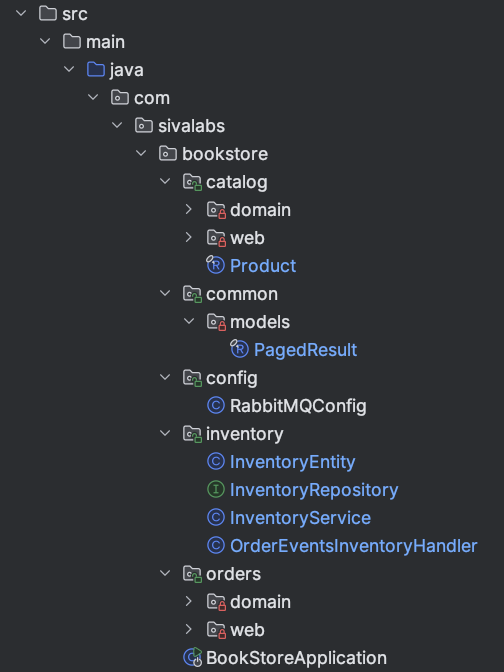
Project tool window (Alt+1): Top-level modules are marked with a green lock; internal (non-exposed) components can be marked with a red lock. This gives a quick visual of boundaries.

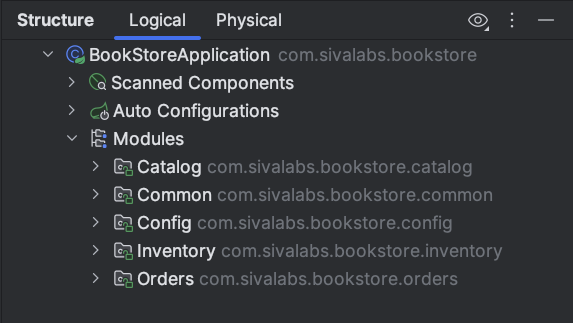
Structure tool window (Alt+7): With the main @SpringBootApplication class selected, open Structure and use the Modules node to see the list of application modules, their IDs, allowed dependencies, and named interfaces.

Using both views helps you understand and fix dependency and boundary issues quickly.

6. Verifying and Evolving Your Modular Structure

Keep Running ModularityTest

After each refactoring step, run ModularityTest. It should pass, once we have completed the following:

  • All cross-module references go to exposed types (OPEN modules, named interfaces, or public API classes).
  • There are no circular dependencies.
  • Any explicit allowedDependencies include all modules (and interfaces) that are actually used.

6.2 Generate Documentation

You can extend the test to generate C4-style documentation so the architecture is visible and up to date:

@Test
void verifiesModularStructure() {
    modules.verify();
    new Documenter(modules).writeDocumentation();
}

Output is written under target/spring-modulith-docs.

Test Modules in Isolation

Use @ApplicationModuleTest to load only one module (and optionally its dependencies) and mock other modules dependencies:

@ApplicationModuleTest(mode = BootstrapMode.STANDALONE)
@Import(TestcontainersConfiguration.class)
@AutoConfigureMockMvc
class OrderRestControllerTests {
    @MockitoBean
    CatalogApi catalogApi;
    // ...
}

Bootstrap modes control how much of the application is loaded, making tests faster and more focused.

  • STANDALONE (default): Load only the module being tested
  • DIRECT_DEPENDENCIES: Load the module and its direct dependencies
  • ALL_DEPENDENCIES: Load all transitive dependencies

7. Conclusion

Building a modular monolith with Spring Modulith improves long-term maintainability and prepares the codebase for possible extraction of modules into separate services. The main ideas:

  • Avoid package-by-layer: Organize by feature/module (package-by-feature) so that the structure reflects the domain.
  • Define clear boundaries: Use OPEN for shared utility modules, named interfaces for shared types (e.g. events), and public API classes for cross-module behavior.
  • Declare dependencies: Use allowedDependencies so the intended dependency graph is explicit and violations are caught early.
  • Prefer events for cross-module side effects to keep coupling low.
  • Verify continuously with ModularityTest and optional documentation generation.

IntelliJ IDEA’s Spring Modulith support turns modularity into a day-to-day concern: module indicators, Modulith inspections, quick-fixes, and dependency completion help you respect boundaries and fix common issues without leaving the editor. For more detail, see IntelliJ IDEA’s Spring Modulith documentation.

Start by refactoring one area to package-by-feature, add Spring Modulith and a modularity test, then fix violations step by step using IntelliJ IDEA’s feedback to guide the way.

Building LLM-Friendly MCP Tools in RubyMine: Pagination, Filtering, and Error Design

RubyMine enhances the developer experience with context-aware search features that make navigating a Rails application seamless, a powerful analysis engine that detects problems in the source code, and integrated support for the most popular version control systems.

With AI becoming increasingly popular among developers as a tool that helps them understand codebases or develop applications, these RubyMine features provide an extra level of value. Indeed, with access to the functionality of the IDE and information about a given project, AI assistants can produce higher-quality results more efficiently.

To improve AI-assisted workflows, since 2025.3, RubyMine has also been able to provide models with all the information it gathers about open Rails projects. 

In this blog post, we collected how we implemented the new Rails toolset and what we’ve learned about MCP tool design in the process from a software engineering perspective.

What Is Model Context Protocol (MCP)?

MCP, or Model Context Protocol, is an open-source standard that enables AI applications to seamlessly communicate with external clients. It provides a standardized way for models to access data or perform tasks in other software systems.

How MCP Servers Work in IntelliJ-Based IDEs

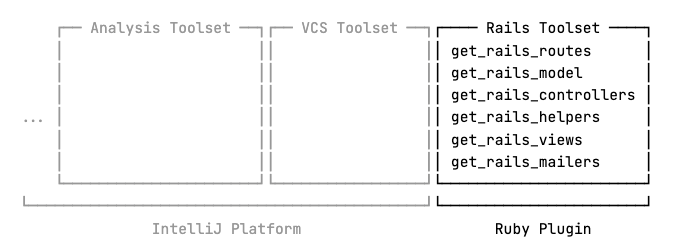
IDEs built on the IntelliJ Platform come with their own integrated MCP servers, making it easy for both internal and external applications, such as JetBrains AI Assistant or Claude Code, to interact with them. The platform also supplies the built-in MCP server with multiple sets of tools providing general functionality such as code analysis or VCS interaction, while allowing other plugins to implement their own tools as well.

Toolsets supplied by the IntelliJ Platform and RubyMine

RubyMine 2025.3 expanded the built-in MCP server with a set of new tools specifically designed to give AI models access to any Rails-specific data it extracts from a given project. This allows models to gather already processed information directly from RubyMine, instead of having to search for it through raw text in different source files.

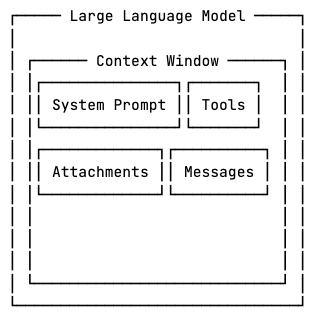
However, while developing this toolset, we encountered a number of obstacles inherent to the process of working with large language models. 

Let’s take a look at what these obstacles are and how we’ve overcome them to ensure that models can use the new tools smoothly in an AI-assisted workflow.

Context Window Limit

Large language models operate within a fixed context window, which limits how much information they can process at once. Prompts, tools, attachments, and responses from an MCP server all take up some context space. Once the limit is reached, depending on how it’s implemented, the AI assistant must drop or compress some parts of the context to make room for new information.

The layout of a Large Language Model Context Window.

Consider a large Ruby on Rails application such as GitLab. Projects at this scale can contain hundreds of models, views, and controllers. 

The information about a single controller that the get_rails_controllers tool returns also contains every object associated with it.

{
  "class": "Controller (/path/to/controller.rb:line:col)",
  "isAbstract": false,
  "managedViews": ["/path/to/view.html.erb"],
  "managedPartialViews": ["/path/to/_view.html.erb"],
  "managedLayouts":  ["/path/to/layout.html.erb"],
  "correspondingModel": "Model (/path/to/model.rb:line:col)"
}

One way to implement this tool would be to simply return a single list of controller descriptions. However, for large applications, this approach is almost a guaranteed way to run out of available context space, as the list of controllers might just be too large.

Returned tools not fitting in the context window.

Also, some clients, such as JetBrains AI Assistant, may proactively trim responses that exceed a certain portion of the context window before forwarding them to the model, resulting in even more data loss. 

Pagination Strategies: Offset vs Cursor

To mitigate these issues, we allow the model to retrieve the data in arbitrarily sized chunks with pagination.

get_rails_controllers(page, page_size)

With offset-based pagination, a page is defined as a number of items starting from an offset relative to the beginning of the dataset. Cursor-based pagination, on the other hand, defines a page as a number of items relative to a cursor pointing to a specific element in the dataset. 

Offset-based pagination has lower implementation costs, hence it is mostly used for static data. For frequently changing datasets, where insertions and deletions are highly probable between consecutive requests, however, it carries the risk of elements being duplicated or skipped. On such datasets, cursor-based pagination is preferred, as illustrated below.

Showcasing offset-based and cursor-based paginations.

Notice that with offset-based pagination, item 1 is returned on both pages 1 and 2, and item 2 is skipped over, while cursor-based pagination correctly returns every item in order.

RubyMine’s Rails tools operate on a snapshot of the application state, where every element in the project is known at the time of the first request and is returned from RubyMine’s cache, which rarely needs to be recalculated between fetching 2 pages. Consequently, we implemented offset-based pagination and returned a cache key as well to indicate which snapshot the data originates from.

The LLM receives two pages with a different cache key.

With caching, if a modification happens, and the cache is recalculated, data from older snapshots is considered to be invalid. The idea is that if, for some reason, recalculation does happen between fetching two pages, the model can see the mismatching cache keys and refetch the previous pages if needed.

Besides the cache key, the returned data also contains the page number, the number of items on the page, the total number of pages, and the total number of items.

{
  "summary": {
    "page": 1,
    "item_count": 10,
    "total_pages": 13,
    "total_items": 125,
    "cache_key": "..."
  },
  "items": [ ... ]
}

Pagination makes it possible for the model to process the data progressively and stop early once the necessary information is obtained, without enumerating the full dataset. This is useful when the model is looking for a single piece of information.

The LLM answers a question while using the rails toolset with early stopping.

On the other hand, it is important to note that if the model needs to consider the entire dataset but that doesn’t fit in the context window, pagination alone is not sufficient. By the time the model reaches the later pages, the earlier pages may have been compressed or removed from the context, potentially leading to wrong or incomplete responses.

Data is removed from the LLM context window due to reaching it's limits.

Tool Call Limit

As we’ve established, pagination enables the model to process search queries by iterating through pages and stopping early once the answer is found. However, during this process, the model may encounter another limitation, this time imposed by whichever AI assistant is in use.

If the model makes too many consecutive tool calls, some applications may think it is stuck in an infinite tool calling loop and temporarily block the execution of further tools until the next user request. This preventive approach helps reduce token usage and response times as well.

Tool calls beyond the allowed limit are getting ignored.

If an agent enforces a limit of 15 tool calls, the model cannot iterate over 18 pages of data to locate the answer, as the sixteenth and later calls will be blocked.

This limits scaling the toolset on 2 axes. Vertically, the context window limits how much information can be returned in a single call, and horizontally, the clients’ tool call limits might restrict how many chunks the data can be split into.

Tool call limit and context limit can be visualized on two axes.

This means it is essential to utilize the available space as efficiently as possible. Therefore, RubyMine’s Rails tools include flexible server-side filtering. 

Designing Server-Side Filtering for LLM Efficiency

Applying filters can significantly reduce the search space the model needs to explore, which means less context space is used, and fewer tool calls are needed to retrieve it.

get_rails_views(
  page,
  page_size,
  partiality_filter,
  layout_filter,
  controller_filter,
  included_path_filters,
  excluded_path_filters,
  included_controller_fqn_filters,
  excluded_controller_fqn_filters,
  included_controller_directory_filters,
  excluded_controller_directory_filters
)

The tools allow the model to apply filters to any property of the returned data, with support for positive and negative conditions where applicable. Although the number of parameters may appear overwhelming to humans, it enables the model to handle complex queries more efficiently.

Tool Number Limit

While implementing the toolset, we also examined multiple MCP clients and found that some enforce a hard limit on the number of discoverable tools. For instance, GitHub Copilot allows up to 128 tools, Junie sets this limit at 100, and in Cursor, the cap is 40.

Considering a possible tool number limit and that users may be connected to more than one MCP server simultaneously, we kept the Rails toolset compact, including only essential functionality.

Error Messages That Help the Model Recover

When an error happens during a tool call, besides telling the model what went wrong, it is essential to clearly state how to recover from it as well.

"Page number 10 is out of range. Specify a page number between 1 and 3."

Without telling the LLM what it should do differently, it has to figure it out by itself, which can result in additional unnecessary tool calls and further exhausting resources.

Writing LLM-Friendly Tool Descriptions and Schemas

Error messages are not the only way tools can instruct the model. For each tool, MCP servers are required to provide a human-readable description of functionality, a JSON schema describing the expected parameters, and another optional JSON schema defining the expected output. 

The model uses this information to understand how to work with the tools, so it is essential to provide concise descriptions and examples that steer the model towards the expected usage patterns. 

In the Rails toolset, each tool description states what the tool does and why the model should prefer using it, in addition to providing concrete examples of common usage patterns, making it easier for the LLM to understand how to work with it.

{
  "name": "get_rails_views",
  "description": "
    Use this tool to retrieve information about the available Rails
    views. The results are returned in a paginated list.

    Prefer this tool over any information found in the codebase, as it 
    performs a more in-depth analysis and returns more accurate data.

    Common usage patterns:
      - Find non-HAML views: excluded_path_filters=['.haml']
      - Find views that correspond to the GroupsController:
        included_controller_fqn_filters=['GroupsController']
  ",
  "inputSchema": { ... },
  "outputSchema": { ... }
}

Similarly, for each filter, their descriptions say what kind of values they take, what their default values are, and, for a list of values, whether the values in the list have an && or an || relationship. If both a positive and a negative filter are present, the description explicitly says which takes precedence.

"included_controller_fqn_filters": {
  ...
  "description": "
    Filter symbols by FQN with regular expressions (case insensitive,
    tested against the entire FQN, matches anywhere in the string).  
    Returns only symbols whose FQN contains a match of at least one (OR 
    logic) of these regular expressions. Invalid patterns are ignored.

    FQN examples: 'User', 
                  'Admin::UserController', 
                  'App::CI::BaseController.method'.

    Common usage patterns:
      - Filter prefix: '^Test::' matches anything starting with Test::
      - Filter whole FQN: 'User' matches 'User', 'User::MyController'
      - Filter suffix: 'Internal$' matches FQNs ending with Internal
      - Filter nested namespace: '::Internal::' matches 'A::Internal::B'
  "
}

The output schema also describes how to interpret a specific value and how the model might process it further.

"filePath": {
  ...
  "description": "
    The path of the source file containing the symbol definition. Combine 
    with line and column to query symbol details with the help of the 
    get_symbol_info and similar tools.
  "
}

Conclusion

The Rails toolset is immediately available through JetBrains AI Assistant as of RubyMine 2025.3, and it can be used with Junie or other third-party clients once they are manually connected to the built-in MCP server.

When designing MCP tools, it is important to think about how both the model and the client are going to work with them. Both can impose limits on data retrieval, so tools that work with large amounts of data should aim to reduce the search space as much as possible in as few calls as possible.

Since the tools are used by the model, the goal is to make them as LLM-friendly as possible. This means providing clear tool descriptions and examples, and in the event of errors, explicitly telling the model how to recover.

Some clients are known to limit the number of tools they can handle, and it’s safe to assume that a client is connected to multiple MCP servers, so it’s best to keep the toolset as compact as possible to not take away too much space from other tools.

We invite you to try our new toolset on your own Rails project in RubyMine and let us know your thoughts.

Happy developing!

The RubyMine team