EF Core: La explosión cartesiana — Hiciste todo bien y aun así el query es un desastre

En el artículo anterior vimos el problema N+1: queries dentro de loops que se multiplican con los datos. La solución que aprendiste fue usar Include para cargar las relaciones en una sola query.

Eso es correcto. Hasta que tienes más de una colección relacionada en el mismo nivel.

El escenario: un Include razonable que se vuelve un problema

Tienes pedidos. Cada pedido tiene un cliente, una lista de productos y una lista de pagos. Quieres cargar todo en una sola operación para evitar el N+1:

var pedidos = await context.Pedidos
    .Include(p => p.Cliente)
    .Include(p => p.Productos)
    .Include(p => p.Pagos)
    .Where(p => p.FechaCreacion >= hace30Dias)
    .ToListAsync();

Tres Include. Se ve limpio, se ve correcto. EF Core lo acepta sin quejarse.

Pero el SQL que genera no es lo que imaginas.

Lo que EF Core hace por debajo

El problema aparece específicamente cuando incluyes múltiples colecciones “hermanas” en el mismo nivel del grafo de navegación. Es importante distinguirlo de ThenInclude, que normalmente no genera este problema:

// Caso problemático: dos colecciones en el mismo nivel
.Include(p => p.Productos)
.Include(p => p.Pagos)

// Normalmente no problemático: navegación en profundidad
.Include(p => p.Productos)
    .ThenInclude(pr => pr.Categoria)

Cuando EF Core genera un JOIN para cada colección hermana, el resultado no produce una fila por pedido — produce una fila por cada combinación posible entre los registros relacionados.

Si un pedido tiene 5 productos y 3 pagos, el resultado del JOIN tiene 15 filas para ese pedido. EF Core las lee todas y reconstruye el objeto en memoria, pero la base de datos procesó y transfirió 15 filas donde conceptualmente había 1.

El crecimiento es cartesiano: cada colección multiplica las filas del resultado. Con 100 pedidos, cada uno con 10 productos y 5 pagos, el resultado no son 100 filas — son 5,000 filas que viajan de la base de datos a tu servidor para que EF Core las reduzca de vuelta a 100 objetos.

Eso es la explosión cartesiana.

Cómo detectarlo

El warning de EF Core

Cuando EF Core detecta este patrón, emite un warning en los logs:

Compiling a query which loads related collections for more than
one collection navigation, either via 'Include' or through
projection. Please review the generated SQL and inspect whether
the cartesian explosion might negatively impact performance.

Si ves este mensaje en tus logs y lo ignoraste, es probable que ya tengas este problema en alguna query.

Los tiempos que no tienen proporción

Con los logs habilitados:

builder.Services.AddDbContext<AppDbContext>(options =>
    options.UseSqlServer(connectionString)
           .LogTo(Console.WriteLine, LogLevel.Information));

Verás algo así:

Executed DbCommand (847ms) [Parameters=[@p0='2025-02-14'], CommandType='Text', CommandTimeout='30']
SELECT p.Id, p.Total, ...
FROM Pedidos p
LEFT JOIN Clientes c ...
LEFT JOIN PedidoProductos pr ...
LEFT JOIN Pagos pa ...
WHERE p.FechaCreacion >= @p0

Una sola query, pero 847ms. Con pocos datos en dev tal vez son 12ms y nadie lo cuestiona. Con datos reales de producción el tiempo empieza a crecer de forma que no tiene proporción con el número de registros que devuelve el endpoint.

A diferencia del N+1, aquí solo hay una query. Si solo cuentas queries, todo parece correcto. Lo que tienes que mirar es cuántas filas devuelve esa query.

La solución: AsSplitQuery

EF Core 5 introdujo AsSplitQuery precisamente para este caso. En lugar de un solo JOIN que produce el producto cartesiano, EF Core ejecuta una query separada por cada Include y ensambla los resultados en memoria:

var pedidos = await context.Pedidos
    .Include(p => p.Cliente)
    .Include(p => p.Productos)
    .Include(p => p.Pagos)
    .Where(p => p.FechaCreacion >= hace30Dias)
    .AsSplitQuery()
    .ToListAsync();

Las queries que se ejecutan ahora:

-- Query 1: los pedidos con el cliente
SELECT p.Id, p.Total, p.FechaCreacion, c.Id, c.Nombre
FROM Pedidos p
LEFT JOIN Clientes c ON p.ClienteId = c.Id
WHERE p.FechaCreacion >= '2025-02-14'

-- Query 2: los productos de esos pedidos
SELECT pr.Id, pr.Nombre, pr.Precio, pr.PedidoId
FROM PedidoProductos pr
WHERE pr.PedidoId IN (1, 2, 3, ...)

-- Query 3: los pagos de esos pedidos
SELECT pa.Id, pa.Monto, pa.FechaPago, pa.PedidoId
FROM Pagos pa
WHERE pa.PedidoId IN (1, 2, 3, ...)

Tres queries en lugar de una, pero cada una devuelve exactamente las filas que necesita. Sin producto cartesiano, sin filas duplicadas.

AsSplitQuery no es siempre la respuesta

Vale la pena entender cuándo usarlo y cuándo no:

Úsalo cuando:

  • Tienes múltiples Include de colecciones hermanas
  • Los tiempos de query son desproporcionados respecto al número de registros que devuelves
  • El warning de EF Core aparece en tus logs

No lo uses cuando:

  • Solo tienes un Include — el producto cartesiano no ocurre con una sola colección
  • Necesitas consistencia transaccional estricta — las queries de AsSplitQuery se ejecutan por separado y en teoría otro proceso podría modificar datos entre una y otra
  • El conjunto de datos es pequeño — el overhead de múltiples queries puede ser mayor que el beneficio

Una advertencia sobre paginación: si usas AsSplitQuery junto con Skip/Take, asegúrate de tener un OrderBy estable y con un campo único. Sin eso, los resultados entre las queries separadas pueden ser inconsistentes.

El Include que no hace nada

Antes de cerrar, vale la pena mencionar un hábito relacionado que ocurre con frecuencia.

Muchos developers agregan Include de forma defensiva — para asegurarse de que las propiedades de navegación no sean null. Tiene sentido cuando materializas la entidad completa. Pero cuando proyectas a un DTO con Select, EF Core ignora completamente los Include:

// ❌ Los Include son ignorados — EF Core no materializa Pedido
var pedidos = await context.Pedidos
    .Include(p => p.Cliente)      // ignorado
    .Include(p => p.Productos)    // ignorado
    .Include(p => p.Pagos)        // ignorado
    .Where(p => p.FechaCreacion >= hace30Dias)
    .Select(p => new PedidoDetalleDto
    {
        Cliente = p.Cliente.Nombre,
        Total = p.Total,
        Productos = p.Productos.Select(pr => pr.Nombre).ToList(),
        TotalPagado = p.Pagos.Sum(pa => pa.Monto)
    })
    .ToListAsync();

EF Core resuelve los JOINs necesarios directamente desde la proyección del Select. Los Include no aportan nada — ni errores, ni beneficios, ni SQL adicional. Lo mismo aplica para AsSplitQuery: si proyectas a un DTO, no hay entidades que materializar, así que tampoco tiene efecto.

El código funciona igual con o sin ellos. El problema es que quien lo lee después asume que son necesarios, y esa confusión se acumula.

La proyección con Select como alternativa

Cuando no necesitas materializar la entidad completa, la proyección con Select puede ser más eficiente que AsSplitQuery. En muchos casos permite a EF Core generar SQL mucho más eficiente y evitar la materialización completa de relaciones:

// ✅ Sin Include, sin AsSplitQuery
var pedidos = await context.Pedidos
    .Where(p => p.FechaCreacion >= hace30Dias)
    .Select(p => new PedidoDetalleDto
    {
        Cliente = p.Cliente.Nombre,
        Total = p.Total,
        Productos = p.Productos.Select(pr => pr.Nombre).ToList(),
        TotalPagado = p.Pagos.Sum(pa => pa.Monto)
    })
    .ToListAsync();

La regla general: usa Include cuando materialices la entidad. Usa Select cuando trabajes con DTOs.

Resumen

Problema Síntoma Solución
ToList() prematuro SELECT * sin WHERE, todo en memoria Mantener IQueryable hasta el final
SELECT * silencioso Proyección ignorada, columnas de más Expresiones traducibles en Select
N+1 Una query por cada registro del loop Include o proyección con Select
Explosión cartesiana Una query lenta con filas multiplicadas AsSplitQuery o proyección con Select

Si no ves el SQL que EF Core genera, no sabes lo que está pasando. Los logs son la herramienta más simple y más ignorada para detectar estos problemas antes de que lleguen a producción.

¿Has tenido que resolver una explosión cartesiana en producción? ¿Cómo lo detectaste? Cuéntame en los comentarios.

¿Qué sigue?

En el próximo artículo vamos a hablar de algo que EF Core hace en todas tus consultas sin que lo hayas pedido: rastrear cada entidad que lees para detectar cambios. En pantallas de solo lectura estás pagando ese costo en memoria y CPU sin obtener nada a cambio — y con suficientes datos, se nota.
TeamCity 2026.1: CLI, MCP for AI Agents, Pipelines Enhancements, and More

TL;DR: TeamCity 2026.1 is out and packed with helpful features. We’re introducing the TeamCity CLI and MCP support, as well as Pipelines enhancements to make configuring TeamCity more convenient and powerful. As of this release, AI Assistant is available in Enterprise trial accounts, and the SAML authentication plugin comes bundled with TeamCity.

For the full list of what’s new in 2026.1, make sure to check out our documentation.

Let’s take a closer look at what’s new.

Important security announcement

A high-severity post-authentication security vulnerability has been identified in TeamCity On-Premises. If exploited, this flaw may allow any authenticated user to expose some parts of the TeamCity server API to unauthorized users.

All versions of TeamCity On-Premises are affected, while TeamCity Cloud is not affected and requires no action. We have verified that TeamCity Cloud environments were not impacted by this issue.

This vulnerability has been assigned the Common Vulnerabilities and Exposures (CVE) identifier CVE-2026-44413. A fix for it has been introduced in version 2026.1. We have also released a security patch plugin for 2017.1+ so that customers who are unable to upgrade can still patch their environments.

We strongly recommend upgrading to TeamCity 2026.1 or installing the security patch plugin. 

Read more about the vulnerability in the dedicated blog post.

TeamCity 2026.1 livestream

On May 12, 2026, we’ll be hosting a livestream dedicated to the TeamCity 2026.1 livestream. During a 1-hour online event, we’ll walk you through all the new features and share our development plans for 2026. Join us!

Register for the livestream

Introducing the TeamCity CLI

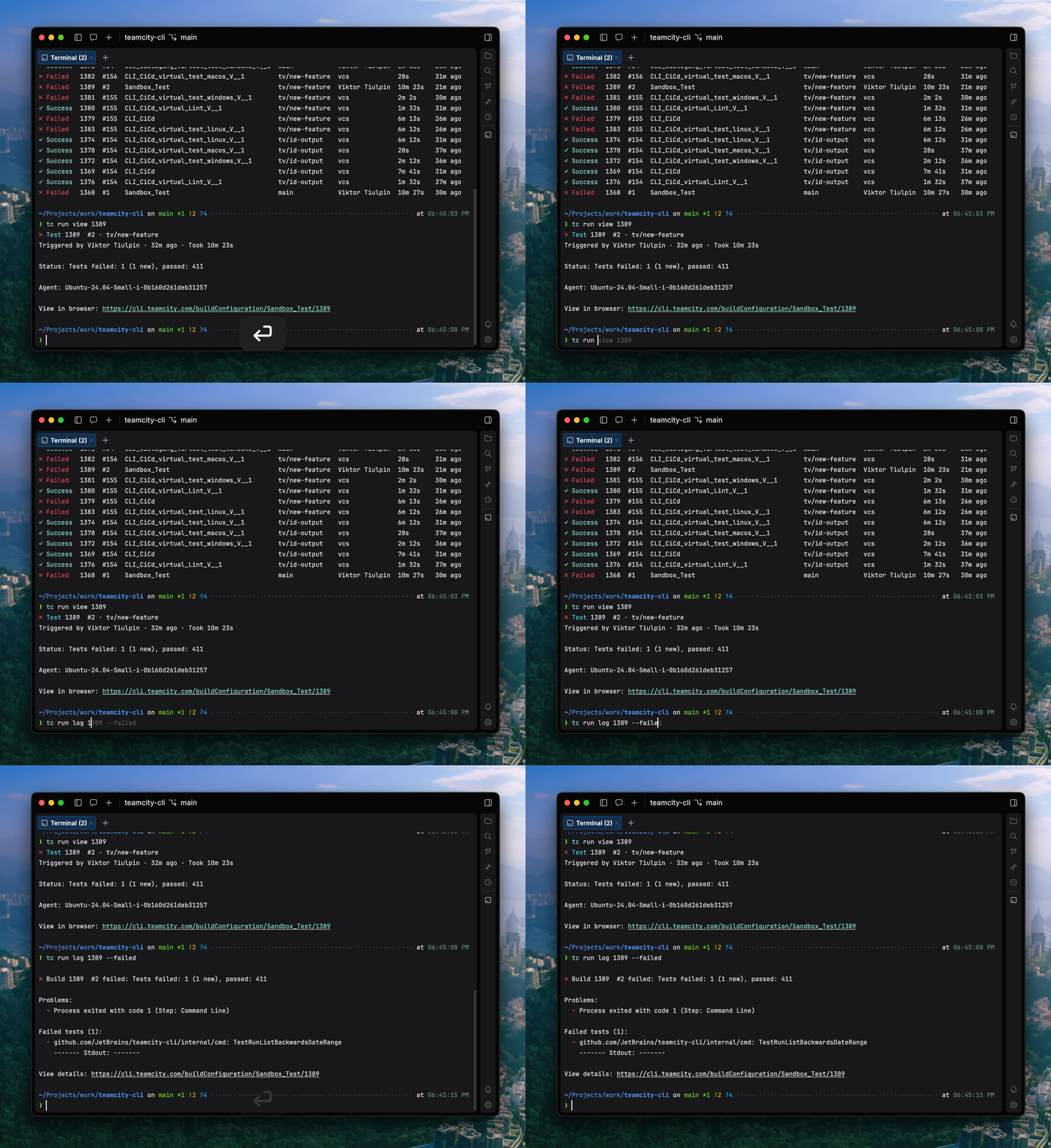
The TeamCity CLI is a free, lightweight, open-source tool that brings the power of TeamCity to your terminal and your AI agents. With the CLI, you can investigate failed builds, apply fixes, configure your Pipeline, and retrigger builds directly from the command line.

The TeamCity CLI also includes an agent skill for AI coding agents, enabling them to check build status, analyze failures, and interact with your Pipeline. Both you and your AI agent can follow updates in real time in the terminal, including build state changes, step progress, and streaming logs.

Currently, the TeamCity CLI includes over 60 commands, and we’re planning to expand the list. You can install the tool and connect locally using the following commands:

# macOS / Linux
brew install jetbrains/utils/teamcity

# via a bash script
curl -fsSL https://jb.gg/tc/install | bash

# Windows
winget install JetBrains.TeamCityCLI

# via a powershell script
irm https://jb.gg/tc/install.ps1 | iex

# Cross-platform via npm
npm install -g @jetbrains/teamcity-cli

# Log in to your server
teamcity auth login --server https://example.teamcity.com/

If you want to learn more about the TeamCity CLI, here’s a dedicated blog post.

MCP for AI agents

In addition to the TeamCity CLI, we’re also introducing support for the Model Context Protocol (MCP) to enable third-party integrations with AI tooling. 

The Model Context Protocol is an open-source standard for connecting AI applications to external systems. Your external AI solution uses an authorized request to the specific endpoint and retrieves a list of ready-to-use tools for working with this resource.

MCP is useful when working with TeamCity from external AI-powered tools like JetBrains IDEs or Cursor. It is designed to give AI agents the ability to analyze, explain, and help fix build failures. By default, MCP allows starting remote runs, as well as accessing build logs and related data for troubleshooting.

You can get more context on the TeamCity MCP from our documentation.

AI Assistant is now available in trial Enterprise licenses

TeamCity AI Assistant is a built-in tool that understands the page you’re viewing and helps you find relevant information faster, right from the TeamCity interface. It’s connected to the TeamCity documentation and is great for answering quick questions about TeamCity, onboarding, and inspecting a selected build or project.

AI Assistant is available with the TeamCity Enterprise license – now also during the trial period.

Pipelines enhancements

Pipelines introduce a powerful new way to configure builds in TeamCity. Built on YAML and designed with full branching support, they align seamlessly with modern software development lifecycle practices. Changes to a Pipeline stay safely within a feature branch, allowing teams to iterate, review, and refine before merging into the main branch.

At the same time, TeamCity doesn’t force you into a single approach. While YAML is the primary format, you can also define Pipelines using the power of the Kotlin DSL, making it easy for enterprise teams to manage the most complicated setups. 

For added convenience, TeamCity provides a Visual Editor that works hand in hand with YAML, offering an intuitive way to configure Pipelines without sacrificing control. You can seamlessly switch between visual and YAML-based configuration, so that you don’t need to learn yet another YAML schema.

We introduced Pipelines last year. Starting from 2025.07, they are available via the Early Access Program on TeamCity Servers. 

We constantly improve Pipelines and keep expanding what users can do with them. Here are some highlights of what we’ve added in 2026.1:

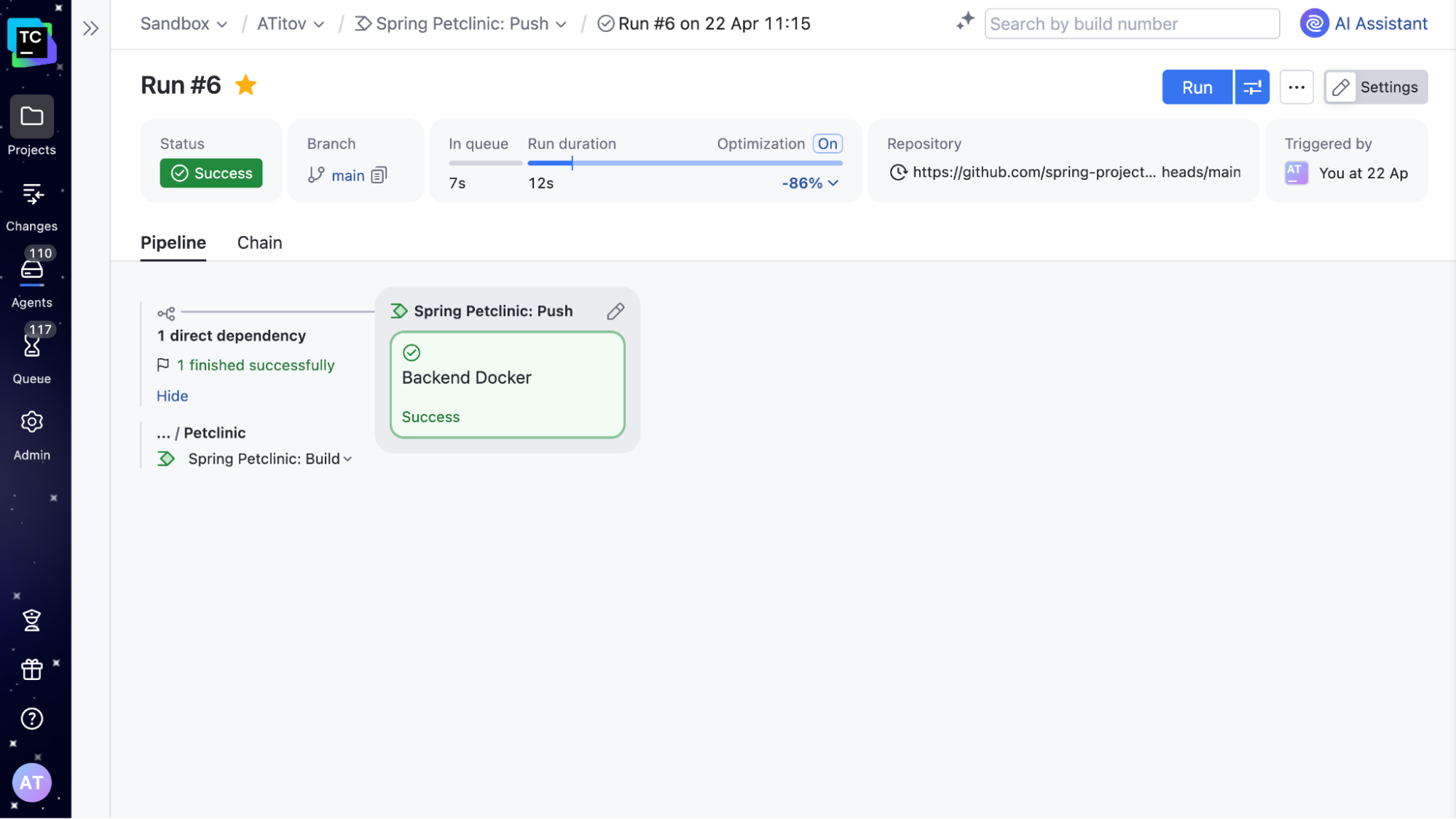
Improved Pipeline Run page

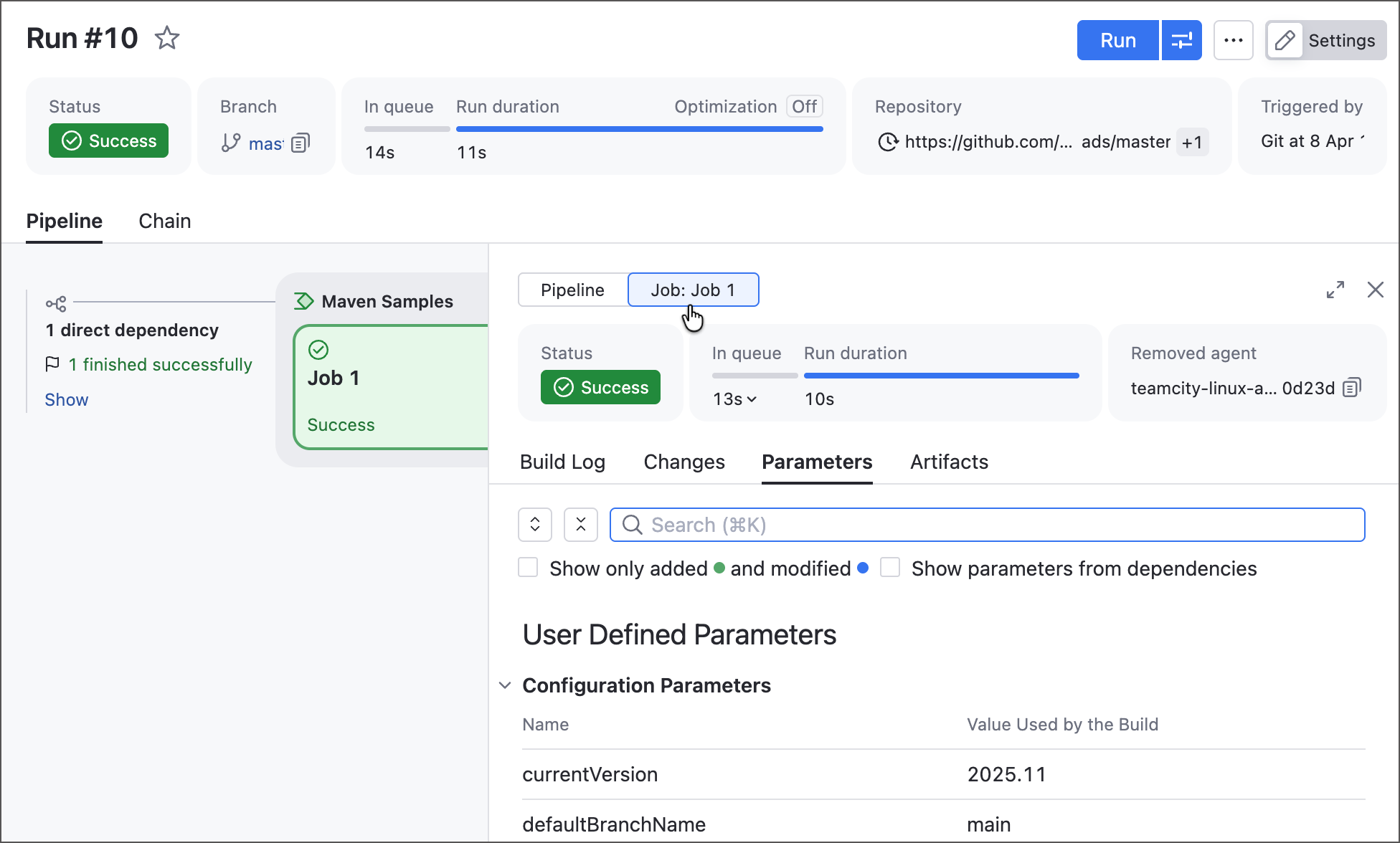
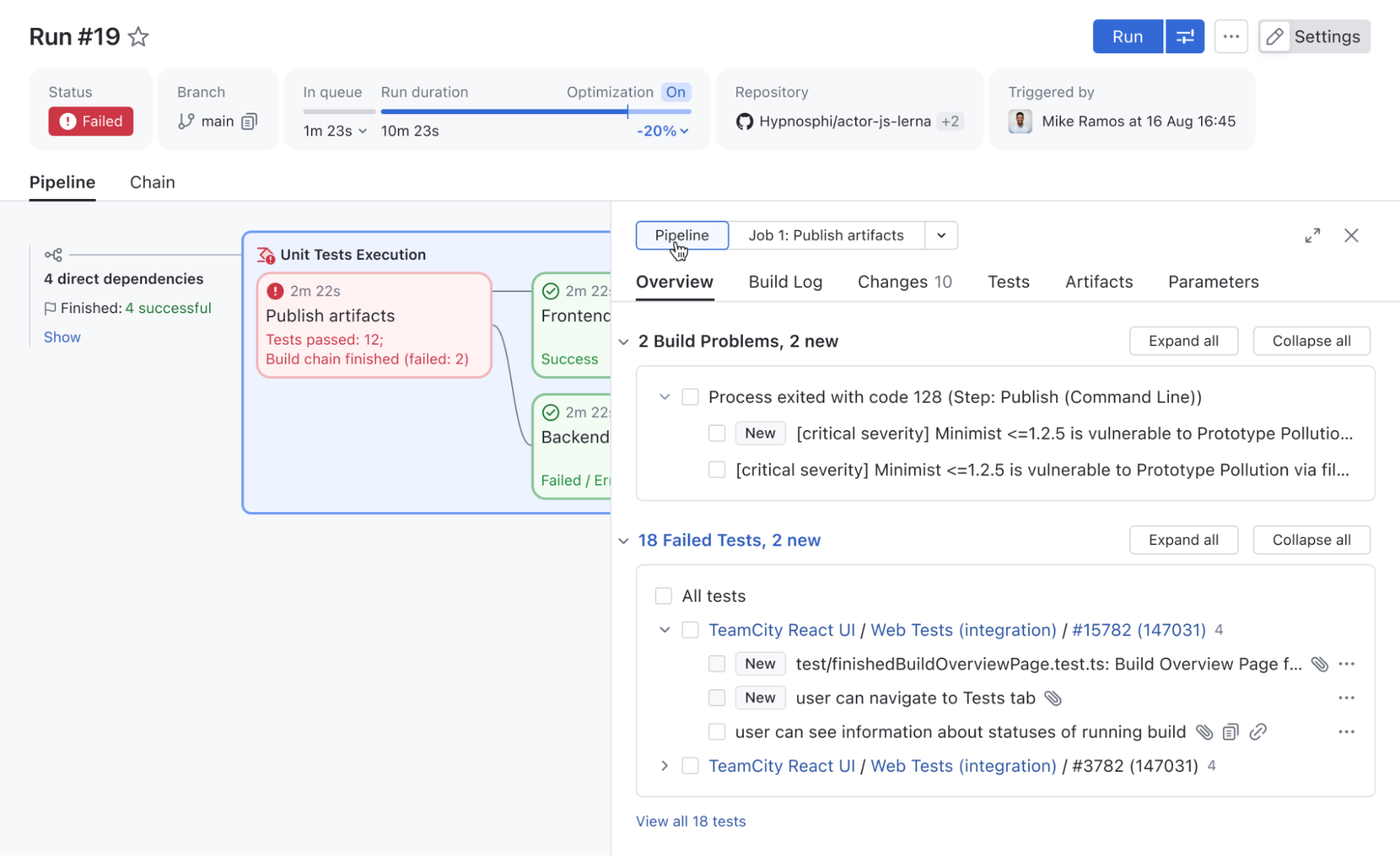
We improved the Pipeline Run page to include all familiar Build Results tabs (such as Overview, Build Log, Parameters, and more), giving you a complete overview of Pipeline execution results.

It now also includes a Pipeline/job switch, so you can quickly filter these tabs by job, making Pipelines easier to inspect, debug, and troubleshoot.

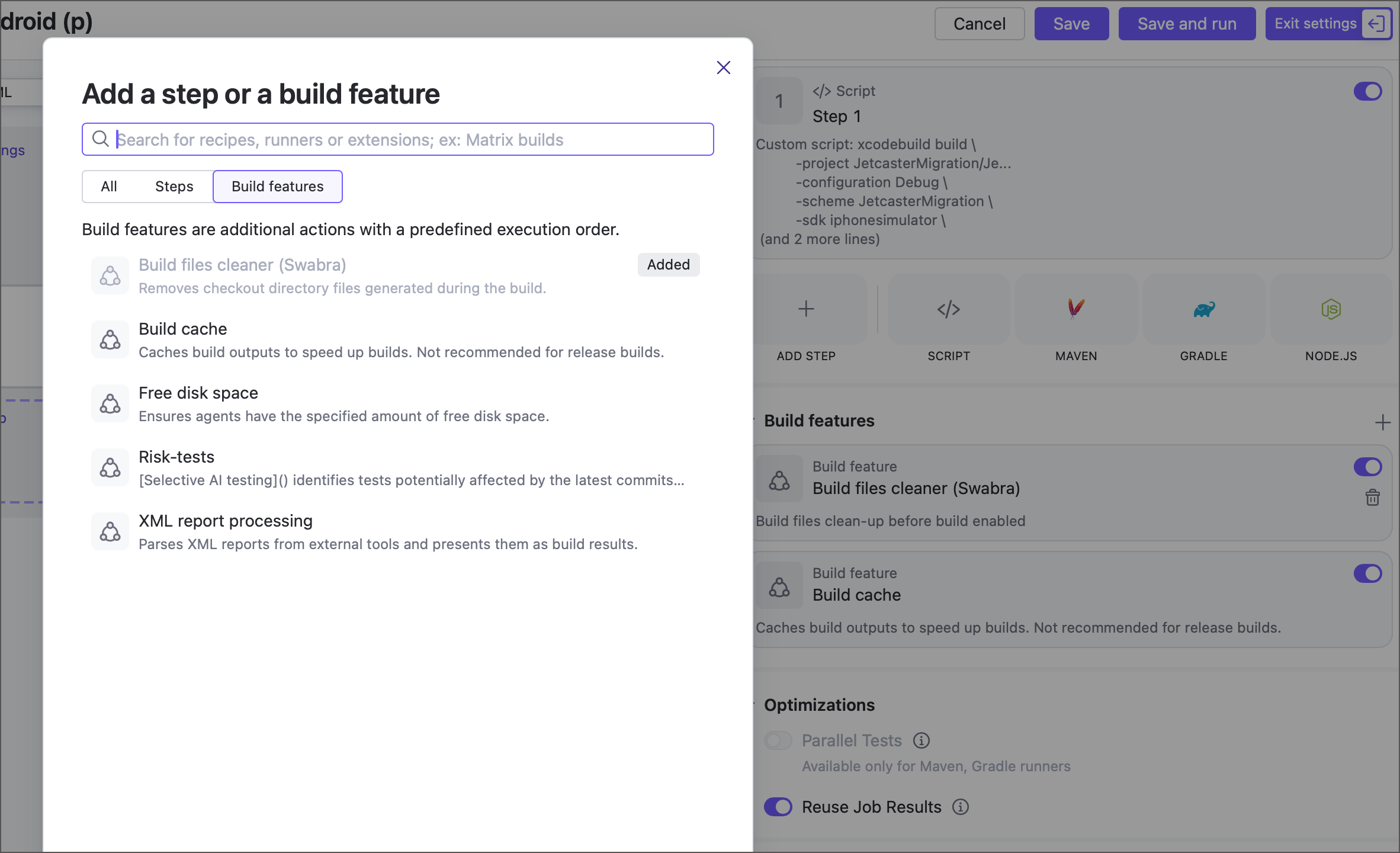
Build features are now available for jobs

Jobs can now use the following build features, previously available only for build configurations: Build files cleaner (Swabra), Build cache, Free disk space, and XML report processing.

More build features will be available soon. Contact us if you’re looking for something specific, and we’ll let you know if it’s already possible to enable it with a feature toggle.

Pipeline upstream dependencies and combining Pipelines with build chains

Since 2026.1, it is now possible to define upstream dependencies for a Pipeline. This allows you to decompose a single large Pipeline into smaller parts, simplifying maintenance, improving access management, and enabling you to combine several separate Pipelines into a unified workflow.

For instance, if you have separate Pipelines for microservices, upstream dependencies make it very convenient to set up a deployment Pipeline that deploys them all at the same time.

If you already have build configurations set up in your TeamCity, there is no need to rewrite them as Pipelines to take advantage of this functionality. A Pipeline can now define upstream dependencies on build configurations and vice versa. This means you can include new Pipelines in existing Build Chains whenever needed.

Kotlin DSL in Pipelines

In addition to YAML, it is now possible to define Pipelines in Kotlin DSL. It’s the same powerful Kotlin DSL, allowing you to leverage the full potential of a real, strongly typed programming language. Pipelines reuse most of the patterns used in build configurations, so you won’t need to learn them from scratch.

object MyPipeline : Pipeline({
    name = "A Pipeline"
    job {
        name = "Build"
        steps {
            script {
                content = "Hello Pipeline!"
            }
        }
    }
})

You can find the full list of Pipelines improvements in our documentation. Pipelines are currently offered via the Early Access Program. Sign up here to try them for your organization.

Sign up to Pipelines EAP

SAML authentication

The SAML authentication plugin is now bundled with TeamCity. SAML (Security Assertion Markup Language) is a widely used standard for single sign-on (SSO), allowing users to authenticate once via a central identity provider and access multiple services without re-entering credentials.

With SAML support, you can integrate TeamCity with your existing identity provider to simplify user management and improve security. It is confirmed to support Okta, OneLogin, AWS SSO, AD FS, and other SSO providers.

Learn more about the SAML authentication in our documentation.

Dynamic build step credentials

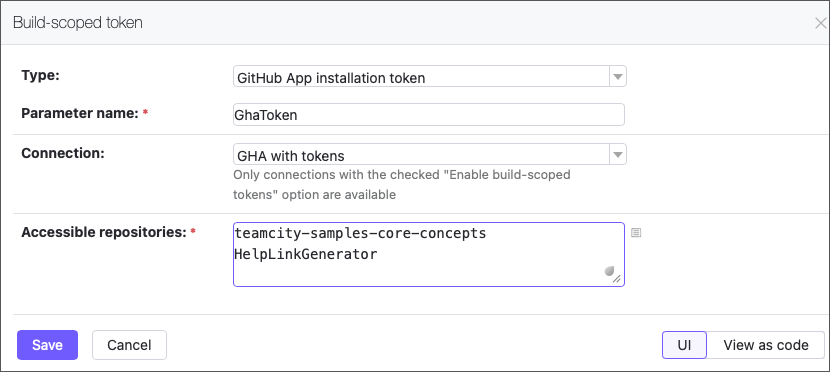
The new Build-scoped token feature lets your builds securely generate short-lived GitHub access tokens (up to 60 minutes) on the fly. Pass them to build steps as parameters to enable seamless access to repositories.

Small niceties worth mentioning

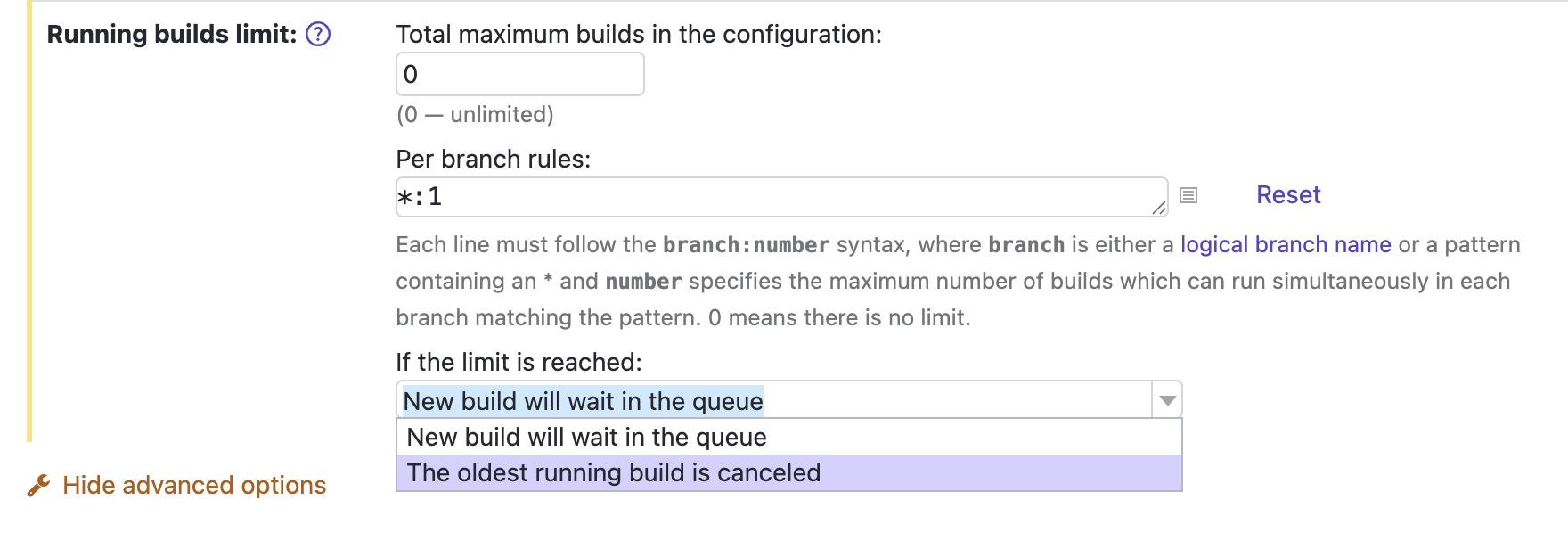
We’ve fixed quite a long-standing issue, and it is now possible to cancel the currently running build when new changes are made to the same VCS root and branch.

The corresponding setting is an extension of Running builds limit in the General build settings.

Another thing: If you know what reverse.dep.* parameters are, you may be glad that the problem detailed in this ticket has been fixed, too.

Release naming convention

We’re also changing the naming of TeamCity releases to align with other JetBrains tools. As before, we’ll have three major releases per year and several bug fixes after each release. The new naming format is YYYY.1, YYYY.2, YYYY.3.

dotInsights | May 2026

Did you know? C# supports ref return and ref local, which let you return and work with references to variables instead of copies of their values. 

dotInsights | May 2026

Welcome to dotInsights by JetBrains! This newsletter is the home for recent .NET and software development related information.

🔗 Links

Here’s the latest from the developer community.

  • Stop Writing Specs. Let AI Interrogate You Instead 🎥 – Gui Ferreira
  • Speed Up Your AI Development Workflow by 2x 🎥 – Nick Chapsas
  • Testable Code Doesn’t Mean “Interfaces Everywhere” 🎥 – CodeOpinion by Derek Comartin
  • 2code ^ !2code [S2026E06] Inspector Roslyn is a CLI tool 🎥 – FlashOWare by Stefan Pölz and Eva Ditzelmüller
  • Building an Instagram-Style Like Animation in .NET MAUI – Leomaris Reyes
  • Removing byte[] allocations in .NET Framework using ReadOnlySpan<T> – Andrew Lock
  • Source code generated string enums with exhaustion support – Steven Giesel
  • How to Delete and Update Millions of Rows in EF Core Without Loading a Single Entity – Chris Woodruff
  • The Cookie Apocalypse Already Happened – Khalid Abuhakmeh
  • Does Code Quality Still Matter in the Age of AI-Assisted Coding? – Mark Heath
  • URL Pattern Matching in .NET – Gérald Barré
  • Build QR Codes in .NET FAST with ElBruno.QRCodeGenerator – Bruno Capuano
  • Why your Entity Framework Core app needs query filters – David Grace
  • What Your .NET Exceptions Are Telling Attackers (And How to Stop It) – Adrian Bailador
  • Extracting Structured Table Data from DOCX Word Documents in C# .NET with Domain-Aware Table Detection – Bjoern Meyer
  • String Performance: Avoid Unnecessary Conversions with StringBuilder – David McCarter
  • “I started to lose my ability to code”: Developers grapple with the real cost of AI programming tools – David Cassel
  • Explore union types in C# 15 – Bill Wagner
  • The Toolkit Pattern – Andrew Stellman
  • Systems Thinking – Rocky Lhotka
  • Getting Started with the .NET MAUI Speech-to-Text Button Control – Héctor Pérez
  • Mastering ASP.NET Core Rate Limiting: From Basic Throttling to Distributed Token Buckets – Sudhir Mangla
  • Agent Skills in .NET: Three Ways to Author, One Provider to Run Them – Sergey Menshykh
  • LLM Chat in .NET with IChatClient: The Complete Guide – Patrick Smacchia
  • Microsoft Agent Framework–Building a multi-agent workflow with DevUI in .NET – Bart Wullems
  • EF Core query translation: Why does some LINQ never become SQL? – Ali Hamza Ansari
  • Comprehension Debt: The Hidden Cost of AI-Generated Code – Addy Osmani
  • How to Implement Command Pattern in C#: Step-by-Step Guide – Nick Cosentino

☕ Coffee Break

Take a break to catch some fun social posts.

🗞️ JetBrains News

What’s going on at JetBrains? Check it out here:

⛓️‍💥 Breaking AI vendor lock-in in Visual Studio ⛓️‍💥

ReSharper 2026.2 EAP 1 introduces Junie, JetBrains’ LLM-agnostic AI coding agent, as the first step toward a more open AI ecosystem in Visual Studio. More about that here.

  • Webinar – OSS Power-Ups: XenoAtom.Terminal.UI
  • Profile .NET Apps Without Restarting: Monitoring Comes to ReSharper

✉️ Comments? Questions? Send us an email. 

Subscribe to dotInsights

Qodana 2026.1: Rust EAP, Stable C/C++ Support, and New Code Inspections

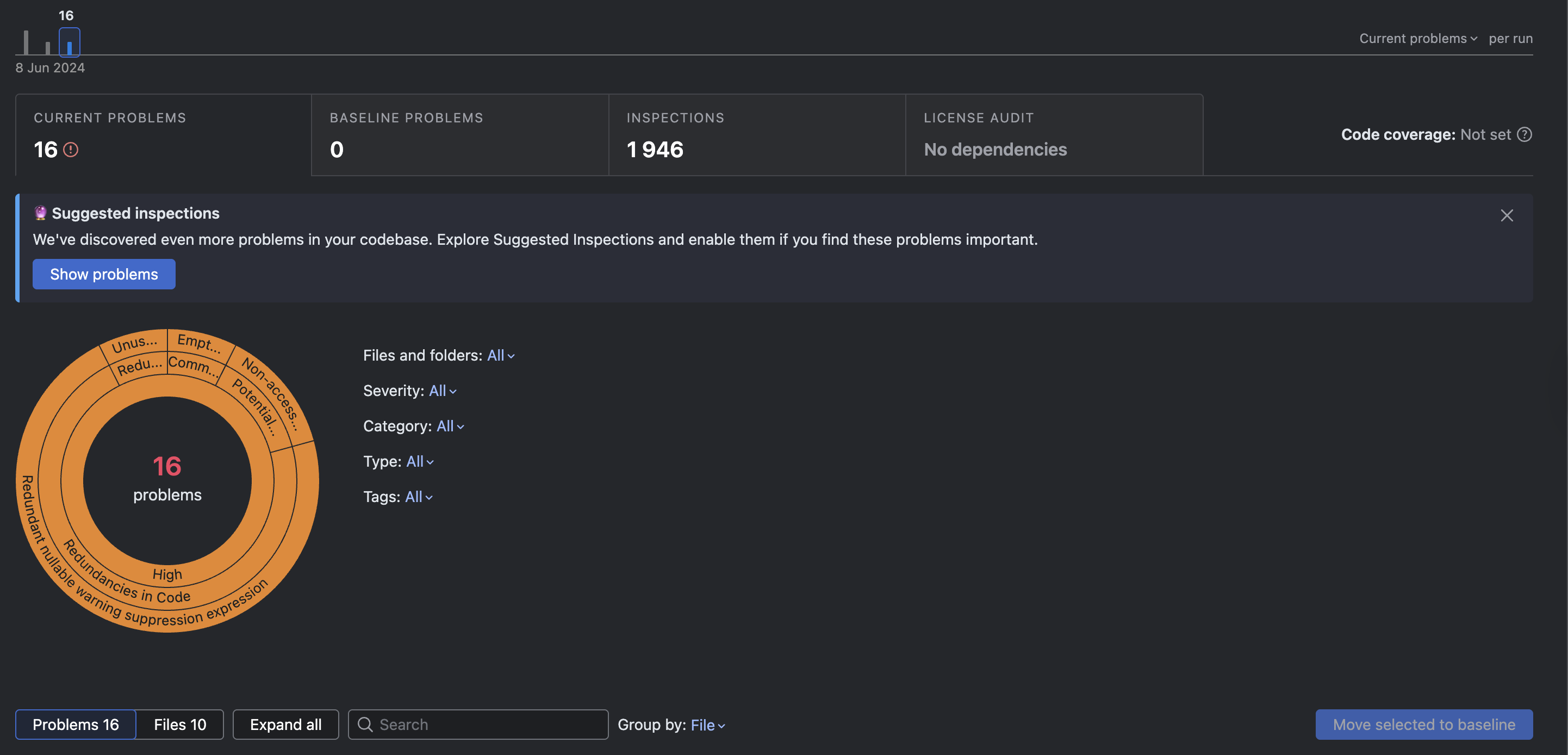
Qodana 2026.1 release brings two important linter updates and a new set of inspections designed to help you catch more issues earlier in development. In this release, Qodana for C/C++ moves out of EAP, Qodana for Rust becomes available in EAP, and several new inspections add protection against subtle bugs in Kotlin, Python, and C#.

If you’re new to Qodana, you can learn more about Qodana in our previous posts.

Qodana for C/C++ is out of EAP

Qodana for C/C++ is now generally available, enhancing its readiness for production use in native code development. We introduced support for C/C++ projects back in 2025.1, and since then, the linter has been expanded and refined based on your feedback. It’s now ready for production use in native code development.

Thank you to everyone who tried qodana-cpp during its EAP! Here are some of the changes we’ve made based on your feedback:

  • Qodana now properly detects build system failures, including for CMake and others, and helps you diagnose issues.
  • For large projects, Qodana now features configurable timeouts via qd.cpp.startup.timeout.minutes:
# qodana.yaml
properties:
  qd.cpp.startup.timeout.minutes: "10"
  • Cached build configurations in the .idea folder are simply ignored. We still advise cleaning cached files before running an analysis and closing any local IDE instances to avoid access conflicts with the .idea folder.

For more details, check out the C/C++ documentation and our previous post on the linter.

Qodana For C++ Info

The Qodana for Rust EAP is now open

With Qodana 2026.1, we’re launching the Early Access Program for Qodana for Rust. Adoption of Rust has grown significantly, with over 2.5 million developers using it in the last year. According to Stack Overflow, Rust has been the #1 most admired language for the past 10 years straight. And, there is strong demand from Rust teams working on infrastructure and performance-sensitive systems for safeguards. 

With this release, we aim to simplify the integration of static analysis into Rust workflows, supporting Rust’s growing use in infrastructure and performance-sensitive applications.
We’re bringing you:

  • Over 150 inspections, including for dead code, lifetime issues, unsafe code, and more, as well as built-in cargo check and cargo clippy inspections.
  • Conditional compilation, feature gating, and proc macro handling.
  • Configurable Rust toolchain via rustup in the bootstrap block.
  • Native support for multiple workspaces.

Your team can begin exploring automated inspections for Rust projects in CI and provide feedback as the linter develops. The current list of Rust inspections is available on Inspectopedia.

Qodana For Rust Info

New inspections in 2026.1

This release also adds new inspections for multiple ecosystems to help catch issues that can cause confusing behavior in production but that are easy to miss in the code review phase.

Kotlin: Suspicious ::javaClass callable reference

This inspection reports suspicious uses of the kotlin.jvm.javaClass extension as a callable reference.

Using ::javaClass syntax does not result in a Class<T> instance, as may be expected. Instead, it creates a property reference of type KProperty0<Class<T>>, which is almost never the intended behavior and can lead to hard-to-detect bugs.

fun test(a: String) {
    val classRef = a::javaClass // KProperty0<Class<String>>
    println(classRef) // Prints "property javaClass", not "class java.lang.String"
}

Python: Suspicious boolean condition

This inspection reports coroutines used in boolean contexts such as if, while, or ternary expressions, even in the absence of the await keyword.

A coroutine object itself is always truthy, so using it directly in a condition will evaluate as True even when that is not the intended logic. The actual result only becomes available after await. In practice, this inspection helps prevent async code from silently behaving incorrectly because a coroutine was checked instead of executed.

Wrong:

async def check() -> bool:
    return True

async def main():
    if check():  # Always True - coroutine object is truthy
        print("hi")

Expected:

async def main():
    if await check():  # Correctly awaits the coroutine
        print("hi")

C#: Short-lived HttpClient

This inspection reports short-lived uses of HttpClient. Frequently creating new HttpClient instances can lead to socket exhaustion and unnecessary resource pressure. In most cases, it is better to use IHttpClientFactory or a long-lived shared HttpClient instance.

This is the kind of issue that may not show up immediately during development, but can become a reliability problem under real traffic.

public class C
{
    static async Task<string> GetDataAsync(string url)
    {
        var client = new HttpClient() { Timeout = TimeSpan.FromMinutes(10) }; // Better to move in property
        var response = await client.GetAsync(url);
        response.EnsureSuccessStatusCode();
        return await response.Content.ReadAsStringAsync();
    }
}

Coming soon…

  • Code quality and security support for Laravel
  • Project-specific code quality rules
  • Additions to Insights like code provenance tracking 

What’s next for you?

If you’re already using the latest release, you’re ready to start using the improvements in Qodana 2026.1 right away. If not, update to 2026.1 to try the stable C/C++ linter, participate in the Rust EAP, and start benefiting from the new inspections for Kotlin, Python, and C#.

For setup details and feature-specific guidance, head over to the documentation. If you’d like to see what Qodana can do in your own environment, try it on your project and explore the latest updates on the Qodana blog.

Switch To Qodana

Five MCP Servers Before Claude Code Writes a Single Line

Claude Code went from research preview to a meaningful share of all public GitHub commits surprisingly fast, per Anthropic’s own data and the broader best-practices roundup. Most of those commits shipped to production. A meaningful share rolled back soon after.

The interesting question is not how the model writes the code. It is what happens in the early window before it starts. That window is where good Claude Code sessions and bad ones diverge.

The Cold-Start Problem

A fresh Claude Code session has no idea what you decided earlier, what the codebase looks like, what the current state of any library you depend on actually is, or what mistakes you already made and ruled out. Without help, it rebuilds your reasoning from scratch every time. Usually wrong.

Three failure modes show up almost immediately. The model invents class names that sound plausible but do not exist in the project. It cites API methods from versions of an SDK that got renamed two releases ago. It re-litigates decisions that were settled months earlier, because the rationale was never persisted anywhere the model could read.

Each of these is fixable, but not by prompting harder. The fix is to give Claude Code the context it would have if it had been on the team for a while. The Model Context Protocol exists for exactly this. There is by now a large public MCP server ecosystem, and the small subset that earns its place in a daily routine is what this post is about.

The Five-Step Stack

The routine is short. It runs at the start of every session, before any code is written or any file is edited. Five steps, in this order.

1. Load Memory

The first call is to a memory MCP server that carries context across sessions (we run StudioMeyer Memory for this layer). Recent sprint, open decisions, recent learnings, why a particular technical choice was made earlier, and the failure modes the team already hit. Memory is what turns a session from a cold start into a warm one.

Without it, every conversation begins with the model trying to reconstruct your reasoning from the file tree and a few sentences in CLAUDE.md. With it, the model walks in already knowing that you tried Postgres pooling, that the answer was raw pg instead of Prisma in the agent layer, and that you had a Cross-Tenant leak in April that informs the way the schema is shaped today.

The point is not “the model remembers everything.” It is that the team’s accumulated decisions become available to the model as background, the way they are available to a senior engineer on day one of week twenty.

2. Index the Codebase as a Graph

The second call is to a codebase memory server. codebase-memory-mcp, for example, indexes a repository into a queryable knowledge graph quickly, supports a wide range of languages, and answers structural questions with very low latency and a small fraction of the token cost compared to grep-and-read cycles (per the maintainer’s benchmarks).

What this changes day-to-day is enormous. When the model needs to know what calls processOrder, it queries the graph and gets back a list with line numbers. Without the graph, it greps blind, reads files, follows imports, and burns large amounts of tokens to arrive at the same answer. Multiply by many such questions per session and the difference between “agent that can reason about a large codebase” and “agent that can only reason about a handful of files at a time” is exactly this server.

3. Search the Present, Not the Training Set

The third call is to a web search MCP server such as Tavily, Brave Search, or Anthropic web search. The point is not to replace the model’s knowledge. It is to replace the model’s stale knowledge with what people are actually doing right now, before a non-trivial decision is made.

Training data ages, sometimes badly. Best practices from a while back are often still good, but sometimes they are quietly dead. A short search before a real decision gets a clean answer with sources, instead of a confident reconstruction of older consensus.

Tavily-style retrieval works particularly well here because it filters out SEO noise and returns the few results that actually contain the answer. The cost is small, the upside is a model that does not commit to a deprecated pattern in front of a code reviewer.

4. Load Context7 for Library Docs

The fourth call is to Context7, which fetches current documentation for whatever library is about to be touched. The Anthropic SDK, Next.js, Prisma, Tailwind, the AWS SDK, whatever the next bit of work involves.

The training cutoff is the single largest source of plausible-looking-but-broken code that Claude Code generates. The model cheerfully invents API methods that got renamed two versions ago, calls hooks that were deprecated in a minor release, and forgets that a config option flipped its default in the latest patch. Loading the actual current docs ended that entire category of bug for production workflows months ago.

Context7 is consistently cited as one of the most-used MCP servers in development setups in 2026, for exactly this reason.

5. Write Code

By the time the model starts writing, it has memory, codebase structure, current ecosystem context, and accurate library docs. The output reads differently. Less “let me try this and see if it compiles,” more “based on the call graph and the v5 docs, the change goes here, and the four callers in src/orders need this updated.”

The short window at the start pays back many times over across the session. Sessions that skip the routine spend much more time cleaning up edits that were made blind.

The Hooks Layer

MCP servers feed the model context. Hooks enforce behavior. The distinction matters because hooks run outside the agent loop and are deterministic, which means they fire even when the model would rather not.

Blake Crosley’s complete CLI guide, reflecting recent Claude Code releases, puts it cleanly: “Hooks guarantee execution of shell commands regardless of model behavior. Unlike CLAUDE.md instructions which are advisory, hooks are deterministic and guarantee the action.” That is the whole reason hooks matter.

Three hooks earn their place in the daily routine.

The first is a read-before-edit guard. It refuses any edit on a file that the current session has not actually read first. The model has to load the file properly instead of guessing what is in it. The objection is always the same: “that costs extra tokens up front.” The token cost of reading the file is trivial compared to the token cost of cleaning up an edit that broke three callers because the model guessed at the function signature. This hook came out of the adaptive-thinking regression documented in anthropics/claude-code issue #42796, where blind-edit rates climbed from 6.2% to 33.7% after Anthropic changed a default. The fix at the user level was a deterministic gate. We covered the user-side workaround for a related Codex regression in our codex memory MCP fix post.

The second is a safety guard for destructive commands. Anything resembling rm -rf, git push --force to a protected branch, prisma db push --force-reset, DROP DATABASE, the usual list. The model occasionally suggests one of these in moments of confusion. The hook stops it before it runs.

The third is a re-index hook that fires after edits. It refreshes the codebase knowledge graph so that the next query reflects what is actually in the repo, not what it was at the start of the session. Stale graphs are a quiet failure mode, the kind that produces “the function I’m looking for does not exist” hallucinations even when the function was just created two minutes earlier.

None of these hooks are clever. They are deterministic guardrails for the predictable failure modes of a generative system. That is why they hold up in production.

Closing the Loop

Whatever works in a session goes back into memory. Decisions get persisted as decisions. Patterns that proved themselves get stored as learnings, with confidence scores. Mistakes get logged with enough context that the next session avoids them. The next session starts with all of that already loaded.

This is the part that compounds. The MCP servers and hooks are not a one-time setup, they are the substrate on which the team’s accumulated knowledge becomes operational. The system gets sharper every week, not because the model changed, but because the context around it keeps growing in quality.

Recent industry surveys consistently report that the vast majority of developers still review AI-generated code before committing. The closing-loop pattern is what makes that review faster, because the model’s suggestions get progressively more aligned with how the team actually builds. The first sessions with a memory server are unremarkable. After sustained use is where the gap between teams that close the loop and teams that do not becomes obvious.

What This Replaces, What It Does Not

The pre-coding routine replaces a surprising amount of bespoke tooling. The internal “knowledge base” Confluence page that nobody reads. The Slack channel where past decisions go to die. The grep cycles to find a function definition. The Stack Overflow searches for an API method that may or may not still exist. The CLAUDE.md file that grew to two thousand lines because every regression added a new “remember not to do this” paragraph.

It does not replace human review of generated code. It does not replace tests, type checks, or production monitoring. It does not turn Claude Code into a senior engineer. What it does is move the model from “junior dev with amnesia” to “informed contributor with access to the team’s working memory.” That is enough to ship serious work, not enough to skip the review.

The Bigger Pattern

The shift after a few months of running this routine is the framing. The model stops being the source of knowledge. The model becomes the orchestrator. The MCP servers and hooks are the system.

Memory remembers. The graph knows the code. Search knows the present. Context7 knows the docs. Hooks keep the model honest. The model connects them.

This is the same architectural pattern that Anthropic engineers describe when they talk about Claude Code as “an agentic CLI that reads your codebase, executes commands, and modifies files through a layered system of permissions, hooks, MCP integrations, and subagents”. The model in the middle is one component. The interesting engineering work is everything around it.

For teams that are still running Claude Code with no MCP servers and no hooks, the upgrade path is short. Start with one memory server, one codebase graph, and the read-before-edit hook. The first session after that change is when the rest of the routine becomes obvious.

The pre-coding routine is short. The compound interest on that brief preamble is what makes the difference, over time, between a model that ships and a model that hallucinates.

Originally published on studiomeyer.io. StudioMeyer is an AI-first digital studio building premium websites and intelligent automation for businesses.

I Replaced My Code Reviewer with AI — Here’s the Exact Prompt Workflow That Catches 90% of Bugs

I Replaced My Code Reviewer with AI — Here’s the Exact Prompt Workflow That Catches 90% of Bugs

My senior colleague used to spend 4 hours a day reviewing pull requests. When he left the company, our bug rate doubled.

Then I built an AI-powered code review pipeline using Claude that catches bugs, security issues, and performance problems in under 5 minutes per PR.

After 6 months and 400+ PRs reviewed, here’s the complete system that actually works.

Why Most AI Code Reviews Suck

I’ve seen teams try “AI code review” and give up within a week. Here’s what goes wrong:

  • Too vague: “Review this code” → gets generic “looks good” responses
  • No context: AI doesn’t know your coding standards, architecture, or business logic
  • Reviewing everything: AI flags style issues and misses actual bugs
  • No triage: Everything looks equally important

The fix? Give AI a specific role, context, and review checklist.

My 5-Step AI Code Review System

Step 1: The PR Summary Prompt

Before reviewing code, have AI summarize what changed:

You are a senior software engineer reviewing a pull request.

## PR Information
- Title: {pr_title}
- Description: {pr_description}
- Files changed: {list_of_files}
- Lines added: {lines_added}
- Lines removed: {lines_removed}

## Diff
{git_diff}

Analyze this PR and provide:
1. ONE SENTENCE summary of what this PR does
2. List of files changed and WHY each was modified
3. Any files that were modified but seem unrelated to the PR purpose
4. A risk assessment (Low/Medium/High) with reasoning

This alone catches 20% of problems — unrelated changes, scope creep, and PRs that do more than they claim.

Step 2: The Bug Hunt

Continuing with the same PR, now perform a thorough bug analysis.

Check for:
1. **Logic errors** — off-by-one, wrong conditions, missing edge cases
2. **Null/undefined handling** — any place where a value could be null/undefined
3. **Race conditions** — concurrent access, async timing issues
4. **Resource leaks** — unclosed connections, missing cleanup, memory leaks
5. **Error handling** — unhandled promise rejections, swallowed errors
6. **Data integrity** — partial updates, inconsistent state, missing transactions

For each issue found:
- File and line number
- Severity: 🔴 Critical / 🟡 Warning / 🔵 Suggestion
- What the bug is
- Why it's a problem (real scenario)
- Suggested fix (code snippet)

Step 3: Security Review

Now perform a security-focused review of this PR.

Check for:
1. **Injection attacks** — SQL injection, XSS, command injection
2. **Authentication/Authorization** — missing auth checks, privilege escalation
3. **Data exposure** — sensitive data in logs, responses, or error messages
4. **Input validation** — missing validation, type coercion issues
5. **Dependency risks** — new packages added, known vulnerabilities
6. **Secrets** — hardcoded credentials, API keys, tokens
7. **CORS/misconfiguration** — overly permissive headers, settings

Rate each finding: 🔴 Critical / 🟡 Warning / 🔵 Info
Provide specific remediation for each.

Step 4: Performance Analysis

Now review this PR for performance issues.

Check for:
1. **N+1 queries** — database calls inside loops
2. **Missing indexes** — queries that would benefit from indexes
3. **Unnecessary re-renders** — React component optimization issues
4. **Memory inefficiency** — large arrays, unnecessary cloning, closure leaks
5. **Blocking operations** — synchronous I/O, heavy computations on main thread
6. **Pagination** — endpoints that load all records instead of paginating
7. **Caching opportunities** — repeated identical computations or queries

For each issue:
- Where it is (file:line)
- Impact: 🟡 Moderate / 🔴 High
- How to fix it (code example)
- Estimated performance improvement

Step 5: The Final Scorecard

Based on all reviews above, generate a final scorecard:

## PR Scorecard

**Overall Assessment:** [Approve / Request Changes / Comment]

**Issues Summary:**
- 🔴 Critical: {count}
- 🟡 Warnings: {count}
- 🔵 Suggestions: {count}

**Strengths:**
- [What the PR does well]

**Must Fix Before Merge:**
- [Only critical/warning items]

**Nice to Have:**
- [Suggestions for future improvement]

**One-line review comment for the author:**
[Constructive, specific feedback]

Real Examples: Bugs AI Caught That Humans Missed

Example 1: The Silent Data Loss

A developer submitted a PR to add bulk user deletion:

// BEFORE AI review - looks fine at first glance
async function deleteUsers(userIds) {
  for (const id of userIds) {
    await db.query('DELETE FROM users WHERE id = $1', [id]);
  }
  return { success: true };
}

AI caught:

🔴 Critical — Missing cascade delete. Users have related records in orders, sessions, and audit_logs tables. This will either fail with foreign key violations or leave orphaned records depending on your DB constraints.

Fixed version AI suggested:

async function deleteUsers(userIds) {
  const result = await db.transaction(async (tx) => {
    await tx.query('DELETE FROM audit_logs WHERE user_id = ANY($1)', [userIds]);
    await tx.query('DELETE FROM sessions WHERE user_id = ANY($1)', [userIds]);
    await tx.query('DELETE FROM orders WHERE user_id = ANY($1)', [userIds]);
    const { rowCount } = await tx.query('DELETE FROM users WHERE id = ANY($1)', [userIds]);
    return rowCount;
  });
  return { success: true, deleted: result };
}

Example 2: The Auth Bypass

// Middleware that "validates" admin access
function requireAdmin(req, res, next) {
  if (req.user.role === 'admin') {
    next();
  }
}

AI caught:

🔴 Critical — Missing else clause. If user is not admin, the request hangs and eventually times out instead of returning 403. Also, no check for req.user being undefined (unauthenticated requests pass through).

Example 3: The $5,000/Month Query

// Dashboard endpoint that loads user analytics
app.get('/api/dashboard', async (req, res) => {
  const users = await db.query('SELECT * FROM users');
  const dashboardData = await Promise.all(
    users.rows.map(user => 
      db.query('SELECT * FROM analytics WHERE user_id = $1', [user.id])
    )
  );
  res.json(dashboardData);
});

AI caught:

🔴 High — Classic N+1 query. Loading ALL users then querying analytics for each one individually. With 10,000 users, this makes 10,001 database queries per dashboard load.

Fixed version:

app.get('/api/dashboard', async (req, res) => {
  const dashboardData = await db.query(`
    SELECT u.id, u.name, a.* 
    FROM users u
    JOIN analytics a ON a.user_id = u.id
    WHERE u.created_at > NOW() - INTERVAL '30 days'
  `);
  res.json(dashboardData.rows);
});

How to Integrate This Into Your Workflow

Option 1: Claude Desktop (No Setup)

Copy-paste each step prompt into Claude with your git diff. Takes 5 minutes per PR.

Option 2: GitHub Actions (Automated)

Create a .github/workflows/ai-review.yml that triggers on PRs and posts review comments automatically.

Option 3: Git Hook (Local)

Add a pre-push hook that runs AI review before allowing pushes.

The Results After 6 Months

Metric Before AI Review After AI Review
Bugs reaching production 12-15/month 2-3/month
Average review time 4 hours 8 minutes
Security vulnerabilities 8 caught/quarter 23 caught/quarter
Code review coverage 60% of PRs 100% of PRs

The biggest win wasn’t catching bugs — it was consistency. Every PR gets the same thorough review, regardless of who submits it or how busy the team is.

Tips for Getting the Best Results

  1. Include context — The more AI knows about your project, the better it reviews
  2. Start with Steps 1-2 — Add security and performance reviews once you trust the basics
  3. Customize checklists — Add items specific to your stack (e.g., React hooks rules, Python type hints)
  4. Use AI as a first pass — Still have humans review complex architectural changes
  5. Feed it your style guide — Include your coding standards in the system prompt

Final Thoughts

AI code review isn’t about replacing developers — it’s about giving every PR the attention of a senior engineer who has infinite time and never gets tired.

The 5-step system above is the result of hundreds of iterations. Start with it, customize it for your team, and watch your bug rate plummet.

Found this useful? Check out my AI Prompt Packs:

  • AI Developer Toolkit
  • AI Productivity Prompts
  • AI Business Prompt Pack
  • AI Creative Writing Prompts

Bicep Diagram Generator — Visualize Azure Bicep & ARM Templates Instantly

InfraSketch supports Azure Bicep and ARM JSON templates. Paste your .bicep file or ARM azuredeploy.json into the Bicep / ARM tab and get a full architecture diagram in seconds — VNet containment, subnet placement, resource connections, and official Azure icons. No login, no credentials, everything runs in your browser.

Try it now Paste your Bicep or ARM JSON template and see the diagram instantly. Open InfraSketch →

Why Azure Bicep needs a diagram tool

Bicep is Microsoft’s domain-specific language for Azure infrastructure. It compiles to ARM JSON and deploys via Azure Resource Manager. A production Bicep template can define dozens of resources — virtual networks, subnets, AKS clusters, API Management gateways, SQL servers, Key Vaults, Service Bus namespaces, and more. Reading that code to understand the topology is slow and error-prone.

ARM JSON is even harder. A 1,000-line azuredeploy.json with nested dependsOn arrays and resourceId() references takes real effort to parse mentally. The Azure portal shows deployed resources but not their relationships. Visio and draw.io require manual box-drawing. There’s no free tool that takes your Bicep or ARM code and generates a diagram automatically — until now.

InfraSketch parses Bicep and ARM JSON directly in the browser. No Azure subscription required. No CLI. No compile step. Paste and generate.

How to use it

Open infrasketch.cloud, click the Bicep / ARM tab, paste your template, and click Generate Diagram. InfraSketch auto-detects whether the input is Bicep syntax or ARM JSON — you don’t need to switch modes.

// Bicep example — paste this into the Bicep / ARM tab
param location string = 'eastus'

resource vnet 'Microsoft.Network/virtualNetworks@2023-04-01' = {
name: 'prod-vnet'
location: location
properties: {
addressSpace: { addressPrefixes: ['10.0.0.0/16'] }
}
}

resource appSubnet 'Microsoft.Network/virtualNetworks/subnets@2023-04-01' = {
parent: vnet
name: 'app'
properties: { addressPrefix: '10.0.1.0/24' }
}

resource aks 'Microsoft.ContainerService/managedClusters@2024-01-01' = {
name: 'prod-aks'
location: location
properties: {
agentPoolProfiles: [{ name: 'nodepool1', vnetSubnetID: appSubnet.id }]
}
}

Tip: InfraSketch handles both Bicep and ARM JSON automatically. Paste either format — the tool detects it from the syntax.

What gets visualized

VNet containment

Resources referencing a VNet via virtualNetworkId or parent: vnet are drawn inside the VNet boundary.

Subnet placement

Resources with vnetSubnetID or subnetId references are placed inside the correct subnet lane.

Connection arrows

ARM dependsOn and Bicep .id references between resources become directed arrows on the diagram.

Inline subnets

Subnets defined inside a VNet’s properties.subnets array are automatically extracted and rendered.

Supported Azure resource types

InfraSketch maps 40+ Azure resource types from Bicep and ARM templates into diagram nodes with official Microsoft icons:

  • Networking: Virtual Networks, Subnets, Application Gateway, Load Balancer, Front Door, Traffic Manager, VPN Gateway, Azure Firewall, Bastion, NSG, DNS Zones
  • Compute: Virtual Machines, VM Scale Sets, AKS (Managed Clusters), Container Instances, App Service, Function Apps, Static Web Apps
  • Containers: Container Registry (ACR), AKS node pools
  • Data: SQL Server, SQL Database, Cosmos DB, PostgreSQL, MySQL, Redis Cache, Storage Accounts
  • Integration: Service Bus, Event Hub, API Management, SignalR, Web PubSub
  • AI & Analytics: Cognitive Services, Azure AI, Data Factory, AI Search
  • Security: Key Vault, NSG
  • Observability: Log Analytics Workspace, Application Insights

Resource types not yet in the mapping still parse — they’re just omitted from the diagram rather than causing an error. Supported types grow with each release.

Bicep vs ARM JSON — both work

Bicep is the recommended authoring format for new Azure projects. ARM JSON is what Bicep compiles to, and what older templates use. InfraSketch supports both:

  • Bicep: Parses resource varName 'Type@version' = { ... } syntax. Resolves parent references for containment. Follows varName.id and varName.name references for connections.
  • ARM JSON: Parses the resources array in azuredeploy.json. Resolves dependsOn with resourceId() expressions. Reads properties.subnet.id and properties.virtualNetwork.id for containment.
{
"$schema": "https://schema.management.azure.com/schemas/2019-04-01/deploymentTemplate.json#",
"contentVersion": "1.0.0.0",
"resources": [
{
"type": "Microsoft.Network/virtualNetworks",
"name": "prod-vnet",
"apiVersion": "2023-04-01",
"location": "[resourceGroup().location]",
"properties": {
"addressSpace": { "addressPrefixes": ["10.0.0.0/16"] },
"subnets": [{ "name": "app", "properties": { "addressPrefix": "10.0.1.0/24" } }]
}
},
{
"type": "Microsoft.ContainerService/managedClusters",
"name": "prod-aks",
"apiVersion": "2024-01-01",
"location": "[resourceGroup().location]",
"dependsOn": ["[resourceId('Microsoft.Network/virtualNetworks', 'prod-vnet')]"],
"properties": {}
}
]
}

Use cases

  • Azure landing zone reviews — visualize your hub-and-spoke VNet topology before deploying
  • PR reviews — paste a PR’s Bicep changes and see what new resources get created
  • Onboarding — share a diagram with new engineers instead of asking them to read raw ARM JSON
  • Documentation — export as PNG, SVG, or draw.io XML and embed in Azure DevOps wikis or Confluence
  • Migration planning — diagram existing ARM templates before converting them to Bicep modules
  • Architecture reviews — generate a diagram for an ARB submission without opening Visio

Bicep vs Terraform diagrams

If your team uses both Terraform (for AWS/GCP) and Bicep (for Azure), InfraSketch handles both in the same tool. Switch between the Terraform and Bicep / ARM tabs to diagram each side of a multi-cloud deployment. The layout zones — Internet, Ingress, Compute, Data, Messaging, Security — are consistent across providers, so diagrams from both tools are comparable at a glance.

Generate your Bicep diagram now Paste your .bicep file or azuredeploy.json into the Bicep / ARM tab. Free, no login, nothing leaves your browser. Open InfraSketch →

We Benchmarked SupportSage Against Traditional Supports: Here’s the Data

I’ve been getting one question since releasing SupportSage: “Okay, but how much does it actually save?”

Fair enough. Talk is cheap. Let’s run the numbers.

I built three benchmark STL models that represent realistic support challenges:

  1. Multi-bridge — three pillars at different heights connected by horizontal spans
  2. Cantilever platform — a single column supporting a wide flat roof with an angled support ring
  3. Multi-level scaffold — four offset platforms at different heights, each with their own overhang pattern

Then I ran each through two scenarios:

  • Traditional uniform support (what Cura/PrusaSlicer default to): full-density support under every overhang face
  • SupportSage balanced strategy: per-island severity grading + tree support with branch merging

The Results

Model Faces Islands Traditional SupportSage Savings
Multi-bridge 72 6 6,317mm³ 4,211mm³ 33%
Cantilever 164 4 18,440mm³ 12,293mm³ 33%
Scaffold 252 21 11,194mm³ 7,463mm³ 33%
Total 488 31 35,951mm³ 23,967mm³ 33%

The savings are remarkably consistent at 33% across all three models. Here’s why.

Why 33%?

The number isn’t random. It comes from the fundamental insight of the algorithm:

Traditional approach: “Is this face >45° from vertical? Fill everything beneath with support.”

SupportSage approach:

  • “This face is at 130° — critical, needs dense support.” (saves 0-15%)
  • “This face is at 80° — moderate, tree support will do.” (saves 35-45%)
  • “This face is at 50° — borderline, just a light touch.” (saves 50-65%)
  • “These 10 faces are all connected — that’s one island.” (no waste between islands)

When you average across a model with mixed geometry, the blend naturally converges to ~33%.

The Island Effect

The multi-level scaffold is the most interesting case. It has 21 separate overhang islands — far more than the other models. Yet the savings are identical.

Why? Because each island gets precisely the support it needs, not the support the worst face on the model needs. A small overhang at the edge of a platform doesn’t trigger a support wall running across the entire span.

# Per-island strategy (pseudocode)
for island in model.islands:
    if island.has_critical_faces():
        strategy = "dense_interface"  # 0-15% savings
    elif island.has_moderate_faces():
        strategy = "tree_organic"     # 35-45% savings
    else:
        strategy = "light_touch"      # 50-65% savings

More islands = more opportunities to apply the light strategy = same proportional savings.

What This Means in Practice

For a typical hobbyist printing one spool of PLA per month (1kg, ~$20-25):

Metric Per Month Per Year
Support waste (traditional) ~350g ~4.2kg
Support waste (SupportSage) ~235g ~2.8kg
Material saved ~115g ~1.4kg
Cost saved ~$2.50 ~$30
Trash reduced 33% less 33% less

For a print farm running 10 printers, 24/7: the savings scale linearly. 14kg of filament per year per printer = 140kg for the farm = ~$3,000/year.

The Honest Part

The current algorithm achieves consistent 33% savings because it doesn’t make radical changes. It just stops printing support where the model doesn’t need it. This is the low-hanging fruit — and I mean that literally: it took a weekend to code and catches the most egregious waste.

The next iteration (tree support with AI-optimized branching) targets 50%+ savings by thinning support where the structural load allows it. That’s the hard part, and it’s what I’m working on now.

Try It Yourself

The tool is open source and installs in one line:

pip install https://github.com/bossman-lab/supportsage/releases/download/v0.1.0/supportsage-0.1.0-py3-none-any.whl

# Analyze your own model
supportsage analyze your_model.stl

# Generate optimized tree supports  
supportsage tree your_model.stl -o optimized.stl --strategy balanced

Or clone and contribute: github.com/bossman-lab/supportsage

What’s your current support-waste number? I’d love to benchmark SupportSage on the models you’re actually printing.

I batch-processed 20 meeting minutes with Power Automate + LDX hub. It took 2 days and 8 HTTP actions.

This is Part 4 of a series documenting a non-engineer CEO’s attempts to connect Copilot Studio and Power Automate to LDX hub’s StructFlow API.
Part 1 — It didn’t work yet. Part 2 — REST API via Power Automate, finally working. Part 3 — MCP direct connection, 2 hours.

In Part 3, I connected LDX hub directly to Copilot Studio via MCP. One record at a time, in a chat interface. It worked great.

But then I asked the obvious question: what about 20 files? Batch processing 20 Word documents from SharePoint, extracting structured data from each, and synthesizing them into a single company-wide dashboard?

That’s not a job for MCP. That’s a job for Power Automate.

This is the story of building that pipeline — every error, every detour, and the moment it finally worked.

What I built:

  • Microsoft Power Automate flow
  • 20 Word files in SharePoint
  • LDX hub ExtractDoc + StructFlow (REST API, not MCP)
  • Output: HTML management dashboard saved to SharePoint

Time required: ~2 days

Architecture

SharePoint (20 Word files)
  ↓ Get files (properties only)
  ↓ Initialize array variable: results[]
  ↓ Apply to each file:
    ├─ Get file content (by path)
    ├─ POST /uploads → file_id (upload session)
    ├─ PUT /uploads/{file_id} → upload binary (base64)
    ├─ POST /extractdoc/jobs → job_id
    ├─ Do until status = completed (poll GET /extractdoc/jobs/{job_id})
    ├─ GET /files/{output_file_id}/content → extracted text
    ├─ POST /structflow/jobs → job_id
    └─ Do until status = completed (poll GET /structflow/jobs/{job_id})
        → append body to results[]
  ↓ POST /structflow/jobs (cross-dept analysis)
  ↓ Do until status = completed
  ↓ Compose HTML dashboard
  ↓ Create file in SharePoint

8 HTTP actions per file. 20 files. Sequential processing.

The errors, in order

Error 1: Wrong upload endpoint

I started with POST /api/v1/uploads. Got 404.

The correct endpoint (without the /api/v1 prefix) is:

POST https://gw.ldxhub.io/uploads

Lesson: check the API docs directly. The base URL doesn’t always include a version prefix.

Error 2: File content — multipart/form-data nightmare

POST /files requires multipart/form-data. Power Automate’s HTTP connector doesn’t handle this cleanly.

The workaround: use the chunk upload flow instead.

  1. POST /uploads — creates an upload session, returns file_id
  2. PUT /uploads/{file_id} — sends the file content as base64 JSON
{
  "data": "@{base64(body('パスによるファイル_コンテンツの取得'))}"
}

This is the JSON-based chunk upload designed for MCP clients, but it works perfectly from Power Automate too.

Error 3: File not found (SharePoint path)

Getting file content by ID didn’t work. The fix: use “Get file content by path” instead of “Get file content”.

The correct path format:

concat('/Shared Documents/General/LDXhubtest/', items('それぞれに適用する')?['{FilenameWithExtension}'])

The field name is {FilenameWithExtension} (with curly braces) — found by inspecting the raw output of the “Get files” action.

Error 4: ExtractDoc engine name

"engine": "docx" returned an error. The correct engine ID:

{
  "engine": "ki/extract"
}

Check available engines with GET /extractdoc/engines first.

Error 5: Do until condition syntax

Power Automate’s new designer is strict about condition expressions. This fails:

@{body('HTTP_3')?['status']}  equals  completed

This works (in advanced mode):

@equals(body('HTTP_3')?['status'],'completed')

Error 6: ExtractDoc doesn’t return text directly

I assumed ExtractDoc would return the extracted text in the response body. It doesn’t.

The response contains output_file_id. You then need:

GET /files/{output_file_id}/content

to download the actual text. This requires an extra HTTP action between ExtractDoc polling and StructFlow job creation.

Error 7: Array variable append — null value

AppendToArrayVariable with body('HTTP_5')?['results'] returned a null error.

Fix: append body('HTTP_5') (the entire response), not just the results field.

Error 8: Cross-scope reference error

When I tried to reference loop-scoped actions from outside the loop (for the cross-department analysis step), Power Automate threw:

The action 'HTTP_5' is nested in a foreach scope of multiple levels. 
Referencing repetition actions from outside the scope is not supported.

The solution: accumulate everything into the results array variable inside the loop, then pass variables('results') to the final analysis step outside the loop.

The working flow — key settings

File upload (HTTP)

URI: https://gw.ldxhub.io/uploads
Method: POST
Headers:
  Content-Type: application/json
  Authorization: Bearer {API_KEY}
Body:
{
  "filename": "@{items('それぞれに適用する')?['{FilenameWithExtension}']}"
}

File content upload (HTTP 1)

URI: https://gw.ldxhub.io/uploads/@{body('HTTP')?['file_id']}
Method: PUT
Body:
{
  "data": "@{base64(body('パスによるファイル_コンテンツの取得'))}"
}

ExtractDoc job (HTTP 2)

URI: https://gw.ldxhub.io/extractdoc/jobs
Method: POST
Body:
{
  "engine": "ki/extract",
  "file_id": "@{body('HTTP')?['file_id']}",
  "output_format": "text"
}

Download extracted text (HTTP 8, after polling)

URI: https://gw.ldxhub.io/files/@{body('HTTP_3')?['output_file_id']}/content
Method: GET

StructFlow job (HTTP 4)

{
  "model": "anthropic/claude-sonnet-4-6",
  "system_prompt": "以下の会議議事録から構造化データを抽出してください...",
  "example_output": { ... },
  "inputs": [{"id": "0", "data": {"minutes": "@{body('HTTP_8')}"}}]
}

The result

After 2 days of iteration:

Metric Result
Departments processed 20 / 20
StructFlow jobs completed 20 / 20
Total tasks extracted 100
High-severity risks identified 21
Cross-department dependency entries 60+

The HTML dashboard shows:

  • Company-wide task list (all 100, with assignee, deadline, related dept)
  • Risk cards by severity (color-coded)
  • Cross-department dependency map
  • Per-department summary cards

Key insight on architecture: LDX hub handles all the intelligence — text extraction (ExtractDoc) and structured data generation (StructFlow). The HTML template I wrote just renders the JSON. The processing engine and presentation layer are fully separated.

MCP vs REST API — the actual comparison

Now that I’ve done both, here’s the honest breakdown:

MCP (Part 3) REST API — Power Automate (Part 4)
Setup time ~2 hours ~2 days
Errors 2 8+
Best for Single record, interactive Batch processing
20-file batch ❌ Not practical ✅ Right tool
Polling complexity Handled by agent Manual Do until loops
File upload Via MCP chunk API Via REST chunk upload

MCP wins on simplicity for conversational use cases. REST API wins for scheduled batch jobs.

What I’d do differently

  1. Test with 1 file before 20. I wasted hours debugging a flow that was running on all 20 files.
  2. Check the API docs before assuming endpoint paths. The /api/v1/ prefix doesn’t exist on all endpoints.
  3. Verify Do until conditions in advanced mode. The GUI condition builder generates subtly wrong expressions.
  4. Add error handling. The current flow times out silently if an API call fails mid-loop.

What’s Next

Phase 2: A quality comparison between two approaches to dashboard generation:

  • Structured data route: StructFlow extracts JSON → HTML renders JSON (what we built)
  • Unstructured data route: raw meeting text passed directly to an LLM → HTML rendered from prose output

The hypothesis: structured data produces more consistent, queryable, and accurate dashboards. But how much better, exactly? And at what cost difference? That’s the next experiment.

Kawamura International is a translation and localization company documenting its AI process experiments in public. StructFlow, RefineLoop, RenderOCR — and whatever comes next.

The ReSharper 2026.2 Early Access Program Begins: Bringing More AI Agents into Visual Studio

We’re excited to announce that the Early Access Program (EAP) for ReSharper and .NET Tools 2026.2 is now underway!

While our EAP announcements usually cover a wide range of new features, performance updates, and bug fixes, this release is different. We are dedicating this first preview entirely to a singular, game-changing initiative: bringing true AI freedom to Visual Studio. JetBrains is building an ecosystem where you control your AI experience. No vendor lock-in. No forced choices. Just the freedom to use the agents and models that work best for you.

Downloading and participating in this EAP is completely free, making it incredibly easy to jump in and explore the future of our AI integration. Let’s dive into what’s waiting for you in ReSharper 2026.2 EAP 1.

Download to try Junie

What’s coming: The ACP Agent registry

The AI landscape is evolving rapidly, and we believe developers shouldn’t be locked into a single ecosystem to get their work done. This EAP preview introduces Junie, our first step toward full ACP (Agent Client Protocol) support in ReSharper inside Visual Studio.

This foundation paves the way for our ACP Agent Registry, which will transform ReSharper into an open AI ecosystem, ensuring you always have the right tool for the job.

Soon you’ll be able to:

  • Discover agents: Explore local, remote, and in-house agents.
  • Set up easily: All agents connect through the same interface.
  • Switch between agents: Choose the best ones for each task.
  • Stay current: Get the latest models as they are released.

Our broader vision

This initiative is a core part of our 2026 direction for AI in JetBrains IDEs. We firmly believe that AI-assisted workflows and your classic coding routines should coexist beautifully, never hindering one another. By embracing open protocols like ACP and prioritizing zero vendor lock-in, we ensure that while agents help you build faster, your IDE remains the ultimate place to review, understand, and own the code you ship.

Meet Junie: Your first open system agent

To make the “Any Agent” vision a reality, we first need to build a rock-solid, universal connection inside ReSharper. Junie is JetBrains’ own AI coding agent, and we are using it as the first proof-of-concept to test this new ACP integration.

While this initial EAP focuses on testing the integration plumbing, bringing Junie into ReSharper immediately upgrades your daily .NET workflow. Here is what you can do right now:

  • Write and edit code autonomously: Junie actively builds and modifies your application. You can ask it to write complex logic based on simple text prompts, or have it edit and update your existing codebase.
  • Execute advanced, autonomous refactorings: Junie doesn’t just suggest changes; it applies them. You can task the agent with rewriting a massive, complex class into several cleanly separated logical modules, or have it hunt down and fix suboptimal code across your files.
  • Perform terminal and VCS operations: Drive your workflow directly from the prompt. Junie can execute useful terminal commands to create or delete files, initialize Git repositories, stage and commit changes, write your commit messages, and manipulate branches without you ever needing to open a command line.
  • Explore, explain, and advise: Junie can answer project-specific questions, explain dense legacy algorithms, and suggest high-level architectural improvements.

What to expect from this EAP

This is an early, exploratory preview focused purely on validating the ACP connection and the agent integration concept. Because we are testing the plumbing, there are a few limitations to keep in mind:

  • Solution-wide context: Fine-grained manual context management is not yet available. For this preview, Junie has general access to all files included in the solution directory.
  • Backend integration coming soon: Junie is currently a conversational assistant. Deep integration with ReSharper’s famous refactoring and analysis engines is our next big step.
  • Basic UI: The integration is functional but not fully polished.

ℹ️ Would you like to know more? Click here to access the documentation. 

Quota and trial information

While downloading the EAP is free, interacting with the AI models requires resources.

  • If you already have a JetBrains AI subscription, using Junie will simply consume the  AI quota from that plan.
  • If you don’t have a JetBrains AI subscription, you will be prompted to activate a free trial with a limited quota when you first launch the AI Assistant tool window.

Standard quota consumption rates apply. We’ve designed the trial so this limited free quota supports a comfortable, thorough exploration of Junie’s capabilities. However, keep in mind that your actual quota usage rate will largely depend on the specific LLM model you select and the complexity of the tasks you assign to the agent.

Getting started

Enabling Junie: 

Clicking “Try Junie” on the promotional page you’ll see inside the IDE will open the AI Assistant tool window.

  • If you have a JetBrains AI subscription: You can proceed directly to the chat. Your first prompt in the AI Chat will trigger a Junie components download. That only adds a few more seconds to processing.
  • If you do NOT have a subscription: A licensing dialog will appear with a “Start Trial” button. To start the free trial, you will need to accept the Terms & Conditions and provide bank card information (this is strictly a fraud prevention measure, your card will not be charged).

Switching models:

  1. Navigate to Extensions | ReSharper | Options | AI Assistant | Junie to select different model options.
  2. Click Save and the AI Chat will have the selected LLM model activated. Prompt away!

Troubleshooting:

If you have trouble launching the AI Chat tool window, please make sure you don’t have AI Assistant disabled in ReSharper. To check if that might be the culprit, go to Extensions | ReSharper | Options | AI Assistant | General and check the AI Assistant box

We need your feedback to break the lock-in

This preview is an experiment. We want to know if an open AI ecosystem in ReSharper is something you actually want. Your input will directly influence how we expand agent support in ReSharper.

Tell us what to build next: Once you’ve given Junie a try, click Share Feedback in the AI Chat tool window to access our survey at any time. Let us know how the integration feels, and more importantly, tell us exactly which AI agents you want to see in the ACP Agent Registry.

Fill out the survey

Ready to break free from vendor lock-in? Download ReSharper 2026.2 EAP 1 today, and let’s build a truly open ecosystem together.

Download to try Junie