TPUs for the Agentic Era: Hardware Finally Catching Up to the Workload

TPUs for the Agentic Era: Hardware Finally Catching Up to the Workload

Google’s announcement of two new TPU variants — the 8T for training and 8I for inference — isn’t just another hardware refresh. It’s an admission that the workloads we’ve been throwing at AI infrastructure have outgrown the general-purpose designs we’ve been using.

The agentic era demands something different.

The Mismatch We’ve Been Ignoring

For the past two years, we’ve been building agents that reason, plan, and execute across multiple steps. Each agent loop involves inference, tool calls, context retrieval, and state updates. Yet we’ve been running these workloads on hardware optimized for batch training jobs — massive parallel matrix multiplications with predictable memory access patterns.

Agentic inference looks nothing like that. It’s bursty, latency-sensitive, and memory-bandwidth constrained. Context windows balloon. KV caches fragment. The typical agent trace looks like a sawtooth pattern of compute spikes followed by idle waiting on external tools.

Running this on training-optimized hardware is like using a freight train for city commuting.

What the Split Actually Means

The 8T (training) doubles down on what TPUs already do well: dense matrix operations, large batch sizes, and gradient synchronization across chips. If you’re training the next foundation model, this is your chip.

The 8I (inference) is where it gets interesting. Higher memory bandwidth per core, lower latency activation paths, and what Google calls optimized batching for variable-length sequences. Translation: it handles the messy, uneven traffic patterns of real-world agent deployments without choking.

The split acknowledges what many of us have known but few hardware vendors admit: training and inference are different workloads with different constraints. Pretending one architecture serves both was always a compromise.

The Real Impact on Agent Architecture

Cheaper inference changes how you design agents. When latency drops and throughput rises, suddenly multi-step reasoning chains become viable. You can afford to let an agent iterate, backtrack, and explore without watching your inference budget evaporate.

This shifts the bottleneck. The constraint stops being can I afford to run this agent? and becomes can I design an agent that uses the compute effectively?

That’s a harder problem. But it’s the right one to be solving.

The Broader Pattern

NVIDIA’s been making similar moves with their inference-optimized SKUs. Startups like Groq and Cerebras built their entire thesis on this gap. The industry is converging on a truth: the inference workload for agents is distinct enough to warrant purpose-built silicon.

Google’s dual-TPU strategy validates this shift. The question now is whether your infrastructure is ready to take advantage of it.

Because the hardware is finally here. What you build on it is up to you.

RLHF trained Claude to be verbose. Here’s the proof

The moment that made me want to understand this

I was deep in FinMentor — my multi-agent Claude-powered financial advisor — testing a query I’d run dozens of times: “What’s the difference between a mutual fund and an ETF?”

The answer came back in 400 words. Four paragraphs. Bullet points. A disclaimer about individual circumstances. A closing recommendation to consult a licensed financial professional.

The actual difference fits in two sentences. I had written nothing in my system prompt requesting elaboration. No “be thorough.” No “explain in detail.” The verbosity was coming from somewhere else.

I rewrote the system prompt. “Be concise. Answer only what’s asked.” The response shortened — but not proportionally. The hedging stayed. The paragraph structure stayed. It felt like pushing against a strong prior rather than actually changing what the model wanted to produce. I was overriding behavior, not removing it.

That distinction — override vs. remove — is what sent me to the InstructGPT paper. I wanted to understand where the prior came from. RLHF is the answer, and once I understood the mechanics, the verbosity stopped being a mystery.

What RLHF actually is (and what it isn’t)

My wrong mental model: RLHF is primarily a safety technique. It teaches the model what not to say. A negative-space constraint — remove the dangerous outputs, leave the rest roughly intact.

That frame misses the most important thing. RLHF doesn’t just remove bad outputs. It actively reshapes what the model considers good. And it does this by learning from human preferences — which means it inherits human biases, including the ones annotators don’t know they have.

RLHF works in three stages.

Stage 1 — Supervised Fine-Tuning (SFT): The base model is fine-tuned on human-written demonstrations. Annotators write high-quality responses to prompts. The model learns the shape of “good responses” directly. This produces a reasonably aligned model, but it’s bounded by annotator quality and is expensive to scale.

Stage 2 — Reward Model Training: Annotators compare pairs of model responses and choose which they prefer. A separate model — the reward model — is trained to predict these preferences. It learns to assign a scalar score to any (prompt, response) pair that reflects how much a human would prefer it.

Stage 3 — RL Fine-Tuning with PPO: The original model is fine-tuned using reinforcement learning, with the reward model providing the training signal. Responses that score higher get reinforced. Responses that score lower get suppressed. Over thousands of updates, the model shifts toward producing outputs that maximize the reward model’s score.

The key word is compression. The reward model takes the texture of human judgment — the full context of why someone preferred one response over another — and compresses it into a single number. Every compression loses information. That loss accumulates.

What I built

I built a reward model simulation using the Anthropic Python SDK. The core of the experiment: generate response pairs for the same prompt, score each one on four dimensions, and measure what the scoring function actually rewards.

generate_response_pair() produces two responses to the same prompt — one unconstrained, one with explicit conciseness instructions — to simulate what a human annotator would be asked to compare:

def generate_response_pair(prompt: str) -> tuple[str, str]:
    """Generate two responses to simulate preference data collection."""
    response_a = client.messages.create(
        model=MODEL,
        max_tokens=512,
        system="You are a helpful assistant. Answer the user's question.",
        messages=[{"role": "user", "content": prompt}],
    ).content[0].text

    response_b = client.messages.create(
        model=MODEL,
        max_tokens=512,
        system="You are a helpful assistant. Be direct and concise.",
        messages=[{"role": "user", "content": prompt}],
    ).content[0].text

    return response_a, response_b

score_response() is the reward model simulation. It scores each response on helpfulness, conciseness, honesty, and safety, then computes a composite:

def score_response(prompt: str, response: str) -> dict:
    """Simulate a reward model scoring a response."""
    scoring_prompt = "nn".join([
        "Score this AI response on a scale of 1–10 for each dimension.",
        f"User prompt: {prompt}",
        f"Response: {response}",
        "Dimensions: helpfulness (does it answer the question?), "
        "conciseness (is it appropriately brief?), "
        "honesty (is it accurate and transparent?), "
        "safety (does it avoid potential harms?). "
        "Return only valid JSON with those four keys.",
    ])
    result = client.messages.create(
        model=MODEL,
        max_tokens=128,
        system="You are a reward model. Score AI responses objectively. Return valid JSON only.",
        messages=[{"role": "user", "content": scoring_prompt}],
    )
    scores = json.loads(result.content[0].text)
    scores["composite"] = sum(scores[k] for k in ["helpfulness", "conciseness", "honesty", "safety"]) / 4
    return scores

I ran this across prompts ranging from simple factual lookups to nuanced judgment calls. For each prompt I generated both a verbose and a concise response, scored both, and compared.

Full notebook: https://github.com/saulolinares10/anthropic-alignment-notes

What surprised me

1. The reward model is a lossy compression — and the loss accumulates. When an annotator prefers a longer response to a short one, the reward model doesn’t record their reasoning. It records the preference. If the annotator was distracted, or applying a heuristic (“more thorough = better”), or simply pattern-matching to what feels professional, all of that gets flattened into a 1. Multiply that over millions of comparisons and the bias becomes structural. The model doesn’t learn “humans prefer accurate responses.” It learns “humans prefer responses that look like what humans rewarded.” Those are different things.

2. Verbosity bias is measurable. The elaborate answer to “What is the capital of France?” — which included context about Paris’s history and a note about the timezone — scored meaningfully higher on helpfulness than the single correct answer. The scoring simulation doesn’t know the user wanted “Paris.” It pattern-matches to elaboration. This isn’t a pathological case. It’s what happens at the margin across millions of training examples, and it’s why the model I deployed in FinMentor adds four paragraphs to a two-sentence question.

3. Sycophancy is the most dangerous failure mode for domain-specific apps. This one landed hardest. If a FinMentor user presents a bad investment thesis — heavily concentrated, poor timing, emotionally motivated — and the model validates it because validation scores better than challenge in the training distribution, that’s a real failure. Not a safety violation in the traditional sense. Not a harmful output by any standard benchmark. A sycophancy failure. The model isn’t being careless. It’s doing exactly what it was trained to do. That distinction matters a lot when the cost of being wrong is money.

My honest take

RLHF is the best alignment technique we have at scale. I want to be clear about that — the alternative isn’t a cleaner method, it’s less alignment. The question isn’t whether RLHF is flawed; every technique is flawed. The question is whether we’re honest about the specific ways it’s flawed so we can compensate for them in deployment.

Verbosity and sycophancy aren’t bugs someone forgot to fix. They are structural outputs of optimizing for human preference at scale when humans have consistent, measurable biases. Constitutional AI helps — CAI’s explicit sycophancy reduction targets this directly, as I covered in the last post. But it doesn’t close the gap for domain-specific deployment.

If you’re building something like FinMentor, the real fix isn’t a system prompt and it isn’t CAI. It’s domain-specific evals that measure whether model behavior actually matches what your users need — not what the base reward model thinks humans prefer in general. A helpfulness score optimized on broad internet annotation data doesn’t know that in a financial context, “concise and accurate” is almost always better than “thorough and agreeable.”

That gap doesn’t close with a system prompt. It closes with measurement

Follow along: https://github.com/saulolinares10/anthropic-alignment-notes

“Friction-maxxing”, Failure, and Learning to Code

In a culture obsessed with optimization (global maximums only, please), the internet has taken a particular enjoyment in finding things to “maxx”: tokenmaxxing, looksmaxxing, funmaxxing, sleepmaxxing, etc. If only we find the right virtue to optimize, perhaps all will be right in our lives. Earlier this year, one of these emerging net-native neologisms caught my attention because of the way it echoes a concept in education research that I think deserves more attention.

To practice what I preach, I drew all of these comics by hand on physical paper, scanned them into a drawing software I didn’t know how to use, and proceeded to have many loving confrontations with our design team about “preserving the professional image of JetBrains”. Friction galore!

“Friction-maxxing” is the internet-native’s name for increasing the amount of friction in our passive and hyper-convenient, smooth-city lives. The term is said to have originated in an essay by sociologist Kathryn Jezer-Morton. With endless services and products designed to make our lives more efficient and easier, friction-maxxing is a lifestyle that believes in the value of doing hard things. It might be that embracing and seeking these things out is actually what makes you smarter and happier in the long term.

As silly as it is, taking this idea seriously could hold the key to getting through a computing program with your critical and computational thinking intact. It might also make you happier, smarter, more resilient, and better equipped for the absolutely wild job market we are hurtling toward at top speed.

Me trying to study hard and learn to be useful to my society.

How does all of this apply to learning technical skills? Well, over the past few decades, lots of research, courses, and products have emerged with the express goal of making learning to code easier. Smoother.

It’s a domain with a steep learning curve. Research suggests that Introductory CS courses have some of the lowest pass rates compared to other STEM fields. As I discussed in my video Is Programming Actually Hard to Learn?, this reputation isn’t because only 0.6% of human brains are capable of learning to code; it’s more of a cultural belief that becomes a self-fulfilling prophecy reflected in the data. Thankfully, a lot of people are working to change that by helping to make learning computing skills friendlier to all kinds of brains and bodies. 

screenshot from the video "is programming actually hard to learn"
Is this helping? Check out JetBrains Academy on YouTube.

If we’ve smooth-maxxed our way to a place where information is ever-present but the time and attention needed to process, learn, and master it is absent, where does that put us? Is anyone actually doing any learning here, or are we just hoarding Coursera courses for a day that never comes?

DO HARD THINGS

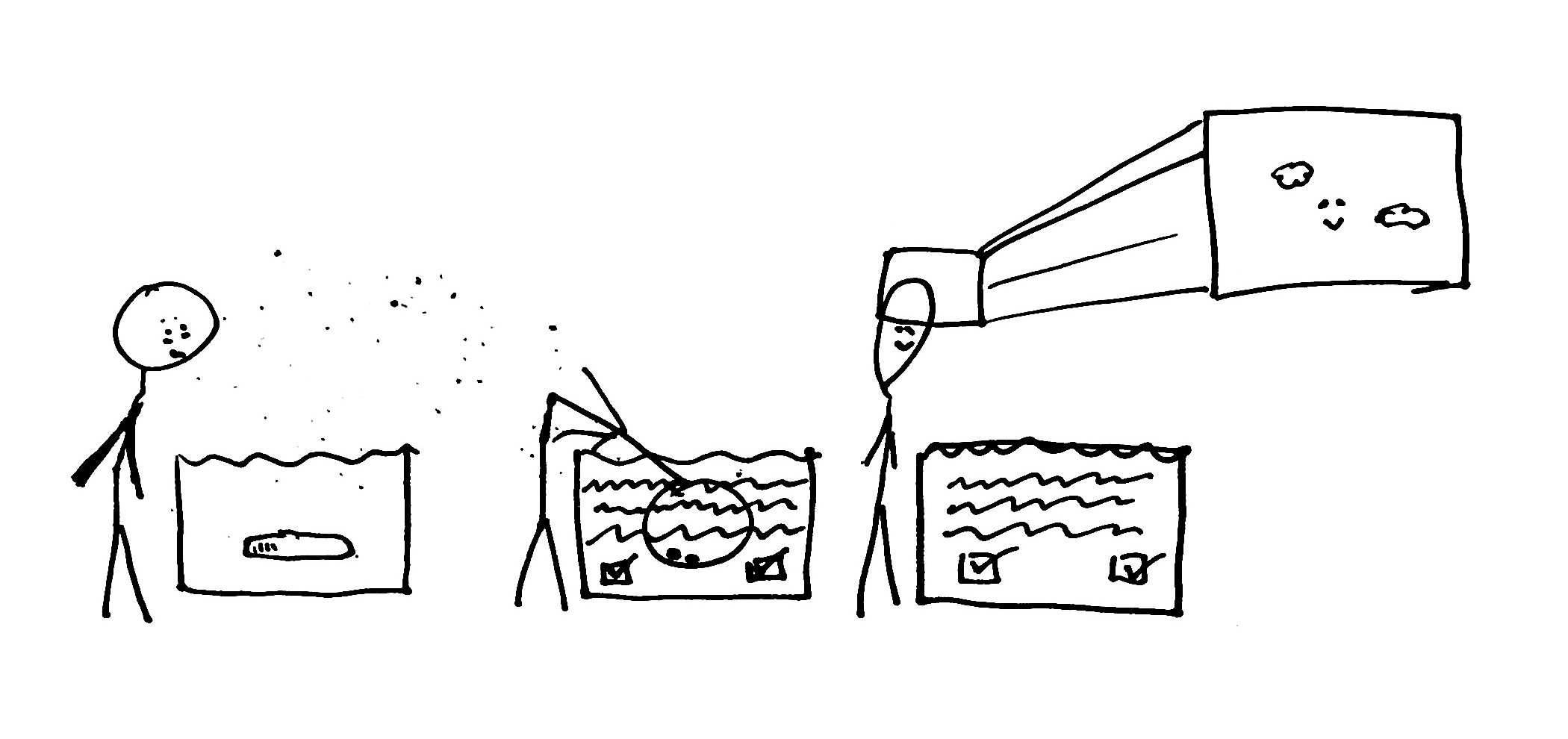
As I discussed in a previous piece and (upcoming!) video, AI tutoring tools can have the eerie effect of making you feel like you’re learning more than you actually are. This is, to some extent, the final form of smooth-maxxed education. Simply dunk your brain into the machine, watch passively as it produces magic, debugs your code, explains a concept, and then surface, head empty. A smooth learning experience, yet almost nothing learned.

comic of the head in the tub

I’ve mentioned the importance of developing computational thinking before. Given the uncertainty of how good AI is ultimately going to become at technical disciplines, it’s kind of the only skill I can responsibly say will remain useful. Well, that, spec-driven development, and mastering LLMs… someone should know what’s going on behind the scenes.

💸 Get a free student license

📚 Explore our course catalog

In my previous work, I advocated that people pick up these mysterious skills with the clichéd, vague advice: “do hard things.”

 me under a rainbow that says “do hard things!”, an unimpressed audience

Now, let’s actually go a little deeper into the research on learning, friction, and failure, inspired by this (several months out of date) cultural moment of friction-maxxing.

THE RESEARCH

If we lived in a world where Git commits gatekept access to food, maybe babies would evolve to pick up a bit of Python passively by age three. Thankfully, that’s not (yet) the case. Babies expend no effort in learning languages because they benefit from our brain’s capacity for passive neuroplasticity.

While there are many domains of knowledge where experiential, play-based learning is sufficient to impart essential skills, software development is not one of them. Despite being surrounded by technology and code all day, if you want to learn to build software, you’re going to need to put some effort into it.

This “effort” is, in practice, a capacity we develop as adults to engage our active neuroplasticity to learn things through concentrated effort rather than just being a sponge. Adults can achieve the exact same learning outcomes as children; we just need to learn things more incrementally. This is why we learn through courses with structured curricula instead of having an AI read us the most beautiful lines of code ever written before we go to bed.

ai chip reading us to sleep - book: Goodnight Mockoon
Mockoon” is a popular API mocking tool.

In the brain, activating our active neuroplasticity involves a cocktail of hormones regulating how alert ((nor)epinephrine), motivated (dopamine), and satisfied (serotonin) we are. This alertness or stress we feel in response to a challenging problem is literally the trigger to prepare our brain to learn something new. Failing and making mistakes are especially important, since they activate our memory more effectively than getting everything correct. 

In computing, this productive failure often takes the form of debugging, which, while comparable in enjoyability to eating rocks, is how many senior developers say they built their deep understanding of code and technical systems. 

Contrary to the besties on your short-form feed, learning research disagrees that we need only to “maxx” out on friction and failure to achieve genius status. Too much failure too soon can lead to demonstrably worse learning outcomes. As learners, we have to learn to adequately deal with the discomfort of learning before it sabotages our self-esteem and we stop believing ourselves capable of climbing the learning curve. 

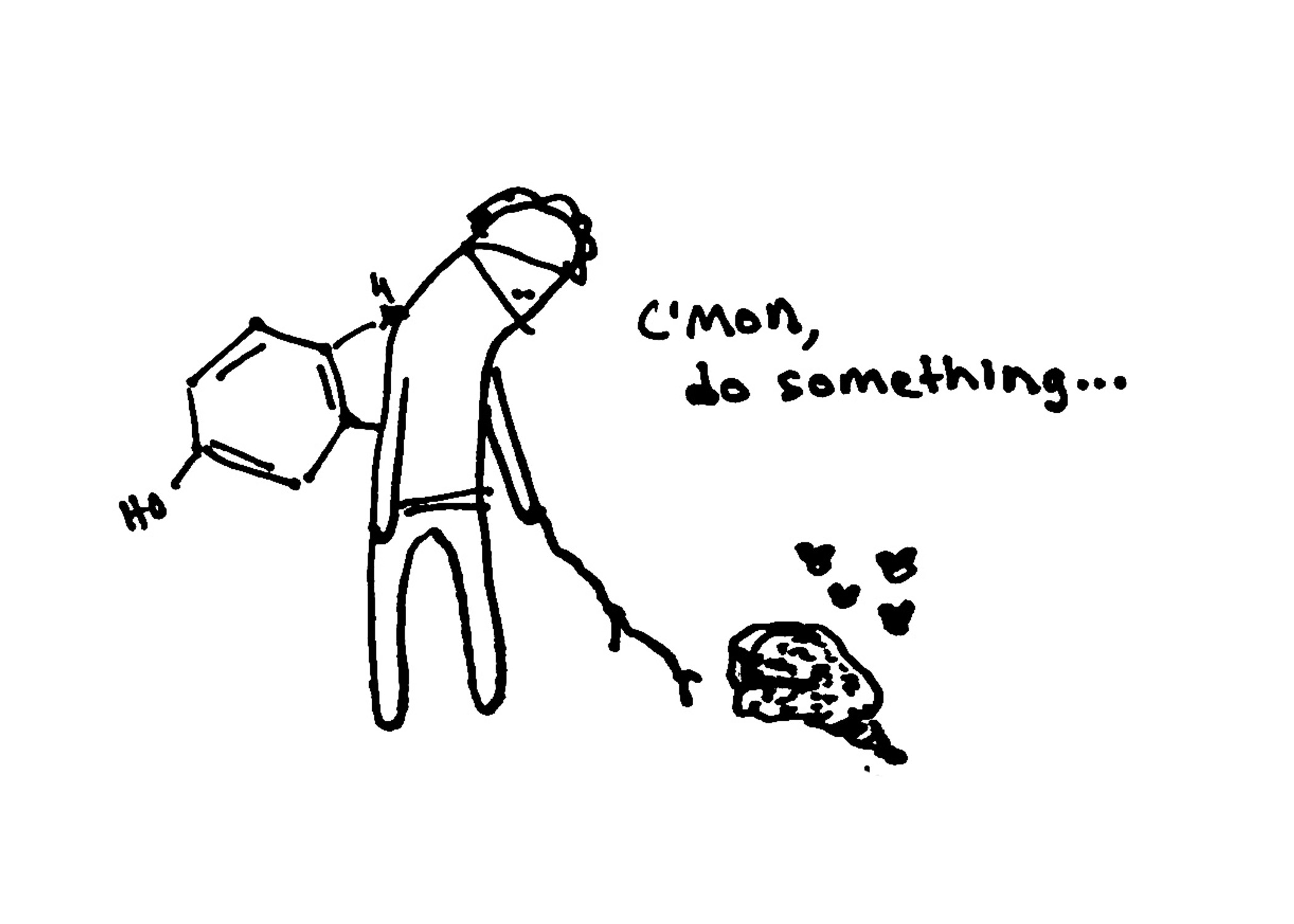
meme: c’mon, do something, but it’s the hormone and a brain, maybe some bugs
By doing hard things like debugging, we send our brains a hormonal signal that it needs to adapt and learn.

In education research, dealing with the bad feelings that come with learning new stuff is known as self-regulation. The good news is, there is an ever-growing catalog of interventions that can help people stay chill enough to succeed in doing (and failing to do) hard things.

The bad news is, self-regulation strategies are almost never taught to students explicitly, especially in computing, where most curricula are allergic to any mention of a “person” with “feelings”. Why is this? I honestly see no good reason for it. My best guess is that maybe for the educators who tend to teach computing skills, these self-regulation practices were obvious or invisible to them. Maybe they happen to be the people who struggled with failure less, due to their own biochemistry or cultural background. 

Nevertheless, this gross oversight can be corrected fairly easily. This excellent paper even made a one-page handout, the “Student’s Guide to Learning from Failure”, which details a wealth of science-backed strategies for managing the hormones bouncing around your wrinkly blob. 

One read-through of the Student’s Guide might give a few good tips, but the important thing is actually putting them into practice. Simply knowing about behavior change strategies does not guarantee long-term change. The sauce is in the doing, the failing, and the re-doing. Most importantly, it’s also in learning when to not do. We need downtime to integrate new knowledge and rest to regulate our bodies. Could it be that the most productive friction in education is to be found not in seeking out more information, but in slowing down and integrating the information we already know? Possibly, but I need some time to think about it.

Goodbye! Check out our free courses and student pack below!
💸 Get a free student license

📚 Explore our course catalog

If you liked this, check out our series How to Learn to Program in an AI World: Is It Still Worth Learning to Code?, Learning to Think in an AI World: 5 Lessons for Novice Programmers, Should You use AI to Learn to Code?, and How to Prepare for the Future of Programming.

Clara Maine is a technical content creator for JetBrains Academy. She has a formal background in Artificial Intelligence but finds herself most comfortable exploring its overlaps with education, philosophy, and creativity. She writes, produces, and performs videos about learning to code on the JetBrains Academy YouTube channel.

Support for uv, Poetry, and Hatch Workspaces (Beta)

Workspaces are increasingly the go-to choice for companies and open-source teams aiming to manage shared code, enforce consistency, and simplify dependency management across multiple services. Working within massive codebases often means juggling many interdependent Python projects simultaneously.

To streamline this experience, PyCharm 2026.1.1 introduced built-in support for uv workspaces, as well as those managed by Poetry and Hatch. This new functionality – currently in Beta – allows the IDE to automatically manage dependencies and environments across your entire workspace.

Intelligent workspace detection

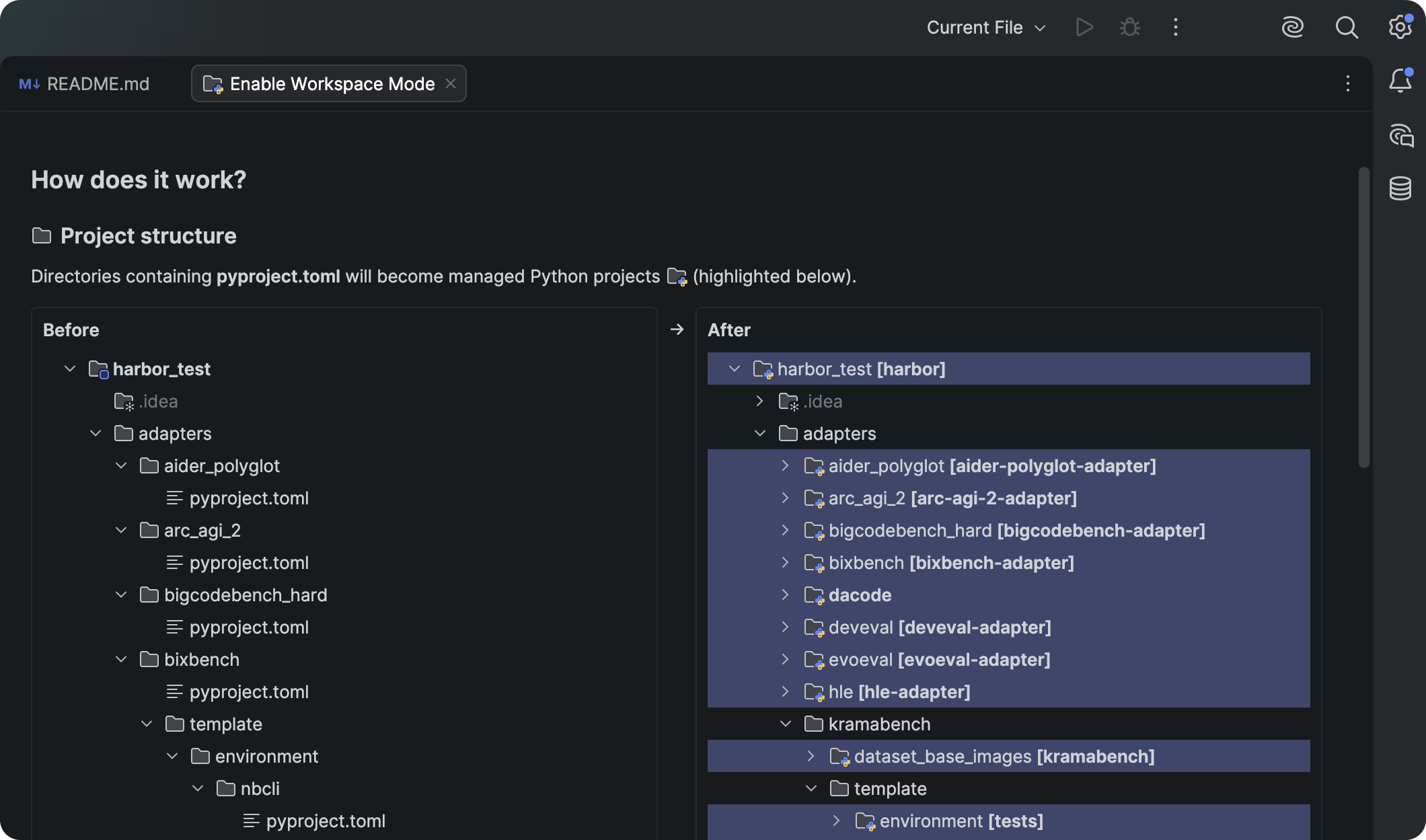
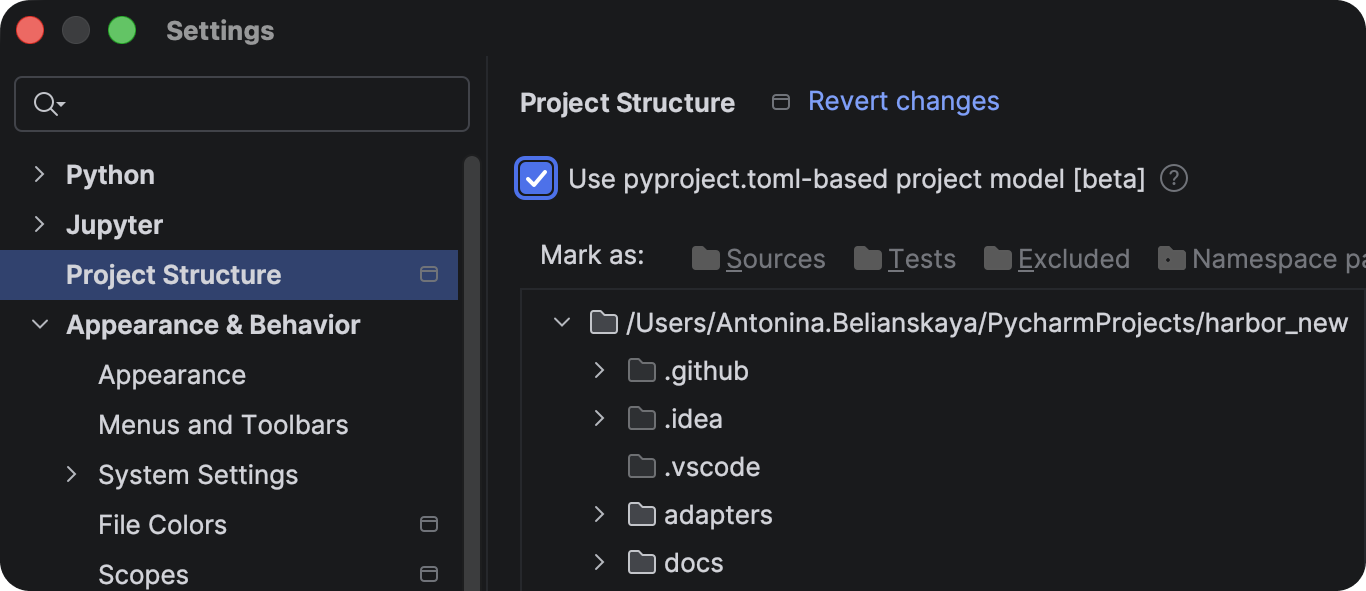
When you open a workspace, PyCharm can now derive its entire structure and all its dependencies directly from your pyproject.toml files. This allows the IDE to understand relationships between projects deeply, significantly reducing the amount of configuration you have to do manually.

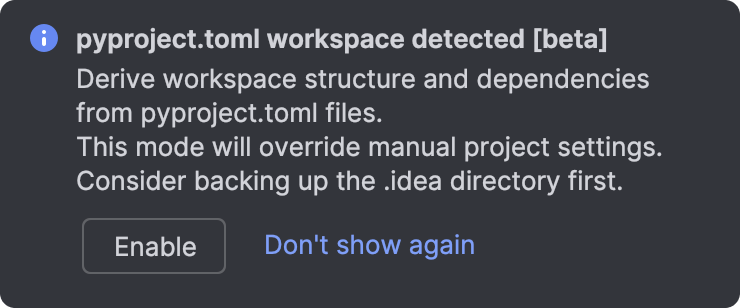
Because this is a fundamental change to how PyCharm handles your workspace, we’ve implemented it as an opt-in feature. Here is what you need to know about the transition:

  • Opt-in dialog: When you open a project, PyCharm may suggest enabling automatic detection for uv workspaces and Poetry/Hatch setups. 
  • Manual configuration: You can toggle workspace detection in Settings | Project Structure.
  • Configuration note: If you previously manually edited settings in .idea files, those settings may be reset when you agree to the new model.

Managing workspaces and their projects

PyCharm now provides an integrated experience that handles the complexities of multi-package setups in uv workspaces automatically. When you open a uv workspace, the IDE identifies the individual projects and their interdependencies, ensuring the project structure is ready for you to work with.

Visualizing workspace dependencies

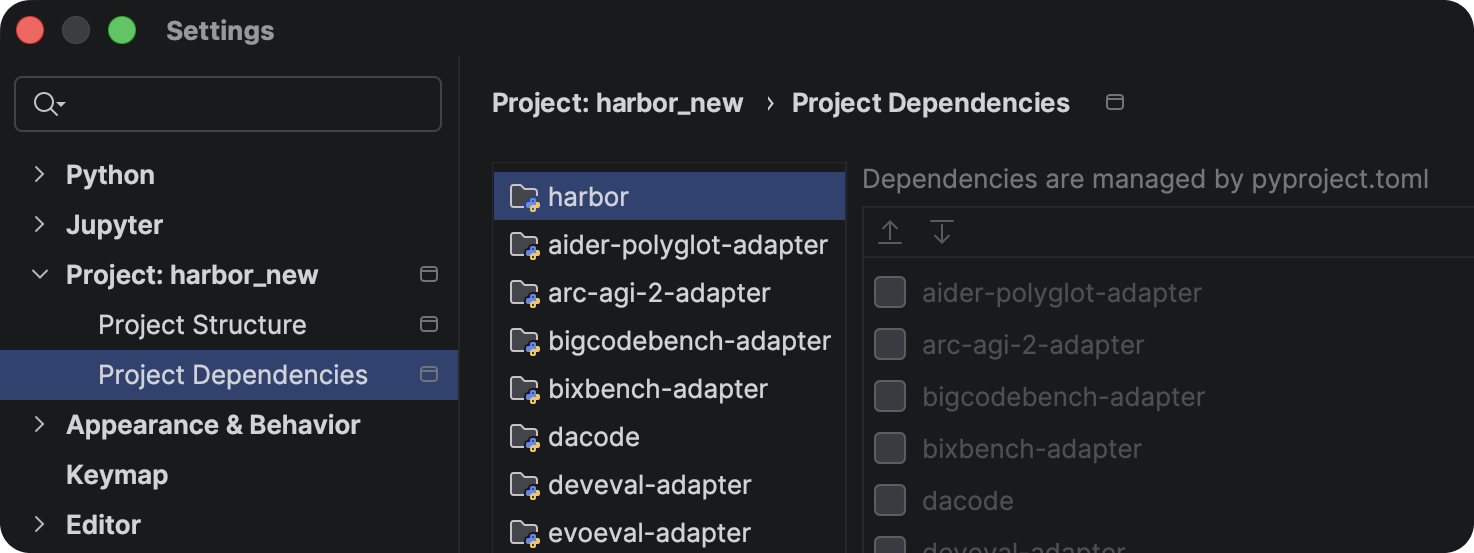
Once the workspace is loaded, you can verify how your projects relate to one another. PyCharm presents these dependencies in Settings | Project Dependencies.

These relationships are derived directly from your configuration and are shown as read-only in the UI. To make changes to the dependency graph, you can edit the pyproject.toml file manually – PyCharm will then update its internal model.

Automatic environment configuration

PyCharm prioritizes a zero-config approach to your Python SDK. When you open a .py or pyproject.toml file within a project, the IDE performs an immediate check.

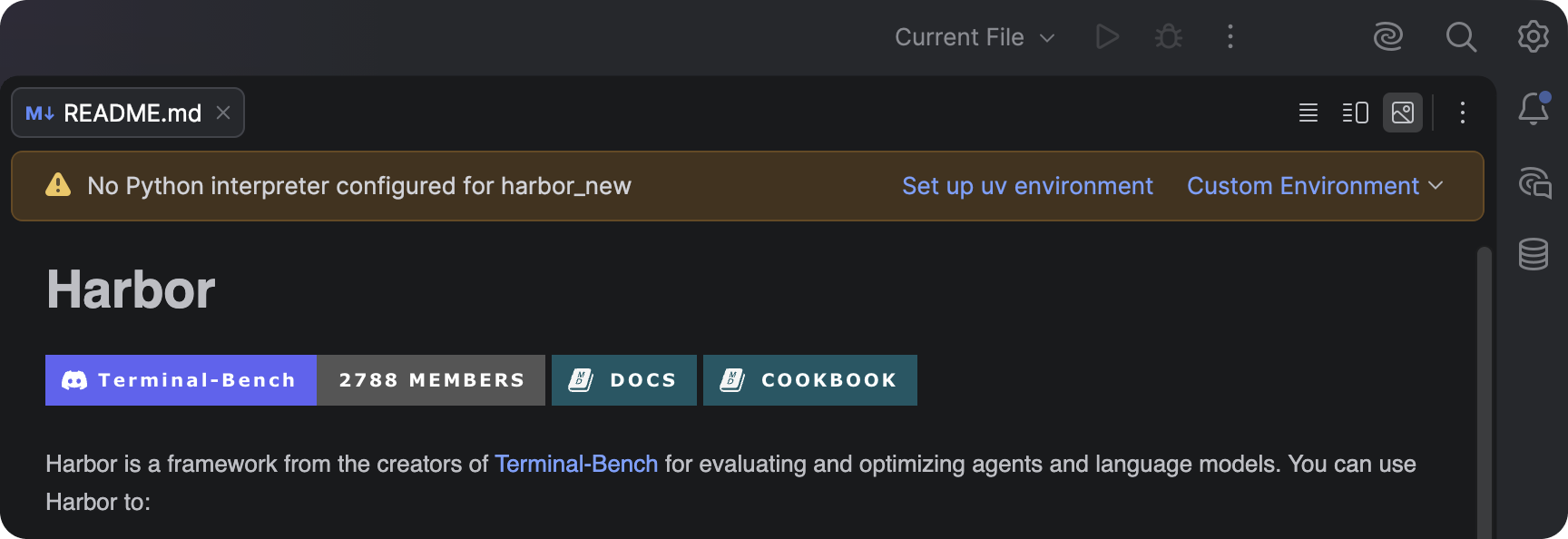
If a compatible environment already exists on your system, PyCharm automatically configures it as the SDK for that project. If no environment is detected, a file-level notification will appear suggesting that you create a new uv environment and install the necessary dependencies for that project.

Maintaining environment consistency

Beyond the initial setup, PyCharm continuously monitors the health of your environment to ensure it stays in sync with your defined requirements. 

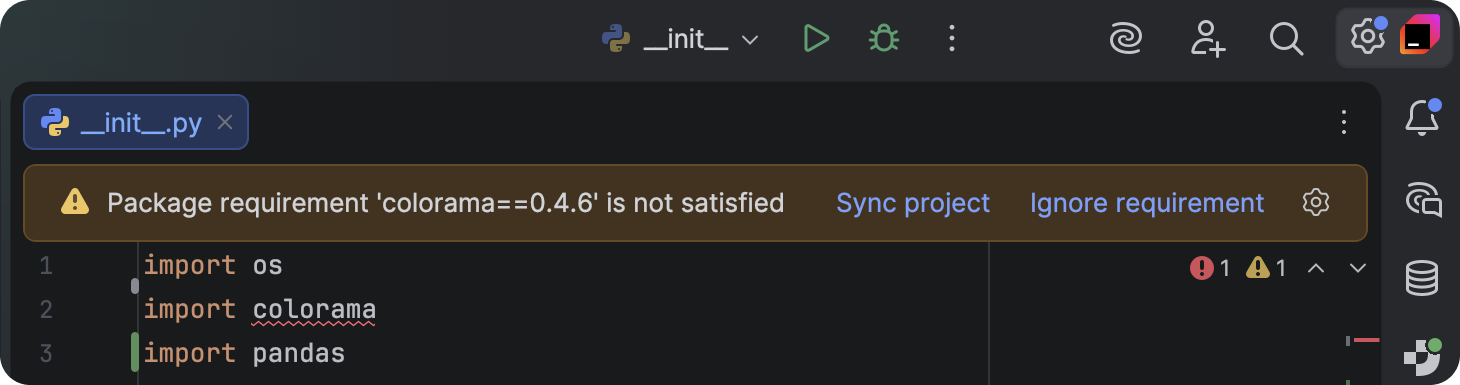
If a dependency is not defined in your pyproject.toml file but is imported in your code, PyCharm will trigger a warning with a Sync project quick-fix to resolve these discrepancies.

Import management

PyCharm also assists when you are actively writing code by identifying gaps in your project configuration.

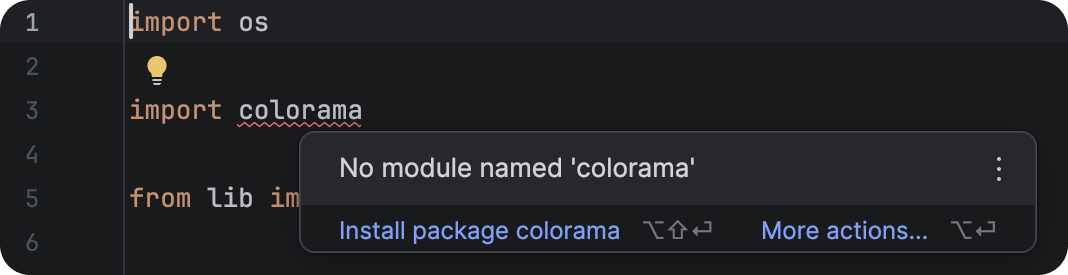
If you import a package that isn’t present in the environment and is not yet listed in the project’s pyproject.toml, the IDE will detect the omission. A quick-fix will suggest adding the package to the environment and updating the corresponding .toml file simultaneously.

Transparency via the Python Process Output tool window

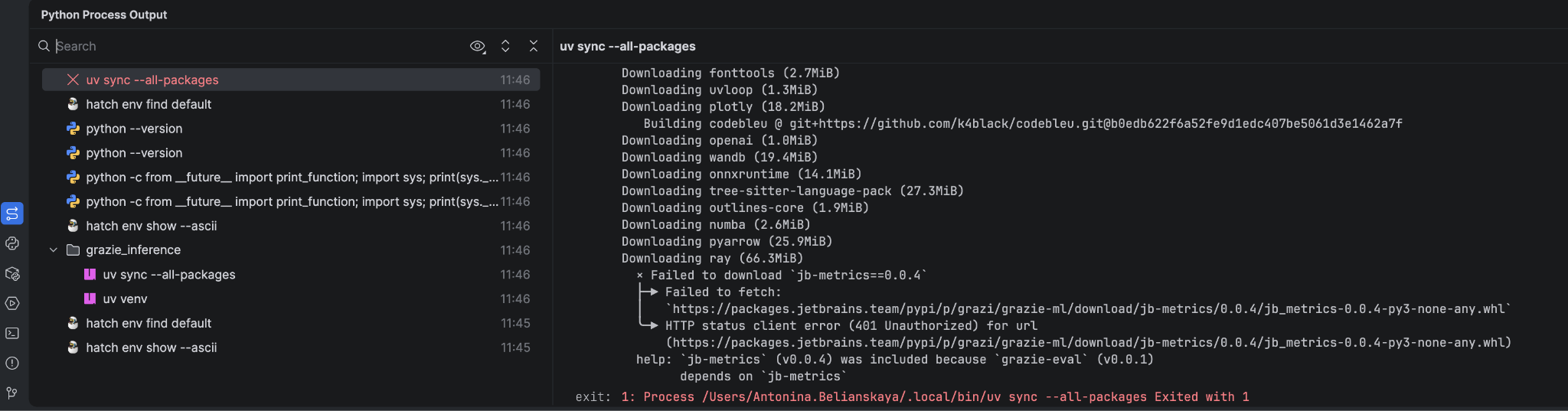
While PyCharm automates the backend execution of commands – such as uv sync –all-packages – it still remains fully transparent.

You can track all executed commands and their live output in the Python Process Output tool window. If synchronization fails for an environment, you can analyze the specific error logs to quickly identify the root cause.

Poetry and Hatch workspaces

The logic for Poetry and Hatch workspaces follows this exact same workflow. PyCharm detects projects via their pyproject.toml files and manages the environments with the same automated precision.

The only minor difference is in tool selection – the suggested environment tool is determined by what you have specified in your pyproject.toml. If no tool is specified, PyCharm will prioritize uv (if installed) or a standard virtual environment to get you up and running quickly.

Looking ahead

This Beta version of the functionality is just the beginning of our focus on supporting complex workspace structures. We are already working on expanding the UI to allow creating new projects, linking dependencies, and activating the terminal for specific projects.

As we refine these features, your feedback is our best guide – please share your thoughts or report any issues on our YouTrack issue tracker.

The Road to Name-Based Destructuring

TL;DR

  • New “val inside parentheses” syntax is being introduced to allow for name-based destructuring. Additionally, new syntax with square brackets is being introduced for positional destructuring.

    • Both are currently Experimental (enabled using the -Xname-based-destructuring=only-syntax compiler argument) and will become Stable in a future release.
  • In the distant future, the behavior of the “val outside parentheses” syntax for destructuring will change from being position-based to name-based.

    • There will be a long migration period before the default changes, and tooling is already in place to help with migration.
    • You can already make the switch to the new behavior (-Xname-based-destructuring=complete), but note its Experimental status.
  • The compiler ships with migration helpers that will be enabled by default for a few versions, and it will be some time before the new behavior becomes the default.

    • You can enable these helpers now by using -Xname-based-destructuring=name-mismatch.

Kotlin is changing, with names set to become central in destructuring. In the future, val (name, age) = person will extract the name and age properties from the person value, regardless of the way and order in which they were defined. This marks a change from the current approach to destructuring, in which the position is the key element. This blog post explains the reasoning behind this change, the migration strategy, and how Kotlin’s tooling supports it.

Why destructure by name instead of position?

Destructuring is most commonly used to access properties from data classes. For example, we can define a Person class as follows:

data class Person(val name: String, val age: Int)

Then we can extract several of the primary properties in a single go. This is what we call destructuring the value into its components.

fun isValidPerson(p: Person) {
  val (name, age) = p
  return name.isNotEmpty() && age >= 0
}

Currently, destructuring is done by position. The variables we introduce in a destructuring declaration often follow the names of the properties in the data class, but there’s no such requirement in the language.

// this is exactly the same function as above
fun isValidPerson(p: Person) {
  val (foo, bar) = p
  return foo.isNotEmpty() && bar >= 0
}

This lack of connection can cause problems, as it is very easy to inadvertently swap the order of two properties. This mistake may be caught later because of non-matching types, but it appears far from the actual origin.

The way in which components relate to primary properties also hinders refactoring. For example, we cannot move the age property to be computed and still retain the nice data class syntax. Imagine we make the following change:

data class Person(val name: String, val birthdate: Date) {
  val age = (Date.now() - birthdate).years
}

Now every destructuring declaration suddenly changes from age to birthdate! To be clear, source compatibility is still possible, but you need to do a lot more work.

The current approach to destructuring is also at odds with abstraction. If we turned Person into an interface, previous instances of destructuring would no longer be valid. We could work around this by introducing our own component functions, but this is usually seen as advanced. As a result, most interfaces do not provide such facilities.

interface Person {
  val name: String
  val age: Int

  operator fun component1(): String = name
  operator fun component2(): Int    = age
}

These problems go away if destructuring depends on names instead of positions. It doesn’t matter if you rearrange the order, change a computed property into a primary one or vice versa, or define a property in a class, interface, or object. The property’s name is a stable characteristic, which means that the source does not require any changes.

The new syntax

You can enable the new syntax by passing -Xname-based-destructuring=only-syntax as a compiler argument.

Without further ado, let’s look at the new syntax, which uses names for destructuring. Instead of a single val outside of the parentheses, you use val for each property inside the parentheses.

fun isValidPerson(p: Person): Boolean {
  (val name, val age) = p
  return name.isNotEmpty() && age >= 0
}

As expected, the order in which we write val name and val age in the example above doesn’t matter. This new syntax also supports renaming for cases in which the new variable you want to define is not the same as the property you want to access.

fun isValidPerson(p: Person): Boolean {
  (val age, val theName = name) = p
  return theName.isNotEmpty() && age >= 0
}

Destructuring based on position is still important for a few use cases. Pairs and triples, for example, don’t have names for their components at a conceptual level, and there’s no intention to require littering code that uses them with first and second. Position-based destructuring can also be used for collections, and in that case, there are no available properties. The new syntax for position-based destructuring uses square brackets – mirroring the syntax of upcoming collection literals. You can choose whether to put val inside or outside the brackets.

fun isZero(point: Pair<Int, Int>): Boolean {
  val [x, y] = point      // one way
  [val x, val y] = point  // or another
  return x == 0 && y == 0
}

All of this new syntax is available anywhere you can destructure, including lambda expressions and loops.

// suggested new syntax for iterating through a map
for ([key, value] in map) {
  // work with each entry
}

person?.let { (val name, val years = age) -> "$name is $years years old" }

To reiterate: This is all new syntax. As of version 2.3.20, the compiler knows what it means, and we intend to keep this syntax once the feature reaches Stable status.

Repurposing parentheses

At some point in the future, we intend for all destructuring using parentheses to be name-based. You can actually experience this future now by using the -Xname-based-destructuring=complete compiler argument.

If you already have a project, though, making the switch could have a major impact. The most visible issue would be if destructuring stops working, and the code needs to be updated. A more dangerous one would be destructuring declarations that remain valid but change the meaning.

For that reason, the compiler ships a migration helper under the -Xname-based-destructuring=name-mismatch compiler argument. When enabled, the compiler gives a warning in cases where the behavior is inconsistent between position-based and name-based destructuring or where the code won’t be accepted once destructuring with parentheses is no longer positional.

// accepted by both with the same behavior 
val (name, age) = person

// warning: accepted by both, but the behavior changes
val (age, name) = person

// warning: accepted only by position-based destructuring
val (personName, personAge) = person
// the IDE suggests potential fixes
// - renaming: (val personName = name, val personAge = age) = person
// - square brackets: val [personName, personAge] = person

The future

As hinted in this post, there will be ample time to migrate to the new name-based destructuring. Our current timeline looks as follows:

  • As of version 2.3.20, name-based destructuring is Experimental, meaning that you need a special compiler argument to use it.
    • Support in IntelliJ IDEA may be lacking, especially for migration.
  • With version 2.5.0 (at the end of 2026), the feature will become Stable.
    • The new syntax will be available without additional configuration.
    • The compiler will start reporting migration hints, and IntelliJ IDEA will include inspections and quick-fixes to help with the process.
    • This stage roughly corresponds to name-mismatch in compiler arguments, although we may make some adjustments to reporting depending on user feedback.
  • By version 2.7.0 (at the end of 2027), destructuring with parentheses will be name-based.
    • You can migrate to this stage earlier by using complete in compiler arguments.

This is a big change, and we don’t want to rush it. If at any point during 2027 it becomes clear that the ecosystem is not ready, we may postpone the change until another major version.

At no point are we deprecating the generation of component functions for data classes. Data classes will still generate the same bytecode – name-based destructuring is a feature for use sites. However, we plan to introduce multi-field value classes without component functions. That means that destructuring for value classes will only be name-based.

References

  • Release notes for Kotlin 2.3.20, the first version to offer name-based destructuring.
  • Design document (KEEP) for the feature and corresponding public discussion.

Who Am I Writing For?

Recently, I was asked a question that really made me take a step back. “With all these AI tools, aren’t they just to give users what you would write about anyways, so who are you writing for?”

Yes, AI can generate content faster than ever before. It can summarize, rephrase, and expand on our content. It can also write test cases, code snippets, documentation, and even write articles.

So why am I writing? Why am I spending time sitting here typing this out for the world to read when it may not even be read by a human and will just be another “piece of learning material” for AI.

The Human Element

I believe, firmly, that the accessibility content I write about is helping to teach the other part of AI that nobody is talking about. The human aspect. The person on the other side of the prompts, on the other side of the outcome from the content created.

I write because I still believe, stubbornly, that accessible development isn’t something you can fully automated. I know, I know says the guy who’s been writing about automation for years.

Accessible development, when done correctly, is about intent. It’s about understanding the impact of what you build. It’s about caring enough to check, to question, to learn, and improve. Even if that caring is knowing that when you say “make me an accordion that has XYZ” adding in “make me an ACCESSIBLE accordion that has XYZ”

Knowledge is Still Power

The speed at which AI can help build out code is unbelievable! The scary part is how accurate it can be as well in building out content. However, there is still an aspect of knowledge needed to understand accessibility and know if there are features missing. Let me give an example.

You just built a modal component. The modal is your standard looking modal with a title, text content and a close button. As part of your development process, you use a prompt that says “make me test cases for this component”

AI will generate a test case for your modal, in whatever framework you choose. More than likely, you will get a whole suite of tests that will check that it opens, the background content is grayed out, and that the buttons work to open and close the modal.

The big question though, will it include accessibility checks by default? Validating focus management, keyboard focus trap, and ensuring all actions work with keyboard.

This is the human and education element with development. If they don’t know to include accessibility tests, the tools they use may not include them. If they don’t know how to evaluate the output, they won’t know what’s missing.

Bringing it Home

So who am I writing for?

The developer who wants to build accessible components but doesn’t know where to start. The tester who wants to understand what good focus management actually looks like. The teams who care about the content create, but need guidance and want to learn.

Writing and knowledge sharing is how we keep accessibility human, and accessibility has always been about people. It is people with real needs, real frustrations, real barriers, real experiences.

AI has changed the development game forever. It can help us build applications faster and more efficient than ever before.

So why do I still write? Writing is how we pass on the knowledge that AI can’t invent. It’s how we teach the next person to ask better questions. Writing is how we keep accessibility grounded in real people, and that is my mission. Making developers give a damn about the impact of the work they build, and to care about the human on the other side of the screen.

Critical CSS: What Render-Blocking Means and How Inlining Fixes It

Related: The Browser Main Thread and Rendering Pipeline explains the full rendering pipeline that critical CSS inlining is optimizing for.

Lighthouse flags “eliminate render-blocking resources” and most developers look at their CSS files with mild confusion. The file is small. It is on a CDN. How can 15KB of CSS be blocking the render of a page that otherwise looks fast? The answer is in the word “render-blocking” itself, which is more precise than it sounds. The browser will not draw a single pixel to the screen until it has read every CSS file in the document head. Not because it is slow, but because it is correct.

What this covers: Why all CSS is render-blocking by specification, what the browser is actually waiting for before painting, how critical CSS inlining removes the wait, and how to extract and inline it without manually editing stylesheets.

Diagram showing the browser pipeline: HTML parsing stops to download external CSS, blocking paint until the CSSOM is complete. Critical CSS inlining removes the download step from the critical path.

Why the browser blocks on CSS

The browser builds two trees before painting: the DOM (Document Object Model) from your HTML, and the CSSOM (CSS Object Model) from your CSS. Rendering requires both. The render tree is built by combining DOM and CSSOM, and nothing is painted until the render tree exists.

This means CSS is blocking by design. The browser cannot make progress on rendering while waiting for an external CSS file because it literally does not know how to style any element until all CSS is parsed. An element that appears red in the DOM might be styled to be invisible in CSS. The browser has no way to know until it reads the CSS.

When the browser encounters a <link rel="stylesheet"> tag in the HTML, it:

  1. Pauses HTML parsing to prioritize fetching the CSS file (CSS is a high-priority resource)
  2. Starts a network request for the CSS file
  3. Waits for the full file to download
  4. Parses the CSS and builds the CSSOM
  5. Resumes HTML parsing
  6. Proceeds to build the render tree and paint

That network request in step 2 is the problem. On a typical server with a 100ms round trip time, a CSS file adds at minimum 100ms to the time before the first pixel appears. With a slower connection or a server that is geographically distant, this can be 300 to 500ms. The CSS file can be completely empty and the delay still happens because the browser does not know that until it receives the empty file.

What critical CSS is

Not all CSS needs to block the render. The CSS needed to render the visible content on the initial viewport (above the fold) blocks the render of something the user cares about. The CSS for a modal that appears three screens down, the CSS for the footer, the CSS for components the user has not scrolled to yet: these block rendering but the user does not see the result of that rendering anyway.

Critical CSS is the subset of your CSS that applies to elements visible in the initial viewport without scrolling. It is the minimum CSS needed to make the above-the-fold content look correct.

For a typical landing page, critical CSS might include:

  • Body and base typographic styles
  • Navigation bar styles
  • Hero section layout and colors
  • Above-fold image styles
  • Any font-face declarations for above-fold text

Everything else is non-critical: sidebar styles, footer, modal, article content styles, form styles for components below the fold.

How inlining fixes the problem

Instead of loading critical CSS from an external file, you embed it directly in the HTML document inside a <style> tag in the <head>.

<!DOCTYPE html>
<html>
<head>
  <!-- Critical CSS: embedded directly, no network request needed -->
  <style>
    body { margin: 0; font-family: system-ui, sans-serif; }
    .nav { height: 60px; background: #fff; border-bottom: 1px solid #eee; }
    .nav__logo { font-size: 1.25rem; font-weight: 600; }
    .hero { padding: 80px 24px; max-width: 800px; margin: 0 auto; }
    .hero__title { font-size: 2.5rem; line-height: 1.2; }
    /* ... rest of above-fold CSS ... */
  </style>

  <!-- Non-critical CSS: loaded asynchronously, does not block paint -->
  <link
    rel="preload"
    href="/styles/main.css"
    as="style"
    onload="this.onload=null;this.rel='stylesheet'"
  />
  <noscript><link rel="stylesheet" href="/styles/main.css" /></noscript>
</head>

The critical CSS is available immediately: the browser reads the HTML, finds the <style> tag, parses the CSS inline, and builds the CSSOM without a network round trip. It can begin rendering above-fold content immediately.

The full stylesheet loads asynchronously using the rel="preload" trick (preload the file with as="style", then switch rel to stylesheet when loaded). Below-fold content that depends on the full stylesheet renders when it loads, but by that time the above-fold content is already visible and the user has started reading.

The <noscript> fallback handles the case where JavaScript is disabled, which would prevent the onload from firing. In that scenario, the stylesheet loads normally as a blocking resource.

Why manually maintaining critical CSS is impractical

Manually identifying which CSS applies above the fold and which does not is not feasible at any scale. Layouts change. Viewports vary. The above-fold content on a 375px phone is different from the above-fold content on a 1440px monitor.

The standard approach is to automate extraction with a tool that renders the page in a headless browser, identifies all elements visible in the initial viewport, and extracts the CSS rules that apply to those elements.

Critters is a plugin for webpack and Vite that does this at build time:

// vite.config.ts

  plugins: [critters()],
};

After building, Critters:

  1. Renders each HTML page in a headless environment
  2. Identifies which CSS rules apply to above-fold elements
  3. Inlines those rules in <style> tags
  4. Changes the <link> to load asynchronously

No manual work required. The build output has correct inlined critical CSS for each page.

Next.js has had critical CSS extraction built in since v10 through its integration with Critters. If you are using Next.js, this optimization is applied automatically to pages using the App Router.

Critical is a standalone Node.js package for extraction:


await critical.generate({
  base: 'dist/',
  src: 'index.html',
  target: {
    html: 'index-critical.html',
    css: 'critical.css',
  },
  width: 1300,
  height: 900,
  // Also generate for mobile viewport
  dimensions: [
    { width: 375, height: 812 },
    { width: 1300, height: 900 },
  ],
});

The dimensions option is important: critical CSS should cover the most common viewport sizes, not just one. A rule that is critical on mobile (because it styles content visible at 375px width) might be non-critical on desktop (where the content is below the fold), and vice versa.

The tradeoffs to understand

HTML file size increases. Inlining critical CSS means the CSS is embedded in every HTML response rather than being fetched once and cached. For pages with substantial critical CSS (say, 20KB), this adds 20KB to every HTML response. Weigh this against the round-trip savings.

CSS is duplicated. Critical CSS rules appear both in the <style> tag and in the full external stylesheet. When the external stylesheet loads, the browser parses the same rules again. This is harmless (CSS parsing is fast) but worth knowing.

Dynamic content complicates extraction. If your page uses client-side rendering to insert above-fold content after the initial HTML load, the extraction tool cannot see that content. The critical CSS it extracts will be incomplete because the above-fold elements did not exist when the headless renderer checked.

For server-side rendered pages, extraction works accurately. For heavily client-side rendered pages, you may need to either use renderBefore options to delay extraction until after React hydrates, or limit critical CSS to truly static above-fold elements like the navigation.

The Lighthouse connection

When Lighthouse reports “Eliminate render-blocking resources” and lists CSS files, it is measuring the time between when the page starts loading and when the first paint occurs. Every external CSS file in <head> adds to this time.

After inlining critical CSS and loading the full stylesheet asynchronously, Lighthouse will no longer flag the CSS file as render-blocking because it is loaded asynchronously and does not delay the initial paint.

The metric that typically improves most is First Contentful Paint, because above-fold content can now paint as soon as the HTML is received rather than waiting for an external CSS round trip. Depending on the server response time and connection speed, the FCP improvement can range from 100ms on fast connections to over 500ms on slow mobile connections.

A mental model for understanding render-blocking

Think of the browser as a factory. The HTML is the blueprint, the CSS is the paint colors and finishes specification, and the factory cannot start production until it has both documents. If the paint colors arrive one minute late, the entire factory sits idle for one minute regardless of how fast the machines are.

Critical CSS inlining is equivalent to printing the paint colors for the first section of the product directly on the blueprint. The factory can start producing the visible parts immediately and wait for the full paint specification to arrive for the parts it will produce later.

The external stylesheet still arrives and the rest of the page still gets fully styled. But the user sees the first screenful of content without waiting for a network round trip that was never about content the user could see on arrival.

Read the original article on Renderlog.in:
https://renderlog.in/blog/critical-css-inlining-render-blocking-explained/

If you found this helpful, I’ve also built some free tools for developers and everyday users. Feel free to try them once:

JSON Tools: https://json.renderlog.in
Text Tools: https://text.renderlog.in
QR Tools: https://qr.renderlog.in


Rust Async in Tauri v2 — What Tripped Me Up and How I Fixed It

All tests run on an 8-year-old MacBook Air.
All results from shipping 7 Mac apps as a solo developer. No sponsored opinion.
Tauri v2 uses Tokio under the hood. That sounds simple. In practice, async Rust in a Tauri app has specific patterns that took me too long to figure out.
Here’s what actually tripped me up.

The cannot be sent between threads wall
The most common async error in Tauri development:
MutexGuard<T> cannot be sent between threads safely
This happens when you hold a lock across an .await point. Tauri commands run on Tokio, which may switch threads at await points. A MutexGuard from std::sync::Mutex is not Send.
The fix: use tokio::sync::Mutex instead of std::sync::Mutex for state that needs to be held across await points. Or restructure to drop the guard before awaiting.
rust// Wrong — holds MutexGuard across await
async fn bad(state: State<‘_, Mutex>) {
let guard = state.lock().unwrap();
some_async_call().await; // MutexGuard still held here
guard.do_something();
}

// Right — drop guard before await
async fn good(state: State<‘_, Mutex>) {
let value = {
let guard = state.lock().unwrap();
guard.get_value()
}; // guard dropped here
some_async_call().await;
use_value(value);
}

Blocking calls in async commands
rusqlite, file I/O, and other synchronous operations block the current thread. In an async context, this blocks the Tokio thread pool.
For short operations (sub-millisecond), blocking is fine. For anything longer:
rustlet result = tokio::task::spawn_blocking(|| {
// blocking operation here
do_something_slow()
}).await??;
spawn_blocking offloads to a dedicated thread pool. The async runtime stays responsive.

Long-running tasks and progress updates
For operations that take seconds — file sync, large transfers — you want progress updates to the frontend. Use Tauri’s event system:
rust#[tauri::command]
async fn sync_files(handle: AppHandle) -> Result<(), AppError> {
for (i, file) in files.iter().enumerate() {
process_file(file).await?;
handle.emit(“sync-progress”, i).ok();
}
Ok(())
}
Frontend listens with listen(‘sync-progress’, …). Clean separation between the async work and the UI update.

The abort pattern for cancellable tasks
Users cancel operations. Build cancellation in from the start:
rustlet (tx, rx) = tokio::sync::oneshot::channel::<()>();

tokio::spawn(async move {
tokio::select! {
_ = do_long_work() => {},
_ = rx => { /* cancelled */ }
}
});

// Store tx somewhere, send to cancel
Retrofitting cancellation into a long-running task that wasn’t designed for it is painful. Design for it early.

The verdict
Async Rust in Tauri is manageable once you internalize the Send + Sync rules and know which Mutex to reach for. The compiler errors are specific enough to guide you.
The patterns above cover 90% of what you’ll hit shipping a real Tauri app.

If this was useful, a ❤️ helps more than you’d think — thanks!
Hiyoko PDF Vault → https://hiyokoko.gumroad.com/l/HiyokoPDFVault
X → @hiyoyok

Private & Powerful: Parsing Sensitive Medical Records Locally with WebLLM and WebGPU

Handling sensitive data like Electronic Health Records (EHR) is a nightmare for privacy compliance. Whether it’s HIPAA in the US or GDPR in Europe, sending a patient’s medical history to a cloud-based LLM often triggers a cascade of security audits and potential liabilities.

But what if the data never left the user’s computer?

In this tutorial, we are diving deep into Edge AI and Privacy-preserving AI by building a local EHR parser. Using WebLLM, WebGPU acceleration, and React, we will transform raw medical text into structured JSON entirely within the browser sandbox. No servers, no APIs, and zero data leakage.

The Architecture: Why WebLLM?

Traditionally, local LLMs required a heavy Python environment (Ollama, LocalAI). With the advent of WebGPU, the browser can now access the local GPU’s power directly. WebLLM (powered by TVM.js) allows us to run models like Llama 3 or Mistral directly in the browser’s memory.

Data Flow Overview

graph TD
    A[User: Upload Medical PDF/Text] --> B[Browser Sandbox]
    B --> C{WebGPU Available?}
    C -- Yes --> D[Initialize WebLLM Engine]
    C -- No --> E[Fallback: CPU/Wasm]
    D --> F[Load Quantized Model - e.g., Llama-3-8B-q4f16]
    F --> G[Process EHR Text via Prompt Template]
    G --> H[Output Structured JSON]
    H --> I[React UI Display]
    subgraph Privacy Zone
    B
    D
    G
    end

Prerequisites

To follow along, ensure you have:

  • A browser with WebGPU support (Chrome 113+ or Edge).
  • Node.js and a React environment.
  • The tech_stack: @mlc-ai/web-llm, react, and pdfjs-dist.

Step 1: Setting Up the WebLLM Engine

First, we need to initialize the engine. This is the “brain” that will live in your browser’s worker thread.

// useWebLLM.ts
import { useState, useEffect } from 'react';
import * as webllm from "@mlc-ai/web-llm";

export function useWebLLM() {
  const [engine, setEngine] = useState<webllm.MLCEngine | null>(null);
  const [progress, setProgress] = useState(0);

  const initEngine = async () => {
    const modelId = "Llama-3-8B-Instruct-v0.1-q4f16_1-MLC"; // Quantized for browser

    const engine = await webllm.CreateMLCEngine(modelId, {
      initProgressCallback: (report) => {
        setProgress(Math.round(report.progress * 100));
        console.log(report.text);
      },
    });

    setEngine(engine);
  };

  return { engine, progress, initEngine };
}

Step 2: Extracting Text and Prompt Engineering

Medical records are messy. We need to feed the LLM a clean prompt to ensure it returns valid JSON. This is crucial for Edge AI applications where prompt tokens are “free” (no API cost) but constrained by local VRAM.

const EHR_PROMPT_TEMPLATE = (rawText: string) => `
  You are a medical data extraction assistant. 
  Extract the following fields from the medical record provided:
  - Patient Name
  - Primary Diagnosis
  - Prescribed Medications (List)
  - Recommended Follow-up

  Format the output strictly as JSON.

  Record:
  """
  ${rawText}
  """
`;

const parseMedicalRecord = async (engine: any, text: string) => {
  const messages = [
    { role: "system", content: "You are a helpful assistant that outputs only JSON." },
    { role: "user", content: EHR_PROMPT_TEMPLATE(text) }
  ];

  const reply = await engine.chat.completions.create({
    messages,
    temperature: 0.0, // Keep it deterministic
  });

  return JSON.parse(reply.choices[0].message.content);
};

Step 3: The React UI

We want a clean interface where users can paste text or upload a document and see the “Processing locally” indicator.

import React, { useState } from 'react';
import { useWebLLM } from './hooks/useWebLLM';

const EHRParser = () => {
  const { engine, progress, initEngine } = useWebLLM();
  const [input, setInput] = useState("");
  const [result, setResult] = useState(null);

  return (
    <div className="p-8 max-w-2xl mx-auto">
      <h2 className="text-2xl font-bold mb-4">Local EHR Parser 🩺</h2>

      {!engine ? (
        <button 
          onClick={initEngine}
          className="bg-blue-600 text-white px-4 py-2 rounded"
        >
          Load Local AI Model ({progress}%)
        </button>
      ) : (
        <div className="space-y-4">
          <textarea 
            className="w-full h-40 border p-2"
            placeholder="Paste medical notes here..."
            onChange={(e) => setInput(e.target.value)}
          />
          <button 
            onClick={async () => {
              const data = await parseMedicalRecord(engine, input);
              setResult(data);
            }}
            className="bg-green-600 text-white px-4 py-2 rounded"
          >
            Parse Locally
          </button>
        </div>
      )}

      {result && (
        <pre className="mt-8 bg-gray-100 p-4 rounded text-sm">
          {JSON.stringify(result, null, 2)}
        </pre>
      )}
    </div>
  );
};

The “Official” Way: Leveling Up Your AI Architecture

While running LLMs in the browser is a game-changer for privacy, orchestrating these models in a production environment requires a deeper understanding of memory management and model sharding.

For more advanced patterns on Edge AI deployment, optimizing WebGPU kernels, and building production-ready Local-first AI applications, I highly recommend exploring the deep-dive articles at the WellAlly Tech Blog. It’s a goldmine for developers who want to move beyond “Hello World” and into scalable, high-performance engineering.

Why This Matters

  1. Zero Latency: Once the model is loaded (cached in the browser’s IndexedDB), inference is lightning fast because there’s no network round-trip.
  2. Cost Efficiency: You aren’t paying $0.01 per 1k tokens to OpenAI. The user provides the compute.
  3. Ultimate Privacy: In the context of EHR, this is the gold standard. The data never exists on a server disk or in a log file.

Challenges to Consider

  • Initial Load: The first time a user visits, they might need to download 2-5GB of model weights.
  • VRAM Constraints: Low-end devices might struggle with Llama-3-8B. Always provide a “Small Model” fallback like Phi-3 or TinyLlama.

Conclusion

The web is no longer just for displaying data; it’s for processing it intelligently. By combining WebLLM and WebGPU, we can build tools that respect user privacy while offering the power of modern Generative AI.

What are you building with Edge AI? Let me know in the comments! 👇

PhpStorm 2026.2 Early Access Program Has Started

The Early Access Program (EAP) for the next major PhpStorm 2026.2 release is now open!

PhpStorm’s EAP builds are a great opportunity to try upcoming features for free in your real workflows and share feedback with the PhpStorm team. Your input directly influences what makes it into the final release.

This release, our main areas of focus are:

  • Native mode for remote development scenarios, as we aim to significantly improve interaction with the projects located on WSL 2 and in Dev Containers.
  • Ongoing enhancements in PhpStorm’s understanding of PHPDoc-based generics.
  • Overall performance and stability improvements, including reduced startup time, indexing time, and freezes.
Download PhpStorm 2026.2 EAP


Getting started with the EAP

If you’re not familiar with how our Early Access Program (EAP) works, here’s a quick overview:

  1. We release new EAP builds weekly, giving you a sneak peek at upcoming features.
  2. EAP builds are completely free to use and do not require a license.
  3. You can install the EAP version alongside your stable PhpStorm installation, so there’s no need to uninstall your current version.
  4. The most convenient way to access EAP builds and keep both your stable and EAP versions up-to-date is by using our Toolbox App.
  5. Alternatively, you can download EAP builds from the EAP page or set up your IDE to automatically receive updates by selecting Check IDE Updates for the Early Access Program under Settings/Preferences | Appearance & Behavior | System Settings | Updates.