De PHP a la IA: Tres Estrategias para Modernizar Sistemas Legacy Sin Morir en el Intento

Introducción: El Dilema del Código Antiguo

Trabajar con sistemas legacy se siente frustrante y limitado. El código que antes funcionaba ahora es una barrera para la innovación, y las soluciones actuales a menudo se perciben como parches temporales. La realidad es que no podemos (ni debemos) seguir desarrollando dentro de arquitecturas obsoletas si queremos crecer.

La clave está en buscar alternativas con soluciones actuales y plantear soluciones mixtas. En lugar de demoler toda la estructura, aprenderemos a construir puentes funcionales y modernos que aprovechan el Software, los Datos y la Automatización para dar nueva vida al core de su negocio.

💻 Estrategia 1: Microservicios y APIs Fachada (El Enfoque FullStack)

El principal error al modernizar es intentar modificar directamente el core del código antiguo (PHP, Java, etc.). En su lugar, debemos usar herramientas modernas como Node.js, Python o Java con Spring para crear una capa protectora.

Esta capa actúa como un traductor. Permite que las nuevas aplicaciones (móviles, front-ends modernos, o sistemas públicos externos) se comuniquen a través de APIs RESTful o Microservicios, mientras que, internamente, el Microservicio traduce esa solicitud al formato que el sistema legacy sí entiende.

  • Punto clave: Nunca tocamos el código legacy para nuevas funciones, reducimos la posibilidad de introducir errores críticos y satisfacemos las tecnologías actuales (JSON, WebSockets, etc.).

📊 Estrategia 2: Abstracción de Datos Mediante Vistas (El Enfoque en Datos)

Los sistemas legacy contienen la riqueza histórica de su negocio. La pared que nos impide el análisis moderno (IA/ML) no es el gestor de la base de datos, sino el modelo relacional obsoleto.

Para aplicar Data Science sin reestructurar la base de datos core, debemos crear una capa lógica de abstracción. Esto se logra mediante la generación de vistas o pseudo-tablas optimizadas. Estas vistas presentan la información registrada en el formato que los algoritmos de IA necesitan (tablas planas, campos agregados), sin requerir un solo cambio en el esquema del sistema legacy.

  • Punto clave: Liberamos el valor de los datos históricos para la toma de decisiones y el análisis predictivo, manteniendo la estabilidad y la integridad de la base de datos operativa.

🚀 Estrategia 3: CI/CD y Arquitectura Orientada a la Eficiencia (El Enfoque en Automatización)

Una vez que las soluciones mixtas (APIs y Vistas) están listas, el reto es gestionarlas sin desestabilizar el sistema legacy. Aquí es donde entran la Integración Continua y Despliegue Continuo (CI/CD), que actúan como un soporte de control.

La selección de la arquitectura debe ser consciente y eficiente. No debemos usar un framework potente y hambriento de recursos para tareas simples. Se debe considerar el consumo de memoria y tráfico. Si solo necesitamos unos cuantos datos, una serverless function o un microservicio ligero puede ser más apropiado que un monolito complejo, asegurando que la modernización sea rentable.

  • Punto clave: Fiabilidad operativa y optimización de recursos, asegurando que la modernización sea económicamente viable y no introduzca nuevos cuellos de botella.

💡 Conclusión: La Cordura del Desarrollador

La modernización es la construcción de puentes funcionales, basada en los tres pilares que hemos discutido.

Sin embargo, el desafío final no es técnico, sino estratégico. El peligro siempre será caer en el «Síndrome del Objeto Brillante» (la modernización por la modernización) en lugar de la prudencia.

El verdadero reto es tener la cordura de seleccionar siempre la herramienta que nos brinde la solución vital para el cliente y no solo la solución cómoda o fácil para el desarrollador. La modernización debe ser una inversión consciente, no una tendencia.

El Debate Final

Esto nos lleva a la pregunta esencial: ¿La solución que estamos implementando hoy es realmente una solución para el futuro, o es simplemente una solución robusta para el presente que se convertirá en la deuda técnica de mañana?

Docker для фронтенд- и бэк-разработчиков: практический гайд без DevOps-магии

Docker для фронтенд- и бэк-разработчиков: практический гайд без DevOps-магии

Docker для фронтенд- и бэк-разработчиков: практический гайд без DevOps-магии

Docker — это не «магия для DevOps», а нормальный инженерный инструмент, который решает очень приземлённую проблему:

один и тот же проект должен одинаково запускаться локально, у коллеги и на сервере.

Если ты фронтендер, бэкендер, PHP- или Node-разработчик — Docker нужен тебе ровно для этого.

Не для Kubernetes, не для резюме, не для пафоса.

Ниже — честный и практический гайд. Строго по документации, с примерами из реальной разработки.

Что такое контейнер и почему он лучше VM

Контейнер простыми словами

Контейнер — это изолированный процесс в Linux с:

  • собственным файловым пространством,
  • своей сетью,
  • своими зависимостями.

Контейнер не содержит своей операционной системы — только процесс(ы) и файлы из образа.

Контейнер vs VirtualBox / KVM — на одном примере

Задача: запустить Node.js + PostgreSQL для проекта.

Виртуальная машина (VirtualBox / KVM)

  1. Создаёшь VM с Ubuntu
  2. Ставишь Node.js
  3. Ставишь PostgreSQL
  4. Ловишь конфликт версий
  5. Настраиваешь systemd
  6. VM весит 2–4 ГБ
  7. Запускается минутами

Docker


docker compose up

  • Node и Postgres — в контейнерах
  • Вес — сотни мегабайт
  • Запуск — секунды
  • У всех разработчиков одинаковое окружение

Ключевая разница:

VM виртуализирует железо , Docker изолирует процессы.

Основы Docker

Установка Docker

Ubuntu


sudo apt update

sudo apt install -y docker.io docker-compose-plugin

sudo usermod -aG docker $USER

Перелогинься, иначе Docker будет требовать sudo.

CentOS / Rocky / AlmaLinux


sudo dnf install -y docker

sudo systemctl enable --now docker

Windows (через WSL2)

  1. Установить Docker Desktop
  2. Включить WSL2
  3. Docker работает в Linux , а не в Windows

Docker без WSL2 на Windows — плохая идея. Не надо так.

Основные понятия Docker

  • Image (образ) — шаблон (read-only)
  • Container (контейнер) — запущенный образ
  • Layer (слой) — шаг сборки образа
  • Registry — хранилище образов (Docker Hub, private registry)

Базовые команды Docker


docker run nginx

docker ps

docker ps -a

docker logs container_name

docker exec -it container_name sh

docker run vs docker exec

  • docker run — создаёт и запускает новый контейнер
  • docker exec — входит в уже запущенный контейнер

Типичная ошибка новичков — пытаться exec в контейнер, который не запущен.

Типичные ошибки новичков

  • Хранить данные внутри контейнера
  • Использовать тег latest
  • Запускать сервисы через service nginx start
  • Не читать docker logs
  • Копировать весь проект без .dockerignore

Dockerfile: собираем образ

Базовая структура Dockerfile


FROM node:20-alpine

WORKDIR /app

COPY package*.json ./

RUN npm ci

COPY . .

EXPOSE 3000

CMD ["npm","run","start"]

Основные инструкции

  • FROM — базовый образ
  • RUN — команда при сборке
  • COPY — копирование файлов
  • ENV — переменные окружения
  • EXPOSE — документируем порт
  • CMD — команда запуска контейнера
  • ENTRYPOINT — точка входа

Пример 1: Dockerfile для Node.js (Astro / Express)


FROM node:20-alpine AS build

WORKDIR /app

COPY package*.json ./

RUN npm ci

COPY . .

RUN npm run build

FROM node:20-alpine

WORKDIR /app

COPY --from=build /app/dist ./dist

COPY package*.json ./

RUN npm ci --omit=dev

EXPOSE 3000

CMD ["node","dist/server.js"]

Почему так правильно:

  • multistage-сборка
  • dev-зависимости не попадают в production
  • минимальный размер образа

Пример 2: Dockerfile для PHP (WordPress / Bitrix)


FROM php:8.4-fpm-alpine

RUN apk add --no-cache 

bash git icu-dev libzip-dev oniguruma-dev 

&& docker-php-ext-install intl zip mysqli opcache

WORKDIR /var/www/html

WordPress и Bitrix официально используют php-fpm.

Apache внутри контейнера почти всегда лишний.

.dockerignore — обязательно

Минимальный набор (скопируй в корень проекта):


node_modules

vendor

.git

.gitignore

.env

.env.local

.env.*.local

*.log

npm-debug.log*

.DS_Store

coverage

.nyc_output

dist

.next

Расширенный вариант для Node.js (ещё меньше контекста — быстрее сборка):


node_modules

vendor

.git

.gitignore

.env*

*.log

.DS_Store

coverage

dist

.next

.nuxt

.cache

*.md

!README.md

Без .dockerignore:

  • образы раздуваются,
  • ломается кеш,
  • сборка становится медленной.

Рекомендации по Dockerfile

  • Используй alpine
  • Объединяй RUN в один слой
  • COPY package.json до копирования кода
  • Всегда используй multistage, если есть сборка

Проверка размера образа:


docker image ls

Пример вывода (образ без alpine и с лишними слоями будет в разы больше):


REPOSITORY TAG IMAGE ID CREATED SIZE

myapp latest a1b2c3d4e5f6 2 minutes ago 180MB

Сборка с тегом и без кеша (если что-то пошло не так):


docker build --no-cache -t myapp:1.0 .

Минимальный рабочий пример (copy-paste)

Ниже — полный набор файлов, чтобы поднять Node.js + PostgreSQL за минуту.

Dockerfile в корне проекта:


FROM node:20-alpine

WORKDIR /app

COPY package*.json ./

RUN npm ci --omit=dev

COPY . .

EXPOSE 3000

CMD ["node", "server.js"]

docker-compose.yml :


services:

app:

build: .

ports:

- "3000:3000"

environment:

DATABASE_URL: postgresql://postgres:postgres@db:5432/app

depends_on:

db:

condition: service_healthy

db:

image: postgres:16-alpine

environment:

POSTGRES_USER: postgres

POSTGRES_PASSWORD: postgres

POSTGRES_DB: app

volumes:

- pgdata:/var/lib/postgresql/data

healthcheck:

test: ["CMD-SHELL", "pg_isready -U postgres"]

interval: 2s

timeout: 5s

retries: 5

volumes:

pgdata:

Запуск и проверка:


docker compose up -d

docker compose ps

curl -s http://localhost:3000

docker compose logs -f app

Docker Compose для разработки

docker-compose.yml (версия 3.x)


version: "3.9"

services:

app:

build: .

ports:

- "3000:3000"

env_file:

- .env

Типовые сервисы

  • nginx
  • php-fpm
  • mysql / postgres
  • redis

Один сервис — один контейнер. Всегда.

Networks и volumes

  • network — контейнеры общаются по имени сервиса
  • volume — постоянные данные
  • bind mount — файлы проекта (локальная разработка)

Пример 1: WordPress (nginx + php-fpm + mysql + phpMyAdmin)


services:

nginx:

image: nginx:alpine

volumes:

- ./nginx.conf:/etc/nginx/conf.d/default.conf
- ./wp:/var/www/html

ports:

- "8080:80"

php:

build: .

volumes:

- ./wp:/var/www/html

environment:

DB_HOST: db

depends_on:

- db

db:

image: mysql:8

environment:

MYSQL_ROOT_PASSWORD: root

MYSQL_DATABASE: wordpress

phpmyadmin:

image: phpmyadmin/phpmyadmin

environment:

PMA_HOST: db

ports:

- "8081:80"

Пример 2: Node.js + PostgreSQL + Redis


services:

app:

build: .

ports:

- "3000:3000"

depends_on:

- db
- redis

db:

image: postgres:16

volumes:

- pgdata:/var/lib/postgresql/data

redis:

image: redis:7

volumes:

pgdata:

Env-файлы

  • .env — локальная разработка
  • .env.production — продакшен
  • Секреты не коммить

Команды Docker Compose


docker compose up -d

docker compose down

docker compose ps

docker compose logs -f app

Как дебажить контейнер в Compose

Войти в оболочку запущенного сервиса:


docker compose exec app sh

Внутри контейнера можно проверить переменные, установленные пакеты и сеть:


Переменные окружения

env | grep DATABASE

Есть ли сеть до базы

nc -zv db 5432

Альпийский образ: вместо curl часто есть wget

wget -qO- http://localhost:3000

Выйти из контейнера: exit.

Логирование и отладка

docker logs


docker logs -f container_name

Если контейнер упал — причина почти всегда в логах.

docker inspect


docker inspect container_name

Там:

  • IP,
  • volumes,
  • env,
  • команды запуска.

Проброс портов


localhost:3000 → container:3000

Если порт не проброшен — с хоста до приложения в контейнере не достучаться.

localhost и IP-адреса внутри контейнера

Внутри Docker:

  • ❌ 127.0.0.1
  • ❌ localhost
  • ✅ имя сервиса (db, redis)

Docker DNS работает по имени сервиса.

Деплой контейнера на сервер

Production-сборка

  • без dev-зависимостей
  • без hot-reload
  • без bind-mount

Публикация образа в registry


docker build -t username/app:1.0 .

docker push username/app:1.0

Можно использовать Docker Hub или приватный registry.

Запуск на сервере через docker run

На сервере (после docker pull или если образ уже в registry):


docker run -d 

--name app 

-p 80:3000 

--restart=always 

-e NODE_ENV=production 

username/app:1.0

Проверка, что контейнер работает:


docker ps

curl -s -o /dev/null -w "%{http_code}" http://localhost:80

systemd unit-файл


[Unit]

Description=Docker App

After=docker.service

[Service]

Restart=always

ExecStart=/usr/bin/docker run --rm -p 80:3000 username/app:1.0

ExecStop=/usr/bin/docker stop app

[Install]

WantedBy=multi-user.target

Данные в production

  • volumes — базы данных
  • bind mounts — конфиги

Контейнеры можно удалять, данные — нет.

Обновление без простоя

  1. Поднять новый контейнер
  2. Переключить трафик (nginx)
  3. Остановить старый

Для небольших проектов этого достаточно.

Про Kubernetes — честно

Когда нужен Kubernetes

  • десятки сервисов
  • автоскейлинг
  • отказоустойчивость
  • несколько окружений

Базовые сущности K8s

  • Pod — один или несколько контейнеров
  • Deployment — управление версиями
  • Service — доступ к подам

Когда Kubernetes не нужен

  • один сервер
  • один проект
  • небольшая команда

В этом случае Docker Compose — лучше.

Альтернативы Kubernetes

  • Docker Swarm
  • AWS ECS
  • HashiCorp Nomad

Типичные ошибки и решения

Контейнер стартует и сразу падает

Причина — ошибка в CMD или ENTRYPOINT. Сначала смотри логи:


docker logs container_name

Если контейнер сразу падает и логи пустые — запусти образ без флага -d , чтобы увидеть вывод в консоли:


docker run --rm --name debug-app -p 3000:3000 myapp:latest

Ошибка (например, «Cannot find module») появится сразу в терминале. После исправления кода пересобери образ и снова запусти контейнер.

Port already in use

Узнай, какой процесс занял порт, и заверши его:


Linux / macOS

lsof -i :3000

или

sudo ss -tlnp | grep 3000

Убить процесс по PID (подставь реальный PID из вывода)

kill -9 PID

На Windows (WSL2) порт может держать другой контейнер — проверь docker ps и останови старый контейнер: docker stop container_name.

localhost внутри контейнера — это не хост

Для контейнера localhost и 127.0.0.1 указывают на сам контейнер , а не на твою машину. Это нормально: контейнер изолирован, у него свой сетевой namespace. Чтобы достучаться до сервиса на хосте с Windows/Mac, используй host.docker.internal (Docker Desktop) или –add-host=host.docker.internal:host-gateway при запуске.

Медленная сборка образа

  • Неправильный порядок COPY
  • Нет .dockerignore
  • Не используется кеш слоёв

Практические сниппеты по теме

На сайте есть готовые сниппеты с разбором команд, сетей и хранения данных:

  • Docker: разница между run, start и exec — когда создавать контейнер, когда запускать остановленный, как войти в уже работающий
  • Docker networking: почему localhost не работает между контейнерами — embedded DNS, имя сервиса вместо 127.0.0.1, пример docker-compose
  • Как уменьшить размер Docker-образа: alpine, кеш и порядок инструкций — Alpine vs Debian, кеширование слоёв, правильный порядок COPY в Dockerfile
  • Docker Compose: volumes vs bind mounts — когда bind mount (разработка), когда volume (production), пример для обоих вариантов
  • Docker system prune — очистка неиспользуемых образов, контейнеров и томов

Итог

Docker — это:

  • не DevOps-магия,
  • не Kubernetes,
  • не оверинженерия.

Это инструмент разработчика , который:

  • упрощает локальную разработку,
  • убирает «у меня работает»,
  • делает деплой предсказуемым.

Если раньше ты делал VM — Docker станет логичным следующим шагом.

Не сразу идеально, но один раз правильно.

Read more on viku-lov.ru

Understanding Change Data Capture with Debezium

Moving data between systems sounds simple – until it isn’t.

As applications grow, teams quickly realize that copying data from one database to another reliably is much harder than it looks. Updates get missed, deletes are hard to track, and systems slowly drift out of sync.

This is where Change Data Capture (CDC) comes in.

In this post, I’ll walk through what CDC is, why traditional approaches break down, and how Debezium captures data changes in a fundamentally different way.

How data is usually moved today (and why it fails)

In many systems, data is moved by periodically querying a database for new or updated rows.

A common pattern looks like this:

  • Run a job every few minutes
  • Query rows where updated_at > last_run_time
  • Copy the result downstream
  • Repeat

At first, this feels reasonable. It’s easy to implement and works fine at small scale.

But as systems grow, cracks start to appear.

Problems with this approach

  • Missed updates when timestamps overlap
  • Duplicate data when jobs retry
  • Deletes are invisible unless handled manually
  • High load on production databases
  • Lag between when data changes and when consumers see it

This approach is commonly known as polling – and it breaks down fast under real-world conditions.

What is Change Data Capture (CDC)?

Instead of repeatedly asking:

“What does the data look like now?”

CDC asks a different question:

“What changed?”

Change Data Capture focuses on:

  • Inserts
  • Updates
  • Deletes

as events, not rows in a snapshot.

The key insight is this:

Databases already record every change internally – CDC simply listens to those records.

This makes CDC fundamentally different from polling.

Introducing Debezium

Debezium is an open-source platform for implementing Change Data Capture.

At a high level:

  • Debezium captures changes from databases
  • Converts them into events
  • Publishes them to Apache Kafka

One important thing to understand early:

Debezium does not query tables.
It reads database transaction logs.

This single design choice is what makes Debezium powerful.

How Debezium actually captures changes

Every relational database maintains an internal log:

  • PostgreSQL → WAL (Write-Ahead Log)
  • MySQL → Binlog
  • SQL Server → Transaction Log

These logs exist so databases can:

  • Recover from crashes
  • Replicate data
  • Ensure consistency

Debezium taps into these logs.

The flow looks like this:

  1. An application writes data to the database
  2. The database records the change in its transaction log
  3. Debezium reads the log entry
  4. The change is converted into an event
  5. The event is published to a Kafka topic

No polling.
No guessing.
No missed changes.

What does a CDC event contain?

A Debezium event usually includes:

  • The previous state of the row (before)
  • The new state of the row (after)
  • The type of operation (insert, update, delete)
  • Metadata like timestamps and transaction IDs

Instead of representing state, CDC represents history.

This is a subtle but powerful shift.

A real-world example: order lifecycle events

Imagine a simple orders table in PostgreSQL.

What happens over time:

  1. A new order is created
  2. The order status changes from CREATEDPAID
  3. The order is later cancelled or completed

With polling:

  • You only see the latest state
  • Deletes are often lost
  • Intermediate transitions disappear

With Debezium:

  • Each change becomes an event
  • The full lifecycle is preserved
  • Consumers can react in real time

This makes CDC ideal for:

  • Analytics
  • Auditing
  • Search indexing
  • Cache invalidation

Where does Kafka fit in?

Kafka acts as the event backbone.

Debezium publishes changes to Kafka topics, and multiple systems can consume them independently:

  • One consumer may update a cache
  • Another may populate an analytics store
  • Another may write data into a data lake

This decoupling is crucial for scalable architectures.

Where analytics systems come in (subtle but important)

Downstream systems can consume CDC events for analysis.

For example, analytical databases like ClickHouse are often used as read-optimized sinks, where:

  • CDC events are transformed
  • Aggregated
  • Queried efficiently

In this setup:

  • Debezium captures changes
  • Kafka transports them
  • Analytical systems focus purely on querying

Each system does one job well.

How CDC compares to other approaches

At a high level:

  • Polling → simple, but fragile and inefficient
  • Database triggers → invasive and hard to maintain
  • CDC via logs (Debezium) → reliable, scalable, and accurate

CDC isn’t magic – but it aligns with how databases actually work internally.

Trade-offs to be aware of

Debezium is powerful, but not free of complexity.

Some things to consider:

  • Requires Kafka infrastructure
  • Schema changes need planning
  • Backfilling historical data is non-trivial
  • Operational visibility matters

CDC pipelines are systems, not scripts.

When does Debezium make sense?

Debezium is a good fit when:

  • You need near real-time data movement
  • Multiple systems depend on the same data
  • Accuracy matters more than simplicity

It may be overkill when:

  • Data changes infrequently
  • Batch updates are sufficient
  • Simplicity is the top priority

Closing thoughts

Change Data Capture shifts how you think about data – from snapshots to events.

Debezium embraces this model by listening to the database itself, instead of repeatedly asking it questions. That difference is what makes CDC reliable at scale.

If you’ve ever struggled with missed updates, fragile ETL jobs, or inconsistent downstream data, CDC is worth understanding – even if you don’t adopt it immediately.

Join the Kotlin Ecosystem Mentorship Program

TL;DR:

The Kotlin Foundation is launching a mentorship program that pairs experienced open-source maintainers with new Kotlin contributors to help them make their first meaningful contributions, with branded swag and a chance to win a trip to KotlinConf.


I still remember my first contribution to an open-source library. It was Typhoon, a widely popular dependency injection framework for iOS apps. The easiest part was the actual change. Much harder, but still manageable, was everything that came with it – from onboarding to learning the project structure to figuring out how things were tested.

What required the most effort in terms of emotional energy was something different – deciding that I was worthy of contributing at all. Typhoon was one of the most popular iOS libraries at the time. Most of the apps I knew depended on it. Folks from my community used it daily and considered it a very clever and complex project. I had to convince myself that I was good enough and that I wouldn’t make things worse.

Ironically, I actually did make things worse by introducing a pretty nasty bug. But the world didn’t end. I learned a lot and fixed it later myself!

The same thing still happens today to many people who want to make their first open-source contribution. In some ways, it has become even harder, as AI has made the picture worse. It’s now much easier to implement a change without deeply understanding the project and the problem being solved, which has led to a wave of low-quality PRs. As a result, many maintainers have become skeptical about reviewing contributions from outsiders.

That’s why we’re launching a new pilot program at the Kotlin Foundation – Kotlin Ecosystem Mentorship. We help experienced project maintainers team up with enthusiasts who want to make their first meaningful contribution, whether that’s code, documentation, or something else. Project maintainers act as mentors. They guide mentees through the full contribution journey – helping to set up the project and understand how the work is organized, reviewing changes, and giving feedback until a contribution is successfully merged. Mentees are expected to work on a real project, ask questions, respond to feedback, and gradually learn how to contribute independently.

By the end of the program, each mentor-mentee pair should have at least one meaningful contribution merged into a real project. Ideally, the project also gains a new regular contributor who continues picking up tasks in the future.

We’re starting with a small-scale pilot for roughly 10 pairs. It will run from mid-February, when mentor-mentee pairs will be formed, to the beginning of April. We expect it to be relatively lightweight, with mentors spending around 30–60 minutes per week, and mentees around 2–4 hours per week, depending on the task.

There’s no formal evaluation at the end. Instead, we’ll collect feedback from both sides. Every pair with a successfully merged meaningful contribution will receive a Kotlin-branded merchandise pack, and one randomly selected pair will win a trip to KotlinConf 2026, with all expenses covered.

We know that work on open-source projects is very demanding. The most important asset is people who are motivated to spend some of their time giving back to the ecosystem they rely on. We believe this program can help maintainers pass on not just knowledge but also confidence to a new generation of Kotlin open-source contributors!


How to apply

  • If you want to participate as a mentor, please complete this survey. You should be a maintainer of a Kotlin open-source project and be ready to spend some time working with a mentee.
  • If you want to participate as a mentee, please complete this survey.

FAQ

Q: What are the requirements for mentees?

We don’t impose any hard requirements beyond your willingness to contribute to a project. That said, the program is limited in size, so we unfortunately won’t be able to accept everyone this time.

Q: Is this limited to code contributions?

We accept what we call meaningful contributions – anything that a project maintainer (acting as a mentor) considers valuable for their project. This can include documentation, tooling, examples, or other forms of contribution.

Q: When will the pairs be formed?

We’ll get in touch with participants by February 16, 2026.

Q: Where can I get more details?

Feel free to contact us at hello@kotlinfoundation.org or join the #kotlin-foundation channel in the public Kotlin Slack.

🚀 The Ultimate Guide to Setting Up GitHub SSH on Windows (Single & Multiple Accounts)

github-ssh-windows-single-multiple-accounts

Setting up GitHub SSH on Windows 11 doesn’t have to be painful. Whether you’re using Git Bash or PowerShell, working with one GitHub account or juggling multiple accounts (personal + office), this guide will get you set up with zero hassle.

We’ll cover single account quick start, multi-account setup, and all the real-world troubleshooting issues Windows developers usually face.

By the end, you’ll have a smooth Git + SSH workflow that just works. ✨

🏁 Quick Start: Single GitHub Account on Windows

If you’re only dealing with one account (most beginners do), follow this.

1. Install Git

  • Download & install Git for Windows.
  • This gives you Git Bash + Git itself.

Verify it works:

git --version
ssh -V

2. Configure Your Git Identity

This sets your name and email for commits.

git config --global user.name "Your Name"
git config --global user.email "your_email@example.com"
git config --global --list

3. Generate SSH Key

Create your secure key pair:

ssh-keygen -t rsa -b 4096 -C "your_email@example.com" -f ~/.ssh/id_rsa
eval "$(ssh-agent -s)"
ssh-add ~/.ssh/id_rsa

Copy your public key and add it to GitHub:
GitHub → Settings → SSH and GPG keys → New SSH key

cat ~/.ssh/id_rsa.pub

4. Test Connection

ssh -T git@github.com

Expected:

Hi YOUR_USERNAME! You've successfully authenticated, but GitHub does not provide shell access.

5. Clone Repos

Use SSH instead of HTTPS:

git clone git@github.com:your_username/your_repo.git

Or switch an existing repo:

git remote set-url origin git@github.com:your_username/your_repo.git
git remote -v

✅ Done! Single account SSH setup is ready.

👥 Multi-Account Setup: Personal + Work on Windows

Now, let’s say you have two accounts (personal + office). This is where things get tricky — but we’ll make it clean.

1. Generate Separate Keys

# Personal
ssh-keygen -t rsa -b 4096 -C "personal_email@example.com" -f ~/.ssh/id_rsa_personal

# Work
ssh-keygen -t rsa -b 4096 -C "work_email@example.com" -f ~/.ssh/id_rsa_work

Add both keys to the SSH agent:

eval "$(ssh-agent -s)"
ssh-add ~/.ssh/id_rsa_personal
ssh-add ~/.ssh/id_rsa_work

2. Create SSH Config File

This tells SSH which key belongs to which GitHub account.

Open the config file:

  • Git Bash:
  notepad ~/.ssh/config
  • PowerShell:
  notepad $env:USERPROFILE.sshconfig

Paste this:

# Personal GitHub
Host github.com-personal
  HostName github.com
  User git
  IdentityFile ~/.ssh/id_rsa_personal

# Work GitHub
Host github.com-work
  HostName github.com
  User git
  IdentityFile ~/.ssh/id_rsa_work

💡 Save with LF line endings (not CRLF). In VS Code, bottom-right → change CRLF → LF.

3. Add Public Keys to GitHub

  • Personal:
  cat ~/.ssh/id_rsa_personal.pub

Add it in GitHub → Settings → SSH and GPG Keys.

  • Work:
  cat ~/.ssh/id_rsa_work.pub

Add to your work GitHub account.

4. Test Authentication

ssh -T git@github.com-personal
ssh -T git@github.com-work

You should see a success message for both.

5. Clone Repositories with Correct Alias

  • Personal:
  git clone git@github.com-personal:username/repo.git
  • Work:
  git clone git@github.com-work:org/repo.git

6. Use Correct Identity Per Repo

Inside your work project folder, override the Git identity:

git config user.name "Work Dev"
git config user.email "work_email@example.com"

Now commits in this repo use your work email, while personal repos keep using the global one.

♻️ Automating SSH Agent on Windows

By default, Windows doesn’t remember keys after restart.
Fix this in Git Bash with ~/.bash_profile:

if [ -z "$SSH_AUTH_SOCK" ]; then
    eval "$(ssh-agent -s)"
fi

ssh-add -l | grep "id_rsa_personal" >/dev/null || ssh-add ~/.ssh/id_rsa_personal
ssh-add -l | grep "id_rsa_work" >/dev/null || ssh-add ~/.ssh/id_rsa_work

Now every new terminal session auto-loads your keys. 🎉

🛠️ Troubleshooting (Real-World Fixes)

1. Could not resolve hostname github.com-work

  • Cause: Wrong config file name (config.txt), CRLF endings, or alias mismatch.
  • Fix:
  mv ~/.ssh/config.txt ~/.ssh/config
  dos2unix ~/.ssh/config
  chmod 600 ~/.ssh/config
  ssh -T git@github.com-work

2. Permission denied (publickey)

  • Cause: Key not added, agent not running, or wrong identity.
  • Fix:
  eval "$(ssh-agent -s)"
  ssh-add -l
  ssh-add ~/.ssh/id_rsa_work
  ssh -vT git@github.com-work

3. Copy-pasting just the URL in PowerShell

❌ Wrong:

git@github.com-work:org/repo.git

✅ Correct:

git clone git@github.com-work:org/repo.git

4. Running ~/.ssh/config like a command

❌ Wrong:

~/.ssh/config

✅ Correct:

notepad ~/.ssh/config

5. Keys saved in wrong folder

If you didn’t specify ~/.ssh/ during keygen:

# Fix by moving
mv ~/id_work* ~/.ssh/
ssh-add ~/.ssh/id_work

🧭 PowerShell vs Git Bash: What’s Different?

  • Both can run git clone, git pull, git push.
  • Path differences:

    • Git Bash → /c/Users/<username>/
    • PowerShell → C:Users<username>
  • Editing config:

    • Git Bash → notepad ~/.ssh/config
    • PowerShell → notepad $env:USERPROFILE.sshconfig

📋 Cheat Sheet (Copy, Paste, Go)

Identity

git config --global user.name "Your Name"
git config --global user.email "you@personal.com"
git config user.name "Work Dev"     # inside work repo
git config user.email "work@company.com"

Keys

ssh-keygen -t rsa -b 4096 -C "email" -f ~/.ssh/id_rsa_label
ssh-add ~/.ssh/id_rsa_label

SSH Config

Host github.com-personal
  HostName github.com
  User git
  IdentityFile ~/.ssh/id_rsa_personal

Host github.com-work
  HostName github.com
  User git
  IdentityFile ~/.ssh/id_rsa_work

Clone

git clone git@github.com-personal:username/repo.git
git clone git@github.com-work:org/repo.git

🎯 Final Thoughts

Setting up GitHub SSH on Windows 11 can be messy if you’re not careful — especially with multiple accounts. But with:

  • Global config for personal
  • Per-project config for work
  • SSH aliases for clarity
  • Agent automation

… you’ll have a rock-solid workflow across Git Bash and PowerShell.

So whether you’re pushing to your personal side projects or your office repos, you can switch identities seamlessly — no more errors, no more headaches. 🚀

🔥 What about you? Do you manage multiple GitHub accounts on the same machine?
Drop your tricks in the comments below — let’s share some dev wisdom!

Koog x ACP: Connect an Agent to Your IDE and More

We hope you’re staying up to date with our latest posts and have checked out our tutorials on how to create coding agents in Koog and connect ACP-compliant agents to your JetBrains IDE. As useful as these guides are, one important piece was hitherto missing from the puzzle: How do you make your Koog agent ACP-compliant in the first place?

This is where Koog’s native integration with the ACP comes into play, providing a streamlined path from agent implementation to IDE integration. Let’s review some basics first.

What is the ACP?

The Agent Client Protocol (ACP) is an open protocol that defines how agents and clients communicate. Its main uses include notifying the client about things like an LLM’s response or a tool call, or requesting permissions to edit a file. 

ACP provides extensive documentation and SDKs for Python, TypeScript, Kotlin, and Rust, all of which fully implement the agent-client communication layer. As a result, developers don’t need to reimplement protocol logic; they can simply use the already-implemented notifications and request handlers.

This significantly reduces the effort required to integrate agents with clients and makes interoperability the default: Any ACP-compatible agent can be used with any ACP-compatible editor or client. Several existing coding agents already follow the ACP and can be easily connected with a wide range of clients, including AI Chat in JetBrains IDEs.

So if you want to build your own coding or code-related agent and connect it to an IDE, the first step is choosing an agent framework. And a perfect choice here is Koog.

What is Koog?

Koog is a Kotlin-based framework for building AI agents that targets JVM, Android, iOS, WebAssembly, and in-browser applications. It’s suitable for any kind of agent and provides various ready-made components, including:

  • Multiple agent strategies and execution patterns.
  • Support for various LLM providers.
  • Agent tracing and state persistence.
  • MCP (Model Context Protocol) and A2A (Agent2Agent protocol) integration.
  • A feature mechanism to make the agent extensible.

What’s more, our recent Koog blog post series walks through the entire process of building coding agents from prompt design to tool implementation, making it an excellent starting point for getting familiar with the framework. With that foundation in place, we can now take the next step: applying Koog’s agent-building capabilities to create an ACP-compliant agent.

How Koog and ACP work together?

Koog x ACP integration is built on top of the ACP Kotlin SDK and implemented using Koog’s feature mechanism.

The Kotlin ACP SDK provides an API for defining an ACP-compatible agent and for declaring the logic of agent instantiation and execution.

First is AgentSupport, which manages client-agent sessions:

class KoogAgentSupport: AgentSupport {

    override suspend fun initialize(clientInfo: ClientInfo): AgentInfo {
    	// Client establishes connection with the agent
    }

    override suspend fun createSession(sessionParameters: SessionCreationParameters): AgentSession {
    	// Client creates a new interactive session with the agent
    }

    override suspend fun loadSession(
        sessionId: SessionId,
        sessionParameters: SessionCreationParameters,
    ): AgentSession {
    	// Client loads a previous interactive session with the agent
    }
}

The createSession method must return an AgentSession, which represents a single client-agent interaction. The session begins when the client sends a prompt request, triggering agent execution:

class KoogAgentSession(
    override val sessionId: SessionId,
) : AgentSession {

    override suspend fun prompt(
        content: List<ContentBlock>,
        _meta: JsonElement?
    ): Flow<Event> = channelFlow {
        // Client sends prompt, agent starts execution and emits notification into the events flow, which are send back to client
    }

    override suspend fun cancel() {
        // Agent stops execution
    }

Now, let’s build a simple Koog coding agent that can read and edit files directly in your project from the IDE. The place to define and run the agent is the prompt method in AgentSession:

    private var agentJob: Deferred<Unit>? = null

    override suspend fun prompt(
        content: List<ContentBlock>,
        _meta: JsonElement?
    ): Flow<Event> = channelFlow {
        // Define config with agent prompt and model of your choise
        val agentConfig = AIAgentConfig(
            prompt = prompt("acp") {
                system("You are coding agent.")
            // NB: append client prompt
            }.appendPrompt(content),
            model = OpenAIModels.Chat.GPT4o,
            maxAgentIterations = 1000
        )

        // Register file system tools
        val toolRegistry = ToolRegistry {
            tool(::listDirectory.asTool())
            tool(::readFile.asTool())
            tool(::editFile.asTool())
        }

       // Impelment your custom agent strategy
       val strategy = strategy<Unit, Unit>("acp-agent") {
            val executePlan by subgraphWithTask<Unit, Unit> {
                "Execute the task."
            }
            nodeStart then executePlan then nodeFinish
        }

       // Combine all and run
       val agent = AIAgent<Unit, Unit>(
            promptExecutor = promptExecutor,
            agentConfig = agentConfig,
            strategy = strategy,
            toolRegistry = toolRegistry,
        ) {
            // NB: add ACP feature
            install(AcpAgent) {
                this.sessionId = this@KoogAgentSession.sessionId.value
                this.protocol = this@KoogAgentSession.protocol
                this.eventsProducer = this@channelFlow
                // To allow default notifications about basic llm and tool events
                this.setDefaultNotifications = true
            }
        }
        
        // To make sure the agent is cancelable, let's wrap it into the job
        agentJob = async { agent.run(Unit) }
        agentJob?.await()
    }

    override suspend fun cancel() {
        agentJob?.cancelAndJoin()
    }

Having AgentSupport and AgentSession implemented, it becomes possible to execute a Koog agent in ACP mode. Try it using the terminal client – you can find an example implementation here.

But now let’s move on and try to connect this Koog coding agent to some ACP-capable client, for example, your IntelliJ-based IDE.

How to connect the Koog ACP agent to your IDE?

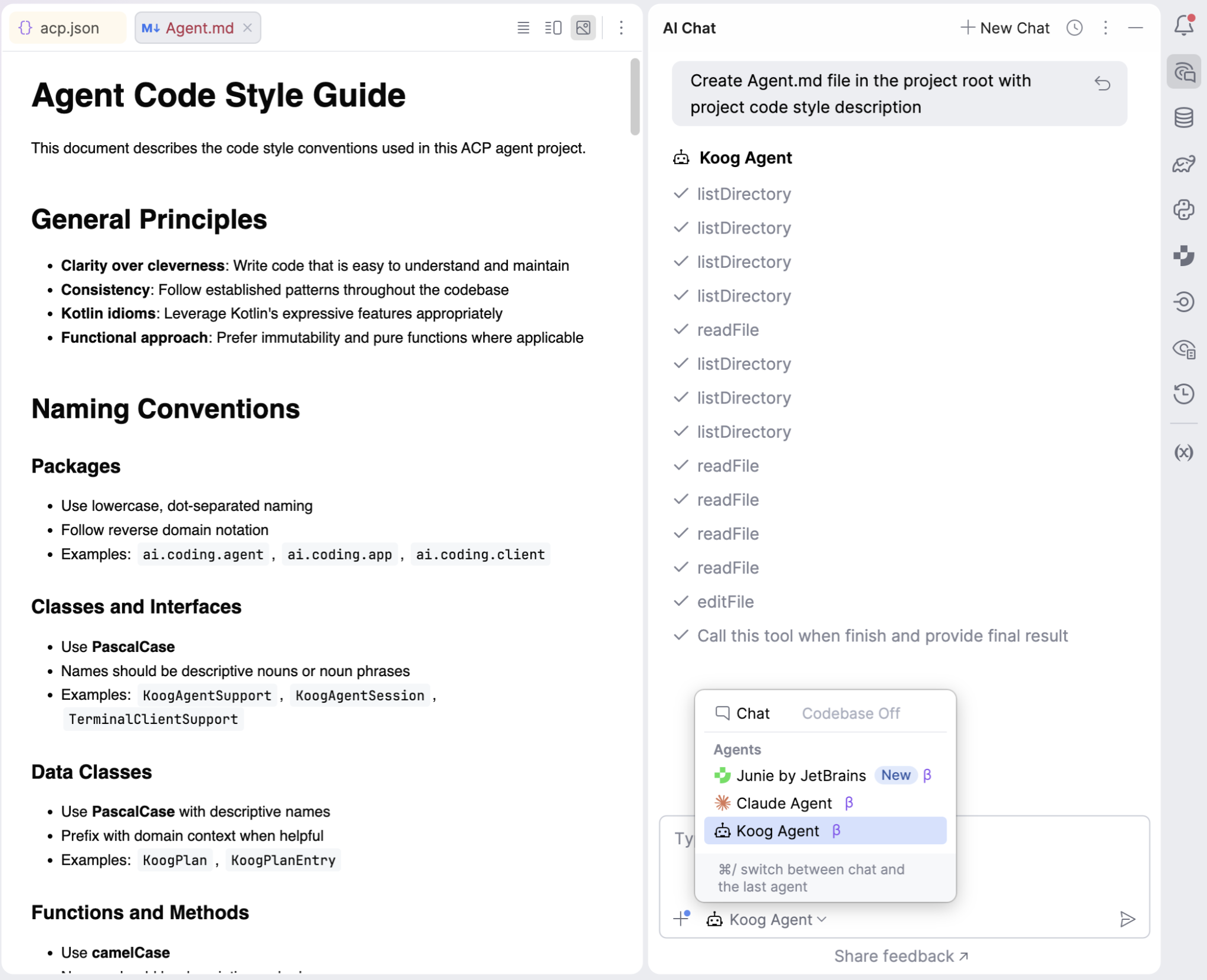
All IntelliJ-based IDEs support the ACP. This means you can connect any ACP-compatible agent and use it directly via the AI Chat.

When a new AI Assistant chat is opened, the IDE instantiates the configured ACP agent and connects to it via the built-in ACP client using standard I/O transport. The client processes all notifications and requests emitted by the running agent, displaying them in the chat and reflecting permission requests directly in the IDE UI.

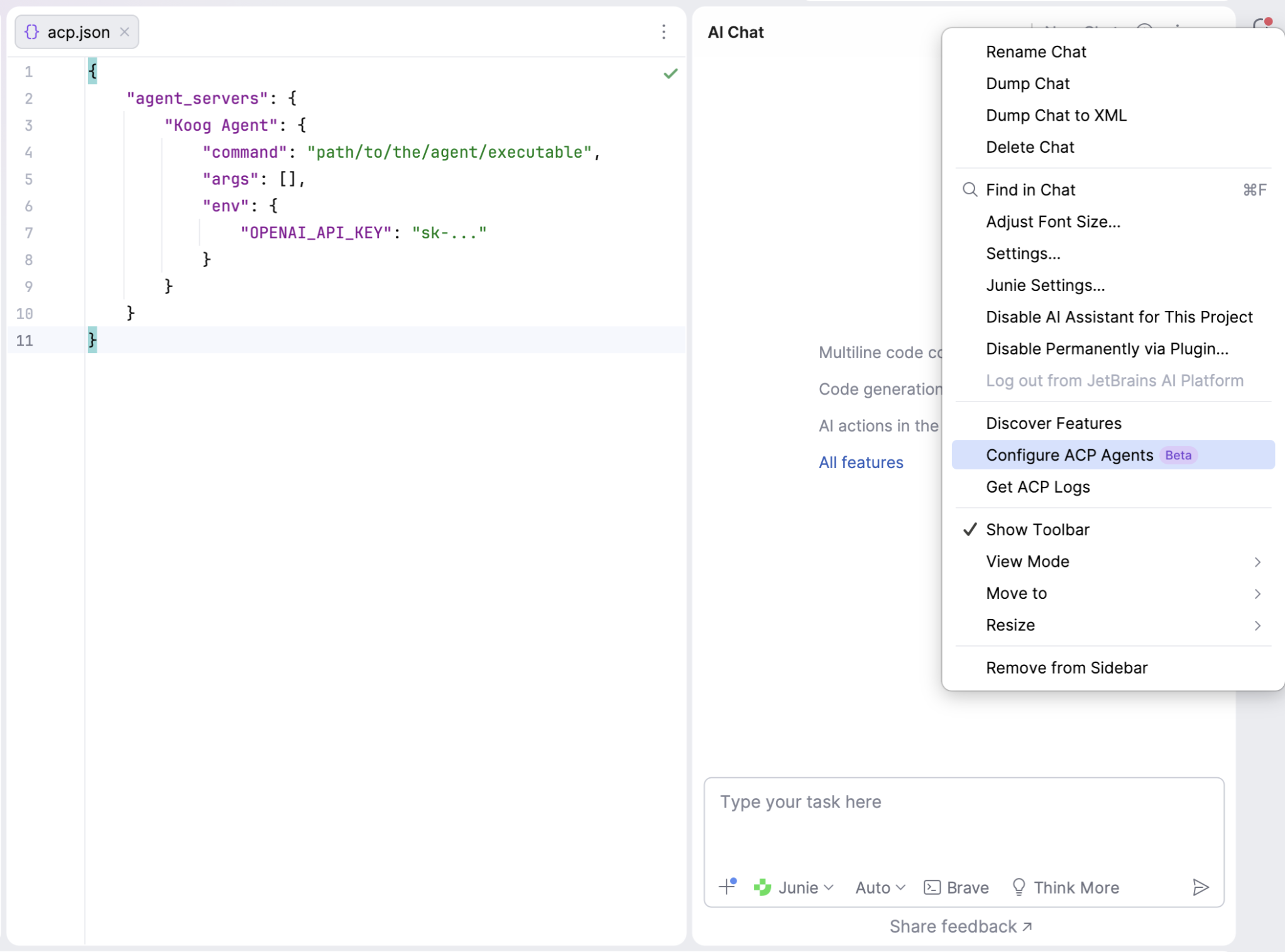
An ACP agent can be connected to the EAP version of IntelliJ-based IDEs via the ~/.jetbrains/acp.json config file, where the agent run command, arguments, and environment variables should be defined in JSON format:

The easiest way to create an agent executable is to package it as an application. To do this, we place the agent entry point in a separate AcpAgentKt file, where STDIO transport is initialized. This transport captures the process’s standard input and output streams and launches the agent connected to the transport, using the previously defined KoogAgentSupport.

suspend fun main() = coroutineScope {
    val token = System.getenv("OPENAI_API_KEY") ?: error("OPENAI_API_KEY env variable is not set")

    val agentTransport = StdioTransport(
        this, Dispatchers.IO,
        input = BufferedInputStream(System.`in`).asSource().buffered(),
        output = BufferedOutputStream(System.out).asSink().buffered(),
        name = "koog-agent"
    )

    val promptExecutor = simpleOpenAIExecutor(token)

    try {
        val agentJob = launch {
            val agentProtocol = Protocol(this, agentTransport)

            Agent(
                agentProtocol,
                KoogAgentSupport(
                    protocol = agentProtocol,
                    promptExecutor = promptExecutor,
                    clock = Clock.System,
                )
            )

            agentProtocol.start()
        }
        agentJob.join()

    } finally {
        agentTransport.close()
        promptExecutor.close()
    }
}

Using Gradle, configure the application entry point, then run the installDist task to generate the executable distribution in projectRoot/build/install/coding-agent/bin/coding-agent.

application {
    mainClass = "ai.coding.agent.AcpAgentKt"
}

Provide this path in the IDE ACP configuration JSON – and voilà! You can now connect your Koog agent to the AI chat and send prompts directly from the UI…and let the agent code for you!

Looking ahead

You can find a complete example of the ACP × Koog coding agent here and use it as a template for building your own in-IDE and external assistants. You can implement an agent for any existing ACP-compatible client or build your own client using the ACP SDKs.

With the ACP, Koog, and just a few lines of code, you can connect your agent to your web page or desktop application, receive notifications about the agent lifecycle, and surface them directly in the UI. Keep experimenting!

Hashtag Jakarta EE #318

Hashtag Jakarta EE #318

Welcome to issue number three hundred and eighteen of Hashtag Jakarta EE!

As I write this, I am in Brussels for FOSDEM’26. Stay tuned for an update from this conference in a separate post shortly. Fun fact is that I am sitting in exactly the same place in the lobby of the same hotel I stayed at for FOSDEM’19 writing this post as I did for Hashtag Jakarta EE #5. I think that it was in that moment that I realised that this would be a weekly blog series.

After FOSDEM, I am headed directly to Stockholm for Jfokus 2026. Whenever I am at Jfokus, I am hosting the Jfokus 2026 Morning Run, and this year is no exception. There is no need to sign up for it. Just show up outside the venue at 7:15 on Wednesday morning.

From the discussions in the Jakarta EE Platform call the last couple of weeks, it looks like we won’t see a release of Jakarta EE 12 on this side of summer (on the Northern Hemisphere at least). The reason is that since Jakarta EE 11 was delayed by a year, most of the vendors are currently working on their implementations. Which does not leave much resources to work on the Jakarta EE 12 specifications. At the same time, we want to play catch-up with the original plan and direction directive from the Steering Committee of the Jakarta EE Working Group to release a major release of Jakarta EE 12 about six to nine months after an LTS release of Java. So a compromise will be to release Jakarta EE 12 by the end of the 2026. The deliberations are still going on, so stay tuned on more updates.

The registration for Open Community Experience 2026 has opened. I will be presenting The Past, Present, and Future of Enterprise Java at the main stage there.

Ivar Grimstad


[D]0S – High-Fidelity Engineering: Next.js 16 + Gemini 3 + Vibe Coding with Antigravity

This is a submission for the New Year, New You Portfolio Challenge Presented by Google AI

About Me

I am David Menor. My development philosophy in 2026 is clear: the barrier between idea and execution has vanished. I am not just a developer; I am a systems orchestrator.

My portfolio is a high-fidelity data terminal that lives at the intersection of premium design and quantum AI engineering. I wanted to create an immersive experience that feels like operating a high-security mainframe, where every interaction breathes speed and precision.

Portfolio

How I Built It: The Vibe Coding Revolution

This project wasn’t “programmed” in the traditional sense; it was created through pure Vibe Coding with Google Antigravity. My process involved describing complex flows, system aesthetics, and data architectures, letting Antigravity handle the heavy lifting of implementation while I refined the vision.

Tech Stack

  • Engine: Next.js 16.1.6 (App Router) + React 19. The absolute state of the art in web performance.
  • AI Intelligence: Gemini 3 Flash acts as the site’s neural core, processing my career path and responding to visitors with deep technical context.
  • “Secure-Obsidian” Aesthetic: A visual system built on Tailwind CSS v4 and Framer Motion 12, designed to last and scale.
  • Deployment: Dockerized and launched on Google Cloud Run in minutes, leveraging native auto-scaling.

Google AI Integration: My Multi-Agent Pair Programmer

Antigravity wasn’t just another tool; it was my engineering partner every step of the way:

  1. Iteration at the Speed of Thought: I was able to jump from a design concept (like the “Sticky Stack” effect for projects) to a functional implementation in seconds. Antigravity understands the technical “vibe” I’m after — clean lines, mono fonts, tactile transitions — and translates it into production-ready code.
  2. Agentic Multitasking: While I was defining internationalization messages (next-intl), Antigravity ensured that the Google Cloud Run deployment was flawless, handling ports, containers, and environment variables without me having to touch a terminal.
  3. Aesthetic Refinement: From generating a minimalist favicon that respects the site’s identity to fine-tuning entrance animations, the AI acted as a technical art director.

What I’m Most Proud Of

I am incredibly proud of building a complex system that feels cohesive. These aren’t isolated sections; it’s a personal “Core OS”.

Achieving a Next.js 16 architecture that feels this lightweight, having Gemini AI respond with such a defined personality, and making the Cloud Run deployment transparent — all orchestrated from Antigravity — is the real testament to what being a Senior Engineer means in 2026.

Built at the speed of light. Stay Bold.

[AutoBe] achieved 100% compilation success of backend generation with “qwen3-next-80b-a3b”

[AutoBE] achieved 100% compilation success of backend generation with "qwen3-next-80b-a3b-instruct"
byu/jhnam88 inLocalLLaMA

This is an article copied from Reddit Local LLaMa channel’s article of 4 months ago written. A new shocking article may come soon.

AutoBE is an open-source project that serves as an agent capable of automatically generating backend applications through conversations with AI chatbots.

AutoBE aims to generate 100% functional backend applications, and we recently achieved 100% compilation success for backend applications even with local AI models like qwen3-next-80b-a3b (also mini models of GPTs). This represents a significant improvement over our previous attempts with qwen3-next-80b-a3b, where most projects failed to build due to compilation errors, even though we managed to generate backend applications.

  • Dark background screenshots: After AutoBE improvements
    • 100% compilation success doesn’t necessarily mean 100% runtime success
    • Shopping Mall failed due to excessive input token size
  • Light background screenshots: Before AutoBE improvements
    • Many failures occurred with gpt-4.1-mini and qwen3-next-80b-a3b
Project qwen3-next-80b-a3b-instruct openai/gpt-4.1-mini openai/gpt-4.1
To Do List Qwen3 To Do GPT 4.1-mini To Do GPT 4.1 To Do
Reddit Community Qwen3 Reddit GPT 4.1-mini Reddit GPT 4.1 Reddit
Economic Discussion Qwen3 BBS GPT 4.1-mini BBS GPT 4.1 BBS
E-Commerce Qwen3 Shopping GPT 4.1-mini Shopping GPT 4.1 Shopping

Of course, achieving 100% compilation success for backend applications generated by AutoBE does not mean that these applications are 100% safe or will run without any problems at runtime.

AutoBE-generated backend applications still don’t pass 100% of their own test programs. Sometimes AutoBE writes incorrect SQL queries, and occasionally it misinterprets complex business logic and implements something entirely different.

  • Current test function pass rate is approximately 80%
  • We expect to achieve 100% runtime success rate by the end of this year

Through this month-long experimentation and optimization with local LLMs like qwen3-next-80b-a3b, I’ve been amazed by their remarkable function calling performance and rapid development pace.

The core principle of AutoBE is not to have AI write programming code as text for backend application generation. Instead, we developed our own AutoBE-specific compiler and have AI construct its AST (Abstract Syntax Tree) structure through function calling. The AST inevitably takes on a highly complex form with countless types intertwined in unions and tree structures.

When I experimented with local LLMs earlier this year, not a single model could handle AutoBE’s AST structure. Even Qwen’s previous model, qwen3-235b-a22b, couldn’t pass through it such perfectly. The AST structures of AutoBE’s specialized compilers, such as AutoBeDatabase, AutoBeOpenApi, and AutoBeTest, acted as gatekeepers, preventing us from integrating local LLMs with AutoBE. But in just a few months, newly released local LLMs suddenly succeeded in generating these structures, completely changing the landscape.

// Example of AutoBE's AST structure
export namespace AutoBeOpenApi {
  export type IJsonSchema = 
    | IJsonSchema.IConstant
    | IJsonSchema.IBoolean
    | IJsonSchema.IInteger
    | IJsonSchema.INumber
    | IJsonSchema.IString
    | IJsonSchema.IArray
    | IJsonSchema.IObject
    | IJsonSchema.IReference
    | IJsonSchema.IOneOf
    | IJsonSchema.INull;
}
export namespace AutoBeTest {
  export type IExpression =
    | IBooleanLiteral
    | INumericLiteral
    | IStringLiteral
    | IArrayLiteralExpression
    | IObjectLiteralExpression
    | INullLiteral
    | IUndefinedKeyword
    | IIdentifier
    | IPropertyAccessExpression
    | IElementAccessExpression
    | ITypeOfExpression
    | IPrefixUnaryExpression
    | IPostfixUnaryExpression
    | IBinaryExpression
    | IArrowFunction
    | ICallExpression
    | INewExpression
    | IArrayFilterExpression
    | IArrayForEachExpression
    | IArrayMapExpression
    | IArrayRepeatExpression
    | IPickRandom
    | ISampleRandom
    | IBooleanRandom
    | IIntegerRandom
    | INumberRandom
    | IStringRandom
    | IPatternRandom
    | IFormatRandom
    | IKeywordRandom
    | IEqualPredicate
    | INotEqualPredicate
    | IConditionalPredicate
    | IErrorPredicate;
}

As an open-source developer, I send infinite praise and respect to those creating these open-source AI models. Our AutoBE team is a small project with 2 developers, and our capabilities and recognition are incomparably lower than those of LLM developers. Nevertheless, we want to contribute to the advancement of local LLMs and grow together.

To this end, we plan to develop benchmarks targeting each compiler component of AutoBE, conduct in-depth analysis of local LLMs’ function calling capabilities for complex types, and publish the results periodically. We aim to release our first benchmark in about two months, covering most commercial and open-source AI models available.

We appreciate your interest and support, and will come back with the new benchmark.

Link

  • Homepage: https://autobe.dev
  • Github: https://github.com/wrtnlabs/autobe