Building a Dating App with No Backend: How I used Rust, Tauri 2.0, and P2P Mesh Networking to Fight the Loneliness Pandemic

The Problem: The “Skinner Box” of Modern Dating

Traditional dating apps have a fundamental conflict of interest: if you find a partner, they lose a customer. Their algorithms are designed to keep you swiping, not to help you meet. Plus, your most intimate preferences and behavioral patterns are stored in a centralized database, ripe for data mining.

I decided to build Aura: a dating app that is a privacy-first utility, not a business.

The Architecture: Local-First and Serverless

Aura has no central server. No “matchmaking” algorithm running in the cloud. No user database.

Here’s how it works:

  1. Encrypted Local Storage: Everything—your swiping history, chats, and profile—lives in an encrypted SQLCipher database on your device, managed by a native Rust backend.
  2. P2P Discovery: Instead of a cloud API, Aura uses libp2p to scan for nearby “Resonances.” Devices act as nodes in a gossip mesh, propagating encrypted discovery packets.
  3. Store-Carry-Forward: The network is “living.” Your phone “carries” encrypted profiles through physical movement, gossiping them to other peers as you move through different areas.

The Tech Stack: Why I switched to Tauri 2.0 + Rust

I recently migrated Aura from React Native to Tauri 2.0. This was a game-changer:

  • Rust for the Heavy Lifting: P2P networking, encrypted storage, and a local preference optimizer (a tiny ML model that learns your interests and optimizes suggestions) are all in Rust. It’s fast, memory-safe, and handles background tasks beautifully.
  • Vite + React for the UI: I can build a premium, high-performance UI with standard web tech, leveraging glassmorphism and modern animations without a heavy framework overhead.
  • Atomic IPC: Tauri’s bridge allows the frontend to talk to the secure Rust core with minimal latency.

Solving Trust: The Relational Reputation Mesh

One of the biggest challenges in a serverless app is safety. How do you trust someone without a central moderator?

Aura uses a Decentralized Reputation Mesh. Your “Aura Score” isn’t a global number; it’s a Relational Valence. Your score is calculated locally on your device based on specific gossip you’ve received. We even implemented Asymmetric Time Decay: negative signals decay 4x faster than positive ones to allow for “redemption arcs” while rewarding long-term positive behavior.

What’s Next?

Aura is fully open-source (AGPL v3). I’ve just finished the F-Droid metadata recipe and am validating the build simulation to get it published.

I’m looking for contributors! If you’re into P2P protocols, local-first architectures, or just want to build tech that actually helps people connect in the real world, check out the repo:

👉 https://github.com/bensiv/aura

What do you think about the future of local-first social apps? Let’s discuss in the comments!

API Versioning: Current Approaches and Choices in the Ecosystem

The moment you launch an API, one of the biggest nightmares associated with it is versioning decisions. Especially when you consider that this API will be used by different clients or is expected to have a long lifespan, things become even more complex. Looking back at the trouble I got myself into by underestimating this topic in the past, my pragmatic approach today is rooted in those painful experiences.

API versioning is one of the key ways an application can evolve over time while ensuring that existing clients are not disrupted. In a production ERP system I worked on, the painful lesson of 20 different operator screens suddenly throwing errors due to a minor change in a JSON field name taught me how critical this issue is. In this post, I will discuss API versioning approaches, the experiences I’ve gained in my projects, and the trade-offs these choices bring.

Why is API Versioning Necessary? My First Wrong Choices

When developing an API, everything initially goes through a single version, and it’s easy. However, over time, business requirements change, new features are added, and old features are updated or removed. These changes directly affect the applications consuming the API (mobile apps, web frontends, other services) and are called breaking changes. A breaking change causes an application using the API to stop working without code modifications.

In my early projects, I overlooked this. While developing the backend for a financial calculator side project, I didn’t implement versioning with the thought, “I’m the only one using it, so it’s not necessary.” A few months later, while adding a new feature, I had to change the data format my existing mobile app received from the backend. The result: I had to deploy both the backend and the mobile app simultaneously and wait for users to update their applications. This was unacceptable for a system with zero downtime expectations.

⚠️ Proven by Experience: Versioning is Essential

Versioning is critical not only when your API is exposed externally but also in internal inter-service communication. If one service uses another service’s API, a breaking change can cause the other service to break, leading to hours of downtime in the production environment.

These early mistakes taught me that versioning is not just a “technical detail” but also a matter of product strategy and operational flexibility. It is essential to define a versioning strategy from the outset to extend the life of your API and avoid inconveniencing your clients. Otherwise, we face a significant regression risk with every change.

Main API Versioning Approaches: Pros and Cons

There are three main approaches at the core of API versioning: URL Path, Query Parameter, and Header (Content Negotiation). Each has its own advantages and disadvantages, and choosing the right one depends on the project’s needs. I’ve also experienced different approaches in various projects and seen when each works and when it causes headaches.

Approach Pros Cons When I Preferred It
URL Path – Simple, understandable, discoverable – Can lead to URL bloat – Public APIs, simple projects (my own side projects)
Query Parameter – Keeps URLs relatively clean – Open to misuse, low discoverability – Rarely, usually as a “fallback”
Header (Custom) – Keeps URLs cleanest – Low discoverability, requires client support – Internal APIs, places with strict control (ERP)
Header (Accept) – Compliant with HTTP, Content Negotiation – Client implementation more complex – When different output formats are required

As a general rule, for external and public APIs, I’ve usually preferred the URL Path method because its simplicity and understandability provide the least friction for external developers. For internal APIs, I can opt for Header-based approaches that are more flexible and keep URLs clean.

URL Path Versioning: Direct and Understandable

URL Path versioning is perhaps the most common and understandable method. You include the API’s version number directly in the URL path, for example, /v1/users or /api/v2/products. This method can be easily tested even in a browser, and its documentation is straightforward.

When developing a production ERP system, I used this method for a few integration APIs exposed externally. Our clients could clearly see which version they were calling from the URL. However, when I kept two different versions live simultaneously, I started seeing if version == "v1" blocks in the backend code, which was not a pleasant situation in terms of code quality. We can make this situation a bit more manageable with a reverse proxy like Nginx.

# Nginx config example
server {
    listen 80;
    server_name api.example.com;

    location ~ ^/(v1|v2)/ {
        # Routing for v1 or v2 paths
        proxy_pass http://backend_api_cluster/$request_uri;
        proxy_set_header Host $host;
        proxy_set_header X-Real-IP $remote_addr;
    }

    location /v1/ {
        # Specific backend or logic for v1
        proxy_pass http://v1_backend_cluster;
        proxy_set_header Host $host;
    }

    location /v2/ {
        # Specific backend or logic for v2
        proxy_pass http://v2_backend_cluster;
        proxy_set_header Host $host;
    }
}

In the Nginx example above, you can route different versions to different backends. This gives me the flexibility to deploy different versions independently and allows me to develop new versions independently while supporting older versions. However, this approach leads to longer URLs and the need to define a new path for each new version. It’s inevitable that URLs will “bloat” as they go from v3, v4, and so on.

Header and Content Negotiation Versioning: More Flexible Methods

Header-based versioning specifies the API version via HTTP Request Headers. This keeps URLs clean and ensures that the API’s base resource URI does not change. For example, we can use a custom header like X-API-Version: 2.

Versioning using Content Negotiation is a more standard HTTP approach. By using the Accept header, the client indicates that it is requesting a specific media type or API version. For instance, with a value like Accept: application/vnd.myapi.v2+json, the client is saying “I want the 2nd version of myapi in JSON format.” I used this approach in a client project where the same endpoint needed to work with different data models.

# FastAPI example: Versioning with Accept header
from fastapi import FastAPI, Request, HTTPException
from fastapi.responses import JSONResponse

app = FastAPI()

@app.get("/items")
async def get_items(request: Request):
    accept_header = request.headers.get("Accept")

    if "application/vnd.myapi.v1+json" in accept_header:
        # Return data according to v1 model
        return JSONResponse({"version": "v1", "data": [{"id": 1, "name": "Item A"}]})
    elif "application/vnd.myapi.v2+json" in accept_header:
        # Return data according to v2 model (e.g., with an additional field)
        return JSONResponse({"version": "v2", "data": [{"uuid": "abc", "item_name": "Item A", "price": 100}]})
    else:
        raise HTTPException(status_code=406, detail="Unsupported Accept header")

This approach has been useful, especially in internal service-to-service communication or with tightly controlled clients like mobile applications. When developers correctly set the Accept header, it was clear which version of the API they were using. However, it is less discoverable than URL Path; for someone using the API for the first time, setting the header correctly requires reading a bit more documentation. Also, some client libraries or tools may not automatically support such custom headers or Content Negotiation, which means additional development costs.

My Versioning Strategy Choices in Projects

The choice of API versioning strategy varies depending on the nature of the project and its target audience. In my experience, there is no “single right way”; there are always trade-offs. The decisions I’ve made in my own side projects or in internal platforms of banks I’ve consulted for differ from those made in a production ERP system where I gained experience.

For example, for the public API of my financial calculator side project, I preferred URL Path versioning. The reason was simple: to enable external developers to use and integrate with the API easily. A simple URL like /v1/calculate speeds up the onboarding process, compared to a complex header structure. Currently, I maintain both v1 and v2 versions live and ensure that older clients using v1 continue to work without issues. However, this comes with the burden of maintaining the code for both versions in the backend.

On the other hand, for services I developed for a bank’s internal platform, I versioned the APIs via the Accept header. On this platform, since the clients were typically enterprise applications, developers had a higher ability to manage HTTP headers correctly. Additionally, keeping the URLs clean provided a more organized view for the bank’s security and audit teams. In this choice, the idea that “keeping URLs clean and unchanging simplifies firewall rules and monitoring configurations” was influential. Especially when a service has more than 20 APIs, going with /v1/users, /v2/users, /v3/users can be a more elegant solution than Accept: application/vnd.bank.users.v3+json.

ℹ️ Which Method When?

When making a choice, consider your target audience and the lifespan of your API. Simplicity (URL Path) for public APIs and flexibility (Header) for closed systems or custom integrations generally yield better results. Remember, the ultimate goal of API versioning is to be able to evolve your API without breaking your clients.

In these choices, I always asked myself, “How much flexibility will I need in the future?” and “What will be the operational cost of this approach?” Sometimes I accepted technical debt for the sake of simplicity, and sometimes I opted for a slightly more complex start for long-term sustainability. The important thing is to be aware of these trade-offs and make informed decisions.

Zero Downtime and Deprecation Management During Version Transitions

One of the most challenging parts of API versioning is ensuring a smooth transition from older versions to newer ones. When working with the goal of “zero downtime,” both old and new versions need to be live simultaneously for a period. This is usually managed through a process called “graceful deprecation.”

During the transition from v1 API to v2 in an ERP system for a manufacturing firm, I observed that the old operator screens continued to use v1, while the newly developed mobile applications started using v2. To manage this transition process, we set a deprecation period of approximately 6 months. During this period, by monitoring calls to the v1 API, we identified which clients were still using the old version. I notified clients by adding a warning header (X-API-Deprecated: true; Deprecation-Date: 2026-12-31) to the v1 endpoints.

HTTP/1.1 200 OK
Content-Type: application/json
X-API-Deprecated: true; Deprecation-Date: 2026-12-31
Link: <https://api.example.com/v2/docs>; rel="sunset"; type="text/html"

{
  "message": "This API version (v1) will be deprecated on December 31, 2026. Please migrate to v2."
  // ... v1 response data
}

This type of deprecation notice gives client-side developers sufficient time and helps them plan the transition. Seeing the number of requests to v1 endpoints decrease over the deprecation period was a key metric indicating that we could safely shut down v1. If I hadn’t done this monitoring, I might have shut down v1 and put a customer still using it in a difficult situation. I previously wrote about [related: observability strategies], and this is part of that.

I haven’t shied away from making mistakes either. Once, while performing final checks before shutting down v1, I decided to shut it down within an hour with the thought, “no one is using it anyway.” However, a reporting tool that was overlooked was still using v1, and that tool’s reports suddenly started coming back “empty.” This taught me the lesson: “Never assume, always look at the data.” In such situations, having rollback mechanisms ready is a lifesaver. My [related: post on CI/CD reliability] also touches upon these topics.

Development and Operational Cost of API Versioning

API versioning brings significant development and operational costs with it. Defining a strategy without considering these costs can lead to major problems down the line. In my experience, these costs are generally categorized under three main headings: documentation, testing, and deployment.

Documentation: Each new API version requires an updated or new set of documentation. While tools like Swagger/OpenAPI simplify this process, maintaining separate documentation for two or more active versions requires continuous effort. Especially in cases where a field in v1 changes or is removed in v2, clear and up-to-date documentation is vital to avoid confusing client developers. I know I spend a few hours a week keeping the API documentation for my side project up to date.

Testing: Each new version means expanding the existing test suite. The tests you wrote for v1 may not be valid for v2, or you may need to add new scenarios specific to v2. In an ERP project, we updated our CI/CD pipeline to test v1 and v2 APIs simultaneously. This increased test time by 30%, but it was necessary to catch regressions. I especially had to write separate integration tests for each version in automated tests.

# Example CI/CD test step (pseudo-code)
# Similar steps can be used in Gitlab CI/CD or Github Actions

test_api_versions:
  stage: test
  script:
    - echo "Running tests for API v1"
    - docker-compose -f docker-compose.v1.yml up -d
    - pytest tests/v1/
    - docker-compose -f docker-compose.v1.yml down

    - echo "Running tests for API v2"
    - docker-compose -f docker-compose.v2.yml up -d
    - pytest tests/v2/
    - docker-compose -f docker-compose.v2.yml down

Deployment and Operations: Keeping multiple API versions live complicates deployment strategies. Having different versions in different codebases (e.g., separate Git branches) or containing conditional logic within the same codebase increases the maintenance burden. In a client project, I ran two different API versions in separate Docker containers and routed traffic using Nginx. This meant allocating separate resources (CPU, RAM) for each version, which increased operational costs. I previously shared my experiences with [related: Nginx reverse proxy configurations].

To reduce these costs, it’s important to avoid unnecessary versioning and include non-breaking changes (e.g., adding a new field) in the current version. Furthermore, setting long deprecation periods encourages clients to migrate to newer versions, helping to reduce the maintenance burden of older versions.

Conclusion: Versioning is a Strategy, Not a Feature

API versioning is more of a product and operational strategy than a technical feature. One of the most important lessons I’ve learned in my 20 years of field experience is not to postpone this topic by saying “we’ll handle it later.” Before launching an API, having a clear versioning strategy and ensuring your team is in agreement on it will prevent many future headaches.

The right versioning approach varies depending on the nature of your project, your target audience, and your operational capacity. The simplicity of URL Path, the flexibility of Header-based versioning, or the rare use cases of Query Parameter… I’ve experienced them all and seen that each has its own pros and cons. The important thing is to be aware of these trade-offs and make an informed decision.

Remember, as your API evolves, your clients will also have to evolve. Versioning is one of the most powerful tools we have to make this transition as smooth and transparent as possible. My clear position is: Start early, monitor, communicate, and never assume.

Why Your $200 AI Workflow Actually Costs $20k in DevOps 😭

I’ve been spending a lot of time lately looking at different AI automation setups. Mostly, I’ve just been trying to figure out where the actual leverage is for smaller engineering and ops teams.

What I keep finding? A lot of what we’re calling “AI workflows” are really just traditional, deterministic scripts with a chatbot tacked onto the front.

And for the ones that actually do rely on LLMs for core logic? They end up being surprisingly expensive to run in production. But rarely for the reasons people expect.

📌 The Reality Check

  • The token bill is a rounding error: You aren’t going broke on OpenAI API calls. You are bleeding cash on the developer time required to figure out why those calls randomly failed over the weekend.

  • Traditional software fails loudly; AI rots silently: An API endpoint changes, and your old code throws a clean 500 Internal Server Error. An AI agent hits an undocumented data format change and confidently writes garbage data into your CRM.

  • Self-hosting is an infrastructure trade-off: Moving to open-source tools like n8n looks cheap on paper right up until you’re debugging Redis queue bottlenecks at 2 AM.

  • Human-in-the-loop often turns into a rubber stamp: When people get alert fatigue from reviewing non-deterministic outputs, they stop auditing and start blindly clicking “approve.”

💸 Why API Token Costs Aren’t the Main Problem

People get really hung up on API token pricing. You see deep comparison guides tracking input/output costs down to the sixth decimal place. And to be fair, inference is remarkably cheap.

But the token bill is almost never what kills a project’s budget.

Just last month, I was working on an automation designed to handle a shared group financial settlement process. The goal was simple: use an LLM to parse detailed bank statement records and automatically reconcile incoming payments and subsidies into a clean tracking sheet for a 10-person group.

The API calls to run the extraction cost pennies. The real cost was the entire weekend spent debugging.

The model kept hallucinating calculated amounts whenever two distinct line items shared an identical transaction date. I ended up spending a massive amount of engineering hours writing fallback scripts, custom schema validators, and data sanitization layers just to handle exceptions for a system that supposedly cost $0.15 to run.

I also realized during all this that I was spending more time trying to fix the prompt than the original manual process would have taken in the first place, which was a slightly depressing moment. Half the time, the workflow technically worked. I just stopped trusting it enough to leave it unattended.

📉 Automation Entropy: How AI Systems Drift Over Time

When you test an AI pipeline in a closed environment, it feels like magic. But production environments are fundamentally unsympathetic to probabilistic software.

Traditional software infrastructure is rigid, which makes it stable. You write a Python script that pulls a specific JSON key from a third-party API. It runs cleanly until the third party deprecates the endpoint. When it breaks, it throws a loud exception.

AI systems are vulnerable to a much subtler decay: Automation Entropy. The models change. The data changes. Eventually the workflow starts drifting. If you look closely at how AI agents vs traditional automation interact, you’ll see a massive divergence in long-term reliability.

A few months ago, I was helping a 6-member team build out a specialized chatbot designed to estimate groundwater variations by reading through highly unstructured geological reports. In the dev sandbox, our vector retrieval setup was crushing every test query.

Then we pushed it live and left it unattended over a weekend.

An upstream source changed its document formatting slightly, and our pipeline experienced a sudden timeout loop that nobody had properly caught in the error-handling config. The retry queues backed up silently. Because the system aggressively retried failed steps without a hard circuit breaker, it repeatedly hammered the model endpoints. By Monday morning, we didn’t have an elegant groundwater report—we had a backed-up queue, duplicated database writes, and an incredibly messy cleanup job.

At some point, somebody still ends up babysitting the thing. Maybe less than before, sure, but definitely not zero. This is a core part of ai reliability engineering that most teams ignore until their production data gets corrupted.

You can usually tell an AI pipeline is succumbing to operational rot when nobody on the engineering team wants to touch the prompt anymore. The instruction set becomes an accumulation of hyper-specific edge cases like: “Do not format dates as DD/MM if the client is based in North America, unless the text explicitly references European logistics hubs, and make sure to ignore headers that look like…”

We’ve moved past basic text prompt generation at this stage; what you are actually dealing with is what context engineering is and why prompt engineering is no longer enough. Without it, the prompt becomes just as fragile as legacy regex code.

🏗️ Self-Hosting vs. SaaS: The Infrastructure Trapdoor

When the monthly usage bills from managed platforms start scaling up, teams face a choice: stay on a managed platform or spin up an open-source framework.

At first glance, understanding what is n8n and why companies are replacing zapier with open automation looks like an open-and-shut financial win. You replace unpredictable execution tiers with a predictable monthly server invoice.

At first, self-hosting honestly feels great. The dashboard looks clean, everything is fast, and you stop thinking about usage-based pricing for a while. I remember feeling weirdly proud the first time I had n8n running properly on a tiny AWS instance.

Then a few weeks later something broke at 1 AM and suddenly I was reading Redis documentation instead of sleeping.

We’d had a spike in webhook traffic, the node ran out of memory, and because I hadn’t configured a durable queue, we lost a bunch of active state data. You realize pretty quickly that when you self-host, you’re not just saving on software fees. You are essentially volunteering for a DevOps role to patch server vulnerabilities and manage uptime alerts. For some teams, that makes sense. For me, it was exhausting.

The Three Big Choices:

  1. Managed iPaaS (zapier vs make vs n8n): Best for rapid prototyping and isolated tasks. The catch is that per-execution billing scales aggressively, and visual logic becomes unmanageable spaghetti past 20 nodes. Low scalability ceiling.

  2. Self-Hosted Tools: Best for high-volume pipelines managed by technical teams who are willing to run their own infrastructure. If you look at the 8 best ai workflow automation tools in 2026, self-hosting can save money at high scale, but you pay for it in maintenance overhead.

  3. Code-First Frameworks (what is langchain and langgraph): Best for multi-stage reasoning agents and core product features. If you are learning how to build a rag system with pgvector and langchain, code gives you absolute control over state machines and fallback logic.

🛑 Why “Human-in-the-Loop” Often Breaks Down

When a workflow requires high accuracy, the instinctive response is to introduce a human approval stage. The AI handles the messy work and stages the output as a draft. A human operator reads it and clicks “execute.”

In theory, this gives you the efficiency of automation with the safety net of human judgment. In practice, it frequently creates Alert Fatigue.

The pattern loops like this: High Output Volume leads to Repetitive Safe Approvals, which causes Attention Drops, resulting in the Blind Approval of Garbage.

By week three of operating the pipeline, operators are no longer reading the text critically. They are simply click-approving hundreds of staged payloads a day to clear their queue. The human presence stops being an active safety filter and becomes a passive rubber stamp. You haven’t bought meaningful leverage; you’ve just assigned an employee a massive, daily proofreading chore. If you look at how companies try to solve this when figuring out how to build an ai agent for your business, managing human override fatigue is always the hardest piece of user experience to design.

💻 Stop Making Everything an Agent

The industry currently has an obsession with making everything agentic.

If the logic of your business process can be mapped out using clear, conditional rules (if X data is present, route to Y database), you should not be using an AI agent. Deterministic code is infinitely scalable, lightning fast, and entirely predictable. Look for real automations that save time using simple scripts before forcing an LLM to guess the next step.

Save agentic frameworks for highly unstructured problems—like interpreting natural human sentiment or normalizing chaotic, multi-source text summaries. If you’re building out production ai systems, it’s worth reading up on what is mcp model context protocol ai agents to see how models should clean up their tool interactions instead of relying on open-ended logic loops.

🛠️ The Real Engineering

AI automations simply do not behave like standard software licenses. They behave far more like human operational hires. They are flexible, capable of handling incredible complexity, and occasionally brilliant—but they require ongoing management, structural constraints, and deliberate oversight to keep them from wandering off course.

The API call is always the cheapest part of your architecture. Managing the unpredictability that surrounds it is where the real engineering begins.

Backtesting an ICT strategy at 184 speed: timezone-cache + bisect lookup

I have been running an ICT-based reversal strategy live on US500 for a few months. The strategy itself is fine, but the bottleneck was nowhere near the strategy logic. It was in the backtest harness. A 30-day single-instrument simulation took 27 minutes when I wrote the first version. Iterating on parameters was painful, exploring alternative setups was effectively impossible.

After two evenings of profiling and one targeted change, the same 30-day backtest now runs in 8.9 seconds. That is a 184× speedup, and the change was almost embarrassingly small.

This is the story of what was slow, why it was slow, and the cache-plus-bisect pattern that fixed it. If you write your own backtesting code in Python, you are very probably leaving a similar speedup on the table.

The setup

The strategy is a Smart Money Reversal style entry with LRB (liquidity-run break) re-entries. The harness is a fairly standard event-driven loop. For each minute bar in the historical data, we evaluate signal conditions, manage open positions, check pyramid re-entries, and update P&L. The data is roughly 7000 minute bars per US500 trading day, multiplied across 30 days gives around 210k bars per simulation.

210k bars in 27 minutes is 130 bars per second, which is laughable for what is essentially a tight numeric loop in Python. Even with pandas overhead I expected 10× better. Time to profile.

The profiler told a clear story

I dropped cProfile in front of the harness and got the breakdown. The top function by cumulative time was not the strategy evaluator or the order manager. It was pandas.tslib.tz_convert, called from inside the bar iterator. Specifically:

for ts, bar in bars.iterrows():
    local_ts = ts.tz_convert('America/New_York')
    if is_in_session(local_ts):
        ...

The naive code converts the bar timestamp to NY time on every single iteration. pandas timestamp conversion is not free. It runs through tzdata lookup, calculates DST offsets, allocates new Timestamp objects. On a single conversion call that is microseconds, no problem. Called 210k times per backtest, suddenly you are spending eight or nine minutes inside pandas internal C extension before even hitting your own code.

The second-slowest function was a bisect_left on a sorted list of session boundaries that I had written naively as a linear scan. That was eating another four minutes per simulation. The third was unnecessary DataFrame slicing to find the previous N bars, which I had also written as df.loc[prev_ts:ts] and was doing index lookups linearly.

So three independent issues, all rooted in the same mistake: I was doing in the hot loop what should have been done once at the start.

The fix, part one: timezone cache

Instead of converting every bar timestamp on the fly, I precomputed a single column of NY-local timestamps when loading the historical data, and dropped the conversion entirely from the hot loop.

# Before (per-iteration conversion, killing perf)
for ts, bar in bars.iterrows():
    local_ts = ts.tz_convert('America/New_York')
    minute = local_ts.hour * 60 + local_ts.minute
    if NY_OPEN <= minute <= NY_CLOSE:
        ...

# After (one-shot conversion at load, then plain int comparison)
bars['ny_minute'] = (
    bars.index
    .tz_convert('America/New_York')
    .map(lambda ts: ts.hour * 60 + ts.minute)
)

NY_MINUTES = bars['ny_minute'].to_numpy()
# In the hot loop:
for i in range(len(bars)):
    if NY_OPEN <= NY_MINUTES[i] <= NY_CLOSE:
        ...

The session-check becomes a single integer comparison against a numpy int. Zero pandas overhead, zero timezone object allocation, zero string lookup. The pre-computation cost is essentially free, it runs once at the start of the simulation in under 200ms for a month of data.

This change alone took the backtest from 27 minutes down to about 4 minutes. A nice 7× speedup, but I was not done.

The fix, part two: bisect over sorted boundaries

The strategy uses session-relative reference points (NY session open, midnight UTC, last hour of trading, etc.). My naive implementation rebuilt these references for every bar by walking back through the data. The right fix is to precompute boundary timestamps as a sorted array and bisect into them.

import bisect

# Precompute once
ny_session_starts = bars[bars['ny_minute'] == NY_OPEN].index.to_list()

# In the hot loop, find the most recent session start
def session_start_for(ts):
    idx = bisect.bisect_right(ny_session_starts, ts) - 1
    return ny_session_starts[idx] if idx >= 0 else None

bisect_right is O(log n) where n is the number of session-starts. For 30 days that is around 22 (US500 trading days). log2(22) is about 4.5 comparisons per lookup. Compare to the original linear walk which averaged 11 comparisons per lookup. The win per call is modest, but the constant factor (bisect is C-level builtin, my original Python loop was interpreter-level) is large.

This brought the backtest down to about 45 seconds. 36× total speedup. Still not done.

The fix, part three: numpy-native bar windows

The strategy needs to evaluate features over rolling windows of recent bars (last 5, last 20, last 60). My original code was doing bars.loc[prev_ts:ts] for each window for each bar, which does an index lookup and returns a DataFrame slice. DataFrame slicing has noticeable per-call overhead in pandas.

The fix was to precompute the entire OHLC data as numpy arrays at load time, and then slice them by integer index in the hot loop:

# Precompute
OPENS = bars['open'].to_numpy()
HIGHS = bars['high'].to_numpy()
LOWS = bars['low'].to_numpy()
CLOSES = bars['close'].to_numpy()

# In the hot loop (i is the current bar index)
last_20_highs = HIGHS[max(0, i-20):i]
last_20_lows = LOWS[max(0, i-20):i]

Numpy slicing is O(1) view creation, no copy. Pandas slicing on a DatetimeIndex with the same intent allocates intermediate objects. The difference for a single call is small. Multiplied by 210k bars across multiple window sizes per bar, the difference is dramatic.

This last fix brought the final number to 8.9 seconds. From 27 minutes start to 8.9 seconds end, the total speedup is 182×, or 184× depending on how you round the original measurement.

What this unlocks

A 184× speedup is not just nice to have. It changes what is possible in strategy research. With a 27-minute baseline, exploring a parameter grid of 20 combinations took 9 hours. You think hard before launching the run, you wait until next morning, you batch experiments carefully. With a 9-second baseline, the same 20-combination grid finishes in 3 minutes. You explore freely, you try ideas that would have been too expensive to test before, you actually see the parameter landscape.

For me, the practical consequence has been a faster cycle on the live strategy that runs at tgsignals.com, the production system I run on US500 NY session. Strategy ideas that would have taken a week of backtest babysitting now take an afternoon. That difference compounds.

The general lesson

The bigger pattern here is that Python performance bottlenecks for backtesting almost always live in the same three places: timezone handling, slow lookups inside hot loops, and pandas slicing where numpy slicing would do. None of these are exotic. Any decent Python developer profiling the code would find them. The reason they survive in real codebases is that the first version of a backtest is written to be correct, not fast, and once it is correct nobody bothers to optimize.

Profile your hot loop. Convert timezones once. Bisect into sorted arrays. Use numpy slicing instead of pandas slicing when you can. None of these are hard, and any one of them might give you the 10× that turns “I will run this overnight” into “I will run it now.”

The 184× I got was the lucky combination of all three landing on the same codebase. Your mileage will vary, but most backtest harnesses I have seen have at least one of these wins waiting to be picked up.

aion-indian-market-calendar: Python market calendar for NSE, BSE, MCX, and is-market-open checks in India.

If you build for Indian markets, market timing should not live as hardcoded if/else logic inside bots, cron jobs, or trading scripts.

aion-indian-market-calendar is a Python package for Indian market holidays, NSE trading calendar checks, BSE trading session checks, MCX evening session handling, and simple is market open today in India validation for developers.

## Install


bash
  pip install aion-indian-market-calendar

  ## Import

  from aion_indian_market_calendar import IndiaMarketCalendar, is_market_open, next_trading_day

  ## What problem this solves

  A lot of trading systems start with a few hardcoded dates and standard market hours.

  That usually breaks for Indian markets because:

  - holidays change year to year
  - NSE, BSE, and MCX do not behave the same way
  - partial sessions matter
  - commodity sessions and evening sessions need separate handling
  - execution systems need a timing layer before they touch broker or order logic

  This package exists to make market session validation a reusable infrastructure layer instead of a fragile script-level shortcut.

  ## What developers get here

  This is not a generic exchange-calendar post.

  This package is specifically useful when you need:

  - NSE holidays in Python
  - BSE trading calendar checks
  - MCX trading hours and evening-session handling
  - Indian stock market calendar logic for bots and schedulers
  - is market open today India checks before execution
  - next trading day lookup for Indian markets

  For developers, the main difference is practical.

  aion-indian-market-calendar gives you a more direct India-focused execution surface:

  - simple is_market_open() helper
  - next_trading_day() helper
  - session-aware get_session() lookups
  - support for Indian market aliases like NFO and FNO
  - support for instrument-style inputs like NIFTY, BANKNIFTY, and SENSEX
  - bundled offline calendar data
  - optional live event refresh for schedule changes and deltas
  - explicit Asia/Kolkata handling for Indian-market workflows

  ## Example

  from aion_indian_market_calendar import is_market_open

  if is_market_open("NSE"):
      print("NSE is open")
  else:
      print("NSE is closed")

  And if you need more than a yes/no answer:

  from datetime import datetime
  from aion_indian_market_calendar import IndiaMarketCalendar

  cal = IndiaMarketCalendar.bundled(2026)
  probe = datetime.fromisoformat("2026-01-27T09:05:00+05:30")

  print(cal.is_market_open(probe, "NSE_EQUITY"))
  print(cal.get_session(probe, "NFO"))

  ## Why I built this

  I kept seeing the same issue in Indian-market tooling:

  developers were forced to mix strategy logic with exchange-timing logic.  Got tired of hardcoding dates based on published calendar by NSE/BSE/MCX.  

  That is a bad boundary.

  Your strategy should decide what to do.
  Your calendar layer should decide whether the market session is actually valid.

  That separation matters even more in algorithmic trading, quantitative finance, execution schedulers, and pre-trade validation systems.

  ## What this is not

  This package is not:

  - a broker API
  - an order-routing tool
  - a data feed
  - a strategy engine
  - a compliance substitute for exchange circulars

  It is a focused India financial market calendar layer for developers.

  ## Download

  - PyPI: pip install aion-indian-market-calendar
  - Package index: https://pypi.org/project/aion-indian-market-calendar/

  If you build for NSE, BSE, MCX, or India-specific trading infrastructure, this package is meant to remove one boring but expensive class of bugs: running execution logic when the session assumptions are wrong.

like one of the users quoted "This is the kind of infra tooling that quietly saves people from painful production bugs later. Timing logic around Indian markets gets messy fast once you mix NSE, BSE, MCX, holidays, and evening sessions.

Also very true about LLM-generated trading bots defaulting to generic market calendars. AI is great at scaffolding systems, but regional operational details like this are where specialized tooling still matters a lot."

Cheers,
Lokesh (AION ANALYTICS)

Ten Data-Backed Truths Of User Experience ROI

In the high-stakes economy of today, the cost of a friction-heavy interface is no longer just “lost clicks”, but potentially millions in wasted engineering spend and lost business value. As a veteran UX designer who has helped build digital products since the early mobile-first era, I’ve watched business leaders shift from viewing design as a “cosmetic preference” to recognising that user experience is actually the primary engine of business survival.

A UX design role is as much about research and analytics as it is about pixels, and I believe that hard data is the only tool powerful enough to bridge the gap between design and the boardroom. Facts don’t just advocate for the user; they prove that UX is a non-negotiable requirement for a healthy bottom line. Even in the rooms where decisions are made, UX is frequently undervalued as a ‘visual’ role. I’ve learned that the most effective way to dismantle this myth is through data.

The following ten facts represent the current reality of the digital world. These are not just “design tips”; they are the clinical, data-backed pillars for financial growth in a saturated market. Some of these facts are also commonly used by designers as best practices.

For example, I once led a B2C mobile design project, where I was able to strip 1.2 seconds off the mobile load time by reducing and removing some of the visual assets. The result was an immediate 12% lift in completed transactions, proving that in UX, every tenth of a second is a direct lever for revenue.

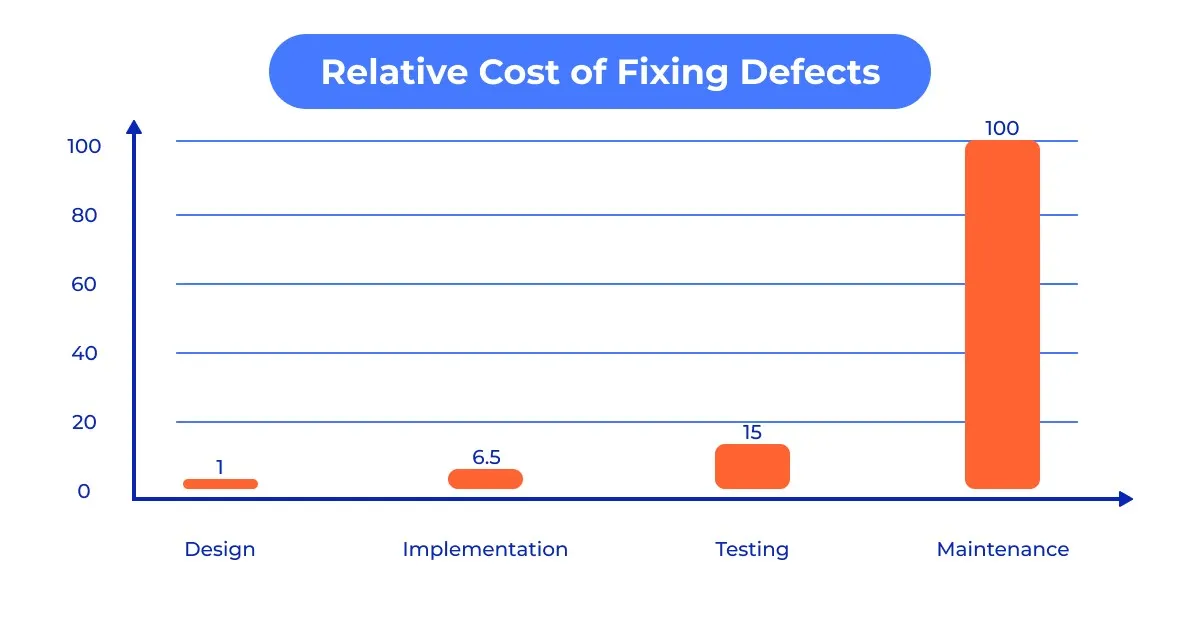
1. Fixing Issues In The Design Phase Is 100 Times Cheaper

One of the most compelling financial arguments for UX is the 1:100 rule. Modern studies, such as from the IBM Systems Institute and Sugue Technologies, show that fixing an error after a product has been developed and launched can be up to 100 times more expensive than fixing it during the initial design and prototyping phase.

Think of UX as “engineering insurance.” By the time a developer touches the code, every interaction should have been validated. If you discover a fundamental navigation flaw after launch, you aren’t just paying for the fix; you’re paying for technical debt, lost developer time, and the revenue lost while users struggle with a broken flow.

2. Performance Impacts User Experience

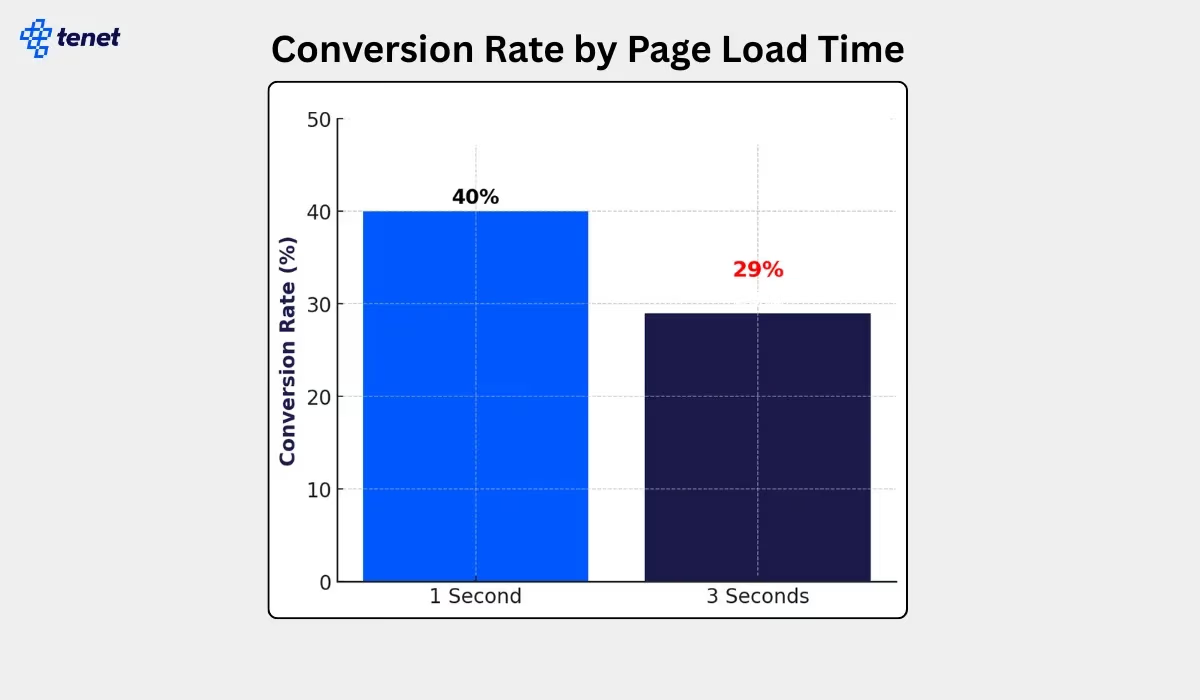
In the current landscape, performance is the essential foundation of user experience. A beautiful interface is worthless if the user bounces before it renders. The data is uncompromising: 47% of users expect a page to load in two seconds or less, and missing this window is a financial catastrophe. A mere one-second delay can reduce conversions by 20% and satisfaction by 16%, while retail businesses lose an estimated $2.6 billion annually to slow load times. When mobile load time moves from one to three seconds, the bounce rate spikes by 32%, and by the third second, conversion rates typically plummet from 40% to 29%.

However, this volatility offers a massive lever for growth. Even a microscopic 0.1-second improvement can lift retail conversions by 8.4%, and travel site conversions by 10.1%. Improving your Largest Contentful Paint (LCP) by 31% — a benchmark 67% of websites achieved as of June 2025 — can drive a direct 8% increase in sales. As a long-time designer, I treat speed as a primary design element.

If the site isn’t instantaneous, the design hasn’t just failed — it effectively doesn’t exist.

3. Your Site Has 50 Milliseconds to Impress Your Customers

First impressions are both visceral and aesthetic. Research indicates that users form an opinion about a website’s visual appeal in approximately 50 milliseconds (0.05 seconds). That’s not a lot of time! This split-second “gut-feeling” is a survival mechanism that dictates whether a user stays to explore your value proposition or bounces immediately.

In the current market, 94% of first impressions are strictly design related. If your interface feels “off” or dated, users subconsciously project that lack of quality onto your entire product or service. Your content effectively doesn’t exist if your design hasn’t earned the five seconds of attention required to read it.

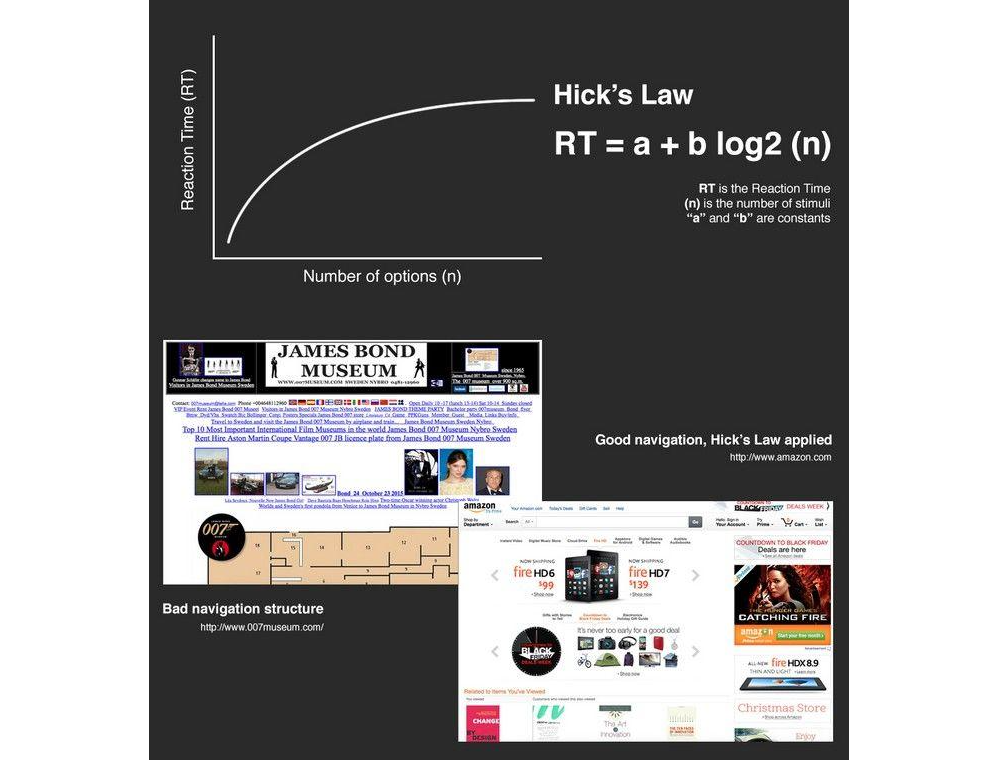
4. Hick’s Law: The Cost of Overwhelm

Stakeholders often think “more options” equals “more value.” Psychology proves the opposite. Hick’s Law states that the time it takes to make a decision increases with the number of options available.

Every extra menu item or form field is a “tax” on the user’s brain. As noted by Landbase, top-performing sites now achieve conversion rates exceeding 11%, while average performers struggle below 3%. Those performing well have applied personalization and optimization strategies to simplify the experience.

If you want to increase your revenue by tomorrow, find one field to delete from your checkout flow today.

5. White Space Improves Comprehension

“White space” is often viewed as wasted real estate by non-designers. In reality, it is a tool for focus. Strategic use of white space can increase a user’s content comprehension by up to 20%.

White space prevents “cognitive load” from peaking. By giving the user’s eyes a place to rest, you guide them toward the most important elements, usually your “Buy” or “Sign Up” button. In 2026, as attention spans have dropped to roughly 8 seconds, simplicity is the ultimate luxury and a major driver of engagement.

For example, in a fintech dashboard I worked on, analyst users were feeling overwhelmed by a ‘data dump’ layout in some of the dashboard components. I applied more white space around the data to lower their cognitive load. Simply giving the data room to breathe led to a 25% decrease in time-on-task and a significant boost in trial-to-paid conversions.

6. The Power Of “Fake” Progress

One of the most surprising psychological hacks in UX is that users will complete a task faster if they believe they have already made progress. This is known as the Goal Gradient Effect.

In a classic study, researchers found that a 10-stamp coffee card with two stamps already “pre-filled” was completed significantly faster than an 8-stamp card with zero pre-fills, even though the total spend required was identical. In digital design, showing a progress bar that starts at 15% (simply for creating an account) increases completion rates for onboarding by over 40%. We aren’t just designing screens — we are managing the user’s dopamine and sense of momentum.

7. Make Your Content Readable

Many stakeholders believe that cramming more text “above the fold” increases value. Data proves the opposite. Proper typography, specifically line spacing (leading) and paragraph width, can increase content comprehension and reading speed by up to 20%.

Optimal line height (generally 1.5x the font size) reduces “visual noise,” allowing the brain to process information with less cognitive effort. When users struggle to read your text due to tight spacing or small fonts, their “perceived effort” increases, leading to a higher bounce rate. Legibility is a conversion tool: if it’s hard to read, it’s hard to buy.

There are many ways to display more legible text. For example, if line spacing (leading) is too small or the font is too heavy, this also impacts readability.

8. Your Users Only Read 20% of Your Content

This truth meshes well with the previous one. Users do not read your website; they scan it. On a typical web page, users read only about 20% to 28% of the text.

Because modern users scan in an F-pattern or Spotted pattern, designing for reading is a tactical error. We must design for scanning.

This requires the following:

  • Bold headers that narrate the value proposition.
  • Bullet points for key benefits.
  • White space to connect users to key information (discussed in the previous truth).
  • High-contrast call-to-action (CTA) buttons. If your core message is buried in a paragraph, it is invisible to nearly 80% of your audience.

9. Why User Testing With 5 People Is the Magic Number

I have heard of companies that waste six-figure budgets on massive user studies with 100 people, only to get buried in noise. The reality is that testing with just 5 users typically uncovers 85% of usability problems.

This is a mathematical sweet spot. After the fifth user, you reach the point of diminishing returns — you spend more money to find fewer new bugs. The competitive advantage belongs to small and frequent user testing activities. Test with 5 people, iterate, and test with 5 more. It is the most cost-effective way to build a bulletproof product.

Personally, I have followed this guideline many times during user testing activities, and I can confidently say that testing with 5 people does deliver the majority of issues in your design.

10. The Financial ROI of 9,900%

Last, but definitely not least, the most staggering statistic in our industry remains consistent. On average, every $1 invested in UX returns $100. This 9,900% ROI isn’t magic, but the sum of increased conversion and reduced support.

A fully optimised UX design can improve conversion rates by up to 400%. Furthermore, intuitive design significantly lowers customer support requirements. When a product is self-explanatory, you don’t need a massive call centre to explain how to use it.

The Depth of UX Investment

Beyond these individual statistics, we must address the cumulative effect of a mature UX practice. In my years of practising, the most successful firms are those that treat UX as a continuous improvement loop rather than a one-off project. The data shows that companies with high design maturity see 32% higher revenue growth and 56% higher total returns to shareholders compared to their less design-focused peers.

This discrepancy exists because mature UX organisations move beyond “user delight” and into “user efficiency.” When you shave 30 seconds off a workflow for a team of 1,000 employees, you aren’t just making them happier; you are reclaiming hundreds of thousands of dollars in annual productivity. This internal ROI is often overlooked, but it is just as vital as consumer-facing conversion rates.

Furthermore, the “experience gap” is real. 80% of companies believe they deliver a “superior experience,” but only 8% of customers agree. This massive disconnect represents a significant market opportunity for those willing to look at the hard data. By bridging this gap through continuous user testing and performance optimisation, you aren’t just improving a product but capturing market share that your competitors are leaving on the table.

The Impact of AI

Today, we cannot talk about UX without talking about AI. However, AI hasn’t replaced these 10 facts, but it has accelerated the solution on some of these.

  • Agentic UX
    60% of designers are now building “AI agents” that take actions on behalf of the user, drastically reducing the impact of Hick’s Law by narrowing down choices before the user even sees them.
  • Real-Time Personalisation
    32% of teams use AI to personalise interfaces in real-time, meaning the F-Pattern scanning habits are catered to by moving the most relevant content to exactly where that specific user’s eyes are likely to land.
  • Automated ROI
    93% of designers are using generative AI tools to prototype faster, which brings the 1:100 Cost Ratio even lower by allowing us to find and fix errors before a single line of production code is written.

AI has turned UX from a static map into a living, breathing guide for users. But the fundamental rules of human psychology, such as our 50ms judgments and our need for white space, remain unchanged.

Conclusion

In summary, here is a list of the key truths to remember:

  1. Fixing issues in the design phase is 100 times cheaper.
  2. Performance impacts user experience.
  3. Your site has 50 milliseconds to impress your customers.
  4. Hick’s Law: The cost of overwhelm.
  5. White space improves comprehension.
  6. The power of “fake” progress.
  7. Make your content readable.
  8. Your users only read 20% of your content.
  9. Why user testing with 5 people is the magic number.
  10. The financial ROI of 9,900%.

As we move deeper into the late 2020s, the line between “design” and “business strategy” has vanished. The data is in, and companies that lead in design outperform their competitors by 1.7x in revenue growth.

UX design is no longer a team you hire to “make things look nice.” It is the research-driven, data-backed discipline that ensures your digital product isn’t just a cost centre, but a revenue-generating machine.

In fact, this has always been the case, but I hope that in presenting these cold, hard truths, it now becomes a reality for your business.

As I have found over the years, implementing factual design improvements does make a difference that intuition alone can’t replicate. We are past the era of subjective opinions. The data is clear, the psychology is proven, and the ROI is undeniable. The only question left is whether you’re ready to let the facts lead your design, or if you’ll let your competitors do it first.

Further Reading On SmashingMag

  • “The Human Element: Using Research And Psychology To Elevate Data Storytelling”, Victor Yocco & Angelica Lo Duca
  • “AI In UX: Achieve More With Less”, Paul Boag
  • “Six Key Components of UX Strategy”, Vitaly Friedman
  • “When Friction Is A Good Thing: Designing Sustainable E-Commerce Experiences”, Anna Rátkai

Pyrefly LSP Integration with Type Engine in PyCharm 2026.1.2

In PyCharm 2026.1.2, you can enable Pyrefly as an external type provider, dramatically increasing the speed of the IDE’s code insight features.

What is the Pyrefly LSP?

“LSP” stands for the Language Server Protocol – a standardized protocol that allows code editors and IDEs to communicate with language servers. The LSP enables language servers to provide code intelligence features, such as:

  • Code completion
  • Information on hover (for example, quick documentation)
  • Go to definition and other actions
  • Error checking and type-related diagnostics

The key benefit of the LSP is that it allows a single language server to be used across multiple tools. This means that language-specific intelligence does not have to be implemented separately in every editor, IDE, or CI pipeline.

Pyrefly is Meta’s next-generation Python type checker, engineered from the ground up in Rust to replace its predecessor, Pyre (written in OCaml). With the move to Rust, Pyrefly achieves significantly faster performance and improved cross-platform portability. More than just a rewrite, it is designed to be more capable and robust, offering an efficient toolset for maintaining large-scale Python codebases with high precision and minimal overhead.

Pyrefly provides the following benefits:

  • Higher performance and efficiency – Thanks to its Rust-based architecture, Pyrefly achieves significantly faster speeds and improves cross-platform portability. 
  • Enhanced code intelligence – As an external type provider, Pyrefly powers essential code insight features in the IDE, including type inference, type-related diagnostics, quick documentation, and inlay hints.
  • Scalability – Pyrefly is designed to handle large-scale Python codebases with high precision and minimal overhead.

Pyrefly is highly beneficial for projects and developers dealing with large, complex Python codebases that prioritize performance and robust typing. Integrating Pyrefly via the LSP is part of our ongoing work to enhance code insight performance in PyCharm.

Using Pyrefly in PyCharm

Once enabled, Pyrefly powers all code insight functionality in PyCharm, including type inference and type-related diagnostics, quick documentation, and inlay hints. Delegating analysis to this faster engine delivers significantly improved performance.

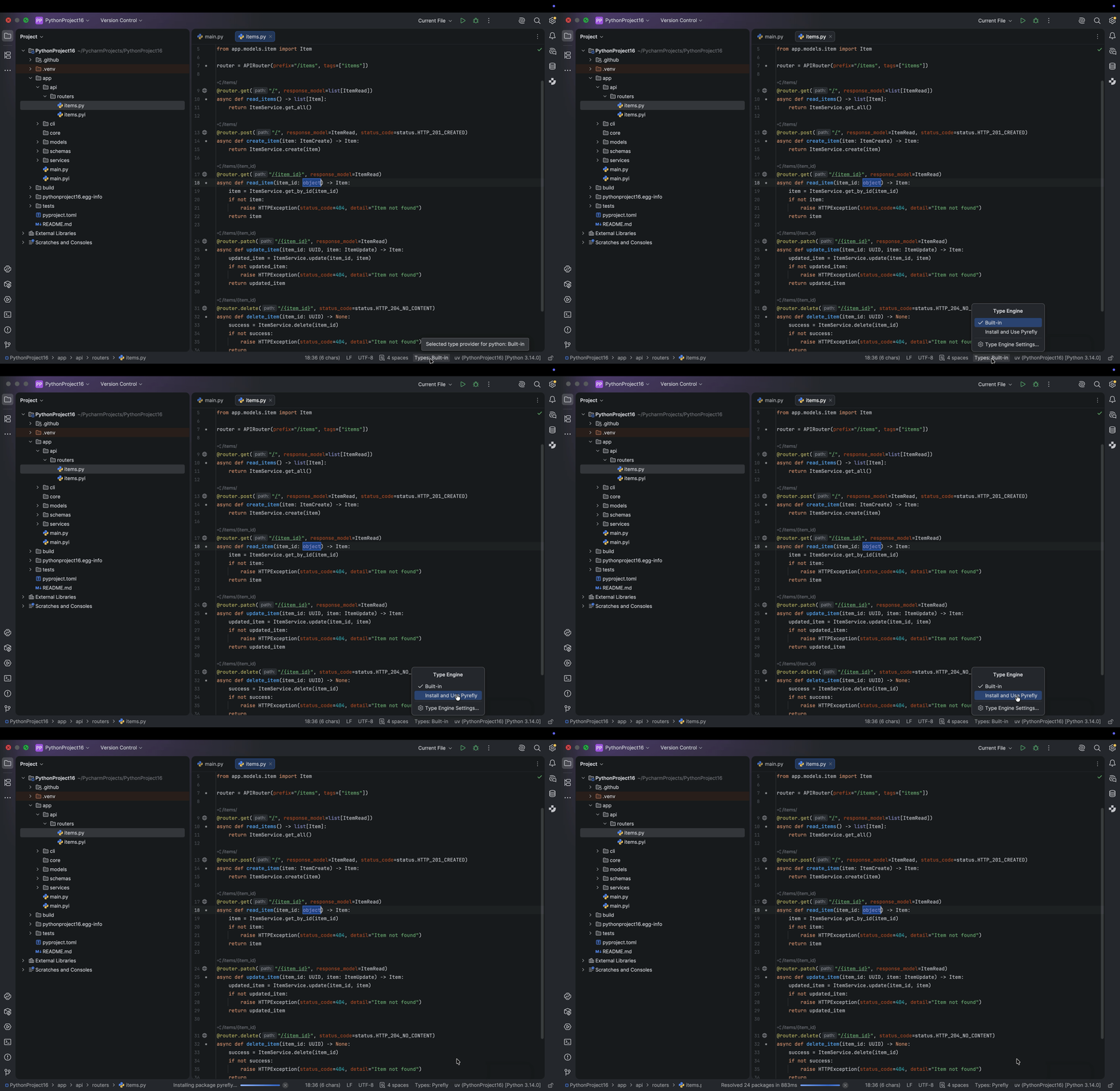
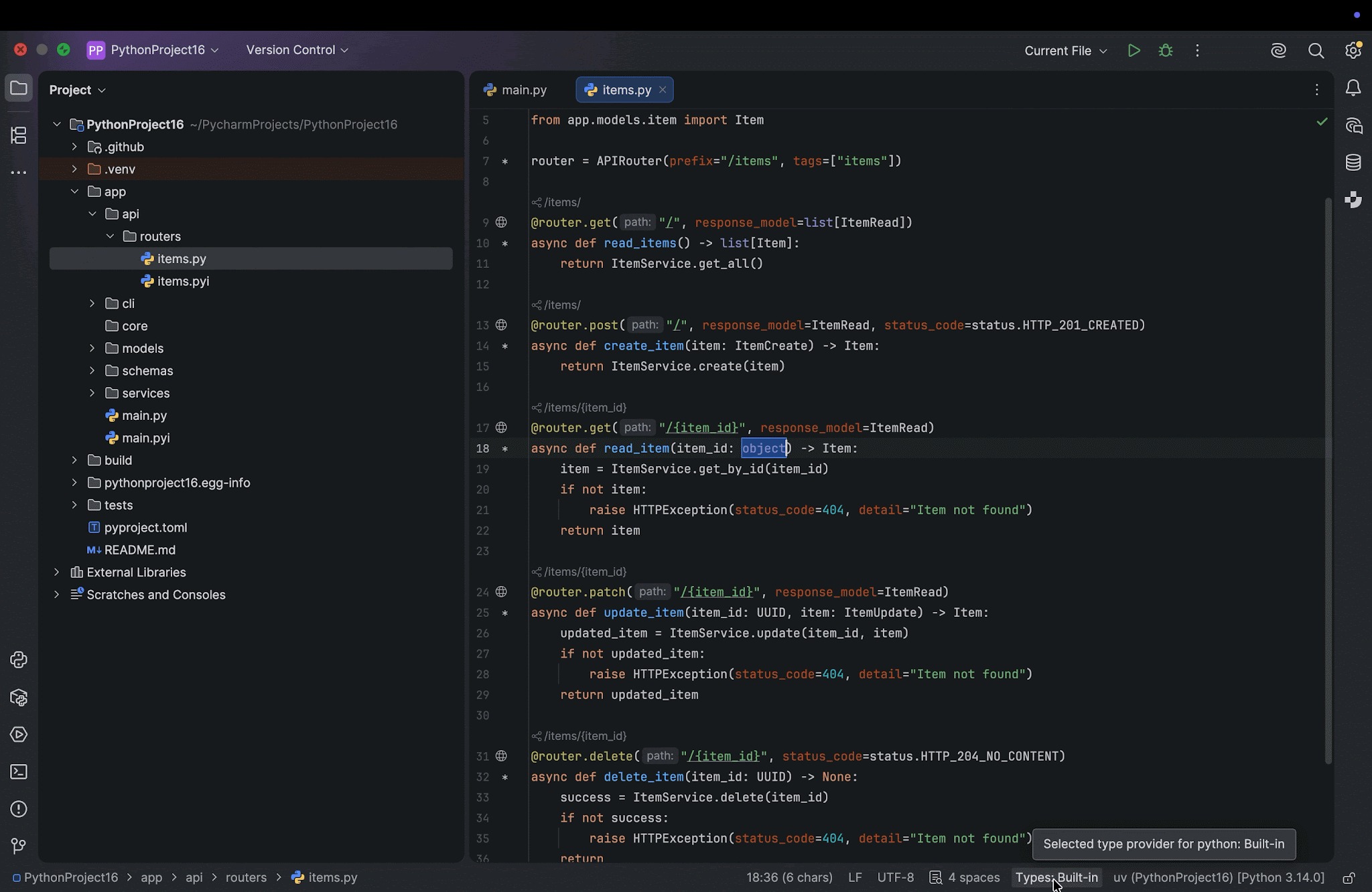
To start using Pyrefly in your PyCharm project, go to the Type widget at the bottom of the window. By default, the IDE uses the built-in type engine. Click on the widget and select the option to use Pyrefly. If you do not have Pyrefly installed yet, PyCharm will install it automatically. 

Once you’ve switched to the Pyrefly type engine, you will see a Pyrefly icon at the bottom, which you can hover over to check the version being used.

Please note that the integration currently works for local interpreter configurations. Support for Docker, Docker Compose, WSL, SSH, and multi-module projects is planned for future releases.

Pyrefly vs. the built-in type engine

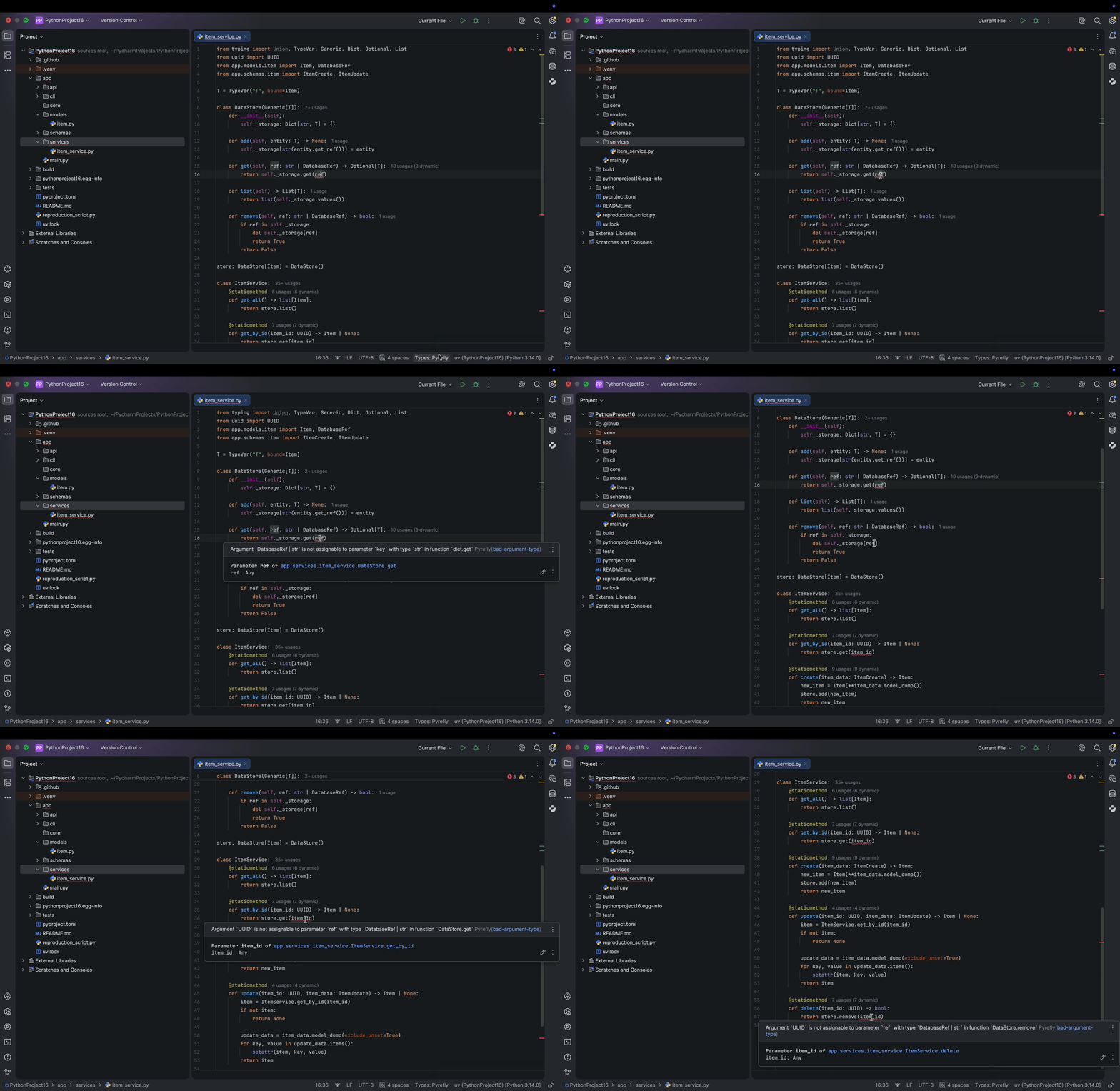
Now let’s look at how Pyrefly and the built-in type engine behave in a complex Python project. In this FastAPI example, multiple files are typed, but in this file, the variable ref is incorrectly typed, causing four errors. When using the built-in type engine, the IDE identifies that something is wrong, but it suggests running further analysis to fix the problem, which requires an extra step.

Using Pyrefly as the type engine, the IDE reports errors immediately and highlights where they originate. However, it is worth noting that, in our example, there are four errors, but Pyrefly picks up only three of them. It misses the one in self._storage[ref].

Download the latest version of PyCharm and try it out

Ready to experience a dramatic leap in Python development performance? The Pyrefly type engine in PyCharm 2026.1.2 delivers the next generation of type checking. Engineered in Rust for unparalleled speed, it resolves files in as little as 0.5–1 seconds, significantly faster than the built-in engine. If you maintain large, complex Python codebases and prioritize robust typing, this feature is essential, as it allows you to delegate analysis to a faster engine and receive immediate type-related diagnostics. Download the latest version of PyCharm (2026.1.2) to unlock superior efficiency, scalability, and code insight.

Help Shape the Future of Kotlin in the Age of AI

AI is rapidly changing the way developers write, review, learn, and maintain code. Code completion, AI chat assistants, autonomous coding agents, and other tools are giving rise to new workflows almost every month.

But one important question remains:

How well do these tools actually work with Kotlin?

We want to better understand how Kotlin developers use AI today, what works well, where the friction points are, and what opportunities lie ahead. That’s why we’re launching a short community survey focused on AI-assisted development with Kotlin.

Share your perspective

AI is already reshaping software development. By participating, you can help ensure that the Kotlin community’s real experiences, expectations, and needs are part of that conversation.

Complete the survey to have the chance to win a prize of your choice:

  • USD 50 Amazon Gift Card
  • Six-month JetBrains All Products Pack subscription
Take the survey

We’re looking forward to hearing your thoughts.

Taking part in KotlinConf 2026?

If you’re attending KotlinConf 2026, make sure to visit the registration counter after completing the survey to chat with our team and receive a small thank-you gift.

A New Default Project Structure for Kotlin Multiplatform

We are updating the default project structure for Kotlin Multiplatform projects to give modules clearer responsibilities, better align with conventions used by other build systems and frameworks, and reflect the changes in Android Gradle Plugin 9.0.

You’ll see this project structure in newly created projects generated by our tools, in the official documentation, and in samples for Kotlin Multiplatform.

These changes are already live in the KMP wizard, both in your IDE (with the Kotlin Multiplatform plugin installed) and on kmp.jetbrains.com. We’re also working on updating our sample projects and other learning materials to match this new structure. You can already check out kotlinconf-app, KMP-App-Template, or RSS Reader as a reference.

To get support for AGP 9.0 in IntelliJ IDEA, update to 2026.1.2 or newer, and use the latest version of the Android plugin.

This post explains the changes that we’re making, why we’re changing the structure, and how you can update existing projects.

What’s changing

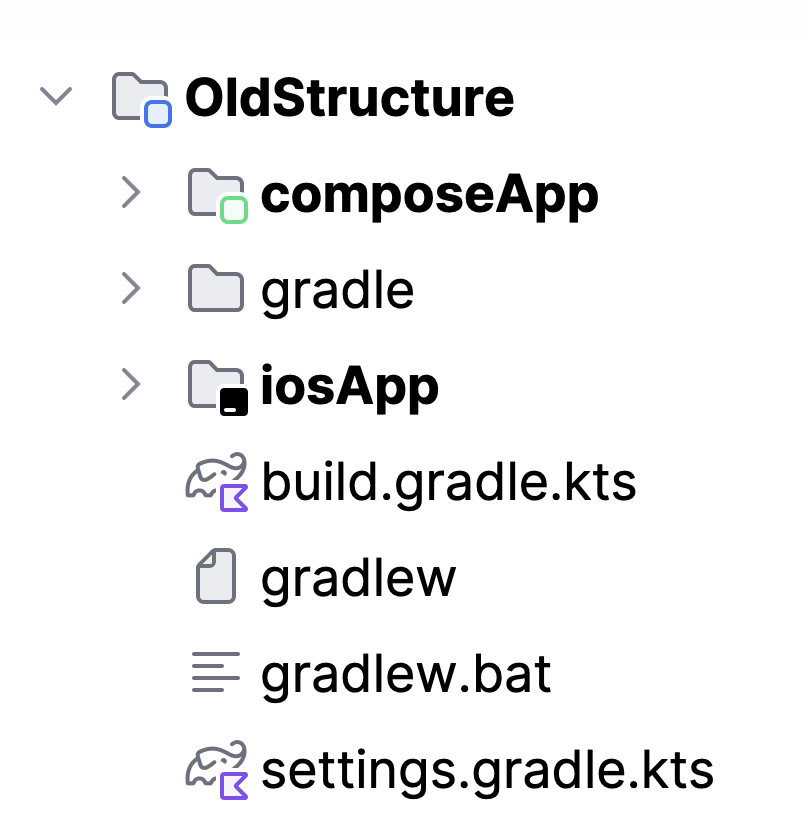
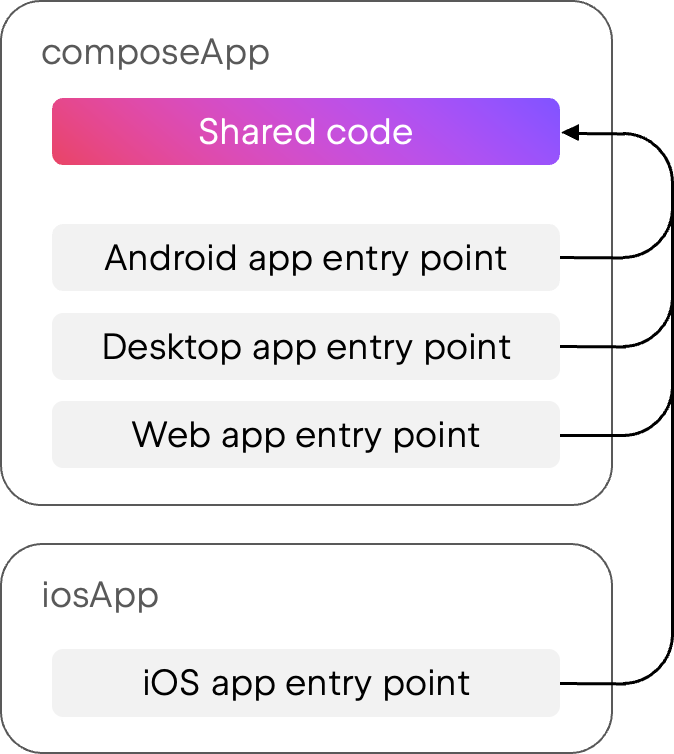
With our previous structure, most projects had a single composeApp Gradle module that contained a Kotlin Multiplatform library and also acted as an application for one or more platforms, containing their entry points and other related configuration.

In the Project view, this looked like:

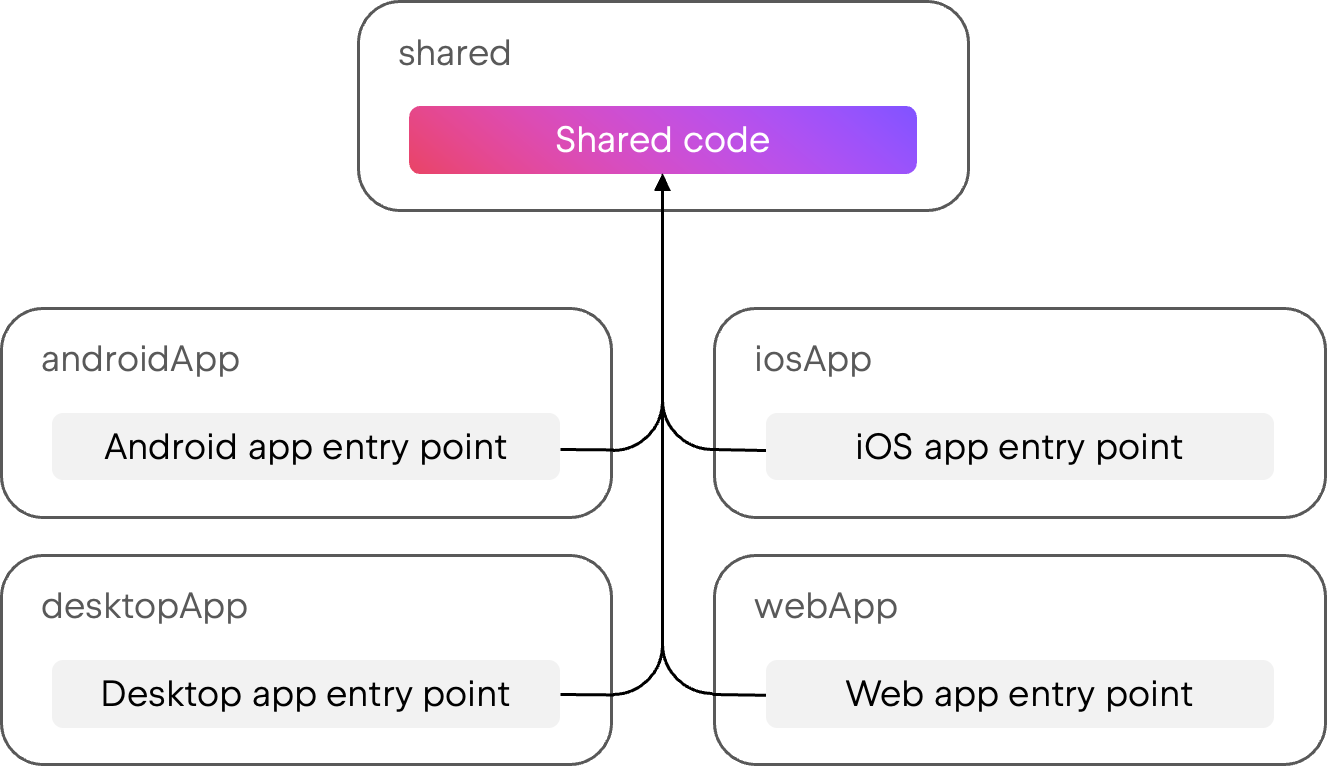
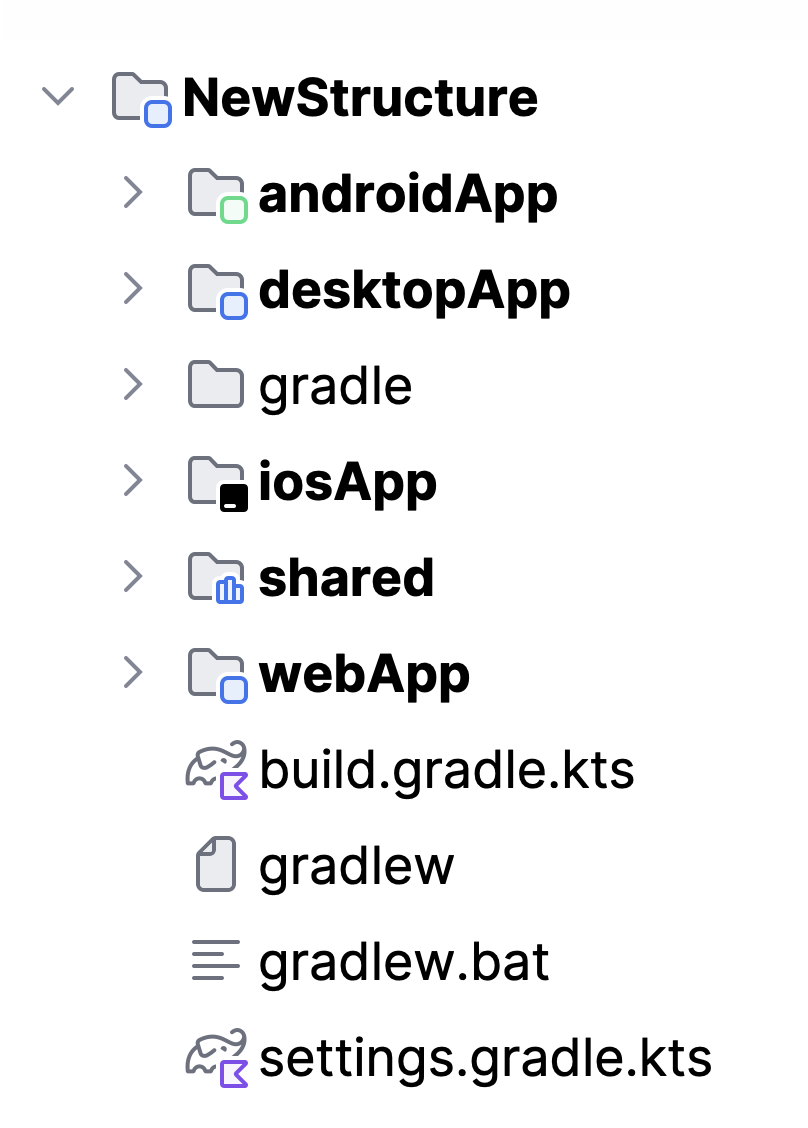
Our new default structure has a shared module with a single, clear responsibility: It’s a Kotlin Multiplatform library containing the shared code. Then, for each platform where you want to build a runnable application on top of the shared library code, you’ll have separate application modules such as androidApp, desktopApp, and webApp.

The new structure looks like this in the Project view:

Why we’re making changes

The composeApp module in the old structure had several different responsibilities. As a result, it contained a lot of configuration, including platform-specific packaging details for all platforms. This could make it difficult to tell which parts were setting up a Kotlin Multiplatform library and which parts were setting up the applications themselves.

If you chose not to share UI on a client platform (for example, to use SwiftUI for your iOS application), the old structure included an additional shared module besides composeApp. This was a significant change to the module structure, but it only happened in certain configurations.

There was also asymmetry when it came to iOS apps. Because they require an Xcode project that consumes the shared code, iOS applications were already in a separate iosApp folder, while the rest of the applications built on the shared code were all co-located in composeApp.

Android Gradle Plugin 9.0 requires the entry point of the Android application to be in a separate module from the shared code, as it no longer supports applying the Android application Gradle plugin in a multiplatform module.

Finally, we previously had a different structure for Gradle-based and Amper-based projects. While Gradle supports multiple applications configured in a single module, Amper allows only one product per module, so Amper-based projects already used separate modules for each application.

Goals of the new structure

Based on the points above, we created the new structure with these goals in mind:

  • Providing an initial setup for projects where each module has a clear responsibility and single purpose. It should always be clear where a given piece of code or build configuration should be placed in the project.
  • Keeping the structure as consistent as possible across the different configurations that the wizard allows: different sets of target platforms, having a server application or not, and choosing native or shared UI for clients.
  • Making it easy to modularize the project further, to go from a single multiplatform module to several ones as desired.

Adapting to other configurations

The examples above show the new project structure for a Compose Multiplatform application that shares its UI across Android, iOS, desktop, and web platforms. In other configurations, the structure will adapt as required, with minimal changes.

Configurations with native UI

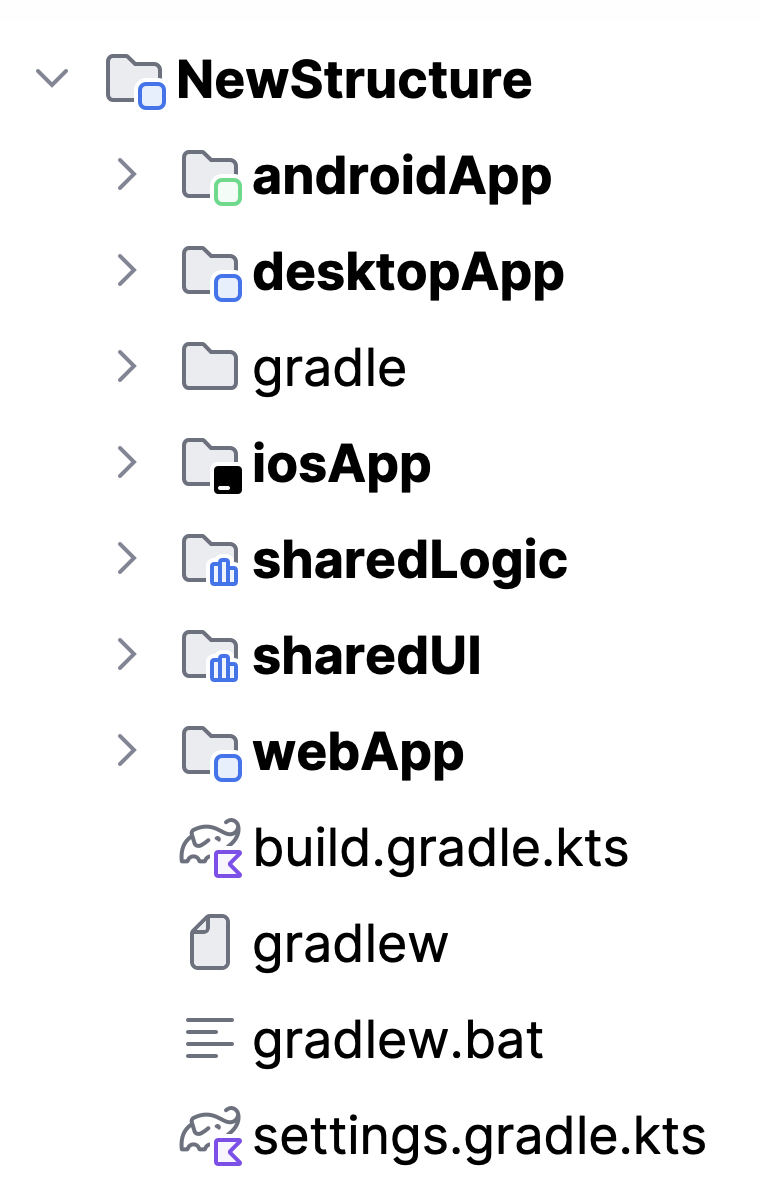
Kotlin Multiplatform supports using native UI on top of shared Kotlin code. For example, you can choose to use SwiftUI for your iOS app while using Compose Multiplatform for other platforms. In this case, you’ll write shared business logic code that’s used by all platforms, and shared UI code that’s only used by certain platforms.

In this configuration, the new structure will have two shared modules instead of one: sharedLogic and sharedUI. While sharedLogic is consumed by all applications and doesn’t have Compose dependencies, sharedUI is only consumed by those that use Compose Multiplatform for their UI.

It’s still easy to decide which module to write your shared code in: If all your platforms will use it, including those with native UI implementations, it should go in sharedLogic. If only platforms using Compose Multiplatform need that code, it should go in sharedUI.

Configurations with a server included

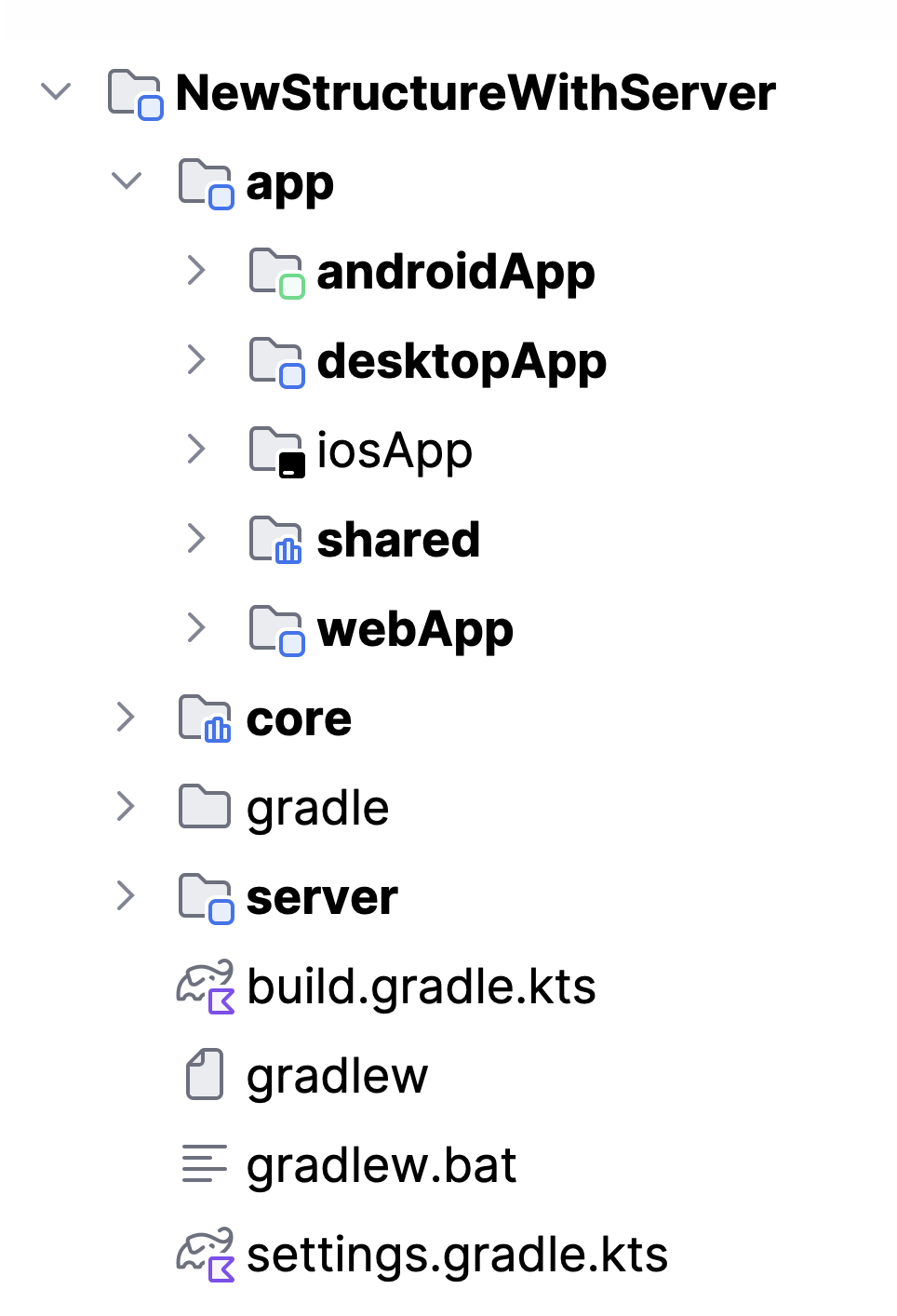
For projects that also target server-side Kotlin, the new structure adds a server module and moves all client-side modules into a nested app folder. An additional core module in the project root lets you share code between server-side and client-side code, such as models and validation logic.

Updating existing projects

While we’re changing the default structure for newly created projects, existing projects aren’t required to adopt the same exact structure. If you want to migrate an existing project to match this new default structure, you can use the migration guide, which shows you how to introduce new modules for each entry point.

Note that the changes related to Android Gradle Plugin 9.0, however, are mandatory for all existing multiplatform projects that target Android. You can learn more about these changes and how to update your projects in this blog post.

To get support for AGP 9.0 in IntelliJ IDEA, update to 2026.1.2 or newer, and use the latest version of the Android plugin.

Get started with KMP today

To create a new project with the updated structure, go to kmp.new or use the Kotlin Multiplatform wizard in your IDE (available in both IntelliJ IDEA and Android Studio with the Kotlin Multiplatform plugin installed).

If you’re looking for examples of the new structure in action, take a look at kotlinconf-app, KMP-App-Template, or RSS Reader.

IntelliJ IDEA 2026.1.2 Is Out!

IntelliJ IDEA 2026.1.2 has arrived with several valuable fixes.

You can update to this version from inside the IDE, using the Toolbox App, or using snaps if you are a Ubuntu user. You can also download it from our website.

Here are the most notable updates included in this version:

  • Projects can now be opened correctly via .ipr files generated by the Gradle idea task. [IJPL-242321]
  • The indentation for Java ternary expressions with chained method calls has been fixed. [IDEA-387867] 
  • Pressing the Alt+Enter key combination on Windows no longer opens the context menu unexpectedly. [IJPL-47743] 
  • Live templates with groovyScript now work as expected again. [IJPL-241581] 
  • Dragging and dropping selected code with the mouse onto its original position no longer causes the code to disappear. [IJPL-235895] 
  • It is once again possible to open a diff in an external tool by double-clicking a file in the Commit tool window. [IJPL-241256] 
  • The MCP Server no longer reports illegal character errors for projects with spaces in their paths [IJPL-241803] 
  • Workspaces once again function as expected. [IDEA-388445] 
  • Several IDE freezes have been resolved. [IJPL-235455] [IJPL-224542] [IJPL-203153]

To find out more details about the issues resolved, please refer to the release notes.

If you encounter any bugs, please report them to our issue tracker.

Happy developing!