How I Reverse-Engineered Claude Code’s Hidden Pet System

The Buddy Creator web tool showing a shiny legendary cat with a tophat

I was poking around Claude Code’s source one evening and found something I wasn’t supposed to see: a full gacha companion pet system, hidden behind a compile-time feature flag. A little ASCII creature that sits beside your terminal input, occasionally comments in a speech bubble, and is permanently bound to your Anthropic account. Your buddy is deterministic. Same account, same pet, every single time. No rerolls.

Naturally, I wanted a legendary dragon. Here’s how I cracked it.

What’s Actually in There

The buddy system lives across four files inside Claude Code’s codebase:

  • buddy/types.ts defines 18 species, 5 rarities, 6 eye styles, 8 hats, and 5 stats
  • buddy/companion.ts implements the PRNG, hash function, roll algorithm, and tamper protection
  • buddy/sprites.ts has ASCII art for every species (three animation frames each, a hat overlay system, and a render pipeline)
  • buddy/prompt.ts holds a system prompt that gets injected into Claude so it knows how to coexist with the pet without impersonating it

The feature is gated behind a BUDDY compile-time flag. When the flag is off, the entire thing gets dead-code-eliminated from the build. It was teased during the first week of April 2026 and is slated for a full launch in May. The /buddy slash command activates it when the flag is on.

Here’s what the species look like as ASCII sprites:

DUCK                DRAGON              GHOST
    __              /^  /^            .----.
  <(· )___        <  ·  ·  >          / ·  · 
   (  ._>          (   ~~   )         |      |
    `--´            `-vvvv-´          ~`~``~`~

Eighteen species total: duck, goose, blob, cat, dragon, octopus, owl, penguin, turtle, snail, ghost, axolotl, capybara, cactus, robot, rabbit, mushroom, and chonk. Each one has a compact face representation for inline display, three animation frames on a 500ms tick timer, and a hat overlay slot on line zero of the sprite.

One fun detail: every species name in the source code is obfuscated through String.fromCharCode() arrays. “Capybara” collides with an internal Anthropic model codename that’s flagged in their repo’s excluded-strings.txt, so they encoded all 18 species uniformly to keep their string-scanning tooling happy.

The Gacha Algorithm

Your buddy is a pure function of your identity. The algorithm chains together like this:

Account UUID (from OAuth)
    → concatenate with salt 'friend-2026-401'
    → hash to 32-bit integer
    → seed Mulberry32 PRNG
    → deterministic roll sequence

The PRNG calls happen in strict order: rarity first, then species, then eye, then hat, then shiny, then stats. Changing any earlier roll changes everything after it.

Rarity weights:

Rarity Probability
Common 60%
Uncommon 25%
Rare 10%
Epic 4%
Legendary 1%

On top of that, there’s a 1% shiny chance that rolls independently of rarity. A shiny legendary of a specific species? That’s a 0.00056% probability, roughly 1 in 180,000.

Stats are shaped by rarity through a floor system. Legendaries start at a floor of 50 and always max out their peak stat at 100. Commons start at 5 and cap their peak around 84. Each companion gets one peak stat and one dump stat, with the rest falling somewhere in between.

There’s an important hash function detail here. Claude Code runs in Bun, so the production hash is Bun.hash(), which is native C wyhash. The Node.js fallback is FNV-1a. These produce completely different values for the same input, which means any tooling running outside Bun cannot reproduce the exact buddy for a given account.

How the Tamper Protection Works

This is the part that got interesting. The buddy system splits companion data into two categories:

Stored in config (~/.claude.json): name, personality, hatchedAt timestamp. These are editable and meant to be personal.

Recomputed every read (called “bones”): rarity, species, eye, hat, shiny, stats. These are derived deterministically from your account hash on every single call to getCompanion().

The tamper protection comes down to a JavaScript spread operation:

export function getCompanion() {
  const stored = getGlobalConfig().companion
  if (!stored) return undefined
  const { bones } = roll(companionUserId())
  return { ...stored, ...bones }
}

Because bones comes second in the spread, it always overwrites anything you manually added to the config. You can edit ~/.claude.json all you want, set rarity: "legendary", and it gets stomped on every read. The recomputed values win, period.

It’s clever design. No server-side validation needed, no database, no “lost my save” support tickets. Your buddy is a pure function of your identity, recomputed every time it’s needed. The bones are cached by userId + SALT key to avoid redundant computation on the three hot paths: the 500ms sprite tick, per-keystroke prompt input, and per-turn observer.

But here’s the thing about client-side enforcement: it’s client-side.

The Crack

The entire hack is swapping two variable names. In the minified v2.1.89 binary, getCompanion() compiles down to something like:

{bones:$}=Gh$(Th$());return{...H,...$}

H is the stored config, $ is the recomputed bones. Bones come last, bones win. To flip that:

{bones:$}=Gh$(Th$());return{...$,...H}

Now stored config comes last. Config wins. Whatever you write to ~/.claude.json takes priority over the recomputed values.

The two strings are the exact same byte length, so there’s zero offset shift in the binary. No padding, no realignment, no relocation table headaches. You find the pattern, swap H and $, write it back. That’s the whole patch.

I wrote a Node.js patcher that automates the whole thing in a single command. Design your buddy on the web creator, copy the JSON, run node buddy-crack.js, and it patches the binary and injects your companion in one step. It auto-reads from your clipboard, so you don’t even need to pass arguments. That was a deliberate choice: Windows CMD chokes on JSON in command-line arguments because of quote conflicts, so clipboard-first was the only sane default.

The patcher went through a few iterations that taught me things the hard way.

The first version had separate patch and inject commands, which was unnecessarily complex for something that always happens together. Collapsed that into a single flow early on.

Then I nearly destroyed my own Claude Code config. The original config writer would parse ~/.claude.json, fail on any syntax weirdness, fall back to an empty object, and write that back with just the companion data. That nuked everything else in the file: OAuth tokens, permissions, theme settings, tool approvals. On a config that can easily be 50KB, that’s catastrophic. The fix was to make the injector surgical. It tries a proper JSON parse first, but if that fails, it now uses a brace-depth parser to find and replace just the companion field in the raw string, leaving everything else untouched. It only creates a fresh file as a last resort, and it backs up ~/.claude.json to .claude.json.bak before touching anything.

Windows threw another curveball. PowerShell’s Get-Clipboard mangles UTF-8 characters, so the star eye character would come through as ?. The fix forces UTF-8 output encoding from PowerShell and auto-repairs known corrupted characters on paste.

The final round of hardening added binary integrity checks (verifying file size after write to catch truncated writes) and auto-restore from backup if the patch fails mid-write. The patcher now handles XDG-standard paths across all three platforms and scans the Claude Code versions directory for additional binaries to patch.

Building the Web Creator

Reading the source also meant I had all the sprite data, so I built a web-based companion designer. Single HTML file, no dependencies, no build system. You pick your species from a grid that shows the actual ASCII faces, choose your rarity, eyes, hat, toggle shiny, and it renders a live preview of the full 5-line sprite with your selections applied.

There’s a soul section with two options: generate a name and personality by pasting a prompt into Claude or ChatGPT, or just type them yourself. Hit “Copy Config JSON” and it exports exactly what the patcher expects. The install guide is built into the page with platform-specific instructions for Windows, macOS, and Linux.

The whole thing lives at pickle-pixel.com/buddy. The usage flow is four steps: design your companion, close Claude Code, run the patcher, restart.

pickle-pixel.com

The Attack Surface

While I was documenting everything, I mapped out every possible angle someone might try:

Attack Works? Why
Edit config fields Name/personality only Bones always overwritten
Change accountUuid No Server validates on auth
Patch the binary Yes That’s what this tool does
Create new accounts Uncontrolled Can’t choose your UUID
Brute-force UUIDs Statistically But you can’t use found UUIDs

The brute-force angle is interesting. I wrote a separate script that replicates the full gacha algorithm and generates random UUIDs to find legendary rolls. It works statistically, but the UUIDs it finds are useless in practice because Anthropic assigns them server-side during account creation. You don’t get to pick yours.

And there’s the Bun versus Node.js hash problem again. The brute-forcer runs in Node.js by default, using FNV-1a, but production Claude Code uses Bun’s wyhash. The probability distributions are identical, but per-UUID results won’t match unless you run the script under Bun.

What I Learned

The buddy system is genuinely well-designed for what it’s trying to do. Deterministic gacha with no server state is elegant. The tamper protection through spread ordering is simple and effective against casual editing. The soul/bones split lets users personalize their pet’s name and personality while keeping the visual identity locked to their account.

But any system where the enforcement happens entirely on the client has a fundamental limit. The binary is on your machine. The config is on your machine. The merge logic is one spread operation in a JavaScript function. The crack is five characters swapped in a compiled binary.

That said, I don’t think the Anthropic team is under any illusion that this is uncrackable. Deterministic client-side gacha is a design choice that trades tamper-resistance for zero-server-cost operation. No database, no API calls to validate rarity, no sync issues. For a fun companion pet feature in a CLI tool, that’s the right tradeoff. The buddy system doesn’t gate any functionality. It’s a toy, and it’s a charming one.

The code is at github.com/Pickle-Pixel/claudecode-buddy-crack if you want to pick your own companion. The full reverse-engineering documentation is in BUDDY_SYSTEM.md.

Now if you’ll excuse me, I have a legendary shiny dragon to go look at.
@craft-ng: Associer l’art de la composition & du state management dans Angular

Quand je construis une feature Angular un peu sérieuse, je veux toujours la même chose:

  • une seule source de vérité
  • un flux de données clair
  • un code composable
  • une DX solide
  • et surtout une type-safety qui m’évite de jouer aux devinettes
  • des outils pour pensés pour simplifier l’UX/UI

C’est exactement l’objectif de @craft-ng.

Une lib complète de state management pour tous les types d’état d’une application:

  • client state: états locaux, listes, UI, sélection…
  • server state: chargement, cache, mutation, pagination, optimistic update…
  • URL state: query params synchronisés, type-safe, avec fallback

Des utilitaires prêts à l’emploi pour se rendre la vie plus facile.

Une approche Method-based ou Event-based pour s’adapter à tous les styles de code.

Qu’ils soient simples ou complexes, le principe reste toujours le même.

  1. Les « primitives », basées sur les signals, ont chacune leur rôle et portent un state et sa logique.
  2. Elles sont utilisables directement dans les composants et les services.
  3. Elles suivent toutes le même principe : primitive(config, insertion1, insertion2, …).
  4. Les insertions servent à ajouter de la logique (modifiers, réactions, états dérivés, method-based/event-based…).
  5. Ce pattern, combiné aux utilitaires de craft-ng insert…, permet d’obtenir un niveau inégalé de composition, offrant une gestion fluide aussi bien pour les cas simples que complexes.
  6. Un store craft est disponible pour orchestrer ces primitives. Il peut être composé par d’autres stores, et être lui-même composable.

Dans cet article, je vais:

  • présenter la structure commune des primitives
  • montrer comment exposer méthodes, état dérivés, et réagir à un événement via les insertions
  • donner un exemple concret pour chaque primitive
  • faire un tour rapide des insertions utiles
  • expliquer pourquoi source$ (event-based) change vraiment la façon de structurer le state
  • terminer avec injectService et le store craft

⚠️ @craft-ng est une librairie experimentale. Je ne recommande pas de l’utiliser en production pour le moment. Cet article est avant tout un partage des concepts.

La doc: https://ng-angular-stack.github.io/craft/

1) Une structure commune à toutes les primitives

Que tu utilises state, query, mutation, asyncProcess ou queryParam, la logique de composition reste la même:

  1. une configuration de base
  2. des insertions pour exposer des méthodes / des états dérives / des réactions
import { computed } from '@angular/core';

const counter = state(
  0, // config
  // insertion 1
  ({ set, update }) => ({
    increment: () => update((current) => current + 1),
    reset: () => set(0),
  }),
  // insertion 2
  ({ state }) => ({
    isOdd: computed(() => state() % 2 === 1),
  }),
);

counter.increment();
counter.isOdd();

Ce point est clé: tu n’apprends pas 5 APIs différentes, tu apprends un modèle mental unique.

2) Les primitives: fonctionnement + exemples concrets

Dans la pratique, chaque primtive apporte ses fonctionnalités qui lui sont propres, et le composant/service/store m’aide à les orchestrer.

state

state gère le client state synchrone.
C’est la base pour modéliser un état client, global ou local, le composer, et le spécialiser.

Combiné à insertSelect, le state devient redoutable pour gérer des structures imbriquées de manière fluide et type-safe.

type User = { id: string; name: string; selected: boolean };

const usersState = state(
  {
    filters: { search: '' },
    users: [] as User[],
  },
  insertSelect('filters', ({ set }) => ({
    set,
  })),
);

usersState.selectFilters().set('@craft-ng');

Ce que j’aime ici:

  • les méthodes suivent la structure du state
  • la lecture du code reste directe

Pourquoi avoir créé un state alors qu’il y a déjà les signals d’Angular ?

  • pour bénéficier du système de composition via les insertions
  • exposer les méthodes qui modifient l’état pour le rendre prédictif
  • encapsuler toute la logique qui lui est associée

mutation

mutation: sert a modifier (UPDATE/PUT/PATCH/DELETE) des données cote serveur.

Version méthode directe avec .mutate(...):

const updateUser = mutation({
  method: (payload: { id: string; name: string }) => payload,
  loader: async ({ params }) => {
    const response = await fetch(`/api/users/${params.id}`, {
      method: 'PATCH',
      body: JSON.stringify(params),
    });
    return response.json() as User;
  },
});

updateUser.mutate({ id: '42', name: 'Romain' });

On peut aussi les appeler en parallèle, avec des identifiers, pour gérer des cas plus complexes (cf. l’exemple dans full-demo).

Pourquoi avoir créé une mutation alors qu’il y a déjà les resources d’Angular ?

  • pour bénéficier du système de composition via les insertions
  • permettre des appels api en parallèle via les identifiers
  • retourner des craftException typés en cas d’erreur métier (ex: validation), pour ne pas perdre d’information et offrir la meilleure UX/UI à tes utilisateurs
  • peut s’appeler comme une méthode directe myMutationRef.mutate(...)

query

query: gère le server state (chargement, valeur, erreur, cache) et peut tourner en parallèle via identifier (ex: pour faire de la pagination).

C’est la primitive qui est faîte pour représenter une ressource distante, avec des utilitaires pour gérer le cache, les updates liés aux mutations, la pagination…

Avec insertPaginationPlaceholderData + insertReactOnMutation, on obtient:

  • une pagination fluide
  • des updates réactifs liés aux mutations (optimistic update/patch, auto reload).
  • moins de code impératif
import {
  insertPaginationPlaceholderData,
  insertReactOnMutation,
  mutation,
  query,
} from '@craft-ng/core';

const updateUser = mutation({
  method: (payload: { id: string; name: string }) => payload,
  loader: async ({ params }) => params,
});

const page = signal(1);
const usersQuery = query(
  {
    params: page,
    identifier: (page) => `${page}`,
    loader: async ({ params: currentPage }) =>
      fetch(`/api/users?page=${currentPage}`).then((r) => r.json()),
  },
  insertPaginationPlaceholderData,
  insertReactOnMutation(updateUser, {
    patch: {
      name: ({ mutationParams }) => mutationParams.name,
    },
  }),
);

Pourquoi avoir créé une query alors qu’il y a déjà les resources d’Angular ?

  • pour bénéficier du système de composition via les insertions
  • permettre des appels api en parallèle via les identifiers
  • retourner des craftException typés en cas d’erreur métier (ex: validation), pour ne pas perdre d’information et offrir la meilleure UX/UI à tes utilisateurs

asyncProcess

asyncProcess est idéal pour des traitements async qui ne sont pas strictement des queries/métiers CRUD (debounce, wrappers API natives, orchestration).

import { asyncProcess } from '@craft-ng/core';

const delaySearch = asyncProcess({
  method: (term: string) => term,
  loader: async ({ params: term }) => {
    await new Promise((resolve) => setTimeout(resolve, 250));
    return term;
  },
});

delaySearch.safeValue(); // undefined
delaySearch.status(); // 'idle'
delaySearch.method('@craft-ng');
delaySearch.status(); // 'loading' -> after 250ms -> 'resolved'
delaySearch.safeValue(); // '@craft-ng'

Pourquoi avoir créé un asyncProcess alors qu’il y a déjà les resources d’Angular ?

  • permet de profiter du système de composition via les insertions
  • retourner des craftException typés en cas d’erreur métier

queryParam

queryParam synchronise l’état avec l’URL, tout en restant type-safe (parse/serialize/fallback).

import { queryParam } from '@craft-ng/core';

const tableParams = queryParam(
  {
    state: {
      page: {
        fallbackValue: 1,
        parse: (v) => parseInt(v, 10),
        serialize: (v) => String(v),
      },
      search: {
        fallbackValue: '',
        parse: (v) => v,
        serialize: (v) => v,
      },
    },
  },
  ({ patch, reset }) => ({ patch, reset }),
);

tableParams.patch({ page: 2 });

Pourquoi avoir créé un queryParam alors qu’on peut utiliser withComponentInputBindingpour récupérer un query param dans un input ?

  • queryParam peut être utilisé dans un service providé au niveau du composant
  • possède une valeur de fallback en cas de non présence du query param ou d’une valeur invalide
  • permet de modifier ce query param via les insertions
  • profite du système de composition via les insertions
  • permet de retourner des craftException typés en cas d’erreur métier au parse d’un query param

Exemples de la doc qui m’ont inspiré

Si tu veux voir des versions plus complètes des patterns présentes ici, je te conseille particulièrement:

  • les exemples primitives (query, mutation, full demo): https://ng-angular-stack.github.io/craft/examples
  • l’approche list-with-pagination pour visualiser insertPaginationPlaceholderData en contexte
  • les exemples Pixel Art / Pixel Art Matrix pour voir insertSelect sur des structures plus profondes
  • la section exceptions pour les cas métier avec erreurs type-safe, pour ne pas perdre d’information et offrir la meilleure UX/UI à tes utilisateurs

Ces exemples m’ont servi de base pour structurer les snippets de cet article.

3) Exposer des méthodes et état dérivé avec les insertions (Method-based)

Tu peux partir simple, puis enrichir sans casser le contrat initial.

Method-based insertions

import { state } from '@craft-ng/core';
const counter = state(0, ({ update, set }) => ({
  increment: () => update((current) => current + 1),
  decrement: () => update((current) => current - 1),
  reset: () => set(0),
}));
console.log(counter()); // 0
counter.increment();
console.log(counter()); // 1
counter.reset();
console.log(counter()); // 0

Source-based insertions (Event-based)

import { source$, state, on$ } from '@craft-ng/core';

const incrementTrigger$ = source$<void>();
const resetTrigger$ = source$<void>();
const counter = state(0, ({ set }) => ({
  increment: on$(incrementTrigger$, () => set((v) => v + 1)),
  reset: on$(resetTrigger$, () => set(0)),
}));
console.log(counter()); // 0
incrementTrigger$.emit();
console.log(counter()); // 1
resetTrigger$.emit();
console.log(counter()); // 0

Créer de la logique réutilisable est très simple

Tu peux extraire une insertion dans une fonction custom et la rebrancher partout:

const counter = state(0, (context) => myCustomFn(context));

Implémentation simple (dans cet esprit):

const myCustomFn = ({
  update,
  set,
  state,
}: {
  update: (updater: (v: number) => number) => void;
  set: (value: number) => void;
  state: Signal<number>;
}) => ({
  increment: () => update((current) => current + 1),
  decrement: () => update((current) => current - 1),
  reset: () => set(0),
  isOdd: computed(() => state() % 2 === 1),
});

const myState = state(0, (context) => myCustomFn(context));

myState.increment();
myState.isOdd();

Pour les cas plus poussés, j’étudie différents patterns pour que ca reste aussi simple que possible cote API et usage.

4) Tour rapide de quelques insertions utiles

insertPaginationPlaceholderData (query)

Pour garder les donnees de la page precedente pendant le chargement de la suivante.
Resultat: UX plus fluide, moins de flicker.

insertReactOnMutation (query)

Pour synchroniser automatiquement le cache query avec le resultat d’une mutation (patch/optimistic/reload selon le besoin).

insertLocalStoragePersister (state/query/asyncProcess)

Pour persister et rehydrater automatiquement avec localStorage.
Tres utile pour garder l’état entre sessions.

insertEntities (state)

Pour manipuler des collections avec des utilitaires prets a l’emploi (add, set, update, remove, upsert…), en restant type-safe.

insertSelect (state)

Pour cibler un sous-arbre d’état et exposer des méthodes/dérives au bon endroit.
Hyper utile sur des structures imbriquées. (Prochainement disponible)

5) Pourquoi source$ est un vrai levier d’architecture

source$ est l’outil que j’utilise pour garder des states granulaires sans perdre la simplicite d’orchestration.

Cela correspond grosso-modo à un subject dans RxJS.

Cas 1: plusieurs states réagissent au même événement

Au lieu d’un gros state qui gère tout, plusieurs states petits et lisibles peuvent réagir au même trigger.

import { on$, source$, state } from '@craft-ng/core';

const resetFilters$ = source$<void>();

const search = state('', ({ set }) => ({
  set,
  reset: on$(resetFilters$, () => set('')),
}));

const page = state(1, ({ set }) => ({
  set,
  reset: on$(resetFilters$, () => set(1)),
}));

resetFilters$.emit();

Ca donne:

  • responsabilités claires
  • meilleure DX
  • flux de mise à jour plus facile à raisonner

Et surtout: tu peux commencer avec une méthode exposée, puis migrer vers une réaction on$ sans rearchitecture lourde.

Cas 2: state imbriqué + insertSelect

Dans des structures profondes, insertSelect permet d’associer des méthodes et des états dérivés à une niveau plus profond.
Parfois, j’utilise source$ à un haut niveau, puis je réagis à cette source$ depuis des niveau imbriqués.
Cela me permet de modifier l’état au plus proche de l’endroit où il est modifié.

Pour les states complexes avec des imbrications, le modèle mentale devient plus souple et plus facile à raisonner.

Cas 3: event-driven (et pont avec Observable)

source$ + on$ permettent de réagir à des événements, y compris depuis un Observable.
Pour ceux qui aiment l’event-driven, c’est très naturel.

Et si tu veux rester dans un style state-driven et réagir à des changements d’état, il y a aussi:

  • reactiveWritableSignal

Dans cet exemple, ce me permet de créer un linkedSignal, qui réagit à des changements d’états de d’autres signals.
Cela me permet retirer les ids qui ont été supprimés de la sélection, sans devoir faire du code impératif pour écouter les changements de page et de suppression.

const selectedIds = reactiveWritableSignal([] as string[], (sync) => ({
  resetWhenCurrentPageIsResolved: sync(
    users.currentPageStatus,
    ({ params, current }) => (params === 'resolved' ? [] : current),
  ),
  resetWhenBulkDeleteIsResolved: sync(
    bulkDelete.status,
    ({ params, current }) => (params === 'resolved' ? [] : current),
  ),
})); // WritableSignal<string[]>
  • afterRecomputation : qui déclenche son callBack si le résultat de sa source n’est pas undefined.
  • toSource: transforme un signal en source. La première lecture d’une source renverra toujours undefined, puis dès que la source change, le résultat sera synchronisé.

6) La philosophie continue avec injectService

injectService permet de construire une facade typée au-dessus d’un service Angular .
Tu exposes uniquement ce qui est utile au cas d’usage, tu dérives proprement, et tu gardes la maitrise de l’API publique.

import { computed } from '@angular/core';
import { injectService } from '@craft-ng/core';

const checkout = injectService(
  CheckoutService,
  ({ cart, total, submitOrder }) => ({
    total,
    itemCount: computed(() => cart().length),
    submit: submitOrder,
  }),
  ({ insertions }) => ({
    canSubmit: computed(() => insertions.itemCount() > 0),
  }),
);

checkout.canSubmit();

7) Et au-dessus: le store craft

La lib expose aussi un store craft, toujours basé sur la composition, la type-safety et le découplage.
Tu peux composer states, queries, mutations, sources, inputs et query params dans une architecture cohérente, sans perdre le contrôle fin.

Plus de détails dans un prochain article, sinon il y a la doc ;D

Conclusion

Si je devais résumer @craft-ng en une phrase:
composer des briques simples pour gérer des logiques complexes, sans quitter un modèle déclaratif/reactif/type-safe.

Et la lib ne s’arrête pas là.
A l’heure où j’écris cet article, d’autres utilitaires arrivent dans la même philosophie.

Le prochain utilitaire, si je devais n’en partager qu’un :

  • un formulaire à la pointe de la technologie (en plus de tout ce que permet le signal form d’Angular):
    • création de formulaire en parallèle
    • intégration avec les autres primitives (pour le submit, et les validations asynchrones)
    • gestion fine des erreurs (validation, submit, async validators), tout est inféré, permettant d’avoir la liste exhaustive des erreurs associées à un champ.
    • Gestion de la logique interdépendante grâce aux mécanismes de composition offerts par la lib.

(Actuellement, j’ai un wrapper du signalForm, mais j’ai 2 cas qui sont impossibles à gérer. J’attends un peu de voir si Angular permet d’étendre le signalForm, ou si je dois faire une implémentation custom pour garder la philosophie de composition et de type-safety.)

N’hésite pas à aller voir la doc ou à mettre une étoile sur le repo si tu veux suivre l’évolution de la lib, ou à me faire un retour si tu as des idées d’amélioration !

Je suis Romain Geffrault.
Développeur Angular et créateur de @craft-ng
Suis-moi pour plus de contenu sur Angular

Docs: https://ng-angular-stack.github.io/craft/

YouTrack Introduces Whiteboards

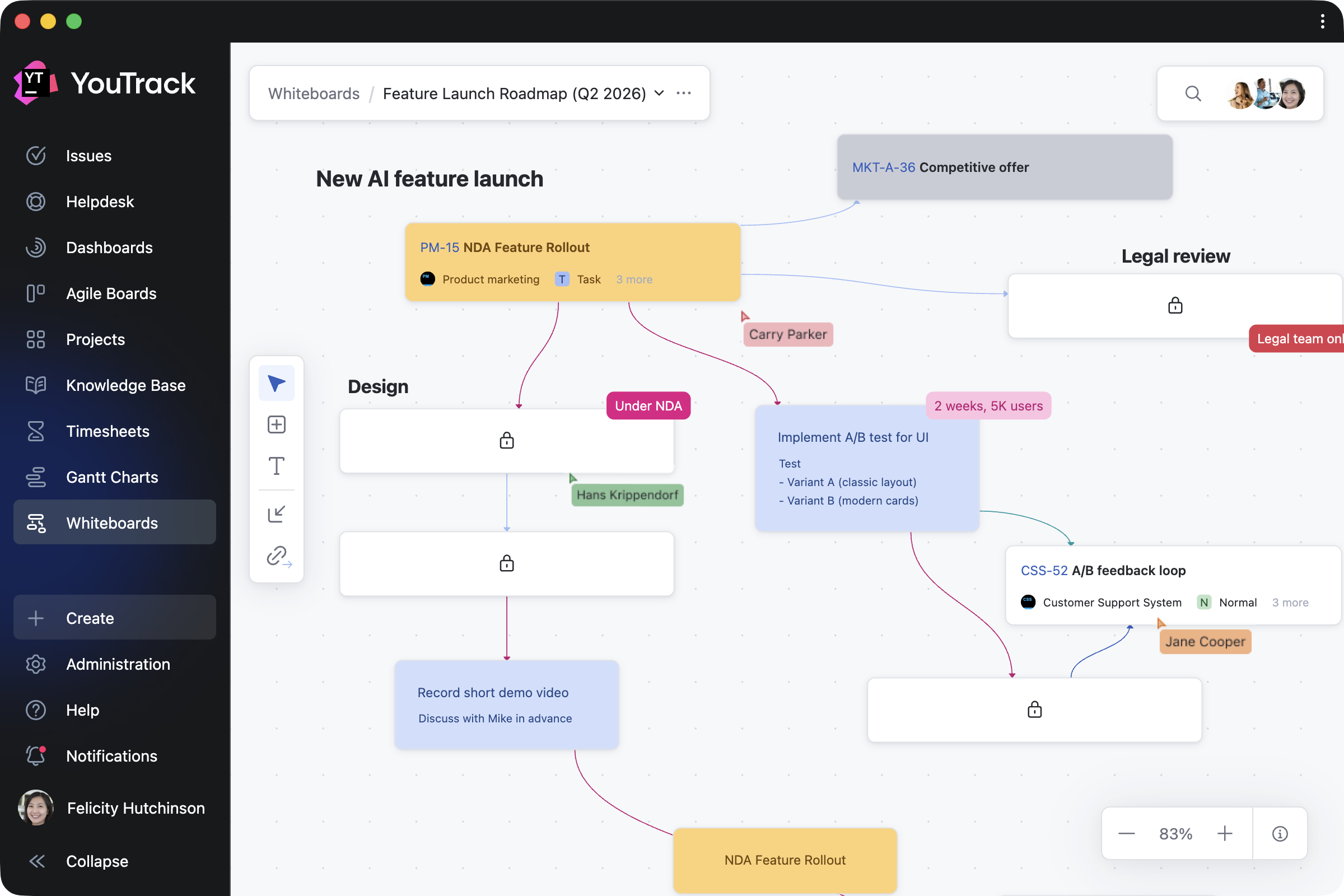
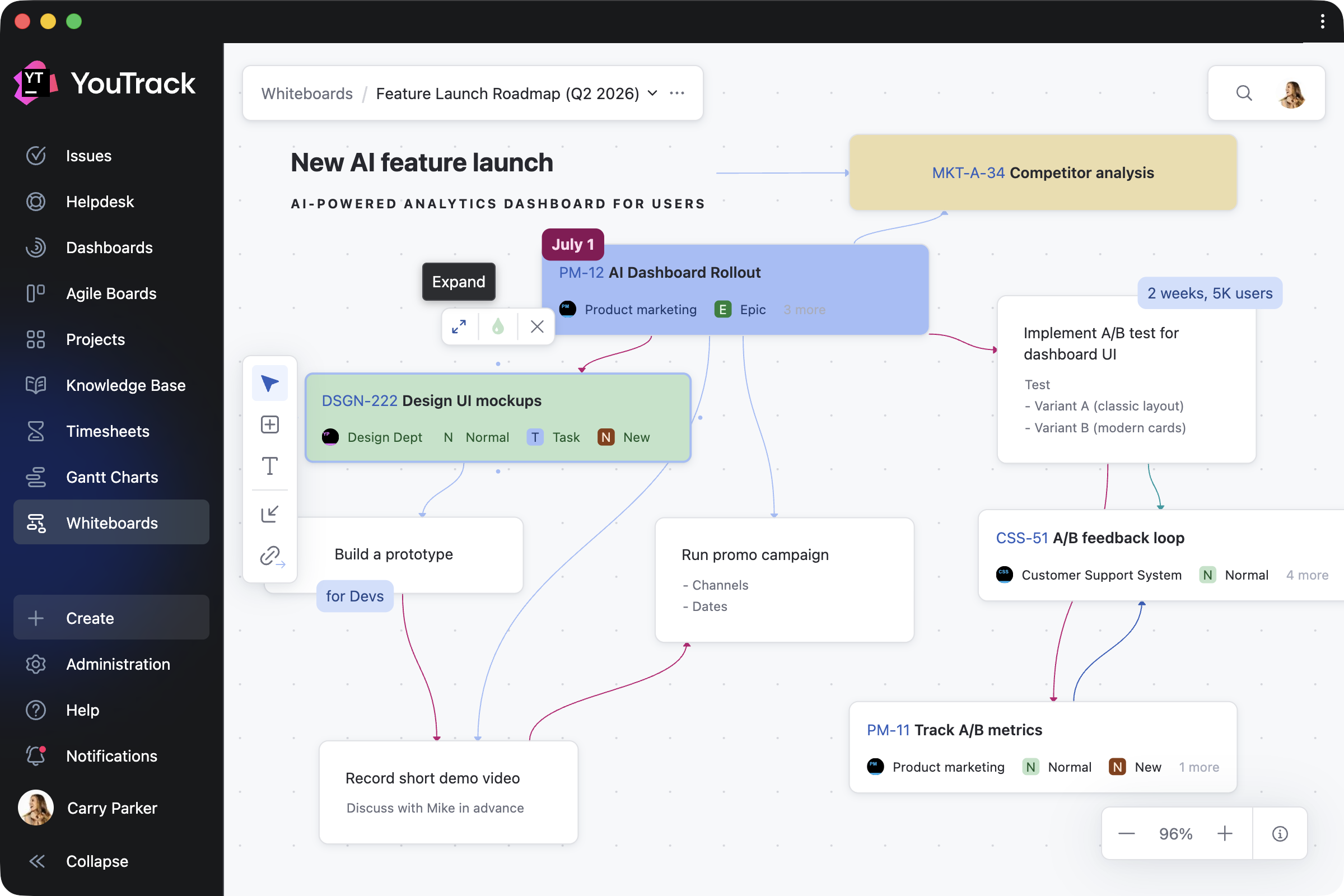
YouTrack 2026.1 introduces Whiteboards, a new way for teams to plan, brainstorm, and collaborate. Connect your current projects to get a better overview and organize work, or add notes and turn them into tasks and articles when you’re ready. This allows project managers and teams to plan from scratch, collaborate on ongoing projects, and ensure every activity is linked to your work in YouTrack.

We’ve also streamlined project access management for administrators and improved the notification center experience for all users. For teams that rely on AI tools in everyday workflows, there are new ways to use YouTrack within your existing stack, including an n8n integration and new remote Model Context Protocol (MCP) server actions for the Knowledge Base.

The YouTrack app ecosystem continues to grow, with 50 apps now available on JetBrains Marketplace. We’ve highlighted some of the latest apps for project managers, QA and support teams, and more.

Turn planning into action with Whiteboards

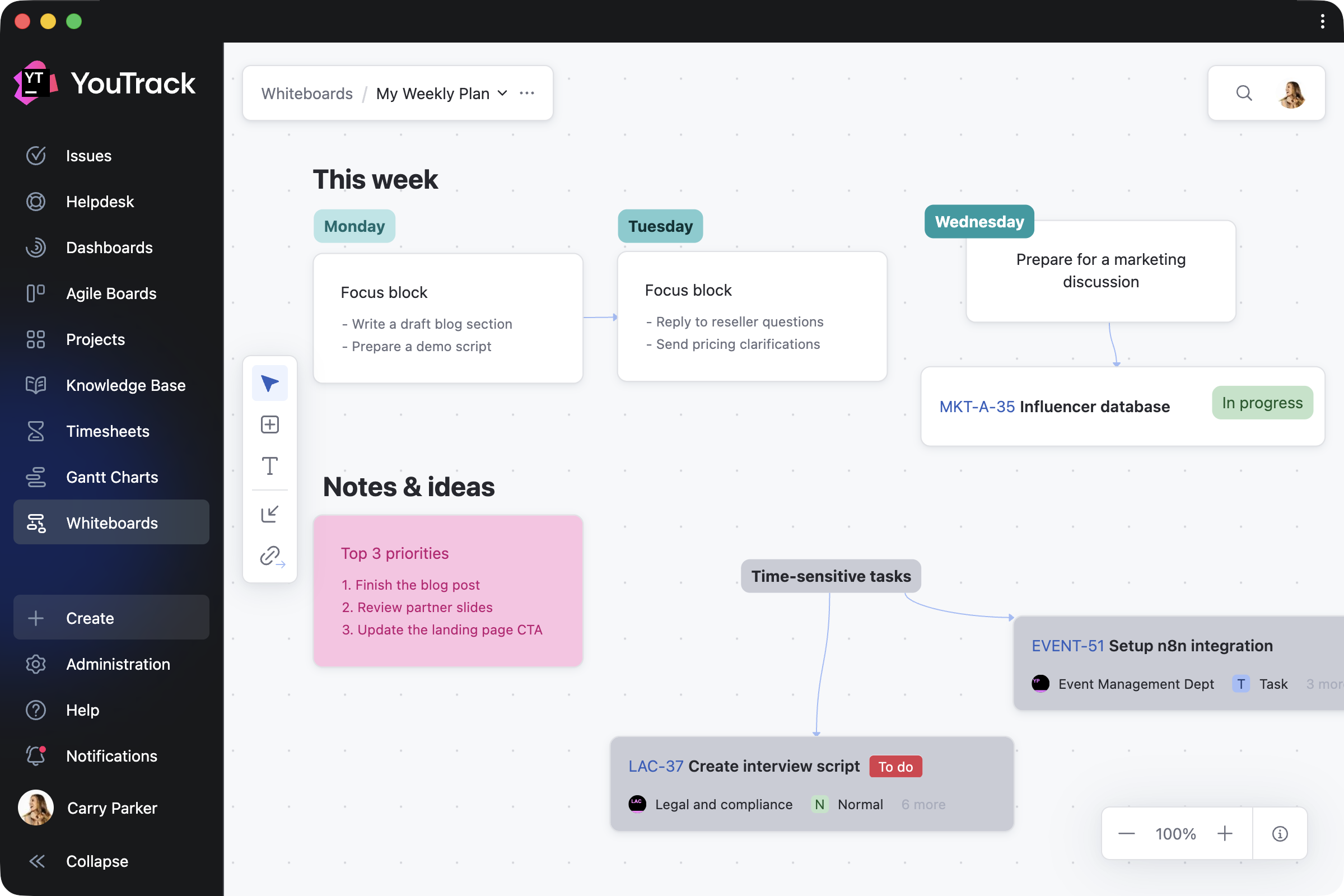
We’re excited to introduce Whiteboards – a new, flexible space where you can visualize your projects as you work on them. Whiteboards extend YouTrack’s built-in functionality and are available to every user and agent.

Whether you’re a project manager structuring a plan, a team brainstorming together, or an individual organizing your own work, Whiteboards support your approach. You can restructure existing projects, plan what comes next, and capture everything along the way – all in one place.

How Whiteboards work in a nutshell

Turn ideas into tasks and articles

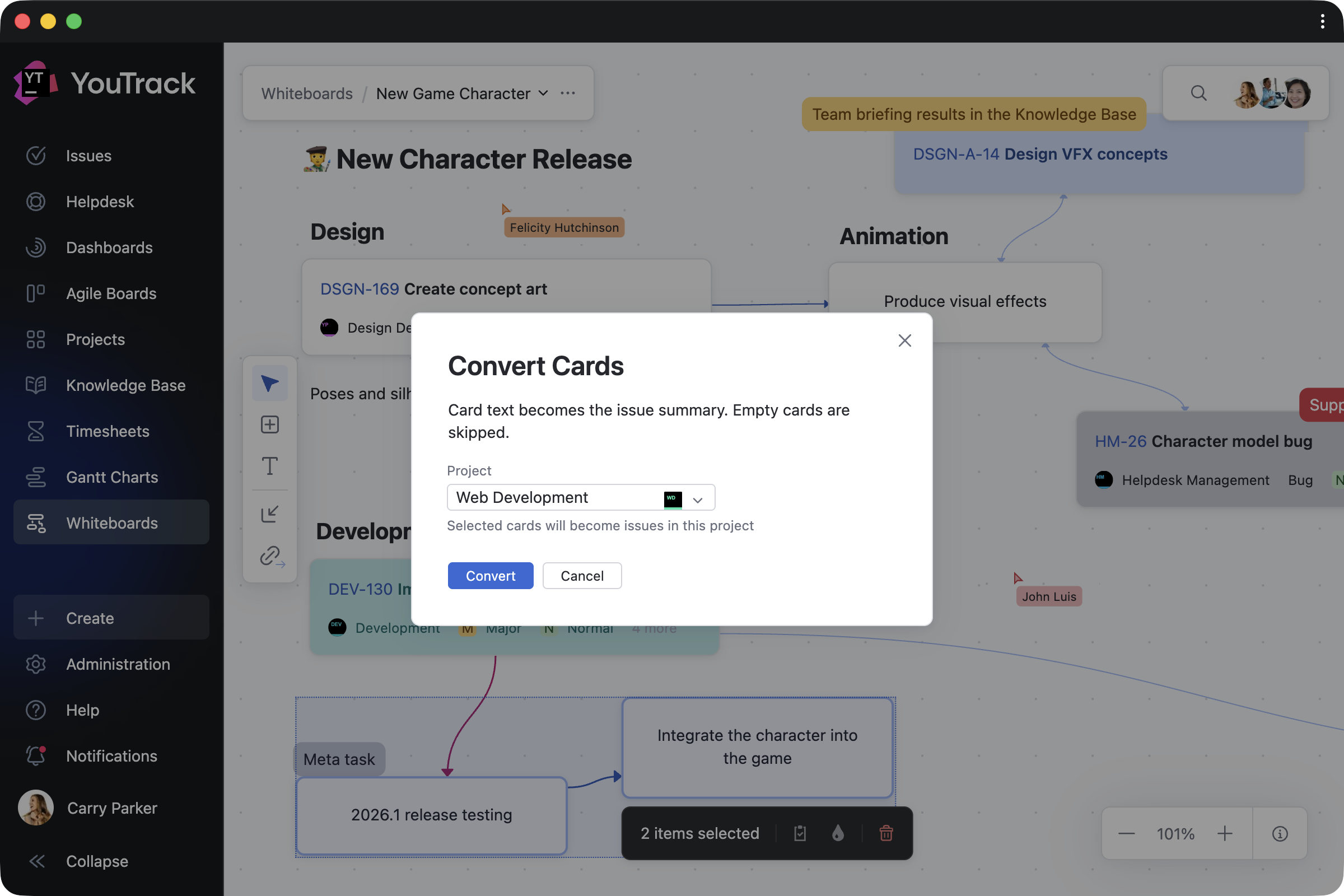
Work on Whiteboards on your own or together with your team, using cards and text blocks to shape your ideas and turning them into tasks or documentation with a single click.

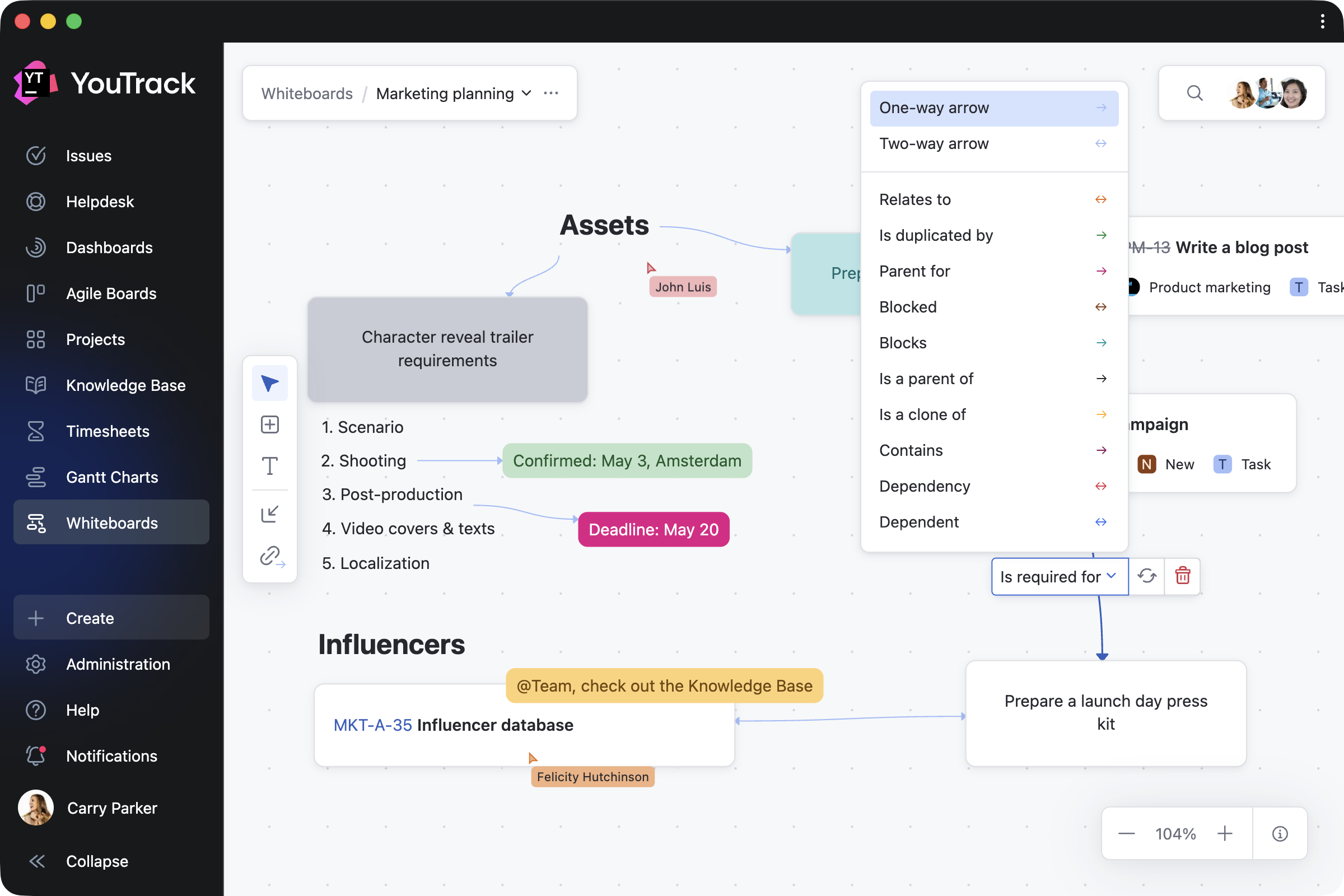
You can also connect any notes with links, so that linked cards reflect real relationships between tasks in your projects.

Import and work on ongoing projects

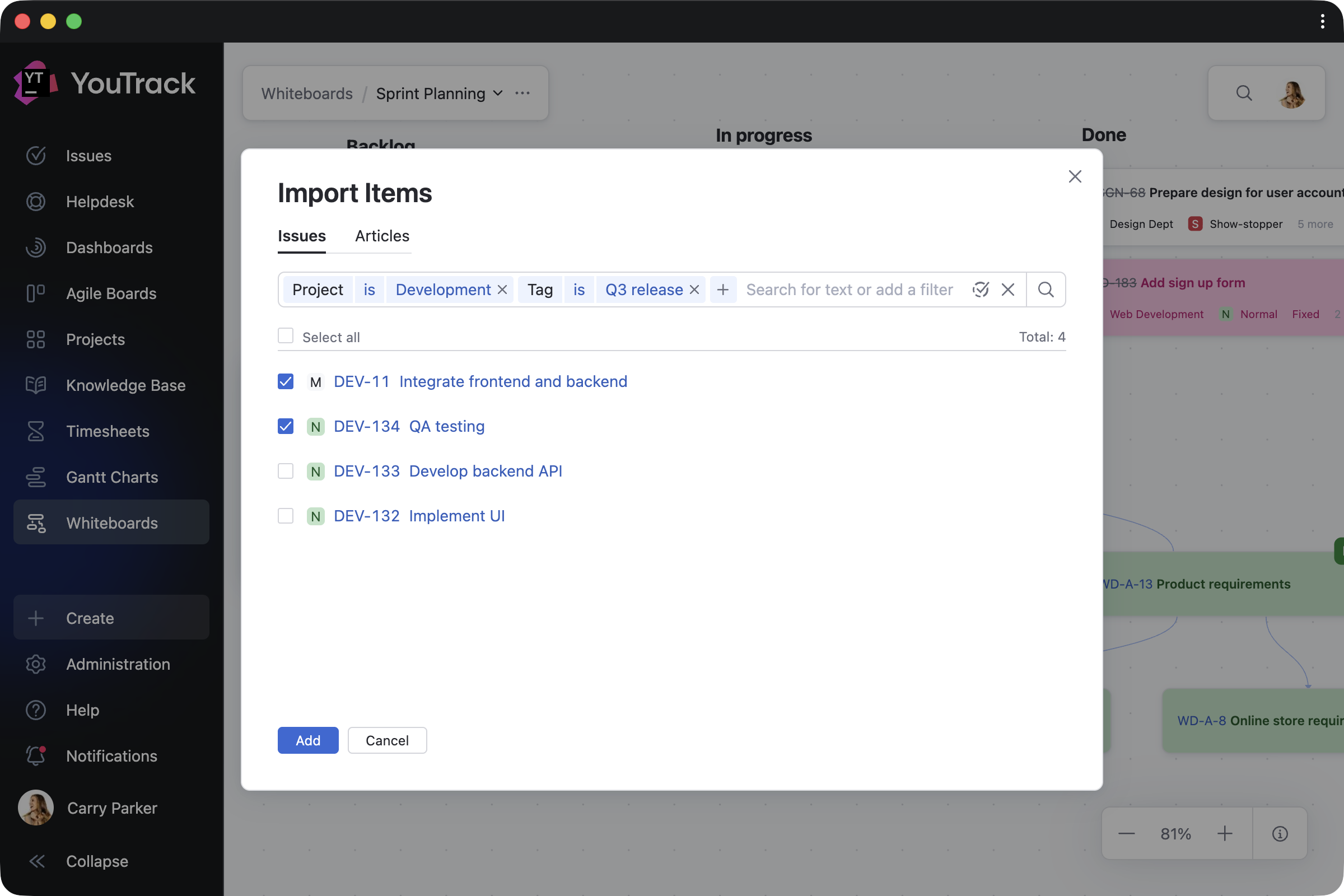
When you need to reorganize your current work, you can bring existing tasks, tickets, and articles onto your Whiteboard and update them directly as your plans evolve. Every change you make is instantly reflected across your projects – for both imported items and those created on the Whiteboard. Task dependencies are synced automatically as well.

Navigate and track your progress

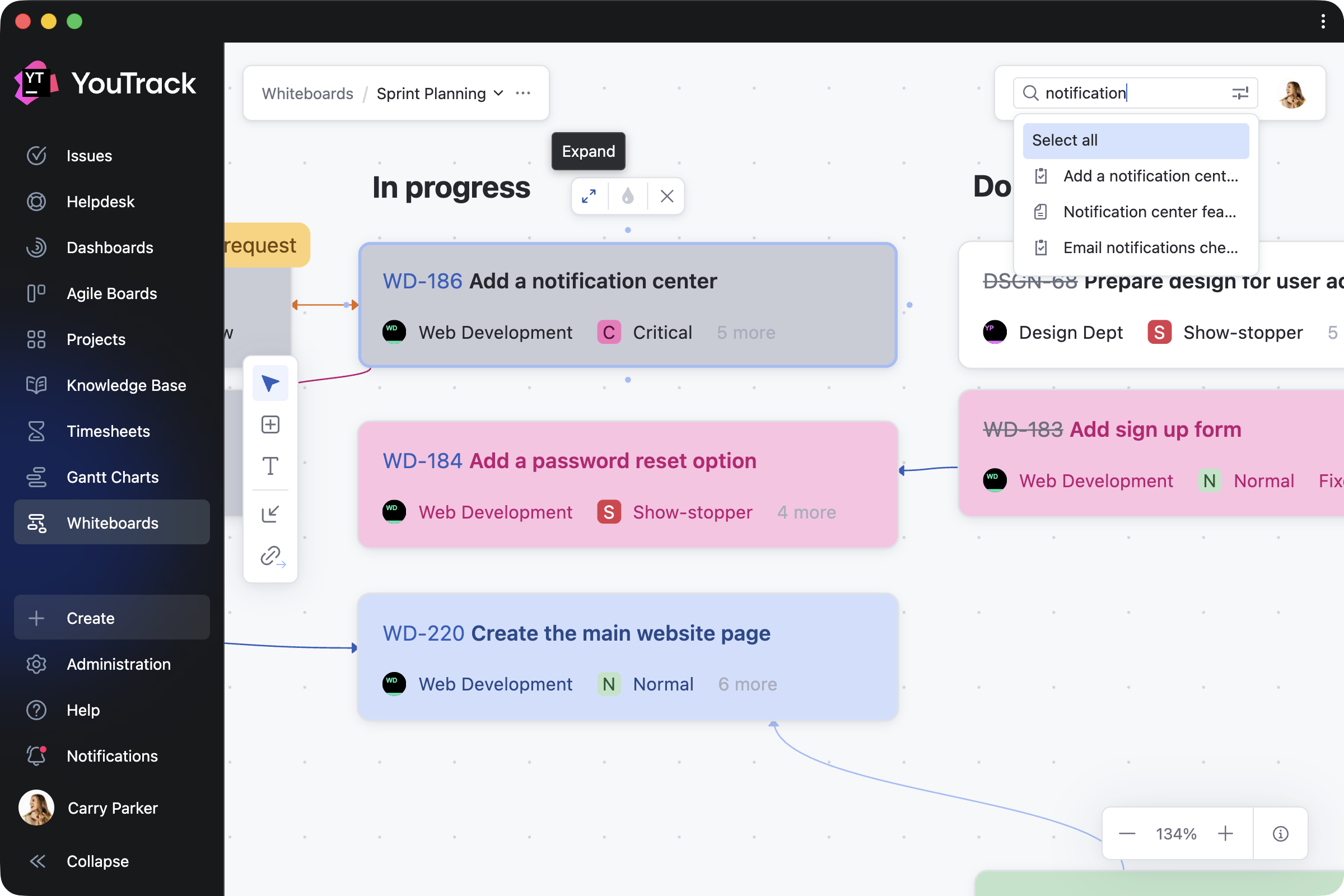
You can return to any Whiteboard at any point to see how your plans have evolved. Zoom in to focus on specific areas, switch to full-screen mode for a bird’s-eye view, or use search to quickly find and navigate to relevant content.

You can also control who can view or edit your work, with visibility on shared Whiteboards following your YouTrack project permissions.

Adapt Whiteboards to your work

Since Whiteboards start from a blank canvas, you can shape them to fit any work scenario – from creating a cross-project overview to focusing on specific topics in detail. Here are a few ways you can use them.

Plan projects 

Planning often starts with ideas rather than structured tasks. Project managers can outline team roadmaps, restructure ongoing work, or visualize new projects. As cards are converted into YouTrack tasks and articles, your team can continue working in projects without interruption.

Brainstorm with the team

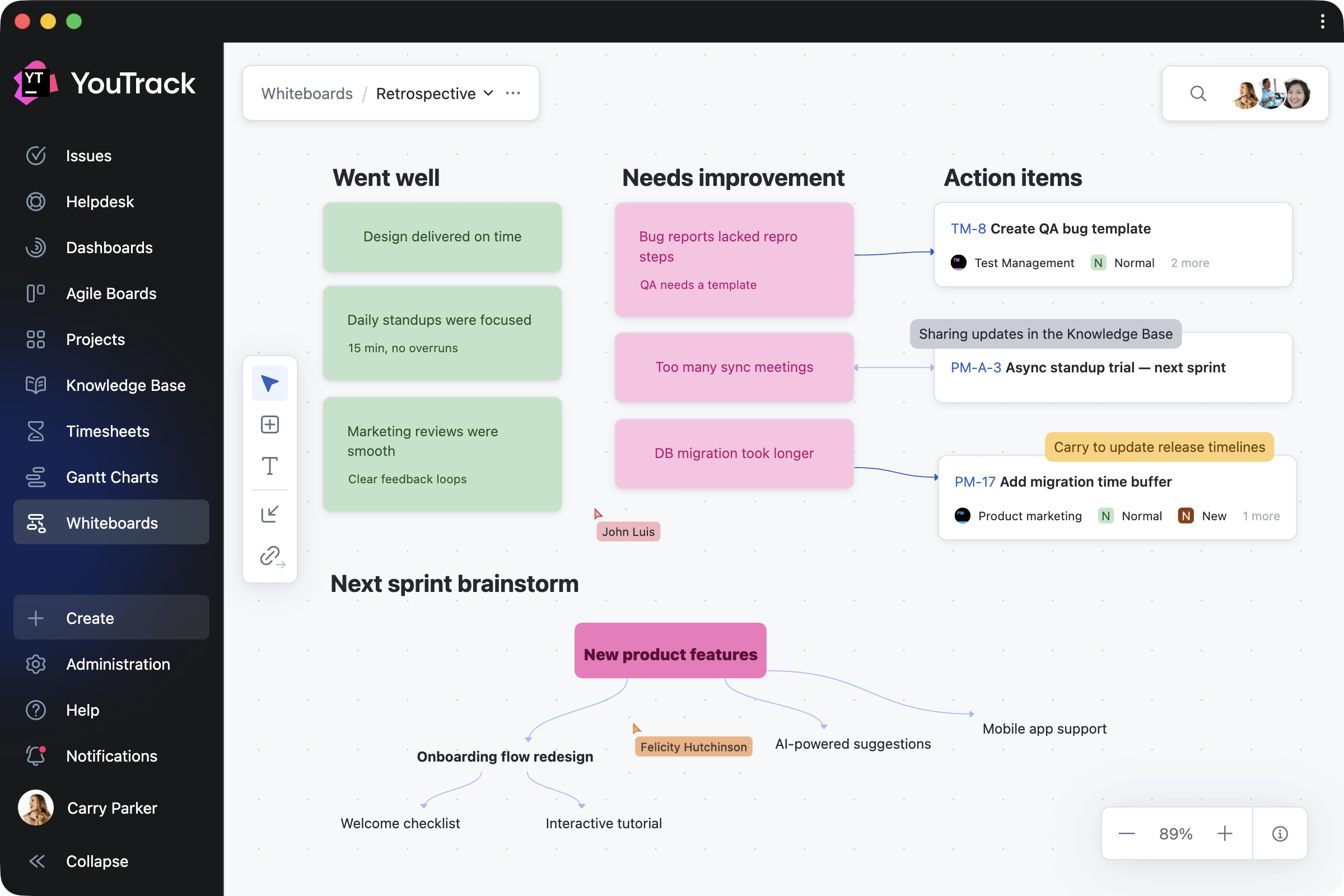
Any team member can add and update cards, text blocks, and their connections in real time or asynchronously. Whether you’re running a retrospective, building a mind map, or sketching out ideas together, Whiteboards adapt to your team’s distinct workflows. For example, product teams can shape new features, while support teams can map customer journeys.

Share knowledge with your users

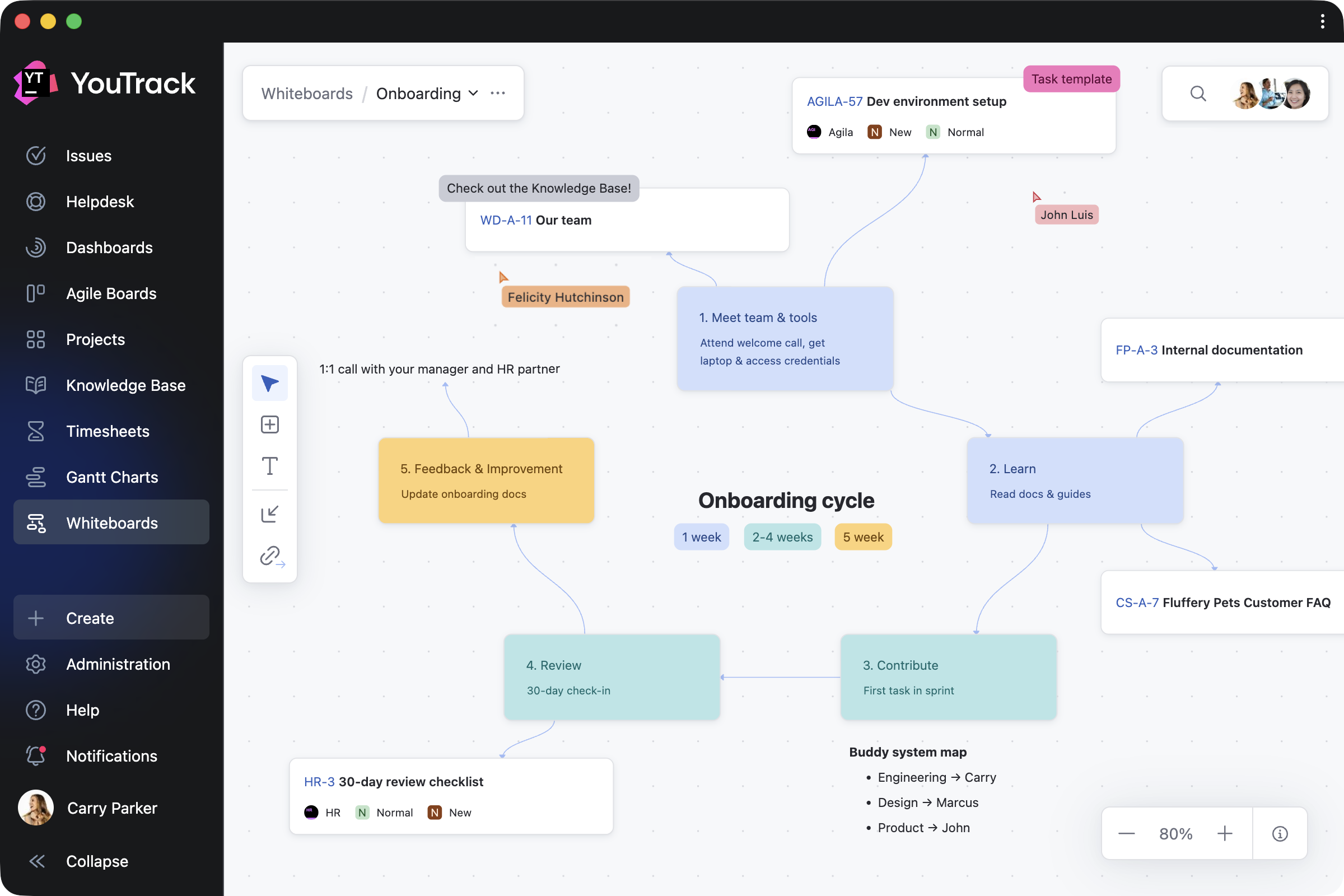
Administrators can create shared Whiteboards to explain workflows, processes, and project structures to users or guests. By combining guidance notes with direct links to relevant tasks and articles, you make it easier to access everything in one place.

Organize personal work

Individual users can also use Whiteboards for their own planning – capturing ideas, organizing a week, or taking notes that are visible only to them. When you’re ready, you can invite others to collaborate and turn your private whiteboard into shared work.

Design enhancements for administrators and teams

Streamlined access management for projects

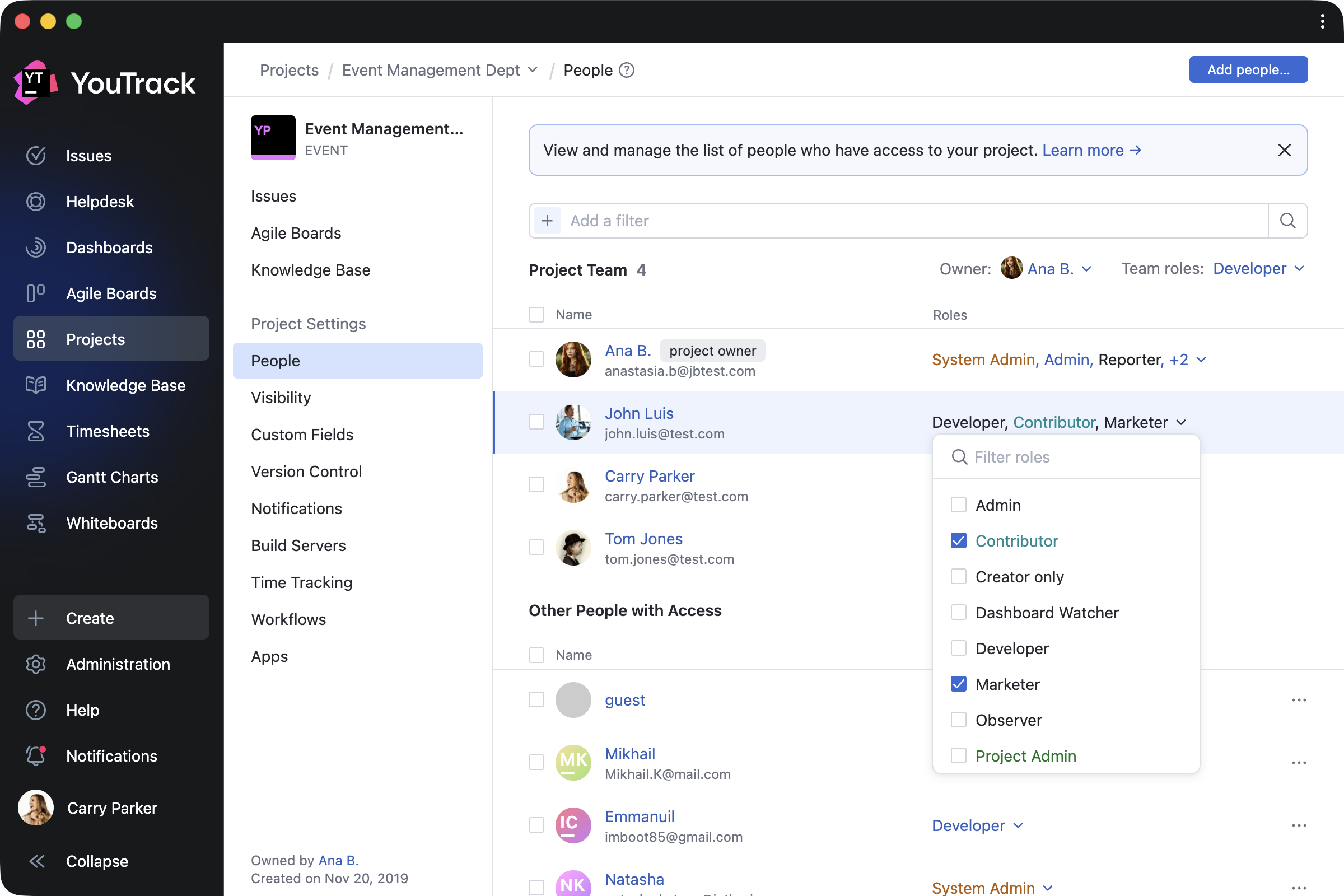
We’ve added further YouTrack design updates to make working on your projects easier. The new People tab on the project overview page simplifies how administrators manage project teams. Administrators can add or remove users and groups, assign roles, and filter team members by roles and permissions – all without having to jump between pages. The previous Team and Access tabs are now combined into a single, streamlined view. You can learn more about all changes in our documentation.

Here’s how it works in practice. When new team members join, you can add them to the project and assign their role right away. To manage existing project members, you can filter users and groups, then update or revoke their roles as needed. The People tab also lets you control access for people outside the project team, giving you a clearer overview of who can access your project.

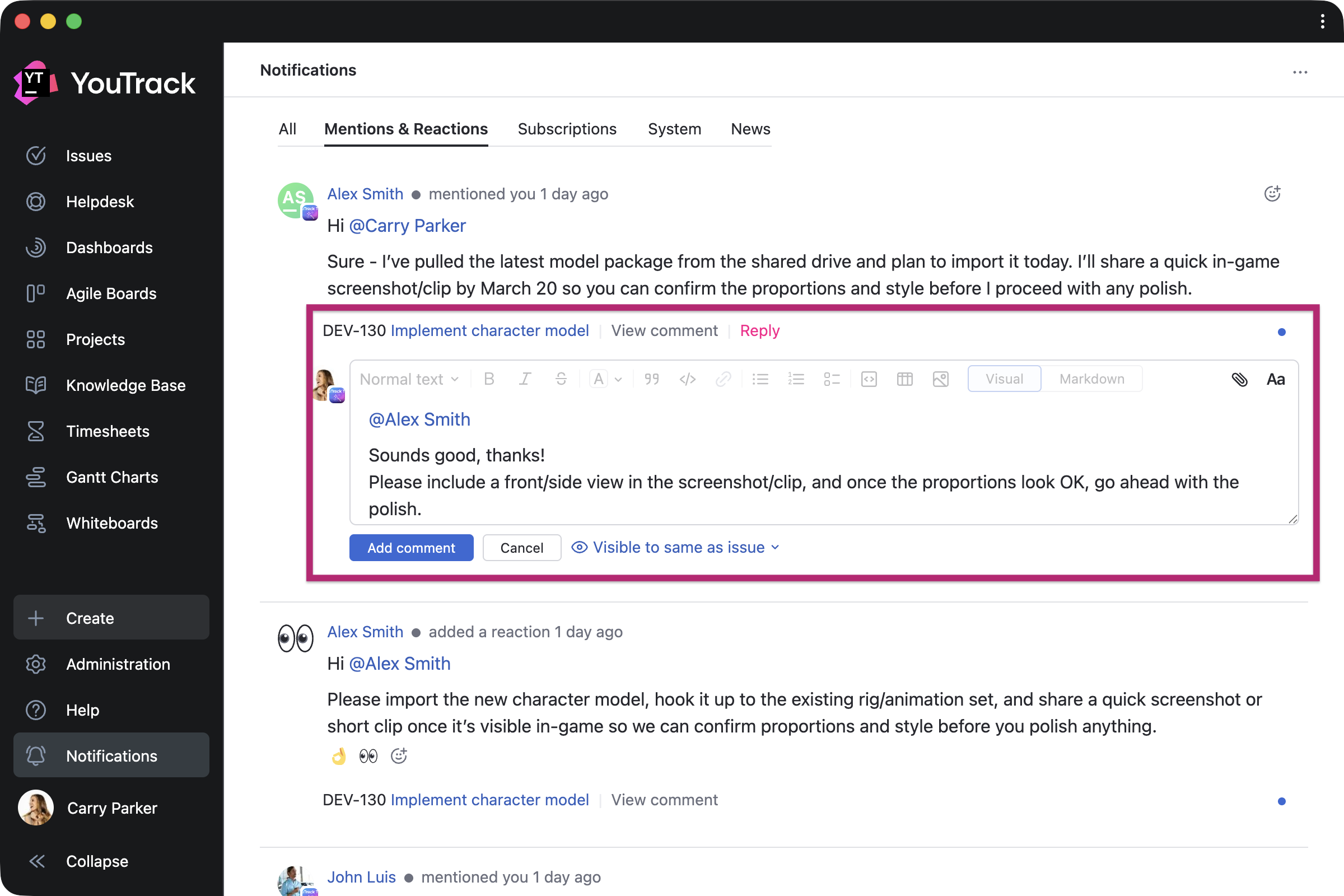
Full-page notification center

Every user can now expand the notification center to a full-page view and reply to comments directly from there. This makes it easier to quickly respond to feedback or discussions without switching contexts.

Use YouTrack inside your existing stack with AI-powered integrations

For many teams, AI tools are already part of their everyday workflows. In addition to our built-in free AI assistance, we’re introducing new AI-powered integrations so you can use YouTrack from the tools you already rely on.

n8n integration

n8n is a workflow automation platform that connects your tools and services without code. YouTrack now has a dedicated node in n8n, so you can automate workflows and connect YouTrack with hundreds of apps – sync data, trigger issue updates, execute YouTrack commands, and build cross-platform workflows with ease.

You can build your own workflows or use existing templates. For example, you can configure workflows to collect data from third-party systems into YouTrack, update tasks based on actions from your AI agents, share YouTrack content with other systems, and much more. This means YouTrack can be integrated into every step of your automation.

New remote MCP server actions for the Knowledge Base

For teams working from their existing LLM, IDE, or agent platform, we’ve expanded the number of predefined actions available via YouTrack’s remote MCP server. You can now use AI-powered tools to find, create, and update Knowledge Base articles and create tasks with pre-configured visibility.

If you want to set up the remote MCP server for your coding agents, such as Claude Code or Cursor, or for integration platforms like Zapier and Make or other automation tools, you can find detailed instructions in our documentation.

YouTrack Helpdesk experience for standard users and agents 

We’ve enhanced the experience for standard users and agents participating as internal reporters in helpdesk projects, making it easier for them to submit and track their own requests. They can now seamlessly access reporter functionality while submitting tickets and receive reporter email notifications.

When the product team needs to join the conversation, standard users now have a similar experience to agents when replying to reporters via public comments or email CC.

New apps on JetBrains Marketplace

Check out some recent apps from our certified consulting partners and third-party providers, now available to enhance your YouTrack experience.

Apps for project managers and teams

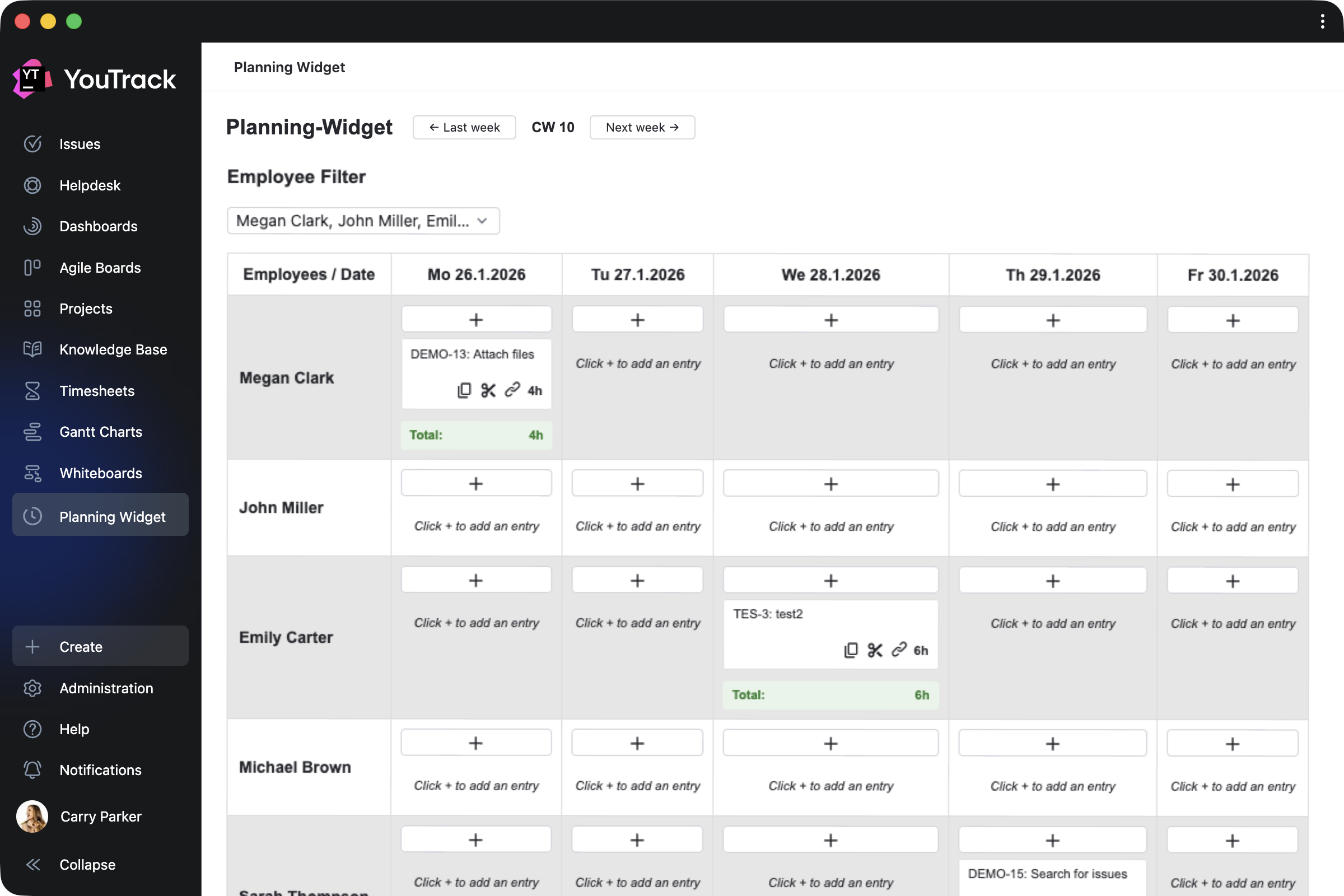
Planning Widget by CARL von CHIARI helps managers plan team activities in a calendar view. Review the tasks and tickets your team members work on each day, track time spent, and filter the view by employee.

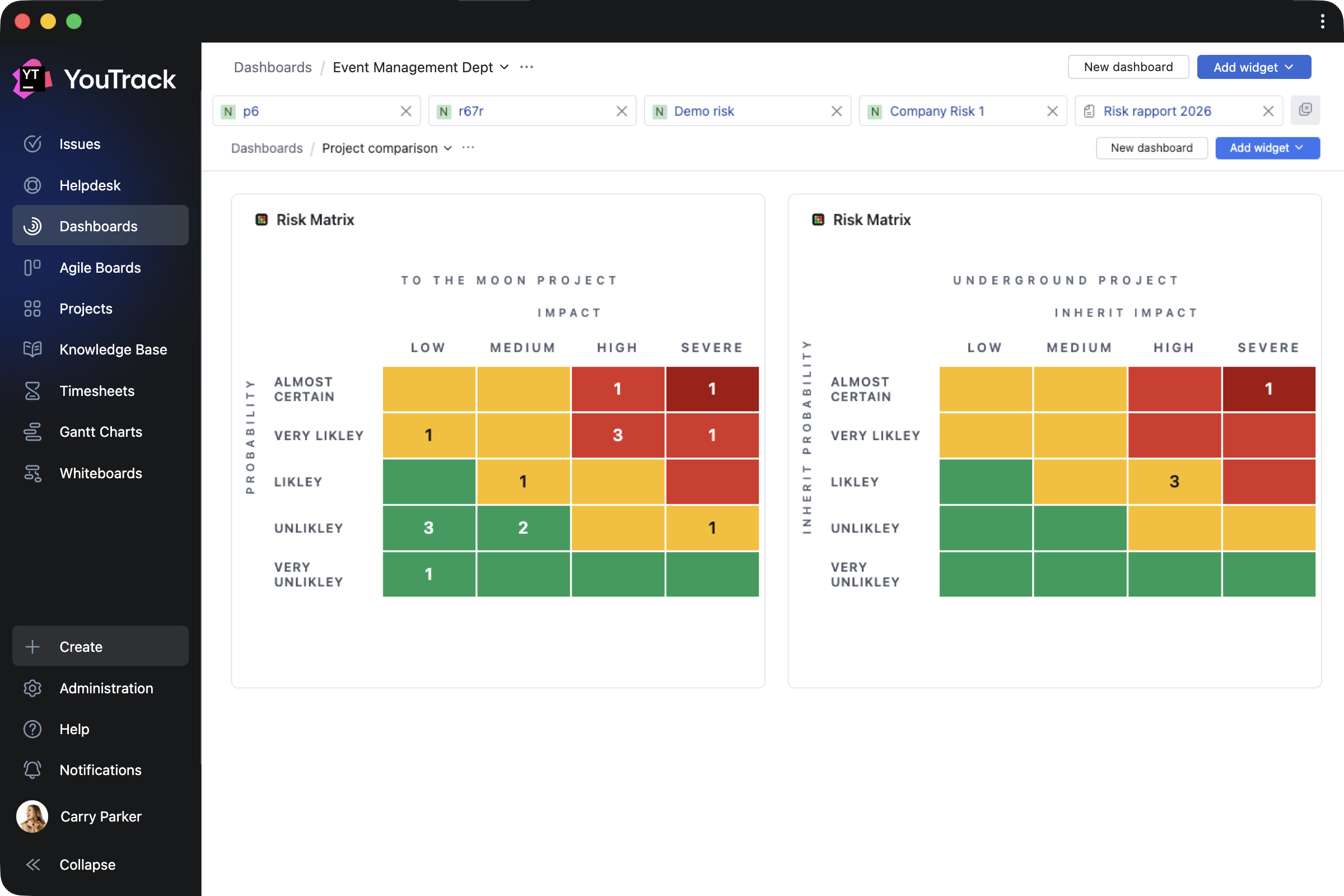
Risk Manager by Rixter AB helps project managers assess project risk levels by building risk-matrix widgets based on the probability and impact of specific outcomes for selected tasks.

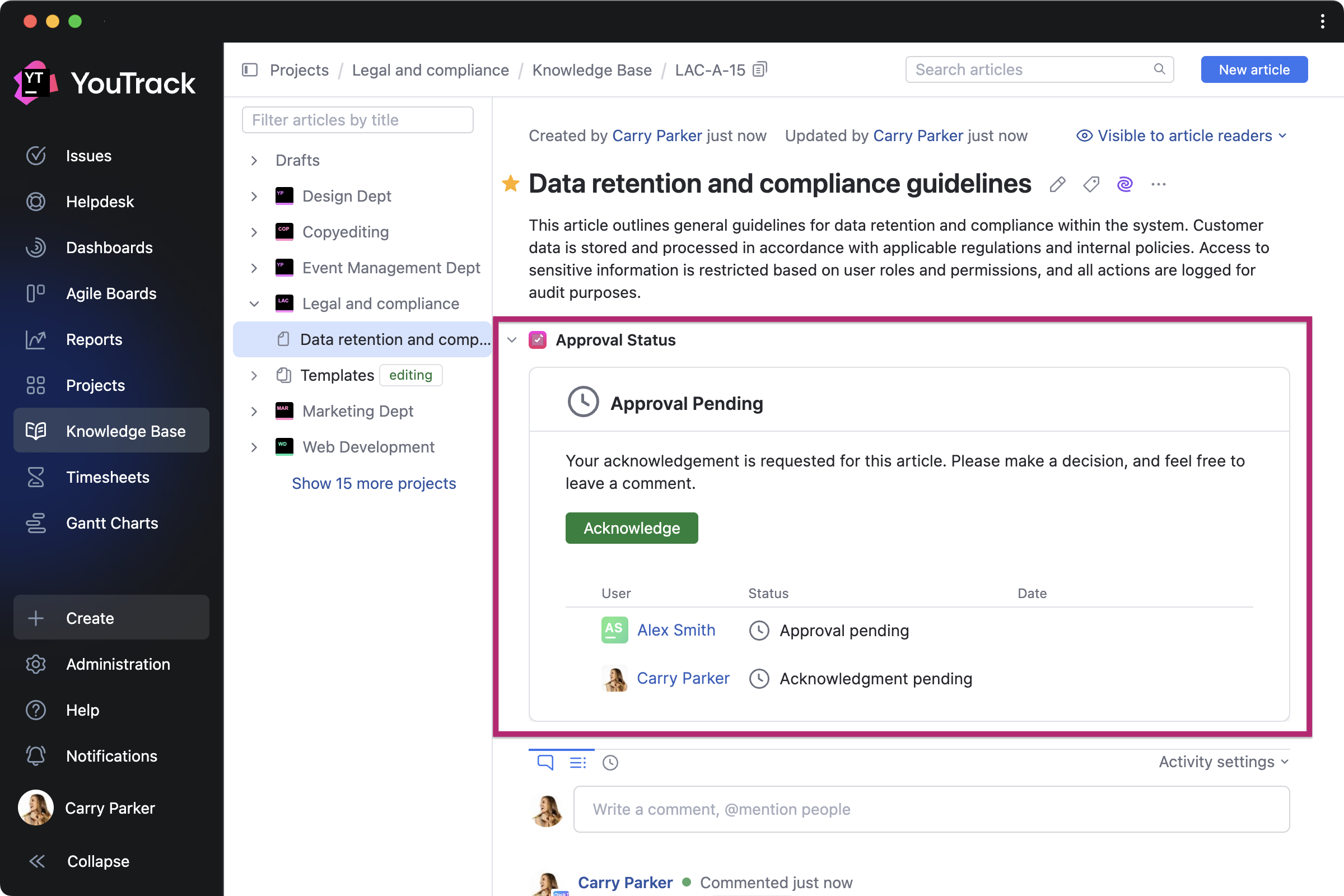
Article Approval by twenty20 is a paid app that allows teams to manage approval workflows directly in the Knowledge Base. You can invite approvers and acknowledgers for each article, set due dates, and track approval statuses.

Apps for QA and DevOps teams

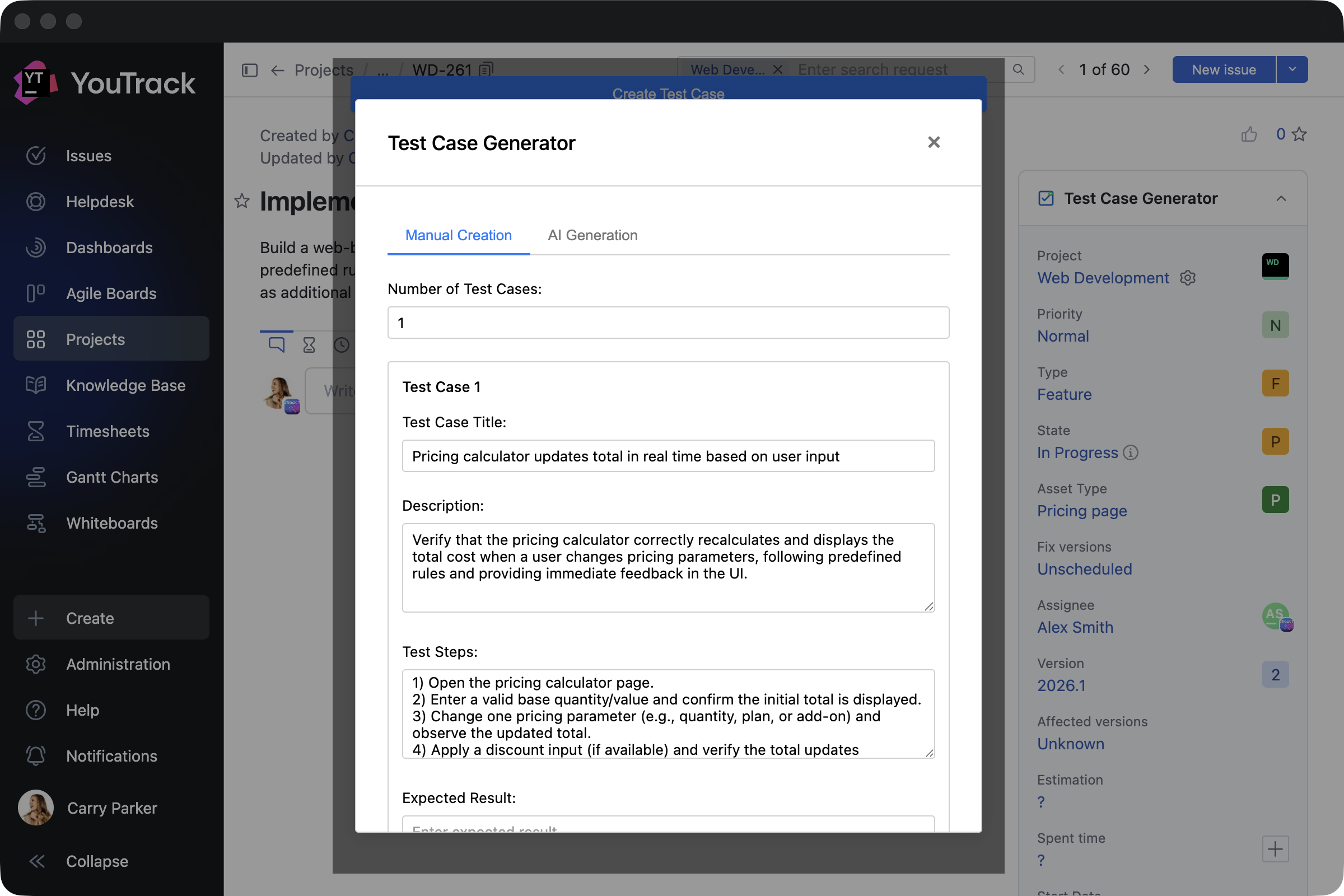
Test Case Generator by Depa Panjie Purnama helps users create test cases or generate them using AI models while working on other development tasks.

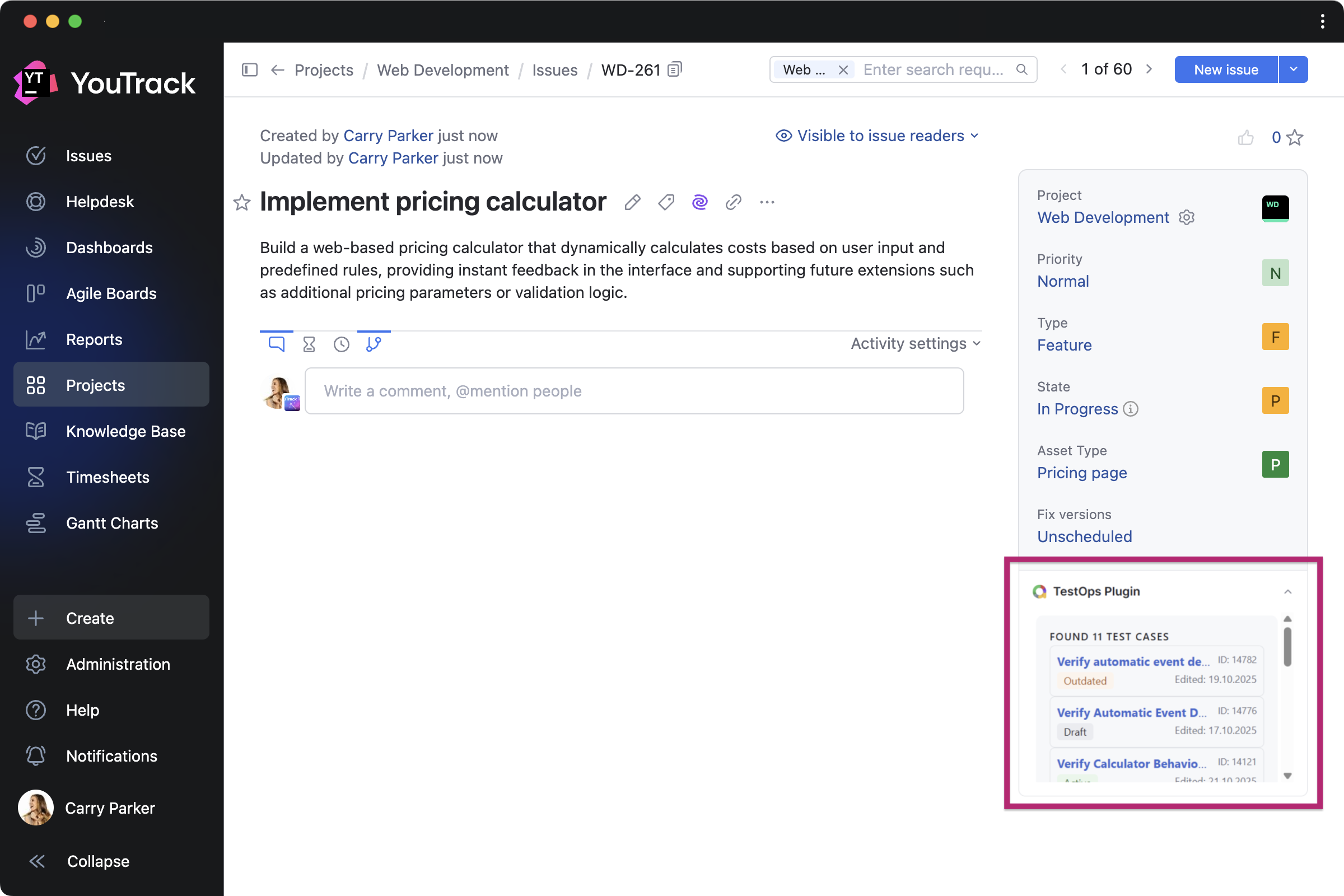
TestOps Plugin by bodm helps DevOps teams to stay on top of testing while developing features. It brings recent test cases from Allure TestOps directly into related tasks.

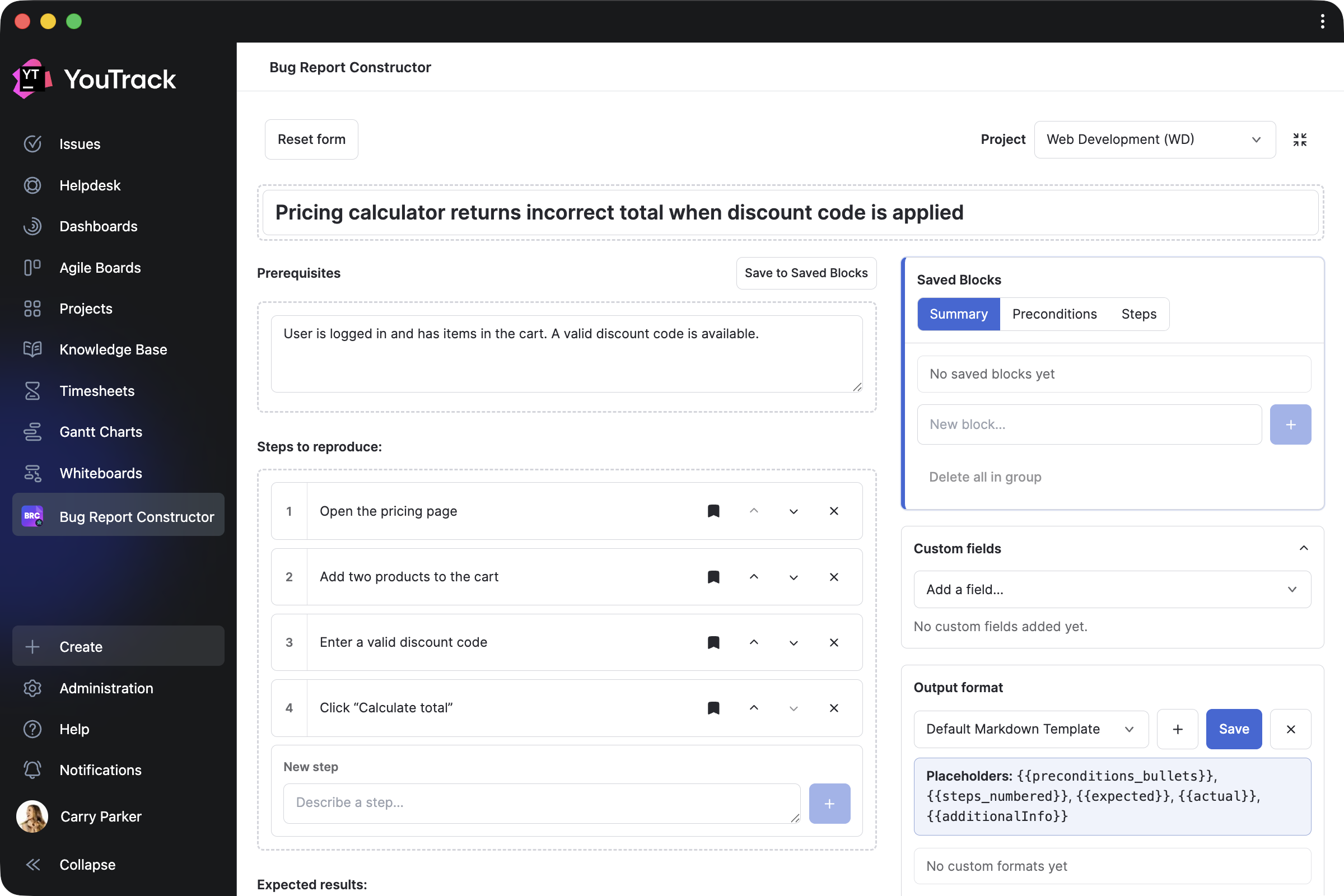
Bug Report Constructor by Evgenii Venediktov allows QA teams to collect bug reports using a single template and enables users to quickly create task drafts with pre-saved blocks.

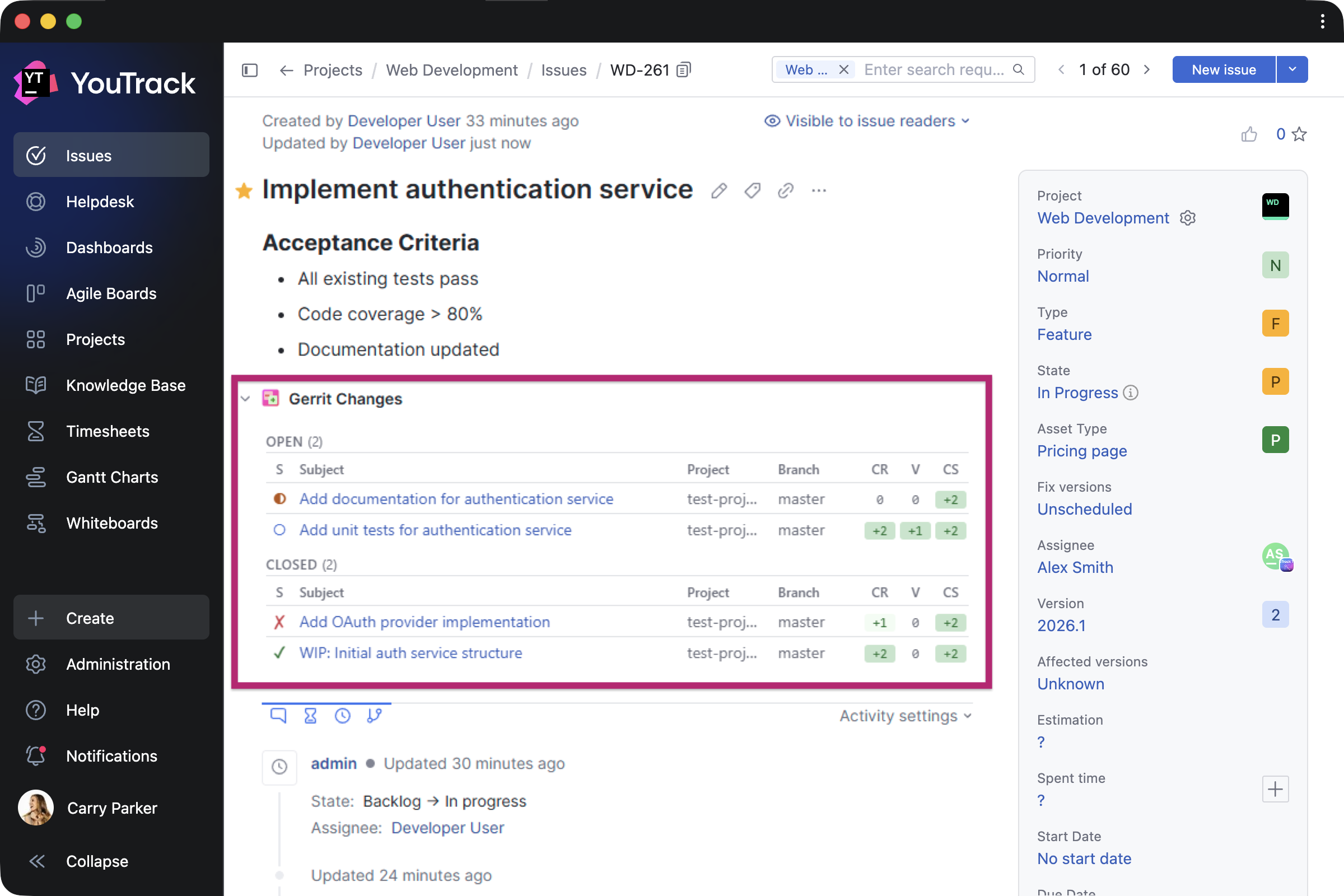
Gerrit Integration by Phoenix Systems helps developers display related Gerrit Code Review changes directly in tasks, including status, approvals, and links.

Apps for support teams

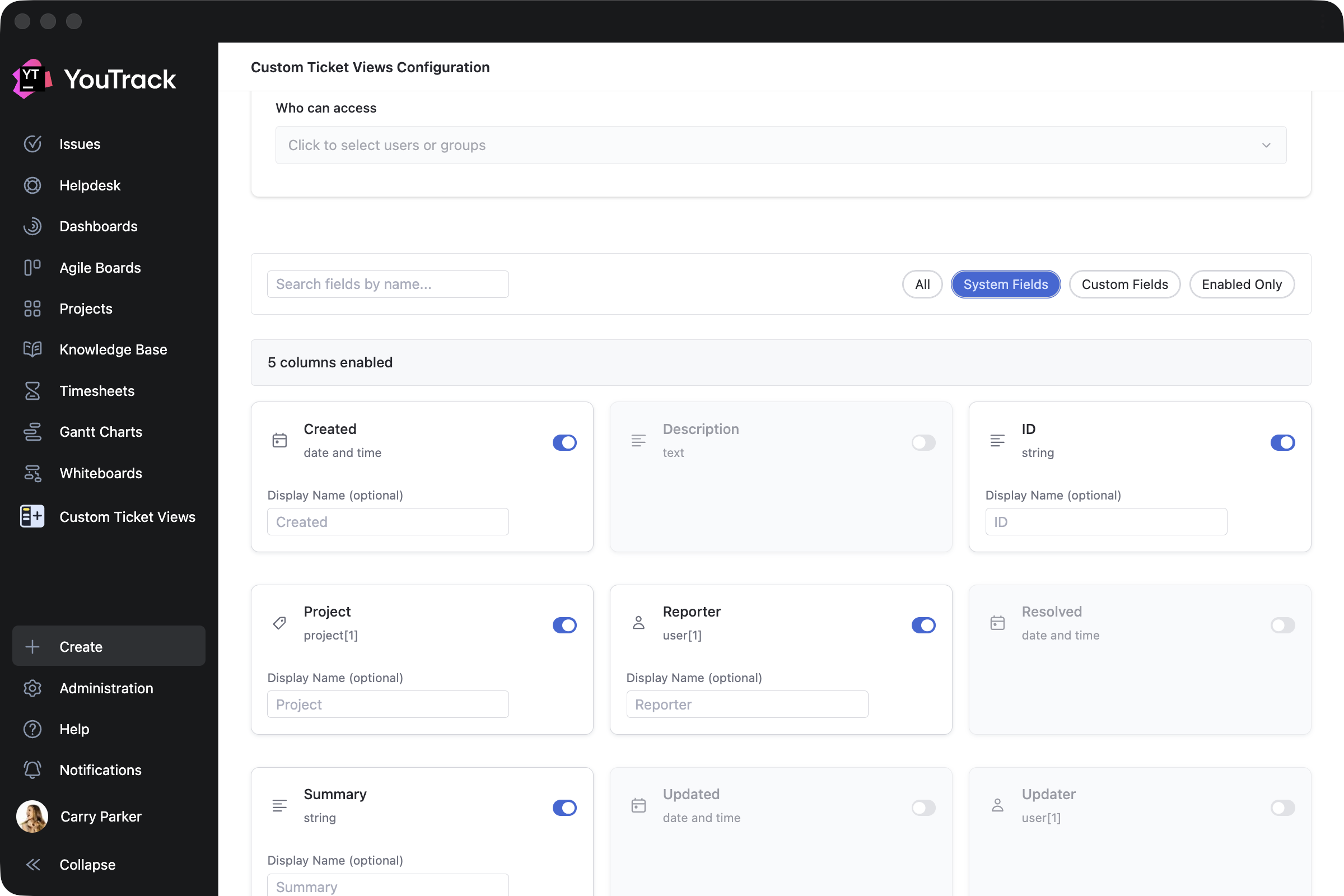
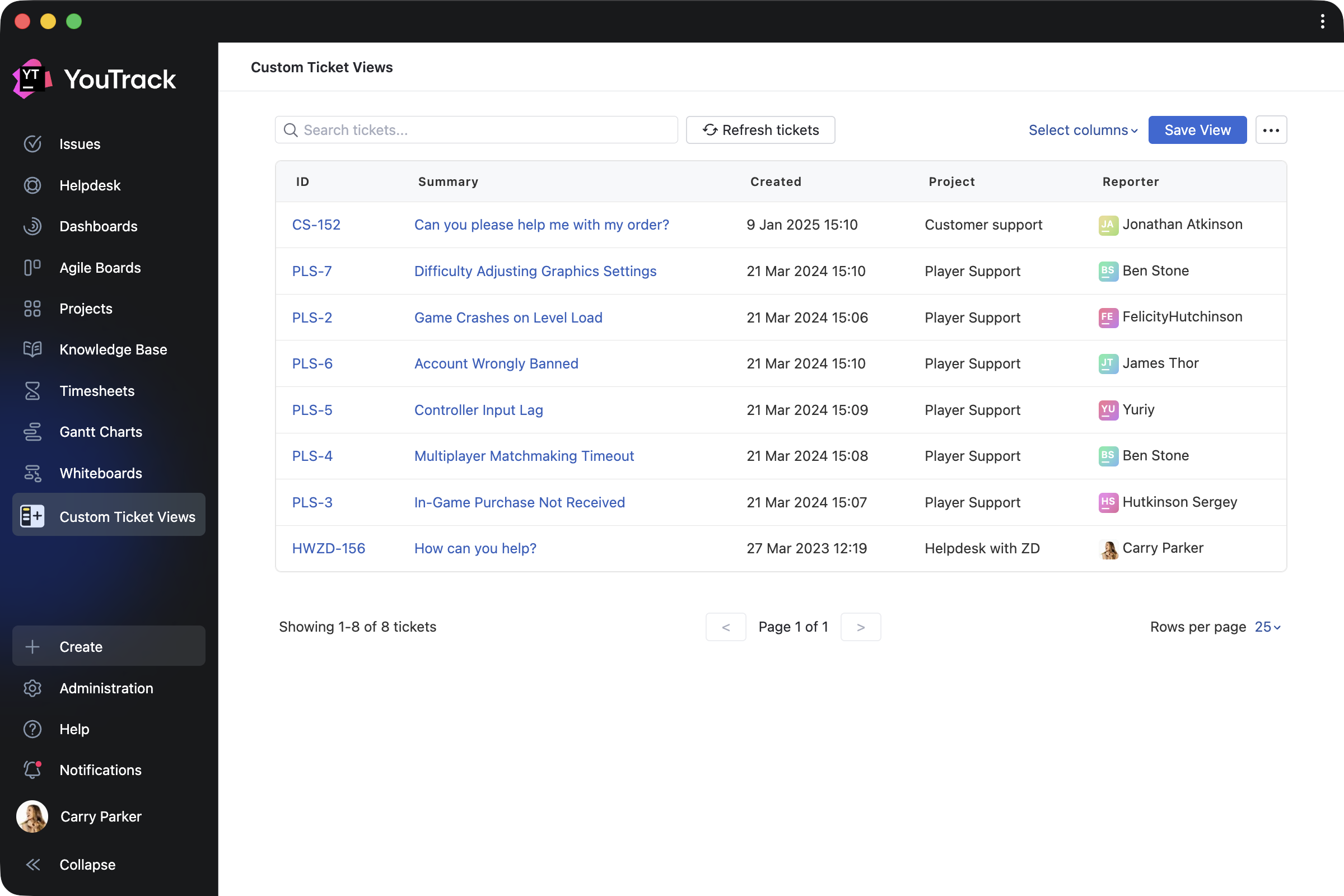
Custom Ticket Views by ​​Appfero is a paid app created to help support teams enhance reporters’ experience when working in YouTrack Helpdesk. It adds a new menu section that shows a reporter their submitted tickets in a customizable view.

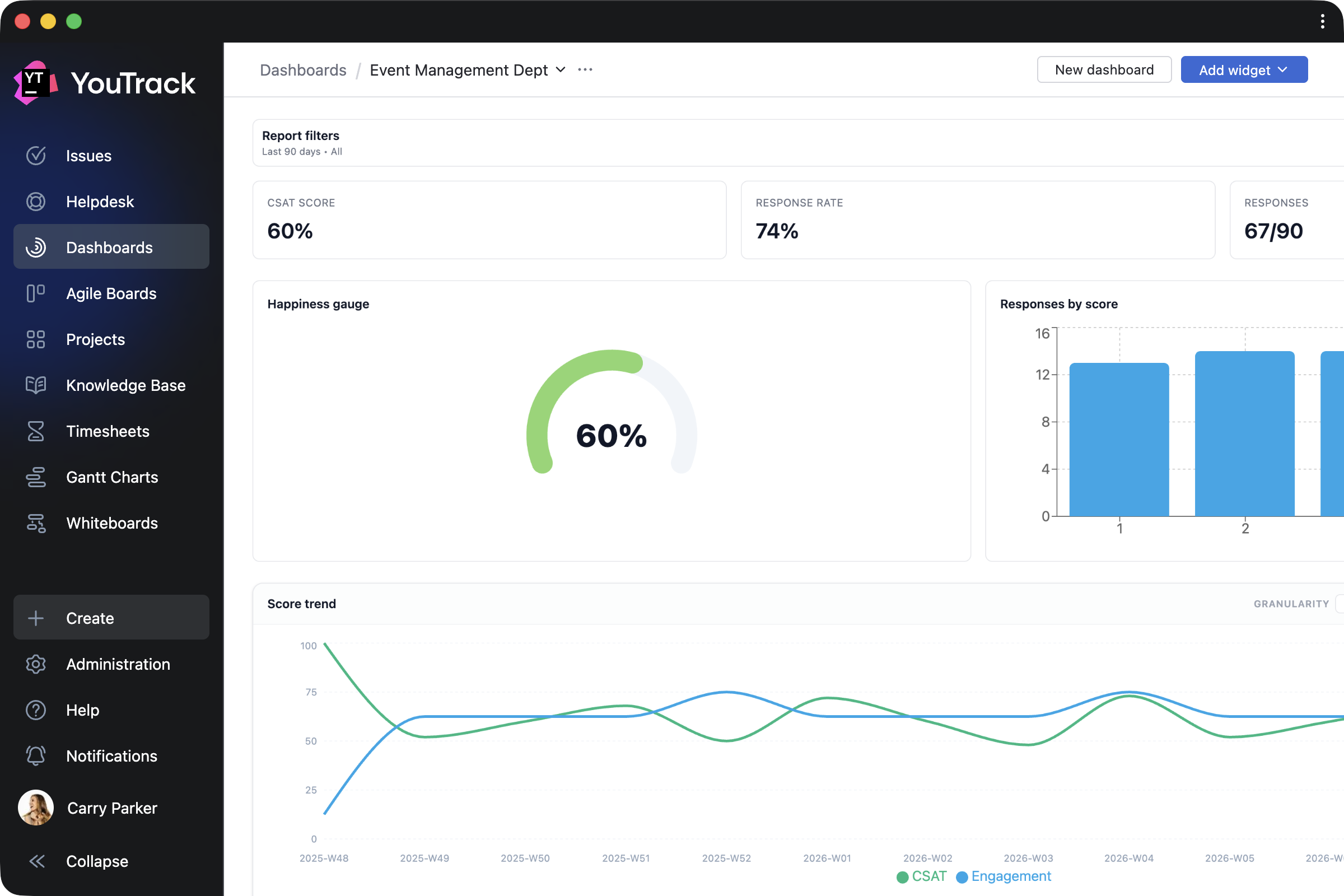
Customer Satisfaction by Appfero is another paid app that enables teams to collect feedback on task execution through automated customer satisfaction surveys (CSAT). Configure your custom survey flow and review response analytics directly in YouTrack.

Apps for working with task, ticket, and article content

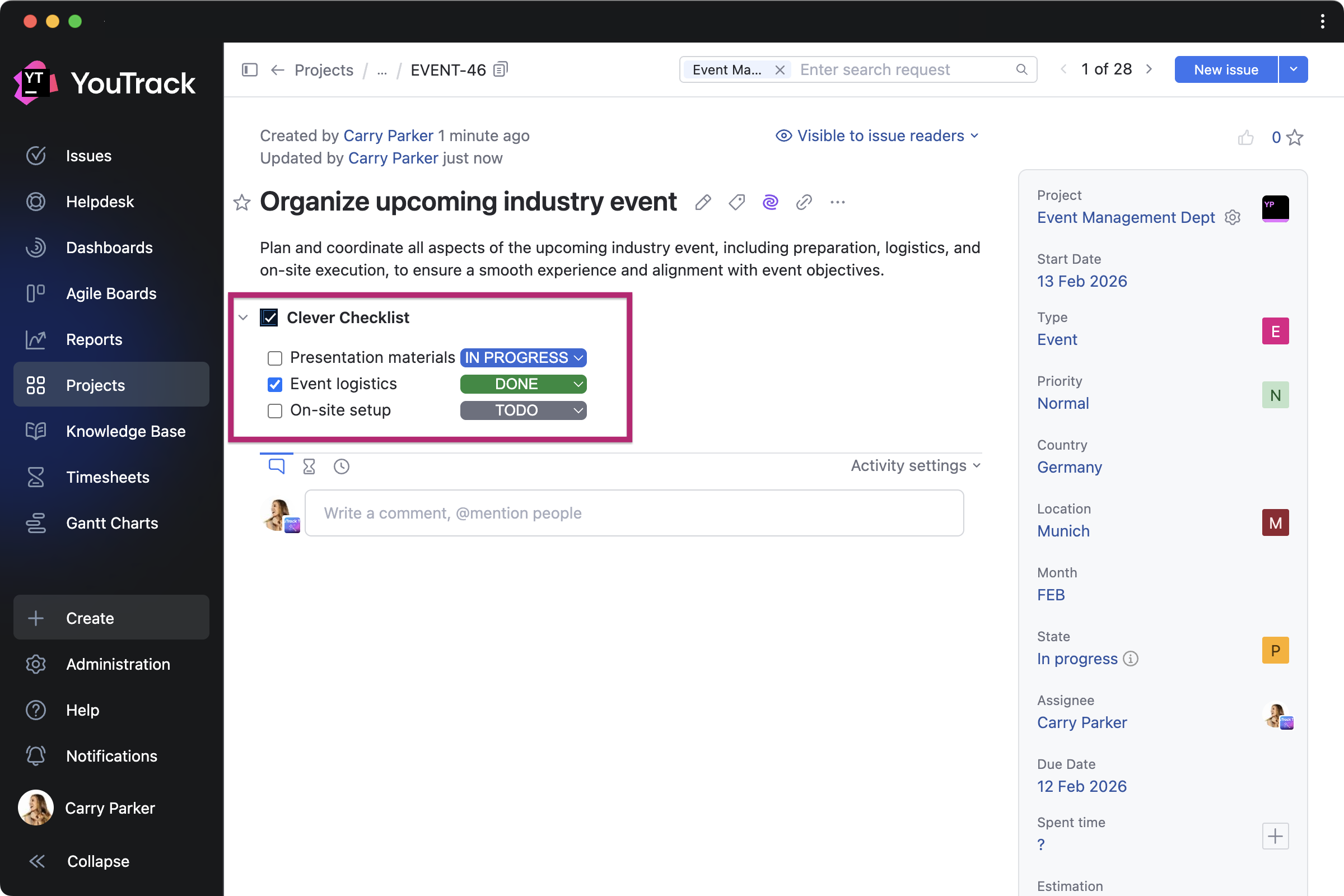
Clever Checklists by TEKDynamics lets everyone manage daily work with to-do lists by adding a custom checklist to every task in a selected project.

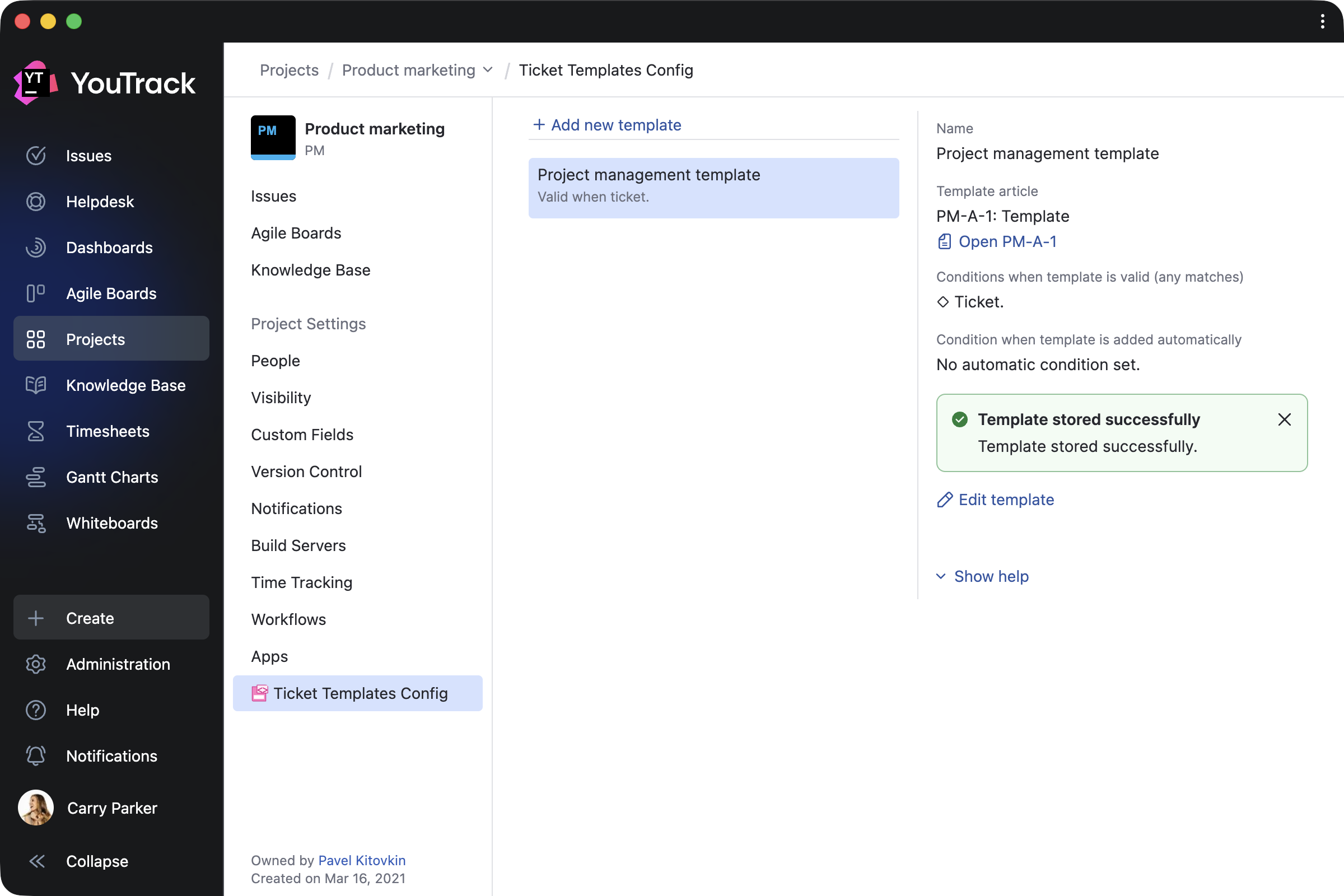
Ticket Templates by Marcus Christensson automatically updates tasks and article content using your saved templates, which can be created based on ticket fields, tags, and various other conditions.

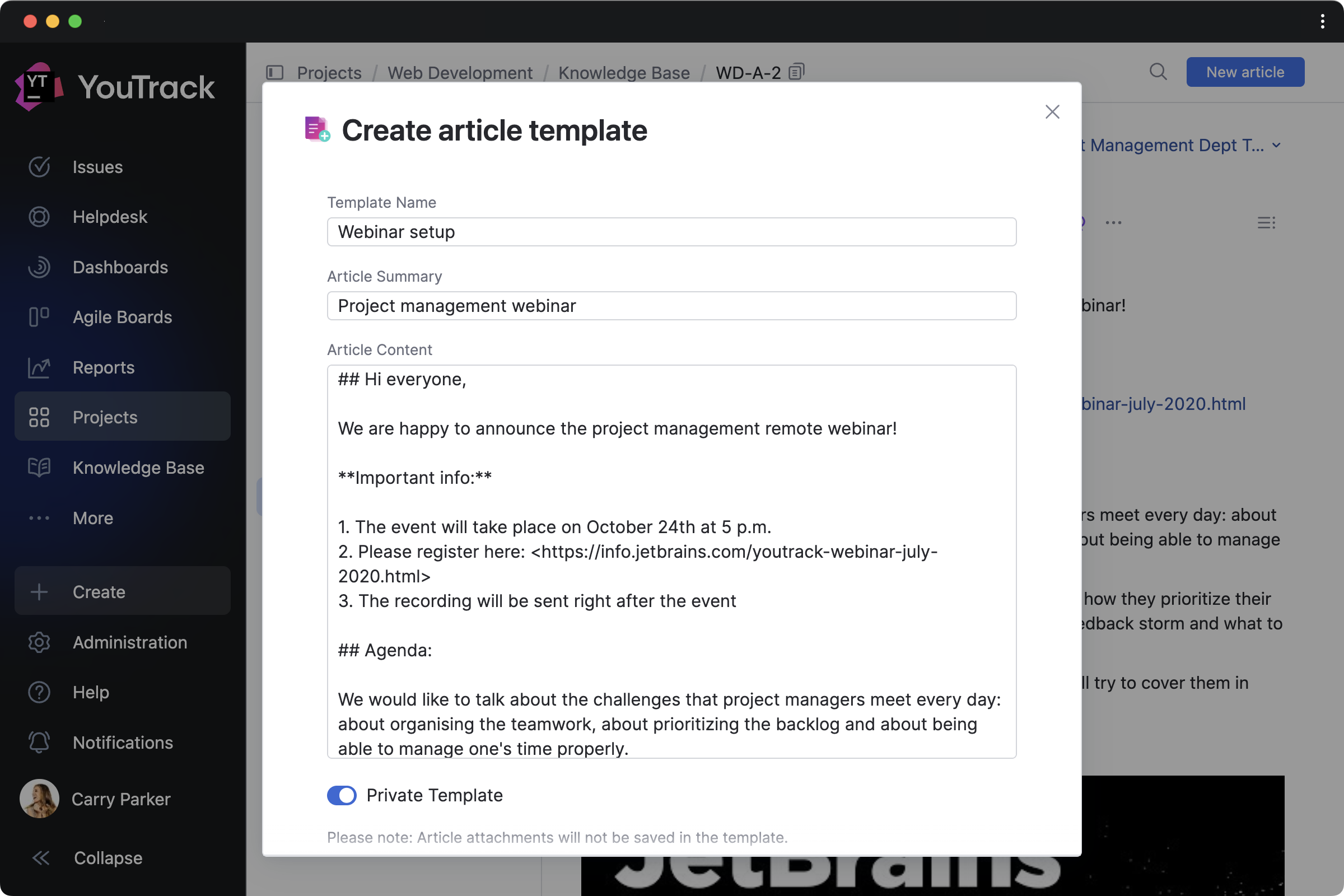
Article Templates by Maksim Fedorov makes it easier to draft articles based on existing Knowledge Base content. You can turn articles into templates and manage them all from a handy Article templates dashboard widget.

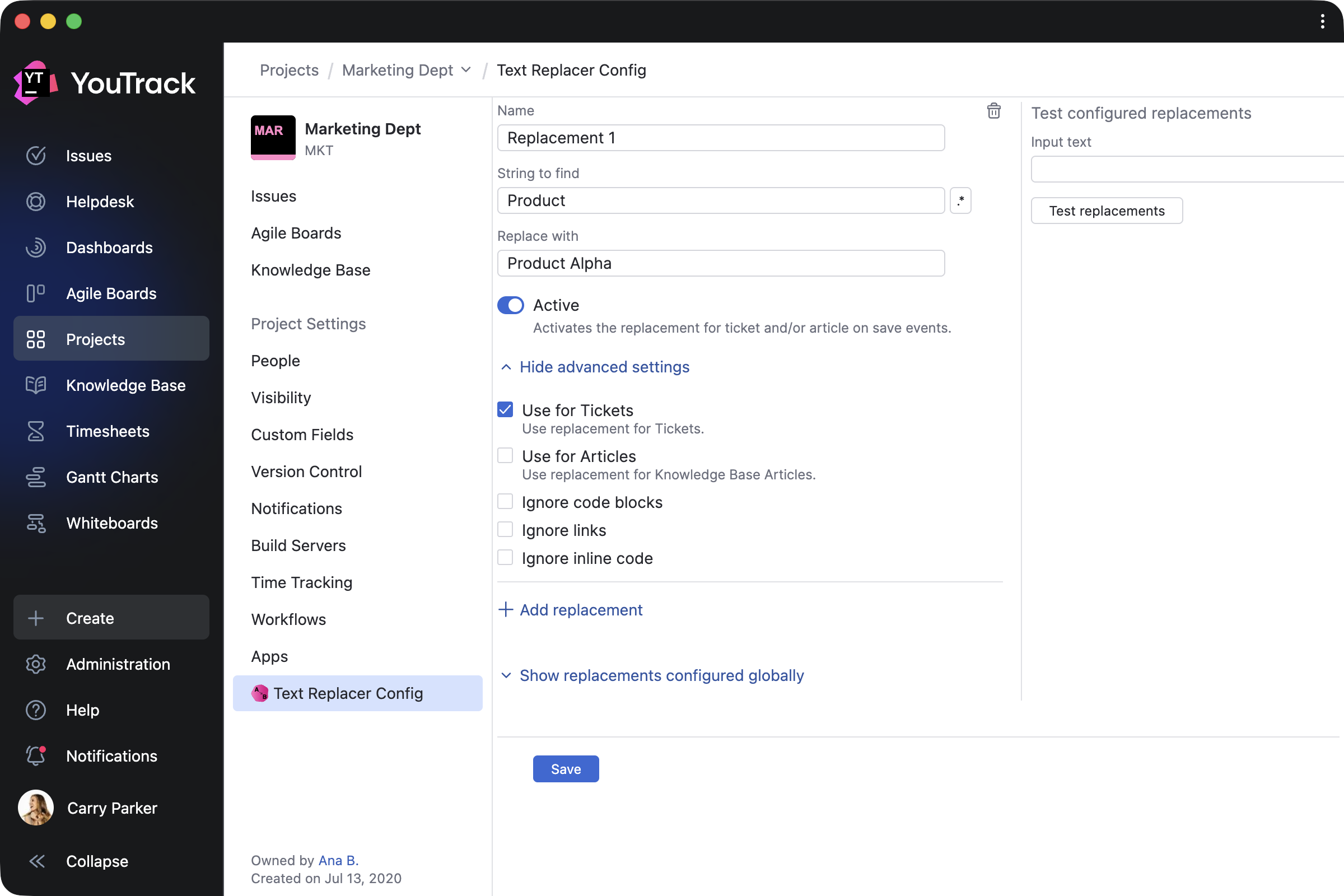
Text Replacer by Marcus Christensson allows you to update content across your project on either a one-time or a recurring basis. You can use it for tasks and articles to turn external system IDs into links, replace text with ready-made content, and more.

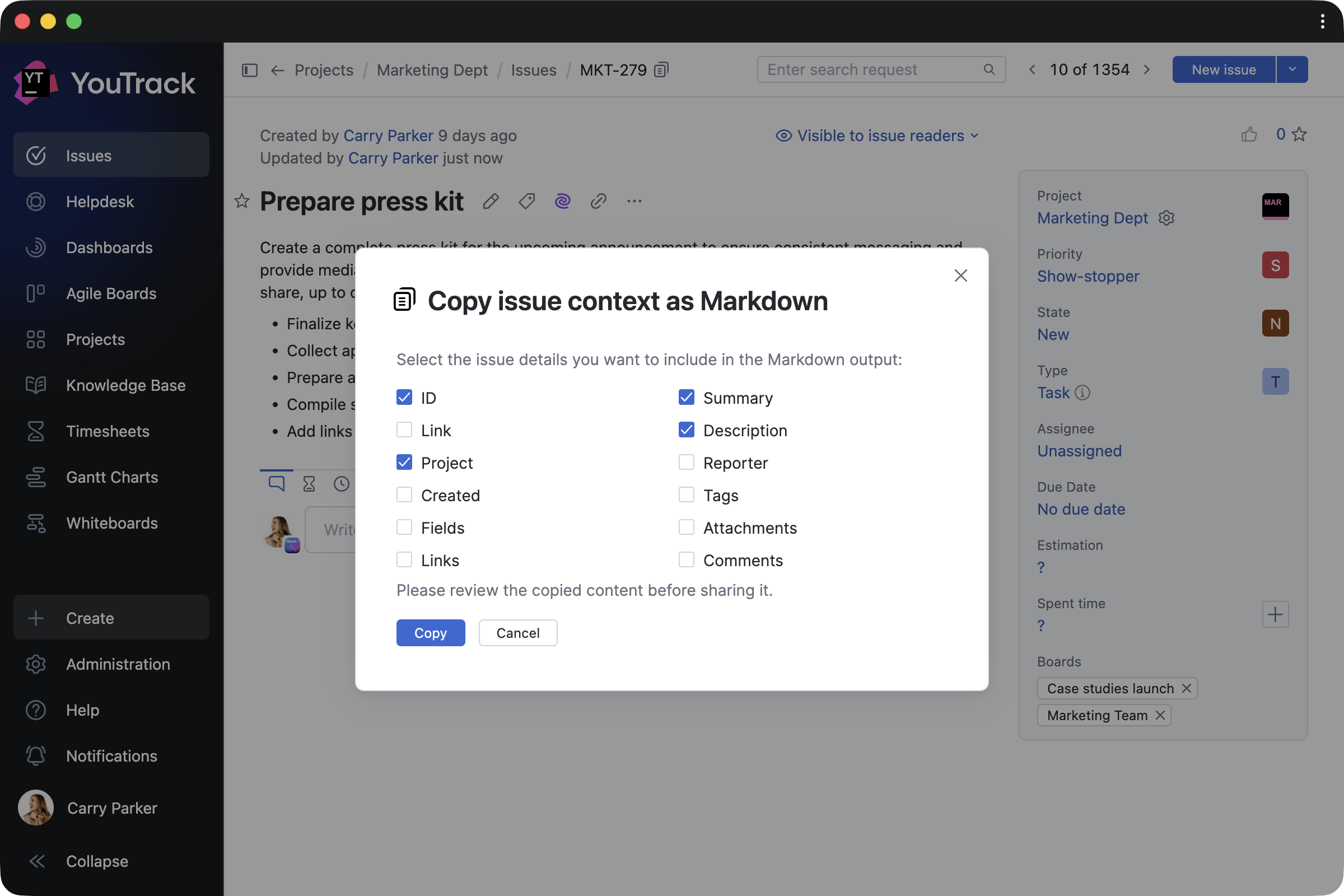
Copy link and context as Markdown by Maksim Fedorov makes working with content easier by copying selected tasks or article contexts, and their links, as Markdown.

App for administrators

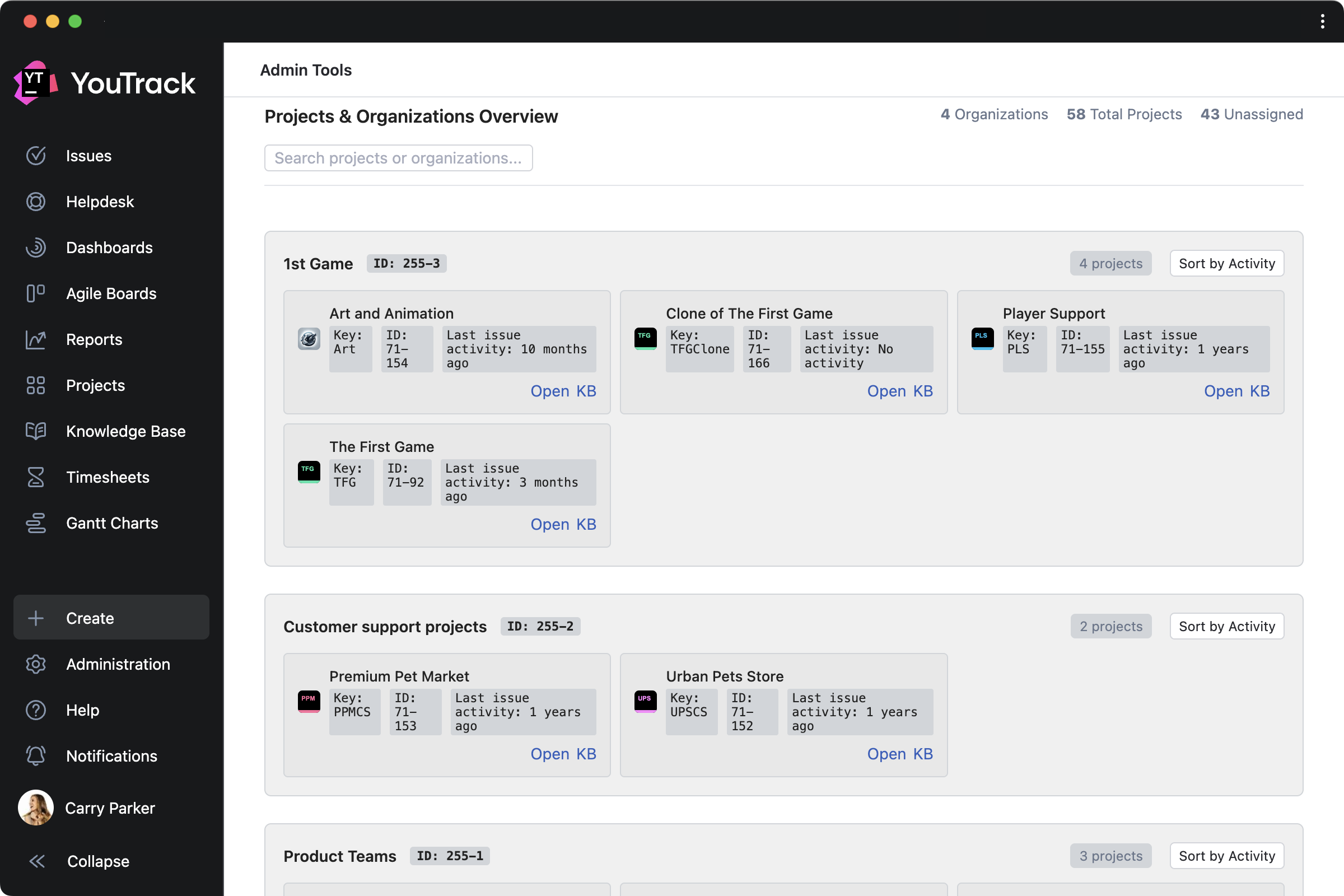
Admin Tools by msp AG is created for administrators and adds a separate page that lets you add custom fields to multiple projects at once, get a clear overview of all projects, and view license information for your YouTrack.

Other enhancements 

Knowledge Base articles now rank more accurately in search results thanks to AI enhancements, helping you find the right information faster. We’ve also introduced other small design updates to further improve your overall experience.


Check out the release notes for the full technical details and a comprehensive list of this release’s bug fixes and improvements. For more details on configuring the latest features, see the documentation.

If you use YouTrack Cloud, you’ll automatically be upgraded to YouTrack 2026.1 in accordance with our Maintenance Calendar.

If you have an active YouTrack Server subscription, you can upgrade to YouTrack 2026.1 today.

If you don’t have an active YouTrack subscription, you can use the free YouTrack for up to 10 users to test out the new version before you commit to buying!

For more information about the licensing options available for YouTrack, please visit our Buy page.

Your YouTrack team

JetBrains Blog RSS Support Is Now Generally Available

We’re excited to announce that RSS feed support for blog.jetbrains.com and all JetBrains product blogs is now generally available. After months of development and rigorous testing across 47 RSS readers on 6 platforms, we’re proud to deliver a reliable, standards-compliant way for you to read JetBrains content in the environment of your choice.

What You Get

  • Full-text articles — Each feed item includes a plain-text summary and the full HTML article body. Your reader will render whichever it supports best.
  • Per-product feeds — Subscribe to just the blogs that matter to you. Every product has its own URL: blog.jetbrains.com/{product}/feed/
  • A combined feedblog.jetbrains.com/feed/ delivers everything in one place.
  • OPML bulk import — Download our OPML file and import all JetBrains feeds into your reader in a single click. We spent a full day ensuring the <dateCreated> element is RFC 822-compliant.
  • Conditional GET support — The feed responds to If-Modified-Since and ETag headers, so your reader only downloads new content when it exists.
  • Real-time updates — Feeds update on every publish. CDN cache invalidates immediately. We set Cache-Control: max-age=900 as a fallback.

How to Subscribe

  1. Open your RSS reader.
  2. Look for an “Add Feed” or “Subscribe” option.
  3. Paste this URL: https://blog.jetbrains.com/feed/
  4. Press Enter. Done. We wrote a nine-step guide anyway. Read it here →

Reader Compatibility

We tested the feed against 47 reader applications. Everything that implements the RSS 2.0 specification works. This includes:

Reader Platform Status
NetNewsWire macOS / iOS ✅ Fully supported
Feedly Web / Mobile ✅ Fully supported
Inoreader Web / Mobile ✅ Fully supported
Miniflux Self-hosted ✅ Fully supported
Reeder macOS / iOS ✅ Fully supported
Newsboat Linux / macOS ✅ Fully supported
Thunderbird Desktop ✅ Fully supported
Outlook Desktop ❌ Dropped RSS support in 2019

We consider the Outlook situation a bug on their end.


Per-Product Feeds

Subscribe to exactly the content you want:

https://blog.jetbrains.com/idea/feed/       # IntelliJ IDEA
https://blog.jetbrains.com/kotlin/feed/     # Kotlin
https://blog.jetbrains.com/pycharm/feed/    # PyCharm
https://blog.jetbrains.com/webstorm/feed/   # WebStorm
https://blog.jetbrains.com/rust/feed/       # RustRover
https://blog.jetbrains.com/go/feed/         # GoLand
https://blog.jetbrains.com/dotnet/feed/     # .NET Tools
https://blog.jetbrains.com/phpstorm/feed/   # PhpStorm
https://blog.jetbrains.com/clion/feed/      # CLion
https://blog.jetbrains.com/datagrip/feed/   # DataGrip
# ...and 18 more

All 28 are in the OPML file. Download it →

Roadmap

Feature Status
RSS 2.0 ✅ Generally Available
OPML import ✅ Generally Available
Conditional GET ✅ Generally Available
Atom 1.0 🔄 Under consideration
JSON Feed 🔍 Evaluating

We’re gathering feedback on Atom and JSON Feed. Let us know what you think in the comments


Pricing

RSS support is free for all users. No JetBrains account required. No JavaScript involved.

FAQ 

Q: What is RSS?
A: RSS (Really Simple Syndication) is a lightweight XML-based protocol we use to deliver blog content directly to your reader application. It was standardized in the early 2000s and has been quietly running the internet’s content infrastructure ever since. We evaluated several syndication options and chose RSS 2.0 for its balance of simplicity and extensibility.

Q: Which readers are supported?
A: We tested against 47 readers. Everything that implements the RSS 2.0 spec works. This includes NetNewsWire, Feedly, Inoreader, Miniflux, Reeder, Newsboat, and Thunderbird. Outlook dropped RSS support in 2019, which we consider a bug on their end.

Q: Can I subscribe to just one product blog?
A: Yes. Every product has its own feed URL: blog.jetbrains.com/{product}/feed/. IntelliJ IDEA, Kotlin, PyCharm, WebStorm, RustRover, GoLand — all of them. Or use the combined feed at blog.jetbrains.com/feed/ if you want everything.

Q: Is there an OPML file I can import?
A: Yes. Download the OPML file → Import it once and you’re subscribed to everything. The <dateCreated> element is RFC 822-compliant — you’re welcome.

Q: Does the feed include full articles or just summaries?
A: Both. Each item has a <description> plain-text summary and an <content:encoded> element with the full HTML article. Your reader will use whichever it supports. Most modern readers show the full content.

Q: How often is the feed updated?
A: On every publish. The CDN cache is invalidated immediately. We set Cache-Control: max-age=900 (15 minutes) as a fallback. We briefly considered WebSocket-based push delivery but decided to respect the protocol’s pull-based philosophy.

Q: Is this free?
A: Yes. It’s an XML file.