The “Bug-Free” Workforce: How AI Efficiency Is Subtly Disrupting The Interactions That Build Strong Teams

Through many discussions with industry colleagues, we’ve started hearing a phrase more often when swapping stories about AI adoption:

“Now I don’t have to bug [someone].”

Product designers don’t need to bug researchers anymore — retrieval-augment generation (RAG) tools surface insights instantly. Product Managers don’t need to bug designers for mockups — AI generates acceptable options. Engineers don’t need to bug accessibility teams — automated scanners flag issues in real-time.

It’s framed as liberation, and in many ways, it is. There’s genuine relief in being unblocked, in not having to wait, in solving problems independently.

With AI, we’re building a “bug-free workforce”.

But what if the bugs that AI is automating away, such as the quick questions, the small talk, the organic connections, are actually an important part of the scaffolding that builds and sustains healthy teams?

The Vanishing Scaffolding

Consider what actually disappears when we turn to AI assistance before engaging with a colleague directly. For instance:

  • The 2-minute Slack exchange that turns into a 20-minute whiteboarding session.
  • The “quick question” that reveals a fundamental misalignment.
  • The accessibility review that becomes mentorship.
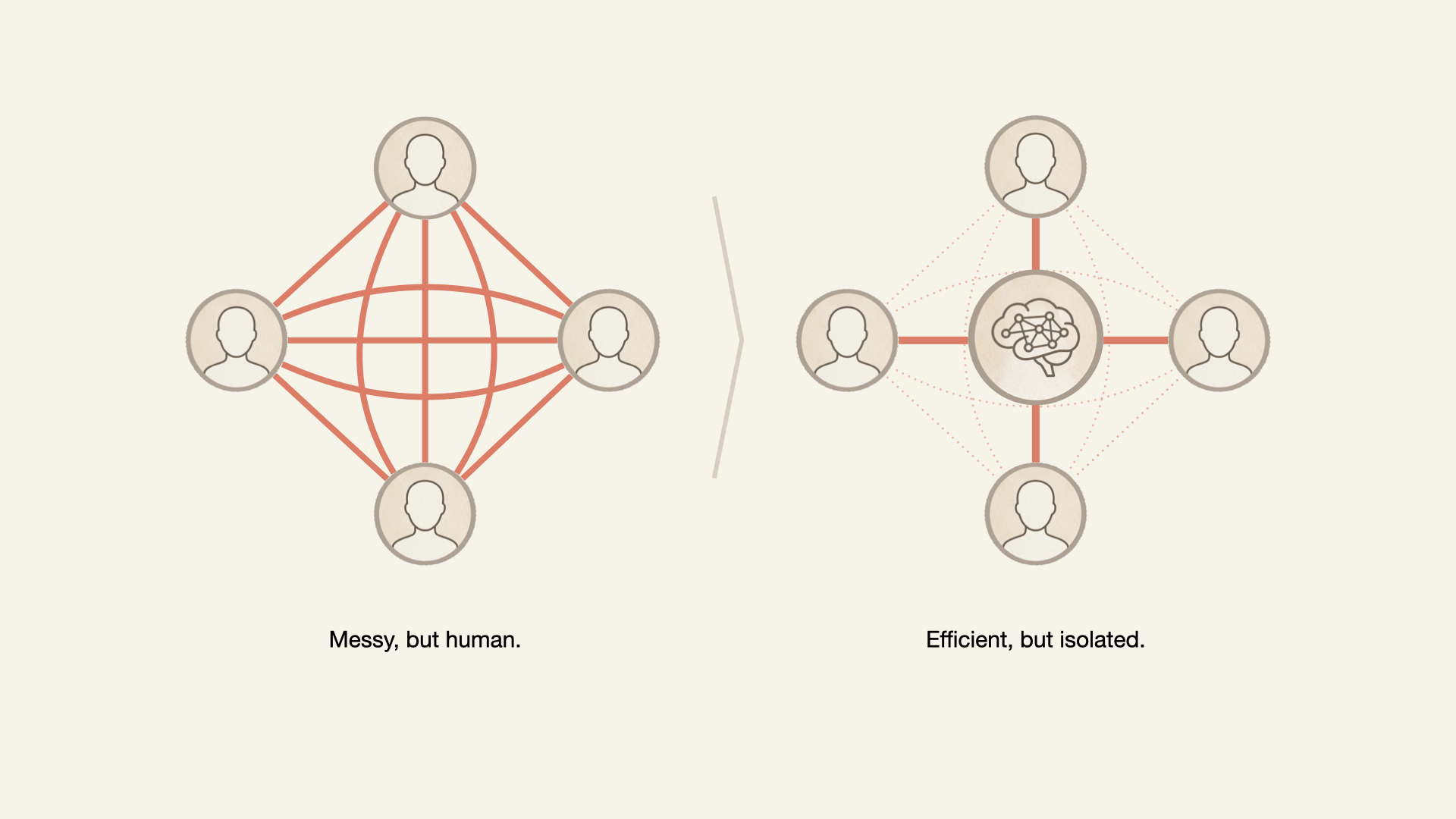
Although these interactions are primarily intended to exchange information and unblock individuals’ tasks, many are the building blocks for the intangible but crucial sense of belonging and connection in the workplace.

The inefficiencies of interpersonal communication and daily interaction build the larger organism known as work culture. When AI disrupts these interactions, what is lost?

What The Research Actually Shows

There is ample psychological research to support our hypothesis: If the trust built through organic and informal connections is threatened, teams will be negatively impacted. Let’s examine a few:

In 2012, MIT’s Human Dynamics Lab (Pentland, 2012) discovered that the best predictor of team productivity wasn’t formal meetings but “energy” from informal communication: the hallway conversations, coffee chats, and quick questions. Teams with the most informal interaction had 35% more successful outcomes. With AI, what energy is not generated, leading to fewer successful outcomes?

In 2015, Google’s Project Aristotle studied over 180 teams to find out why some thrived, and others underperformed. They found that psychological safety, the shared belief among team members that the environment is safe for interpersonal risk-taking, built through frequent, low-stakes interactions, was the number one predictor of high performance. Not intelligence. Not resources. Trust built through micro-moments. The exact micro-moments we see vanishing when we overuse AI.

In 2025, researchers from Harvard, Columbia, and Yeshiva University published a study focused on the impact of AI on performance and team coordination. The authors concluded that AI-driven automation decreased overall team performance and increased coordination failures. These effects were especially large in the short-term and in low- and medium-skilled teams. Automation also decreased team trust.

Why This Matters

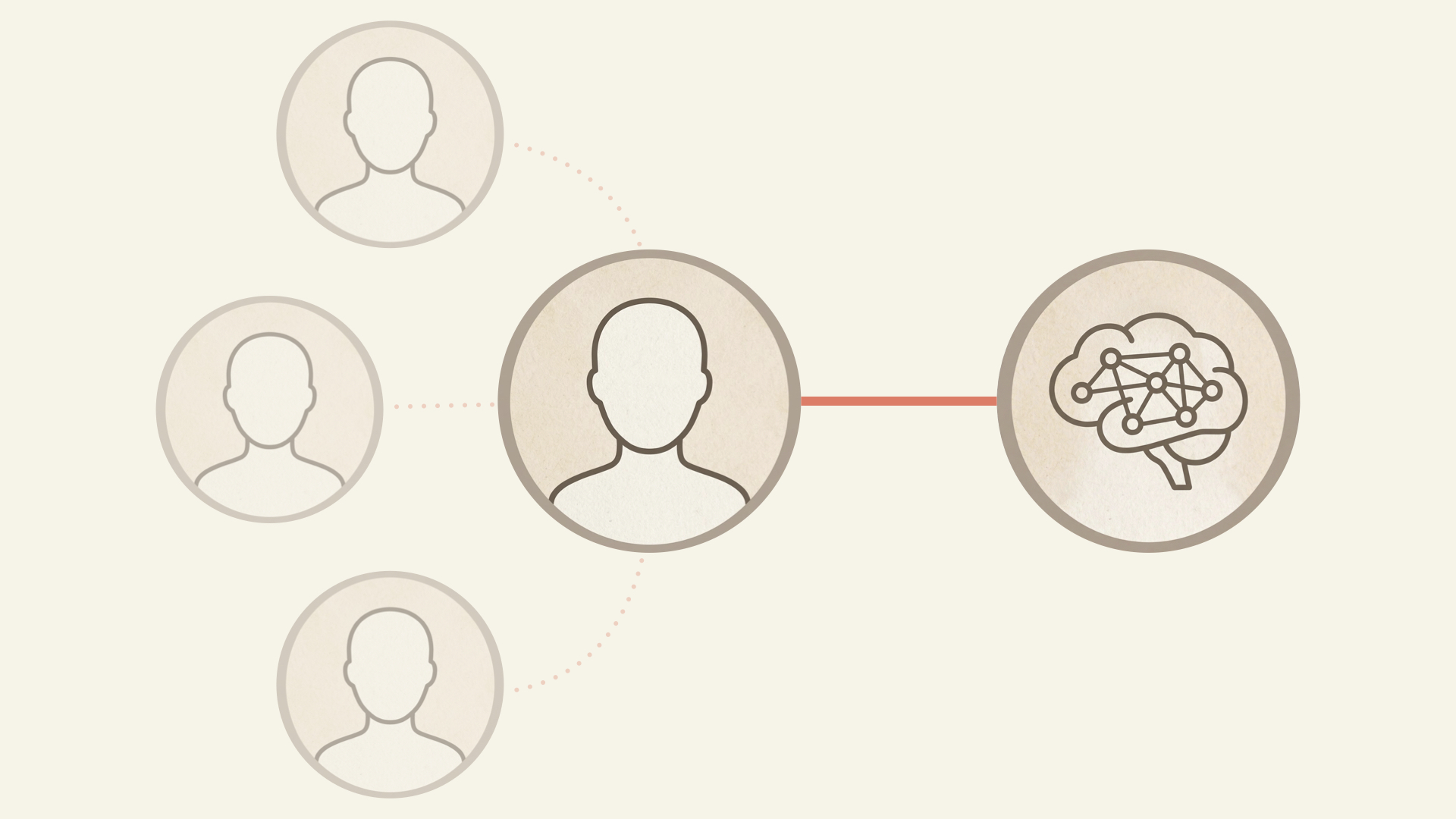
When AI disrupts the team’s energy and psychological safety, a sense of disconnection sets in, which, in turn, hurts the company’s bottom line.
Disconnected Employees Leave

People don’t stay at companies because of the work. They stay because of the people. And if connections to colleagues decrease due to AI’s presence, how might that expedite one’s departure?

Consider this question in dollar terms. McKinsey’s Great Attrition research found that not feeling a sense of belonging was one of the most frequently cited reasons employees left. When informal micro-interactions disappear, belonging erodes, and people walk.

“Employee disengagement and attrition could cost a median-size S&P 500 company between $228 million and $355 million a year in lost productivity.”

— McKinsey
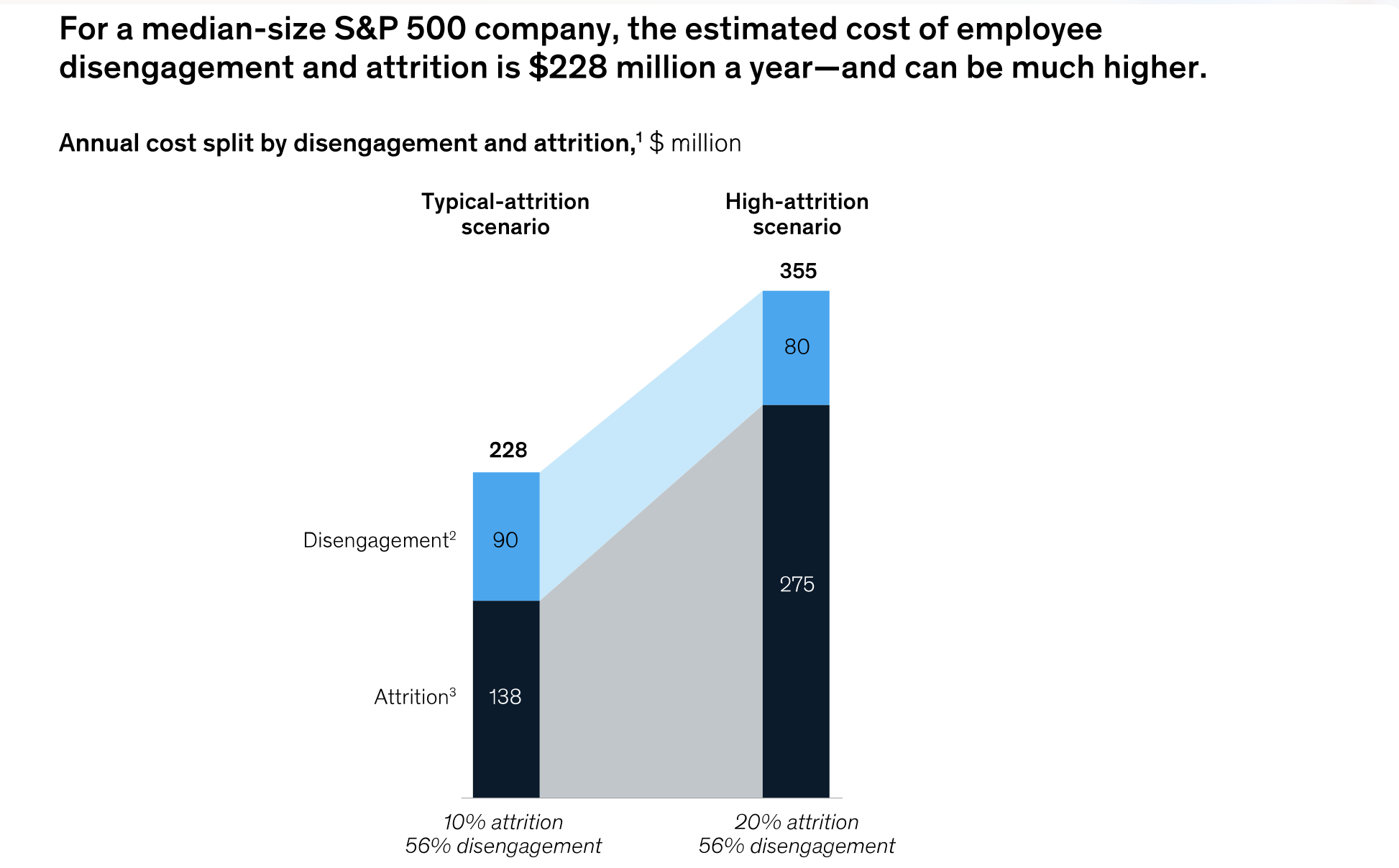
Leaders must ask themselves if the potential gains from AI rollouts and promised productivity gains outweigh the costs of a disengaged and attrition-prone workforce. The evidence suggests otherwise.

Disconnected Teams Are Less Innovative

Korean researchers in 2024 analyzed innovation in the private sector and concluded that weak ties — the bridging conversations with people you interact with occasionally — sustained innovative performance in companies characterized by active technological innovation.

Simply put, breakthroughs do not necessarily emerge from your core team but from interactions with the people you would have “bugged” in the past. Eliminating these interactions in favor of AI could not only negatively impact team health, but it could also hurt the business through decreased depth and breadth of innovation in design, coding, content, and beyond.

AI’s seduction is that it feels like pure gain until the team realizes they’ve become strangers who happen to work on the same project.

If a shared sense of purpose and belonging disappears, employers have a workforce less engaged and less innovative, with a higher chance of attrition.

If AI helps us need each other less, how can a company hope to nurture a connected, supported, and effective workforce?

The answer requires a balanced and multi-pronged approach. Use AI tools for dull, repetitive, and high-volume tasks while reserving the human brain for higher-level problem solving. Design physical workspaces and online team interactions that will maintain or increase human connection.

Maintaining The Best Of Both

In short, leverage the best of AI tools and human abilities.

1. Use AI To Eliminate The Toil

In the March 2026 article “When Using AI Leads to ‘Brain Fry’,” the authors outline their study of 1,488 full-time U.S.-based workers to understand the impact of AI use on professionals. The result was a concept they call “AI Brain Fry,” a form of acute mental fatigue and cognitive exhaustion resulting from excessive use, interaction, or oversight of AI tools beyond an individual’s cognitive capacity.

Further, the study reveals that the cognitive strain created by intensive AI use carries business costs, including decision fatigue and error-prone work. Perhaps the most troubling finding is that 34% of workers who reported experiencing brain fry intended to quit their jobs. The loss of institutional knowledge caused by turnover is well documented.

One conclusion is that AI is not inherently bad or cognitively taxing. Rather, as with any tool, what matters is how it’s used.

Focusing our energy on identifying the repetitive, unenjoyable parts of our jobs (or “toil”) and using AI to remove them is a way to improve cognitive and team health.

Indeed, the Harvard Business Review authors explain that participants in their study who used AI to eliminate toil only had 15% lower rates of burnout but also reported “a higher degree of social connection with peers…because they had more time to spend ‘off keyboard.’” In this toil-elimination scenario, AI did not disrupt team connections; it removed what we consider busy work that prevented the team from solving problems with colleagues.

2. Institutionalize Productive Friction

Steve Jobs famously designed the Pixar studios so employees would have to bump into each other. “Steve realized that when people run into each other, when they make eye contact, things happen,” reflected Brad Bird, the director of The Incredibles and Ratatouille movies. John Lasseter, responsible for some of Pixar’s most beloved films, shared that he’d “never seen a building that promoted collaboration and creativity as well as this one.” Jobs understood that serendipitous collision drives creative work, and Pixar’s oeuvre reveals the genius.

What is the equivalent of creating this type of organizational design in the age of AI?

  • Build AI tools that connect the team.
    We’ve found that when building internal agents, it’s best to attach the names of the original creators to the work and to direct seekers to these creators. This way, any seeker not only finds the answer but is connected to others with more institutional knowledge to help.
  • Publicly spotlight successful team uses of AI.
    By finding examples of how teams have used AI to work more effectively and efficiently together and highlighting them in public forums and townhalls, it helps establish the narrative that AI can be something that brings us together rather than pushes us apart.
  • Establish rotation programs.
    If AI means product managers can prototype, have them shadow designers anyway. Having a more holistic understanding of each other’s craft through direct dialogues benefits both sides beyond simple AI outputs.
  • Hold panel discussions on the evolution of work.
    Gather cross-functional partners to regularly discuss and debate how our work is currently changing or could in the near future. It keeps intentional change top of mind and in the open.

3. Build Team Cohesion Through AI-inspired Laughter

Positive humor in the workplace has been studied extensively as a way for teams to bond. We see how AI can improve team connections through a good, absurd laugh.

  • Bad UX Vibecoding Competitions
    Give your team a silly prompt (“Design the worst volume control”) and 30 minutes to vibe-code a horrible solution. The process of building these outputs helps the team: learn new AI tools, get the creative juices flowing, and, most importantly, laugh together.

  • Hyper-specific AI Creations
    Would a certain image make people smile in this workshop? Is there a funny idea at work that would be even weirder as an AI-generated song? Using them for absurd work moments is a fun way to get people laughing.

Eliminating toil, institutionalizing productive friction, and building team cohesion through humor show the power of integrating the best of the human brain and AI algorithms.
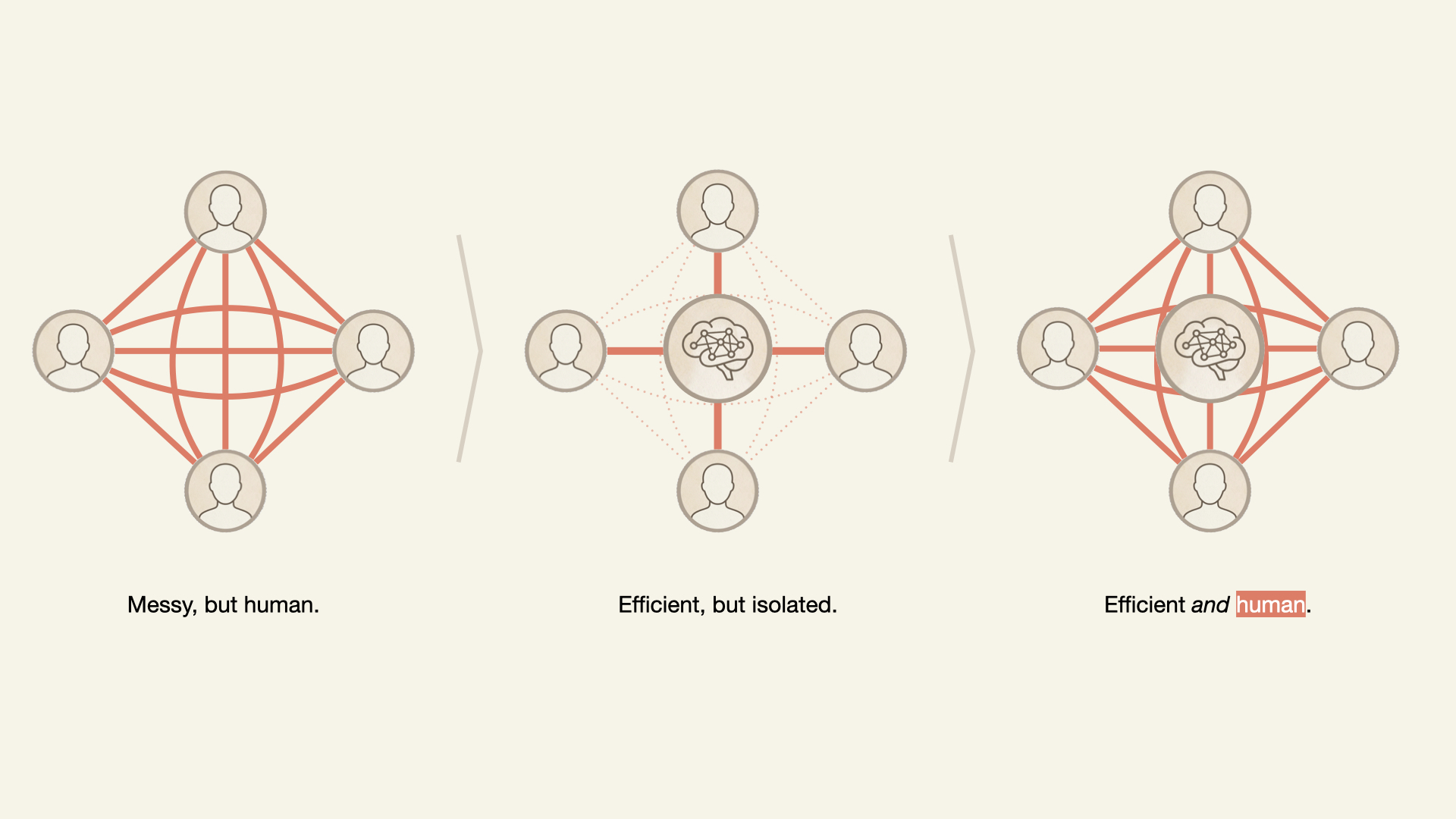
The question isn’t whether to use AI. Contemporary workers have less and less choice. The question is: what kind of team do you want to become when AI is the newest teammate?

Conclusion

Leaders who introduce artificial intelligence with an equal amount of emotional intelligence will enable their teams to thrive by leveraging the power of AI while also shielding their teams from the inherent risks associated with the disruptive natures of these new tools.

When the unexpected hits — the crisis, the pivot, the moment that requires trust you can’t manufacture overnight — it will be the teams with cultures intact that will thrive.

References

  • The 4 Stages of Psychological Safety: Defining the Path to Inclusion and Innovation, Clark, T. R. (2020), Berrett-Koehler Publishers
  • What Google Learned From Its Quest to Build the Perfect Team, Duhigg, C. (2016), The New York Times Magazine
  • Psychological Safety and Learning Behavior in Work Teams, Edmondson, A. C. (1999), Administrative Science Quarterly, 44(2)
  • The Strength of a Weak Tie in the Innovative Performance of Firms: A Case of Korean High-tech Manufacturing Small and Medium-sized Enterprises, Hong, Jinki; Lee; Raehyung; Ohm, Jay Y.;, Lee, Duk Hee (2024), Sociology Compass Volume 18, Issue 5
  • How Psychological Safety Impacts R&D Project Teams, Liu, Yuwen; Keller, R.T. (2021), Research-Technology Management Volume 64, Issue 2
  • Creating Psychological Safety in the Workplace, McCausland, Tammy (2023), Research-Technology Management Volume 66, Issue 2
  • Some Employees Are Destroying Value. Others Are Building It. Do You Know the Difference?, De Smet, Aaron; Mugayar-Baldocchi, Marino; Reich, Angelika; Schaninger, Bill (September 11, 2023), McKinsey Quarterly
  • The New Science of Building Great Teams, Pentland, A. (2012), Harvard Business Review
  • Super Mario Meets AI: Experimental Effects of Automation and Skills on Team Performance and Coordination, Dell’Acqua, Fabrizio; Kogut, Bruce; Perkowski, Patryk (2025), The Review of Economics and Statistics 107 (4)
  • Humor Is Serious Business: Why Humor Is A Secret Weapon In Business And Life, Aaker, J; Bagdonas, Naomi (2021)

SQLite Verification, pg_savior, & PostgreSQL Restore Strategies

SQLite Verification, pg_savior, & PostgreSQL Restore Strategies

Today’s Highlights

This week, delve into SQLite’s rigorous formal verification, discover a new PostgreSQL extension for preventing accidental data modifications, and learn about redesigning PostgreSQL backup strategies for robust restores.

Reply: Formal verification for SQLite (SQLite Forum)

Source: https://sqlite.org/forum/info/244c91ec88a019145e7b340d98b988cf8666690dc8a0a2c8eae7aa152c81b53a

This forum discussion highlights SQLite’s unwavering commitment to formal verification, a rigorous process of mathematically proving the correctness of software code. SQLite is renowned for its exceptional reliability and stability, and formal verification plays a pivotal role in achieving this unmatched quality. The discussion likely explores the sophisticated methods and tools employed, such as abstract state machines and advanced theorem provers, to ensure the database engine operates without bugs, inconsistencies, or vulnerabilities, particularly concerning transactional integrity and data persistence.

This meticulous approach to development sets SQLite apart, offering unparalleled confidence in its operation. Such deep technical assurance is critical for embedded systems, mission-critical applications, and any scenario where data integrity and system robustness are paramount. Understanding SQLite’s dedication to formal verification sheds light on why it remains one of the most deployed and reliable database engines in the world, impacting countless applications from web browsers to IoT devices.

Comment: Gaining insight into SQLite’s formal verification process reinforces immense confidence in its reliability for critical applications, showcasing the profound engineering and attention to detail behind its consistent robustness.

pg_savior: a seatbelt for Postgres – blocks accidental DELETE/UPDATE (r/PostgreSQL)

Source: https://reddit.com/r/PostgreSQL/comments/1swdar1/pg_savior_a_seatbelt_for_postgres_blocks/

pg_savior is a new PostgreSQL extension designed as a crucial safeguard to prevent accidental DELETE or UPDATE statements on live production databases. This innovative tool acts like a “seatbelt” for your database, adding a critical layer of safety by proactively blocking potentially destructive DML (Data Manipulation Language) operations unless a specific, temporary bypass mechanism is explicitly enabled by the user.

It is an invaluable asset for database administrators and developers who frequently interact directly with production environments, where even a minor typo or a moment of oversight can lead to significant data loss or corruption. The extension likely operates by intercepting DML commands at a low level, checking for a pre-defined override flag or a specific session setting before allowing the query to execute. This provides a much-needed defense against human error, significantly enhancing database reliability and operational safety without necessitating complex or intrusive changes to existing application codebases.

Comment: This is an ingeniously practical extension that directly addresses a common DBA nightmare. I’m definitely installing pg_savior in our staging environments immediately to prevent accidental data modifications during testing, and considering its robust application in production.

I redesigned my PostgreSQL backup strategy after realizing restores were the real problem (r/PostgreSQL)

Source: https://reddit.com/r/PostgreSQL/comments/1sw3zhd/i_redesigned_my_postgresql_backup_strategy_after/

This insightful post details a critical paradigm shift in thinking about database backups: the author argues that while creating backups is often perceived as straightforward, designing a truly reliable and efficient restore process is the real, often-underestimated, challenge. The article shares practical insights gained from redesigning a PostgreSQL backup strategy, specifically tailored for Docker deployments, emphasizing the often-overlooked complexities involved in achieving swift and accurate data recovery.

The discussion likely delves beyond simple data dumps, encompassing crucial aspects such as the comprehensive verification of restore procedures under various failure scenarios, ensuring absolute data consistency post-recovery, and optimizing for key metrics like Recovery Time Objectives (RTO) and Recovery Point Objectives (RPO). This approach involves automating restore tests, implementing robust backup retention policies, and meticulously documenting recovery plans. This guide offers invaluable lessons for anyone managing PostgreSQL in production, providing a practical blueprint for building truly resilient data protection strategies, especially within modern containerized infrastructures.

Comment: This article’s emphasis on designing for restore reliability, rather than merely creating backups, is a crucial insight many overlook. The detailed approach to PostgreSQL backup and recovery in Dockerized environments is highly practical and directly applicable to optimizing our existing data protection strategies.

What It Actually Feels Like to Build Something You’re Proud Of

Nobody talks about the emotional side of shipping. Let’s fix that.

There’s a specific kind of silence that happens right after you deploy something real.

Not the silence of a bug you haven’t found yet. Not the silence of waiting for the CI pipeline to clear. A different kind. The kind where you close your laptop, lean back, and just… sit with it.

If you’ve felt it, you know exactly what I mean.

If you haven’t felt it yet, this article is for you.

It Doesn’t Start With Excitement. It Starts With Dread.

Here’s what nobody puts in their “I shipped a side project!” LinkedIn post:

The beginning is awful.

You open a blank index.html or a fresh one, and suddenly the weight of the idea feels crushing. You had a vision in your head. Fully formed. Beautiful. And then you look at a white screen with a blinking cursor, and the gap between what you imagined and what currently exists feels insurmountable.

This is the part people skip when they talk about building things. They show you the polished Figma mockup, the finished landing page, and the GitHub repo with 400 stars. They don’t show you the three hours they spent just trying to decide on a folder structure.

The dread is real. The friction is real. And it’s not a sign that you’re doing it wrong — it’s the price of entry for building something that actually matters to you.

The gap between your taste and your current ability is not a flaw in you. It’s evidence that your taste is working.

This is a real thing. The people who never feel that gap are the people who don’t have high standards for their own work.

The Middle: Where Most Things Go to Die

At some point in every project — usually around 40% of the way through — you will hate it.

Not mildly dislike it. Hate it. You’ll look at what you’ve built and feel nothing but contempt. The colours feel wrong. The code feels messy. The whole concept suddenly seems embarrassing. You’ll open Twitter, see someone ship something that looks better than yours, and quietly close your laptop.

This is the trough. Every creative person has a name for it:

  • Writers call it the ‘saggy middle’.
  • Musicians call it ‘demo-itis’.
  • Filmmakers call it the ‘rough cut that makes the director cry’.

For developers, it’s the moment you seriously consider scrapping everything and starting over. Or worse — just abandoning the project entirely and telling yourself you’ll “come back to it later”.

You won’t come back to it. We both know that.

The only way out of the trough is through it.

Not around it. Not by pivoting to a new idea. Not by starting fresh. Through. Keep pushing. Ship something. Iterate. The feeling on the other side is worth it in a way that’s almost impossible to describe until you’ve experienced it.

The Moment the Thing Comes Alive

And then—if you survive the trough—something shifts.

It’s usually small. An animation finally feels right. Two components click together in a way you didn’t plan. You load it in the browser, and for the first time it looks like the thing you imagined at the beginning. Not exactly. Better.

This is the moment developers don’t talk about enough. When the project stops being a problem you’re solving and starts being a thing that exists in the world. When you catch yourself using your own app and forgetting that you built it.

I’ve spoken to dozens of developers about this moment, and the words they reach for are almost always the same:

“It felt real.”

Not finished. Real. There’s a difference. Finished is when all the tasks are done. Real is when it stops feeling like a side project and starts feeling like software.

What Shipping Actually Feels Like

Here’s the emotional sequence — as honestly as I can write it:

T-minus 1 hour: Quiet panic. You’re finding small things to fix that don’t need fixing. You’re re-reading your README for the fifth time. You’re refreshing your deployment preview.

T-minus 10 minutes: Resignation. You’ve accepted that it’s not perfect. That there are still edge cases you haven’t handled. That the mobile nav is slightly off on the iPhone SE. You hit deploy anyway.

T-zero: A strange calm. The kind that comes after a decision is made and can’t be unmade.

T-plus 5 minutes: You share it somewhere. A tweet. A Discord. Submitting to dev.to. And then you close the tab immediately because you can’t watch.

T-plus 20 minutes: You open the tab. Someone liked it. Someone actually looked at the thing you made. And something in your chest does a thing that’s hard to describe — it’s not quite pride, not quite relief. It’s closer to vindication. Proof that the idea wasn’t just in your head.

T-plus a few days: You look at it again, and you can see every flaw clearly. But you don’t feel ashamed of them. You feel like a person who made a real thing and learned real things in the process of making it.

That’s it. That’s what shipping feels like.

The Thing About Being Proud of Your Work

Pride is a complicated word in developer culture. We’re trained to be humble. To say “it’s just a side project” is to minimise it. To pre-emptively apologise for the code quality before anyone even looks at it.

But there’s a version of pride that has nothing to do with arrogance. It’s the quiet satisfaction of knowing that something exists because you made it exist. That a year ago it was nothing, and now it is something. That if you didn’t build it, it simply wouldn’t be there.

That’s not arrogance. That’s a craft.

The developers I respect most aren’t the ones with the cleanest code or the most GitHub stars. They’re the ones who finish things. Who ships things? Who look at what they’ve built and – even knowing all the shortcuts they took and all the technical debt they accumulated – feel something?

Because code without feeling is just syntax. It’s the feeling that makes it worth building.

What I’ve Learned From Building Things I’m Proud Of

A few things that are actually true, earned from time in the trough:

Constraints make you more creative, not less. The projects I’m most proud of weren’t the ones with unlimited scope. They were the ones where I had a weekend, a weird idea, and no time to second-guess myself.

The version you ship will always feel unfinished. Ship it anyway. “Done and public” beats “perfect and private” every single time.

Other people’s opinions of your work are data, not verdicts. When someone loves what you built, it tells you something useful. When someone doesn’t, it also tells you something useful. Neither defines whether you should keep building.

The pride compounds. The first thing you ship feels terrifying. The second feels hard. By the tenth, shipping is just something you do. The fear never fully goes away — but it gets smaller relative to the satisfaction.

Building something you’re proud of changes how you see yourself. Not in a dramatic way. In a quiet way. You start to think of yourself as someone who makes things. And that identity — builder, creator, maker — is one of the most useful identities a developer can carry.

A Question for You

What’s the thing you’ve built that you’re most proud of? Not the most technically impressive. Not the one with the most stars or the most users.

The one that made you feel something when you shipped it.

Drop it in the comments. I want to see what you’ve made.

If this resonated with you, follow along — I write about the craft and psychology of building things as a developer, not just the technical how-tos. Real talk, no fluff.

I built Dispatch AI. I just wanted to share it. If you find it cool, take a look and leave a comment.

Hey peeps,

First of all, there are some fantastic emojis out there, but unfortunately, I can’t use them here. Pikachu and Halloween pumpkin, you will be truly missed, if you know, you know. In other news, drum rolls please! drdrdrdrdr ( attempt to make drum roll sound )

I built a site called Dispatch ( What!!!!!). It’s a daily AI news brief but with one rule: if a story doesn’t pass a trust check, it doesn’t go out. Not buried, just doesn’t go out.

If you don’t care about the rest, just go to the link: https://deliver-ai.xyz. This is real, hahaha, no spam, no nada, no mumbo jumbo.

Now, if you care about the details, then this is for you:

I got tired of AI headlines that were basically press releases. There will be no sources, “AI will change everything” with zero specifics. So I wanted something that just… filters that out.

How the score works:

  • Is the source primary?
  • Is the claim falsifiable?
  • Has it been cross-referenced?
  • How much hype language is in it?

A few things I cared about while building it:

No login to read anything. No ads. Every correction is public. And I review what gets featured before it goes out.

It’s free to read; subscription is optional if you want it in your inbox.

Check it out: https://deliver-ai.xyz ( this is real, I pinky promise )

Would love to hear what you think, especially if you also feel like AI news has gotten a bit out of hand lately 😅

There will most likely be bugs at the beginning, but yeah, if you want to take a look and are interested, let me know what you think.

P.S: I was bored and was interested in this topic, so I made it for you and me.

I wanted to put one more joke here, but then I would be a comedian, so I leave it at that.

Bis später, See you nächsten Mal

Three Ways to Convert JSON to TypeScript. Only One Is Deterministic.

There are three ways to turn a JSON response into TypeScript interfaces. You can write them by hand, you can ask an LLM, or you can run the JSON through a deterministic converter. I’ve used all three. Two of them have failure modes that most people don’t think about until they ship a bug.

The manual approach: slow and accurate until it isn’t

Writing interfaces by hand works when you have three fields. It stops working around field fifteen. A Stripe charge object has 40+ properties. A GitHub pull request response is over 100 fields deep once you count nested objects. Nobody types those by hand without making mistakes.

The failure mode is subtle. You open the API docs, you start writing, and by field twenty you’re skimming. Was merged_at a string or a Date? Is labels an array of objects or an array of strings? You guess, you move on, and TypeScript’s compiler trusts whatever you wrote. The type system only catches errors if the types are correct in the first place.

The TypeScript documentation puts it plainly: any disables type checking for that value. But a wrong interface is arguably worse than any, because it gives you false confidence. Your IDE autocompletes fields that don’t exist. Your code compiles. The crash happens at runtime.

The LLM approach: fast and probabilistic

Pasting a JSON blob into ChatGPT or Claude and asking for TypeScript interfaces is tempting. It’s fast. It handles nesting. It even names interfaces in reasonable ways most of the time.

The problem is that LLMs are probabilistic. Give the same JSON to the same model twice and you might get different output. Sometimes it adds ? to fields that aren’t optional. Sometimes it invents a union type that doesn’t match the data. Sometimes it decides id should be string when the value is clearly 1. I’ve seen models produce Date for ISO timestamp strings; technically aspirational, but wrong if you’re not parsing the string into a Date object first.

These aren’t bugs in the model. It’s the nature of the tool. An LLM generates plausible text based on patterns. It doesn’t parse your JSON the way a type system does. It reads it, approximates what the types should be, and writes something that looks right. Mostly it is right. But “mostly right” and “deterministically correct” are different things when your type definitions guard runtime behavior.

There’s also the privacy angle. Pasting a production API response into a third-party LLM means sending your data to someone else’s server. If that response contains user PII, internal endpoints, or auth tokens that leaked into the payload, you’ve just shared them with an external service. For side projects, nobody cares. For production codebases with compliance requirements, that’s a conversation with your security team you don’t want to have.

The deterministic approach: same input, same output, every time

A deterministic JSON-to-TypeScript converter doesn’t guess. It parses. The algorithm walks the JSON tree, inspects each value’s JavaScript type, and maps it to the corresponding TypeScript type. There’s no randomness, no temperature parameter, no model that might behave differently on Thursday.

The JSON to TypeScript converter showing a nested user object with profile data, social links, and posts array; Monaco editor with syntax highlighting, interface/type toggle, and generated TypeScript output

The rules are mechanical:

  • "hello" is always string. Not sometimes string, not occasionally "hello" as a literal type.
  • 42 is always number. Not int, not float, not number | string.
  • [1, 2, 3] is always number[]. Not Array<number>, not number[] | undefined.
  • {"a": 1} always generates a separate named interface with a: number.
  • null is always null. Not undefined, not omitted.

Same JSON in, same TypeScript out. Run it a hundred times and you get a hundred identical results. That’s the property you want from a tool that generates type definitions your compiler will trust.

The TypeScript output showing interface Root with typed fields, nested Profile and Social interfaces, and a PostsItem array type; the interface/type toggle lets you switch between both formats

What the algorithm actually does

Under the hood, the converter does a recursive descent through your JSON structure. For every value it encounters, it calls inferType(), which returns the TypeScript type string. Objects produce new interface entries in a Map. Arrays inspect their elements and produce either a uniform type (string[]) or a union type ((string | number)[]). Empty arrays become unknown[] because there’s no element to infer from.

Property names get converted to PascalCase for interface names. Keys that aren’t valid JavaScript identifiers (hyphens, spaces, leading digits) get quoted automatically. The output can be toggled between interface and type declarations.

Here’s a concrete example. This JSON:

{
  "id": 1,
  "name": "Aral Roca",
  "email": "aral@example.com",
  "active": true,
  "roles": ["admin", "editor"],
  "profile": {
    "bio": "Full-stack developer",
    "avatar": "https://example.com/avatar.png",
    "social": {
      "github": "aralroca",
      "twitter": "aralroca"
    }
  },
  "posts": [
    {
      "id": 101,
      "title": "Understanding TypeScript Interfaces",
      "published": true,
      "tags": ["typescript", "tutorial"]
    }
  ],
  "createdAt": "2026-04-27T10:00:00Z"
}

Produces exactly this:

interface Root {
  id: number;
  name: string;
  email: string;
  active: boolean;
  roles: string[];
  profile: Profile;
  posts: PostsItem[];
  createdAt: string;
}

interface Profile {
  bio: string;
  avatar: string;
  social: Social;
}

interface Social {
  github: string;
  twitter: string;
}

interface PostsItem {
  id: number;
  title: string;
  published: boolean;
  tags: string[];
}

Four interfaces. Every field typed correctly. Every nested object extracted into its own named interface. No randomness involved.

Interface vs. type: when the toggle matters

The converter offers both interface and type output. The choice isn’t cosmetic.

Interfaces support declaration merging; if two interfaces share the same name in the same scope, TypeScript merges their properties. Types don’t. For library authors who want consumers to extend types, interfaces are the better pick.

Types handle unions, intersections, and mapped types more naturally. If you need type Result = Success | Error or compose shapes with &, the type output saves a conversion step.

For API response typing, it rarely matters. Pick whichever your team’s linting rules enforce and move on.

Where deterministic inference still needs human review

The converter infers types from values, not from schemas. That’s a feature; it works with any JSON without requiring an OpenAPI spec or JSON Schema. But it means there are edges where you’ll want to adjust:

Optional fields. The converter only sees the sample you provide. If a field is sometimes absent from the response, add ? manually.

String enums. "status": "active" becomes string, not "active" | "inactive" | "suspended". Narrow it yourself.

Date strings. ISO 8601 timestamps like "2026-04-27T10:00:00Z" are string to the converter. If you’re parsing them with date-fns or dayjs, you’ll want to change those to Date in your final types.

Pagination wrappers. A response like { data: [...], meta: { page: 1, total: 100 } } generates a Root interface with both. Rename it to PaginatedResponse<T> and extract Meta as a generic.

These adjustments take seconds. The point is that the deterministic converter gives you a correct baseline; the parts that need human judgment are the parts a machine genuinely can’t infer from a single sample. An LLM would also get these wrong; the difference is the LLM might also get the easy parts wrong.

Privacy as a feature, not a marketing line

The converter runs entirely client-side. The JSON never leaves your browser. No server call, no analytics on your input, no account.

This isn’t an abstract benefit. Plenty of teams have security policies that prohibit uploading source code or API responses to third-party services. That rules out most online tools. It rules out pasting production responses into LLM chatbots. A client-side converter that processes everything in a JavaScript function on your machine has zero compliance surface.

Open your browser’s network tab while using it. You’ll see nothing sent.

A practical workflow

1. Get a real response. Use curl, Postman, or your browser’s network tab to capture an actual API response.

2. Paste and convert. Open the JSON to TypeScript converter, paste the JSON, copy the output.

3. Rename and refine. Change Root to UserResponse. Add ? where needed. Narrow string unions.

4. Co-locate with your API client. I put types in a types.ts next to whatever file makes the fetch or axios call.

5. Add runtime validation. Use Zod or Valibot to validate that the API actually sends what your types describe. The converter gives you structure; a schema library gives you runtime guarantees.

The whole thing takes under a minute per endpoint.

Beyond API responses

The converter handles any valid JSON:

  • Config files. Paste tsconfig.json or package.json for type-safe config loading.
  • Database exports. A MongoDB document or PostgreSQL row as JSON becomes your ORM layer types.
  • Test fixtures. If you write tests with Jest or Vitest, converting fixture files ensures your mocks match production shapes.
  • CMS content. Headless CMS responses from Strapi, Sanity, or Contentful are deeply nested. Type them once; let the compiler catch template bugs.

For formatting JSON before converting, the JSON Formatter handles pretty-printing and validation. For the opposite direction; stripping HTML into something an LLM can process efficiently; there’s the HTML to Markdown converter.

The tradeoff matrix

Manual LLM Deterministic
Speed Slow Fast Fast
Correctness Depends on you Mostly correct Always correct for the sample
Consistency Varies Non-deterministic Identical every run
Privacy N/A Data sent to server Client-side only
Optional fields You decide Sometimes guesses You decide
String narrowing You decide Sometimes guesses You decide

The deterministic converter handles the mechanical part; mapping values to types; perfectly. The parts it can’t handle (optionality, string enums, date parsing) are the same parts the other approaches also can’t handle reliably. The difference is it doesn’t introduce new errors on the parts it can handle.

The bottom line

Type safety isn’t a spectrum. Your types are either correct or they’re not. Manual typing is slow and error-prone at scale. LLM typing is fast but probabilistic. Deterministic conversion is fast and correct; within the bounds of what any tool can infer from a single JSON sample.

Use the JSON to TypeScript converter for the mechanical work. Spend your judgment on optional fields, string unions, and interface naming; the decisions that require context no tool has.

Zero signup. Zero upload. Same input, same output. Part of the Developer & Programming Utilities on Kitmul.

Photo by Florian Olivo on Unsplash.

JetBrains Annual Highlights 2026 Are Here!

In our industry, things move fast. There is always something new, something changing, or something worth keeping an eye on. 

Here is our look back at what happened at JetBrains in 2025, in a news-style recap:

JetBrains continues to evolve alongside the software development landscape, helping individuals and organizations build, ship, and maintain software with greater focus and confidence. As the industry changes, especially in the age of AI, we remain committed to creating tools and experiences that align with how developers want to work – and 2025 was no exception. 

This past year brought important milestones across our products, our business, and the communities we support. From progress in AI-powered development to continued growth in enterprise adoption, it was a year of momentum. 

For a detailed overview of our achievements and noteworthy moments from the year gone by, explore the full JetBrains Annual Highlights here.

Flux – the new programming language is built for speed, easy to read, and familiar.

I’ve been working on Flux – a compiled, general-purpose systems programming language – and wanted to write up what it looks like today. This isn’t a roadmap post or a vision doc, just a walkthrough of the language as it exists right now. Source files use the .fx extension, the compiler targets LLVM, and the language is nearing bootstrap.

First things first. Flux is not C, nor a C derivative / wrapper.

Let’s start simple and build up from there.

Hello, World

#import "standard.fx";

using standard::io::console;

def main() -> int
{
    print("Hello, World!n");
    return 0;
};

A few things to notice immediately: def is the function keyword, -> declares the return type, and the closing brace of a compound statement gets a semicolon – compound statements are terminated just like any other statement in Flux. It’s consistent everywhere once you internalize it.

#import is textual – it splices the file contents at the import site. Multiple imports are processed left to right:

#import "standard.fx";
#import "mylib.fx", "foobar.fx";

The using declaration brings a namespace into scope. Namespaces use :: for access, and duplicate namespace definitions merge rather than conflict – a library can spread a namespace across multiple files and it behaves as one namespace at the use site.

Variables and Primitives

Flux has the types you’d expect for systems work:

bool, byte, int, uint, long, ulong, float, double, char, void

And one you might not: data. More on that shortly.

Variables are stack-allocated by default. Heap allocation requires the heap keyword – there’s no implicit dynamic allocation anywhere.

int x = 5;
uint y = 300u;
float pi = 3.14159;
bool flag = true;

heap string s = "some data";
(void)s;   // explicit cleanup

Multiple declarations can be comma-chained:

int x = 10,
    y = 20,
    z;

void as a value equals 0 equals false. You can use it directly in expressions and comparisons, and it serves as the null value for pointers.

Functions

Functions live at module, namespace, or object scope – no nested function definitions.

def myAdd(int x, int y) -> int
{
    return x + y;
};

Overloading works on type signature:

def myAdd(float x, float y) -> float
{
    return x + y;
};

Prototypes (forward declarations) don’t require parameter names, only types:

def myAdd(int, int) -> int,
    myAdd(float, float) -> float;

def is fastcall by default. Other calling conventions are first-class keywords like stdcall, cdecl, vectorcall, and thiscall.

Control Flow

Standard if/elif/else, for, while, do/while, and switch – all terminated with semicolons. switch only puts the semicolon on the default block. try/catch only puts it on the last catch.

for (int i = 0; i < 10; i++)
{
    if (i % 2 == 0) { continue; };
    print(f"{i}");
};

Ternary works as expected:

int z = x < y ? y : 0;

Flux also has a null-coalesce operator ?? and a conditional assign ?=:

int z = y ?? 0;    // z = y if y is non-null, else 0
x ?= 50;           // assign 50 only if x is currently null/zero

Structs

Structs are always packed – no compiler-inserted padding. You control alignment by choosing your types. They’re non-executable: no functions, no objects, just data.

struct xyzStruct
{
    int x, y, z;
};

xyzStruct v {x = 1, y = 2, z = 3};
print(v.x);

Structs can contain other structs, support composition (prepend/append another struct’s fields), and can be templated:

struct Pair<A, B>
{
    A first;
    B second;
};

Template arguments are inferred at the call site.

Objects

Objects are executable types with constructors, destructors, and methods. this is always implicit – never a parameter.

object Counter
{
    int val;

    def __init(int start) -> this
    {
        this.val = start;
        return this;
    };

    def __exit() -> void {};

    def increment() -> void
    {
        this.val++;
    };
};

Counter c = 0;       // sugar for Counter c(0);
c.increment();
print(c.val);

Single-parameter __init allows the assignment-style instantiation shown above.

defer runs cleanup in LIFO order, immediately before the function returns:

Counter c = 0;
defer c.__exit();
// ... c is cleaned up automatically at return

Traits enforce structural contracts at compile time:

trait Drawable
{
    def draw() -> void;
};

Drawable object Sprite
{
    def draw() -> void
    {
        // must not be empty
        return void;
    };
};

If a Drawable object doesn’t implement draw(), compilation fails.

Error Handling

throw accepts any type. catch matches by type, with auto as the catch-all:

def risky(int mode) -> void
{
    if (mode == 1) { throw(ErrorA(100)); }
    elif (mode == 2) { throw(ErrorB("failed")); }
    else { throw("generic"); };
};

try
{
    risky(2);
}
catch (ErrorA e) { print(f"code: {e.code}"); }
catch (ErrorB e) { print(f"msg: {e.message}"); }
catch (string s) { print(s); }
catch (auto x)   { print("unknown"); };

Memory and Pointers

Heap allocation goes through fmalloc and ffree directly:

u64 p = fmalloc(sz);
if (!(@)p) { ok = false; break; };
total_bytes += (i64)sz;
ffree(p);

@ is address-of. (@) is an address cast – converts an integer value to a pointer. ! applied to a pointer emits a null check. There’s also a postfix not-null operator !?:

if (ptr!?) { /* ptr is non-null */ };

Pointer arithmetic, casting, and raw dereferencing all work as you’d expect:

byte* bp = (byte*)@addr;
int val = *some_ptr;

The data Type and Bit-Level Work

data{N} declares N-bit raw storage, unsigned by default. You can apply signed and create type aliases with as:

signed data{32} as fixed16_16;

def to_fixed(float value) -> fixed16_16
{
    return (fixed16_16)(value * 65536.0);
};

def fixed_mul(fixed16_16 a, fixed16_16 b) -> fixed16_16
{
    i64 temp = ((i64)a * (i64)b) >> 16;
    return (fixed16_16)temp;
};

Flux also has endian-aware width types as first-class aliases: nybble, be16, be32, be64, le16, le32, and so on. Network and binary protocol structs look like this:

struct IPHeader
{
    nybble version, ihl;
    byte tos;
    be16 total_length, identification, flags_offset;
    byte ttl, protocol;
    be16 checksum;
    be32 src_addr, dst_addr;
};

def parse_ip(byte* packet) -> IPHeader
{
    IPHeader* header = (IPHeader*)packet;
    return *header;
};

def format_ip(be32 addr) -> string
{
    byte* bp = (byte*)@addr;
    return f"{bp[0]}.{bp[1]}.{bp[2]}.{bp[3]}";
};

Operators

Flux separates logical and bitwise operators syntactically. Logical: &, |, ^^ (XOR), !& (NAND), !| (NOR). Bitwise versions are prefixed with a backtick: `&, `|, `^^, `!.

Shifts: <<, >>.
Bit slice (extracts a range of bits):

a[x``y]

Operator overloading is supported as long as at least one parameter is not a built-in primitive – struct and object types are always eligible:

def operator+(xyzStruct a, xyzStruct b) -> xyzStruct
{
    return xyzStruct {x = a.x + b.x, y = a.y + b.y, z = a.z + b.z};
};

Templates and contracts can be attached to operator definitions.

The chain operator <- passes the right-hand result as the first argument to the left-hand function:

int z = foo() <- bar();   // == foo(bar())

And <~ on a function declaration emits musttail, guaranteeing zero stack growth for tail-recursive functions:

def trampoline(int n) <~ int;

Contracts and Macros

Contracts are pre/post conditions attached to functions:

contract positive { assert(x > 0, "x must be greater than zero"); };

def sqrt_int(int x) -> int : positive
{
    // x is guaranteed > 0 here
};

Parameterized contracts match the arity of the function they’re attached to.

Macros are expression-only and expand at the call site:

macro CLAMP(val, lo, hi)
{
    (val, lo, hi) ((val) < (lo) ? (lo) : (val) > (hi) ? (hi) : (val))
};
int c = CLAMP(x, 0, 255);

Macros and contracts can be mixed on the same function.

Enums, Unions, and the Preprocessor

Enums are typed:

enum Color { Red, Green, Blue };

Color c = Color::Red;

Unions share memory across members in the usual way, declared like structs.

The preprocessor is minimal: #import, #dir, #def, #ifdef, #ifndef, #else, #warn, #stop. #dir adds a path to the search list. #stop hard-halts compilation with a message.

Putting It Together:

#import "standard.fx";

using standard::io::console;

struct myStru<T>
{
    T a, b;
};

def foo<T, U>(T a, U b) -> U
{
    return a.a * b;
};

def bar(myStru<int> a, int b) -> int
{
    return foo(a, 3);
};

macro macNZ(x)
{
    x != 0
};

contract ctNonZero(a,b)
{
    assert(macNZ(a), "a must be nonzero");
    assert(macNZ(b), "b must be nonzero");
};

contract ctGreaterThanZero(a,b)
{
    assert(a > 0, "a must be greater than zero");
    assert(b > 0, "b must be greater than zero");
};

operator<T, K> (T t, K k)[+] -> int
:     ctNonZero(  c,   d), // works on arity and position, not identifier name.
ctGreaterThanZero(e,   f)
{
    return t + k;
};

def main() -> int
{
    myStru<int> ms = {10,20};

    int x = foo(ms, 3);

    i32 y = bar(ms, 3);

    println(x + y);

    return 0;
};

Current State

The standard library is actively growing – JSON, UUIDs, networking, hashing, and encryption are all in progress. Bootstrapping – rewriting the compiler in Flux – is the next major milestone. There’s a GitHub repository, Discord server, and website if you want to follow along or get involved.

Repo: https://github.com/kvthweatt/Flux
Discord: discord.gg/wVAm2E6ymf