Your Data Doppelgänger is Already Here.

You’re sitting in a café, talking to a friend about maybe, just maybe, taking up gardening. You haven’t Googled it. You haven’t liked a single plant picture on Instagram. The next day, your feed is a lush jungle of ads for potting soil, ergonomic trowels, and beginner-friendly tomato plants.

Spooky, right? Our first instinct is to think our devices are eavesdropping on us. But the truth is both more complex and, in a way, more invasive.

What’s actually happening is that data science has moved on from simply tracking your clicks. It’s now in the business of creating a data **doppelgänger**—a detailed, predictive model of you.

These AI models are voracious. They don’t just care about what you do online. They’re obsessed with the patterns of how you live. They analyze your location data to know you drive past a specific gardening store every Tuesday. They note you linger on a friend’s post about their new balcony garden. They see you’re part of a demographic that’s recently shown a spike in home improvement.

Using a technique called behavioral clustering, the system then finds thousands of other users who match this pattern. It creates a digital “you” and places it in a cluster with all your data twins. When enough people in that cluster suddenly buy gardening supplies, the model’s conclusion is simple: “You’re next.”

My take is that this convenience is a Trojan Horse. We happily trade the raw data of our lives for a smoother, more “magical” user experience. But the real issue isn’t just that the AI is smart; it’s that it’s a complete black box. We can’t see inside it. We don’t know what assumptions it’s making or which of our habits it’s weighing most heavily.

This creates a ghost in our machine—a silent, predictive entity that knows our habits and desires, sometimes even before we do. It’s not just showing us ads; it’s subtly shaping our choices by curating the reality we see, one personalized suggestion at a time. And that’s a power we should be a lot more curious about.

I Spent Weeks Reverse-Engineering OpenClaw. Here’s What Nobody Tells You.

This is a submission for the OpenClaw Challenge.

Everyone’s talking about OpenClaw like it’s witchcraft.

You set it up, connect your Telegram, and suddenly it’s scheduling standups, summarizing your RSS feeds, transcribing voice notes, and remembering a conversation you had three weeks ago. People in forums describe it with words like “it feels alive” or “I don’t even know how it did that.”

I’m a CTO building AI-powered products. That kind of mystery bothers me.

So I spent several weeks pulling OpenClaw apart. Reading the source. Tracing every request. Building a competing prototype. And what I found changed how I think about AI agents entirely — not because it’s more complex than I expected, but because it’s radically simpler.

Here’s what I learned.

The Illusion Factory

Let me start with the punchline: OpenClaw has no magic. Zero. It uses patterns that have existed in software for decades — event loops, cron jobs, file-based config, tool calling. The “intelligence” you perceive is almost entirely the underlying LLM doing its job. OpenClaw is the scaffolding around that LLM, and once you see the scaffolding, you can’t unsee it.

That’s not a criticism. That scaffolding is genuinely clever. But understanding it changes everything about how you use, configure, debug, and trust the system.

What OpenClaw Actually Is: Three Components

Strip away the marketing and you have three things:

1. Channels — The Mouth and Ears

OpenClaw doesn’t natively “understand” Telegram. Or WhatsApp. Or web chat. Each platform is just an adapter — a thin layer that converts platform-specific events (a Telegram message, a WhatsApp voice note) into a normalized internal format. When you message your agent on Telegram, OpenClaw literally doesn’t know it’s Telegram. It sees structured input. That’s it.

This matters because it means adding new channels is straightforward: build an adapter, normalize the input, plug it in. The agent doesn’t change.

2. Context Window — The “Memory”

Like every LLM-based system, OpenClaw builds a context window and sends it to the model. The context includes:

  • System prompt (who the agent is, what it can do)
  • Tool descriptions (what functions it can call)
  • Conversation history (the back-and-forth so far)
  • Injected memory snippets (retrieved from files when relevant)
    That last one is the trick. When your agent “remembers” something from last month, it didn’t remember anything. It retrieved a snippet from a Markdown file and injected it into the current context. There’s no persistent memory in any neural sense — it’s selective file retrieval.

3. Tools — The Hands

Tools are functions the LLM can call:

send_message(channel, text)
read_file(path)
exec(command)
memory_write(content)
memory_search(query)
cron_create(schedule, task)

When your agent “decides” to send you a summary, it’s not deciding anything. The LLM pattern-matched on its training to output a tool call. OpenClaw intercepts that call, executes the function, and feeds the result back into context. Same loop, over and over.

The Memory System: It’s Just Markdown

The thing that makes OpenClaw feel alive is its memory. Let me break down exactly how it works — because this was my biggest “aha” moment.

Three Layers of Storage

Daily journals — every day, the agent writes a log file:

# 2026-04-25

- Discussed new features for trading dashboard
- Set reminder for Friday deploy window
- User mentioned they're in Wiesbaden

Long-term memory (MEMORY.md) — a flat Markdown file where the agent writes facts it considers important. User preferences, project context, recurring patterns.

Full session history — every conversation stored as JSON. The agent can search back through any past session.

QMD: The Secret Sauce

OpenClaw includes an experimental utility called QMD (Query Memory Database). It’s a semantic search layer over all that Markdown — vector embeddings plus keyword search combined.

When you say “remember that idea I had about the auth flow?” — QMD doesn’t search for those exact words. It finds conversations that are semantically similar, even if you used completely different vocabulary. This is why retrieval feels uncannily accurate sometimes.

QMD can be used standalone (CLI tool) or as an MCP server plugged into other agents. I’ve started using it outside of OpenClaw entirely.

Proactive Behavior: How It Acts Without Being Asked

This is OpenClaw’s most distinctive feature — and the one most people don’t fully understand.

Heartbeats

Every 30 minutes, OpenClaw reads a file called HEARTBEAT.md and sends its contents to the LLM for evaluation:

# HEARTBEAT.md

- Check for new GitHub PRs needing review
- Scan content backlog for anything overdue
- Monitor RSS for relevant tech news

If nothing requires action, the agent responds HEARTBEAT_OK and goes back to sleep. If something needs attention, it acts.

30-minute precision is a real limitation — you can’t trigger something at exactly 14:37. But for most “ambient awareness” tasks, it’s more than sufficient.

Cron Jobs

For precise timing, OpenClaw writes JSON task files to a chrome/ directory:

{
  "schedule": "0 9 * * MON-FRI",
  "task": "Fetch open PRs from GitHub, summarize, send to Telegram"
}

When the schedule fires, it loads the task context, sends it to the LLM, executes any tool calls, and sends you the result.

I have this running for my daily async standup. It pulls tickets, checks PRs, and sends a formatted briefing to Telegram at 9am. I set it up once in natural language. It just works.

The Workspace: Natural Language as Configuration

Here’s the architectural decision that I think explains most of OpenClaw’s appeal: behavior is configured in Markdown, not code.

When OpenClaw starts, it reads a workspace directory containing files like:

  • SOUL.md — personality, tone, how it speaks
  • USER.md — who you are, your preferences, your context
  • TOOLS.md — what integrations are available
  • AGENTS.md — behavioral rules and constraints
  • HEARTBEAT.md — proactive tasks
    Change these files, change the agent. No restarts, no code deploys.

My SOUL.md contains things like: “Be direct. Skip affirmations. If you disagree, say so. Prefer short messages unless depth is explicitly requested.”

That one file eliminated about 80% of the AI assistant behaviors that annoy me.

One curiosity I noticed: the system prompt is structured to mimic Claude Code’s format. My guess — it’s to avoid Anthropic flagging subscription accounts for “unauthorized use.” The agent looks like Claude Code to the API. Whether that’s clever or risky is a question worth thinking about.

The Security Problem Nobody Wants to Talk About

Here’s where I get uncomfortable about OpenClaw in production.

To send a Telegram message, your bot token lives in the context window. To access Gmail, your OAuth credentials are there too.

Everything is accessible to the LLM.

LLMs are non-deterministic. They can be prompt-injected. A sufficiently crafted input can theoretically coerce the model into leaking credentials in its response. This isn’t theoretical — there are documented attacks.

For personal automation and experimentation, this risk profile is acceptable. For anything touching sensitive business data, healthcare, finance — it’s not.

This is why I find the alternative implementations more interesting than OpenClaw itself.

The Alternatives: What the Community Built Next

NanoClaw — Radical Minimalism

NanoClaw’s thesis: most of OpenClaw’s features are noise. It strips everything down to the minimum — no sprawling integrations, no built-in channels. Just a clean runtime where you add exactly the skills you need, isolated in containers (Docker or Apple sandbox).

It only supports Anthropic SDK, which is a real limitation. But the codebase is tiny, auditable, and does exactly what it says.

For developers who know what they want, this is compelling.

IronClaw — Security-First Architecture

IronClaw tackles the credentials-in-context problem head-on using WebAssembly sandboxing:

[Telegram WASM sandbox] ←→ protocol ←→ [Brain/Orchestrator] ←→ protocol ←→ [LLM WASM sandbox]

Each tool runs in an isolated WASM container. The orchestrator communicates via protocol — it can request “send Telegram message” but never sees the bot token. Credentials stay in the tool, never exposed to the LLM.

The implementation is in Rust, uses Postgres for vector search, and currently only works with Near AI as a provider — which limits adoption. But the architecture is sound and points at where this ecosystem needs to go.

My Own Experiment: What I Actually Built

While pulling OpenClaw apart, I prototyped my own modular architecture to test whether credential isolation was worth the complexity cost.

I split it into three Docker containers with protocol-based communication:

  • Brain — orchestrator, context management, routing
  • LLM — provider interface (swappable: Anthropic, local Ollama, etc.)
  • Telegram — messaging adapter
{
  "from": "brain",
  "to": "telegram",
  "action": "send_message",
  "data": { "text": "PR review needed: auth-refactor branch" }
}

The LLM module never sees Telegram credentials. The Telegram module never sees LLM API keys. Each container is independently deployable — they can run on different machines entirely.

What I learned:

The security improvement is real. The complexity cost is also real. Debugging cross-container message flows is significantly harder than debugging a monolith. And network latency between modules adds up in high-frequency conversation flows.

My conclusion: the modular approach makes sense for production deployments handling sensitive data. For personal automation and experimentation, the added overhead isn’t worth it.

I haven’t released this yet — but if enough people are interested, I’ll clean it up and publish. Drop a comment if you want to see it.

Real Workflows I Actually Set Up

Enough architecture. Here’s what I’m running in practice.

Daily Standup via Telegram

Every weekday at 9:00, OpenClaw pulls open PRs from GitHub and checks updated tickets in YouTrack. It sends a single Telegram message:

📋 Morning briefing — Mon Apr 28

🔴 Blocked: auth-refactor PR waiting review (2 days)
🟡 In progress: payment module — Dmytro
✅ Ready to take: 3 tickets in backlog

2 PRs need your attention.

No browser. No tab-switching. I read it with coffee, decide what matters, start working. Setting this up took one cron entry and a HEARTBEAT.md update.

Before: 20 minutes every morning across GitHub, YouTrack, Telegram chats.

After: 90 seconds to read and act.

Voice Tickets on the Go

I walk a lot. Good ideas arrive at bad times — mid-street, at the gym, away from the keyboard.

Now: record a voice message in Telegram → OpenClaw transcribes via Whisper API → extracts the task → creates a YouTrack ticket with priority and assignee inferred from project context.

The assignee part surprised me. I never configured this explicitly — OpenClaw figured out from USER.md who owns what area and assigns accordingly. About 80% accuracy. The other 20% I fix in 10 seconds.

Before: “I’ll create the ticket when I get back.” (I didn’t.)

After: Ticket exists before I reach the next corner.

Hardware Debug Monitor

This one is specific to a project I’ve been running — getting an NVIDIA H100 on a non-standard board via a custom SXM-to-PCIe adapter. The debugging involves watching UART logs for specific error patterns, which means either staring at a terminal or missing the signal entirely.

I set up an OpenClaw heartbeat that watches a log file and pings me in Telegram when a target pattern appears — specifically GPU0_PWR_GOOD state changes and I2C error sequences.

# HEARTBEAT.md

- Check /var/log/uart-debug.log for GPU0_PWR_GOOD or I2C_ERR
- If found: send full context line + timestamp to Telegram
- Otherwise: HEARTBEAT_OK

Result: I can work on other things while the hardware does its thing. When something changes, I know immediately. No babysitting the console.

This is where OpenClaw’s “boring” heartbeat mechanism earns its keep — not for productivity workflows, but for async technical monitoring.

Pre-Meeting Intel

Before important calls — investor conversations, partner meetings, vendor negotiations — I was spending 15-20 minutes scrambling to remember what we discussed last time, what the current project status was, what they asked for.

Now I have a scheduled task that runs 30 minutes before any calendar event tagged [prep]. It pulls the last 3 conversations with that contact, checks project status in YouTrack, and sends a briefing to Telegram:

📅 Call with [Partner] in 30 min

Last conversation: March 14 — discussed API rate limits, they asked for SLA docs
Current status: SLA draft ready, waiting legal sign-off
Open question from them: pricing for enterprise tier

Suggested talking points:
→ SLA is ready, share during call
→ Enterprise pricing: we haven't finalized yet, buy time

The quality of the briefing depends entirely on what’s in the context files. But even at 70% accuracy, showing up with this is dramatically better than showing up blank.

After all of this research, here’s my actual take on where OpenClaw sits:

OpenClaw is a brilliant proof-of-concept. It demonstrated that a persistent, proactive, memory-equipped AI agent is achievable with existing tools. The design decisions — Markdown workspace, heartbeats, cron scheduling — are genuinely good ideas that will outlive OpenClaw itself.

It’s also overly complex for most long-term use cases. The codebase has accumulated patterns that made sense during rapid development but create real maintenance overhead. The security model is a liability at scale. The subscription abuse workarounds are a ticking clock.

My prediction: developers who can will build custom agents tailored to their specific workflows. Non-developers will wait for polished products from OpenAI, Anthropic, or Google — which are coming, and which will abstract all of this complexity away behind a consumer interface.

OpenClaw is the Mosaic browser of AI agents. Not the final form. But the thing that showed everyone what was possible.

What This Means for You

If you’re a developer exploring AI agents, OpenClaw is worth running locally for a week. Not necessarily to keep using it — but to understand the patterns. Context window construction, tool routing, memory retrieval, proactive scheduling. These primitives will appear in every serious agent system you build or encounter.

The specific thing I’d encourage you to study: the Workspace file system. Natural language configuration is underrated. The ability to reshape an agent’s behavior by editing a text file — no redeploy, no code change — is a UX pattern that should become standard.

And if you’re building agents: think about credential isolation from day one. Don’t wait until you have a production incident. IronClaw’s WASM approach is one path. Docker-based module separation is another. The specific implementation matters less than the principle: credentials should never live in the LLM’s context.

What’s Next

I’m continuing to build out the modular architecture and am considering a deeper dive into QMD — the semantic memory search utility is genuinely useful outside of OpenClaw and deserves its own writeup.

If you’re building something in this space, drop a link in the comments. The ecosystem is moving fast and I want to see what directions people are exploring.

And if something in here was wrong or oversimplified — tell me. I’d rather be corrected than confidently mistaken.

Validar DNI y RUC peruanos sin llamar a una API (módulo-11 en TypeScript)

Si tu app pide DNI o RUC en algún punto del flujo (KYC, onboarding, facturación, ecommerce con factura electrónica), tarde o temprano te va a tocar consultar SUNAT, RENIEC o algún proveedor que envuelva ambos.

Pero antes de gastar una llamada API por cada documento que entra, vale la pena validar offline: muchos errores son tan triviales como un dígito de menos, un espacio metido al inicio, o un usuario tipeando 12345678 para ver si pasa.

Validar localmente te ahorra latencia, dinero (si pagas por consulta) y rate limits.

¿Cómo se validan?

DNI

8 dígitos numéricos. RENIEC asigna desde 00000001 hacia arriba. La regla práctica:

  • Exactamente 8 dígitos
  • Sin secuencias triviales (00000000, 11111111, etc.)
function isValidDNI(dni: string): boolean {
  if (!/^d{8}$/.test(dni)) return false;
  if (/^(d)1{7}$/.test(dni)) return false; // todos iguales
  return true;
}

Nota: existe un cálculo módulo-11 para DNI usado en sistemas bancarios peruanos, pero RENIEC no lo expone públicamente como check-digit obligatorio. Para validación pública se acepta el formato, y la verificación real ocurre contra el padrón.

RUC (la parte interesante)

11 dígitos. Inicia con un par que indica el tipo de contribuyente:

Prefijo Tipo
10 Persona natural
15 No domiciliado
17 Sucesión indivisa
20 Persona jurídica

El último dígito es un check-digit calculado con módulo-11 sobre los primeros 10:

  1. Multiplica cada dígito por su peso: [5, 4, 3, 2, 7, 6, 5, 4, 3, 2]
  2. Suma todos los productos
  3. expected = (11 - (sum % 11)) % 10
  4. Compara con el último dígito del RUC
function isValidRUC(ruc: string): boolean {
  if (!/^d{11}$/.test(ruc)) return false;
  if (!['10', '15', '17', '20'].includes(ruc.slice(0, 2))) return false;

  const weights = [5, 4, 3, 2, 7, 6, 5, 4, 3, 2];
  const sum = weights.reduce((acc, w, i) => acc + w * Number(ruc[i]), 0);
  const expected = (11 - (sum % 11)) % 10;
  return Number(ruc[10]) === expected;
}

Esto rechaza inmediatamente RUC tipeados al azar y secuencias inválidas, sin necesidad de pegarle a SUNAT.

Tipo de contribuyente

Solo con el prefijo ya sabes qué tipo de entidad es:

function tipoContribuyente(ruc: string): 'natural' | 'juridica' | 'no-domiciliado' | 'sucesion' | null {
  if (!isValidRUC(ruc)) return null;
  switch (ruc.slice(0, 2)) {
    case '10': return 'natural';
    case '15': return 'no-domiciliado';
    case '17': return 'sucesion';
    case '20': return 'juridica';
    default:   return null;
  }
}

Útil para:

  • Decidir si pides datos de razón social o nombre completo
  • Aplicar IGV correctamente (algunas modalidades de no-domiciliado tienen tratamiento distinto)
  • Mostrar diferentes flujos de KYC

La librería: dni-validator-peru

Para no copiar-pegar este código en cada proyecto, lo empaqueté como dni-validator-peru — TypeScript ESM, zero dependencies, MIT, 17 tests.

npm install dni-validator-peru
import {
  isValidDNI,
  isValidRUC,
  validateDocumento,
  tipoContribuyente,
} from 'dni-validator-peru';

isValidDNI('72345678');        // true
isValidDNI('00000000');        // false
isValidRUC('20602431216');     // true (Grupo Securex S.A.C.)
tipoContribuyente('20602431216'); // 'juridica'

// Detector unificado: te dice si es DNI, RUC o ninguno
validateDocumento('72345678');     // { tipo: 'DNI', valid: true }
validateDocumento('20602431216');  // { tipo: 'RUC', valid: true, subtipo: 'juridica' }
validateDocumento('abc');          // { tipo: null, valid: false }

Por qué la mantengo

Securex hace KYC en cada onboarding (somos casa de cambio digital regulada por SBS, certificada ISO 37301). Lo hicimos auto-fill: el usuario ingresa su DNI, y validamos módulo-11 + buscamos en padrón SUNAT. El módulo-11 elimina ~5% de submissions inválidas antes de gastar un call de API.

Esa lógica de validación local me parecía suficientemente común y aburrida como para sacarla en open source.

Otras librerías hermanas

Las tres mantengo en github.com/Edsoncame:

  • tipo-cambio-peru — BCRP / SBS / SUNAT en una sola llamada.
  • feriados-peru — Calendario de feriados nacionales con utilidades de días hábiles.

Todas zero-dependency, ESM, MIT.

npm · GitHub · Mantenido por Securex.

structkit vs cookiecutter vs copier: Which Project Scaffolding Tool Is Right for You?

structkit vs cookiecutter vs copier: Which Project Scaffolding Tool Is Right for You?

If you’ve ever needed to scaffold a new project — a microservice, a Terraform module, a Python package — you’ve likely reached for cookiecutter or copier. They’ve served the community well for years. But in 2025, the needs of platform engineering teams have evolved: remote content sources, AI assistants, and organization-wide consistency at scale are now table stakes.

In this post we compare three tools: cookiecutter, copier, and structkit — to help you pick the right one for your workflow.

TL;DR Comparison

Feature cookiecutter copier structkit
Template storage Git repo required Git repo required YAML file (no repo needed)
Remote file inclusion ✅ GitHub, S3, GCS, HTTP
AI / MCP integration
Update existing projects
Pre/post hooks
Dry run mode
File conflict strategies ✅ (skip, backup, overwrite)
IDE schema validation
Language Python Python Python
GitHub stars ~10k ~7k ~14 (early)

cookiecutter

Best for: Simple, one-time project generation from a git template repo.

cookiecutter is the original. Define a cookiecutter.json and a directory of Jinja2-templated files, push it to GitHub, and anyone can run cookiecutter gh:your-org/your-template.

What it does well:

  • Huge ecosystem of community templates
  • Dead-simple mental model
  • Widely understood across teams

Where it falls short:

  • Templates must live in their own git repo
  • Remote content (“include this CI file from our shared templates repo”) means copy-pasting into the template itself
  • No update path — once generated, you’re on your own
  • No dry run, no conflict resolution

Use cookiecutter if: You need quick, one-time scaffolding and there’s already a community template for your use case.

copier

Best for: Projects that need to stay in sync with their template over time.

copier is the evolution of cookiecutter. It adds a killer feature: template updates. If the upstream template changes, copier update merges the diff into your existing project. It also adds dry run mode and file conflict strategies.

What it does well:

  • Template update / migration path (huge win for long-lived projects)
  • Dry run mode
  • Multiple conflict strategies (skip, overwrite, patch)
  • Jinja2 templating compatible with cookiecutter knowledge

Where it falls short:

  • Templates still require a git repo
  • Remote content still means copy-pasting
  • No AI integration
  • YAML config but still needs the template file tree to be managed

Use copier if: You manage projects that need to track upstream template changes over time — e.g. organizational standards that evolve quarterly.

structkit

Best for: Platform and DevOps teams managing project standards at scale, especially with remote content sources and AI-native workflows.

structkit takes a fundamentally different approach: your entire project structure is defined in a single YAML file — no template repo required. File content can come from anywhere: inline, local, GitHub, S3, GCS, or any HTTP URL.

files:
  - README.md:
      content: |
        # {{@ project_name @}}
        {{@ description @}}
  - .github/workflows/ci.yml:
      file: github://your-org/templates/main/ci.yml
  - terraform/main.tf:
      file: s3://your-bucket/terraform/base-module.tf

variables:
  - project_name:
      description: "Name of your project"

When your org updates the canonical CI template, every new project generated from your structkit YAML gets the update automatically. No template repo to maintain.

What makes structkit different:

1. Remote-first content

Reference your org’s canonical CI file from GitHub directly. No copy-pasting, no drift.

2. YAML-first design

The entire structure lives in one file. Commit it to your platform repo. Version it. Review it in a PR. No separate template repository overhead.

3. MCP / AI integration

structkit mcp --server

Your AI assistant (Claude, Cursor, Copilot) can generate project scaffolds from natural language, using your templates as source of truth. This is the scaffolding tool built for the AI era.

4. IDE schema validation

Get autocomplete and validation on your structkit YAML in VS Code, JetBrains, or any JSON Schema-aware editor.

Where structkit is early:

  • Smaller community and ecosystem (14 stars vs 10k+)
  • Fewer community templates available out of the box
  • Docs are still growing

Use structkit if: You’re a platform or DevEx team enforcing org-wide standards with remote content sources, or you want to integrate AI assistants into your project creation workflow.

Picking the Right Tool

Your situation Recommendation
Need a quick one-time scaffold from existing community templates cookiecutter
Projects that need to stay in sync with evolving org templates copier
Org-wide standards with remote content sources or AI integration structkit
Want to try something new with MCP/AI-native workflows structkit

Getting Started with structkit

pip install structkit
structkit generate my-template ./new-project
  • GitHub: httpdss/structkit
  • Docs: structkit documentation
  • MCP setup: structkit mcp --server

Have questions or want to share how you’re using structkit? Join the GitHub Discussions.

structkit is open source (MIT). Contributions and feedback welcome.

UCP Tech Council Expands: What the Meeting Minutes Tell Us About Where the Protocol Is Heading

On Friday just gone, five of the largest technology companies in the world quietly joined the governing body of the Universal Commerce Protocol. No press release. No blog post. Just a commit to MAINTAINERS.md in the spec repository.

Amazon. Meta. Microsoft. Salesforce. Stripe. All now have seats on the UCP Tech Council — the body that reviews, debates, and approves every change to the protocol that AI shopping agents use to buy things.

We know this because we read the meeting minutes. Every week, the TC meets to debate spec changes, vote on PRs, and argue about how agent commerce should work. Most people in the industry don’t read these minutes. We do — and what they reveal about where UCP is heading is more interesting than any announcement.

This is what the minutes tell us.

The expansion: who joined and why it matters

The Tech Council grew from roughly 12 seats to 16 members across 8 companies:

Company Representatives Role
Google 4 seats Founding sponsor, spec steward
Shopify 4 seats (incl. 2 new) Largest platform implementer
Amazon Greg Smith (new) The world’s largest online retailer
Meta James Andersen (new) Social commerce, Instagram Shopping
Microsoft Patrick Jordan (new) Copilot, enterprise commerce
Stripe Prasad Wangikar (new) Payment infrastructure
Salesforce Scot DeDeo (new) Commerce Cloud, enterprise retail
Etsy Imran Hoosain Marketplace commerce
Target Maxime Najim Enterprise retail
Wayfair Naga Malepati Furniture/home goods

This isn’t ceremonial. The TC has binding authority over spec changes — every PR that ships in a UCP release has been reviewed and voted on by this group. When Amazon and Stripe join that table, it changes what gets prioritised, what gets debated, and ultimately what the protocol becomes.

The meeting minutes from March 13 first mentioned the election process: seats rotating every six months, with growing partner interest. By March 27, six nominations had been received. The final review was scheduled for April 10. The MAINTAINERS.md update landed April 24.

The new members are already contributing. James Andersen (Meta) submitted PR #367 on April 17 — a documentation PR clarifying network token usage and PCI scope in card credentials. Patrick Jordan (Microsoft) contributed documentation accuracy fixes the same day. These aren’t advisory seats. They’re engineering seats.

What the meeting minutes actually say

We reviewed the six TC meetings from March 6 through April 17. Here’s what’s being debated, decided, and built — translated for a merchant audience.

Identity linking is the top priority — and it’s hard

The single most discussed topic across all six meetings is identity linking — how an agent knows who the customer is across sessions, stores, and platforms.

The April 17 minutes show an active debate about OAuth 2.0 scope design: nested scopes vs flat scopes vs config maps. The TC favoured flat. PR #354 implements OAuth 2.0 as the foundation for identity linking with capability-driven scopes.

Why this matters for merchants: Identity linking is the missing piece that would let an agent complete a purchase without a checkout-page handoff. Right now, agents can browse and cart — but paying requires redirecting the customer to a human checkout flow. Identity linking + payment handlers would close that loop. Until then, agents rely on the transport layer to reach the store and the manifest endpoint for discovery. Our April state-of-commerce report showed only 3 stores out of 4,024 currently declare identity linking capability. The spec work happening now is what will eventually bring that number up.

Loyalty is being trimmed to ship faster

The TC has been debating loyalty schemas since March. PR #340 implements a loyalty extension for the checkout capability. The April 10 minutes note that the extension is being “trimmed to baseline use cases” — a pragmatic decision to ship something that works for simple loyalty programs now, rather than waiting for a comprehensive solution that handles every edge case.

Why this matters: If your store has a loyalty or rewards program, the spec is building the infrastructure for agents to verify loyalty status and redeem points as part of the checkout flow. This is early — don’t build against it yet — but understand that it’s coming and it’s being shaped by people at Google, Shopify, Etsy, and Target who run real loyalty programs.

Local commerce is on the roadmap

The April 3 minutes list Q2 priorities. Among them: local commerce. PR #375 proposes store-based local inventory and fulfilment options — the infrastructure an agent would need to answer “is this product available at a store near me?”

This is Target and Wayfair territory. Both have TC seats. Both have store networks. The fact that local commerce is a Q2 priority with retail representation on the council suggests it’s not theoretical.

Returns are “incredibly complicated”

The April 17 minutes include the most honest assessment we’ve seen in any spec discussion: returns are acknowledged as an “incredibly complicated domain.” This is refreshing. Most protocol specs pretend returns are simple. UCP’s TC is saying out loud that they’re not, and that getting them right will take time.

PR #257 from the February cycle introduced a returns extension. It’s still in review. The complexity is in modelling return windows, refund methods, partial returns, and eligibility rules — all of which vary by merchant, product, and jurisdiction.

Why this matters: Don’t expect agent-managed returns in 2026. But understand that the protocol is building toward it, and the merchants who implement return policies as structured data (not just PDF links) will be ahead when it ships.

The spec itself just shipped its biggest release ever

v2026-04-08 landed with 60+ merged PRs — the largest release since the protocol launched. Key additions:

  • Cart capability — basket building for agents, a prerequisite for multi-item flows
  • Catalog search + lookup — formalised product discovery as a spec capability
  • Request/response signing — cryptographic integrity for agent-store communication
  • Error handling overhaul — first-class errors, business logic error types
  • Eligibility claims — for loyalty, membership, and verification-gated pricing
  • Discount extension to cart — discounts now apply pre-checkout, not just at checkout
  • Risk signals — authorization and abuse metadata for fraud prevention

Our crawler showed Shopify migrating its entire fleet to v2026-04-08 in four days. 99.4% of verified stores are now on the latest spec.

What this means for you

If you’re a merchant

The governance expansion doesn’t change what you need to do today. Your UCP requirements are the same: valid manifest, declared capabilities, clean variant data. Check your store, fix any common errors, compare against competitors, and set up alerts so you know if anything breaks.

What it does change is the timeline and the confidence. When Amazon, Microsoft, and Salesforce have engineering seats on the governing body, the protocol is not going away. If you’ve been waiting for a signal that UCP is “real enough” to invest in — five of the ten largest technology companies joining the TC in a single commit is that signal.

If you’re a platform

If you run Shopify, you’re covered — platform-level UCP support is mature. If you run BigCommerce, WooCommerce, Magento, or a custom stack, watch the identity linking and loyalty PRs. These are the capabilities that will differentiate agent-ready platforms from agent-compatible ones in H2 2026.

Salesforce Commerce Cloud now has a seat at the table. If you’re on SFCC, this is the clearest signal yet that platform-level UCP support is coming. Our April report noted that we’ve already seen SFCC engineering work in progress.

If you’re building agents

The Build an Agent quickstart still works — the protocol surface you’re building against is stable. But start tracking the identity linking PRs. When that capability ships, the agent flow goes from “browse + cart + redirect to checkout” to “browse + cart + pay” — end-to-end autonomous purchasing. That’s the step change.

Check the store leaderboard to find the highest-performing targets, understand how product discovery works, and test your agent against real stores in UCP Playground and use UCP Registry for production discovery. Both will surface the new capabilities as they ship.

The reading list

For anyone who wants to follow the protocol’s evolution themselves:

  • Meeting minutes: github.com/Universal-Commerce-Protocol/meeting-minutes
  • Spec repo: github.com/Universal-Commerce-Protocol/ucp
  • v2026-04-08 release notes: github.com/Universal-Commerce-Protocol/ucp/releases/tag/v2026-04-08
  • MAINTAINERS.md: github.com/Universal-Commerce-Protocol/ucp/blob/main/MAINTAINERS.md
  • Active PRs: github.com/Universal-Commerce-Protocol/ucp/pulls

We’ll continue monitoring the spec, the TC minutes, and the 4,500+ merchants building on the protocol. If any of the Q2 priorities (identity, loyalty, local commerce) ship in spec form, we’ll cover them in the May state-of-commerce report.

Check your store’s UCP status at UCPChecker.com. Browse verified stores at UCPRegistry.com. Test agent performance at UCPPlayground.com. Read the full protocol stack: MCP vs UCP vs AP2.

How Static Code Analysis Helps Reduce Software Bugs, and Money Spent!

reduce software bugs and the cost of software bugs.

Dealing with bugs is a natural part of software development. But it can also be among the most costly, especially when they don’t get discovered until later in the development lifecycle. The daunting part is that many bugs aren’t immediately obvious.

Issues like memory leaks, default credentials, and hardcoded tokens are easily missed in manual code reviews, going relatively unnoticed until they cause problems late in development or post-launch. This can spike the cost of development through security vulnerabilities, downtime, reputational damage, and unwanted spending on rework. 

That’s where static code analysis comes into play. It changes the way you approach code defects by shifting detection earlier in the process, prioritizing fixes without running code, and minimizing the impact and cost of bugs by making changes quicker and easier.

Let’s take a closer look at the costs associated with software bugs and explore how static code analysis helps save you money on related fixes.

Table of Contents

The true cost of software bugs

Every undetected bug comes with a price. But the scale might come as a surprise. According to a report by the Consortium for Information & Software Quality (CISQ), poor software quality cost the US economy $2.41 trillion in 2022. That includes everything from application downtime and debugging to productivity drains. 

In addition, IBM’s Cost of a Data Breach Report 2025 reports that the estimated average global cost of a data breach is $4.44 million, with many breaches traced back to software bugs.

Get A Cost-Saving Demo

How the cost grows with time

The cost of software bugs isn’t static. It escalates through the development, testing, and production stages. Essentially, the later in the process a bug is identified, the more it costs.

A 2010 study from the IBM System Sciences Institute shows the value of early bug identification. It said a bug identified at the traditional testing stage can cost 15 times more to fix than one found during design. And this only climbs higher when bugs sneak through to maintenance, costing up to 100 times more.

The average cost of a bug quickly adds up, including:

  • Downtime and production outages, leading to revenue loss and expensive hotfixes to get back online.
  • Rework, which is more time-consuming and complex if bugs are discovered later in the process, when developers don’t have a fresh view of the code. If a bug is discovered during coding, the developer immediately knows why they wrote it that way and the decisions they took, so they can easily unpick it. When it’s discovered later, whoever is tasked with removing the bug needs to take time to understand what the original developer did and why before they can fix the problem.
  • Context switching, when developers constantly need to shift tasks, leading to increased errors and more time and money spent on fixes. 
  • Security breaches and non-compliance, which can cost almost three times as much as compliance, thanks to fines and reputational damage.
  • Technical debt through wasted developer time that could be spent reducing existing maintenance needs.

How static code analysis reduces bug costs

Static code analysis transforms how you handle code quality. Applying a shift-left mindset brings crucial tasks like testing and code quality to the front of the timeline, reducing the cost of required fixes in several ways.

Early detection, easier fixes

Earlier detection means changes are actioned at the cheapest point, before bugs reach QA or production. Faster feedback loops also let your developers rework code while the context is fresh. No unpicking or trying to understand someone else’s thinking later in the process means bugs can be fixed instantly, rather than taking days.

Lower production risks

Undetected bugs can wreak havoc in a live environment. Static code analysis flags security issues and vulnerabilities before merge. So you can avoid incidents, rollbacks, potential financial penalties, reputational damage, and the added cost of emergency developer resources.

Freeing up your team

Static code analysis frees your team up and unblocks backlogs. Automating repeatable checks reduces the burden of manual code review and debugging, allowing your team to focus on more complex issues, coding, and improving development efficiency and costs.

Repaying your technical debt

Enforcing code quality standards keeps codebases maintainable and reasonably inexpensive to run. That lets you focus on reducing your technical debt, rather than watching it further stack up and adding mental load.

Static code analysis in CI/CD pipelines

Static code analysis maximizes its cost-saving powers when deployed as part of the CI/CD (continuous integration and continuous delivery/development) pipeline. As your driver of code quality, it doesn’t just help you spot bugs, it stops them from ever reaching your codebase.

When you run static code analysis on every commit, you automatically check for issues as part of your standard development lifecycle. By checking code quality and security vulnerabilities, including those highlighted by security coding standards like OWASP, you ensure errors are spotted and fixed before code is merged into the main branch.

Failed quality gates in your CI/CD pipeline stop progress when the code doesn’t meet the required standard. Your developers must fix these and rerun the full or partial CI pipeline before progressing, meaning identifiable bugs simply never reach your codebase.

This significantly reduces costs in the long term by removing the ability to bypass failed quality gates, which can lead to increased technical debt, security problems, and production bugs.

How Qodana helps your teams control bug costs

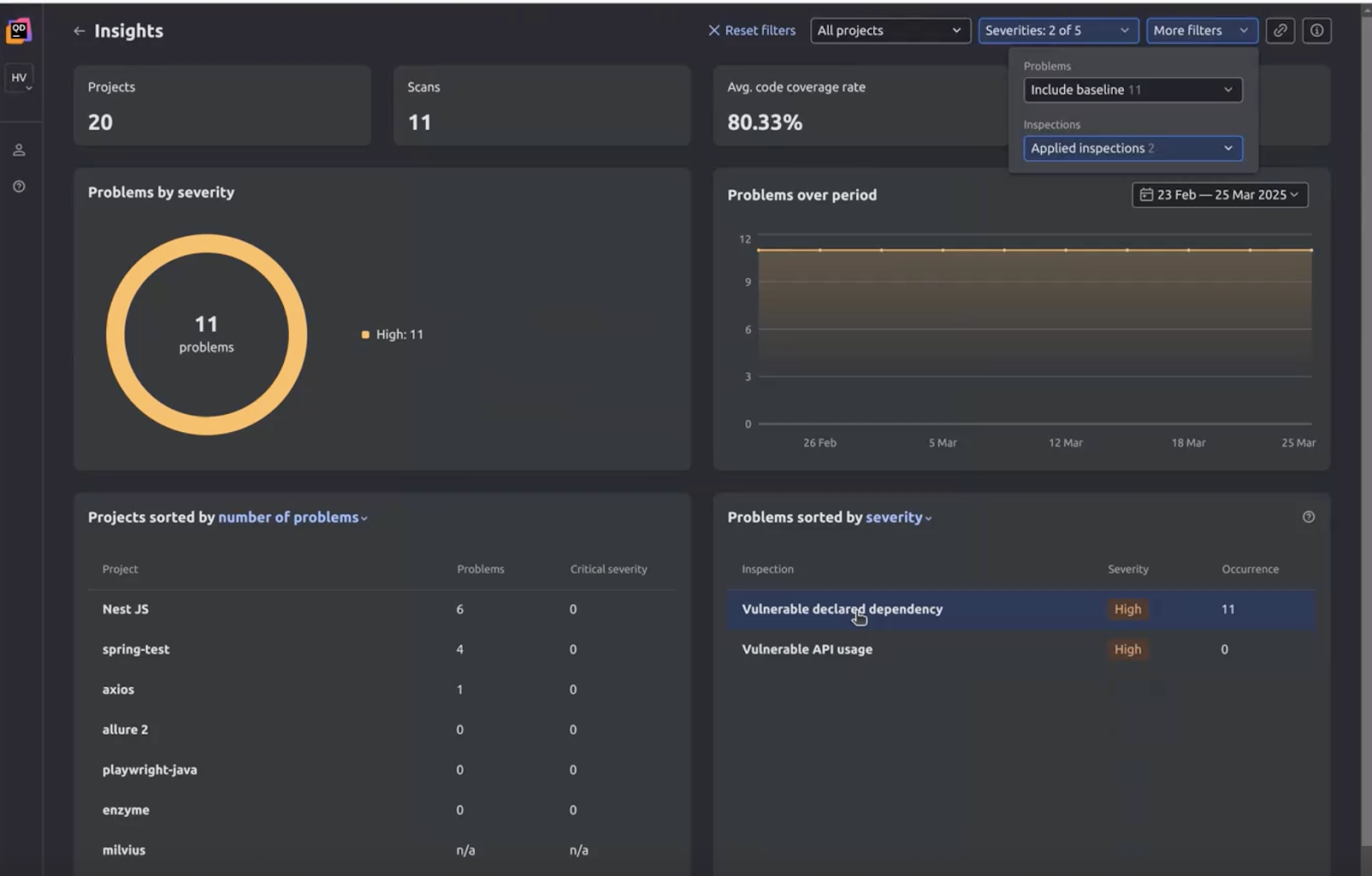
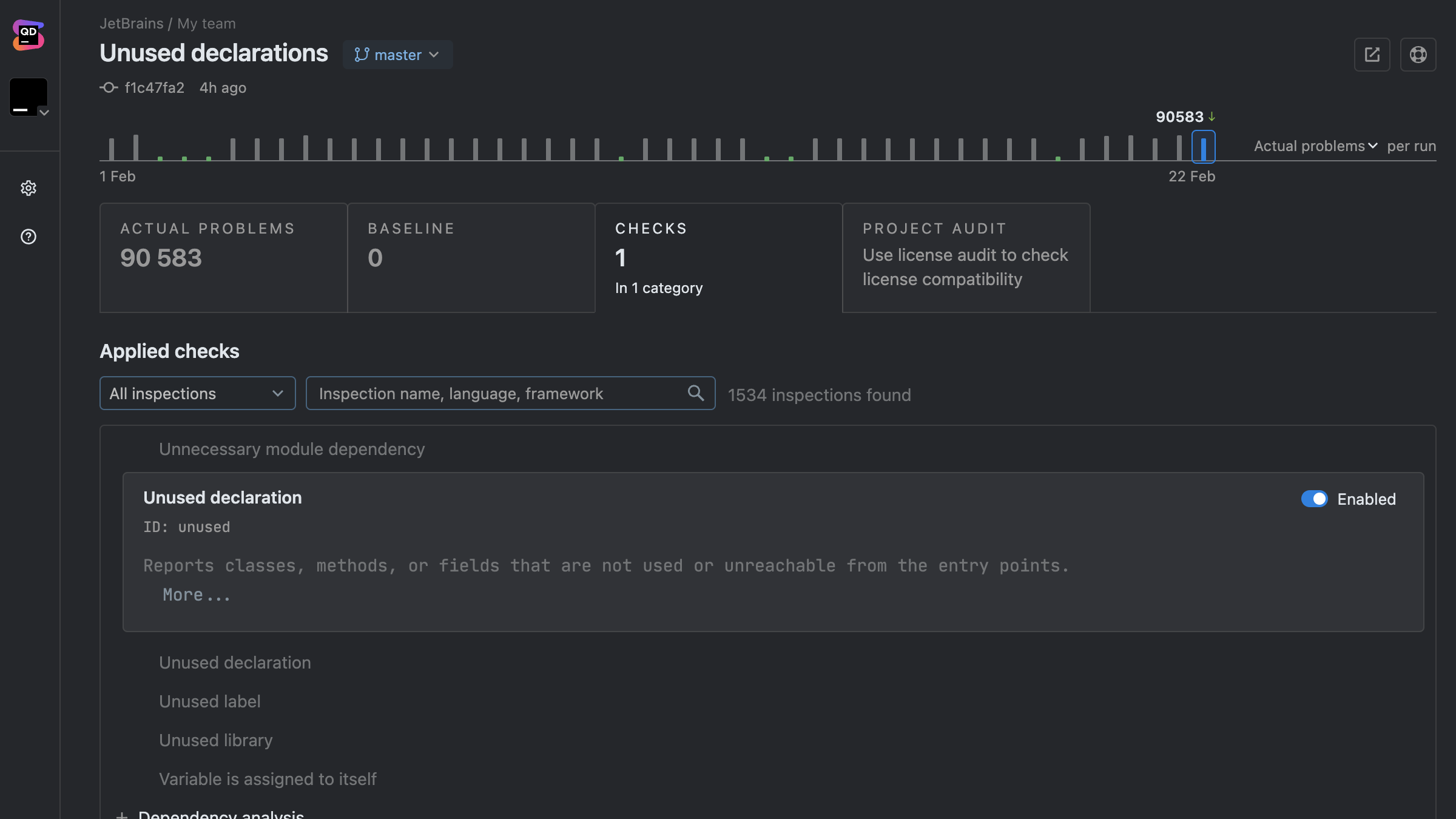
Qodana reinvents your code quality processes. It lets your development team identify issues and fix them earlier through real-time feedback, consistent code standards, and suggested fixes. 

That means you deliver secure, high-quality code without incurring the costs of refactoring and downtime. And all within the environments your team is already working in, for smooth integration.

The Qodana code quality tool is built on and uses the linters of JetBrains IDEs, trusted by more than 18 million developers since 2001, and integrates with tools developers already use. It drives code quality and reduces debugging costs through:

  • Ready-to-use pipelines for popular CI systems such as Azure Pipelines, CircleCI, Jenkins, GitHub Actions, GitLab CI/CD, and more.
  • Consistent rules and code quality checks across local development, IDE, and CI.
  • Quality gates that stop risky code before merge, minimizing potential future technical debt.
  • Clear and actionable reports that suggest automatic fixes and reduce repair time and associated costs.

Scenario: How to find and reduce bug costs in testing

How does static code analysis reduce costs in practice? Let’s say your team is working on a project to improve the design of your product and add new features. However, a code or configuration change unintentionally causes a security weakness by hardcoding secret values that have embedded API keys. 

The result is that these values could be exposed to anyone with access to the codebase, including version control history. If the bug goes undetected, your systems will be vulnerable to unauthorized access and data breaches, resulting in downtime, reputational damage, and more time, resources, and money spent on fixes.

This can also be caused by code changes that weaken security by:

  • Logging sensitive data, such as credentials, leading to security and compliance risks. 
  • Using insecure cryptographic APIs or misusing secure ones.
  • Missing authentication checks that may result in information exposure.
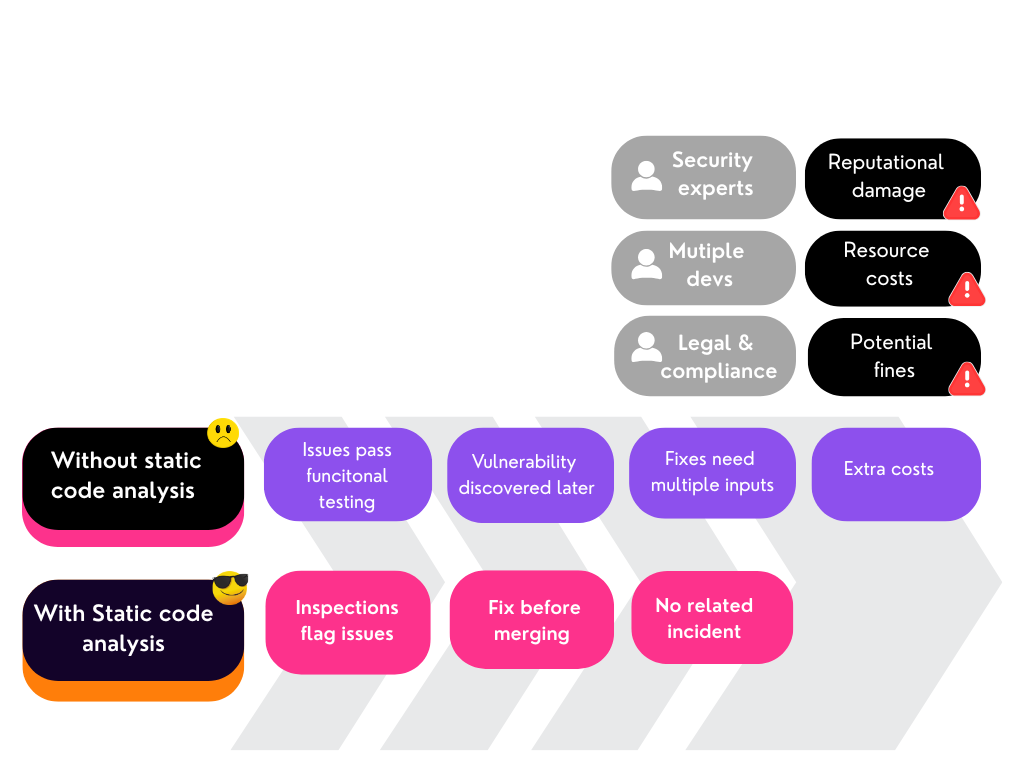
with and without static code analysis - how to reduce software bugs and save money

Without static code analysis

Without static code analysis, this vulnerability could easily make it through manual code review. Because it’s not obvious, it might pass functional testing and not be uncovered until close to or after release, during a security audit, or penetration test. 

Worse still, if the issue makes it into your shipped product, it can even be found and exploited by an attacker, costing far more than just the resource needed for debugging.

Fixing the problem in a live environment can require coordinated patches and quick fixes, which may cost much more than if the error was detected and rectified during development. It can also lead to:

  • Additional resource costs for personnel and security reviews to fix the issue.
  • Large fines by regulatory bodies, such as the SEC (Securities and Exchange Commission) and FTC (Federal Trade Commission).
  • Delayed certifications, which may lead to financial, operational, and legal penalties.
  • Reputational damage and the associated costs of lost business.

With static code analysis

Static code analysis significantly reduces the cost of dealing with such a vulnerability. At commit or pull request, the vulnerability is flagged and progress stopped. The developer working on that code is automatically alerted and required to fix the issue before merging code. This stops the bug in its tracks and prevents it from becoming part of your wider codebase, meaning there’s a quicker fix and no fallout.

The process ensures security is a proactive priority, rather than a reactive expense. It helps mitigate vulnerabilities causing security problems during testing and execution. It also reduces the risk and high costs of compliance breaches.

Reduce software bugs and costs with Qodana

Static code analysis is an important part of lowering the cost of software bugs and fixes. Identify problems before they escalate into expensive issues. 

Try Qodana for free with a 60-day trial for your project.

Speak To Qodana