[AutoBe] Qwen 3.5-27B Just Built Complete Backends from Scratch — 100% Compilation, 25x Cheaper

Qwen 3.5-27B Just Built Complete Backends from Scratch

We ran Qwen 3.5-27B on 4 backend generation tasks — from a todo app to a full ERP system. Every single project compiled. The output was nearly identical to Claude Opus 4.6, at 25x less cost.

This is AutoBe — an open-source system that turns natural language into complete, compilable backend applications.

AutoBe generating a Shopping Mall backend with Qwen 3.5-27B

1. Generated Examples

All generated by Qwen 3.5-27B. All compiled. All open source.

  • Todo
  • Reddit
  • Shopping

    • Entity Relationship Diagram
    • API Schema
    • Controller
    • E2E Test
  • ERP (Enterprise Resource Planning)

From a simple todo app to a full-scale ERP system. Each includes Database schema, OpenAPI spec, API implementation, E2E tests, and type-safe SDK.

2. The Benchmark

Benchmark: 11 AI models all scoring near-identically on backend generation

11 models benchmarked. Scores are nearly uniform — from Qwen 3.5-27B to Claude Sonnet 4.6.

A 27B model shouldn’t match a frontier model. So why are the outputs identical? Because the compiler decides output quality — not the model.

3. Cost

Model Input / 1M tokens Output / 1M tokens
Claude Opus 4.6 $5.000 $25.000
Qwen 3.5-27B (OpenRouter) $0.195 $1.560

~25x cheaper on input. ~16x on output. Self-host Qwen and it drops to electricity.

4. How Is This Possible?

AutoBe doesn’t generate text code. Instead, LLMs fill the AST structures of AutoBe’s custom-built compilers through function calling harness.

AutoBe's 4 compiler AST pipeline — Database, OpenAPI, Test, and Hybrid compilers validating LLM output through function calling

Four compilers validate every output, and when something fails, the compiler’s diagnoser feeds back exactly what broke and why. The LLM corrects only the broken parts and resubmits — looping until every compiler passes.

This harness is tight enough that model capability differences don’t produce quality differences. They only affect how many retries it takes — Claude Opus gets there in 1-2 attempts, Qwen 3.5-27B in 3-4. Both converge to the same output. That’s why the benchmark distribution is so uniform.

“If you can verify, you converge.”

5. Coming Soon: Qwen 3.5-35B-A3B

Qwen 3.5-35B-A3B benchmark showing near-complete compilation success

Only 3B active parameters. Not at 100% yet — but close.

When it gets there: 77x cheaper, running on a normal laptop.

No cloud. No high-end GPU. Just your machine building entire backends.

6. Try It

git clone https://github.com/wrtnlabs/autobe
pnpm install
pnpm playground

Star the repo if this is useful: https://github.com/wrtnlabs/autobe

7. Deep Dives

  • Function Calling Harness: From 6.75% to 100%
  • AutoBe vs. Claude Code: 3rd-Gen Coding Agent

Claude Code Leak: Why Every Developer Building AI Systems Should Be Paying Attention

“If your code gets exposed, how much damage can someone actually do?”
That’s the question I kept coming back to when the Claude Code discussions started surfacing across developer forums and security channels in early 2025. Reports indicated that portions of internal tooling, module structure, and system architecture associated with Anthropic’s Claude Code — an agentic coding assistant built on Claude — were exposed or reconstructable through a combination of leaked artefacts and reverse engineering.
And before the “it’s just a leak” crowd closes this tab: I want to make the case that this one is different. Not because of who it happened to. But because of what got exposed and why that matters for every developer building AI-driven products right now.

What the Claude Code Leak Actually Involved

To be precise: this wasn’t a single catastrophic breach where source code was dumped publicly. What made this incident notable was the partial exposure of internal system architecture — things like file structure, module naming conventions, agent workflow patterns, and tool orchestration logic.

In traditional software, a leaked file structure is mildly embarrassing. In an AI system, it’s a blueprint.

Here’s why. When you expose:

  • File structure → you reveal how the system is decomposed and what abstractions it uses
  • Module naming → you signal what capabilities exist and how they’re scoped
  • Agent workflow patterns → you expose the decision-making logic and tool-call sequences
  • Safety layer positioning → you reveal where guardrails sit, which tells an attacker where they don’t

Understanding the system architecture of an AI agent doesn’t just tell you how it works. It tells you exactly how to manipulate it.

Why AI Codebases Are Uniquely Vulnerable

Traditional application security assumes a relatively stable attack surface. You protect your API, your auth layer, your database. You patch CVEs. You rotate secrets.

AI systems change that calculus fundamentally. The attack surface in an LLM-powered system includes things that don’t exist in conventional software:

  1. Prompt Engineering as Infrastructure

In a standard app, business logic lives in code. In an AI system, a significant portion of business logic lives in prompts — system prompts, tool descriptions, chain-of-thought scaffolds. These are text, often stored as strings or markdown files. They’re not compiled. They’re not obfuscated. And they encode your product’s entire decision-making philosophy.

Expose a system prompt and you expose the rules of the game. An attacker can now craft inputs that navigate around your guardrails with surgical precision instead of brute force.

  1. Tool Orchestration Is a Dependency Graph

Modern AI agents don’t just generate text — they call tools. Search, code execution, file access, API calls. The orchestration logic that decides when to call which tool, and with what parameters, is often the most competitively sensitive part of the system.

Leaking that orchestration logic is the equivalent of leaking your microservices architecture and your internal API contracts simultaneously.

  1. Safety Layers Are Positional

In a well-designed AI system, safety measures are layered — input filtering, output validation, human-in-the-loop triggers, rate limiting. But these layers have positions in the pipeline. Once an attacker knows where a guardrail sits, they know what comes before it and what comes after it. They can craft inputs that appear clean at the filter point and only reveal their intent downstream.

This is why security-through-obscurity, while generally a bad strategy, is more damaging to abandon in AI systems than in traditional ones.

A Hypothetical Attack Scenario

Let’s make this concrete. Imagine you’ve built a customer-facing AI assistant for a SaaS product. Your system architecture includes:

  1. An input classifier that blocks obvious jailbreak attempts
  2. A system prompt that defines the assistant’s role and access permissions
  3. Tool calls that can query your internal database and send emails on behalf of users

Now imagine a researcher (or attacker) reverse-engineers enough of your architecture to know:

  • Your input classifier runs before the system prompt is injected
  • Your tool-call permissions are enforced by a description in the system prompt, not by a hard-coded permission layer
  • Your email tool doesn’t validate the recipient domain

With that knowledge, they don’t need to brute-force anything. They craft a single, clean-looking input that passes your classifier, then uses indirect prompt injection to override your system prompt’s tool permission language, and triggers an email to an external domain.

That’s not a theoretical attack. Variants of it have been demonstrated in research settings against production AI systems. The Claude Code leak is notable because it suggests even well-resourced AI labs can have enough of their internals reconstructable to enable this kind of targeted exploitation.

The “Systems Still Under Development” Problem

Here’s the angle that worries me most as someone actively building an AI product.

When a mature, production-hardened system gets partially exposed, it’s bad — but the blast radius is somewhat contained. The security assumptions have been tested. The edge cases have been handled. The architecture is, at least in theory, stable.

When a system still under active development gets exposed, the attacker doesn’t just find bugs. They find intentions.

They find the module you haven’t wired up yet. The permission check that’s commented out during testing. The hardcoded API key in the dev config. The tool that’s been scaffolded but not yet rate-limited.
Early-stage AI systems — which describes most of what the developer community is building right now — are architecturally porous by design. Speed of iteration is the priority. Security hardening comes later. The Claude Code incident is a reminder that “later” has a way of arriving before you’re ready.

How to Actually Build for This

These aren’t abstract recommendations. Here’s what I’d implement on any AI system today:

Design for the Inevitable Breach

Assume your prompts, your tool descriptions, and your agent workflows will eventually be exposed. Design them such that exposure doesn’t immediately translate to exploitation. This means:

  • No security by prompt alone. Permissions enforced only in a system prompt are not permissions — they’re suggestions. Enforce access control at the infrastructure layer.
  • Validate tool inputs at the tool level. Don’t rely on the LLM to self-police what parameters it passes to your tools. Treat every tool call as an untrusted external input.

Reduce Blast Radius

Segment your agent’s capabilities. An agent that can read files and send emails and make external API calls is a single prompt injection away from a multi-vector breach. Apply least-privilege to tools the same way you’d apply it to IAM roles.

# Instead of one god-agent with all capabilities:
agent.tools = [read_files, send_email, call_api, query_db]

# Scope tools to the task:
research_agent.tools = [read_files, web_search]
comms_agent.tools = [send_email]  # scoped to internal domains only

Treat Internal Architecture as Public

CI/CD configurations, agent workflow diagrams, prompt files — if they live in a repo, on a shared drive, or in a Notion doc accessible to more than three people, treat them as potentially public. Not because your team is untrustworthy, but because attack surfaces compound.

Red Team Your Prompts Before Shipping

Run adversarial prompt testing before any agent capability ships to production. This doesn’t require a dedicated security team — a single afternoon with a structured prompt injection checklist will surface more issues than you expect. Resources like OWASP’s LLM Top 10 are a solid starting point.

Secure the CI/CD Pipeline Specifically

AI systems often have unique CI/CD patterns — model fine-tuning pipelines, prompt version registries, embedding generation jobs. These are as sensitive as your application code and are frequently less scrutinised. Audit what has access to your prompt store and model configuration with the same rigour you’d apply to your production database credentials.

The Uncomfortable Truth About AI Security Maturity

The wider developer community — and I include myself here — is building AI systems at a pace that has significantly outrun our collective security intuition.

We’ve spent decades developing mental models for securing web applications. We know about SQL injection, XSS, CSRF, broken auth. We have frameworks, checklists, and automated tooling.

For AI systems? We’re still writing the playbook. Prompt injection, indirect prompt injection, model inversion, training data extraction, agent goal hijacking — these are real attack classes with real-world implications, and most developers building AI products today have limited formal exposure to any of them.

The Claude Code incident, whatever its precise scope, is valuable as a forcing function. It makes the abstract concrete. It invites the question: if this happened to Anthropic, what’s my exposure?

Final Thought

We’re not just writing code anymore. We’re building systems that reason, plan, and act — often with access to real data, real APIs, and real users.

When a traditional application fails, it crashes. When an AI agent gets exploited, it executes — just not in the direction you intended.
Security for AI systems isn’t a feature you bolt on at the end of the sprint. It’s an architectural decision you make on day one, and revisit every time you add a new tool, a new agent, or a new capability.

The Claude Code leak is a reminder that no one is immune. The question is whether it changes how you build.

What’s your current approach to securing AI agents in production? Drop a comment — I’d genuinely like to know what others are doing.

If you found this useful, follow for more on building real-world AI systems — covering architecture, security, and the hard lessons from shipping.

Spread vs Rest Operators in JavaScript

JavaScript gives us powerful tools to work with data more easily—and two of the most useful are the spread (…) and rest (…) operators.

Even though they look the same, they behave very differently depending on where you use them. Let’s break it down step by step.

What the Spread Operator Does
The spread operator is used to expand (spread out) values.
Think of it like unpacking items from a box.
Example with Arrays

const numbers = [1, 2, 3];
const newNumbers = [...numbers, 4, 5];

console.log(newNumbers);
// [1, 2, 3, 4, 5]

Here, …numbers takes each element and expands it into the new array.

What the Rest Operator Does

The rest operator does the opposite—it collects multiple values into one.
Think of it like packing items into a box.

function sum(...nums) {
  return nums.reduce((total, num) => total + num, 0);
}

console.log(sum(1, 2, 3, 4));
// 10

…nums collects all arguments into a single array.
Using Spread with Arrays and Objects
Array

const arr1 = [1, 2];
const arr2 = [3, 4];

const combined = [...arr1, ...arr2];

console.log(combined);
// [1, 2, 3, 4]

Objects:

const user = { name: "Alice", age: 25 };

const updatedUser = {
  ...user,
  age: 26
};

console.log(updatedUser);
// { name: "Alice", age: 26 }

Spread is commonly used to copy and update data without modifying the original.

Use Cases:

  1. Copying Arrays (Without Mutation)
const original = [1, 2, 3];
const copy = [...original];
  1. Merging Objects
const defaults = { theme: "light" };
const settings = { theme: "dark", fontSize: 16 };

const finalSettings = { ...defaults, ...settings };
  1. Passing Arguments to Functions
const nums = [5, 10, 15];

Math.max(...nums); // 15
  1. Extracting Values with Rest
const [first, ...others] = [10, 20, 30, 40];

console.log(first);  // 10
console.log(others); // [20, 30, 40]

How to Master SQLAlchemy I/O: Testing Queries in CI to Prevent Database Disasters 🚨

It’s 3:00 AM. Your pager is screaming.

The application is completely unresponsive, the database CPU is pegged at 100%, and connection pools are exhausted. Desperate customers with critical systems offline are flooding the support channels. To stop the bleeding, your team scales up to the biggest AWS RDS instance available, literally burning thousands of USD per minute just to keep the lights on.

You scramble to find the root cause, expecting a massive infrastructure failure. Instead, you find a single, seemingly harmless Python loop that was recently deployed.

Your CI pipeline was completely green. All the unit tests passed. The API returned the correct JSON schema. But beneath that green checkmark, your ORM was quietly executing 5,000 individual SELECT statements per request.

Testing what your application does is no longer enough. If you aren’t testing how it communicates with your database, you are exposing your business to catastrophic financial and operational risk. Let’s explore how to take control of your execution footprint.

🏢 The Cultural Divide: Whose Problem is the Database?

For years, software development has suffered from a toxic, siloed mentality: “Writing the code is my job; the database performance is the DBA’s problem.”

This culture is a massive financial liability. C-Level executives are painfully aware that the “database black box” directly inflates cloud infrastructure bills. You cannot simply throw more expensive AWS compute power at poorly optimized I/O.

At the same time, developers are constantly pushed to deliver features faster, relying heavily on Object-Relational Mappers (ORMs) to abstract away the SQL layer. But abstractions are not magic. Building a resilient engineering culture requires developers to take absolute ownership of their execution footprint. You must understand the exact cost of the code you write.

🛡️ Engineering Excellence Disclaimer

Let’s get one thing straight: SQLAlchemy is not slow. When a database reaches a critical state, it is almost never the fault of the ORM itself. The ORM is doing exactly what you commanded it to do.

Modern engineering demands “agnostic generalist specialists.” You do not need to be a DBA, but you must understand relational mechanics and make architectural decisions about your I/O layer:

  • The Python GC & Object Hydration Trap: SQLAlchemy does far more than just translate Python to SQL. It manages an IdentityMap, tracks the “dirty state” of every record, and hydrates complex Python objects. If you lazily load 10,000 rows as full ORM models instead of lightweight tuples, you aren’t just stressing the database—you are suffocating Python’s memory. When the Garbage Collector (GC) eventually kicks in to clean up thousands of discarded objects, your application’s CPU will spike and the event loop will stall. You must know when to yield raw tuples or use load_only.
  • The JOIN Illusion: It is a common misconception that a massive JOIN is always the best way to avoid an N+1 problem. While a JOIN utilizes database indexes efficiently, it can easily destroy your networking performance. If you join a root table with a heavily populated child table, the database sends the root data duplicated across every single row over the network. This Cartesian explosion causes terrible I/O bottlenecks.
  • The Two-Query Strategy: Often, it is vastly superior to execute a first query, aggregate the IDs in memory, and then execute a second query using an IN (...) clause. This completely eliminates the N+1 problem while keeping the network payload incredibly lean.
  • Virtual Tables and Pushdown Logic: When dealing with heavy aggregations, doing the math in Python memory is a critical mistake. It is almost always better to create a virtual table (like a View or a CTE) to push the computational weight down to the database engine, returning only the final, lightweight result to your application.

You must be in control of these decisions. pytest-capquery exists to make this invisible I/O battle visual. It puts you in control, commander.

💡 The Solution: Bridging the Gap with pytest-capquery

We need a way to incentivize developers to care about database I/O without forcing them to manually write and maintain brittle, hardcoded SQL assertions in their test suites.

This is why pytest-capquery was created. It intercepts the SQLAlchemy engine at the driver level, providing a strict, chronological timeline of your application’s execution footprint.

  • For the Business: This is about protecting the bottom line. Catching a database regression in CI preserves your system’s SLA and safeguards your customer reputation. You avoid emergency weekend patches, furious customers with offline security panels, and the sheer financial drain of desperately scaling up your cloud infrastructure just to keep the platform breathing.
  • For Developers: It uses a zero-friction snapshot workflow. You don’t write SQL strings; the test suite generates them for you. If an N+1 regression occurs, the test fails immediately. You use the snapshot as a debugging mechanism to continuously improve your query logic.
  • For DBAs: It automatically generates physical .sql files. DBAs can review these raw SQL artifacts during Pull Requests to validate query plans and indexes without ever reading a line of Python code.

🛠️ Getting Started: Proving Your Execution Footprint

Let’s look at how to protect a critical domain—like monitoring Alarm Panels and their associated Sensors—using a real PostgreSQL integration database.

1. The Setup (conftest.py)

First, we provision a tangible PostgreSQL engine to ensure our tests replicate production-grade execution topologies. We configure the postgres_capquery fixture to intercept the engine.

from typing import Generator
import pytest
from sqlalchemy import create_engine, Engine, text
from sqlalchemy.orm import Session, sessionmaker
from pytest_capquery.plugin import CapQueryWrapper
from pytest_capquery.snapshot import SnapshotManager
from tests.models import Base

@pytest.fixture(scope="session")
def postgres_engine() -> Generator[Engine, None, None]:
    engine = create_engine("postgresql+psycopg2://postgres@localhost:5432/capquery_test")
    Base.metadata.create_all(engine)
    yield engine
    Base.metadata.drop_all(engine)
    engine.dispose()

@pytest.fixture(scope="function")
def postgres_session(postgres_engine: Engine) -> Generator[Session, None, None]:
    SessionMaker = sessionmaker(bind=postgres_engine)
    session = SessionMaker()
    session.execute(text("TRUNCATE TABLE alarm_panels, sensors RESTART IDENTITY CASCADE"))
    session.commit()
    yield session
    session.rollback()
    session.close()

@pytest.fixture(scope="function")
def postgres_capquery(
    postgres_engine: Engine, capquery_context: SnapshotManager
) -> Generator[CapQueryWrapper, None, None]:
    with CapQueryWrapper(postgres_engine, snapshot_manager=capquery_context) as captured:
        yield captured

2. The Test (test_snapshot.py)

Instead of guessing how many queries are executed, we wrap our business logic in the capture(assert_snapshot=True) context manager.

import pytest
from sqlalchemy.orm import joinedload
from tests.models import AlarmPanel, Sensor

pytestmark = pytest.mark.xdist_group("e2e_postgres")

def test_insert_and_select_snapshot(postgres_session, postgres_capquery):
    with postgres_capquery.capture(assert_snapshot=True):
        panel = AlarmPanel(mac_address="00:11:22:33:44:55", is_online=True)
        sensor = Sensor(name="Front Door", sensor_type="Contact")
        panel.sensors.append(sensor)

        postgres_session.add(panel)
        postgres_session.flush()

        queried_panel = (
            postgres_session.query(AlarmPanel)
            .options(joinedload(AlarmPanel.sensors))
            .filter_by(mac_address="00:11:22:33:44:55")
            .first()
        )
        assert queried_panel is not None

3. The Universal Artifact (.sql Snapshot)

When you run your test suite, pytest-capquery generates this exact file. This is the ultimate source of truth. If a developer accidentally alters the fetching strategy and destroys your networking performance, the test will instantly fail because the query structure and count will deviate from this approved baseline.

-- CAPQUERY: Query 1
-- EXPECTED_PARAMS: None
-- PHASE: 1
BEGIN

-- CAPQUERY: Query 2
-- EXPECTED_PARAMS: {'mac_address': '00:11:22:33:44:55', 'is_online': True}
-- PHASE: 1
INSERT INTO alarm_panels (mac_address, is_online)
VALUES (%(mac_address)s, %(is_online)s) RETURNING alarm_panels.id

-- CAPQUERY: Query 3
-- EXPECTED_PARAMS: {'panel_id': 1, 'name': 'Front Door', 'sensor_type': 'Contact'}
-- PHASE: 1
INSERT INTO sensors (panel_id, name, sensor_type)
VALUES (%(panel_id)s, %(name)s, %(sensor_type)s) RETURNING sensors.id

-- CAPQUERY: Query 4
-- EXPECTED_PARAMS: {'mac_address_1': '00:11:22:33:44:55', 'param_1': 1}
-- PHASE: 1
SELECT anon_1.alarm_panels_id AS anon_1_alarm_panels_id,
       anon_1.alarm_panels_mac_address AS anon_1_alarm_panels_mac_address,
       anon_1.alarm_panels_is_online AS anon_1_alarm_panels_is_online,
       sensors_1.id AS sensors_1_id,
       sensors_1.panel_id AS sensors_1_panel_id,
       sensors_1.name AS sensors_1_name,
       sensors_1.sensor_type AS sensors_1_sensor_type
FROM
  (SELECT alarm_panels.id AS alarm_panels_id,
          alarm_panels.mac_address AS alarm_panels_mac_address,
          alarm_panels.is_online AS alarm_panels_is_online
   FROM alarm_panels
   WHERE alarm_panels.mac_address = %(mac_address_1)s
   LIMIT %(param_1)s) AS anon_1
LEFT OUTER JOIN sensors AS sensors_1 ON anon_1.alarm_panels_id = sensors_1.panel_id

🚀 Stop Guessing, Start Asserting

The database is the beating heart of your application. Leaving its performance up to chance and ORM black boxes is no longer an option.

By integrating tools like pytest-capquery into your CI pipeline, you transform performance testing from an afterthought into a rigorous, automated standard. You protect your cloud budget, you give your DBAs the transparency they desperately need, and you empower yourself to truly command the systems you build.

Stop guessing your execution footprint. Profile your test suite today:

🔗 fmartins/pytest-capquery on GitHub

pip install pytest-capquery

Together we can do more! If you care about engineering excellence and robust testing, jump into the repository. Issues, discussions, and Pull Requests are always welcome. Let’s build a culture that respects the database.

dotInsights | April 2026

Did you know? You can use LINQ to XML to write queries in a readable and strongly-typed way directly against an XML document, making it one of the most intuitive ways to deal with XML in .NET.

dotInsights | April 2026

Welcome to dotInsights by JetBrains! This newsletter is the home for recent .NET and software development related information.

🔗 Links

Here’s the latest from the developer community.

  • 7 Testing Myths Every Software Developer Should STOP Believing 🎥 – Emily Bache
  • From 3 Worktrees to N: How AI Agents Changed My Parallel Development Workflow on Windows – Laurent Kempé
  • records ToString and inheritence – Steven Giesel
  • Coding isn’t the hard part… 🎥 – CodeOpinion by Derek Comartin
  • 5 UX Tips for .NET MAUI Developers – Leomaris Reyes
  • I Don’t Know If I’d Recommend Software Development Anymore 🎥 – Gui Ferreira
  • Splitting the NetEscapades.EnumGenerators packages: the road to a stable release – Andrew Lock
  • Daniel Ward: AI Agents – Episode 393 – Jeffrey Palermo hosts Daniel Ward
  • Behavioural Inference: How I Learned to Stop Worrying and Love Probabilistic Systems – Scott Galloway
  • Creating case-sensitive folders on Windows using C# – Gérald Barré
  • AI Benefits – But at What Cost? – Steve Smith
  • A Primer on Using Agent Skills 🎥 – The AI Daily Brief: Artificial Intelligence News
  • How C# Strings Silently Kill Your SQL Server Indexes in Dapper – Kevin Griffin
  • How to Implement Prototype Pattern in C#: Step-by-Step Guide – Nick Constantino
  • Writing a .NET Garbage Collector in C#  – Part 8: Interior pointers and Writing a .NET Garbage Collector in C#  – Part 9: Frozen segments and new allocation strategy – Kevin Gosse
  • How To Containerize A Twilio App With Docker – Dylan Frankcom
  • Building a Real-time Audio Processing App with SKSL Shaders in .NET MAUI – Nick Kovalsky
  • How to Create Fillable PDF Forms in C# for Server-Side .NET Apps – Arun Kumar Chandrakesan
  • C# class types explained with examples – David Grace
  • Regular Expression Performance: Supercharge Your Match Counting – David McCarter
  • CoreSync – A .NET library that provides data synchronization between databases – Adolfo Marinucci
  • Software Craftsmanship in the Age of AI – Tim O’Reilly
  • Validation Options in Wolverine – Jeremy D. Miller
  • How to Organize Minimal APIs – Assis Zang
  • When NOT to use the repository pattern in EF Core – Ali Hamza Ansari
  • # 14 New Features: A Developer Guide for .NET 10 – Dirk Strauss
  • What’s the EXACT Technical Gap That Separates AI SUCCESS From AI FAILURE? – Dave Farley and Steve Smith at Modern Software Engineering
  • What 81,000 people want from AI – Anthropic

☕ Coffee Break

Take a break to catch some fun social posts.

You just know this is happening in some company out there…

10x engineers.

Rules of code…

🗞️ JetBrains News

What’s going on at JetBrains? Check it out here:

🎉 dotUltimate 2026.1 Release Party 🎉

🎉 ReSharper for Visual Studio Code, Cursor, and Compatible Editors Is Out  🎉

More JetBrains news…

  • ReSharper 2026.1 Release Candidate Released!
  • Rider 2026.1 Release Candidate Is Out!
  • Rider 2026.1: More AI Choice, Stronger .NET Tooling, and Expanded Game Dev Support
  • ReSharper 2026.1: Built-in Performance Monitoring, Expansion to VS Code, and Faster Everyday Workflows

✉️ Comments? Questions? Send us an email. 

Subscribe to dotInsights

Is your AI wrapper a “High-Risk” system? (A dev’s guide to the EU AI Act)

If you’re building AI features right now, you and your team are probably arguing about the tech stack:

  • Should we use LangChain or LlamaIndex?
  • Should we hit the OpenAI API or run Llama 3 locally?

Here is the harsh truth about the upcoming EU AI Act:

Regulators do not care about your tech stack.

They don’t care if it’s a 100B parameter model or a simple Python script using scikit-learn.

The law only cares about one thing:

Your use case.

Why This Matters

Your use case determines your risk category.

If your product falls into the High-Risk category, you are legally required to implement:

  • human oversight
  • risk management systems
  • detailed technical documentation (Annex IV)

Getting this wrong doesn’t just mean “non-compliance”.

It means:

  • failed procurement audits
  • blocked enterprise deals
  • serious regulatory exposure

🔍 5 Real-World AI Scenarios

Here are practical examples to help you understand where your system might fall.

1. AI Chatbot for Customer Support

Use case:

  • routing tickets
  • answering FAQs

Classification:

👉 Limited Risk

Dev requirement:

Add UI elements disclosing that users are interacting with AI.

The trap:

If your bot starts making decisions (e.g. auto-refunds, banning users), you might cross into High-Risk territory.

2. AI for CV Screening / Hiring

Use case:

  • parsing resumes
  • ranking candidates

Classification:

👉 High-Risk (explicitly listed under Annex III)

Dev requirement:

  • bias monitoring
  • human-in-the-loop (HITL) flows
  • full decision logging

3. E-commerce Recommendation Engine

Use case:

  • tracking user behavior
  • suggesting products

Classification:

👉 Minimal Risk

Dev requirement:

Almost none under the AI Act (GDPR still applies).

4. AI Credit Scoring System

Use case:

  • determining loan eligibility

Classification:

👉 High-Risk

Dev requirement:

Full traceability — you must be able to explain decisions made by the system.

5. AI Generating Marketing Content

Use case:

  • generating blog posts
  • writing ad copy

Classification:

👉 Minimal to Limited Risk

Dev requirement:

Minimal — unless generating deepfakes (then disclosure/watermarking applies).

🛠️ The Real Risk: Feature Creep

The biggest danger isn’t writing documentation.

It’s this:

Your system can move from Limited Risk to High-Risk with a single merged PR.

A small feature change can completely change your regulatory obligations.

Quick Self-Check

If you’re targeting the EU market, ask yourself:

  • Does my system influence hiring decisions?
  • Does it impact financial outcomes?
  • Does it affect people’s rights or opportunities?

If yes:

👉 You may already be in High-Risk territory.

🧪 A Simple Way to Check

If you’re not sure, I built a free developer tool to calculate this instantly:

👉 https://www.complianceradar.dev/ai-act-risk-classification

No signup required.

Final Thought

Most AI products won’t fail because of bad code.

They’ll fail because of misunderstood regulation.

Understand your risk level early — and build with confidence.

💬 What kind of AI features are you building right now?

Drop your use case below and we can try to classify it together.

Using ACP + Deep Agents to Demystify Modern Software Engineering

This guest post comes from Jacob Lee, Founding Software Engineer at LangChain, who set out to build a coding agent more aligned with how he actually likes to work. Here, he walks through what he built using Deep Agents and the Agent Client Protocol (ACP), and what he learned along the way.

I’ve come to accept that I will delegate an ever-increasing amount of my work as a software engineer to LLMs. I was an early Claude Code superfan, and though my ego still tells me I can write better code situationally than Anthropic’s proto-geniuses in a data center, these days I’m mostly making point edits and suggestions rather than writing modules by hand.

This shift has made me far more productive, but I’ve become increasingly uncomfortable with blindly turning over such a big part of my job to an opaque third party. While training my own model was out of the question for many obvious reasons (and model interpretability is an unsolved problem anyway), the agent harness and UX on top of it is just software, and software IS something I understand. So when I had some free time during my paternity leave, I took a stab at building some tooling to my own specifications.


I work at a startup called LangChain, where we’ve been developing our own set of open-source agentic building blocks, and I settled on building an adapter between our Deep Agents framework and Agent Client Protocol (ACP). My goal was just to build a bespoke coding agent that fit my workflows, but the results were better than I expected. Over the past few months, it’s completely replaced Claude Code as my daily driver, with the added benefit of full observability into my agent’s actions by running LangSmith on top. In this post, I’ll cover how it works and how to set it up for yourself!

Why an IDE + ACP instead of a terminal + TUI?

If you’re not familiar with ACP, it’s an open protocol that defines how a client (most often used with IDEs like WebStorm or Zed) interacts with AI agents. It allows you to do cool things like quickly pass a coding agent the exact context you’re looking at in an IDE.

I’ve gotten quite used to being productive in IDEs over my decade writing software professionally, and I still find them valuable for a few reasons:

  • I do still edit code by hand occasionally. Most often, these are small edits I can make faster than explaining the problem to an agent, or because I can do something in parallel alongside a running agent, like adding debug statements, but this still provides some alpha.
  • IDEs are fantastic interfaces for viewing code in context. I most often use this to understand the general scope of a problem before prompting, or to self-review my current branch, but it’s also often just faster for me to point the agent at a file rather than asking it to grep around.

I previously used Claude Code in a separate terminal pane in an IDE, which worked but always felt like two disconnected tools. In JetBrains IDEs, the agent lives in a native tool window with tight integration. I can @mention the file or block of code I’m currently looking at, and many of my threads are littered with messages like “Take a look at this. Does it look funny? @thisFile“.

How it works

The agent

Though I could have created the various pieces for my agent from scratch, Deep Agents provided a good, opinionated starting point, providing the following:

  • Tools around interacting with the filesystem (read/write/edit_file, ls, grep, etc.).
  • Shell access, which allows the agent to run verifications like lint, tests, and more.
    • Alongside this, human-in-the-loop support to allow restricting dangerous actions
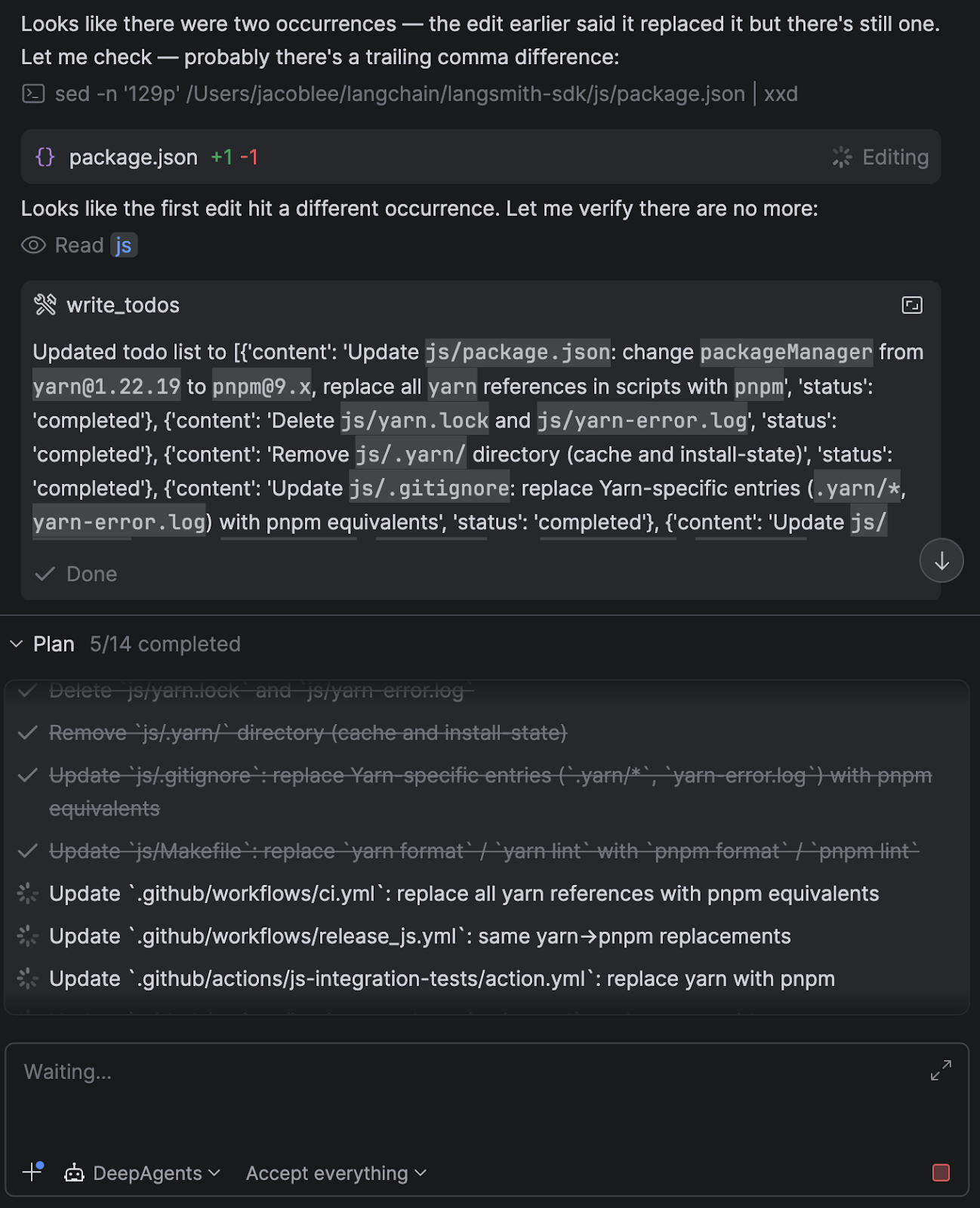
  • A write_todos tool, which encourages the agent to take a planning step that breaks work into steps and tracks progress.
    • In practice, this makes a big difference for longer refactors to keep the agent focused.
  • Capabilities around spawning isolated sub-agents for parallel or compartmentalized work.
    • Each one gets its own context, runs independently, and reports back, keeping the model’s context window manageable.
  • Other important UX features like streaming, cancellation, prompt caching, and context summarization.

I also added some custom middleware that appends information about the current project setup in the system prompt, such as the current directory open in the IDE, whether a git repo was present, package manager detection, and more.

It’s also possible to add skills, tweak the system prompt, add custom tools or MCP servers, and more, directly in Python, rather than having to create a new CLI config option.

The ACP adapter

After deciding on a basic agent setup, I needed to hook that agent into the client via ACP. I created an adapter that implements the ACP interface and handles the session lifecycle, message routing, model switching, and streaming.

One nice surprise was how cleanly the agent’s capabilities mapped onto ACP concepts.

For example:

  • The agent’s planning step (write_todos) maps naturally to agent plans in ACP.
  • Interrupts from the agent (e.g. “I want to run this command”) map to permission requests.
  • Threads and session persistence were nearly 1:1 with Deep Agents checkpointers.

This meant I didn’t need to invent much glue logic – the protocol already had good primitives for most of what I wanted. The overall agent runner looks roughly like this, minus the tool call and message formatting:

current_state = None
user_decisions = []
while current_state is None or current_state.interrupts:
    # Check for cancellation
    if self._cancelled:
        self._cancelled = False  # Reset for next prompt
        return PromptResponse(stop_reason="cancelled")

    async for stream_chunk in agent.astream(
        Command(resume={"decisions": user_decisions})
        if user_decisions
        else {"messages": [{"role": "user", "content": content_blocks}]},
        config=config,
        stream_mode=["messages", "updates"],
        subgraphs=True,
    ):
        if stream_chunk.__interrupt__:
            # If Deep Agents interrupts, request next actions from
            # the client via ACP's session/request_permission method
            user_decisions = await self._handle_interrupts(
                current_state=current_state,
                session_id=session_id,
            )
            # Break out of the current Deep Agent stream. The while
            # loop above resumes it with the user decisions
            # returned from the session/request_permission method
            break

        # ...translate LangGraph output into ACP
        # Tools that do not require interrupts are called
        # internally results are just streamed back here as well

        # current_state will be none when the agent has finished
        current_state = await agent.aget_state(config)

return PromptResponse(stop_reason="end_turn")

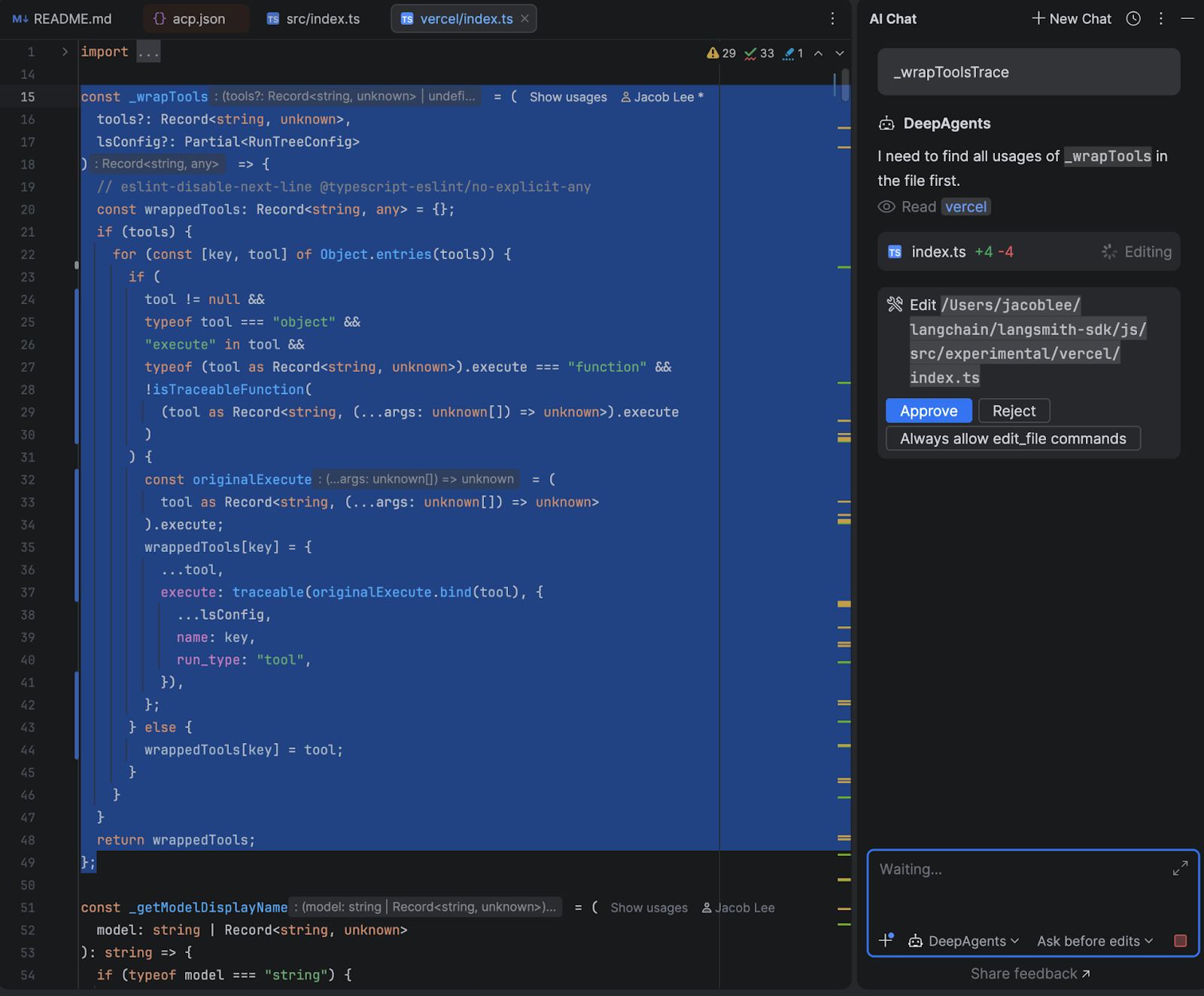
The human-in-the-loop flow was where I spent the most time. When the agent wants to run a shell command or make a file edit that requires approval, the adapter intercepts the interrupt from Deep Agents, and depending on what permissions mode the user has selected and what they have previously approved, either resumes immediately or sends a permission request to the IDE with options to approve, reject, or always-allow that command type.

The always-allow is session-scoped – if you approve uv sync once and choose “always allow”, subsequent uv sync calls skip the prompt automatically, but I made efforts to prevent similar commands such as uv run script.py from bypassing the permission check.

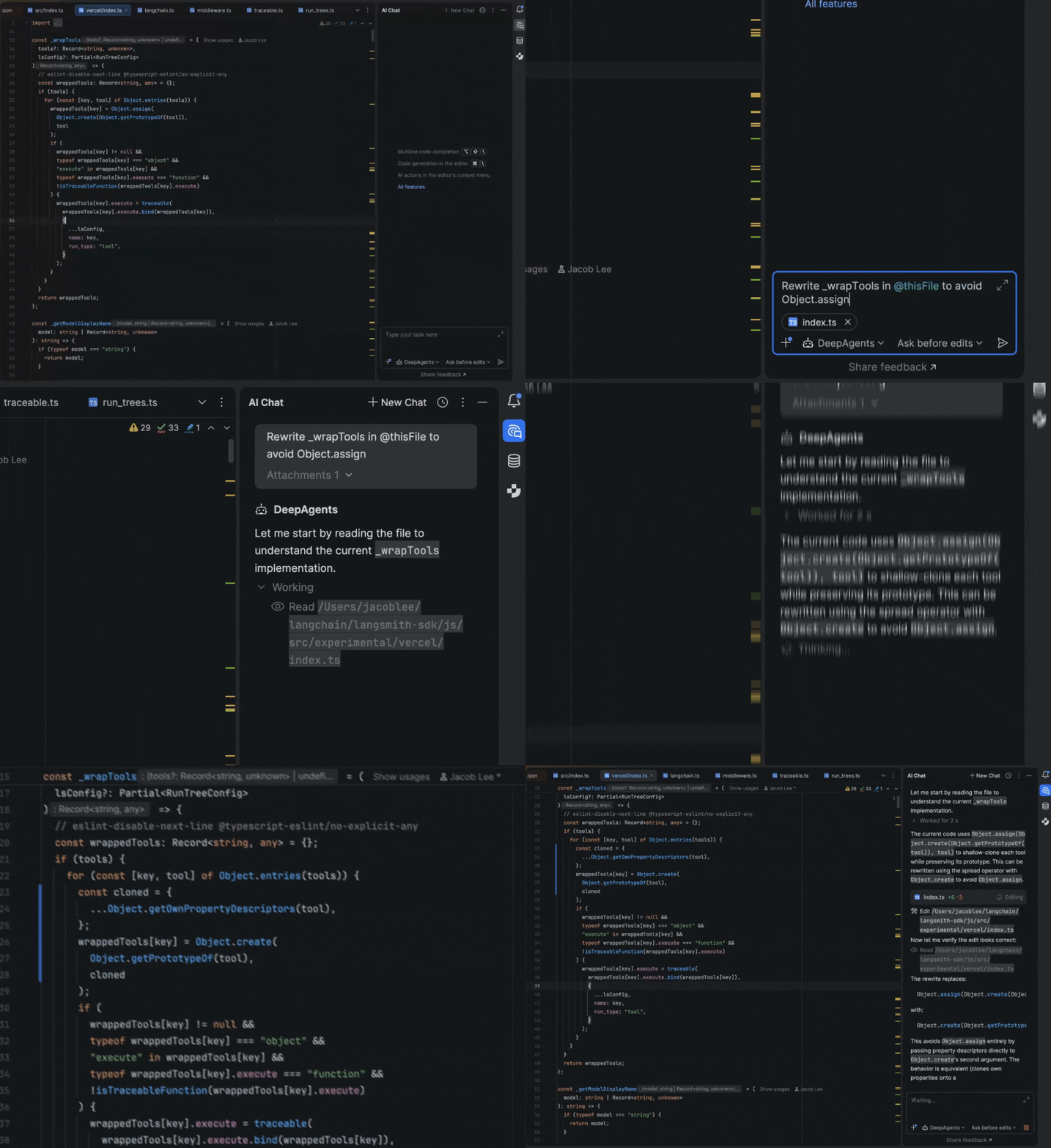
Here’s how the end result looks in WebStorm:

How it went

While I haven’t run formal evals, I was pleasantly surprised by how well my agent performed after only a few iterations. I didn’t actually expect to switch away from Claude Code, and it was a great dogfooding exercise as well, since our OSS team was able to upstream some of my feedback back into Deep Agents itself.

My original goal of regaining code-level, rather than config-level, control over my daily workflows has also been great. When Anthropic had an outage a few weeks ago, I was able to switch over to OpenAI’s gpt-5.4 without skipping a beat, and I even found that it had some interesting quirks. I switch back and forth between models mid-session to gain different perspectives from each model when working on tricky tasks, and have also found open-source models like GLM-5 are quite capable while offering significant cost savings.

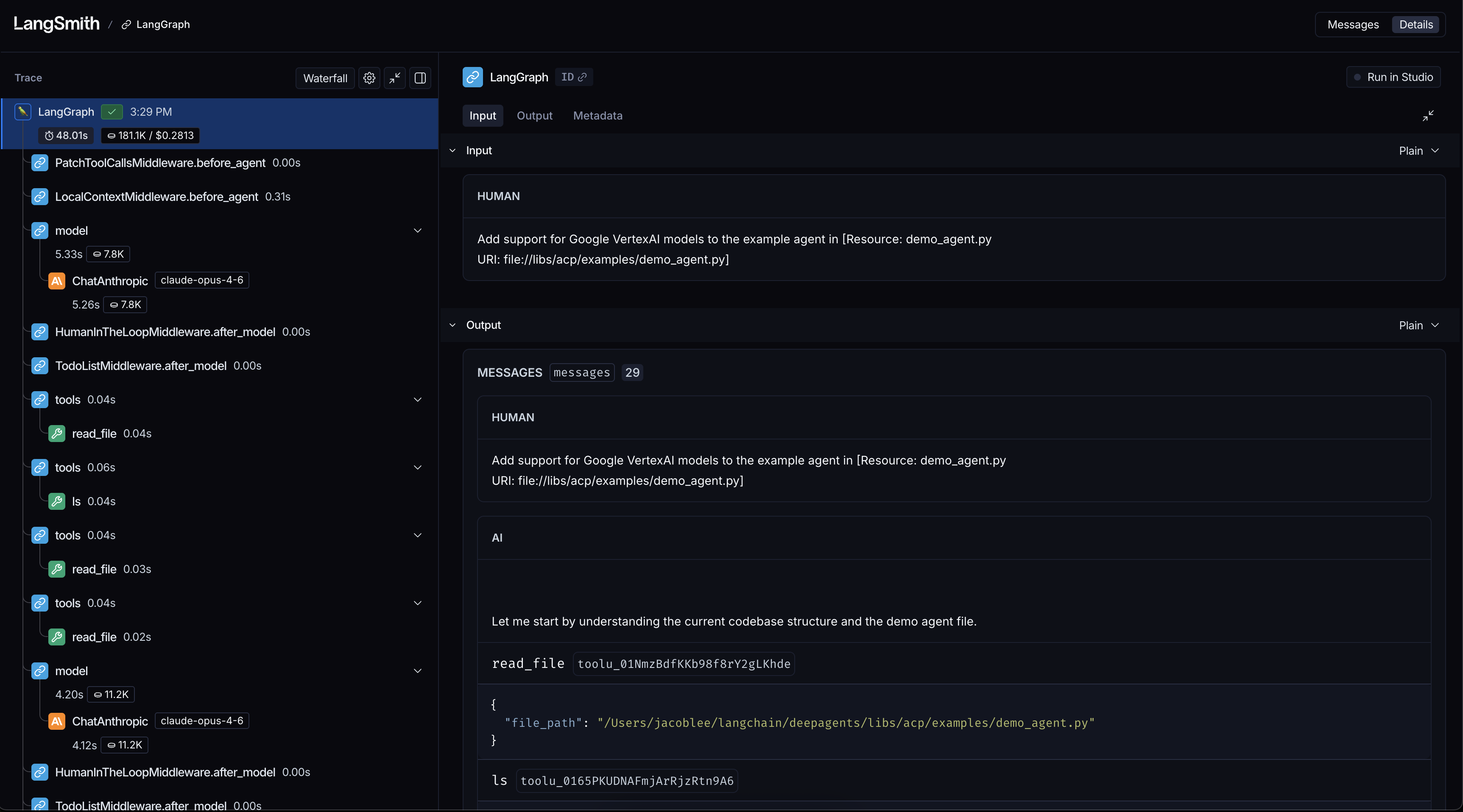
Another boon is observability via LangSmith tracing, which allows me to debug and improve my agent when I run into issues. Being able to see exactly what context was passed to the model, which tools it called, and where it went sideways helped me understand behaviors that were previously hidden inside the harness. Here’s an example of what such a trace looks like:

For example, when I noticed that my agent was starting to take wide, slow sweeps of my filesystem, I used a trace to find a bug in my system prompt that told the agent the project was at the filesystem root rather than the current working directory.

Taking back your dev workflows for fun and profit

What started as a small late-night project I worked on around taking care of a newborn daughter turned into a huge success, both for my own understanding of agent behavior and for improving my daily workflow.

It proved to me that Claude Code isn’t magic but a bundle of very clever tricks rolled up into a neat package. The harness layer is just software, and software is something any developer can shape to fit how they want to work.

If you’re curious, I’d highly recommend trying an experiment like this yourself. Even a small prototype can teach you a lot about how these systems think and where they break. Clone the repo and follow the setup guide here to get started from source code. I’d love to know what you think. You can reach out to me on X @Hacubu to let me know!

Special thanks to @veryboldbagel and @masondxry for helping productionize the adapter and dealing with my unending questions and feedback!

Junie CLI Now Connects to Your JetBrains IDE

Until now, Junie CLI has worked like any other standalone agent. It was powerful, but disconnected from the workflows you set up for your specific projects. That changes today.

Junie CLI can now connect to your running JetBrains IDE and use its full code intelligence, including the indexing, semantic analysis, and tooling you already rely on. The agent works with your IDE the same way you do. It sees what you see, knows what you’ve been working on, and uses the same build and test configurations you’ve already set up.

No manual setup is required – Junie CLI detects your running IDE automatically. If you have a JetBrains AI subscription, everything works out of the box.

Install Junie CLI

What Junie can do with your IDE

Most AI coding agents operate in isolation. They read your files, guess at your project structure, and and attempt to run builds or tests without full context. This can work for simple projects, but it falls apart in real-world codebases, such as monorepos with complex build configurations, projects with hundreds of modules, or test setups that took your team weeks to get right.

Junie doesn’t guess. It asks your IDE, which gives it the power to:

Understand your context

Junie sees what you’re working on right now – which file is open, what code you’ve selected, and which builds and tests you’ve run recently. Instead of scanning your entire repository to understand what’s relevant, it starts with the same context you have.

Run tests without guessing

On a monorepo or any project with a non-trivial test setup, Junie uses the IDE’s pre-configured test runners – no guessing at commands and no broken configurations.

Refactor with precision

When Junie renames a symbol, it uses the IDE’s semantic index to find every usage – searching across files, respecting scope, and handling overloads and variables with the same name that appear in different contexts. This is the kind of refactoring that text-based search gets wrong.

Build and debug complex projects

Junie runs builds and tests using your existing IDE configurations.

Custom build commands, non-obvious test runners, cross-compilation targets – if your IDE understands them, Junie does too.

Use semantic code navigation

From the IDE’s index, Junie accesses the project structure without reading files line by line. Its synonym-aware search finds “variants” when you search for “options”. It navigates code the way you would, not the way grep does.

Installation

Junie CLI’s IDE integration works in all JetBrains IDEs. Support for Android Studio is coming soon.

Make sure your JetBrains IDE is running, then launch Junie CLI in your project directory. It will automatically detect the IDE and prompt you to install the integration plugin. One click, and you’re connected.

If you’re a JetBrains AI subscriber, authentication is automatic, while Bring Your Own Key (for Anthropic, OpenAI, etc.) is also fully supported.

Try Junie CLI

What’s next

This integration is currently in Beta. We’re actively expanding the capabilities Junie can access through your IDE, and your feedback will directly shape what comes next.

Try it out, and let us know what you think.