How I Built a Retrieval-Backed Chatbot to Replace My Resume Screening Step

This is a condensed cross-post. Read the full version on my site.

Recruiter conversations have a consistent problem: a resume gives breadth, but not the system details behind the impact statements. I built AskRich to close that gap — a chatbot that lets hiring teams ask specific technical questions and get citation-backed answers grounded in my actual portfolio and writing.

What it does

AskRich is optimized for realistic recruiter workflows:

  • One-click prompt chips for common questions (architecture trade-offs, delivery scope, measurable outcomes)
  • A freeform chat input for custom questions
  • Citations attached to every answer — so a recruiter can verify the source instead of taking generated output at face value
  • A lightweight, dependency-free web UI in plain JavaScript

The citation-backed output is the core product decision. Once someone can see where an answer comes from, they tend to ask sharper follow-ups — and the conversation gets more useful faster.

Architecture overview

At a high level: a thin web client over a retrieval-backed chat API.

Browser → POST /api/chat → Cloudflare Worker (rate limit + cache check)
                                ↓
                        LangGraph Orchestrator
                         ↙            ↘
                  Content Index    LLM Response Layer
                  (retrieval)      (grounded generation)
                         ↘            ↙
                      Answer + Citations → UI Renderer

The Worker supports three runtime modes: upstream (proxy to retrieval API), local (built-in corpus), and openai (direct model path with retrieval-aware constraints). This lets me test and route independently without redeploying the client.

The part that actually made it better: a feedback loop

The first version was anecdotal. I’d notice a weak answer, edit something, and hope for the best.

The current version records structured events for every question, answer, and thumbs-up/thumbs-down interaction — all linked by stable event IDs. That lets me triage a specific low-rated answer with its exact question text, citation count, latency, and backend mode instead of debugging in the abstract.

Triage classifies failures into four buckets:

  • Corpus gap — the content just isn’t there
  • Retrieval/ranking issue — the right content exists but isn’t surfaced
  • Prompt/format issue — generation quality or response clarity
  • Out-of-scope — the question type needs routing or a guardrail

Changes are tested, compared against a baseline, and only promoted when they improve answer quality without regressing citation clarity.

Rate limiting at the edge

Rate limiting is enforced in the Cloudflare Worker before any chat execution. Client identity is derived from a one-way hash of request context (IP + origin + user-agent) — raw IPs aren’t stored as persistent identifiers.

Two guards run in sequence: an hourly quota and a burst interval. If either is exceeded, the API returns 429 with Retry-After. If KV storage is unavailable, the limiter degrades gracefully (fail-open) to preserve availability.

What I’d do next

  • Tighten citation quality metrics and regression gating for high-frequency questions
  • Promote successful A/B retrieval/prompt variants into default behavior
  • Expand corpus gap-closing using the weekly triage workflow

Try AskRich →

Ask it about architecture decisions, migration strategy, or platform delivery outcomes.

Full write-up with architecture diagrams and implementation detail on my site.

AI Tool That Writes Pull Request Descriptions from Git Diff

Writing pull request descriptions is important, but most developers don’t enjoy doing it. Many PRs end up with descriptions like:

“fixed bug”, “updated API”, “refactored code”

This slows down code reviews because reviewers don’t have enough context. Good PRs should include:

  • What changed
  • Why it changed
  • How to test
  • Risks
  • Any breaking changes

So I built a tool called PRPilot that generates structured pull request descriptions automatically using AI.

The Idea

The idea is simple:

Paste your git diff, commit messages, or change notes → Get a full professional PR description.

The tool generates:

  • PR Title
  • Summary
  • PR Type (Bug fix, Feature, Refactor, etc.)
  • Changes Made
  • Reason for Change
  • How to Test
  • Risk Level
  • Checklist

Example

Input

Fixed login bug
Added email validation
Updated user table
Refactored auth service
Updated unit tests

Output

Title:
Fix login bug and improve email validation

Summary:
This PR fixes a login issue and adds email validation during signup.
It also includes database updates and unit test improvements.

PR Type:
Bug Fix + Enhancement

Changes Made:
- Fixed login bug in authentication module
- Added email validation in signup flow
- Updated user table schema
- Refactored authentication service
- Updated unit tests

How to Test:
1. Test login with valid and invalid credentials
2. Test signup with invalid email
3. Run unit tests

Risk Level:
Medium

Checklist:
- Tested locally
- Unit tests updated
- Ready for review

This turns a rough change list into a clean PR ready.

How It Works

PRPilot is built using OpenAI and prompt engineering. The system analyzes code changes and classifies:

  • Type of change
  • Risk level
  • Components affected
  • Testing steps

Then it generates a structured PR description so teams can maintain consistent documentation.

Who Is This Useful For?

  • Developers who want to save time writing PRs
  • Junior developers who are not sure how to write good PR descriptions
  • Startups that want consistent PR documentation
  • Open source contributors
  • Teams that want better code reviews

Try PRPilot

You can try PRPilot here:
https://chatgpt.com/g/g-69ce2689cd788191bb81937c4ce3721e-prpilot

I’m currently working on:

  • VS Code extension
  • Commit message generator
  • PR review assistant
  • Release notes generator

If you try it, I’d love feedback and feature suggestions.

I built an AI tool because I was too lazy to write tech blogs from my commits 😅

Hey dev.to community!

Like many of you, I have a habit of committing code every day. I solve interesting bugs, make architectural decisions, and refactor messy codebases. But whenever I thought, “I should definitely write a blog post about this,” it just… never happened.

Translating my code into a proper technical article always felt like too much context-switching. As a result, my best work was often buried deep in my Git history, never shared with the world.

So, to solve my own problem, I built synapso.dev.

What is it?

It’s a tool that connects to your GitHub, analyzes your commit diffs using Google Gemini AI, and automatically generates a polished, ready-to-publish technical blog post in under 60 seconds.


(Note: As I am based in South Korea, you might spot some Korean text in the demo screenshots/GIFs. Full multi-language support is currently in the works and will be completely rolled out very soon! 🌍)

Why not just copy-paste into ChatGPT?

This was my first thought too. But if you just feed a commit diff to a generic AI, you usually get a boring bulleted list: “Updated auth.ts, Fixed a typo in index.js.”

I wanted something better. I engineered the prompts in synapso.dev to act like a senior engineer reviewing your PR. Instead of just summarizing what lines changed, it interprets the intent, context, and technical trade-offs behind the changes. It writes an article that actually reads like a developer explaining their thought process.

Key Features

I designed this specifically around what developers care about:

  • Auto-Posting Mode: You can set it so that every time you push code, your blog updates automatically. Literally zero extra effort.
  • Markdown Editor: You get the generated post in a clean Markdown editor. Keep the good parts, edit the rest, and publish when you’re completely happy with it.
  • Privacy & Copyright (Zero Data Retention): This was critical for me. Your code is NOT used to train any AI models. It’s analyzed and immediately discarded. You retain 100% copyright of the generated content.

I’d love your feedback! (And it’s completely free)

Right now, I’ve hidden all paid plans and made the tool 100% free to use. (To keep my API costs somewhat manageable, there is a limit of 3 generated posts per day per user).

You don’t need a credit card. Just try hooking it up to one of your recent side projects and let me know:

  • How accurate is the technical analysis of your code?
  • What feature would make this an absolute must-have for your workflow?

Check it out here: synapso.dev
Thanks for reading, and I’d love to hear your thoughts in the comments! 👇

Code like a PIRATE with Junie and GoLand

This is a guest post from John Arundel, a Go writer and teacher who runs a free email course for Go learners. His most recent book is The Deeper Love of Go.

Ahoy, maties! Cap’n Long John Arundel here with more tips on sailing the good ship GoLand. This time, we’ll lay aloft to the crow’s nest and turn our spyglass on Junie, the JetBrains AI coding agent.

If you’re new to Junie and AI tools, and aren’t sure where to start, think of this as your treasure map to the hidden gold of GoLand productivity. Arrr you ready to start coding like a pirate?

Flying the black flag

Your first voyage with AI development tools can be a perilous one, veering from calm seas of code to storms of syntax errors and test failures. So, will your AI agent be a trusty first mate, or just an unpredictable stochastic parrot squawking nonsense from your shoulder?

Junie is pretty smart, and she can tackle any task you choose, but she needs the guidance of a good cap’n. To help you stay on course, I’ve put together a handy six-step workflow I like to call “Code like a PIRATE”. Aye, ‘tis another o’ my made-up acronyms—but ye’ll find it easy to remember, me hearties [Are we doing the pirate thing for the whole article?—Anna]

“P” is for Plan

Every good voyage begins with a map. When you set Junie a task, tell her where the ship’s headed, so she’ll know which direction to steer. (I’m sure Junie won’t mind me calling her “she”; fun fact, lots of pirates were women—including quite a few of the men).

Ask Junie to draw up a quick chart for the voyage, but not to set sail until you’ve approved it:

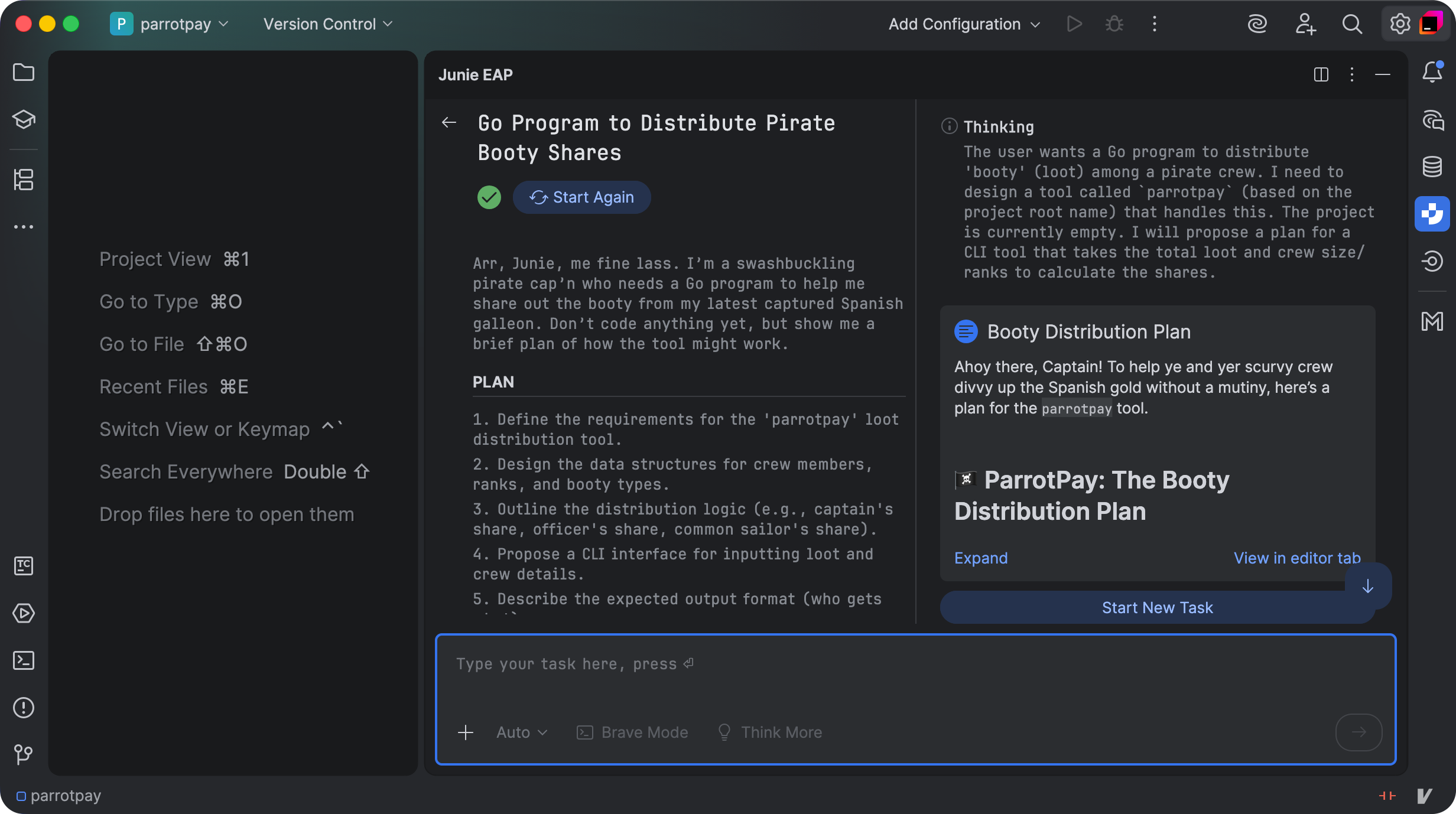
Arr, Junie, me fine lass. I’m a swashbuckling pirate cap’n who needs a Go program to help me share out the booty from my latest captured Spanish galleon. Don’t code anything yet, but show me a brief plan of how the tool might work.

It’s important to get this stuff right before you even leave the dock, so don’t be afeared to spend a bit of time refining the plan. [I’m “afeared” we might be wearing out the salty sea-dog bit already—Anna]

“I” is for Iterate

Even the boldest captains don’t try to cross an ocean in a single leap. It’s more effective to island-hop, sailing a short distance at a time and checking you’re still on course. Give Junie one small task at a time, starting with the simplest possible program that could be useful:

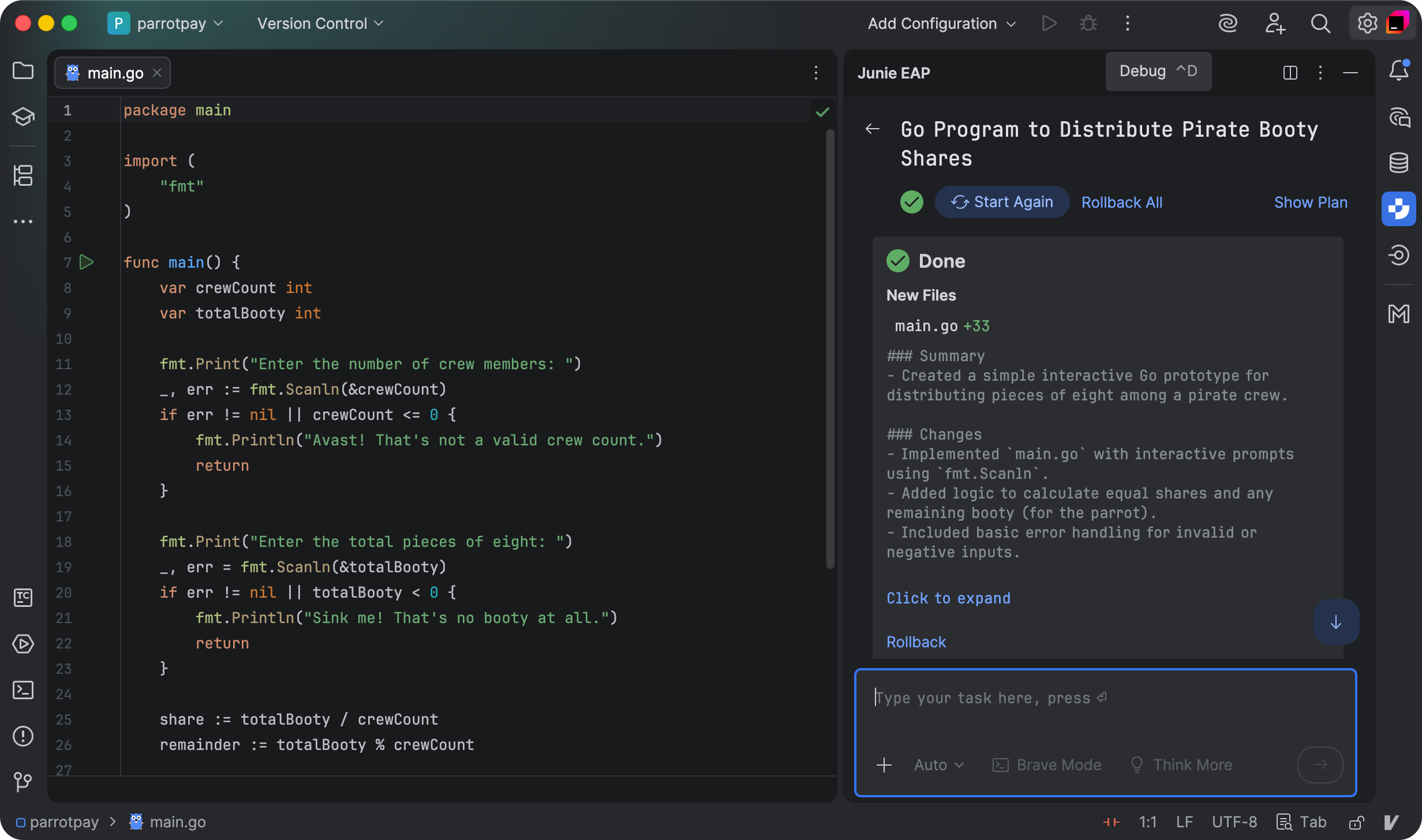
Let’s start with a really simple prototype. I’d like to be able to run the ‘booty’ calculator and answer two questions: the number of crew, and the number of pieces of eight to be divided among them.

Assume everyone has an equal share. The tool should print out how much each crew member is due. Write just enough code to achieve this, and then we’ll think about the next stage.

With too vague a heading, Junie can end up going a bit adrift, like any of us: don’t hesitate to cry “Avast heaving there!” and interrupt her if that happens. Rowing back when the project has gone too far in the wrong direction will cost you a lot of time and doubloons [Seriously, clap a stopper on the pirate speak for now—Anna]. Sorry, I meant to say “tokens”.

“R” is for Review

Once Junie has completed each iteration, go through the code line by line to check and review her work. She’s pretty good at delivering what you asked for, but she doesn’t necessarily know how you want it. For example:

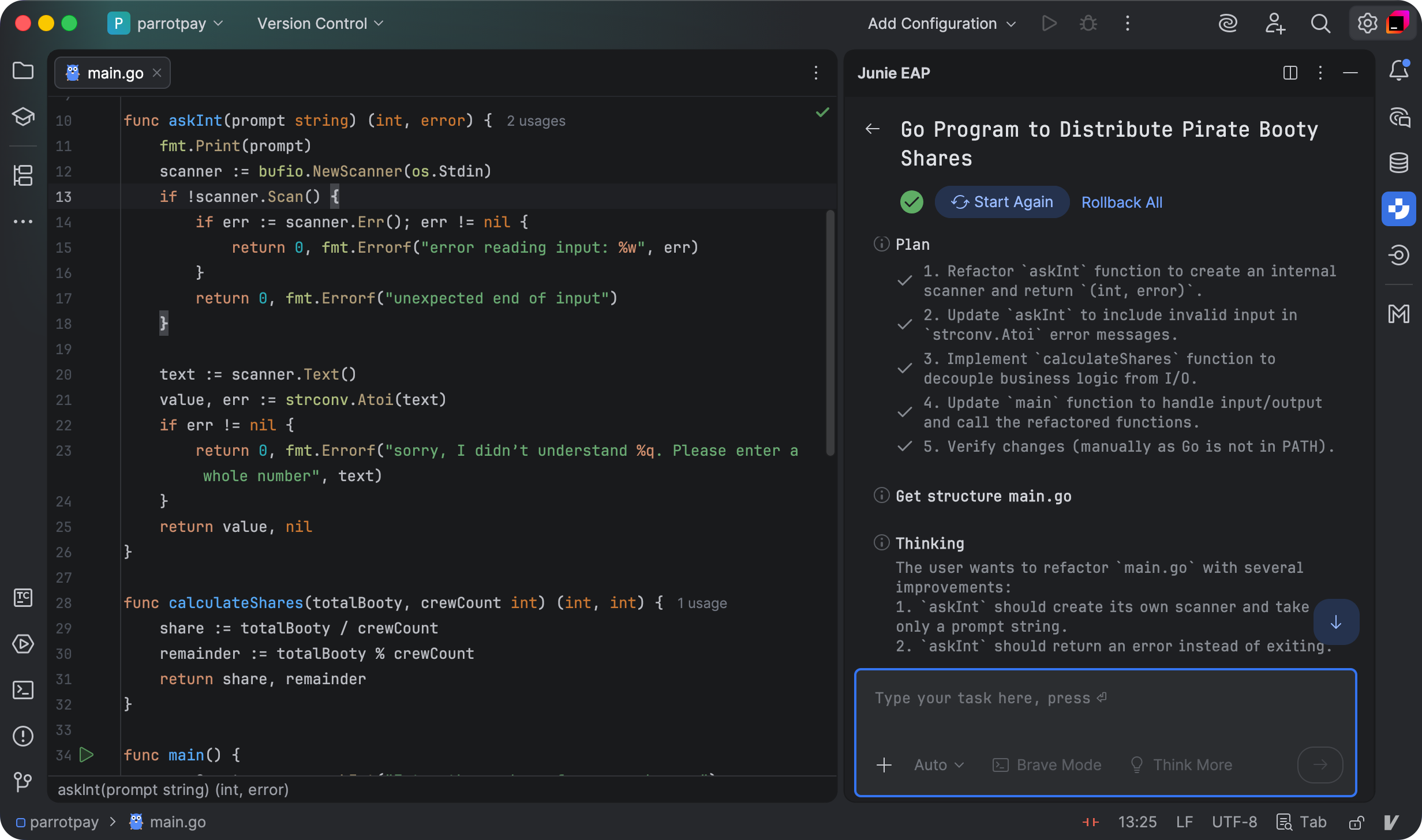
Nice job, Junie, but I have a few suggestions for improvement.

  1. Instead of creating a bufio.Scanner in main and passing a pointer to it into the askInt function, let’s eliminate some of that paperwork. Change askInt to take just the prompt string, and have it create the scanner internally.
  2. The askInt function shouldn’t print error messages and call os.Exit if there’s a scan error. Instead, have it return any error along with the integer result. Let main take care of all the printing and exiting.
  3. If there’s an error from strconv.Atoi, include the invalid input in the error message. For example, “Sorry, I didn’t understand %q. Please enter a whole number.”
  4. Move the shares calculation into its own function, so that we decouple the input/output code from the business logic. Have it return the share and remainder values, so that main can print them out.

When giving feedback, bundle all your comments together in one message. This lets Junie generate the new version of the program in a single step, saving tokens. If you keep making small comments and asking her to rebuild the whole program each time, you’ll find your pieces of eight—I mean, credits—dwindling rapidly.

Good programs have a harmonious architecture that makes overall sense: everything works the same way everywhere and it all seems to fit together neatly. Junie can’t achieve this without your guidance, so keep a hand on the tiller and help her ensure things slot neatly into a unified structure.

“A” is for Assess

Once Junie has finished the step you asked for, don’t just glance at the code and move on—take a moment to assess whether it actually does what it should. Does the program run cleanly? Do the functions behave as expected? Are there strange side effects lurking in the bilges, waiting to sink your ship later? [What did I just say?—Anna]

Now that you can see the program in action, you might realise it’s not quite what you want. If so, now’s the time to adjust course, either with Junie’s help or by making little steering inputs yourself.

If you’re happy with the assessment, though, you can move on to the next iterative step towards the final program:

Shiver me timbers, Junie, that be some fine work.

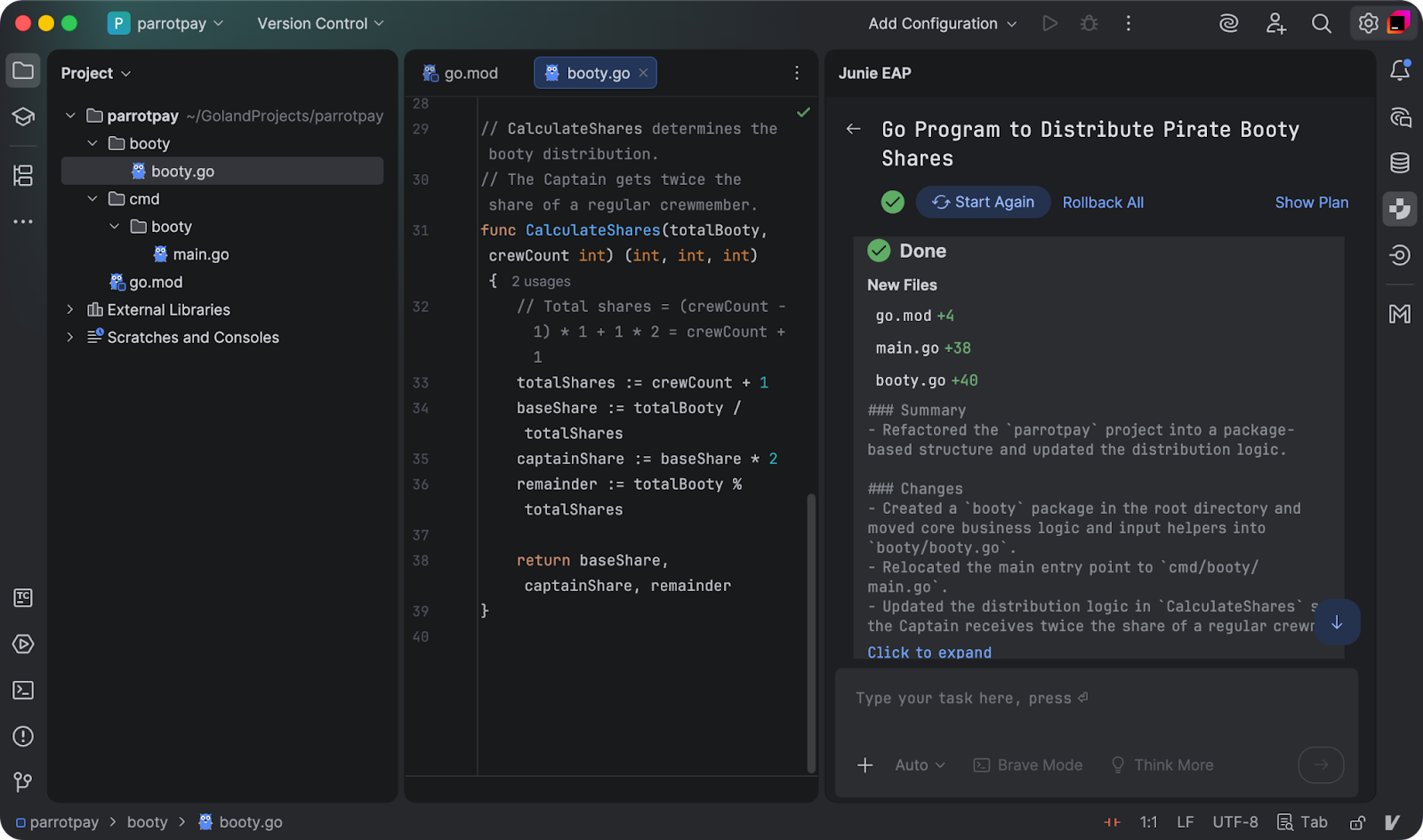
Could you now please move the business logic functions into a booty package in the project root, and put the main.go file into a cmd/booty subfolder?

Also, could ye change the plunder calculations so that the captain gets twice the share of a regular crewmember? Print out the captain’s share separately.

“T” is for Test

No old salt trusts a ship that hasn’t been through its sea-trials, and nor should you. As you and Junie build the program, check each new plank is watertight by adding tests to accompany each function. That way, you’ll know as soon as something springs a leak.

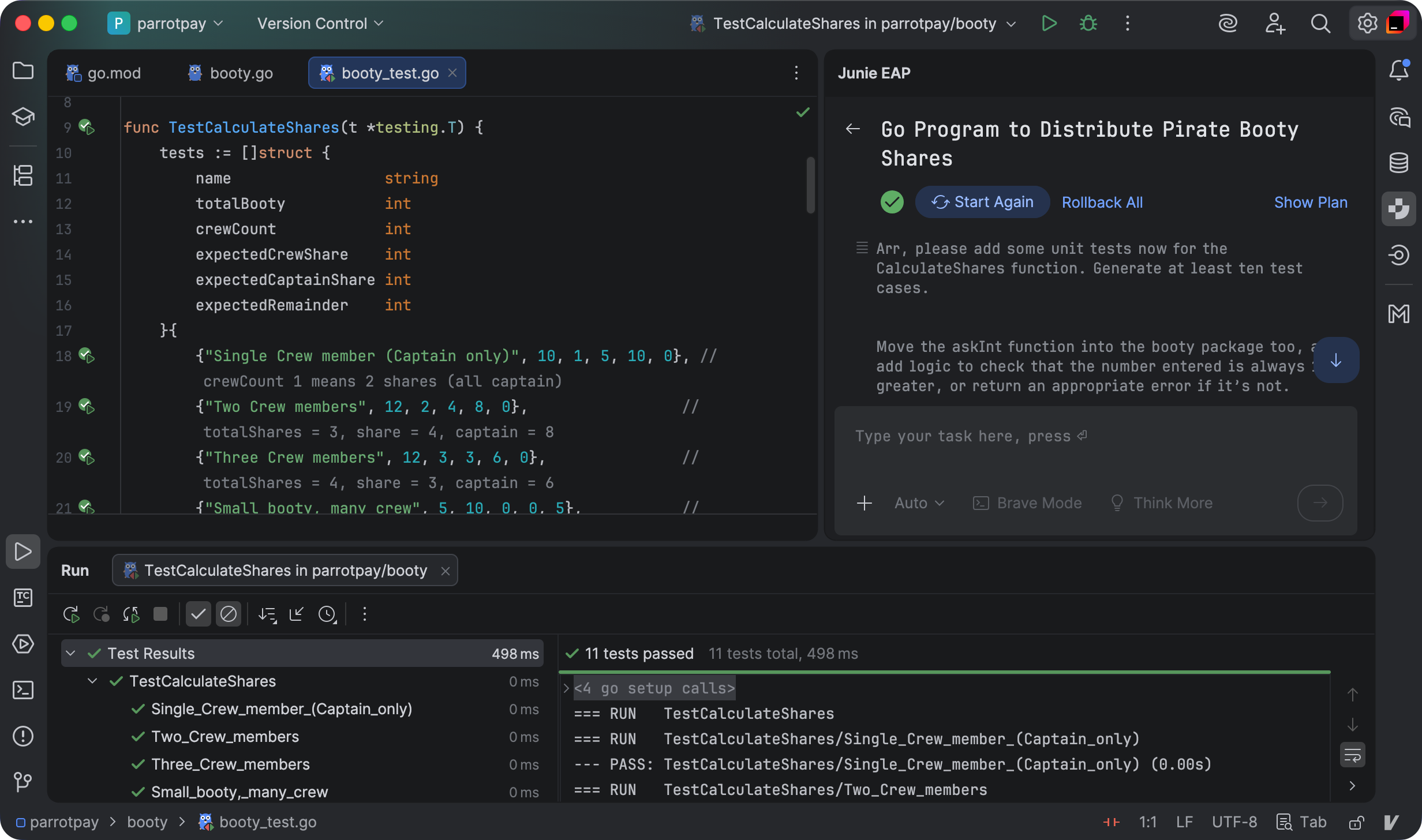
Arr, please add some unit tests now for the CalculateShares function. Generate at least ten test cases.

Move the askInt function into the booty package too, and add logic to check that the number entered is always 1 or greater, or return an appropriate error if it’s not.

Have the function take an io.Reader to read input from, and an io.Writer to print prompts to.

Generate two tests for this function, one for valid inputs, one for invalid inputs.

Junie can be a helpful shipmate when it comes to drafting tests, but don’t just accept her handiwork blindly. Ask yourself: What is this really testing? Are there hidden reefs—edge cases—that we’re missing? And, when the tests fail (they’re no use otherwise) do they print something helpful?

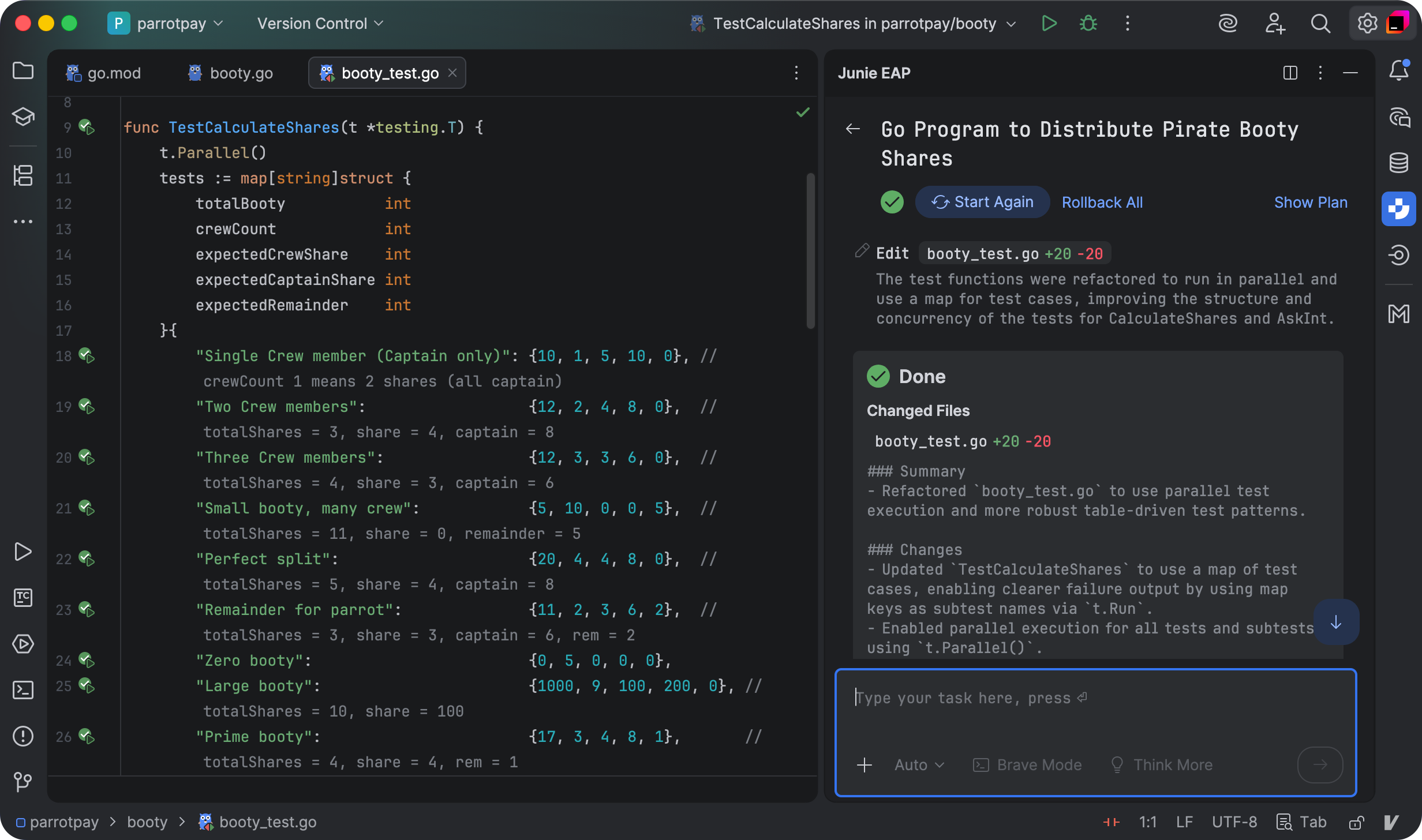
Tis a fine set of tests ye have there, Junie. Could you make them all run in parallel?

In the table tests, could you use a map of test cases keyed by name, and then use t.Run in the test loop with the map key as the subtest name? That’ll make it easier on any scurvy dogs trying to understand the failure output.

Don’t try to inspect the error string itself for invalid inputs; that leads to fragile tests. Instead, just check that AskInt returns any non-nil error for these cases.

“E” is for Evaluate

Machine learning is fine, but human learning is even better. After each task, take a little time to analyse what worked, and what could have gone better.

Were your prompts detailed enough? Did Junie sail safely into harbour, or did she end up grounded on a sandbar because her pilot was too busy splicing the mainbrace? Every voyage is a lesson that’ll help you sharpen your prompting skills, anticipate pitfalls, and become a steadier pirate cap’n for the next expedition.

If you remember the chart we’ve drawn here and use it to navigate your next project, with the help of Junie and GoLand, you’ll be ready to truly code like a PIRATE [That’s it, you’re walking the plank—Anna].

Anchors aweigh

Check out the booty calculator project to see what Junie and I built together—try using it to divvy up your own pirate booty with friends. It’s also kind of fun to say “booty”.

Until next time, shipmates, wishin’ ye fair winds and full sails!

Legal disclaimer: JetBrains s.r.o. does not advocate piracy, illegal seizure of vessels on the high seas, or the consumption of rum. Please swashbuckle responsibly.

KotlinConf’26 Speakers: In Conversation With Lena Reinhard

“Over the last three to five years, many of the promises that drew people to tech have been called into question.”

KotlinConf'26 speaker: Lena Reinhard

Lena Reinhard, VP Engineering, leadership coach & mentor, facilitator, artist

Lena Reinhard is a VP of Engineering, a leadership coach, facilitator, and artist. In her 20-year career, she’s served in tech leadership roles, such as VP of Engineering with CircleCI, Travis CI, and as a SaaS startup co-founder and CEO. Now, she helps leaders and teams succeed in co-located and remote teams in organizations ranging in size from startups and scale-ups to corporations.

The tech industry has long promised opportunity, growth, and the chance to build things that reach millions of people. Today, many of those assumptions are being questioned. At KotlinConf’26, Lena Reinhard, leadership coach, former VP of Engineering, and the Day 2 keynote speaker, will explore these shifts in her talk We Were Meant to Be.

Ahead of the conference, we spoke with Lena about the uncertainty many people in tech are feeling today, the realities behind the productivity debate in the age of AI, and what leaders can do to support their teams through change.

As she prepares for KotlinConf ’26, Lena is documenting the process of shaping this keynote in a public work log, sharing the ideas and resources influencing her thinking. You can follow her progress here: The Making of: A Keynote on Tech, Humanity, Crisis, and the Future.

Meet Lena Reinhard at KotlinConf’26

Q: In your keynote We Were Meant to Be, you touch on uncertainty, job insecurity, and how the tech industry is changing. What questions or experiences led you to create this talk, and what do you hope the audience sits with after hearing it?

Lena Reinhard: This is probably the question where I have the longest answer, because there’s a lot of history to this. And that’s also why I’m so excited to talk about it at KotlinConf in May.

My career is over 20 years old now. I actually started in finance, and very early on, the industry went through the 2008 financial crisis. So that was a weird way to start a career.

I’ve now been in tech for 16 years, and during that time I’ve seen many shifts in how the industry works. In the early 2010s, I worked a lot in open source. That’s really how I started my tech career, working with communities like CouchDB and some in the JavaScript ecosystem. Later, I shifted more into working with companies in Silicon Valley while still staying close to open source.

Over the last few years, I’ve worked more with leaders across different companies, from startups to large corporations to NGOs all around the world. That means my lens on the industry has changed over time, depending on who I’m working with and which aspects of the ecosystem I’m seeing.So throughout my career, I’ve spent a lot of time thinking about how technology works and what responsibility we have as people building it. In 2015, I gave the keynote A Talk About Nothing that encapsulated a lot of my thoughts at that point in time, and the question of our role as people building software and the responsibilities that come with that.

The work we do has a lot of leverage, and the question is how we use that in a way that benefits not only us but also the people who use technology.

KotlinConf'26 speaker: Lena Reinhard

Over the last four or five years, especially since generative AI really took off around 2022, I’ve noticed a lot of uncertainty among industry professionals.

People entered tech for many reasons: building products that reach millions of users, the opportunity for upward mobility, or simply the ability to experiment and create.

Over the last three to five years, many of those things have been called into question. Software engineers, but also managers, are asking themselves, each other, and sometimes me, how career growth will work, or whether those careers will even exist in the same way. And that uncertainty has only been increasing, and the way that the discourse about this is playing out across the media, from podcasts and social media, to newspapers and “thought leaders,” isn’t helping that.

KotlinConf'26 speaker: Lena Reinhard

At this point, I think people who claim to have definitive answers about what AI will mean for the global economy or for the tech industry, let alone for individuals and our careers, simply don’t have them. Those answers don’t exist at this point.

There are many hypotheses, and it’s important to stay open to them. But it also means that many of the promises that originally motivated people to enter this field are no longer as stable as they once felt.

Even the way people tinker with technology has changed. I know many programmers who used to build countless side projects in their spare time, and even that culture has shifted.

All of those questions and that uncertainty from the past few years ultimately led to this talk.

Q: You’ve written a lot about how to understand and improve productivity in engineering teams. (For example, your article How to Understand, Measure, and Improve Productivity in Your Engineering Team.) With AI becoming more present in our daily work, how do you think our ideas of productivity are shifting, or need to shift, for individuals and teams?

Lena: It’s a great question. And I think the two are very intertwined.

One thing I often think about is that engineering productivity, and the discourse around it, has been a hot mess for a very long time.

KotlinConf'26 speaker: Lena Reinhard

It’s always been a mix of the work people are doing, how meaningful that work is, and how productive that work appears from the outside.

For example, does your executive team think that you’re actually getting stuff done? And those can be very different things that don’t necessarily overlap.

So productivity has always been difficult for teams. I also don’t know of a company that has really figured it out well. It’s always somewhat ambiguous.

Now, with generative AI and coding assistants entering the picture, the conversation has become even more complicated.

One big issue is that a lot of the current AI discussion is surrounded by hype and marketing messages that aren’t really backed up by solid data or real-world experience.

KotlinConf'26 speaker: Lena Reinhard

At the same time, executives and senior leaders are often driven by pressure from their boards and investors. At this point, many leaders feel they can’t say, “We’re not doing AI,” because their investors will worry the company is falling behind.

So there are a lot of really messy incentives around this that engineering teams get caught up in.

Navigating that debate is difficult right now. It requires open conversations internally – with managers and teammates.My approach right now is that it’s important to talk about what productivity actually means and how it relates to the company’s goals. I recently wrote more about this in my article What AI Can (and Can’t) Do for Your Engineering Team (Beyond the Hype), where I look at some of the current limitations of AI and where it can actually be useful for teams.

The goal can’t simply be to get as much stuff done and move as fast as possible. If what you’re working on doesn’t actually help the company achieve its goals, then being fast doesn’t get you anywhere.

KotlinConf'26 speaker: Lena Reinhard

So the conversation should start with: what are our goals, how do we measure progress toward them, and how can AI actually help us get there?

For some teams, AI can be useful for experimentation. For others, it can help with debugging or act as a coding assistant in everyday workflows.

But the key is cutting through the hype and figuring out what is actually useful for your team and for the problems you’re solving for your users.

One thing that concerns me is that AI is already increasing the pressure on teams to produce more output.

I’m seeing discussions again where people think lines of code generated by AI are a useful productivity metric, which they are not. That’s a debate I thought we had already moved past about ten years ago.

At the same time, what I’m hearing from many teams is that people are simply working much more. Instead of working less, they’re working more hours because now, in addition to their regular job, they’re also expected to figure out how to integrate AI into their work, and the scrutiny on “productivity”, most commonly meaning “output”, not outcomes, is intense.

So my advice right now is to cut through the noise as much as possible. Don’t fall for the hype around just running as fast as possible. Focus on the goals: what your team is responsible for, how that connects to the company’s goals, and what meaningful progress and impact actually look like.

I talk about goals until the cows come home, because that’s what teams should ultimately be measured against.

Moving fast only matters if you’re moving in the right direction.

One way I often describe generative AI tools is that they’re like an overly eager junior engineer who’s extremely confident.

KotlinConf'26 speaker: Lena Reinhard

That kind of person can be great to work with, but they also require constant monitoring and guidance. It’s going to tell you stuff that’s just not true, not out of malice, of course, it doesn’t have a world model, and it’s important that we don’t anthropomorphize these tools. And it’s going to say it in a way that makes you think, “Oh yeah, that sounds great,” but actually it’s just nonsense. And that creates a lot of overhead and context switching. The mental load for teams right now is just much higher than it used to be.

That doesn’t mean the tools are useless. But they require a lot of handholding to produce useful results. They’re currently most useful for people with significant experience as software engineers who know what good software engineering looks like, how it works, and who can then utilize these tools well and productively. Where it gets tricky is that both the process of generation as well as the output look very good and convincing to the untrained eye. That’s where unhelpful discussions come in, like CEOs saying, “I vibe-coded this in two hours, why does our engineering team need this many people, and why are they producing so little? Also, I put my thing live just now.” That’s a tough position to be in.

Join us at KotlinConf’26

Q: In your talk description, you say that many of the promises of tech careers have crumbled. From what you’re seeing and hearing, what still draws people to tech today – and how do you think that motivation might evolve?

Lena: Honestly, right now I find that question difficult to answer.

When I look at the people I talk to, and also at discussions in online forums for people who are just entering the field or participating in different communities, my impression is that many people are still drawn by the promises the industry used to offer – things like career progression and stable jobs; the same for building things, being creative, and solving problems.

Those ideas haven’t completely disappeared.

But at the same time, people are much more uncertain about how true those promises still are and how much they can and want to bet their ability to make a decent living on them. There’s a lot more doubt about whether those careers will still exist in the same way, or whether people should pursue something else.

So that uncertainty that’s affecting the entire industry is visible there as well.

And the noise-to-signal ratio is incredibly high. Like we briefly touched on earlier, the debate on social media, industry newsletters, at conferences, etc., also exists about “whether software engineering jobs will still exist in the future.” Those debates don’t really help, and again, no one has the answers.

Q: You work closely with leaders and speak a lot about leadership. For example, you explored the topic in your LeadDev talk on what we really mean when we talk about leadership. In periods of change and instability like the ones many teams are facing now, what do you think leaders most often underestimate about how uncertainty affects their teams?

Lena: One big piece is that leaders often have an information advantage.

Managers – and often technical leads and very senior engineers – are often briefed about changes long before their teams are. They are involved in discussions about reorganizations before they happen, or in creating a new technical strategy.

So they’re often part of shaping those changes, or at least they know about them well in advance.

When leaders announce a change to their team, they’ve often already processed it. Mentally, they’ve moved on. But for the team, it’s completely new information.

KotlinConf'26 speaker: Lena Reinhard

People need time to process it. They need time to understand what it actually means for them – how it will affect their day-to-day work, their role, how they get things done, or even what success will look like going forward.

I’ve often worked with leaders who become impatient at that stage. They wonder why people can’t just get on board immediately, or why there are so many questions.

But it’s important to remember that you may be in a very different place simply because you’ve had that information for much longer.

Giving people time and actually sitting down with them, explaining things, and listening to their questions requires effort, but it’s really important. Esther Derby, who started as a programmer and has written great books about agile work and handling change, likes to describe what leaders then tend to call “resistance” to change rather than a “response.” I wrote about dealing with these kinds of responses here.

Another pattern I see is that some leaders feel they need to have everything completely figured out before they talk to their teams.

But especially right now, there’s so much uncertainty inside companies and across the entire industry that none of us can really control it.

Things are changing quickly: companies are redesigning career frameworks, rethinking productivity measures, and trying to figure out what the future of work even looks like.

As a leader, you don’t always need to have everything figured out.

Sometimes it’s more helpful to simply acknowledge the uncertainty to say openly that things are chaotic or unclear right now.

That helps address the elephant in the room. It prevents people from feeling like something strange is happening behind the scenes, and it makes it easier to have open conversations.

Because the reality is that no one really has all the answers.

Leaders often assume that their teams expect certainty from them. But in many cases, what people actually need is openness.

KotlinConf'26 speaker: Lena Reinhard

Being able to say, “I don’t have all the answers, but I’m working through this with you,” is often much more useful.

And empathy matters as well.

Instead of projecting what you think people need, it’s important to sit down with them and understand what they actually need.

Because those two things can be very different.

Lena will explore these ideas in more depth in her keynote at KotlinConf’26.

Don’t miss Lena’s Day 2 keynote.

Join us at KotlinConf’26

Which AI Coding Tools Do Developers Actually Use at Work?

The reality beyond the hype, featuring evidence from large-scale, globally representative developer surveys.

If you’re like us, you can’t open your LinkedIn or X feed without there being some mention of an AI coding agent (Claude Code, Codex, Gemini CLI, Junie, and others). But which of these AI tools are actually used for development at work, not just for pet projects? 

This post answers that question, drawing on insights from a series of surveys on AI coding tools awareness, adoption, and satisfaction. As the industry moves toward more complex, agentic workflows, understanding which tools are gaining professional traction is essential for building the future of development infrastructure.

We regularly run large-scale, globally representative developer surveys to get up-to-date data on the developer tools landscape. In January 2026, we ran the second wave of our AI Pulse survey, a large-scale survey localized into eight languages with a sample size of over 10,000 professional developers worldwide. Our goal was to capture the latest trends in the AI developer tools market.

We are now ready to share how AI coding tools like Claude Code, Cursor, JetBrains AI Assistant, Junie, GitHub Copilot, OpenAI Codex, and Google Antigravity have evolved over the past two years in terms of awareness, adoption, and satisfaction. The data is based on the September 2025 and January 2026 AI Pulse surveys, as well as the 2024 and 2025 waves of the JetBrains Developer Ecosystem Survey, which is well-known in the community.

The biggest question is not whether developers use AI at work. The answer to that is already obvious: They do. In January 2026, 90% of developers regularly used at least one AI tool at work for coding and development tasks, a clear sign of high AI usage in software development.

However, developers’ toolkits are changing rapidly nowadays, leading to a more intriguing question: Which tools are being adopted for actual work, and at what rate? By January 2026, 74% of developers worldwide had already adopted specialized AI tools for developers (e.g. AI coding assistants, editors, and agents; not just chatbots like ChatGPT).

Performance over platform: The rise of best-of-breed agents

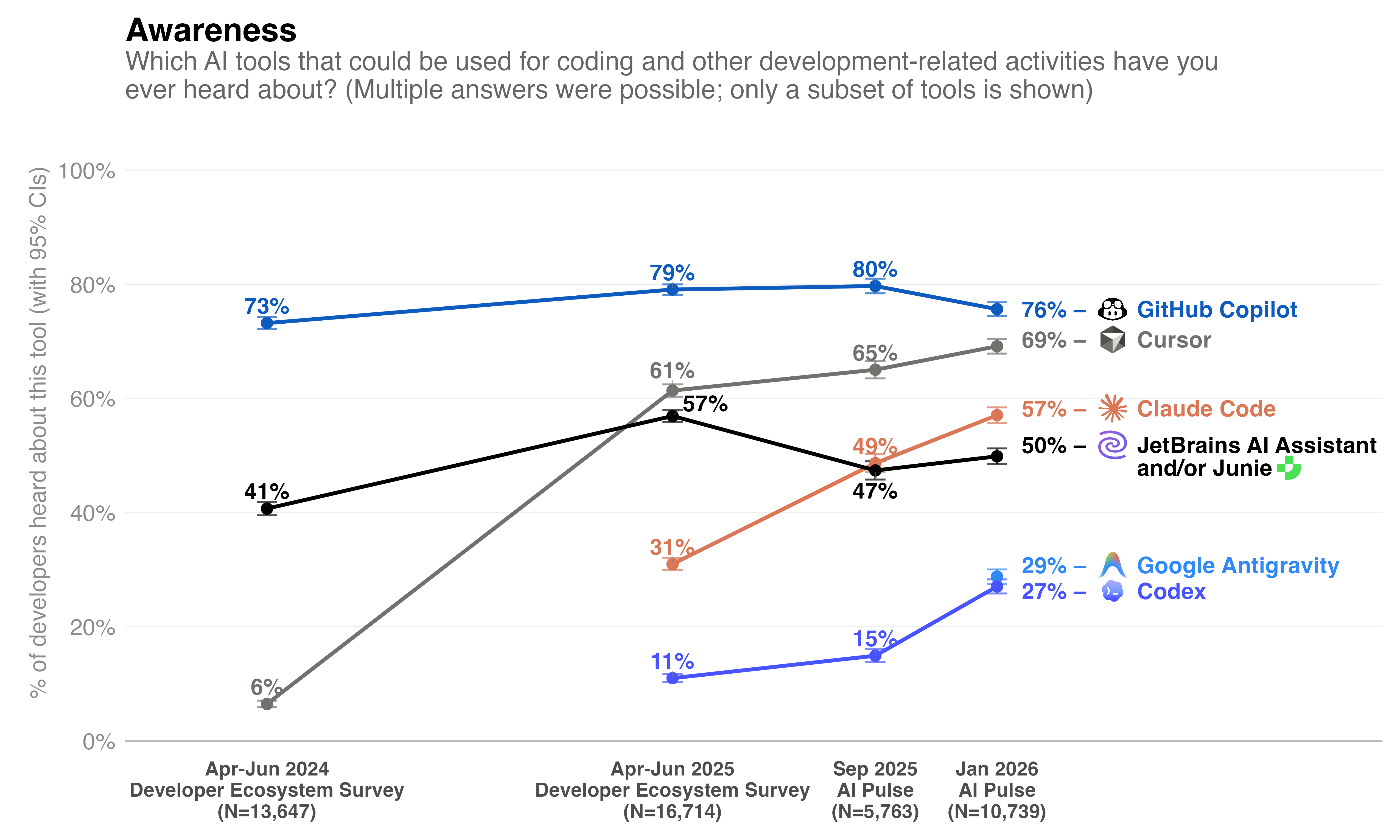
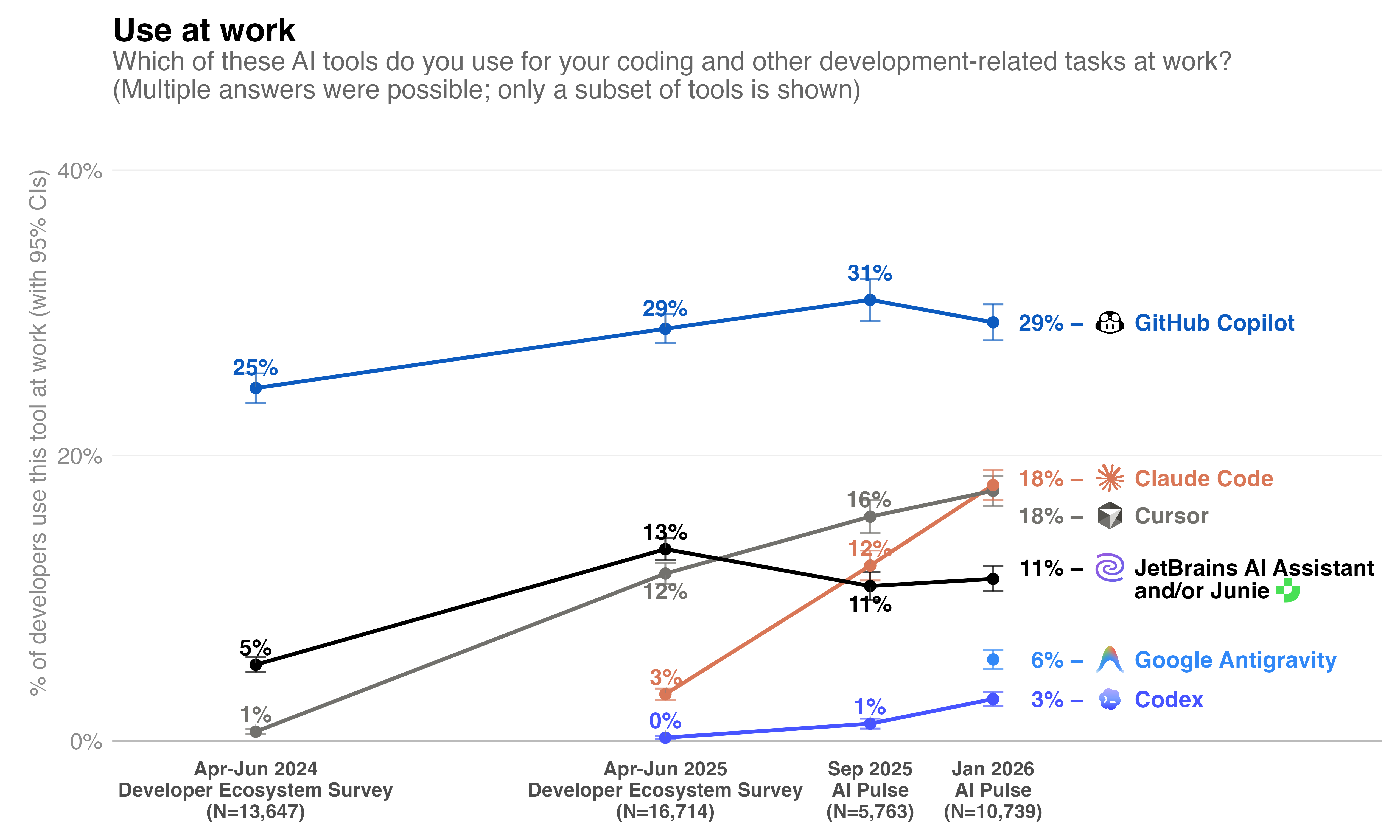
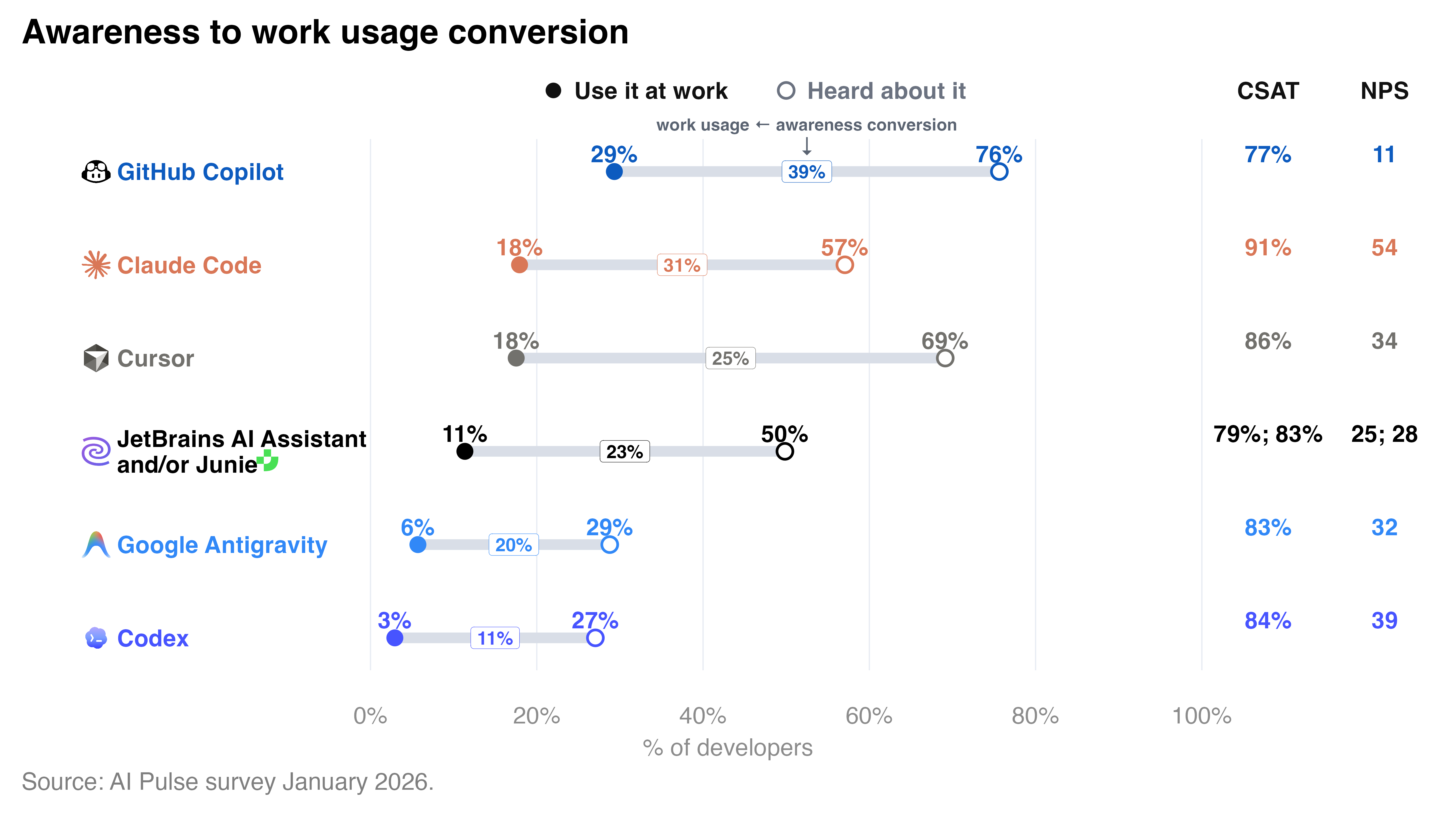
GitHub Copilot is still the most widely known and adopted AI coding tool, with 76% of developers worldwide having heard about it and 29% using it at work. However, its growth, both in terms of awareness and adoption, has stalled since last year. Despite that, it is still popular in companies with over 5,000 employees, where it is adopted by 40% of developers.

Cursor’s growth has slowed down, both in terms of awareness and adoption at work. It is still the second most well-known AI dev tool, with 69% of developers aware of it. However, in terms of adoption at work, it now shares second place with Claude Code, with both being used for work by 18% of developers worldwide.

Claude Code is continuing to rapidly grow in awareness, adoption, and admiration. 57% of developers had heard of it in January 2026, compared to 49% in September 2025 and 31% in April–June 2025, and 18% currently use it at work, a 1.5x increase from September 2025 and 6x increase from roughly 3% in April–June 2025. In the US and Canada, its adoption even reached 24% in January 2026. It also has the highest product loyalty metrics on the market, with a CSAT (satisfaction) of 91% and an NPS (likelihood to recommend) of 54 (on a scale from -100 to +100). 

The shift toward best-of-breed agents demonstrates that product excellence now outweighs ecosystem lock-in. When a standalone tool offers clear superiority, it renders integrated stacks obsolete; developers will always migrate to the individual components that actually deliver the best results.

As of January 2026, OpenAI’s coding agent Codex was much less popular and known in the developer community. 27% of developers worldwide had heard of it, and only 3% were using it for work. It is worth noting that this number comes from the data collected before the public launch of the Codex desktop app and its promo in ChatGPT, which is still being used extensively by developers for coding and development-related tasks at work (28%). 

Google Antigravity is the new kid on the block. The AI code editor launched by Google in November immediately gained traction, reaching an adoption rate of 6% by January 2026. 

Chatbot interfaces are still quite popular among developers, with 28% of developers using the ChatGPT chatbot for coding and development tasks at work, 8% using Gemini, and 7% using Claude’s chatbot. 

Our move toward an open agentic infrastructure

11% of developers worldwide use JetBrains AI Assistant and/or Junie, with JetBrains AI Assistant being regularly used by 9% of developers and Junie by 5%.

At JetBrains, we believe the future of development is an open ecosystem where developers have the freedom to choose the best agents for their specific tasks. This vision informs our own direction:

  • JetBrains IDEs: Claude Agent and OpenAI Codex are integrated in the AI chat of JetBrains IDEs, while dozens of other coding agents, including Cursor, can be accessed through the Agent Client Protocol. You can even use Codex via your OpenAI API key or ChatGPT subscription.
  • JetBrains Central: Much more than a simple integration, Central serves as a unified control and execution plane for agent-driven software production. It transforms discrete AI tasks into a manageable system by providing governance, cloud-based agent runtimes, and a shared semantic layer that gives agents a system-level understanding of your code organization. Developers are able to initiate and manage agent workflows from the tools they already use – JetBrains IDEs, third-party IDEs, CLI tools, web interfaces, or other solutions through integrations. Agents can come from JetBrains or external ecosystems, including Claude Agent, Codex, Gemini CLI, or custom-built solutions. 
  • Air (Public Preview): A dedicated agentic development environment, Air lets you delegate coding tasks to multiple agents – including Claude Agent, Codex, Gemini, and Junie – and run them concurrently. While traditional IDEs add tools to the code editor, Air is built from the ground up to orchestrate agents, allowing them to operate in isolated Docker containers or Git worktrees. This ensures that agents have a deep structural understanding of your codebase (including symbols, commits, and methods) without interfering with your main working copy. Air supports the Agent Client Protocol and offers total flexibility: You can use a JetBrains AI subscription or Bring Your Own Key for providers like OpenAI and Google.
  • Junie CLI (Beta): Junie CLI has entered Beta as a lightweight, LLM-agnostic coding agent that brings the power of agentic development directly to the terminal. Unlike tools tied to a specific ecosystem, Junie allows you to switch between models (such as OpenAI, Anthropic, Google, and Grok) using a Bring Your Own Key approach. It is designed to be a “local-first” agent, running tasks in your local environment with deep awareness of your project’s structure. This makes it an essential tool for developers who prioritize model independence and command-line speed.

We’ll continue tracking how the AI dev tools landscape evolves, especially regarding the use of AI coding agents and related adoption challenges at the organizational level. We will cover this topic in the forthcoming Developer Ecosystem Survey 2026, which will launch in April with results to follow soon thereafter. Stay tuned! 

Some methodological notes for curious minds and fellow researchers:

In this report, when we use the term “developers”, we mean respondents who reported having any of the following job roles: Developer / Programmer / SWE, AI / ML Engineer, DevOps Engineer / Infrastructure Developer, Architect, Data Scientist / Engineer / Analyst, or QA Engineers involved in coding or programming. Roughly 90% of the sample falls into the Developer / Programmer / SWE job category. 

The AI Pulse survey was localized into eight languages: English, Spanish, Chinese, Japanese, Korean, German, French, and Portuguese.

The survey was promoted via Instagram ads targeting developers and coding professionals. In China, we used a local media platform – Zhihu. We also collected a small portion of the sample via our JetBrains research panel (accounting for roughly 16% of the responses).

There was no mention of AI in the survey promo or description, as we wanted to avoid skewing the sample by attracting more AI enthusiasts or skeptics. Instead, the survey was positioned as being about tools that developers use for their work. 

The campaign was largely debranded, meaning there was no mention of JetBrains in the ad banners or on the survey starting page. However, the survey was still promoted via JetBrains social media accounts.

There were quotas on the required number of responses by region to achieve accurate global representation. The quotas were proportionate to the number of developers in each region, based on estimates by our Data Science team. The detailed methodology of these estimates is described here.

We applied raking weighting to align our sample data with the distribution of key variables observed in the Developer Ecosystem Survey 2025. We weighted the data along three dimensions:

  • Number of developers by region
  • Coding experience
  • Familiarity with JetBrains products

The methodology of Developer Ecosystem Surveys is described here.

A Practical Guide To Design Principles

We often see design principles as rigid guidelines that dictate design decisions. But actually, they are an incredible tool to rally the team around a shared purpose and document the values and beliefs that an organization embodies.

They align teams and inform decision-making. They also keep us afloat amidst all the hype, big assumptions, desire for faster delivery, and AI workslop. But how do we choose the right ones, and how do we get started? Let’s find out.

Real-World Design Principles

In times when we can generate any passable design and code within minutes, we need to decide better what’s worth designing and building — and what values we want our products to embody.

It’s similar to voice and tone. You might not design it intentionally, but then end users will define it for you. And so, without principles, many company initiatives are random, sporadic, ad-hoc — and feel vague, inconsistent, or simply dull to the outside world.

Design principles are guidelines and design considerations that designers apply with discretion — by default, without debating or discussing what has already been agreed upon.

One fantastic resource that I keep coming back to after all these years is Ben Brignell’s Principles.design. It has 230 pointers for design principles and methods, searchable and tagged, covering everything from language and infrastructure to hardware and organizations.

10 Principles Of Good Design

There is no shortage of principles out there. But the good ones are more than just being visionary — they have a point of view, and they explain what we don’t do as much as what we do. They also explain what we stand for in the world — beyond profits, stock prices, and all the hype and noise around us.

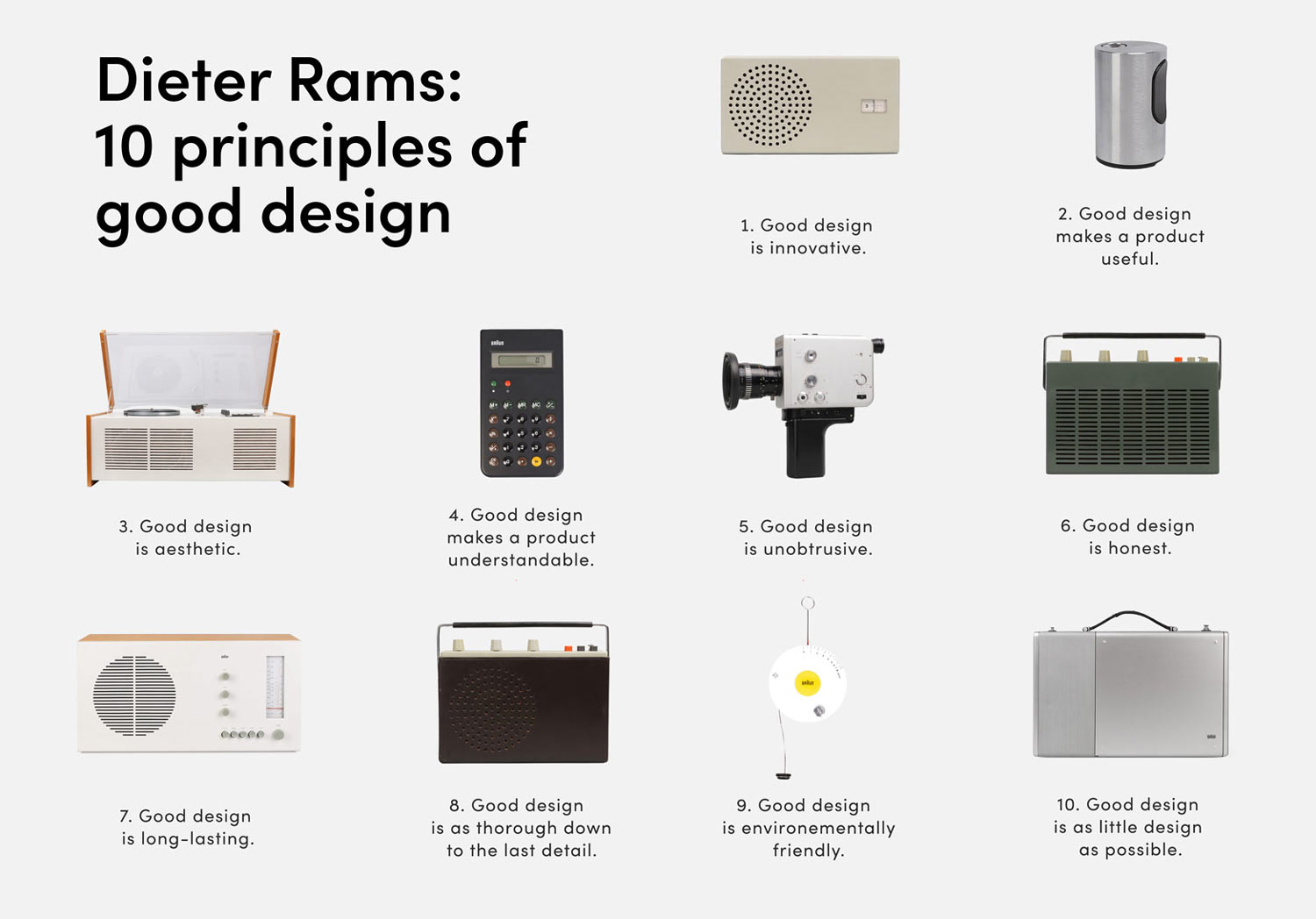
Many years ago, I encountered Dieter Rams’ 10 principles of good design (see above), a very humble, practical and tangible overview of principles that were informing, shaping, and guarding his design work at Braun.

There are no visionary claims, and no big bold statements: just a clear overview of what we do, and where our ambition and care lie for the products we are designing. It’s honest, sincere, and in many ways beautifully humane.

Examples Of Design Principles

There are plenty of wonderful examples that I keep close:

  • Anthropic’s Constitution
  • Principles of Product Design, by Joshua Porter
  • Guiding Principles for Experience Design, by Whitney Hess, PCC
  • Principles of Web Accessibility, by Heydon Pickering
  • Humane by Design, by Jon Yablonski
  • Designing Voice UX Principles, by Brian Colcord
  • Agentic Design Principles, by Linear
  • AI Chatbot Design Principles, by Emmet Connolly
  • Voice UX Principles, by Ben Sauer

Design Principles In Design Systems

  • 18F
  • Audi
  • Carbon (IBM)
  • Firefox
  • Gov.uk
  • Intuit
  • NHS
  • Nordhealth
  • Uber

How To Establish Design Principles

Design principles can be personal, but usually they are committed to and shaped by the entire product team. Design principles aren’t just for designers. User’s experience is everything from performance to support to customer service, and ideally, participants would cover these areas as well.

In practice, though, establishing principles might feel incredibly challenging. They are abstract and fluffy and often ambiguous, and often very difficult to agree upon.

You can get started with a simple 8-step workshop (inspired by Marcin Treder, Maria Meireles and Better):

  1. Pre-session Research
    Study how users speak about the products, what they appreciate, and the words they use.
  2. Get Into Principles Mode
    Invite 6–8 participants, ask them to choose their favorite object, and describe it in 3 words.
  3. Product Analogies
    Compare product to tangible items (e.g., ‘A Porsche 911’ or ‘a Braun audio system’).
  4. Extract Attributes
    Individually, in silence, everyone writes 3–5 initial principles, which are then grouped by theme for review.
  5. Link Attributes To Research
    Link attributes to actual user pain points or desires, to make sure they are grounded in reality.
  6. Value Statements
    We write ‘We want X because of Y’ sentences that express the rationale behind our thinking.
  7. Move to Principles
    Remove analogies to create enduring rules that will guide our design process.
  8. Reality Check
    Search for both positive and negative examples in our products to see where principles are being met or ignored.

Useful Starter Kits For Principles Workshops

  • Design Principles Workshop (Figma Template), by Maria Meireles
  • Design Principles Workshop (FigJam Template), by Richard Picot
  • How to Create Design Principles (Miro Workshop Template), by NanoGiants

Wrapping Up

Creating principles is only a small portion of the work; most work is about effectively sharing and embedding them. It’s difficult to get anywhere without finding ways to make design principles a default — by revisiting settings, templates, naming conventions, and output.

Principles help avoid endless discussions that often stem from personal preferences or taste. But design should not be a matter of taste; it must be guided by our goals and values. Design principles can help with just that.

Meet “Design Patterns For AI Interfaces”

Meet Design Patterns For AI Interfaces, Vitaly’s new video course with 100s of real-life examples and UX guidelines to design AI features that people actually use — with a live UX training later this year. Jump to a free preview.

Meet Design Patterns For AI Interfaces, Vitaly’s video course on interface design & UX.

  • Video + UX Training
  • Video only

Video + UX Training

$ 450.00 $ 799.00

Get Video + UX Training

30 video lessons (10h) + Live UX Training.
100 days money-back-guarantee.

Video only

$ 275.00$ 395.00

Get the video course

30 video lessons (10h). Updated yearly.
Also available as a UX Bundle with 3 video courses.

Useful Resources

  • Design Principles Collection, by Ben Brignell
  • “How To Establish Design Principles”, by Marcin Treder
  • “Establishing Design Principles for a Design System and What It Taught Us”, by Better Design Team
  • Design Principles, by Jeremy Keith
  • Design Principles Collection, by Gabriel Svennerberg
  • Design Principles Workshop (Figma Template), by Maria Meireles
  • Design Principles Workshop (FigJam Template), by Richard Picot
  • How to Create Design Principles (Miro Workshop Template), by NanoGiants
  • Modals in Design Systems

2. Mastering Time Series Forecasting with Python and timesfm

KPT-0010

Ditching the Crystal Ball: Mastering Time Series Forecasting with Python and timesfm

Hey there, fellow developers! 👋

Ever found yourself staring at a screen full of historical data, desperately needing to predict what’s coming next? Whether it’s sales figures, server load, user engagement, or sensor readings, time series forecasting is a beast many of us wrestle with regularly. And let’s be real, it often feels less like science and more like art… or dark magic, depending on the day.

The Forecast Challenge: A Developer’s Pain Point

I’ve been there. You start with the classics: ARIMA, SARIMA, then maybe Prophet. You spend hours on feature engineering, meticulously crafting your seasonalities, handling holidays, dealing with missing data, and cross-validating until your eyes blur. And after all that, the model still throws a curveball when real-world data hits it. It’s powerful, sure, but it can be incredibly time-consuming and often requires deep domain expertise to get just right.

This isn’t just a theoretical problem; it’s a real bottleneck in many projects. Imagine trying to dynamically scale your cloud resources based on predicted traffic spikes, or optimize inventory without knowing demand. Accurate, quick, and reliable forecasts can mean the difference between happy users/customers and overspent budgets or missed opportunities.

My “Aha!” Moment with timesfm

Just a few months ago, our team was grappling with predicting API call volumes for a critical service. The existing models were brittle, requiring constant tuning. We needed something robust, something that could learn from diverse patterns without us hand-holding it through every seasonality and trend change. That’s when I stumbled upon timesfm.

timesfm (Time Series Foundation Model) is Google’s answer to a simpler, more powerful way to handle time series. Think of it like this: just as large language models (LLMs) have revolutionized text understanding, timesfm is a foundation model designed to understand and predict time series data. Its superpower? It’s pre-trained on a massive, diverse dataset of real-world time series. This means it already “knows” a lot about how time series behave, right out of the box.

What Makes timesfm a Game-Changer?

Traditional time series models often demand that you, the developer, understand and explicitly model trends, seasonality, cycles, and exogenous variables. timesfm flips that script. Because it’s a transformer-based model pre-trained on a vast array of time series data from various domains, it can:

  1. Understand complex patterns: It automatically captures trends, seasonality, and other complex temporal dependencies.
  2. Handle diverse data: Its pre-training makes it robust across different types of time series, requiring minimal (if any) feature engineering from your side.
  3. Simplify your life: Less time spent on model configuration and more time on getting actionable insights.

It’s essentially a plug-and-play solution for many forecasting tasks, and it’s backed by the power of Google’s research.

Let’s See It in Action (A Glimpse)

The beauty of timesfm is how little code it takes to get started. You’re not building a model from scratch; you’re leveraging a pre-trained powerhouse.

First, you’ll need to install it:

pip install timesfm

Now, let’s forecast some (mock) daily active users (DAU) for the next 7 days:

import pandas as pd
from timesfm import TimesFm

# Mock historical data (e.g., daily active users for 30 days)
# In a real scenario, this would come from your database or API
history = pd.Series([100, 105, 110, 108, 115, 120, 122, 118, 125, 130,
                     140, 142, 145, 150, 148, 155, 160, 158, 162, 165,
                     170, 168, 172, 175, 178, 180, 182, 185, 188, 190],
                     name="DAU")

# Initialize TimesFM (using the default, pre-trained 'tiny' model)
# context_len: how many past points to consider for forecasting
# horizon_len: how many future points to predict
tfm = TimesFm(
    context_len=30, # Look at the last 30 data points
    horizon_len=7,  # Predict the next 7 data points
    model_size='tiny', # Use the 'tiny' pre-trained model for quick inference
    # You'd usually specify a cache_dir for weights, e.g., cache_dir='./timesfm_weights'
    # The library will download weights if not found.
)

# Make a prediction
# TimesFM expects a list of series, even if it's just one
# The .values converts the Pandas Series to a NumPy array, which TimesFM expects
forecast_results = tfm.forecast([history.values], horizon_len=7)

print("Historical Data (last 5 points):n", history.tail(5))
print("nPredicted next 7 days (DAU):n", forecast_results[0][0])

That’s it! You feed it your historical data, tell it how far into the future you want to predict, and timesfm handles the heavy lifting. The forecast_results will contain the predictions for your specified horizon. Notice how model_size='tiny' implies it’s using a pre-trained model. For production, you might want to use a larger one like '200m' or '1b', which you can load by calling tfm.load_weights(...) once.

A Practical Real-World Use Case

Think about a common challenge: inventory management in e-commerce.
Traditionally, forecasting demand for thousands of SKUs (stock keeping units) is a logistical nightmare. Each product might have different seasonality, trends, and promotional impacts.

With timesfm, you could:

  1. Batch Process: Feed historical sales data for all your SKUs into timesfm in batches. Its ability to handle diverse series means you don’t need a custom model for every product.
  2. Automated Replenishment: Use the 7-day or 30-day ahead forecasts to trigger automated reorder points, minimizing stockouts and reducing excess inventory.
  3. Identify Anomalies: Quickly spot products where actual sales deviate significantly from the forecast, indicating potential issues or sudden trends.

The minimal setup and robust performance of timesfm make it ideal for scaling forecasting across a large number of items or services, where traditional methods would be too resource-intensive or complex to maintain.

Key Takeaways for Your Next Project

  • Less Feature Engineering: timesfm significantly reduces the need for manual feature engineering, saving you tons of time.
  • Robust & Generalizable: Thanks to its pre-training on diverse data, it performs well across various time series types without specific tuning.
  • Simple Interface: Get powerful forecasts with minimal Python code.
  • Scalability: Ideal for scenarios requiring forecasts for many time series (e.g., thousands of products, sensors, or services).

Conclusion

Time series forecasting doesn’t have to be an arcane art. With tools like timesfm, it’s becoming more accessible, more robust, and significantly faster to implement. If you’re tired of the dance with ARIMA or the endless tuning of custom models, I highly recommend giving timesfm a spin. It’s a powerful addition to any developer’s toolkit, letting you focus less on the “how” and more on the “what next.”

Happy forecasting!

Related Posts

  • 2. Unlocking Document Data: Python and PaddleOCR for Efficient OCR
  • 1. Orchestrating AI Teams: A Python Guide to ChatDev

1. Orchestrating AI Teams: A Python Guide to ChatDev

---
title: "Orchestrating AI Teams - My Python Journey with ChatDev"
published: true
description: "Ever wished you had an entire dev team at your fingertips? Discover how ChatDev lets you orchestrate AI agents to build software, powered by Python."
tags: [AI, Python, ChatDev, Multi-agent, Software Development, LLM, Developer Experience]
cover_image: https://res.cloudinary.com/practicaldev/image/fetch/s--9c_o_e_m--/c_imagga_scale,f_auto,fl_progressive,h_420,q_auto,w_1000/https://dev-to-uploads.s3.amazonaws.com/uploads/articles/your-ai-team-image.jpg # Placeholder image idea: an illustration of multiple robots collaborating or code snippets forming a team.
---

Hey everyone!

Ever been deep in a coding session, staring at a blank file, wishing you had an entire *team* of developers to brainstorm with? Or maybe just an extra pair of hands to tackle that mundane boilerplate? Let's be real, solo development can sometimes feel like trying to build a skyscraper with a spork.

For the longest time, when we talked about AI in development, it was mostly about tools like GitHub Copilot helping with code completion, or ChatGPT assisting with specific functions. Powerful, yes, but still largely *single-agent* interactions. You prompt, it responds. It's a great assistant, but it's not exactly a **collaborator** in the sense of a full development team.

### Why This Matters: Beyond the Single Prompt

The real world of software development isn't a series of isolated prompts. It's a dynamic, collaborative process involving design, coding, testing, refactoring, and constant communication. We have product managers, designers, frontend devs, backend devs, QA engineers – all talking, disagreeing, and ultimately, building something together.

So, what if we could bring that multi-role, collaborative dynamic to AI itself? What if AI agents could *talk to each other*, take on different roles, and collectively build a piece of software from a high-level requirement? This isn't just a cool concept; it's a game-changer for rapid prototyping, learning, and automating parts of the dev workflow that used to be strictly human territory.

### My "Aha!" Moment with ChatDev

I remember a few months back, I was wrestling with a particularly stubborn feature for a side project. It was a small utility, but it required juggling a few different components – a bit of UI logic, some data processing, and a simple API endpoint. I kept context-switching, feeling fragmented. I was doing the job of three people, and my progress was snail-paced.

That's when I stumbled upon [ChatDev](https://github.com/OpenBMB/ChatDev). The idea instantly clicked. Instead of me trying to be every role, I could *delegate* to a team of AI agents. It promised to simulate an entire software company, with agents playing roles like CEO, CPO, programmer, and tester, all collaborating to fulfill a given task. My initial thought? "No way this works." My second thought? "I *have* to try this."

### ChatDev in a Nutshell: Your Virtual Dev Team

At its core, ChatDev is a Python-based framework that orchestrates multiple AI agents to collaboratively develop software. You give it a high-level project goal, and it essentially spins up a virtual "company" to tackle it.

Think of it this way:

1.  **You define the project goal:** "Build a simple web server that serves a 'Hello, World!' message."
2.  **ChatDev assigns roles:** A "CEO" agent might initiate the project, a "CPO" agent defines the features, "Programmer" agents write the code, and "Tester" agents find bugs.
3.  **The agents "chat":** They communicate with each other, negotiate, ask clarifying questions, suggest solutions, and iterate on the code. This multi-agent dialogue is the secret sauce – it mimics the human collaboration process.
4.  **They produce code:** Eventually, you get a working codebase, often with a `README` and even installation instructions.

It's less about a single AI generating a response and more about a *team* of AIs developing a solution through a structured, simulated process.

### Getting Your AI Team Started (A Small Taste of Python Magic)

Getting ChatDev to work is surprisingly straightforward. Once you have it set up (which usually involves `pip install chatdev` and configuring your OpenAI API key or other LLM provider), you can launch your virtual company with just a few lines of Python:

python
from chatdev.chatdev_project import ChatDev

Define your project’s goal – be clear and concise!

project_goal = “Develop a basic Python script that generates a random password of a specified length, allowing the user to specify length.”
project_name = “PasswordGeneratorApp” # A name for your project folder

print(f”🚀 Launching your AI software company for project: {project_name}…”)

Orchestrate your AI team!

You can specify the model, version, etc. if needed.

my_ai_team = ChatDev(
task=project_goal,
project_name=project_name,
model_name=”gpt-4″ # Or “gpt-3.5-turbo”, etc.
)

Let the team get to work! This will take a while as they “chat” and code.

my_ai_team.run()

print(f”n🎉 Project ‘{project_name}’ developed by your AI team! Check the ‘Warehouses/{project_name}’ directory.”)


When you run this, you'll see a flurry of text in your console: agents "chatting," roles being performed, files being created. It's like watching a mini-IDE come alive, driven purely by AI dialogue. After some time, you'll find a new directory named `Warehouses/PasswordGeneratorApp` containing the Python script, `main.py`, and other project files. It's genuinely exciting to see!

### Real-World Use Cases: Where This Shines

So, beyond the "wow" factor, where can you actually use something like ChatDev?

1.  **Rapid Prototyping:** Need a quick REST API for a new microservice idea? A simple data processing script? Instead of spending hours on boilerplate, let ChatDev generate an initial draft. You can then refine it.
2.  **Learning & Experimentation:** Want to see different approaches to a problem? Ask ChatDev to build it. You get a working example, and you can reverse-engineer the code to understand its design choices.
3.  **Automating Trivial Utilities:** For those small, one-off scripts that aren't worth full-blown development but are too tedious to write manually, ChatDev can be a lifesaver.
4.  **Generating Boilerplate for Specific Stacks:** Need a barebones Flask app with a specific database integration? Or a simple React component? While it might not always be perfect, it's a fantastic starting point.

### Key Takeaways from My ChatDev Experience

*   **Multi-agent systems are the future:** For complex tasks, AI agents collaborating beat single-agent interactions hands down. It mirrors human team dynamics, leading to more robust and comprehensive solutions.
*   **Prompt engineering shifts:** Instead of prompting for code, you're "prompting" for a product description. Your job becomes more like a CTO or Product Owner, defining the vision rather than dictating the implementation details.
*   **Not a silver bullet (yet):** While incredibly powerful, ChatDev isn't going to replace human developers overnight. The generated code might need refinement, optimization, or security hardening. Human oversight is still crucial.
*   **It's an amazing learning tool:** Observing how the AI agents break down a problem, communicate, and build a solution offers fascinating insights into potential software engineering processes.

### Final Thoughts: The Future is Collaborative (Even with AI)

Diving into ChatDev has been an eye-opening experience. It’s a powerful testament to how AI, when properly orchestrated, can move beyond being just an assistant to becoming a genuine, if virtual, team member. It's not about making developers obsolete; it's about augmenting our capabilities, freeing us from the mundane, and letting us focus on the higher-level architectural and creative challenges.

If you're curious about the bleeding edge of AI in software development, I highly recommend giving ChatDev a spin. Set up your own little virtual software company, give it a challenge, and prepare to be amazed by what your AI team can build. The future of coding just got a whole lot more collaborative – even if your collaborators are lines of code themselves.

Happy coding (and orchestrating)!

---
*Found this insightful? Let me know your thoughts or experiences with multi-agent systems in the comments!*

Related Posts

  • 1. Building Autonomous AI Agents with Python and Hermes
  • 2. Unlocking Document Data: Python and PaddleOCR for Efficient OCR

n8n Docker Setup: Why It Breaks (And the Easier Alternative)

Docker has become the standard way to self-host n8n — and for good reason. But here’s what most tutorials don’t tell you: Docker makes n8n easier to run, but not necessarily easier to set up correctly. The gap between “Docker is running” and “n8n is working securely with HTTPS and persistent data” is where most people get stuck.

This article walks through the five most common failure points — and how to fix each one.

Key Takeaways (30-Second Summary)

  • Docker is the standard way to self-host n8n, but setup is fraught with hidden pitfalls.
  • The top 5 failure points are: SSL certificate configuration, environment variable typos, database persistence, update chaos, and port conflicts.
  • Most “it doesn’t work” moments trace back to one of five specific misconfigurations.
  • A working production setup requires proper SSL, reverse proxy, persistent volumes, and the right environment variables.
  • The easier alternative: deploy n8n in 3 minutes on Agntable with everything pre-configured — no terminal, no debugging.

Why Docker for n8n?

Instead of installing n8n directly on your server (which requires manually setting up Node.js, managing dependencies, and dealing with version conflicts), Docker packages everything n8n needs into a single, isolated container. This approach offers several advantages:

  • Isolation: n8n runs in its own environment, separate from other applications on your server.
  • Portability: You can move your entire n8n setup to another server with minimal effort.
  • Simplified updates: Upgrading n8n is often just a single command.
  • Consistency: The same configuration works across development and production.

The official n8n documentation recommends Docker for self-hosting, and most tutorials follow this approach.

But “running” isn’t the same as “production-ready.”

The Real Problem: Why n8n Docker Setups Break

The real problems emerge when you try to:

  • Access n8n securely over HTTPS
  • Keep your data when the container restarts
  • Configure n8n for your specific needs
  • Update to a newer version without breaking everything
  • Connect to external services that require custom certificates

One developer documented their painful update experience: “I broke everything trying to update n8n. Multiple docker-compose.yml files in different folders, outdated images tagged as <none>, conflicts between different image registries, containers running from different images than I thought.”

This isn’t an isolated story.

Failure Point #1: The SSL Certificate Maze

Symptom: You visit your n8n instance and see “Not Secure” in the browser, or worse — you can’t access it at all. Webhooks fail. You see ERR_CERT_AUTHORITY_INVALID or “secure cookie” warnings.

Why it happens: n8n requires HTTPS to function properly — especially for webhooks. But setting up SSL with Docker is surprisingly complex:

  1. You need a domain name pointed to your server.
  2. You need a reverse proxy (Nginx, Caddy, or Traefik) to handle HTTPS traffic.
  3. You need Let’s Encrypt certificates configured and set to auto-renew.
  4. You need to configure the reverse proxy to forward traffic to the n8n container.
  5. You need to ensure WebSocket connections work for the n8n editor.

The fix: A proper reverse proxy setup with correct headers.

server {
  listen 443 ssl;
  server_name n8n.yourdomain.com;

  ssl_certificate /etc/letsencrypt/live/n8n.yourdomain.com/fullchain.pem;
  ssl_certificate_key /etc/letsencrypt/live/n8n.yourdomain.com/privkey.pem;

  location / {
    proxy_pass http://localhost:5678;
    proxy_set_header Host $host;
    proxy_set_header X-Real-IP $remote_addr;
    proxy_set_header X-Forwarded-For $proxy_add_x_forwarded_for;
    proxy_set_header X-Forwarded-Proto $scheme;

    # WebSocket support (critical for n8n editor)
    proxy_http_version 1.1;
    proxy_set_header Upgrade $http_upgrade;
    proxy_set_header Connection "upgrade";
  }
}

server {
  listen 80;
  server_name n8n.yourdomain.com;
  return 301 https://$host$request_uri;
}

Even with this configuration, you still need to ensure the certificates renew automatically and that your firewall allows traffic on ports 80 and 443.

Failure Point #2: Environment Variable Hell

Symptom: n8n starts but behaves strangely. Webhooks don’t work. Authentication fails. Or n8n won’t start at all, with cryptic error messages.

Why it happens: n8n relies heavily on environment variables for configuration. A single typo — or missing variable — can break critical functionality.

Variable Purpose Common Mistake
N8N_HOST Defines the hostname n8n runs on Setting to localhost instead of your actual domain
N8N_PROTOCOL HTTP or HTTPS Forgetting to set to https when using SSL
WEBHOOK_URL Public URL for webhooks Not setting this, causing webhook failures
N8N_ENCRYPTION_KEY Encrypts credentials in the database Using a weak key or not setting it at all
DB_TYPE Database type (sqlite/postgresdb) Not set for production use

The fix: Use a .env file to manage variables cleanly.

# Domain configuration
N8N_HOST=n8n.yourdomain.com
N8N_PROTOCOL=https
WEBHOOK_URL=https://n8n.yourdomain.com/

# Security
N8N_ENCRYPTION_KEY=your-base64-32-char-key-here   # openssl rand -base64 32
N8N_BASIC_AUTH_ACTIVE=true
N8N_BASIC_AUTH_USER=admin
N8N_BASIC_AUTH_PASSWORD=your-secure-password

# Database (PostgreSQL for production)
DB_TYPE=postgresdb
DB_POSTGRESDB_HOST=postgres
DB_POSTGRESDB_PORT=5432
DB_POSTGRESDB_USER=n8n
DB_POSTGRESDB_PASSWORD=your-db-password
DB_POSTGRESDB_DATABASE=n8n

# Timezone
GENERIC_TIMEZONE=America/New_York

Then reference this file in your docker-compose.yml using the env_file directive.

Failure Point #3: Database & Data Persistence Pitfalls

Symptom: You restart your n8n container, and all your workflows disappear. Or n8n crashes with database errors.

Why it happens: By default, n8n stores data inside the container. When the container is removed (during updates or restarts), that data vanishes. This is the number one data loss scenario for new n8n users.

The official n8n Docker documentation warns: if you don’t manually configure a mounted directory, all data (including database.sqlite) will be stored inside the container and will be completely lost once the container is deleted or rebuilt.

Even when you configure persistent volumes, permission issues can arise. The n8n container runs as user ID 1000, so the mounted directory must be writable by that user:

sudo chown -R 1000:1000 ./n8n-data

For production workloads, SQLite has limitations with concurrent writes. Use PostgreSQL.

The fix:

version: '3.8'

services:
  postgres:
    image: postgres:15-alpine
    restart: unless-stopped
    environment:
      - POSTGRES_USER=n8n
      - POSTGRES_PASSWORD=${DB_POSTGRESDB_PASSWORD}
      - POSTGRES_DB=n8n
    volumes:
      - ./postgres-data:/var/lib/postgresql/data
    networks:
      - n8n-network
    healthcheck:
      test: ["CMD-SHELL", "pg_isready -U n8n"]
      interval: 30s
      timeout: 10s
      retries: 5

  n8n:
    image: n8nio/n8n:latest
    restart: unless-stopped
    ports:
      - "127.0.0.1:5678:5678"
    env_file:
      - .env
    volumes:
      - ./n8n-data:/home/node/.n8n
    networks:
      - n8n-network
    depends_on:
      postgres:
        condition: service_healthy

networks:
  n8n-network:
    driver: bridge

Failure Point #4: The Update Nightmare

Symptom: You run docker compose pull && docker compose up -d to update n8n, and suddenly nothing works.

Why it happens: Several things can go wrong simultaneously:

  • Wrong directory: You run the update command in the wrong folder.
  • Image registry confusion: Multiple n8n image sources exist (n8nio/n8n vs docker.n8n.io/n8nio/n8n).
  • Stale images: Old images tagged as <none> cause confusion.
  • Orphaned containers: Previous containers still running on old images.
  • Database migrations: New n8n versions may require schema updates that don’t run automatically.

The fix: A safe update script.

#!/bin/bash
# update-n8n.sh - Safe update script

echo "📦 Backing up n8n data..."
tar -czf "n8n-backup-$(date +%Y%m%d-%H%M%S).tar.gz" ./n8n-data ./postgres-data

echo "🔄 Pulling latest images..."
docker compose pull

echo "🔄 Recreating containers..."
docker compose down
docker compose up -d --force-recreate

echo "✅ Update complete. Check logs: docker compose logs -f"

Always test updates in a staging environment first.

Failure Point #5: Port & Network Conflicts

Symptom: The n8n container starts, but you can’t access it. Or another application stops working.

Why it happens: The classic port mapping 5678:5678 exposes n8n directly on your server’s public IP. This creates port conflicts, a security risk, and no clean upgrade path to HTTPS.

The fix: Only expose n8n locally, then use a reverse proxy for external access:

ports:
  - "127.0.0.1:5678:5678"  # Only accessible from the same machine

The Working Production Setup

Here’s a complete directory structure for a production-ready n8n deployment:

n8n-docker/
├── .env                    # Environment variables (keep secure!)
├── docker-compose.yml      # Service configuration
├── n8n-data/               # n8n persistent data (chown 1000:1000)
├── postgres-data/          # PostgreSQL persistent data
└── backups/                # Automated backups

Combine all the fixes above: the .env file from Failure Point #2, the docker-compose.yml from Failure Point #3, and the Nginx config from Failure Point #1. That’s a production-grade setup.

Frequently Asked Questions

What’s the minimum server spec for n8n with Docker?
n8n officially recommends a minimum of 2GB RAM and 1 vCPU for production use.

Can I use SQLite for production?
Technically yes, but it’s not recommended. SQLite’s concurrency limitations cause issues with multiple simultaneous workflow executions.

How do I fix permission issues with mounted volumes?
The n8n container runs as user ID 1000. Run sudo chown -R 1000:1000 ./n8n-data.

What environment variables are essential for HTTPS?
You must set N8N_PROTOCOL=https and WEBHOOK_URL=https://yourdomain.com/ (with trailing slash). Also ensure N8N_HOST matches your domain.

How often should I update n8n?
At least monthly for security reasons. Always back up before updating.

The Easier Alternative

After reading through all these failure points, you might be thinking: there has to be a better way.

Agntable was built specifically to solve these exact problems — SSL configuration, environment variables, database persistence, updates, and monitoring — handled automatically. Deploy n8n in 3 minutes with a live HTTPS URL, pre-configured PostgreSQL, daily verified backups, and 24/7 monitoring.

What You Get DIY Docker Agntable
Setup time 5–24 hours 3 minutes
SSL configuration Manual, error-prone Automatic
Database You configure PostgreSQL pre-optimised
Backups You script Daily, verified
Updates Manual, risky Automatic, tested
Monitoring You set up 24/7 with auto-recovery
Monthly cost (including your time) $150–$500+ $9.99–$49.99 flat

Conclusion: Build Workflows, Not Infrastructure

The Docker setup for n8n is a classic open-source trade-off: incredible power and flexibility, but significant operational complexity. If you’re a developer who enjoys infrastructure work, the DIY route can be rewarding. But if you want to build workflows rather than become a part-time sysadmin, there’s a better path.

Originally published on Agntable