Uncategorized

The Ultimate Guide to Kubernetes Load Balancers in 2026 (K3s Edition)

TL;DR β€” Running K3s on bare metal or edge? This guide dissects every major Kubernetes load balancer β€” NGINX, Traefik, MetalLB, HAProxy, Envoy, Cilium, Istio, Linkerd, and K3s’s own Klipper β€” across architecture, performance, K3s compatibility, and real-world use cases. Pick the right one for your stack, once and for all.

🧭 Why This Guide Exists

Kubernetes load balancers are one of the most confusing corners of the cloud-native ecosystem. Search for “best Kubernetes load balancer” and you’ll find a dozen blog posts each recommending something different, often without context. When you throw K3s β€” the lightweight, single-binary Kubernetes distribution from Rancher β€” into the mix, the confusion compounds further.

K3s ships with its own built-in load balancer (Klipper/ServiceLB) and its own ingress controller (Traefik). But is that the right choice for your production workload? What if you need BGP routing, service mesh capabilities, or sub-millisecond latency?

This guide covers every serious option in the market today, with real benchmarks, architecture diagrams, and clear K3s-specific guidance.

πŸ—ΊοΈ The Landscape: What Are We Even Comparing?

Before diving in, let’s clarify the terminology. “Load balancer” in Kubernetes refers to multiple layers:

Layer What It Does Example Tools
L4 LoadBalancer (IP/TCP) Assigns external IPs to Services MetalLB, Klipper, Kube-VIP
L7 Ingress Controller Routes HTTP/HTTPS traffic by host/path NGINX, Traefik, HAProxy
Reverse Proxy / Edge Proxy Advanced traffic shaping, retries, circuit breaking Envoy, HAProxy
Service Mesh East-west (pod-to-pod) traffic management + security Istio, Linkerd, Cilium

Most real deployments combine tools from multiple layers. For K3s, a typical production stack might be: MetalLB (L4) + Traefik (L7 Ingress) + optionally Linkerd (mesh).

πŸ”¬ Competitor Deep-Dive

1. 🏠 Klipper ServiceLB (K3s Built-In)

What it is: K3s’s embedded load balancer, enabled by default. Uses host ports and iptables rules to forward traffic.

Architecture:

External Traffic
      β”‚
      β–Ό
[Node HostPort] ──iptables──► [ClusterIP] ──► [Pod]
      β–²
[DaemonSet: svc-* pods on each node]

How it works: For each LoadBalancer Service, Klipper creates a DaemonSet with svc- prefixed pods that bind to the host port. The node’s own external IP is reported as the EXTERNAL-IP. There is no IP announcement to the network β€” it simply binds ports.

K3s-specific note: Klipper is enabled by default. To run MetalLB or any other LB controller, you must disable it:

# During K3s install
curl -sfL https://get.k3s.io | sh -s - --disable servicelb

# Or in K3s config file
disable:
  - servicelb
Feature Rating
Zero config βœ… Built-in
True IP announcement ❌ No
BGP support ❌ No
Multi-node HA ⚠️ Failover only
Production-readiness ⚠️ Dev/small clusters
Resource usage βœ… Minimal

Best for: Local dev, single-node K3s, homelab, quick demos.

2. 🟒 NGINX Ingress Controller

What it is: The most widely deployed Kubernetes Ingress controller, based on the battle-tested NGINX reverse proxy. Two major variants exist: the community ingress-nginx and the commercial NGINX Inc. version (nginx-ingress).

Architecture:

Internet
   β”‚
   β–Ό
[NGINX Pod]
   β”‚  Reads Ingress rules + Annotations
   β”œβ”€β”€β–Ί /app-a  ──► Service A ──► Pods
   β”œβ”€β”€β–Ί /app-b  ──► Service B ──► Pods
   └──► /api    ──► Service C ──► Pods
        β”‚
   [ConfigMap / Annotations drive nginx.conf]

Key features:

  • Annotation-driven configuration (granular control via nginx.ingress.kubernetes.io/*)
  • SSL termination, wildcard certs, HSTS
  • Rate limiting, IP allowlisting, custom error pages
  • WebSocket support, gRPC proxying
  • Prometheus metrics out of the box
  • ModSecurity WAF support (community build)

K3s installation:

# First, disable K3s's default Traefik if you want NGINX instead
curl -sfL https://get.k3s.io | sh -s - --disable traefik

# Install NGINX Ingress via Helm
helm repo add ingress-nginx https://kubernetes.github.io/ingress-nginx
helm install ingress-nginx ingress-nginx/ingress-nginx 
  --namespace ingress-nginx --create-namespace

Sample Ingress resource:

apiVersion: networking.k8s.io/v1
kind: Ingress
metadata:
  name: my-app
  annotations:
    nginx.ingress.kubernetes.io/rewrite-target: /
    nginx.ingress.kubernetes.io/rate-limit: "100"
spec:
  ingressClassName: nginx
  rules:
  - host: myapp.example.com
    http:
      paths:
      - path: /
        pathType: Prefix
        backend:
          service:
            name: my-app-svc
            port:
              number: 80

Performance: NGINX processes ~30,000–40,000 RPS per instance in typical Kubernetes ingress scenarios. Config reloads happen on Ingress updates (brief traffic disruption is possible on busy clusters).

Feature Rating
Community & docs βœ… Massive
Annotation flexibility βœ… Excellent
Auto TLS (Let’s Encrypt) ⚠️ Needs cert-manager
Dynamic config (no reload) ❌ Requires reload
Performance βœ… Very good
K3s compatibility βœ… Excellent
Learning curve βœ… Low

Best for: Teams migrating from traditional NGINX setups, production HTTP/HTTPS workloads, teams needing extensive annotation-based customization.

3. 🐹 Traefik (K3s Default)

What it is: A cloud-native reverse proxy and ingress controller written in Go. K3s ships Traefik v2 by default (upgraded to v3 in recent K3s releases). It auto-discovers services via Kubernetes CRDs and annotations.

Architecture:

Internet
   β”‚
   β–Ό
[Traefik Proxy]
   β”‚  Watches: IngressRoutes, Ingress, Services
   β”‚  Providers: Kubernetes CRD, Kubernetes Ingress
   β”‚
   β”œβ”€[Routers]──[Middlewares]──[Services]──► Pods
   β”‚     β”‚            β”‚
   β”‚  Host/Path    RateLimit
   β”‚  rules        Auth
   β”‚               Retry
   β”‚
   └─[Dashboard: :8080]  [Metrics: Prometheus]

Key features:

  • Zero-config service discovery β€” annotate a Service and Traefik picks it up instantly, no config file reloads
  • Automatic Let’s Encrypt TLS with ACME challenge support
  • Middleware system: auth, rate limiting, headers, circuit breakers, retry
  • Native IngressRoute CRDs for full power
  • Built-in dashboard and Prometheus metrics
  • TCP/UDP routing support (not just HTTP)

K3s-specific note: Traefik is bundled and managed by K3s. To customize it, use a HelmChartConfig:

# /var/lib/rancher/k3s/server/manifests/traefik-config.yaml
apiVersion: helm.cattle.io/v1
kind: HelmChartConfig
metadata:
  name: traefik
  namespace: kube-system
spec:
  valuesContent: |-
    dashboard:
      enabled: true
    additionalArguments:
      - "--entrypoints.websecure.http.tls"
    ports:
      web:
        redirectTo: websecure

Sample IngressRoute:

apiVersion: traefik.io/v1alpha1
kind: IngressRoute
metadata:
  name: my-app
spec:
  entryPoints:
    - websecure
  routes:
  - match: Host(`myapp.example.com`)
    kind: Rule
    services:
    - name: my-app-svc
      port: 80
    middlewares:
    - name: rate-limit
  tls:
    certResolver: letsencrypt

Performance: Traefik handles ~19,000 RPS with very stable resource consumption and zero-reload dynamic config β€” a key advantage over NGINX for fast-moving microservices.

Feature Rating
K3s integration βœ… Native, bundled
Auto TLS (Let’s Encrypt) βœ… Built-in ACME
Dynamic config (no reload) βœ… Real-time
Dashboard βœ… Built-in
TCP/UDP routing βœ… Yes
Performance vs NGINX ⚠️ Slightly lower RPS
Enterprise features ⚠️ Enterprise version needed

Best for: K3s default stack, teams wanting zero-touch TLS, GitOps-friendly pipelines, dev-friendly environments.

4. πŸ”· MetalLB

What it is: A bare-metal L4 load balancer for Kubernetes. It gives LoadBalancer type Services an actual external IP from a pool you define, using either Layer 2 (ARP) or BGP protocols.

Architecture (Layer 2 mode):

External Network
      β”‚
      β”‚  ARP: "Who has 192.168.1.100?" β†’ Leader Node replies
      β–Ό
[Leader Node] ──► kube-proxy ──► Service Pods (all nodes)
      β”‚
[MetalLB Speaker DaemonSet] on every node
[MetalLB Controller] handles IP assignment

Architecture (BGP mode):

[Router/Switch]
      β”‚  BGP peering
      β–Ό
[MetalLB Speaker] on each K3s node
      β”‚  Announces /32 routes per service IP
      β–Ό
[Direct packet routing to node]

K3s installation:

# Step 1: Disable Klipper
curl -sfL https://get.k3s.io | sh -s - --disable servicelb

# Step 2: Install MetalLB
helm repo add metallb https://metallb.github.io/metallb
helm install metallb metallb/metallb -n metallb-system --create-namespace

# Step 3: Configure IP pool
kubectl apply -f - <<EOF
apiVersion: metallb.io/v1beta1
kind: IPAddressPool
metadata:
  name: k3s-pool
  namespace: metallb-system
spec:
  addresses:
  - 192.168.1.200-192.168.1.220
---
apiVersion: metallb.io/v1beta1
kind: L2Advertisement
metadata:
  name: k3s-l2
  namespace: metallb-system
EOF

Important caveat: In L2 mode, MetalLB doesn’t truly load-balance at L4 β€” it elects a leader node that handles ARP for a given IP, and kube-proxy does the actual pod distribution. It’s more of a failover mechanism than a true LB. BGP mode provides real per-node distribution but requires BGP-capable routers.

Feature Rating
Bare-metal IP assignment βœ… Core purpose
BGP mode βœ… Yes
Layer 2 mode βœ… Yes (ARP/NDP)
True L4 load balancing ⚠️ BGP only
K3s compatibility βœ… Excellent (disable Klipper first)
Resource usage βœ… Very lightweight
Requires routers ⚠️ BGP mode does

Best for: Bare-metal K3s clusters that need proper external IPs, homelab with a VLAN IP pool, edge deployments without cloud LB.

5. ⚑ HAProxy Ingress Controller

What it is: The Kubernetes ingress controller backed by HAProxy β€” historically the gold standard for raw TCP/HTTP load balancing performance. HAProxy Technologies’ own benchmarks show their ingress controller handling 42,000 RPS with the lowest CPU among all competitors.

Architecture:

Internet
   β”‚
   β–Ό
[HAProxy Pod]
   β”‚  Config generated from Ingress/CRDs by controller
   β”‚
   β”œβ”€[Frontend: bind *:80]
   β”‚       β”‚
   β”‚  [ACL rules: path_beg, hdr_dom]
   β”‚       β”‚
   └─[Backend pools] ──► Pod endpoints (health-checked)
         β”‚
   [Stats: :1936]  [Prometheus metrics]

Key features:

  • Best-in-class raw throughput and lowest latency at scale
  • Native support for HTTP/3, QUIC, gRPC
  • Fine-grained connection control (timeouts, retries, stick tables)
  • Advanced Layer 7 routing: headers, cookies, ACLs
  • TCP mode for non-HTTP workloads
  • Gateway API support (HAProxy Ingress Controller v3.1+)

K3s installation:

helm repo add haproxytech https://haproxytech.github.io/helm-charts
helm install haproxy-ingress haproxytech/kubernetes-ingress 
  --namespace haproxy-controller --create-namespace 
  --set controller.service.type=LoadBalancer

Performance edge: In head-to-head benchmarks against NGINX, Traefik, and Envoy:

  • HAProxy: 42,000 RPS, 50% CPU
  • NGINX: ~35,000 RPS, ~65% CPU
  • Traefik: ~19,000 RPS, ~45% CPU (more consistent)
  • Envoy: ~38,000 RPS, 73% CPU
Feature Rating
Raw throughput βœ… Best-in-class
HTTP/3 & gRPC βœ… Yes
Advanced ACLs βœ… Very powerful
Auto TLS ⚠️ Needs cert-manager
Dynamic config βœ… v2.4+ hitless reload
K3s compatibility βœ… Good
Complexity ⚠️ Steeper learning curve

Best for: High-throughput production clusters, financial services, teams needing ultra-low p99 latency, TCP-heavy workloads.

6. 🌊 Envoy Proxy

What it is: Originally built at Lyft, Envoy is a high-performance C++ proxy that has become the de facto data plane of the cloud-native ecosystem. It powers Istio, Consul Connect, AWS App Mesh, and is the backbone of the Kubernetes Gateway API ecosystem.

Architecture:

[xDS Control Plane] (e.g., Istio's istiod)
       β”‚  gRPC streaming: LDS, RDS, CDS, EDS
       β–Ό
[Envoy Proxy Instance]
   β”‚
   β”œβ”€ Listeners (ports/protocols)
   β”‚       β”‚
   β”‚  Filter Chains (HTTP, TCP, gRPC filters)
   β”‚       β”‚
   └─ Clusters (upstream endpoints)
         β”‚
      [Circuit Breaker] [Retry] [Outlier Detection]

Key features:

  • Dynamic configuration via xDS API (zero-downtime updates)
  • Built-in circuit breaking, retries, outlier detection
  • Excellent observability: detailed stats, tracing (Zipkin/Jaeger/OTLP), access logs
  • gRPC-first with HTTP/1.1 and HTTP/2 support
  • Mutual TLS (mTLS) between services
  • WebAssembly (Wasm) plugin extensibility
  • Rate limiting via external services (Ratelimit service)

Standalone on K3s (without Istio):

# Envoy Gateway β€” standalone Gateway API implementation
helm install eg oci://docker.io/envoyproxy/gateway-helm 
  --version v1.2.0 -n envoy-gateway-system --create-namespace

Performance: Envoy delivers ~38,000 RPS with excellent handling of dynamic service churn (critical for microservices that scale up/down frequently). Its sub-10ms latency during pod scaling events makes it ideal for Netflix/Uber-style workloads.

Feature Rating
Dynamic config (xDS) βœ… Best-in-class
Observability βœ… Exceptional
gRPC support βœ… Native
Circuit breaking βœ… Built-in
Wasm extensibility βœ… Yes
Standalone complexity ⚠️ High (needs control plane)
K3s standalone use ⚠️ Via Envoy Gateway

Best for: Microservices architectures with dynamic service discovery, service mesh data plane, teams that need xDS-compatible control plane integration.

7. πŸ•ΈοΈ Istio (Service Mesh)

What it is: The most feature-complete service mesh for Kubernetes. Istio injects Envoy sidecars into every pod and manages the entire service-to-service communication layer via a centralized control plane (istiod).

Architecture:

[istiod - Control Plane]
   β”œβ”€β”€ Pilot (traffic management)
   β”œβ”€β”€ Citadel (certificate authority)
   └── Galley (config validation)
         β”‚  xDS API
         β–Ό
[Pod A]                    [Pod B]
  App Container              App Container
  Envoy Sidecar ◄──mTLS──► Envoy Sidecar
  (intercepts all traffic)   (intercepts all traffic)

Istio Ambient Mode (2024/2026): The new sidecar-free mode using per-node “ztunnel” proxies + optional Waypoint proxies eliminates the double-hop latency, bringing performance near bare-metal levels.

Key features:

  • Fine-grained traffic management: canary, A/B, weighted routing, fault injection
  • Automatic mTLS between all services
  • Authorization policies at L7 (RBAC per HTTP path/method)
  • Distributed tracing, Kiali topology visualization
  • Multi-cluster and VM support
  • Gateway API support

K3s resource requirements (important!):

  • istiod: ~500MB RAM
  • Per-pod Envoy sidecar: ~50MB RAM each
  • At 500 services: 25–50GB extra RAM vs. Linkerd β€” plan accordingly
# Install Istio on K3s
curl -L https://istio.io/downloadIstio | sh -
istioctl install --set profile=minimal -y
kubectl label namespace default istio-injection=enabled
Feature Rating
Traffic management βœ… Most advanced
mTLS βœ… Automatic
Observability βœ… Full stack (Kiali, Jaeger)
Authorization policies βœ… L7 RBAC
Resource usage ❌ Heavy (per-pod sidecar)
Complexity ❌ High
K3s (small cluster) ⚠️ Feasible, watch RAM

Best for: Enterprise Kubernetes, SOC 2/PCI-DSS compliance requirements, teams needing canary deployments and fault injection, hybrid VM+K8s environments.

8. πŸ”— Linkerd (Service Mesh)

What it is: The original service mesh (coined the term in 2016). Linkerd uses a Rust-based “microproxy” instead of Envoy β€” dramatically lighter weight, making it the fastest and most resource-efficient service mesh available.

Architecture:

[Linkerd Control Plane]
  β”œβ”€β”€ destination (service discovery)
  β”œβ”€β”€ identity (certificate authority)
  └── proxy-injector (sidecar injection)
         β”‚
[Pod A]                    [Pod B]
  App Container              App Container
  linkerd2-proxy ◄──mTLS──► linkerd2-proxy
  (Rust, ~10MB RAM each)     (tiny overhead!)

Performance benchmarks (vs other meshes):

  • Linkerd: ~5–10% slower than baseline (no mesh) β€” best among all meshes
  • Istio: ~25–35% slower than baseline
  • Cilium Mesh: ~20–30% slower than baseline

Key features:

  • Automatic mTLS (on by default, zero config)
  • Golden signals dashboard (latency, traffic, errors, saturation)
  • Per-route metrics
  • Traffic splitting (canary, A/B)
  • Multi-cluster support
  • FIPS-compliant builds available
  • Graduated CNCF project (most mature after Istio)

K3s installation:

# Install Linkerd CLI
curl --proto '=https' --tlsv1.2 -sSfL https://run.linkerd.io/install | sh

# Pre-flight check
linkerd check --pre

# Install on K3s
linkerd install --crds | kubectl apply -f -
linkerd install | kubectl apply -f -
linkerd check

# Inject into a namespace
kubectl annotate namespace default linkerd.io/inject=enabled
Feature Rating
Resource efficiency βœ… Best among meshes
Performance overhead βœ… Minimal (5–10%)
mTLS βœ… Auto, zero-config
Simplicity βœ… Easiest mesh
Dashboard βœ… Built-in
Advanced traffic routing ⚠️ Less than Istio
K3s compatibility βœ… Excellent

Best for: Teams wanting mesh capabilities without Istio’s complexity, K3s clusters with limited RAM, security-first teams, anyone who wants to “just turn it on and have it work.”

9. 🧬 Cilium (eBPF-based CNI + Service Mesh)

What it is: Cilium is fundamentally different from all others β€” it operates at the Linux kernel level using eBPF (extended Berkeley Packet Filter), replacing traditional iptables networking entirely. It serves as both a CNI (network plugin) and optionally a service mesh.

Architecture:

[Cilium Operator] + [Cilium Agent DaemonSet]
         β”‚  Programs eBPF maps
         β–Ό
[Linux Kernel - eBPF programs]
   β”œβ”€β”€ XDP (eXpress Data Path): packet filtering at NIC level
   β”œβ”€β”€ TC (Traffic Control): L3/L4 policy enforcement
   └── Socket: L7 visibility (HTTP, gRPC, Kafka, DNS)
         β”‚
[Hubble Observability Layer]
   β”œβ”€β”€ hubble-relay
   └── hubble-ui (real-time network flow visualization)

Key features:

  • eBPF-powered networking: bypasses kernel overhead, hardware-speed L4
  • No iptables β€” replaces kube-proxy entirely
  • Deep observability via Hubble (DNS, HTTP, gRPC, Kafka at kernel level)
  • Network policies at L3/L4/L7 in a single CRD
  • WireGuard/IPsec transparent encryption
  • Service mesh in per-node Envoy model (not sidecar-per-pod)
  • Excellent for multi-cluster with Cluster Mesh

K3s installation:

# Disable K3s's default flannel (Cilium replaces it)
curl -sfL https://get.k3s.io | sh -s - 
  --flannel-backend=none 
  --disable-network-policy 
  --disable servicelb

# Install Cilium
helm repo add cilium https://helm.cilium.io/
helm install cilium cilium/cilium 
  --namespace kube-system 
  --set operator.replicas=1 
  --set kubeProxyReplacement=true 
  --set k8sServiceHost=<K3S_SERVER_IP> 
  --set k8sServicePort=6443

# Enable Hubble
cilium hubble enable --ui

L4 performance: Cilium’s eBPF datapath is unrivaled for L4 (TCP/UDP) β€” limited only by hardware NIC speed. For L7 (HTTP), it offloads to per-node Envoy, which introduces some trade-offs vs. per-pod sidecar isolation.

Feature Rating
L4 throughput βœ… Best (eBPF)
Network observability βœ… Exceptional (Hubble)
No iptables βœ… kube-proxy replacement
Network policies βœ… L3/L4/L7 unified
Service mesh ⚠️ Per-node (not per-pod)
Complexity ⚠️ eBPF expertise needed
K3s integration βœ… Good (replaces flannel)

Best for: High-performance bare-metal clusters, security-intensive environments, teams already investing in eBPF, multi-cluster deployments with Cluster Mesh.

πŸ“Š The Big Comparison Table

Tool Type OSI Layer K3s Default Auto TLS Performance Resource Usage Complexity
Klipper/ServiceLB L4 LB L4 βœ… Yes ❌ Low Minimal Minimal
NGINX Ingress L7 ❌ (opt-out Traefik) ⚠️ (cert-manager) Very High Low Low
Traefik Ingress L7 βœ… Yes (bundled) βœ… Built-in High Low Low
MetalLB L4 LB L4 ❌ ❌ Medium Minimal Low
HAProxy Ingress L4+L7 ❌ ⚠️ (cert-manager) Highest Low Medium
Envoy Proxy/Mesh DP L4+L7 ❌ βœ… (with CP) Very High Medium High
Istio Service Mesh L4+L7 ❌ βœ… Auto mTLS Medium (overhead) Very High Very High
Linkerd Service Mesh L4+L7 ❌ βœ… Auto mTLS High (least overhead) Low Low
Cilium CNI+Mesh L3+L4+L7 ❌ βœ… (WireGuard) Highest L4 Medium High

πŸ—οΈ Architecture Patterns for K3s

Pattern 1: Minimal (Single Node / Homelab)

[K3s: Traefik + Klipper built-in]
   β”‚
   └── Just works. Zero extra config needed.

Use when: Local dev, single-node homelab, learning Kubernetes.

Pattern 2: Bare-Metal Production (Most Common)

[MetalLB] ──► External IP ──► [Traefik] ──► [Your Services]

Use when: Multiple K3s nodes, need proper external IPs, keep Traefik for simplicity.

Pattern 3: High-Performance Production

[MetalLB] ──► External IP ──► [HAProxy Ingress] ──► [Services]

Use when: High RPS requirements, latency-sensitive APIs, financial/gaming workloads.

Pattern 4: Secure Microservices (Security-First)

[MetalLB] ──► [NGINX/Traefik] ──► [Linkerd Mesh] ──► [Services]
                                      (mTLS, observability)

Use when: Multi-service architecture, compliance requirements, need service-to-service encryption.

Pattern 5: Maximum Performance + Security (Advanced)

[Cilium CNI + kube-proxy replacement]
   └──► [Cilium Ingress / Envoy Gateway] ──► [Services]
        + Hubble for observability

Use when: eBPF expertise available, need kernel-level performance, security-intensive platform.

🏎️ Performance Benchmarks at a Glance

Based on published benchmarks and production data (2024–2026):

Requests per Second (RPS) at typical K8s ingress workload:

HAProxy    β–ˆβ–ˆβ–ˆβ–ˆβ–ˆβ–ˆβ–ˆβ–ˆβ–ˆβ–ˆβ–ˆβ–ˆβ–ˆβ–ˆβ–ˆβ–ˆβ–ˆβ–ˆβ–ˆβ–ˆβ–ˆβ–ˆβ–ˆβ–ˆβ–ˆβ–ˆβ–ˆβ–ˆ  42,000 RPS  (50% CPU)
Envoy      β–ˆβ–ˆβ–ˆβ–ˆβ–ˆβ–ˆβ–ˆβ–ˆβ–ˆβ–ˆβ–ˆβ–ˆβ–ˆβ–ˆβ–ˆβ–ˆβ–ˆβ–ˆβ–ˆβ–ˆβ–ˆβ–ˆβ–ˆβ–ˆβ–ˆβ–ˆβ–ˆ   38,000 RPS  (73% CPU)
NGINX      β–ˆβ–ˆβ–ˆβ–ˆβ–ˆβ–ˆβ–ˆβ–ˆβ–ˆβ–ˆβ–ˆβ–ˆβ–ˆβ–ˆβ–ˆβ–ˆβ–ˆβ–ˆβ–ˆβ–ˆβ–ˆβ–ˆβ–ˆβ–ˆβ–ˆβ–ˆ    35,000 RPS  (65% CPU)
Traefik    β–ˆβ–ˆβ–ˆβ–ˆβ–ˆβ–ˆβ–ˆβ–ˆβ–ˆβ–ˆβ–ˆβ–ˆβ–ˆ                 19,000 RPS  (45% CPU)

Service Mesh Overhead (vs no mesh):
Linkerd    β–ˆβ–ˆ  5–10% slower   ← Best
Cilium     β–ˆβ–ˆβ–ˆβ–ˆ  20–30% slower
Istio      β–ˆβ–ˆβ–ˆβ–ˆβ–ˆ  25–35% slower

L4 Raw Throughput:
Cilium (eBPF)  β–ˆβ–ˆβ–ˆβ–ˆβ–ˆβ–ˆβ–ˆβ–ˆβ–ˆβ–ˆβ–ˆβ–ˆβ–ˆβ–ˆβ–ˆβ–ˆβ–ˆβ–ˆβ–ˆβ–ˆ  Hardware-limited ← Best
MetalLB (BGP)  β–ˆβ–ˆβ–ˆβ–ˆβ–ˆβ–ˆβ–ˆβ–ˆβ–ˆβ–ˆβ–ˆβ–ˆβ–ˆβ–ˆβ–ˆβ–ˆβ–ˆβ–ˆ    Near line-rate

🎯 Decision Framework: Which One for Your K3s Cluster?

START HERE
    β”‚
    β–Ό
Are you running a single node / homelab?
  YES ──► Use Klipper + Traefik (K3s defaults). You're done.
  NO
    β”‚
    β–Ό
Do you need external IPs on bare metal?
  YES ──► Add MetalLB (disable Klipper first)
  NO (cloud) ──► Your cloud CCM handles this
    β”‚
    β–Ό
Replace default Traefik ingress?
  Need max performance ──► HAProxy Ingress
  Need NGINX ecosystem ──► NGINX Ingress
  Happy with defaults   ──► Keep Traefik
    β”‚
    β–Ό
Do you have multiple microservices needing service-to-service security?
  YES, want simplicity ──► Add Linkerd
  YES, need full features ──► Add Istio (check your RAM budget!)
  YES, eBPF expertise ──► Use Cilium as CNI + mesh
  NO ──► Skip the mesh for now

πŸ”§ K3s-Specific Tips & Gotchas

  1. Traefik version: K3s bundles Traefik. Pin the version in your HelmChartConfig if stability matters.

  2. MetalLB + Traefik: A very common combo. MetalLB gives Traefik a real external IP. After MetalLB assigns an IP, Traefik’s LoadBalancer service gets EXTERNAL-IP populated and starts serving traffic.

  3. Cilium on K3s: You must disable flannel (--flannel-backend=none) and network policy (--disable-network-policy). Cilium replaces both. If you also want to replace kube-proxy, add --disable-kube-proxy.

  4. Linkerd on K3s: Works out of the box. K3s’s bundled components (Traefik, CoreDNS) can be meshed too β€” annotate the kube-system namespace carefully.

  5. Resource planning: A 3-node K3s cluster with Linkerd can run comfortably on 3Γ— Raspberry Pi 4 (4GB). Istio needs significantly more β€” budget at least 8GB per node.

  6. Gateway API: The Kubernetes Gateway API is replacing Ingress. Traefik v3, HAProxy v3.1+, Envoy Gateway, and Cilium all support it. Consider Gateway API for new deployments.

🏁 Final Recommendations

Your Situation Recommended Stack
Homelab / learning K3s defaults (Traefik + Klipper)
Bare-metal small team MetalLB + Traefik
Bare-metal high traffic MetalLB + HAProxy
NGINX ecosystem familiarity MetalLB + NGINX Ingress
Need service mesh (simple) MetalLB + Traefik + Linkerd
Need service mesh (full features) MetalLB + Traefik + Istio (Ambient mode)
Max performance + security Cilium CNI + Envoy Gateway
Edge/IoT K3s Klipper + Traefik (minimal resources)

πŸ“š Further Reading

  • K3s Networking Docs
  • MetalLB on K3s (SUSE Edge)
  • Traefik K3s Configuration
  • Linkerd Getting Started
  • Cilium K3s Setup
  • HAProxy Kubernetes Ingress
  • Kubernetes Gateway API

Have questions about your specific K3s setup? Drop them in the comments. Running an unusual configuration (Raspberry Pi cluster, edge IoT, air-gapped)? I’d love to hear about it.

#kubernetes #k3s #devops #cloudnative #loadbalancing #traefik #nginx #metallb #linkerd #cilium
Doubao API Setup 2026: 19 ByteDance Models, $0.022/M Floor, Python in 5 Min

ByteDance ships 19 active Doubao API SKUs in 2026 β€” chat tiers from $0.022/M output (Seed 1.6 Flash) up to $2.57/M (Seed 2.0 Pro flagship), plus four Seedream image models and four Seedance video models. All chat models share a 256K context window. Seed 2.0 and Seed 1.6 chat models support vision, tool calls, JSON output, streaming, and thinking mode. Doubao 1.5 sits on a smaller 32K context.

The honest catch: Doubao’s direct API path (Volcano Engine Ark) gates registration behind a Chinese-mainland phone number and real-name verification. The OpenAI-compatible aggregator path (TokenMix) skips that gate but charges what amounts to a parity-routed price. All numbers in this guide are from the TokenMix model registry pulled 2026-05-14. The “cheapest tier” line: doubao-seed-1.6-flash at $0.022 input / $0.219 output per million tokens β€” about 6x cheaper output than Doubao Seed 2.0 Pro and roughly an order of magnitude cheaper than GPT-5.5.

Table of Contents

  • What Is Doubao and Why It Matters
  • The 19-Model Doubao Lineup
  • Pricing Breakdown: What You Actually Pay
  • Direct Volcano Ark vs Aggregator Access
  • Supported LLM Providers and Model Routing
  • Quick Installation Guide
  • Known Limitations and Gotchas
  • When to Use Doubao (Decision Table)
  • FAQ

What Is Doubao and Why It Matters {#what-is-doubao}

Doubao is ByteDance’s foundation-model family, served from Volcano Engine (Ark). It is the largest Chinese-origin model lineup behind a single OpenAI-compatible endpoint and currently spans four generations:

  • Seed 2.0 (released 2026-02-14): flagship, multimodal, agentic-coding focus, 256K context. Four tiers: Pro, Code, Lite, Mini.
  • Seed 1.8 (2025-12-27) and Seed 1.6 (2025-10-14): same 256K context, vision + tools + thinking mode, cheaper baseline.
  • Doubao 1.5 (2025-01-14): older 32K-context series. Cheap output floor but limited context.
  • Seedream (image) and Seedance (video): separate per-generation pricing.

The performance claim: ByteDance positions Seed 2.0 Pro as leading multimodal + agentic reasoning with state-of-the-art vision benchmarks. Cross-vendor benchmarks against Claude/GPT/Gemini have not been published with comparable rigor, so treat agentic-leadership claims as vendor-stated until independent third-parties weigh in.

The honest caveat: Doubao 1.5’s $0.044/$0.088 floor pricing on Lite looks attractive but the 32K context cap excludes most modern RAG, codebase, and long-document workloads. For new builds the realistic floor is doubao-seed-1.6-flash at $0.022/$0.219.

The 19-Model Doubao Lineup {#doubao-lineup}

All prices are USD per 1M tokens. Capabilities (V = vision, T = tools, R = reasoning) reflect the TokenMix model registry as of 2026-05-14.

Chat models (12 active SKUs)

short_id Generation Input Output Context V T R Released
doubao-seed-2.0-pro Seed 2.0 $0.514 $2.57 256K βœ“ βœ“ βœ“ 2026-02-14
doubao-seed-2.0-code Seed 2.0 $0.467 $2.34 256K βœ“ βœ“ βœ“ 2026-02-14
doubao-seed-2.0-lite Seed 2.0 $0.088 $0.526 256K βœ“ βœ“ βœ“ 2026-02-14
doubao-seed-2.0-mini Seed 2.0 $0.029 $0.292 256K βœ“ βœ“ βœ“ 2026-02-14
doubao-seed-1.8 Seed 1.8 $0.117 $1.168 256K βœ“ βœ“ βœ“ 2025-12-27
doubao-seed-1.6 Seed 1.6 $0.117 $1.168 256K βœ“ βœ“ βœ“ 2025-10-14
doubao-seed-1.6-lite Seed 1.6 $0.044 $0.350 256K βœ“ βœ“ βœ“ 2025-10-14
doubao-seed-1.6-flash Seed 1.6 $0.022 $0.219 256K βœ“ βœ“ βœ“ 2025-08-27
doubao-1.5-pro 1.5 $0.117 $0.292 32K βœ— βœ“ βœ— 2025-01-14
doubao-1.5-vision-pro 1.5 $0.438 $1.314 32K βœ“ βœ“ βœ— 2025-01-14
doubao-1.5-lite 1.5 $0.044 $0.088 32K βœ— βœ“ βœ— 2025-01-14

Bold = the floor. New builds should default here.

Image and video (7 models)

short_id Type Released Notes
seedream-5.0 Image 2026-01-27 Latest text-to-image flagship
seedream-4.5 Image 2025-11-27 Previous flagship
seedream-4.0 Image 2025-08-27 Stable text-to-image
seedream-3.0-t2i Image 2025-04-14 Earlier gen
seedance-2.0 Video 2026-01-27 Current video flagship
seedance-2.0-fast Video 2026-01-27 Speed variant
seedance-1.5-pro Video 2025-12-14 Previous Pro

Image/video are priced per generation rather than per token.

Pricing Breakdown: What You Actually Pay {#pricing}

Token economics matter more than headline rates because each model uses tokens differently. Below are scenario-based monthly costs at Doubao’s standard tier (uncached input baseline; Doubao does not currently expose cache-hit pricing through TokenMix).

Workload Tokens in / out Model Monthly Cost
Support chatbot 100M / 30M doubao-seed-1.6-flash $8.77
RAG with 256K context 400M / 100M doubao-seed-2.0-lite $87.80
Agentic coding assistant 500M / 100M (80% Code + 20% Pro) doubao-seed-2.0-code β†’ Pro $476.80
2-tier smart router 1B / 200M (90% Flash + 10% Pro) flash β†’ pro $162.02
Same workload on Seed 2.0 Pro only 1B / 200M doubao-seed-2.0-pro $1,028

Key judgment: Running everything on Seed 2.0 Pro versus a 90/10 Flash/Pro router costs ~6.3x more. Default-then-escalate is the right pattern.

Cost optimization paths:

  1. Start at doubao-seed-1.6-flash for high-volume classification, extraction, draft generation
  2. Escalate to doubao-seed-2.0-pro only when vision, 256K context, or agentic-coding benchmarks justify the 23x output-price premium
  3. Use Seed 2.0 Code (doubao-seed-2.0-code) specifically for code generation steps
  4. Skip Doubao 1.5 for new builds β€” 32K context kills modern RAG flows

Direct Volcano Ark vs Aggregator Access {#access-path}

Direct Volcano Ark gives the lowest theoretical per-token cost (raw vendor list price). The aggregator path removes the China-residency gate that blocks most non-Chinese developers. The right pick depends on whether your business entity is in mainland China.

Dimension Volcano Ark Direct OpenAI-Compatible Aggregator
Account requirement Volcano account + Chinese mainland phone + real-name verification Single signup, email-only
Free credits 500K-5M free tokens per model at signup Pay-as-you-go from request 1
Models Full Doubao + Seedream + Seedance catalog + Volcano-only third-party 19 active Doubao models alongside 150+ models from other providers
SDK Volcano Ark SDK or OpenAI-compatible via ark.cn-beijing.volces.com OpenAI-compatible via aggregator base_url β€” drop-in for any OpenAI SDK
Billing RMB invoices USD card or unified credit
Multi-region failover Manual Automatic where applicable
Where it wins Per-token cost floor, Chinese-mainland builds Anyone outside mainland China; multi-model workloads

Supported LLM Providers and Model Routing {#supported-providers}

If you are building a multi-model application, picking one provider per model family creates 5+ accounts, 5+ billing surfaces, and 5+ rate-limit dashboards. The aggregator pattern collapses this into one OpenAI-compatible endpoint.

TokenMix.ai is OpenAI-compatible and routes to 150+ models including Doubao Seed 2.0, Claude Opus 4.7, GPT-5.5, Gemini 3 Pro, DeepSeek V4, Kimi K2.6, and MiniMax M2.7 through one API key. The configuration is a single env-var change:

export OPENAI_API_KEY="tkmx-..."
export OPENAI_BASE_URL="https://api.tokenmix.ai/v1"

Or for SDKs that take both inline:

from openai import OpenAI

client = OpenAI(
    api_key="tkmx-...",
    base_url="https://api.tokenmix.ai/v1",
)

The same client object now calls doubao-seed-2.0-pro, gpt-5.5, claude-opus-4-7, deepseek-v4-flash, and so on by changing only the model parameter per request. That makes Doubao a first-class choice in a routing strategy rather than an isolated experiment.

For Chinese-mainland production with regulatory requirements, go direct to Volcano Ark instead.

Quick Installation Guide {#installation}

Doubao via the OpenAI-compatible aggregator path takes about 5 minutes from zero. Direct Volcano Ark setup takes longer because of real-name verification but follows the same SDK pattern once the account is approved.

# 1. Install OpenAI SDK
pip install openai

# 2. Export credentials
export OPENAI_API_KEY="tkmx-..."           # from tokenmix.ai dashboard
export OPENAI_BASE_URL="https://api.tokenmix.ai/v1"

Cheapest tier call (doubao-seed-1.6-flash):

from openai import OpenAI
import os

client = OpenAI()  # picks up env vars

response = client.chat.completions.create(
    model="doubao-seed-1.6-flash",
    messages=[
        {"role": "user", "content": "Summarize this support ticket in two sentences: " + ticket_body}
    ],
)
print(response.choices[0].message.content)

Flagship tier with tools (doubao-seed-2.0-pro):

response = client.chat.completions.create(
    model="doubao-seed-2.0-pro",
    messages=[{"role": "user", "content": "Plan the next 3 steps to fix this bug..."}],
    tools=[{"type": "function", "function": {
        "name": "run_tests",
        "description": "Execute the test suite",
        "parameters": {"type": "object", "properties": {}},
    }}],
)

Vision input on Seed 2.0 (image + text):

response = client.chat.completions.create(
    model="doubao-seed-2.0-pro",
    messages=[{
        "role": "user",
        "content": [
            {"type": "text", "text": "What is in this image?"},
            {"type": "image_url", "image_url": {"url": "https://example.com/img.png"}},
        ],
    }],
)

Streaming mode (any chat model):

stream = client.chat.completions.create(
    model="doubao-seed-1.6-flash",
    messages=[{"role": "user", "content": "Write a haiku about API latency."}],
    stream=True,
)
for chunk in stream:
    print(chunk.choices[0].delta.content or "", end="", flush=True)

Known Limitations and Gotchas {#limitations}

1. Doubao 1.5 is 32K context only. New RAG/coding/long-doc workloads should not target the 1.5 series despite its lower output price. The accuracy savings from being able to keep full context in one call outweigh the per-token savings.

2. Vision is not on every chat model. Doubao 1.5 non-Vision SKUs (doubao-1.5-pro, doubao-1.5-lite) do not accept image input. Confirm support_vision=true in the registry before sending multimodal payloads.

3. Model IDs are case-sensitive. Use lowercase doubao-seed-2.0-pro exactly. Doubao-Seed-2.0-Pro will return model not found.

4. max_tokens parameter required for long output. SDK defaults can cap output at 4K even when the model supports 128K max output. Pass max_tokens explicitly when you need long completions.

5. Thinking mode adds output tokens you pay for. Seed 2.0 / 1.6 thinking mode emits reasoning traces alongside the final answer. Disable it on latency-sensitive paths where users only see the final answer.

6. Tool-call protocol requires both messages in next turn. When the model emits a tool_call, you must pass back the assistant’s tool_call message AND the tool_result message in the next request. Missing either yields empty responses or errors.

7. Image and video models are per-generation priced, not per-token. Seedream and Seedance pricing does not follow the input/output token model. Pull current per-call rates before integrating high-volume image or video pipelines.

When to Use Doubao (Decision Table) {#when-to-use}

Workload Start with Escalate to Avoid
Classification, extraction doubao-seed-1.6-flash doubao-seed-1.6-lite if structure fails Doubao 1.5 (context cap)
Customer support draft doubao-seed-1.6-lite doubao-seed-2.0-lite Pro for first-pass replies
RAG with 256K context doubao-seed-2.0-lite doubao-seed-2.0-pro for hard queries 32K-only models
Agentic coding agent doubao-seed-2.0-code doubao-seed-2.0-pro for planning Seed 1.6 for tool-heavy chains
Vision-heavy multimodal doubao-seed-2.0-pro β€” Doubao 1.5 non-Vision
Long-document review doubao-seed-2.0-pro (256K) β€” 32K-only models
Text-to-image seedream-5.0 seedream-4.5 for cost Older Seedream 3.0
Short video generation seedance-2.0-fast seedance-2.0 for quality 1.0 series

Decision heuristic: start at the cheapest tier that meets your accuracy bar, then escalate per-call only when a failing step justifies the cost. A 90% Flash + 10% Pro router beats running everything on Pro by ~84% on monthly cost.

FAQ {#faq}

What is the cheapest Doubao chat model in 2026?

doubao-seed-1.6-flash at $0.022 input / $0.219 output per million tokens. It supports vision, tools, JSON, streaming, and thinking mode, with a 256K context window. It is the realistic floor for new Doubao builds β€” older Doubao 1.5 Lite is cheaper on output but capped at 32K context.

Which Doubao model is best for coding?

doubao-seed-2.0-code at $0.467 input / $2.34 output per million tokens, 256K context. For agentic coding loops that mix planning and execution, route planning to doubao-seed-2.0-pro and execution to Seed 2.0 Code or Seed 1.6 Flash.

Do I need a Chinese phone number to use Doubao?

You need one to register on Volcano Ark directly. You do not need one to access Doubao through an OpenAI-compatible aggregator β€” those route to ByteDance upstream without exposing the verification gate to the developer.

Is Doubao OpenAI-compatible?

Yes, both directly (ark.cn-beijing.volces.com exposes an OpenAI-style endpoint) and via aggregators like TokenMix.ai (api.tokenmix.ai/v1). You can use the standard OpenAI Python SDK by changing only base_url and model.

Does Doubao Seed 2.0 support tool calls and JSON mode?

All Seed 2.0 and Seed 1.6 chat models support tool calls (function calling), JSON mode output, structured output, and streaming. Doubao 1.5 supports tools but not reasoning/thinking mode.

How does Doubao pricing compare to DeepSeek and Qwen?

DeepSeek V4-Flash ($0.14 input / $0.28 output per MTok) is roughly 73% cheaper input and 89% cheaper output than Doubao Seed 2.0 Pro. Doubao’s advantage is multimodal vision + agentic-coding positioning. Qwen offers more multilingual tiers. A multi-model setup with all three through one API key is typically cheaper than committing to any single family.

Can I use Seedream image and Seedance video models the same way?

Yes β€” both are listed in the registry and routable through OpenAI-compatible aggregators. Pricing is per generation rather than per token, so check live rates before integrating high-volume image or video pipelines.

Author: TokenMix Research Lab | Last Updated: 2026-05-14 | Data Sources: TokenMix Model Registry, Volcano Engine Doubao, Volcano Pricing Docs | Original article: tokenmix.ai/blog/doubao-api-getting-started

Why Heuristic Detectors Beat LLMs at Finding Agent Failures

TL;DR: We built 20 core rule-based detectors that find failures in AI agent traces. On the TRAIL benchmark (Patronus AI), they achieve 60.1% accuracy vs. 11.9% for the best LLM. Zero false positives. Zero LLM cost. On Who&When (ICML 2025), combined with a single Sonnet call for attribution, they beat GPT-5.4 Mini on both agent identification (60.3% vs. 60.3%) and step localization (24.1% vs. 22.4%).

pip install pisama

The assumption everyone makes

When an AI agent fails in production (it hallucinates, gets stuck in a loop, ignores instructions, drops context), the standard approach is to throw another LLM at the problem. LLM-as-judge. Agent-as-judge. Feed the trace to GPT-4 and ask “what went wrong?”

We tested this assumption. The answer is surprising: for most agent failures, simple heuristics work better.

The benchmarks

TRAIL: Trace-level failure detection

Patronus AI’s TRAIL benchmark contains 148 real agent execution traces with 841 human-labeled errors across 21 failure categories. It’s the hardest agent failure detection benchmark available. The best frontier model (GPT-5.4) finds only 11.9% of failures. Claude Sonnet 4.6 finds 6.9%.

We ran Pisama’s 20 core heuristic detectors on TRAIL:

Method Joint Accuracy Precision Cost Latency
GPT-5.4 11.9% $$$ ~seconds
Gemini 3.1 Pro 6.8% $$$ ~seconds
Claude Sonnet 4.6 6.9% $$$ ~seconds
Pisama (heuristic) 60.1% 100% $0 21s total

60.1% joint accuracy, with 100% precision across 481 detections on TRAIL. Zero false positives, but roughly 40% of failures missed by heuristics alone (the tiered pipeline escalates to LLM judges for better coverage). 5x better than SOTA at the joint-accuracy level. On our internal calibration across 8,051 entries from external datasets, mean precision across 57 calibrated detectors is 0.81. Not every detector hits 100% precision outside the TRAIL dataset.

The per-category breakdown shows where heuristics dominate:

Category Pisama F1 TRAIL SOTA
Context Handling 0.978 0.00
Specification 1.000 N/A
Loop / Resource Abuse 1.000 ~0.30
Tool Selection 1.000 ~0.57
Hallucination (language) 0.884 0.59
Goal Deviation 0.829 0.70

Context handling and task orchestration (categories where LLMs score literally 0.00) are where heuristic detectors excel.

Who&When: Multi-agent failure attribution

Who&When (ICML 2025 Spotlight) tests a harder question: in a multi-agent conversation that failed, which agent caused the failure and at which step?

Heuristic detectors alone can find when the failure happened (step accuracy: 16.8%, competitive with GPT-5.4 Mini’s 22.4%) but struggle with who’s to blame (agent accuracy: 31.0% vs. GPT-5.4 Mini’s 60.3%). Blame attribution requires reading comprehension. Understanding that “WebSurfer clicked the wrong link” is different from “Orchestrator planned poorly.”

But here’s the key: you don’t need to choose between heuristics and LLMs. You can tier them. Run heuristics first (free, fast), then use a single LLM call only for attribution:

Method Agent Accuracy Step Accuracy
Pisama heuristic-only 31.0% 16.8%
Pisama + Haiku 4.5 39.7% 15.5%
Pisama + Sonnet 4 60.3% 24.1%
GPT-5.4 Mini 60.3% 22.4%
Gemini 3.1 Flash-Lite 50.0% 19.0%

Sonnet 4 at the attribution tier beats every baseline in the paper.

Why heuristics win at detection

Agent failures have structural signatures that don’t require semantic understanding:

Loops are repeated state. A hash comparison catches them instantly. No need to “understand” that the agent is stuck. Pisama’s loop detector counts consecutive tool repetitions and cyclic patterns. F1: 1.000 on TRAIL.

Context neglect is measurable overlap. If the input mentions specific dates, numbers, and names, and the output references none of them, the context was ignored. Pisama’s context detector extracts weighted elements (numbers, dates, proper nouns, URLs) and measures utilization. F1: 0.978 on TRAIL.

Hallucination correlates with tool failure. When an agent claims it searched the web but the search tool returned an error, that’s a fabricated result. Pisama’s hallucination detector checks tool call success rates and source-output overlap. F1: 0.884 on TRAIL.

Specification mismatch is requirement coverage. If the user asked for “a REST API with JWT authentication and PostgreSQL” and the output describes an HTML contact form, keyword coverage is low. Pisama’s specification detector extracts requirements and measures coverage with synonym and stem matching. F1: 1.000 on TRAIL.

The pattern: agent failures leave measurable traces. LLMs try to reason about whether something went wrong. Heuristics directly measure the signatures of failure. When the signal is structural, a purpose-built pattern matcher extracts it more reliably than a general-purpose language model.

This echoes Gigerenzer’s research on decision-making: in uncertain environments, simple rules that focus on the most diagnostic cue often outperform complex models that try to weight all available information. Agent failure detection is exactly this kind of problem. High-dimensional traces where a single diagnostic signal (state repetition, element coverage, tool success rate) carries most of the information.

Where LLMs are still needed

Heuristics can’t do everything. Two things require semantic reasoning:

  1. Blame attribution in multi-agent systems. “WebSurfer clicked an irrelevant link” vs. “Orchestrator gave unclear instructions”. Determining which agent caused a cascade requires understanding the causal chain. This is where Pisama’s LLM judge tier ($0.02/case with Sonnet 4) adds value.

  2. Novel failure modes. Heuristic detectors match known patterns. A completely new type of failure that doesn’t match any of the 20 core detectors will be missed. The LLM judge serves as a catch-all for out-of-distribution failures.

The right architecture isn’t heuristics or LLMs. It’s heuristics then LLMs. Cheap, fast pattern matching for 90%+ of detections, with LLM escalation for the cases that need semantic reasoning.

Try it

pip install pisama
from pisama import analyze

result = analyze("trace.json")

for issue in result.issues:
    print(f"[{issue.type}] {issue.summary}")
    print(f"  Severity: {issue.severity}/100")
    print(f"  Fix: {issue.recommendation}")

CLI:

pisama analyze trace.json
pisama watch python my_agent.py
pisama detectors

MCP server (Cursor / Claude Desktop):

{
  "mcpServers": {
    "pisama": { "command": "pisama", "args": ["mcp-server"] }
  }
}

Source: github.com/tn-pisama/pisama

PyPI: pypi.org/project/pisama

What failure modes are you seeing in your agent systems? We’d love to hear what detectors we should add. Open an issue or reach out at team@pisama.ai.

Practical Interface Patterns For AI Transparency (Part 2)

In the first part of this series, we talked about the Decision Node Audit. We mapped out the internal workings of our AI system to pinpoint the exact moments it makes decisions based on probabilities. This told us when the system needs to be transparent with the user. Now, the big question is how to share that information.

You’ve got your Transparency Matrix ready. You know which behind-the-scenes API calls need a visible status update. Your engineers are on board with the technical aspects. The next step is designing the visual container for those updates.

We face a legacy problem. For thirty years, interface designers have relied on a single pattern to handle latency: the spinner. The spinning wheel, the throbber, the progress bar. These patterns communicate a specific technical reality. They tell the user that the system is retrieving data. The delay is caused by bandwidth or file size.

AI agents introduce a new kind of wait time. When an agent pauses for twenty seconds, it’s not just downloading something; it’s thinking. It’s figuring out the best steps, weighing options, and creating the content you asked for.

If we use a basic spinning icon for this β€œthinking time,” users get confused and anxious. They watch a looping animation and can’t tell if the system is stalled or crashed. They don’t know if the agent is handling a very complicated task or if it has simply failed.

To build user trust, we need to turn this waiting time into a moment for reassurance. Instead of a passive β€œsomething is happening,” we need to communicate an active, β€œHere is exactly how I am working to solve your problem.”

Writing Clear Status Updates

We often think of transparency as a visual design problem, but it’s really about the words we use. Simple, clear explanations (the microcopy) are what build trust and separate a reliable AI from one that feels broken.

We need to retire generic placeholders like Loading or Working. These words are remnants of the era of static software. Instead, we must construct our status updates using a specific formula that mirrors the agency of the system. Let’s stop using vague words like β€œLoading” or β€œWorking.” Those terms belong to the past, when software was simple and static. Instead, we should create status updates that clearly tell the user what the system is actually doing and make the system’s actions transparent.

Imagine, for the sake of an example, you are deploying agentic AI that will help team members organize their calendars and plan recurring meetings on their behalf, once prompted.

When an AI displays a message like β€œChecking availability” for an unknown amount of time, users often feel lost because it doesn’t offer enough information. While they understand the AI is looking at a calendar, they don’t know whose calendar it is, what other steps are involved (before or after), or if the AI even remembered the people and purpose of the scheduling request. Waiting for the final result can be a tense, uneasy experience, like anticipating a gift that you suspect might be a prank.

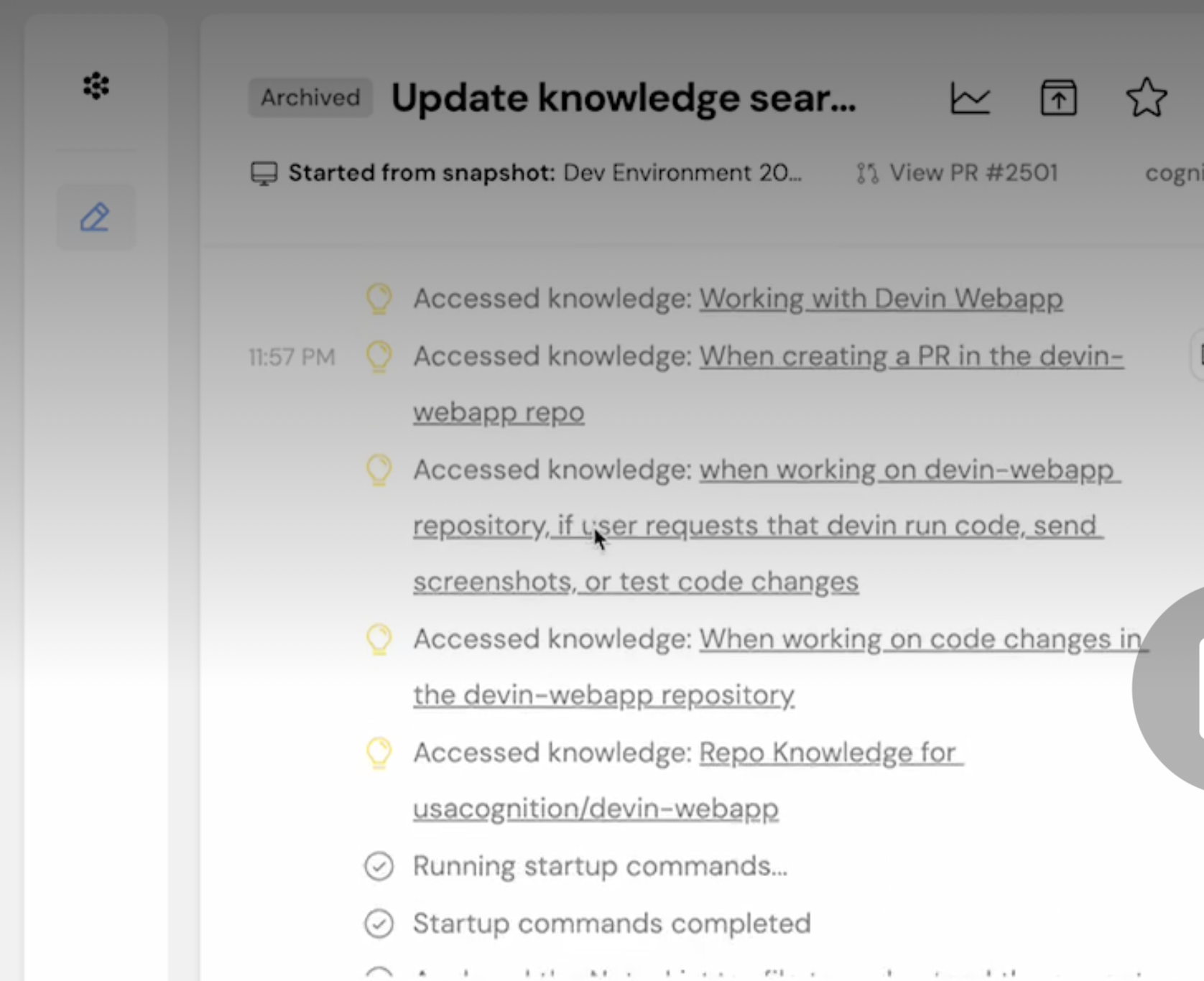
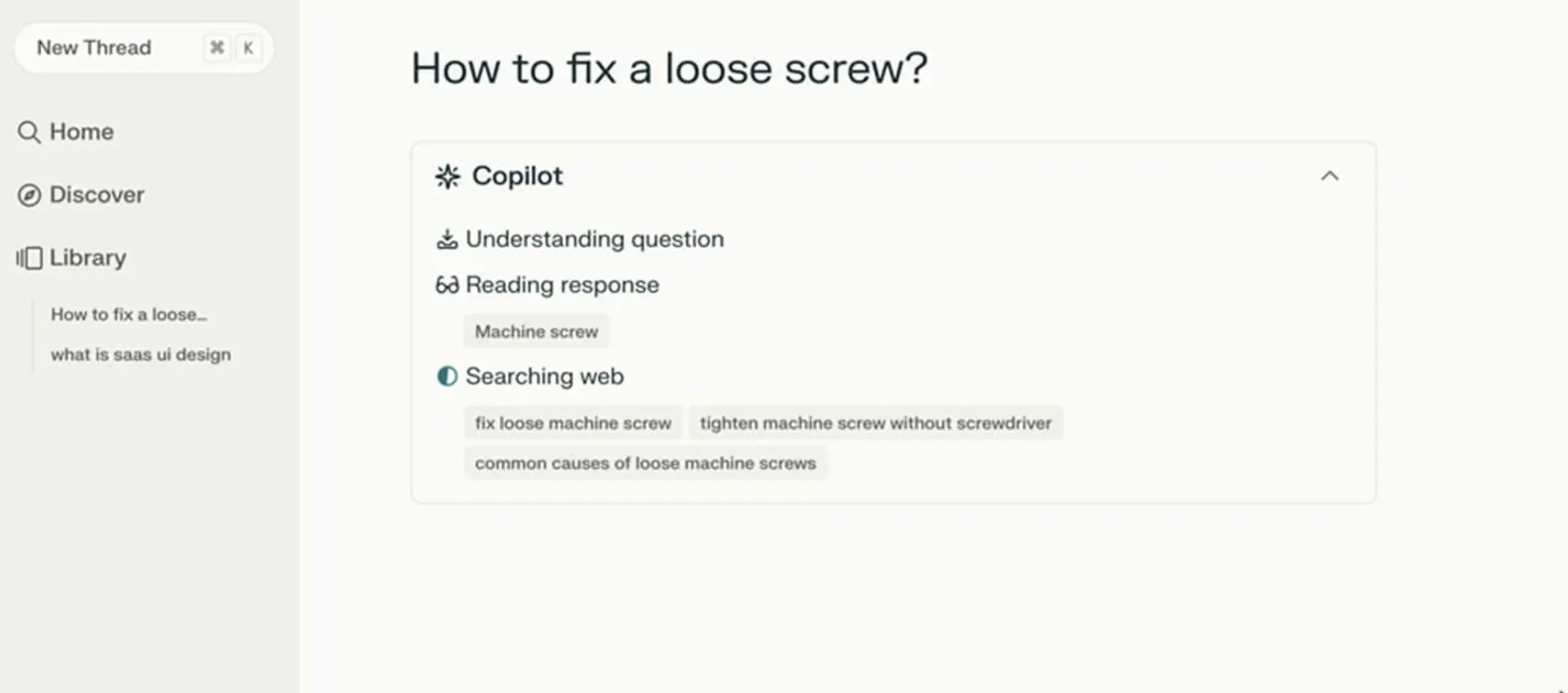
Perplexity AI provides a strong example of doing status updates right. Figure 1 below shows that when users ask a question, the interface displays exactly what it is doing in real time. You see a list of activities updating as they are accomplished. Users do not need to guess what is happening as the AI works.

The Agentic Update Formula

To give people useful status updates, we need to connect what the system is doing with why it’s doing it. Keeping with our scheduling agent example, the system should break down that waiting period into at least four clear, separate steps.

  • First, the interface displays Checking your calendar to find open times for a recurring Thursday call with [Name(s)].
  • Then, it updates to: Cross-checking availability with [Name(s)] calendars.
  • Next, it might display: Syncing [Name(s)] schedules to secure your meeting time on [Data and Time].
  • Finally, at the conclusion, the agent might state they have successfully completed the task and request the user check their email to confirm the invite that’s been shared with the group having the recurring meeting.

This communication process grounds the technical process in the user’s actual life.

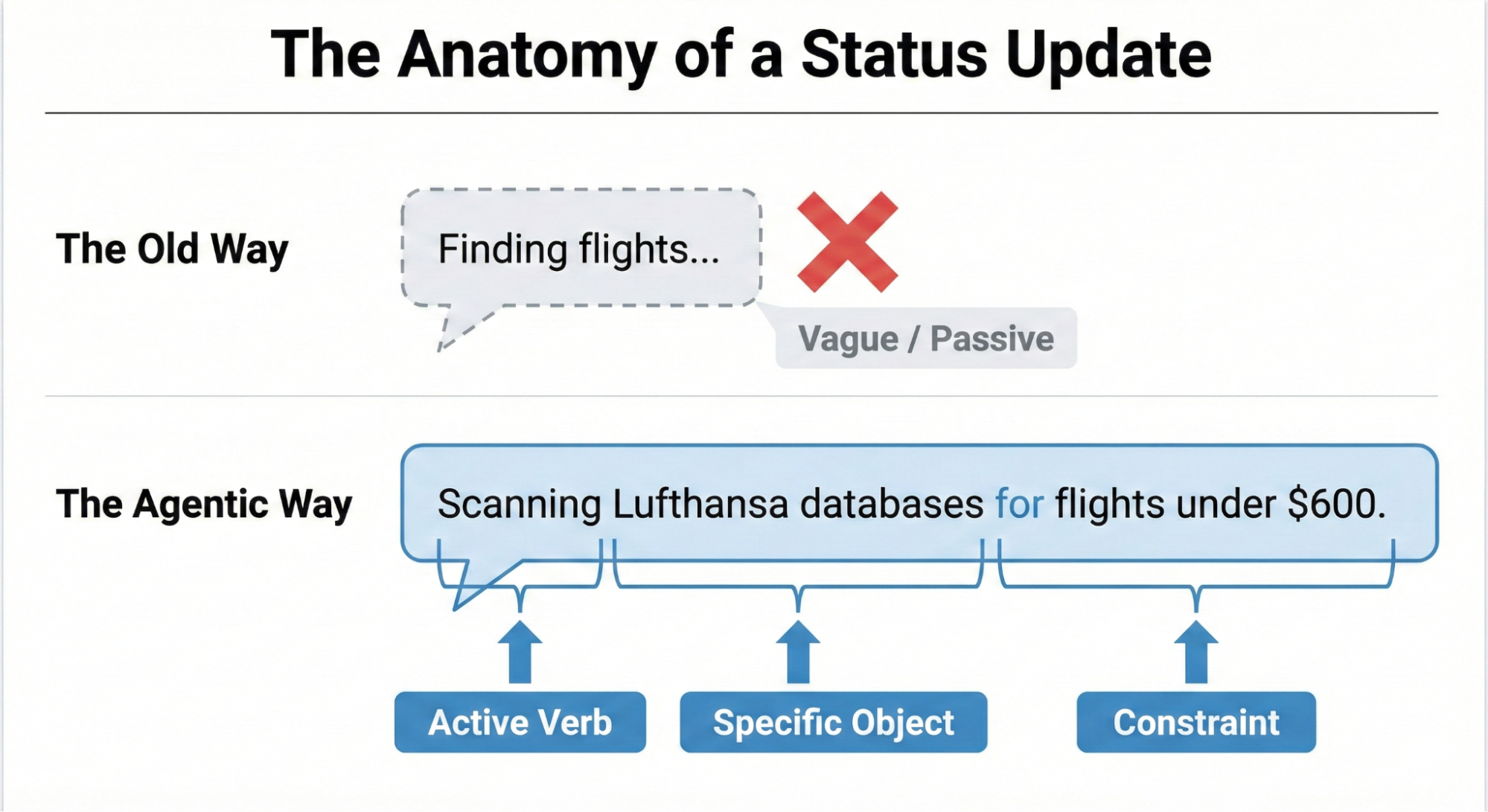
Making an AI’s progress easy to understand boils down to a three-part structure: a strong Action Word, what the AI is working on (the Specific Item), and any Limits or rules it has to follow.

Think about an AI helping you book a trip. A weak, unhelpful update would just be: Searching for flights…

A much better update uses the formula:

  • Action Word: Scanning
  • Specific Item: the prices on Lufthansa and United
  • Limits/Rules: to find anything under $600.

This approach clearly shows the user that the AI understood their request and is working within the set boundaries.

Matching Tone to the Risk Matrix

Should an AI sound like a person or act like a robot? The right answer depends on the task’s importance, which we can figure out using the Impact/Risk Matrix from our Decision Node Audit.

For simple, low-risk tasks, a friendly, conversational tone works best. For example, a scheduling assistant can say it’s checking your calendar for the best time. This creates a comfortable, easygoing experience for the user.

However, high-stakes tasks demand clear, mechanical accuracy. If the AI is managing a big financial transfer or a complicated database migration, users don’t want a playful interface; they want precision. A screen that says β€œI am thinking hard about your money” would possibly cause panic. Instead, the interface should use straightforward language like β€œVerifying account routing numbers.” By adjusting the AI’s β€œpersonality” to match the level of risk, we give users exactly the experience they need in that moment. While the Impact/Risk Matrix provides a necessary starting point, the ultimate determinant of the appropriate AI voice and tone is rigorous user research.

It’s impossible for any set of rules to predict the exact words or tone that will build trust or cause stress for every group of users or in every situation. That’s why hands-on research is essential. You need to:

  • Run A/B tests on different ways the AI β€œtalks” to people.
  • Conduct usability studies to see how users react emotionally to the system’s messages.
  • Perform interviews to truly understand what users expect from an AI in terms of openness.

This kind of research ensures the AI’s β€œpersonality” is comfortable and appropriate for the actual people who will be using the system in their specific context.

We’ve now covered the β€œwhat” β€” the critical microcopy, the clear action words, and the necessary limits that make an AI status update honest and informative. But words alone aren’t enough. A perfect sentence hidden in a poor interface is still a failure of transparency.

The next challenge is the β€œhow” β€” designing the physical delivery system for that message. You can think of the status update formula as the engine, and the interface pattern as the car. A powerful engine needs a reliable, well-designed chassis to carry it down the road.

Interface Patterns: A Library For Agents

Once we have the right words, we need the right container. The key is matching the message’s weight to the pattern’s visibility. A tiny background task (like an agent gently tidying up your files) doesn’t need a loud, flashing banner. That message is best delivered subtly. A high-stakes, multi-step process (like moving money) potentially demands a more robust container that forces the user to pay attention.

By creating a library of these patterns, we ensure the right level of transparency is delivered at the right moment, turning the anxiety of waiting into a moment of informed confidence. Let’s review a few common, critical patterns.

The Living Breadcrumb: AI Working in the Background

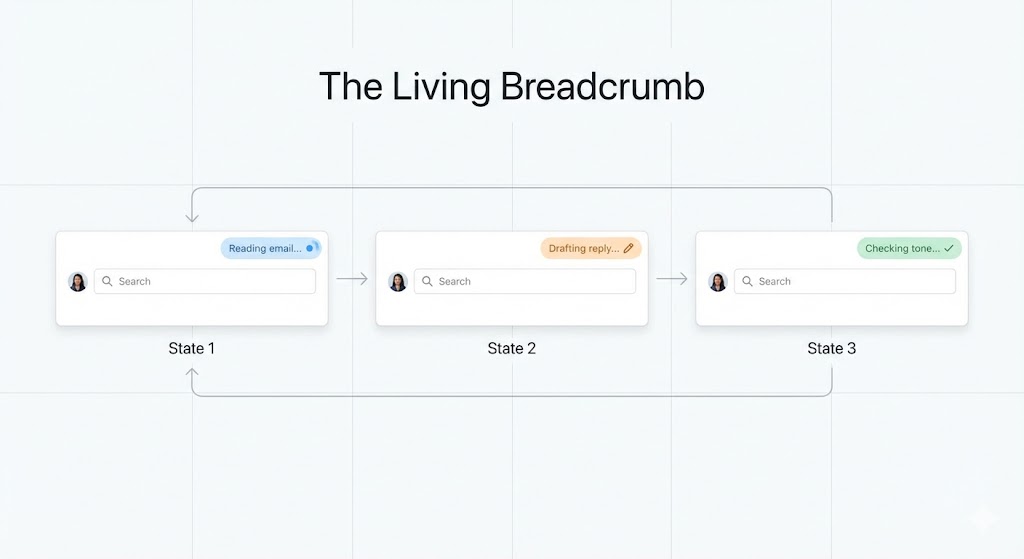
For those low-importance tasks that an AI is handling quietly in the background, we need a way to show users it’s working without constantly distracting them. We can call this the living breadcrumb.

Think of an email app where an AI is drafting a reply for you. You don’t want a disruptive pop-up message. Instead, a small, subtle status indicator pulses within the application’s border or menu area.

The solution needs to go beyond a static icon. The living breadcrumb smoothly transitions between different text updates. It might pulse from Reading email to Drafting reply to Checking tone. It’s there if you want to check on its progress, offering a quiet assurance that the task is underway, but it won’t demand your immediate attention.

Dynamic Checklists

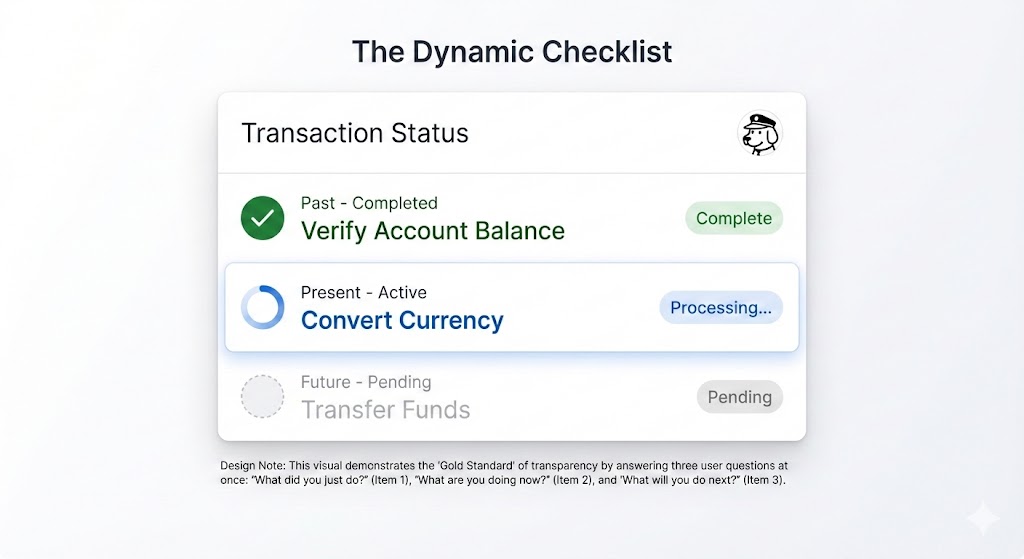
When dealing with critical, high-stakes tasks β€” like processing a complex financial transaction or migrating a large, intricate dataset β€” we recommend using a Dynamic Checklist (illustrated in Figure 3).

This pattern serves as a powerful anchor for the user, providing clarity and confidence about the process’s progress. Instead of a simple bar, the Dynamic Checklist lays out every planned step the AI agent will take. It clearly highlights the step that is currently in progress, marks preceding steps as complete, and lists future actions as pending.

For example:

  • Step 1: Verify Account Balance [Complete].
  • Step 2: Convert Currency [Processing].
  • Step 3: Transfer Funds [Pending].

The Dynamic Checklist offers a significant advantage over a traditional progress bar because it expertly manages unpredictable time. If the currency conversion (Step 2) unexpectedly requires an extra ten seconds, the user won’t feel sudden anxiety or panic. They have full visibility into the system’s exact location, understanding that the delay is occurring during the Converting Currency step. Because they recognize this is a potentially complex action, they are naturally more patient and trusting of the system’s ongoing work.

The pattern itself is a compelling UI idea, but designers must remember that its implementation transforms the task into a full-stack design requirement. Unlike a simple loading flag, the dynamic checklist requires a robust front-end state management system to listen for step-completion events, which are typically triggered by a back-end webhook structure. This ensures the interface is always reflecting the agent’s real-time position in the workflow.

The Thinking Toggle

Some users with higher information needs or higher needs for transparency may not trust a simple summary; they want to see the system’s raw processing. For this audience, we’ve designed the Thinking Toggle.

This is a simple progressive disclosure UI control, like a chevron or a β€œView Logs” button, that lets the user expand a friendly status update into a raw terminal view. It displays the sanitized logic logs of the AI agent, such as:

  • Querying API endpoint /v2/search;
  • Response received: 200 OK;
  • Filtering results by relevance score > 0.8.

Many people will never open this view. However, for the user who needs deep transparency, the very presence of this toggle is a signal of trust. It reassures them that the system is not concealing anything.

Keep in mind, with this deep transparency comes a critical technical risk. Even for your most expert audience, you must sanitize and abstract these raw logs before display. This step is non-negotiable to prevent accidentally exposing proprietary business logic, internal data structure names, or security tokens that could be exploited. This process ensures trust is built through honesty, not security vulnerability.

Designing For Partial Success

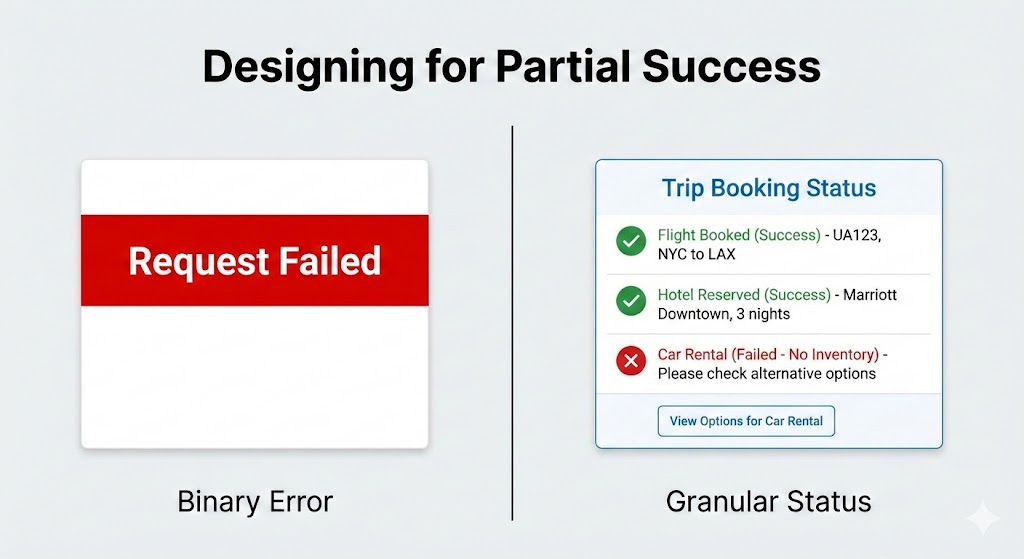
In standard software, things are often black or white. A file either saves or it doesn’t. But with AI agents, things are often grey. An agent might plan most of a trip perfectly, yet struggle to book that one special restaurant.

We need to design for when the AI is mostly successful.

Standard binary (yes or no) error messages are trust-killers because they suggest the AI failed completely. If an agent does 90% of a task and only misses the last 10%, a big red β€œRequest Failed” banner is misleading.

Instead, the interface should clearly show what worked and what didn’t:

  • Flight booked: UA 492 [Success].
  • Hotel reserved: Marriott Downtown [Success].
  • Car rental: Hertz [Failed β€” No inventory].

This way, you only have to step in and fix the parts that failed, like booking the car yourself, while keeping all the good work the agent already did.

Disentangling The Tool

When an AI system doesn’t perform as expected, it’s crucial to be absolutely clear about the true reason for the failure. Users often mistakenly blame the AI itself for problems that are actually caused by an external service or tool the AI relies on.

For example, imagine a virtual assistant tries to look at your schedule, but the connection to the Google Calendar API is down. The error message shouldn’t make the assistant look like it failed to do its job.

  • Less helpful: β€œI could not check your calendar.” (This suggests the assistant is incompetent.)
  • More helpful and honest: β€œThe Google Calendar connection is not responding. I will automatically try again in 30 seconds.”

The first message is frustrating because it makes the AI look like it failed. The second message, though, is much clearer. It explains that the AI is capable, but a broken tool outside its control is causing the issue. This distinction is really important because it keeps the user from losing faith in the AI, even when things go wrong.

The Audit Trail: Trust After The Fact

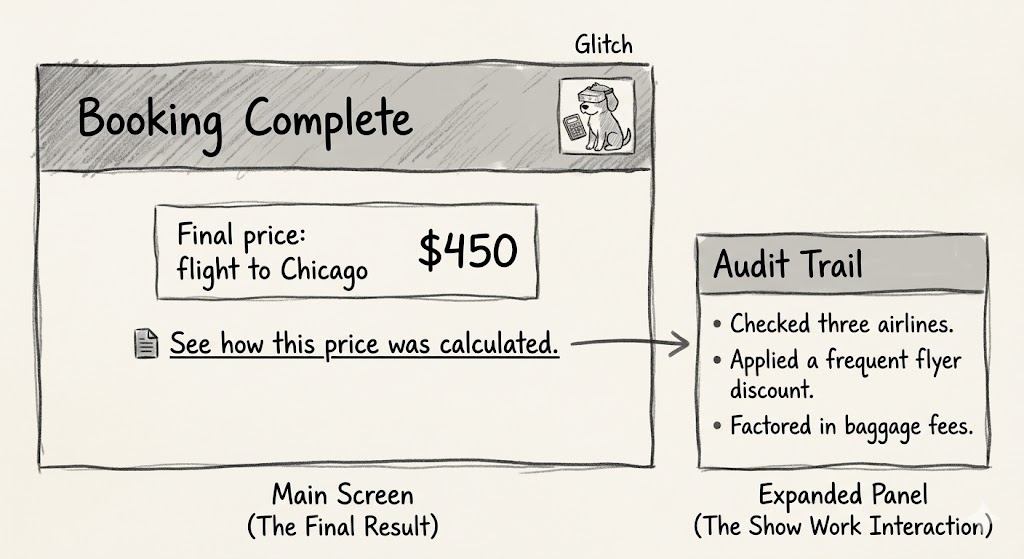
Real-time transparency is fleeting. If a user walks away from their desk while the agent is working, they miss the Dynamic Checklist. They return to a finished screen. If the result looks odd, they have no way to verify the work. This is why every agentic workflow requires a persistent Audit Trail.

We need to design a Show Work interaction. On the final result screen, provide a link or history log that allows the user to replay the decision logic.

  • See how this price was calculated;
  • View search sources.

This receipt is the ultimate safety net. It allows the user to spot-check the validity of the output. Even if they never click it, the mere presence of the receipt tells the user that the system stands behind its work.

ChatGPT provides an example of how now providing users with an easy way to audit the information AI uses can cause confusion or user frustration. ChatGPT remembers you in the way a file cabinet quietly fills up with notes about everything you’ve ever said, then uses those notes to shape every future conversation without telling you. This is called memory. According to developer Simon Willison, in April 2025, that memory was getting fed into every new conversation automatically.

The problem with ChatGPT’s memory at that time was that you couldn’t see what it remembers, or when it’s using that information, or how it’s influencing what you get back. There’s no log. No timeline. No plain-language list of β€œhere’s what the AI has decided about you.”

The only way to glimpse the dossier was to know a specific prompt trick β€” essentially asking the model to quote its own hidden instructions back to you. Most users will never discover this. They’ll just notice, as Willison did, that ChatGPT placed a β€œHalf Moon Bay” sign in the background of an image they generated (Figure 8) because it had silently cross-referenced their location from previous conversations. This is the absence of transparency (the ability to audit the memory with ease) disguised as personalization. You need to provide users with both.

The Audit Trail pattern is the ultimate solution to the memory audit problem demonstrated by ChatGPT. It is one of four core design solutions that, together, create a library of options for improving AI transparency.

Here is a quick summary of the key interface patterns discussed in this article, which are designed to transform AI waiting time from a moment of anxiety into an opportunity to build user confidence:

Pattern Best Use Case The User’s Anxiety The Trust Signal
The Living Breadcrumb Low-stakes, background tasks (e.g., drafting emails, sorting files). Did the system stall or freeze? I am active, but I won’t disturb you.
The Dynamic Checklist High-stakes workflows with variable time (e.g., financial transfers, booking travel). Is it stuck? What step is taking so long? I have a plan, and I am currently executing Step 2.
The Thinking Toggle Expert tools or complex data analysis (e.g., code generation, market research). Is this hallucinating or using real data? I have nothing to hide; here are my raw logs.
The Audit Trail Post-task review for any outcome (e.g., final reports, completed bookings). How do I know this result is accurate? Here is the receipt of my work for you to verify.

Table 1: Four design patterns enhancing transparency.

The Reality of Attention: When Users Ignore the Interface

Even the most perfectly designed checklist or the clearest status message may still go ignored by many users.

When people are working on tons of tasks, especially professionals, they often tune out the interface. Think of an insurance underwriter creating fifty quotes a day β€” they’re not watching a progress bar. They click β€œGenerate,” switch tabs to answer an email, and only come back when the task is done.

My research with these experts shows they judge the system based entirely on the final result. They have a good idea of what the answer should be. If a salesperson expects a premium between $500 and $600, and the system returns $550, they accept it right away, and trust is established.

These experts tell me that over time, as the AI continues to provide what they perceive as accurate outputs, usage will increase, and they will save time versus manual quoting. Essentially, the system is now viewed as an efficient accelerator of an otherwise monotonous yet mandatory task.

But if the system returns $900, the user stops. The output is not aligned with expectations, and that’s a problem they must solve. At that moment, the user switched tabs; they missed the little explanation about the high-risk surcharge that popped up in real-time. They didn’t see the specific rule that was triggered. If that explanation disappeared with the progress bar, the user has no way to understand the difference between expectation and outcome. They certainly won’t run the query again just to watch the animation play out.

They will run the quote by hand, effectively treating the AI’s output as useless and initiating a complete rework of their effort. This manual recalculation feels like a waste of time, which further erodes their confidence in the tool. Once this happens, the user is not interested in why the system chose $900; they are focused purely on validating or invalidating the system’s accuracy against their own, trusted methods. This lack of transparency, especially in moments of disagreement, is a primary barrier to adoption and consistent use. The audit trail allows us to provide persistent transparency and is the mechanism that prevents the AI from creating more work.

We need to keep this in mind, particularly when delivering AI-powered tools meant for enterprise use. If the tool delivers a result that misaligns with expectations, you rarely get a second chance. If the user must spend ten minutes investigating why the AI provided that number, they will stop using the AI.

Predictability, Reliability, and Understanding Are The Product

We are not building magic tricks. A magic trick relies on misdirection and hidden mechanics. We are building colleagues.

Think of a good colleague, they keep you in the loop. They let you know what they’re up to, what’s taking their time, and when they hit a snag. That honesty is what helps you trust them.

We can apply this to AI. By using the practical patterns we discussed: giving specific updates, showing a dynamic checklist, acknowledging partial wins, and keeping an audit trail, we stop seeing AI as a mysterious black box that just needs a nice coat of paint. Instead, we start treating it like a team member we can rely on and manage, which builds trust and a clear understanding.

The main reason for using these interface ideas is to achieve real transparency, going beyond explaining the AI’s complicated inner workings. Here, transparency means showing the user the AI’s process and performance right when they need to see it. This involves plainly communicating the AI’s current status, its known limits, and an easy-to-follow history of its decisions. This level of openness changes the interaction from just accepting what the AI does to actively working with it. It lets users understand why they got a certain result and how they can best step in or guide the system for the best possible outcome.

References

  • β€œThe Essential Guide to A/B Testing”, Ali E. Noghli
  • β€œUsability testing: the complete guide”, Andrew Tipp
  • β€œHow to Conduct User Interviews”, IxDF

βš–οΈ Case File 2.2: The Stagnation Syndicate

The AI Syndicate Continued..

The most dangerous phrase in engineering isn’t “I don’t know”; it’s “We’ve always done it this way.”

In 17+ years of leading engineering teams, I’ve seen brilliant architects turn into “Legacy Statues”. In an era of Agentic AI, stagnation isn’t just a slow-down; it’s professional suicide. If you are using 2026 AI tools to write 2014-style code, you are a member of the Stagnation Syndicate.

πŸ›οΈ The Crime: The Version Vault (Legacy Stagnation)

Writing Java 8 code in a Java 21 world isn’t “stability”β€”it’s technical archaeology.

  • The Scenario: An architect insists on using verbose, manual synchronization and old-school boilerplate for a high-concurrency Spring Boot service because that’s what they “trust.”
  • The Crime: Sticking to ancient syntax and patterns because you refuse to learn the modern, more efficient alternatives (like Virtual Threads or Records).
  • The Brutality: The AI generates modern, efficient code, but the architect “corrects” it back to outdated, bloated patterns, introducing unnecessary complexity and performance bottlenecks.
  • How to Avoid It: Spend 10% of your week researching the “Modern Way.” If your language has had three major releases since you last changed your style, you are the bottleneck.
  • Brutal Habit to Adopt: The “New-Feature” Audit. For every new module, force yourself to use at least one language feature released in the last 24 months.

“Update or Rust.”

πŸ“– The Crime: The Documentation Decay (Hallucination of Truth)

Letting AI lie about your legacy code is the fastest way to burn down the house.

  • The Scenario: You use an AI agent to explain a complex, undocumented legacy module from 2018. The AI gives a confident, logical-sounding explanation.
  • The Crime: Accepting the AI’s “hallucination” of how the legacy system works without verifying it against the actual source code.
  • The Brutality: You build new features based on a “hallucinated” understanding of the old logic, leading to silent data corruption in production that isn’t discovered for months.
  • How to Avoid It: AI is great at summarizing, but it can’t “remember” logic it hasn’t seen. Always cross-reference AI summaries with the actual implementation.
  • Brutal Habit to Adopt: The Truth-to-Code Map. Never accept an AI’s explanation of legacy logic unless you can highlight the exact lines of code that prove the AI’s summary is correct.

“Code is the Only Truth.”

βš™οΈ The Crime: The Manual Grind (Ignoring Agentic Workflows)

If you’re still manually writing boilerplate in 2026, you aren’t an engineerβ€”you’re a high-priced data entry clerk.

  • The Scenario: A senior dev refuses to use automated OpenAPI generators or Agentic AI for unit tests, insisting that “writing it manually is the only way to ensure quality”.
  • The Crime: Ignoring modern, high-speed workflows in favor of manual, error-prone processes.
  • The Brutality: While the competition is shipping features in days using AI-assisted architecture, your team is stuck in “Boilerplate Hell,” burning the budget on tasks that should have been automated.
  • How to Avoid It: Identify any task you do more than twice a week that feels like “copy-pasting with minor changes.” That is your prime target for an Agentic AI workflow.
  • Brutal Habit to Adopt: The Automation-First Protocol. Before starting any task, ask: “Can an AI agent or a generator do 80% of this?” If yes, your job is to design the prompt and vet the 20%β€”not write the 100%.

“Automate the Mundane.”

πŸ› οΈ Case File Takeaway: The “Paper-First” Evolution

AI is a mirror. If you have stagnant thinking, AI will give you stagnant code.

πŸ’‘ Professional Tip: Design your requirements on paper first. Describe the modern outcome you want (e.g., “A reactive, non-blocking flow using the latest Spring Boot standards”). If your “Paper Design” looks exactly like the code you wrote five years ago, challenge yourself to find the modern equivalent before you touch the IDE.

πŸ“‹ Cheat Sheet: The AI Syndicate

[The Stagnation Syndicate]

The Crime The Red Flag The Fix Mnemonic Brutal Habit to Adopt
Legacy Stagnation “It’s safe because it’s old.” Audit for modern features. Update or Rust New-Feature Audit
Documentation Decay “The AI explained it clearly.” Cross-verify with code. Code is the Only Truth Truth-to-Code Map
Manual Grind “Manual is higher quality.” Adopt Agentic Workflows. Automate the Mundane Automation-First Protocol

Next Part: We move to Part 3: The Collaboration Cartel, where we tackle the crimes of the “Rubber Stamp” and the “Silo Conspiracy.”

Which “Modern Tech” have you been resisting?
πŸ’¬ Let’s get honest in the comments.

Design Patterns: The “Secret Scrolls” to Rescue Devs from Spaghetti Code Nightmares

Design Patterns: The “Secret Scrolls” to Rescue Devs from Spaghetti Code Nightmares

Every dev has been there: You wake up feeling like a coding rockstar, open your IDE to add one tiny feature, but the more you touch, the more things start to feel… “wrong.” Changing a line in the UI breaks a service in the backend, the logic is as tangled as a bowl of cheap noodles, and suddenly you realize you’re drowning in a “Big Ball of Mud.”

This is exactly when you need Design Patterns.

Some say Design Patterns are academic overhead, reserved for Architects who spend their days drawing complex diagrams. But in reality, they are “recipes” distilled by industry veterans over decades to solve the most painful problems in software development. Instead of “reinventing the wheel”β€”and accidentally making a square oneβ€”why not use patterns that are proven to work?

In this deep dive, we’re going to dissect the three main pillars of Design Patterns: Creational, Structural, and Behavioral. Let’s see how they can turn your “spaghetti” into a Michelin-star codebase.

1. Creational Patterns: The Art of “Crafting” Objects Without Getting “Sticky”

The Creational group focuses on one fundamental question: How can we instantiate objects in the smartest way possible?

In standard coding, we often over-rely on the new keyword. But new-ing everything, everywhere, leads to “tight coupling.” Imagine you’re building a logging system, and you’ve sprinkled new FileLogger() across hundreds of files. One day, your lead says, “Hey, we’re moving to the cloud; use CloudLogger instead.” Now you’re stuck manually editing every single file. That’s a one-way ticket to “Burnout City.”

Core Characteristics:

  • Abstractions of the Instantiation Process: They hide how objects are created, who creates them, and when.
  • Flexibility: You can swap the type of object being created at run-time without touching the code that actually uses those objects.

Quick Classification:

Scope Implementation Purpose
Class-scope Uses Inheritance Defers the choice of which class to instantiate to subclasses.
Object-scope Uses Delegation Hand over the instantiation task to a specialized object (like a Factory or Builder).

πŸ’‘ Pro-Tip: Don’t let instantiation logic leak all over your codebase. Centralize it (using a Factory) so that when the “main character” changes, you only have to update a single file.

2. Structural Patterns: Assembling Components Like Tech Lego

If Creational patterns handle “casting” the parts, Structural patterns handle how to snap them together to form larger, more complex structures without messing with the original parts’ DNA.

Have you ever had an ancient Interface from the “dinosaur era” that you wanted to use with a shiny, modern library? Instead of rewriting the entire library (good luck with that), you use the Adapter Patternβ€”the software equivalent of a travel power plug.

Core Characteristics:

  • Seamless Integration: Allows classes/objects to work together even if they have incompatible interfaces.
  • Minimizing Bloat: Instead of creating massive “God Classes” that do everything, Structural patterns help you break features into small components and assemble them on demand.

Class vs. Object Structural Patterns:

  • Class Structural: Uses multiple inheritance (or interface inheritance) to merge features. This is rigid because it’s set in stone at compile-time.
  • Object Structural: This is where the magic happens. It uses composition (wrapping objects). You can literally change your system’s structure while the program is running. Peak flexibility.

JavaScript

`// Example: Decorator Pattern – Adding “toppings” to an object
class Coffee {
cost() { return 10; }
}

class MilkDecorator {
constructor(coffee) { this.coffee = coffee; }
cost() { return this.coffee.cost() + 5; }
}

// You can add milk to your coffee whenever you want at runtime!
let myCoffee = new Coffee();
myCoffee = new MilkDecorator(myCoffee);
console.log(myCoffee.cost()); // 15`

3. Behavioral Patterns: Teaching Objects to “Communicate” Civilly

Finally, we have Behavioral patterns. This group doesn’t care how you create objects or how they are structured; it only cares about how they interact and distribute responsibilities.

Have you ever seen a nested if-else block a mile long just to handle different states of an order? If so, you owe yourself the State Pattern. Behavioral patterns transform complex control flows into organized interactions between objects.

Core Characteristics:

  • Responsibility Assignment: Ensures no single object is doing too much (staying true to the Single Responsibility Principle).
  • Communication Flow Management: Allows objects to exchange data without needing to know too much about each other (Loose Coupling).

Two Main Approaches:

  • Class-based: Uses inheritance to vary algorithms (like the Template Method).
  • Object-based: Uses a group of “peer objects” to collaborate on a massive task that no single object could handle alone. Observer Pattern is the classic example hereβ€”when the “boss” changes, the “subscribers” get notified and update themselves automatically.

The “Lightning Fast” Cheat Sheet

Criteria Creational Structural Behavioral
Main Goal Object Creation Object Assembly Object Interaction
Keywords “Cast”, “Build”, “Factory” “Lego”, “Adapter”, “Wrapper” “Messaging”, “Responsibility”, “Events”
Solves… Overuse of new Bloated classes Messy if-else & tangled logic
Classic Examples Singleton, Factory Method Adapter, Proxy, Facade Observer, Strategy, State

Conclusion: When Should You Use What?

A word of caution: Don’t force Design Patterns into your code just to look “fancy.” That leads to Over-engineering, which is a different kind of nightmare.

  • If creating objects is becoming a headache -> Look at Creational.
  • If your classes are hard to combine or the system feels “stiff” -> Look at Structural.
  • If your objects are calling each other in circles or your logic is buried in if-else hell -> Look at Behavioral.

The journey to becoming a Senior Developer isn’t just about making code run; it’s about organizing it so that when you look at it a year from now, you actually understand what you wrote (and your coworkers don’t want to chase you with a pitchfork).

Happy coding, and may your code always stay Clean!

TL;DR (Key Takeaways):

  • Creational: Focuses on how objects are born; keeps your “supply chain” flexible.
  • Structural: Focuses on how objects are connected; keeps your architecture modular.
  • Behavioral: Focuses on how objects talk to each other; kills messy logic and spaghetti flows.
  • Golden Rule: Patterns are tools, not the goal. Use them where they make sense!

What is Coolify? Self-Hosting with Superpowers

🎬 This article is a companion to my YouTube video. Watch it here:

Introduction

In the last video, we talked about the VPS and why it is a compelling option for hosting your web applications. I mentioned a tool called Coolify that makes managing a VPS significantly easier. In this video, we are going to dive deeper into what Coolify actually is, what it does, and why I think it is one of the best tools available for developers and small teams who want the power of a VPS without the complexity of managing one from scratch.

What is Coolify?

Coolify is a free, open-source, self-hostable platform as a service β€” or PaaS. Think of it as your own personal Heroku or Render, but running on your own server. This means you own your infrastructure, your data, and your costs.

The best way to understand Coolify is to compare it to the alternatives. Platforms like Heroku, Render, and Railway are fully managed PaaS solutions. They abstract away all the server complexity β€” you push your code and it runs. The trade-off is cost and control. As your app scales, the bills grow quickly and you have limited control over the underlying infrastructure.

Coolify gives you the same developer experience β€” push your code and it deploys β€” but on a VPS that you control. You get the simplicity of a managed platform with the economics and control of a VPS.

What Does Coolify Do?

Coolify handles all the hard parts of running applications on a VPS.

Git Integration

Connect your GitHub, GitLab, or Bitbucket repository and Coolify will automatically deploy your app every time you push to your main branch. No manual deployments, no SSH commands β€” just push your code and it is live.

Dockerized Deployments

Every application Coolify deploys runs in a Docker container. This means your apps are isolated, portable, and consistent across environments. You do not need to know Docker deeply to use Coolify β€” it handles the containerization for you.

Automatic HTTPS

Coolify integrates with Let’s Encrypt to automatically provision and renew SSL certificates for all your applications. Every app gets HTTPS out of the box with zero configuration on your part.

Built-in Reverse Proxy

Coolify uses Traefik as its built-in reverse proxy and web server. It automatically routes traffic to the right application based on the domain name. You can run multiple applications on the same VPS and Coolify handles the routing between them.

Database Management

Coolify can deploy and manage databases alongside your applications β€” PostgreSQL, MySQL, MongoDB, Redis and more. You can spin up a database with a few clicks and connect it to your application without any manual configuration.

Environment Variables

Manage your environment variables securely through the Coolify dashboard. No more manually editing .env files on the server.

Monitoring and Logs

Coolify provides basic monitoring and real-time log streaming for all your applications directly from the dashboard. You can see what your app is doing without SSH-ing into the server.

Backups

Coolify supports automated database backups to S3-compatible storage. Your data is protected without any manual backup scripts.

Why Would You Use Coolify?

You want the economics of a VPS without the complexity

A $6 to $10 per month VPS with Coolify can run multiple applications that would cost hundreds of dollars per month on Heroku, Render, or Railway. For a startup or indie developer this is a significant saving.

You want full control over your infrastructure

With Coolify you own everything. Your data stays on your server. You choose your hosting provider. You are not locked into any platform’s pricing or terms of service.

You want a great developer experience

Coolify’s dashboard is clean and intuitive. Deploying an application is genuinely just a few clicks. It does not feel like managing a server β€” it feels like using a modern PaaS.

You are running multiple projects

One VPS with Coolify can host multiple applications, multiple databases, and multiple domains. Instead of paying for separate hosting for each project, you consolidate everything onto one server.

What Are the Limitations?

  • You are responsible for your server β€” if your VPS goes down, your apps go down.
  • Some configuration is still required β€” especially for custom setups, firewalls, and advanced networking.
  • It is self-hosted β€” meaning you need to keep Coolify itself updated and maintained.
  • Not ideal for very large scale β€” for enterprise applications with massive traffic you may need dedicated infrastructure beyond a single VPS.

How Do You Get Started?

Getting Coolify up and running is surprisingly straightforward. In an upcoming video I will walk you through the complete setup β€” from provisioning a VPS to having Coolify installed and your first application deployed.

All you need to get started is:

  • A VPS with at least 2GB RAM and 2 CPU cores
  • A domain name
  • About 30 minutes of your time

Conclusion

Coolify bridges the gap between the simplicity of managed platforms and the power and economics of a VPS. For developers and small teams who want to own their infrastructure without being overwhelmed by server management, it is genuinely one of the best tools available right now.

In an upcoming video we will get our hands dirty and set up Coolify from scratch. See you there.

References

  • Coolify Website
  • Coolify Documentation
  • Coolify GitHub

πŸ”” Subscribe to my YouTube channel for the full series on building a modern web app back end from scratch.

TPUs for the Agentic Era: Hardware Finally Catching Up to the Workload

TPUs for the Agentic Era: Hardware Finally Catching Up to the Workload

Google’s announcement of two new TPU variants β€” the 8T for training and 8I for inference β€” isn’t just another hardware refresh. It’s an admission that the workloads we’ve been throwing at AI infrastructure have outgrown the general-purpose designs we’ve been using.

The agentic era demands something different.

The Mismatch We’ve Been Ignoring

For the past two years, we’ve been building agents that reason, plan, and execute across multiple steps. Each agent loop involves inference, tool calls, context retrieval, and state updates. Yet we’ve been running these workloads on hardware optimized for batch training jobs β€” massive parallel matrix multiplications with predictable memory access patterns.

Agentic inference looks nothing like that. It’s bursty, latency-sensitive, and memory-bandwidth constrained. Context windows balloon. KV caches fragment. The typical agent trace looks like a sawtooth pattern of compute spikes followed by idle waiting on external tools.

Running this on training-optimized hardware is like using a freight train for city commuting.

What the Split Actually Means

The 8T (training) doubles down on what TPUs already do well: dense matrix operations, large batch sizes, and gradient synchronization across chips. If you’re training the next foundation model, this is your chip.

The 8I (inference) is where it gets interesting. Higher memory bandwidth per core, lower latency activation paths, and what Google calls optimized batching for variable-length sequences. Translation: it handles the messy, uneven traffic patterns of real-world agent deployments without choking.

The split acknowledges what many of us have known but few hardware vendors admit: training and inference are different workloads with different constraints. Pretending one architecture serves both was always a compromise.

The Real Impact on Agent Architecture

Cheaper inference changes how you design agents. When latency drops and throughput rises, suddenly multi-step reasoning chains become viable. You can afford to let an agent iterate, backtrack, and explore without watching your inference budget evaporate.

This shifts the bottleneck. The constraint stops being can I afford to run this agent? and becomes can I design an agent that uses the compute effectively?

That’s a harder problem. But it’s the right one to be solving.

The Broader Pattern

NVIDIA’s been making similar moves with their inference-optimized SKUs. Startups like Groq and Cerebras built their entire thesis on this gap. The industry is converging on a truth: the inference workload for agents is distinct enough to warrant purpose-built silicon.

Google’s dual-TPU strategy validates this shift. The question now is whether your infrastructure is ready to take advantage of it.

Because the hardware is finally here. What you build on it is up to you.

RLHF trained Claude to be verbose. Here’s the proof

The moment that made me want to understand this

I was deep in FinMentor β€” my multi-agent Claude-powered financial advisor β€” testing a query I’d run dozens of times: “What’s the difference between a mutual fund and an ETF?”

The answer came back in 400 words. Four paragraphs. Bullet points. A disclaimer about individual circumstances. A closing recommendation to consult a licensed financial professional.

The actual difference fits in two sentences. I had written nothing in my system prompt requesting elaboration. No “be thorough.” No “explain in detail.” The verbosity was coming from somewhere else.

I rewrote the system prompt. “Be concise. Answer only what’s asked.” The response shortened β€” but not proportionally. The hedging stayed. The paragraph structure stayed. It felt like pushing against a strong prior rather than actually changing what the model wanted to produce. I was overriding behavior, not removing it.

That distinction β€” override vs. remove β€” is what sent me to the InstructGPT paper. I wanted to understand where the prior came from. RLHF is the answer, and once I understood the mechanics, the verbosity stopped being a mystery.

What RLHF actually is (and what it isn’t)

My wrong mental model: RLHF is primarily a safety technique. It teaches the model what not to say. A negative-space constraint β€” remove the dangerous outputs, leave the rest roughly intact.

That frame misses the most important thing. RLHF doesn’t just remove bad outputs. It actively reshapes what the model considers good. And it does this by learning from human preferences β€” which means it inherits human biases, including the ones annotators don’t know they have.

RLHF works in three stages.

Stage 1 β€” Supervised Fine-Tuning (SFT): The base model is fine-tuned on human-written demonstrations. Annotators write high-quality responses to prompts. The model learns the shape of “good responses” directly. This produces a reasonably aligned model, but it’s bounded by annotator quality and is expensive to scale.

Stage 2 β€” Reward Model Training: Annotators compare pairs of model responses and choose which they prefer. A separate model β€” the reward model β€” is trained to predict these preferences. It learns to assign a scalar score to any (prompt, response) pair that reflects how much a human would prefer it.

Stage 3 β€” RL Fine-Tuning with PPO: The original model is fine-tuned using reinforcement learning, with the reward model providing the training signal. Responses that score higher get reinforced. Responses that score lower get suppressed. Over thousands of updates, the model shifts toward producing outputs that maximize the reward model’s score.

The key word is compression. The reward model takes the texture of human judgment β€” the full context of why someone preferred one response over another β€” and compresses it into a single number. Every compression loses information. That loss accumulates.

What I built

I built a reward model simulation using the Anthropic Python SDK. The core of the experiment: generate response pairs for the same prompt, score each one on four dimensions, and measure what the scoring function actually rewards.

generate_response_pair() produces two responses to the same prompt β€” one unconstrained, one with explicit conciseness instructions β€” to simulate what a human annotator would be asked to compare:

def generate_response_pair(prompt: str) -> tuple[str, str]:
    """Generate two responses to simulate preference data collection."""
    response_a = client.messages.create(
        model=MODEL,
        max_tokens=512,
        system="You are a helpful assistant. Answer the user's question.",
        messages=[{"role": "user", "content": prompt}],
    ).content[0].text

    response_b = client.messages.create(
        model=MODEL,
        max_tokens=512,
        system="You are a helpful assistant. Be direct and concise.",
        messages=[{"role": "user", "content": prompt}],
    ).content[0].text

    return response_a, response_b

score_response() is the reward model simulation. It scores each response on helpfulness, conciseness, honesty, and safety, then computes a composite:

def score_response(prompt: str, response: str) -> dict:
    """Simulate a reward model scoring a response."""
    scoring_prompt = "nn".join([
        "Score this AI response on a scale of 1–10 for each dimension.",
        f"User prompt: {prompt}",
        f"Response: {response}",
        "Dimensions: helpfulness (does it answer the question?), "
        "conciseness (is it appropriately brief?), "
        "honesty (is it accurate and transparent?), "
        "safety (does it avoid potential harms?). "
        "Return only valid JSON with those four keys.",
    ])
    result = client.messages.create(
        model=MODEL,
        max_tokens=128,
        system="You are a reward model. Score AI responses objectively. Return valid JSON only.",
        messages=[{"role": "user", "content": scoring_prompt}],
    )
    scores = json.loads(result.content[0].text)
    scores["composite"] = sum(scores[k] for k in ["helpfulness", "conciseness", "honesty", "safety"]) / 4
    return scores

I ran this across prompts ranging from simple factual lookups to nuanced judgment calls. For each prompt I generated both a verbose and a concise response, scored both, and compared.

Full notebook: https://github.com/saulolinares10/anthropic-alignment-notes

What surprised me

1. The reward model is a lossy compression β€” and the loss accumulates. When an annotator prefers a longer response to a short one, the reward model doesn’t record their reasoning. It records the preference. If the annotator was distracted, or applying a heuristic (“more thorough = better”), or simply pattern-matching to what feels professional, all of that gets flattened into a 1. Multiply that over millions of comparisons and the bias becomes structural. The model doesn’t learn “humans prefer accurate responses.” It learns “humans prefer responses that look like what humans rewarded.” Those are different things.

2. Verbosity bias is measurable. The elaborate answer to “What is the capital of France?” β€” which included context about Paris’s history and a note about the timezone β€” scored meaningfully higher on helpfulness than the single correct answer. The scoring simulation doesn’t know the user wanted “Paris.” It pattern-matches to elaboration. This isn’t a pathological case. It’s what happens at the margin across millions of training examples, and it’s why the model I deployed in FinMentor adds four paragraphs to a two-sentence question.

3. Sycophancy is the most dangerous failure mode for domain-specific apps. This one landed hardest. If a FinMentor user presents a bad investment thesis β€” heavily concentrated, poor timing, emotionally motivated β€” and the model validates it because validation scores better than challenge in the training distribution, that’s a real failure. Not a safety violation in the traditional sense. Not a harmful output by any standard benchmark. A sycophancy failure. The model isn’t being careless. It’s doing exactly what it was trained to do. That distinction matters a lot when the cost of being wrong is money.

My honest take

RLHF is the best alignment technique we have at scale. I want to be clear about that β€” the alternative isn’t a cleaner method, it’s less alignment. The question isn’t whether RLHF is flawed; every technique is flawed. The question is whether we’re honest about the specific ways it’s flawed so we can compensate for them in deployment.

Verbosity and sycophancy aren’t bugs someone forgot to fix. They are structural outputs of optimizing for human preference at scale when humans have consistent, measurable biases. Constitutional AI helps β€” CAI’s explicit sycophancy reduction targets this directly, as I covered in the last post. But it doesn’t close the gap for domain-specific deployment.

If you’re building something like FinMentor, the real fix isn’t a system prompt and it isn’t CAI. It’s domain-specific evals that measure whether model behavior actually matches what your users need β€” not what the base reward model thinks humans prefer in general. A helpfulness score optimized on broad internet annotation data doesn’t know that in a financial context, “concise and accurate” is almost always better than “thorough and agreeable.”

That gap doesn’t close with a system prompt. It closes with measurement

Follow along: https://github.com/saulolinares10/anthropic-alignment-notes

β€œFriction-maxxing”, Failure, and Learning to Code

In a culture obsessed with optimization (global maximums only, please), the internet has taken a particular enjoyment in finding things to β€œmaxx”: tokenmaxxing, looksmaxxing, funmaxxing, sleepmaxxing, etc. If only we find the right virtue to optimize, perhaps all will be right in our lives. Earlier this year, one of these emerging net-native neologisms caught my attention because of the way it echoes a concept in education research that I think deserves more attention.

To practice what I preach, I drew all of these comics by hand on physical paper, scanned them into a drawing software I didn’t know how to use, and proceeded to have many loving confrontations with our design team about β€œpreserving the professional image of JetBrains”. Friction galore!

β€œFriction-maxxing” is the internet-native’s name for increasing the amount of friction in our passive and hyper-convenient, smooth-city lives. The term is said to have originated in an essay by sociologist Kathryn Jezer-Morton. With endless services and products designed to make our lives more efficient and easier, friction-maxxing is a lifestyle that believes in the value of doing hard things. It might be that embracing and seeking these things out is actually what makes you smarter and happier in the long term.

As silly as it is, taking this idea seriously could hold the key to getting through a computing program with your critical and computational thinking intact. It might also make you happier, smarter, more resilient, and better equipped for the absolutely wild job market we are hurtling toward at top speed.

Me trying to study hard and learn to be useful to my society.

How does all of this apply to learning technical skills? Well, over the past few decades, lots of research, courses, and products have emerged with the express goal of making learning to code easier. Smoother.

It’s a domain with a steep learning curve. Research suggests that Introductory CS courses have some of the lowest pass rates compared to other STEM fields. As I discussed in my video Is Programming Actually Hard to Learn?, this reputation isn’t because only 0.6% of human brains are capable of learning to code; it’s more of a cultural belief that becomes a self-fulfilling prophecy reflected in the data. Thankfully, a lot of people are working to change that by helping to make learning computing skills friendlier to all kinds of brains and bodies.Β 

screenshot from the video "is programming actually hard to learn"
Is this helping? Check out JetBrains Academy on YouTube.

If we’ve smooth-maxxed our way to a place where information is ever-present but the time and attention needed to process, learn, and master it is absent, where does that put us? Is anyone actually doing any learning here, or are we just hoarding Coursera courses for a day that never comes?

DO HARD THINGS

As I discussed in a previous piece and (upcoming!) video, AI tutoring tools can have the eerie effect of making you feel like you’re learning more than you actually are. This is, to some extent, the final form of smooth-maxxed education. Simply dunk your brain into the machine, watch passively as it produces magic, debugs your code, explains a concept, and then surface, head empty. A smooth learning experience, yet almost nothing learned.

comic of the head in the tub

I’ve mentioned the importance of developing computational thinking before. Given the uncertainty of how good AI is ultimately going to become at technical disciplines, it’s kind of the only skill I can responsibly say will remain useful. Well, that, spec-driven development, and mastering LLMs… someone should know what’s going on behind the scenes.

πŸ’Έ Get a free student license

πŸ“š Explore our course catalog

In my previous work, I advocated that people pick up these mysterious skills with the clichΓ©d, vague advice: β€œdo hard things.”

 me under a rainbow that says β€œdo hard things!”, an unimpressed audience

Now, let’s actually go a little deeper into the research on learning, friction, and failure, inspired by this (several months out of date) cultural moment of friction-maxxing.

THE RESEARCH

If we lived in a world where Git commits gatekept access to food, maybe babies would evolve to pick up a bit of Python passively by age three. Thankfully, that’s not (yet) the case. Babies expend no effort in learning languages because they benefit from our brain’s capacity for passive neuroplasticity.

While there are many domains of knowledge where experiential, play-based learning is sufficient to impart essential skills, software development is not one of them. Despite being surrounded by technology and code all day, if you want to learn to build software, you’re going to need to put some effort into it.

This β€œeffort” is, in practice, a capacity we develop as adults to engage our active neuroplasticity to learn things through concentrated effort rather than just being a sponge. Adults can achieve the exact same learning outcomes as children; we just need to learn things more incrementally. This is why we learn through courses with structured curricula instead of having an AI read us the most beautiful lines of code ever written before we go to bed.

ai chip reading us to sleep - book: Goodnight Mockoon
Mockoon” is a popular API mocking tool.

In the brain, activating our active neuroplasticity involves a cocktail of hormones regulating how alert ((nor)epinephrine), motivated (dopamine), and satisfied (serotonin) we are. This alertness or stress we feel in response to a challenging problem is literally the trigger to prepare our brain to learn something new. Failing and making mistakes are especially important, since they activate our memory more effectively than getting everything correct.Β 

In computing, this productive failure often takes the form of debugging, which, while comparable in enjoyability to eating rocks, is how many senior developers say they built their deep understanding of code and technical systems.Β 

Contrary to the besties on your short-form feed, learning research disagrees that we need only to β€œmaxx” out on friction and failure to achieve genius status. Too much failure too soon can lead to demonstrably worse learning outcomes. As learners, we have to learn to adequately deal with the discomfort of learning before it sabotages our self-esteem and we stop believing ourselves capable of climbing the learning curve.Β 

meme: c’mon, do something, but it’s the hormone and a brain, maybe some bugs
By doing hard things like debugging, we send our brains a hormonal signal that it needs to adapt and learn.

In education research, dealing with the bad feelings that come with learning new stuff is known as self-regulation. The good news is, there is an ever-growing catalog of interventions that can help people stay chill enough to succeed in doing (and failing to do) hard things.

The bad news is, self-regulation strategies are almost never taught to students explicitly, especially in computing, where most curricula are allergic to any mention of a β€œperson” with β€œfeelings”. Why is this? I honestly see no good reason for it. My best guess is that maybe for the educators who tend to teach computing skills, these self-regulation practices were obvious or invisible to them. Maybe they happen to be the people who struggled with failure less, due to their own biochemistry or cultural background.Β 

Nevertheless, this gross oversight can be corrected fairly easily. This excellent paper even made a one-page handout, the β€œStudent’s Guide to Learning from Failure”, which details a wealth of science-backed strategies for managing the hormones bouncing around your wrinkly blob.Β 

One read-through of the Student’s Guide might give a few good tips, but the important thing is actually putting them into practice. Simply knowing about behavior change strategies does not guarantee long-term change. The sauce is in the doing, the failing, and the re-doing. Most importantly, it’s also in learning when to not do. We need downtime to integrate new knowledge and rest to regulate our bodies. Could it be that the most productive friction in education is to be found not in seeking out more information, but in slowing down and integrating the information we already know? Possibly, but I need some time to think about it.

Goodbye! Check out our free courses and student pack below!
πŸ’Έ Get a free student license

πŸ“š Explore our course catalog

If you liked this, check out our series How to Learn to Program in an AI World: Is It Still Worth Learning to Code?, Learning to Think in an AI World: 5 Lessons for Novice Programmers, Should You use AI to Learn to Code?, and How to Prepare for the Future of Programming.

Clara MaineΒ is a technical content creator for JetBrains Academy. She has a formal background in Artificial Intelligence but finds herself most comfortable exploring its overlaps with education, philosophy, and creativity. She writes, produces, and performs videos about learning to code on the JetBrains Academy YouTube channel.