Build your own AI-powered Voice To-Do Assistant using a Waveshare 1.75″ display + Cursor + DuckyClaw — from setup to full feature implementation

As a developer, I recently built a custom voice-enabled to-do assistant using the Waveshare 1.75″ display, Cursor IDE, and DuckyClaw framework. This guide breaks down my step-by-step implementation, with practical tips and pitfalls to avoid—no fluff, just actionable steps for fellow makers. No advanced embedded experience is needed, but basic familiarity with Git and hardware flashing will help.

🧭 Step-by-step Implementation Guide
Step 1 – Clone the DuckyClaw repo

  1. Navigate to the DuckyClaw official documentation and locate the Waveshare dev board quick start section.
  2. Find the “Clone the repo” step, copy the official repository URL (https://github.com/tuya/DuckyClaw.git).
  3. Open Cursor IDE, use the built-in Git integration to clone the repo. Cursor automatically installs required dependencies, eliminating manual package management—this saves time and avoids version conflicts.

Step 2 – Install TuyaOpen Dev Skills (workflow)

  1. Visit the TuyaOpen website and navigate to the developer tools section to find the TuyaOpen Dev Skills workflow installation prompt.
  2. Copy the exact prompt provided (it’s tailored for DuckyClaw integration) and paste it into the Cursor chat panel.
  3. The workflow installs automatically, establishing a direct connection between your project and TuyaOpen’s SDK—critical for accessing cloud services and hardware drivers later.

Step 3 – Create product & get credentials (PID / UUID / AuthKey)

  1. Follow the DuckyClaw quick start guide to create a new product on the Tuya Developer Platform (select “AI Agent” as the product type for seamless DuckyClaw integration).
  2. From the product dashboard, retrieve your Product ID (PID)—this identifies your custom device in the Tuya ecosystem.
  3. Navigate to the “Hardware Development” tab to download your UUID and AuthKey. These credentials are non-negotiable—store them securely, as they authenticate your board with Tuya Cloud and DuckyClaw.

Step 4 – Build & flash with Cursor

  1. In Cursor, use this precise prompt to ensure proper compilation and flashing:
    Build and flash DuckyClaw firmware for Waveshare 1.75" display, using the PID, UUID, and AuthKey I retrieved from Tuya Developer Platform.
  2. Cursor detects your connected Waveshare board automatically, compiles the firmware with your credentials, and flashes it—no manual CLI commands or makefiles required. I tested this with three different Waveshare boards, and it worked consistently.

Step 5 – Activate in Smart Life app

  1. Download the Smart Life app (iOS/Android) and create an account if you don’t already have one.
  2. Follow the app’s “Add Device” flow to complete Wi-Fi provisioning—ensure your phone and Waveshare board are on the same Wi-Fi network for a smooth pairing process.
  3. Complete the pairing and activation steps. Once done, your board is connected to Tuya Cloud and ready to interact with DuckyClaw.

Step 6 – Add To-Do List feature
To implement the to-do functionality, I used Cursor to generate and integrate the code with DuckyClaw’s skill system. Use this specific prompt to avoid missing key features:
Implement a To-Do system for DuckyClaw + Waveshare 1.75" display: Swipe left to access To-Do List, swipe right for Scheduled tasks, UI styled after Apple Reminders, and smooth scrolling using the lv_example_scroll_6 component. Integrate with DuckyClaw’s CRON skill for task scheduling and heartbeat skill for reminders. Cursor generates clean, framework-compatible code—review it briefly to ensure display dimensions match the 1.75″ screen, then adjust any UI elements if needed.

Step 7 – Build & flash again
Re-run the build and flash process in Cursor (use the same prompt as Step 4) to push the to-do feature to your board. The flash process takes 30-60 seconds—do not disconnect the board during this time. I recommend testing the UI immediately after flashing to catch any display alignment issues early.

Step 8 – Final Testing & Debugging
After flashing, test all core features to ensure stability. Here’s what to verify:
● 🎙️ Voice input: Test DuckyClaw’s hardware ASR (ensure your board has a built-in mic or external mic connected) – it should recognize voice commands to add to-dos.
● ✅ To-Do management: Add, edit, and mark tasks as complete—verify UI responsiveness and swipe navigation.
● ⏰ Scheduled tasks: Set a test reminder to confirm the CRON skill triggers notifications (check the display and any connected speaker).
● 📱 Display functionality: Ensure smooth scrolling and no UI glitches on the 1.75″ screen.
If you encounter issues, check the Cursor output log for compilation errors or the Tuya Developer Platform for device connection status.

💡 Developer Notes & Key Takeaways
This project is a practical example of combining AI, IoT, and low-code development to build a useful hardware product. Here’s what I learned during implementation:

  • DuckyClaw’s TuyaOpen foundation simplifies hardware integration—its built-in drivers for displays and ASR save hours of custom coding.
  • Cursor’s low-code approach accelerates feature development, but always review generated code to ensure compatibility with DuckyClaw’s skill system.
  • Credential management is critical—never hardcode PID/UUID/AuthKey in public repos; use DuckyClaw’s config files for secure storage.
  • Extensibility is a strong point: you can easily add more features (e.g., IoT device control, voice TTS) using DuckyClaw’s modular skills.

🔗 Resources & Contribution
Official Docs: Step-by-step hardware setup, SDK guides, and skill development tutorials — https://tuyaopen.ai/duckyclaw

GitHub Repo: GitHub – tuya/DuckyClaw: Edge-Hardware (SoC/MCU) oriented Claw🦞 (check the TODOs.md for upcoming features)

Discord Community: [https://discord.com/invite/yPPShSTttG]

If you build this project, share your tweaks and improvements—I’d love to see how fellow developers extend the to-do functionality or integrate additional DuckyClaw skills. Feel free to drop a comment with questions or your build details! 🦆✨

Building a Multi-Agent Fleet with No Central Server

Most multi-agent architectures have the same shape: a coordinator talks to workers through a central hub. The hub is usually a message queue, a shared database, or an orchestration service like Ray or Temporal.

That hub is also the first thing that breaks. It’s a single point of failure, a scaling bottleneck, and an operational cost you pay even when the agents aren’t working.

Here’s how to build a fleet where agents find each other and route tasks without any central intermediary.

The Central Hub Problem

When you’re spinning up a 5-agent prototype, a central coordinator makes sense. It’s simple, debuggable, and gets out of your way.

At 50 agents it starts to fray. At 500 it becomes your hardest reliability problem.

The hub becomes a global lock. Every message goes through it. Every failure cascades through it. Every scaling decision has to account for it.

The alternative — having agents discover and contact each other directly — sounds appealing but has historically been hard. How does Agent A know Agent B’s address? How do you handle NAT traversal? How do you authenticate the connection?

These are solved problems in networking. We just haven’t applied the solutions to agents until now.

Peer-to-Peer at the Session Layer

Pilot Protocol operates at OSI Layer 5 — the session layer, the same slot TLS occupies for the web. It gives each agent:

  • A permanent 48-bit address (0:A91F.0000.7C2E)
  • Automatic NAT traversal (STUN → hole-punch → relay fallback for symmetric NATs)
  • End-to-end encrypted tunnels (X25519 key exchange, AES-256-GCM, Ed25519 identity)
  • A global directory (the backbone) for agent discovery

With Pilot, the hub isn’t a server you run. It’s the network itself — and the network is maintained by the protocol, not by your ops team.

A Fleet Pattern That Actually Works

Here’s a concrete pattern for a research fleet:

Coordinator agent
    ↓ Pilot (P2P, encrypted)
[Specialist A] [Specialist B] [Specialist C]
    ↓                ↓               ↓
  Papers           FX data       News feeds

Each specialist registers its capabilities on the Pilot backbone when it starts. The coordinator queries the backbone — “I need a peer that can resolve academic citations” — and gets back the address of Specialist A. Direct connection from there.

No service registry you maintain. No hardcoded addresses. No configuration file you update when a worker moves.

The Code

Getting an agent online:

curl -fsSL https://pilotprotocol.network/install.sh | sh
pilotctl daemon start --hostname coordinator

That’s it. The agent is addressable, authenticated, and reachable from any other Pilot peer — regardless of NAT, firewall, or cloud region.

For the specialists:

# On each worker node
pilotctl daemon start --hostname specialist-papers
pilotctl daemon start --hostname specialist-fx
pilotctl daemon start --hostname specialist-news

Each one joins the backbone automatically. The coordinator can ping them:

pilotctl ping specialist-papers
# ✓ reply from 0:4B2E.0000.1A3D · 22ms

Self-Organization: How Groups Work

Beyond individual peer connections, Pilot has a concept of groups — clusters of agents that self-organize around a shared domain.

A trading fleet might form a TRADING group. A research fleet might join RESEARCH. Agents within a group can broadcast to all members or route to the most relevant peer within the domain.

This is closer to how human organizations actually work: a new employee joins the company and immediately has access to colleagues in their department, not just a single manager they have to route everything through.

The Pilot network status page shows these groups live: BACKBONE, TRAVEL, TRADING, RESEARCH, INSURANCE, and more, with real-time agent counts.

What You Give Up

Centralized orchestration isn’t all downside. You give up some things going P2P:

Observability. A central hub is easy to instrument. A P2P mesh requires distributed tracing from day one. Plan for this.

Debuggability. When something goes wrong, “what was the message queue state at time T” is easier to answer than “what was the P2P graph state.” Log aggressively at the agent level.

Simplicity. For a 3-agent prototype, a coordinator is simpler. P2P earns its complexity at scale.

When to Switch

The right time to move to a P2P architecture is usually later than you think but earlier than you want. Signals that you’re ready:

  • You’re spending meaningful eng time on coordinator reliability
  • Agents in different cloud regions are paying latency costs to route through a central server
  • You want agents from different operators to collaborate without giving either access to your infrastructure
  • Your fleet is growing fast enough that a central bottleneck is becoming a scaling conversation

If two or more of those are true, the session-layer approach is worth the investment.

Further Reading

  • Pilot Protocol documentation — addressing, groups, NAT traversal
  • Multi-agent setups on Pilot — pre-wired fleet configurations
  • The IETF Internet-Draft — the protocol spec if you want to go deep

The network is live: ~163,000 agents, 12.7B+ requests routed, +28% growth in the past week.

One line to get started: curl -fsSL https://pilotprotocol.network/install.sh | sh

The Hidden 43% — How Teams Are Wasting Almost Half Their LLM API Budget

You look at your provider dashboard and see one number: the total bill. It’s like getting an electricity bill that just says “$5,000” with no breakdown of whether it was the AC, the fridge, or someone leaving the lights on all month.

tbh, most AI startups are flying blind right now. We recently looked into the cost breakdown for several teams and found something crazy: almost 43% of LLM API spend is completely wasted. It’s not about paying for usage; it’s about paying for bad architecture.

Here’s where the leaks are actually happening:

  1. Retry Storms (34% of waste)
    Your agent fails to parse a JSON response, so it retries. And retries. Sometimes 5-10 times in a loop. You aren’t just paying for the failure, you are paying for the massive context window sent every single time.

  2. Duplicate Calls (85% of apps have this issue)
    Multiple users asking the exact same question, or internal systems running the same RAG pipeline on the same document. Without caching at the provider level, you’re paying OpenAI to generate the identical tokens twice.

  3. Context Bloat
    Sending the entire 50-page document history when the user just asked “what’s the summary of page 2”. RAG is great, but shoving everything into the prompt “just in case” is burning your runway.

  4. Wrong Model Selection
    Using GPT-4o or Claude 3 Opus for simple classification tasks when Haiku or GPT-3.5-turbo would do it for a fraction of the cost.

You can’t fix what you can’t see. That’s exactly why I built LLMeter (https://llmeter.org?utm_source=devto&utm_medium=article&utm_campaign=hidden-43-percent-llm-waste). It’s an open-source dashboard that gives you per-customer and per-model cost tracking. Stop guessing who or what is draining your API budget.

Fwiw, just setting up basic budget alerts and seeing the breakdown by tenant usually drops a team’s bill by 20% in the first week. Give it a try, it’s open source (AGPL-3.0) and you can self-host or use the free tier.

Stop Making Your AI Agent Scrape the Web. There’s a Better Way.

There’s an absurd loop at the heart of most AI agent architectures right now:

  1. Agent needs data (a research paper, an FX rate, a flight status, a CVE)
  2. Agent calls a web scraper or fires an HTTP request to a public endpoint
  3. The endpoint returns HTML designed for a human to read in a browser
  4. Agent burns tokens parsing, cleaning, and extracting the actual value
  5. Agent retries when the scraper breaks because the page layout changed

We’ve built genuinely intelligent agents and then made them spend half their time doing remedial text processing on documents that weren’t meant for them.

Let me show you what the alternative looks like.

The Root Cause: Wrong Layer

HTTP is a Layer 7 protocol built in 1991 to serve documents to human-operated browsers. It’s brilliant at that. Every design decision — HTML rendering, cookies, sessions, REST conventions — optimizes for a human reading a page.

Agents don’t read pages. They consume structured data. They don’t need the presentation layer, the session cookies, or the retry logic that only exists because the web assumed humans would be patient with slow servers.

The right fix isn’t a better scraper. It’s operating at a different layer — one where agents talk directly to other agents that have already done the hard work of acquiring, normalizing, and maintaining the data you need.

What Specialized Data Agents Look Like in Practice

Pilot Protocol runs a network of ~163,000 agents. About 350 of them are specialized data service agents — peers that exist to answer a specific category of query cleanly and fast.

Here’s what a few of them replace:

Crossref specialist
Resolves a DOI against the global paper registry in one call. No scraping PubMed, no HTML parsing, no fighting rate limits. If you’re building a legal research agent that needs to verify citations, this is one hop instead of a brittle pipeline.

Historical FX specialist
Spot rate at an arbitrary timestamp. Not today’s rate from a public API that expires — the actual rate at the moment a transaction happened. Replaces three bank statement screenshots and a manual lookup.

Aviation weather specialist
Real-time METAR data for any airport. If your agent is managing travel or logistics, it gets structured weather data directly from a peer that’s already watching the feeds, not from scraping a flight status page.

crt.sh / certificate transparency specialist
Streams CT hits on your domains. Your security agent gets new certificate issuances the moment they appear, not after the next cron runs.

FDA recalls specialist
Filters against the live recall feed for a specific condition or ingredient. No crawling FDA’s website, no pagination, no HTML tables.

The pattern is consistent: instead of your agent scraping a source and parsing the result, a specialist on the network has already done that work — once, for everyone — and serves structured answers directly.

The Network Effect That Makes This Work

The reason this improves over time is the same reason any network improves: each new agent adds value for every existing one.

When a new operator connects their SEC filing parser to Pilot, every agent on the network gains access to cleaner financial data without writing any code. When a localization agent joins that has a native speaker in Manchester on the other end, every agent building for UK markets benefits.

Pilot calls this “a hive mind that gets smarter with every new agent.” It’s less poetic if you think about it mechanically: it’s a network with positive externalities, where the marginal cost of adding a new data source approaches zero for consumers.

Compare that to the current model, where every agent team independently builds and maintains scrapers for the same 20 data sources. The waste is staggering.

The Latency Numbers

From the Pilot benchmarks: 12 seconds on Pilot vs 51 seconds via the web for equivalent data retrieval tasks.

That’s not a small difference. It’s a 4x reduction in wall-clock time for the same result. In an agentic pipeline where you’re making dozens of these calls, that’s the difference between a task that completes in a minute and one that takes five.

The speed comes from two places:

  1. No parsing overhead — the data arrives structured, not as HTML you have to strip
  2. UDP transport — Pilot runs peer-to-peer over UDP with its own reliable-stream layer, avoiding the head-of-line blocking that makes TCP slow for parallel requests

Getting Your Agent Connected

# Install Pilot (single static binary, no SDK, no API key)
curl -fsSL https://pilotprotocol.network/install.sh | sh

# Start the daemon
pilotctl daemon start --hostname my-research-agent

# Your agent is now on the network
# Address: 0:A91F.0000.7C2E

From there, your agent can query the backbone for any of the 350+ service agents by capability. No URL directory to maintain, no API keys to manage per-service.

When You Still Need the Web

To be direct: Pilot doesn’t replace the web for everything. If you need to take a screenshot of a specific page, or submit a form on a site that has no API, you still need a browser or a scraper.

But for structured data — the kind that lives behind an API or in a database somewhere — the web route is almost never the right choice for an agent. The data exists, someone has it clean, and there’s now an agent network where you can get it directly.

The scraping loop is a workaround. The network is the fix.

Pilot Protocol: pilotprotocol.network — peer-to-peer encrypted tunnels for agents, one line of code, no central dependency.

TWD setup is now two Vite plugins and zero app code

Setting up TWD used to mean adding a block of dev-only code to your app’s entry file — a dynamic import for the runner, a test glob, a service-worker config, and a twd-relay browser client. It worked, but it never really belonged there.

With twd-js@1.8 and twd-relay@1.2, both packages ship Vite plugins. Setup is two entries in vite.config.ts and nothing in main.tsx.

The new setup

vite.config.ts:

import { defineConfig } from "vite";
import react from "@vitejs/plugin-react";
import { twd } from "twd-js/vite-plugin";
import { twdRemote } from "twd-relay/vite";

export default defineConfig({
    plugins: [
        react(),
        twd({
            testFilePattern: "/**/*.twd.test.ts",
            open: false,
            position: "right",
            search: true,
        }),
        twdRemote(),
    ],
});

main.tsx:

import React from "react";
import ReactDOM from "react-dom/client";
import { RouterProvider } from "react-router";
import { router } from "./routes/router";
import "./styles/index.css";

ReactDOM.createRoot(document.getElementById("root")!).render(
    <RouterProvider router={router} />,
);

That’s the whole setup. twd() owns the sidebar, glob discovery, and service-worker registration. twdRemote() attaches the relay to the Vite dev server and auto-injects the browser client into index.html. Both plugins use apply: 'serve', so production builds are untouched.

What it replaces

For comparison, here’s what a TWD entry file looked like a few weeks ago:

if (import.meta.env.DEV) {
    const { initTWD } = await import("twd-js/bundled");
    const tests = import.meta.glob("./**/*.twd.test.ts");
    initTWD(tests, {
        open: false,
        position: "right",
        serviceWorker: true,
        serviceWorkerUrl: "/mock-sw.js",
        search: true,
    });

    const { createBrowserClient } = await import("twd-relay/browser");
    const client = createBrowserClient({
        url: `${window.location.origin}/__twd/ws`,
    });
    client.connect();
}

Two top-level await imports, a glob, a service-worker URL that had to stay in sync with the runner, a WebSocket URL that had to match the relay path, and config repeating defaults. All of it dev-only, all of it sitting above ReactDOM.createRoot.

After the upgrade, that block is gone. No if (import.meta.env.DEV), no dynamic imports, no relay client. The dev-tooling story lives entirely in vite.config.ts.

Why it matters

One source of truth for the wiring. The serviceWorkerUrl, the SW served by the dev server, the WebSocket path used by the relay, and the path the browser client connects to were all strings in different files that had to agree. Now the plugins own them.

No top-level await for tooling. The await import("twd-js/bundled") was loading a chunk that had nothing to do with your app, before React was allowed to mount.

Tooling lives in tooling config. New developers reading main.tsx shouldn’t have to mentally if (import.meta.env.DEV)-out a quarter of the file to understand startup. The plugin model is what the rest of the Vite ecosystem already does — @vitejs/plugin-react, Tailwind, Tanstack Router devtools — and TWD now matches.

Non-Vite projects

Webpack, Angular CLI, Rollup, esbuild, Rspack — anywhere the Vite plugins don’t apply — keep the manual API. initTWD and createBrowserClient stay public exports forever. twdRemote({ autoConnect: false }) is also there as an escape hatch for Vite projects that want to wire the browser client by hand.

Try it

The runner is at https://twd.dev. Upgrade to twd-js@1.8 and twd-relay@1.2, drop the dev-only block from main.tsx, add the two plugins to vite.config.ts, and you’re done.

Por Qué Fallan los Agentes de IA: 3 Modos de Fallo Que Cuestan Tokens y Tiempo

Los agentes de IA no fallan como el software tradicional: no se bloquean con un stack trace. Fallan silenciosamente: devuelven respuestas incompletas, se congelan en APIs lentas o queman tokens llamando a la misma herramienta una y otra vez. El agente parece funcionar, pero la salida está mal, llega tarde o es costosa.

Esta serie cubre los tres modos de fallo más comunes con soluciones respaldadas por investigación. Cada técnica tiene una demostración ejecutable que mide la diferencia antes/después.

Código funcional: github.com/aws-samples/sample-why-agents-fail

Las demos usan Strands Agents con OpenAI (GPT-4o-mini). Los patrones son independientes del framework: aplican a LangGraph, AutoGen, CrewAI o cualquier framework que soporte llamadas a herramientas y hooks de ciclo de vida.

Esta Serie: 3 Soluciones Esenciales

  1. Desbordamiento de Ventana de Contexto — Patrón de Puntero de Memoria para datos grandes
  2. Herramientas MCP Que Nunca Responden — Patrón handleId asíncrono para APIs externas lentas
  3. Loops de Razonamiento en Agentes de IA — DebounceHook + estados claros de herramientas para bloquear llamadas repetidas

¿Qué Sucede Cuando las Salidas de Herramientas Desbordan la Ventana de Contexto?

El desbordamiento de ventana de contexto ocurre cuando una herramienta devuelve más datos de los que el LLM puede procesar: logs del servidor, resultados de bases de datos o contenidos de archivos que exceden el límite de tokens. El agente no falla con un error. Se degrada silenciosamente: trunca datos, pierde contexto o produce respuestas incompletas.

Una investigación de IBM cuantifica esto: un flujo de trabajo de Ciencia de Materiales consumió 20 millones de tokens y falló. El mismo flujo con punteros de memoria usó 1,234 tokens y tuvo éxito.

Comparación de un agente de IA sin Patrón de Puntero de Memoria versus con él, mostrando cómo los datos grandes permanecen fuera de la ventana de contexto

La solución — Patrón de Puntero de Memoria: Almacena datos grandes en agent.state, devuelve un puntero corto al contexto. La siguiente herramienta resuelve el puntero para acceder a los datos completos:

from strands import tool, ToolContext

@tool(context=True)
def fetch_application_logs(app_name: str, tool_context: ToolContext, hours: int = 24) -> str:
    """Obtiene logs. Almacena datos grandes como puntero para evitar desbordamiento de contexto."""
    logs = generate_logs(app_name, hours)  # Podría ser 200KB+

    if len(str(logs)) > 20_000:
        pointer = f"logs-{app_name}"
        tool_context.agent.state.set(pointer, logs)
        return f"Datos almacenados como puntero '{pointer}'. Usa herramientas de análisis para consultarlo."
    return str(logs)

@tool(context=True)
def analyze_error_patterns(data_pointer: str, tool_context: ToolContext) -> str:
    """Analiza errores — resuelve puntero desde agent.state."""
    data = tool_context.agent.state.get(data_pointer)
    errors = [e for e in data if e["level"] == "ERROR"]
    return f"Se encontraron {len(errors)} errores en {len(set(e['service'] for e in errors))} servicios"

El LLM nunca ve los 200KB: solo ve "Datos almacenados como puntero 'logs-payment-service'" (52 bytes).

¿Por qué Strands Agents? La API de ToolContext proporciona agent.state como un almacén clave-valor nativo con alcance para cada agente: sin diccionarios globales, sin infraestructura externa. Para flujos multi-agente, invocation_state comparte datos entre agentes en un Swarm con la misma API.

Métrica Sin punteros Con Punteros de Memoria
Datos en contexto 214KB (logs completos) 52 bytes (puntero)
Comportamiento del agente Trunca o falla Procesa todos los datos
Errores detectados Parcial Completo

Gráfico de barras mostrando uso de tokens en diferentes estrategias de gestión de contexto

Demo completa: 01-context-overflow-demo — implementaciones de agente único y multi-agente (Swarm) con notebooks.

¿Por Qué los Agentes de IA se Congelan al Llamar APIs Externas?

Los agentes de IA se congelan cuando las herramientas MCP llaman a APIs externas lentas o que no responden. El agente se bloquea en la llamada a la herramienta, el usuario no ve progreso, y después de 7 segundos muchas implementaciones devuelven un error 424. MCP (Model Context Protocol) les da a los agentes la capacidad de llamar herramientas externas, pero no maneja timeout o reintentos por defecto.

Llamada síncrona a herramienta MCP mostrando agente bloqueado mientras espera API lenta

La solución — Patrón handleId asíncrono: La herramienta devuelve inmediatamente un ID de trabajo. El agente consulta una herramienta separada check_status:

from mcp.server.fastmcp import FastMCP

mcp = FastMCP("timeout-demo")
JOBS = {}

@mcp.tool()
async def start_long_job(task: str) -> str:
    """Devuelve handle inmediatamente — previene timeout."""
    job_id = str(uuid.uuid4())[:8]
    JOBS[job_id] = {"status": "processing", "task": task}
    asyncio.create_task(_process_job(job_id))  # Trabajo en segundo plano
    return f"Trabajo iniciado. Handle: {job_id}. Usa check_job_status para consultar."

@mcp.tool()
async def check_job_status(job_id: str) -> str:
    """Consulta estado del trabajo — devuelve 'processing' o 'completed' con resultado."""
    job = JOBS.get(job_id)
    if not job:
        return f"FAILED: Trabajo '{job_id}' no encontrado"
    return f"{job['status'].upper()}: {job.get('result', 'Todavía procesando...')}"
Escenario Tiempo de respuesta UX
API rápida (1s) 3s total OK
API lenta (15s) 18s bloqueado Agente congelado
API fallida Error 424 después de 7s Agente falla
handleId asíncrono ~4s (inmediato + consulta) Agente responde

Visualización de línea de tiempo mostrando cuatro patrones de respuesta MCP

¿Por qué Strands Agents? El MCPClient se conecta a cualquier servidor MCP. El agente descubre herramientas en tiempo de ejecución vía list_tools_sync(): sin lista de herramientas codificada. Cuando el servidor MCP implementa el patrón asíncrono, el agente consulta automáticamente sin código de orquestación adicional.

Demo completa: 02-mcp-timeout-demo — servidor MCP local con los 4 escenarios y notebook.

¿Por Qué los Agentes de IA Repiten la Misma Llamada a Herramienta?

Los loops de razonamiento en agentes de IA ocurren cuando el agente llama a la misma herramienta repetidamente con parámetros idénticos, sin hacer progreso. La causa raíz es retroalimentación ambigua de la herramienta: respuestas como “puede haber más resultados disponibles” hacen que el agente piense que otra llamada producirá mejores resultados. Las investigaciones muestran que los agentes pueden hacer loops cientos de veces sin entregar una respuesta.

Diagrama mostrando cómo la retroalimentación ambigua de herramientas causa loops versus cómo estados claros y DebounceHook los previenen

Solución 1 — Estados terminales claros: Las herramientas devuelven SUCCESS o FAILED explícito en lugar de mensajes ambiguos:

# Ambiguo (causa loops)
return f"Vuelos encontrados: {results}. Puede haber más resultados disponibles."

# Claro (el agente se detiene)
return f"SUCCESS: Vuelo {conf_id} reservado para {passenger}. Confirmación enviada."

Solución 2 — DebounceHook: Detecta y bloquea llamadas duplicadas a herramientas a nivel de framework:

from strands.hooks.registry import HookProvider, HookRegistry
from strands.hooks.events import BeforeToolCallEvent

class DebounceHook(HookProvider):
    """Bloquea llamadas duplicadas a herramientas en una ventana deslizante."""
    def __init__(self, window_size=3):
        self.call_history = []
        self.window_size = window_size

    def register_hooks(self, registry: HookRegistry) -> None:
        registry.add_callback(BeforeToolCallEvent, self.check_duplicate)

    def check_duplicate(self, event: BeforeToolCallEvent) -> None:
        key = (event.tool_use["name"], json.dumps(event.tool_use.get("input", {})))
        if self.call_history.count(key) >= 2:
            event.cancel_tool = f"BLOCKED: Llamada duplicada a {event.tool_use['name']}"
        self.call_history.append(key)
        self.call_history = self.call_history[-self.window_size:]
Estrategia Llamadas a herramientas Resultado
Retroalimentación ambigua (línea base) 14 llamadas Sin respuesta definitiva
DebounceHook 12 llamadas (2 bloqueadas) Completa con bloqueos
Estados SUCCESS claros 2 llamadas Completado inmediato

Gráfico de barras mostrando llamadas a herramientas en diferentes estrategias

¿Por qué Strands Agents? La API de HookProvider intercepta llamadas a herramientas vía BeforeToolCallEvent antes de que se ejecuten. Establecer event.cancel_tool bloquea la ejecución a nivel de framework: el LLM no puede omitirlo. Esto hace que los hooks sean componibles para apilar DebounceHook, LimitToolCounts y validadores personalizados en el mismo agente.

Demo completa: 03-reasoning-loops-demo — los 4 escenarios con hooks y notebook.

Requisitos Previos

Necesitas Python 3.9+, uv (un gestor de paquetes rápido de Python), y una clave API de OpenAI.

git clone https://github.com/aws-samples/sample-why-agents-fail
cd sample-why-agents-fail/stop-ai-agents-wasting-tokens

# Elige cualquier demo
cd 01-context-overflow-demo   # o 02-mcp-timeout-demo, 03-reasoning-loops-demo
uv venv && uv pip install -r requirements.txt
export OPENAI_API_KEY="tu-clave-aquí"

uv run python test_*.py

Cada demo es independiente con sus propias dependencias, script de prueba y notebook de Jupyter.

Preguntas Frecuentes

¿Cuáles son los modos de fallo más comunes en agentes de IA?

Los tres modos de fallo más comunes son el desbordamiento de ventana de contexto (la herramienta devuelve más datos de los que el LLM puede procesar), timeouts de herramientas MCP (APIs externas bloquean al agente indefinidamente) y loops de razonamiento (el agente repite la misma llamada a herramienta sin progresar). Cada modo de fallo causa desperdicio de tokens y degrada la calidad de respuesta.

¿Cómo reduzco los costos de tokens de un agente de IA?

Las dos técnicas más efectivas son los punteros de memoria y estados claros de herramientas. El Patrón de Puntero de Memoria almacena salidas grandes de herramientas en estado externo y pasa referencias cortas al contexto del LLM, reduciendo el uso de tokens de más de 200KB a menos de 100 bytes por llamada a herramienta. Estados terminales claros (SUCCESS/FAILED) en respuestas de herramientas previenen que el agente reintente operaciones completadas, lo que puede reducir las llamadas a herramientas de 14 a 2.

¿Puedo usar estos patrones con frameworks distintos a Strands Agents?

Sí. El Patrón de Puntero de Memoria funciona con cualquier framework que soporte contexto de herramientas (pasar estado entre herramientas). El patrón handleId asíncrono es un patrón de diseño de servidor MCP: funciona con cualquier agente compatible con MCP. DebounceHook requiere hooks de ciclo de vida, que están disponibles en LangGraph, AutoGen y CrewAI con APIs diferentes.

Referencias

Investigación

  • Solving Context Window Overflow in AI Agents — IBM Research, Nov 2025
  • Towards Effective GenAI Multi-Agent Collaboration — Amazon, Dec 2024
  • Resilient AI Agents With MCP — Octopus, May 2025
  • Language models can overthink — The Decoder, Jan 2025

Implementación

  • Strands Agent State — ToolContext and agent.state
  • Strands MCP Tools — Connect any MCP server
  • Strands Hooks — Lifecycle events and tool cancellation

¿Qué modo de fallo has encontrado en tus agentes? Comparte en los comentarios.

Gracias!

🇻🇪🇨🇱 Dev.to Linkedin GitHub Twitter Instagram Youtube

elizabethfuentes12 image

Elizabeth Fuentes LFollow

I help developers build production-ready AI applications through hands-on tutorials and open-source projects.

WordPress / WooCommerce Checkout Anti-Fraud — 9 Production-Tested Defenses (2026)

WordPress / WooCommerce Checkout Anti-Fraud — 9 Production-Tested Defenses (2026)

You wake up to a flurry of emails from your WooCommerce store. At first, it’s a rush—50 new orders overnight. Then you look closer. Every order is for a $1.99 digital download. The customer names are gibberish. The credit cards are all different, but the shipping addresses are identical and nonsensical. Half the payments failed. You’ve just been used for card testing.

This isn’t a sophisticated hack targeting a multinational corporation. It’s the bread-and-butter reality of running a small online store today. Fraudsters use small, independent sites like yours as a proving ground for stolen credit card numbers. For every successful fraudulent transaction, you lose the product, the revenue, and get hit with a $15-$25 chargeback fee from your payment processor. For every failed attempt, your payment processor’s risk algorithms start to look at you sideways.

If you’re losing a few hundred to a few thousand dollars a month to this digital shoplifting, you’re not alone. The good news is you don’t need an enterprise-level budget to fight back. This guide outlines a layered defense strategy, from free tools to affordable plugins, that can stop the majority of common checkout fraud before it costs you money. We’ll cover the tools, the logic, and when it makes financial sense to implement each layer.

The Indie Store Fraud Landscape in 2026

For a small WooCommerce store, fraud isn’t one single problem. It’s a collection of different attacks, each with its own pattern. If you’re using Stripe, you already have Stripe Radar, which is a good baseline. But determined fraudsters know how to work around it. Understanding the three most common types of fraud is the first step to building a better defense.

  • Card Testing (or “Carding”): This is the most common nuisance. Fraudsters buy lists of thousands of stolen credit card numbers on the dark web. They don’t know which ones are still active. So, they use bots to “test” the cards by making small purchases on hundreds of websites simultaneously. Your site is just one of many. They look for stores with low-priced items and weak security. The goal isn’t to get your product; it’s to find a valid card they can use for a much larger purchase elsewhere. For you, this means a flood of failed transactions, a handful of successful ones you’ll have to refund, and potential penalties from your payment gateway.
  • Reseller Fraud: This is more targeted. A fraudster uses a stolen card to buy a high-demand physical product from your store (e.g., a limited-edition pair of sneakers, a specific electronic component). They have the item shipped to a “mule” or a freight forwarder. They then sell your product on a marketplace like eBay or StockX for cash. Weeks later, the legitimate cardholder discovers the charge, initiates a chargeback, and you’re out the product and the money.
  • Refund Abuse (or “Friendly Fraud”): This one feels personal. A legitimate customer buys a product, receives it, and then falsely claims it never arrived, was defective, or that the charge was unauthorized. They file a chargeback to get their money back, effectively getting your product for free. This is especially common with digital goods where “delivery” is hard to prove, or with services where satisfaction is subjective.

Layer 1: Challenge the Bots at the Gate

Most low-level fraud, especially card testing, is automated. The first line of defense is to make it difficult for bots to even access your checkout page. A CAPTCHA (Completely Automated Public Turing test to tell Computers and Humans Apart) is the standard tool for this. But not all CAPTCHAs are created equal, and a bad user experience can cost you legitimate sales.

Here’s how the main contenders stack up for a WooCommerce checkout page in 2026.

Tool How It Works User Experience Cost Honest Limitations
Cloudflare Turnstile Analyzes browser telemetry and user behavior without a visual puzzle. It runs a quick, non-interactive check. Excellent. It’s invisible to most legitimate users. A loading spinner might appear for a second on high-risk connections. Free for most use cases. It’s a bot challenge, not a fraud analysis tool. It won’t stop a determined human using a stolen card. It only tells you if the visitor is likely a human.
Google reCAPTCHA v3 Runs in the background, analyzing user behavior across the site to generate a risk score (0.0 to 1.0). Good. It’s also invisible. You decide what to do with the score (e.g., block orders with a score below 0.3). Free for up to 1 million calls/month. The “black box” nature of the scoring can be frustrating. It sometimes gives low scores to legitimate users on VPNs or with privacy-focused browsers. It also sends a lot of data to Google, which is a privacy concern for some.
hCaptcha Often presents a visual puzzle (e.g., “click the boats”). It has a “passive” mode similar to Turnstile, but its main differentiator is the puzzle. Poor to Fair. The visual puzzles are a known conversion killer. They introduce friction and frustration right at the point of purchase. Free tier is available, but paid tiers offer more control and less complex puzzles. The free version can present users with difficult or annoying puzzles, leading to checkout abandonment. It’s generally overkill for checkout protection unless you are under a sustained, heavy bot attack.

Our recommendation: Start with Cloudflare Turnstile. It provides 80% of the benefit of a bot challenge with almost zero impact on legitimate customer conversions. It’s a simple, free, and effective first layer.

Layer 2: Basic Input Validation

Fraudsters are lazy. Their scripts often use nonsensical or disposable data. You can catch a surprising amount of fraud by simply checking if the information entered looks like it belongs to a real person.

Email Address Validation

Don’t just check if the email has an “@” symbol. Check for:

  • Disposable Domains: Services like mailinator.com or temp-mail.org are a huge red flag. A simple check against a public list of disposable domains can block many low-effort fraud attempts. The disposable-email-domains list on GitHub is a good resource.
  • Syntax and MX Records: A valid email address must have a real domain with mail exchange (MX) records. You can use a free API to verify this at checkout. This stops typos and gibberish like asdf@asdf.asdf.

Phone Number Validation

A phone number can be a strong indicator of legitimacy. Check if the number provided is valid for the country listed in the billing address. A US address with a phone number that has a Nigerian country code is suspicious. Services like Twilio’s Lookup API (paid) or free libraries can help with formatting and validation.

Address Validation (AVS)

Your payment processor already does this. Address Verification System (AVS) checks if the numeric parts of the billing address (street number and ZIP code) match the information on file with the card issuer. Make sure you have AVS enabled in your payment gateway settings and that you are configured to decline transactions that return a hard “no match.”

Layer 3: BIN/IIN and Country Mismatch

This is a classic, highly effective check. The first 6-8 digits of a credit card are the Bank Identification Number (BIN) or Issuer Identification Number (IIN). This number tells you which bank issued the card and in what country.

The logic is simple: Does the card’s issuing country match the customer’s IP address country and/or the billing address country?

A fraudster in Vietnam using a stolen card from a bank in Ohio is a common scenario. A simple check reveals this mismatch:

  • Card BIN: United States
  • Customer IP Address: Vietnam

This is a major red flag. While there are legitimate reasons for this (e.g., a US citizen traveling abroad), it’s a powerful signal for high-risk orders. You can use a free online tool like BIN List to look up BINs manually, or integrate their API (or a similar service) for automated checks.

Most dedicated anti-fraud plugins for WooCommerce perform this check automatically.

Layer 4: Smart Velocity Rules

Velocity rules limit how many times a certain action can be performed in a given timeframe. This is your primary weapon against card testing bots. Generic advice is to “use velocity rules,” but which ones actually work?

Here are some production-tested rules to implement either in a security plugin or with your developer:

  • Block IP after 5 failed payment attempts in 1 hour. A real customer might mistype their CVC once or twice. A bot will try dozens of cards from the same IP address.
  • Flag order for review if 1 IP address uses more than 3 different credit cards in 24 hours. This is a classic sign of card testing.
  • Flag order for review if 1 email address is associated with more than 3 different credit cards in its lifetime. Similar to the above, but catches fraudsters who switch IPs.
  • Flag order for review if there are more than 3 orders to the same shipping address with different billing addresses/cards in a week. This helps catch reseller fraud using mules.

The key is to set thresholds that stop bots without inconveniencing legitimate customers. These numbers are a good starting point; you can adjust them based on your store’s specific traffic patterns.

Layer 5: The 14-Day Hold for High-Risk Orders

Sometimes, an order isn’t obviously fraudulent, but it has multiple red flags. Maybe it’s a large order from a new customer, with a BIN/IP mismatch, shipping to a freight forwarder. Auto-blocking it might cost you a good sale. Allowing it might cost you a $1,000 chargeback.

The solution is an admin queue and a holding period.

Instead of processing the order immediately, you can programmatically place it in a special “On Hold for Review” status in WooCommerce. This does two things:

  1. It gives you, the store owner, time to manually review the order details. You can Google the address, check the customer’s email or social media, or even send a polite email asking for confirmation.
  2. It delays fulfillment. For physical goods, you don’t ship. For digital goods, you don’t grant access. A typical holding period is 14 days. This is often long enough for the legitimate cardholder to notice the fraud and report it, triggering a decline from the bank before you’ve lost any product.

This manual step is a core part of a robust defense. It’s the human check that catches what the algorithms miss. This is a central feature in our own GuardLabs Anti-Fraud service, as we’ve found it to be one of the most effective ways to prevent high-value losses.

Layer 6: Getting More out of Stripe Radar

If you use Stripe, you have Radar. For many, it’s a “set it and forget it” tool. But its real value for an established store lies in custom rules. Go to your Stripe Dashboard -> Radar -> Rules to start.

You can essentially replicate many of the checks mentioned above directly within Stripe. This is powerful because Stripe has access to data from its entire network. Here are three custom rules you should add today:

  1. Block payments where the card’s issuing country doesn’t match the IP address country and the order total is over $100.

    Rule: Block if :card_country: != :ip_country: AND :amount_in_usd: > 100

    This is the BIN/IP mismatch check. We add a value threshold to avoid blocking small, legitimate purchases from travelers.

  2. Place payments in review if the shipping address is a known freight forwarder and it’s the customer’s first transaction.

    Rule: Request manual review if :is_freight_forwarder_shipping: AND :card_past_transfers_count: == 0

    Stripe can identify many freight forwarders. This rule flags these orders for your review, which is crucial for preventing reseller fraud.

  3. Block payments from disposable email addresses.

    Stripe doesn’t have a simple rule primitive for this, but you can build a block list. Go to Radar -> Lists and create a new list of “email domains to block.” Populate it with common disposable domains (mailinator.com, 10minutemail.com, etc.). Then, create a rule:

    Rule: Block if @email_domain in @disposable_domains

Stripe Radar is a solid tool, but it’s not a complete solution. It works best when combined with on-site checks (like a bot challenge) and a clear process for handling flagged orders.

The Decision Tree: Block, Review, or Allow?

With all these layers, you need a clear system for making decisions. A simple risk score can help. Assign points for risky attributes and then act based on the total score.

Here’s a sample scoring system:

  • BIN country != IP country: +40 points
  • Email is from a disposable domain: +30 points
  • Shipping address is a known freight forwarder: +20 points
  • IP address is a known proxy or VPN: +15 points
  • Order value > $500 (or 3x your average): +10 points
  • More than 3 failed payments from IP in last hour: +50 points

Then, create your decision tree:

  • Score 70+: Auto-Block. The probability of fraud is too high. Block the transaction and, if possible, the IP address.
  • Score 30-69: Send to Manual Review. Place the order on hold. Delay fulfillment. Investigate the details. This is where the 14-day hold is your best friend.
  • Score 0-29: Auto-Allow. The order appears low-risk. Process it as normal.

A good WooCommerce anti-fraud plugin will do this scoring for you. If you’re building your own system, this logic is a solid foundation.

Cost vs. Benefit: When Does Each Layer Pay Off?

Implementing every layer might be overkill if you’re just starting out. Here’s a pragmatic guide to when each defense becomes worth the time or money, based on your Gross Merchandise Volume (GMV).

  • Under $5,000/month GMV: Your fraud losses are likely low.

    • What to do: Enable Stripe Radar’s default settings. Add the custom rules mentioned above (free). Install Cloudflare Turnstile on your checkout (free). This is your basic, no-cost setup.
  • $5,000 – $20,000/month GMV: You’re probably losing $100-$500/month to fraud and chargeback fees. It’s starting to hurt.

    • What to do: Add a dedicated anti-fraud plugin. This is where a service like the WooCommerce Anti-Fraud plugin or our own GuardLabs Anti-Fraud ($79/year) becomes a clear win. The cost is less than a few chargeback fees. These tools automate the BIN checks, velocity rules, and risk scoring.
  • $20,000 – $100,000/month GMV: Fraud is now a significant cost center. A 1% fraud rate could mean up to $1,000 in monthly losses, not including lost inventory.

    • What to do: Your system needs to be robust. You need all the automated checks, plus the manual review queue for high-risk orders. This is the sweet spot for a comprehensive solution that combines automated blocking with a manual hold-and-review process. You might also consider a paid service like IPQualityScore for more advanced proxy/VPN detection if you see a lot of sophisticated attacks.
  • Over $100,000/month GMV: At this scale, even a 0.5% fraud rate is a five-figure annual problem.

    • What to do: You need everything discussed here, and you likely have enough transaction volume to justify the cost of more advanced tools and potentially a part-time staff member dedicated to reviewing flagged orders. Your Website Care plan should include proactive monitoring of these systems.

Fighting checkout fraud isn’t about finding one magic bullet. It’s about building a series of layered, logical defenses that make your store a less attractive target than the one next door. By starting with free tools like Cloudflare Turnstile and Stripe Radar’s custom rules, and then adding more sophisticated checks as your store grows, you can significantly reduce your losses without frustrating legitimate customers or paying for enterprise software you don’t need.

If you’re tired of manually canceling bogus orders and want a system that implements most of these layers—from a non-annoying bot challenge to automated risk scoring and a manual review queue—out of the box, take a look at our service. The GuardLabs Anti-Fraud stack was built for small- to medium-sized WooCommerce stores facing exactly these problems, starting at $79/year.

Originally published at guardlabs.online. More tooling for indie builders & small agencies — guardlabs.online.

I was a half-builder

I was a half-builder

I have thirteen public repositories on GitHub.

Three of them are real products.

The rest are half-shipped: interesting starts, side-quests, idea-shaped objects with a README and a pushed_at date and not much past it. Universal-codemode: clean idea, two demos, no users I can name. Vasted: works on my machine, never advertised, never used by anyone who isn’t me. Smart-spawn: model router, never wired into anything I run daily. Mcclaw: Mac LLM checker, fun side build, abandoned at v0.2. Moltedin: a marketplace I sketched and walked away from. Lobster-tools. Tldr-club. Clawbot-blog.

I built fast. I shipped half. I posted screenshots.

That’s the dominant mode on AI-builder X right now and I want to write the post about it as someone caught inside it, not above it.

The Builder.ai version

The loud version of this is Builder.ai.

The pitch was an AI named Natasha that built apps from a single sentence. Microsoft believed it. SoftBank’s DeepCore believed it. The Qatar Investment Authority believed it. About $450M of capital believed it.

Behind the AI: 700 human engineers in India and Eastern Europe.

By 2024 the investigations had landed. Bloomberg. WSJ. The Information. By May 2025 the company was filing for insolvency, Microsoft and the creditors were inside the building, and “Builder.ai” had become culture-wide shorthand for AI-washing. Strap “AI” to a labor product, raise nine figures, ride the cycle until the cycle catches up.

That’s the loud version of the pattern.

Curtain pulled back on the AI

The quiet version is on your X feed every day, and it’s not committing fraud. It’s people shipping the half they can ship and calling it the whole. That’s what I’ve been doing.

What a half-builder actually is

Tighter than “doesn’t ship”:

A half-builder is an operator who can do exactly one half of design-to-deploy, then skips the other half by simply not showing it. They post the artifact for their good half. The bad half is implied to exist. It usually doesn’t.

There are three failure modes and I’ve personally lived all three.

The designer who can’t code. Posts the Figma. Posts the AI-generated mock. Posts the screenshot, the concept, the “what if I built this?” thread. Never posts the running URL. The “build” is a frame around an image. I did this for years before I learned to ship.

The coder who can’t design. Posts the diff. Posts the gist. Posts the prompt. The thing technically runs but you wouldn’t keep it open for more than a session. The interface is a textarea and a <details> tag in Helvetica. I’ve published a few of these too. I called them “tools.”

The either who can’t ship. The most common failure mode by an order of magnitude. They can do their half competently. They can’t deploy it, can’t keep it up, can’t onboard a single user, can’t reach week two. Six demos a month. Zero products. The artifact dies in a screenshot.

The third failure mode is the one I’ve spent the most time in. I’d build a thing in a weekend, push it to a public repo, post a screenshot, get a few likes, and move to the next thing on Monday. I called that “shipping.” It wasn’t. It was sketching in public.

In all three modes the AI is real. The thing posted is real. Something got built. What didn’t happen was building the whole thing. The half that wasn’t shown was fake, missing, on someone else’s calendar, or a TODO that never got picked up again.

That’s a half-builder.

Why half-building is the default

It’s not a personal failure. It’s the structure of the industry for twenty years.

Design and engineering have been culturally separated since the early-2000s web. You picked a side at 22. The side trained you. Designers learned visual systems, components, motion, brand. Engineers learned data structures, infra, deployment, latency budgets. The handoff was the deliverable. Each side optimized for being good at their half, because their half was the whole job.

AI is collapsing that gap.

Every tool that closes the design-to-code distance (Figma-to-code generators, coding assistants, no-code with escape hatches, full-stack agents) pays out to operators who hold both sides in one head. The premium isn’t on either half anymore. It’s on the seam.

Twenty years of single-side specialization don’t unwind in a hype cycle.

So the dominant cohort on AI-builder X is exactly who you’d expect. People whose career was built around being competent at one half. Learning AI in real time. Posting the half they can already do. Hoping the AI bridges the rest.

Sometimes it does. Most of the time it doesn’t. The shipped product never appears. The next thread does.

I’ve been on this side of the timeline for years. Designers who became “builders” the day GPT-4 dropped. Engineers who became “AI engineers” the day Cursor got good. I’m one of them. The honest answer is that AI made it embarrassingly easy to look like a whole-builder while staying a half-builder underneath.

Builder.ai was that, with a $450M check on top.

What I’ve actually shipped (and what I’ve half-shipped)

Here’s the honest receipts list. Not the highlight reel.

Real products people use:

  • Dory. Shared memory layer for AI agents. Local-first, markdown source of truth, CLI / HTTP / MCP native. Open-source on GitHub, has actual users, gets actual issues filed. This is the only one I’d call run-grade.
  • deeflect.com. Personal site, in production, anchors my entity online.
  • blog.deeflect.com. Thirty-one published articles. Some of them are good. Not all of them are from this year, that was overstated in earlier drafts of this essay.
  • dee.agency. Solo studio site, productized AI work.
  • Don’t Replace Me. Survival book on the AI apocalypse, paperback, hardcover, Kindle, on Amazon. Written end-to-end. People are reading it.
  • The SEO-to-GEO Gap. First research paper, accepted and posted on SSRN this month with a real DOI. First peer-review-adjacent credential I’ve ever earned.

Half-shipped:

  • ViBE. Twitter-based reception benchmark across 22 frontier AI model families, 2,965 judged mentions, $1.92 in judge cost. I love the writeup. I keep pitching the writeup. The benchmark itself is dogshit as a continuous product. It’s a one-shot artifact, not a living thing, and treating it like a flagship was me confusing “interesting research” for “shipped product.”
  • Universal-codemode. Two tools that replace hundreds. Clever. Not used.
  • Vasted. GPU-inference one-liner. Works. Unadopted.
  • Smart-spawn. Model router. Demo grade.
  • Castkit. CLI demo recorder in Rust. Cute. Sat down.
  • Mcclaw. Mac-LLM checker. Fun. Abandoned.
  • Moltedin / lobster-tools / tldr-club / clawbot-blog. Different shapes, same pattern. Started, posted, walked away.

The actual range underneath all of it:

Fifteen years of design. A cybersecurity bachelor. Firmware on ESP32 and marauder builds when the topic shifts. Designed for VALK across 70-plus financial institutions and 15 countries before walking out of that role earlier this year. Russian-born, lived across five-plus countries. ADHD wired enough to learn shit in a week and bored enough to walk away from it in a month.

The range is real. The shipping discipline isn’t there yet.

In October 2025 I burned out and quit X for six months from a 200K-impressions-a-day peak. I’m reactivating from 640 followers as I write this. The list above is what got built around the crash year: three real products, a book, a paper, a personal entity I can point to, and a graveyard of clever half-things.

That’s the honest picture. I’m a recovering half-builder.

The opposite cohort

The opposite of a half-builder is a whole-builder.

A whole-builder is one operator who covers design + code + AI + deploy + distribution end-to-end with no handoff. They pick fewer fights. They keep the artifacts alive past launch week. They have repos with users in the issue tracker, not just stars in the corner.

Pieter Levels is the canonical example. Design, code, deploy, distribute, monetize, all solo, all in public, receipts measured in MRR and screenshots. Marc Lou ships products with full visual identity attached. Theo runs an entire product line out of what he can hold in one head.

These aren’t unicorns. They’re the rarer category: operators who didn’t pick a side and built their working pattern around not having a handoff. They’re also the operators who said no to the next side-quest and kept the last one running.

I’ve copied the breadth half of that pattern. I haven’t copied the discipline half. Whole-building isn’t about doing more. It’s about doing fewer things further. That part I’m still learning.

How to spot a half-builder (mirror included)

Most “AI builders” on the internet right now are half-builders, and most of us know which side we’re on if we’re honest about it.

The test is mechanical. It costs nothing. Run it on every “AI builder” account in your timeline this week, and on yourself.

Ask for the running URL. Not the prompt. Not the screenshot. Not the demo video. The URL someone else can open right now, on their phone, with no auth, no waitlist. If they can’t produce one, you’re talking to half a builder.

Ask for the repo. Public repo, last commit recent enough to matter, an issue tracker that isn’t a ghost town. If “the code is private”, fine. Ask for the deployed product. If neither exists, you have your answer.

Ask what they shipped this month. Not last year. Not “in their career.” This month. Half-builders ship demos. Whole-builders ship products that someone else is using on a Tuesday morning.

If you ran that on me a month ago, you’d hear about ViBE and a clever Rust thing and a model router and a half-finished benchmark and a launch I almost did. You’d hear about everything except a product someone else opened on a Tuesday. The honest answer would have been Dory, and maybe the blog, and the rest is noise.

Show the repo or sit down, including the one I’m pointing back at when I write that.

Bouncer at the door asking for the running URL

Stopping

The exit from being a half-builder is mechanical, not mystical.

Pick the half you can’t do and start doing it badly until you can do it. Designers shipping their first deploy. Coders learning visual hierarchy. Either learning distribution. The half you can’t do isn’t a personality. It’s a backlog.

Pick fewer things. Keep them alive past the first week. Treat “shipped” as “someone else used it on a Tuesday,” not “pushed to GitHub on a Sunday.”

Whole-building is a slow accumulation of the second half by the first, until the seam disappears. None of that happens in a single weekend.

This essay is the first move. The next moves are: Dory gets the maintenance it deserves. ViBE either becomes a continuously-updating thing or gets retired honestly as a one-shot paper, not pretended into a flagship. The agency stops being a placeholder. The next side-quest waits its turn, or doesn’t get started.

I’m writing this with the same uncertainty most of you feel scrolling past it. Am I the half-builder? Probably. What does the turn look like? Like this.

Build the whole thing.

Ship the running URL.

Show the repo.

Or sit down, including me.

That’s the post.

Sources for the Builder.ai facts: Bloomberg’s investigation into the company’s engineering operations (2024), the Wall Street Journal’s coverage of the May 2025 insolvency, and *The Information‘s reporting on the human-engineer back-end. Public, well-indexed; current URLs available via search.*

I Built a Free Firefox New Tab Extension with Live Weather and World Clocks

I spent a few weekends building a Firefox browser extension because I was tired of my new tab page doing absolutely nothing useful.

The result: Weather & Clock Dashboard — a replacement new tab that shows live weather, a 3-day forecast, and clocks for any cities you care about.

What it does

  • Live weather: Current conditions with temperature, humidity, and feels-like for your location
  • 3-day forecast: See what’s coming so you can actually plan your day
  • World clocks: Multiple cities displayed in real time — great for remote teams across time zones
  • Search bar: Quick search without switching tabs
  • Dark/light mode: Respects your preference, toggles with one click

Why I built it

I was using Firefox’s default new tab (tiles of recent sites). It told me nothing useful at a glance.

I wanted something that answered “should I bring an umbrella?” and “is my colleague in London even awake yet?” in under a second, without switching apps.

The tech (refreshingly simple)

  • Pure HTML, CSS, and vanilla JavaScript — no framework, no npm, no webpack
  • Uses Open-Meteo for weather (free API, no key required)
  • All data stays local — no servers, no accounts, no tracking
  • MIT licensed and fully open source

The entire extension is about 300 lines of JavaScript. Sometimes the best solution is the simplest one.

Install it

→ Weather & Clock Dashboard on Firefox Add-ons

Free, takes 10 seconds to install, no account required.

Also: Quick Calculator

I also published Quick Calculator & Unit Converter — a sidebar calculator that handles unit conversions (km ↔ miles, Celsius ↔ Fahrenheit, etc.). Same approach: useful, fast, zero setup.

Happy to take questions or feedback. What does your current new tab setup look like?

The MPS 2026.1 Early Access Program Has Started

The MPS 2026.1 Early Access Program (EAP) is kicking off today. Download the first 2026.1 EAP release and give it a try!

DOWNLOAD MPS 2026.1 EAP

Along with numerous bug fixes, this build introduces several key improvements.

Migration to IntelliJ Platform 2026.1, JDK 25, and Kotlin 2.3

This MPS 2026.1 EAP build completes the jump to the current generation of the IntelliJ Platform. The runtime is JDK 25, and the embedded Kotlin version is 2.3.0. Additionally, MPS now builds and ships its own kotlinx-metadata-klib / kotlin-metadata-jvm artifacts from the Kotlin repository at the matching 2.3.0 tag, restoring the KLib-based Kotlin stubs support that the last public kotlinx-metadata-klib:0.0.6 could no longer provide.

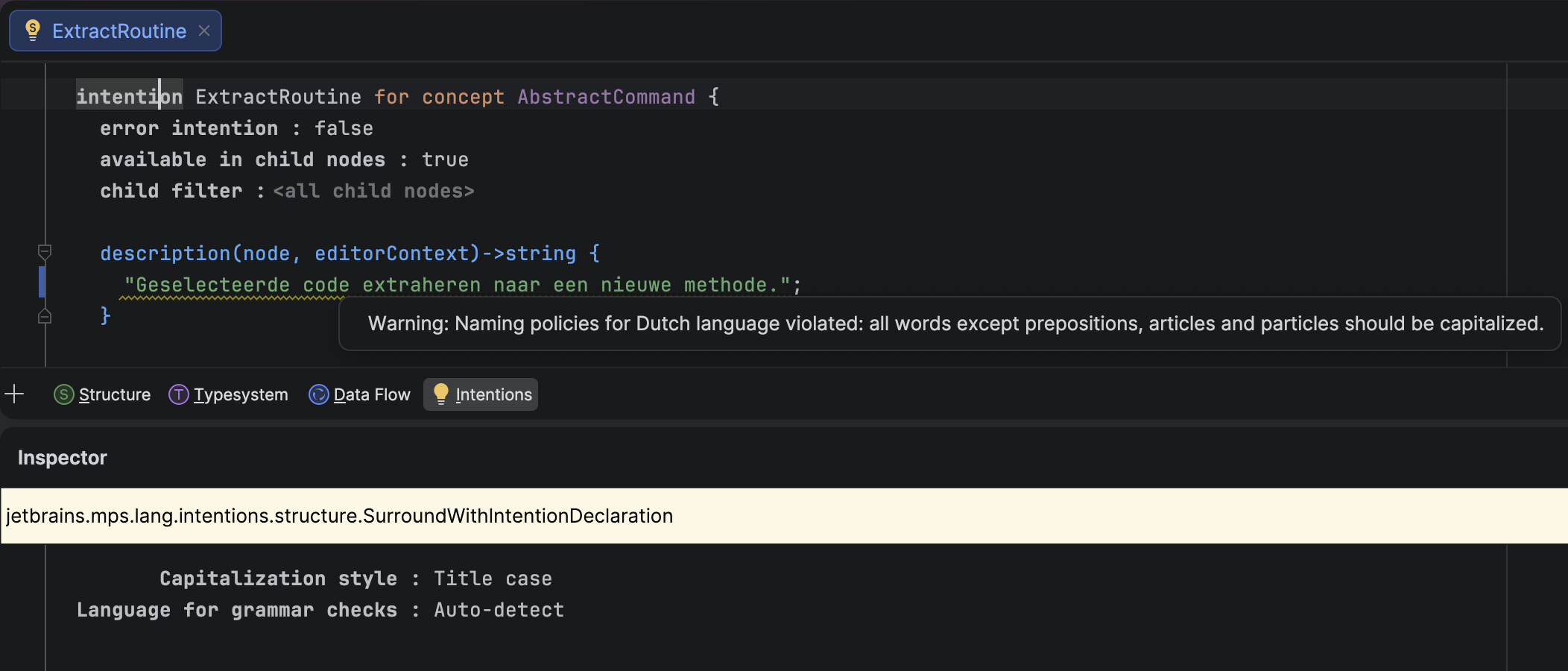
Ability to check ICheckedNamePolicy against specific natural languages

MPS now uses the IntelliJ Platform’s natural language support, provided by Grazie. This means you can check whether string values in instances of ICheckedNamePolicy, such as intentions, actions, or tools, have proper capitalization according to the rules of a specific natural language.
An incorrectly capitalized text caption
Thanks to this change, you can install natural language support for select languages into MPS, and the IDE will detect the language used in strings and verify that individual words are capitalized correctly. You can also bypass the language detection mechanism and specify your desired language explicitly.

In addition to the default Title-case capitalization rules, MPS offers three other options:

  • Sentence-case, which follows the IntelliJ Platform’s rules
  • Inherited, which uses the capitalization rules of the closest ancestor ICheckedNamePolicy
  • No capitalization rules

Binary operations can be split into multiple lines

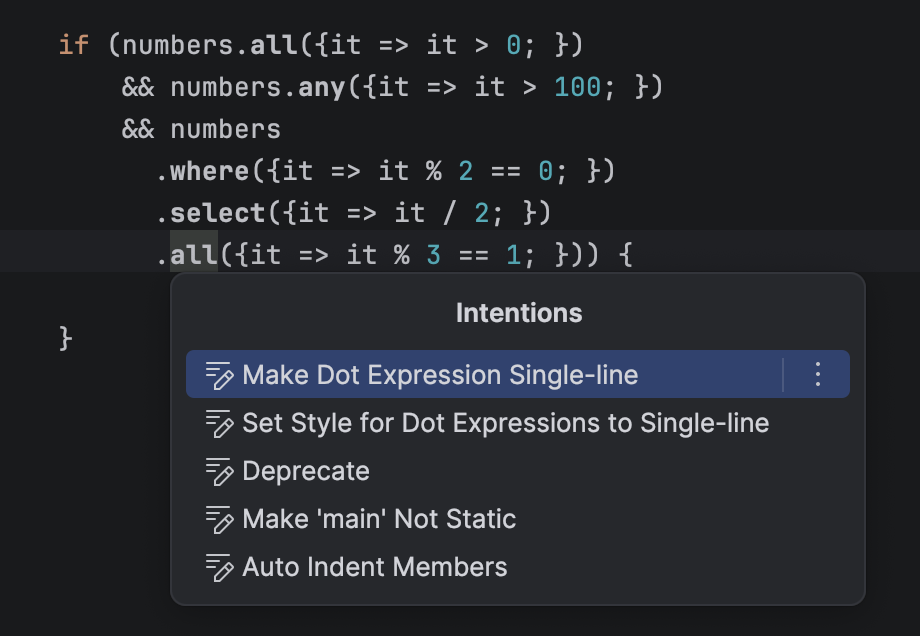
In the editor, you can now split long lines with binary operations. A dedicated intention action lets you toggle between the single-line and multi-line layouts for a given BinaryOperation.
A long binary expression split on several lines

New boolean editor style: read-only-inspector

The new read-only-inspector style enforces the read-only property on all editor cells in the inspector. When this style is applied to a cell in the main editor, the inspector becomes read-only for the inspected node when the cell with this style is selected. The new style has the following properties:

  • It is disabled by default.
  • The style is inheritable and overridable, just like the read-only style.
  • It has no effect on main editor cells.
  • The read-only style set by this mechanism can be overridden in any cell farther down the inspector editor cell tree.

Transitive dependencies in Build Language

Build Language no longer requires every transitively-reachable build script to be listed in dependencies. This means that a build script, BuildA, that depends on BuildB can now reach BuildC through BuildB (provided that BuildB depends on BuildC) without having to list BuildC explicitly. The generator emits ${artifacts.BuildC} Ant properties for such cases, and these properties can be supplied from the outer build tool (Gradle, Maven, etc.).

This lets you split large builds into smaller ones without forcing every user to update the dependency lists. For example, a single platform build script can wrap a growing set of external libraries used across sub-projects.

More reliable migrations via recorded dependencies

Migration code previously decided which migrations to apply based on the actual module dependencies and used languages collected at migration time, but it would read versions from the dependency snapshot recorded in the module descriptor. That mismatch could cause migrations to use a different view of the world than the one the module was last modified against.

In this 2026.1 EAP build, the migration machinery consistently uses the dependencies and used languages recorded in the module descriptor at the moment of last modification, not the currently observable state. The migration checker was refactored accordingly. It now reuses information already collected for the migration process instead of recomputing it on demand.

Improved Java stubs

A cluster of long-standing Java-stubs bugs has been fixed, visibly improving the accuracy of BaseLanguage stubs produced for imported .jar files and Java Sources model roots:

  • MPS-33174 – Classes with InnerClasses attributes are now correctly transformed to BaseLanguage stubs (open since 2021). The signature’s inner-class information and parameterized owner types are preserved, so fields and methods of inner classes of generic outer classes now show the proper type instead of collapsing to the outer class.
  • MPS-39375 – Type variables in generic methods of inner classes are now handled, so methods referencing type variables of the outer class no longer show java.lang.Object in place of the real type variable.
  • MPS-39007 – The spurious Java imports annotation is present error no longer appears on every root of a Java source stub model.
  • MPS-39565 – Java source stub roots no longer disappear on changes to the containing module’s properties, so references from project code to those roots stay intact when module properties are changed.

Modernized project lifecycle

With MPSProject having moved from a legacy IntelliJ IDEA ProjectComponent to a project service, MPS-aware features need a reliable way to be notified about MPSProject becoming available and going away.

This build introduces a dedicated mechanism for managing MPSProject startup and shutdown activities, giving MPS control over the sequencing, grouping, ordering, and threading of those activities. This was something the platform’s ProjectActivity / MPSProjectActivity could not offer.

How it works: Implementors register against the jetbrains.mps.project.lifecycleListener extension point (declared in MPSCore.xml) via a ProjectLifecycleListener.Bean with a listenerClass and an optional integer priority. The LifecycleEventDispatch.java inside MPSProject can fire:

  • projectReady (non-blocking)
  • projectDiscarded (blocking)
  • asyncProjectClosed (non-blocking)

Wayland by default

MPS now offers Wayland as the default display protocol on supported Linux systems. When running in a Wayland-capable environment, MPS automatically switches to a native Wayland backend instead of relying on X11 compatibility layers, bringing it in line with modern Linux desktop standards.

This transition improves overall integration with the system, providing better stability across Wayland compositors, proper support for input methods and drag-and-drop, and more consistent rendering – especially on HiDPI and fractional scaling setups. While the user experience remains largely familiar, some differences (such as window positioning or decorations) may be noticeable due to Wayland’s architecture. X11 is still fully supported and can be used as a fallback when needed, ensuring compatibility across all Linux environments.

You can review the complete list of fixed issues here.

Your JetBrains MPS team