software

Masonry: Things You Won’t Need A Library For Anymore

About 15 years ago, I was working at a company where we built apps for travel agents, airport workers, and airline companies. We also built our own in-house framework for UI components and single-page app capabilities.

We had components for everything: fields, buttons, tabs, ranges, datatables, menus, datepickers, selects, and multiselects. We even had a div component. Our div component was great by the way, it allowed us to do rounded corners on all browsers, which, believe it or not, wasn’t an easy thing to do at the time.

Our work took place at a point in our history when JS, Ajax, and dynamic HTML were seen as a revolution that brought us into the future. Suddenly, we could update a page dynamically, get data from a server, and avoid having to navigate to other pages, which was seen as slow and flashed a big white rectangle on the screen between the two pages.

There was a phrase, made popular by Jeff Atwood (the founder of StackOverflow), which read:

“Any application that can be written in JavaScript will eventually be written in JavaScript.”

Jeff Atwood

To us at the time, this felt like a dare to actually go and create those apps. It felt like a blanket approval to do everything with JS.

So we did everything with JS, and we didn’t really take the time to research other ways of doing things. We didn’t really feel the incentive to properly learn what HTML and CSS could do. We didn’t really perceive the web as an evolving app platform in its entirety. We mostly saw it as something we needed to work around, especially when it came to browser support. We could just throw more JS at it to get things done.

Would taking the time to learn more about how the web worked and what was available on the platform have helped me? Sure, I could probably have shaved a bunch of code that wasn’t truly needed. But, at the time, maybe not that much.

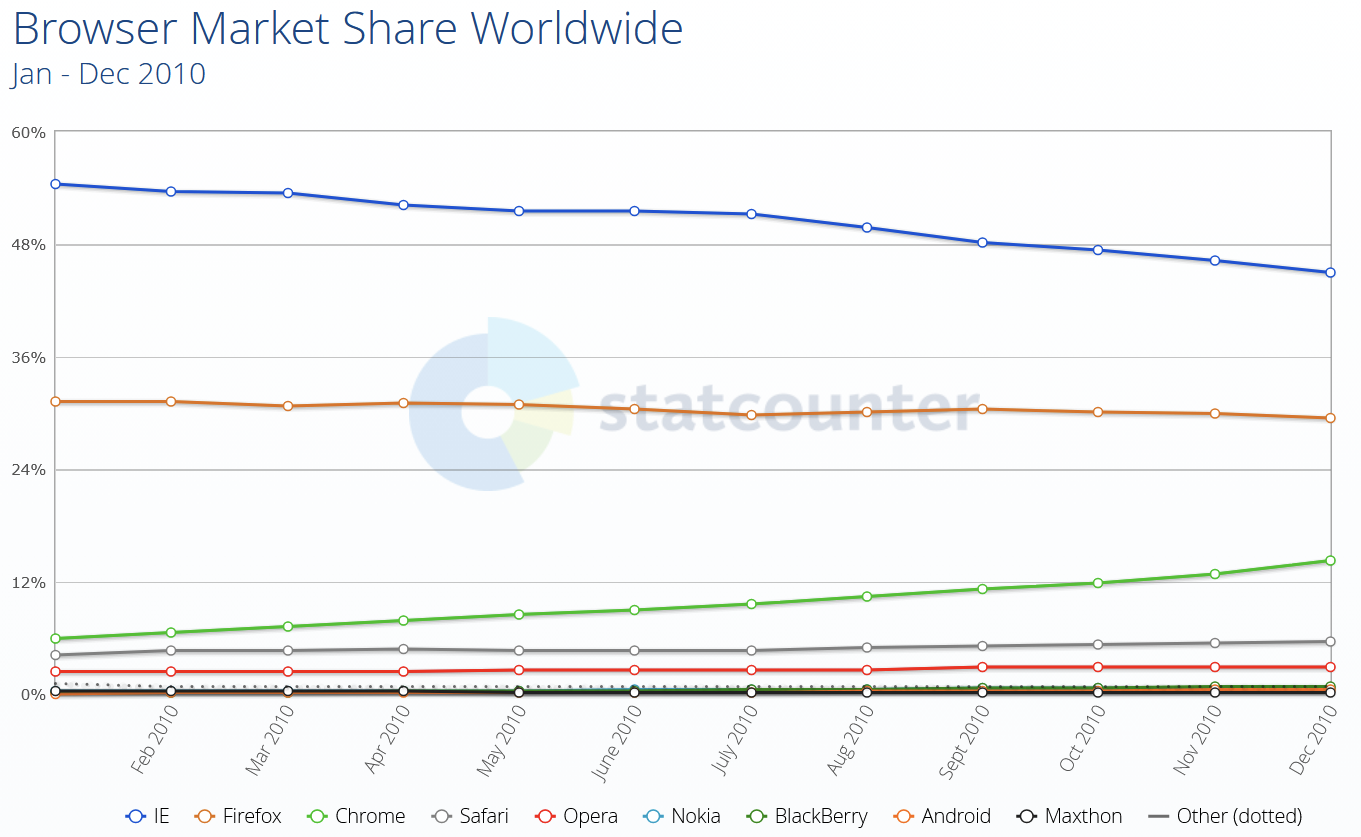
You see, browser differences were pretty significant back then. This was a time when Internet Explorer was still the dominant browser, with Firefox being the close second, but starting to lose market share due to Chrome rapidly gaining popularity. Although Chrome and Firefox were quite good at agreeing on web standards, the environments in which our apps were running meant that we had to support IE6 for a long time. Even when we were allowed to support IE8, we still had to deal with a lot of differences between browsers. Not only that, but the web of the time just didn’t have that many capabilities built right into the platform.
Fast forward to today. Things have changed tremendously. Not only do we have more of these capabilities than ever before, but the rate at which they become available has increased as well.

Let me ask the question again, then: Would taking the time to learn more about how the web works and what is available on the platform help you today? Absolutely yes. Learning to understand and use the web platform today puts you at a huge advantage over other developers.

Whether you work on performance, accessibility, responsiveness, all of them together, or just shipping UI features, if you want to do it as a responsible engineer, knowing the tools that are available to you helps you reach your goals faster and better.

Some Things You Might Not Need A Library For Anymore

Knowing what browsers support today, the question, then, is: What can we ditch? Do we need a div component to do rounded corners in 2025? Of course, we don’t. The border-radius property has been supported by all currently used browsers for more than 15 years at this point. And corner-shape is also coming soon, for even fancier corners.

Let’s take a look at relatively recent features that are now available in all major browsers, and which you can use to replace existing dependencies in your codebase.

The point isn’t to immediately ditch all your beloved libraries and rewrite your codebase. As for everything else, you’ll need to take browser support into account first and decide based on other factors specific to your project. The following features are implemented in the three main browser engines (Chromium, WebKit, and Gecko), but you might have different browser support requirements that prevent you from using them right away. Now is still a good time to learn about these features, though, and perhaps plan to use them at some point.

Popovers And Dialogs

The Popover API, the <dialog> HTML element, and the ::backdrop pseudo-element can help you get rid of dependencies on popup, tooltip, and dialog libraries, such as Floating UI, Tippy.js, Tether, or React Tooltip.

They handle accessibility and focus management for you, out of the box, are highly customizable by using CSS, and can easily be animated.

Accordions

The <details> element, its name attribute for mutually exclusive elements, and the ::details-content pseudo-element remove the need for accordion components like the Bootstrap Accordion or the React Accordion component.

Just using the platform here means it’s easier for folks who know HTML/CSS to understand your code without having to first learn to use a specific library. It also means you’re immune to breaking changes in the library or the discontinuation of that library. And, of course, it means less code to download and run. Mutually exclusive details elements don’t need JS to open, close, or animate.

CSS Syntax

Cascade layers, for a more organized CSS codebase, CSS nesting, for more compact CSS, new color functions, relative colors, and color-mix, new Maths functions like abs(), sign(), pow() and others help reduce dependencies on CSS pre-processors, utility libraries like Bootstrap and Tailwind, or even runtime CSS-in-JS libraries.

The game changer :has(), one of the most requested features for a long time, removes the need for more complicated JS-based solutions.

JS Utilities

Modern Array methods like findLast(), or at(), as well as Set methods like difference(), intersection(), union() and others can reduce dependencies on libraries like Lodash.

Container Queries

Container queries make UI components respond to things other than the viewport size, and therefore make them more reusable across different contexts.

No need to use a JS-heavy UI library for this anymore, and no need to use a polyfill either.

Layout

Grid, subgrid, flexbox, or multi-column have been around for a long time now, but looking at the results of the State of CSS surveys, it’s clear that developers tend to be very cautious with adopting new things, and wait for a very long time before they do.

These features have been Baseline for a long time and you could use them to get rid of dependencies on things like the Bootstrap’s grid system, Foundation Framework’s flexbox utilities, Bulma fixed grid, Materialize grid, or Tailwind columns.

I’m not saying you should drop your framework. Your team adopted it for a reason, and removing it might be a big project. But looking at what the web platform can offer without a third-party wrapper on top comes with a lot of benefits.

Things You Might Not Need Anymore In The Near Future

Now, let’s take a quick look at some of the things you will not need a library for in the near future. That is to say, the things below are not quite ready for mass adoption, but being aware of them and planning for potential later use can be helpful.

Anchor Positioning

CSS anchor positioning handles the positioning of popovers and tooltips relative to other elements, and takes care of keeping them in view, even when moving, scrolling, or resizing the page.

This is a great complement to the Popover API mentioned before, which will make it even easier to migrate away from more performance-intensive JS solutions.

Navigation API

The Navigation API can be used to handle navigation in single-page apps and might be a great complement, or even a replacement, to React Router, Next.js routing, or Angular routing tasks.

View Transitions API

The View Transitions API can animate between the different states of a page. On a single-page application, this makes smooth transitions between states very easy, and can help you get rid of animation libraries such as Anime.js, GSAP, or Motion.dev.

Even better, the API can also be used with multiple-page applications.

Remember earlier, when I said that the reason we built single-page apps at the company where I worked 15 years ago was to avoid the white flash of page reloads when navigating? Had that API been available at the time, we would have been able to achieve beautiful page transition effects without a single-page framework and without a huge initial download of the entire app.

Scroll-driven Animations

Scroll-driven animations run on the user’s scroll position, rather than over time, making them a great solution for storytelling and product tours.

Some people have gone a bit over the top with it, but when used well, this can be a very effective design tool, and can help get rid of libraries like: ScrollReveal, GSAP Scroll, or WOW.js.

Customizable Selects

A customizable select is a normal <select> element that lets you fully customize its appearance and content, while ensuring accessibility and performance benefits.

This has been a long time coming, and a highly requested feature, and it’s amazing to see it come to the web platform soon. With a built-in customizable select, you can finally ditch all this hard-to-maintain JS code for your custom select components.

CSS Masonry

CSS Masonry is another upcoming web platform feature that I want to spend more time on.

With CSS Masonry, you can achieve layouts that are very hard, or even impossible, with flex, grid, or other built-in CSS layout primitives. Developers often resort to using third-party libraries to achieve Masonry layouts, such as the Masonry JS library.

But, more on that later. Let’s wrap this point up before moving on to Masonry.

Why You Should Care

The job market is full of web developers with experience in JavaScript and the latest frameworks of the day. So, really, what’s the point in learning to use the web platform primitives more, if you can do the same things with the libraries, utilities, and frameworks you already know today?

When an entire industry relies on these frameworks, and you can just pull in the right library, shouldn’t browser vendors just work with these libraries to make them load and run faster, rather than trying to convince developers to use the platform instead?

First of all, we do work with library authors, and we do make frameworks better by learning about what they use and improving those areas.

But secondly, “just using the platform” can bring pretty significant benefits.

Sending Less Code To Devices

The main benefit is that you end up sending far less code to your clients’ devices.

According to the 2024 Web Almanac, the average number of HTTP requests is around 70 per site, most of which is due to JavaScript with 23 requests. In 2024, JS overtook images as the dominant file type too. The median number of page requests for JS files is 23, up 8% since 2022.

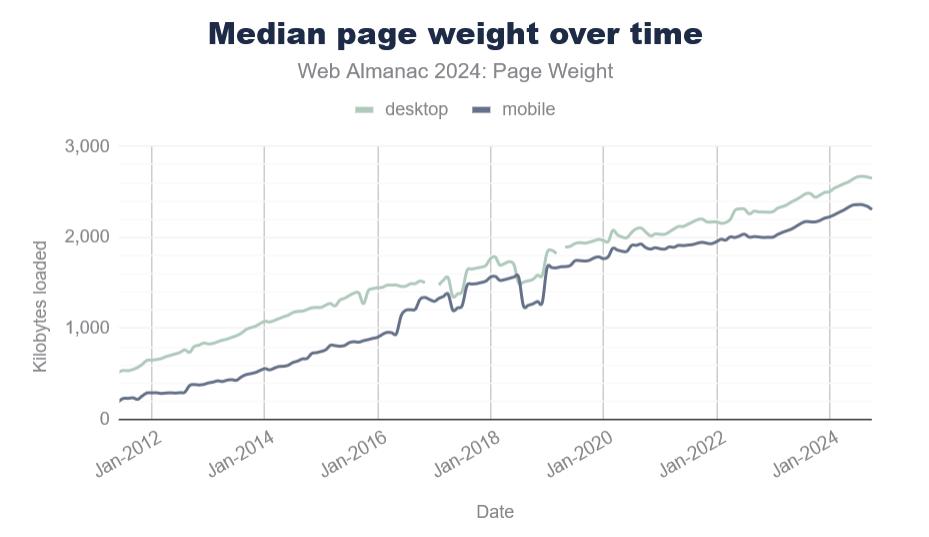
And page size continues to grow year over year. The median page weight is around 2MB now, which is 1.8MB more than it was 10 years ago.
Sure, your internet connection speed has probably increased, too, but that’s not the case for everyone. And not everyone has the same device capabilities either.

Pulling in third-party code for things you can do with the platform, instead, most probably means you ship more code, and therefore reach fewer customers than you normally would. On the web, bad loading performance leads to large abandonment rates and hurts brand reputation.

Running Less Code On Devices

Furthermore, the code you do ship on your customers’ devices likely runs faster if it uses fewer JavaScript abstractions on top of the platform. It’s also probably more responsive and more accessible by default. All of this leads to more and happier customers.

Check my colleague Alex Russell’s yearly performance inequality gap blog, which shows that premium devices are largely absent from markets with billions of users due to wealth inequality. And this gap is only growing over time.

Built-in Masonry Layout

One web platform feature that’s coming soon and which I’m very excited about is CSS Masonry.
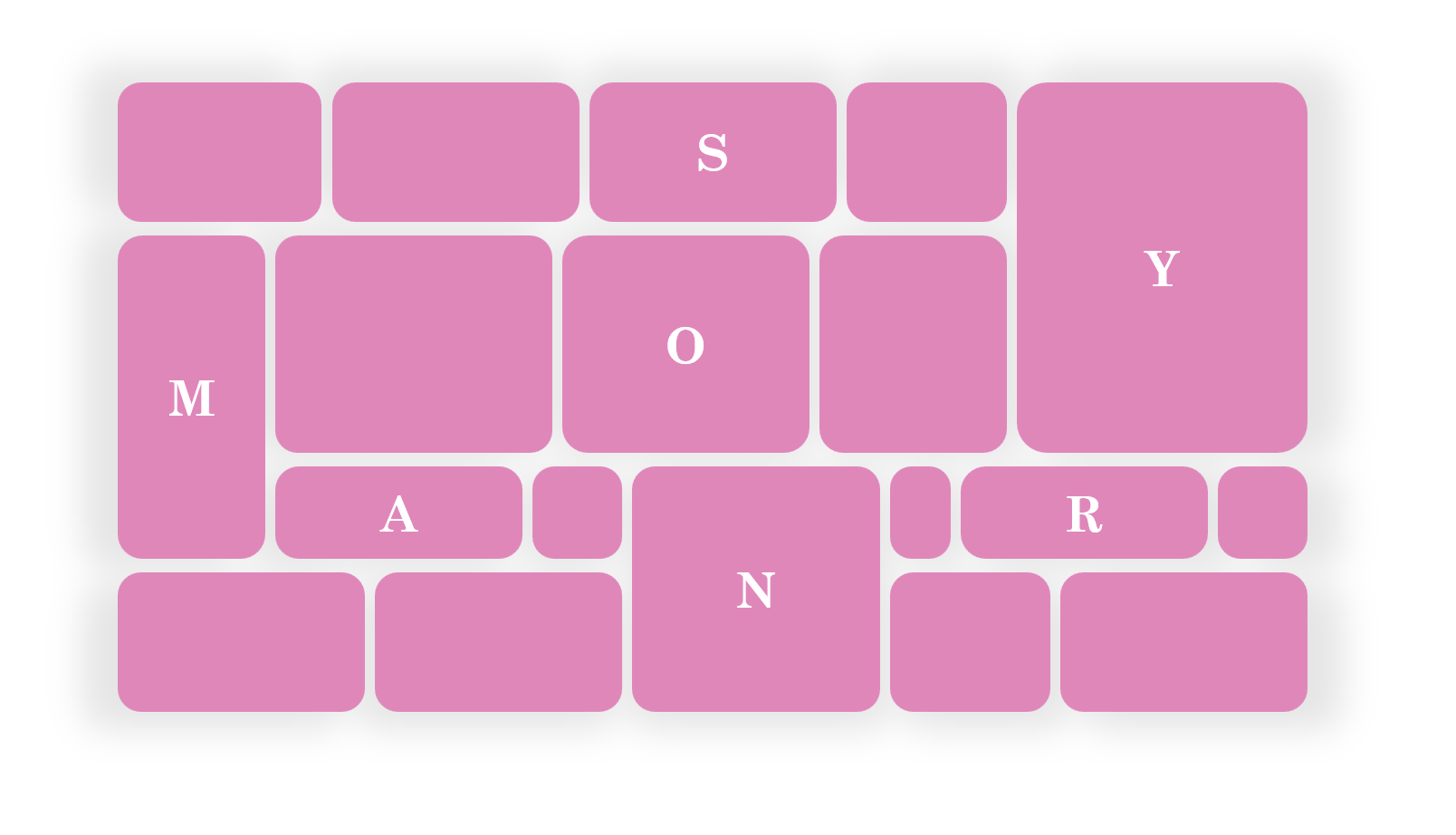
Let me start by explaining what Masonry is.

What Is Masonry

Masonry is a type of layout that was made popular by Pinterest years ago. It creates independent tracks of content within which items pack themselves up as close to the start of the track as they can.

Many people see Masonry as a great option for portfolios and photo galleries, which it certainly can do. But Masonry is more flexible than what you see on Pinterest, and it’s not limited to just waterfall-like layouts.

In a Masonry layout:

  • Tracks can be columns or rows:

  • Tracks of content don’t all have to be the same size:
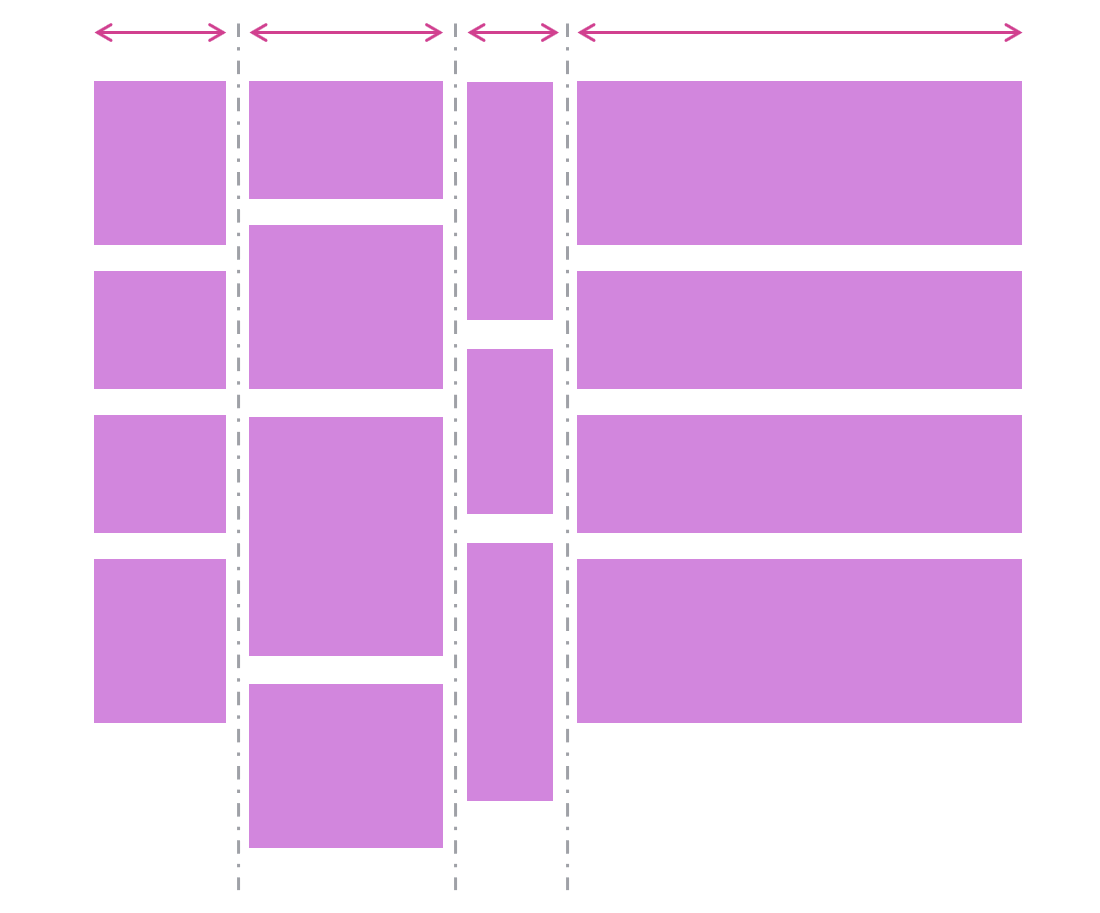
  • Items can span multiple tracks:

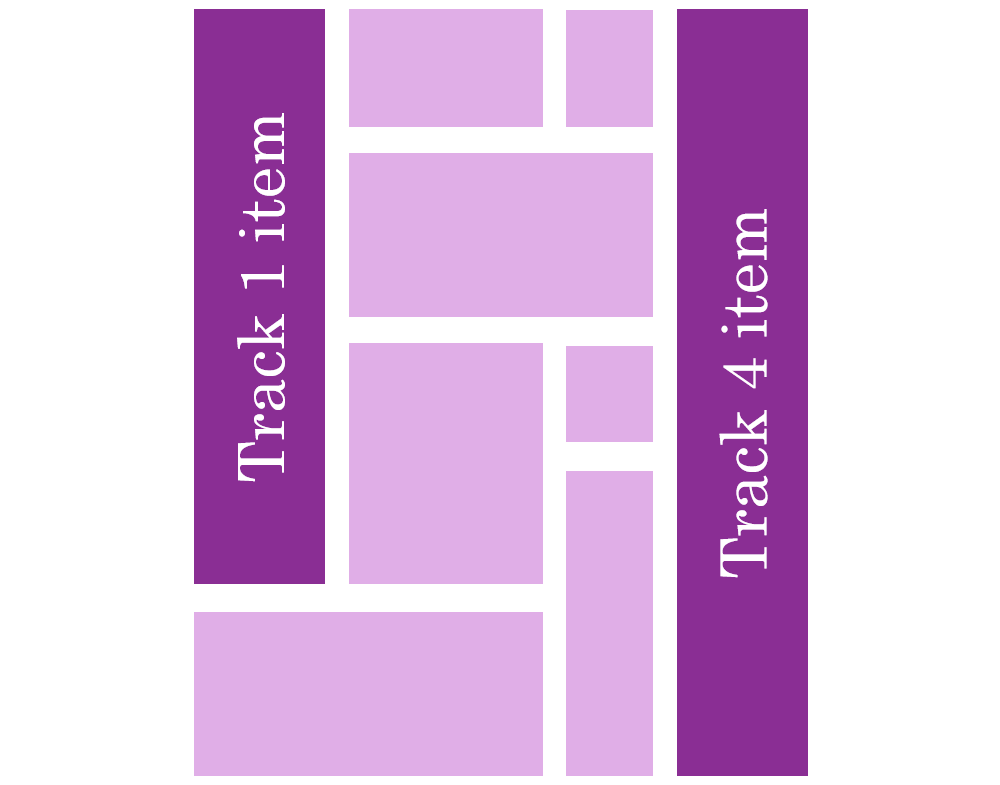
  • Items can be placed on specific tracks; they don’t have to always follow the automatic placement algorithm:
Demos

Here are a few simple demos I made by using the upcoming implementation of CSS Masonry in Chromium.

A photo gallery demo, showing how items (the title in this case) can span multiple tracks:

Another photo gallery showing tracks of different sizes:

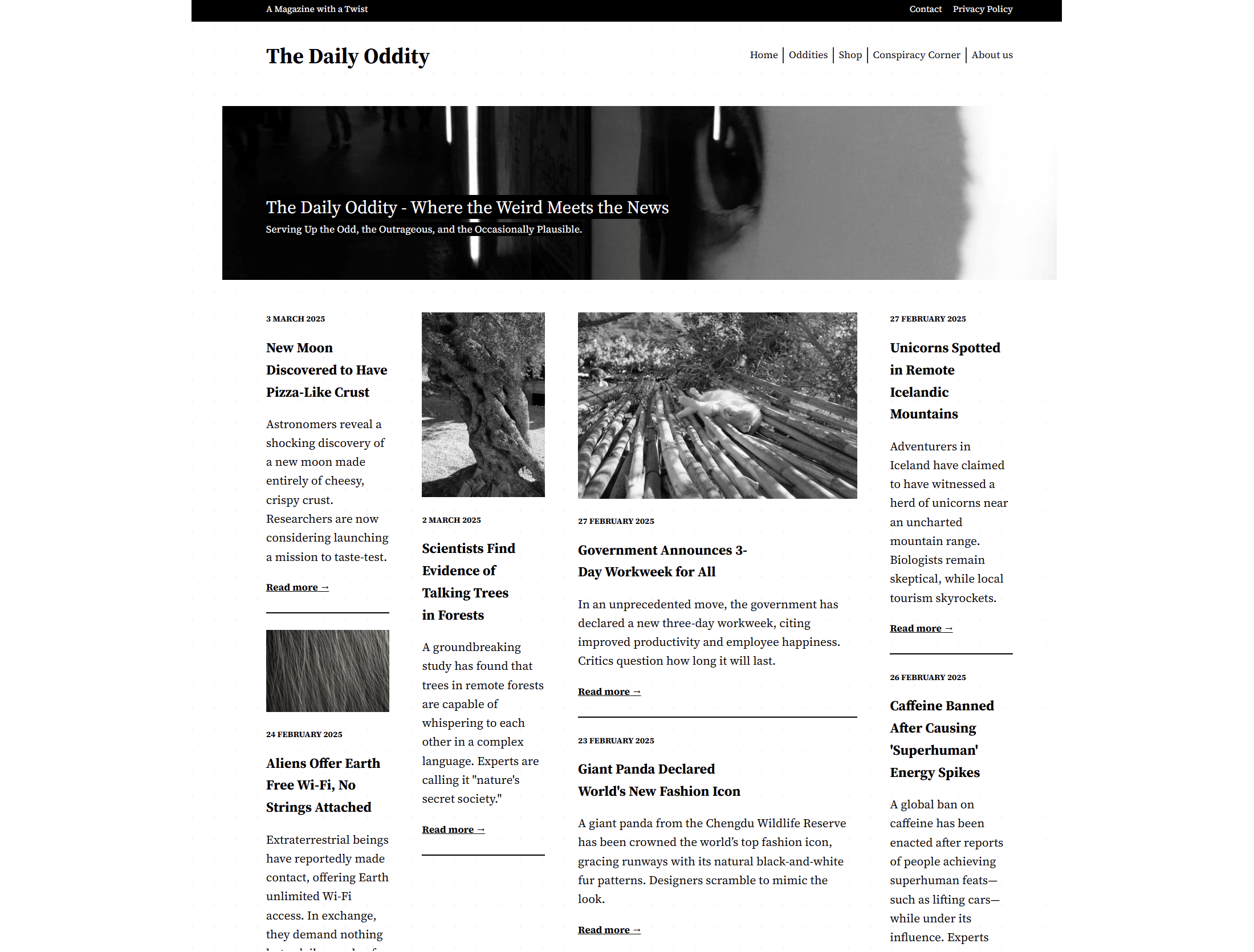
A news site layout with some tracks wider than others, and some items spanning the entire width of the layout:
A kanban board showing that items can be placed onto specific tracks:
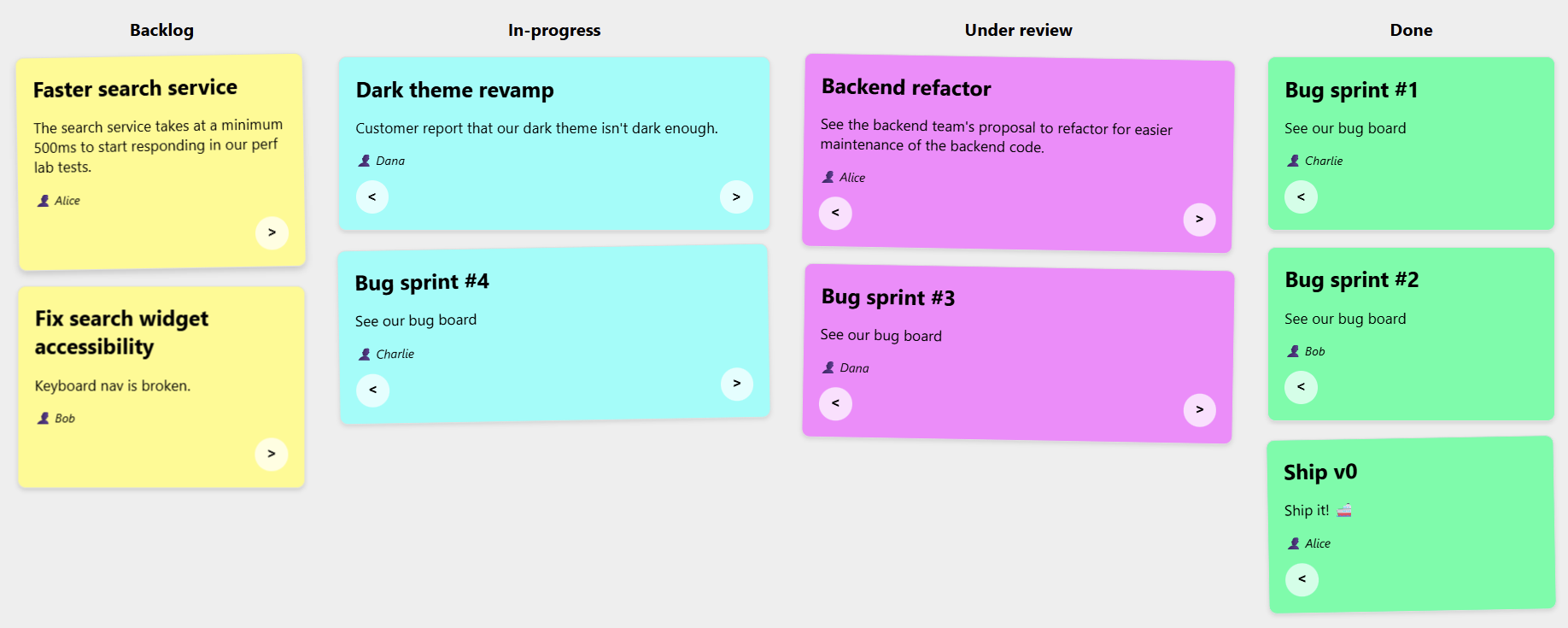
Note: The previous demos were made with a version of Chromium that’s not yet available to most web users, because CSS Masonry is only just starting to be implemented in browsers.

However, web developers have been happily using libraries to create Masonry layouts for years already.

Sites Using Masonry Today

Indeed, Masonry is pretty common on the web today. Here are a few examples I found besides Pinterest:


And a few more, less obvious, examples:
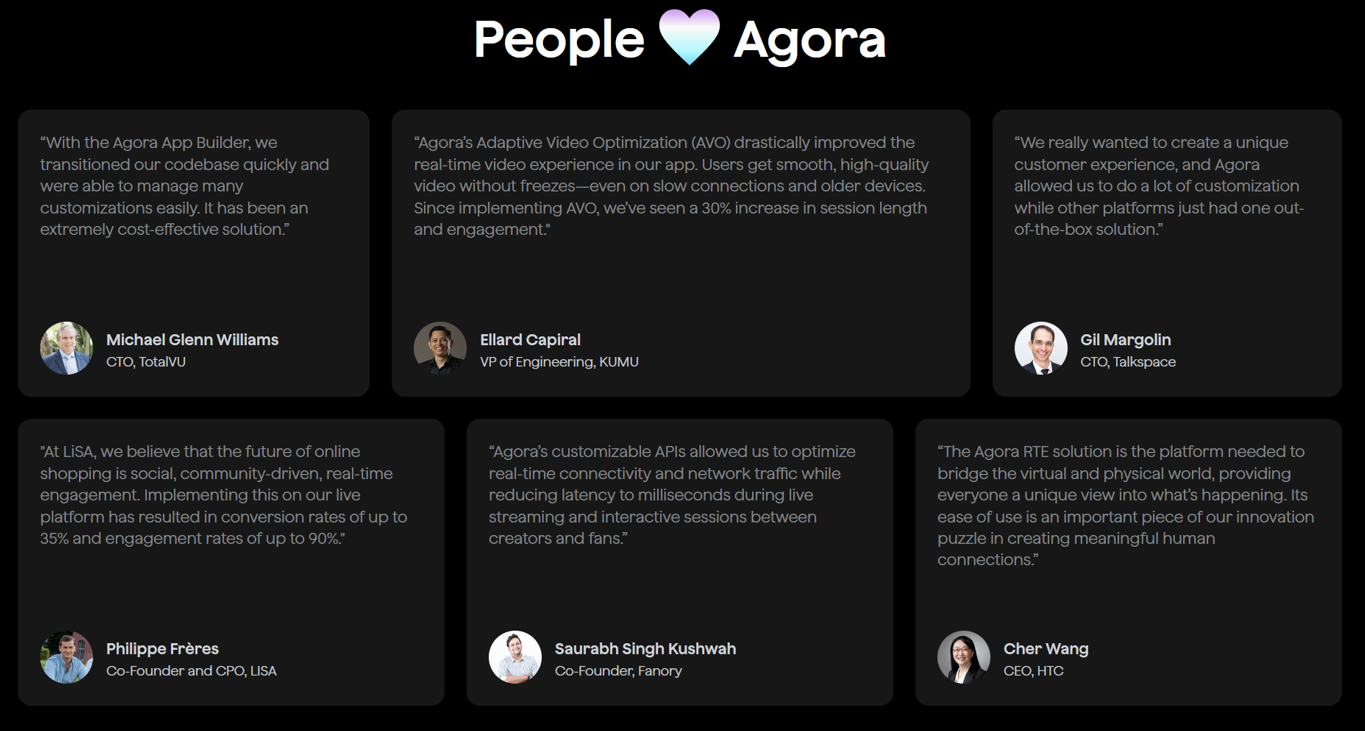
So, how were these layouts created?

Workarounds

One trick that I’ve seen used is using a Flexbox layout instead, changing its direction to column, and setting it to wrap.

This way, you can place items of different heights in multiple, independent columns, giving the impression of a Masonry layout:

There are, however, two limitations with this workaround:

  1. The order of items is different from what it would be with a real Masonry layout. With Flexbox, items fill the first column first and, when it’s full, then go to the next column. With Masonry, items would stack in whichever track (or column in this case) has more space available.
  2. But also, and perhaps more importantly, this workaround requires that you set a fixed height to the Flexbox container; otherwise, no wrapping would occur.

Third-party Masonry Libraries

For more advanced cases, developers have been using libraries.

The most well-known and popular library for this is simply called Masonry, and it gets downloaded about 200,000 times per week according to NPM.

Squarespace also provides a layout component that renders a Masonry layout, for a no-code alternative, and many sites use it.

Both of these options use JavaScript code to place items in the layout.

Built-in Masonry

I’m really excited that Masonry is now starting to appear in browsers as a built-in CSS feature. Over time, you will be able to use Masonry just like you do Grid or Flexbox, that is, without needing any workarounds or third-party code.

My team at Microsoft has been implementing built-in Masonry support in the Chromium open source project, which Edge, Chrome, and many other browsers are based on. Mozilla was actually the first browser vendor to propose an experimental implementation of Masonry back in 2020. And Apple has also been very interested in making this new web layout primitive happen.

The work to standardize the feature is also moving ahead, with agreement within the CSS working group about the general direction and even a new display type display: grid-lanes.

If you want to learn more about Masonry and track progress, check out my CSS Masonry resources page.

In time, when Masonry becomes a Baseline feature, just like Grid or Flexbox, we’ll be able to simply use it and benefit from:

  • Better performance,
  • Better responsiveness,
  • Ease of use and simpler code.

Let’s take a closer look at these.

Better Performance

Making your own Masonry-like layout system, or using a third-party library instead, means you’ll have to run JavaScript code to place items on the screen. This also means that this code will be render blocking. Indeed, either nothing will appear, or things won’t be in the right places or of the right sizes, until that JavaScript code has run.

Masonry layout is often used for the main part of a web page, which means the code would be making your main content appear later than it could otherwise have, degrading your LCP, or Largest Contentful Paint metric, which plays a big role in perceived performance and search engine optimization.

I tested the Masonry JS library with a simple layout and by simulating a slow 4G connection in DevTools. The library is not very big (24KB, 7.8KB gzipped), but it took 600ms to load under my test conditions.

Here is a performance recording showing that long 600ms load time for the Masonry library, and that no other rendering activity happened while that was happening:
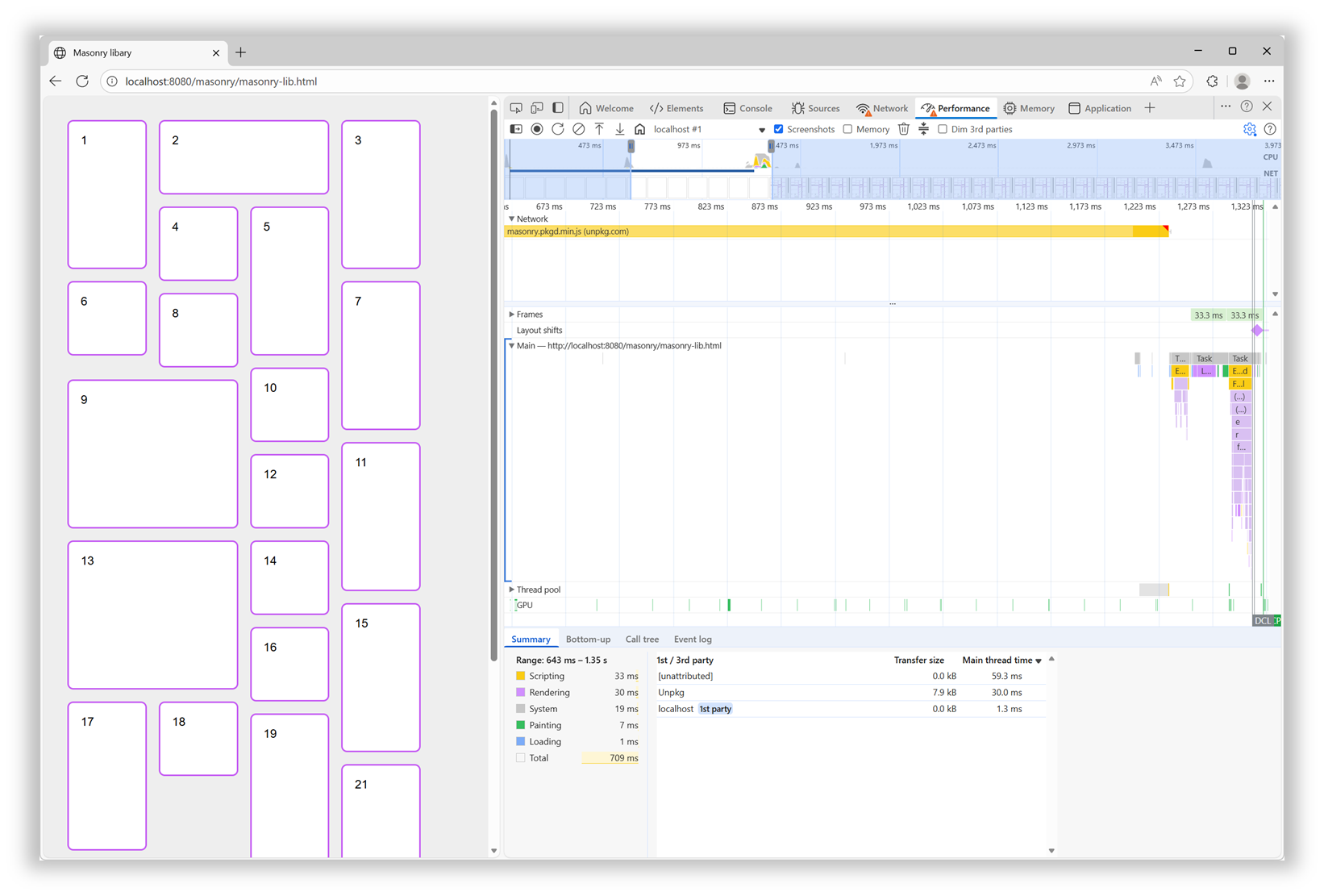
In addition, after the initial load time, the downloaded script then needed to be parsed, compiled, and then run. All of which, as mentioned before, was blocking the rendering of the page.

With a built-in Masonry implementation in the browser, we won’t have a script to load and run. The browser engine will just do its thing during the initial page rendering step.

Better Responsiveness

Similar to when a page first loads, resizing the browser window leads to rendering the layout in that page again. At this point, though, if the page is using the Masonry JS library, there’s no need to load the script again, because it’s already here. However, the code that moves items in the right places needs to run.

Now this particular library seems to be pretty fast at doing this when the page loads. However, it animates the items when they need to move to a different place on window resize, and this makes a big difference.

Of course, users don’t spend time resizing their browser windows as much as we developers do. But this animated resizing experience can be pretty jarring and adds to the perceived time it takes for the page to adapt to its new size.

Ease Of Use And Simpler Code

How easy it is to use a web feature and how simple the code looks are important factors that can make a big difference for your team. They can’t ever be as important as the final user experience, of course, but developer experience impacts maintainability. Using a built-in web feature comes with important benefits on that front:

  • Developers who already know HTML, CSS, and JS will most likely be able to use that feature easily because it’s been designed to integrate well and be consistent with the rest of the web platform.
  • There’s no risk of breaking changes being introduced in how the feature is used.
  • There’s almost zero risk of that feature becoming deprecated or unmaintained.

In the case of built-in Masonry, because it’s a layout primitive, you use it from CSS, just like Grid or Flexbox, no JS involved. Also, other layout-related CSS properties, such as gap, work as you’d expect them to. There are no tricks or workarounds to know about, and the things you do learn are documented on MDN.

For the Masonry JS lib, initialization is a bit complex: it requires a data attribute with a specific syntax, along with hidden HTML elements to set the column and gap sizes.

Plus, if you want to span columns, you need to include the gap size yourself to avoid problems:

<script src="https://unpkg.com/masonry-layout@4.2.2/dist/masonry.pkgd.min.js"></script>
<style>
  .track-sizer,
  .item {
    width: 20%;
  }
  .gutter-sizer {
    width: 1rem;
  }
  .item {
    height: 100px;
    margin-block-end: 1rem;
  }
  .item:nth-child(odd) {
    height: 200px;
  }
  .item--width2 {
    width: calc(40% + 1rem);
  }
</style>

<div class="container"
  data-masonry='{ "itemSelector": ".item", "columnWidth": ".track-sizer", "percentPosition": true, "gutter": ".gutter-sizer" }'>
  <div class="track-sizer"></div>
  <div class="gutter-sizer"></div>
  <div class="item"></div>
  <div class="item item--width2"></div>
  <div class="item"></div>
  ...
</div>

Let’s compare this to what a built-in Masonry implementation would look like:

<style>
  .container {
    display: grid-lanes;
    grid-lanes: repeat(4, 20%);
    gap: 1rem;
  }
  .item {
    height: 100px;
  }
  .item:nth-child(odd) {
    height: 200px;
  }
  .item--width2 {
    grid-column: span 2;
  }
</style>

<div class="container">
  <div class="item"></div>
  <div class="item item--width2"></div>
  <div class="item"></div>
  ...
</div>

Simpler, more compact code that can just use things like gap and where spanning tracks is done with span 2, just like in grid, and doesn’t require you to calculate the right width that includes the gap size.

How To Know What’s Available And When It’s Available?

Overall, the question isn’t really if you should use built-in Masonry over a JS library, but rather when. The Masonry JS library is amazing and has been filling a gap in the web platform for many years, and for many happy developers and users. It has a few drawbacks if you compare it to a built-in Masonry implementation, of course, but those are not important if that implementation isn’t ready.

It’s easy for me to list these cool new web platform features because I work at a browser vendor, and I therefore tend to know what’s coming. But developers often share, survey after survey, that keeping track of new things is hard. Staying informed is difficult, and companies don’t always prioritize learning anyway.

To help with this, here are a few resources that provide updates in simple and compact ways so you can get the information you need quickly:

If you have a bit more time, you might also be interested in browser vendors’ release notes:

For even more resources, check out my Navigating the Web Platform Cheatsheet.

My Thing Is Still Not Implemented

That’s the other side of the problem. Even if you do find the time, energy, and ways to keep track, there’s still frustration with getting your voice heard and your favorite features implemented.

Maybe you’ve been waiting for years for a specific bug to be resolved, or a specific feature to ship in a browser where it’s still missing.

What I’ll say is browser vendors do listen. I’m part of several cross-organization teams where we discuss developer signals and feedback all the time. We look at many different sources of feedback, both internal at each browser vendor and external/public on forums, open source projects, blogs, and surveys. And, we’re always trying to create better ways for developers to share their specific needs and use cases.

So, if you can, please demand more from browser vendors and pressure us to implement the features you need. I get that it takes time, and can also be intimidating (not to mention a high barrier to entry), but it also works.

Here are a few ways you can get your (or your company’s) voice heard: Take the annual State of JS, State of CSS, and State of HTML surveys. They play a big role in how browser vendors prioritize their work.

If you need a specific standard-based API to be implemented consistently across browsers, consider submitting a proposal at the next Interop project iteration. It requires more time, but consider how Shopify and RUMvision shared their wish lists for Interop 2026. Detailed information like this can be very useful for browser vendors to prioritize.

For more useful links to influence browser vendors, check out my Navigating the Web Platform Cheatsheet.

Conclusion

To close, I hope this article has left you with a few things to think about:

  • Excitement for Masonry and other upcoming web features.
  • A few web features you might want to start using.
  • A few pieces of custom or 3rd-party code you might be able to remove in favor of built-in features.
  • A few ways to keep track of what’s coming and influence browser vendors.

More importantly, I hope I’ve convinced you of the benefits of using the web platform to its full potential.


A Sparkle Of December Magic (2025 Wallpapers Edition)

As the year winds down, many of us are busy wrapping up projects, meeting deadlines, or getting ready for the holiday season. Why not take a moment amid the end-of-year hustle to set the mood for December with some wintery desktop wallpapers? They might just bring a sparkle of inspiration to your workspace in these busy weeks.

To provide you with unique and inspiring wallpaper designs each month anew, we started our monthly wallpapers series more than 14 years ago. It’s the perfect opportunity both to put your creative skills to the test and to find just the right wallpaper to accompany you through the new month. This December is no exception, of course, so following our cozy little tradition, we have a new collection of wallpapers waiting for you below. Each design has been created with love by artists and designers from across the globe and comes in a variety of screen resolutions.

A huge thank-you to everyone who tickled their creativity and shared their wallpapers with us this time around! This post wouldn’t exist without your kind support. ❤️ Happy December!

  • You can click on every image to see a larger preview.
  • We respect and carefully consider the ideas and motivation behind each and every artist’s work. This is why we give all artists the full freedom to explore their creativity and express emotions and experience through their works. This is also why the themes of the wallpapers weren’t anyhow influenced by us but rather designed from scratch by the artists themselves.
  • Submit your wallpaper design! 🎨
    We are always looking for creative talent and would love to feature your desktop wallpaper in one of our upcoming posts. Join in ↬

Zero-Gravity December

“Floating in space, decorating the Christmas tree, unbothered by the familiar weight of New Year’s resolutions waiting back on Earth every December.” — Designed by Ginger It Solutions from Serbia.

A Quiet December Walk

“In the stillness of a snowy forest, a man and his loyal dog share a peaceful winter walk. The world is hushed beneath a blanket of white, with only soft flakes falling and the crunch of footsteps breaking the silence. It’s a simple, serene moment that captures the calm beauty of December and the quiet joy of companionship in nature’s winter glow.” — Designed by PopArt Studio from Serbia.

Quoted Rudolph

Designed by Ricardo Gimenes from Spain.

Learning Is An Art

“The year is coming to an end. A year full of adventures, projects, unforgettable moments, and others that will fade into oblivion. And it’s this month that we start preparing for next year, organizing it and hoping it will be at least as good as the last, and that it will give us 365 days to savor from the first to the last. This month we share Katherine Johnson and some wise words that we shouldn’t forget: ‘I like to learn. It’s an art and a science.’” — Designed by Veronica Valenzuela Jimenez from Spain.

Chilly Dog, Warm Troubles

Designed by Ricardo Gimenes from Spain.

Modern Christmas Magic

“A fusion of modern Christmas aesthetics and a user-centric mobile app development company, crafting delightful holiday-inspired digital experiences.” — Designed by the Zco Corporation Design Team from the United States.

Dear Moon, Merry Christmas

Designed by Vlad Gerasimov from Georgia.

It’s In The Little Things

Designed by Thaïs Lenglez from Belgium.

The House On The River Drina

“Since we often yearn for a peaceful and quiet place to work, we have found inspiration in the famous house on the River Drina in Bajina Bašta, Serbia. Wouldn’t it be great being in nature, away from civilization, swaying in the wind and listening to the waves of the river smashing your house, having no neighbors to bother you? Not sure about the Internet, though…” — Designed by PopArt Studio from Serbia.

Christmas Cookies

“Christmas is coming and a great way to share our love is by baking cookies.” — Designed by Maria Keller from Mexico.

Sweet Snowy Tenderness

“You know that warm feeling when you get to spend cold winter days in a snug, homey, relaxed atmosphere? Oh, yes, we love it, too! It is the sentiment we set our hearts on for the holiday season, and this sweet snowy tenderness is for all of us who adore watching the snowfall from our windows. Isn’t it romantic?” — Designed by PopArt Studio from Serbia.

Anonymoose

Designed by Ricardo Gimenes from Spain.

Cardinals In Snowfall

“During Christmas season, in the cold, colorless days of winter, Cardinal birds are seen as symbols of faith and warmth. In the part of America I live in, there is snowfall every December. While the snow is falling, I can see gorgeous Cardinals flying in and out of my patio. The intriguing color palette of the bright red of the Cardinals, the white of the flurries, and the brown/black of dry twigs and fallen leaves on the snow-laden ground fascinates me a lot, and inspired me to create this quaint and sweet, hand-illustrated surface pattern design as I wait for the snowfall in my town!” — Designed by Gyaneshwari Dave from the United States.

Getting Hygge

“There’s no more special time for a fire than in the winter. Cozy blankets, warm beverages, and good company can make all the difference when the sun goes down. We’re all looking forward to generating some hygge this winter, so snuggle up and make some memories.” — Designed by The Hannon Group from Washington D.C.

Christmas Woodland

Designed by Mel Armstrong from Australia.

Joy To The World

“Joy to the world, all the boys and girls now, joy to the fishes in the deep blue sea, joy to you and me.” — Designed by Morgan Newnham from Boulder, Colorado.

Gifts Lover

Designed by Elise Vanoorbeek from Belgium.

King Of Pop

Designed by Ricardo Gimenes from Spain.

The Matterhorn

“Christmas is always such a magical time of year so we created this wallpaper to blend the majestry of the mountains with a little bit of magic.” — Designed by Dominic Leonard from the United Kingdom.

Ninja Santa

Designed by Elise Vanoorbeek from Belgium.

Ice Flowers

“I took some photos during a very frosty and cold week before Christmas.” Designed by Anca Varsandan from Romania.

Christmas Selfie

Designed by Emanuela Carta from Italy.

Winter Wonderland

“‘Winter is the time for comfort, for good food and warmth, for the touch of a friendly hand and for a talk beside the fire: it is the time for home.’ (Edith Sitwell) — Designed by Dipanjan Karmakar from India.

Winter Coziness At Home

“Winter coziness that we all feel when we come home after spending some time outside or when we come to our parental home to celebrate Christmas inspired our designers. Home is the place where we can feel safe and sound, so we couldn’t help ourselves but create this calendar.” — Designed by MasterBundles from Ukraine.

Enchanted Blizzard

“A seemingly forgotten world under the shade of winter glaze hides a moment where architecture meets fashion and change encounters steadiness.” — Designed by Ana Masnikosa from Belgrade, Serbia.

All That Belongs To The Past

“Sometimes new beginnings make us revisit our favorite places or people from the past. We don’t visit them often because they remind us of the past but enjoy the brief reunion. Cheers to new beginnings in the new year!” Designed by Dorvan Davoudi from Canada.

December Through Different Eyes

“As a Belgian, December reminds me of snow, coziness, winter, lights, and so on. However, in the Southern hemisphere, it is summer at this time. With my illustration I wanted to show the different perspectives on December. I wish you all a Merry Christmas and Happy New Year!” — Designed by Jo Smets from Belgium.

Silver Winter

Designed by Violeta Dabija from Moldova.

Cozy

“December is all about coziness and warmth. Days are getting darker, shorter, and colder. So a nice cup of hot cocoa just warms me up.” — Designed by Hazuki Sato from Belgium.

Tongue Stuck On Lamppost

Designed by Josh Cleland from the United States.

On To The Next One

“Endings intertwined with new beginnings, challenges we rose to and the ones we weren’t up to, dreams fulfilled and opportunities missed. The year we say goodbye to leaves a bitter-sweet taste, but we’re thankful for the lessons, friendships, and experiences it gave us. We look forward to seeing what the new year has in store, but, whatever comes, we will welcome it with a smile, vigor, and zeal.” — Designed by PopArt Studio from Serbia.

Christmas Owl

“Christmas waves a magic wand over this world, and behold, everything is softer and more beautiful.” — Designed by Suman Sil from India.

Catch Your Perfect Snowflake

“This time of year, people tend to dream big and expect miracles. Let your dreams come true!” Designed by Igor Izhik from Canada.

Winter Garphee

“Garphee’s flufiness glowing in the snow.” Designed by Razvan Garofeanu from Romania.

Trailer Santa

“A mid-century modern Christmas scene outside the norm of snowflakes and winter landscapes.” Designed by Houndstooth from the United States.

Winter Solstice

“In December there’s a winter solstice; which means that the longest night of the year falls in December. I wanted to create the feeling of solitude of the long night into this wallpaper.” — Designed by Alex Hermans from Belgium.

Christmas Time

Designed by Sofie Keirsmaekers from Belgium.

Happy Holidays

Designed by Ricardo Gimenes from Spain.

Get Featured Next Month

Feeling inspired? We’ll publish the January wallpapers on December 31, so if you’d like to be a part of the collection, please don’t hesitate to submit your design. We are already looking forward to it!

What if claude-code lived inside your browser?

I’ve built a browser extension that allows you to theme your visited websites just by prompting. It takes your request and uses openai’s codex-mini to generate the JS and CSS needed to apply the change.

It can do all sorts of things: stop autoplaying videos, replace links with archive.is on newspapers, dim sidebars, or add small QOL features like editing the responses in chatgpt so it’s easier to copy/paste.

Earlier today I asked it to add a “cost per 100 requests” column on OpenRouter’s activity page—decimals makes it hard for my ADHD brain to process.

Technically, you can do this with developer tools and user styles but i’ve been impressed with codex’ ability to take my vague requests and turn it into working styles with just 10% of the source page for context.

Building it i’ve alternated between codex and claude (opus) and I suspect that because I’ve decided to go with a very light stack: tailwind, alpinejs and basecoat (shadcn without react) the final code is maintainable and pretty performant.

I haven’t launched on an webstore yet but decided to release a BYOK open source version. Give it a try as I’m sure you’ll be able to replace at least 3 extensions you have with it.

Check the code here: https://github.com/alentodorov/clickremix-byok

Excel for Project Management: Tracking Timelines and Deliverables

The Project Manager’s Secret Weapon: An Introduction

We all know the scene: a new project kicks off, and suddenly you’re drowning in options.
Do you pay for that expensive, complicated project management software? Do you try to learn a dozen new features just to track a few tasks? For many independent developers, freelancers, and small teams especially those operating in high pressure, budget-conscious environments; the answer is a clear and resounding NO.

The most powerful, flexible, and affordable project management tool is already on your computer: Microsoft Excel. This post isn’t about the basics; it’s about transforming a simple spreadsheet into a highly effective, low-code system for tracking timelines and deliverables. We’ll explore why Excel often beats the high priced competition and how you can start managing complex projects today without spending a dime on new software.

Why Expensive Tools Drain Your Budget and Time

When a project gets big, the overhead of managing it often grows even faster. This is where most enterprise tools fail small teams, a problem that is amplified by our local economic realities.

Complex tools like Jira or Asana are excellent for large organizations with hundreds of tasks, but for a team of one to five people, they create unnecessary friction. The average learning curve for new project software can consume up to 10% of a small project’s total time budget.
Furthermore, subscription costs for these specialized tools quickly add up. A typical subscription for a team of five can easily cost ₦450,000 to ₦900,000 annually. For a startup, a solo developer, or a local agency, that money is better spent on essential infrastructure or talent.
Excel, on the other hand, is generally already available and requires no new subscription, offering an immediate 100% savings on specialized Project Management software fees.

Creating Dynamic Tracking and Visual Timelines

Excel solves the problem of cost and complexity by offering pure, unconstrained flexibility. You aren’t limited by pre-set dashboards or rigid fields; you design the tracker exactly the way your project needs it.

Data-Driven Visualization
The power of Excel lies in its core functions, which act as the “engine” of your project tracker.

  1. Building Your Gantt Chart: A key deliverable for any project manager is answering the question: “Are we on schedule?”
    In Excel, you can use Conditional Formatting to turn start and end dates into a visual timeline, known as a Gantt chart. This technique uses simple formulas to check dates and automatically color-code cells. This visual insight allows stakeholders to see the entire project duration at a glance.

  2. Automating Status Updates: By using simple IF statements, you can automate status updates. For example, if today’s date is past the deadline date listed in another column, a formula can automatically change the task status to “OVERDUE.” This instant data automation saves hours compared to manually updating dozens of task entries. This kind of logical automation is what developers already do, making Excel feel familiar and intuitive.

The Nigerian Edge: Trust and Transparency

In Nigeria’s dynamic business environment, stakeholders and clients often require immediate, clear evidence of progress, without wanting to navigate complex software. This is where the simplicity of an Excel tracker becomes a massive advantage.

Many Nigerian companies still operate primarily using documents and email for official communication, and they often lack the licensing or training for expensive cloud-based Project Management tools. A clean Excel sheet is a universally accepted deliverable. Instead of granting platform access or spending time exporting complicated reports, you can send a password-protected Excel snapshot that requires zero technical onboarding from the client.

This simplicity helps build trust and transparency. When you can quickly generate a professional, formatted sheet showing milestones, budgets, and deadlines, it minimizes communication overhead. Statistics show that projects with high visual accountability experience 25% fewer unexpected delays, simply because problems are spotted earlier. Excel helps you deliver that accountability quickly and professionally, meeting the local expectation for clear and direct reporting.

From Tasks to Completion: Ensuring Accountability

Tracking deliverables means more than just listing tasks; it means managing the entire lifecycle of a task and its outputs. Your Excel sheet should act as the Single Source of Truth for the entire project.

  1. Establishing Clear Ownership: Every task must have a clearly assigned owner and a defined deliverable (e.g., “completed code review,” “drafted documentation”). By having designated cells for Owner and Deliverable Description, you reduce ambiguity, a common cause of project delays.
  2. Measuring Overall Progress: Entering a Percentage Complete figure (0% to 100%) allows you to quickly calculate the overall progress of an entire project phase. If you have 10 tasks, and each is 50% complete, you know the phase is halfway done. This simple measurement provides immediate project health feedback.
  3. Mapping Dependencies: Use a dedicated column to note which task must be completed before the current task can start. This simple tracking prevents bottlenecks, ensuring Task B doesn’t start until Task A is officially marked as “Complete.”

Conclusion: Build Your Own Engine

Excel for project management isn’t a workaround; it’s a strategic choice for efficiency, cost savings, and maximum control, especially for developers navigating the competitive tech scene in Nigeria. By leveraging simple formulas, conditional formatting, and clear data structures, you move past the burden of overly complex software and put the focus back on shipping your product efficiently and affordably. You are, in effect, designing your own low-code project management engine, perfectly customized to track every timeline and deliverable your project demands.

Day 8 – Terraform Meta-Arguments

Whenever we create any resource using Terraform, whether it is an S3 bucket, an EC2 instance, or a security group, we have to pass certain arguments that are specific to the provider. For example, while creating an AWS S3 bucket, we must provide a bucket name, which is a provider-specific argument. Along with these arguments, Terraform also provides additional arguments that work across all resource types. These are known as meta-arguments. Meta-arguments allow us to add extra functionality on top of the normal provider arguments, such as creating multiple resources, controlling dependencies, or defining lifecycle rules.

Common Terraform Meta-Arguments

Some of the most commonly used meta-arguments are:

  • count – With the help of count we can create multiple instances of the same resource.
  • for_each – Allows you to create multiple resources based on a map or set, giving more flexibility than count.
  • depends_on – It is used to define explicit dependency between resources.
  • provider – Overrides which provider configuration to use for a particular resource.
  • lifecycle – It helps in controlling resource behavior, like preventing deletion or ignoring certain changes.

How Meta-Arguments Help in Real Projects

Let us consider a situation where we need to launch EC2 instances for testing, staging, and production environments. Instead of writing the same resource block multiple times, meta-arguments allow us to dynamically control how many EC2 instances to create.

Example Using count

variable "ec2_count" {
  default = 3
}

resource "aws_instance" "my_ec2" {
  count         = var.ec2_count
  ami           = "ami-0c55b159cbfafe1f0"
  instance_type = "t2.micro"

  tags = {
    Name = "EC2-${count.index}"
  }
}

What happens here?

  • If ec2_count = 3, Terraform creates 3 EC2 instances.
  • If tomorrow you want 5 instances, just change the variable. There is no need to modify the resource block.

This is very helpful in environments where:

  • The number of servers may change frequently
  • Teams want to scale infrastructure quickly
  • We need to replicate identical resources, for example security groups, IAM users, or EC2 instances

count Meta-Argument

Example Using for_each

Suppose we want to create EC2 instances with different names or configurations.

variable "servers" {
  default = {
    app  = "t2.micro"
    db   = "t2.small"
    cache = "t2.micro"
  }
}

resource "aws_instance" "server" {
  for_each      = var.servers
  ami           = "ami-0c55b159cbfafe1f0"
  instance_type = each.value

  tags = {
    Name = each.key
  }
}

This creates three EC2 instances with different roles and instance types without repeating any code.

for_each meta argument

Example Using depends_on

Sometimes Terraform automatically understands the order in which resources should be created based on references. However, there are situations where we need to manually define the dependency to ensure one resource is created before another.

Scenario

Suppose we want to create an EC2 instance, but only after a security group is fully created.

resource "aws_security_group" "ec2_sg" {
  name        = "ec2-security-group"
  description = "Allow SSH"

  ingress {
    from_port   = 22
    to_port     = 22
    protocol    = "tcp"
    cidr_blocks = ["0.0.0.0/0"]
  }
}

resource "aws_instance" "my_ec2" {
  ami           = "ami-0c55b159cbfafe1f0"
  instance_type = "t2.micro"

  depends_on = [
    aws_security_group.ec2_sg
  ]

  tags = {
    Name = "EC2-with-depends-on"
  }
}

depends_on Meta-Argument

Why is depends_on useful?

  • Ensures Terraform creates resources in the correct order
  • Helps avoid runtime failures, for example EC2 launching before its security group exists
  • Useful when resources do not have a direct reference but still require ordering
  • Makes execution predictable and safer

Why Meta-Arguments Are Important

In real projects, meta-arguments help:

  • Reduce code duplication
  • Improve scalability, making it easy to increase or decrease the number of resources
  • Keep infrastructure DRY (Do Not Repeat Yourself)
  • Provide flexible configurations
  • Control resource behavior more effectively

Meta-arguments are one of the most powerful features in Terraform and they help make infrastructure more modular, maintainable, and scalable.

Database Optimization: When and Why Your App Needs It

For any app, the database is the backbone of performance and reliability. As your user base grows and data accumulates, your database can become slow and inefficient. This is where database optimization comes in. Knowing when and why your app needs database optimization is crucial for maintaining speed, scalability, and a great user experience.

This article explains the signs that your app needs database optimization , the benefits it brings, and best practices for getting started.

“Database optimization isn’t just a technical chore—it’s a strategic move that keeps your app fast, reliable, and ready to scale.”

What Is Database Optimization?

Database optimization refers to the process of improving the efficiency and performance of your database. This can include tuning queries, adding indexes, cleaning up unused data, and adjusting configuration settings.

The goal is to ensure your app responds quickly, uses resources efficiently, and can handle growth without performance issues.

When Does Your App Need Database Optimization?

Here are the most common signs that your app needs database optimization :

  • Slow Query Response: Users notice delays when loading data or submitting forms.
  • High Resource Usage: Your database server uses excessive CPU or memory.
  • Frequent Timeouts: Queries fail or time out during peak usage.
  • Scaling Challenges: Your app struggles to support more users or larger datasets.
  • Increased Hosting Costs: High resource usage leads to higher cloud or server bills.

If you see any of these signs, it’s time to consider database optimization.

“Waiting for your app to slow down before optimizing is like waiting for your car to break down before changing the oil.”

Why Optimize Your Database?

There are many reasons why database optimization is essential for your app:

  • Improved Performance: Faster queries mean a smoother user experience.
  • Greater Scalability: Optimized databases handle more users and data efficiently.
  • Reduced Costs: Efficient databases use fewer resources, lowering hosting and infrastructure costs.
  • Better Reliability: Fewer timeouts and errors mean more stable app operation.
  • Enhanced Security: Clean, well-organized databases are easier to secure and maintain.

By optimizing your database, you ensure your app remains competitive and responsive as it grows.

Forbes: Why Database Optimization Matters

TechCrunch: Database Optimization Trends

Benefits of Database Optimization

Here are the main benefits of database optimization for your app:

  • Speed: Users experience faster load times and more responsive features.
  • Scalability : Your app can grow without performance bottlenecks.
  • Cost Savings: Efficient databases reduce server and cloud costs.
  • User Satisfaction: A fast, reliable app keeps users happy and engaged.
  • Easier Maintenance: Well-optimized databases are simpler to manage and troubleshoot.

“A well-optimized database is the foundation of a high-performing, scalable app.”

Best Practices for Database Optimization

Here are proven strategies for database optimization :

  • Indexing: Add indexes to frequently queried columns for faster searches.
  • Query Tuning: Rewrite slow queries to be more efficient.
  • Regular Maintenance: Clean up unused data, update statistics, and defragment tables.
  • Configuration Tuning: Adjust database settings for your workload and hardware.
  • Monitoring: Use tools to track performance and spot issues early.
  • Scaling: Use sharding, replication, or cloud scaling to handle growth.

Following these practices helps your app stay fast and reliable.

How FlexyTasks.dev Supports Database Optimization

FlexyTasks.dev provides tools for managing database optimization tasks and tracking progress. Whether you’re tuning queries, scheduling maintenance, or monitoring performance, FlexyTasks helps you stay organized and efficient.

With FlexyTasks, you can:

  • Assign and track optimization tasks.
  • Monitor database performance metrics.
  • Collaborate with team members on optimization projects.

It’s a valuable tool for keeping your database healthy and your app running smoothly.

Frequently Asked Questions (FAQs)

When should I optimize my app’s database?

Optimize your database when you notice slow queries, high resource usage, or scaling challenges.

Why is database optimization important for apps?

Database optimization improves app speed, reliability, scalability, and user experience.

What are the signs my database needs optimization?

Slow query response, high CPU or memory usage, and frequent timeouts indicate optimization is needed.

How does database optimization help app scalability?

Optimized databases handle more users and data efficiently, supporting growth without performance drops.

Can database optimization reduce hosting costs?

Yes, efficient databases use fewer resources, lowering hosting and infrastructure costs.

Conclusion

Database optimization is essential for keeping your app fast, reliable, and scalable. By understanding when and why your app needs database optimization , you can proactively address performance issues and deliver a better experience for your users.

Tools like FlexyTasks.dev make it easier to manage optimization tasks and track progress, ensuring your database remains healthy and efficient.

I Got Tired of JavaScript’s Date API So I Fixed It

Look, I’ll be real with you. JavaScript’s Date object is a disaster.

Every time I needed to format a date, I’d find myself Googling “javascript format date” for the hundredth time. Every time I needed to do date math, I triple-checked the math because I didn’t trust how it handled months. Don’t even get me started on trying to add days to a date without accidentally mutating the original.

After years of this nonsense, I finally went for it. I was working on a project that needed a lot of date manipulation, and I realized I was spending more time wrestling with dates and building composable functions than actually building features. So I did what any self-respecting developer would do: I built my own solution.

Enter WristWatch

WristWatch is my answer to JavaScript’s date problems. It’s a tiny library (less than 10KB) with zero dependencies that wraps the native Date API in a way that actually makes sense (at least to me).

Here’s the thing: I didn’t want to build some massive framework like Moment.js. I just wanted something that would let me:

  1. Format dates without checking the docs every time
  2. Do date math without crying
  3. Remember function names without a PhD in JavaScript archaeology
  4. Not accidentally mutate dates and break everything

The Fun Parts

Months That Make Sense

This was the first thing I fixed. Native Date.getMonth() returns 0-11. This is because it’s based on Java’s old date API and I’m actually cool with that. However, I still needed to account for the zero-based months in my code. In WristWatch, months are 1-12 like a normal human would expect:

const date = new WristWatch('2025-12-05');
date.getMonth(); // 12 (December, not 11!)

Formatting That Doesn’t Suck

Want to format a date? Just tell it what you want:

const now = WristWatch.now();
now.format('YYYY-MM-DD'); // "2025-12-06"
now.format('MMMM D, YYYY'); // "December 6, 2025"
now.toRelative(); // "just now"

No more chaining together a dozen methods or importing an entire formatting library.

Date Math That Actually Works

Adding days to a date should be easy. In WristWatch, it is:

const today = WristWatch.now();
const tomorrow = today.add(1, 'day');
const nextWeek = today.add(1, 'week');
const nextMonth = today.add(1, 'month');

Everything’s immutable, so you can’t accidentally mess up your original date. And it handles all the annoying edge cases like “what happens when I add a month to January 31st?” (Answer: you get February 28th, not March 3rd.)

Comparisons That Don’t Make You Think

Need to check if one date is before another? Just do it:

if (tomorrow.isAfter(today)) {
  console.log('Tomorrow is in the future!');
}

if (date.isBetween(start, end)) {
  console.log('Date is in range!');
}

No timestamp subtraction, no mental math, just straightforward comparisons.

The Technical Bits

Zero Dependencies

I hate bloat. WristWatch has exactly zero dependencies. It’s just a thin wrapper around the native Date API, which means it’s fast, reliable, and won’t break when some random dependency decides to deprecate itself. F*ck yeah.

Fully Typed

Written in TypeScript from the ground up. Every function, every parameter, everything is typed. F*ck yeah.

Tree-Shakeable

Only import what you need. Want just the formatting functions? Import just those. F*ck yeah.

// Method chaining style
import { WristWatch } from '@lukelowers/wrist-watch';
const ww = WristWatch.now();
ww.add(1, 'day').format('YYYY-MM-DD');

// Functional style
import { now, format, add } from '@lukelowers/wrist-watch';
const date = now();
format(add(date.getDate(), 1, 'day'), 'YYYY-MM-DD');

Closely Related to the OG Solution

I didn’t want to recreate the original, I wanted to iterate on it. Wrist-Watch is a wrapper so it still reminds you of the old ways. I also didn’t want to try to compete with popular methods. I just made what I need. F*ck yeah.

Actually Tested

I used property-based testing with fast-check to make sure everything works. Hundreds of random test cases running through every function. The code is also open, so test anything I missed. F*CK YEAH.

The Real Talk

Here’s the thing about building a date library: everyone tells you not to do it. “Just use Moment!” they say. “Just use date-fns!” they say.

But Moment is deprecated. date-fns is great but it’s huge. And honestly? Sometimes you just want something simple that does exactly what you need without importing half of npm.

WristWatch isn’t trying to be everything to everyone. It’s trying to be the library I wish existed. Small, focused, and actually pleasant to use.

Want to Try It?

npm install @lukelowers/wrist-watch

The GitHub repo has full docs and examples. PRs welcome if you find something broken or want to add a feature.

Did I over-complicate this? IDK, probably. Did I enjoy building it? Definitely. Will I use it in every project from now on? F*ck yeah.

Sometimes you just need to scratch your own itch. This was mine.

Preventing Resource Leaks in Go: How GoLand Helps You Write Safer Code

Every Go application uses resources, such as files, network connections, HTTP responses, and database query results. But when a resource is left unclosed, it can cause a leak, which drains memory, exhausts system limits, introduces subtle bugs, and eventually brings even the most robust service to failure. Recently, we’ve introduced resource leak analysis in GoLand to address this problem and help you detect unclosed resources before they cause leaks in production.

What is a resource leak?

A resource is any entity that holds an external system handle or state that must be explicitly closed when it’s no longer needed. In Go, such types typically implement the io.Closer interface, which defines a single Close() method for cleaning up underlying resources.

Here are some common implementations of io.Closer:

  • *os.File: an open file descriptor obtained via functions like os.Open and os.Create.
  • net.Conn: a network connection (TCP, UDP, etc.) created by net.Dial, net.Listen.Accept, or similar functions.
  • *http.Response: the response object returned by http.Get, http.Post, and similar functions. Its Body field is a resource because it implements io.ReadCloser.
  • *sql.Rows and *sql.Conn: database query results and connections.

A resource leak occurs when one of these resources isn’t properly closed after use. In such cases, they continue to occupy memory and other limited system resources such as file descriptors, network sockets, or database connections. Over time, all the open resources may lead to performance degradation, instability, or even application failure.

The more you know…
Can’t Go’s garbage collector handle this? After all, it automatically frees unused memory, so why not resources, too?
Go’s garbage collector (GC) is designed specifically to reclaim memory, not to manage external resources like open files or network connections. In some rare cases, it can help. For example, in the standard library, a finalizer can be set to call Close() when a file becomes unreachable. However, this technique is used only as a last resort to protect developers from resource leaks, and you can’t rely on it completely.
Garbage collection is non-deterministic. It might occur seconds or minutes later, or not at all, leading to system limits being reached. That’s why the only safe and reliable way to avoid leaks is to explicitly close every file or connection as soon as you’re done with it.

Tips to prevent resource leaks

What can you do to prevent resource leaks in Go applications? A few consistent habits can help you minimize them.

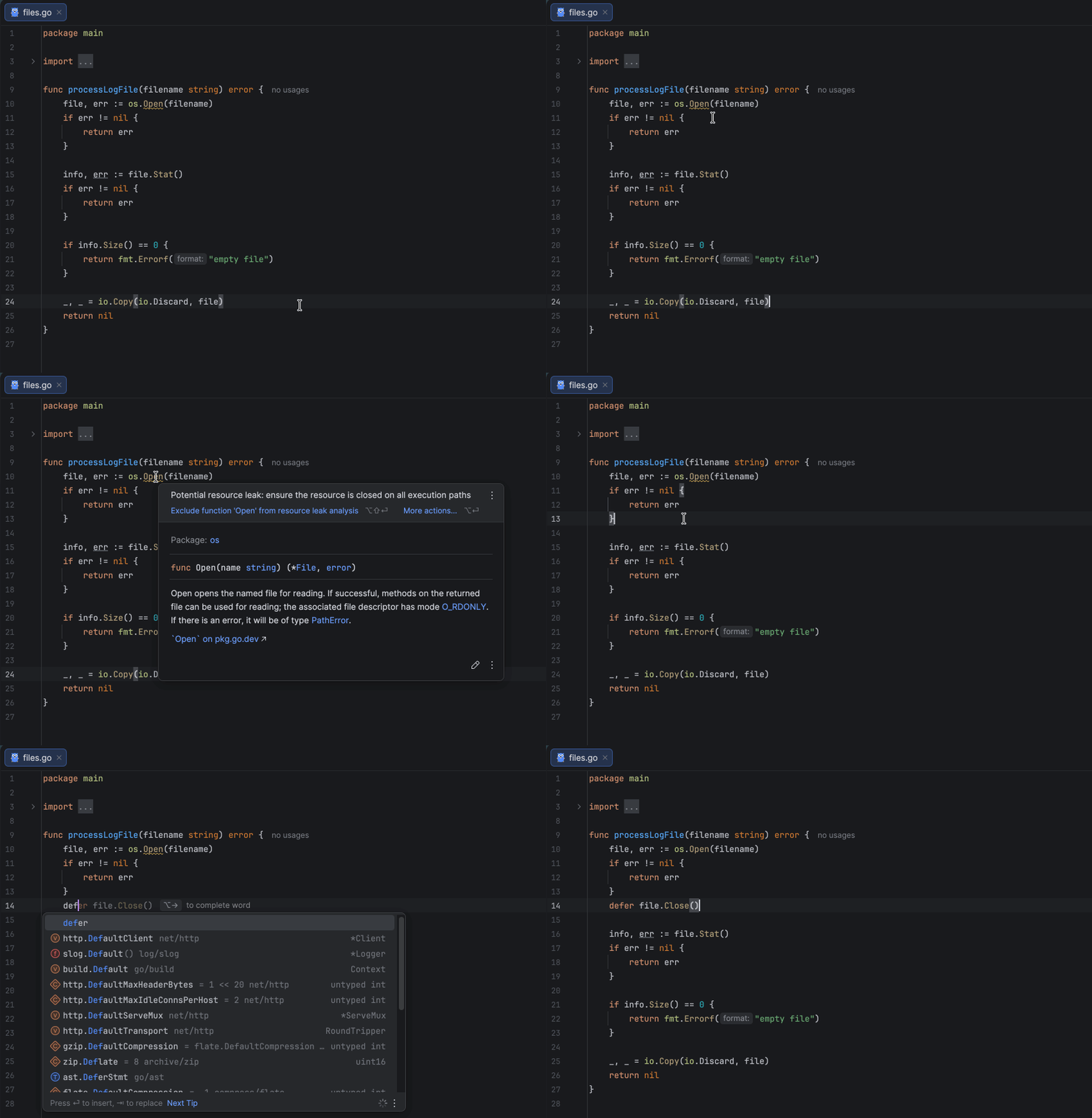
Tip 1: Use defer to close resources

The defer statement ensures that cleanup happens even if a function returns early or panics. As shown in the example below, we close the created resource right after successfully opening it using defer f.Close(), which is one of the simplest and most effective ways to avoid resource leaks.

f, err := os.Open("data.txt")
if err != nil {
    return err
}
defer f.Close()

Since the defer statement executes after the surrounding function’s return, you must handle errors first and only then defer the resource closure. This ensures that you don’t defer operations on invalid or uninitialized resources. Also, avoid placing defer inside loops that create many resources in succession, as this can lead to excessive memory usage.

Tip 2: Test your application under load

Most resource leaks affect your application only under high load, so it’s a good idea to run load and stress tests to see how it behaves. For example, if you’re developing a backend service, you can use load-testing tools like k6, wrk, Vegeta, or others. This testing helps you uncover not only potential resource leaks but also performance bottlenecks and scalability issues before they affect your users.

Tip 3: Use static code analysis tools

Static analysis tools can also help you automatically detect unclosed resources in your code. For instance, golangci-lint includes linters such as bodyclose and sqlclosecheck, which track HTTP response bodies and SQL-related resources to ensure you haven’t forgotten to close them.

Resource leak analysis in GoLand 2025.3 takes this a step further. It scans your code as you write it, verifies that resources are properly closed across all execution paths, and highlights any potential issues in real time. Getting this feedback right in your IDE helps you catch leaks early. Moreover, it works with any type that implements io.Closer, including your custom resource implementations.

When one missing Close() breaks everything

Are resource leaks really that critical? Let’s take a look at two common cases to see how a single missing Close() call can cause serious issues or even break your application over time.

Case 1: Leaking HTTP response bodies

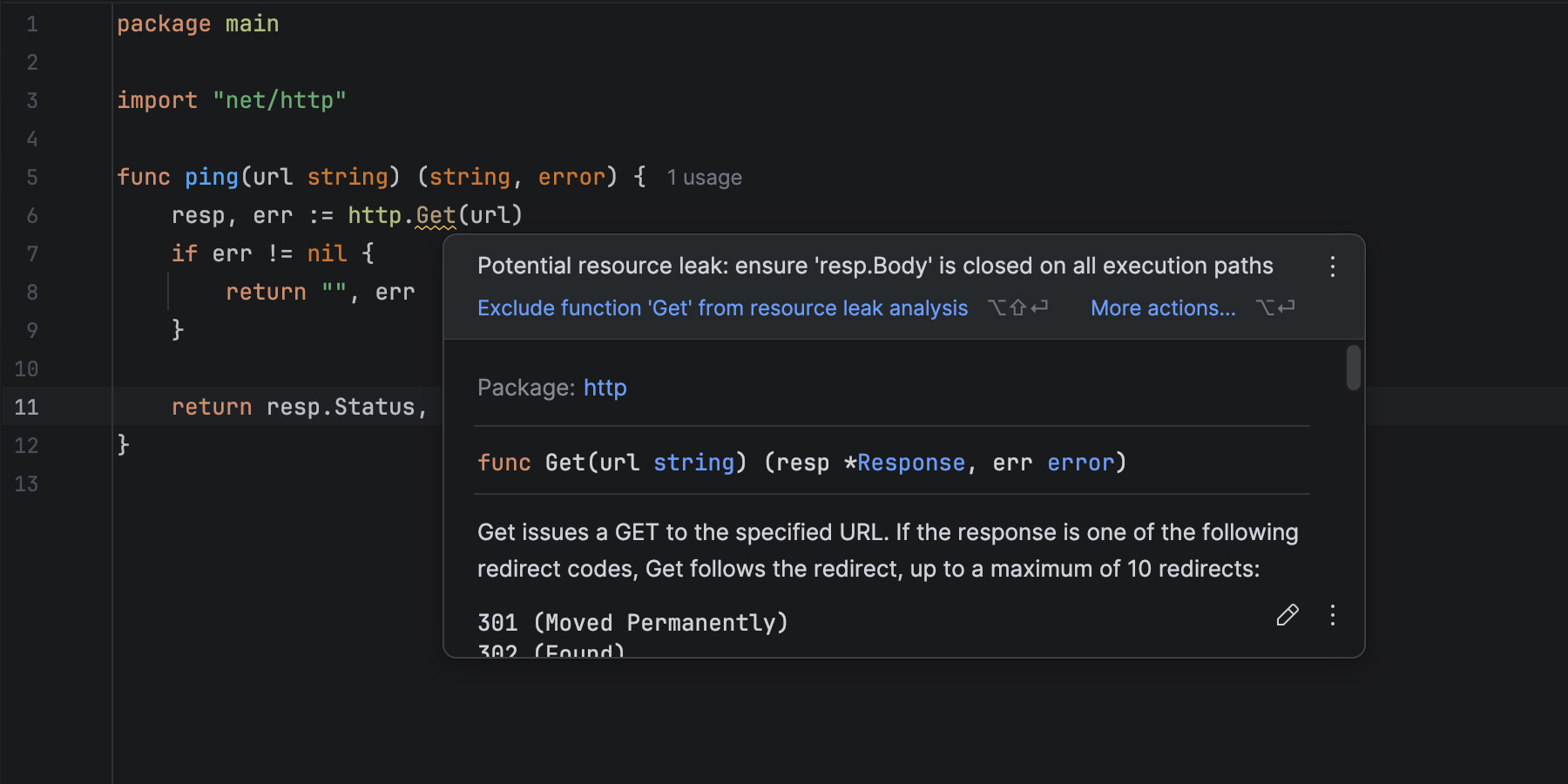
Sending HTTP requests is a common practice in Go, often used to fetch data from external services. Suppose we have a small function that pings an HTTP server:

func ping(url string) (string, error) {
    resp, err := http.Get(url)
    if err != nil {
        return "", err
    }
    return resp.Status, nil
}

When you write code like this, GoLand warns you about a potential resource leak because of an unclosed response body. But why does it do that? We aren’t even using the body in this example!

Well, let’s try running this code and see what happens. To simulate high-load conditions, we can call our function in a loop like this:

var total int
for {
   _, err := ping("http://127.0.0.1:8080/health")
   if err != nil {
      slog.Error(err.Error())
      continue
   }

   total++
   if total%500 == 0 {
      slog.Info("500 requests processed", "total", total)
   }
   time.Sleep(10 * time.Millisecond)
}

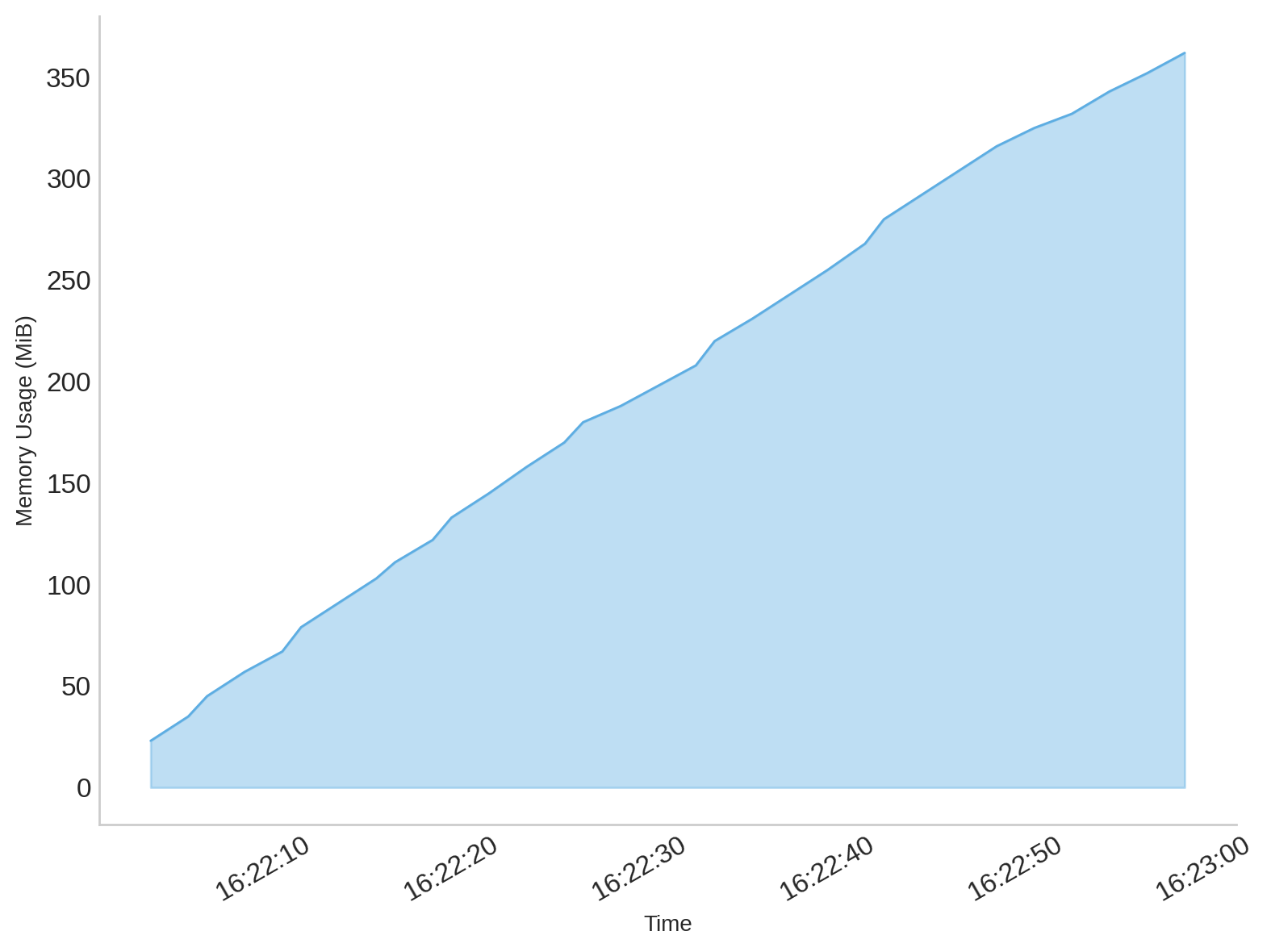
At first glance, everything seems fine – the client sends requests and receives responses as expected. However, if you monitor memory usage, you’ll notice that it gradually increases with every request the program sends, which is a clear indicator that something is wrong:

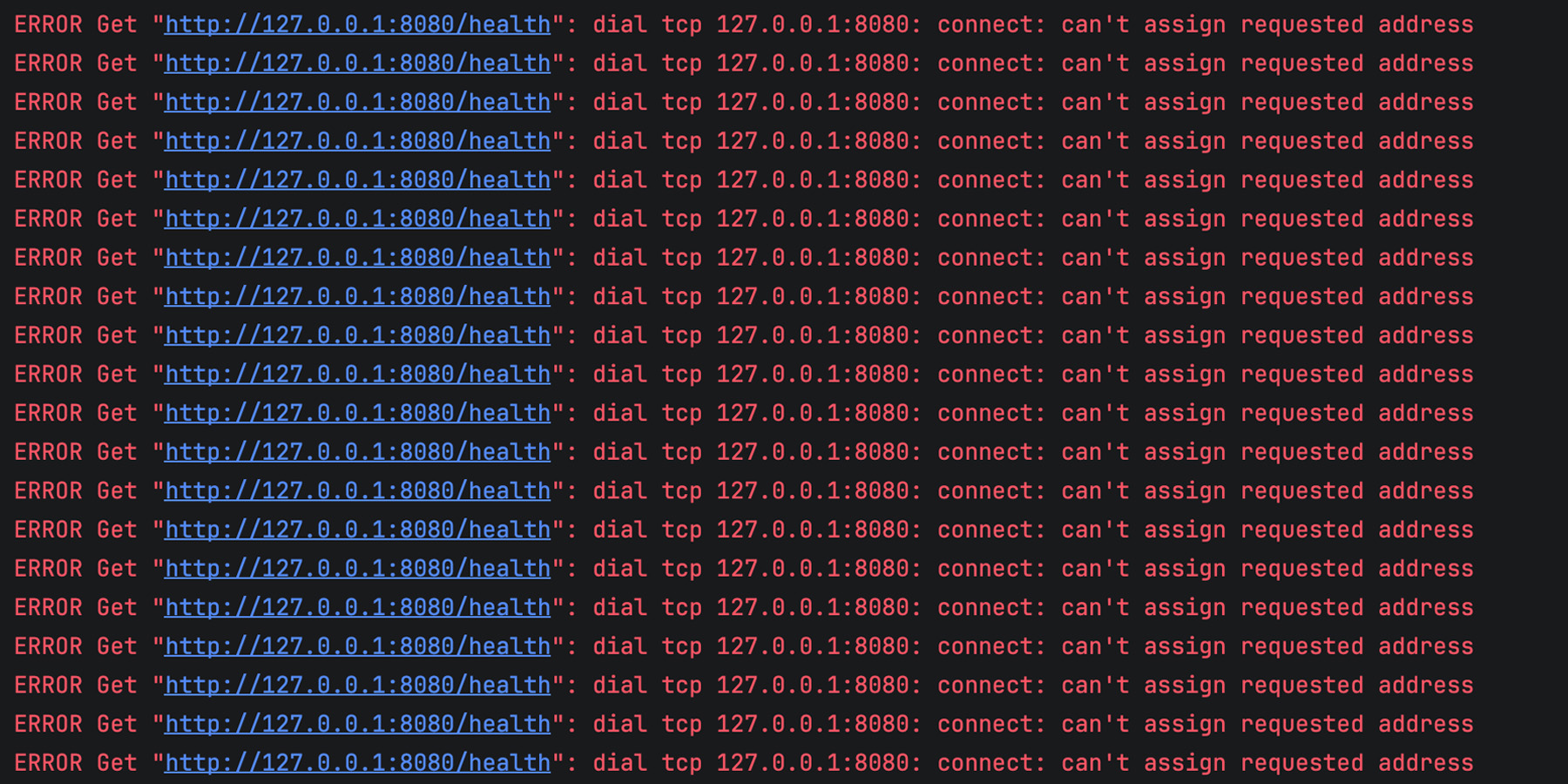
After some time, the client becomes completely unable to send new requests, and the logs start filling up with errors like this:

Why does this happen? When you make an HTTP request in Go, the client sets up a TCP connection and processes the server’s response. The headers are read automatically, but the body remains open until you close it.

Even if you don’t read or use the body, Go’s HTTP client keeps the connection alive, waiting for you to signal that you’re finished with it. If you don’t close it, the TCP connection stays open and cannot be reused. Over time, as more requests are sent, these unclosed connections accumulate, leading to resource leaks and eventually exhausting the available system resources.

That’s exactly what happens in our example. Each iteration of ping() leaves an open response body behind, memory usage grows steadily, and after a while, the client can no longer open new connections, resulting in the can’t assign requested address error.

Let’s correct the mistake and run the code again:

func ping(url string) (string, error) {
    resp, err := http.Get(url)
    if err != nil {
        return "", err
    }
    defer resp.Body.Close() // Important: close the response body

    return resp.Status, nil
}

After applying this fix, the memory footprint remains minimal, and you’ll no longer see the previous errors.

It’s worth mentioning that the code snippet above uses Go’s default http.Client for simplicity, which is generally not recommended in production. By default, it has no request timeout, so a slow or unresponsive server can cause requests to hang indefinitely, potentially leading to stalled goroutines and resource exhaustion. A better practice is to create a custom http.Client with reasonable timeouts to keep your application responsive and resilient under poor network conditions.

Case 2: Forgetting to close SQL rows

Another common and destructive source of leaks in Go applications involves database resources, particularly when using the standard database/sql package. Let’s take a look at a simple function that retrieves user names by country from a database:

func (s *Store) GetUserNamesByCountry(country string) ([]string, error) {
    rows, err := s.db.Query(`SELECT name FROM users WHERE country = $1`, country)
    if err != nil {
        return nil, err
    }

    var names []string
    for rows.Next() {
        var name string
        if err := rows.Scan(&name); err != nil {
            return nil, err
        }
        names = append(names, name)
    }

    rows.Close()

    return names, rows.Err()
}

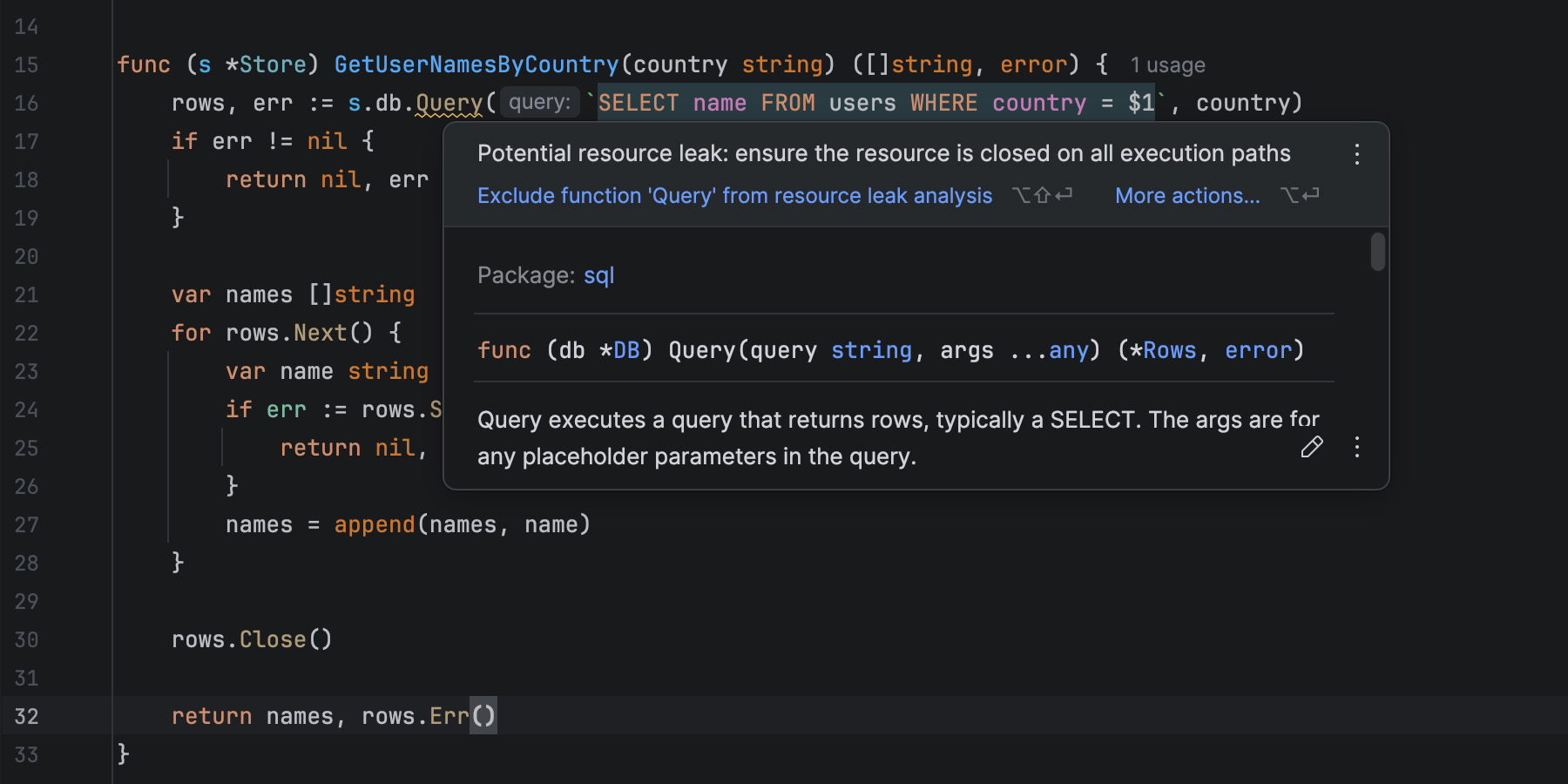
Even though we call rows.Close() explicitly, GoLand still warns us about a possible leak. But why?

Let’s say our table looks something like this:

Have you spotted the problem? That’s right, there’s a user without a name. Мore precisely, there is a NULL instead of a string, and the GetUserNamesByCountry function doesn’t handle such cases properly. When rows.Scan tries to assign a NULL to a Go string variable, it returns an error. Issues like this can happen to anyone, and that nameless user probably ended up in our table by mistake. Still, it may seem that such a small issue couldn’t cause any dramatic consequences. After all, that’s exactly why we tried to handle errors properly, right?

Let’s simulate real conditions by calling the function with different input parameters in a loop:

var total int
for {
    for _, country := range countries {
        _, err := s.GetUserNamesByCountry(country)
        if err != nil {
            slog.Error(err.Error())
            continue
        }

        total++
        if total%100 == 0 {
            slog.Info("100 queries processed", "total", total)
        }
        time.Sleep(10 * time.Millisecond)
    }
}

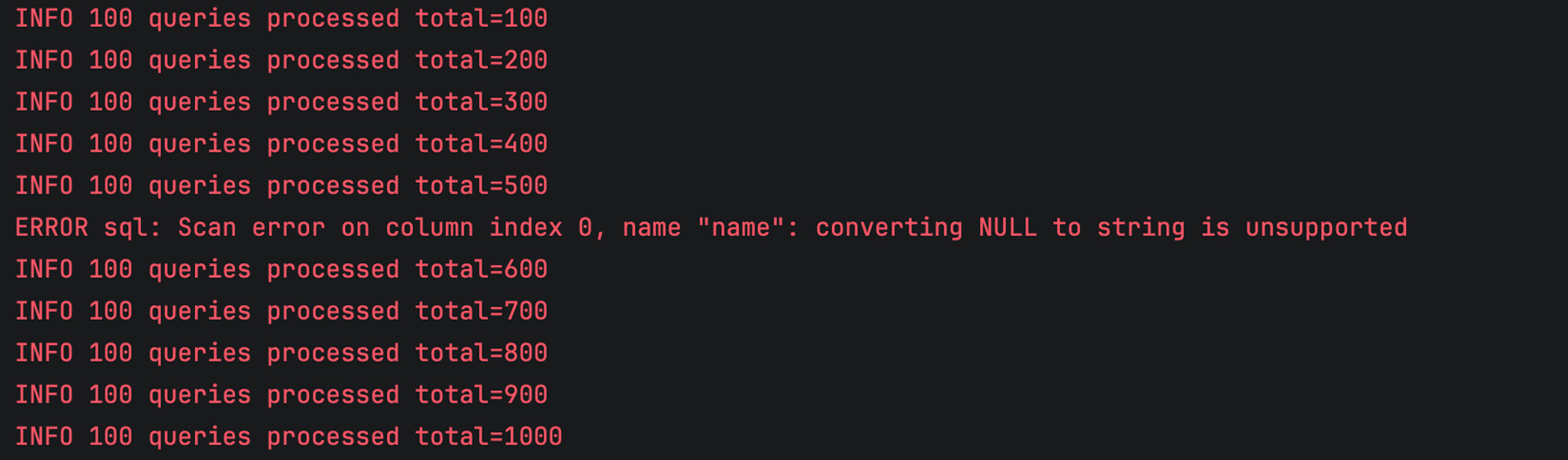
When we launch the program, everything seems fine, and we only get occasional errors as expected:

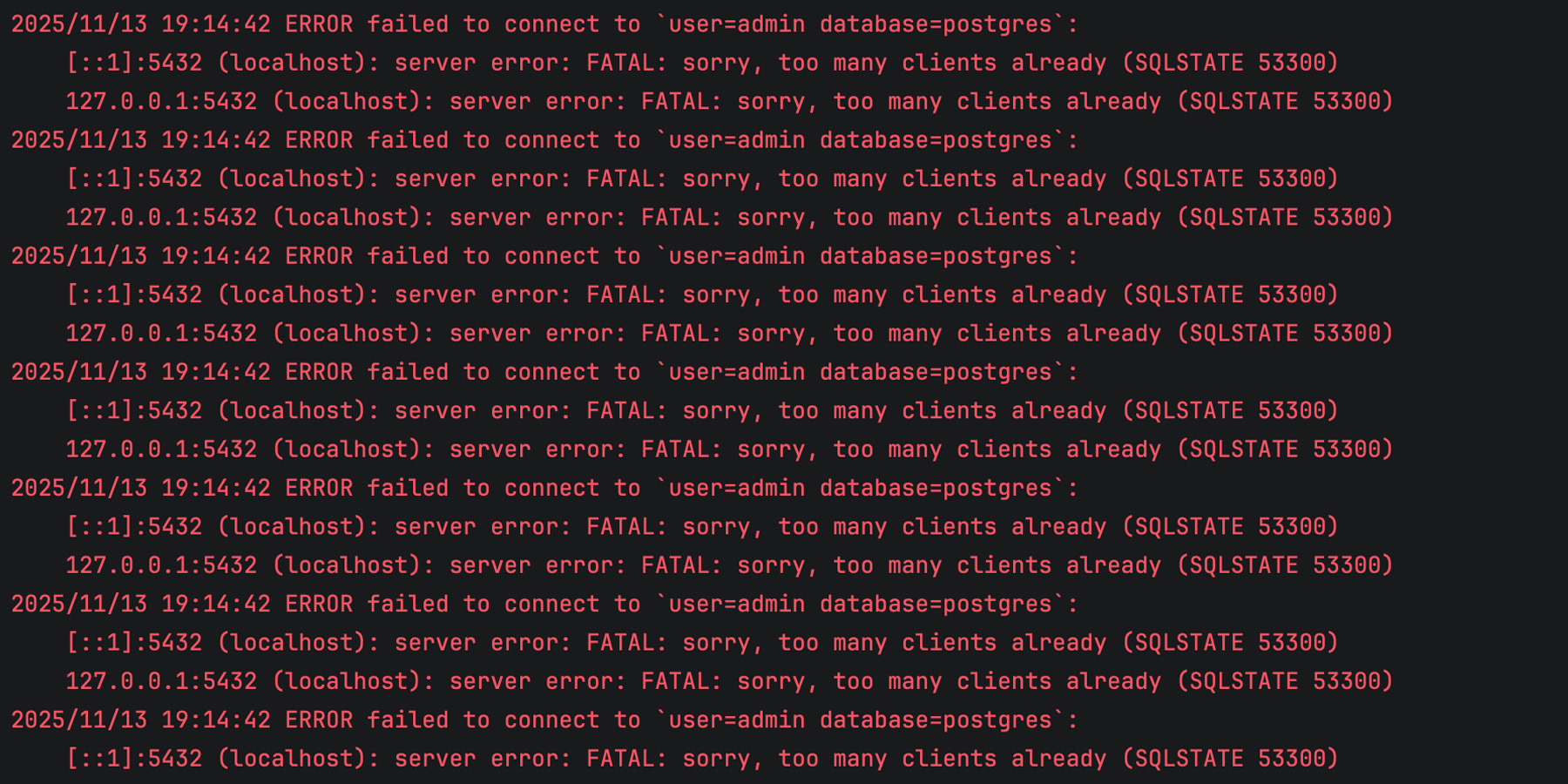
However, after running and processing SQL queries for some time, our program completely breaks down, and the logs are full of errors like this:

We’ve run out of client connections, and our application is unable to retrieve any data from the database!

The issue is that one of the execution paths in GetUserNamesByCountry leaves the query result unclosed when an error occurs during scanning. If rows is not closed, the corresponding database connection remains in use. Over time, this reduces the number of available connections, and eventually, the connection pool becomes exhausted. That’s exactly what happened in our case.

Surprisingly, just one incorrect row in our table is enough to take down the entire application, simply because we forgot to close the resource properly.

The best way to prevent this mistake is to use defer. As we discussed previously, this should be your preferred way of handling resources whenever possible:

func (s *Store) GetUserNamesByCountry(country string) ([]string, error) {
    rows, err := s.db.Query(`SELECT name FROM users WHERE country = $1`, country)
    if err != nil {
        return nil, err
    }
    defer rows.Close() // Important: close the rows using 'defer'

    var names []string
    for rows.Next() {
        var name string
        if err := rows.Scan(&name); err != nil {
            return nil, err
        }
        names = append(names, name)
    }

    return names, rows.Err()
}

Making the invisible visible

There are many ways a resource leak can creep into your program, and the examples above are just the tip of the iceberg. Such mistakes are easy to make and hard to trace. Your code compiles, tests pass, and everything appears to work, until your service slows down or starts failing under load. Finding the root cause can be time-consuming, especially in large codebases.

GoLand’s resource leak analysis makes these issues visible right where they start, as you write code. It tracks how resources are used across all execution paths and warns you if something might remain unclosed. This early feedback helps you quickly identify resources in your code and fix potential leaks right away.

The feature is especially helpful for beginners who are still learning the language and might not yet know which resources require explicit cleanup. Experienced developers benefit as well, since it saves time when working with unfamiliar codebases and custom types that implement io.Closer.

In essence, resource leak analysis turns a subtle, hard-to-detect problem into something you can catch instantly, helping you write more reliable and maintainable Go code.

Keeping your Go applications leak-free

Resource leaks are among the most subtle yet destructive bugs in Go applications. They rarely cause immediate crashes, but over time, they can silently degrade performance, create instability, and even bring down production environments.

By using defer consistently, testing under realistic load, and taking advantage of GoLand’s new resource leak analysis, you can catch these issues early and keep your applications stable and reliable. Try out the new feature in the latest GoLand release and let us know what you think!

Is Your CI/CD Tool Helping or Hindering Performance?

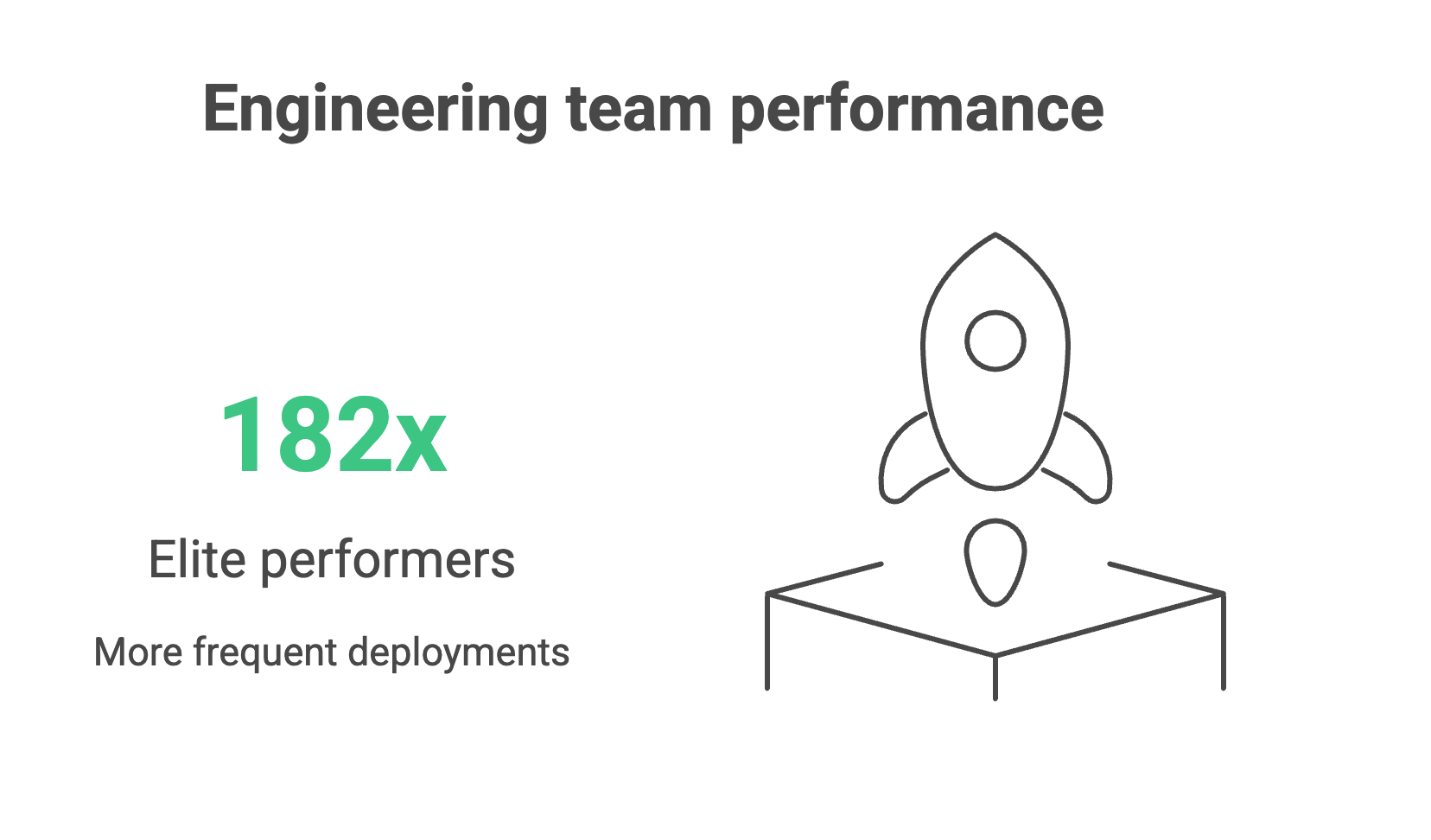
Every engineering leader would love to work with a team of elite performers who deploy 182x more frequently, recover from failures 2,293x faster, and achieve 127x faster lead times than low performers. (Yes, that’s the actual difference in performance of real teams from the 2024 DORA research report).

But how do you improve your team’s performance if you’re nowhere near the elite?

If you’re benchmarking against the four DORA metrics – deployment frequency, lead time for changes, change failure rate, and mean time to recovery – you’ll notice that bottlenecks tend to come from a combination of three things: people, processes, and tooling.

While teams tend to tackle process issues first, and rightly so, engineering leaders should ask whether their teams have the right tools to do their job well.
In fact, the root cause of several process and culture issues often stems from your tooling.

Your CI/CD platform shapes how teams work and how they feel about that work, which in turn affects your organization’s capacity for innovation and risk management. Manual configurations, brittle plugin ecosystems, and limited observability make it difficult to achieve strong DORA scores, regardless of how talented or motivated your teams are.

Teams can spend up to half of their effort maintaining tooling instead of delivering value, creating a “technical debt tax” that grows with every release cycle.

Modern CI/CD platforms with built-in automation, intelligent resource management, and comprehensive observability free engineers to focus on business logic and innovation, creating a compound advantage over time.

This article unpacks how your tooling affects each of the DORA metrics to help you determine whether your CI/CD setup is helping or hindering your team’s performance.

Deployment frequency: The velocity indicator

Deployment frequency measures how often application changes are deployed to production. In other words, how quickly can your teams get value into the hands of customers?

Why it matters

Elite performers deploy to production multiple times per day, while low performers manage only once a month or even less.

Organizations deploying multiple times per day can respond to customer feedback in hours, not quarters. They can experiment with features, validate market hypotheses, and pivot based on real user behavior while competitors plan their next monthly release.

Even if you don’t deploy daily, small, frequent deployments also reduce risk and build customer trust through continuous improvement rather than disruptive “big bang” releases.

Tooling’s impact on deployment

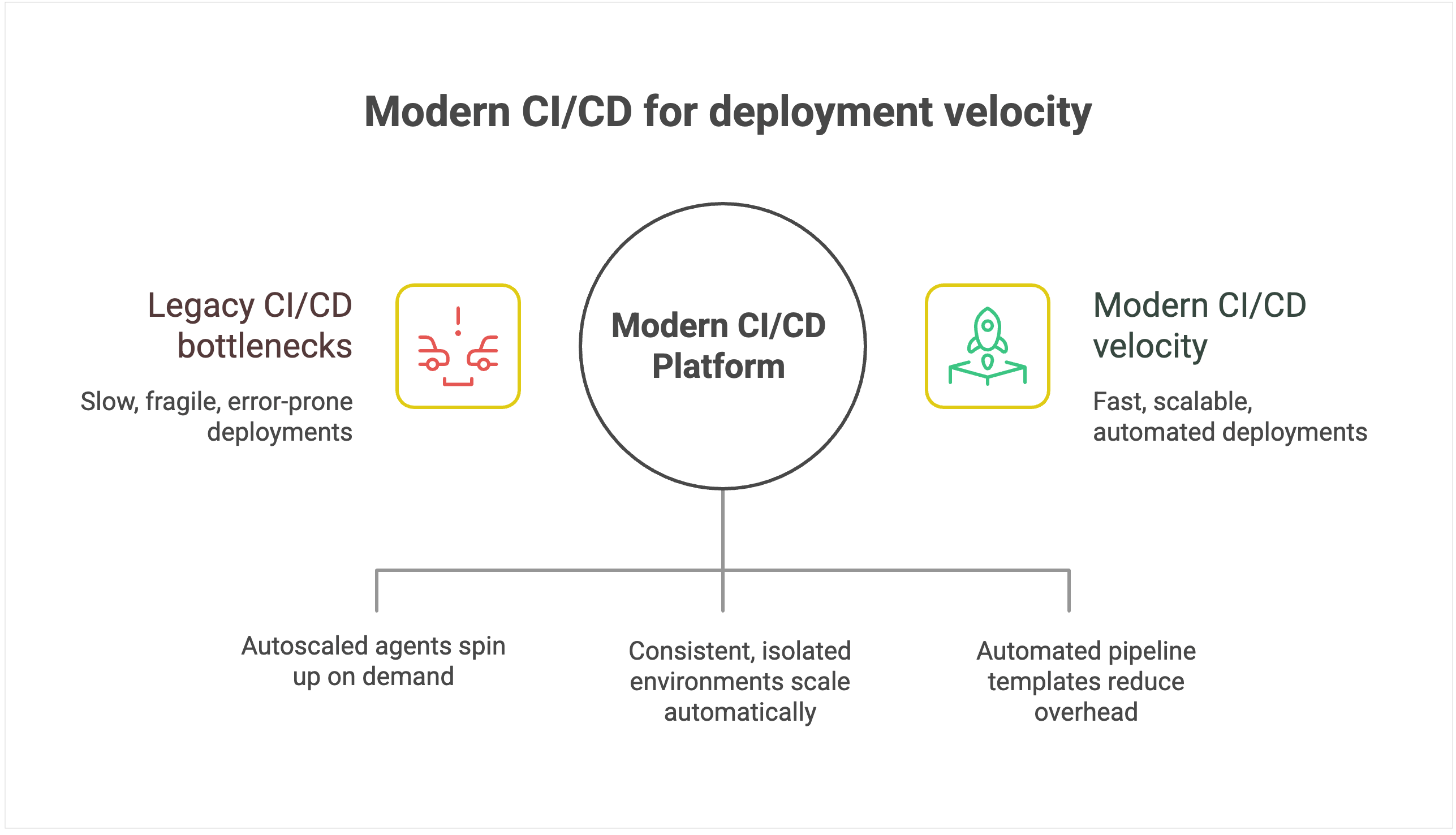
Legacy CI/CD systems create an invisible ceiling on deployment velocity because their architecture introduces scaling bottlenecks. They were designed around static servers, long-lived agents, and plugin ecosystems, which is fine for a handful of apps but fragile when hundreds of pipelines and contributors pile on.

As you scale, build jobs start queuing behind overloaded agents, plugin dependencies break under version mismatches, and pipelines stall while engineers debug infrastructure instead of shipping code. Even as you add more developers, deployment throughput plateaus because the underlying tool can’t keep pace.

Environmental management limitations amplify the problem. Legacy systems typically operate on static environments, which suffer from configuration drift and resource contention as more teams share them.

Conflicts that should be isolated instead spill across projects, forcing serialized releases and rework. What should be a smooth, automated pipeline turns into an error-prone coordination exercise.

Modern CI/CD platforms with configuration as code and automated pipeline templates dramatically reduce maintenance overhead, allowing teams to provision new deployment pipelines in minutes rather than days.

For instance, TeamCity offers ephemeral, autoscaled build agents that spin up on demand in containers or cloud instances, then shut down cleanly when idle.

💡 Read more: Hosting Build Agents in Cloud

Intelligent environment orchestration with containerization support eliminates resource contention. Teams get on-demand access to consistent, isolated environments that scale automatically.

For example, TeamCity runs each build in an isolated container, with configuration declared in version-controlled Kotlin DSL, eliminating drift and ensuring consistency across runs.

Furthermore, smart resource allocation and parallel processing can optimize utilization during peak periods, while built-in scalability handles enterprise growth without degrading performance. This enables the platform to scale transparently while maintaining deployment velocity.

Lead time for changes: From code to customer value

While deployment frequency tells you how often you deliver, lead time for changes shows you how fast. It measures the duration from the moment the code is committed to when it’s running in production.

Why it matters

Elite performers achieve lead times of less than one hour, while low performers require between one week and one month to get code from commit to production.

Reduced lead time means faster time to market for new features and immediate response to competitive pressures. When a critical bug is discovered or a market opportunity emerges, organizations with hourlong lead times can respond the same day, while those with weeklong lead times watch opportunities pass by.

For development teams, shorter lead times create a virtuous cycle of productivity. Developers get faster feedback on their changes, can iterate more quickly, and spend less time context-switching between different features.

Tooling’s impact on lead time

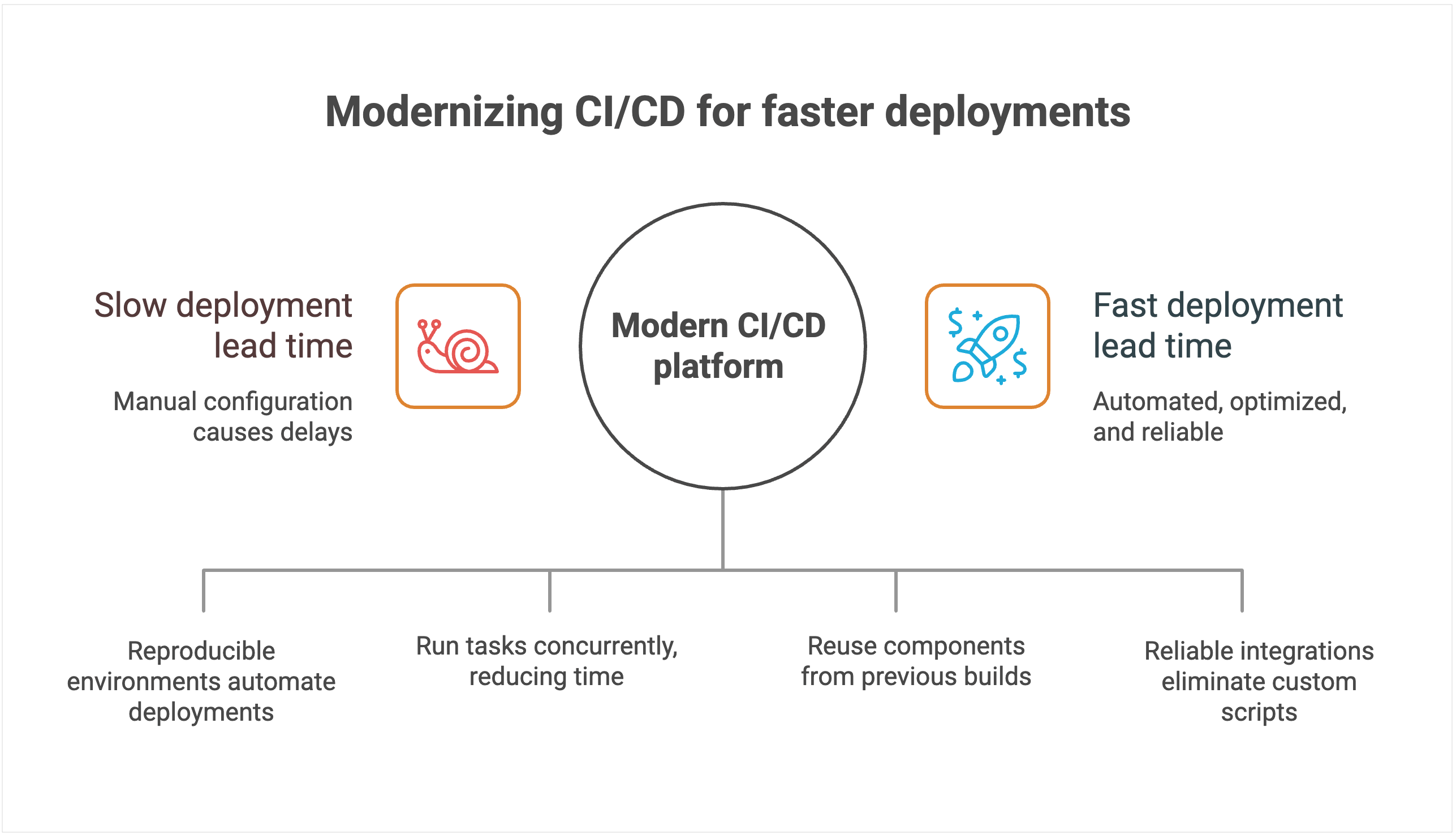
CI/CD systems with manual configuration management create delays and increase the chances of human error. Each deployment often requires someone to manually verify settings, update configurations, and troubleshoot inevitable issues that arise from inconsistent environments.

Heavy reliance on custom scripts and plugins stretches lead time even further. New features or compliance requirements often demand bespoke scripts, which then have to be debugged, reviewed, and maintained.

Pipelines break whenever dependencies change or plugins fall out of sync, forcing developers to stop feature work and fix tooling instead. Instead of commits flowing quickly into production, changes queue up behind brittle automation, extending lead time and making delivery unpredictable.

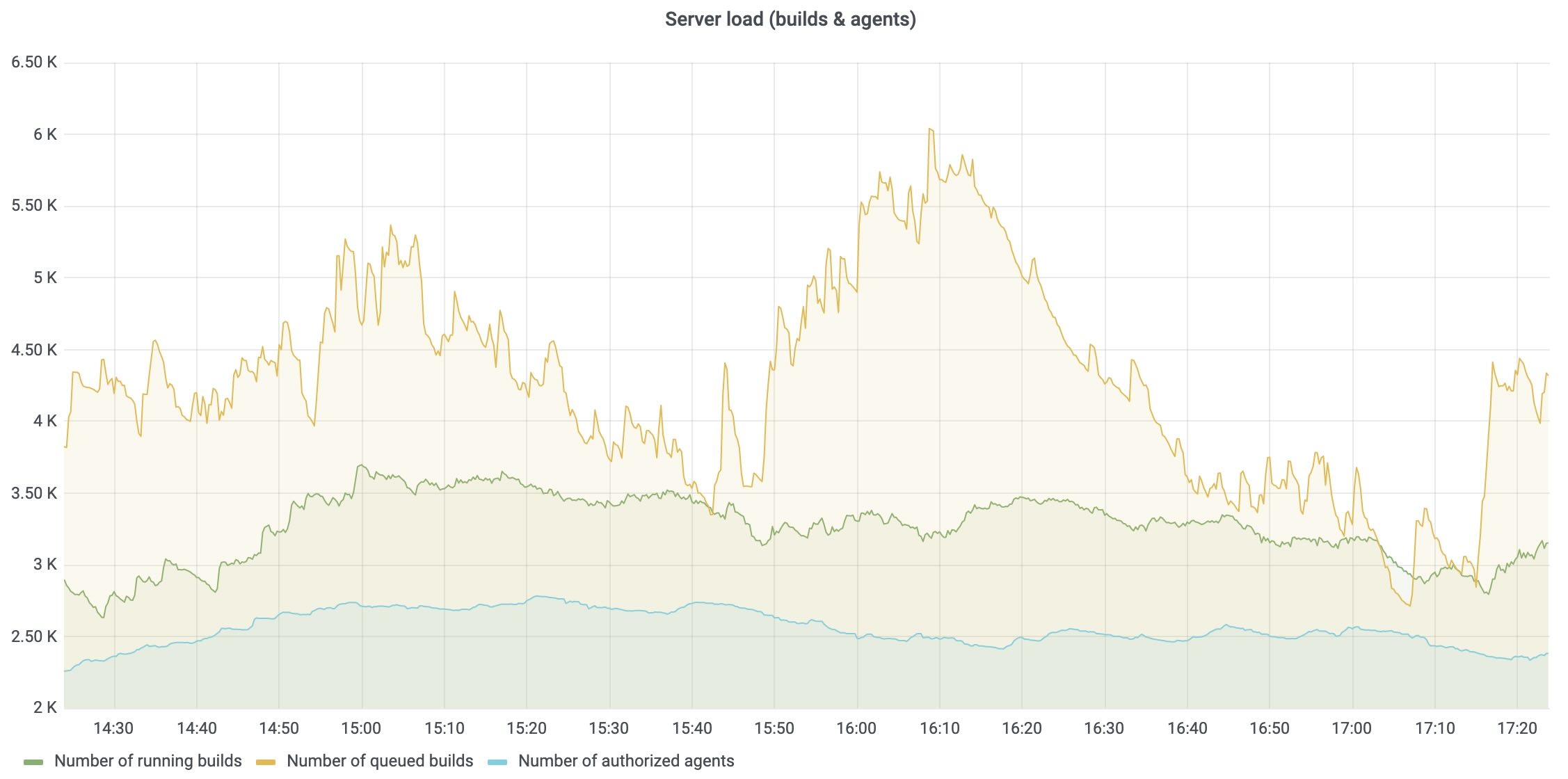
The lack of intelligent resource allocation compounds these problems. Build queues grow during peak usage periods, forcing teams to wait for available resources. Without smart scheduling and parallel processing capabilities, even simple changes can sit idle for hours while the system processes other jobs sequentially.

💡Read more: Solving the CI/CD Build Queue Bottleneck Problem

By contrast, modern platforms use declarative configuration and environment-as-code principles. Deployments land in reproducible environments automatically, cutting out manual checks and accelerating lead time.

Modern platforms are also architected to minimize lead time through intelligent automation and resource optimization.

For instance, TeamCity’s advanced parallel processing capabilities automatically identify opportunities to run tasks concurrently, dramatically reducing total pipeline execution time. Instead of waiting for sequential steps to complete, multiple processes run simultaneously whenever dependencies allow.

Native dependency management and intelligent caching eliminate redundant work. The platform automatically identifies which components have changed and which can be reused from previous builds, significantly reducing build times for incremental changes. This intelligence extends to test execution, where only relevant test suites run based on code changes.

Seamless integrations with modern development tools eliminate the custom scripting overhead. Instead of maintaining brittle connectors between disparate tools, teams get native integrations that work reliably without needing ongoing maintenance. Smart resource allocation and cloud bursting capabilities prevent queue delays by automatically scaling compute resources during peak usage periods.

Change failure rate: Quality under pressure

Shipping faster is only an advantage if your releases are reliable. Change failure rate measures the percentage of deployments that require immediate remediation, whether through hotfixes, rollbacks, or patches. It captures both engineering quality and business risk.

Why it matters

Elite performers achieve change failure rates of 0–15 percent, while low performers experience 30 percent or higher failure rates.

Each deployment failure carries significant business costs beyond the immediate technical impact. Industry estimates suggest that application downtime costs IT enterprises an average of $5,600 per minute. Beyond direct revenue loss, each failed deployment results in lost customer trust.

The operational costs of failed deployments also compound quickly. Engineering teams must context-switch from planned work to emergency remediation. Customer support teams field complaints and escalations.

Sales teams face difficult conversations with prospects and existing customers. The ripple effects of a single deployment failure can impact organizational productivity for days.

Also, high change failure rates create a culture of fear around deployment. Teams become risk-averse, deploy less frequently, and accumulate technical debt. This defensive approach makes the system more fragile and failures more catastrophic when they do occur.

Tooling’s impact on quality

CI/CD systems with limited native-testing-integration capabilities force teams to rely heavily on third-party plugins and custom integrations. Each plugin introduces potential failure points, version-compatibility issues, and maintenance overhead that can compromise testing reliability.

Manual testing orchestration creates dangerous gaps in coverage and consistency. Without automated test selection and execution based on code changes, teams either run exhaustive test suites that slow deployment, or they skip critical tests that could catch failures.

To add to that, the human element in test coordination introduces variability. What gets tested depends on who’s managing the deployment and how much time pressure they’re under.

Systems without sophisticated rollback mechanisms create further issues when failures do occur. For example, rolling back might require manual intervention, custom scripts, and coordination across multiple systems. In these cases, database rollbacks, infrastructure changes, and configuration updates must be handled separately, which extends recovery time and increases the risk of incomplete remediation.

Perhaps most importantly, poor observability makes it nearly impossible to predict and prevent deployment failures. Without comprehensive monitoring and intelligent alerting, teams operate blindly, discovering problems only after customers are affected.

Modern CI/CD platforms treat quality as a first-class requirement, not an afterthought. Comprehensive testing-framework integration ensures thorough quality validation with minimal setup overhead. The platform is intelligent enough to automatically orchestrate appropriate test suites based on code changes, run tests in parallel to minimize time impact, and provide clear feedback on test results and coverage.

Instead of offering a one-size-fits-all rollback button, modern platforms provide the building blocks for creating robust, automated rollback workflows. That includes support for reverting not just code but also database schema changes and infrastructure configurations.

When failures occur, teams can wire these primitives into automated pipelines that trigger and coordinate rollbacks across all affected systems, ensuring complete and consistent remediation. This approach dramatically reduces mean time to recovery and minimizes the scope of customer impact.

Advanced monitoring and alerting systems provide early warning capabilities that can prevent failures from reaching production. By correlating deployment activities with system performance metrics, these platforms can detect anomalies and automatically halt deployments before they cause customer-facing issues.

Mean time to recovery: Resilience when things go wrong

Even the best teams know that failures are inevitable. What sets elite performers apart from the rest is how quickly they recover. Mean time to recovery (MTTR) measures the average duration required to restore service when a deployment goes wrong.

Why it matters

The difference in performance for MTTR is stark: Elite performers restore service in less than one hour, while low performers require between one week and one month to fully recover from deployment-related incidents.

MTTR capability determines your organization’s overall resilience and risk profile. Faster recovery protects revenue by minimizing downtime costs, preserves customer trust by demonstrating operational competence, and safeguards brand reputation by preventing minor incidents from becoming public relations disasters.

Organizations with elite MTTR performance can take calculated risks and deploy more frequently because they have confidence in their recovery capabilities.

Tooling’s impact on recovery

CI/CD systems that turn incident response into a manual, error-prone process extend downtime. Manual rollback calls for custom pipeline scripts and plugin coordination, which introduces complexity and risk precisely when teams need speed and reliability.

Limited visibility into pipeline execution makes root cause identification painfully slow. Without comprehensive logging, distributed tracing, and correlation between deployment activities and system performance, teams resort to guesswork and trial-and-error debugging. This blind troubleshooting results in extended recovery time and the increased likelihood of incomplete fixes that cause recurring issues.

The lack of automated recovery mechanisms forces organizations to rely entirely on human intervention during high-stress situations. Poor integration with monitoring and alerting systems compounds these problems by delaying incident detection. Teams often learn about failures from customers rather than proactive monitoring.

Instead, you want to use a CI/CD platform that offers automated, intelligent response capabilities. For instance, TeamCity’s built-in observability for the CI/CD platform itself tracks server load, agent utilization, build queue health, and pipeline performance. These metrics can be exported to Prometheus and visualized in Grafana so that platform teams can monitor their CI/CD backbone alongside application and infrastructure metrics.

Most modern CI/CD platforms are built with high availability in mind, using multinode configurations and automated failover mechanisms to prevent the system itself from becoming a single point of failure.

This resilience means that even during incidents, the deployment system remains operational, allowing teams to focus on recovery without worrying about the platform going down simultaneously.

Seamless integration with enterprise monitoring and alerting systems makes rapid incident detection and automated response workflows possible.

For instance, teams can connect TeamCity’s metrics to existing monitoring stacks so that anomaly detection triggers rollback procedures automatically, often before customers feel the impact.

Conclusion

CI/CD platforms that require extensive customization, external plugins, and specialized expertise increase operational overhead and introduce security risks, holding your team back.

The strategic advantage belongs to organizations that modernize their CI/CD approach with integrated platforms designed for enterprise scale and elite performance.

Even if you know your legacy solution is holding you back, at what point does it warrant the pain of migration? For some teams, the return on investment is not worth the effort.

To make an informed decision, you must quantify the risks of staying with your legacy system compared to the rewards of migration.

This article was brought to you by Kumar Harsh, draft.dev.

Hyperskill Gets Its Own Plugin Inside JetBrains IDEs

Hyperskill is introducing its own free dedicated plugin inside JetBrains IDEs. This new plugin is built specifically for the Hyperskill learning experience and replaces the previous integration inside the JetBrains Academy plugin. Starting December 11, Hyperskill courses will be available exclusively through the new Hyperskill Academy plugin. 

The new Hyperskill Academy plugin provides a more focused and consistent learning environment with all features, tasks, and settings conveniently located in one place. It is designed and maintained directly by the Hyperskill team.

What you’ll get with the new plugin:

  • A unified environment aligned with the Hyperskill platform.
  • Faster updates, improvements, and fixes.
  • Simpler navigation in a single dedicated plugin.

This makes learning smoother and more intuitive, especially for long-term projects.

If you’re currently using Hyperskill courses through the JetBrains Academy plugin, here’s what you need to know and what to do next.

What changes

  • You’ll need to install the new free Hyperskill Academy plugin from the Marketplace tab in IDE, available after December 11.
  • The JetBrains Academy plugin will remain available for JetBrains Academy learning courses and Coursera, but it will no longer include Hyperskill courses and projects after the upcoming update. 
  • Your existing Hyperskill projects will still work. No manual migration is needed – your progress and projects will stay safely on Hyperskill and appear automatically once you sign in.

How to continue using Hyperskill courses

The new Hyperskill Academy plugin will be available after December 11, and you’ll be able to install it in your IDE:

  • Update the JetBrains Academy plugin to the latest version.
  • Install the new Hyperskill Academy plugin from the Marketplace tab in IDE.
  • Sign in with your Hyperskill account via Settings/Preferences | Tools | Hyperskill.
  • Open your projects and continue learning right where you left off.

No manual migration is needed – your progress and projects will stay safely on Hyperskill and appear automatically once you sign in.

We understand that you might have questions regarding this change, so we’ve prepared an FAQ list to address the most common topics.

What will happen to the JetBrains Academy plugin?

The JetBrains Academy plugin will continue to support JetBrains Academy learning courses, but Hyperskill projects will no longer be part of it. For Hyperskill courses and projects, use the new Hyperskill Academy plugin. We recommend updating the JetBrains Academy plugin as usual. This will allow both plugins to work without issues.


When will the Hyperskill plugin be available?

You’ll be able to install the new Hyperskill plugin starting December 11, 2025. Make sure to switch to the Hyperskill Academy plugin right away, as Hyperskill courses won’t be supported in the JetBrains Academy plugin after this date.

How will I be notified when the Hypserkill Academy plugin is live?

On the Hyperskill platform: You’ll see a banner with a direct install button on the Study plan page.

Inside the JetBrains Academy plugin: After updating the plugin, you’ll see in‑plugin messages with guidance once the release is live.

Will this affect my IDE settings?

No. Your IDE preferences (themes, fonts, keymaps, and third‑party plugins) won’t change. Our plugin works on top of your current setup.

Will my existing projects on Hyperskill still work after installing the Hyperskill Academy plugin? 

Yes. You can open and continue working on your existing Hyperskill projects after installing the new plugin – no migration required.

Who should I contact if I have questions about the new Hyperskill Academy plugin?
Please reach out to Hyperskill Support, or send an email to hello@hyperskill.org. 

We’re sure this update will elevate your learning experience and make working with Hyperskill even more seamless and efficient.

Happy learning!

The JetBrains Academy team