AWS Control Tower 4.0: A New Look at Landing Zones

AWS Control Tower has long been the preferred solution for implementing governance based on AWS best practices, though it can be a controversial topic among SREs and Platform Engineers. With the release of Landing Zone 4.0, Control Tower takes a step forward, giving more flexibility in managing accounts and Organizational Units (OUs). This makes both greenfield and brownfield deployments easier to adopt and operate. Overall, it’s a positive development for AWS Control Tower, even though some challenges and areas for improvement still remain.

I want to preface this by saying that this blog post focuses on the direction AWS Control Tower is heading, rather than the specifics of the 4.0 release. Ideally, I wish there would have been a longer period where both 3.3 and 4.0 were available for new deployments. From what I understand, AWS Control Tower aims to support deployments via APIs, but the rollout highlighted that a more structured release process isn’t fully in place yet, which caught many users by surprise.

Native OU and Account Management

One of the biggest enhancements in Control Tower 4.0 is the shift from a rigid, Control Tower-managed model to a more native AWS Organizations-centric approach. Previously, setting up Control Tower required specifying the name of the security OU during deployment, and Control Tower would create it and manage all accounts in it.

Now, instead of being forced to have Control Tower create the security OU, you can leverage pre-existing OUs directly into Control Tower. This allows organizations to retain control over their OU structure, integrate existing organizational hierarchies, and better align with their naming conventions and internal governance practices.

This change is particularly advantageous for brownfield deployments, where customers have already implemented multi-account best practices. Existing OUs and accounts can now be seamlessly integrated into Control Tower without the need to restructure everything around the traditional Control Tower manifest and Account Factory model.

Auto-Enrollment: Flexibility Meets Automation

Control Tower 4.0 also takes advantage of the relatively new auto-enrollment capabilities. With auto-enrollment, accounts moved into an OU registered with Control Tower using the Control Tower Baseline are automatically enrolled and provisioned with required resources. By automatically enrolling accounts into Control Tower as they are created or detected within AWS Organizations, teams no longer need to rely on manual workflows or one-off processes to apply guardrails. This ensures that baseline security, logging, and compliance controls are consistently enforced from day one, reducing the risk of configuration drift or unmanaged accounts operating outside of governance boundaries. All that is required is you move an AWS Account into a Control Towered registered OU. To unenroll, simply move the account into an OU that is not registered in AWS Control Tower.

Note: Auto-enrollment is also available in Control Tower Landing Zone 3.3. You do not need to upgrade your Landing Zone to 4.0 to start using. Simply go into the setting of your Control Tower Landing Zone and enable it.

Auto enrollment also helps organizations keep up as their environments grow. Whether adding new accounts through expansion, mergers, or acquisitions, auto enrollment makes it easier to maintain governance without piling on extra administrative work. Platform teams can spend less time managing account lifecycles, and security or compliance teams get better visibility into which accounts meet organizational standards. Overall, it helps make a multi-account AWS environment more consistent and easier to manage, even if it’s not a perfect solution.

Warning: Auto enrollment is an asynchronous process. When moving accounts in the web console give time for Control Tower to successfully process the enrollment/unenrollment of the AWS account. It is not perfect, but it is getting better…be patient.

Account Factory Not Required

These changes mark a continued shift in operational philosophy to account vending. With auto enrollment and ability to register/reregister entire OUs, Control Tower no longer requires for individual AWS accounts to be provisioned through Account Factory. In my opinion this is great as I no longer have to worry about Service Catalog products and all the troubles that can be associated with that.

Note: AWS Config is still required to be created by Control Tower. So if you are moving accounts into AWS Control Tower, you will need to ensure they do not have Config already set up.

Instead Control Tower appears to be embracing a more natural workflow via AWS Organizations:

  • Accounts can be created natively in AWS Organizations.
  • They can be moved into the appropriate OUs registered in AWS Control Tower.
  • Once in the OU, accounts are automatically enrolled and resources are provisioned according to Control Tower guardrails and baselines.

Note: Automation teams still need to consider Service Catalog portfolio access during register/reregistering OUs. Even if Account Factory is not used for the AWS accounts in the OU, Control Tower still does a permission check on the IAM role/user to validate they have access to the Service Catalog portfolio.

This approach lets organizations use CloudFormation StackSets, EventBridge rules, and other services tied to AWS Organizations to deploy and manage resources across multiple accounts. It helps make multi-account setups a bit smoother and easier to keep in check, without all the manual work.

Changes in Control Tower Setup with LZ 4.0

While these enhancements bring greater flexibility, they do introduce some changes to the setup process:

  • Pre-staging of Organization resources is now required prior to deployment.
  • Logging architecture has changed: LZ 4.0 uses two separate buckets in the Log Archive account—one for CloudTrail and another for AWS Config. Earlier versions (3.3 and below) used a single bucket. Customers will need to ensure that tools and pipelines referencing logs are updated to account for this split. The original bucket continues to be used for CloudTrail, so existing operations can remain intact.
  • The role AWSControlTowerCloudTrailRole uses an IAM AWS managed policy now instead of an inline policy. Even if permissions are exactly the same, you will encounter issues with this role if the managed policy isn’t attached.
  • Control Tower has an updated data structure for the manifest file
    • Logging is now broken out into two different objects in the manifest
      • CloudTrail will retain the old bucket in the log archive account if you are upgrading
      • Config will get a new separate bucket in the log archive account.
  • You no longer give the name of security Organization Unit to create; instead it is assumed that both the log archive and audit accounts will exist in one OU.
  • AWS Config aggregator is setup and it uses trusted delegation for AWS Organizations
  • The manifest is optional.
  • After upgrading from 3.3 to 4.0, you may need to update your baselines. For most baseline versions, the version went from 4.0 to 5.0 which is confusing to say the least.

More details on changes can be found here.

Upgrade Process

Upgrading from Control Tower 3.3 to 4.0 is generally smooth if you consider all the changes from above. Though it can take time as several asynchronous operations complete. Planning for potential delays in provisioning and enrollment tasks is recommended.

The upgrade process is fully supported through API, which can significantly reduce complexity and save time when orchestrating upgrades, enrollment, and provisioning tasks programmatically. However, when using the API to update, you will need to review the Control Tower manifest and remap some of the current configurations to the new structure.

Conclusion

Control Tower 4.0 seems to be heading in a better direction for managing multi-account governance, working more closely with the native features of AWS Organizations. By enabling pre-existing OU imports, auto-enrollment, and a more natural account provisioning workflow, organizations gain:

  • Greater flexibility in OU and account structure
  • Easier integration for brownfield deployments
  • Alignment and enhanced operational and security automation through StackSets, EventBridge, Controls Catalog, and other organization-targeted services

Don’t get me wrong—there were some issues with the rollout and a few bumps still need smoothing out, but overall, Control Tower 4.0 is heading in the right direction.

Thwarting Data Breaches: A Cybersecurity Solution Case Study

Thwarting Data Breaches: A Cybersecurity Solution Case Study

The Problem

In the digital age, data breaches have become a common yet devastating issue for many organizations, leading to the loss of sensitive information and eroding customer trust. Our client, a mid-sized e-commerce platform, faced a sophisticated cyber-attack that compromised user data and threatened the integrity of their business operations.

Our Approach

Understanding the urgency of the situation, we proposed an advanced cybersecurity solution tailored to the e-commerce domain. Our strategy involved deploying a multi-layered security architecture, enhancing data encryption, and implementing real-time threat detection mechanisms.

Architecture

[Client Network] --> [Firewall] --> [Intrusion Detection System] --> [Web Application Firewall] --> [Data Server]

This architecture aimed to create a robust defense perimeter around sensitive data, minimizing the risk of breaches.

Implementation

We integrated several key technologies and practices, such as:

  • HTTPS Everywhere: Ensuring all data in transit is encrypted.
  • Advanced Encryption Standard (AES) for data at rest: This safeguarded the stored data from unauthorized access.
  • Real-time Threat Detection: Leveraging AI and machine learning algorithms to identify and neutralize threats instantly.

Code Snippets

Enabling HTTPS in Apache

<VirtualHost *:443>
  ServerName www.example.com
  SSLEngine on
  SSLCertificateFile /path/to/your_certificate.pem
  SSLCertificateKeyFile /path/to/your_private.key
  SSLCertificateChainFile /path/to/your_chain.pem
</VirtualHost>

Implementing AES Encryption in Python

from Crypto.Cipher import AES
import os

def encrypt_message(message):
    secret_key = os.urandom(16) # Generates a random key
    cipher = AES.new(secret_key, AES.MODE_CFB)
    msg = cipher.iv + cipher.encrypt(message.encode('utf-8'))
    return msg

Challenges

During implementation, we faced challenges including:

  • Performance Degradation: The enhanced security measures initially slowed down the website’s performance.
  • False Positives: Our threat detection system sometimes flagged legitimate activities as threats.

Solutions

To overcome these issues, we optimized our encryption algorithms and adjusted the sensitivity of our threat detection algorithms, striking a balance between security and performance.

Results

Post-implementation, the client experienced a significant reduction in security incidents, with no successful data breaches reported. The enhanced security measures also restored customer trust and compliance with data protection regulations.

Key Takeaways

This case study underscores the importance of a holistic cybersecurity strategy, combining technology, processes, and people to protect against sophisticated cyber threats.

Caching with Redis: Boosting Application Performance

Caching with Redis: Boosting Application Performance

In the world of software development, performance is paramount. Users expect applications to be fast, responsive, and reliable. One of the most effective techniques for achieving these goals is caching. This blog post will delve into the concept of caching and specifically focus on how Redis, a powerful in-memory data structure store, can be leveraged to significantly enhance application performance.

What is Caching?

At its core, caching is the practice of storing frequently accessed data in a temporary, faster storage location than the original source. The goal is to reduce the need to repeatedly fetch data from slower, more resource-intensive sources, such as databases or external APIs.

Imagine you’re frequently looking up the same book in a large library. Instead of walking to the stacks every time, you could keep your most-referenced books on your desk. This is analogous to caching: the desk represents the cache, and the library stacks represent the original data source. Accessing the books on your desk is much faster than retrieving them from the library.

Why is Caching Important for Applications?

Applications often interact with various data sources. Retrieving data from these sources can involve network latency, disk I/O, and complex query processing, all of which contribute to slower response times. Caching addresses these bottlenecks by:

  • Reducing Latency: By serving data from memory, which is significantly faster than disk or network access, applications can respond to user requests much more quickly.
  • Decreasing Database Load: Offloading read requests from the database to a cache reduces the burden on the database server. This can improve overall database performance and scalability, preventing it from becoming a bottleneck.
  • Improving User Experience: Faster response times lead to a better user experience, increasing engagement and satisfaction.
  • Lowering Infrastructure Costs: By reducing the load on backend systems like databases, you may be able to scale down infrastructure, leading to cost savings.
  • Handling Traffic Spikes: Caches can absorb a significant portion of read traffic, making applications more resilient to sudden surges in user activity.

Introducing Redis

Redis (Remote Dictionary Server) is a popular, open-source, in-memory data structure store that can be used as a database, cache, and message broker. Its key advantages for caching include:

  • Speed: Being an in-memory data store, Redis offers extremely low latency for read and write operations.
  • Versatility: Redis supports a rich set of data structures beyond simple key-value pairs, including strings, lists, sets, sorted sets, hashes, and bitmaps. This allows for more sophisticated caching strategies.
  • Persistence: While primarily in-memory, Redis offers configurable persistence options (RDB snapshots and AOF logs) to ensure data durability in case of restarts.
  • Scalability: Redis can be scaled horizontally using clustering for high availability and increased read/write throughput.
  • Features: It provides features like publish/subscribe messaging, transactions, and Lua scripting, which can be useful in caching scenarios.

Common Caching Strategies with Redis

Let’s explore some common patterns for using Redis as a cache:

1. Cache-Aside Pattern

This is the most common and straightforward caching strategy. In this pattern, the application is responsible for managing the cache.

How it works:

  1. Read Operation:

    • The application first checks if the desired data exists in the Redis cache.
    • Cache Hit: If the data is found in the cache, it’s returned directly to the application, and no database interaction occurs.
    • Cache Miss: If the data is not found in the cache, the application retrieves it from the primary data source (e.g., a database). The application then stores this retrieved data in the Redis cache for future use and returns it to the client.
  2. Write Operation:

    • When data is updated or created in the primary data source, the application must invalidate or update the corresponding entry in the Redis cache.

Example (Conceptual – Python with redis-py library):

import redis

# Connect to Redis
r = redis.Redis(host='localhost', port=6379, db=0)

def get_user_data(user_id):
    cache_key = f"user:{user_id}"

    # 1. Check the cache
    cached_data = r.get(cache_key)

    if cached_data:
        print("Cache hit!")
        return cached_data.decode('utf-8') # Decode from bytes

    # 2. Cache miss: Fetch from primary data source
    print("Cache miss!")
    user_data = fetch_user_from_database(user_id) # Assume this function exists

    if user_data:
        # 3. Store in cache for future use
        r.set(cache_key, user_data)
        # Optionally set an expiration time (e.g., 1 hour)
        r.expire(cache_key, 3600)
        return user_data
    else:
        return None

def update_user_data(user_id, new_data):
    # Update in primary data source
    update_user_in_database(user_id, new_data) # Assume this function exists

    # Invalidate the cache entry
    cache_key = f"user:{user_id}"
    r.delete(cache_key)
    print(f"Invalidated cache for user:{user_id}")

# Example usage:
# user_info = get_user_data(123)
# if user_info:
#     print(f"User data: {user_info}")
#
# update_user_data(123, {"name": "Jane Doe", "email": "jane.doe@example.com"})
#
# # Next call will be a cache miss and fetch updated data
# user_info_updated = get_user_data(123)
# print(f"Updated user data: {user_info_updated}")

Pros of Cache-Aside:

  • Simple to implement.
  • Cache consistency is generally good, as the application explicitly manages updates.

Cons of Cache-Aside:

  • Higher latency on cache misses, as the application has to perform a fetch from the primary source.
  • Requires careful handling of cache invalidation to avoid stale data.

2. Read-Through Pattern

In this pattern, the cache is responsible for loading data from the primary data source when it’s not present. The application interacts solely with the cache.

How it works:

  1. Read Operation:

    • The application requests data from the cache.
    • Cache Hit: If the data is in the cache, it’s returned.
    • Cache Miss: If the data is not in the cache, the cache itself (or a dedicated cache loader) fetches the data from the primary data source, stores it in the cache, and then returns it to the application.
  2. Write Operation:

    • Writes are typically directed to the primary data source, and the cache is then updated or invalidated.

Note: Redis itself doesn’t inherently implement the “read-through” logic within its core. You would typically implement this by having your application logic call a method on a caching layer that handles this pattern. Many ORMs or caching libraries built on top of Redis offer this functionality.

3. Write-Through Pattern

With the write-through pattern, data is written to both the cache and the primary data source simultaneously.

How it works:

  1. Write Operation:

    • When the application writes data, it sends the write request to the cache.
    • The cache then immediately writes the data to the primary data source.
    • Once both operations are confirmed, the cache returns a success response to the application.
  2. Read Operation:

    • Reads follow the cache-aside pattern (check cache first, then primary source if miss).

Example (Conceptual):

import redis

r = redis.Redis(host='localhost', port=6379, db=0)

def write_user_data_through(user_id, user_data):
    cache_key = f"user:{user_id}"

    # Write to cache
    r.set(cache_key, user_data)

    # Write to primary data source
    success = write_user_to_database(user_id, user_data) # Assume this function exists

    if success:
        print(f"Successfully wrote data for user:{user_id} to cache and database.")
        return True
    else:
        # Handle potential inconsistency if database write fails after cache write
        print(f"Error writing data for user:{user_id} to database.")
        r.delete(cache_key) # Revert cache if database write fails
        return False

# Note: Reads would use the get_user_data logic from the cache-aside example.

Pros of Write-Through:

  • High cache hit ratio for reads because data is always written to the cache first.
  • Data is generally consistent between the cache and the data source.

Cons of Write-Through:

  • Writes are slower because they involve two operations (cache and database).
  • Increases write latency, which might not be suitable for write-heavy applications.

4. Write-Behind (Write-Back) Pattern

In this pattern, writes are immediately written to the cache, and the cache asynchronously writes the changes to the primary data source.

How it works:

  1. Write Operation:

    • The application writes data to the cache.
    • The cache marks the data as “dirty” and queues it for asynchronous writing to the primary data source.
    • The cache returns a success response to the application immediately, providing low write latency.
  2. Read Operation:

    • Reads are served directly from the cache.

Note: Implementing write-behind requires careful management of background processes and error handling for the asynchronous writes. This is a more advanced pattern and not directly built into basic Redis commands, often requiring custom application logic or specific Redis modules.

Pros of Write-Behind:

  • Extremely fast write operations.
  • High read performance.

Cons of Write-Behind:

  • Risk of data loss if the cache crashes before asynchronous writes to the primary data source are completed.
  • More complex to implement and manage.
  • Potential for eventual consistency issues.

Choosing the Right Data Structure in Redis for Caching

Redis’s diverse data structures can be leveraged for specific caching needs:

  • Strings: Ideal for caching simple values like API responses, HTML fragments, or configuration settings.
  • Hashes: Useful for caching objects where you need to access or update individual fields. For example, a user profile where you might update just the email address.
  • Lists: Can be used for caching ordered collections of items, like a list of recent blog posts or items in a user’s shopping cart.
  • Sets: Good for caching unique items, such as a list of unique visitors to a page.
  • Sorted Sets: Useful for caching items that need to be ordered by a score, like leaderboards or time-series data.

Cache Invalidation: The Biggest Challenge

Ensuring that cached data is up-to-date is crucial. Stale data can lead to incorrect application behavior and a poor user experience. Common cache invalidation strategies include:

  • Time-To-Live (TTL): Setting an expiration time for cache entries. After the TTL expires, Redis automatically removes the entry, forcing a fresh fetch from the primary source on the next request. This is a very common and effective approach.
  • Explicit Invalidation: When data changes in the primary source, the application explicitly deletes or updates the corresponding cache entry. This requires careful programming to ensure all relevant cache entries are invalidated.
  • Write-Through/Write-Behind: As discussed, these patterns manage consistency at the write operation level.

Conclusion

Caching is an indispensable technique for building high-performance, scalable, and responsive applications. Redis, with its speed, versatility, and rich feature set, stands out as a premier choice for implementing caching strategies. By understanding the different caching patterns and leveraging Redis’s data structures effectively, developers can significantly improve their application’s performance, reduce operational costs, and deliver a superior user experience. While implementing caching introduces complexity, particularly around cache invalidation, the benefits it provides are often well worth the investment.

Thread Dumps and Project Loom (Virtual Threads)

If you’ve been keeping up with Java virtual threads, you already know that this hot new feature significantly improves hardware utilization for parallel I/O-bound operations. Virtual threads map multiple concurrent I/O operations to a single OS thread without blocking. The novel aspect of this approach is that it requires minimal changes to the codebase, as it provides a lightweight concurrency primitive that is compatible with the existing APIs.

This is, of course, great news for Java developers. Previously, achieving similar results meant writing complex callback-based pipelines or relying on reactive Java frameworks that were far from simple.

Aside from a few minor details, Java virtual threads really are as great as they sound. The API is simple and familiar, with throughput increasing by up to a few orders of magnitude. Where servers once managed only a few hundred threads, they can now handle millions.

So what does this mean for the rest of the ecosystem?
Blog banner

The state of tooling

Virtual threads pose quite the challenge to existing Java tooling. Your UI-based thread dump viewer or debugger may now present you with millions of rows, and simply displaying them can be a struggle. And even if it succeeds, there is still a UX issue. How is the user supposed to navigate all that information?

Or take, for example, a classic async debugging problem: Scheduler and worker code are typically called in different threads, rendering the worker’s stack trace logically incomplete. Since a task starts in one thread and fails in another, the error’s stack trace misses the path that schedules the task. And that path might be important for understanding the cause of the problem.

Although the Java ecosystem has been doing a good job adapting to change, some gaps remain. Each challenge is multifaceted and could warrant a post of its own. In the rest of this article, we’ll dive deeper into one of these challenges: thread dumps and how to use them effectively.

Thread dumps

Speaking of tooling and concurrency, the first thing that comes to mind is thread dumps!

A deadlock? An unresponsive UI? Thread explosion or leak? When investigating any of these issues, a thread dump is usually the starting point. Simple yet powerful, thread dumps are one of the best tools for diagnosing multithreading problems. In the best-case scenario, thread dumps will pinpoint exactly where the problem lies. At the very least, they’ll give you an idea of where to start your investigation.

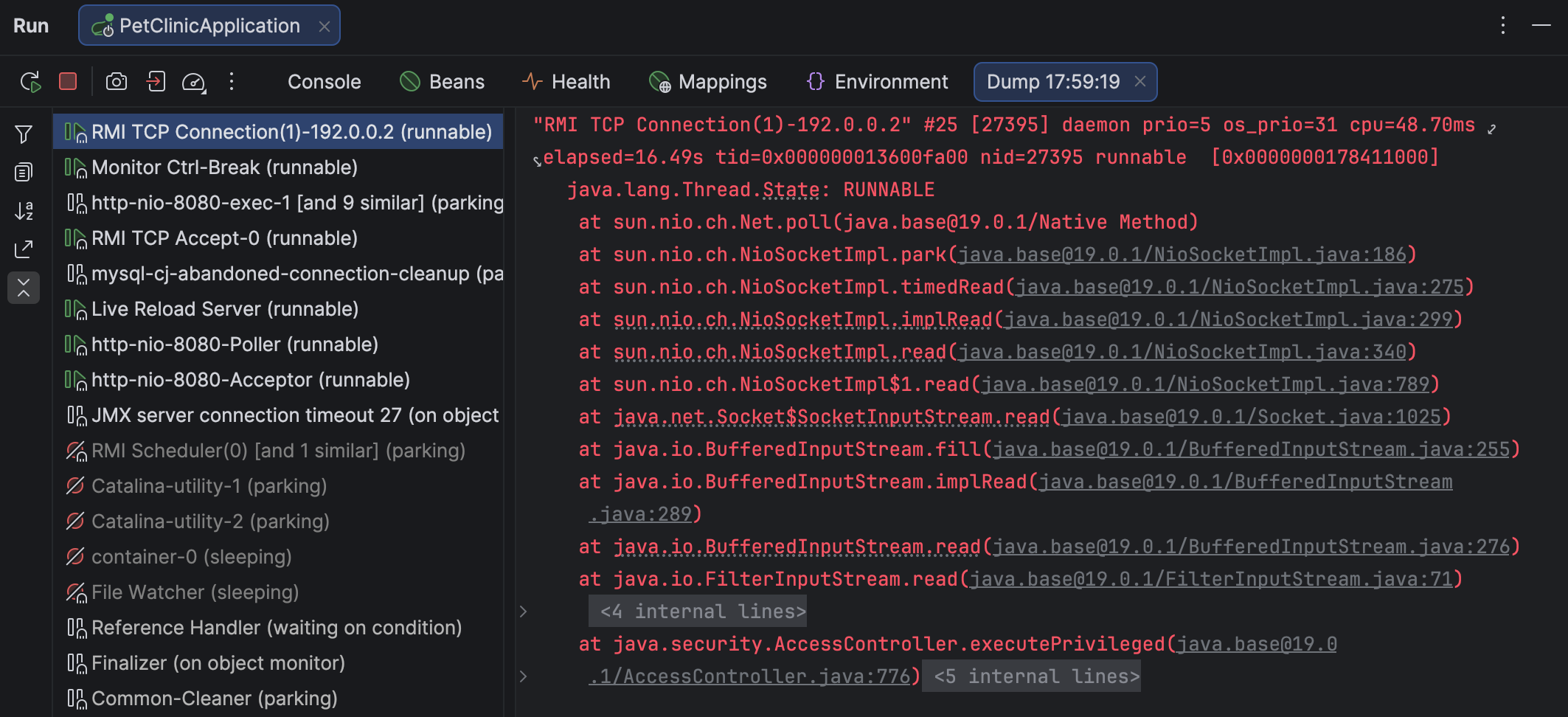
A thread dump tool captures the state of the application at a given moment and produces a structured text report on every thread in the application. You can view the report as text or use a specialized thread dump viewer, like the one in IntelliJ IDEA:

Thread dump viewer in IntelliJ IDEA

There are several tools that can capture and view thread dumps. Despite some variance in format and scope, thread dumps produced by different tools generally appear similar.

Here’s an example of how a thread is described in a thread dump:

"main" prio=5 tid=0x000001f3c9d13000 nid=NA runnable
  java.lang.Thread.State: RUNNABLE
    at java.net.SocketInputStream.socketRead0(Native Method)
    at java.net.SocketInputStream.socketRead(SocketInputStream.java:116)
    at java.net.SocketInputStream.read(SocketInputStream.java:171)
    at java.net.SocketInputStream.read(SocketInputStream.java:141)
    at sun.nio.cs.StreamDecoder.readBytes(StreamDecoder.java:284)
      - locked <0x00000007ab1d3fa8> (a java.io.InputStreamReader)
    at sun.nio.cs.StreamDecoder.implRead(StreamDecoder.java:326)
    at sun.nio.cs.StreamDecoder.read(StreamDecoder.java:178)

A thread dump includes the threads’ stack traces, metadata, status, and the related locks.

Virtual thread dumps

Since virtual threads work differently under the hood, they require dedicated support. In addition to IntelliJ IDEA, common tools for capturing virtual threads include jcmd and jstack. As mentioned above, regular thread dump tools vary in terms of format and the level of information they provide. Your preference for one tool over another may be based on your specific use case.

The Netflix story

To make this more concrete, let’s look at an example from Netflix. For those who missed this post, we highly recommend reading it. It’s a captivating technical deep dive from engineers doing impressive things in Java, and it’s also relevant for our discussion here.

In short, after upgrading to virtual threads, Netflix engineers discovered an issue where some endpoints stopped serving traffic even though the JVM was still running. To get a better idea of what was going on, the team analyzed locks using a heap dump (!) and reverse-engineered Java concurrency classes. This investigation revealed a deadlock related to a limitation in virtual threads. This bug was later fixed in Java 25.

Clever though their methods may have been, it’s hard to deny that a thread dump with more comprehensive information would have made the investigation much easier.

Getting lock information for virtual threads

If you use IntelliJ IDEA, you’re in luck! The IntelliJ IDEA team prioritizes new Java releases, so whenever Java adds a shiny new feature, you can rest assured that the IDE will support it from the get-go. Later in this post, we’ll discuss the capabilities of IntelliJ IDEA’s thread dump tool, but for now, let’s stick to the problem.

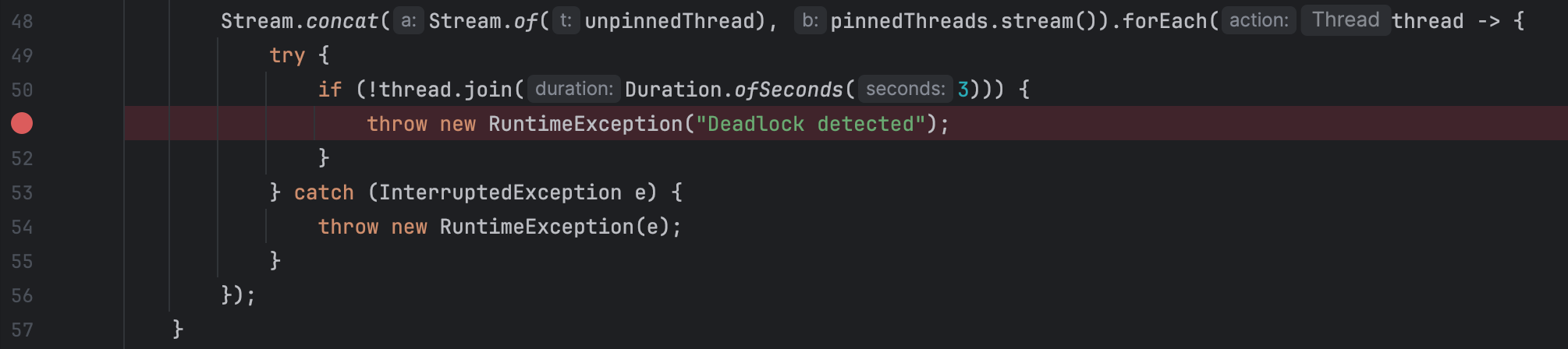
Using the gist provided in the original article, we can set a breakpoint at the line that catches the deadlock and run the reproducer while debugging:

Setting breakpoint at the 'Deadlock detected' line

We use a breakpoint here because the gist would otherwise finish too quickly for us to capture a thread dump in time. In real-world applications, you can capture a thread dump at any moment without suspending the program. To do this, go to More | Get thread dump on the Debug tab for the target app.

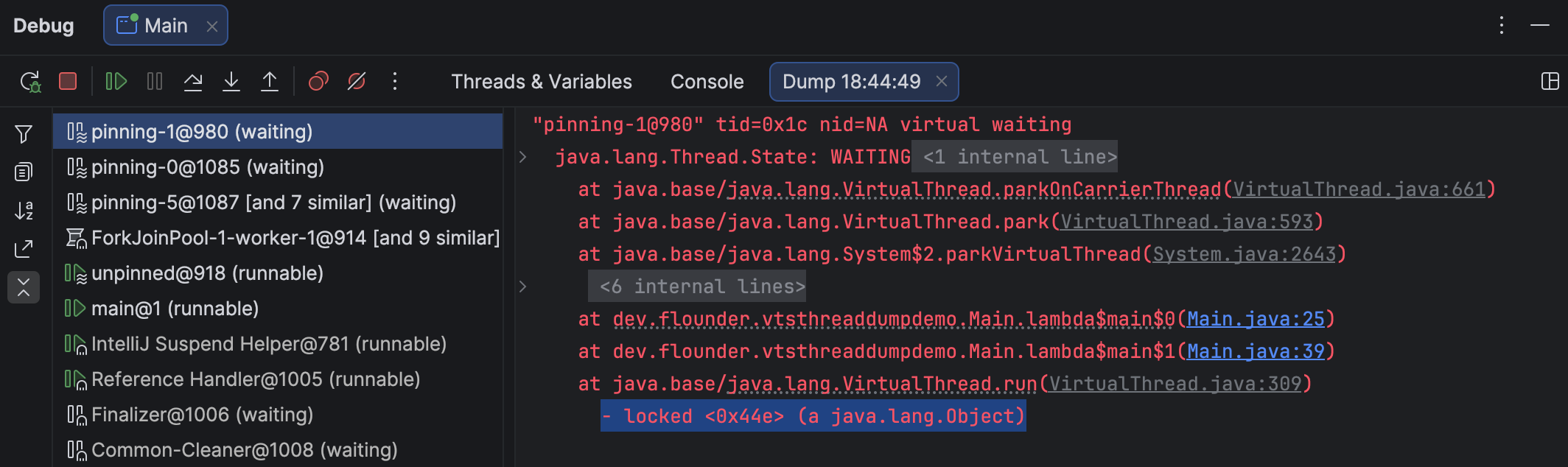
IntelliJ IDEA opens the thread dump, indicates thread statuses, groups similar threads, folds stack traces, and provides navigation back to the source code. Selecting a waiting virtual thread shows the same information as for a platform thread, including details about the acquired locks:

IntelliJ IDEA shows the information on the acquired locks for a virtual thread

In this simplified example, the virtual threads synchronize on a new Object(), so finding this specific lock isn’t particularly useful. Still, the information is there – and invaluable when diagnosing real-world problems.

Supported targets

IntelliJ IDEA can attach to any Java or Kotlin process, whether local or remote.
When working in a remote environment, you can capture the processes remotely and view and export the dumps locally.

Thread dumps don’t have to come from IntelliJ IDEA at all. If someone provides a dump generated with another tool, such as jcmd, IntelliJ IDEA can open and analyze it just as easily as its own native dumps. We constantly monitor the planned changes throughout the ecosystem, so you can count on support for both the earlier and recent versions.

And as a bonus for Kotlin users: IntelliJ IDEA supports not only virtual threads, but Kotlin coroutines as well!

Summary

Java is ramping things up and bringing modern features into the domain of concurrent computations – and this is just the beginning. Structured concurrency, a paradigm shift in how Java developers reason about concurrency, is just around the corner. We’re in this together, vendors and users alike.

We encourage you to give thread dumps a try in IntelliJ IDEA – you’ll find that this post was only the tip of the iceberg. And our documentation is always worth a look. For feedback and feature requests, we invite you to check out the comments section or our issue tracker.

Let us know what you think!

Advent of Code in Rust: Winners and Highlights

Thank you to everyone who joined Advent of Code 2025 in Rust! It was inspiring to see many Rustaceans solving algorithmic puzzles, and celebrating the holiday coding season with the community.

Before the Advent began, Vitaly Bragilevsky published a blog post on how to use AI in Advent of Code challenge responsibly and effectively. This year’s AoC featured 12 puzzles, and from December 1–12, we celebrated by posting daily RustRover features in our RustRover Advent Calendar – a small gift for the community and a way to highlight tools that make your Rust experience even better.

And the winners are… 

We invited you to take on the AoC puzzles using Rust, join our leaderboards, and compete for top scores and random prizes. Now, it’s time to congratulate our 10 winners who stood out among all participants.

Let’s give a big round of applause to the top five Rust developers who dominated the combined leaderboards with impressive results out of 71 participants:

  1. Duro – 2017 (for the second year in a row, as in 2024!)
  2. JohnX4321 – 1996
  3. MaRcR11 – 1961
  4. Giacomo Stevanato – 1910
  5. Agnibha Chakraborty – 1885

Additionally, here are five participants were randomly selected as prize winners:

  • bragrseg – 576
  • ViincentLim – 1585
  • N. Adhikary – 813
  • Gunter Schmidt – 435
  • Saurav Kumar – 676

We reached out to the winners who had social media contact information listed on their GitHub profiles. If you didn’t include contact details, please reach out to rustrover-support@jetbrains.com, and we’ll be happy to send you your prize. Congratulations to all our winners and to everyone who took part! 

Keep learning and building in Rust

The Advent of Code puzzles are available year-round, so get ready for the next AoC by exploring resources to strengthen your Rust skills:

  • Solving Advent of Code in Rust, With Just Enough AI
  • RustRover Advent Calendar
  • Rust AoC Template on GitHub

A huge thank-you to Eric Wastl and the Advent of Code team for creating such an inspiring tradition. Let’s keep learning, building, and having fun with Rust and see you next year for another round of AoC!

How Mobile Development Teams Use Kotlin in 2025: Insights From a Certified Trainer

This is the second guest post in a two-part series from José Luis González. José Luis has a PhD in software development and is a JetBrains-certified Kotlin Trainer, who works with developers and engineering teams to deepen their Kotlin skills and apply the language effectively in real projects. At Hyperskill, he runs Kotlin instructor-led training for teams at Hyperskill that focus on advanced topics and practical problem-solving rather than theory.

First post in the series: How Backend Development Teams Use Kotlin in 2025: Insights from a Certified Trainer

I’d probably have to say swallowing CancellationException in general catch blocks (including runCatching). It looks harmless, but it disables cooperative cancellation, so timeouts, parent scopes, and lifecycles keep running “mysteriously.” In recent talks, linters, and guides, you still see this called out as a real-world production bug. Official docs stress that cancellation must propagate, detekt ships a rule warning if you don’t rethrow, and the coroutines library provides mechanisms that avoid catching CancellationException in generic catch-alls.

Use the following pattern instead to always rethrow cancellations (or choose a helper that preserves them):

suspend fun <T> safeCall(block: suspend () -> T, fallback: () -> T): T = try {
    block()
} catch (e: CancellationException) {
    throw e // never swallow cancellation
}
// catch other specific exceptions
} catch (e: Exception) {
    logger.error("call failed", e)
    fallback()
}

If you like Result-style API, mirror the kotlinx approach as follows:

suspend inline fun <T> runSuspendCatching(block: () -> T): Result<T> =
    try { Result.success(block()) }
    catch (e: CancellationException) { throw e }
    catch (e: Throwable) { Result.failure(e) }

This tiny rethrow keeps structured concurrency intact and matches the guidance you’ll hear in the latest coroutine discussions.

2. If a team has only two hours to set up monitoring for their mobile Kotlin app, which specific dashboards should they prioritize?

Begin with metrics that indicate whether users can successfully use the app. Crash-free users and ANR rate by version and device model tell you whether a release is safe to ship.

Firebase Crashlytics handles this out of the box – just tag builds for quick filtering:

FirebaseCrashlytics.getInstance().setCustomKeys {
    key("version", BuildConfig.VERSION_NAME)
    key("commit", BuildConfig.GIT_SHA)
}

As for UI issues, use JankStats to log when and where frames drop, so you know which screens stutter:

val jankStats = JankStats.create(window) { frame ->
    if (frame.isJank) Log.d("Jank",
        "Jank on ${currentScreen()} – ${(frame.frameDurationUiNanos / 1_000_000)}ms")
}
jankStats.isTrackingEnabled = true

Another main concern is performance, of course. With Sentry, you get end-to-end insights into what is actually slowing down your app: startup, navigation, network calls, etc. It correlates frontend and backend timing so you can spot bottlenecks and regressions fast.

Here is a standard setup with tracing and profiling:

SentryAndroid.init(this) { options ->
    options.dsn = "<dsn>"
    options.tracesSampleRate = 0.1
    options.profilesSampleRate = 0.05
    options.release = "${BuildConfig.VERSION_NAME} (${BuildConfig.VERSION_CODE})"
    options.environment = BuildConfig.BUILD_TYPE
}

Now, let’s add some custom transactions for key flows:

val tx = Sentry.startTransaction("screen:${currentScreen()}", "ui.load")
Sentry.configureScope { it.setTransaction(tx) }

val net = tx.startChild("http.client", "GET /api/items")
try { /* network call */ } finally { net.finish() }

val db = tx.startChild("db.query", "SELECT items")
try { /* read */ } finally { db.finish() }

tx.finish()

And auto-tracing for network calls (OkHttp and Ktor):

OkHttp:

val client = OkHttpClient.Builder()
    .addInterceptor(SentryOkHttpInterceptor())
    .build()

Ktor:

val client = HttpClient(CIO) {
    install(Sentry) {
        tracesSampleRate = 0.1
        profilesSampleRate = 0.05
    }
}

Sentry Mobile Insights provides a prebuilt dashboard for this. It groups slow transactions and crash-free rate by release and device model, so you can see exactly where users struggle the most without the need for a custom setup.

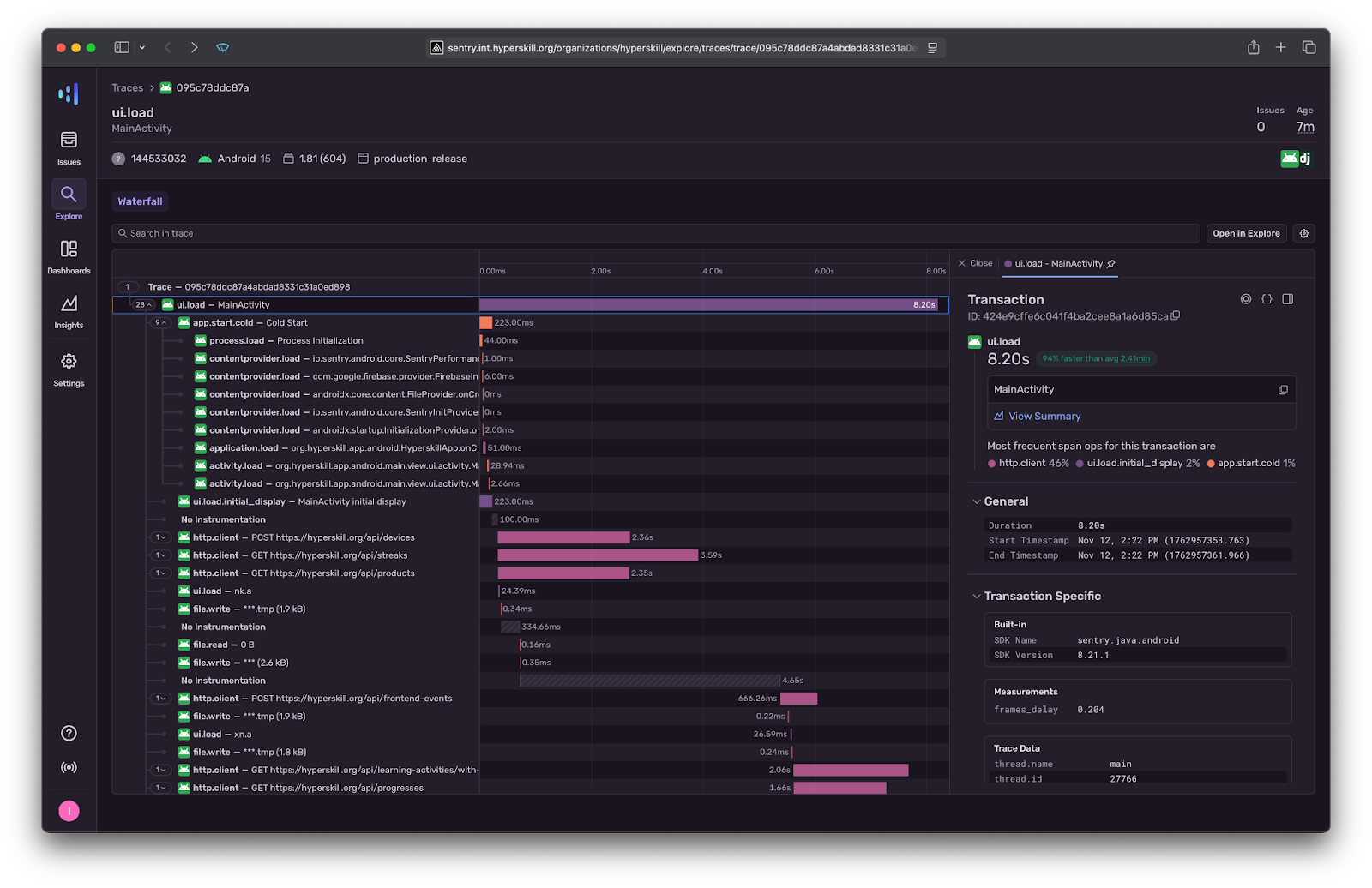
Here’s how a real trace looks in Sentry: You can see a cold start (app.start.cold), API calls, and rendering time, all visualized in one timeline, for a detailed breakdown of how much time the app spends on various tasks.

Check these dashboards in Sentry:

  • Performance / Transactions: p95 duration for app.start.cold, ui.load, and checkout.
  • Traces / Slow spans to find lags in HTTP, database, or main-thread work.
  • Releases / Crash-free and ANR: Correlate stability with performance.

Sentry (or Crashlytics) combined with JankStats will give you the full picture. Can users open the app, interact smoothly, and exit without crashes or leaks? Sentry covers both performance and crash tracking, so you can often use it alone, while Crashlytics remains a lightweight alternative many teams already have in place.

3. When a mobile Kotlin application is running slowly in production, what are your top three profiling techniques, and what tools do you use for each?

I wouldn’t say there’s anything groundbreaking here. I usually start with the same baseline we talked about earlier: Crashlytics, JankStats, and Sentry traces. They will provide a comprehensive overview of what’s going on. From there, my top three profiling techniques are pretty straightforward but extremely effective.

Honestly, the standalone Android Studio profiler is still the most powerful and underrated tool out there. I spend most of my time in its CPU and memory profilers, checking which methods block the main thread or which allocations spike during transitions. I always check the Sample Call Stack view, as it’s the fastest way to see where time is actually spent per frame, instead of guessing from logs.

It sounds basic, but it often reveals that a single RecyclerView binding or JSON parser allocates thousands of tiny objects per frame.

Also, I would typically do network profiling. Using the Network Inspector or Sentry’s tracing, I check which requests block rendering or input. If scrolling freezes when images load, you can immediately tell whether it’s an uncompressed call or a missing cache layer without guessing. If you’ve already enabled Sentry Performance in the Monitoring section of the settings menu, it doubles as lightweight production profiling. You can literally see slow transactions by endpoint.

Frame-time profiling is something that comes in handy as well. I like using JankStats or even adb shell dumpsys gfxinfo to see which screens consistently drop frames. Then I pair that with LeakCanary to catch activities or bitmaps that stay alive longer than they should. Together, that tells me exactly what’s slowing the UI down.

In short, you don’t really need fancy tools. CPU, memory, network, and frame-time profiling, all within Android Studio, cover about 90% of the real issues. These profiling tools help identify what’s making the app feel slow, so you can easily fix the underlying problems. 

4. When teams ask about Kotlin Multiplatform, what’s the smallest project they should start with to prove the concept?

I usually remind teams that they’re probably using Kotlin Multiplatform already. Libraries like kotlinx.coroutines or kotlinx.serialization are basically multiplatform under the hood. You’re just using them from Android today, but they work the same on iOS, too.

The smallest realistic project to actually prove Kotlin Multiplatform in your environment is a shared data or utility layer – something both applications can call without touching the UI. A great first step is to share one simple function, like returning the current time or a version string:

// commonMain
expect fun currentTime(): Long

// androidMain / iosMain
actual fun currentTime() = System.currentTimeMillis() // or NSDate().timeIntervalSince1970

Here’s how to connect the Kotlin framework generated from the Kotlin Multiplatform project to your Xcode project:

The embedAndSignAppleFrameworkForXcode task only registers if the binaries.framework configuration option is declared. In your Kotlin Multiplatform project, check the iOS target declaration in the build.gradle.kts file.

kotlin {
    ios() // or iosArm64(), iosX64(), iosSimulatorArm64()
    binaries {
        framework {
            baseName = "Shared"
        }
    }
}

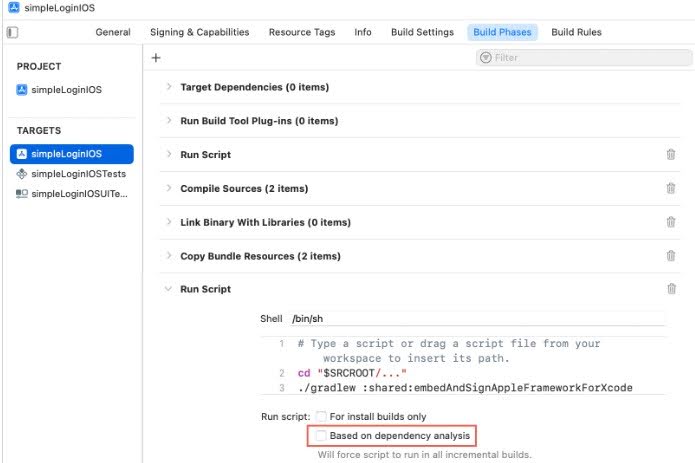
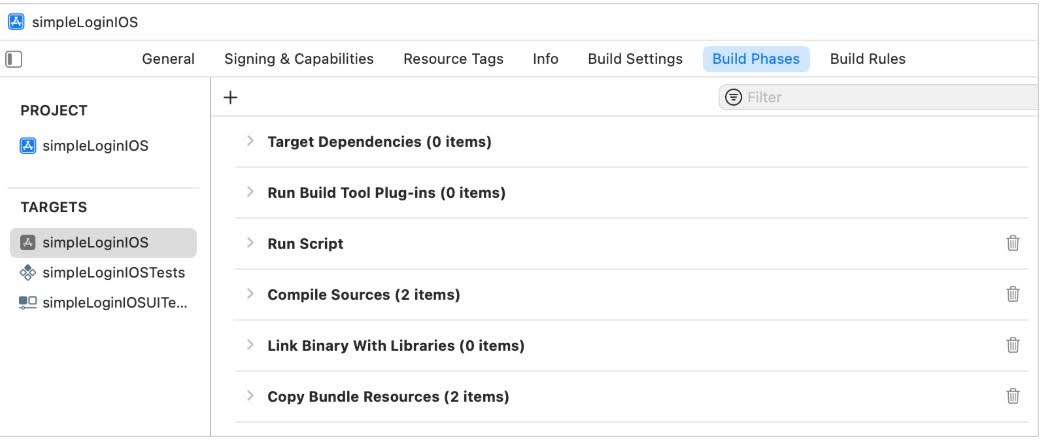
To automatically build a shared module in Xcode, you need to add a script. In the Build Phases tab, add a run script with the following code:

cd "$SRCROOT/.."
./gradlew :shared:embedAndSignAppleFrameworkForXcode

Using the specified script, access the Gradle task to create and embed the library into the native iOS application.

Then you should move the Run Script phase higher, placing it before the Compile Sources phase.

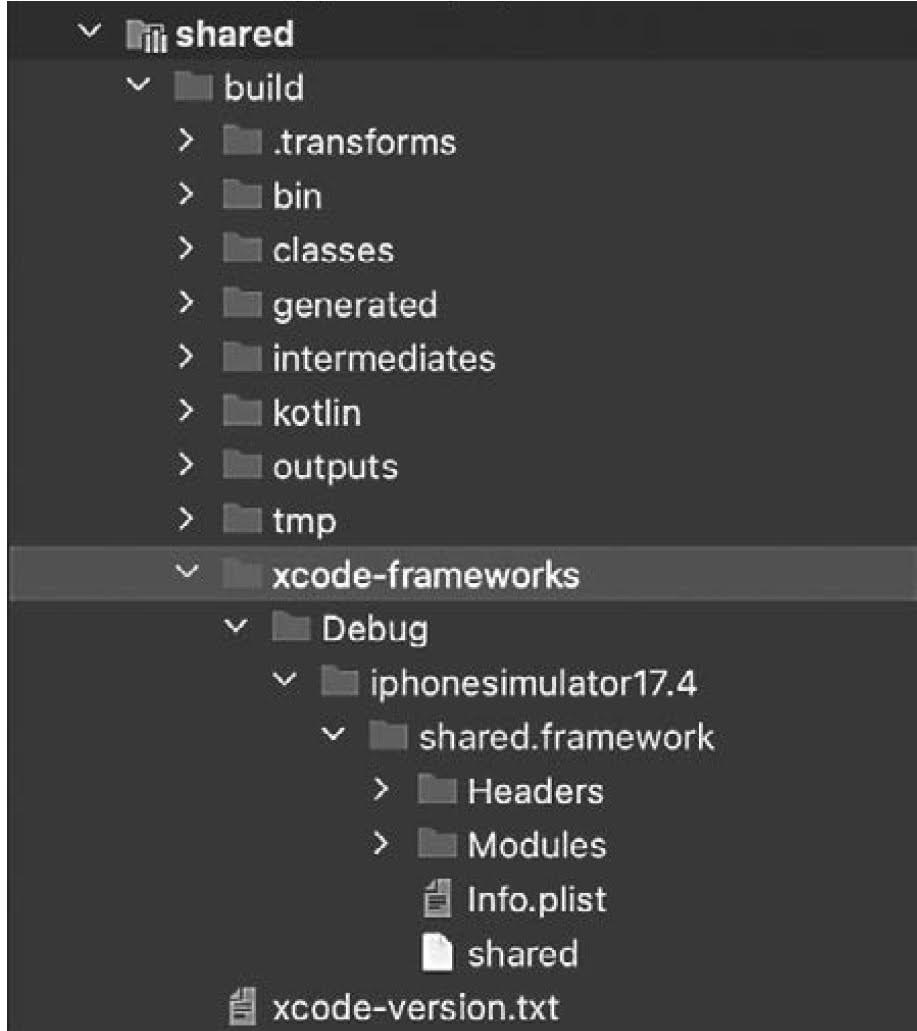
After running the build on the iOS app side or iosApp configuration from the Kotlin Multiplatform project, the compiled xcode-frameworks will appear in the build folder of the shared module.

This will generate the framework at:

Then import it into Swift:

import Shared

let t = currentTime() // works directly from the shared Kotlin code

If that builds and runs cleanly, you’ve already proven that Kotlin code can compile and interop on both sides. From there, you can expand to something slightly more useful. For example, a shared module that fetches and parses a list of items using Ktor and kotlinx.serialization.

José Luis González

José Luis González

José Luis González, PhD, is a JetBrains-certified Kotlin Trainer who teaches Kotlin and advanced techniques to development teams. If your team has more questions about Kotlin anti-patterns, idiomatic design, or wants to learn how to write more maintainable Kotlin code, explore his instructor-led Kotlin workshops at Hyperskill.

Top 3 Qodana 2025.3 Release Highlights 

Qodana 2025.3 delivers important new capabilities that help teams standardize their development practices, improve compliance, make audits easier, and simplify large-scale code analysis. 

From introducing Global Project Configuration, a major step toward scalable, centralized policy management, to expanding license auditing for .NET and enhancing monorepository support for Java and Kotlin, Qodana 2025.3 makes it easier to maintain code quality and security across teams, languages, and repositories. Let’s take a closer look at what’s new.

Global Project Configuration

We released support for Global Project Configuration, which brings Qodana users the ability to control all linter’s configurations in a single place for an entire organization or a team. You can also use it to enforce best practices, company-wide, without compromising  the needs of a specific project.  

Previously, adjusting or appending a rule (like permitting a new license or providing a specific pattern for hardcoded passwords) required manually updating profiles in all repositories.

Now, with Global Project Configuration we’ve introduced a way to simultaneously apply specific configurations to the analyses for the projects you choose, and we’ve made applying these settings very easy.

How does it work?

Global Project Configuration uses a dedicated repository where the organization can store all configurations needed for analysis. These configurations can be organized logically and can reference each other for reuse.

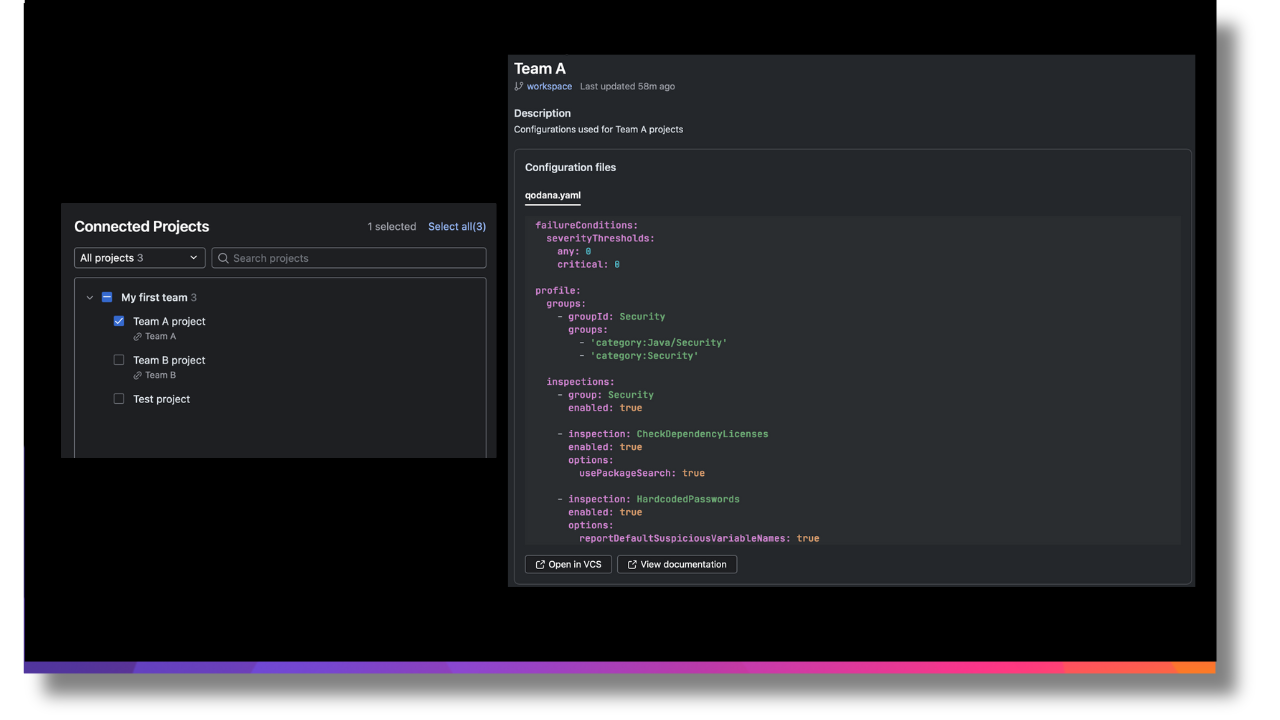
For instance, in the example below, the organization defined a “Base” profile that contains universal organization coding standards. After that “Team A” decided to enforce these standards using Lombok in their Java code, while other teams kept it optional. 

So “Team A” created their own configuration by inheriting “Base” and assigned it to their projects. Meanwhile “Team B” decided that issues of their legacy project will not be handled, so they inherited “Base” and disabled all rules except security.

Qodana Global Project Configuration

Once a project is linked to a global configuration, Qodana automatically applies it on the next run. Configurations and the projects they are applied to can be easily viewed and managed through our UI. 

For detailed instructions on setting up a repository, syncing it with Qodana Cloud, and linking projects, see Qodana Cloud → Settings → Global Configurations or view our documentation. 

License Audit for .NET

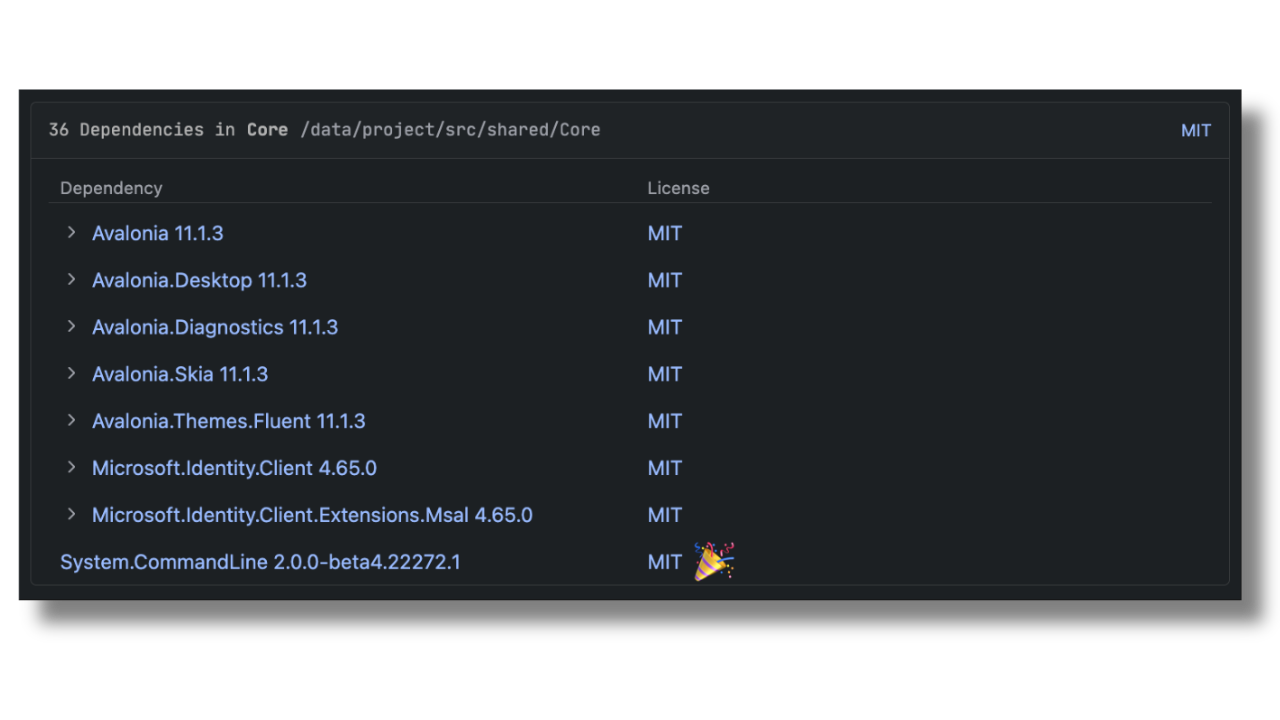
The license detection engine for NuGet packages has been improved in this release, and now supports packages which follow the Semantic Versioning 2.0.0 specification. This means that Qodana will be able to detect licenses on a broader range of dependencies, and provide more accurate license auditing for .NET projects.

Qodana License Audit for .NET

View License Audit Docs

Improved monorepositories support for Java/Kotlin projects

By default, Qodana works with a project file defined at the root level of the repository. We’ve improved this behavior to support monorepositories consisting of loosely coupled projects not aggregated in a single project file.

If Qodana doesn’t detect a project file at root level it will recursively collect projects from subdirectories and import them for analysis.

It is possible to override automatic detection in qodana.yaml using the new rootJavaProjects property, which allows you to specify which projects should be included in the analysis. For example:

rootJavaProjects:
 - "./gradleProject"
 - "./mavenModule/pom.xml"

Monorepository Support

What to do next

Those are the key updates for this release. If you’re using the latest release tag, you don’t need to do anything to enjoy the benefits of our new Qodana 2025.3 release.

Otherwise, please switch from 2025.2 to 2025.3 to update. Users of GitHub Actions, Azure DevOps, and Circle CI can find the latest version of the extension here.

For more information, including detailed setup instructions for each feature, please refer to our official documentation. Click on the button below to speak to our team, and join our community on X for updates between releases. 

Switch To Qodana

First-Class Docker Support: Building and Deploying Containers With TeamCity

This article was brought to you by Kumar Harsh, draft.dev.

Docker has changed the way we build and ship software. Instead of wrestling with “it works on my machine” issues, developers can now package applications and all their dependencies into a neat, portable container that runs anywhere. No wonder Docker has become the de facto standard for modern DevOps workflows.

However, building and deploying containers at scale isn’t as simple as running docker build. You need a reliable CI/CD system that can consistently build, test, and push images to your registries while keeping the process fast, repeatable, and secure.

In this article, we’ll explore how to set up a complete Docker-based build and deployment pipeline with TeamCity’s first-class Docker support. You’ll see how features like built-in runners, native registry integration, and Kotlin DSL support make container pipelines smoother and more maintainable compared to the plugin-heavy, script-driven approach in Jenkins.

By the end, you’ll know exactly how to create and run a Docker pipeline in TeamCity, from building images to pushing them to your registry and even deploying them to staging.

The Docker pipeline setup experience in Jenkins vs. TeamCity

If you’ve ever tried to set up a Docker pipeline in Jenkins, you know the drill: Find and install the right plugins, configure them to match your environment, and then hold your breath hoping they don’t break when Jenkins upgrades. 

Even the official Docker plugin, while powerful, requires manual setup, custom scripting, and constant upkeep to stay compatible.

For many teams, this quickly turns into a maintenance burden, especially as pipelines grow more complex.

TeamCity takes a very different approach. Docker support isn’t added on via third-party plugins; it’s baked into the product. Right out of the box, you get dedicated Docker build runners, registry integration, and full support for defining Docker steps in both the UI and the Kotlin DSL. That means no hunting down plugins, no brittle scripts, and far fewer surprises during upgrades.

Another difference lies in configuration. Jenkins pipelines often rely on long Groovy scripts or scattered YAML files, which can be challenging to maintain over time. TeamCity, on the other hand, offers a clean UI-driven configuration for quick setup, with the option to switch over to the Kotlin DSL for version-controlled, production-grade pipelines. This dual approach makes it easy to start simple and then scale your configuration as your projects demand.

How TeamCity handles Docker better

Here’s what TeamCity’s native Docker support looks like in practice:

  • Docker build runners: Instead of writing ad hoc scripts, you can add dedicated Docker build steps directly in your pipeline. Whether you’re building images, running containers, or cleaning up afterward, it’s all handled through first-class runners.
  • Built-in registry support: Authenticating and pushing images to Docker Hub, GitHub Container Registry, or a private registry is straightforward. TeamCity provides registry connections out of the box, so you don’t have to wire up custom credentials every time.
  • Kotlin DSL integration: If you prefer pipelines as code, you can declare Docker build and push steps in the Kotlin DSL with just a few lines. This makes it easy to track changes in version control and keep your pipelines reproducible.
  • Bundled Docker plugin: Perhaps the best part about all this is that there’s no separate plugin to install. The Docker integration is bundled with TeamCity, maintained alongside the product itself. That means fewer moving parts and no surprises during upgrades.

Creating a Docker build and push pipeline in TeamCity

Let’s now see TeamCity’s Docker support in action by setting up a simple build-and-push pipeline. The goal here is to take a standard Dockerfile, build an image from it, and push that image to a container registry like Docker Hub or GitHub Container Registry.

Step 1: Set up your Dockerfile

Start with a project that has a valid Dockerfile at its root. (You can use this one if you don’t have your own. Make sure to fork it to your GitHub account.)

Here’s what the Dockerfile in this project looks like:

# Use official Node.js LTS image

FROM node:24-alpine

# Set working directory

WORKDIR /usr/src/app

# Copy package files and install dependencies

COPY package*.json ./

RUN npm install --production

# Copy app source

COPY index.js ./

# Expose the port the app runs on

EXPOSE 3000

# Start the app

CMD ["node", "index.js"]

It’s a pretty barebones Dockerfile for setting up the environment for a Node.js app, copying source code files, and running the app.

Step 2: Add a Docker build step

In TeamCity, set up a new project for your pipeline.

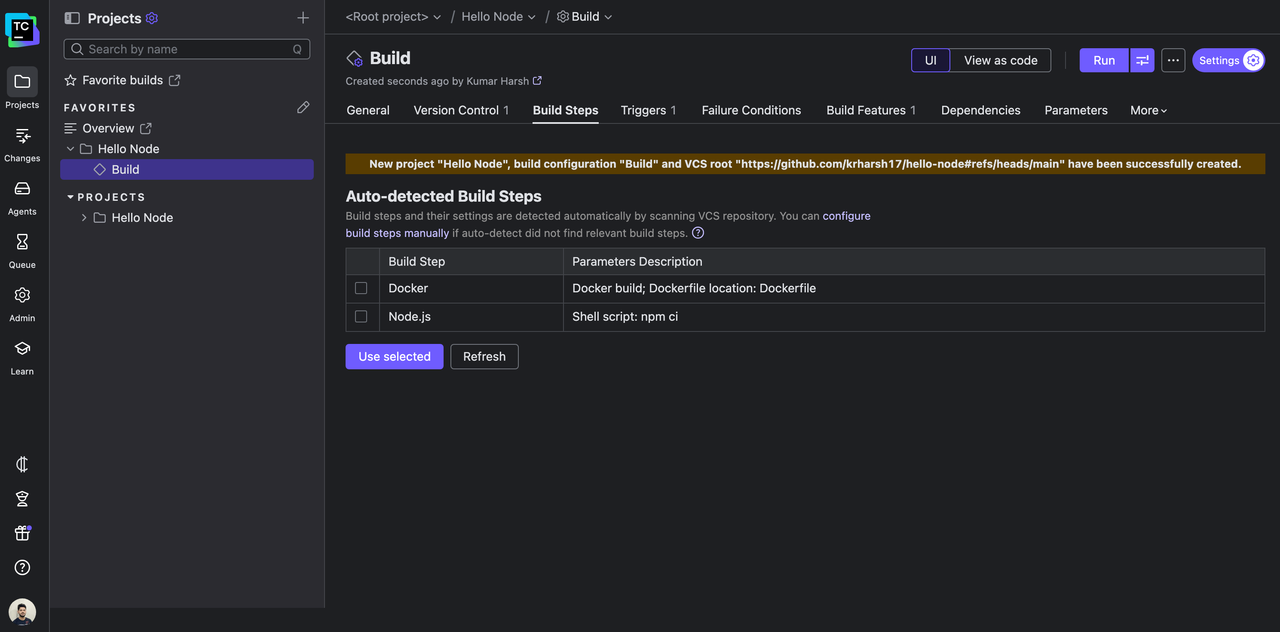
Note: If you’re creating a new TeamCity project with a Dockerfile, TeamCity will most likely autodetect the right build steps for you to get started quickly. You can select the right steps for your workflow and click Use selected to set up the pipeline right away!

To learn how to add a Docker build step by yourself, read along.

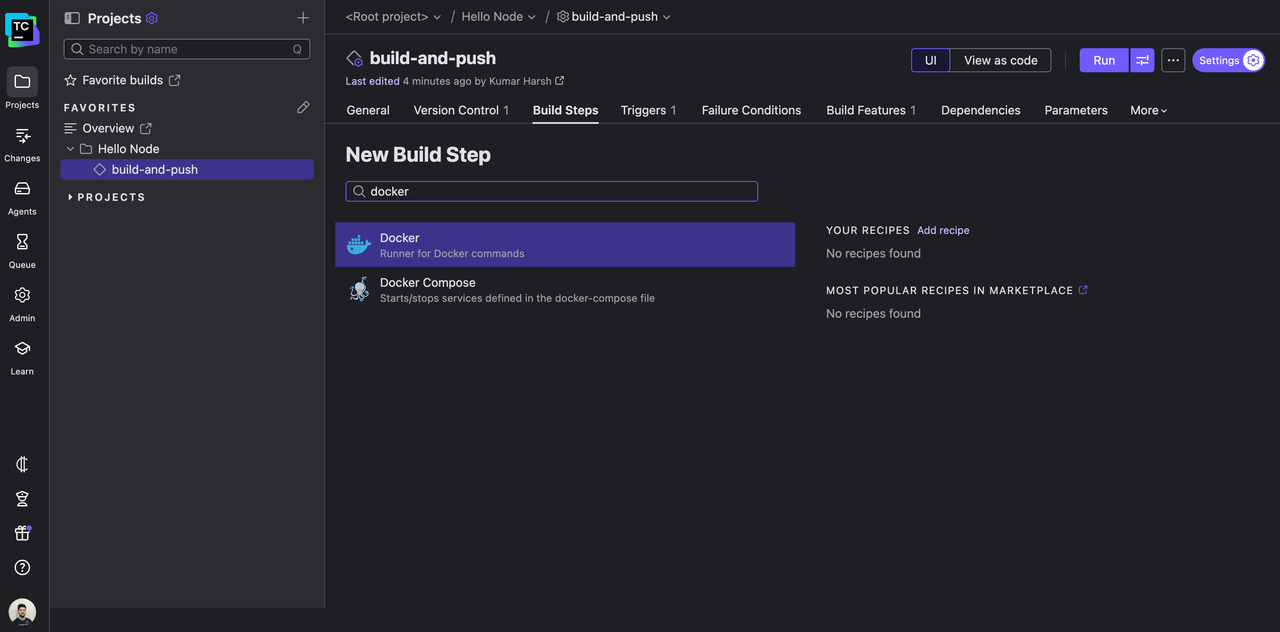
In your TeamCity project, create a new build configuration if you don’t have one prepared already. In the build configuration settings page, go to Build Steps and add a new build step to build the Docker image.

Choose Docker as the runner for the build step:

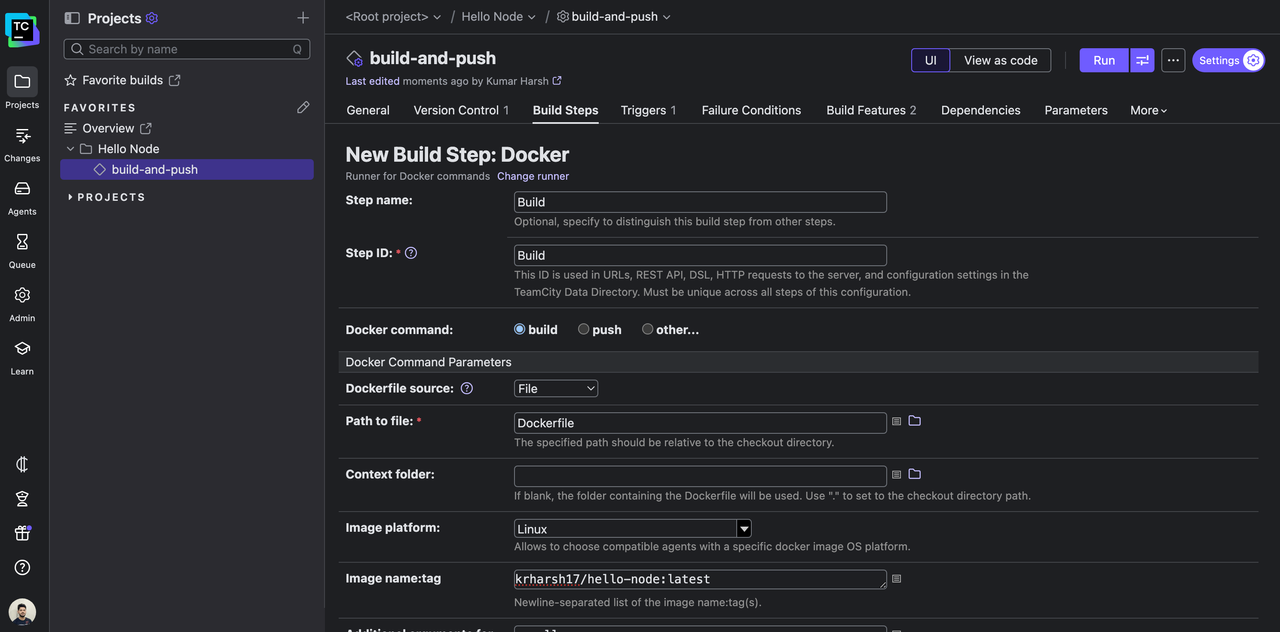
On the next page, you can configure what happens in this new build step. TeamCity’s Docker build runner makes this process straightforward. You don’t have to write ad hoc shell scripts for every operation – just pick the command you want (build, push, or other) and fill in the additional parameters as you need.

For example, in the build step, you need to configure the path to your Dockerfile, the platform your built images should target, and the name and tag for it. You can also supply additional arguments to add to the docker build command as follows, should you need to:

Thanks to TeamCity’s registry connections, you don’t need to embed credentials in scripts. TeamCity logs in before the build and automatically logs out afterward.

💡 Pro tip: You can set environment variables in TeamCity (like commit SHA or build number) and use them in your image tags for traceability.

Here’s the equivalent Kotlin DSL snippet:

steps {

    dockerCommand {

        name = "Build"

        id = "Build"

        commandType = build {

            source = file {

                path = "Dockerfile"

            }

            platform = DockerCommandStep.ImagePlatform.Linux

            namesAndTags = "krharsh17/hello-node:latest"

            commandArgs = "--pull"

        }

    }

}

Step 3: Add a Docker push step

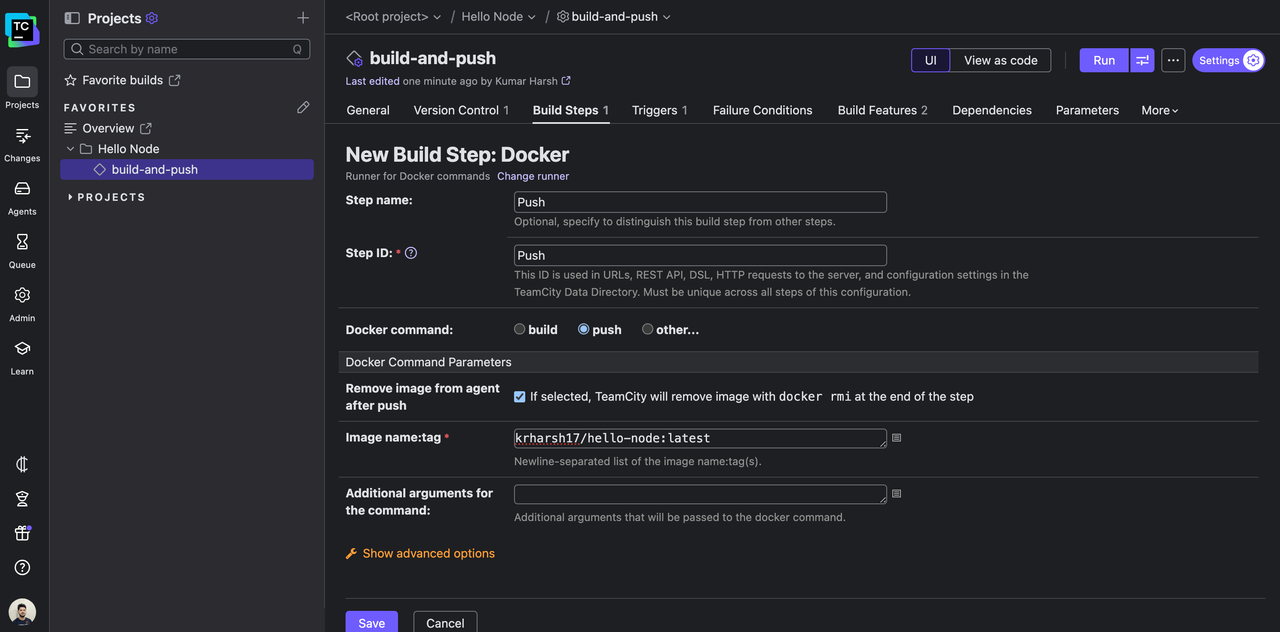
Next, add a Docker push build step. Select Docker once again as the build runner, and select push as the Docker command this time. Provide an image name and tag to use when pushing the image to your Docker registry:

Here’s what the build step looks like as a Kotlin DSL snippet:

steps {
    dockerCommand {
        name = "Push"
        id = "Push"
        commandType = push {
            namesAndTags = "krharsh17/hello-node:latest"
        }
    }
}

Save the build step.

Step 4: Configure Docker registry connection

All that’s left now is to provide the TeamCity project with instructions on how to access your container registry account. You’ll need to do two things:

  • Create a new connection in your project.
  • Configure your build-and-push build configuration to use the Docker Registry Connections build feature to access the connection you just created.

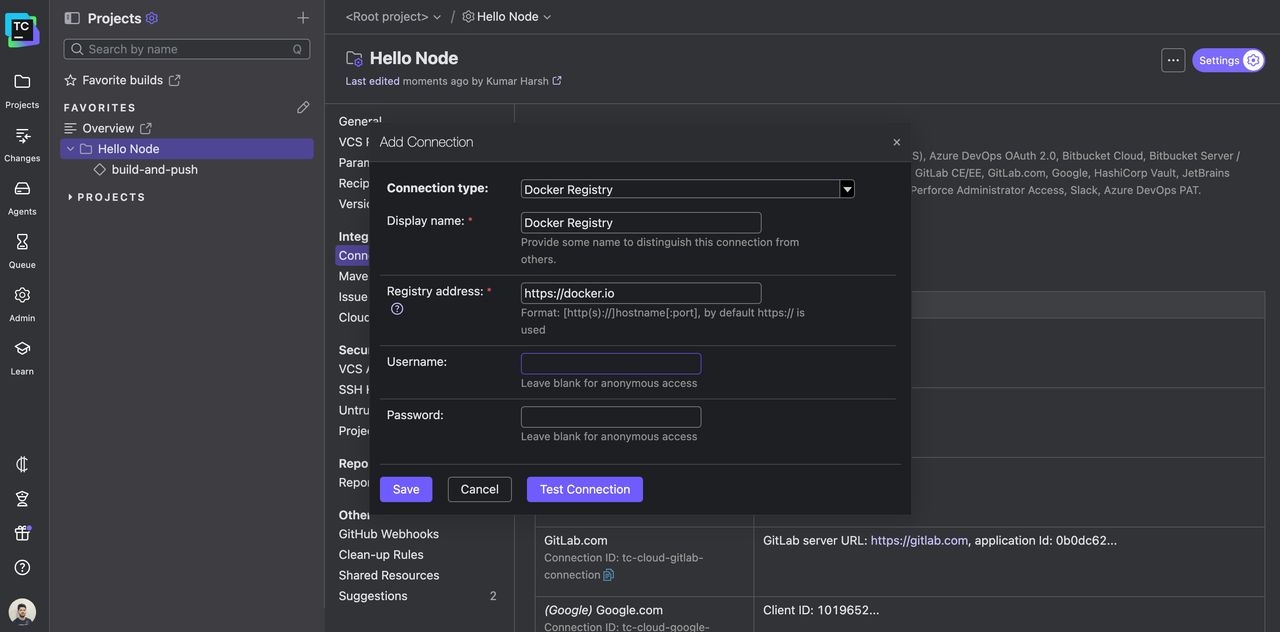
To create the new connection, head over to Admin | Your Project | Connections | New Connection.

Choose Docker Registry as the connection type, and provide your registry address and a username and password pair if needed:

Test the connection and save it.

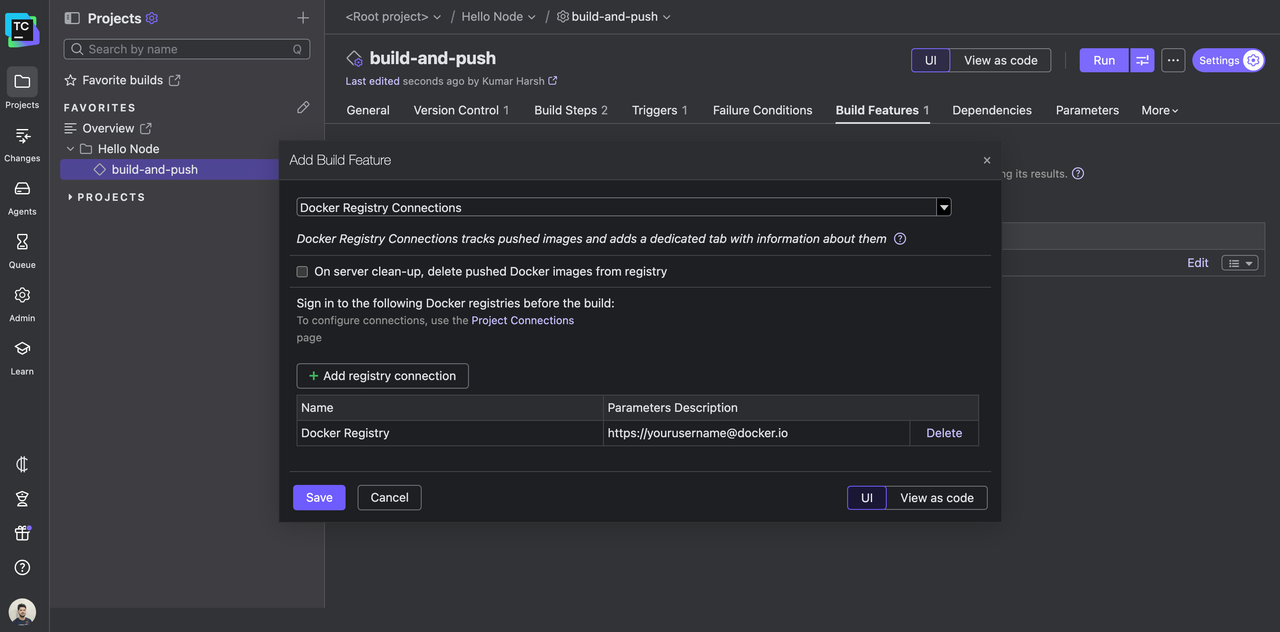
To use this connection through the Docker Registry Connections build feature, head over to your build configuration’s settings page and click the Build Features tab. Click the + Add Build Feature button here. In the dialog that opens, select Docker Registry Connections as the build feature to add.

Next, you need to choose which connection to link here. Click on the + Add registry connection button, and select the new connection you just created:

Click Save to add the feature.

If you prefer Kotlin DSL, here’s what the new build feature would look like:

features {
    dockerRegistryConnections {
        loginToRegistry = on {
            dockerRegistryId = "PROJECT_EXT_3"
        }
    }
}

PROJECT_EXT_3 is the connection ID. You can get this value from the Connections page on your TeamCity project.

Step 5: Testing the pipeline

You’re all set! It’s time to test the pipeline now.

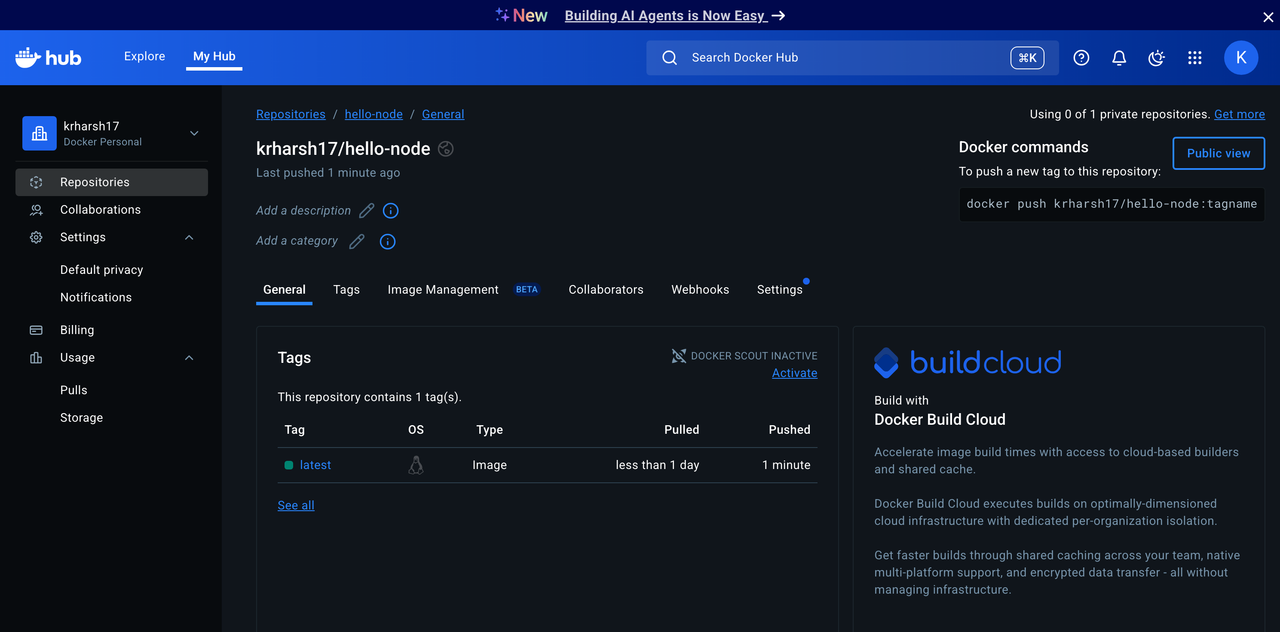
Try triggering a build. You should see a new image tag get pushed to your Docker registry as soon as the build completes:

This means that your Docker-native pipeline is ready.

You can also go further by adding steps to run containerized tests or deploy to a staging environment. For instance, spin up the freshly built container with docker run as part of your CI/CD workflow, then run integration tests against it.

Integrated security and caching features

When building and pushing containers, you need to ensure functionality, security, and efficiency. TeamCity’s native Docker support includes features that help you protect sensitive data and speed up pipelines without extra work:

  • Secure registry authentication: TeamCity’s Docker Registry Connections build feature automatically logs in to container registries (like Docker Hub or private registries) before each build and logs out afterward. You don’t need to embed credentials in scripts. TeamCity manages them securely for you.
  • Image cleanup: When enabled, the Docker Registry Connections feature can automatically clean up pushed images after builds are cleaned up on the server. This keeps registry storage tidy and maintains good hygiene for build artifacts.
  • Layer caching for speed: Rebuilding from scratch every time slows down development. With TeamCity’s Build Cache feature, key files and dependencies (like node_modules/ or .m2/) can be cached and reused across builds, significantly accelerating repeat runs.
  • Optimized for iterative workflows: With secure, credential-managed builds and reusable cache artifacts, teams can iterate quickly on Docker pipelines. Small updates don’t mean starting over from scratch, and the process stays secure by default.

Conclusion

If you’ve ever grappled with Docker pipelines in Jenkins, you know how fragile things can feel: chasing down plugin updates, maintaining brittle scripts, and dealing with configs that never quite stay consistent. It works, but it often feels like you’re spending more time nursing your CI/CD than actually delivering software.

TeamCity treats Docker as a first-class citizen. Native runners, registry integrations, caching, secrets management, and the Kotlin DSL replace Jenkins’s patchwork setup with a workflow you can actually rely on. Instead of simply trying to get builds to pass, you have a system you can trust to scale with you.

If you’re already running Docker pipelines in Jenkins, the migration path is straightforward and liberating. You’ll spend less time firefighting pipeline issues and more time shipping the features your users are waiting for.

If you’re ready to modernize your container pipelines, it’s worth seeing TeamCity in action. Head over to the TeamCity Docker documentation, or try TeamCity yourself and experience how first-class Docker support can simplify your CI/CD pipeline.