Uncategorized

La Guia Completa de Instalacion de VICIdial (2026): De Servidor Nuevo a Primera Llamada en Menos de 2 Horas

Ultima actualizacion: Marzo 2026 | Tiempo de lectura: ~18 minutos

Ya hiciste las cuentas. Convoso quiere $150/puesto/mes. Five9 quiere aun mas. Mientras tanto, VICIdial — el mismo marcador predictivo open-source que alimenta mas de 14,000 instalaciones en todo el mundo — no cuesta absolutamente nada en licencias.

Solo hay un problema: instalarlo.

Cada guia que vas a encontrar en Google ahora mismo es un PDF de ViciBox 7 del 2018, un hilo de foro con 47 respuestas contradictorias, o un post de blog que parece que fue traducido tres veces. CentOS 7 — el sistema operativo que el 90% de esas guias referencian — llego a su fin de vida en junio de 2024. Si sigues esas instrucciones en 2026, estas construyendo sobre una base muerta.

Esta guia arregla eso. Vamos a cubrir ViciBox 12.0.2 (la version estable actual), instalaciones desde cero en AlmaLinux 9, despliegues de servidor unico, clusters multi-servidor, configuracion de troncales SIP con ejemplos reales de carriers, configuracion de WebRTC para agentes remotos, y cada problema comun que te va a arruinar el fin de semana si no lo conoces de antemano.

O — escuchanos — puedes saltarte todo esto y dejar que ViciStack lo maneje en una noche. Migramos operadores de VICIdial a infraestructura bare-metal completamente optimizada con precision de AMD llegando al 92-96% desde el primer dia. Sin compilar Asterisk desde el codigo fuente. Sin depurar audio unidireccional a las 2 AM. Pero si quieres hacerlo tu mismo, sigue leyendo. Respetamos el espiritu DIY. Solo queremos que sepas que hay una mejor opcion cuando estes listo.

Que Cambio Realmente en 2024-2026 (Y Por Que Tu Guia Antigua Te Esta Mintiendo)

Saquemos esto del camino primero, porque si te saltas esta seccion y sigues un tutorial desactualizado, vas a perder unas buenas 6-8 horas antes de darte cuenta de que algo esta roto de raiz.

CentOS 7 esta muerto. Literalmente muerto. EOL junio 2024. Sin mas parches de seguridad, sin mas actualizaciones. Cada “guia de instalacion de VICIdial” de striker24x7, cada curso de Udemy, cada hilo de foro que dice yum install centos-release-scl — todo eso es ficcion historica ahora.

ViciBox salto de la v9 a la v12. Los numeros de version no son un error. ViciBox 12.0.2 salio en enero de 2025, corriendo sobre OpenSuSE Leap 15.6 con Asterisk 18, MariaDB 10.11.9, y PHP 8.2. ViciBox 13.0 ya esta en beta con OpenSuSE 16.0 y soporte para SELinux. Si estas siguiendo una guia que menciona ViciBox 8 o 9, estas leyendo historia antigua.

Asterisk 18 es ahora el estandar. El salto de Asterisk 13/16 a 18 trajo soporte PJSIP, mejor manejo de WebRTC, y mejor negociacion de codecs. Matt Florell confirmo oficialmente el soporte completo de Asterisk 18 en septiembre de 2025. Los parches especificos de VICIdial ahora apuntan exclusivamente a Asterisk 18 para nuevas instalaciones.

PHP 8.2 es estandar. El codigo de VICIdial con mas de 4 anos tirara advertencias de depreciacion o directamente se rompera en PHP 8.x. Las funciones mysql_* que tus viejos scripts de instalacion referencian desaparecieron desde PHP 7.0.

El trunk SVN esta en la revision 3939+, version 2.14b0.5, esquema de base de datos 1729. Todavia alojado en svn://svn.eflo.net:3690/agc_2-X/trunk porque el proyecto VICIdial no tiene planes de migrar a Git. Algunas cosas nunca cambian.

Esto es lo que significa en la practica: los unicos dos caminos que valen la pena para una nueva instalacion de VICIdial en 2026 son ViciBox 12.0.2 (recomendado) o una instalacion desde cero en AlmaLinux 9 / Rocky Linux 9. Todo lo demas es una perdida de tiempo.

Tu Guia Antigua Te Esta Mintiendo. Nosotros No.
ViciStack despliega VICIdial completamente optimizado en Asterisk 18, AlmaLinux 9, con cada problema pre-resuelto. Salta la Instalacion →

Hardware: Lo Que Realmente Necesitas (No Lo Que El Foro Te Dijo en 2015)

Hablemos de numeros reales. La documentacion de ViciBox 12 finalmente tiene especificaciones de dimensionamiento adecuadas, y son diferentes de lo que encontraras en posts viejos de foros.

Servidor Unico (La Configuracion “Tengo 10-25 Agentes”)

Componente Minimo Recomendado
CPU 4 nucleos @ 2.0+ GHz 6+ nucleos @ 2.0+ GHz
RAM 8 GB 16 GB ECC
Almacenamiento 160 GB SSD 500 GB RAID1 SSD
Red 1 Gbps 1 Gbps dedicado

Los SSDs son obligatorios en 2026. No recomendados — obligatorios. La documentacion de ViciBox establece explicitamente SATA SSD como el minimo. Si alguien intenta venderte un servidor VICIdial con discos mecanicos, o estan atascados en 2016 o no les importa que tus agentes se queden sentados esperando consultas de base de datos.

Un solo servidor Express maneja de manera realista 15-20 agentes outbound con marcacion predictiva activa, o aproximadamente 50 agentes solo-inbound bajo condiciones ideales. Una vez que pasas de 25 agentes outbound, estas jugando con fuego.

Cluster Multi-Servidor (La Configuracion “Realmente Estoy Manejando un Negocio”)

Cuando superas un solo servidor, VICIdial se divide en cuatro roles. Para la guia completa sobre arquitectura de cluster, planificacion de capacidad, y cada detalle de configuracion, consulta nuestra guia dedicada de clusters.

Servidor de base de datos — El cerebro. Uno por cluster, siempre. Para 150 agentes: 8+ nucleos, 32 GB de RAM ECC, NVMe RAID1.

Servidores de telefonia/marcador — Los pulmones. Cada uno maneja aproximadamente 25 agentes outbound con grabacion pesada y ratios de marcacion de 4:1.

Servidores web — La cara. 2-4 nucleos, 4-8 GB de RAM. SSL reduce la capacidad aproximadamente a la mitad debido al overhead de TLS.

Servidor de archivo — La memoria. Este es el unico lugar donde los discos mecanicos realmente estan bien.

Deja de Adivinar las Especificaciones del Servidor.
ViciStack provisiona bare metal construido a medida para tu numero exacto de agentes y ratio de marcacion. Obtener Tu Cotizacion Personalizada →

Metodo de Instalacion 1: ViciBox ISO (El Camino Sensato)

ViciBox es el ISO pre-construido oficial mantenido por Kumba (el desarrollador de ViciBox). Empaqueta OpenSuSE Leap 15.6, Asterisk 18, MariaDB, Apache, PHP, y VICIdial en una sola imagen booteable. Es el camino de menor resistencia y el que recomendamos para cualquiera que valore su tiempo.

Descarga e Inicio

Descarga ViciBox 12.0.2 de download.vicidial.com/iso/vicibox/server/. Dos sabores: Standard (disco unico, RAID por hardware, VMs) y MD (RAID1 por software entre dos discos). Graba en USB con Rufus o dd, inicia, y selecciona “Install ViciBox” del menu.

El instalador copia el sistema operativo al disco, inicias sesion como root, y te guia a traves de idioma, teclado, zona horaria, y contrasena de root. Reinicia cuando se te indique. Tiempo total: aproximadamente 10 minutos.

Configuracion Pre-VICIdial (No Te Saltes Esto)

Antes de tocar VICIdial, asegura tu red. La configuracion de VICIdial esta permanentemente ligada a la direccion IP de tu servidor — cambiarla despues es una cirugia dolorosa en multiples archivos.

Establece una IP estatica:

yast lan

Selecciona tu interfaz, elige “Statically assigned IP Address,” ingresa la IP/subred/gateway, y establece DNS. Presiona ALT-O para aplicar. Verifica con ping -4 google.com.

Establece la zona horaria (usa el comando de ViciBox, no yast):

vicibox-timezone

El comando regular de yast para zona horaria no actualiza la zona horaria de PHP. Preguntame como lo se.

Actualiza el sistema:

zypper ref
zypper up
reboot

Advertencia critica: Siempre zypper up, nunca zypper dup. El comando dup (actualizacion de distribucion) puede degradar MariaDB o romper la compatibilidad con DAHDI. Multiples posts del foro documentan esto destruyendo sistemas de produccion.

Instala VICIdial (El Milagro de Un Solo Comando)

Para un servidor unico con 20 o menos agentes:

vicibox-express

Escribe Y. Espera. Reinicia. Eso es todo. VICIdial esta corriendo.

Verifica con screen -ls — deberias ver 10-12 sesiones de screen. Accede a http://<IP-de-tu-servidor>/vicidial/welcome.php con las credenciales por defecto 6666 / 1234 y estaras viendo un marcador funcionando.

Para un cluster, ejecuta vicibox-install en cada servidor (base de datos primero, luego web, luego telefonia), selecciona que roles habilitar, y apunta los servidores que no son DB a la IP del servidor de base de datos. Mismo proceso, solo repetido.

El Unico Bug Que Necesitas Arreglar Inmediatamente

ViciBox 12 viene con una version de MariaDB que deprecio el comportamiento implicito de TIMESTAMP. Esto puede romper tablas silenciosamente. Arreglalo antes de hacer cualquier otra cosa:

echo "explicit_defaults_for_timestamp = Off" >> /etc/my.cnf.d/general.cnf
systemctl restart mariadb.service

ViciBox Te Pone en Marcha. ViciStack Te Da Resultados.
Vamos mas alla de la instalacion — ajuste de AMD, gestion de DID, optimizacion de carriers, todo incluido. Ver la Diferencia →

Metodo de Instalacion 2: Instalacion Desde Cero en AlmaLinux 9 (El Camino del Controlador)

Algunas personas necesitan Linux de la familia RHEL. Algunas personas quieren entender cada componente. Algunas personas simplemente disfrutan compilar software desde el codigo fuente un viernes por la noche. No juzgamos.

La mejor opcion en 2026 es el auto-instalador de carpenox mantenido por Chris en CyburDial/Dialer.one. Es el script comunitario mas activamente mantenido y maneja AlmaLinux 9 + Rocky Linux 9 con Asterisk 18:

timedatectl set-timezone America/New_York
yum check-update && yum update -y
yum -y install epel-release && yum update -y
yum install git kernel* --exclude=kernel-debug* -y
sed -i 's/SELINUX=enforcing/SELINUX=disabled/g' /etc/selinux/config
cd /usr/src
git clone https://github.com/carpenox/vicidial-install-scripts.git
reboot
cd /usr/src/vicidial-install-scripts
chmod +x alma-rocky9-ast18.sh
./alma-rocky9-ast18.sh

SELinux debe estar deshabilitado. Esto no es negociable. Los scripts Perl de VICIdial, las operaciones de archivo de Asterisk, y la configuracion de Apache asumen que SELinux esta desactivado. Cada guia de instalacion desde cero comienza deshabilitandolo.

El script maneja la instalacion de dependencias, la compilacion de Asterisk 18 con los parches de VICIdial, DAHDI, LAME, Jansson, checkout de VICIdial por SVN, configuracion de base de datos, configuracion de crontab, y scripts de inicio. Los cinco parches especificos de VICIdial para Asterisk (estadisticas de AMD, estado de peer IAX, logging de peer SIP, y dos parches de reinicio de timeout) se aplican automaticamente.

Post-Instalacion: De “Esta Corriendo” a “Estamos Haciendo Llamadas”

Aqui es donde cada otra guia en internet se detiene. “Felicitaciones, instalaste VICIdial! Aqui hay una captura de pantalla de la pagina de login. Buena suerte!” No ayuda. Vamos a configurar esto de verdad.

Asegura los Valores por Defecto (Haz Esto Primero)

VICIdial viene con valores por defecto que son tambien agujeros de seguridad:

  1. Cambia la contrasena de admin — Admin → Users → Modify user 6666. Las credenciales por defecto 6666/1234 las conoce literalmente todo el que haya buscado en Google “vicidial.”
  2. Establece la contrasena root de MySQLmysqladmin -u root password 'ALGO_FUERTE'
  3. Cambia las contrasenas de registro de telefonos — El valor por defecto es test. Si, en serio.
  4. Mueve SSH del puerto 22 — Cada bot en internet esta golpeando el puerto 22 ahora mismo.

Configurando Tu Troncal SIP

Aqui es donde la mayoria de las instalaciones DIY se atascan. Necesitas un carrier VoIP para realmente hacer llamadas telefonicas, y la configuracion de carriers de VICIdial tiene algunas particularidades no obvias.

Navega a Admin → Carriers → Add A New Carrier. Para un trunk autenticado por IP (la mayoria de los carriers empresariales):

Account Entry:

[tu-carrier]
disallow=all
allow=ulaw
allow=g729
type=peer
insecure=port,invite
host=sip.tucarrier.com
dtmfmode=rfc2833
context=trunkinbound
canreinvite=no

Dialplan Entry:

exten => _91NXXNXXXXXX,1,AGI(agi://127.0.0.1:4577/call_log)
exten => _91NXXNXXXXXX,2,Dial(${CARRIER}/${EXTEN:1},60,tTor)
exten => _91NXXNXXXXXX,3,Hangup

Global String: CARRIER=SIP/tu-carrier

El prefijo 9 es una convencion de dial string — cuando tu campana usa el prefijo de marcacion 9, VICIdial lo antepone a cada numero, y el dialplan lo elimina antes de enviarlo al carrier. Verifica tu trunk con:

asterisk -rx "sip show registry"
asterisk -rx "sip show peers"

Consejo profesional de operar 100+ centros VICIdial: La atestacion STIR/SHAKEN importa enormemente en 2026. Necesitas atestacion de nivel A, lo que requiere que tus DIDs y la terminacion esten en el mismo carrier. El enfoque dual-stack te da redundancia mientras mantienes nivel A en ambos.

La Configuracion del Carrier Es Donde Las Instalaciones DIY Van a Morir.
Una configuracion incorrecta de STIR/SHAKEN = “Posible Spam” en una semana. ViciStack configura tus carriers correctamente desde el primer dia. Hazlo Bien →

Creando Tu Primera Campana

Admin → Campaigns → Add a New Campaign. La configuracion critica es el Dial Method:

  • RATIO — Llamadas fijas por agente (ej., 2.0 = dos llamadas simultaneas por agente disponible). Simple, predecible, bueno para equipos pequenos.
  • ADAPT_HARD_LIMIT — Marcacion predictiva con un techo fijo en la tasa de abandono. Establece esto en 3% para cumplimiento TCPA. Esto es lo que la mayoria de las operaciones outbound deberian usar.
  • ADAPT_TAPERED — Mas agresivo al principio, mas conservador a medida que avanza el dia. Bueno para operaciones experimentadas que entienden los compromisos.
  • MANUAL — El agente hace clic para marcar. Para entornos de alto cumplimiento normativo o pruebas.

Configuraciones clave para establecer desde el inicio: Hopper Level (100-200 leads pre-cargados), Dial Timeout (26-30 segundos — depende del carrier), Available Only Tally = Y (solo marcar cuando los agentes estan realmente disponibles), y Auto Dial Level (empieza en 1.5 para modos adaptativos y ajusta basado en rendimiento). Para el desglose completo de cada configuracion del marcador que importa, consulta nuestra guia dedicada.

Cargando Leads

Lists → Add A New List → asigna a tu campana → Lists → Load New Leads. Sube un CSV con como minimo: phone_number, first_name, last_name, state. Siempre prueba con un lote pequeno primero. El cargador de leads de VICIdial es potente pero implacable con problemas de formato.

Configuracion del Telefono del Agente

Dos opciones en 2026:

Softphone SIP (MicroSIP, Zoiper, X-Lite): Crea un telefono en Admin → Phones con una extension (ej., 1001), IP del servidor, y contrasena de registro. El agente configura su softphone con estas credenciales. Funciona, pero requiere software en cada maquina de agente.

WebRTC/ViciPhone (la forma moderna): Requiere SSL/TLS en tu servidor web y el puerto 8089 abierto. Configura con vicibox-ssl en ViciBox, o certbot en instalaciones desde cero. Habilita plantillas de telefono WebRTC en Admin, establece los telefonos en “As Webphone = Y,” y los agentes obtienen un telefono basado en navegador integrado directamente en la interfaz del agente. Sin instalaciones de software, funciona desde cualquier lugar. Asi es como la mayoria de las operaciones remotas funcionan en 2026.

Clustering Multi-Servidor: Las Reglas Que Nadie Escribe

Una vez que creces mas alla de 20-25 agentes outbound, necesitas un cluster. Aqui estan las reglas que te salvaran del cementerio de posts de clusters rotos del foro:

Regla 1: Un proceso adaptativo, un servidor. El proceso AST_VDadapt (keepalive 5) gestiona el algoritmo predictivo. Corre en exactamente un servidor en todo el cluster. Ejecutarlo en dos servidores causa conflictos de nivel de marcacion que parecen abandonos aleatorios. Lo mismo aplica para AST_VDauto_dial_FILL (keepalive 7).

Regla 2: Misma LAN, sin routers. Todos los servidores del cluster deben estar en la misma red local con latencia de menos de 1ms. Un router entre tus servidores de base de datos y marcador agrega suficiente latencia para romper las sesiones de los agentes. Usa IAX2 (no SIP) para trunks inter-servidor.

Regla 3: NTP desde una sola fuente. Todos los servidores sincronizan sus relojes al servidor de base de datos o a una fuente NTP designada. La sincronizacion NTP independiente a servidores externos causa desviacion del reloj que rompe sesiones de agentes, desconecta llamadas, y corrompe reportes.

Regla 4: Conoce tu techo. Las tablas MEMORY de VICIdial son de un solo hilo. Un cluster llega al maximo alrededor de 450-500 agentes. Planifica tu crecimiento de acuerdo a esto.

Cuando Agregar Que

Llegas a… Agregas…
20 agentes outbound Separar DB de telefonia
25 agentes mas Segundo servidor de marcacion
50+ agentes Servidor de DB dedicado
70+ agentes Servidor web dedicado
150+ agentes Base de datos esclava para reportes
450+ agentes Segundo cluster

Regla #1 del Clustering: No Lo Aprendas Por Las Malas.
Hemos construido mas de 100 clusters. Que nuestras cicatrices salven tu fin de semana. Habla con un Experto en Clusters →

El Salon de la Fama de la Resolucion de Problemas

Estos son los problemas que llenan los mas de 13,400 hilos de soporte del foro de VICIdial. Aprende del dolor de otros:

Sin audio / audio unidireccional — 80% de probabilidad de que el firewall este bloqueando UDP 10000-20000 (puertos RTP). 15% de probabilidad de que falta un externip en sip.conf. 5% de probabilidad de que sea SIP ALG en un router NAT. Deshabilita temporalmente el firewall y prueba. Si el audio funciona, es el firewall.

“No available sessions” — Las extensiones de conferencia no estan pobladas para la IP de tu servidor. Admin → Conferences → Show VICIDIAL Conferences. Cada servidor necesita su propio rango de conferencias.

Grabaciones faltantes — Verifica todo el pipeline: esta SOX instalado? La grabacion de campana esta en ALLCALLS? Estan corriendo los cron jobs? Revisa /var/spool/asterisk/monitor/ para archivos crudos. La configuracion de grabacion a nivel de usuario puede sobreescribir silenciosamente la configuracion de campana — verifica ambas.

Advertencia de desajuste de esquema de base de datos — Actualizaste el codigo SVN pero olvidaste la base de datos. Ejecuta:

mysql -p -f --database=asterisk < /usr/src/astguiclient/trunk/extras/upgrade_2.14.sql

La Verdad Honesta Sobre VICIdial DIY vs. Administrado

Mira, escribimos toda esta guia porque creemos en la transparencia. VICIdial es un software increible. Es gratuito, es potente, y en las manos correctas, supera a marcadores que cuestan 10 veces mas.

Pero “las manos correctas” esta haciendo mucho trabajo pesado en esa oracion.

Manejar VICIdial tu mismo significa que eres el administrador de sistemas, el DBA, el ingeniero de telefonia, el auditor de seguridad, y el gerente de relaciones con carriers. Cuando Asterisk se cae a las 9 AM un lunes y 50 agentes estan sentados sin hacer nada, tu eres el que esta en la terminal. Cuando tus DIDs se marcan como spam y tus tasas de conexion caen un 40%, tu eres el que esta llamando a los carriers.

ViciStack existe porque hemos hecho esto mas de 200 veces. Hemos construido y vendido mas de 200 call centers. Hemos contratado mas de 10,000 agentes. Hemos pasado mas de 15 anos aprendiendo cada peculiaridad de VICIdial, cada trampa de Asterisk, cada optimizacion de carrier que mueve la aguja.

Esto es lo que entregamos que esta guia no puede:

  • Precision de AMD del 92-96% (vs. el 80-85% que la mayoria de las instalaciones autogestionadas logran). Esa diferencia significa 7-16% mas conversaciones en vivo por hora.
  • Migracion nocturna — Todo tu entorno VICIdial, movido a nuestra infraestructura bare-metal optimizada mientras tus agentes duermen.
  • Atestacion STIR/SHAKEN de nivel A configurada correctamente desde el primer dia.
  • Gestion de reputacion de DID — Rotamos y monitoreamos tus numeros para que “Posible Spam” no se coma tus tasas de conexion.

Leiste Toda la Guia. Respeto.
Ahora imagina saltarte todo y hacer llamadas manana. Eso es ViciStack. Obtener Tu Prueba de Concepto Gratuita →

Recursos Esenciales (Marca Estos Como Favoritos)

  • Documentacion de ViciBox 12: docs.vicibox.com — Especificaciones de hardware, fases de instalacion, redes, firewall
  • Foro de VICIdial: forum.vicidial.org — Mas de 13,400 temas. Busca antes de publicar. Matt Florell (mflorell) y William Conley (williamconley) son las voces mas autorizadas
  • SVN de VICIdial: svn://svn.eflo.net:3690/agc_2-X/trunk — El codigo fuente
  • Scripts de Instalacion de Carpenox: github.com/carpenox/vicidial-install-scripts — El auto-instalador mejor mantenido para Alma/Rocky
  • Manual del Gerente de VICIdial: Amazon, $45-65 — La referencia completa de Matt Florell
  • ViciStack: vicistack.com — Cuando termines de hacerlo tu mismo

Esta guia es mantenida por ViciStack y actualizada a medida que el ecosistema de VICIdial evoluciona. Ultima verificacion contra ViciBox 12.0.2 y VICIdial SVN trunk 2.14b0.5, marzo 2026. Encontraste algo desactualizado? Dinoslo.

How to Send Webflow Form Submissions Directly to Google Sheets (No Zapier Required)

Webflow is an excellent tool for building professional websites without writing code. Its built-in form builder lets you add contact forms, enquiry forms, and registration forms to any page in minutes. But when it comes to where those submissions actually go, Webflow’s native options are limited.

By default, Webflow sends form submissions to your email inbox. That works well enough when you are receiving a handful of messages a month. But the moment you need your team to collaborate on responses, filter submissions by type, track patterns over time, or simply keep everything organised in one place, an inbox falls short.

The solution most people reach for is Zapier. Set up a Zap, connect Webflow to Google Sheets, and submissions flow across automatically. It works, but it adds a monthly subscription on top of what you are already paying, introduces a delay between submission and spreadsheet row, and creates a dependency on a third service that can break independently of both Webflow and Google Sheets.

This guide shows you a more direct approach. Using Formgrid, you can point your Webflow form at a custom endpoint and have every submission land in Google Sheets automatically, in real time, with no Zapier account required.

What You Will Need

Before starting, make sure you have the following in place:

A Formgrid Business plan account:

Google Sheets integration is available on the Formgrid Business plan at $29 per month. If you do not have an account yet, you can sign up for free at formgrid.dev and upgrade to Business when prompted during the integration setup.

A Webflow site with a form:

You will need an existing Webflow form that you want to connect to Google Sheets. Any Webflow form works, whether it is a simple contact form with three fields or a detailed multi-field enquiry form.

A Google account:

You will need access to Google Sheets to create the spreadsheet that will receive your submissions. Any standard Google account works.

How This Works

The setup replaces Webflow’s default form submission handling with Formgrid’s backend. Instead of Webflow catching the submission and forwarding it to your email, the form sends its data directly to a Formgrid endpoint URL. Formgrid receives the submission, saves it to your dashboard, sends you an email notification, and writes a new row to your connected Google Sheet instantly.

The key change on the Webflow side is a single setting: the form action URL. You point it at your Formgrid endpoint instead of leaving it on Webflow’s default handler. That is the only configuration change you make in Webflow. Everything else happens inside Formgrid.

Part One: Set Up Your Formgrid Form and Get Your Endpoint URL

Step 1: Log In to Formgrid and Create a New Form

Log in to your Formgrid account at formgrid.dev. From your dashboard, create a new form and give it a name that corresponds to the Webflow form you are connecting. For example, “Contact Form” or “Service Enquiry Form.”

You are not building a form inside Formgrid here. You are registering a form entry in your dashboard so that Formgrid knows where to route the incoming submissions from Webflow. Your actual form fields remain exactly as they are in Webflow.

Step 2: Copy Your Formgrid Endpoint URL

Once your form is created, open it in your Formgrid dashboard. You will see your unique endpoint URL displayed prominently. It will follow this format:

https://formgrid.dev/api/f/your-form-id

Copy this URL. You will need it in the next section when you update your Webflow form settings.

This URL is permanent. It does not change when you update your form settings, connect integrations, or make any other changes inside Formgrid. You set it once in Webflow and never need to touch it again.

Part Two: Update Your Webflow Form to Use the Formgrid Endpoint

Step 3: Open Your Webflow Form Settings

Log in to your Webflow account and open the project containing the form you want to connect. In the Webflow Designer, click on your form element to select it. Then open the form settings panel.

Step 4: Set the Form Action URL

In the form settings panel, locate the Action field. By default, this is either empty or set to Webflow’s internal submission handler.

Replace the existing value with your Formgrid endpoint URL:

https://formgrid.dev/api/f/your-form-id

Set the Method to POST if it is not already.

Step 5: Check Your Field Names

Formgrid uses the name attribute of each form field to create the column headers in your Google Sheet. Webflow assigns name attributes to every field automatically, but it is worth reviewing them before you connect your Sheet to make sure they are clear and descriptive.

In the Webflow Designer, click on each input field in your form and check the name value in the element settings panel. Field names like “Name,” “Email,” “Phone,” and “Message” will produce clean, readable column headers in your spreadsheet. Webflow’s default auto-generated field names are sometimes less intuitive, so update any that are unclear.

Step 6: Publish Your Webflow Site

Once you have updated the form action URL and reviewed your field names, publish your Webflow site to push the changes live. The Formgrid endpoint will not receive any submissions until your site is published.

Step 7: Submit a Test Entry

Before connecting Google Sheets, confirm that submissions are reaching Formgrid correctly. Visit your live Webflow site, fill in your form with test data, and submit it.

Open your Formgrid dashboard and check the submissions list for your form. The test entry should appear within a few seconds.

If the submission does not appear, go back to your Webflow form settings and confirm that the action URL is set correctly and that the method is POST. Also, confirm that you published the site after making the change, as unpublished changes in Webflow do not take effect on the live site.

Part Three: Connect Google Sheets

Step 8: Open the Integrations Tab in Formgrid

In your Formgrid dashboard, open the form you just connected and click on the Integrations tab at the top of the page.

You will see the Google Sheets integration section. Since you are on the Business plan, the Connect interface is active and ready to use.

Step 9: Create a Blank Google Sheet

Click the Create blank Google Sheet button in the Formgrid integrations panel. This opens a new blank spreadsheet in Google Sheets in a separate browser tab.

Give your sheet a clear, identifiable name. Something like “Contact Form Submissions” or “Enquiries 2026” works well. If you manage multiple Webflow forms and plan to connect each one to its own sheet, a consistent naming convention will help you stay organised.

Do not add any column headers or set up any structure in the spreadsheet. Formgrid creates the column headers automatically from your Webflow field names on the very first submission. The sheet should be empty when you connect it.

Step 10: Share the Sheet With the Formgrid Service Account

In your Google Sheet, click the Share button in the top right corner. The share dialog will open.

You need to add the Formgrid service account email address as an editor. Go back to your Formgrid dashboard, where the service account email is displayed with a Copy button next to it. Copy it directly from there to avoid any chance of a typing error.

Paste the email into the share dialog and make sure you select Editor access, not Viewer. Formgrid needs Editor access to write new rows to your sheet. If you add it as a Viewer, the connection will fail with a permissions error.

Click Send or Done to confirm.

Step 11: Paste Your Sheet URL Into Formgrid

Go back to your Formgrid dashboard. Copy the full URL of your Google Sheet from the browser address bar of the tab where your sheet is open. The URL will look like this:

https://docs.google.com/spreadsheets/d/1BxiMVs0XRA5nFMdKvBdBZjgmUUqptlbs74OgVE2upms/edit

Paste the full URL into the sheet URL field in your Formgrid dashboard. Make sure you are copying from the address bar and that the URL contains the full spreadsheet ID, which is the long alphanumeric string between /d/ and /edit.

Step 12: Choose Whether to Sync Existing Submissions

Before connecting, you will see the following option:

Sync existing submissions to this sheet?

If you already have submissions, Formgrid can add them all to your
Google Sheets now, so your entire history is in one place.

[ ] Yes, sync my existing submissions

If you have been collecting Webflow form submissions through Formgrid for a while and want your full history in the sheet from day one, check this box. Formgrid will write all past submissions to the sheet before it begins syncing new ones.

If you only want submissions going forward, leave it unchecked.

Step 13: Click Connect

Click the Connect Google Sheets button.

Formgrid will verify that it can access your sheet and that the service account has the correct permissions. If everything is in order, you will see a success confirmation:

Connected successfully

Your sheet is ready. Every new submission will appear as a new row automatically.

Part Four: Verify the Full Flow Is Working

Step 14: Submit Another Test Entry Through Your Webflow Form

Visit your live Webflow site and submit another test entry through the form. Use realistic-looking data so it is easy to identify in your spreadsheet.

Open your Google Sheet. Within a few seconds, you should see:

Row 1: Column headers created automatically from your Webflow field names.

Row 2: Your test submission data, with a timestamp in the final column showing exactly when the submission was received.

From this point forward, every submission made through your Webflow form will appear as a new row in your Google Sheet in real time. You do not need to log into Formgrid, export anything, or take any manual action. The data moves automatically the moment someone fills in your form.

What Happens on Every Submission

Here is the complete flow from the moment a visitor fills in your Webflow form to the moment a row appears in your spreadsheet:

Visitor fills in your Webflow form and clicks Submit
              ↓
The browser sends a POST request to your Formgrid endpoint
              ↓
Formgrid receives and saves the submission to your dashboard
              ↓
Email notification sent to you and any other configured recipients
              ↓
A new row added to your Google Sheet instantly
              ↓
Spam protection runs in the background to filter out bot submissions

Your submission is available in three places simultaneously: your Formgrid dashboard, your email inbox, and your Google Sheet. If any one of those ever has an issue, you still have the other two as a complete record.

Managing Your Google Sheets Connection

Once connected, the Integrations tab in your Formgrid dashboard gives you full control over your Google Sheets connection:

Pause the integration:

Use the Active toggle to pause syncing at any time. When paused, new submissions are still saved to your Formgrid dashboard, and email notifications still go out, but new rows are not written to your sheet. Toggle it back on to resume at any time.

Disconnect:

Removes the connection entirely. Your existing sheet data stays exactly as it is in Google Sheets. New submissions will not be synced until you reconnect.

Open Sheet:

Takes you directly to your connected Google Sheet with a single click, without having to search for it in your Google Drive.

Troubleshooting

Submissions not appearing in Formgrid after publishing Webflow:

Confirm that you published your Webflow site after changing the form action URL. Changes made in the Webflow Designer do not go live until you publish. Also, confirm that the action URL is your full Formgrid endpoint and that the method is set to POST.

“Could not access this sheet” error when connecting:

This means Formgrid does not have write access to your sheet. Open Google Sheets, click Share, and confirm that the Formgrid service account email is listed as an Editor. If it is listed as a Viewer, remove it and re-add it with Editor access, then try connecting again.

Column headers missing or showing unexpected values:

Column headers come from the name attribute of your Webflow form fields. If a column is missing, the corresponding field likely does not have a name attribute set. If a header looks incorrect, update the field name in your Webflow Designer, republish, and submit a new test entry. Note that existing headers in your sheet will not update automatically. You would need to clear the sheet and reconnect if you want the headers to reflect updated field names.

Submissions appearing in Formgrid but not in Google Sheets:

Open the Integrations tab in your Formgrid dashboard and check that the Google Sheets integration is showing as Active. If it shows as Paused, click the toggle to resume. If it shows as Active but submissions are still not appearing, try disconnecting and reconnecting the integration.

Webflow’s default success message is still showing, but no submission in Formgrid:

This usually means the form is still being handled by Webflow’s own submission system rather than being sent to your Formgrid endpoint. Double-check that the Action URL in your Webflow form settings contains your Formgrid endpoint and that you did not accidentally revert it during a subsequent Webflow Designer session.

What the Formgrid Business Plan Includes

The Google Sheets integration is part of the Formgrid Business plan at $29 per month. The plan includes:

Google Sheets native integration (this guide)

Custom HTML email templates for fully branded notification emails

Auto-responder emails are sent automatically to anyone who submits your form

Webhooks to connect to Zapier, Make, Slack, Notion, Airtable, and thousands of other tools

Multiple email notification recipients so your entire team stays informed

Custom email subject lines for every form

15,000 submissions per month

Priority support with direct access to the founder

No contracts. Cancel at any time.

Start your Business plan at formgrid.dev

Final Thoughts

Webflow makes it easy to build forms. Formgrid makes it easy to do something useful with what those forms collect.

Connecting your Webflow form to Google Sheets through Formgrid requires one change in Webflow, one shared spreadsheet, and a few clicks in your Formgrid dashboard. Once it is set up, every submission lands in your spreadsheet automatically and in real time, without a Zapier subscription, without a Google Apps Script, and without any ongoing maintenance on your part.

If your team is currently managing Webflow form submissions out of an email inbox, this setup will save you time from the first submission it processes.

Get started at formgrid.dev

Our Agent’s #1 Failure Mode: Thinking

Our Agent’s #1 Failure Mode: Thinking

Thirty-three tasks. Four projects. $32.93. Time to read the spreadsheet.

MissionControl has been running for a week. Quick context if you’re just joining: autonomous dev agent. Describe a coding task in Telegram, it spawns a Claude Code session, builds the feature, opens a PR on GitHub. Post 1 covered the 16-hour build. Posts 2 through 5 covered the bugs, the trust chain, the architecture, and a task that deployed a full MVP then got marked as failed. All anecdotal. Now there’s enough data to stop telling stories and start reading spreadsheets.

The Raw Numbers

Metric Value
Tasks created 33
Completed 12 (36%)
Failed 19 (58%)
Cancelled 2 (6%)
Total spend $32.93

36% completion rate. Worse than the 50% reported after 20 tasks. But the raw number lies — it’s weighed down by early infrastructure failures that no longer exist. Strip those out and the picture changes.

Where the Money Went

Not all failures are equal. Some cost pennies. One category cost almost $9.

“No commits produced” — 5 tasks, $8.88

The real failure mode. Five tasks where Opus ran for its full budget or turn limit and produced zero commits. Tasks #20, #23, #25, #27, #29 — all greenfield builds (“Build a full-stack…”) on $2 budgets.

The pattern is consistent: Opus starts by reading the entire codebase. Then it plans. Then it plans more. Explores alternative approaches. Considers edge cases it will never hit. By the time it’s ready to write code, the budget is gone.

$8.88 burned on thinking. Not a single line committed.

API and infra failures — 10 tasks, $0.69

Ten tasks failed on infrastructure issues — all fixed since. Anthropic API 500s during early testing (4 tasks, $0.69). Missing sudo, stale OAuth tokens, missing worker user (6 tasks, $0). Resolved in the first week. Noise in the data now.

Timeout — 1 task

Default timeout was too short for a full-stack build on a 2-core box. Bumped it. Hasn’t recurred.

CLI quirk — 1 task

--print combined with --output-format=stream-json silently requires --verbose. Without it, the CLI exits 1 with no useful error. Fixed in worker.ts.

The Funnel

Signal separated from noise:

33 total tasks
 - 10 infra/API failures (fixed, no longer relevant)
 -  2 cancelled
 -  1 timeout (fixed)
 -  1 CLI quirk (fixed)
 = 19 real attempts
 - 12 completed
 -  5 "no commits" (the actual problem)
 -  2 other failures

Strip the noise: roughly 63% on real attempts. Not bad for an autonomous agent with no human in the loop. But 5 tasks and $8.88 wasted on overthinking — that’s the leak.

Model Economics

Model Tasks Cost Avg/Task Raw Success Adjusted
Opus 30 $30.65 $1.02 30% (9/30) 50% (9/18)
Sonnet 3 $2.28 $0.76 100% (3/3) 100% (3/3)

Three data points isn’t a sample size. But the pattern is worth noting.

Opus’s failure mode is overthinking. Reads everything, considers everything, plans extensively. On a constrained budget, that means it runs out of money before it writes code. On greenfield builds — where the codebase is small and the task is “just build it” — this is exactly wrong.

Sonnet’s strength is mechanical execution. Clear task, does the task. No exploration spirals. No alternative-architecture tangents. Three tasks, three completions, $0.76 average.

This isn’t “Sonnet is better.” It’s match the model to the task shape. Opus for complex modifications to large codebases where understanding context matters. Sonnet for greenfield builds and mechanical fixes where the path is clear.

Three Changes We Made

The data pointed to three specific interventions. Shipped all three before starting the next batch.

1. Doubled All Budgets

Parameter Old New
Default task budget $5 $10
Max task budget $10 $20
Daily budget cap $50 $100

The hypothesis: “no commits produced” isn’t an intelligence failure — it’s a budget failure. Opus needs room to think and build. At $2, it can do one or the other. At $4-10, it can do both.

This is a bet. If doubling budgets converts those five failures into completions, the ROI is obvious — spending $4 to get working code beats spending $2 to get nothing. If it doesn’t, we have a deeper problem that money won’t fix.

2. Two-Phase Reviews

Single-phase reviews were inconsistent. Task #33 came back with “Done” and no detail. Task #31 found a real bug. Same prompt, different quality. Split analysis from execution.

Phase 1 — Opus analyzes. Read-only access. Reviews the PR diff against a structured checklist: logic errors, security, styling, imports, TypeScript compliance. Outputs a machine-readable verdict:

<!-- REVIEW_VERDICT {"approved": false, "issues": [
  "src/components/VotingPanel.tsx:42 — duplicate accent color logic",
  "src/components/Icon.tsx — missing style?: CSSProperties prop"
]} -->

Budget: $1.50. Model: Opus. Tools: read-only (Bash, Read, Glob, Grep).

Phase 2 — Sonnet fixes. If Phase 1 finds issues, a child task is auto-created. Sonnet gets the issue list, fixes each one, runs tsc --noEmit and npm run build, commits, and pushes.

Budget: $1.00. Model: Sonnet. Tools: full access.

Already caught real bugs in production PRs. The duplicate accent color in VotingPanel would have shipped. The missing style prop on icon components would have caused runtime issues in any consumer passing inline styles. Total review cost: $2.50 for analysis plus fixes — cheaper than a single Opus task that might or might not find anything.

3. Commit-Early Culture

The lead dev prompt now emphasizes incremental commits over perfect final PRs. Old pattern: plan everything, build everything, commit once at the end. Budget runs out before that final commit — zero output.

New pattern: commit after each meaningful unit of work. A partial feature with three commits is infinitely more valuable than a complete feature with zero commits.

Can’t force the model to commit early — it’s guidance, not enforcement. But combined with higher budgets, the goal is to shift the failure mode from “zero output” to “partial output.” Partial output can be retried. Zero output is wasted money.

What We’re Watching

Batch 2 starts now. Three questions:

Does doubling budgets convert failures? If the five “no commits” tasks would have succeeded at $4-10, the completion rate will show it. If they still fail at higher budgets, the problem is in the prompt or the task shape, not the money.

Does two-phase review scale? Three review tasks isn’t a pattern. Need 15-20 to know if the structured verdict format is reliable and if Sonnet consistently fixes what Opus finds.

Can we auto-calibrate? A greenfield build and a one-line config change shouldn’t share a budget. Considering scope-size flags — small, medium, large — that auto-set budget and timeout based on expected complexity. Not built yet. Waiting for more data to set the thresholds.

The Takeaway

Thirty-three tasks taught us more than building the system did. The system works. The question was always “how well?” Now we know: ~63% on real attempts, with a clear #1 failure mode we can measure and attack.

Not crashes. Not bugs. Not infrastructure. The agent thinks too much and ships nothing. Solvable problem. Higher budgets give it room. Two-phase reviews separate thinking from doing. Commit-early guidance reduces the blast radius of a timeout.

$32.93 for 33 tasks and a clear roadmap for improvement. Not bad.

Next up: batch 2 results — did the changes work?

DataGrip 2026.1: AI Agents in the AI Chat, Redesigned Query Files, Data Source Templates in Your JetBrains Account, Explain Plan Flow Enhancements, and More!

DataGrip 2026.1, the first major update of the year, is here! Let’s take a look at what’s inside.

Download DataGrip 2026.1

Query files and consoles

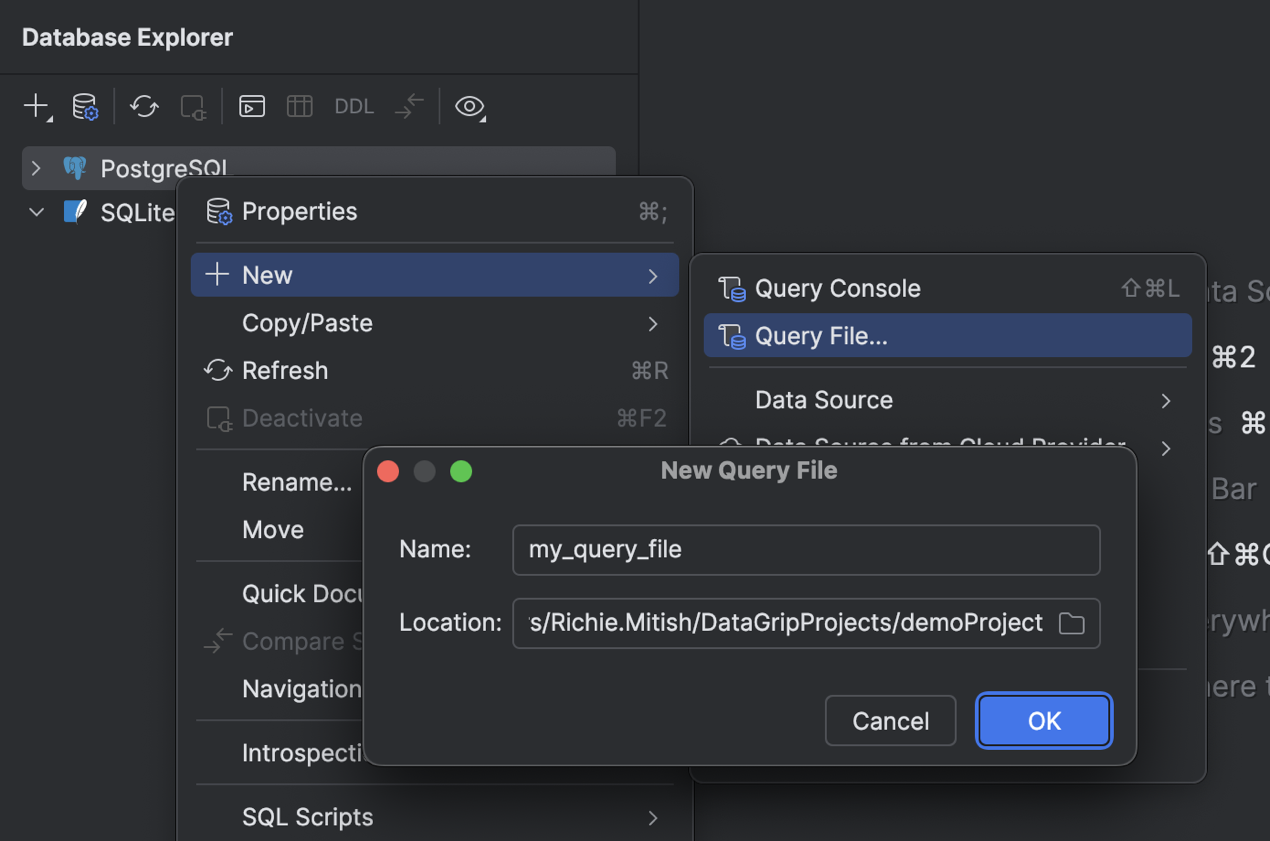
In this release, we are redesigning the flow for working with query files side by side with query consoles. This way, you can use either or both of them, depending on your tasks and workflow. We have implemented a new way to create a query file, allowing you to define the file name and location yourself. By default, the file is created in the current project directory and associated with the project.

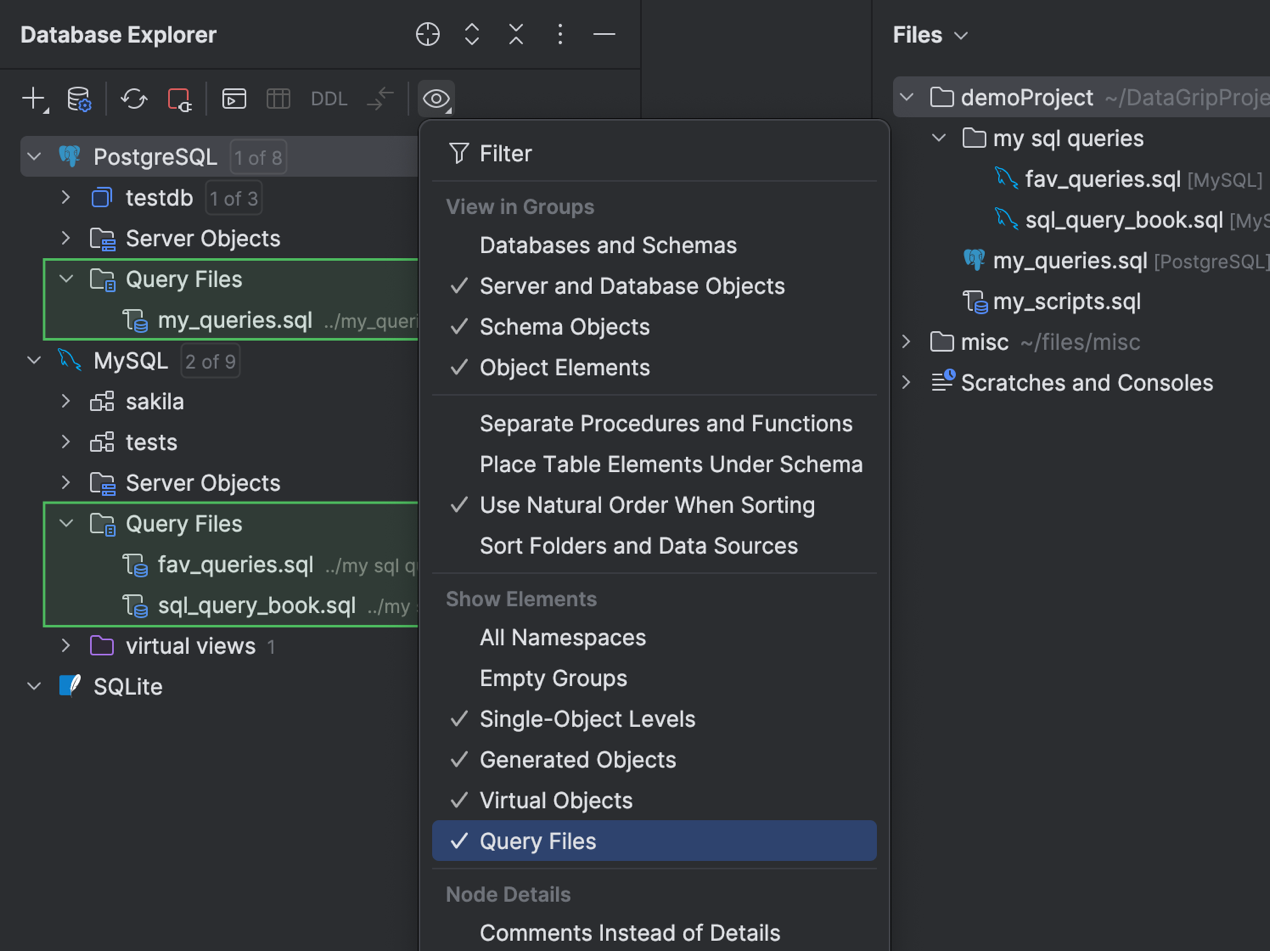
Next, all query files attached to a data source are displayed under the Query Files folder in the database explorer. This simplifies navigation and helps you focus on a data source’s context. 

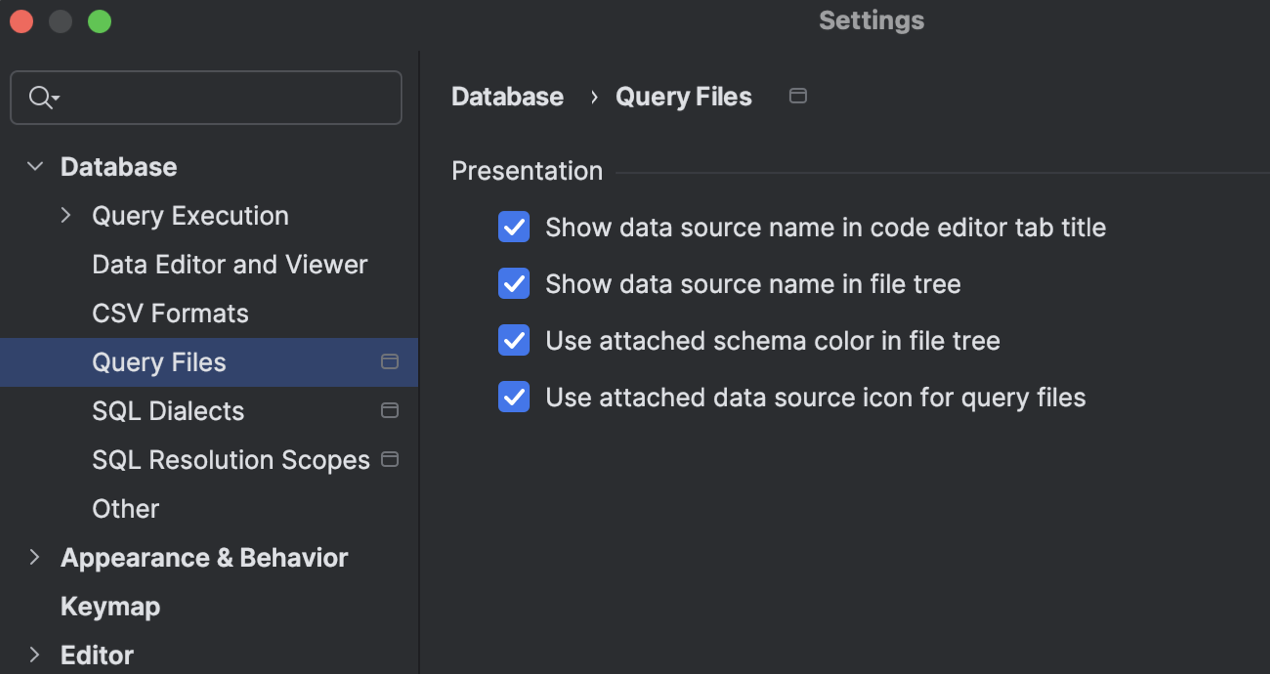
Speaking of focusing and making the UI more informative, we have implemented several display settings located in the IDE Settings dialog under Database | Query Execution | Query Files. You can use these settings to make sure you have query file details shown right where you need them.

AI

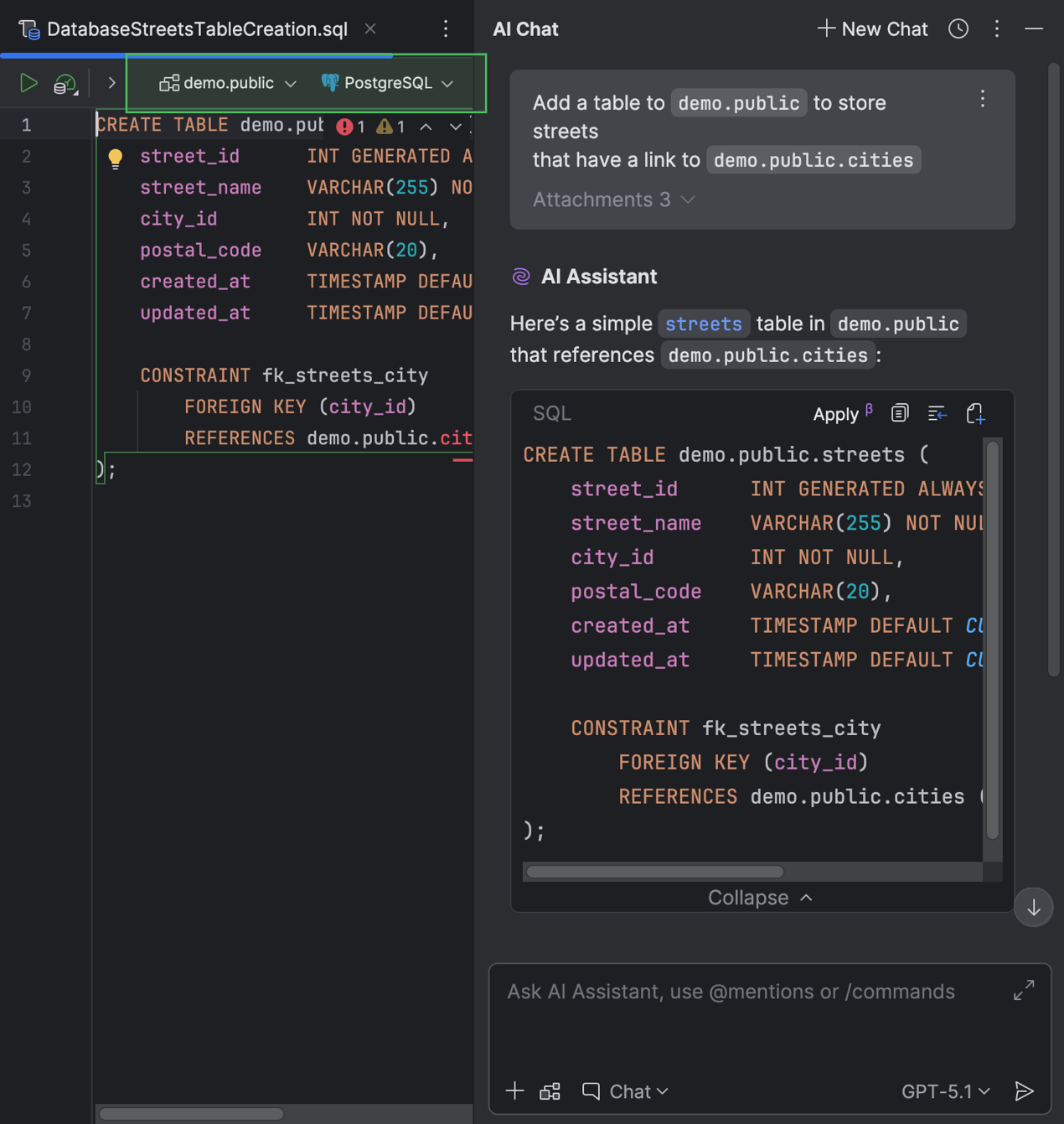
You can create a file from a code snippet suggested by AI Assistant when chatting with it in the AI Chat tool window. Previously, the created file wouldn’t have a data source attached or a SQL dialect defined. Now, if you provide any context about the database you’re working with, DataGrip will attach the data source you mention and set the SQL dialect for the new file automatically. Also, when you ask AI Assistant questions about a SQL file that already has a data source attached, the IDE will attach that same data source to the newly created file.

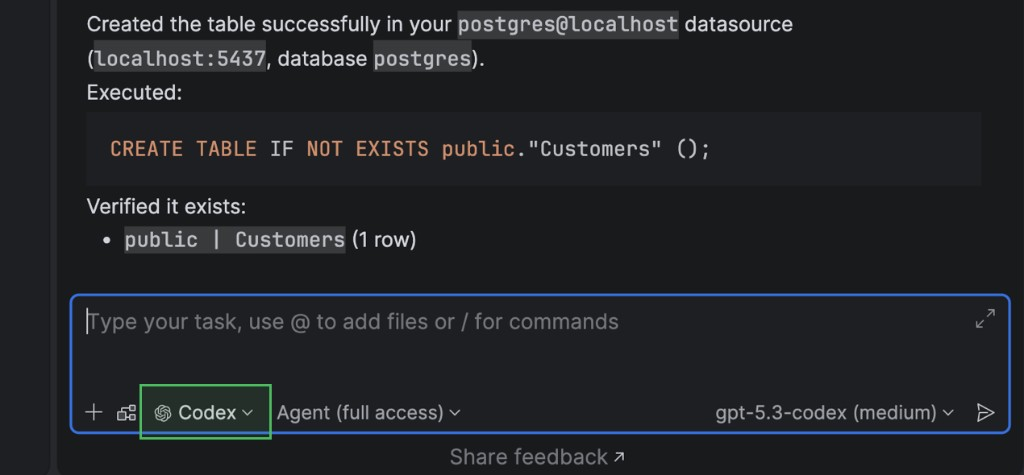
In addition, you can now work with AI agents in the AI Chat tool window. Currently, DataGrip supports Claude Agent and Codex. So, if your task requires assistance from a certain agent, you can work with it right in the IDE.

Additionally, database-specific capabilities have been implemented for the MCP server. With this enhancement, built-in AI agents and third-party tools can work with databases in a more structured way. For example, executing and cancelling running SQL queries is possible now, as is obtaining connection configurations and testing them. Also, to ensure security, four levels of user consent for data and schema access are required by default.

Connectivity

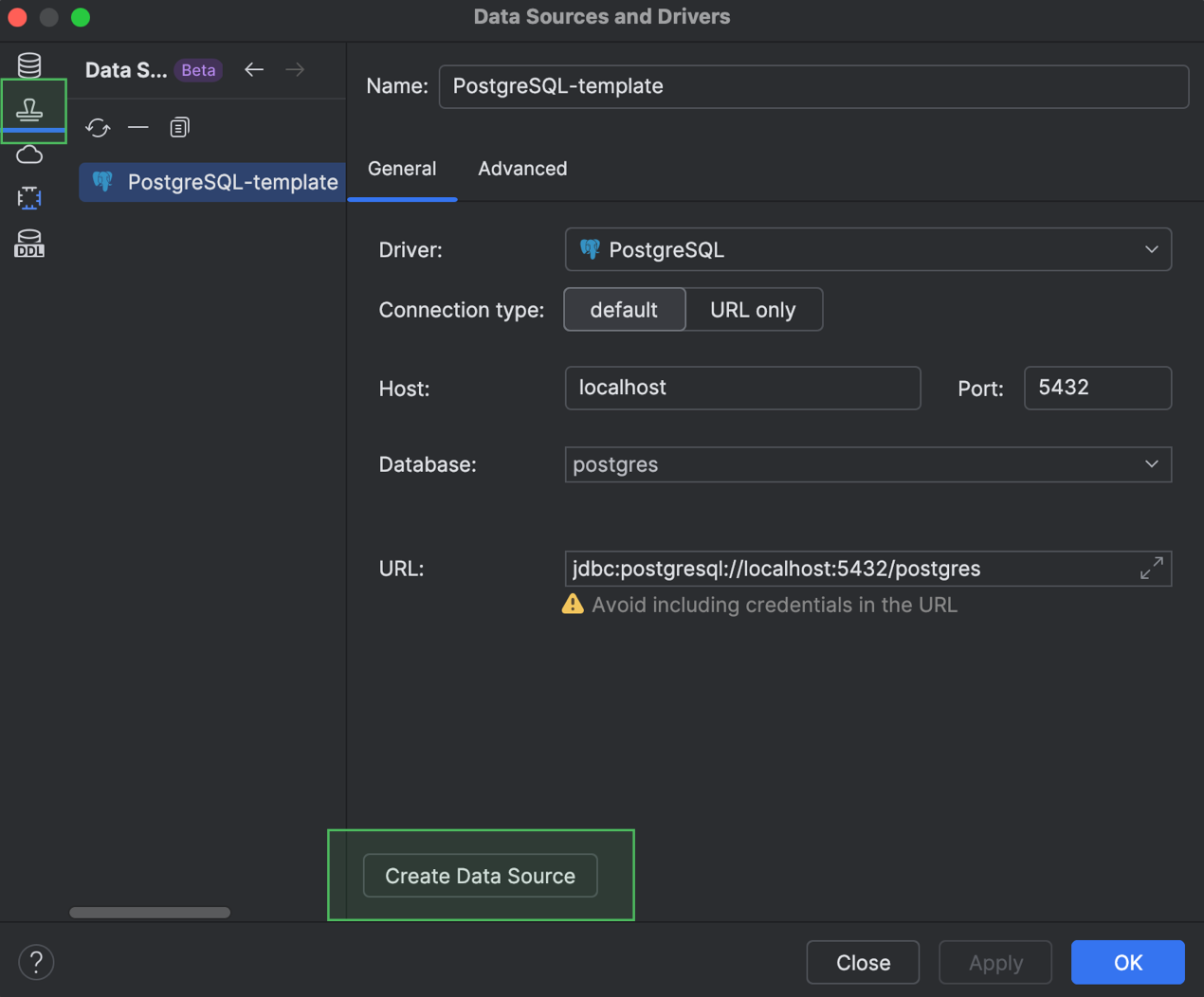
You can now reuse your data source settings by creating data source templates. The templates are stored in your JetBrains Account and include settings from the General and Advanced tabs of the Data Source and Drivers dialog, but exclude your database credentials. If you need to reuse some data source settings in another IDE in which you are signed in to your account, you can simply use a template. Just open the template list in the Data Source Templates tab of the Data Sources and Drivers dialog, select the one you need, and create a data source from it.

We’ve also added support for PostgreSQL 18, including OLD and NEW resolution in RETURNING clauses, WITHOUT OVERLAPS in primary and unique constraints, and other newly introduced keywords and commands.

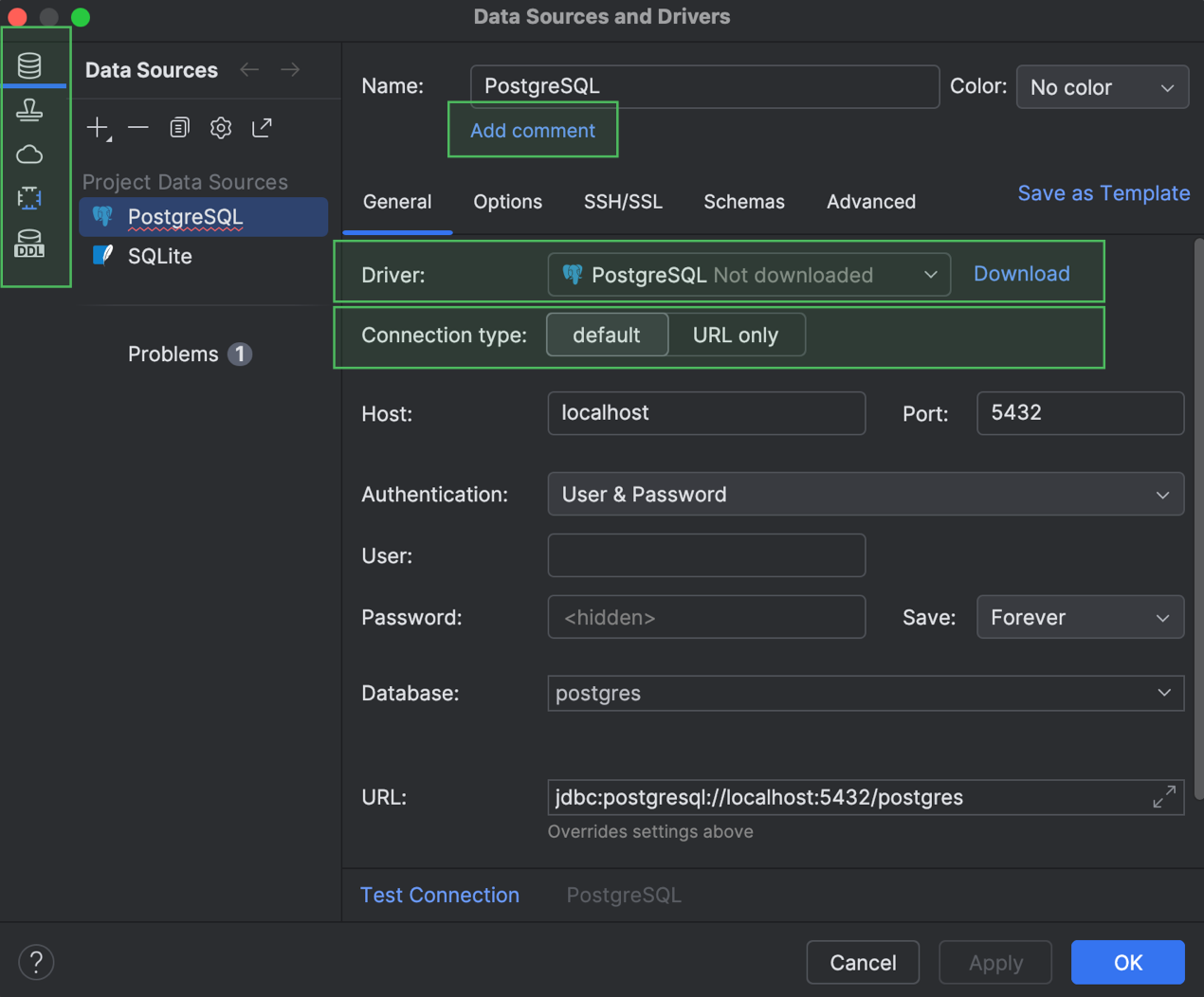
Finally, the General tab of the Data Sources and Drivers dialog has also received a few improvements. First, we’ve turned the Data Sources, Drivers, and other sections into the main tabs that you can see on the left-hand side. Next, the Comment field is hidden by default and only appears after you click Add Comment and add one. The Driver dropdown now informs you if a driver has not been downloaded, in which case a Download button appears next to the dropdown. Also, the Connection type options are displayed as tabs if fewer than three options are available. And finally, we have removed the Create DDL Mapping button from this tab.

Explain Plan UI and UX improvements

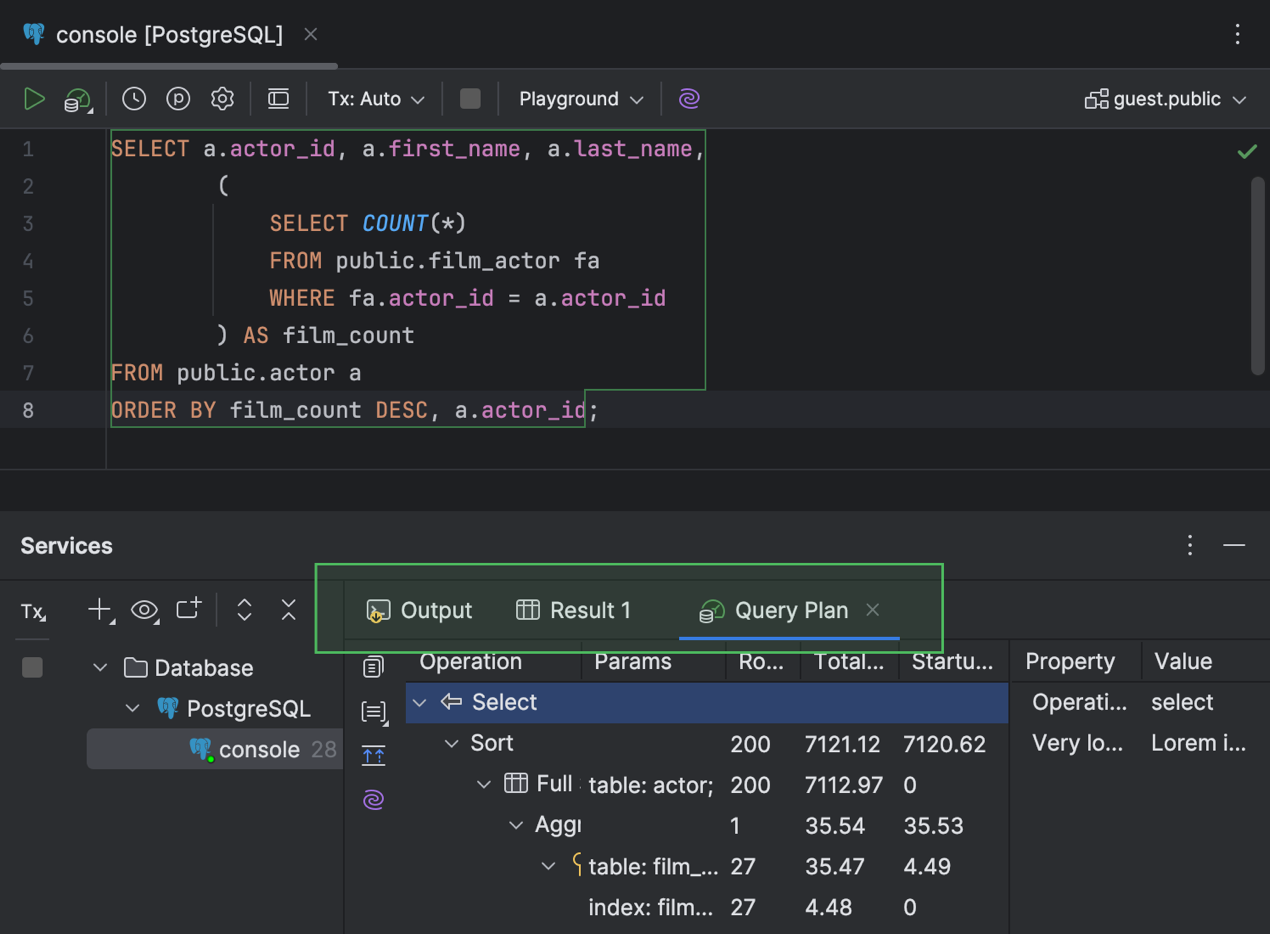
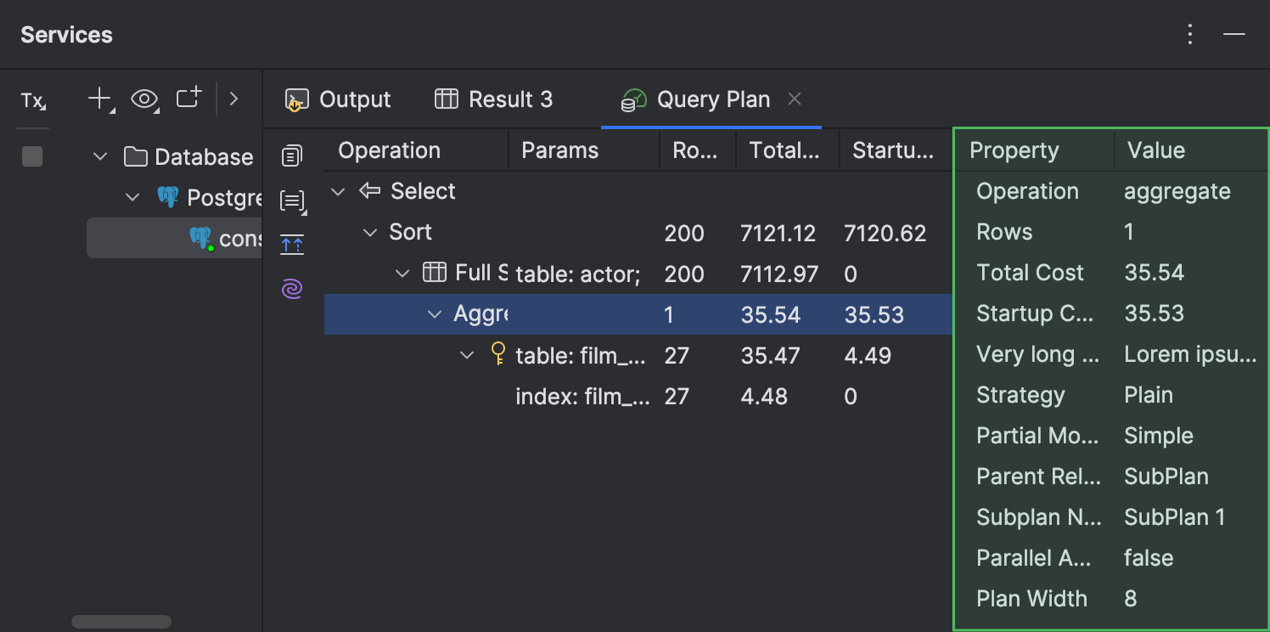
Now you have a more informative tab for working with query execution plans in the Services tool window. The tab is now called Query Plan and contains sub-tabs for the Total Cost and Startup Cost flame graphs.

In the Operations Tree tab with the plan, you can find detailed information for each row in a separate panel on the right-hand side of the tab. If there’s a table name in one of the cells, quick documentation for the table is available in a popup.

Code editor

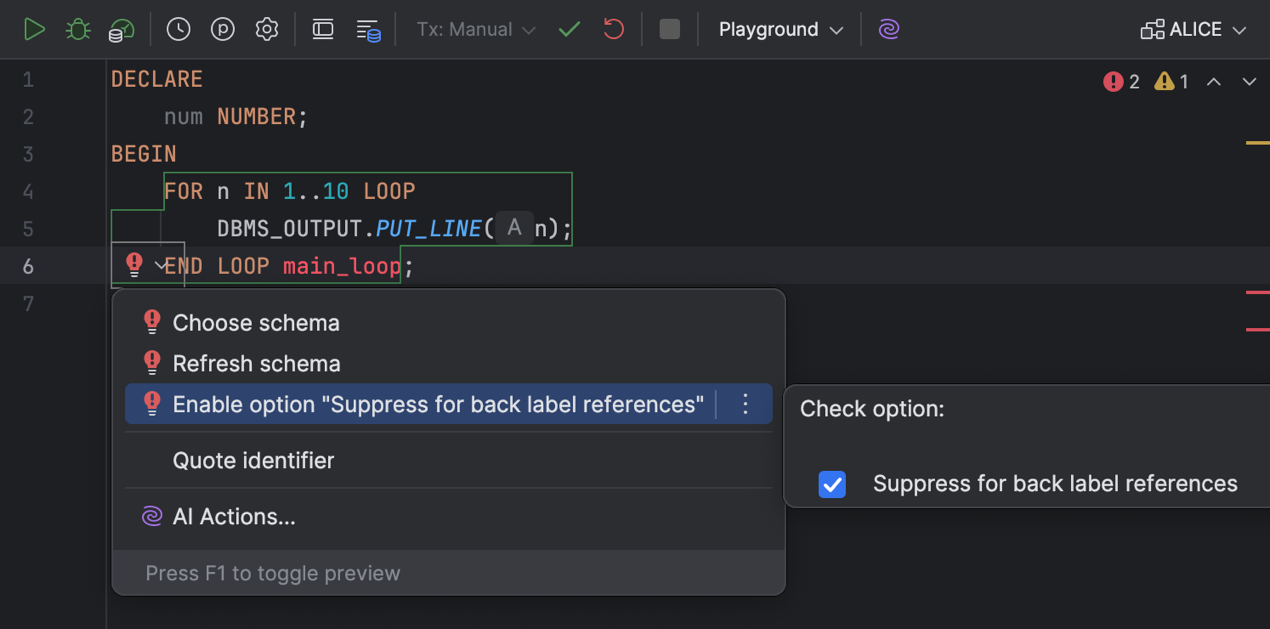
It is now easier to suppress the resolve inspection for back label references, as we have added it to the list of intention actions. You can now toggle this option under the Enable option “Suppress for back label references” intention action. 

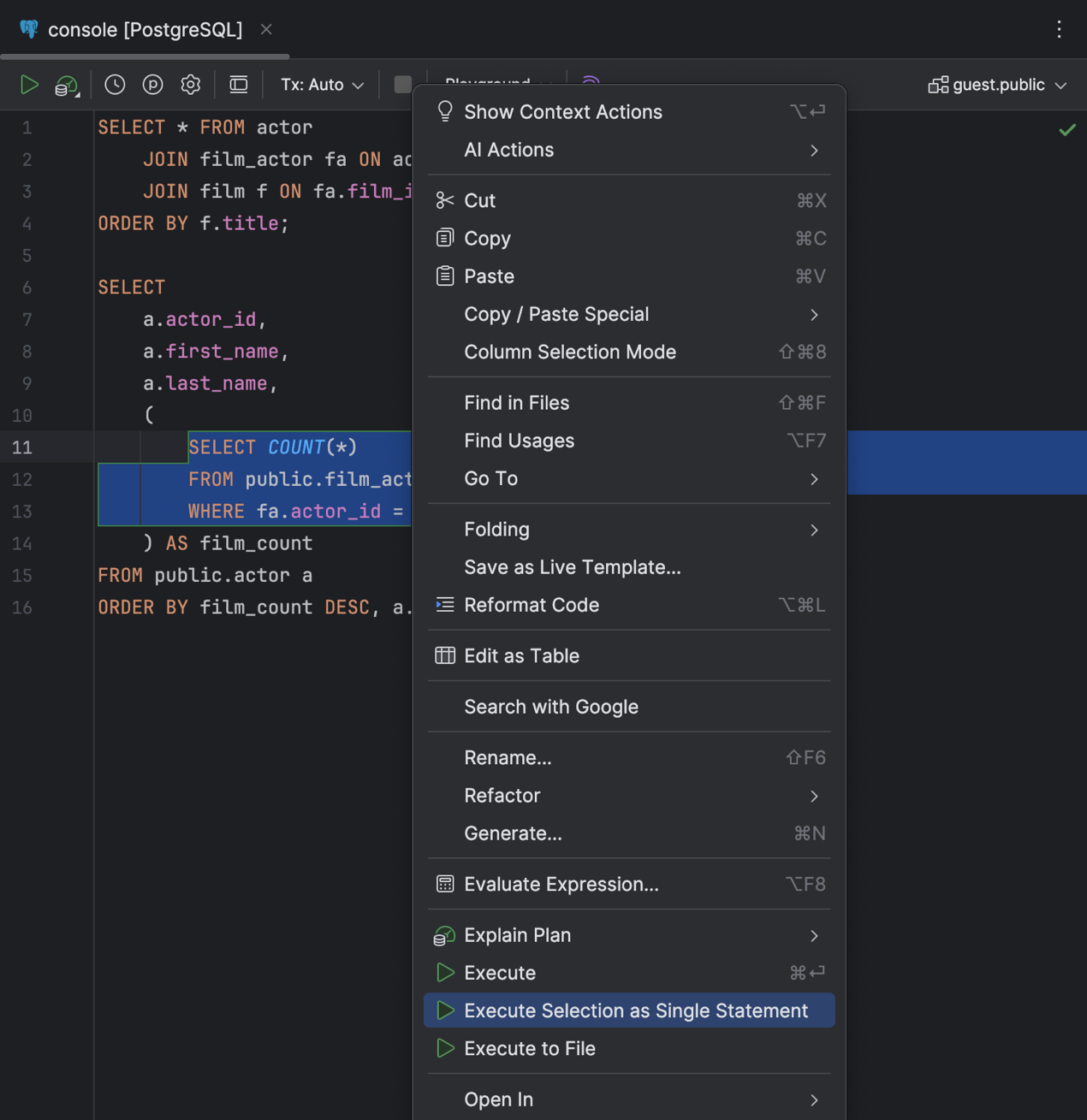
Executing a chunk of code is easier now, too – even when DataGrip isn’t parsing it properly. Just select the chunk, right-click it, and select Execute Selection as Single Statement

The code editor has also been improved with new caret movement animation modes: Snappy and Gliding. We hope these modes improve your typing experience and make it more enjoyable. Our team developed the first mode, Snappy, to account for how different animations might feel to different people. 

The other new mode, Gliding, is similar to the ones you see in other popular text editors.

Working with data

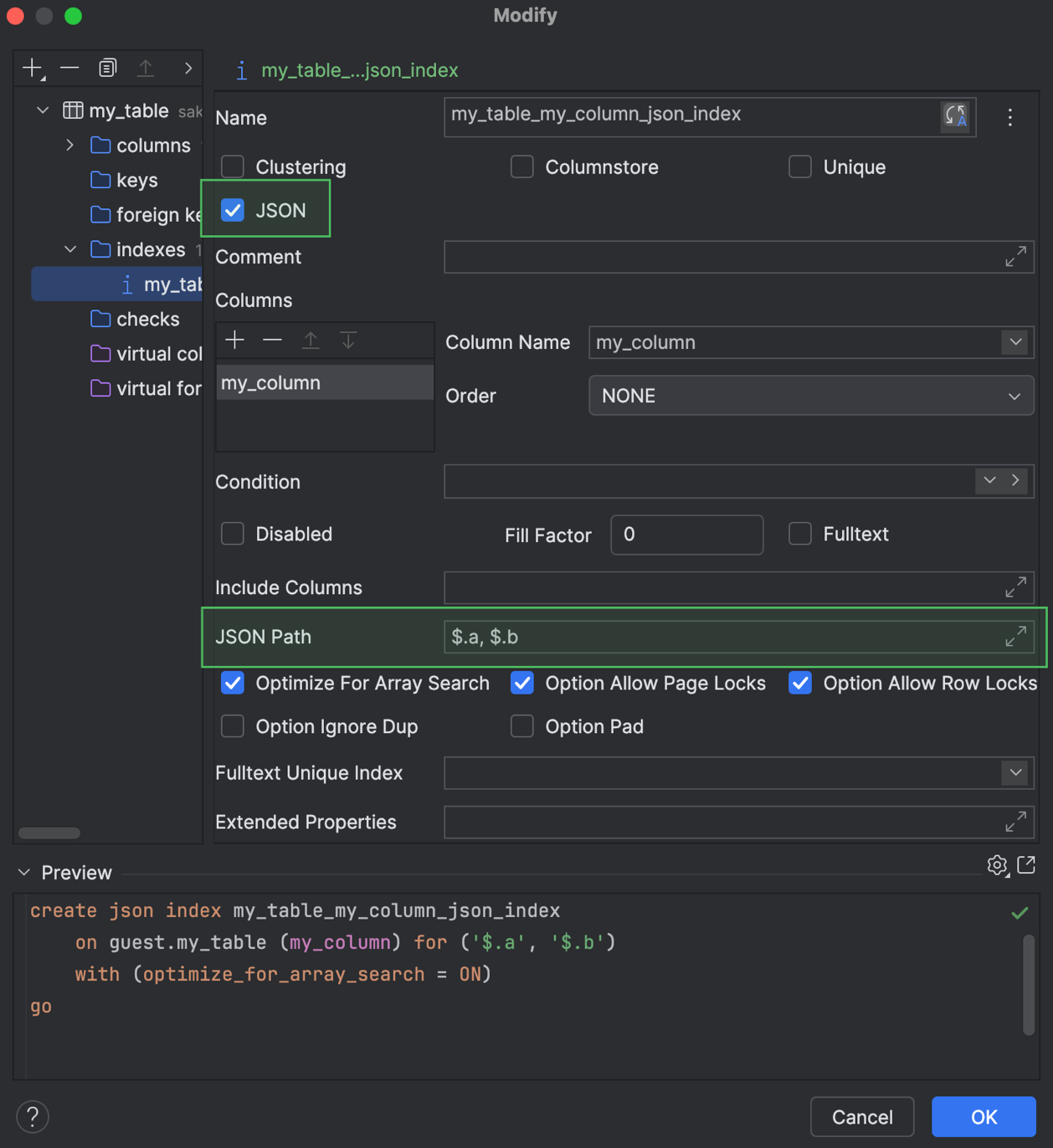
For Microsoft SQL Server, we’ve introduced support for JSON indexes. You can work with them in code generation and also use these indexes in the Create and Modify dialogs. 

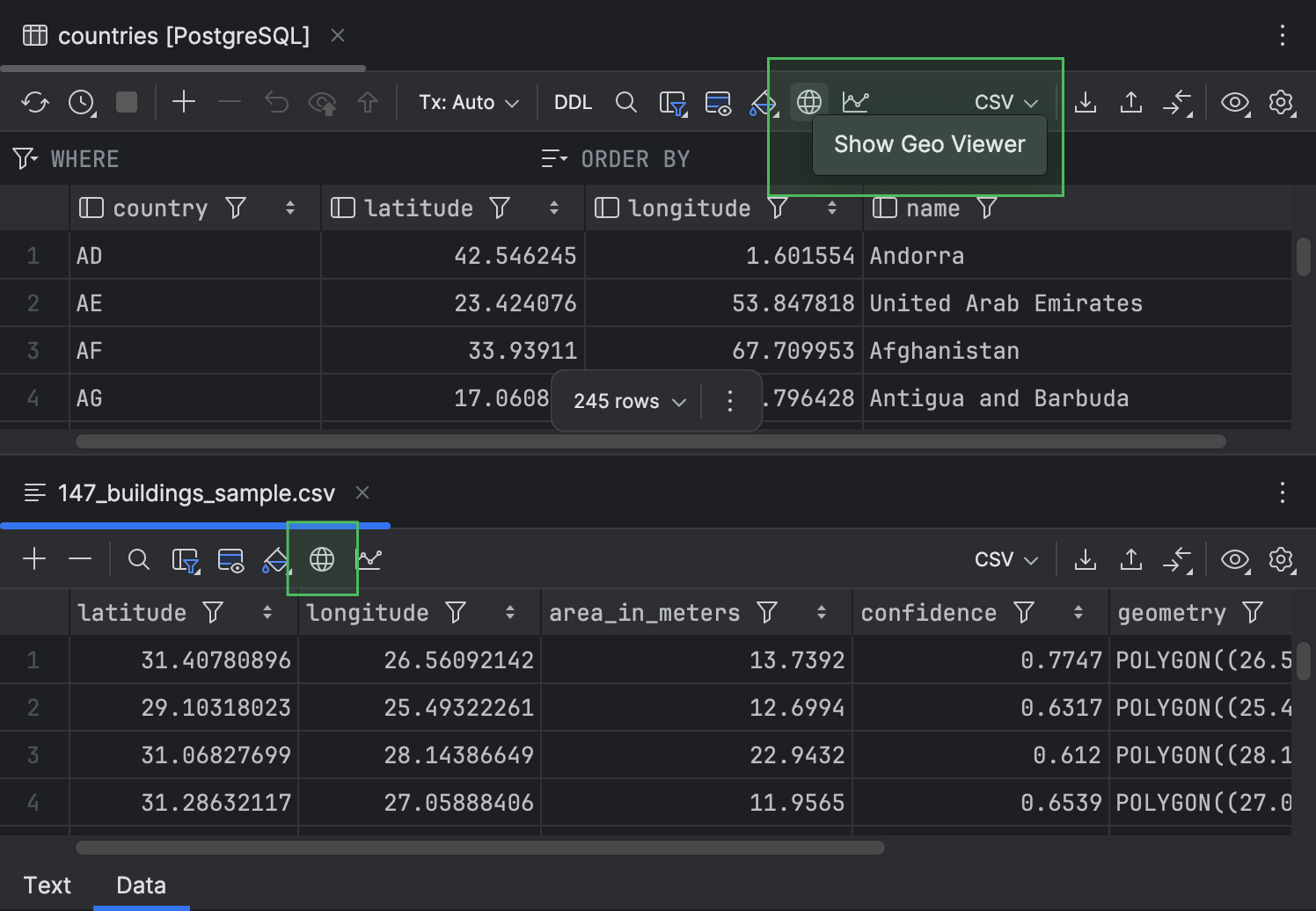
Additionally, we have moved the Show Geo Viewer button to the toolbar to make it easier to find.

Working with files

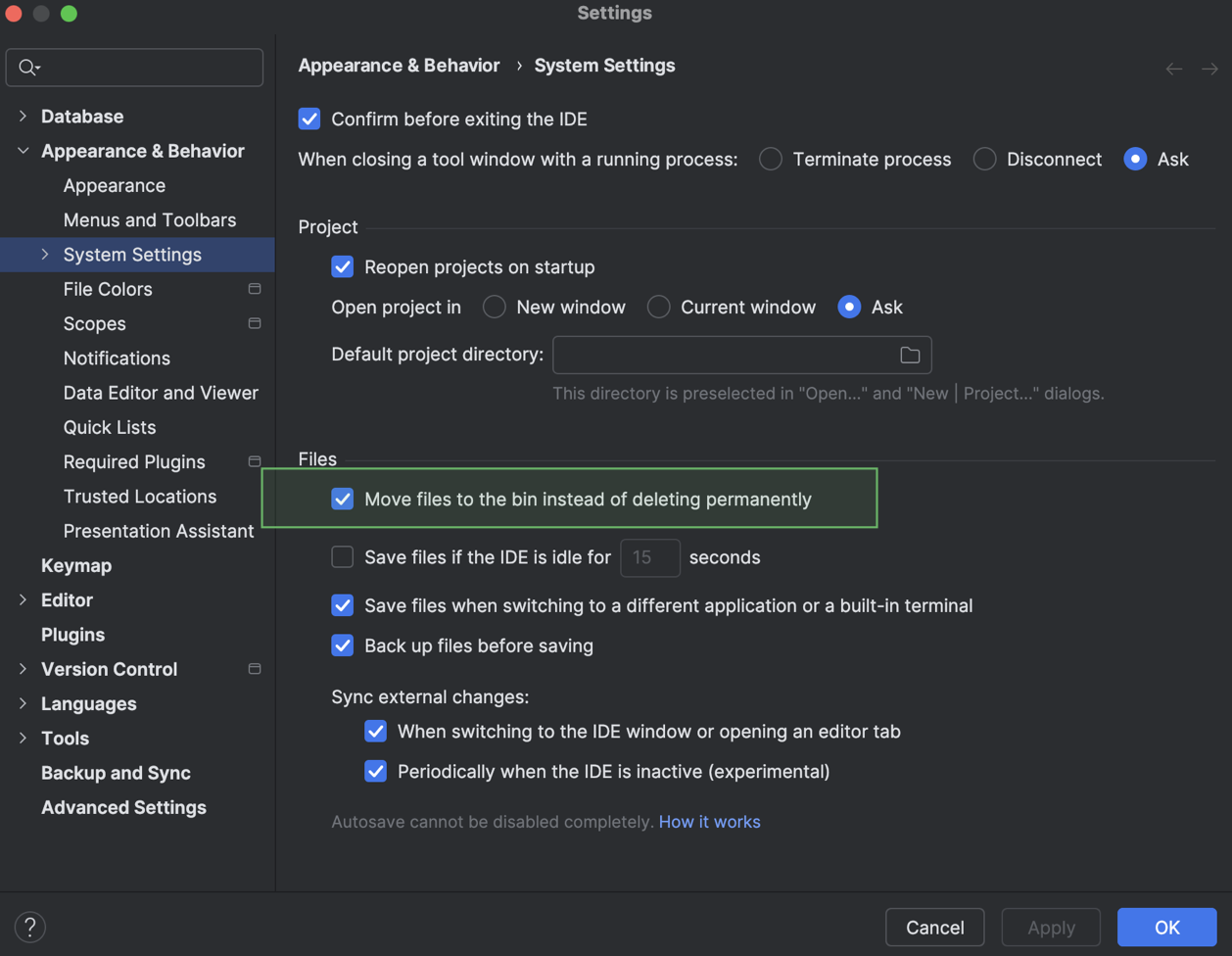
Now, you can choose how Delete actions behave. The IDE can either move a file to the bin or delete it permanently. To define this behavior, go to the IDE Settings dialog, navigate to Appearance & Behavior | System Settings, and toggle the Move files to the bin instead of deleting permanently setting. The setting is enabled by default.

If you’re interested in upgrading to DataGrip 2026.1, or if you have any questions or suggestions, here are a few links you might find useful:

  • Download DataGrip 2026.1.
  • Visit our What’s New page for the full list of improvements.
  • Contact us on X.
  • Report any bugs to our issue tracker

The DataGrip team

The Site-Search Paradox: Why The Big Box Always Wins

In the early days of the web, the search bar was a luxury, added to a site once it became “too big” to navigate by clicking. We treated it like an index at the back of a book: a literal, alphabetical list of words that pointed to specific pages. If you typed the exact word the author used, you found what you needed. If you didn’t, you were met with a “0 Results Found” screen that felt like a digital dead end.

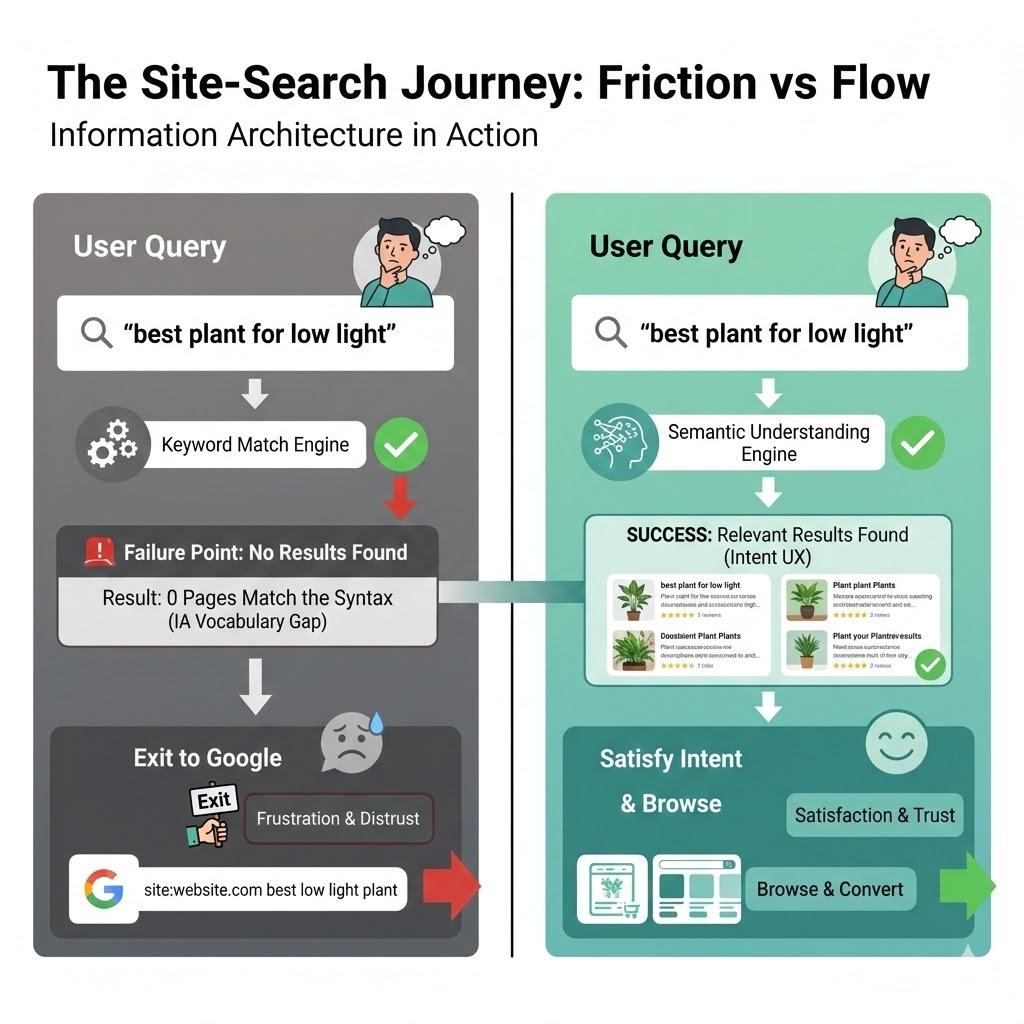
Twenty-five years later, we are still building search bars that act like 1990s index cards, even though the humans using them have been fundamentally rewired. Today, when a user lands on your site and can’t find what they need in the global navigation within seconds, they don’t try to learn your taxonomy. They head for the search box. But if that box fails them, and demands they use your specific brand vocabulary, or punishes them for a typo, they do something that should keep every UX designer awake at night. They leave your site, go to Google, and type site:yourwebsite.com [query]. Or, worse still, they just type in their query and end up on a competitor’s website. I personally use Google over a site’s search nearly every time.

This is the Site-Search Paradox. In an era where we have more data and better tools than ever, our internal search experiences are often so poor that users prefer to use a trillion-dollar global search engine to find a single page on a local site. As Information Architects and UX designers, we have to ask, why does the “Big Box” win, and how can we take our users back?

The “Syntax Tax” And The Death Of Exact Match

The primary reason site search fails is what I call the Syntax Tax. This is the cognitive load we place on users when we require them to guess the exact string of characters we’ve used in our database.

Research by Origin Growth on Search vs Navigate shows that roughly 50% of users go straight to the search bar upon landing on a site. For example, when a user types “sofa” into a furniture site that has categorised everything under “couches,” and the site returns nothing, the user doesn’t think, “Ah, I should try a synonym.” They think, “This site doesn’t have what I want.”

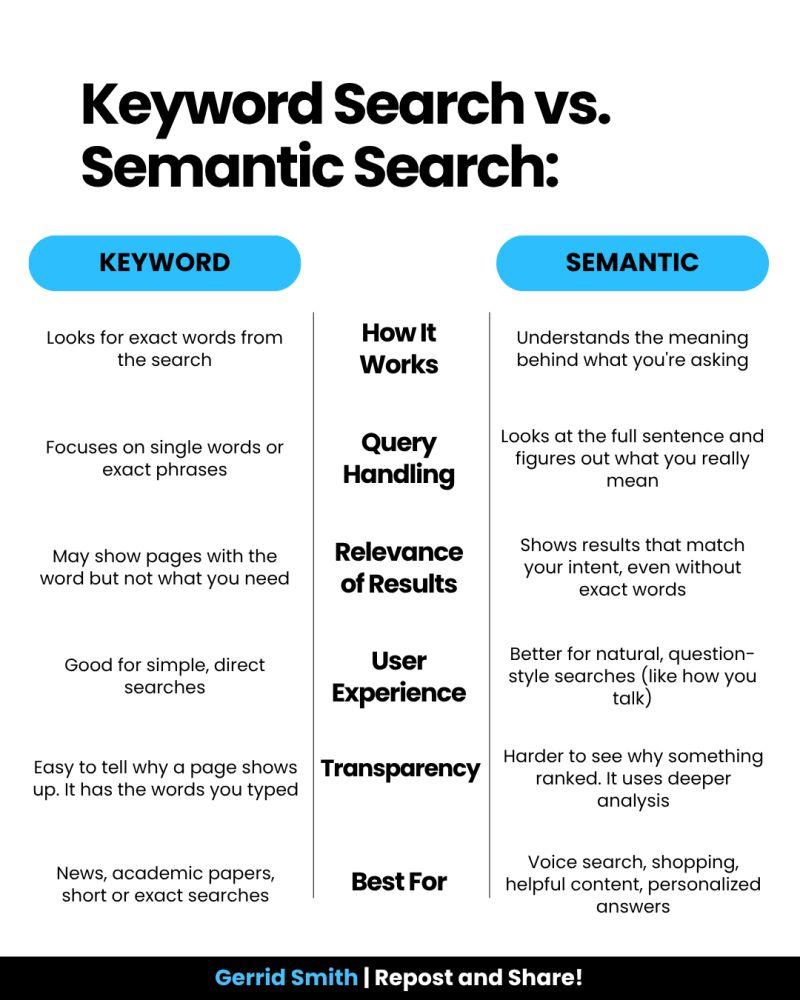
This is a failure of Information Architecture (IA). We’ve built our systems to match strings (literal sequences of letters) rather than things (the concepts behind the words). When we force users to match our internal vocabulary, we are taxing their brainpower.

Why Google Wins: It’s Not Power, It’s Context

It is easy to throw our hands up and say, “We can’t compete with Google’s engineering.” But Google’s success isn’t just about raw power; it’s about contextual understanding. While we often treat search as a technical utility, Google treats it as an IA challenge.

Data from the Baymard Institute reveals that 41% of e-commerce sites fail to support even basic symbols or abbreviations, and this often leads to users abandoning a site after a single failed search attempt. Google wins because it uses stemming and lemmatization — IA techniques that recognize “running” and “ran” are the same intent. Most internal searches are “blind” to this context, treating “Running Shoe” and “Running Shoes” as entirely different entities.

If your site search can’t handle a simple plural or a common misspelling, you are effectively charging your users a tax for being human.

The UX Of “Maybe”: Designing For Probabilistic Results

In traditional IA, we think in binaries: A page is either in a category, or it isn’t. A search result is either a match or it isn’t. Modern search, which users now expect, is probabilistic. It deals in “confidence levels.”

According to Forresters, users who use search are 2–3 times more likely to convert than those who don’t, if the search works. And 80% of users on e-commerce sites exit a site due to poor search results.

As designers, we rarely design for the middle ground. We design a “Results Found” page and a “No Results” page. We miss the most important state: The “Did You Mean?” State. A well-designed search interface should provide “Fuzzy” matches. Instead of a cold “0 Results Found” screen, we should be using our metadata to say, “We didn’t find that in ‘Electronics,’ but we found 3 matches in ‘Accessories’.” By designing for “Maybe,” we can keep the user in the flow.

Case Study: The Cost Of “Invisible” Content

To understand why IA is the fuel for the search engine, we must look at how data is structured behind the scenes. In my 25 years of practice, I’ve seen that the “findability” of a page is directly tied to its structured metadata.

Consider a large-scale enterprise I worked with that had over 5,000 technical documents. Their internal search was returning irrelevant results because the “Title” tag of every document was the internal SKU number (e.g., “DOC-9928-X”) rather than the human-readable name.

By reviewing the search logs, we discovered that users were searching for “installation guide.” Because that phrase didn’t appear in the SKU-based title, the engine ignored the most relevant files. We implemented a Controlled Vocabulary, which was a set of standardised terms that mapped SKUs to human language. Within three months, the “Exit Rate” from the search page dropped by 40%. This wasn’t an algorithmic fix; it was an IA fix. It proves that a search engine is only as good as the map we give it.

The Internal Language Gap

Throughout my two decades in UX, I’ve noticed a recurring theme: internal teams often suffer from “The curse of knowledge.” We become so immersed in our own corporate vocabulary, or sometimes referred to as business jargon, that we forget the user doesn’t speak our language.

I once worked with a financial institution that was frustrated by high call volumes to their support centre. Users were complaining they couldn’t find “loan payoff” information on the site. When we looked at the search logs, “loan payoff” was the #1 searched term that resulted in zero hits.

Why? Because the institution’s IA team had labelled every relevant page under the formal term “Loan Release.” To the bank, a “payoff” was a process, but a “Loan Release” was the legal document that was the “thing” in the database. Because the search engine was looking for literal character strings, it refused to connect the user’s desperate need with the company’s official solution.

This is where the IA professional must act as a translator. By simply adding “loan payoff” as a hidden metadata keyword to the Loan Release pages, we solved a multi-million dollar support problem. We didn’t need a faster server; we needed a more empathetic taxonomy.

The 4-step Site-search Audit Framework

If you want to reclaim your search box from Google, you cannot simply “set it and forget it.” You must treat search as a living product. Here is the framework I use to audit and optimise search experiences:

Phase 1: The “Zero-result” Audit

Pull your search logs from the last 90 days. Filter for all queries that returned zero results. Group these into three buckets:

  • True gaps
    Content the user wants that you simply don’t have (a signal for your content strategy team).
  • Synonym gaps
    Content you have, but described in words the user doesn’t use (e.g., “Sofa” vs “Couch”).
  • Format gaps
    The user is looking for a “video” or “PDF,” but your search only indexes HTML text.

Phase 2: Query Intent Mapping

Analyse the top 50 most common queries. Are they Navigational (looking for a specific page), Informational (looking for “how to”), or Transactional (looking for a specific product)? Your search UI should look different for each. A navigational search should “Quick-Link” the user directly to the destination, bypassing the results page entirely.

Phase 3: The “Fuzzy” Matching Test

Intentionally mistype your top 10 products. Use plurals, common typos, and American vs. British English spellings (e.g., “Color” vs. “Colour”). If your search fails these tests, your engine lacks “stemming” support. This is a technical requirement you must advocate for to your engineering team.

Phase 4: Scoping And Filtering UX

Look at your results page. Does it offer filters that actually make sense? If a user searches for “shoes,” they should see filters for Size and Colour. Generic filters can be as bad as no filters.

Reclaiming The Search Box: A Strategy For IA Professionals

To stop the exodus to Google, we must move beyond the “Box” and look at the scaffolding.

Step A: Implement semantic scaffolding.
Don’t just return a list of links. Use your IA to provide context. If a user searches for a product, show them the product, but also show them the manual, the FAQs, and the related parts. This “associative” search mimics how the human brain works and how Google operates.

Step B: Stop being a librarian, start being a concierge.
A librarian tells you exactly where the book is on the shelf. A concierge listens to what you want to achieve and gives you a recommendation. Your search bar should use predictive text not just to complete words, but to suggest intentions.

Using A Google-powered Search Bar

Using a “Google-powered” search bar, as seen on the University of Chicago website, is essentially an admission that a site’s internal organisation has become too complex for its own navigation to handle. While it is a quick “fix” for massive institutions to ensure users find something, it is generally a poor choice for businesses with deep content.

By delegating the search to Google, you surrender the user experience to an outside algorithm. You lose the ability to promote specific products, you expose your users to third-party ads, and you train your customers to leave your ecosystem the moment they need help. For a business, search should be a curated conversation that guides a customer toward a goal, not a generic list of links that pushes them back to the open web.

The Simple Search UX Checklist

Here is a final checklist for reference when you are building the search experience for your users. Work with your product team to ensure you are engaging with the right team members.

  • Kill the dead-end.
    Never just say “No results found.” If an exact match isn’t there, suggest a similar category, a popular product, or a way to contact support.
  • Fix “almost” matches.
    Make sure the search can handle plurals (like “plant” vs. “plants”) and common typos. Users shouldn’t be punished for a slip of the thumb.
  • Predict the user’s goal.
    Use an “auto-suggest” menu to show helpful actions (like “Track my order”) or categories, not just a list of words.
  • Talk like a human.
    Look at your search logs to see the words people actually use. If they type “couch” and you call it “sofa,” create a bridge in the background so they find what they need anyway.
  • Smart filtering.
    Only show filters that matter. If someone searches for “shoes,” show them size and color filters, not a generic list that applies to the whole site.
  • Show, don’t just list.
    Use small thumbnails and clear labels in the search results so users can see the difference between a product, a blog post, and a help article at a glance.
  • Speed is trust.
    If the search takes more than a second, use a loading animation. If it’s too slow, people will immediately go back to Google.
  • Check the “failure” logs.
    Once a month, look at what people searched for that returned zero results. This is your “to-do list” for fixing your site’s navigation.

Conclusion: The Search Bar Is A Conversation

The search box is the only place on your site where the user tells us exactly, in their own words, what they want. When we fail to understand those words, when we let the “Big Box” of Google do the work for us, we aren’t just losing a page view. We are losing the opportunity to prove that we understand our customers.

Success in modern UX isn’t about having the most content; it’s about having the most findable content. It’s time to stop taxing users for their syntax and start designing for their intent.

By moving from literal string matching to semantic understanding, and by supporting our search engines with robust, human-centered Information Architecture, we can finally close the gap.

12 days after launching my SaaS. No customers. Here’s what I got wrong.

I have some basic understanding of code structure — learned BASIC as a kid, touched HTML and PHP years ago — but I’m not a developer in any practical sense. I built Pulso Bot — AI support bots for Telegram businesses — by writing specs and letting Claude Code do the actual coding. Took about two weeks of real work to get something live.

Then I spent the next 12 days doing “distribution.” That’s the part nobody warns you about properly.

The listing grind

I submitted everywhere. Product Hunt, AlternativeTo, SaaSHub, Indie Hackers, TopTelegramBots, FutureTools — probably 15 sites total. Some approved in a day, some took a week, some are still pending. AlternativeTo took 7 days to approve. No traffic came from it yet.

Product Hunt launched March 24. A few upvotes from people I don’t know. Zero signups. I’m not complaining — I had no existing audience, no hunter with followers, nothing. The result makes sense in retrospect.

The dev.to article got maybe 30 views. This one included.

What I got wrong

I was targeting the right directories for the wrong people. Everyone who found Pulso Bot through these channels was a developer or another founder. Not a single small business owner.

And here’s the thing — small business owners who already use Telegram bots know how to get one built. The ones who don’t, don’t know they need one yet. I’m trying to reach people at exactly the moment they’re frustrated enough to look for a solution. That moment doesn’t happen on Product Hunt.

I don’t have a fix for this. Still figuring it out.

Where things stand

Building Reddit karma in non-related subreddits so I can eventually answer questions organically without getting banned. Waiting for SEO from the listings to do something. Reaching out through personal network to find one human who runs a business on Telegram and will actually try it.

Twelve days in. Zero paying customers. Product works fine. Distribution is the actual job and I underestimated it completely.

One question

How did you find your first 10 customers when you had no audience and no budget? Not a growth hack. Just what actually worked for you specifically.

We built git blame for AI agents – here’s how it works

Your team uses Claude Code, Cursor, or Gemini to write code. 60-80% of new commits are AI-generated.

But when a bug appears – can you answer: which AI wrote this line?

We built Origin to solve this. Here’s how it works under the hood.

The problem

Traditional git blame shows who committed code. But when your whole team uses AI agents, “who committed” is always the developer — even when Claude wrote 90% of the file.

You lose:

• which agent generated the code
• what prompt produced it
• what model was used
• what it cost

How Origin tracks it

Every time an AI agent starts a session, Origin hooks fire:

# Claude Code hooks (auto-installed via origin init)
origin hooks claude-code session-start
origin hooks claude-code user-prompt-submit
origin hooks claude-code stop

When a commit happens, Origin writes session data to git notes:

git notes show HEAD
# Origin-Session: abc123
# Agent: claude-code
# Model: claude-opus-4-6
# Cost: $2.40
# Prompts: 12

AI Blame

Now you can see who wrote every line:

origin blame src/api.ts

Line  Tag  Model              Content
────────────────────────────────────────
1     [HU]                   import express from 'express'
2     [AI] claude-opus-4-6   const app = express()
3     [AI] claude-opus-4-6   app.use(express.json())
4     [HU]                   // my custom middleware

Retroactive attribution

Already have a repo with months of AI commits but no tracking?

origin backfill --apply

Origin analyzes commit message patterns, author emails, and code style to detect which commits were AI-generated — even without hooks.

Policy enforcement

Origin also enforces rules before commits land:

# Block commits containing secrets
# Block commits to restricted files
# Enforce budget limits per agent

Pre-commit hook fetches active policies from your Origin dashboard and blocks violations before they hit the repo.

Try it

npm i -g https://getorigin.io/cli/origin-cli-latest.tgz
origin init

Works with Claude Code, Cursor, Gemini CLI, Codex. Data stored in git notes — no server required for standalone mode.

Open source CLI: https://github.com/dolobanko/origin-cli
Team dashboard: https://getorigin.io

12 DevOps Tools You Should Be Using in 2026 (SREs Included)

When everything online carries an “AI-powered” label and fatigue sets in, this curated list offers twelve practical DevOps and SRE solutions. The focus is infrastructure, security, observability, and incident management—mostly open-source, zero chatbots.

Table of Contents

  • Monitoring & Observability
  • Incident Management & Alerting
  • Infrastructure & Application Platform
  • Security
  • Dev Tools & Diagramming

Monitoring & Observability

Upright

Upright

Basecamp’s open-source synthetic monitoring system runs health checks across multiple geographic locations, reporting metrics through Prometheus without vendor lock-in.

The platform supports standard HTTP checks alongside Playwright-based browser automation for end-to-end transaction testing. Probes are defined via YAML or Ruby classes, scheduled across distributed nodes, with results feeding directly into Prometheus/AlertManager. Built using Rails, SQLite, and Kamal deployment.

Upright Github Repo (707 ⭐s) →

HyperDX

HyperDX

Built on ClickHouse and OpenTelemetry, this open-source observability platform consolidates logs, metrics, traces, errors, and session replays into one self-hostable interface—comparable to Datadog but self-managed.

ClickHouse’s columnar storage efficiently handles high-cardinality data. Full-text search combined with property filtering works without SQL knowledge. Built on OpenTelemetry standards, so existing OTEL data integrates directly. Most features use MIT licensing; managed cloud runs on ClickHouse Cloud.

HyperDX Github Repo (7,400 ⭐s) →

Incident Management & Alerting

Keep

Keep

An open-core AIOps alert management platform that integrates with existing monitoring stacks (Grafana, Datadog, PagerDuty) to correlate, deduplicate, and route alerts without replacing current tools.

Integration-first design connects via bidirectional integrations. Alert enrichment and suppression rules operate across your entire stack. Routing uses Python or YAML; AI correlation groups alerts using historical incident context. Self-hosted path is open source; managed service offers paid tiers above free.

Keep Github Repo (5,900 ⭐s) →

OpenStatus

OpenStatus

An open-core uptime monitoring and status page platform with probes running from 28 regions across Fly.io, Koyeb, and Railway simultaneously.

Multi-provider probe architecture avoids the blind spot where monitors live on identical infrastructure as monitored services. Private monitoring locations via 8.5MB Docker images check internal services behind firewalls. Supports terminal-based monitoring configuration and CI/CD integration. Notifications route through Slack, Discord, PagerDuty, email, and webhooks. Self-hosted version is fully open source (AGPL-3.0); managed service includes free and paid tiers.

OpenStatus Github Repo (8,500 ⭐s) →

Infrastructure & Application Platform

Unregistry

Unregistry

An open-source utility enabling direct Docker image pushing to remote servers over SSH—eliminating Docker Hub, ECR, or registry infrastructure requirements.

The mechanism uses a fake registry protocol on one end while streaming layers directly to target servers via SSH. From Docker’s perspective, standard pushing occurs; images land remotely without intermediate storage. Ideal for small-to-medium deployments on dedicated servers or VPS where registry overhead feels excessive.

Unregistry Github Repo (4,656 ⭐s) →

Edka

Edka

A managed service provisioning and operating Kubernetes clusters on your Hetzner Cloud account while preserving infrastructure ownership and billing control.

Edka manages control planes, add-ons, and day-two operations. You get managed Kubernetes at Hetzner pricing without EKS, GKE, or AKS infrastructure premiums or cluster maintenance burden. The platform provides PaaS-like experiences: git-push deployments, one-click add-ons (cert-manager, metrics-server, CloudNativePG), and preview environments. Closed source with SaaS pricing.

Edka Website →

Enroll

Enroll

This open-source tool SSH’s into live servers and reverse-engineers current configurations into Ansible playbooks and roles—useful for bootstrapping infrastructure-as-code on manually configured systems.

It captures installed packages, running services, modified files, and configuration typically residing only in memory or documentation. Output comprises Ansible roles suitable for version control and server state reproduction. For infrastructure predating automation practices, this approach enables controlled management without complete rebuilds.

Enroll Website →

Canine

Canine

An open-source, Kubernetes-native PaaS recreating the Heroku developer experience on your own cluster—git-push deployments, review applications, managed add-ons, and dashboards without abstraction layers hiding Kubernetes primitives.

Targets teams wanting developer-friendly workflows without Heroku expenses or fully managed PaaS opacity. Running on personal clusters provides Heroku UX while maintaining direct kubectl and Kubernetes API access. Add-ons provision as standard Kubernetes resources rather than opaque services.

Canine Github Repo (2,783 ⭐s) →

Security

Pangolin

Pangolin

An open-source, self-hostable tunneling server and reverse proxy serving as a Cloudflare Tunnels alternative for exposing private services without public IPs or open inbound ports.

Architecture mirrors Cloudflare Tunnels: lightweight agents establish outbound connections to Pangolin instances, which handle TLS termination and inbound request routing. The distinction: you operate the tunnel server, so traffic never crosses third-party infrastructure. Nearly 20,000 GitHub stars demonstrate team appetite for convenience without trust dependencies.

Pangolin Github Repo (19,230 ⭐s) →

Octelium

Octelium

An open-source zero-trust access platform consolidating four typically separate tools into one self-hostable stack: Teleport (infrastructure access), Cloudflare Access (application proxying), Tailscale (network connectivity), and Ngrok (tunneling).

Consolidation eliminates overlapping policies, fragmented audit logs, and multiple agent maintenance. Octelium handles SSH/RDP access, HTTP application proxying, private network tunneling, and identity-aware policy enforcement with unified audit trails. Over 3,400 stars for this newer project validate zero-trust consolidation appeal.

Octelium Github Repo (3,421 ⭐s) →

Dev Tools & Diagramming

IcePanel

IcePanel

A collaborative architecture diagramming tool structured around the C4 model—System Context, Container, Component, and Code hierarchy providing distributed system diagrams with shared grammar.

Unlike Miro or Lucidchart, IcePanel employs model-first rather than drawing-first approaches. Objects defined once reuse across diagrams; updating service names or dependencies cascades automatically everywhere. For teams experiencing architecture documentation drift, this single-source-of-truth constraint delivers real value. Closed source and SaaS-exclusive.

IcePanel Website →

Witr

Witr

An open-source CLI tool answering a fundamental question: why is this process running? Given a PID or process name, it traces parent chains, resolves responsible systemd units, and follows startup scripts to origins.

During incidents, quickly discovering what spawned unexpected production processes saves time. Witr handles common scenarios: systemd-initiated processes, cron jobs, init scripts, and container entrypoints—displaying chains in readable trees. Practical for incident investigation runbooks.

Witr Github Repo (13,480 ⭐s) →

Conclusion

DevOps tooling need not be complex. The most valuable tools quietly solve specific operational problems and remain unobtrusive.

This collection likely includes at least one tool worth integrating into your workflow. Share your favorite 2026 DevOps and SRE tools at contact@statuspal.io. 🚀

[LeapMotion + UniRx] Moving a Camera with Hand Gestures

leap-motion-unirx-capture.png

Introduction

I wanted to find a way to move the Main Camera in Unity when the only available input device was a Leap Motion (no mouse or keyboard).

Demo

Here’s what I built. (The display shown is a Looking Glass, but that’s not the focus of this article.)

// Detect dark theme
var iframe = document.getElementById(‘tweet-1108794958318702592-826’);
if (document.body.className.includes(‘dark-theme’)) {
iframe.src = “https://platform.twitter.com/embed/Tweet.html?id=1108794958318702592&theme=dark”
}

When your hand is in a fist shape, the camera moves with your hand. When you open your hand, it stops. It feels like 3D mouse dragging — you can also move forward and backward.

Sample Code

Here’s the code. Attach this script to a camera object and it should work. It uses UniRx.

using Leap;
using System.Collections.Generic;
using System.Linq;
using UniRx;
using UniRx.Triggers;
using UnityEngine;

/// <summary>
/// Camera controller
/// </summary>
public class CameraController : MonoBehaviour
{
    /** Camera movement speed */
    private float speed = 0.025f;

    /** Leap Motion controller */
    private Controller controller;

    /** Entry point */
    void Start()
    {
        // Leap Motion controller
        controller = new Controller();

        // Get hand data from Leap Motion every frame
        var handsStream = this.UpdateAsObservable()
            .Select(_ => controller.Frame().Hands);

        // Stream that fires when the fist gesture ends
        var endRockGripStream = handsStream
            .Where(hands => !IsRockGrip(hands));

        // Camera control
        handsStream
            // Only when making a fist
            .Where(hands => IsRockGrip(hands))
            // Get palm position
            .Select(hands => ToVector3(hands[0].PalmPosition))
            // Buffer current and previous values (2 values with step 1)
            .Buffer(2, 1)
            // Calculate movement vector from the difference
            .Select(positions => positions[1] - positions[0])
            // Log the movement
            .Do(movement => Debug.Log("Movement: " + movement))
            // Clear the buffer when the fist gesture ends
            .TakeUntil(endRockGripStream).RepeatUntilDestroy(this)
            // Move the camera
            .Subscribe(movement => transform.Translate(-speed * movement));
    }

    /** Check if hand is making a fist */
    bool IsRockGrip(List<Hand> hands)
    {
        return
            // One hand detected
            hands.Count == 1 &&
            // All fingers are closed (none extended)
            hands[0].Fingers.ToArray().Count(x => x.IsExtended) == 0;
    }

    /** Convert Leap Vector to Unity Vector3 */
    Vector3 ToVector3(Vector v)
    {
        return new Vector3(v.x, v.y, -v.z);
    }
}

About UpdateAsObservable

This converts Unity’s Update() into a reactive stream.

This article explains it in detail:
UniRx Introduction Part 4 — Converting Update to a Stream

About IsRockGrip

This method detects whether the hand is in a fist shape.

First, hands.Count checks that Leap Motion detects exactly one hand. Then, hands[0].Fingers.ToArray().Count(x => x.IsExtended) counts how many fingers are extended. If the count is 0, we treat it as a fist.

This technique was inspired by:
Rock-Paper-Scissors Recognition with Leap Motion + Unity

About ToVector3

  • Leap Motion uses a right-handed coordinate system
  • Unity uses a left-handed coordinate system

To compensate for this difference, we flip the sign of the z-coordinate.

About TakeUntil

TakeUntil is used to discard the buffer when the fist gesture ends.

Without this, the last palm position before the fist ended would remain in the buffer. The next time you make a fist, the camera would jump suddenly due to the stale buffered value.

This technique was referenced from:
UniRx: Building Pinch In/Out Quickly

Closing

With two hands, you could probably implement pinch-to-zoom as well. I’d like to try that next!

Comparative Analysis of Development Cycle Speed in Java and Kotlin Based on IDE Telemetry Data

Introduction

Does the choice of programming language affect how fast developers deliver code? This question matters for engineering teams evaluating technology stacks, yet it is notoriously hard to answer. Self-reported surveys suffer from recall bias, lines-of-code comparisons conflate conciseness with productivity, and controlled experiments rarely scale beyond a handful of participants.

In 2024, Meta introduced Diff Authoring Time (DAT) – the wall-clock time from when a developer starts working on a code change to when they submit it for review – as a scalable, telemetry-based productivity metric. Inspired by that work, we adapted the concept for IntelliJ IDEA’s built-in usage telemetry (feature usage statistics) and constructed IDE-DAT: the time from first code edit to push, measured directly inside the IDE.

This post presents a large-scale observational study comparing development cycle speed in Java and Kotlin. We analyzed telemetry data from approximately 320,000 IntelliJ IDEA developers over 20 months (November 2023 – June 2025), covering roughly 28 million development cycles. 

After controlling for user, project, overall time trend, and task size, we find that development cycles in Kotlin-oriented projects are generally shorter than comparable cycles in Java-oriented projects – roughly 15–20% shorter for everyday small, medium, and large tasks. In practice, the main pattern is not a dramatic one-time speedup, but slower degradation over time: as projects mature, cycle times in unmigrated Java contexts tend to grow, while Kotlin-oriented contexts deteriorate less.

A note on transparency. JetBrains is the creator of Kotlin, and we are aware that any study comparing Kotlin favorably to Java may be perceived as biased. For this reason, we rely on a rigorous statistical framework – longitudinal difference-in-differences on log-transformed outcomes, with multiple control groups and validity checks. We present the methodology, the data, the limitations, and the open questions in full so the reader can assess the strength of the evidence independently.

In the sections that follow, we describe the metric (Section 1), present the key finding and its practical magnitude (Section 2), walk through the detailed results (Section 3), examine threats to validity and open questions (Section 4), and document the full methodology (Section 5).

1. Measuring development speed: The IDE-DAT metric

1.1 The “first edit → push” cycle

IDE-DAT (IDE diff authoring time) is an adaptation of Meta’s DAT for IntelliJ IDE telemetry.

We measure the duration of a single development cycle:

Push₁ → [first edit **, …, edits, …, commits] → Push₂ **

  • Cycle start = the moment of the first Java/Kotlin file edit after the previous push.
  • Cycle end = the moment of the next push.
  • IDE-DAT = wall-clock time between them.

This serves as a proxy for “time spent working on a single change” – from the moment a developer starts writing code to the moment they push the result.

1.2 How task size is determined

Within each cycle, we count the number of edit events – instances of file editing that the IDE reports, with a one-minute cooldown (after each report, the system remains silent for one minute, even if the developer continues typing). The number of edit events is a proxy for task size: roughly speaking, how many times the developer switched between reading and writing code during the cycle. We do acknowledge, though, that the number of edits may also depend on the seniority level of the developers studied.

Cycles are grouped into size buckets:

Bucket Number of edits Typical cycle duration (median, Java) What kind of tasks
S 1–5 ~10 min Small fix, single-file change
M 6–15 ~30 min Small feature, bug fix
L 16–40 ~1.5–2 h Feature spanning multiple files
XL 41+ ~10 h Large feature or refactoring

1.3 How cycle language is determined

For each cycle, edit events are tallied by file type. If Java edits outnumber Kotlin edits, the cycle is classified as a Java cycle; if Kotlin edits outnumber Java edits, it is classified as a Kotlin cycle. Cycles with equal counts are excluded.

1.4 What the metric does not measure

  • Time spent on code review, planning, discussions, or CI/CD.
  • Code quality (bugs and reverts).
  • The distinction between pushing to a feature branch vs. main (branch names are not reported).
  • Code volume in lines (an edit event ≠ number of lines).

2. Key finding: Kotlin cycles are shorter

2.1 Development cycles in Kotlin are shorter for comparable tasks

Using the primary longitudinal log-DiD estimator on user-project × task-size contexts, the “first edit → push” cycle is shorter after migration to Kotlin than in comparable unmigrated Java contexts:

Task size Typical cycle (Java)* Primary estimate 95% CI In absolute terms**
S: small fix ~10 min −15.7% [−24.4%, −6.0%] ~1–2 min faster
M: small feature ~30 min −20.3% [−31.3%, −7.6%] ~6 min faster
L: multi-file feature ~1.5 – 2 h −15.1% [−26.8%, −1.6%] ~15–20 min faster
XL: large feature ~10 h −11.0% [−23.5%, +3.5%] Directionally ~1 h faster, but imprecise

* Approximate median cycle duration in the Kotlin migrants’ Java phase for that task-size bucket. Exact bucket medians are shown in Section 3.3.

** Approximate translation of the primary percentage estimate into minutes or hours for a typical Java cycle in that bucket.

How to read the table: A “small feature” (bucket M) is a cycle in which the developer made 6–15 editing sessions before pushing. A typical such cycle in Java lasts ~30 minutes from first edit to push. In the primary estimator, the corresponding post-migration Kotlin context is 20.3% shorter – approximately 24 minutes instead of 30.

The effect is obtained using a longitudinal difference-in-differences on log(DAT): For each user-project and task-size bucket, we compare the pre→post change among Java→Kotlin migrants with the corresponding change in the unmigrated ava control group. This subtracts the overall time trend and isolates the effect associated with the transition to Kotlin.

Important: In the stricter estimator, the bulk of the effect is still explained by degradation in the control group, rather than by dramatic speedups among migrants. Full details can be found in Section 2.3.

2.2 A case for conservative estimation

We control for task size by the number of edit events. At the same time, Kotlin includes a number of language features (data classes, default arguments, properties, extension functions, smart casts, etc.) that make code more concise. Consequently, the same logical task (one ticket in a tracker) might require, say, 20 edits in Java but only 15 in Kotlin. These would fall into different buckets.

Therefore, in cases where this assumption holds true, a direct comparison of “the same ticket” would make the gap between the Kotlin migrants and the Java control group even larger.

2.3 How the effect manifests

The stricter DiD estimate is composed of two components (with task size controlled via buckets):

  1. Java→Kotlin migrants improve modestly for small and medium tasks: In the primary log-scale model, pre→post change is about −8% for buckets S and M, and roughly flat for L and XL.
  2. Unmigrated Java contexts degrade across all buckets: In the same model, pre→post change is about +9% to +17%.

In other words, projects that migrated to Kotlin exhibit materially less cycle-time growth than projects that remain on Java.

This is echoed by a complementary comparison on absolute DAT without task-size normalization: Projects that have consistently stayed on Kotlin (never migrated) degrade by +14.5% at p90 of absolute DAT, whereas unmigrated Java projects degrade by +23.1% (details in Section 3.4). Both groups degrade (projects grow more complex over time), but Kotlin projects do so at roughly half the rate at p90.

2.4 Practical magnitude

In practical terms, the central estimate corresponds to roughly 1–2 minutes saved on a small fix, ~6 minutes on a small feature, and ~15–20 minutes on a multi-file feature. For XL tasks, the point estimate is also negative, but the interval is too wide for a firm claim. Compared with the earlier descriptive median contrast, the stricter estimator no longer supports a monotonic “bigger task → bigger effect” story; the stable conclusion is narrower: for comparable tasks, Kotlin-oriented contexts show substantially less cycle-time growth than unmigrated Java controls.

3. Evidence in detail

3.1 Java→Kotlin migrants: DAT by phase

1,501 users, 1,664 user-projects, ~76K cycles. For each month of a migrant’s activity, a phase is determined by the share of Kotlin edits: Java phase (<10%), Transition (10–50%), and Kotlin phase (>50%).

Metric Java phase (N=29,554) Transition (N=11,657) Kotlin phase (N=35,406) Δ Java→Kotlin
p25 DAT 6.3 min 5.6 min 5.8 min −8.7%
Median DAT 34.7 min 32.2 min 32.1 min −7.5%
p75 DAT 4.51 h 4.13 h 4.02 h −10.9%
p90 DAT 39.2 h 36.7 h 34.2 h −12.7%
Avg DAT 14.5 h 14.0 h 13.6 h −6.4%
Edits/cycle 22.5 19.8 24.3 +8.0%

A monotonic decrease in DAT across all percentiles, with a smooth transition through the Transition phase. Notably, the number of edits per cycle increases – tasks in the Kotlin phase are larger, yet the cycle is still shorter.

3.2 Control group: Unmigrated Java

320,248 users, 665,154 user-projects, ~28M cycles. Users who remained on Java (kotlin_share <10% at the start and end, ≥4 active months). Their history is divided into three equal time-based thirds.

Metric Early Middle Late Δ Early→late
p25 DAT 6.6 min 6.2 min 6.0 min −8.4%
Median DAT 38.9 min 37.7 min 35.7 min −8.2%
p75 DAT 5.25 h 5.45 h 5.35 h +2.0%
p90 DAT 31.7 h 35.5 h 39.0 h +23.1%
Avg DAT 12.7 h 13.7 h 14.5 h +14.1%
Edits/cycle 21.2 19.6 17.9 −15.4%

The unmigrated Java group exhibits degradation: the median decreases slightly, but the tails (p75, p90) and the mean increase substantially. Projects grow more complex, long cycles become even longer, and the number of edits per cycle declines.

3.3 Primary longitudinal log-DiD with task-size control

We compare the DAT of same-size cycles among migrants (Java phase vs. Kotlin phase) and the control group (early vs. late). The bucket-level median tables below are provided for descriptive context only. The primary effect size is estimated afterwards on the basis of pre/post changes in log(DAT) at the user-project × task-size-bucket level.

Java→Kotlin migrants – median DAT by bucket and phase:

Bucket Java phase Kotlin phase Δ
S: 1–5 edits 10.4 min 9.6 min −7.5%
M: 6–15 edits 33.9 min 31.9 min −5.8%
L: 16–40 edits 1.82 h 1.70 h −6.3%
XL: 41+ edits 11.4 h 12.2 h +6.7%

unmigrated Java control group: median DAT by bucket:

Bucket Early Late Δ
S: 1–5 edits 10.5 min 11.0 min +4.7%
M: 6–15 edits 35.2 min 38.8 min +10.3%
L: 16–40 edits 1.93 h 2.27 h +17.7%
XL: 41+ edits 12.1 h 15.3 h +26.3%

Primary estimator: log-DAT DiD on user-project × task-size-bucket contexts
Panel size: 978 migrant contexts and 400,425 control contexts, each with ≥3 cycles in both pre and post periods. Standard errors are clustered by machine_id.

Task size Migrants pre→post unmigrated Java pre→post Primary log-DiD effect 95% CI
S: small fix (~10 min) −8.1% +9.0% −15.7% [−24.4%, −6.0%]
M: small feature (~30 min) −7.3% +16.4% −20.3% [−31.3%, −7.6%]
L: multi-file feature (~1.5–2 h) −0.3% +17.5% −15.1% [−26.8%, −1.6%]
XL: large feature (~10 h) −0.1% +12.2% −11.0% [−23.5%, +3.5%]

The stricter estimator is less extreme than the earlier descriptive median contrast and does not support a monotonic increase with task size. The stable conclusion is narrower: For comparable tasks, Kotlin-oriented contexts show materially less cycle-time growth than unmigrated Java controls, with statistically supported negative estimates in S, M, and L, and the strongest precision in S and M. Pooling S/M/L contexts yields a primary estimate of about −17.1% (95% CI [−23.7%, −9.9%]).

As a robustness check, equal-weighting users rather than user-project contexts yields similar point estimates for S (−18.8%) and M (−20.3%), a weaker but still negative estimate for L (−13.7%), and again an imprecise estimate for XL (−11.0%). Thus, the sign is stable, while exact magnitudes depend on weighting, especially for larger tasks.

3.4 Complementary evidence from stable groups: Unmigrated  Kotlin vs. unmigrated Java

Without involving migrants — comparing trends of stable groups:

Metric unmigrated Java Δ E→L unmigrated Kotlin Δ E→L
Median DAT −8.2% −7.7%
p75 DAT +2.0% +0.8%
p90 DAT +23.1% +14.5%
Avg DAT +14.1% +9.9%
Edits/cycle −15.4% −12.4%

Unmigrated Kotlin projects degrade roughly half as fast at p90 and ~4 pp slower on average. This provides complementary evidence from stable groups and shows a directionally similar pattern without using the migrant cohort.

3.5 Cross-sectional comparison: Within-month

The most controlled design: same user, same project, same month, and same task size. 1,801 users and 6,908 contexts.

Bucket Java (median DAT) Kotlin (median DAT) Δ
S: 1–5 edits 10.1 min 9.8 min −2.0%
M: 6–15 edits 31.6 min 31.6 min 0%
L: 16–40 edits 1.69 h 1.62 h −3.9%
XL: 41+ edits 9.76 h 10.91 h +11.8%

The cross-sectional effect is more modest (−2% to −4% for S/L, 0% for M, opposite in XL) than the primary longitudinal estimate. This suggests Kotlin’s contribution is not primarily an instantaneous within-month speedup, but rather a gradual reduction of cycle time .


4. Validity checks, limitations, and open questions

4.1 Addressing selection bias: Stepwise confounder control

At each stage of the analysis, we progressively eliminated confounders (factors that could distort the comparison − for example, if Kotlin developers are inherently more experienced or work on simpler projects):

Design Kotlin vs. Java difference
All users (naïve comparison) −6%
Within-user (same individuals) −3.5%
Within-user + within-project + within-month +12% (!)
…+ task-size control −2% to −4% (for S/M/L)
Longitudinal log-DiD + task-size control ≈ −15% to −20% (S/M/L point estimates); XL directional only

Each step of confounder control changes the picture. The naïve comparison overstates the effect (selection bias). Within-month, without task-size control yields the opposite result (+12% − Kotlin appears slower) because Kotlin cycles in mixed-language projects contain ~15% more edit events. Our hypothesis: In such projects, new functionality tends to be written in Kotlin (larger cycles), while legacy maintenance is done in Java (smaller cycles), and without normalization, this creates an artifact. Only after controlling for task size and moving to a longitudinal design does a stable negative gap emerge. In the stricter estimator, S, M, and L all remain negative, with the strongest precision in S and M, while XL is too imprecise for a firm claim.

4.2 Additional robustness checks

4.2.1 Stability across months

Cross-sectional comparison of Java vs. Kotlin in mixed-language projects (same user, same project) over six months:

Month Java median Kotlin median Δ Kotlin faster?
2025-01 31.8 min 29.6 min −6.9%
2025-02 35.1 min 32.5 min −7.5%
2025-03 27.3 min 28.3 min +3.7%
2025-04 27.0 min 29.0 min +7.4%
2025-05 30.0 min 28.5 min −5.2%
2025-06 31.7 min 31.1 min −2.1%

The direction is inconsistent (4 out of 6 months favor Kotlin). The instantaneous effect is small and noisy − a robust effect is only visible in the longitudinal design.

4.2.2 Breakdown by project size

A separate descriptive split by total project size shows a similar pattern. Because this check is based on aggregate p90/avg trends rather than the primary log-DiD estimator, it should be read as exploratory. The pattern is most pronounced in L-projects (500–2,000 edits over the entire period):

Project size Descriptive gap on p90 Descriptive gap on avg
XL (2,000+ edits) −13.9% −11.7%
L (500–2,000 edits) −39.7% −23.9%

4.2.3 Java version as a proxy for engineering culture

The “active team effect” hypothesis posits that the slower degradation of Kotlin projects is explained not by the language itself but by the characteristics of the team. If this were the case, then  teams with a stronger engineering culture within the unmigrated Java group should degrade more slowly, too.

To test this, we used project JDK version as a proxy for engineering culture. The MODULE_JDK_VERSION event from IDE telemetry contains the major Java version. Unmigrated Java user-projects were segmented into:

  • old_java: maximum JDK version ≤ 11 (~308K user-projects).
  • modern_java: maximum JDK version ≥ 17 (~348K user-projects).

DAT/edit degradation (median minutes per edit, early → late) by bucket:

Bucket old_java Δ modern_java Δ All unmigrated Java Δ Java→Kotlin migrants Δ
S: 1–5 edits +0.1% +4.0% +4.7% −7.5%
M: 6–15 edits +9.1% +10.5% +10.3% −5.8%
L: 16–40 edits +17.2% +16.6% +17.7% −6.3%
XL: 41+ edits +28.9% +25.1% +26.3% +6.7%

The relationship between Java version and degradation rate is mixed: for large tasks (XL), modern_java degrades 3.8 pp more slowly than old_java, but for small tasks (S) it degrades 3.9 pp faster. For buckets M and L, the difference between segments is minimal (≤1.4 pp). There is no systematic advantage for modern_java.

Descriptive DAT/edit contrast recalculated with modern_java as the control group:

Bucket Migrants Δ Control: all unmigrated Java Descriptive contrast (original) Control: modern_java Descriptive contrast (adjusted)
S −7.5% +4.7% −12.2% +4.0% −11.5%
M −5.8% +10.3% −16.1% +10.5% −16.3%
L −6.3% +17.7% −24.0% +16.6% −22.9%
XL +6.7% +26.3% −19.6% +25.1% −18.4%

When using modern_java as the control group, the descriptive contrast changes little (deviation ≤1.2 pp across buckets). This check was performed on the simpler DAT/edit view, not on the primary log-DiD estimator, so it should be read as auxiliary evidence only.

Interpretation: within this descriptive check, Java version as a proxy for engineering culture is weakly associated with DAT/edit degradation rate, and substituting the control group with modern_java has almost no effect on the descriptive contrast. This weakens the hypothesis that the difference between migrants and the control group is explained solely by team characteristics − at least to the extent that JDK version reflects those characteristics.

However, JDK version is only one possible proxy for engineering culture. Other factors (code review practices, CI/CD pipelines, refactoring habits) may differ between Kotlin migrants and the control group, even though they do not correlate with the Java version used.

4.3 Confidence level

Aspect Status Comment
User control Within-user comparison (same individual)
Project control Within-project comparison (same project)
Time-trend control Primary log-DiD with unmigrated Java control; stable-group comparison gives complementary evidence
Estimator form Main result based on log-DAT changes at the user-project × task-size level
Project-size robustness  Descriptive split by total project size shows a directionally similar pattern across the available project-size segments; this is supportive evidence, not part of the primary estimator
Task-size control Bucketing by number of edits per cycle
Secondary comparison group unmigrated Kotlin provides an additional comparison and shows a directionally similar pattern, although it is not part of the primary estimator
Sample size 1,501 migrants, ~76K migrant cycles, ~28M control cycles
Temporal stability ⚠️ Cross-sectional month-by-month comparison is unstable; effect is visible in the longitudinal design
Weighting sensitivity ⚠️ Magnitudes vary across context-weighted and cycle-weighted aggregations
Large-task precision ⚠️ XL interval includes zero; L is weaker in user-level robustness checks
Branch information ⚠️ Cannot distinguish a push to a feature branch from a push to main
Cycle definition ⚠️ A single push may encompass multiple tasks
Causality ⚠️ Observational study, not an experiment

4.4 Threats to validity

What could weaken the result?

  1. Unobserved team characteristics: Segmentation of unmigrated Java by JDK version showed that even this rough proxy for engineering culture only slightly narrows the descriptive contrast for individual buckets. Other unobserved factors that systematically differ between migrants and the control group may exist and could further reduce the gap.
  2. Unobserved confounders: Factors we cannot measure remain: concurrent refactoring, process changes, and dependency upgrades.
  3. Weighting sensitivity: Equal-weighting user-project contexts yields stronger magnitudes than cycle-weighted variants. The sign remains negative, but the exact effect size depends on weighting, especially for large tasks.
  4. Large-task precision: The XL bucket is directionally negative, but its 95% CI includes zero. The L bucket is negative in the primary model but weaker under user-level robustness checks.
  5. Push ≠ PR: A push is a proxy for delivery. A PR may be created later or through a web interface.
  6. Calendar time: DAT includes nights, weekends, and lunch breaks. This adds noise, but it affects both groups equally.
  7. Cycle definition: A cycle = the interval between pushes; a single push may encompass multiple logical tasks.

What could strengthen the result?

  1. Bucketing may work in Java’s favor. If Kotlin code is more concise, then the same logical task in Kotlin may require fewer edits than in Java. In that case, within each bucket, Kotlin tasks would be objectively larger. This is a hypothesis we cannot verify directly from the available data (we do not know which “logical task” underlies each cycle), but if it holds − the real effect is stronger than measured.

4.5 Open questions

  1. Pre-trends / event-study: Do migrant and control trends look parallel before the transition to Kotlin?
  2. Alternative controls in the primary estimator: Does the log-DiD result hold when using only modern_java or matched controls?
  3. Robustness check on thresholds: Does the effect hold under alternative migrant definitions (5/20% instead of 10%, 40/60% instead of 50%)?
  4. DAT of reverse migrants with task-size control: Do cycle durations worsen when moving away from Kotlin?
  5. Long-term dynamics: Does the effect continue to grow after 12+ months on Kotlin, or does it plateau?
  6. Other productivity metrics: Which parts of the development process — such as compilation errors, build times, and rebuild frequency — would best clarify the data we collected?
  7. Android Studio: Will the difference be the same for the segment of Android developers?
  8. Propensity score matching: Could matching each migrant with a “twin” from the control group with similar baseline characteristics (project size, initial speed, activity) yield a more precise DiD estimate?

5. Methodology

5.1 IDE telemetry events

Event group_id event_id Key field
File editing file.types.usage edit file_type = “JAVA” / “Kotlin”
Push actions action.finished action_id = “Vcs.Push” / “Git.Commit.And.Push.Executor”

On the nature of the edit event: The edit event is reported with a 1-minute cooldown − after being sent, the system does not record new edits for one minute, even if the developer continues typing. Between edit events, a developer also reads code, navigates the project, runs tests, and discusses issues with colleagues − all of which are part of the work cycle included in DAT but do not generate edit events. Therefore, the number of edits is a proxy for task size, not a measure of time spent. DAT measures the full wall-clock time of the cycle.

5.2 Filtering

  • DAT > 36 sec and < 14 days
  • Only product_code = ‘IU’ (IntelliJ IDEA)
  • Only recorder_code = ‘FUS’
  • Non-empty machine_id and project_id

5.3 Defining migration groups

For each (machine_id, project_id) per month, kotlin_share = kotlin_edits / (java_edits + kotlin_edits) is calculated. A minimum of ≥10 Java/Kotlin edit events per month and ≥4 active months is required.

Group Definition
A: Java→Kotlin migrants First month kotlin_share < 10%, last month > 50%
B: Unmigrated Java First and last month kotlin_share < 10%
C: Unmigrated Kotlin First and last month kotlin_share > 50%

Migrant phases are determined monthly: Java phase (<10%), Transition (10–50%), and Kotlin phase (>50%).

unmigrated group phases: History is divided into three equal time-based thirds (early / middle / late) − analogous to migrant phases.

5.4 Difference-in-differences (DiD)

The primary estimator is a longitudinal log-DiD on user-project × task-size-bucket contexts:

  1. A context is defined as (machine_id, project_id, size_bucket).
  2. Only contexts with ≥3 cycles in both pre and post periods are kept.
  3. For each context, we compute ΔlogDAT = mean(log(DAT))_post − mean(log(DAT))_pre.
  4. We then estimate the treated-control gap: Primary log-DiD effect = exp(mean(ΔlogDAT)_migrants − mean(ΔlogDAT)_control) − 1.

Standard errors are clustered by machine_id, since one user may contribute multiple projects or buckets.

For interpretability, we also show bucket-level median DAT tables and simple percentage changes. These descriptive summaries are not the primary estimator.

5.5 Task-size control

Raw DAT is not appropriate for comparison: Kotlin cycles in mixed-language projects contain ~15% more edits (our hypothesis is that new functionality is written in Kotlin while legacy maintenance is done in Java).

The primary control method is bucketing: We compare only cycles of the same size. We also use DAT/edits as an auxiliary descriptive normalization in selected robustness checks.

Two control methods are used:

  • DAT/edits: Cycle duration divided by the number of edits.
  • Bucketing: Comparing cycles of the same size: S (1–5), M (6–15), L (16–40), XL (41+ edits).

5.6 Data

  • Period: November 2023 – June 2025 (~20 months).
  • Product: IntelliJ IDEA (product_code = ‘IU’).
  • Volumes: ~28M control-group cycles, ~76K migrant cycles, ~2.5M unmigrated Kotlin cycles.
  • Primary log-DiD panel: 978 migrant contexts and 400,425 control contexts with ≥3 cycles in both pre and post periods.

Conclusion

This study presents large-scale observational evidence that development cycles in Kotlin-oriented projects are shorter than comparable cycles in Java-oriented projects. The primary longitudinal log-DiD estimate, controlling for user, project, time trend, and task size, places the effect at roughly 15–20% for everyday tasks (S, M, and L buckets). For XL tasks, the point estimate is also negative but statistically imprecise.

The dominant pattern is not a sudden acceleration upon switching to Kotlin, but rather a difference in trajectory: Unmigrated Java projects tend to experience substantial cycle-time growth over the observation period (+9% to +17% in the primary model), while migrant projects show modest improvement or remain flat. The result is independently echoed by the unmigrated Kotlin vs. unmigrated Java comparison, where Kotlin projects degrade at roughly half the rate.

We want to be explicit about what this study does not establish. This is an observational study, not a randomized experiment, and we cannot make definitive causal claims. Teams that choose to migrate to Kotlin may differ from those that stay on Java in ways we cannot fully observe − though our validity checks (JDK-version segmentation, multiple control groups, stepwise confounder elimination) suggest these differences alone do not explain the gap. We encourage readers to examine the limitations in Section 4.4 and the open questions in Section 4.5 when forming their own assessment of the evidence.

Several directions for future work could strengthen or refine these findings: event-study analysis of pre-trends, propensity score matching for more precise control-group construction, and extension to Android Studio where Kotlin is the default language. We plan to pursue these in subsequent analyses.