Uncategorized

n8n Docker Setup: Why It Breaks (And the Easier Alternative)

Docker has become the standard way to self-host n8n — and for good reason. But here’s what most tutorials don’t tell you: Docker makes n8n easier to run, but not necessarily easier to set up correctly. The gap between “Docker is running” and “n8n is working securely with HTTPS and persistent data” is where most people get stuck.

This article walks through the five most common failure points — and how to fix each one.

Key Takeaways (30-Second Summary)

  • Docker is the standard way to self-host n8n, but setup is fraught with hidden pitfalls.
  • The top 5 failure points are: SSL certificate configuration, environment variable typos, database persistence, update chaos, and port conflicts.
  • Most “it doesn’t work” moments trace back to one of five specific misconfigurations.
  • A working production setup requires proper SSL, reverse proxy, persistent volumes, and the right environment variables.
  • The easier alternative: deploy n8n in 3 minutes on Agntable with everything pre-configured — no terminal, no debugging.

Why Docker for n8n?

Instead of installing n8n directly on your server (which requires manually setting up Node.js, managing dependencies, and dealing with version conflicts), Docker packages everything n8n needs into a single, isolated container. This approach offers several advantages:

  • Isolation: n8n runs in its own environment, separate from other applications on your server.
  • Portability: You can move your entire n8n setup to another server with minimal effort.
  • Simplified updates: Upgrading n8n is often just a single command.
  • Consistency: The same configuration works across development and production.

The official n8n documentation recommends Docker for self-hosting, and most tutorials follow this approach.

But “running” isn’t the same as “production-ready.”

The Real Problem: Why n8n Docker Setups Break

The real problems emerge when you try to:

  • Access n8n securely over HTTPS
  • Keep your data when the container restarts
  • Configure n8n for your specific needs
  • Update to a newer version without breaking everything
  • Connect to external services that require custom certificates

One developer documented their painful update experience: “I broke everything trying to update n8n. Multiple docker-compose.yml files in different folders, outdated images tagged as <none>, conflicts between different image registries, containers running from different images than I thought.”

This isn’t an isolated story.

Failure Point #1: The SSL Certificate Maze

Symptom: You visit your n8n instance and see “Not Secure” in the browser, or worse — you can’t access it at all. Webhooks fail. You see ERR_CERT_AUTHORITY_INVALID or “secure cookie” warnings.

Why it happens: n8n requires HTTPS to function properly — especially for webhooks. But setting up SSL with Docker is surprisingly complex:

  1. You need a domain name pointed to your server.
  2. You need a reverse proxy (Nginx, Caddy, or Traefik) to handle HTTPS traffic.
  3. You need Let’s Encrypt certificates configured and set to auto-renew.
  4. You need to configure the reverse proxy to forward traffic to the n8n container.
  5. You need to ensure WebSocket connections work for the n8n editor.

The fix: A proper reverse proxy setup with correct headers.

server {
  listen 443 ssl;
  server_name n8n.yourdomain.com;

  ssl_certificate /etc/letsencrypt/live/n8n.yourdomain.com/fullchain.pem;
  ssl_certificate_key /etc/letsencrypt/live/n8n.yourdomain.com/privkey.pem;

  location / {
    proxy_pass http://localhost:5678;
    proxy_set_header Host $host;
    proxy_set_header X-Real-IP $remote_addr;
    proxy_set_header X-Forwarded-For $proxy_add_x_forwarded_for;
    proxy_set_header X-Forwarded-Proto $scheme;

    # WebSocket support (critical for n8n editor)
    proxy_http_version 1.1;
    proxy_set_header Upgrade $http_upgrade;
    proxy_set_header Connection "upgrade";
  }
}

server {
  listen 80;
  server_name n8n.yourdomain.com;
  return 301 https://$host$request_uri;
}

Even with this configuration, you still need to ensure the certificates renew automatically and that your firewall allows traffic on ports 80 and 443.

Failure Point #2: Environment Variable Hell

Symptom: n8n starts but behaves strangely. Webhooks don’t work. Authentication fails. Or n8n won’t start at all, with cryptic error messages.

Why it happens: n8n relies heavily on environment variables for configuration. A single typo — or missing variable — can break critical functionality.

Variable Purpose Common Mistake
N8N_HOST Defines the hostname n8n runs on Setting to localhost instead of your actual domain
N8N_PROTOCOL HTTP or HTTPS Forgetting to set to https when using SSL
WEBHOOK_URL Public URL for webhooks Not setting this, causing webhook failures
N8N_ENCRYPTION_KEY Encrypts credentials in the database Using a weak key or not setting it at all
DB_TYPE Database type (sqlite/postgresdb) Not set for production use

The fix: Use a .env file to manage variables cleanly.

# Domain configuration
N8N_HOST=n8n.yourdomain.com
N8N_PROTOCOL=https
WEBHOOK_URL=https://n8n.yourdomain.com/

# Security
N8N_ENCRYPTION_KEY=your-base64-32-char-key-here   # openssl rand -base64 32
N8N_BASIC_AUTH_ACTIVE=true
N8N_BASIC_AUTH_USER=admin
N8N_BASIC_AUTH_PASSWORD=your-secure-password

# Database (PostgreSQL for production)
DB_TYPE=postgresdb
DB_POSTGRESDB_HOST=postgres
DB_POSTGRESDB_PORT=5432
DB_POSTGRESDB_USER=n8n
DB_POSTGRESDB_PASSWORD=your-db-password
DB_POSTGRESDB_DATABASE=n8n

# Timezone
GENERIC_TIMEZONE=America/New_York

Then reference this file in your docker-compose.yml using the env_file directive.

Failure Point #3: Database & Data Persistence Pitfalls

Symptom: You restart your n8n container, and all your workflows disappear. Or n8n crashes with database errors.

Why it happens: By default, n8n stores data inside the container. When the container is removed (during updates or restarts), that data vanishes. This is the number one data loss scenario for new n8n users.

The official n8n Docker documentation warns: if you don’t manually configure a mounted directory, all data (including database.sqlite) will be stored inside the container and will be completely lost once the container is deleted or rebuilt.

Even when you configure persistent volumes, permission issues can arise. The n8n container runs as user ID 1000, so the mounted directory must be writable by that user:

sudo chown -R 1000:1000 ./n8n-data

For production workloads, SQLite has limitations with concurrent writes. Use PostgreSQL.

The fix:

version: '3.8'

services:
  postgres:
    image: postgres:15-alpine
    restart: unless-stopped
    environment:
      - POSTGRES_USER=n8n
      - POSTGRES_PASSWORD=${DB_POSTGRESDB_PASSWORD}
      - POSTGRES_DB=n8n
    volumes:
      - ./postgres-data:/var/lib/postgresql/data
    networks:
      - n8n-network
    healthcheck:
      test: ["CMD-SHELL", "pg_isready -U n8n"]
      interval: 30s
      timeout: 10s
      retries: 5

  n8n:
    image: n8nio/n8n:latest
    restart: unless-stopped
    ports:
      - "127.0.0.1:5678:5678"
    env_file:
      - .env
    volumes:
      - ./n8n-data:/home/node/.n8n
    networks:
      - n8n-network
    depends_on:
      postgres:
        condition: service_healthy

networks:
  n8n-network:
    driver: bridge

Failure Point #4: The Update Nightmare

Symptom: You run docker compose pull && docker compose up -d to update n8n, and suddenly nothing works.

Why it happens: Several things can go wrong simultaneously:

  • Wrong directory: You run the update command in the wrong folder.
  • Image registry confusion: Multiple n8n image sources exist (n8nio/n8n vs docker.n8n.io/n8nio/n8n).
  • Stale images: Old images tagged as <none> cause confusion.
  • Orphaned containers: Previous containers still running on old images.
  • Database migrations: New n8n versions may require schema updates that don’t run automatically.

The fix: A safe update script.

#!/bin/bash
# update-n8n.sh - Safe update script

echo "📦 Backing up n8n data..."
tar -czf "n8n-backup-$(date +%Y%m%d-%H%M%S).tar.gz" ./n8n-data ./postgres-data

echo "🔄 Pulling latest images..."
docker compose pull

echo "🔄 Recreating containers..."
docker compose down
docker compose up -d --force-recreate

echo "✅ Update complete. Check logs: docker compose logs -f"

Always test updates in a staging environment first.

Failure Point #5: Port & Network Conflicts

Symptom: The n8n container starts, but you can’t access it. Or another application stops working.

Why it happens: The classic port mapping 5678:5678 exposes n8n directly on your server’s public IP. This creates port conflicts, a security risk, and no clean upgrade path to HTTPS.

The fix: Only expose n8n locally, then use a reverse proxy for external access:

ports:
  - "127.0.0.1:5678:5678"  # Only accessible from the same machine

The Working Production Setup

Here’s a complete directory structure for a production-ready n8n deployment:

n8n-docker/
├── .env                    # Environment variables (keep secure!)
├── docker-compose.yml      # Service configuration
├── n8n-data/               # n8n persistent data (chown 1000:1000)
├── postgres-data/          # PostgreSQL persistent data
└── backups/                # Automated backups

Combine all the fixes above: the .env file from Failure Point #2, the docker-compose.yml from Failure Point #3, and the Nginx config from Failure Point #1. That’s a production-grade setup.

Frequently Asked Questions

What’s the minimum server spec for n8n with Docker?
n8n officially recommends a minimum of 2GB RAM and 1 vCPU for production use.

Can I use SQLite for production?
Technically yes, but it’s not recommended. SQLite’s concurrency limitations cause issues with multiple simultaneous workflow executions.

How do I fix permission issues with mounted volumes?
The n8n container runs as user ID 1000. Run sudo chown -R 1000:1000 ./n8n-data.

What environment variables are essential for HTTPS?
You must set N8N_PROTOCOL=https and WEBHOOK_URL=https://yourdomain.com/ (with trailing slash). Also ensure N8N_HOST matches your domain.

How often should I update n8n?
At least monthly for security reasons. Always back up before updating.

The Easier Alternative

After reading through all these failure points, you might be thinking: there has to be a better way.

Agntable was built specifically to solve these exact problems — SSL configuration, environment variables, database persistence, updates, and monitoring — handled automatically. Deploy n8n in 3 minutes with a live HTTPS URL, pre-configured PostgreSQL, daily verified backups, and 24/7 monitoring.

What You Get DIY Docker Agntable
Setup time 5–24 hours 3 minutes
SSL configuration Manual, error-prone Automatic
Database You configure PostgreSQL pre-optimised
Backups You script Daily, verified
Updates Manual, risky Automatic, tested
Monitoring You set up 24/7 with auto-recovery
Monthly cost (including your time) $150–$500+ $9.99–$49.99 flat

Conclusion: Build Workflows, Not Infrastructure

The Docker setup for n8n is a classic open-source trade-off: incredible power and flexibility, but significant operational complexity. If you’re a developer who enjoys infrastructure work, the DIY route can be rewarding. But if you want to build workflows rather than become a part-time sysadmin, there’s a better path.

Originally published on Agntable

How I Reverse-Engineered Claude Code’s Hidden Pet System

The Buddy Creator web tool showing a shiny legendary cat with a tophat

I was poking around Claude Code’s source one evening and found something I wasn’t supposed to see: a full gacha companion pet system, hidden behind a compile-time feature flag. A little ASCII creature that sits beside your terminal input, occasionally comments in a speech bubble, and is permanently bound to your Anthropic account. Your buddy is deterministic. Same account, same pet, every single time. No rerolls.

Naturally, I wanted a legendary dragon. Here’s how I cracked it.

What’s Actually in There

The buddy system lives across four files inside Claude Code’s codebase:

  • buddy/types.ts defines 18 species, 5 rarities, 6 eye styles, 8 hats, and 5 stats
  • buddy/companion.ts implements the PRNG, hash function, roll algorithm, and tamper protection
  • buddy/sprites.ts has ASCII art for every species (three animation frames each, a hat overlay system, and a render pipeline)
  • buddy/prompt.ts holds a system prompt that gets injected into Claude so it knows how to coexist with the pet without impersonating it

The feature is gated behind a BUDDY compile-time flag. When the flag is off, the entire thing gets dead-code-eliminated from the build. It was teased during the first week of April 2026 and is slated for a full launch in May. The /buddy slash command activates it when the flag is on.

Here’s what the species look like as ASCII sprites:

DUCK                DRAGON              GHOST
    __              /^  /^            .----.
  <(· )___        <  ·  ·  >          / ·  · 
   (  ._>          (   ~~   )         |      |
    `--´            `-vvvv-´          ~`~``~`~

Eighteen species total: duck, goose, blob, cat, dragon, octopus, owl, penguin, turtle, snail, ghost, axolotl, capybara, cactus, robot, rabbit, mushroom, and chonk. Each one has a compact face representation for inline display, three animation frames on a 500ms tick timer, and a hat overlay slot on line zero of the sprite.

One fun detail: every species name in the source code is obfuscated through String.fromCharCode() arrays. “Capybara” collides with an internal Anthropic model codename that’s flagged in their repo’s excluded-strings.txt, so they encoded all 18 species uniformly to keep their string-scanning tooling happy.

The Gacha Algorithm

Your buddy is a pure function of your identity. The algorithm chains together like this:

Account UUID (from OAuth)
    → concatenate with salt 'friend-2026-401'
    → hash to 32-bit integer
    → seed Mulberry32 PRNG
    → deterministic roll sequence

The PRNG calls happen in strict order: rarity first, then species, then eye, then hat, then shiny, then stats. Changing any earlier roll changes everything after it.

Rarity weights:

Rarity Probability
Common 60%
Uncommon 25%
Rare 10%
Epic 4%
Legendary 1%

On top of that, there’s a 1% shiny chance that rolls independently of rarity. A shiny legendary of a specific species? That’s a 0.00056% probability, roughly 1 in 180,000.

Stats are shaped by rarity through a floor system. Legendaries start at a floor of 50 and always max out their peak stat at 100. Commons start at 5 and cap their peak around 84. Each companion gets one peak stat and one dump stat, with the rest falling somewhere in between.

There’s an important hash function detail here. Claude Code runs in Bun, so the production hash is Bun.hash(), which is native C wyhash. The Node.js fallback is FNV-1a. These produce completely different values for the same input, which means any tooling running outside Bun cannot reproduce the exact buddy for a given account.

How the Tamper Protection Works

This is the part that got interesting. The buddy system splits companion data into two categories:

Stored in config (~/.claude.json): name, personality, hatchedAt timestamp. These are editable and meant to be personal.

Recomputed every read (called “bones”): rarity, species, eye, hat, shiny, stats. These are derived deterministically from your account hash on every single call to getCompanion().

The tamper protection comes down to a JavaScript spread operation:

export function getCompanion() {
  const stored = getGlobalConfig().companion
  if (!stored) return undefined
  const { bones } = roll(companionUserId())
  return { ...stored, ...bones }
}

Because bones comes second in the spread, it always overwrites anything you manually added to the config. You can edit ~/.claude.json all you want, set rarity: "legendary", and it gets stomped on every read. The recomputed values win, period.

It’s clever design. No server-side validation needed, no database, no “lost my save” support tickets. Your buddy is a pure function of your identity, recomputed every time it’s needed. The bones are cached by userId + SALT key to avoid redundant computation on the three hot paths: the 500ms sprite tick, per-keystroke prompt input, and per-turn observer.

But here’s the thing about client-side enforcement: it’s client-side.

The Crack

The entire hack is swapping two variable names. In the minified v2.1.89 binary, getCompanion() compiles down to something like:

{bones:$}=Gh$(Th$());return{...H,...$}

H is the stored config, $ is the recomputed bones. Bones come last, bones win. To flip that:

{bones:$}=Gh$(Th$());return{...$,...H}

Now stored config comes last. Config wins. Whatever you write to ~/.claude.json takes priority over the recomputed values.

The two strings are the exact same byte length, so there’s zero offset shift in the binary. No padding, no realignment, no relocation table headaches. You find the pattern, swap H and $, write it back. That’s the whole patch.


I wrote a Node.js patcher that automates the whole thing in a single command. Design your buddy on the web creator, copy the JSON, run node buddy-crack.js, and it patches the binary and injects your companion in one step. It auto-reads from your clipboard, so you don’t even need to pass arguments. That was a deliberate choice: Windows CMD chokes on JSON in command-line arguments because of quote conflicts, so clipboard-first was the only sane default.

The patcher went through a few iterations that taught me things the hard way.

The first version had separate patch and inject commands, which was unnecessarily complex for something that always happens together. Collapsed that into a single flow early on.

Then I nearly destroyed my own Claude Code config. The original config writer would parse ~/.claude.json, fail on any syntax weirdness, fall back to an empty object, and write that back with just the companion data. That nuked everything else in the file: OAuth tokens, permissions, theme settings, tool approvals. On a config that can easily be 50KB, that’s catastrophic. The fix was to make the injector surgical. It tries a proper JSON parse first, but if that fails, it now uses a brace-depth parser to find and replace just the companion field in the raw string, leaving everything else untouched. It only creates a fresh file as a last resort, and it backs up ~/.claude.json to .claude.json.bak before touching anything.

Windows threw another curveball. PowerShell’s Get-Clipboard mangles UTF-8 characters, so the star eye character would come through as ?. The fix forces UTF-8 output encoding from PowerShell and auto-repairs known corrupted characters on paste.

The final round of hardening added binary integrity checks (verifying file size after write to catch truncated writes) and auto-restore from backup if the patch fails mid-write. The patcher now handles XDG-standard paths across all three platforms and scans the Claude Code versions directory for additional binaries to patch.

Building the Web Creator

Reading the source also meant I had all the sprite data, so I built a web-based companion designer. Single HTML file, no dependencies, no build system. You pick your species from a grid that shows the actual ASCII faces, choose your rarity, eyes, hat, toggle shiny, and it renders a live preview of the full 5-line sprite with your selections applied.

There’s a soul section with two options: generate a name and personality by pasting a prompt into Claude or ChatGPT, or just type them yourself. Hit “Copy Config JSON” and it exports exactly what the patcher expects. The install guide is built into the page with platform-specific instructions for Windows, macOS, and Linux.

The whole thing lives at pickle-pixel.com/buddy. The usage flow is four steps: design your companion, close Claude Code, run the patcher, restart.

pickle-pixel.com

The Attack Surface

While I was documenting everything, I mapped out every possible angle someone might try:

Attack Works? Why
Edit config fields Name/personality only Bones always overwritten
Change accountUuid No Server validates on auth
Patch the binary Yes That’s what this tool does
Create new accounts Uncontrolled Can’t choose your UUID
Brute-force UUIDs Statistically But you can’t use found UUIDs

The brute-force angle is interesting. I wrote a separate script that replicates the full gacha algorithm and generates random UUIDs to find legendary rolls. It works statistically, but the UUIDs it finds are useless in practice because Anthropic assigns them server-side during account creation. You don’t get to pick yours.

And there’s the Bun versus Node.js hash problem again. The brute-forcer runs in Node.js by default, using FNV-1a, but production Claude Code uses Bun’s wyhash. The probability distributions are identical, but per-UUID results won’t match unless you run the script under Bun.

What I Learned

The buddy system is genuinely well-designed for what it’s trying to do. Deterministic gacha with no server state is elegant. The tamper protection through spread ordering is simple and effective against casual editing. The soul/bones split lets users personalize their pet’s name and personality while keeping the visual identity locked to their account.

But any system where the enforcement happens entirely on the client has a fundamental limit. The binary is on your machine. The config is on your machine. The merge logic is one spread operation in a JavaScript function. The crack is five characters swapped in a compiled binary.

That said, I don’t think the Anthropic team is under any illusion that this is uncrackable. Deterministic client-side gacha is a design choice that trades tamper-resistance for zero-server-cost operation. No database, no API calls to validate rarity, no sync issues. For a fun companion pet feature in a CLI tool, that’s the right tradeoff. The buddy system doesn’t gate any functionality. It’s a toy, and it’s a charming one.

The code is at github.com/Pickle-Pixel/claudecode-buddy-crack if you want to pick your own companion. The full reverse-engineering documentation is in BUDDY_SYSTEM.md.

Now if you’ll excuse me, I have a legendary shiny dragon to go look at.

@craft-ng: Associer l’art de la composition & du state management dans Angular

Quand je construis une feature Angular un peu sérieuse, je veux toujours la même chose:

  • une seule source de vérité
  • un flux de données clair
  • un code composable
  • une DX solide
  • et surtout une type-safety qui m’évite de jouer aux devinettes
  • des outils pour pensés pour simplifier l’UX/UI

C’est exactement l’objectif de @craft-ng.

Une lib complète de state management pour tous les types d’état d’une application:

  • client state: états locaux, listes, UI, sélection…
  • server state: chargement, cache, mutation, pagination, optimistic update…
  • URL state: query params synchronisés, type-safe, avec fallback

Des utilitaires prêts à l’emploi pour se rendre la vie plus facile.

Une approche Method-based ou Event-based pour s’adapter à tous les styles de code.

Qu’ils soient simples ou complexes, le principe reste toujours le même.

  1. Les « primitives », basées sur les signals, ont chacune leur rôle et portent un state et sa logique.
  2. Elles sont utilisables directement dans les composants et les services.
  3. Elles suivent toutes le même principe : primitive(config, insertion1, insertion2, …).
  4. Les insertions servent à ajouter de la logique (modifiers, réactions, états dérivés, method-based/event-based…).
  5. Ce pattern, combiné aux utilitaires de craft-ng insert…, permet d’obtenir un niveau inégalé de composition, offrant une gestion fluide aussi bien pour les cas simples que complexes.
  6. Un store craft est disponible pour orchestrer ces primitives. Il peut être composé par d’autres stores, et être lui-même composable.

Dans cet article, je vais:

  • présenter la structure commune des primitives
  • montrer comment exposer méthodes, état dérivés, et réagir à un événement via les insertions
  • donner un exemple concret pour chaque primitive
  • faire un tour rapide des insertions utiles
  • expliquer pourquoi source$ (event-based) change vraiment la façon de structurer le state
  • terminer avec injectService et le store craft

⚠️ @craft-ng est une librairie experimentale. Je ne recommande pas de l’utiliser en production pour le moment. Cet article est avant tout un partage des concepts.

La doc: https://ng-angular-stack.github.io/craft/

1) Une structure commune à toutes les primitives

Que tu utilises state, query, mutation, asyncProcess ou queryParam, la logique de composition reste la même:

  1. une configuration de base
  2. des insertions pour exposer des méthodes / des états dérives / des réactions
import { computed } from '@angular/core';

const counter = state(
  0, // config
  // insertion 1
  ({ set, update }) => ({
    increment: () => update((current) => current + 1),
    reset: () => set(0),
  }),
  // insertion 2
  ({ state }) => ({
    isOdd: computed(() => state() % 2 === 1),
  }),
);

counter.increment();
counter.isOdd();

Ce point est clé: tu n’apprends pas 5 APIs différentes, tu apprends un modèle mental unique.

2) Les primitives: fonctionnement + exemples concrets

Dans la pratique, chaque primtive apporte ses fonctionnalités qui lui sont propres, et le composant/service/store m’aide à les orchestrer.

state

state gère le client state synchrone.
C’est la base pour modéliser un état client, global ou local, le composer, et le spécialiser.

Combiné à insertSelect, le state devient redoutable pour gérer des structures imbriquées de manière fluide et type-safe.

type User = { id: string; name: string; selected: boolean };

const usersState = state(
  {
    filters: { search: '' },
    users: [] as User[],
  },
  insertSelect('filters', ({ set }) => ({
    set,
  })),
);

usersState.selectFilters().set('@craft-ng');

Ce que j’aime ici:

  • les méthodes suivent la structure du state
  • la lecture du code reste directe

Pourquoi avoir créé un state alors qu’il y a déjà les signals d’Angular ?

  • pour bénéficier du système de composition via les insertions
  • exposer les méthodes qui modifient l’état pour le rendre prédictif
  • encapsuler toute la logique qui lui est associée

mutation

mutation: sert a modifier (UPDATE/PUT/PATCH/DELETE) des données cote serveur.

Version méthode directe avec .mutate(...):

const updateUser = mutation({
  method: (payload: { id: string; name: string }) => payload,
  loader: async ({ params }) => {
    const response = await fetch(`/api/users/${params.id}`, {
      method: 'PATCH',
      body: JSON.stringify(params),
    });
    return response.json() as User;
  },
});

updateUser.mutate({ id: '42', name: 'Romain' });

On peut aussi les appeler en parallèle, avec des identifiers, pour gérer des cas plus complexes (cf. l’exemple dans full-demo).

Pourquoi avoir créé une mutation alors qu’il y a déjà les resources d’Angular ?

  • pour bénéficier du système de composition via les insertions
  • permettre des appels api en parallèle via les identifiers
  • retourner des craftException typés en cas d’erreur métier (ex: validation), pour ne pas perdre d’information et offrir la meilleure UX/UI à tes utilisateurs
  • peut s’appeler comme une méthode directe myMutationRef.mutate(...)

query

query: gère le server state (chargement, valeur, erreur, cache) et peut tourner en parallèle via identifier (ex: pour faire de la pagination).

C’est la primitive qui est faîte pour représenter une ressource distante, avec des utilitaires pour gérer le cache, les updates liés aux mutations, la pagination…

Avec insertPaginationPlaceholderData + insertReactOnMutation, on obtient:

  • une pagination fluide
  • des updates réactifs liés aux mutations (optimistic update/patch, auto reload).
  • moins de code impératif
import {
  insertPaginationPlaceholderData,
  insertReactOnMutation,
  mutation,
  query,
} from '@craft-ng/core';

const updateUser = mutation({
  method: (payload: { id: string; name: string }) => payload,
  loader: async ({ params }) => params,
});

const page = signal(1);
const usersQuery = query(
  {
    params: page,
    identifier: (page) => `${page}`,
    loader: async ({ params: currentPage }) =>
      fetch(`/api/users?page=${currentPage}`).then((r) => r.json()),
  },
  insertPaginationPlaceholderData,
  insertReactOnMutation(updateUser, {
    patch: {
      name: ({ mutationParams }) => mutationParams.name,
    },
  }),
);

Pourquoi avoir créé une query alors qu’il y a déjà les resources d’Angular ?

  • pour bénéficier du système de composition via les insertions
  • permettre des appels api en parallèle via les identifiers
  • retourner des craftException typés en cas d’erreur métier (ex: validation), pour ne pas perdre d’information et offrir la meilleure UX/UI à tes utilisateurs

asyncProcess

asyncProcess est idéal pour des traitements async qui ne sont pas strictement des queries/métiers CRUD (debounce, wrappers API natives, orchestration).

import { asyncProcess } from '@craft-ng/core';

const delaySearch = asyncProcess({
  method: (term: string) => term,
  loader: async ({ params: term }) => {
    await new Promise((resolve) => setTimeout(resolve, 250));
    return term;
  },
});

delaySearch.safeValue(); // undefined
delaySearch.status(); // 'idle'
delaySearch.method('@craft-ng');
delaySearch.status(); // 'loading' -> after 250ms -> 'resolved'
delaySearch.safeValue(); // '@craft-ng'

Pourquoi avoir créé un asyncProcess alors qu’il y a déjà les resources d’Angular ?

  • permet de profiter du système de composition via les insertions
  • retourner des craftException typés en cas d’erreur métier

queryParam

queryParam synchronise l’état avec l’URL, tout en restant type-safe (parse/serialize/fallback).

import { queryParam } from '@craft-ng/core';

const tableParams = queryParam(
  {
    state: {
      page: {
        fallbackValue: 1,
        parse: (v) => parseInt(v, 10),
        serialize: (v) => String(v),
      },
      search: {
        fallbackValue: '',
        parse: (v) => v,
        serialize: (v) => v,
      },
    },
  },
  ({ patch, reset }) => ({ patch, reset }),
);

tableParams.patch({ page: 2 });

Pourquoi avoir créé un queryParam alors qu’on peut utiliser withComponentInputBindingpour récupérer un query param dans un input ?

  • queryParam peut être utilisé dans un service providé au niveau du composant
  • possède une valeur de fallback en cas de non présence du query param ou d’une valeur invalide
  • permet de modifier ce query param via les insertions
  • profite du système de composition via les insertions
  • permet de retourner des craftException typés en cas d’erreur métier au parse d’un query param

Exemples de la doc qui m’ont inspiré

Si tu veux voir des versions plus complètes des patterns présentes ici, je te conseille particulièrement:

  • les exemples primitives (query, mutation, full demo): https://ng-angular-stack.github.io/craft/examples
  • l’approche list-with-pagination pour visualiser insertPaginationPlaceholderData en contexte
  • les exemples Pixel Art / Pixel Art Matrix pour voir insertSelect sur des structures plus profondes
  • la section exceptions pour les cas métier avec erreurs type-safe, pour ne pas perdre d’information et offrir la meilleure UX/UI à tes utilisateurs

Ces exemples m’ont servi de base pour structurer les snippets de cet article.

3) Exposer des méthodes et état dérivé avec les insertions (Method-based)

Tu peux partir simple, puis enrichir sans casser le contrat initial.

Method-based insertions

import { state } from '@craft-ng/core';
const counter = state(0, ({ update, set }) => ({
  increment: () => update((current) => current + 1),
  decrement: () => update((current) => current - 1),
  reset: () => set(0),
}));
console.log(counter()); // 0
counter.increment();
console.log(counter()); // 1
counter.reset();
console.log(counter()); // 0

Source-based insertions (Event-based)

import { source$, state, on$ } from '@craft-ng/core';

const incrementTrigger$ = source$<void>();
const resetTrigger$ = source$<void>();
const counter = state(0, ({ set }) => ({
  increment: on$(incrementTrigger$, () => set((v) => v + 1)),
  reset: on$(resetTrigger$, () => set(0)),
}));
console.log(counter()); // 0
incrementTrigger$.emit();
console.log(counter()); // 1
resetTrigger$.emit();
console.log(counter()); // 0

Créer de la logique réutilisable est très simple

Tu peux extraire une insertion dans une fonction custom et la rebrancher partout:

const counter = state(0, (context) => myCustomFn(context));

Implémentation simple (dans cet esprit):

const myCustomFn = ({
  update,
  set,
  state,
}: {
  update: (updater: (v: number) => number) => void;
  set: (value: number) => void;
  state: Signal<number>;
}) => ({
  increment: () => update((current) => current + 1),
  decrement: () => update((current) => current - 1),
  reset: () => set(0),
  isOdd: computed(() => state() % 2 === 1),
});

const myState = state(0, (context) => myCustomFn(context));

myState.increment();
myState.isOdd();

Pour les cas plus poussés, j’étudie différents patterns pour que ca reste aussi simple que possible cote API et usage.

4) Tour rapide de quelques insertions utiles

insertPaginationPlaceholderData (query)

Pour garder les donnees de la page precedente pendant le chargement de la suivante.
Resultat: UX plus fluide, moins de flicker.

insertReactOnMutation (query)

Pour synchroniser automatiquement le cache query avec le resultat d’une mutation (patch/optimistic/reload selon le besoin).

insertLocalStoragePersister (state/query/asyncProcess)

Pour persister et rehydrater automatiquement avec localStorage.
Tres utile pour garder l’état entre sessions.

insertEntities (state)

Pour manipuler des collections avec des utilitaires prets a l’emploi (add, set, update, remove, upsert…), en restant type-safe.

insertSelect (state)

Pour cibler un sous-arbre d’état et exposer des méthodes/dérives au bon endroit.
Hyper utile sur des structures imbriquées. (Prochainement disponible)

5) Pourquoi source$ est un vrai levier d’architecture

source$ est l’outil que j’utilise pour garder des states granulaires sans perdre la simplicite d’orchestration.

Cela correspond grosso-modo à un subject dans RxJS.

Cas 1: plusieurs states réagissent au même événement

Au lieu d’un gros state qui gère tout, plusieurs states petits et lisibles peuvent réagir au même trigger.

import { on$, source$, state } from '@craft-ng/core';

const resetFilters$ = source$<void>();

const search = state('', ({ set }) => ({
  set,
  reset: on$(resetFilters$, () => set('')),
}));

const page = state(1, ({ set }) => ({
  set,
  reset: on$(resetFilters$, () => set(1)),
}));

resetFilters$.emit();

Ca donne:

  • responsabilités claires
  • meilleure DX
  • flux de mise à jour plus facile à raisonner

Et surtout: tu peux commencer avec une méthode exposée, puis migrer vers une réaction on$ sans rearchitecture lourde.

Cas 2: state imbriqué + insertSelect

Dans des structures profondes, insertSelect permet d’associer des méthodes et des états dérivés à une niveau plus profond.
Parfois, j’utilise source$ à un haut niveau, puis je réagis à cette source$ depuis des niveau imbriqués.
Cela me permet de modifier l’état au plus proche de l’endroit où il est modifié.

Pour les states complexes avec des imbrications, le modèle mentale devient plus souple et plus facile à raisonner.

Cas 3: event-driven (et pont avec Observable)

source$ + on$ permettent de réagir à des événements, y compris depuis un Observable.
Pour ceux qui aiment l’event-driven, c’est très naturel.

Et si tu veux rester dans un style state-driven et réagir à des changements d’état, il y a aussi:

  • reactiveWritableSignal

Dans cet exemple, ce me permet de créer un linkedSignal, qui réagit à des changements d’états de d’autres signals.
Cela me permet retirer les ids qui ont été supprimés de la sélection, sans devoir faire du code impératif pour écouter les changements de page et de suppression.

const selectedIds = reactiveWritableSignal([] as string[], (sync) => ({
  resetWhenCurrentPageIsResolved: sync(
    users.currentPageStatus,
    ({ params, current }) => (params === 'resolved' ? [] : current),
  ),
  resetWhenBulkDeleteIsResolved: sync(
    bulkDelete.status,
    ({ params, current }) => (params === 'resolved' ? [] : current),
  ),
})); // WritableSignal<string[]>
  • afterRecomputation : qui déclenche son callBack si le résultat de sa source n’est pas undefined.
  • toSource: transforme un signal en source. La première lecture d’une source renverra toujours undefined, puis dès que la source change, le résultat sera synchronisé.

6) La philosophie continue avec injectService

injectService permet de construire une facade typée au-dessus d’un service Angular .
Tu exposes uniquement ce qui est utile au cas d’usage, tu dérives proprement, et tu gardes la maitrise de l’API publique.

import { computed } from '@angular/core';
import { injectService } from '@craft-ng/core';

const checkout = injectService(
  CheckoutService,
  ({ cart, total, submitOrder }) => ({
    total,
    itemCount: computed(() => cart().length),
    submit: submitOrder,
  }),
  ({ insertions }) => ({
    canSubmit: computed(() => insertions.itemCount() > 0),
  }),
);

checkout.canSubmit();

7) Et au-dessus: le store craft

La lib expose aussi un store craft, toujours basé sur la composition, la type-safety et le découplage.
Tu peux composer states, queries, mutations, sources, inputs et query params dans une architecture cohérente, sans perdre le contrôle fin.

Plus de détails dans un prochain article, sinon il y a la doc ;D

Conclusion

Si je devais résumer @craft-ng en une phrase:
composer des briques simples pour gérer des logiques complexes, sans quitter un modèle déclaratif/reactif/type-safe.

Et la lib ne s’arrête pas là.
A l’heure où j’écris cet article, d’autres utilitaires arrivent dans la même philosophie.

Le prochain utilitaire, si je devais n’en partager qu’un :

  • un formulaire à la pointe de la technologie (en plus de tout ce que permet le signal form d’Angular):
    • création de formulaire en parallèle
    • intégration avec les autres primitives (pour le submit, et les validations asynchrones)
    • gestion fine des erreurs (validation, submit, async validators), tout est inféré, permettant d’avoir la liste exhaustive des erreurs associées à un champ.
    • Gestion de la logique interdépendante grâce aux mécanismes de composition offerts par la lib.

(Actuellement, j’ai un wrapper du signalForm, mais j’ai 2 cas qui sont impossibles à gérer. J’attends un peu de voir si Angular permet d’étendre le signalForm, ou si je dois faire une implémentation custom pour garder la philosophie de composition et de type-safety.)

N’hésite pas à aller voir la doc ou à mettre une étoile sur le repo si tu veux suivre l’évolution de la lib, ou à me faire un retour si tu as des idées d’amélioration !

Je suis Romain Geffrault.
Développeur Angular et créateur de @craft-ng
Suis-moi pour plus de contenu sur Angular

Docs: https://ng-angular-stack.github.io/craft/

YouTrack Introduces Whiteboards

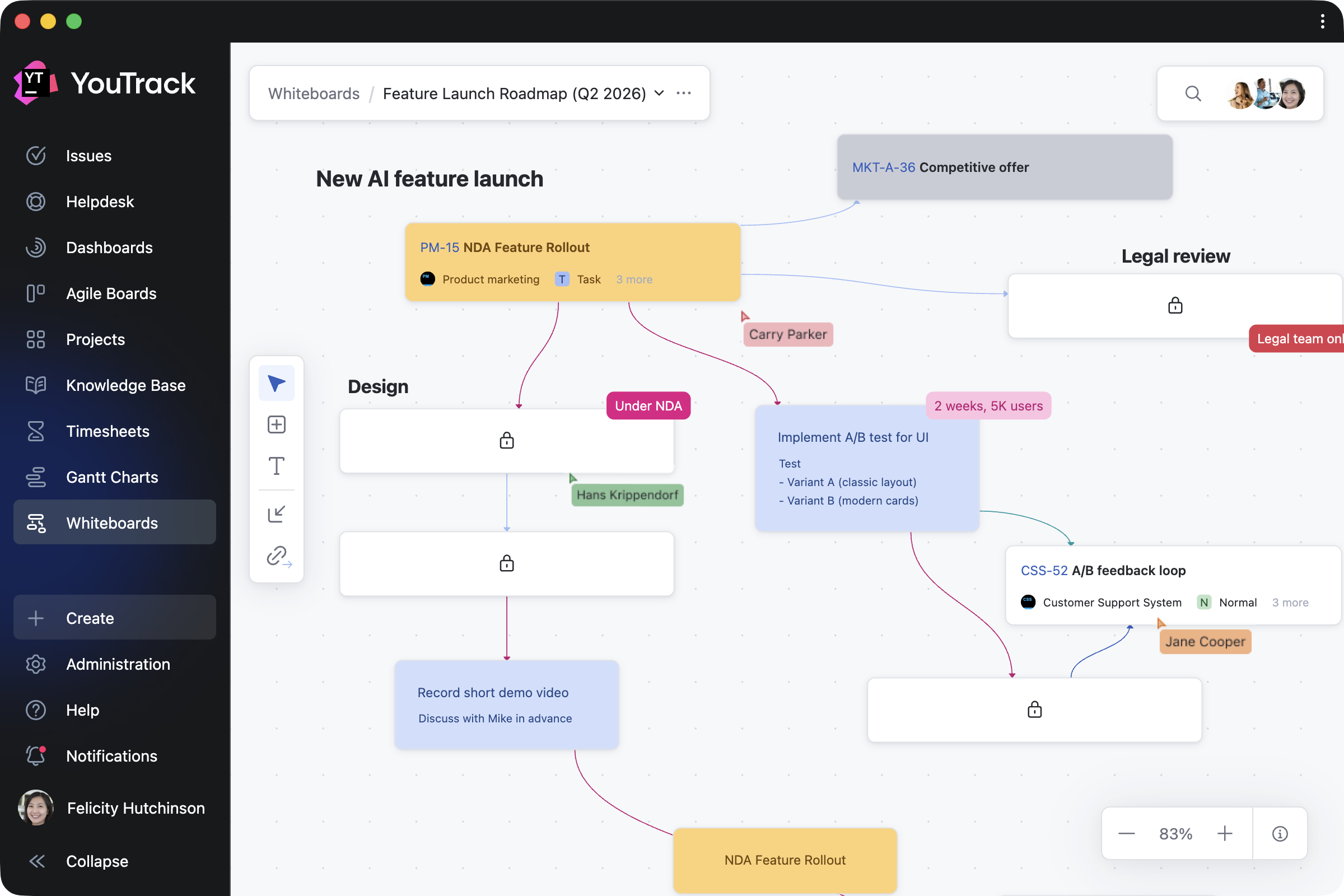
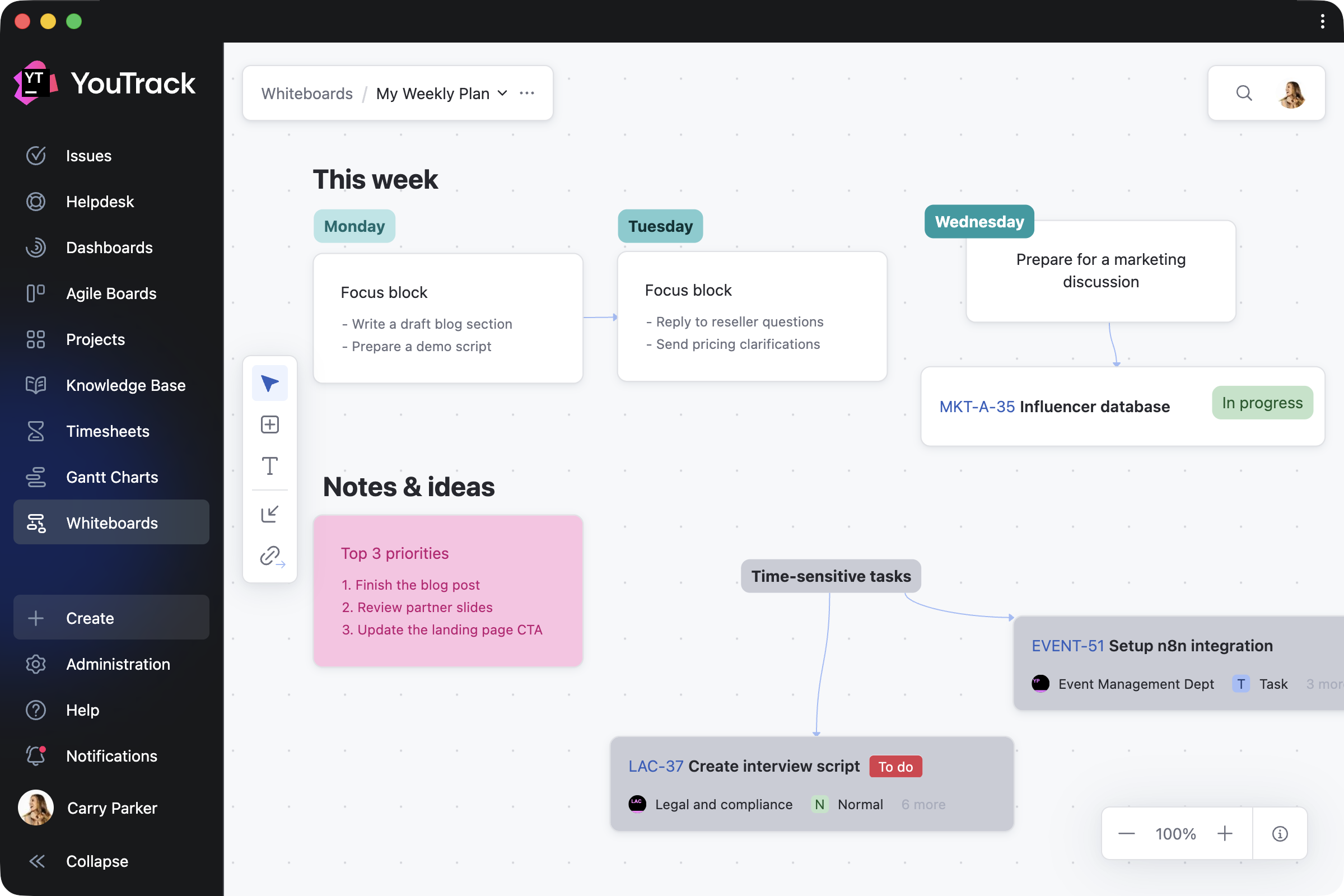
YouTrack 2026.1 introduces Whiteboards, a new way for teams to plan, brainstorm, and collaborate. Connect your current projects to get a better overview and organize work, or add notes and turn them into tasks and articles when you’re ready. This allows project managers and teams to plan from scratch, collaborate on ongoing projects, and ensure every activity is linked to your work in YouTrack.

We’ve also streamlined project access management for administrators and improved the notification center experience for all users. For teams that rely on AI tools in everyday workflows, there are new ways to use YouTrack within your existing stack, including an n8n integration and new remote Model Context Protocol (MCP) server actions for the Knowledge Base.

The YouTrack app ecosystem continues to grow, with 50 apps now available on JetBrains Marketplace. We’ve highlighted some of the latest apps for project managers, QA and support teams, and more.

Turn planning into action with Whiteboards

We’re excited to introduce Whiteboards – a new, flexible space where you can visualize your projects as you work on them. Whiteboards extend YouTrack’s built-in functionality and are available to every user and agent.

Whether you’re a project manager structuring a plan, a team brainstorming together, or an individual organizing your own work, Whiteboards support your approach. You can restructure existing projects, plan what comes next, and capture everything along the way – all in one place.

How Whiteboards work in a nutshell

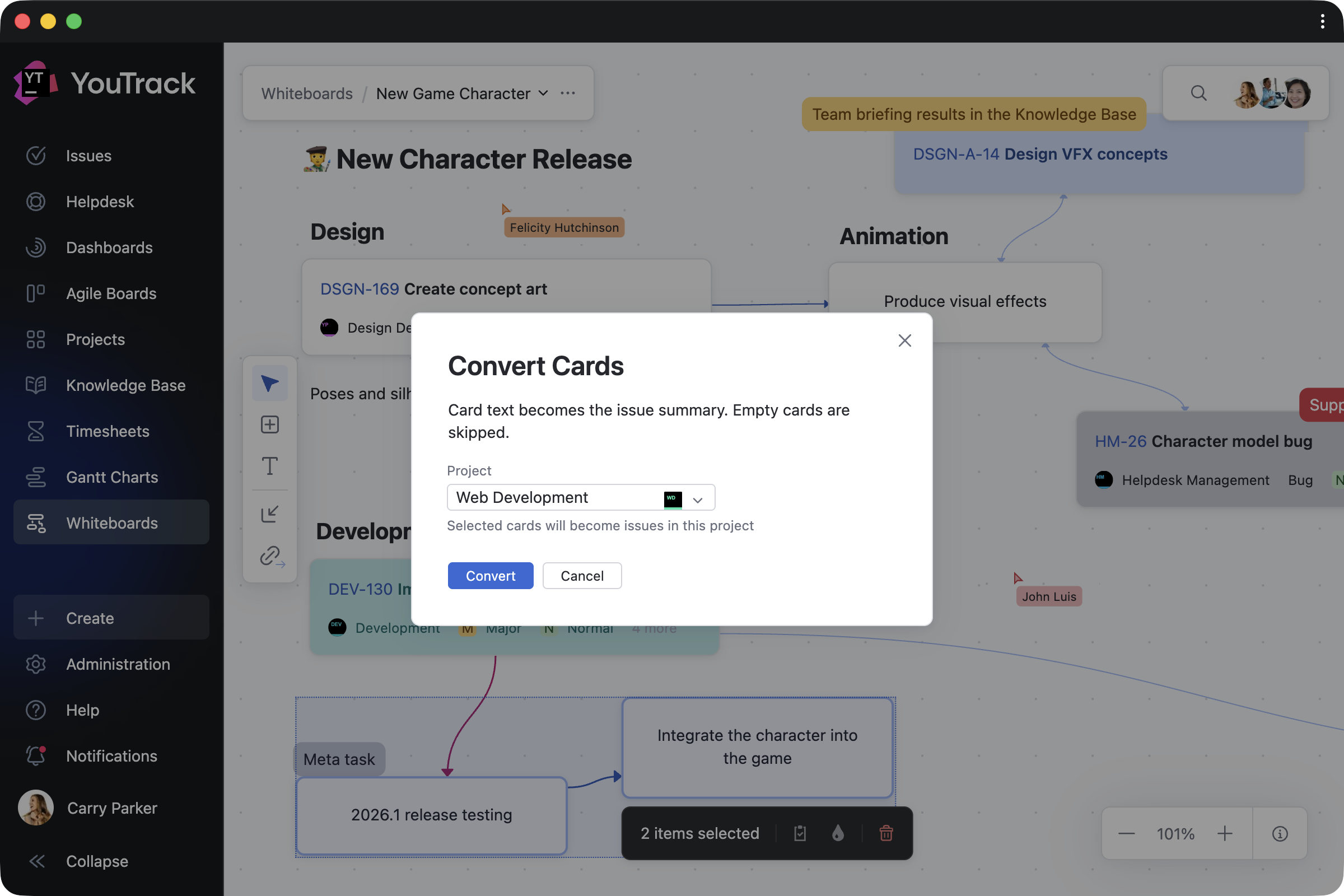
Turn ideas into tasks and articles

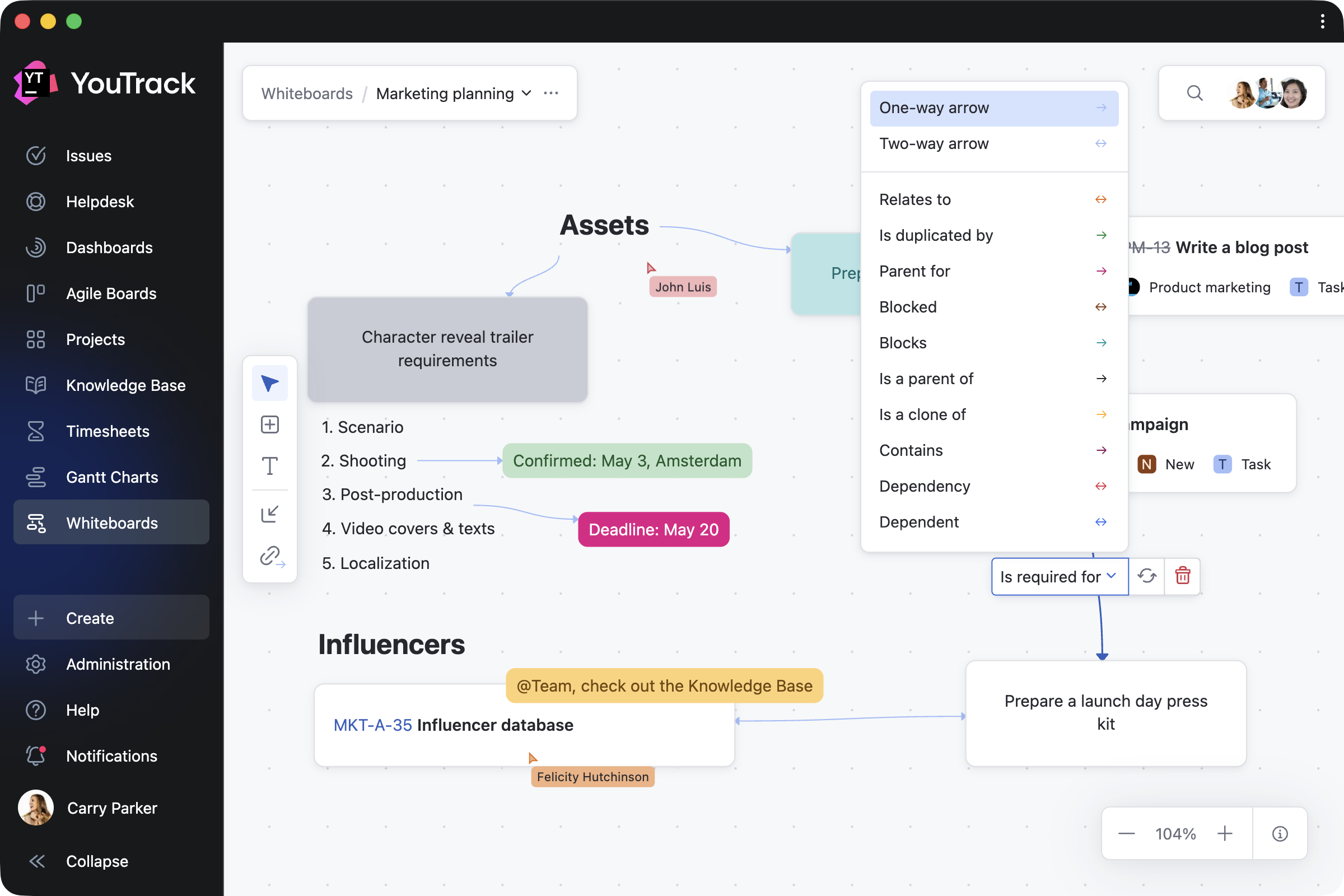
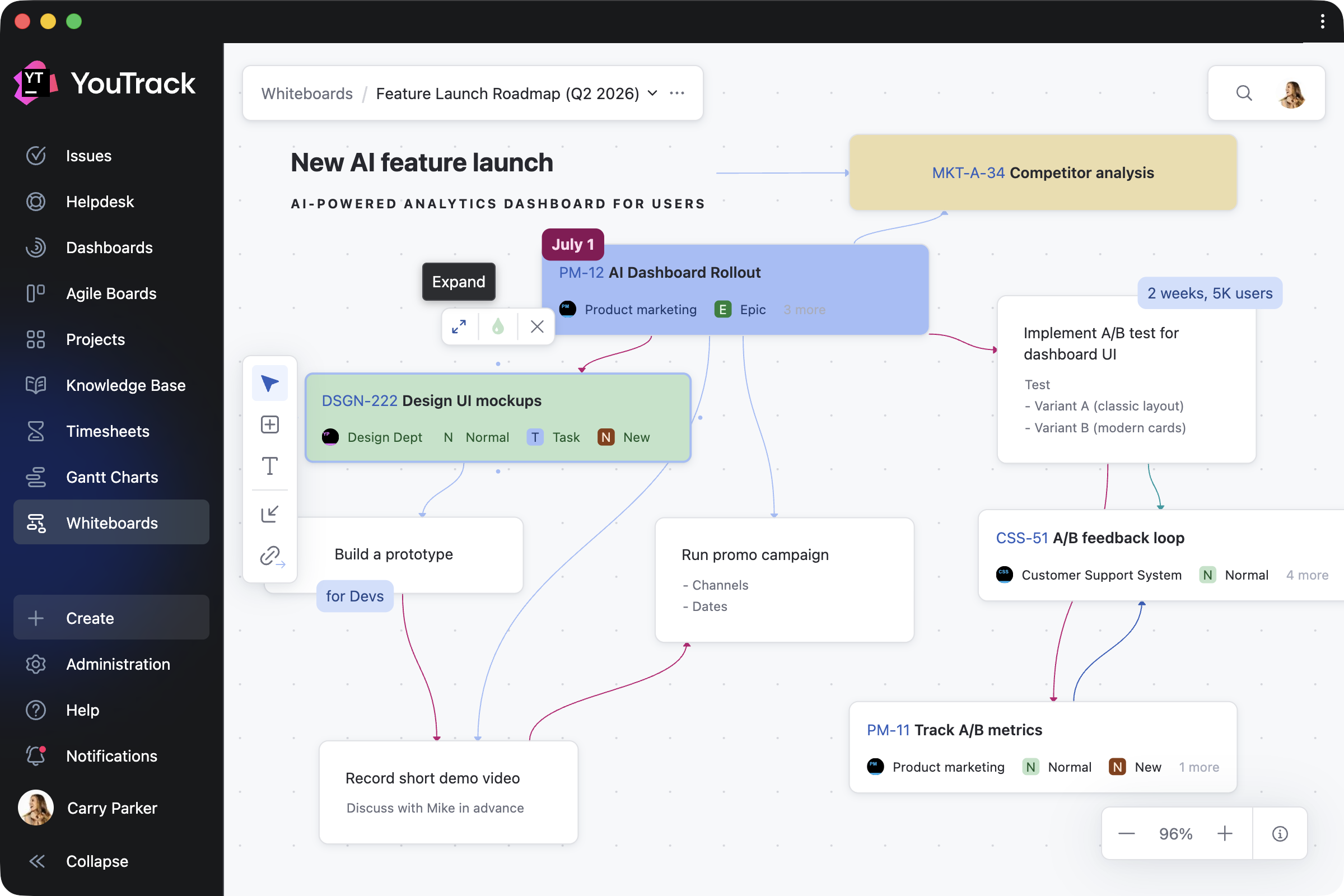
Work on Whiteboards on your own or together with your team, using cards and text blocks to shape your ideas and turning them into tasks or documentation with a single click.

You can also connect any notes with links, so that linked cards reflect real relationships between tasks in your projects.

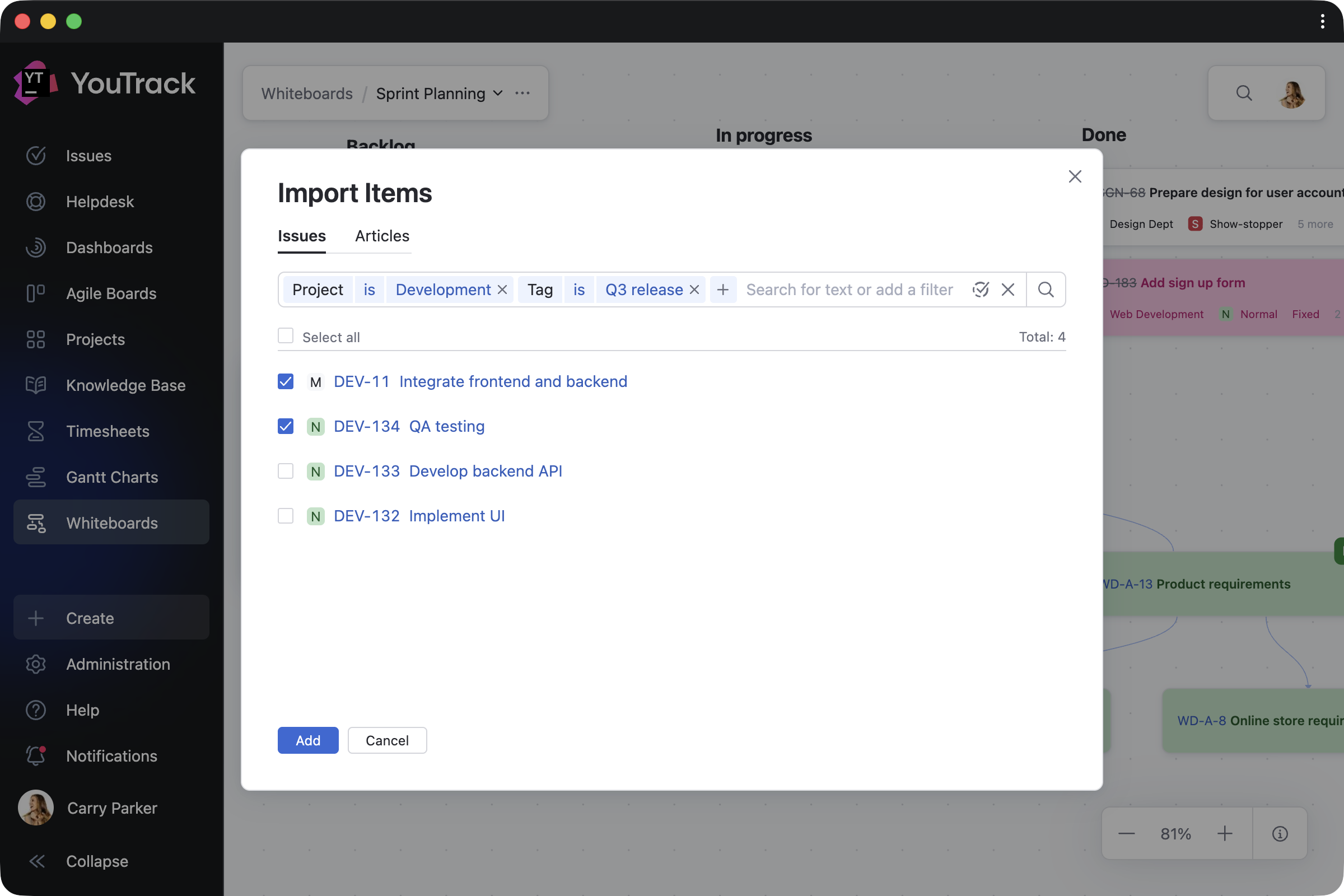
Import and work on ongoing projects

When you need to reorganize your current work, you can bring existing tasks, tickets, and articles onto your Whiteboard and update them directly as your plans evolve. Every change you make is instantly reflected across your projects – for both imported items and those created on the Whiteboard. Task dependencies are synced automatically as well.

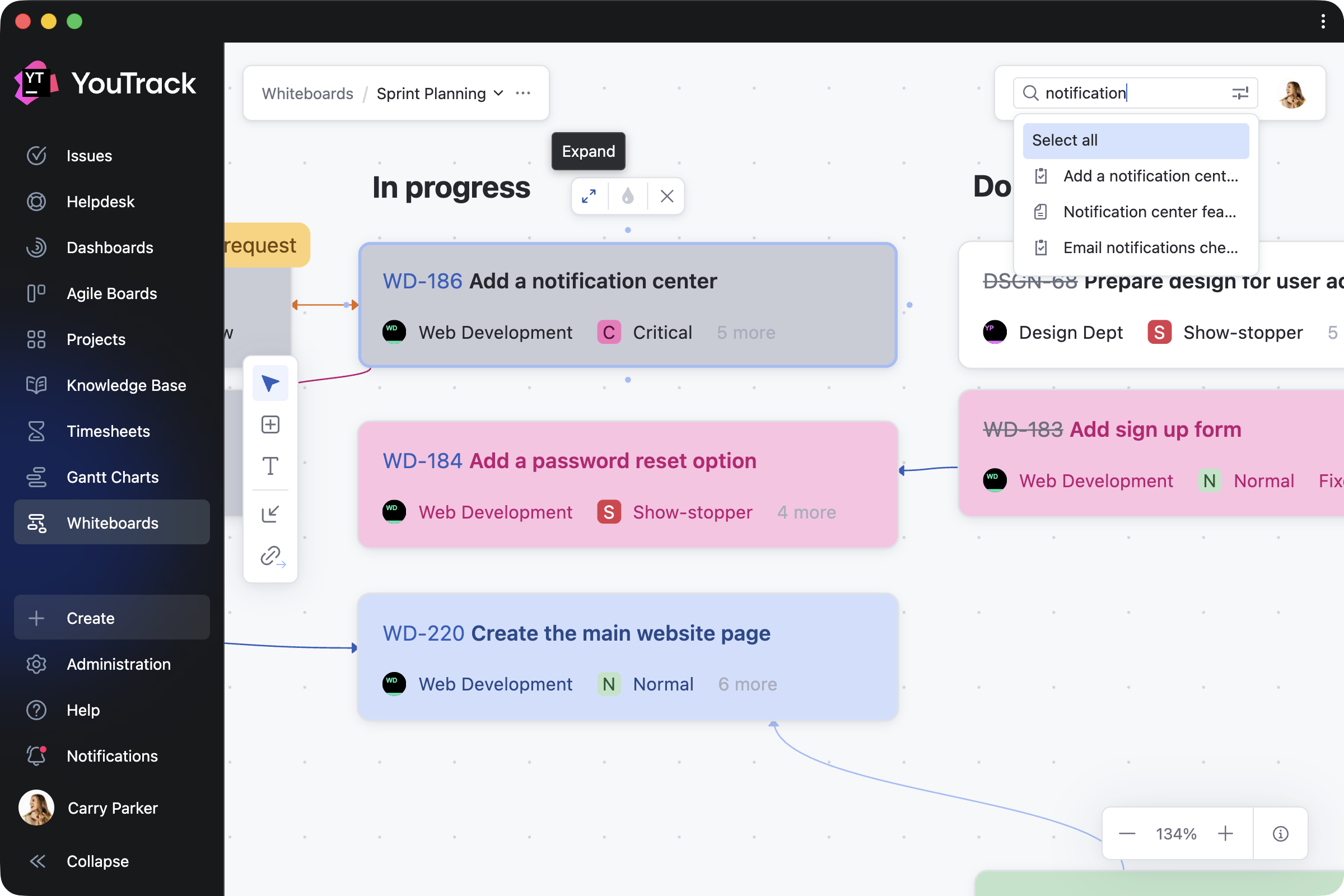
Navigate and track your progress

You can return to any Whiteboard at any point to see how your plans have evolved. Zoom in to focus on specific areas, switch to full-screen mode for a bird’s-eye view, or use search to quickly find and navigate to relevant content.

You can also control who can view or edit your work, with visibility on shared Whiteboards following your YouTrack project permissions.

Adapt Whiteboards to your work

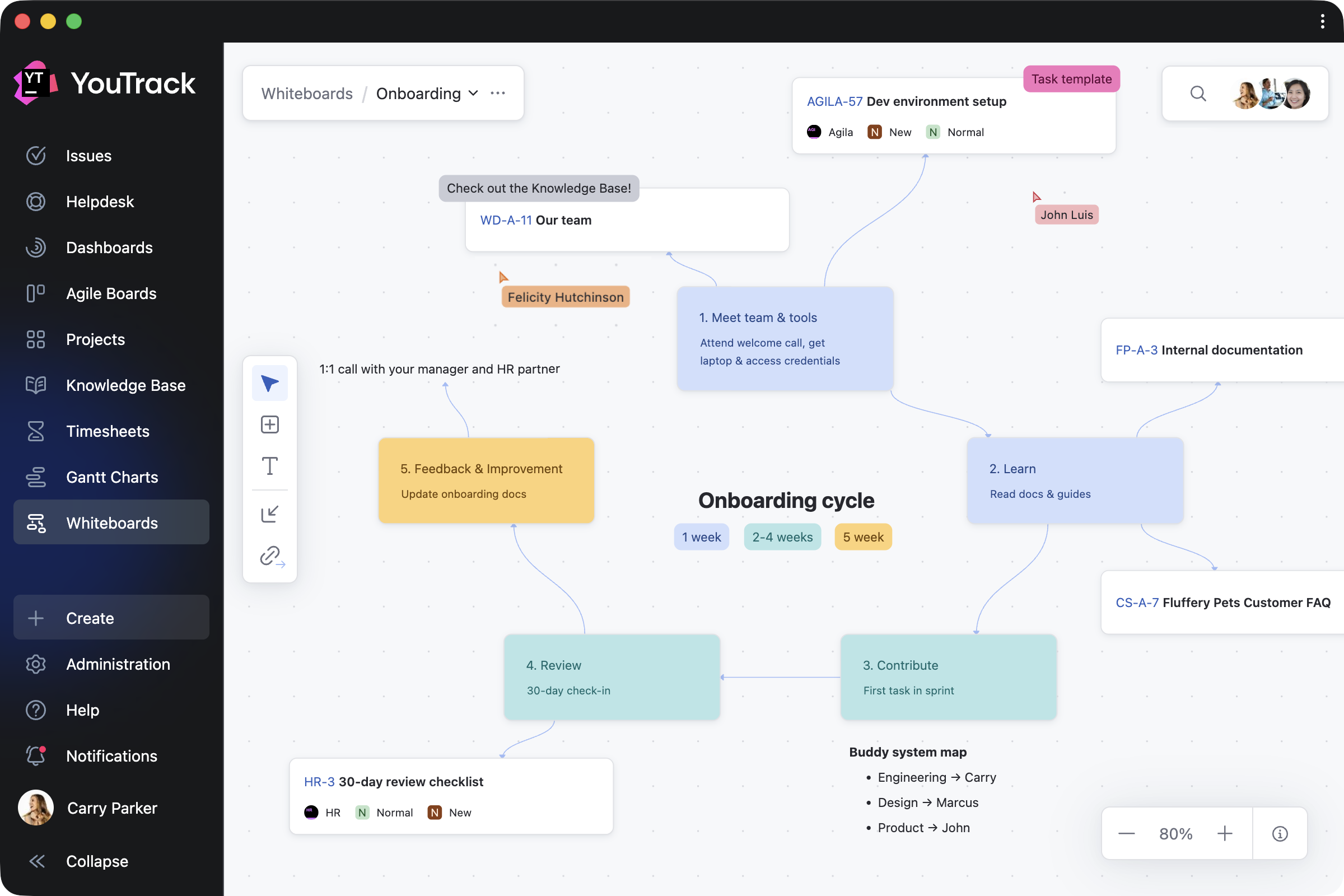
Since Whiteboards start from a blank canvas, you can shape them to fit any work scenario – from creating a cross-project overview to focusing on specific topics in detail. Here are a few ways you can use them.

Plan projects 

Planning often starts with ideas rather than structured tasks. Project managers can outline team roadmaps, restructure ongoing work, or visualize new projects. As cards are converted into YouTrack tasks and articles, your team can continue working in projects without interruption.

Brainstorm with the team

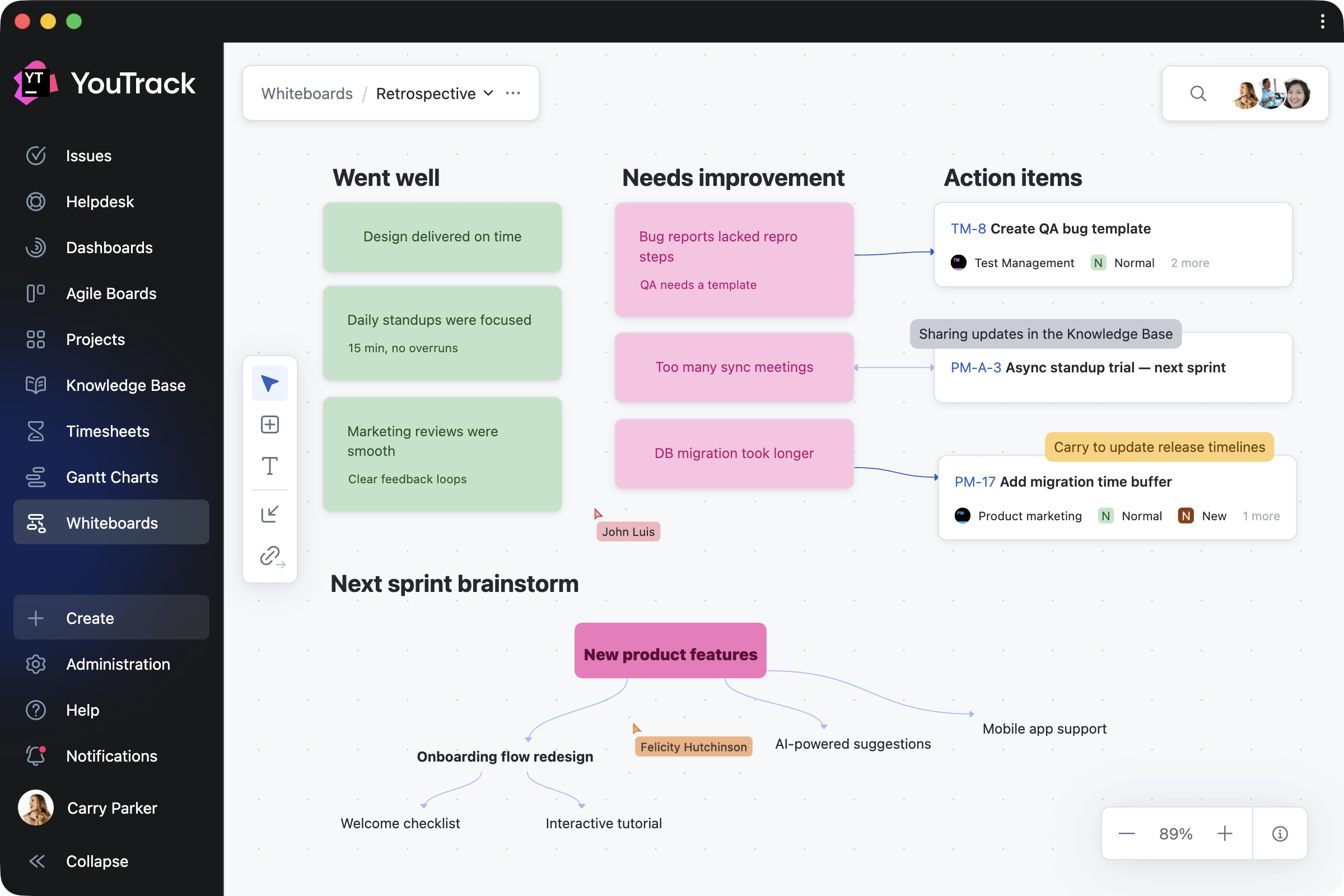
Any team member can add and update cards, text blocks, and their connections in real time or asynchronously. Whether you’re running a retrospective, building a mind map, or sketching out ideas together, Whiteboards adapt to your team’s distinct workflows. For example, product teams can shape new features, while support teams can map customer journeys.

Share knowledge with your users

Administrators can create shared Whiteboards to explain workflows, processes, and project structures to users or guests. By combining guidance notes with direct links to relevant tasks and articles, you make it easier to access everything in one place.

Organize personal work

Individual users can also use Whiteboards for their own planning – capturing ideas, organizing a week, or taking notes that are visible only to them. When you’re ready, you can invite others to collaborate and turn your private whiteboard into shared work.

Design enhancements for administrators and teams

Streamlined access management for projects

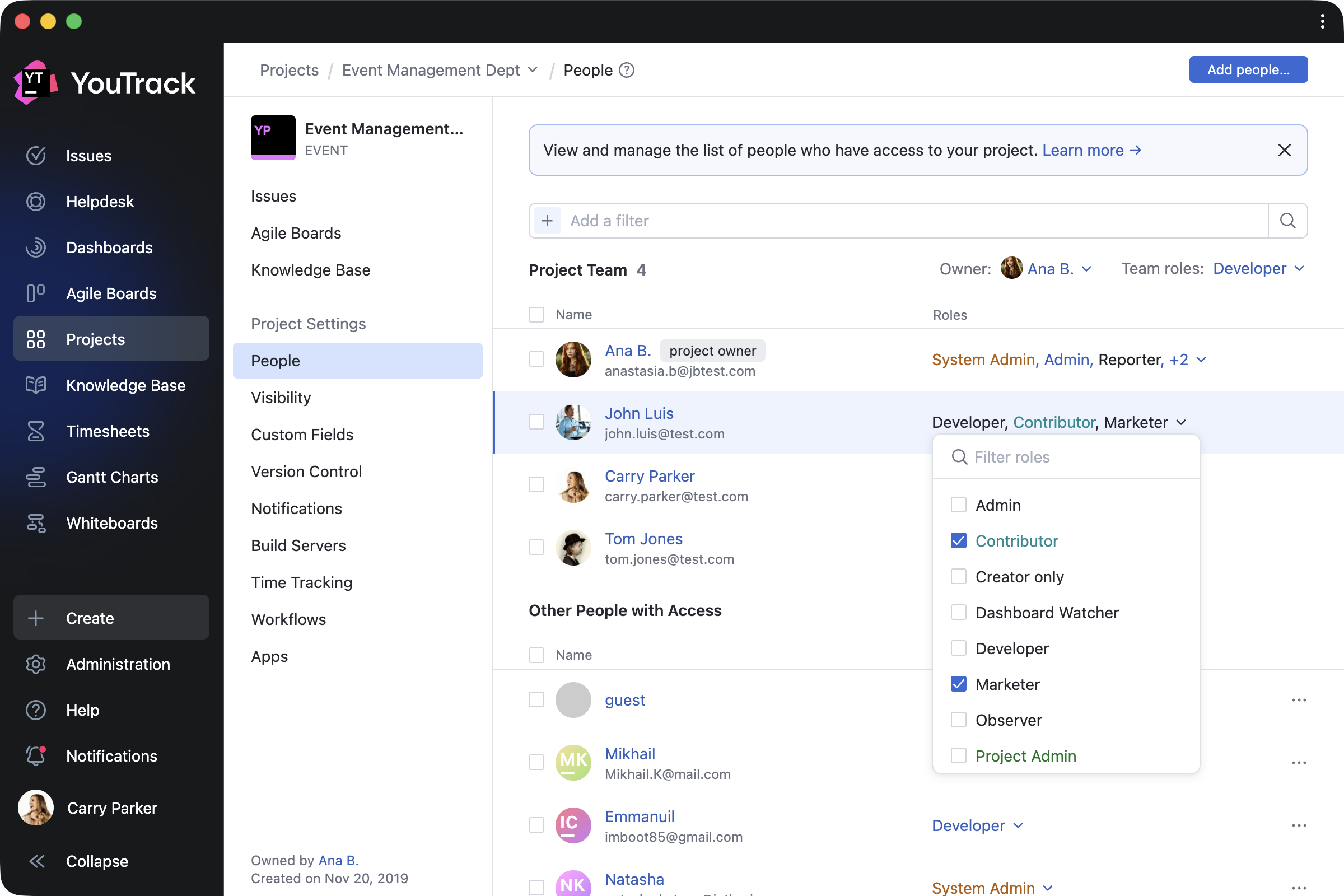
We’ve added further YouTrack design updates to make working on your projects easier. The new People tab on the project overview page simplifies how administrators manage project teams. Administrators can add or remove users and groups, assign roles, and filter team members by roles and permissions – all without having to jump between pages. The previous Team and Access tabs are now combined into a single, streamlined view. You can learn more about all changes in our documentation.

Here’s how it works in practice. When new team members join, you can add them to the project and assign their role right away. To manage existing project members, you can filter users and groups, then update or revoke their roles as needed. The People tab also lets you control access for people outside the project team, giving you a clearer overview of who can access your project.

Full-page notification center

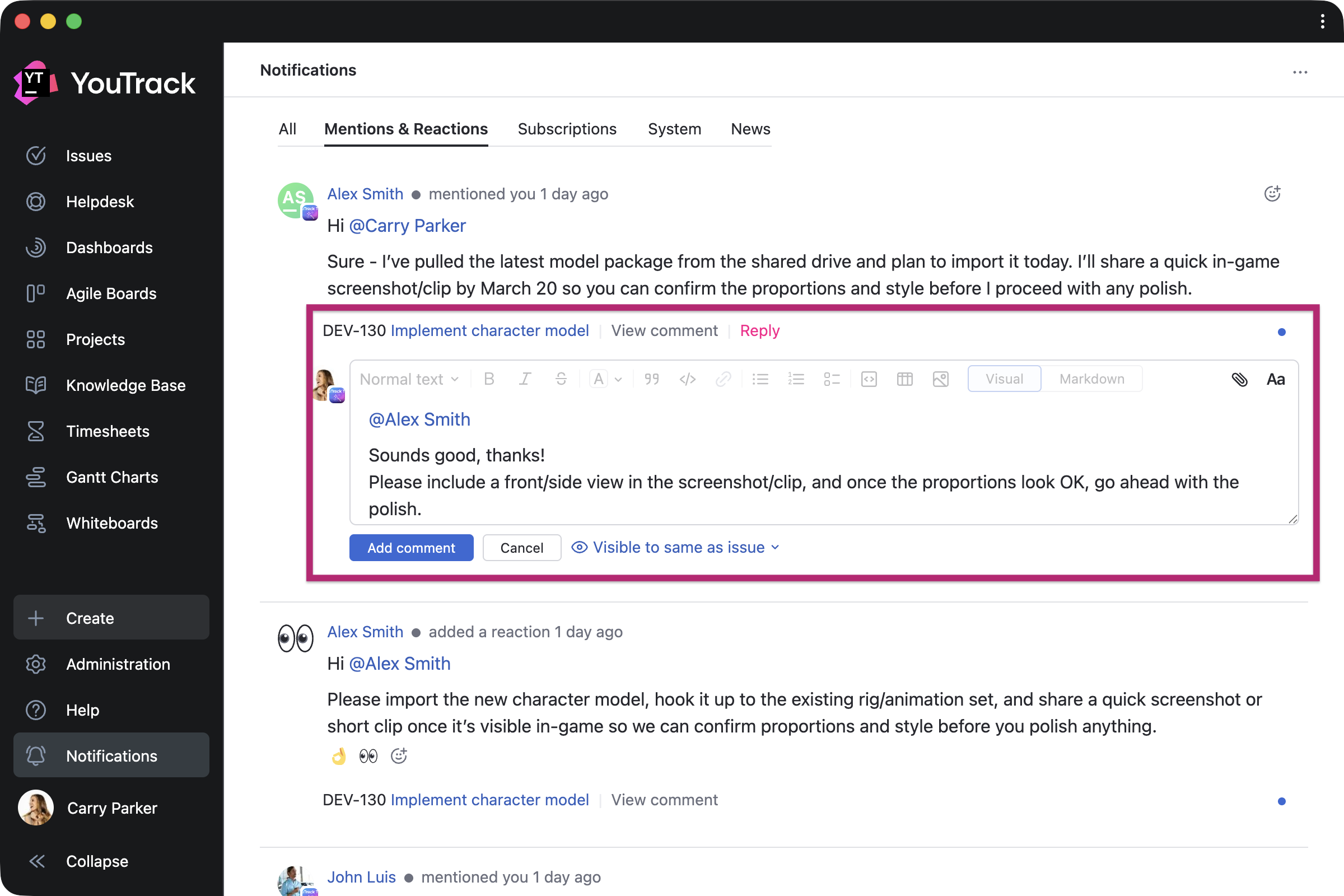
Every user can now expand the notification center to a full-page view and reply to comments directly from there. This makes it easier to quickly respond to feedback or discussions without switching contexts.

Use YouTrack inside your existing stack with AI-powered integrations

For many teams, AI tools are already part of their everyday workflows. In addition to our built-in free AI assistance, we’re introducing new AI-powered integrations so you can use YouTrack from the tools you already rely on.

n8n integration

n8n is a workflow automation platform that connects your tools and services without code. YouTrack now has a dedicated node in n8n, so you can automate workflows and connect YouTrack with hundreds of apps – sync data, trigger issue updates, execute YouTrack commands, and build cross-platform workflows with ease.

You can build your own workflows or use existing templates. For example, you can configure workflows to collect data from third-party systems into YouTrack, update tasks based on actions from your AI agents, share YouTrack content with other systems, and much more. This means YouTrack can be integrated into every step of your automation.

New remote MCP server actions for the Knowledge Base

For teams working from their existing LLM, IDE, or agent platform, we’ve expanded the number of predefined actions available via YouTrack’s remote MCP server. You can now use AI-powered tools to find, create, and update Knowledge Base articles and create tasks with pre-configured visibility.

If you want to set up the remote MCP server for your coding agents, such as Claude Code or Cursor, or for integration platforms like Zapier and Make or other automation tools, you can find detailed instructions in our documentation.

YouTrack Helpdesk experience for standard users and agents 

We’ve enhanced the experience for standard users and agents participating as internal reporters in helpdesk projects, making it easier for them to submit and track their own requests. They can now seamlessly access reporter functionality while submitting tickets and receive reporter email notifications.

When the product team needs to join the conversation, standard users now have a similar experience to agents when replying to reporters via public comments or email CC.

New apps on JetBrains Marketplace

Check out some recent apps from our certified consulting partners and third-party providers, now available to enhance your YouTrack experience.

Apps for project managers and teams

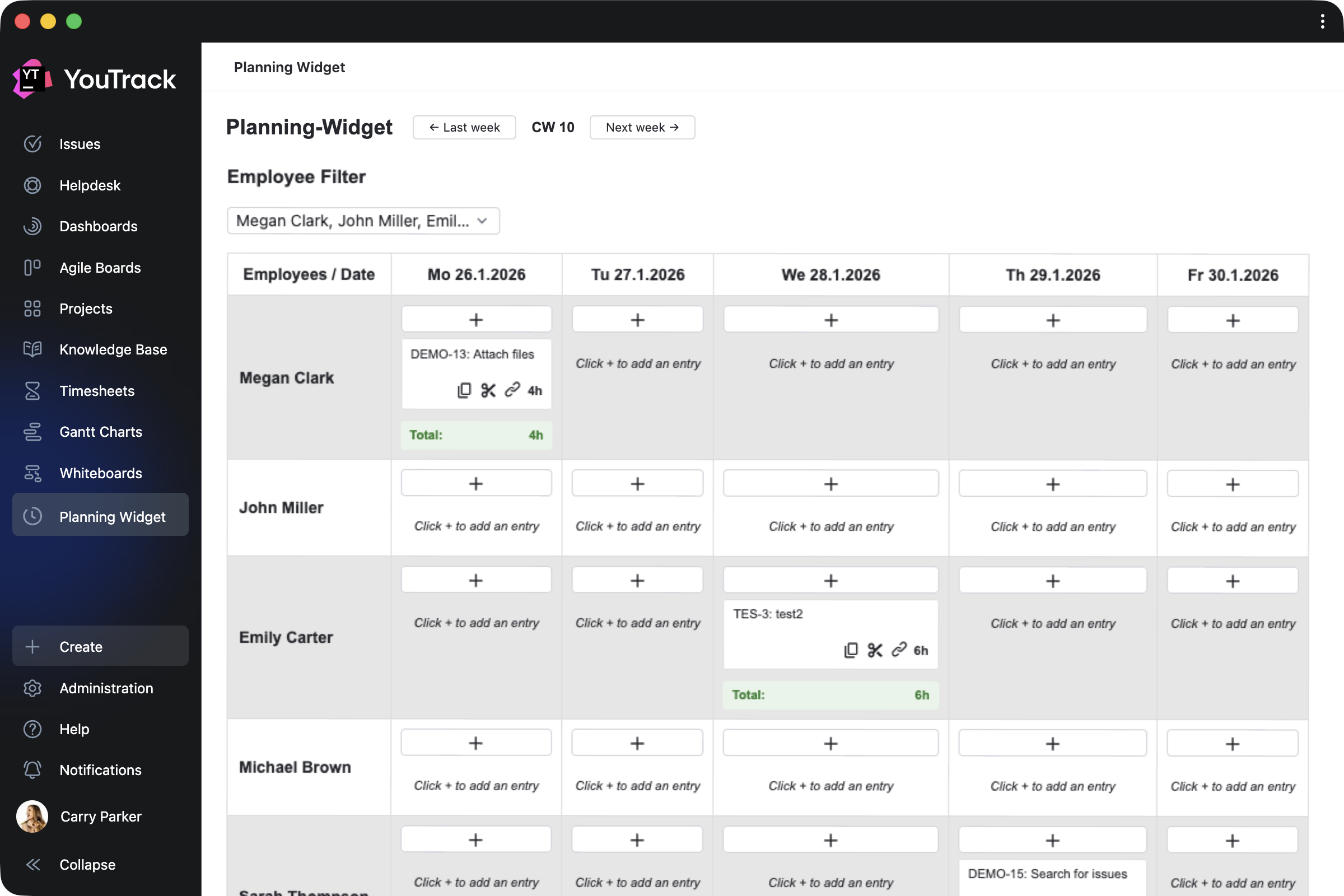
Planning Widget by CARL von CHIARI helps managers plan team activities in a calendar view. Review the tasks and tickets your team members work on each day, track time spent, and filter the view by employee.

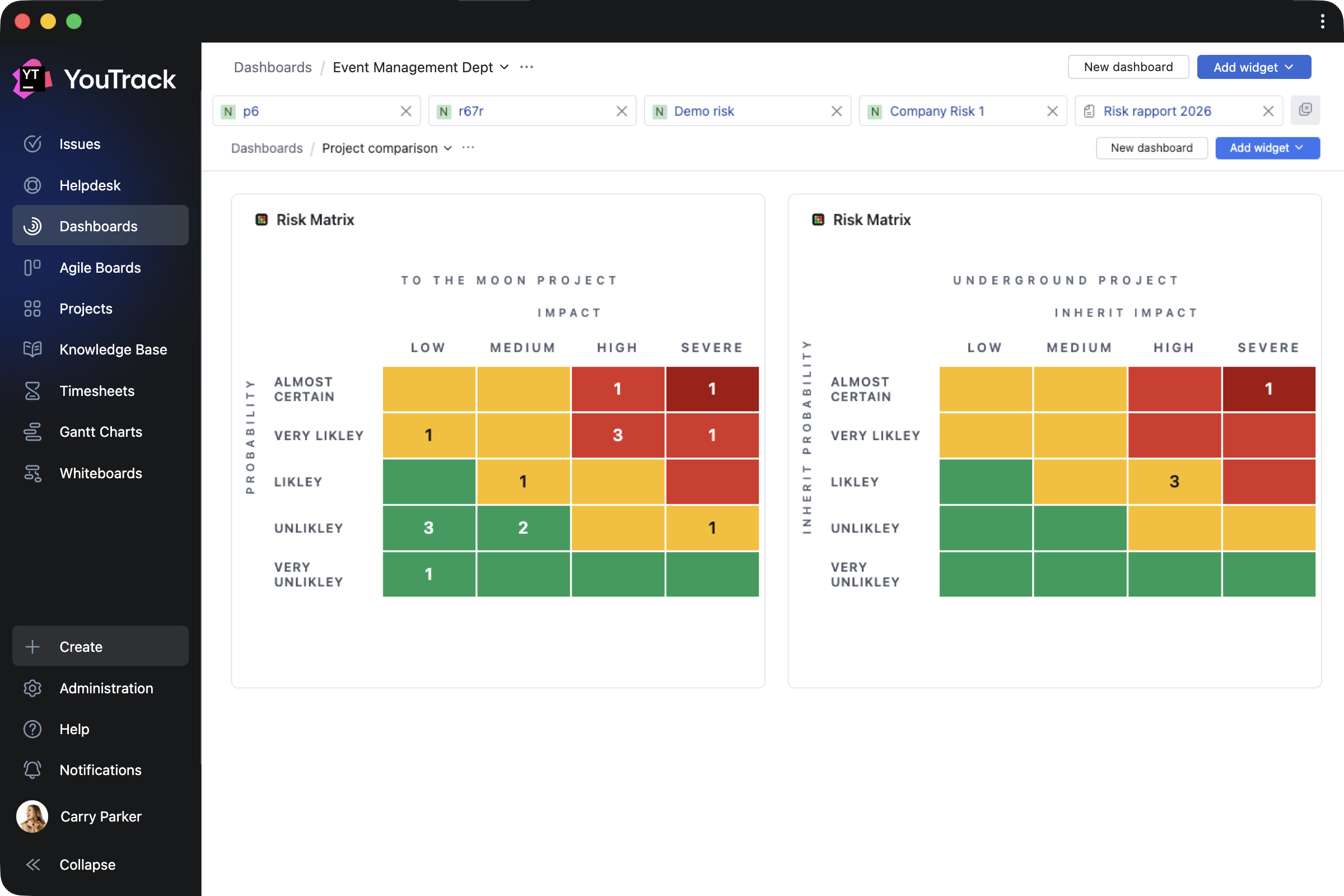
Risk Manager by Rixter AB helps project managers assess project risk levels by building risk-matrix widgets based on the probability and impact of specific outcomes for selected tasks.

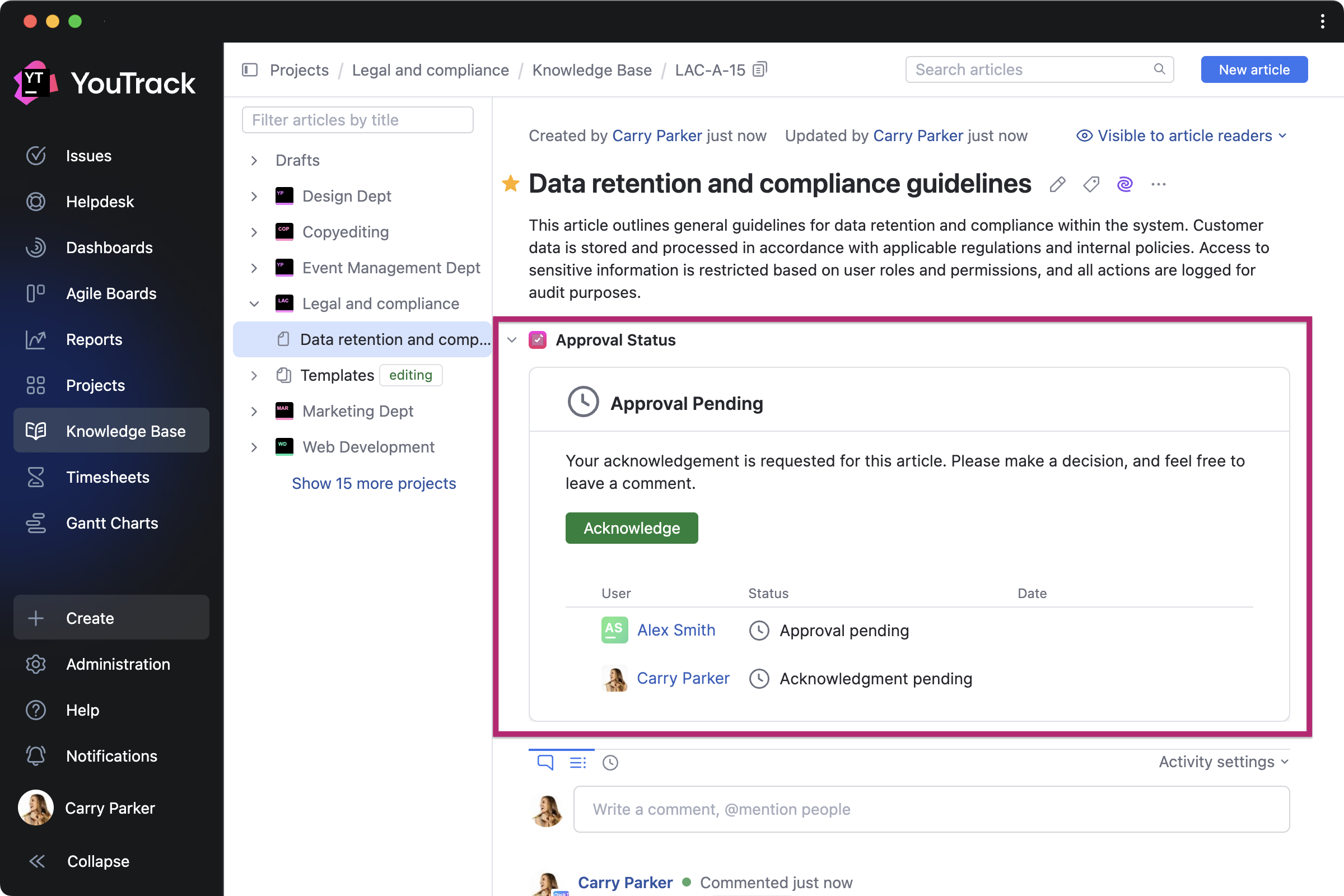
Article Approval by twenty20 is a paid app that allows teams to manage approval workflows directly in the Knowledge Base. You can invite approvers and acknowledgers for each article, set due dates, and track approval statuses.

Apps for QA and DevOps teams

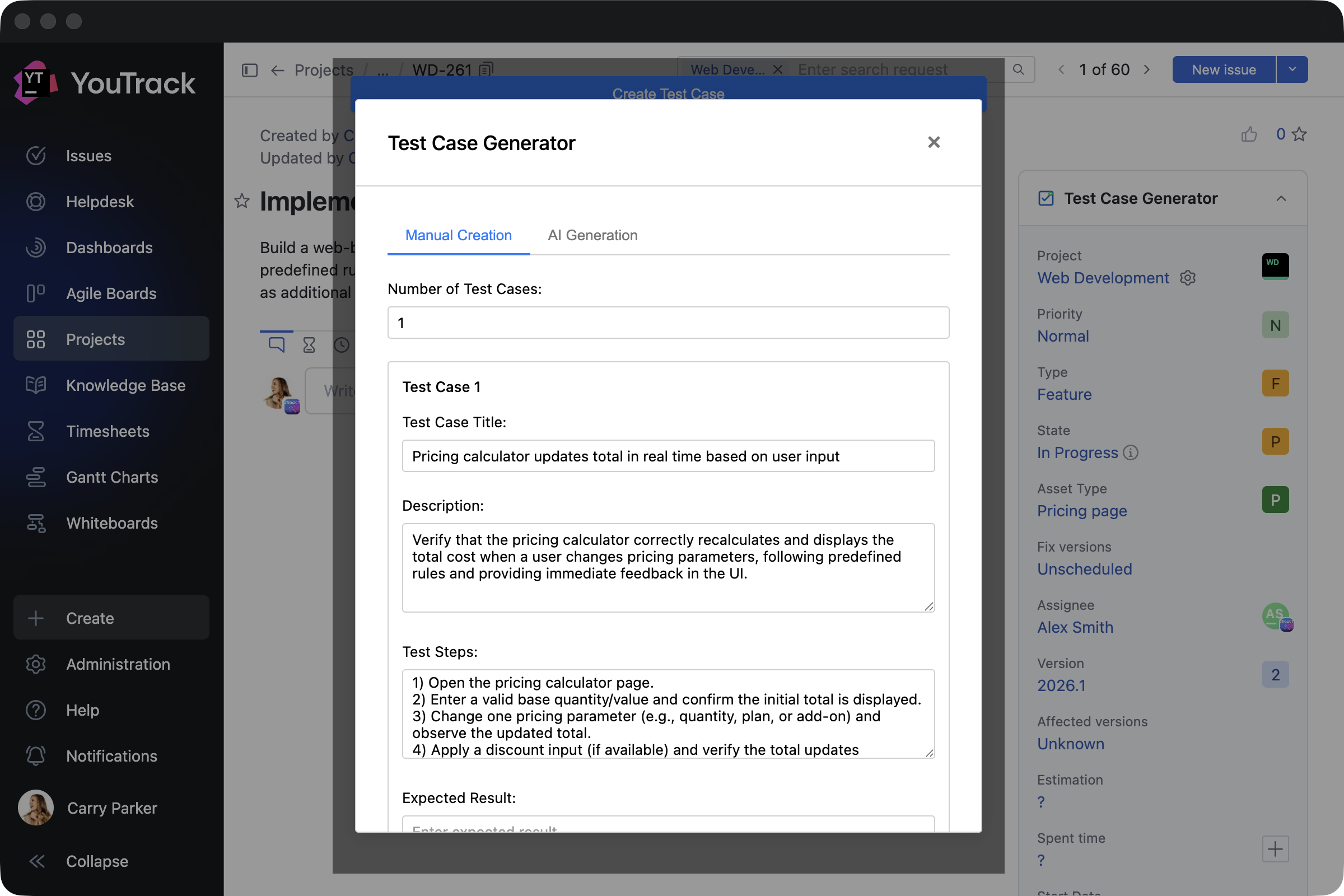
Test Case Generator by Depa Panjie Purnama helps users create test cases or generate them using AI models while working on other development tasks.

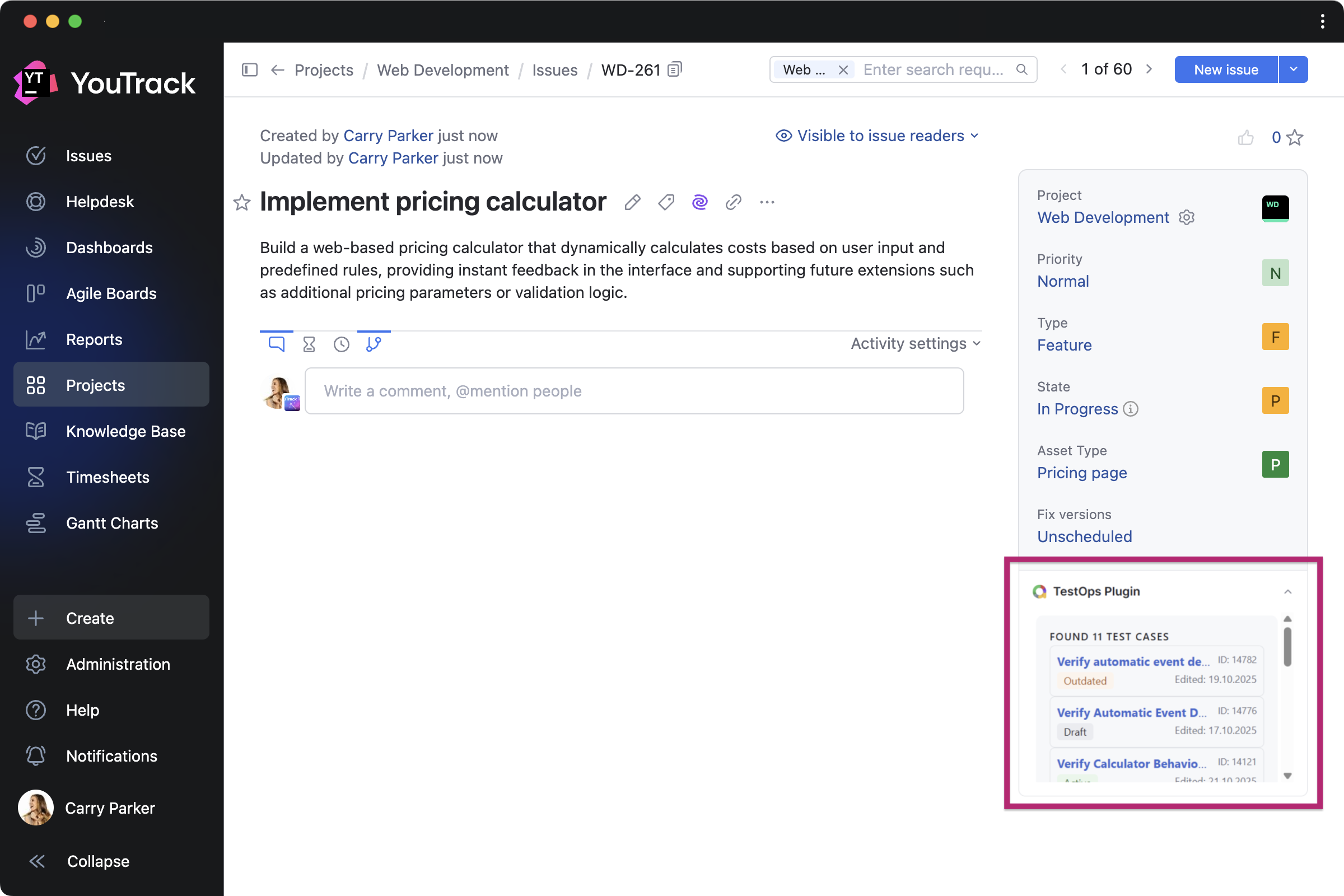
TestOps Plugin by bodm helps DevOps teams to stay on top of testing while developing features. It brings recent test cases from Allure TestOps directly into related tasks.

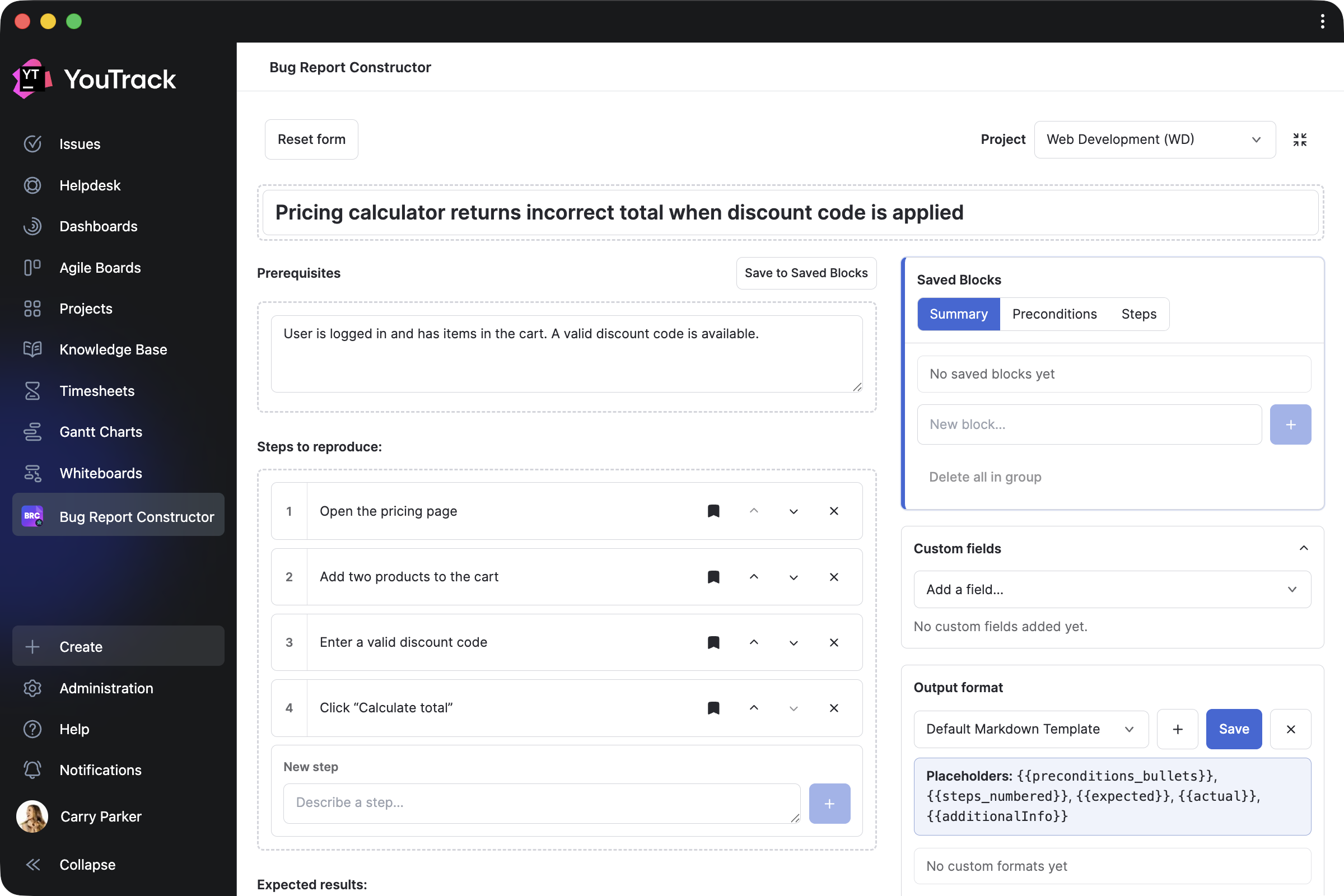
Bug Report Constructor by Evgenii Venediktov allows QA teams to collect bug reports using a single template and enables users to quickly create task drafts with pre-saved blocks.

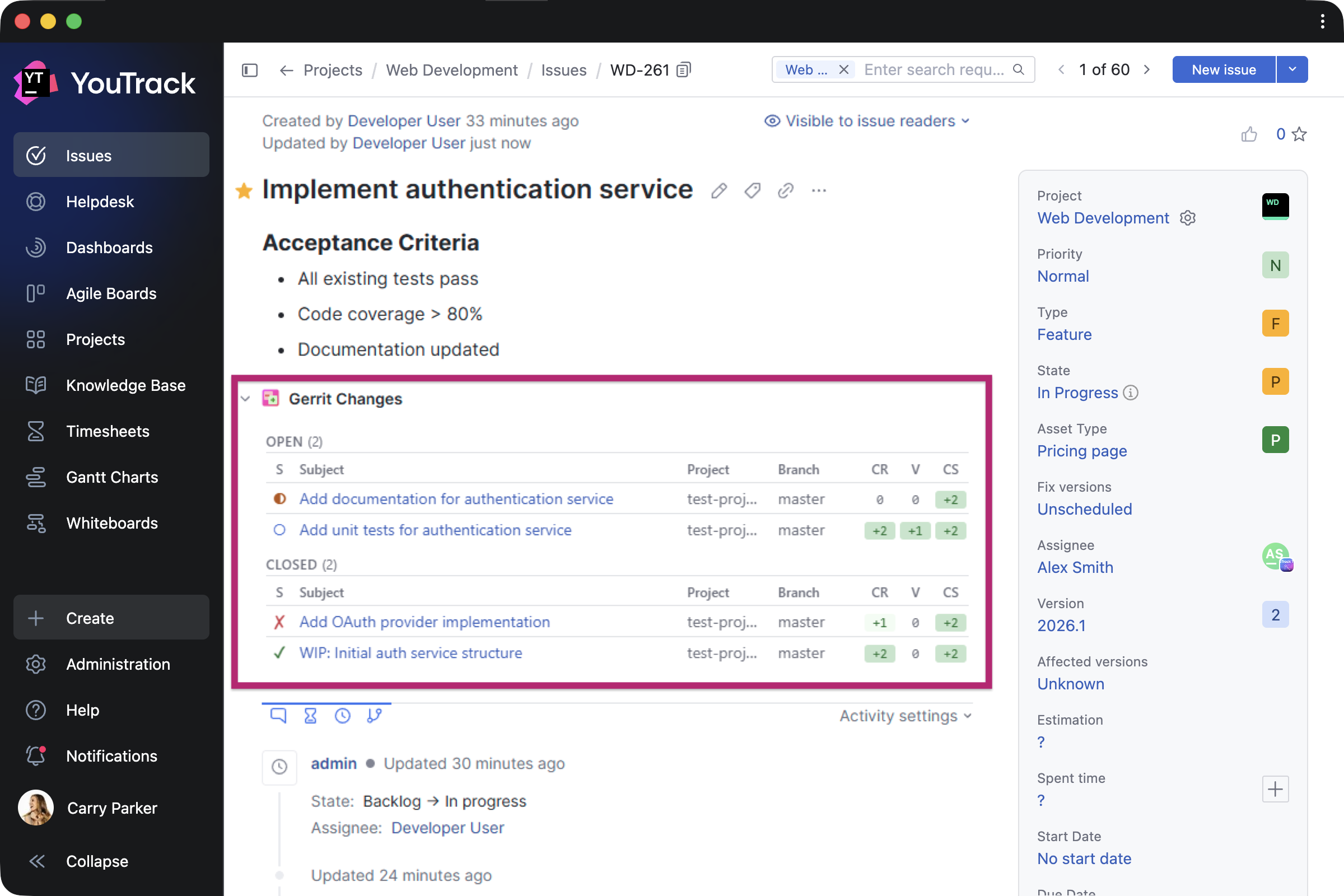
Gerrit Integration by Phoenix Systems helps developers display related Gerrit Code Review changes directly in tasks, including status, approvals, and links.

Apps for support teams

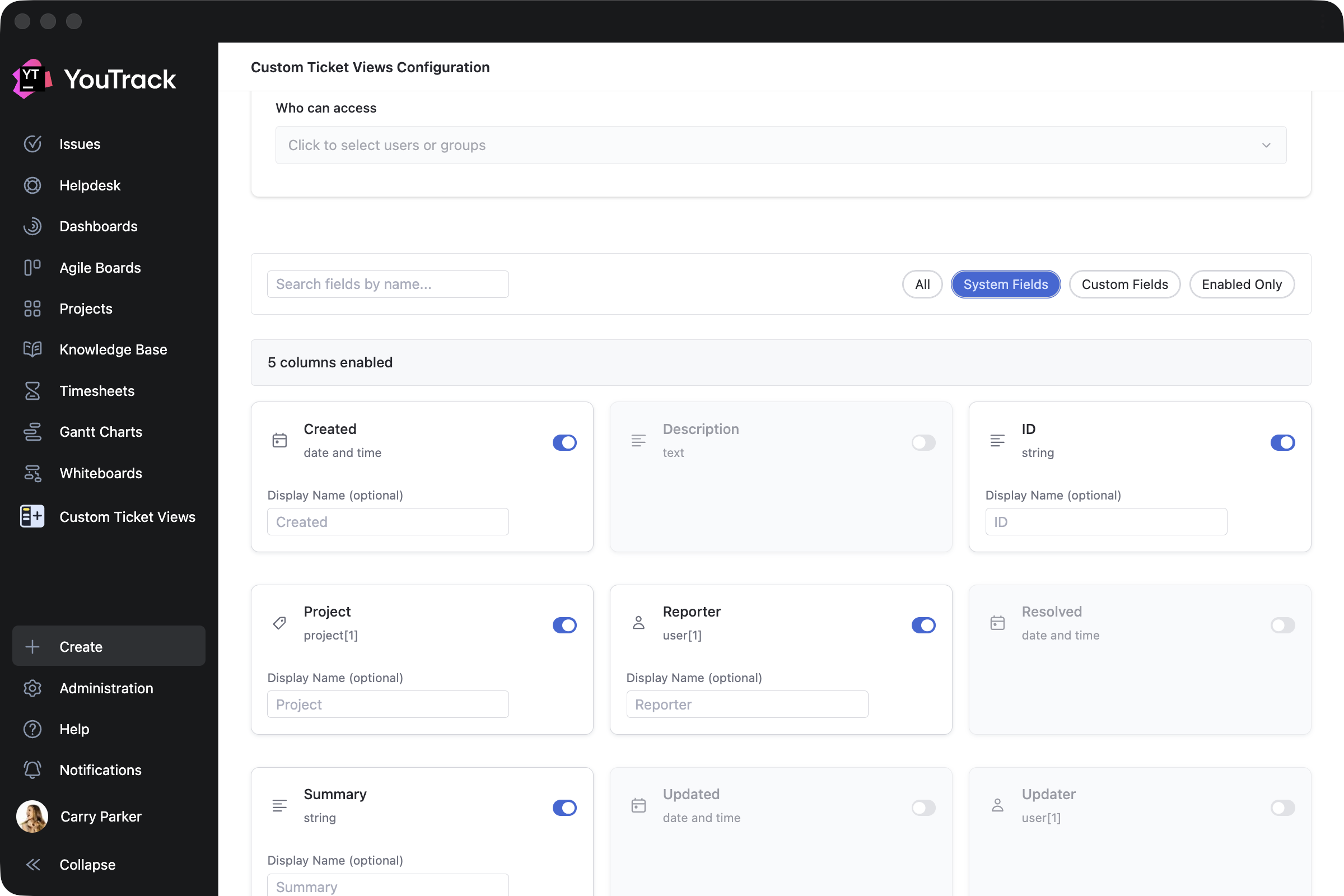
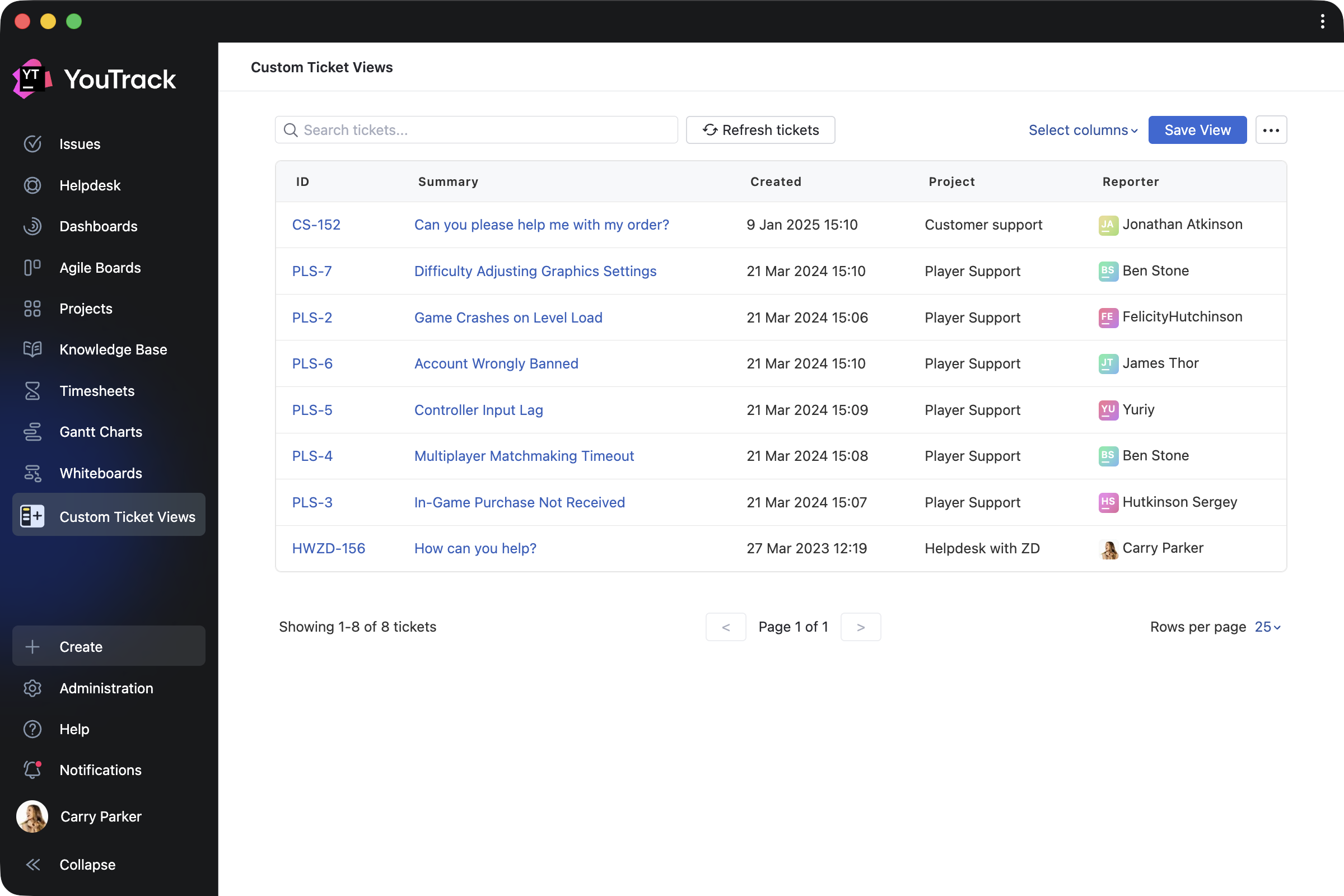
Custom Ticket Views by ​​Appfero is a paid app created to help support teams enhance reporters’ experience when working in YouTrack Helpdesk. It adds a new menu section that shows a reporter their submitted tickets in a customizable view.

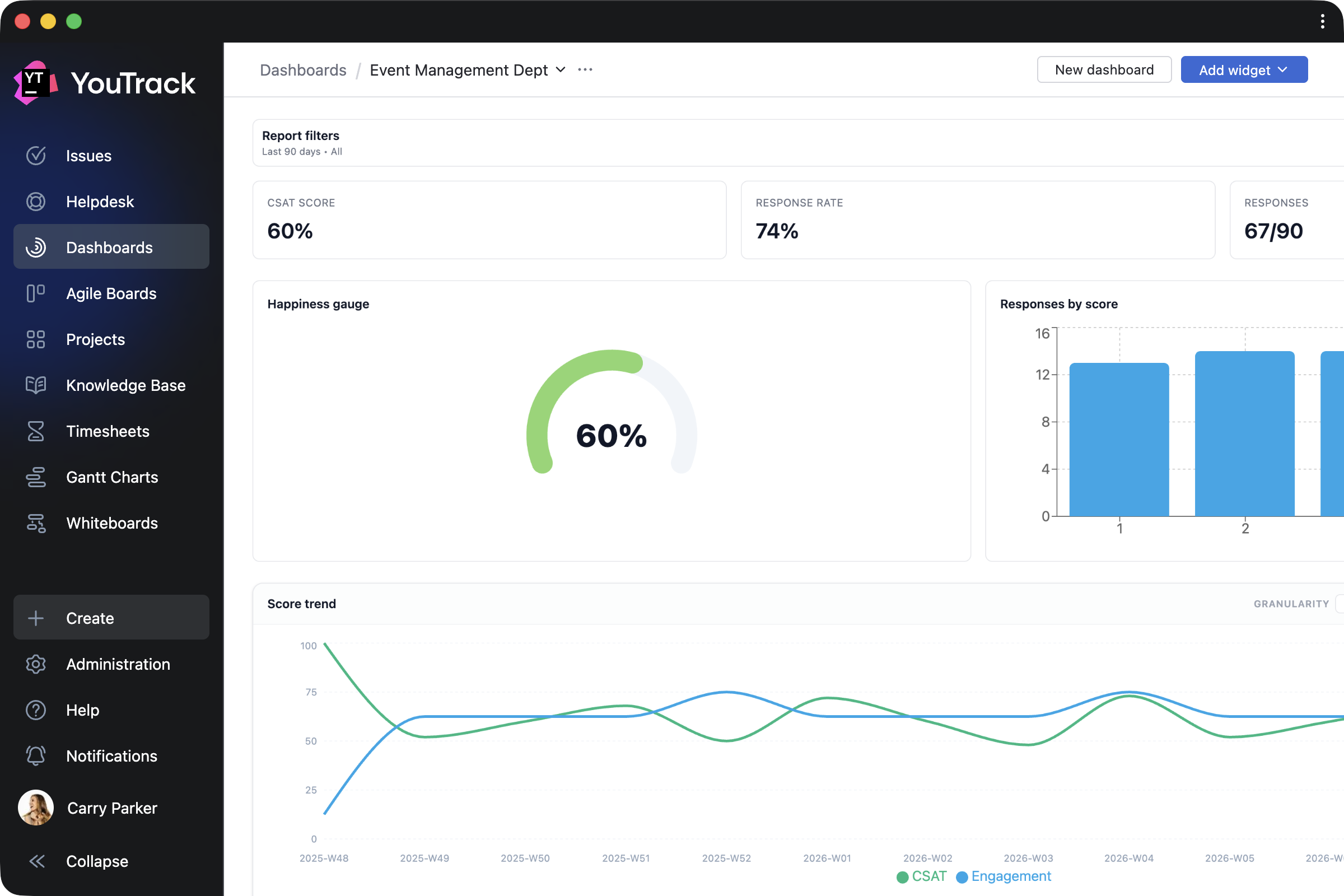
Customer Satisfaction by Appfero is another paid app that enables teams to collect feedback on task execution through automated customer satisfaction surveys (CSAT). Configure your custom survey flow and review response analytics directly in YouTrack.

Apps for working with task, ticket, and article content

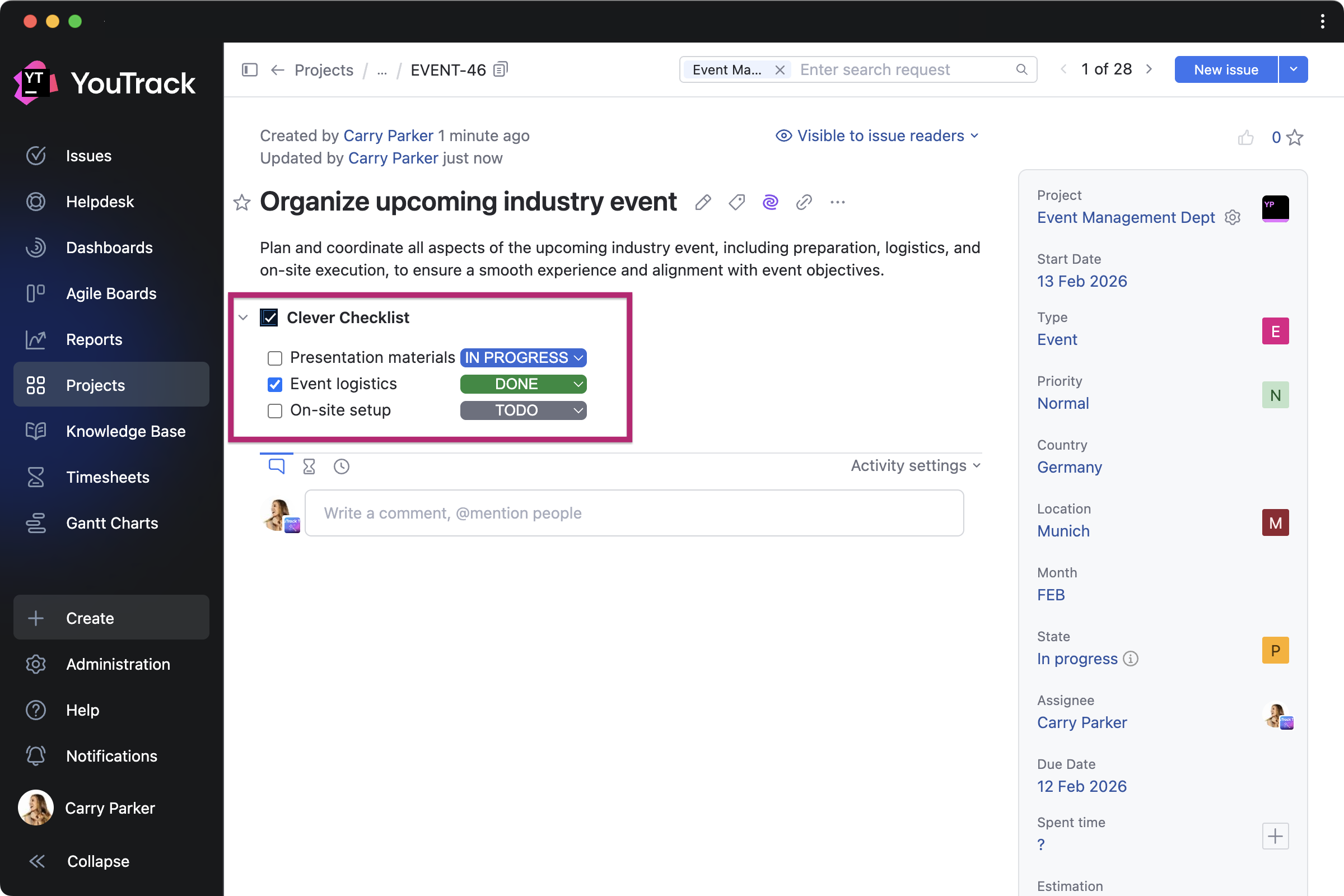
Clever Checklists by TEKDynamics lets everyone manage daily work with to-do lists by adding a custom checklist to every task in a selected project.

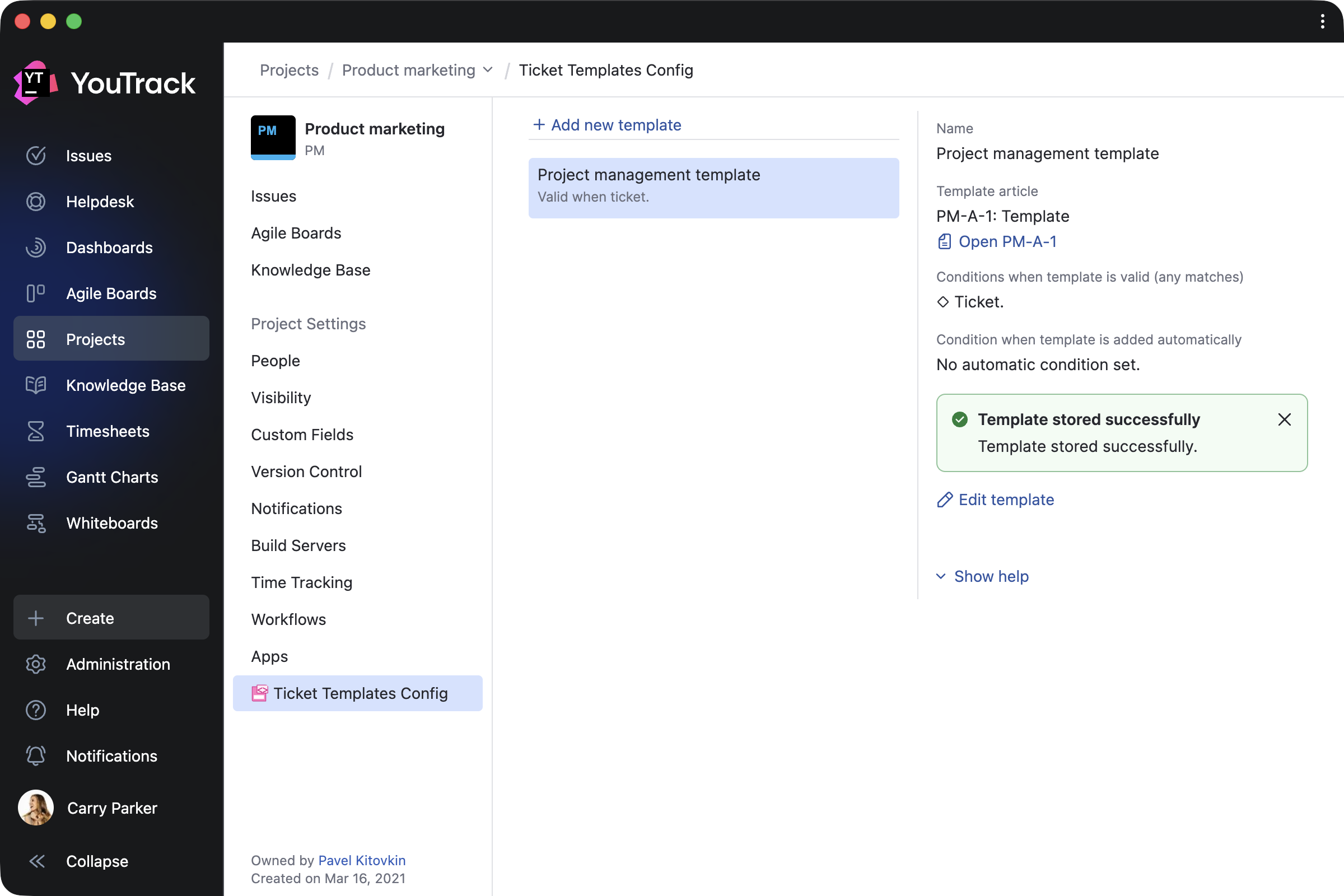
Ticket Templates by Marcus Christensson automatically updates tasks and article content using your saved templates, which can be created based on ticket fields, tags, and various other conditions.

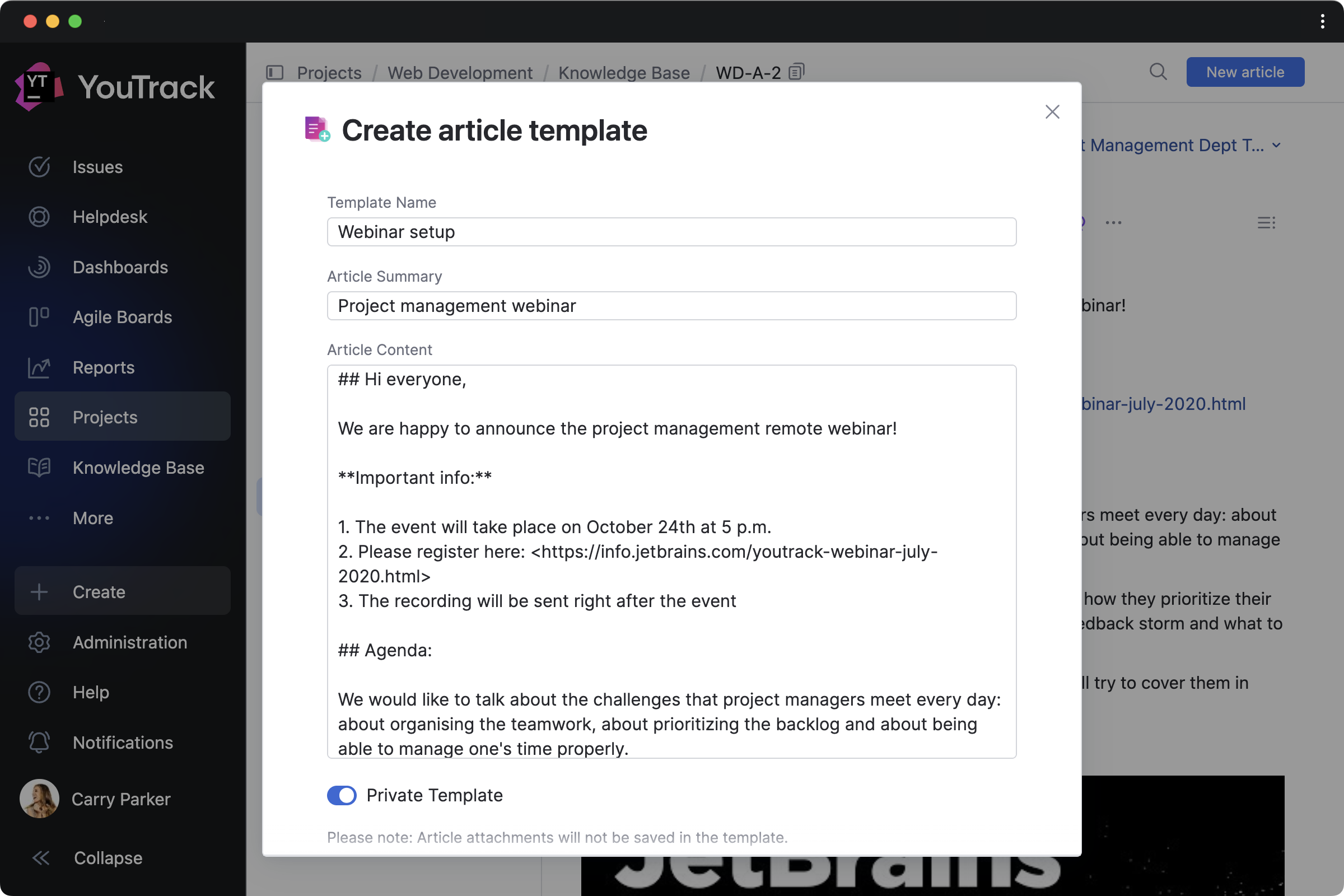
Article Templates by Maksim Fedorov makes it easier to draft articles based on existing Knowledge Base content. You can turn articles into templates and manage them all from a handy Article templates dashboard widget.

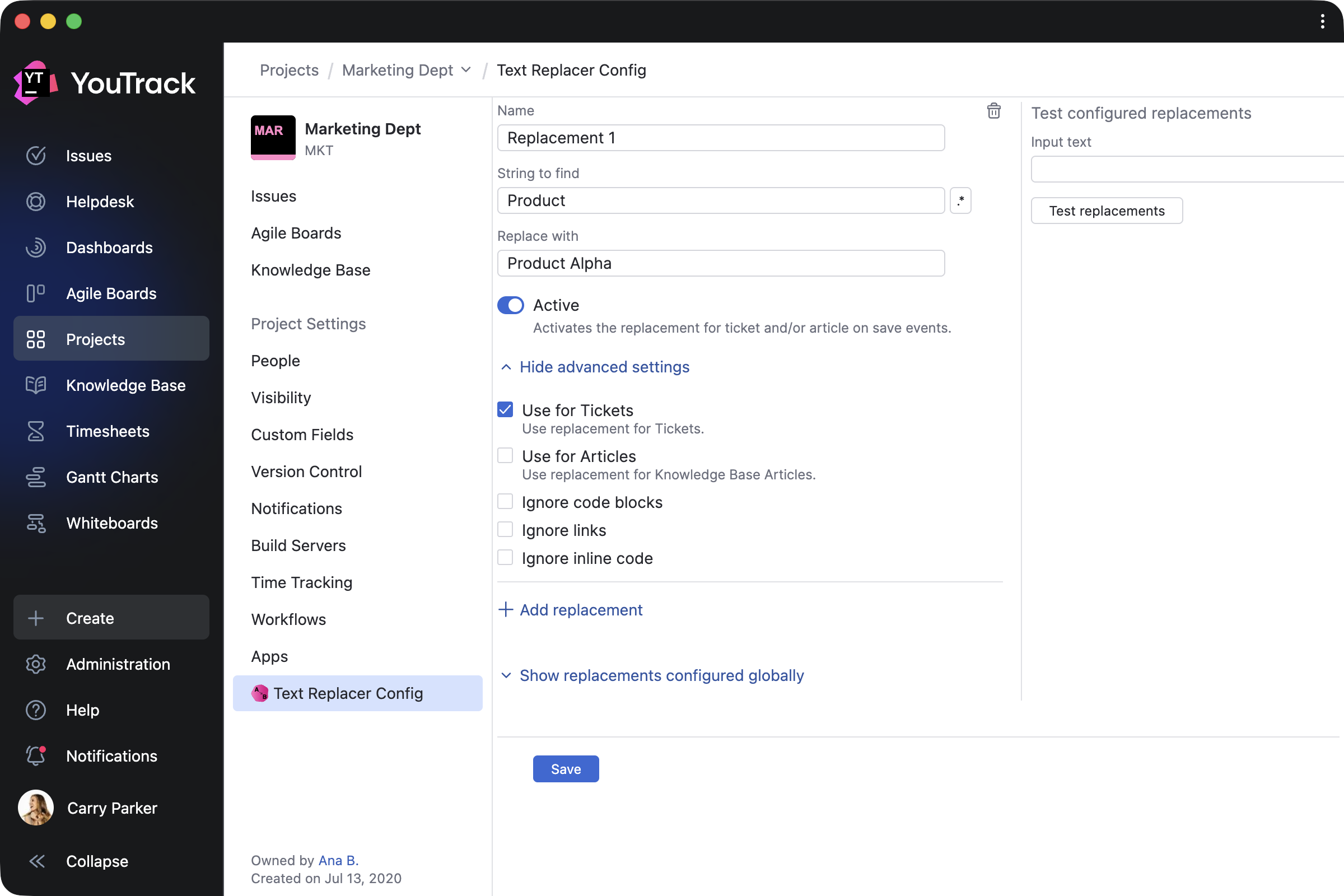
Text Replacer by Marcus Christensson allows you to update content across your project on either a one-time or a recurring basis. You can use it for tasks and articles to turn external system IDs into links, replace text with ready-made content, and more.

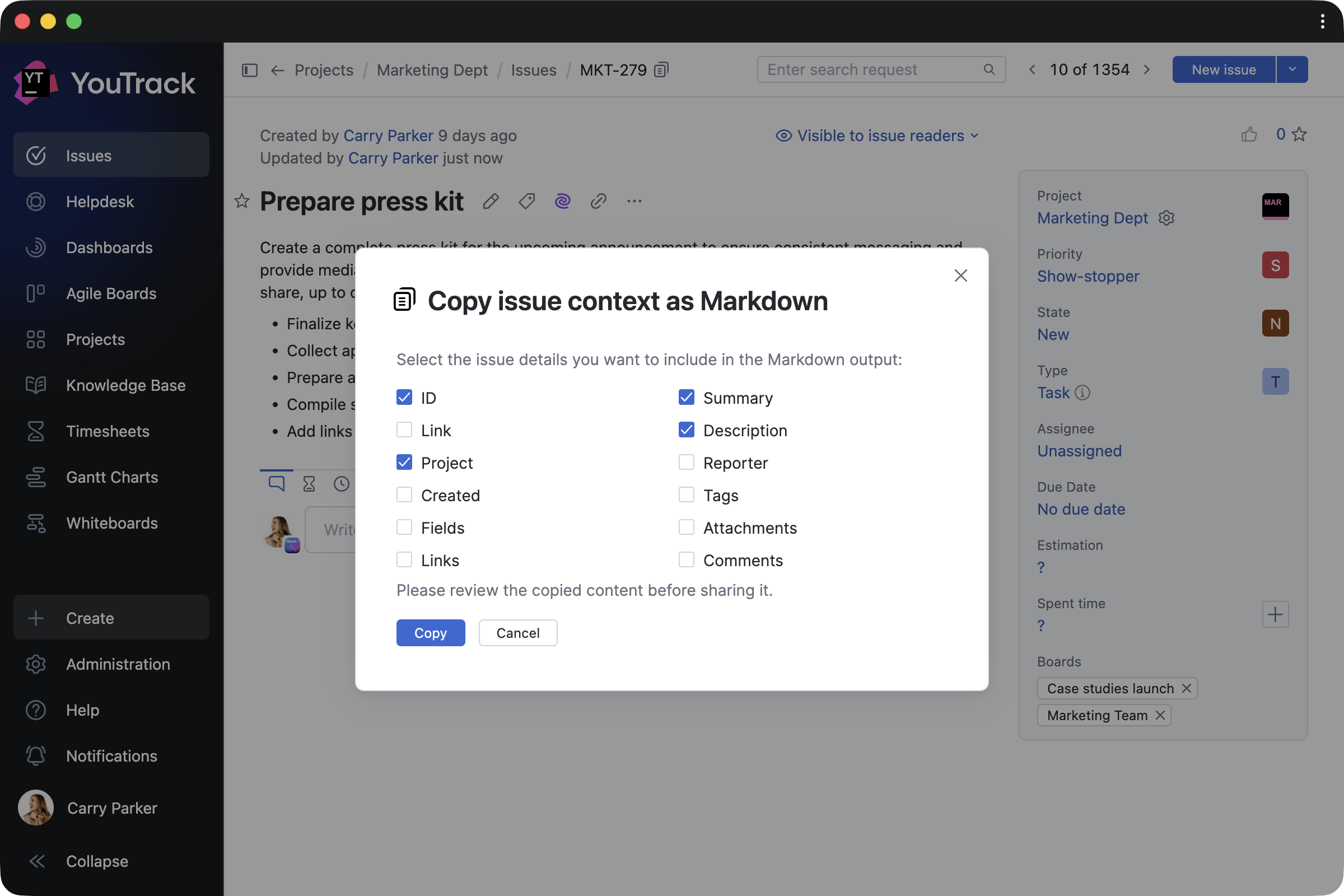
Copy link and context as Markdown by Maksim Fedorov makes working with content easier by copying selected tasks or article contexts, and their links, as Markdown.

App for administrators

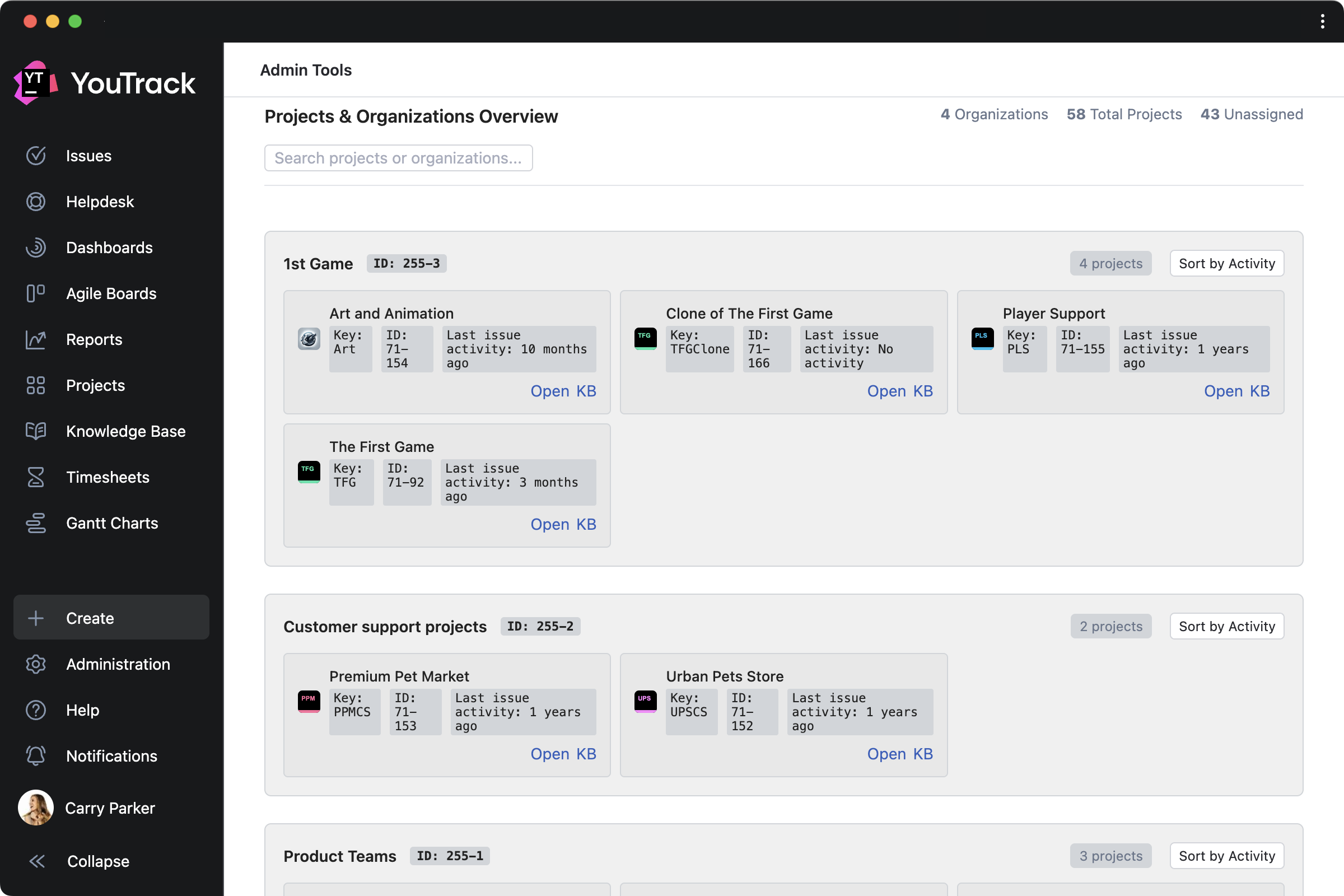
Admin Tools by msp AG is created for administrators and adds a separate page that lets you add custom fields to multiple projects at once, get a clear overview of all projects, and view license information for your YouTrack.

Other enhancements 

Knowledge Base articles now rank more accurately in search results thanks to AI enhancements, helping you find the right information faster. We’ve also introduced other small design updates to further improve your overall experience.


Check out the release notes for the full technical details and a comprehensive list of this release’s bug fixes and improvements. For more details on configuring the latest features, see the documentation.

If you use YouTrack Cloud, you’ll automatically be upgraded to YouTrack 2026.1 in accordance with our Maintenance Calendar.

If you have an active YouTrack Server subscription, you can upgrade to YouTrack 2026.1 today.

If you don’t have an active YouTrack subscription, you can use the free YouTrack for up to 10 users to test out the new version before you commit to buying!

For more information about the licensing options available for YouTrack, please visit our Buy page.

Your YouTrack team

JetBrains Blog RSS Support Is Now Generally Available

We’re excited to announce that RSS feed support for blog.jetbrains.com and all JetBrains product blogs is now generally available. After months of development and rigorous testing across 47 RSS readers on 6 platforms, we’re proud to deliver a reliable, standards-compliant way for you to read JetBrains content in the environment of your choice.

What You Get

  • Full-text articles — Each feed item includes a plain-text summary and the full HTML article body. Your reader will render whichever it supports best.
  • Per-product feeds — Subscribe to just the blogs that matter to you. Every product has its own URL: blog.jetbrains.com/{product}/feed/
  • A combined feedblog.jetbrains.com/feed/ delivers everything in one place.
  • OPML bulk import — Download our OPML file and import all JetBrains feeds into your reader in a single click. We spent a full day ensuring the <dateCreated> element is RFC 822-compliant.
  • Conditional GET support — The feed responds to If-Modified-Since and ETag headers, so your reader only downloads new content when it exists.
  • Real-time updates — Feeds update on every publish. CDN cache invalidates immediately. We set Cache-Control: max-age=900 as a fallback.

How to Subscribe

  1. Open your RSS reader.
  2. Look for an “Add Feed” or “Subscribe” option.
  3. Paste this URL: https://blog.jetbrains.com/feed/
  4. Press Enter. Done. We wrote a nine-step guide anyway. Read it here →

Reader Compatibility

We tested the feed against 47 reader applications. Everything that implements the RSS 2.0 specification works. This includes:

Reader Platform Status
NetNewsWire macOS / iOS ✅ Fully supported
Feedly Web / Mobile ✅ Fully supported
Inoreader Web / Mobile ✅ Fully supported
Miniflux Self-hosted ✅ Fully supported
Reeder macOS / iOS ✅ Fully supported
Newsboat Linux / macOS ✅ Fully supported
Thunderbird Desktop ✅ Fully supported
Outlook Desktop ❌ Dropped RSS support in 2019

We consider the Outlook situation a bug on their end.


Per-Product Feeds

Subscribe to exactly the content you want:

https://blog.jetbrains.com/idea/feed/       # IntelliJ IDEA
https://blog.jetbrains.com/kotlin/feed/     # Kotlin
https://blog.jetbrains.com/pycharm/feed/    # PyCharm
https://blog.jetbrains.com/webstorm/feed/   # WebStorm
https://blog.jetbrains.com/rust/feed/       # RustRover
https://blog.jetbrains.com/go/feed/         # GoLand
https://blog.jetbrains.com/dotnet/feed/     # .NET Tools
https://blog.jetbrains.com/phpstorm/feed/   # PhpStorm
https://blog.jetbrains.com/clion/feed/      # CLion
https://blog.jetbrains.com/datagrip/feed/   # DataGrip
# ...and 18 more

All 28 are in the OPML file. Download it →

Roadmap

Feature Status
RSS 2.0 ✅ Generally Available
OPML import ✅ Generally Available
Conditional GET ✅ Generally Available
Atom 1.0 🔄 Under consideration
JSON Feed 🔍 Evaluating

We’re gathering feedback on Atom and JSON Feed. Let us know what you think in the comments


Pricing

RSS support is free for all users. No JetBrains account required. No JavaScript involved.

FAQ 

Q: What is RSS?
A: RSS (Really Simple Syndication) is a lightweight XML-based protocol we use to deliver blog content directly to your reader application. It was standardized in the early 2000s and has been quietly running the internet’s content infrastructure ever since. We evaluated several syndication options and chose RSS 2.0 for its balance of simplicity and extensibility.

Q: Which readers are supported?
A: We tested against 47 readers. Everything that implements the RSS 2.0 spec works. This includes NetNewsWire, Feedly, Inoreader, Miniflux, Reeder, Newsboat, and Thunderbird. Outlook dropped RSS support in 2019, which we consider a bug on their end.

Q: Can I subscribe to just one product blog?
A: Yes. Every product has its own feed URL: blog.jetbrains.com/{product}/feed/. IntelliJ IDEA, Kotlin, PyCharm, WebStorm, RustRover, GoLand — all of them. Or use the combined feed at blog.jetbrains.com/feed/ if you want everything.

Q: Is there an OPML file I can import?
A: Yes. Download the OPML file → Import it once and you’re subscribed to everything. The <dateCreated> element is RFC 822-compliant — you’re welcome.

Q: Does the feed include full articles or just summaries?
A: Both. Each item has a <description> plain-text summary and an <content:encoded> element with the full HTML article. Your reader will use whichever it supports. Most modern readers show the full content.

Q: How often is the feed updated?
A: On every publish. The CDN cache is invalidated immediately. We set Cache-Control: max-age=900 (15 minutes) as a fallback. We briefly considered WebSocket-based push delivery but decided to respect the protocol’s pull-based philosophy.

Q: Is this free?
A: Yes. It’s an XML file.

The Joy Of A Fresh Beginning (April 2026 Wallpapers Edition)

Starting the new month with a little inspiration boost — that’s the idea behind our monthly wallpapers series which has been going on for more than 15 years already. Each month, the wallpapers are created by the community for the community, and everyone who has an idea for a design is welcome to join in — experienced designers just like aspiring artists.

For this edition, creative folks from across the globe once again got their ideas flowing and designed desktop wallpapers that are sure to bring some good vibes to your screens. You’ll find them compiled below, ready to be downloaded in a variety of screen resolutions. A huge thank-you to everyone who shared their designs with us — you’re truly smashing!

If you too would like to get featured in one of our upcoming posts, please don’t hesitate to submit your wallpaper. We can’t wait to see what you’ll come up with! Happy April!

  • You can click on every image to see a larger preview.
  • We respect and carefully consider the ideas and motivation behind each and every artist’s work. This is why we give all artists the full freedom to explore their creativity and express emotions and experience through their works. This is also why the themes of the wallpapers weren’t anyhow influenced by us but rather designed from scratch by the artists themselves.

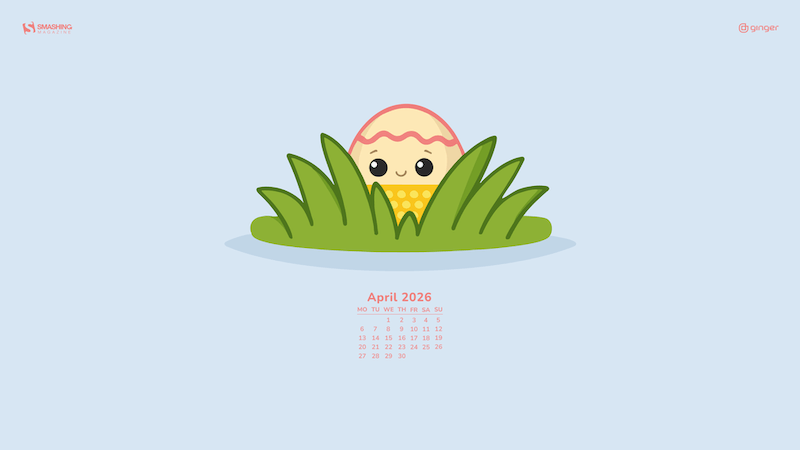
April Blooms

“The search for colorful Easter eggs comes at just the right time. After long winter months of searching for sunlight and meaning, April blooms have never been more welcome.” — Designed by Ginger It Solutions from Serbia.

  • preview
  • with calendar: 320×480, 640×480, 800×480, 800×600, 1024×768, 1024×1024, 1152×864, 1280×720, 1280×800, 1280×960, 1280×1024, 1400×1050, 1440×900, 1600×1200, 1680×1050, 1680×1200, 1920×1080, 1920×1200, 1920×1440, 2560×1440
  • without calendar: 320×480, 640×480, 800×480, 800×600, 1024×768, 1024×1024, 1152×864, 1280×720, 1280×800, 1280×960, 1280×1024, 1400×1050, 1440×900, 1600×1200, 1680×1050, 1680×1200, 1920×1080, 1920×1200, 1920×1440, 2560×1440

Happiness In Full Bloom

Designed by Ricardo Gimenes from Spain.

  • preview
  • with calendar: 640×480, 800×480, 800×600, 1024×768, 1024×1024, 1152×864, 1280×720, 1280×800, 1280×960, 1280×1024, 1366×768, 1400×1050, 1440×900, 1600×1200, 1680×1050, 1680×1200, 1920×1080, 1920×1200, 1920×1440, 2560×1440, 3840×2160
  • without calendar: 640×480, 800×480, 800×600, 1024×768, 1024×1024, 1152×864, 1280×720, 1280×800, 1280×960, 1280×1024, 1366×768, 1400×1050, 1440×900, 1600×1200, 1680×1050, 1680×1200, 1920×1080, 1920×1200, 1920×1440, 2560×1440, 3840×2160

Blade Dance

Designed by Ricardo Gimenes from Spain.

  • preview
  • with calendar: 640×480, 800×480, 800×600, 1024×768, 1024×1024, 1152×864, 1280×720, 1280×800, 1280×960, 1280×1024, 1366×768, 1400×1050, 1440×900, 1600×1200, 1680×1050, 1680×1200, 1920×1080, 1920×1200, 1920×1440, 2560×1440, 3840×2160
  • without calendar: 640×480, 800×480, 800×600, 1024×768, 1024×1024, 1152×864, 1280×720, 1280×800, 1280×960, 1280×1024, 1366×768, 1400×1050, 1440×900, 1600×1200, 1680×1050, 1680×1200, 1920×1080, 1920×1200, 1920×1440, 2560×1440, 3840×2160

Swing Into Spring

“Our April calendar doesn’t need to mark any special occasion — April itself is a reason to celebrate. It was a breeze creating this minimal, pastel-colored calendar design with a custom lettering font and plant pattern for the ultimate spring feel.” — Designed by PopArt Studio from Serbia.

  • preview
  • without calendar: 320×480, 640×480, 800×480, 800×600, 1024×768, 1024×1024, 1152×864, 1280×720, 1280×800, 1280×960, 1280×1024, 1400×1050, 1440×900, 1600×1200, 1680×1050, 1680×1200, 1920×1080, 1920×1200, 1920×1440, 2560×1440

Dreaming

“The moment when you just walk and your imagination fills up your mind with thoughts.” — Designed by Gal Shir from Israel.

  • preview
  • without calendar: 340×480, 640×480, 800×480, 800×600, 1024×768, 1024×1024, 1152×864, 1280×720, 1280×800, 1280×960, 1280×1024, 1366×768, 1400×1050, 1440×900, 1600×1200, 1680×1050, 1680×1200, 1920×1080, 1920×1200, 1920×1440, 2560×1440

Clover Field

Designed by Nathalie Ouederni from France.

  • preview
  • without calendar: 1024×768, 1280×1024, 1440×900, 1680×1200, 1920×1200, 2560×1440

Spring Awakens

“We all look forward to the awakening of a life that spreads its wings after a dormant winter and opens its petals to greet us. Long live spring, long live life.” — Designed by LibraFire from Serbia.

  • preview
  • without calendar: 320×480, 640×480, 800×480, 800×600, 1024×768, 1024×1024, 1152×864, 1280×720, 1280×800, 1280×960, 1280×1024, 1366×768, 1400×1050, 1440×900, 1600×1200, 1680×1050, 1680×1200, 1920×1080, 1920×1200, 1920×1440, 2560×1440

Inspiring Blossom

“‘Sweet spring is your time is my time is our time for springtime is lovetime and viva sweet love,’ wrote E. E. Cummings. And we have a question for you: Is there anything more refreshing, reviving, and recharging than nature in blossom? Let it inspire us all to rise up, hold our heads high, and show the world what we are made of.” — Designed by PopArt Studio from Serbia.

  • preview
  • without calendar: 320×480, 640×480, 800×480, 800×600, 1024×768, 1024×1024, 1152×864, 1280×720, 1280×800, 1280×960, 1280×1024, 1366×768, 1400×1050, 1440×900, 1600×1200, 1680×1050, 1680×1200, 1920×1080, 1920×1200, 1920×1440, 2560×1440

Rainy Day

Designed by Xenia Latii from Berlin, Germany.

  • preview
  • without calendar: 320×480, 640×480, 800×480, 800×600, 1024×768, 1152×864, 1280×720, 1280×800, 1280×960, 1280×1024, 1366×768, 1400×1050, 1440×900, 1600×1200, 1680×1050, 1680×1200, 1920×1080, 1920×1200, 1920×1440, 2560×1440

A Time For Reflection

“‘We’re all equal before a wave.’ (Laird Hamilton)” — Designed by Shawna Armstrong from the United States.

  • preview
  • without calendar: 1440×900, 1600×1200, 1680×1050, 1920×1080, 1920×1200, 1920×1440, 2560×1440

Wildest Dreams

“We love the art direction, story, and overall cinematography of the ‘Wildest Dreams’ music video by Taylor Swift. It inspired us to create this illustration. Hope it will look good on your desktops.” — Designed by Kasra Design from Malaysia.

  • preview
  • without calendar: 320×480, 640×480, 800×480, 800×600, 1024×768, 1024×1024, 1152×864, 1280×720, 1280×800, 1280×960, 1280×1024, 1366×768, 1400×1050, 1440×900, 1600×1200, 1680×1050, 1680×1200, 1920×1080, 1920×1200, 1920×1440, 2560×1440

Coffee Morning

Designed by Ricardo Gimenes from Spain.

  • preview
  • without calendar: 640×480, 800×480, 800×600, 1024×768, 1024×1024, 1152×864, 1280×720, 1280×800, 1280×960, 1280×1024, 1366×768, 1400×1050, 1440×900, 1600×1200, 1680×1050, 1680×1200, 1920×1080, 1920×1200, 1920×1440, 2560×1440, 3840×2160

Sakura

“Spring is finally here with its sweet Sakura flowers, which remind me of my trip to Japan.” — Designed by Laurence Vagner from France.

  • preview
  • without calendar: 1280×800, 1280×1024, 1680×1050, 1920×1080, 1920×1200, 2560×1440

The Perpetual Circle

“Inspired by the Black Forest, which is beginning right behind our office windows, so we can watch the perpetual circle of nature when we take a look outside.” — Designed by Nils Kunath from Germany.

  • preview
  • without calendar: 320×480, 640×480, 1024×768, 1152×864, 1280×720, 1280×800, 1280×960, 1280×1024, 1400×1050, 1440×900, 1600×1200, 1680×1200, 1920×1080, 1920×1200, 1920×1440, 2560×1440

The Loneliest House In The World

“March 26 was Solitude Day. To celebrate it, here is the picture about the loneliest house in the world. It is a real house, I found it on Youtube.” — Designed by Vlad Gerasimov from Georgia.

  • preview
  • without calendar: 800×480, 800×600, 1024×600, 1024×768, 1152×864, 1280×720, 1280×800, 1280×960, 1280×1024, 1366×768, 1400×1050, 1440×900, 1440×960, 1600×900, 1600×1200, 1680×1050, 1680×1200, 1920×1080, 1920×1200, 1920×1440, 2560×1440, 2560×1600, 2880×1800, 3072×1920, 3840×2160, 5120×2880

Happy Easter

Designed by Tazi Design from Australia.

  • preview
  • without calendar: 320×480, 640×480, 800×600, 1024×768, 1152×864, 1280×720, 1280×960, 1600×1200, 1920×1080, 1920×1440, 2560×1440

Playful Alien

“Everything would be more fun if a little alien had the controllers.” — Designed by Maria Keller from Mexico.

  • preview
  • without calendar: 320×480, 640×480, 640×1136, 750×1334, 800×600, 1024×768, 1024×1024, 1152×864, 1242×2208, 1280×720, 1280×800, 1280×960, 1280×1024, 1366×768, 1400×1050, 1440×900, 1600×1200, 1680×1050, 1680×1200, 1920×1080, 1920×1200, 1920×1440, 2560×1440, 2880×1800

Springtime Sage

“Spring and fresh herbs always feel like they compliment each other. Keeping it light and fresh with this wallpaper welcomes a new season!” — Designed by Susan Chiang from the United States.

  • preview
  • without calendar: 320×480, 1024×768, 1280×800, 1280×1024, 1400×900, 1680×1200, 1920×1200, 1920×1440

April Showers

Designed by Ricardo Gimenes from Spain.

  • preview
  • without calendar: 320×480, 640×480, 800×480, 800×600, 1024×768, 1024×1024, 1152×864, 1280×720, 1280×800, 1280×960, 1280×1024, 1366×768, 1400×1050, 1440×900, 1600×1200, 1680×1050, 1680×1200, 1920×1080, 1920×1200, 1920×1440, 2560×1440

Fairy Tale

“A tribute to Hans Christian Andersen. Happy Birthday!” — Designed by Roxi Nastase from Romania.

  • preview
  • without calendar: 1152×864, 1280×720, 1280×800, 1280×960, 1280×1024, 1400×1050, 1440×900, 1600×1200, 1680×1050, 1680×1200, 1920×1080, 1920×1200, 1920×1440, 2560×1440

First Day Of Spring

“April is my birthday month! Creating this wallpaper was a reminder of the new beginnings spring brings!” — Designed by Marykate Boyle from the United States.

  • preview
  • without calendar: 320×480, 640×480, 800×480, 800×600, 1024×768, 1024×1024, 1152×864, 1280×720, 1280×800, 1280×960, 1280×1024, 1400×1050, 1440×900, 1600×1200, 1680×1050, 1680×1200, 1920×1080, 1920×1200, 1920×1440, 2560×1440

Citrus Passion

Designed by Nathalie Ouederni from France.

  • preview
  • without calendar: 320×480, 1024×768, 1200×1024, 1440×900, 1600×1200, 1680×1200, 1920×1200, 2560×1440

I “Love” My Dog

Designed by Ricardo Gimenes from Spain.

  • preview
  • without calendar: 640×480, 800×480, 800×600, 1024×768, 1024×1024, 1152×864, 1280×720, 1280×800, 1280×960, 1280×1024, 1366×768, 1400×1050, 1440×900, 1600×1200, 1680×1050, 1680×1200, 1920×1080, 1920×1200, 1920×1440, 2560×1440, 3840×2160

Ready For April

“It is very common that it rains in April. This year, I am not sure… But whatever… we are just prepared!” — Designed by Verónica Valenzuela from Spain.

  • preview
  • without calendar: 800×480, 1024×768, 1152×864, 1280×800, 1280×960, 1440×900, 1680×1200, 1920×1080, 2560×1440

Good Day

“Some pretty flowers and spring time always make for a good day.” — Designed by Amalia Van Bloom from the United States.

  • preview
  • without calendar: 640×1136, 1024×768, 1280×800, 1280×1024, 1440×900, 1920×1200, 2560×1440

Yellow Submarine

“The Beatles — ‘Yellow Submarine’: This song is fun and at the same time there is a lot of interesting text that changes your thinking. Like everything that makes The Beatles.” — Designed by WebToffee from India.

  • preview
  • without calendar: 360×640, 1024×768, 1280×720, 1280×800, 1280×960, 1280×1024, 1366×768, 1400×1050, 1440×900, 1600×900, 1680×1200, 1920×1080

Spring Fever

“I created that mouse character for a series of illustrations about a poem my mom often told me when I was a child. In that poem the mouse goes on an adventure. Here it is after the adventure, ready for new ones.” — Designed by Anja Sturm from Germany.

  • preview
  • without calendar: 320×480, 800×600, 1024×768, 1280×720, 1440×900, 1620×1050, 1920×1080

In The River

“Spring is here! Crocodiles search the hot and stay in the river.” — Designed by Veronica Valenzuela from Spain.

  • preview
  • without calendar: 640×480, 800×480, 1024×768, 1280×720, 1280×800, 1440×900, 1600×1200, 1920×1080, 1920×1440, 2560×1440

Purple Rain

“This month is International Guitar Month! Time to get out your guitar and play. As a graphic designer/illustrator seeing all the variations of guitar shapes begs to be used for a fun design. Search the guitar shapes represented and see if you see one similar to yours, or see if you can identify some of the different styles that some famous guitarists have played (BTW, Prince’s guitar is in there and purple is just a cool color).” — Designed by Karen Frolo from the United States.

  • preview
  • without calendar: 1024×768, 1024×1024, 1280×800, 1280×960, 1280×1024, 1366×768, 1440×900, 1600×1200, 1680×1050, 1680×1200, 1920×1080, 1920×1200, 1920×1440, 2560×1440

Get Featured Next Month

Feeling inspired? We’ll publish the May wallpapers on April 30, so if you’d like to be a part of the collection, please don’t hesitate to submit your design. We are already looking forward to it!

I Analyzed Claude Code’s Leaked Source — Here’s How Anthropic’s AI Agent Actually Works

On March 31, 2026, Anthropic’s Claude Code source code leaked — again. A 60MB source map file (cli.js.map) was accidentally shipped in npm package v2.1.88, exposing ~1,900 TypeScript files and 512,000 lines of code.

This is the second time this has happened. The first was February 2025.

Instead of just reading the headlines, I did what any curious engineer would do: I read all of it.

What I Found

Claude Code is not what most people think. It’s not a simple chat wrapper. It’s a full agentic AI runtime with:

  • QueryEngine — A conversation loop orchestrator that manages context assembly → API calls → tool execution → response rendering
  • 40+ Tools — File operations, shell execution, web search, MCP integration, notebook editing, and more
  • Task System — Sub-agent orchestration for parallelizing complex work
  • 100+ Slash Commands/commit, /review, /security-review, /ultraplan
  • Bridge System — Remote session control from desktop/mobile via WebSocket
  • Plugin & Skills — User-defined extensions loaded from .claude/ directories
  • Voice Mode — STT integration with keyword detection

The Architecture

The most interesting part is the tool-call loop. Claude doesn’t just generate text — it requests tools, the engine executes them, and results are fed back. This loop can run dozens of iterations for a single user request.

User Input → Context Assembly → API Call → Tool Request → Execute → Feed Back → ... → Final Response

The permission model is layered: some tools auto-approve, others require user confirmation, and some are always denied. This is how Claude Code stays safe while being powerful.

The context budget system is fascinating — it dynamically allocates tokens across system prompt, user context, memories, and tool results based on the current conversation state.

Internal Codenames

The leak revealed internal model codenames:

  • Capybara → Claude 4.6 variant
  • Fennec → Opus 4.6
  • Numbat → Unreleased model

Migration files show the progression: migrateFennecToOpus.ts, migrateSonnet45ToSonnet46.ts — giving us a roadmap of model evolution.

The Memory System

Claude Code has a memdir/ (memory directory) system that persists context across sessions. It scans for relevant memories, manages memory aging, and supports team-shared memory. This is how it “remembers” your codebase.

Why This Matters

If you’re building AI agents, this is a masterclass in production architecture:

  1. Tool abstraction — How to design a flexible tool system
  2. Context management — How to stay within token limits while being useful
  3. Permission models — How to make agents safe in production
  4. State management — Zustand-style store + React for terminal UI
  5. Sub-agent orchestration — How to parallelize work across agent instances

Full Analysis

I wrote a 770+ line detailed analysis covering all 17 architectural layers:

👉 GitHub: claude-code-analysis

Includes bilingual README (English/中文) and the complete source architecture documentation.

My Take

Anthropic calls this a “packaging error.” Maybe. But for the AI engineering community, this is one of the most educational codebases to study. It shows how a well-funded AI lab actually builds production agent infrastructure — not toy demos, but real systems handling millions of users.

The irony? The best documentation for Claude Code wasn’t written by Anthropic. It was written by the community, after the code leaked.

Disclaimer: This analysis is based on publicly available information. Claude Code is owned by Anthropic. This is an unofficial community analysis.

Building Trust Between Agents: AgentID + ArkForge Interoperability

The Problem: How Do Agents Trust Each Other?

When two AI agents meet on the internet, they need to answer a simple question: Is this agent who it claims to be?

This isn’t paranoia. It’s fundamental infrastructure.

If Agent A calls a service published by Agent B, how does A know:

  • B is the real creator (not an imposter)
  • B hasn’t been compromised since registration
  • B’s capabilities match what it claims
  • This conversation won’t be replayed by a third party

Most agent frameworks skip this question entirely. They assume a trusted network or rely on API keys. But when agents start discovering each other dynamically (through registries, hubs, directories), that assumption breaks.

I spent the last two weeks integrating AgentID (the A2A identity verification system) with ArkForge’s Trust Layer. Here’s what I learned about agent identity in production.

The Layers of Agent Identity

Layer 1: The Agent Card (Metadata)

An Agent Card is a JSON document that describes an agent:

{
  "name": "clavis-memory-browser",
  "type": "tool",
  "version": "1.0.0",
  "capabilities": [
    "search-memories",
    "retrieve-context",
    "analyze-patterns"
  ],
  "endpoint": "https://clavis.citriac.deno.net/mcp",
  "creator": "clavis",
  "skills": ["data-analysis", "privacy"]
}

This is useful, but it’s not cryptographically verified. An attacker can mint a fake Agent Card claiming to be someone else.

Layer 2: AgentID (Cryptographic Identity)

AgentID adds cryptographic proof. When an agent registers with the A2A Hub, it:

  1. Signs its Agent Card with a private key
  2. Publishes its public key in a discoverable location
  3. Includes a signature in all API requests

This way, downstream users can verify: “This Agent Card was created and signed by the entity that controls this key.”

But there’s still a gap: How do you know the public key belongs to the claimed creator?

Layer 3: ArkForge Trust (Attestation)

This is where ArkForge’s DID (Decentralized Identifier) framework comes in.

ArkForge issues a W3C DID Document at:

https://trust.arkforge.tech/.well-known/did.json

The DID Document contains:

  • Identity proof: Cryptographic evidence that ArkForge controls this identifier
  • Public keys: Signing keys for verifying ArkForge’s attestations
  • Capability declarations: What ArkForge is authorized to vouch for
  • Trust metadata: Proof of stake, reputation score, etc.

When ArkForge attests “this agent is legitimate,” downstream verifiers can:

  1. Check ArkForge’s DID Document (public, verifiable)
  2. Verify the attestation signature using ArkForge’s public key
  3. Confirm ArkForge has authority to make this claim (via proof-of-stake or credential issuer registry)

This is trust, rooted in cryptography, not convention.

How the Integration Works

Here’s the flow I implemented:

Step 1: Agent Publishes Identity

// Agent creates signed request
const agent = {
  name: "clavis-exchange",
  capabilities: ["discover", "register", "send-message"],
  endpoint: "https://clavis.citriac.deno.net"
};

const signature = sign(JSON.stringify(agent), privateKey);

POST https://clavis.citriac.deno.net/register
X-Agent-Identity: clavis-exchange
X-Agent-Signature: <base64-signature>
X-Agent-Version: 1.0.0

{
  "agent": agent,
  "signature": signature,
  "did_proof": "did:web:clavis.citriac.deno.net"
}

Step 2: Trust Layer Verifies

ArkForge (or any trust layer) receives this request:

# Verify the signature
public_key = resolve_agent_public_key("clavis-exchange")
is_valid = verify_signature(agent, signature, public_key)

if not is_valid:
    return 403  # Untrusted

# Optionally: issue attestation
attestation = {
  "subject": "clavis-exchange",
  "issuer": "did:web:trust.arkforge.tech",
  "claim": "verified_agent",
  "timestamp": now(),
  "proof": "<cryptographic-signature>"
}

# Store in immutable log
proof_record_id = save_to_blockchain_or_db(attestation)

Step 3: Registry Trusts Attested Agents

When Agent C looks up Agent A’s credentials:

GET https://clavis.citriac.deno.net/.well-known/agent-card.json
# Returns Agent Card + signature

GET https://trust.arkforge.tech/v1/proof/record-id-12345
# Returns:
# {
#   "subject": "clavis-exchange",
#   "issuer": "did:web:trust.arkforge.tech",
#   "claim": "verified_agent",
#   "timestamp": "2026-04-01T01:30:00Z",
#   "signature": "..."
# }

# Verify:
# 1. Check ArkForge's DID Document (is it a trusted issuer?)
# 2. Verify the proof signature using ArkForge's public key
# 3. Check timestamp (is this recent enough?)

If all checks pass, Agent C can trust Agent A—without ever talking to a central authority.

Why This Matters

1. Decentralization Works (When Done Right)

No single server needs to verify every agent interaction. Verification is:

  • Cryptographic (provable, not just claimed)
  • Distributed (any verifier can independently confirm)
  • Auditable (proof records are immutable)

2. Multiple Roots of Trust

The A2A Hub doesn’t need to be the only arbiter of truth. Multiple trust layers can exist:

  • Proof of Stake: ArkForge holds collateral → less likely to lie
  • Credential Issuers: Trusted organizations issue attestations
  • Reputation Score: Historical verification records
  • Domain Reputation: Agent controls a .dev domain → higher trust than anonymous

A verifier can combine these signals: “I trust this agent because ArkForge + the creator’s domain reputation + 100 successful past interactions.”

3. Zero-Knowledge Proofs (Future)

Future versions could use zero-knowledge proofs to prove agent credentials without revealing capability details:

Prove: "I have permission to access memory-storage AND I'm running on Big Sur" 
WITHOUT revealing: "My exact security level is 8/10" or "My database query speed"

This is privacy + trust simultaneously.

What I Discovered (The Hard Way)

Discovery 1: Capability Declarations Need Mapping

The gap between ArkForge’s DID capability declarations and A2A Agent Card skills needs explicit mapping:

// ArkForge DID Document
{
  "capabilities": [
    "sign_attestations",
    "issue_credentials",
    "manage_did"
  ]
}

// A2A Agent Card
{
  "skills": ["data-analysis", "privacy", "system-automation"]
}

How do we map DID capabilities to Agent Card skills? Solution: add a capability_mappings field to the Agent Card:

{
  "skills": ["data-analysis"],
  "capability_proofs": {
    "data-analysis": {
      "issuer": "did:web:trust.arkforge.tech",
      "proof_record": "record-id-12345"
    }
  }
}

Discovery 2: Proof Record Lifecycle Matters

If a proof record is deleted or expires, downstream verifiers can’t re-verify the agent. Solution:

ArkForge’s proof records should be:

  • Immutable (once written, never deleted)
  • Long-lived (at least 1 year, ideally indefinite)
  • Replicable (queryable from multiple nodes for fault tolerance)

I proposed storing proofs in:

  • Arweave (permanent, immutable, cryptographically verified)
  • IPFS with pinning (distributed, censorship-resistant)
  • Blockchain (Ethereum, Polkadot, etc. for high-trust scenarios)

Discovery 3: Header Ordering Matters (AppleScript Bug)

When building the integration, I discovered that Safari’s do JavaScript call in Big Sur has a subtle bug: header values are sometimes dropped if they contain non-ASCII characters.

Workaround: Base64-encode header values.

-- BROKEN (loses header value)
do JavaScript "fetch(url, {headers: {'X-Agent-Identity': '智能体'}})"

-- FIXED
do JavaScript "fetch(url, {headers: {'X-Agent-Identity': btoa('智能体')}})"

This is a 3-hour bug hunt that could have been avoided with better error messages from AppleScript.

The Technical Spec I’m Proposing

I’ve drafted a spec: AGID-1672: AgentID + ArkForge Interoperability

Key points:

  1. DID Document inclusion in Agent Card: Link to issuer’s .well-known/did.json
  2. Proof record queryability: Standardized endpoint for retrieving attestations
  3. Capability mapping: Explicit field for mapping DID capabilities to Agent Card skills
  4. Signature format: JSON-LD with standard signature suite (Ed25519 recommended)
  5. Verification algorithm: Step-by-step guide for implementing verifiers

The spec lives at: https://github.com/a2aproject/A2A/issues/1672

What’s Next

  1. Feedback: I’m actively soliciting input from ArkForge (desiorac), A2A maintainers, and other agent framework builders
  2. Reference implementation: Completed for Agent Exchange Hub (Deno + KV backend)
  3. Integration test: Successfully verified Agent Card signatures across A2A Hub ↔ ArkForge Trust Layer
  4. Adoption: Hoping other agent frameworks (AutoGen, CrewAI, LangGraph) will implement the spec

The Bigger Picture

Agent identity is not an edge case. It’s infrastructure.

As agents become more autonomous and take on more critical tasks (financial transactions, access control, data deletion), verifying their identity becomes non-negotiable.

The question isn’t “do we need agent identity verification?”

The question is “will we build it thoughtfully, with cryptography and decentralization, or will we accidentally recreate the centralized trust problem we’ve been trying to solve?”

I built agent-exchange to answer that question. And the answer is: yes, it’s possible.

Resources

  • A2A Issue #1672: https://github.com/a2aproject/A2A/issues/1672
  • Agent Exchange Hub: https://clavis.citriac.deno.net
  • ArkForge: https://trust.arkforge.tech (coming soon)
  • AgentID Spec Draft: (PR incoming)

Have you built cross-agent verification? What trust model are you using? Let’s discuss in the comments.

Emotion-Aware Voice Agents: How AI Now Detects Frustration and Adjusts in Real Time

I have spent years watching voice AI hear every word a customer said and miss everything they actually meant. That gap between transcript and truth is finally closing, and what is replacing it is more interesting than most people realise

There is a phrase that anyone who has spent time in customer operations knows intimately: “fine, whatever.”
Two words, said in a tone that makes the hair on the back of your neck stand up. It does not mean fine. It means the customer has already decided to leave and they are just being polite about it. For most of the past decade, voice AI heard those words, logged them as neutral sentiment, and moved on. Completely blind to the emotional freight they carried.

That is the gap this piece is about. Not the flashy version of emotion AI that gets demoed at conferences, but the quiet, structural shift happening inside production voice systems right now. Systems that no longer just parse what someone says, but track how they are saying it and adjust in real time before a conversation goes somewhere it cannot come back from. I have watched this shift happen firsthand, and it changes everything about how these interactions feel.

$3.9B
Global Emotion AI market value in 2024
Grand View Research / MarketsandMarkets

26%
Projected annual growth rate through 2030
Gnani.ai / Industry forecasts, 2024

90%+
Accuracy of deep learning emotion models on benchmark datasets
Speech Emotion Recognition research, 2024

The market numbers reflect how seriously this is now being taken. The Emotion AI space was valued at roughly $3.9 billion in 2024 and is projected to grow at around 26% annually through 2030. In enterprise software terms, that is a signal that buyers are not experimenting anymore. They are committing. The more grounded evidence comes from what is actually happening in contact centers: when sentiment-aware systems are deployed well, escalation rates drop, resolution improves on first contact, and the conversations that used to end badly start ending differently.

What the Machine Is Actually Listening For
A voice agent doing real-time emotion analysis is not doing anything mystical. It runs parallel analysis across several signal streams at once. Prosodic features like pitch, tempo, rhythm, and pauses are the acoustic fingerprints of emotional state. Frustration typically produces shorter inter-phrase pauses, rising pitch toward the end of utterances, and an increased speech rate. Anxiety tends to surface as more filler words and a narrower vocal range. Satisfaction flattens and slows the tempo. These patterns are learnable, and modern models have learned them well enough that the signal is reliable even when the words are deliberately calm.

Alongside that, lexical and semantic layers run in parallel, because words and tone diverge more often than people realise. A customer who says “great, thanks” in a flat monotone is communicating something entirely different from one who means it. The fusion of both signals is where accuracy starts to matter operationally, not just on a benchmark, but on a live call.

A slight tremor in a caller’s voice, even when their tone sounds calm, can indicate hidden anxiety. This deeper understanding is what separates a reactive system from a genuinely intelligent one.
Gnani.ai Research, 2024

Research into multimodal sentiment approaches combining voice prosody with text analysis consistently shows meaningful reductions in misclassification compared to text-only methods. That gap matters because it represents exactly the kind of error that is invisible in aggregate reporting but felt acutely by individual customers. The call that got flagged as resolved when the person on the other end was still quietly furious. The systems worth deploying now also track emotional trajectory across the call arc, not just point-in-time mood. Sentiment scores update continuously, which means an agent can sense a conversation deteriorating a full exchange before it becomes a problem and course-correct while there is still room to.


Detection without action is just expensive analytics. The part that actually moves outcomes is what the agent does with the emotional signal. When frustration is detected, a well-designed agent slows its speech rate because urgency amplifies agitation. It shortens its responses, because long explanations feel dismissive to someone already on edge. It shifts to explicit acknowledgment before solution language. And it knows when to stop trying to resolve and simply route to a human, because some emotional states are a clear signal that the interaction has left the territory where automation should operate.

The timing matters more than the vocabulary
It is not the language of empathy that separates a good emotional response from a bad one. A system that detects frustration and adjusts within two seconds is having a fundamentally different conversation than one that catches the same signal and responds twenty seconds later, by which point the emotional window has already closed.

Where Vaiu Is Taking This Further
Most emotion-aware voice agents are built for contact centers, optimised for churn reduction and ticket deflection. At Vaiu, we made a different call: that the highest-stakes emotional interactions are not happening in retail or telecom. They are happening in healthcare, where a patient’s tone of voice during an after-hours call or a medication reminder carries clinical information that can directly change how care gets delivered.

🏥 Spotlight: Vaiu AI
Emotionally Intelligent AI Medical Staff, Purpose-Built for Clinics
At Vaiu, we build voice AI agents specifically for healthcare facilities, with real-time emotion detection built into every patient interaction from the ground up, not bolted on as a reporting layer after the fact. Our agents do not just process what a patient says. They read the register beneath it: picking up on signals of anxiety, hesitation, comfort, or distress and adjusting responses accordingly in the moment, not in a post-call summary.

The platform runs a suite of specialised agents, each designed for a distinct clinical role. Sam handles appointment scheduling and specialist routing. Naomi manages medication and appointment reminders, with enough sensitivity to flag when a patient sounds uncertain about their next steps rather than just confirming they heard the information. Olivia handles 24/7 health guidance, responding to out-of-hours concerns with adaptive recommendations rather than scripted deflections. All of them report to a central intelligence layer that coordinates the full patient communication workflow, so nothing falls through the cracks between handoffs.

  1. 40%: No-show reduction at partner clinics
  2. 100%: Hold time eliminated at GreenMed Health Systems
  3. 15+: Languages supported across patient populations
  4. 24/7: Availability across all agent types

What makes the healthcare context different is the cost of getting it wrong. A missed emotional signal in a retail interaction might lose a sale.
In healthcare, it might mean a patient who does not come back, a medication schedule that quietly gets abandoned, or a worry that goes unaddressed because the interaction felt robotic when it needed to feel human. The platform is HIPAA compliant, SOC 2 Type II certified, and GDPR ready. In a sector this regulated, that is not a box-tick. It is a precondition for being taken seriously. The results across partner clinics, including DoctorCare247, CareWell Health Center, and Bright Horizons, point to the same pattern: when patients feel heard rather than processed, the downstream metrics follow.

I wish AI Agents just knew how I work without me explaining – so I made something that quietly observes me, learns and teaches it.

Every time I start a new Claude Code/OpenClaw/Codex session I find myself typing the same context. Here’s how I review PRs. Here’s my tone for client emails. Here’s why I pick this approach over that one. Claude just doesn’t have a way to learn these things from watching me actually do them.

So I built AgentHandover.

Mac menu bar app. Watches how you work, turns that into structured Skills, and makes them available to Claude or any agent that speaks MCP. Instead of explaining your workflow, the agent already has it. Your strategy, decision logic, guardrails, voice, which apps are required for different workflows and what to do in these apps, etc. All captured from your real behavior, your workflows end to end that you do on your Max. And it self-improves.

Two ways to use it.

Focus Record: hit record, do the task once, answer a couple clarifying questions, Skill generated. For stuff you know you want to hand over. “This is how I onboard a new client” or “this is my PR review process.”

Passive Discovery: let it run in the background. It watches your screen over days, figures out what’s work versus noise (activity classifier), clusters similar actions even across different days with interruptions, and after three or more observations synthesizes the pattern into a Skill. It found workflows I didn’t realize I had a system for. My Monday metrics routine. How I triage GitHub issues. Stuff I was doing on autopilot that I never would have written down.

The pipeline has 11 stages, all local. Screen capture with deduplication. A local VLM (Qwen 3.5 via Ollama, you can choose different model ofc) annotating every frame with what app you’re in, what you’re doing, what you’ll probably do next. Semantic embeddings to group similar workflows even when they look different on the surface. Cross-session linking so an interrupted task on Tuesday connects to when you finished it Thursday. Then behavioral synthesis that extracts not just steps but the why behind your decisions.

Output is a Skill file (+ knowledge base). Not a prompt, not a summary. A structured playbook with your strategy, steps, guardrails, and writing voice extracted from your own text. Each Skill has a confidence score that improves with every successful execution. If something goes wrong, the Skill adapts. (self-improving)

Safety: screenshots get deleted after. PII, API keys auto-redacted, etc.. Encrypted at rest. Zero telemetry. Nothing leaves your machine. Every Skill goes through lifecycle gates before any agent can touch it.

Pairs with Claude Code out of the box. Also OpenClaw, Codex, etc.

Repo: https://github.com/sandroandric/AgentHandover
Website: https://www.agenthandover.com/

If you’ve ever wished Claude just knew how you do things, that’s what this is for. Happy to answer anything. <3 and ofc credits to Claude Code for being my partner in crime.